Trade Manager Interface MT5

4.71

The Trade Manager Interface is a free utility designed to simplify manual trading in MetaTrader.

MT4 Version Available        Manual      +Free Strategy   Gold Breakout Engine

Please leave a review, if you like the trade manager.

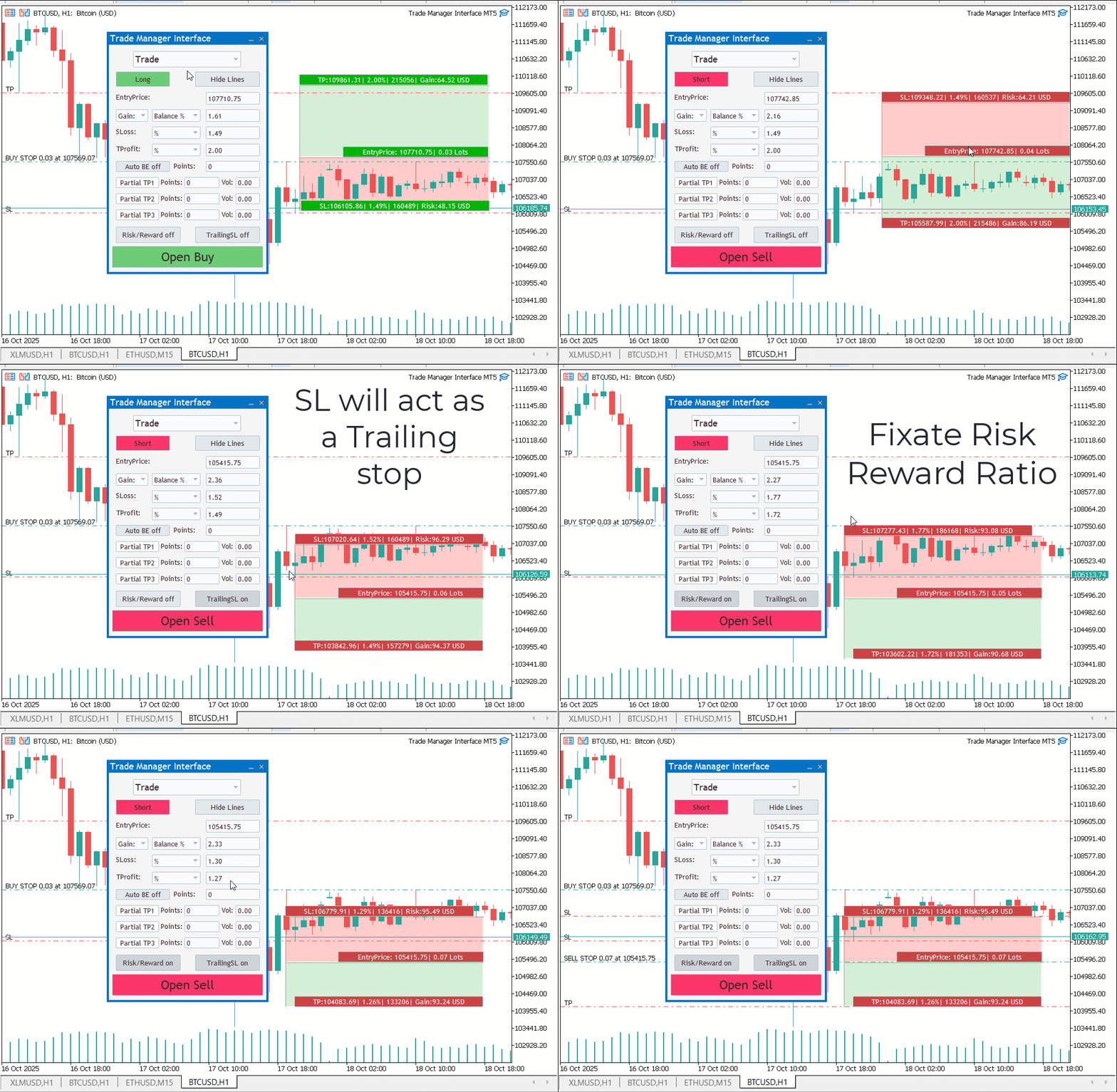
It allows traders to visualize trades directly on the chart, calculate position size automatically, and manage orders with advanced features such as partial take profits, automatic breakeven, and trailing stops.

For more advanced features check out: ManHedger

This tool focuses on risk control and execution precision, making trade management faster and more efficient.

For the advanced trade management features to function correctly, please keep the Expert Advisor running after opening a trade.


Watch the explanatory video for a complete walkthrough.

Key Features

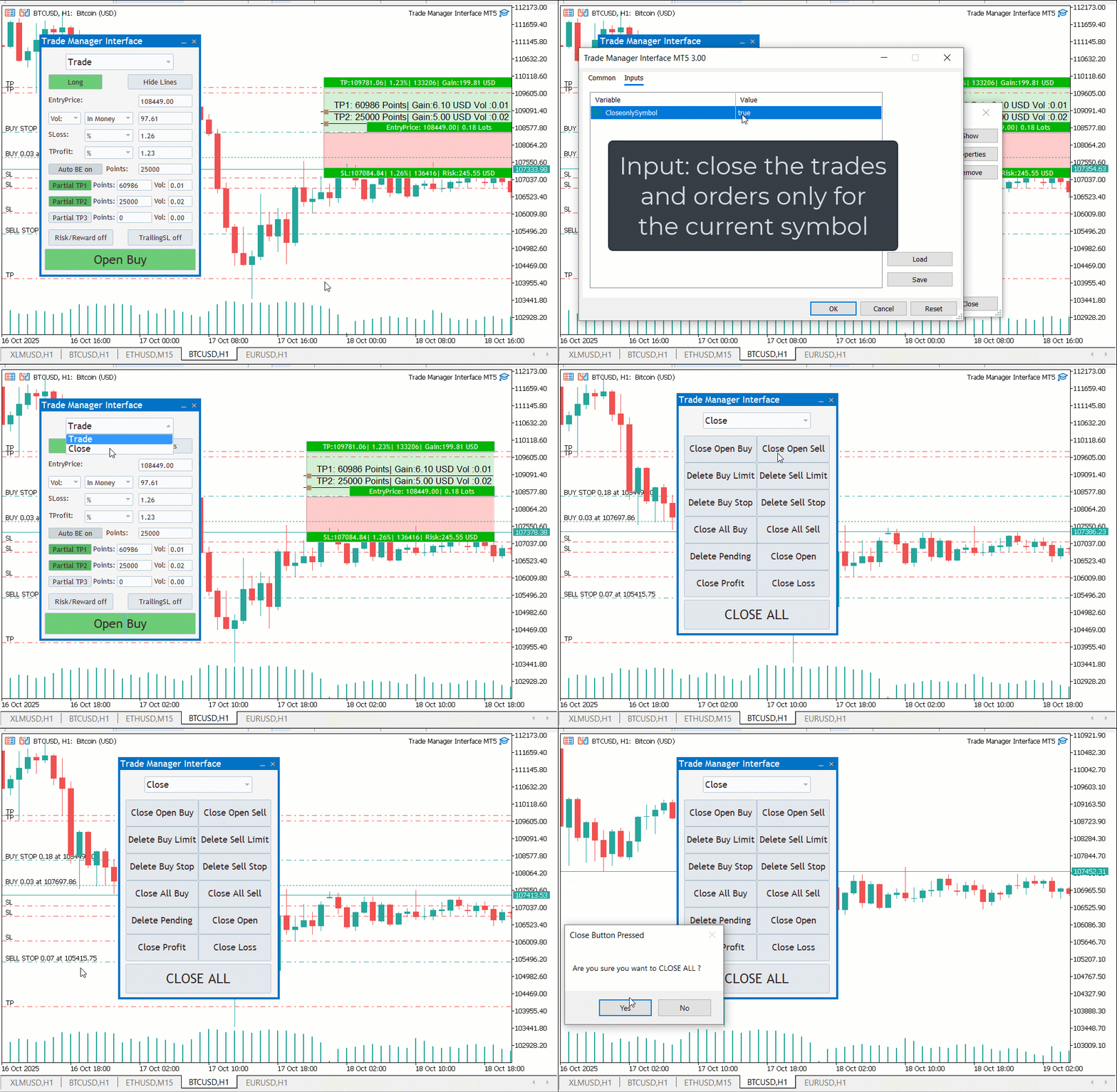
  • Two operation modes: Trade and Close

  • Full visual trade setup on the chart (entry, stop loss, take profit)

  • Risk- or volume-based position sizing

  • Stop loss and take profit display in points, percentage, or price levels

  • Automatic Breakeven and Trailing Stop functions

  • Fixed Risk/Reward Ratio lock option

  • Up to three Partial Take Profits with customizable distances and volumes

  • Adjustable lines by dragging directly on the chart

How It Works

  1. Open the Trade Manager panel on your chart.

  2. Select the trading direction: Long (Buy) or Short (Sell).

  3. Specify the Entry Price, Stop Loss, Take Profit, and Volume parameters.

    • Volume can be defined by lots, percentage of balance, or fixed monetary value (meaning margin used).

  4. Optionally activate Auto Breakeven, Trailing Stop, or Partial Take Profits for automated management.

  5. Click Open Trade to execute a market or pending order automatically based on the entered parameters.

The interface also provides the “Display Lines” option, allowing you to visualize and modify trade levels directly on the chart.
When a level is moved, the panel instantly updates to show the new point and percentage values relative to the entry price. It's important to note, that each trade will be executed based on the parameters in the DIALOG, and not based on the visualization.

Close Mode

This mode allows users to close trades and delete orders based on their type with the click of buttons. 

Some buttons in the close mode include:

  • Close ALL
  • Close Open
  • Close Profit
  • Close Loss
  • Delete Pending

Could not hurt to check out:

Best Free MT5 Supply and Demand indicator

#tags trading panel partial takeprofit auto be automatic breakeven close all, delete pending, close manager risk reward ratio trailing stoploss trading manager

리뷰 56
Javier Herrera
448
Javier Herrera 2026.07.20 17:13 
 

This tool is perfect for me; it does everything I need. Thank you so much for sharing.

Peter K
18
Peter K 2026.07.15 03:55 
 

Very Good Tool only what I do not know if I install Volume and I want to Input Stop Loss and Take Profit off 2% must I Input 2 or 0.02

30SEV
16
30SEV 2026.07.11 07:12 
 

ITS A VERY NICE TOOL AND MUST HAVE. BUT IN YOUR NEXT UPDATE, CAN YOU ADD FEAUTURE TO LOCK IN PIPS AFTER BREAKEVEN? THAT WILL BE WELL APPRECIATED. THANKS

추천 제품
FiT Panel Pro
Thonglak Janyakorn
Overview FiT Panel Pro is a professional-grade trade management panel designed for MetaTrader 5 traders who demand speed, precision, and full control over their trades. Built with a modern dark-theme UI, it combines one-click execution with advanced risk management, visual SL/TP drag lines, automatic Fibonacci-based levels, and comprehensive order management — all in a single, compact panel. Whether you are a scalper, day trader, or swing trader, FiT Panel Pro gives you the edge you need to exec
FREE
Trade assistant pro v8
Ahmed Mohammed Bakr Bakr
2 (1)
FREE FREE FREE Trade Assistant MT5 – Professional Trading & Risk Management Panel Trade Assistant MT5 is an advanced trading panel designed to help traders execute orders faster, safer, and more professionally . It simplifies manual trading by combining smart order management , precise risk control , and one-click execution , making it ideal for both beginners and advanced traders. This tool does not trade automatically . Instead, it empowers you with full control while applying professional-gra
FREE
Account Info EA It is a tool that presents on the graph all the positions of the account, and specific information concerning the positions, but also the account. It enables the user to have an image of his account at a glance. Use like any expert advisor. You can't attach it in the same chart with other expert advisor. It does not have the ability to open or manage positions. You can attach it on any chart and any timeframe.
FREE
Signalator Trade Summary Panel MT5 is a free local MetaTrader 5 utility that gives traders a clear account and open-trade overview directly on the chart. It is part of the Signalator Trading and Analysis Ecosystem — a growing set of practical MetaTrader tools for account monitoring, market analysis, symbol scanning, alerts and trader workflow improvement. This panel focuses on the account and position side of the workflow. It helps you quickly understand floating profit or loss, account status,
FREE
MT5용 NAS100 Auto SL 및 TP 메이커를 소개합니다: 메타트레이더 5에서 나스닥 100 시장을 탐색하는 트레이더에게 없어서는 안될 보조 도구인 NAS100 Auto SL 및 TP 메이커로 손절 및 테이크프로핏 설정을 다시는 놓치지 마세요. 이 도구는 손절 및 테이크프로핏 레벨을 자동으로 관리할 수 있는 원활한 솔루션을 찾는 분들을 위해 설계되었습니다. 주요 특징: 손쉬운 자동화: 스톱로스 및/또는 테이크프로핏 없이 나스닥 100 거래를 자동으로 모니터링합니다. 사용자가 구성한 설정에 따라 레벨을 동적으로 조정합니다. 다양한 주문 유형: 나스닥 100의 시장가 및 지정가 주문 모두와 호환됩니다. 메타트레이더 5에서 사용할 수 있는 다양한 주문 유형을 지원합니다. 맞춤형 구성: 사용자 친화적인 매개변수 설정으로 추적 기본 설정 및 손절/익절 수준을 사용자 지정할 수 있습니다. 유연한 범위: 실행되는 특정 NAS100 상품 또는 거래되는 모든 상품에 대해 손절 및 테이크프
FREE
Free Global Stop Loss and Take Profit Setter with Break Even Free one click Stop Loss and Take Profit tool for manual trading. Apply a fixed SL and TP to every open position on the symbol, or move them all to break even, with a single button. It only modifies Stop Loss and Take Profit levels — it never opens or closes a trade. Set your SL and TP distance in points, click once, and every position on the current symbol is protected. The break even button moves stops to entry (or a configurable num
FREE
GDS RiskLab TradeDesk Free Manual Trading Desk and Risk-Control Utility for MetaTrader 5 GDS RiskLab TradeDesk is a free chart-based utility for traders who want a cleaner manual trading workspace in MetaTrader 5. It is designed as a simple execution-support and risk-control panel. The goal is to keep the trading process more organized: review the chart, plan the trade, keep risk visible and execute manually with more structure. This tool does not generate buy or sell signals. It does not predic
FREE
이 작은 도구는 차트에서 간단한 선을 드래그하여 위험 관리를 정의하는 데 도움이 됩니다. 계정 % 또는 라인에서 직접 고정 금액으로 계산된 실제 로트 크기를 보여줍니다. 당신이 해야 할 일은 키보드의 "t" 키를 눌러 라인을 활성화하고 라인을 손실 정지 지점으로 드래그하는 것입니다. 그게 다야. 설정에서 선과 텍스트의 색상과 너비, 선과 오른쪽 사이의 텍스트 공간을 정의할 수 있으며 계정 비율 또는 고정 금액 크기로 위험을 설정할 수 있습니다. 질문이나 희망사항이 있으시면 언제든지 문의해 주세요. 이 작은 도구는 차트에서 간단한 선을 드래그하여 위험 관리를 정의하는 데 도움이 됩니다. 계정 % 또는 라인에서 직접 고정 금액으로 계산된 실제 로트 크기를 보여줍니다. 당신이 해야 할 일은 키보드의 "t" 키를 눌러 라인을 활성화하고 라인을 손실 정지 지점으로 드래그하는 것입니다. 그게 다야. 설정에서 선과 텍스트의 색상과 너비, 선과 오른쪽 사이의 텍스트 공간을 정의할 수
FREE
Risk Manager – Account Protection Tool Risk Manager is an Expert Advisor for MetaTrader 5 designed to protect your trading account by applying automatic risk management rules. This tool does not open trades . It continuously monitors your account and enforces predefined limits to help prevent excessive losses and maintain disciplined trading. Risk Manager works in the background and can manage positions opened by manual trading or other Expert Advisors. It is particularly useful for: • Manual tr
FREE
Donchian Breakout And Rsi
Mattia Impicciatore
4.5 (2)
개요 이 지표는 클래식 돈치안 채널(Donchian Channel) 의 향상된 버전으로, 실전 트레이딩을 위한 다양한 기능이 추가되었습니다. 표준 세 개의 선(상단, 하단, 중앙선) 외에도 브레이크아웃 을 감지하여 차트에 화살표로 시각적으로 표시하며, 차트를 깔끔하게 보기 위해 현재 추세 방향의 반대 라인만 표시 합니다. 지표 기능: 시각적 신호 : 브레이크아웃 시 컬러 화살표 표시 자동 알림 : 팝업, 푸시 알림, 이메일 RSI 필터 : 시장의 상대 강도를 기반으로 신호 검증 사용자 맞춤 설정 : 색상, 선 두께, 화살표 코드, RSI 임계값 등 동작 원리 돈치안 채널은 다음을 계산합니다: 상단선 : 최근 N개의 종가 완료 캔들에서 가장 높은 고가 하단선 : 최근 N개의 종가 완료 캔들에서 가장 낮은 저가 중앙선 : 고가와 저가의 평균값 상방 브레이크아웃 은 종가가 상단선을 돌파할 때 발생하며, 하방 브레이크아웃 은 종가가 하단선 아래로 내려갈 때 발생합니다. 이 지표는: 세 개의
FREE
Bundle Risk Manager Pro EA "Risk Manager Pro EA is an all-in-one trading utility that combines advanced risk management tools, ensuring full control over your trading account while protecting your capital and complying with trading regulations. By bundling Limit Positions , Concurrent Risk Capital , and the newly added Limit Profit , this EA is the ultimate solution for disciplined trading and achieving evaluation goals. Key Features: 1. Limit Positions : Enforces a maximum number of open posi
FREE
This MQL5 indicator creates a customizable grid of horizontal lines on your trading chart. Here's what it does: **Main Functions:** - Draws equally spaced horizontal lines across the visible price range - Supports two line types: horizontal lines or trend lines with forward projection - Automatically adjusts to price scale changes **Key Features:** 1. **Customizable Spacing**: Set grid distance in pips (20 pips by default) 2. **Flexible Starting Point**: Auto-calculates starting price or lets
FREE
================================================================ MATRIX CONDITION MONITOR Live Trade Condition Panel for MetaTrader 5 Fully Automatic -- Works with ALL Matrix EAs ================================================================ NEVER MISS A TRADE SETUP AGAIN Matrix Condition Monitor is a free utility that attaches to any chart and automatically checks all 10 trade conditions in real time -- showing you exactly why a trade will or will not open, and alerting you the moment ever
FREE
This utility automates Take Profit (TP) and Stop Loss (SL) levels for your trades, calculated in Money (Example : if you type 10, it means 10USD) . It ensures consistent risk management for all your positions. Crucial Note for Manual Traders: If you intend to use this utility on trades opened manually (without an Expert Advisor), you must change the 'Magic Number' setting to 0 (zero) . This allows the utility to correctly identify and manage your manual orders.
FREE
Free automatic Fibonacci is an indicator that automatically plots a Fibonacci retracement based on the number of bars you select on the BarsToScan setting in the indicator. The Fibonacci is automatically updated in real time as new highest and lowest values appears amongst the selected bars. You can select which level values to be displayed in the indicator settings. You can also select the color of the levels thus enabling the trader to be able to attach the indicator several times with differe
FREE
Equity monitor This is a simple means change informer. I wrote it for myself, maybe someone will need it... 1. Displays the change in funds for the day. Every day, when the terminal is first launched, it remembers the current funds and monitors changes throughout the day. 2. The first day of the month, well remembers the money and, within months, to monitor changes. 3. Well, it displays the profit of the open position. To work, you need to create 4 global variables: gvarEqityDay , gvarEq
FREE
MT4 및 MT5 고급 거래 관리자로 거래를 혁신하십시오 Mt4 Version : https://www.mql5.com/en/market/product/107249 정밀하고 통제된 거래를 위해 궁극적인 도구인 우리의 MT4 및 MT5 고급 거래 관리자로 거래 전략을 강화하세요. 일반적인 거래 관리자와 달리, 우리의 거래 관리자는 시장 상황에 따라 동적으로 조정되며, 거래를 시작하자마자 자동으로 손절매와 목표 이익 수준을 설정합니다. 주요 기능: 자동 진입 전략: 거래 관리자의 자동 진입 전략으로 기회를 즉시 포착하세요. 거래를 시작할 때 시스템이 미리 정의된 손절매와 목표 이익을 전략적으로 설정하여 시작부터 규율있는 리스크 관리를 보장합니다. 동적 손절매 관리: 실시간으로 시장 변동에 반응하세요. 거래가 +0.50% 수익을 기록하면 시스템이 자동으로 손절매를 절반으로 줄여 이익을 보호하면서도 위험을 억제합니다. 손익분기점 보호: +1% 수익을 달성하면 안심하고 수익을 누리세요.
FREE
Introduction Welcome to the world of Forex trading, where every tick of the market can be influenced by news events. Introducing our expert advisor for MetaTrader, your ultimate tool for navigating the complexities of news trading. This innovative advisor is specifically designed to automate your trading strategy during key macroeconomic releases, ensuring you never miss an opportunity.  When important indicators are announced, volatility often spikes, creating potential for profit. Our expert
FREE
NINJA MT5 DOCTOR 개요 NINJA MT5 Doctor는 터미널, 계좌, 열린 차트, 선택한 히스토리 및 현재 호스트 차트의 종목에 대한 일회성 진단 스냅샷을 생성하는 무료 읽기 전용 MT5 유틸리티입니다. Expert Advisor 형식의 유틸리티이며, 거래 EA나 인디케이터가 아닙니다. 패널과 입력 매개변수의 이름은 영어로 표시됩니다. 검사 항목 브로커 서버 연결, 터미널 및 계좌의 거래 권한, Doctor 자체 권한, 거래 모드 및 공개된 거래 세션, 시세의 최신성, 스프레드, 선택한 시간대의 동기화 상태와 바 수, 거래량 규칙, 기준 증거금과 가용 증거금의 비교, 브로커가 공개한 종목 속성을 검사합니다. CHARTS 탭에는 열린 각 차트와 확인 가능한 경우 연결된 EA의 이름이 표시됩니다. 다른 EA의 비공개 로직은 검사할 수 없습니다. 대시보드 및 상태 OVERVIEW는 검사 결과를 요약하고, HISTORY는 동기화 상태와 복사된 바 수를 표시하며, CHARTS는
FREE
IMPORTANT NOTE: This is a professional Trade Management Utility and on-chart assistant. It is NOT an automated trading robot. It does not open trades on its own. The UltraFast Trade Manager MT5 is the ultimate execution and risk-management suite designed to give you absolute control over your manual and algorithmic trades. When managing multiple positions, calculating complex net break-even points, or constantly monitoring the economic calendar, hesitation can lead to costly mistakes. This utili
FREE
Manual position management. Missing SL. Price moves against you. No protection. Trade Manager Lite automates Stop Loss, Take Profit, Trailing Stop, and Break-Even for your open positions. Attach to one chart. Configure your default SL/TP distance. Let it manage your positions automatically. What's Included (FREE Version) Auto SL/TP: Applies missing Stop Loss and Take Profit to positions based on your configured distance in points Trailing Stop: Adjusts SL dynamically as price moves in your favor
FREE
Remaining Time
Dhokiyas Money Map Investment Consultants - FZCO
"캔들 남은 시간" MetaTrader 5용 "더 이상 캔들 마감을 놓치지 마세요. 완벽한 타이밍으로 거래하세요." 공식 업데이트 채널 채널 참여 : Dhokiyas 지원 직접 메시지 : Contact "캔들 남은 시간 - MT5 정밀 타이머 유틸리티" "캔들 남은 시간" 은 현재 캔들의 정확한 남은 시간을 실시간으로 표시하는 가볍고 정확한 MT5 유틸리티입니다. 캔들 마감 확인을 기다리며 정밀한 진입과 청산을 원하는 트레이더를 위해 설계되었습니다. "당신의 전략이 캔들 마감에 의존한다면, 이 도구는 필수입니다." "이 도구가 중요한 이유" 많은 전략은 캔들 마감 확인을 필요로 합니다. 타이머가 보이지 않으면 트레이더는 너무 일찍 진입하거나 너무 늦게 청산하는 경우가 많습니다. 이 유틸리티는 차트에 명확한 카운트다운을 표시하여 그 문제를 해결합니다. "주요 기능" "실시간 캔들 카운트다운" "모든 타임프레임 지원" M1부터 MN까지 "모든 종목 지원" 외환, 금, 암호화폐
FREE
Stamina HUD
Michele Todesco
STAMINA HUD – Advanced Market & Trend Dashboard (MT5) STAMINA HUD   is a professional   market information panel   designed for traders who want   clarity, speed, and control   directly on the chart. It provides a   clean heads-up display (HUD)   with essential market data and   multi-timeframe trend direction , without cluttering the chart or generating trading signals. What STAMINA HUD Shows   Current Price   Spread (in real pips)   Today High–Low range (pips)   Average D
FREE
NS Financas Automatic Clear All Chart Indicators Script Automatically remove all indicators from your chart offered for free by NS Financas! Don't waste any more time deleting the indicators one by one. With this script it is possible in one click to remove all indicators from the screen to adjust your new strategy while still using the settings of your graph, in addition to the possibility of configuring keyboard shortcuts for quick access to the script. Take the opportunity to visit our cha
FREE
InnovaDash Smart Sync는 MetaTrader 터미널을 InnovaDash Analytics 대시보드에 직접 연결하도록 설계된 공식 데이터 커넥터입니다. 전문 트레이더를 위해 제작된 이 가벼운 유틸리티는 백그라운드에서 조용히 실행되며 실시간 평가금액(Equity) 업데이트, 미결제 약정 및 과거 거래 데이터를 InnovaDash로 자동 푸시합니다. 왜 InnovaDash인가? InnovaDash는 원시 거래 데이터를 실행 가능한 인사이트로 변환하여 거래 성과를 향상시켜 주는 프리미엄 클라우드 기반 퀀트 분석 제품군입니다. 데이 트레이더, 스윙 트레이더, 펀드 매니저 등 누구에게나 InnovaDash는 손실을 줄이고 거래 성과를 개선하는 데 도움을 줍니다. Innova AI 에이전트 무엇이 잘못되었는지 추측하지 마세요. 귀하의 거래 내역과 직접 대화하십시오. AI에게 "주로 요일 중 언제 돈을 잃나요?", "내가 뇌동매매(복수 거래)를 하고 있나요?" 또는
FREE
Haunted Risk Calculator is a visual risk management panel for MT5 that calculates the correct lot size in real time based on your account balance, risk percentage, and stop-loss distance. HOW IT WORKS Set your risk percentage or dollar amount, drag the SL and TP lines to your desired levels on the chart, and the panel instantly shows the calculated lot size, risk in dollars, reward-to-risk ratio, and expected profit. Execute with one click or a keyboard shortcut. FEATURES Draggable panel — grab
FREE
Strategy: This is a Guard for your account in case the Margin Call of the Account is called. The most brokers have Margin Call at Margin Level of 100%. If account Margin Level is below TriggerMarginLevelPercent (100%), the EA checks all open account positions. For every non-hedge position it opens one reverse position with the same symbol and same volume. After that it will remove itself from the Chart IMPORTANT: CHECK this manually on the Account before using this EA. Only some Broker offer t
FREE
RM Sync Master
Mohammadreza Mahdi Mavaddat
5 (1)
IF YOU FIND THIS TOOL HELPFUL, PLEASE LEAVE A 5-STAR RATING & REVIEW! Your feedback helps us maintain and update this FREE tool for the trading community. ================================================================= RM Sync Master - Ultimate Multi-Chart & Multi-Timeframe Sync Utility ================================================================= RM Sync Master is a powerful chart synchronization utility for MetaTrader designed to link and synchronize multiple charts instantly. Align
FREE
This utility keeps a watchful eye on your trading terminals and ensures that you are notified if any of them are disconnected. Simply attach the utility to a chart and connect to a monitoring service who can notify you. We use UptimeRobot for both VPS and terminal monitoring; however, any service supporting heartbeat monitoring can be employed. Many such services offer free plans and various notification methods, such as Cronitor.io
FREE
SPECIAL ANNOUNCEMENT: Get the Ultimate Trading Suite! Before you grab this utility, did you know? The LogicLadder Visual Trade Planner is so powerful that it serves as the core visual execution engine for my flagship MT5 trading systems! If you are looking for a massive, all-in-one trading dashboard, advanced trade management, or strict prop-firm guardrails, you can get this exact visual planner already included inside my premium and free full-suite EAs: Pro LTS TradeDashboard MT5 (Paid
FREE
이 제품의 구매자들이 또한 구매함
Trade Assistant MT5
Evgeniy Kravchenko
4.41 (216)
거래당 위험 계산, 라인을 사용한 손쉬운 신규 주문, 부분 청산 기능을 통한 주문 관리, 7가지 유형의 트레일링 스탑 및 기타 유용한 기능을 제공합니다. 추가 자료 및 지침 설치 지침   -   애플리케이션 지침   -   데모 계정용 애플리케이션 평가판 라인 기능       - 차트에 개시선, 손절매, 차익실현을 표시합니다. 이 기능을 사용하면 새로운 주문을 쉽게 하고 개봉 전에 추가 특성을 볼 수 있습니다. 위기 관리       -       위험 계산 기능은 설정된 위험과 손절매 주문의 크기를 고려하여 새 주문의 볼륨을 계산합니다. 이를 통해 손절매 크기를 설정하고 동시에 설정된 위험을 존중할 수 있습니다. 로트 계산 버튼 - 위험 계산을 활성화/비활성화합니다. 필요한 위험 값은 위험 필드에 0에서 100 사이의 백분율 또는 예금 통화로 설정됩니다. 설정 탭에서 위험 계산 옵션을 선택합니다. $ 통화, % 잔액, % 지분, % 자유 마진, % 사용자 정의, % AB 이전
Trade Manager EA에 오신 것을 환영합니다. 이 도구는 거래를 보다 직관적이고 정확하며 효율적으로 만들기 위해 설계된 궁극적인 리스크 관리 도구 입니다. 단순한 주문 실행 도구가 아닌, 원활한 거래 계획, 포지션 관리 및 리스크 제어를 위한 종합 솔루션입니다. 초보자부터 고급 트레이더, 빠른 실행이 필요한 스캘퍼에 이르기까지 Trade Manager EA는 외환, 지수, 상품, 암호화폐 등 다양한 시장에서 유연성을 제공합니다. Trade Manager EA를 사용하면 복잡한 계산은 이제 과거의 일이 됩니다. 시장을 분석하고 진입, 손절 및 익절 수준을 차트의 수평선으로 표시한 후 리스크를 설정하면, Trade Manager가 이상적인 포지션 크기를 즉시 계산하고 SL 및 TP 값을 실시간으로 표시합니다. 모든 거래가 간편하게 관리됩니다. 주요 기능: 포지션 크기 계산기 : 정의된 리스크에 따라 거래 크기를 즉시 결정합니다. 간단한 거래 계획 : 진입, 손절, 익절을 위한
Local Trade Copier EA MT5
Juvenille Emperor Limited
4.97 (147)
Local Trade Copier EA MT5 를 사용하여 매우 빠른 거래 복사 경험을 해보세요. 1분 안에 간편하게 설정할 수 있으며, 이 거래 복사기를 사용하면 Windows 컴퓨터 또는 Windows VPS에서 여러 개의 MetaTrader 터미널 간에 거래를 0.5초 미만의 초고속 복사 속도로 복사할 수 있습니다. 초보자든 전문가든   Local Trade Copier EA MT5 는 다양한 옵션을 제공하여 사용자의 특정 요구에 맞게 맞춤 설정할 수 있습니다. 이는 수익 잠재력을 높이려는 모든 사람을 위한 최고의 솔루션입니다. 지금 사용해보시고 이것이 왜 시장에서 가장 빠르고 쉬운 무역용 복사기인지 알아보세요! 팁: 여기 에서 데모 계정에서 Local Trade Copier EA MT5 데모 버전을 다운로드하여 사용해 볼 수 있습니다. 다운로드한 무료 데모 파일을 MT5 >> File >> Open Data Folder >> MQL5 >> Experts 폴더에 붙여넣고 터
================================================================================ POC BREAKOUT - V20.72. Full Professional Grade Toolkit ================================================================================ POC Breakout is a full MetaTrader 5 trading dashboard for discretionary traders who want breakout signals, Point of Control (POC) context, volume profiles, order flow, market structure, news, alerts, and advanced trade planning in one professional workspace. Attached directly to you
Astro Trade MT5
Indra Maulana
5 (2)
25% discount on the release of the tool: only for the next 3 buyers Download the trial version: https://www.mql5.com/en/market/product/192656 AstroTrade Trading Assistant AstroTrade is a comprehensive multi-functional trading utility developed for the MetaTrader 5 platform. It integrates essential tools for trade execution, risk management, and technical monitoring into a single unified interface. The application is designed to assist traders in managing their daily operations through a visual
TradePanel MT5
Alfiya Fazylova
4.88 (167)
Trade Panel은 다기능 거래 도우미입니다. 이 애플리케이션에는 50개 이상의 수동 거래 기능이 포함되어 있으며 대부분의 거래 작업을 자동화할 수 있습니다. 앱 사용 설명서 + 동영상 설명: https://www.mql5.com/en/blogs/post/756482 데모 계정용 앱 체험판: https://www.mql5.com/en/blogs/post/750865 앱 설치 방법: https://www.mql5.com/en/blogs/post/756239 시각 모드에서 앱 테스트 방법: https://www.mql5.com/en/blogs/post/770277 VPS MetaTrader에 앱 설치 방법: https://www.mql5.com/en/blogs/post/770190 거래. 한 번의 클릭으로 거래를 수행할 수 있습니다: 리스크 자동 계산과 함께 예약 주문 및 포지션 열기. 한 번의 클릭으로 여러 주문 및 포지션 열기. 주문 그리드 열기. 예약 주문 및 포지션을 그룹별로
베타 출시 Telegram to MT5 Signal Trader 는 곧 공식 알파 버전을 출시할 예정입니다. 일부 기능은 아직 개발 중이며, 작은 버그가 발생할 수 있습니다. 문제가 있으면 꼭 보고해 주세요. 여러분의 피드백은 소프트웨어 개선에 도움이 됩니다. Telegram to MT5 Signal Trader 는 Telegram 채널 또는 그룹의 거래 신호를 자동으로 MetaTrader 5 계정으로 복사하는 강력한 도구입니다. 공개 및 비공개 채널을 모두 지원하며, 여러 신호 제공자를 여러 MT5 계정에 연결할 수 있습니다. 소프트웨어는 빠르고 안정적으로 동작하며, 복사된 거래를 완벽히 제어할 수 있습니다. 인터페이스는 깔끔하며 대시보드와 차트가 시각적으로 구성되어 있고, 직관적인 네비게이션이 가능합니다. 여러 Signal Account를 관리하고, 공급자별 설정을 세밀하게 조정하며, 모든 동작을 실시간으로 모니터링할 수 있습니다. 필수 조건 MQL의 제한으로 인해 EA는 Te
Telegram to MT5 Multi-Channel Copier 는 Telegram 채널의 트레이딩 신호를 자동으로 MetaTrader 5로 직접 복사합니다. 봇도, 브라우저 확장 프로그램도, 수동 복사도 필요 없습니다. Telegram에서 신호를 받으면 EA가 몇 초 안에 터미널에서 거래를 엽니다. 본 제품은 두 가지 구성 요소로 구성되어 있습니다: Telegram 채널을 감시하는 Windows 애플리케이션과 MT5 터미널에서 신호를 실행하는 이 Expert Advisor입니다. MT4 버전도 제공됩니다. 설정 가이드 및 애플리케이션 다운로드: https://www.mql5.com/en/blogs/post/768988 작동 방식 Windows 애플리케이션은 봇이 아닌 사용자 자신의 API 자격 증명을 사용하여 Telegram에 연결됩니다. 이는 프라이빗 및 VIP 채널을 포함하여 구독 중인 모든 채널, 그룹 또는 주제를 읽을 수 있음을 의미합니다. 신호를 감지하면 이를 파싱하여
Telegram To MT5 Ultra
Mirel Daniel Gheonu
5 (4)
Telegram To MT5 — 시그널 카피어 텔레그램 채널의 트레이딩 콜을 실제 MT5 주문으로 바꿔 드립니다 — 자동으로, 원하는 만큼의 계좌에서, 리스크와 규칙을 완전히 당신의 통제 아래 둡니다. Telegram To MT5는 이미 텔레그램에서 팔로우하고 있는 VIP / 시그널 채널을 당신의 MetaTrader 5 터미널에 연결합니다. 무료 동반 데스크톱 앱이 메시지를 읽고(봇을 차단하는 채널에서도 가능), 이 EA가 당신의 계좌에서 이를 실행합니다 — 당신만의 리스크 설정, 심볼 매핑, 익절(TP) 처리, 세션 및 뉴스 필터를 적용합니다. 이것은 블랙박스 전략이 아니라 시그널 카피어입니다. 어떤 채널을 신뢰할지, 각 거래의 수량과 관리 방식을 당신이 결정합니다. 단계별 설정 및 동반 앱 설치 가이드 작동 방식 [당신의 텔레그램 채널] -> [동반 데스크톱 앱] -> [MT5 + 이 EA] -> 주문 동반 데스크톱 앱(무료, 포함)은 당신의 텔레그램 계정으로 로그인하여 선택한
Anchor Trade Manager
Kalinskie Gilliam
5 (7)
Anchor: The EA Manager Your EAs manage their own trades. Anchor manages the account around them. Anchor gives you one place to control your EAs, manage risk and decide when trading is allowed. Any EA, any vendor, any broker or symbol. No source-code changes required. The Problem Most EAs only know what they are doing. They cannot see when another EA is already trading, when several EAs open and are stacking risk or when the account has reached your loss limit. Even using just one EA, it may not
HINN MagicEntry Extra
ALGOFLOW OÜ
4.71 (17)
HINN MAGIC ENTRY – the ultimate tool for entry and position management! SIMPLE. FASTEST. INTUITIVE. MAX AUTOMATED. Place orders by selecting a level directly on the chart! full description   ::  demo-version  :: 60-sec-video-description Key features: - Market, limit, and pending orders - Automatic lot size calculation - Automatic spread and commission accounting - Unlimited partitial take-profits  - Breakeven and trailing stop-loss and take-profit  functions - Invalidation leves - Intuitive, a
Exp COPYLOT CLIENT for MT5
Vladislav Andruschenko
3.97 (35)
MetaTrader 5용 전문 트레이드 복사기 MetaTrader 용 빠르고 전문적이며 신뢰할 수 있는 트레이드 복사기 입니다. COPYLOT 은 MT4와 MT5 터미널 간의 Forex 거래 복사를 지원하며, Hedge 및 Netting 계좌를 모두 지원합니다. COPYLOT MT5 버전 지원 구성: - MT5 Hedge → MT5 Hedge - MT5 Hedge → MT5 Netting - MT5 Netting → MT5 Hedge - MT5 Netting → MT5 Netting - MT4 → MT5 Hedge - MT4 → MT5 Netting MT4 버전 전체 설명 + DEMO + PDF 구매 방법 설치 방법 로그 파일 확인 방법 테스트 및 최적화 방법 Expforex의 모든 제품 MT4 터미널로도 거래를 복사할 수 있습니다(MT4 → MT4, MT5 → MT4): COPYLOT CLIENT for MT4 COPYLOT은 2개, 3개, 심지어 10개의 터미널과 동시에 작동할
The product will copy all telegram signal to MT5 ( which you are member) , also it can work as remote copier.  Easy to set up, copy order instant, can work with almost signal formats, image signal,  s upport to translate other language to English Work with all type of channel or group, even channel have "Restrict Saving Content", work with  multi channel, multi MT5 Work as remote copier: with signal have ticket number, it will copy exactly via ticket number. Support to backtest signal. How to s
Signal TradingView to MT5 Pro Automator TradingView와 MetaTrader 5 간의 즉각적인 전문 실행 TradingView 알림과 MT5의 실제 실행을 연결하는 가장 강력한 커뮤니케이션 브리지로 거래 전략을 자동화하세요. 속도, 유연성 및 완벽한 위험 관리를 요구하는 트레이더를 위해 설계된 이 Expert Advisor는 모든 알림 메시지를 정확한 시장가 또는 지정가 주문으로 변환합니다. 강점 및 이점 범용 파싱 엔진(독점 기술): 모든 알림 형식에서 데이터를 자동으로 인식하고 추출할 수 있는 고급 기술입니다. 단일하고 엄격한 형식에 얽매일 필요가 없습니다. 시스템은 심볼, 액션, 가격, SL 및 TP를 자동으로 이해합니다. 실시간 실행: 지연 시간을 최소화하도록 최적화된 1초 미만의 초고속 폴링 기술. 신호 수신 후 몇 밀리초 내에 주문 실행이 이루어집니다. 기관 수준의 위험 관리: 다음 기준에 따른 자동적이고 정확한 로트(Lot) 크기 계
Trade copier MT5
Alfiya Fazylova
4.58 (52)
Trade Copier는 거래 계정 간의 거래를 복사하고 동기화하도록 설계된 전문 유틸리티입니다. 복사는 공급자의 계정/단말기에서 동일한 컴퓨터 또는 vps에 설치된 수신자의 계정/단말기로 발생합니다. 프로모션 - 이미 "Trade copier MT5"를 구매하셨다면, "Trade copier MT4"를 무료로 받으실 수 있습니다 (MT4 → MT5 및 MT4 ← MT5 복사용). 조건에 대한 자세한 정보를 원하시면, 개인 메시지를 통해 저희에게 문의해 주시기 바랍니다! 구매하기 전에 데모 계정에서 데모 버전을 테스트할 수 있습니다. 데모 버전 여기 . 전체 지침 여기 . 주요 기능 및 이점: 복사기는 "МТ5> МТ5", "МТ4> МТ5", "МТ5> МТ4" 복사를 지원합니다. 복사기는 데모 계정 > 실 계정, 실 계정 > 데모 계정, 데모 계정 > 데모 계정 및 실제 계정 > 실 계정 복사를 지원합니다. 복사기는 읽기 전용 암호가 적용된 투자자 계정에서 복사를 지원합니다. 하
Global Investing FX Terminal
Santiago Nicolas Pla Casuriaga
Global Investing FX Terminal 은 MetaTrader 5용 올인원 FX 대시보드입니다 — 중앙은행 정책금리, CFTC COT 포지션, 캐리 순위, 경제 서프라이즈, 옵션 스큐, 소매 심리, 상관관계까지 총 열세 개의 분석 패널을 깜빡임 없는 단일 캔버스에 렌더링하며, 단일 EA에서 10초마다 갱신됩니다. 외부 소프트웨어가 필요 없습니다. 전문적인 FX 분석은 일반적으로 별도의 플랫폼에 분산된 데이터에 동시에 접근해야 합니다: 금리 파생상품, 정부 데이터 포털, 브로커 스왑 명세, 옵션 데스크. 이 EA는 이 모든 것을 거래 결정이 실행되는 거래 터미널 내 단일 화면에 통합합니다. 대시보드에서 보이는 것 시장 개요 FX 페어 테이블 — 28개 G10 통화쌍 전체에, 브로커의 Market Watch에 NOK/SEK 크로스가 있을 경우 이를 더한 최대 36개 통화쌍의 실시간 매수/매도 가격. 각 행은 스프레드, 일간·주간 변화, 핍 단위의 절대 범위, ADR% — 1
구매 후 저에게 메시지를 보내주시면 전체 매뉴얼 키트 + AI 기능을 테스트할 수 있는 3일간의 OpenAI API 체험 + 추가 보너스 선물을 제공해 드립니다 현재 가격은 8월 재출시 업데이트를 위한 기간 한정 할인 가격입니다 — 가격이 인상되기 전에 지금 에디션을 확보하세요. 다음 가격: $340 이것은 시장에서 지금까지 사용해 보았거나 본 어떤 트레이딩 패널과도 완전히 다릅니다. 현재 리테일 시장에서 이용할 수 있는 가장 혁신적인 AI 기반 트레이딩 패널 중 하나입니다. AI를 차트에 직접 연결한다고 상상해 보세요   — AI 추천, 계좌 감사, AI 트레이딩 신호 수신 및 클릭 한 번으로 실행. Telegram을 통해 스마트폰에서   전체 트레이딩 계좌를 관리한다고 상상해 보세요   — AI와 채팅하고, 즉각적인 알림을 받고, 거래를 관리하며 어디서든 계좌를 보호할 수 있습니다. 여러   EA를 실행하면서   각 EA의 성과를 개별적으로 모니터링하고, 거래를 관리하거나 특정
파워 캔들 전략 스캐너 - 자체 최적화 다중 종목 설정 찾기 도구 파워 캔들 전략 스캐너는 마켓 워치에 등록된 모든 종목에 대해 파워 캔들 지표와 동일한 자체 최적화 엔진을 동시에 실행합니다. 하나의 패널에서 현재 통계적으로 거래 가능한 종목, 각 종목별 최적의 전략, 최적의 손절매/익절 조합을 알려주며, 새로운 신호가 발생하면 즉시 알림을 전송합니다. 이 도구는 Stein Investments 에코시스템의 일부입니다. 18개 이상의 도구와 함께 당신의 1대1 AI 트레이딩 멘토 Max.  항상 대기 중, 모든 인디케이터를 깊이 있게 이해, 무언가를 차근차근 생각해보고 싶은 순간에 도움을 줍니다.  https://stein.investments 에서 만나보세요 완벽한 시장 모니터링. 종목당 3,000건 이상의 자동 최적화. 2가지 알림 유형. 한 번의 클릭으로 차트를 전환하고 바로 거래하세요. 이 도구가 필요한 이유 대부분의 다중 종목 스캐너는 가격 변동만 보여줍니다. 티커별
Trade Assistant 38 in 1
Makarii Gubaydullin
4.91 (23)
다기능 도구: 로트 계산기, 그리드 주문, R/R 비율, 트레이드 관리자, 수급 구역, 가격 행동 등 데모 버전   |   사용자 설명서 트레이드 어시스턴트   는 전략 테스터에서 작동하지 않습니다 :   여기에서 데모 버전을 다운로드  하여 유틸리티 를 테스트하세요. 질문/개선 아이디어/버그 발견 시 연락주세요 MT4 버전이 필요하시면 여기 에서 이용 가능합니다 거래   프로세스 를 간소화, 가속화, 자동화하세요. 이   대시보드 로 표준 터미널 기능을 확장합니다. 트레이딩 패널은  모든 거래 상품에서 작동: 외환, 주식, 지수, 암호화폐 등. 1. 새 거래 개시 : 로트 / 위험 / RR 계산 : 수동 거래를 위한 위험 관리 로트 계산기 (위험 크기 기반 거래량 계산) 위험 계산기 (로트 크기 기반 위험 금액) 위험 대비 보상   비율 그리드 주문:  + 동적 간격 옵션, 로트 분할 옵션 주문 활성화 트리거, + 매수 스톱리밋 / 매도 스톱리밋 가상 SL, 가상 TP (숨김
Seconds Chart MT5
Boris Sedov
4.61 (18)
Seconds Chart - MetaTrader 5에서 초 단위 차트를 생성하는 독특한 도구입니다. Seconds Chart 를 사용하면 초 단위로 설정된 타임프레임으로 차트를 작성할 수 있어, 표준 분 또는 시간 단위 차트에서는 불가능한 유연성과 정밀한 분석이 가능합니다. 예를 들어, S15 타임프레임은 15초 동안의 캔들로 구성된 차트를 의미합니다. 사용자 정의 심볼을 지원하는 모든 인디케이터와 전문가 어드바이저를 사용할 수 있습니다. 이를 사용하는 것은 표준 차트에서 거래하는 것만큼 편리합니다. 표준 도구와 달리, Seconds Chart 는 초고속 타임프레임에서도 높은 정확도와 지연 없이 작업할 수 있도록 지원합니다. 무료 데모: Seconds Chart v2.29 Demo.ex5 무료 데모를 다운로드하고 직접 확인하십시오: 완전한 기능 - 모든 기능 사용 가능 24시간 테스트 - 정확성과 편리성을 평가하기에 충분한 시간 데모 계정만 - 대부분의 브로커에서 쉽게 개설 가능
Timeless Charts
Samuel Manoel De Souza
5 (8)
Timeless Charts is an all-in-one trading utility for professional traders. It combines custom chart types such as Seconds Charts and Renko with advanced order flow analysis using Footprints , Clusters , Volume Profiles , VWAP studies, and anchored analysis tools for deeper market insight. Trading and position management are handled directly from the chart through an integrated trade management panel , while Market Replay and Virtual Accounts provide environments for practicing trading skills and
Farmed Hedge Yield Farming | All Markets (Manual - Hybrid - Semi/Automated EA) VERIFIED TRADING RESULTS - Farmed Hedge Yield Axi Copy:  https://www.mql5.com/en/signals/2356376 - Farmed Hedge Yield Exn Copy:   https://www.mql5.com/en/signals/2356404 - Farmed Hedge Yield V Copy:  https://www.mql5.com/en/signals/2357156 * Before purchasing, please feel free to send me a message if you have any questions about the product or setup. ** After purchase,  Contact me via private message to receive t
Trade Copier Ultimate
Janitha Sandaruwan Amaradasa Wickramasingha Arachchilage
5 (4)
Trade Copier Ultimate - Telegram to MT5 Signal Copier Trade Copier Ultimate automatically copies Telegram trading signals into MetaTrader 5. The EA can read signal messages, detect the symbol, order type, entry price, Stop Loss, Take Profit levels and selected update commands, then execute or manage the trade in MT5 using your lot and risk settings. It is more than a basic Telegram to MT5 copier. TCU also supports Bot API and user-account Bridge workflows, Discord signal routing, local MT5 to MT
Premium Trade Manager - 코치가 내장된 트레이딩 패널 Premium Trade Manager 는 차트 안에 트레이딩 코치를 심어놓은 도구입니다. 주문을 확정하기 전에, AI 트레이딩 코치 Max가 설정된 거래를 직접 읽고 명확한 판단을 내려줍니다. 스톱이 규율 있는 접근 방식에 맞는지, 리스크 크기가 합리적인지, 고영향 뉴스 이벤트가 몇 분 후에 있는지, 프롭 펌 한도에 근접했는지. 그 아래에는 완전한 실행 엔진이 있습니다. 원클릭 리스크 기반 진입, 차트에서 드래그로 세우고 거래가 진행되는 동안에도 계속 움직일 수 있는 플랜, 최대 4단계 분할 익절, 7가지 트레일링 방식, 실시간 프롭 펌 컴플라이언스, 뉴스 가드, 그리고 자체 비용을 평가하는 스프레드까지. 결정은 당신이 내립니다. Max가 두 번째 시선으로 확인합니다. 패널이 그 이후의 모든 것을 처리합니다. 구매 전에 직접 체험해 보세요. 브라우저에서 라이브 패널을 직접 클릭해볼 수 있습니다. 구매 전에 실제
MT5 to Telegram Signal Provider 는 사용하기 쉽고 완전히 커스터마이즈 가능한 유틸리티로, 특정 신호를 Telegram의 채팅, 채널 또는 그룹으로 전송하고, 귀하의 계정을 신호 제공자 로 만듭니다. 경쟁 제품과 달리 DLL 임포트를 사용하지 않습니다. [ 데모 ] [ 매뉴얼 ] [ MT4 버전 ] [ 디스코드 버전 ] [ 텔레그램 채널 ]  New: [ Telegram To MT5 ] 설정 단계별 사용자 가이드 가 제공됩니다. 텔레그램 API에 대한 지식은 필요하지 않습니다; 개발자가 제공하는 모든 것이 필요합니다. 주요 특징 구독자에게 보낸 주문 상세 정보를 커스터마이즈할 수 있습니다. 예를 들어, 브론즈, 실버, 골드와 같은 계층 구독 모델을 만들 수 있습니다. 골드 구독에서는 모든 신호를 받습니다. id, 심볼, 또는 코멘트로 주문을 필터링할 수 있습니다. 주문이 실행된 차트의 스크린샷이 포함됩니다 보낸 스크린샷에 닫힌 주문을 그려 추가 검증을 합니다
Risk Manager Pro MT5 is an account protection Expert Advisor for traders who want strict risk control inside MetaTrader 5. The utility monitors your account equity, daily and weekly results, drawdown, open positions, trade count, consecutive losses, and trading hours. When a configured limit is reached, it can automatically close positions, cancel pending orders, stop other EAs, send notifications, or close the terminal. Instead of relying on discipline during a stressful trading session, you de
Trade Dashboard MT5
Fatemeh Ameri
4.95 (132)
Trade Dashboard simplifies how you open, manage, and control your trades, with built-in lot size calculation. It allows you to execute trades, manage risk, and control positions directly on the chart, with tools such as partial close, breakeven, and trailing stop. Designed to reduce manual work and help you stay focused on your trading decisions. A demo version is available for testing. Detailed explanations of features are provided within the MQL5 platform. Installation instructions are include
EA Portfolio Analyzer
Jimmy Peter Eriksson
4 (1)
설치 가이드:    여기를 클릭하세요! 여러 전문가 자문가의 의견을 종합적으로 분석합니다. 매직 넘버를 기준으로 EA 결과를 비교해 보세요. 수익성 및 손실 추이 추적 날짜 범위를 기준으로 결과 필터링 시각적 형평성 곡선 및 상세 지표 1분 안에 사용 준비 완료 EA 포트폴리오 분석기 EA 포트폴리오 분석기는   여러 전문가용 투자 자문 시스템(EA)의 실시간 성과를   명확하고 체계적인 방식으로   모니터링하도록 설계된   전문 분석 도구 입니다. 동일한 계정에서 여러 개의 EA를 실행할 때 각 EA가 전체 결과에 어떻게 기여하는지 파악하기 어려울 수 있습니다. EA 포트폴리오 분석기를 사용하면   매직 넘버를 기준으로 EA를 필터링하고 조합하여 특정   EA 하나, 선택한 몇 개의 EA 또는 전체 포트폴리오   의 성과를 확인할 수 있습니다   . 이를 통해 다양한 EA 조합을   쉽게 테스트하고   자산 곡선이 어떻게 함께 움직이는지 확인할 수 있습니다. 이를 통해   보다
SAFETYLOCK for MetaTrader 5 — 프리미엄 보호 잠금 및 리스크 관리 시스템 SAFETYLOCK for MT5 는 MetaTrader 5용 전문 유틸리티로, 이미 열린 포지션에 대해 반대 방향의 보호용 대기 주문을 자동으로 생성합니다. 트레이더 또는 다른 Expert Advisor가 포지션을 열면 SAFETYLOCK은 지정된 거리에서 보호용 Buy Stop 또는 Sell Stop을 배치할 수 있습니다. 시장이 원래 포지션과 반대 방향으로 움직이면 이 주문이 활성화되어 제어된 safety lock 구조를 형성합니다. 이는 단순한 hedge도 아니고 무계획적인 물타기도 아닙니다. SAFETYLOCK은 열린 포지션 모니터링, 보호 주문 활성화, 랏 배수 사용, 보호 포지션 관리, 사전 정의된 규칙에 따른 후속 작업 제어 등 recovery 시나리오를 미리 준비할 수 있도록 도와줍니다. 중요: SAFETYLOCK은 수익을 보장하지 않으며 시장 리스크를 제거하지 않습니다.
Quant AI Agents
Ho Tuan Thang
5 (1)
Quant AI Agents are independent trading Expert Advisors. Instead of trading using a fixed strategy like other conventional EAs, Quant AI Agents   is a   multi-agent AI trading framework   that turns natural-language strategy prompts into live.  WANT THE SAME RESULTS AS MY LIVE SIGNAL?   Use the exact same brokers I do:   IC MARKETS , IC TRADING   .  Unlike the centralized stock market, Forex has no single, unified price feed.  Every broker sources liquidity from different providers, creating un
제작자의 제품 더 보기
Supply and Demand Zones MT5
Peter Mueller
4.86 (21)
The Supply and Demand Zone Indicator is a powerful and easy-to-use tool designed to help traders identify critical supply and demand zones on the chart. These zones can provide valuable insight into potential market reversals, breakouts, and important price levels where buyers or sellers are likely to take control. The best   FREE Trade Manager . If you want to create your own Hedging or Grid strategies without any coding make sure to check out the   ManHedger Key Features: Automatic Zone Detect
FREE
BTC Breakout Engine
Peter Mueller
5 (1)
Watch my video about this EA!  Making an informed decision always pays off! No AI, No Grid, No MartinGale. This is a real Expert Advisor built on top of a real trading strategy: The Breakout of major Support and Resistance Levels.  Please contact me after purchase for the installation & user guidelines.  SET FILES LIVE SIGNAL   Recommended Spread below 20$ The Bitcoin Breakout Engine is a Portfolio of 4 different breakout strategies, all of them are trading Bitcoin. The Strategy has been stres
ManHedger MT5
Peter Mueller
4.83 (6)
THIS EA IS A SEMI-AUTO EA, IT NEEDS USER INPUT. Manual & Test Version Please TEST this product before BUYING  and watch my video about it. The price of the ManHedger will increase to 250$ after 20 copies sold. Contact me for user support or bug reports or if you want the MT4 version! MT4 Version  I do not guarantee any profits or financial success using this EA. With this Expert Advisor, you can: Implement your own Zone Recovery strategy to capitalize on trending markets. Create Grid trading s
Watch my video about this EA, and read the description before purchasing!   Making an informed decision always pays off! No AI, No Quantum, No Grid, No Martingale.   This EA is built around a real trading concept: breakouts of major support and resistance levels.  Contact me after purchase for installation support and user guidelines. SET FILES   Price will increase based on live performance & demand. Live Signal The Gold Breakout Engine is a portfolio of 4 different breakout strategies trading
The   Trade Manager Interface   is a free utility designed to simplify manual trading in MetaTrader. Please leave a review, if you like the trade manager. It allows traders to visualize trades directly on the chart, calculate position size automatically, and manage orders with advanced features such as partial take profits, automatic breakeven, and trailing stops. This tool focuses on risk control and execution precision, making trade management faster and more efficient. For the advanced trade
FREE
The Supply and Demand Zone Indicator is a powerful and easy-to-use tool designed to help traders identify critical supply and demand zones on the chart. These zones can provide valuable insight into potential market reversals, breakouts, and important price levels where buyers or sellers are likely to take control. The best   FREE Trade Manager . If you want to create your own Hedging or Grid strategies without any coding make sure to check out the   ManHedger Key Features: Automatic Zone Detect
FREE
ManHedger MT4
Peter Mueller
5 (2)
THIS EA IS A SEMI-AUTO EA, IT NEEDS USER INPUT. Manual & Test Version Please TEST this product before   BUYING  and watch my video about it. Contact me for user support or bug reports, or if you want the MT5 version! MT5 Version I do not guarantee any profits or financial success using this EA. With this Expert Advisor, you can: Implement your own   Zone Recovery   strategy to capitalize on trending markets. Create   Grid   trading strategies, to profit from ranging markets. Place orders easil
Watch my video about this EA, and read the description (pros & cons) before purchasing!   Making an informed decision always pays off! No AI, No Quantum, No Grid, No Martingale.   This EA is built around a real trading concept: breakouts of major support and resistance levels.  Contact me after purchase for installation support and user guidelines. MT5 Version Price will increase based on live performance & demand. SET FILES The Gold Breakout Engine is a portfolio of 4 different breakout strate
필터:
Javier Herrera
448
Javier Herrera 2026.07.20 17:13 
 

This tool is perfect for me; it does everything I need. Thank you so much for sharing.

Peter Mueller
56815
개발자의 답변 Peter Mueller 2026.07.20 17:21
You are welcome
miccia micci
18
miccia micci 2026.07.20 08:24 
 

사용자가 평가에 대한 코멘트를 남기지 않았습니다

Peter Mueller
56815
개발자의 답변 Peter Mueller 2026.07.20 08:46
Thank you very much for taking your time and writing a review! Changing the partial TPs on an open position is possible with the ManHedger.
saroq
308
saroq 2026.07.16 22:09 
 

I would have found this tool very useful, but it destabilized my MT5 trading platform so I had to remove it.

Peter Mueller
56815
개발자의 답변 Peter Mueller 2026.07.16 22:29
Hi thanks a lot for taking the time and writing a review, I really appreciate your feedback. how did it destabilize it? Can you provide some more details in PM? I would be glad to solve this problem but I have not heard of this before.
Peter K
18
Peter K 2026.07.15 03:55 
 

Very Good Tool only what I do not know if I install Volume and I want to Input Stop Loss and Take Profit off 2% must I Input 2 or 0.02

Peter Mueller
56815
개발자의 답변 Peter Mueller 2026.07.15 07:04
if you use percentage it should be 2% but you can display the trade on the chart
KVLR11
15
KVLR11 2026.07.14 10:25 
 

사용자가 평가에 대한 코멘트를 남기지 않았습니다

Peter Mueller
56815
개발자의 답변 Peter Mueller 2026.07.14 15:51
thank you for your review!
30SEV
16
30SEV 2026.07.11 07:12 
 

ITS A VERY NICE TOOL AND MUST HAVE. BUT IN YOUR NEXT UPDATE, CAN YOU ADD FEAUTURE TO LOCK IN PIPS AFTER BREAKEVEN? THAT WILL BE WELL APPRECIATED. THANKS

Peter Mueller
56815
개발자의 답변 Peter Mueller 2026.07.14 15:53
Thank you for writing a review! What do you mean by this exactly? Can you tell me please more precisely?
Lyndelle McCullough
18
Lyndelle McCullough 2026.06.22 18:00 
 

I LOVE this Trade Manager. Its easy to use and understand. Please keep making indicators and cool things. Thank you...Quick Qestion, Is it possible to enter a trade without setting a TP but keeping the trailing SL On?

Peter Mueller
56815
개발자의 답변 Peter Mueller 2026.07.14 15:52
Sorry for the huge delay in my answer. You are welcome! I'm glad you like the product, sadly it is not possible to enter without a takeprofit now.
Craig
16
Craig 2026.06.15 23:47 
 

사용자가 평가에 대한 코멘트를 남기지 않았습니다

Peter Mueller
56815
개발자의 답변 Peter Mueller 2026.06.16 09:05
Thank you for your review!
Madan Kumar
18
Madan Kumar 2026.06.12 06:56 
 

Respected Sir, Good Morning , Humble Request That , Partial TP1, Partial TP2, Partial TP3, Not Working , Partial Close Not Happing Humble Request To Solve Please .Thanking You

Peter Mueller
56815
개발자의 답변 Peter Mueller 2026.06.12 08:48
Thank you very much for your review! You keep the EA running after the setup right?
isminvest
14
isminvest 2026.06.10 21:09 
 

Very good trade management EA, Well done. Has 90% of what I need. Would love to see a button to select to make trade breakeven when trading instead of relying on presets. To add make live SL changing. Not quite working as expected.

Peter Mueller
56815
개발자의 답변 Peter Mueller 2026.06.10 21:11
Thank you for your review! I really appreciate it
Noel Earl Block
36
Noel Earl Block 2026.05.14 16:35 
 

사용자가 평가에 대한 코멘트를 남기지 않았습니다

Peter Mueller
56815
개발자의 답변 Peter Mueller 2026.05.14 17:57
Thank you for your kind review I appreciate it ;)
ferryklein
14
ferryklein 2026.05.14 08:54 
 

A must have. Great tool. Thank you very much Peter

Peter Mueller
56815
개발자의 답변 Peter Mueller 2026.05.14 09:01
Thank you for taking your time and writing a review! I'm glad you like it
Siphesihle kubheka
18
Siphesihle kubheka 2026.04.23 06:38 
 

사용자가 평가에 대한 코멘트를 남기지 않았습니다

Peter Mueller
56815
개발자의 답변 Peter Mueller 2026.05.05 14:45
Thank you very much, I'm glad you like it
Naldo Yap
18
Naldo Yap 2026.04.13 15:50 
 

Best free trade manager ever!

Peter Mueller
56815
개발자의 답변 Peter Mueller 2026.04.13 15:51
thank you for taking the time and writing a review!!
Fazz
229
Fazz 2026.04.02 10:07 
 

hey bro. can you make paid version where are manual breakeven and add 2 more partial TP? free version are best ... need paid version :)

Peter Mueller
56815
개발자의 답변 Peter Mueller 2026.04.02 10:12
Hi! Thank you for the review, I have a paid version that does this already it is called ManHedger :DD

Pradip Moktan
18
Pradip Moktan 2026.04.01 05:14 
 

I have using your product since last 6 months. It's great tool for free. Love to see if you can make something take profit or close 50%/25% open position on direct bottoms. Thank you so much for your latest update. I love it Bro.

Peter Mueller

56815
개발자의 답변 Peter Mueller 2026.04.01 22:25
Thank you for your review!
Traderjamal
14
Traderjamal 2026.03.27 09:13 
 

Leider leuft die Version schlechter als die davor wenn der Manger ohne propleme leuft wer er perfekt ich mag ihn. Fehler: Er zeigt ganz oft die Linen nicht an.Die Berchnung Funktioniert gar nicht mehr Risk Money kann eingeben was ich will er berchnet nix weder Lot noch Geld. So ist er leider leider nicht zu gebrauchen. Ich habe ihn jetz schon drei mal neu Installiert und alle anderen Indikatoren ausgeschaltet aber es gab keine Besserung. Können sie mir sagen wo dran das liegt? Oder den Code Posten damit man ihn vlt Fehler frei macht? Sonst gute arbeit wenn er Fehler frei Funktioniern würde. Mfg

Peter Mueller
56815
개발자의 답변 Peter Mueller 2026.03.27 10:11
Danke für dein Feedback. Ich habe es auf meinem Computer probiert und ich habe auch gesehen, dass es einige Fehlern gab. Jetzt habe ich eine neue version hochgeladen, hoffentlich wird das gut funktionieren. Nächstes mal, falls du eine Problem hast, bitte schreib mir ein Privat Nachricht. Ich werde das Problem lösen und du musst dann kein schlechtes Review auf eine kostenlose utility geben :( .
hrkz9
24
hrkz9 2026.03.27 07:36 
 

사용자가 평가에 대한 코멘트를 남기지 않았습니다

Peter Mueller
56815
개발자의 답변 Peter Mueller 2026.03.27 10:11
Thank you for your review!
vtr2828
76
vtr2828 2026.03.26 13:49 
 

사용자가 평가에 대한 코멘트를 남기지 않았습니다

Peter Mueller
56815
개발자의 답변 Peter Mueller 2026.03.26 16:47
Thank you!
waleedhassan92
14
waleedhassan92 2026.03.24 19:37 
 

SL should not be moving (up and down with the Market price) when opening market order!

Peter Mueller
56815
개발자의 답변 Peter Mueller 2026.03.26 12:11
Thank you very much, for taking your time and writing a review. I will try to fix this in future versions. Edit: this feature has been added to the Utility, hopefully you will like it
123
리뷰 답변