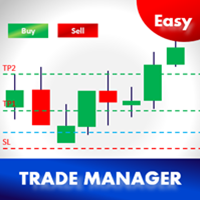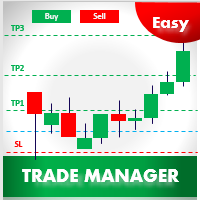
Easy Trade Manager MT5

4.5

Thank you users for all your great reviews  !

  1. Enter the Risked Amount or Lot size or % of Balance (New!)
  2. Drag the RED line on the chart to fix the Stop-Loss.
  3. Drag Blue line (New!) for Limit/Stop orders automatically !
  4. Adjust TP1, TP2 and TP3 lines
  5. You are ready to Buy/Sell > Adjust the lines even after the trade
  6. Reviews - https://tinyurl.com/etmreviews
  7. Check the user video - https://tinyurl.com/etmmt4ea
Check updated information on - easytrademanager.com

Automatic Breakeven TP1/2 | Book Part/Partial Profit TP1-TP2 | Automatic Magic Trail TP1/2 | Trade with fixed Amount or Lot Size or % Balance |Automatic lot | All orders are hidden ( so you will not see it until it is executed!) | Hidden features for scalping
  • Buy/Sell! TP1,2,3 and lot size will be done based on your preference.
  • New Magic Trail option will automatically sense market volatility and adjust/trail your TP3! try it!
  • All the levels you set are hidden from the broker so the broker will only see it after execution!
Basic Features and EA Settings –

Trade  Management 
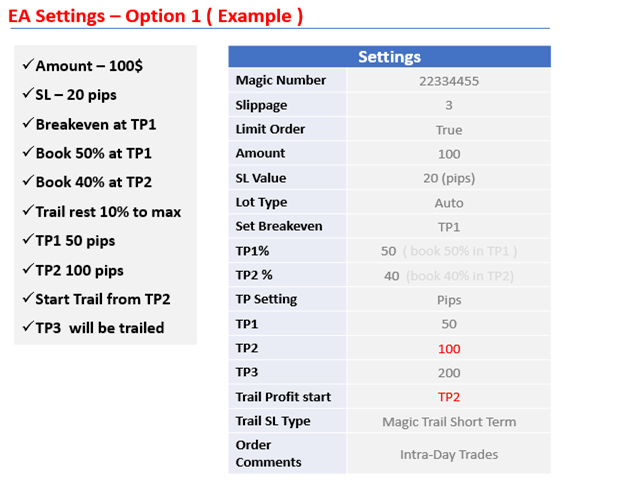
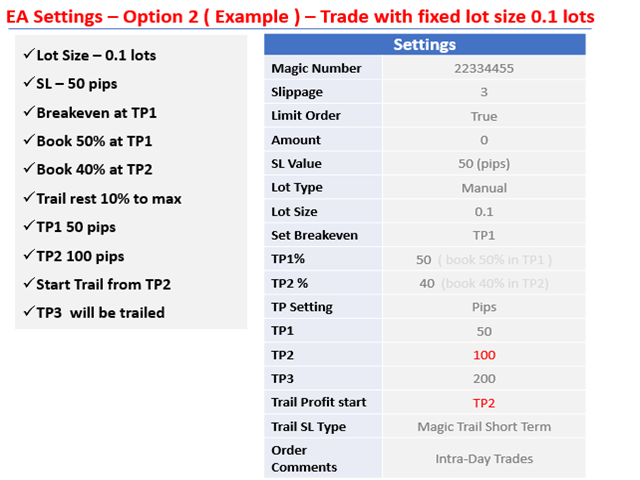
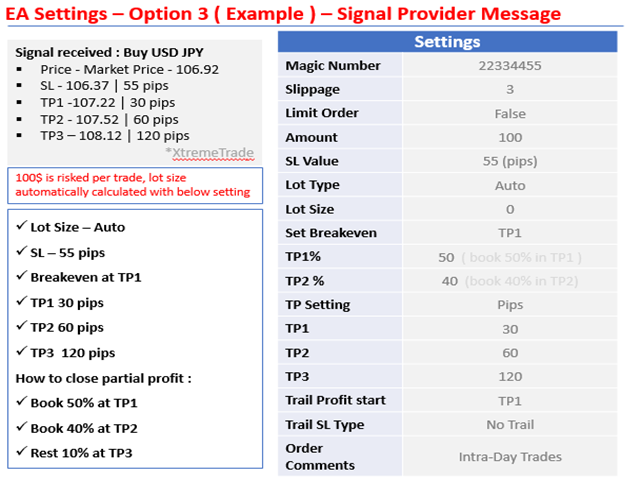
  • Risk Setting = Select > Fixed Amount or Fixed Lot or % Balance - New!
  • Amount Risked = 100 -  Means $100 to be risked per trade ( Can be any currency )
  • % of Balance = % of Balance to be risked. Eg.2% - New!
  • Fixed Lot Size = Lot Size to be risked. Eg 0.1 Lots - Make sure Risk Setting = Fixed Lot
  • Limit Order = True/False - True for enabling Limit/Stop Orders ; False for market orders

Stop-loss Settings - Define Stop-loss, Lot Size and when to breakeven

  • SL Value = 10.0 means stop-loss will 10 pips
  • Set Breakeven = TP1 or TP2 - Means trades will be set to breakeven after TP1 is booked > 2 New unique hidden features for Breakeven!
  • Use Hidden Stop-loss = True/False - True means hidden SL will be used
  • Unique Stop-loss Assist Features (Download to know more)

Profit Booking Settings - How much to partial close  & What levels to close

  • TP1 = 50 - TP1 % Percentage of Lots/Amount to be booked at TP1 - 50 means 50%
  • TP2 = 40 - TP2 % Percentage of Lots/Amount to be booked at TP2 – 40 means 40% ( TP3 will automatically be 10% )
  • TP Setting = Pips - enter pips below or Use Ratios - Eg 1:1 so if SL is 10 pips, TP1 will 10 pips
  • TP1 = 20.0 - 1st Take Profit ;Eg. 20.0 means 20 pips if TP setting=pips,Ratios - 1.0 means automatically calculate 1:1 so if SL is 10 pips,TP1 will 10 pips
  • TP2 = 40.0 - 2nd Take Profit ;Eg. 40.0 means 40 pips if TP setting=pips,Ratios - 2.0 means automatically calculate 1:2 so if SL is 10 pips,TP2 will 20 pips
  • TP3 = 80.0 - 3rd Take Profit ; 80.0 pips if TP setting=pips, Ratios - 3.0 means automatically calculate 1:3 so if SL is 10 pips, TP3 will 30 pips

 Trail Settings - When to Trail & How to Trail

  • Trail Profit Start = Start when to Trail profit from TP1 or TP2 or Order Open Price - Tricks to Scalp!
  • Trail Type = Magic Trail Slow = Use for Long Term trades ; Magic Trail Fast = Use for short term trades ; No trail

Trade Settings - Conditions used for the Trades

  • Slippage allowed = 3 - This means maximum slippage allowed will be 3
  • Add Spread =  True/False - Used to add spread to TP/SL automatically
  • Order Comments =  Used for updating comment

I want to keep this EA simple and you will see trades - breakeven - partial closing is done with high speed and accuracy - this will be the most important aspect of this EA.

Note : Please use the Easy Trade Manager on a VPS for uninterrupted FASTER operation. If you are new > Try the free Amazon VPS ( Check Youtube )

Pls leave a good review if you like the EA & send me suggestions to improve

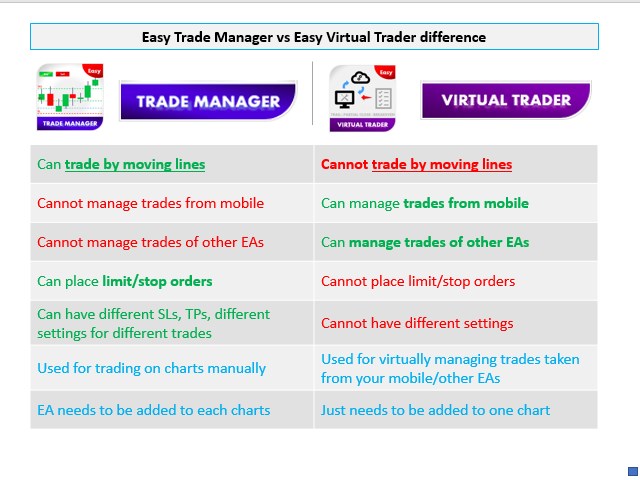
Easy Trade Manager automated Version to virtually manage trades > Easy Virtual Traderhttps://www.mql5.com/en/market/product/42804

Easy Virtual Trader Video - https://www.youtube.com/watch?v=3DNd_TCCOVE

Easy "Virtual" Trader will automatically set stop-loss, set breakeven ,book partial profit and set trail for your orders taken from your mobile.


Thank you!
리뷰 16
homebrewdon
100
homebrewdon 2023.01.21 05:58 
 

Have been using this EA for over a year now. I can't believe how I traded without it. It has become a vital part of my trading and Anoop is very responsive and helpful, definately worth it...Highly recommended.

jakey_marx
29
jakey_marx 2022.11.22 15:54 
 

awesome trade manager! very user friendly! Anoop is also extremely respsonsive and happy to assist with any questions. Couldn't be happier with the TA

Philipp Ohlrogge
1219
Philipp Ohlrogge 2022.10.05 20:22 
 

This EA does what its supposed to be. What I have to mention is that Anoop helped me very very patiently with the installation and answered all my questions fast and accurate. For me: 5* for the Trademanager and a 6th for Anoop.

추천 제품
InsightPL – Advanced Profit & Loss Tracker with Smart Notifications InsightPL is a powerful Expert Advisor that provides deep insights into your trading performance with a user-friendly dashboard and mobile-friendly notifications. Monitor your profit/loss, track trades by magic number, and optimize your strategies with ease. Unlock the Power of Your Trading Performance with InsightPL Are you tired of manually tracking your trading profits and losses across multiple strategies? InsightPL is he
BlockLongTimeFlexible
Everton Fernando Da Silva Messias
BlockLongTimeFlexible - 시간 블록 시각화 도구 시장의 시간적 분석을 마스터하세요 BlockLongTimeFlexible은 시간대를 전문적이고 직관적으로 시각화하고 분석해야 하는 트레이더와 분석가를 위한 궁극적인 도구입니다. 차트에서 직접 주기, 계절성 및 시간적 패턴을 강조하는 사용자 정의 가능한 시각적 사각형을 생성하세요. BlockLongTimeFlexible 지표 간편 매뉴얼 이 지표는 무엇을 하나요? 특정 기간을 표시하기 위해 차트에 색상 사각형을 생성합니다. 계절적 패턴, 시장 주기 분석 및 기간 비교에 이상적입니다. 3단계 기본 설정 1. 기간 유형 선택 년/월/주: 시간 단위를 선택합니다. 블록당 단위: 각 사각형이 나타내는 단위 수를 설정합니다(예: 2주). 블록 수: 생성할 사각형 수를 설정합니다. 2. 날짜 정의 (선택 사항) 고정 날짜 사용: 특정 기간에 대해 활성화합니다. 시작/종료 날짜: 첫 번째 블록을 정의합니다. 다음 블록들
The Techno Deity — XAUUSD 디지털 도미넌스 프로모션: Cryon X-9000 어드바이저를 선물로 받으실 수 있습니다. 조건 및 액세스 문의는 직접 연락해 주세요. The Techno Deity는 골드 시장의 혼돈 속에서 구조적 질서를 찾는 트레이더를 위한 하이테크 트레이딩 시스템입니다. 가격 추종을 넘어 기관의 관심 구역과 시장 불균형을 식별하는 디지털 직관 알고리즘을 사용합니다. 주요 장점 유동성 지능: 숨겨진 유동성 클러스터를 스캔하여 강력한 임펄스 지점에서 진입합니다. 신경망 트렌드 필터: 노이즈와 가짜 조정을 걸러내고 진정한 추세를 포착합니다. 제로 그리드 철학: 마틴게일이나 그리드 전략을 사용하지 않습니다. 수학적 우위를 바탕으로 한 '원 엔트리-원 엑시트' 원칙을 고수합니다. 기술 사양 종목: 골드 (XAUUSD) 타임프레임: H1 추천 예치금: 500 USD 이상 (최소 200 USD) 실행 타입: 모든 브로커 호환 (낮은 스프레드 권장) 면책 조항
MiniFullIndexTrader
Francisco Eugenio Martoni M De Andrada
FA MiniFullIndexTrader: Scalper versátil para índices mini e completos Este Expert Advisor (EA) é uma estratégia de scalping automatizada para MetaTrader 5, otimizada para contratos de índice como WIN@, WINQ25, WINFUT e WIN$. Ele utiliza rompimentos diários para entradas rápidas, com gerenciamento de risco avançado para proteger o capital. Principais vantagens: Rentável e consistente: Em backtests, gera lucro líquido de até 14.310 pontos com fator de lucro de 1,44 e Sharpe 16,77 (alto retorno p
Multiple Positions
Emanuel Reynard Phillips
한 번에 여러 포지션/거래를 열어야 합니까? 우리는 귀하의 쉬운 솔루션을 만들었습니다. 이제 한 번에 여러 직위를 입력할 수 있습니다. 로트 크기, 포지션 수, 이익 실현 및 손실 중지를 설정할 수 있습니다. 예: 특정 로트 규모로 3, 5, 10 또는 원하는 수의 포지션을 구매하려고 합니다. 이제 "구매" 버튼을 탭하기만 하면 됩니다. 또는 예: 특정 로트 규모로 3, 5, 10 또는 원하는 수의 포지션을 판매하려고 합니다. 간단히 "판매" 버튼을 클릭하시면 됩니다. han beon-e yeoleo pojisyeon/geolaeleul yeol-eoya habnikka? ulineun gwihaui swiun sollusyeon-eul mandeul-eossseubnida. ije han beon-e yeoleo jig-wileul iblyeoghal su issseubnida. loteu keugi, pojisyeon su, iig silhyeon mich sonsil jung
Forex Strike EA
Abderrahmane Benali
FOREX Strike EA – Discipline Meets Opportunity FOREX Strike EA is an intelligent automated trading system built to bring structure, control, and consistency to the Forex market. Designed with modern MQL5 standards, it focuses on precision execution and disciplined awareness rather than aggressive exposure. By combining smart order placement with adaptive money management, the system engages the market only when conditions align—allowing you to trade with confidence, not emotion. Operating withi
PO3 HTF Candle
Sakariya Bhaskar Nitinbhai
HTF PO3 캔들 인디케이터   HTF PO3 캔들 인디케이터는 상위 타임프레임의 “Power of Three” 구조를 현재 차트에 오버레이하여, 타임프레임 전환 없이 더 큰 시장 맥락에서 주요 레벨과 진입/청산 구역을 확인할 수 있도록 도와줍니다. 주요 기능: 1. 상위 타임프레임 캔들 오버레이   2. 사용자 설정 가능 (채움/비움, 외곽선 스타일, 선 굵기, 색상)   3. 1분부터 월간까지 즉시 타임프레임 변경   4. Forex, 상품, 암호화폐, 지수 등 다양한 자산 지원   5. 경량화된 최적 코드 (낮은 CPU 사용률)   사용 방법: 1. 차트에 인디케이터 적용   2. Inputs 탭에서 “Higher timeframe” 선택   3. 외관 및 색상 설정   4. PO3 캔들의 몸통과 꼬리를 축적, 조작, 분배 단계로 해석   왜 HTF PO3 캔들인가? - 기관 주문 흐름에 집중   - 높은 확률의 반응 구역 파악   - 타임프레임 전환 번거로움 제거
Dashboard Signals aNa Magic ATR EA
Choawana Malaikitsanachalee
English Description aNa Magic ATR EA – Dashboard and Signals (MT5) ATR-based SL/TP (TP1–TP3), EMA200 trend filter, RSI gate, clean on-chart dashboard and segmented guide lines. MagicNumber support for multi-EA setups. What it does This Expert Advisor automates entries and risk targets using ATR. It filters the market with EMA(200) and an RSI range to avoid low-quality trades. A compact dashboard shows entry, TP1-TP3 and SL for both long and short. Lines are drawn as short segments (not full-wid
FREE
Risk Manager for Synthetic Index Calculate the appropriate lot size using two lines and trade across 11 synthetic index: Boom 1000, Boom 500, Boom 300, Crash 1000, Crash 500, Crash 300, Step Index, Dex 600 Down, Dex 600 UP, Dex 900 DOWN, and Dex 900 UP. Technical Features: Calculation based on percentage risk (R%) or fixed amount (R$). Market and pending order execution. Adjustable panel that can be minimized/maximized to avoid obstructing the chart. Dynamic lot size update when modifying chart
Bober Real MT5
Arnold Bobrinskii
4.76 (17)
Bober Real MT5 is a fully automatic Forex trading Expert Advisor. This robot was made in 2014 year and did a lot of profitbale trades during this period. So far over 7000% growth on my personal account. There was many updates but 2019 update is the best one. The robot can run on any instrument, but the results are better with EURGBP, GBPUSD, on the M5 timeframe. Robot doesn't show good results in tester or live account if you run incorrect sets. Set files for Live accounts availible only for cu
The main function of this EA: Quick batch modification stop profit stop loss to the specified price position. For example: you have five XAUUSD  BUY orders, the opening price is 2510, 2508, 2506, 2504, 2495you can through this EA, batch unified change the profit is 2530, stop loss is 2480.Good luck with your deal! Wechat:FX-AIEA QQ:2813871972 Email:lxy284628@163.com Wechat public account: Xinyou Jinke FXAIEA.com Welcome to your attention ( Xinyou Jinke FXAIEA.com) Around A1, big data, cloud com
Expert Amazo DEMO
Guilherme Geovanini Fraga
3 (1)
EXPERT AMAZO DEMO   é um Expert Advisor projetado especificamente para negociar WIN (mini índice) e WDO (mini dólar) e para ser usado somente em contas DEMO. A operação é baseada na abertura de ordens utilizando alguns indicadores como Sars parabólicos, médias móveis, Bandas de Bollinger, Fibonacci, etc., trabalhando de acordo com 3 modalidades de estratégia, o AMAZO procura prever os movimentos do mercado com operações contra ea favor da tendência.              Entre em nosso Grupo de WhatsAp
FREE
SDZ Trend Pro
Van Toan Nguyen
Overview SDZ Trend Pro is a professional Expert Advisor work for all symbol, recommend  XAUUSD (Gold) trading on the H1 timeframe . It combines dynamic price action patterns, EMA filters, and strict session-based trading logic to identify precise market entries with optimal risk control. This EA is ideal for traders who prefer structured, time-filtered trading during active market hours. ️ Core Features Dynamic Stop Loss (SL) logic Automatically sets SL based on candle pattern Chooses the
Dear traders and investors! We present to you the MT5 Optimization Booster – an innovative product that will revolutionize your optimization experience on MetaTrader 5! The MT5 Optimization Booster is based on the innovative Quantum Swap Protocol (QSP) algorithm – a unique proprietary optimization strategy that forms the core of the product and elevates the process of finding optimal solutions to a new level. After the purchase , be sure to contact me . The product is designed to enhance the ca
Custom Alerts: 여러 시장을 동시에 모니터링하고 중요한 기회를 놓치지 마세요 개요 Custom Alerts 는 여러 종목에 걸쳐 잠재적 트레이딩 기회를 한눈에 파악하고자 하는 트레이더를 위한 동적인 솔루션입니다. FX Power, FX Volume, FX Dynamic, FX Levels, IX Power와 같은 Stein Investments의 주요 도구들과 통합되어, 여러 차트를 오가거나 기회를 놓치는 일 없이 중요한 시장 변화를 자동으로 알림으로 제공합니다. 이제 브로커가 제공하는 모든 자산군을 지원하며, 기호를 입력할 필요 없이 자산 유형만 선택하면 설정이 완료됩니다. 1. Custom Alerts가 트레이더에게 매우 유용한 이유 올인원 시장 모니터링 • Custom Alerts 는 외환, 금속, 암호화폐, 지수, 주식(브로커가 지원하는 경우)까지 다양한 자산군의 신호를 수집하고 통합합니다. • 여러 차트를 전환할 필요 없이 하나의 창에서 명확한 알림을 받아보
TradeForge AlphaGain AI
Akshay Chunilal Patil
AlphaGain AI – 차세대 AI로 구동되는 정밀한 트레이딩 EA AlphaGain AI는 MetaTrader 5용으로 개발된 고급 인공지능 기반 EA로, 10년 이상의 데이터를 분석하여 시장 변화에 적응하는 전략으로 정확한 진입/청산 신호를 제공합니다. 주요 특징: AI 기반 핵심 알고리즘: 캔들 패턴, 변동성 영역, 모멘텀 분석; 10년 이상의 백데이터 기반 훈련; 지능형 매수/매도 전략: SL/TP, 트레일링 스탑, 손익분기점 설정, 변동성 기반 목표가 설정; 자금 보호 기능: 최대 손실 제한, 잔고 보호, 최대 스프레드 필터, 거래 시간 제어; 완전 자동화: 수동 개입 없이 작동; ECN 환경에 최적화된 저지연 실행. 추천 설정: 거래쌍: EUR/USD 타임프레임: 15분 (M15) 최소 잔고: $100 추천 계정 유형: ECN 또는 Raw Spread 레버리지: 1:100 이상 왜 AlphaGain AI인가요? 바로 사용 가능: .ex5
Echelon EA
Daniel Suk
5 (1)
Echelon EA – Chart Your Unique Trading Constellation Like the celestial guides that lead explorers through the vast universe, Echelon EA empowers you to create and optimize your very own trading strategies. This versatile system combines advanced grid and martingale techniques with cutting‐edge indicators, offering you an endless palette for designing a strategy that is truly your own. Craft Your Personal Strategy: Infinite Possibilities – Customize every parameter to build a trading system t
FREE
Prosperity MT5
Mr James Daniel Coe
5 (2)
High growth, low draw-down bot. Great for beginners AND pros. 5 COPIES LEFT - NEXT PRICE $999 Contact me after purchase for group info, manual and a personal bonus! Prosperity live fund, real money (>$2,000) signal:  CLICK HERE ABOUT A rare diamond in a sea of EAs - 4x improvements in most backtest stats. We read descriptions saying 'no martingale, grid, or 'AI'' - I offer alternate parameters... Original EA No history reading No .set files changing constantly, all built-in as default Not an 'ex
Exp TickSniper PRO FULL
Vladislav Andruschenko
3.97 (58)
Exp-TickSniper -   자동으로 각 통화 쌍에 대한 매개변수를 자동으로 선택하는 고속 틱 스캘퍼. 거래 매개 변수를 자동으로 계산하는 고문을 꿈꾸십니까? 자동으로 최적화되고 조정됩니까? MetaTrader 4용 시스템 정식 버전:       MetaTrader 4용   TickSniper   스캘퍼 TickSniper - 전체 설명       + 데모 + PDF EA는 10년 가까운 EA 프로그래밍 경험을 바탕으로 개발되었습니다. EA 전략은 모든 기호와 함께 작동합니다. 기간은 중요하지 않습니다. 로봇은 현재 시세, 틱 도달 속도, 스프레드 크기 및 기타 계약 사양 매개변수를 기반으로 합니다. 시스템은 유리한 정지 손실 및 이익 실현 수준을 자동으로 정의할 뿐만 아니라 평균 위치의 거리, 후행 정지 거리 등을 정의합니다. EA는 추세에 대해 추가 개방 시스템을 적용합니다("평균"). 설정은 실제 계정에서 테스트할 수 있도록 최적화되었습니다. Expert Advisor
The utility TradeKeeper Pro allows you to open a trade manually with a magic and a volume of your choice. It does not open its own trades, it can only open a trade by your command. TradeKeeper Pro can trail any open trades by the iSAR (parabolic) indicator, and a simple trail. It can set the stoploss level at the open price as soon as possible. To trail any open trades for any instruments, it suffices to launch the utility in one chart. TradeKeeper Pro can close any trades or pending orders of a

Gyroscopes mt5
Nadiya Mirosh
5 (2)
Gyroscope        professional forex expert   (for EURUSD, GBPUSD, USDJPY, AUDUSD, USDCHF, EURGBP, EURJPY, NZDUSD, USDCAD, EURCHF, AUDJPY, CADJPY pairs)   alyzing the market using the Elliot Wave Index. Elliott wave theory is the interpretation of processes in financial markets through a system of visual models (waves) on price charts. The author of the theory, Ralph Elliott, identified eight variants of alternating waves (of which five are in the trend and three are against the trend). The mov
Connector Solutions Binance — Binance 가상화폐 거래소에서 거래를 복사하기 위한 전문적인 프로그램.  MetaTrader 5를 이용하지만 귀하의 거래를 가상화폐 거래소에서도, 예컨대,  Binance에 있는 것을 원하시는 분들에게 추천드립니다.  Connector Solutions Binance - MetaTrader 5를 통해서 데모 계정을 복사합니다. (데모 계정에 사용하고 싶은 가상화폐가 있어야 합니다)  해당 버전은 Connector Solutions Binance  무료인데 기능성을 테스트를 하기 위한 만들어낸 프로그램입니다.  그리고 AAVEUSDT 가상화폐만 사용 가능합니다. 풀 버전의 링크는 다음과 같습니다.  https://connector.solutions 시작 케이스: 시작하기 전에 Binance에서 먼저 API 키를 받아야 합니다. https://www.mql5.com/ru/blogs/post/752065 또한 웹사이트에서 쿠코인
FREE
Daily Drop Analyzer
Rafael Gazzinelli
5 (1)
Automate Your Strategy! Use the Expert Advisor Daily Drop Analyzer to automatically execute the strategy, with filters, configurable parameters, and order management. Check it here: Daily Drop Analyzer EA Daily Drop Analyzer is a technical indicator for MetaTrader 5 that performs historical tests based on daily percentage drops. It analyzes up to 200 Market Watch symbols to identify recurring entry levels within a configurable range. The calculation uses daily candles (default: 120 days) and
FREE
PulsePanel FREE – The exact same clean, professional and powerful dashboard as the Pro, completely free so you can test it thoroughly before upgrading. Limited to USDCHF and GBPNZD , this free edition gives you full, unrestricted access to every core feature: What You Get in the FREE Version One-click instant execution (buy/sell) Real-time currency strength meter Precise momentum scanner Watchlist with trend, momentum and conviction Live position tracking: net P&L, dynamic risk/reward ratio, sto
FREE
Multi Timeframe Analysis
Teerathad Booranawisedkul
FREE 7-DAY TRIAL After your trial ends, continue using this essential trading tool for only $30 one-time payment. Multi-Timeframe Dashboard Indicator A comprehensive multi-timeframe analysis tool that displays market conditions across 9 timeframes simultaneously on a single dashboard panel. Timeframes Analyzed M1, M5, M15, M30, H1, H4, D1, W1, MN Toggle visibility for each timeframe individually Analysis Metrics Trend - EMA crossover status (Strong/Weak/Bearish/Neutral) Power - ADX strength p
Euro Scalper MT5
Andrey Vasilenko
The Expert Advisor trades in the direction of the current trend, the algorithm is based on calculating the width of the trading range for a given interval and assessing price movements on short time intervals. If the impulse value exceeds a specified percentage of the trading range, a position is opened in the direction of the trend. The impulses are also additionally filtered using a special technique. When evaluating impulses, the tick history inside the bar is not used . The algorithm uses ex
KDJ Random Index MT5
KEENBASE SOFTWARE SOLUTIONS
5 (1)
Basic technical analysis tools use signals during market changes by providing critical information that can influence investment and trading decisions. Several technical analysis tools are developed for this purpose, and one of the most popular indicators traders use the KDJ Random index. It's known as the Random Index, is primarily a trend-following indicator that aids traders in identifying trends and prime entry points.  Features It analyzes and projects changes in trends and price patterns
Reverse Position
Nindita Giwangkara
A simple Reverse Position tool. Just a simple tool to make you reverse your position from e.g long position to short position. This tool also allow you to set SL and Risk to Reward Ratio, so you are safe while reversing your position. Also calculates your all volume order in current open position and reverse all of the open position to make opposite position. works on any symbol, just load the EA and add to your symbol you want to trade.
Cypher invest
Arnold Byarufu
Introducing "CypherInvest," your trusted Expert Advisor in the dynamic world of financial markets.  With cutting-edge technology and advanced algorithms, CypherInvest analyzes market data, identifies patterns, and uncovers hidden opportunities to help you make informed investment decisions. Our innovative approach combines the power of cryptography and data analysis, unlocking the secrets of the market to maximize your returns. Powered by the Secret algorithm, CypherInvest leverages support an
SkyScraperMT5
Teressa Herlene Thomson
Overview SkyScraper is a sophisticated automated trading system built exclusively for MetaTrader 5. This versatile EA adapts to your trading style on any timeframe (optimized for 3-5 minute charts) and works seamlessly across forex pairs, cryptocurrencies, and metals including gold. Why SkyScraper? Smart Automation That Protects Your Capital Intelligent trade execution with multi-layer risk controls Dynamic position sizing that automatically adjusts to your broker's requirements Adaptive stop l
이 제품의 구매자들이 또한 구매함
Trade Assistant MT5
Evgeniy Kravchenko
4.41 (208)
거래당 위험 계산, 라인을 사용한 손쉬운 신규 주문, 부분 청산 기능을 통한 주문 관리, 7가지 유형의 트레일링 스탑 및 기타 유용한 기능을 제공합니다. 추가 자료 및 지침 설치 지침   -   애플리케이션 지침   -   데모 계정용 애플리케이션 평가판 라인 기능       - 차트에 개시선, 손절매, 차익실현을 표시합니다. 이 기능을 사용하면 새로운 주문을 쉽게 하고 개봉 전에 추가 특성을 볼 수 있습니다. 위기 관리       -       위험 계산 기능은 설정된 위험과 손절매 주문의 크기를 고려하여 새 주문의 볼륨을 계산합니다. 이를 통해 손절매 크기를 설정하고 동시에 설정된 위험을 존중할 수 있습니다. 로트 계산 버튼 - 위험 계산을 활성화/비활성화합니다. 필요한 위험 값은 위험 필드에 0에서 100 사이의 백분율 또는 예금 통화로 설정됩니다. 설정 탭에서 위험 계산 옵션을 선택합니다. $ 통화, % 잔액, % 지분, % 자유 마진, % 사용자 정의, % AB 이전
Trade Manager EA에 오신 것을 환영합니다. 이 도구는 거래를 보다 직관적이고 정확하며 효율적으로 만들기 위해 설계된 궁극적인 리스크 관리 도구 입니다. 단순한 주문 실행 도구가 아닌, 원활한 거래 계획, 포지션 관리 및 리스크 제어를 위한 종합 솔루션입니다. 초보자부터 고급 트레이더, 빠른 실행이 필요한 스캘퍼에 이르기까지 Trade Manager EA는 외환, 지수, 상품, 암호화폐 등 다양한 시장에서 유연성을 제공합니다. Trade Manager EA를 사용하면 복잡한 계산은 이제 과거의 일이 됩니다. 시장을 분석하고 진입, 손절 및 익절 수준을 차트의 수평선으로 표시한 후 리스크를 설정하면, Trade Manager가 이상적인 포지션 크기를 즉시 계산하고 SL 및 TP 값을 실시간으로 표시합니다. 모든 거래가 간편하게 관리됩니다. 주요 기능: 포지션 크기 계산기 : 정의된 리스크에 따라 거래 크기를 즉시 결정합니다. 간단한 거래 계획 : 진입, 손절, 익절을 위한
TradePanel MT5
Alfiya Fazylova
4.86 (148)
Trade Panel은 다기능 거래 보조원입니다. 이 애플리케이션에는 수동 거래를 위한 50개 이상의 거래 기능이 포함되어 있으며 대부분의 거래 작업을 자동화할 수 있습니다. 전략 테스터에서는 애플리케이션이 작동하지 않습니다. 구매하기 전에 데모 계정에서 데모 버전을 테스트할 수 있습니다. 데모 버전 여기 . 전체 지침 여기 . 거래. 한 번의 클릭으로 거래 작업을 수행할 수 있습니다: 자동 위험 계산을 통해 지정가 주문 및 포지션을 엽니다. 한 번의 클릭으로 여러 주문과 포지션을 열 수 있습니다. 주문 그리드를 엽니다. 그룹별 대기 주문 및 포지션을 마감합니다. 포지션 반전(매수 청산 후 매도 개시 또는 매도 청산 후 매수 개시). 포지션 고정(매수 포지션과 매도 포지션의 양을 동일하게 하는 추가 포지션 개설). 한 번의 클릭으로 모든 포지션을 부분 청산합니다. 모든 포지션의 이익실현과 손절매를 동일한 가격 수준으로 설정합니다. 모든 포지션에 대한 손절매를 해당 포지션의 손익 분기
Local Trade Copier EA MT5
Juvenille Emperor Limited
4.96 (124)
Local Trade Copier EA MT5 를 사용하여 매우 빠른 거래 복사 경험을 해보세요. 1분 안에 간편하게 설정할 수 있으며, 이 거래 복사기를 사용하면 Windows 컴퓨터 또는 Windows VPS에서 여러 개의 MetaTrader 터미널 간에 거래를 0.5초 미만의 초고속 복사 속도로 복사할 수 있습니다. 초보자든 전문가든   Local Trade Copier EA MT5 는 다양한 옵션을 제공하여 사용자의 특정 요구에 맞게 맞춤 설정할 수 있습니다. 이는 수익 잠재력을 높이려는 모든 사람을 위한 최고의 솔루션입니다. 지금 사용해보시고 이것이 왜 시장에서 가장 빠르고 쉬운 무역용 복사기인지 알아보세요! 팁: 여기 에서 데모 계정에서 Local Trade Copier EA MT5 데모 버전을 다운로드하여 사용해 볼 수 있습니다. 다운로드한 무료 데모 파일을 MT5 >> File >> Open Data Folder >> MQL5 >> Experts 폴더에 붙여넣고 터
Trade Dashboard MT5
Fatemeh Ameri
4.96 (113)
Tired of complex order placement and manual calculations? Trade Dashboard is your solution. With its user-friendly interface, placing orders becomes effortless, by a single click, you can open trades, set stop loss and take profit levels, manage trade lot size, and calculate risk to reward ratios, allowing you to only focus on your strategy. Say goodbye to manual calculations and streamline your trading experience with Trade Dashboard. Download  Demo Version  right now. You can find  Details of
베타 출시 Telegram to MT5 Signal Trader 는 곧 공식 알파 버전을 출시할 예정입니다. 일부 기능은 아직 개발 중이며, 작은 버그가 발생할 수 있습니다. 문제가 있으면 꼭 보고해 주세요. 여러분의 피드백은 소프트웨어 개선에 도움이 됩니다. 가격은 20건 판매 후 인상됩니다. 남은 $90 카피: 2/20 . Telegram to MT5 Signal Trader 는 Telegram 채널 또는 그룹의 거래 신호를 자동으로 MetaTrader 5 계정으로 복사하는 강력한 도구입니다. 공개 및 비공개 채널을 모두 지원하며, 여러 신호 제공자를 여러 MT5 계정에 연결할 수 있습니다. 소프트웨어는 빠르고 안정적으로 동작하며, 복사된 거래를 완벽히 제어할 수 있습니다. 인터페이스는 깔끔하며 대시보드와 차트가 시각적으로 구성되어 있고, 직관적인 네비게이션이 가능합니다. 여러 Signal Account를 관리하고, 공급자별 설정을 세밀하게 조정하며, 모든 동작을 실시간으로
Exp COPYLOT CLIENT for MT5
Vladislav Andruschenko
3.82 (34)
MT5용 트레이드 복사기는 metaТrader 5 플랫폼용 트레이드 복사기입니다   . 그것은 사이의   외환 거래를 복사합니다       모든 계정   COPYLOT MT5 버전의 경우   MT5   -   MT5, MT4   -   MT5 (또는 COPYLOT MT4 버전의 경우   MT4 -   MT4 MT5   -  MT4) 믿을 수 있는 복사기! MT4 버전 전체 설명   +DEMO +PDF 구입 방법 설치하는 방법     로그 파일을 얻는 방법     테스트 및 최적화 방법     Expforex의 모든 제품 МТ4 터미널에서 거래를 복사할 수도 있습니다(   МТ4   -   МТ4, МТ5   -   МТ4   ):   COPYLOT CLIENT for MT4 이 버전은 МТ5   -   МТ5, МТ4   -   МТ5   터미널 간을 포함합니다. 거래 복사기는 2/3/10 터미널 사이의 거래/포지션을 복사하기 위해 만들어졌습니다. 데모 계정 및 투자 계정에서
The product will copy all telegram signal to MT5 ( which you are member) , also it can work as remote copier.  Easy to set up, copy order instant, can work with almost signal formats, image signal,  s upport to translate other language to English Work with all type of channel or group, even channel have "Restrict Saving Content", work with  multi channel, multi MT5 Work as remote copier: with signal have ticket number, it will copy exactly via ticket number. Support to backtest signal. How to s
Copy Cat More Trade Copier MT5 (복사 고양이 MT5) 는 오늘날의 거래 과제를 위해 설계된 로컬 거래 복사기이자 완전한 위험 관리 및 실행 프레임워크입니다. 프롭펌 챌린지부터 개인 포트폴리오 관리까지, 견고한 실행, 자본 보호, 유연한 구성 및 고급 거래 처리의 조합으로 모든 상황에 적응합니다. 복사기는 마스터(송신자)와 슬레이브(수신자) 모드 모두에서 작동하며, 시장 주문과 예약 주문, 거래 수정, 부분 청산 및 헷지 청산 작업의 실시간 동기화를 제공합니다. 데모 및 실계좌, 거래 또는 투자자 로그인과 호환되며, EA, 터미널 또는 VPS가 재시작되어도 지속적인 거래 메모리 시스템을 통해 복구를 보장합니다. 고유 ID로 여러 마스터와 슬레이브를 동시에 관리할 수 있으며, 브로커 간 차이는 접두사/접미사 조정 또는 사용자 정의 심볼 매핑을 통해 자동으로 처리됩니다. 매뉴얼/설정  | Copy Cat More MT4 | 채널  특별 기능: 설정이 간편함 —
Trade Manager DaneTrades
Levi Dane Benjamin
4.36 (28)
거래 관리자는 위험을 자동으로 계산하는 동시에 거래를 빠르게 시작하고 종료하는 데 도움을 줍니다. 과잉 거래, 복수 거래 및 감정 거래를 방지하는 데 도움이 되는 기능이 포함되어 있습니다. 거래를 자동으로 관리할 수 있으며 계정 성과 지표를 그래프로 시각화할 수 있습니다. 이러한 기능은 이 패널을 모든 수동 거래자에게 이상적으로 만들고 MetaTrader 5 플랫폼을 향상시키는 데 도움이 됩니다. 다중 언어 지원. MT4 버전  |  사용자 가이드 + 데모 트레이드 매니저는 전략 테스터에서 작동하지 않습니다. 데모를 보려면 사용자 가이드로 이동하세요. 위기 관리 % 또는 $를 기준으로 위험 자동 조정 고정 로트 크기 또는 거래량과 핍을 기반으로 한 자동 로트 크기 계산을 사용하는 옵션 RR, Pips 또는 Price를 사용한 손익분기점 손실 설정 추적 중지 손실 설정 목표 달성 시 모든 거래를 자동으로 마감하는 최대 일일 손실률(%)입니다. 과도한 손실로부터 계정을 보호하고 과도한
Ultimate Extractor
Clifton Creath
5 (9)
Ultimate Extractor - Professional Trading Analytics for MT5 *****this is the local HTML version of Ultimate Extractor. Check out Ultimate Extractor Cloud on mql5 for the Cloud version****** Ultimate Extractor transforms your MetaTrader 5 trading history into actionable insights with comprehensive analytics, interactive charts, and real-time performance tracking. What It Does Automatically analyzes your MT5 trading history across all Expert Advisors and generates detailed HTML reports with inte
Farmed Hedge Yield Farming - Professional Pair Trading Dashboard (Manual - Hybrid - Semi/Automated EA) VERSION 3 - WILD HARVEST UPDATE Trading Approach: - Manual Trading: Primary focus - Auto Pilot: Optional supplementary feature - Full Automation: Not the main purpose Recommended Timeframe: H1-H4 DEMO VERSION Download the free demo to test functionality. Use Strategy Tester with Visual Mode to see how it works. VERIFIED TRADING RESULTS - Farmed Hedge Yield Axi Copy: https://www.mql5.com/en/si
HINN MagicEntry Extra
ALGOFLOW OÜ
4.67 (12)
HINN MAGIC ENTRY – the ultimate tool for entry and position management! Place orders by selecting a level directly on the chart! full description   ::  demo-version Key features: - Market, limit, and pending orders - Automatic lot size calculation - Automatic spread and commission accounting - Unlimited partitial take-profits  - Breakeven and trailing stop-loss and take-profit  functions - Invalidation leves - Intuitive, adaptive, and customizable interface - Works with any assets and account t
Trade Manager DashPlus
Henry Lyubomir Wallace
5 (13)
DashPlus 는 MetaTrader 5 플랫폼에서 거래 효율성과 효과를 향상시키기 위해 설계된 고급 거래 관리 도구입니다. 리스크 계산, 주문 관리, 고급 그리드 시스템, 차트 기반 도구 및 성과 분석 등 포괄적인 기능을 제공합니다. 주요 기능 1. 리커버리 그리드 불리한 시장 상황에서 거래를 관리하기 위한 평균화 및 유연한 그리드 시스템을 구현합니다. 거래 회복을 최적화할 수 있도록 전략적인 진입 및 종료 포인트를 제공합니다. 2. 스택 그리드 강한 시장 움직임 동안 포지션을 추가하여 유리한 거래에서 잠재적 수익을 극대화하도록 설계되었습니다. 유리한 시장 트렌드에서 승률을 높이며 거래를 확장할 수 있도록 합니다. 3. 손익(P&L) 라인 차트에서 잠재적인 수익 및 손실 시나리오를 시각적으로 표현합니다. 설정을 조정하고 P&L 라인을 드래그하여 실행 전에 다양한 거래 결과를 평가할 수 있습니다. 4. 바스켓 모드 동일한 심볼에 여러 포지션을 단일 집계 포지션으로 결합하여 관리합니
YuClusters
Yury Kulikov
4.93 (43)
Attention: You can view the program operation in the free version  YuClusters DEMO .  YuClusters is a professional market analysis system. The trader has unique opportunities to analyze the flow of orders, trade volumes, price movements using various charts, profiles, indicators, and graphical objects. YuClusters operates on data based on Time&Sales or ticks information, depending on what is available in the quotes of a financial instrument. YuClusters allows you to build graphs by combining da
MT5 to Telegram Signal Provider 는 사용하기 쉽고 완전히 커스터마이즈 가능한 유틸리티로, 특정 신호를 Telegram의 채팅, 채널 또는 그룹으로 전송하고, 귀하의 계정을 신호 제공자 로 만듭니다. 경쟁 제품과 달리 DLL 임포트를 사용하지 않습니다. [ 데모 ] [ 매뉴얼 ] [ MT4 버전 ] [ 디스코드 버전 ] [ 텔레그램 채널 ]  New: [ Telegram To MT5 ] 설정 단계별 사용자 가이드 가 제공됩니다. 텔레그램 API에 대한 지식은 필요하지 않습니다; 개발자가 제공하는 모든 것이 필요합니다. 주요 특징 구독자에게 보낸 주문 상세 정보를 커스터마이즈할 수 있습니다. 예를 들어, 브론즈, 실버, 골드와 같은 계층 구독 모델을 만들 수 있습니다. 골드 구독에서는 모든 신호를 받습니다. id, 심볼, 또는 코멘트로 주문을 필터링할 수 있습니다. 주문이 실행된 차트의 스크린샷이 포함됩니다 보낸 스크린샷에 닫힌 주문을 그려 추가 검증을 합니다
Telegram to MT5 Coppy
Sergey Batudayev
5 (8)
Telegram에서 MT5로:   최고의 신호 복사 솔루션 DLL 없이도 Telegram 채널과 채팅에서 MetaTrader 5 플랫폼으로 거래 신호를 직접 복사하는 최신 도구인 Telegram to MT5를 사용하여 거래를 간소화하세요. 이 강력한 솔루션은 정밀한 신호 실행, 광범위한 사용자 정의 옵션을 제공하고 시간을 절약하며 효율성을 높여줍니다. [ Instructions and DEMO ] 주요 특징 직접 Telegram API 통합 전화번호와 보안 코드를 통해 인증하세요. 사용자 친화적인 EXE 브리지를 통해 채팅 ID를 쉽게 관리하세요. 여러 채널/채팅을 추가, 삭제, 새로 고침하여 동시에 신호를 복사합니다. 고급 필터를 사용한 신호 파싱 예외 단어(예: "보고서", "결과")가 포함된 원치 않는 신호를 건너뜁니다. 유연한 SL 및 TP 형식을 지원합니다: 가격, 핍 또는 포인트. 가격 대신 포인트를 지정하는 신호에 대한 진입 포인트를 자동으로 계산합니다. 주문 맞춤화 및
Smart Stop Manager – 전문 트레이더 수준의 자동 스톱로스 실행 개요 Smart Stop Manager는 Smart Stop 라인업의 실행 계층으로, 여러 개의 오픈 포지션을 보유한 트레이더를 위해 설계된 구조적이고 신뢰할 수 있으며 완전 자동화된 스톱로스 관리 시스템입니다. 모든 활성 거래를 지속적으로 모니터링하고, Smart Stop 시장 구조 로직을 사용해 최적의 스톱레벨을 계산하며, 명확하고 투명한 규칙에 따라 스톱을 자동으로 업데이트합니다. 단일 자산부터 전체 멀티심볼 포트폴리오까지, Smart Stop Manager는 모든 거래에 규율, 일관성, 그리고 완전한 리스크 가시성을 제공합니다. 감정적 판단을 제거하고, 수동 작업을 줄이며, 모든 스톱이 항상 시장 구조 기반의 논리적 진행을 따르도록 보장합니다. 하이라이트 시장 구조 기반 자동 스톱 배치 • 모든 오픈 포지션을 평가하여 Smart Stop 로직에 기반한 최적의 스톱로스를 자동 적용합니다. 포트폴
Seconds Chart MT5
Boris Sedov
4.59 (17)
Seconds Chart — MetaTrader 5에서 초 단위 차트를 생성하는 독특한 도구입니다. Seconds Chart 를 사용하면 초 단위로 설정된 타임프레임으로 차트를 작성할 수 있어, 표준 분 또는 시간 단위 차트에서는 불가능한 유연성과 정밀한 분석이 가능합니다. 예를 들어, S15 타임프레임은 15초 동안의 캔들로 구성된 차트를 의미합니다. 사용자 정의 심볼을 지원하는 모든 인디케이터와 전문가 어드바이저를 사용할 수 있습니다. 이를 사용하는 것은 표준 차트에서 거래하는 것만큼 편리합니다. 표준 도구와 달리, Seconds Chart 는 초고속 타임프레임에서도 높은 정확도와 지연 없이 작업할 수 있도록 지원합니다. Seconds Chart의 장점 1초부터 900초까지 의 타임프레임 지원. 내장 틱 데이터베이스 덕분에 역사 데이터 즉시 로딩 . 실시간 데이터 업데이트로 지연이나 차이 없음 . 여러 초 단위 차트를 동시에 생성 가능. Seconds Chart가 이상적인 경우
Telegram To MT5 Receiver
Levi Dane Benjamin
4.53 (15)
가입한 모든 채널에서 (개인 및 제한된 채널 포함) 시그널을 바로 MT5로 복사합니다.   이 도구는 사용자를 고려하여 설계되었으며 거래를 관리하고 모니터하는 데 필요한 많은 기능을 제공합니다. 이 제품은 사용하기 쉽고 시각적으로 매력적인 그래픽 인터페이스로 제공됩니다. 설정을 사용자 정의하고 제품을 몇 분 안에 사용할 수 있습니다! 사용자 가이드 + 데모  | MT4 버전 | 디스코드 버전 데모를 시도하려면 사용자 가이드로 이동하십시오. Telegram To MT5 수신기는 전략 테스터에서 작동하지 않습니다! Telegram To MT5 특징 여러 채널에서 동시에 신호를 복사합니다. 개인 및 제한된 채널에서 신호를 복사합니다. Bot 토큰이나 채팅 ID가 필요하지 않습니다.   (원하는 경우에는 사용할 수 있습니다) 위험 % 또는 고정된 로트로 거래합니다. 특정 심볼을 제외합니다. 모든 신호를 복사할지 또는 복사할 신호를 사용자 정의할지 선택할 수 있습니다. 모든 신호를 인
GRat Crypto
Ivan Titov
4.5 (2)
Trade on crypto exchanges in MT5! GRat_Crypto is a tool for manual and automated trading , including ANY available EA, ANY  cryptocurrency  on most popular crypto exchanges in the familiar MT5 environment 24/7. Features 1. ALL instruments of the 9 most popular crypto exchanges are available: Binance, BingX, Bybit, Coinbase, CoinEx, Kraken,   KuCoin, MEXC and OKX . 2. The ability to place ANY type of order available in MT5, both market and pending, to modify orders and positions, to delete order
Risk Manager for MT5
Sergey Batudayev
4.35 (17)
MT5의 Expert Advisor Risk Manager는 매우 중요하며 제 생각에는 모든 거래자에게 필요한 프로그램입니다. 이 Expert Advisor를 사용하면 거래 계정의 위험을 제어할 수 있습니다. 위험 및 이익 통제는 금전적 측면과 백분율 측면에서 모두 수행될 수 있습니다. Expert Advisor가 작동하려면 통화 쌍 차트에 첨부하고 예금 통화 또는 현재 잔액의 %로 허용되는 위험 값을 설정하기만 하면 됩니다. [Instruction for Risk Manager parameters] 어드바이저 기능 이 위험 관리자는 위험을 제어하는 ​​데 도움이 됩니다. - 거래를 위해 - 하루 - 일주일 동안 - 한 달 동안 당신은 또한 제어할 수 있습니다 1) 거래 시 최대 허용 랏 2) 1일 최대 주문 수 3) 하루 최대 수익 4) 지분 인수 이익 설정 그게 다가 아닙니다. 설정에서 자동 설정을 지정하면 고문이 기본 SL 및 TP를 설정할 수도 있습니다. 상
Professional Footprint Chart EA - Complete Order Flow Trading Suite DEMO USERS - PLEASE SELECT EVERY TICK WHEN TESTING  See What Market Makers See! The most comprehensive order flow analysis tool for MetaTrader 5. Get institutional-grade volume analysis, real-time DOM, Time & Sales, and intelligent trade signals - all in one powerful EA. 6 Professional Panels - Complete order flow analysis suite Real-Time Tick Data - Live bid/ask volume at every price level Automatic Imbalance Detection - Spot
Entry In The Zone and SMC Multi Timeframe is a real-time market analysis tool developed based on Smart Money Concepts (SMC). It is designed to analyze market structure, price direction, reversal points, and key zones across multiple timeframes in a systematic way. The system displays Points of Interest (POI) and real-time No Repaint signals, with instant alerts when price reaches key zones or when signals occur within those zones. It functions as both an Indicator and a Signal System (2-in-1), c
Smart Stop Scanner – 실제 시장 구조 기반의 멀티자산 스톱로스 분석 시스템 개요 Smart Stop Scanner는 여러 시장에서 스톱로스 구조를 전문적으로 모니터링하기 위해 설계된 강력한 도구입니다. 실제 시장 구조, 핵심 브레이크아웃, 가격 행동 로직을 기반으로 가장 의미 있는 스톱 영역을 자동으로 감지하며, 고해상도(DPI 지원)의 깔끔하고 일관된 패널에 모든 정보를 표시합니다. 포렉스(FOREX), 금, 지수, 금속, 암호화폐 등 다양한 자산군을 지원합니다. 스톱 레벨 계산 방식 이 시스템은 기존의 인디케이터 공식을 사용하지 않습니다. 대신 브레이크아웃, 더 높은 고점, 더 낮은 저점 과 같은 실제 시장 구조 이벤트를 분석합니다. 스톱 레벨은 이러한 구조적 지점에서 직접 생성되므로 시장의 실제 움직임과 자연스럽게 일치하며, 더 신뢰도 높은 스톱 시스템을 제공합니다. 주요 기능 • 고정밀 멀티자산 호환성 포렉스, 금속, 금, 지수, 암호화폐 등 다양한
한 번의 클릭으로 거래할 수 있는 거래 패널.   위치 및 주문 작업!   차트 또는 키보드에서 거래. 당사의 거래 패널을 사용하면 차트에서 직접 클릭 한 번으로 거래를 실행할 수 있으며 표준 MetaTrader 컨트롤보다 30배 빠르게 거래 작업을 수행할 수 있습니다. 매개변수와 기능의 자동 계산을 통해 트레이더는 더욱 빠르고 편리하게 거래할 수 있습니다. 그래픽 팁, 정보 라벨, 무역 거래에 대한 전체 정보는 MetaTrader 차트에 있습니다. MT4 버전 전체 설명   +DEMO +PDF 구입 방법 설치하는 방법     로그 파일을 얻는 방법     테스트 및 최적화 방법     Expforex의 모든 제품 열기 및 닫기, 반전 및 잠금, 부분 닫기/오토로트. 가상/실제 손절매/이익 실현/후행 정지/손익분기점, 주문 그리드 ... MetaТrader 5   의 주요 주문 거래 컨트롤 패널: 구매, 판매, 구매 중지, 구매 제한, 판매 중지, 판매 제한, 닫기, 삭제, 수
Take a Break MT5
Eric Emmrich
4.83 (23)
One tool to protect all your EAs — news filter, equity protection, time filter and more — free demo available Take a Break has transformed from a basic news filter into a comprehensive account protection solution. It seamlessly pauses any other Expert Advisors during news events or based on your custom filters — automatically restoring all EA settings when trading resumes. Typical use cases: One news filter for all your EAs. Pause trading during news or high volatility — and close all trades bef
Trade Assistant 38 in 1
Makarii Gubaydullin
4.91 (23)
다기능 도구: 로트 계산기, 그리드 주문, R/R 비율, 트레이드 관리자, 수급 구역, 가격 행동 등 데모 버전   |   사용자 설명서 트레이드 어시스턴트   는 전략 테스터에서 작동하지 않습니다 :   여기에서 데모 버전을 다운로드  하여 유틸리티 를 테스트하세요. 질문/개선 아이디어/버그 발견 시 연락주세요 MT4 버전이 필요하시면 여기 에서 이용 가능합니다 거래   프로세스 를 간소화, 가속화, 자동화하세요. 이   대시보드 로 표준 터미널 기능을 확장합니다. 트레이딩 패널은  모든 거래 상품에서 작동: 외환, 주식, 지수, 암호화폐 등. 1. 새 거래 개시 : 로트 / 위험 / RR 계산 : 수동 거래를 위한 위험 관리 로트 계산기 (위험 크기 기반 거래량 계산) 위험 계산기 (로트 크기 기반 위험 금액) 위험 대비 보상   비율 그리드 주문:  + 동적 간격 옵션, 로트 분할 옵션 주문 활성화 트리거, + 매수 스톱리밋 / 매도 스톱리밋 가상 SL, 가상 TP (숨김
Grid Manual MT5
Alfiya Fazylova
4.9 (20)
"Grid Manual"은 주문 그리드 작업을 위한 거래 패널입니다. 이 유틸리티는 보편적이며 유연한 설정과 직관적인 인터페이스를 제공합니다. 그것은 손실을 평균화하는 방향뿐만 아니라 이익을 증가시키는 방향으로 주문 그리드와 함께 작동합니다. 거래자는 주문 그리드를 만들고 유지할 필요가 없으며 유틸리티에서 수행합니다. 거래자가 주문을 시작하는 것으로 충분하며 "Grid Manual"는 자동으로 그를 위한 주문 그리드를 생성하고 거래가 마감될 때까지 그와 동행할 것입니다. 전체 설명 및 데모 버전 여기 . 유틸리티의 주요 기능: 모바일 터미널을 포함하여 어떤 방식으로든 열린 주문과 함께 작동합니다. "제한" 및 "중지"의 두 가지 유형의 그리드와 함께 작동합니다. 고정 및 동적(ATR 표시기 기반)의 두 가지 유형의 그리드 간격 계산과 함께 작동합니다. 오픈 오더 그리드의 설정을 변경할 수 있습니다. 차트에서 각 주문 그리드의 손익분기점 수준을 표시합니다. 각 주문 그리드에 대한 이익
MT5 to Discord Signal Provider 는 Discord로 직접 거래 신호를 보내는 데에 설계된 사용자 친화적이고 완전히 맞춤화할 수 있는 유틸리티입니다. 이 도구는 귀하의 거래 계좌를 효율적인 신호 제공자로 변환합니다. 귀하의 스타일에 맞게 메시지 형식을 사용자 정의하세요! 사용 편의성을 위해 사전에 디자인된 템플릿을 선택하고 포함하거나 제외할 메시지 요소를 선택할 수 있습니다. [ 데모 ] [ 매뉴얼 ] [ MT4 버전 ] [ Telegram 버전 ]  New: [ Telegram To MT5 ] 설정 간편한 설정을 위해 저희의 상세한 사용자 가이드 를 따르세요. Discord API에 대한 사전 지식이 필요 없습니다; 필요한 모든 도구를 제공합니다. 주요 기능 구독자 업데이트를 위한 주문 세부 정보를 사용자 정의합니다. 각 계층이 다른 수준의 신호 접근을 제공하는 브론즈, 실버, 골드와 같은 계층적 구독 모델을 구현합니다. 주문이 실행된 차트의 스크린샷을 첨
제작자의 제품 더 보기
Easy Virtual Trader MT5
Anoop Sivasankaran
5 (1)
Latest MT4 Version always updated as MT5 as well. 2022 with more Hidden killer features soon! Setup Easy Virtual Trader > Input your Rules > You are ready to trade from mobile or another EA or anywhere....Let robot manage your Trades !  This powerful EA will help you manage ALL or SPECIFIC trades automatically based on your PRE-SET rules and settings Once it is setup and running on just one chart, you don't need to monitor your orders anymore, the software will keep watching and control your or
Easy Trade Manager
Anoop Sivasankaran
4.78 (36)
New version with Panel updated..! (Thank you users for all your great feedback!) - Enter the Risked Amount or Lot size or % of Balance (New!) Drag the RED line on the chart to fix the Stop-Loss. Drag Blue line (New!) for Limit/Stop orders automatically ! Adjust TP1, TP2 and TP3 lines You are ready to Buy/Sell > Adjust the lines even after the trade - New! Check the user video - https://tinyurl.com/etmmt4ea Automatic Breakeven TP1/2 | Book Part/Partial Profit TP1-TP2 | Automatic Magic Trail TP1
Easy Virtual Trader
Anoop Sivasankaran
4.89 (9)
Setup Easy Virtual Trader > Input your Rules > You are ready to trade from mobile or another EA or anywhere....Let robot manage your Trades !  This powerful EA will help you manage ALL or SPECIFIC trades automatically based on your PRE-SET rules and settings Once it is setup and running on just one chart, you don't need to monitor your orders anymore, the software will keep watching and control your orders with your predefined rules You can trade from your desktop MT4 or from your mobile appli
필터:
homebrewdon
100
homebrewdon 2023.01.21 05:58 
 

Have been using this EA for over a year now. I can't believe how I traded without it. It has become a vital part of my trading and Anoop is very responsive and helpful, definately worth it...Highly recommended.

jakey_marx
29
jakey_marx 2022.11.22 15:54 
 

awesome trade manager! very user friendly! Anoop is also extremely respsonsive and happy to assist with any questions. Couldn't be happier with the TA

Philipp Ohlrogge
1219
Philipp Ohlrogge 2022.10.05 20:22 
 

This EA does what its supposed to be. What I have to mention is that Anoop helped me very very patiently with the installation and answered all my questions fast and accurate. For me: 5* for the Trademanager and a 6th for Anoop.

joyatrader
19
joyatrader 2022.04.08 02:11 
 

If you're looking to have a immediate desired risk calculated for you each trade with desired RRR TPs this will work extremely effiient. Finally i can make risk exactly what i want in the matter of a split second

Birds_eye
314
Birds_eye 2022.02.27 18:02 
 

Hi Anoop, thanks for this fantastic EA. "It does exactly what it says on the tin". Highly recommend.

James Aspinall
38
James Aspinall 2022.02.25 19:54 
 

사용자가 평가에 대한 코멘트를 남기지 않았습니다

Anoop Sivasankaran
11775
개발자의 답변 Anoop Sivasankaran 2022.02.26 19:48
Thank you James!
Sarun O
43
Sarun O 2021.09.14 17:51 
 

Best money management it helpful so much Nice support

Anoop Sivasankaran
11775
개발자의 답변 Anoop Sivasankaran 2022.02.26 19:48
Thank you Sarun.
Robin
36
Robin 2021.08.09 10:21 
 

The EA did not work for me due to Metaquotes. However the seller refunded a part of the price. So thank you.

Anoop Sivasankaran
11775
개발자의 답변 Anoop Sivasankaran 2021.09.05 07:30
Hope you have updated your MACBOOK. Also we have released the Latest Version 6 that will make the MT5 much better and new features. Please update your EA to version 6.
vcs
28
vcs 2021.06.17 13:39 
 

Not so nice experience.. too much fiddly (lot sizes, cost and leverages are cleared out for some reason when it's running on the charts). I have noticed not much details around how profit and loss take out works i.e when you want some thing closed out i.e. magic trail. What's the reason for ATR and SAR ranges. A bit confused. this utility I don't recommend for high frequency trading for sure. too much pain moving around and charts.. not much fun in focusing on the trading. not happy with how my trades went yesterday i.e. I got stopped out in losses... probably configuration related and how it's setup. I wish some basic settings or clear profile should help. Good luck enhancing it. I am opting for cTrader for now(doesn't have magic trail but I can be sure that my orders get closed out and product is supported by vendor).

Anoop Sivasankaran
11775
개발자의 답변 Anoop Sivasankaran 2021.09.05 07:28
Please reach me directly and I will help you out with all your questions and help you setup the Manager. Latest Version 6 released will make the MT5 much better and new features. Please update your EA to version 6.
Advantis International Inc.
188
Jay Urban Greenlees 2021.01.17 16:45 
 

Fantastic Expert Advisor. Works great and is pretty easy to use. I recently passed phase 1 of FTMO's $100k challenge and Easy Trade Mgr definitely helped me pass by being able to manage trades better. Magic Trail was also a great help in protecting capital. Anoop's video is very informative. He has also provided very timely and easy to follow instructions when I ran into a technical snag on my end. Highly recommend Easy Trade Manager.

125055
59
125055 2020.10.02 00:59 
 

The best trade manager EA on the market.....so easy to use and saves you alot of time placing a trade and the best part is that you can have 3 take profits all in 1 position taken.

kingq44
94
kingq44 2020.09.15 08:23 
 

Fantastic Expert Advisor. Works great. No more guessing at lot sizes when I buy or sell using Ratio of account percent. Easy to use. Anoop's video is very informative. He has also provided very timely and easy to follow instructions when I ran into a technical snag on my end. Highly recommend Easy Trade Manager.

setite
42
setite 2020.08.25 09:39 
 

사용자가 평가에 대한 코멘트를 남기지 않았습니다

60946066
87
60946066 2020.06.29 13:32 
 

I had been looking for a similar ea for a long time. This ea does what it should do and is very useful. Now I no longer have to constantly watch my trades. The seller is also very friendly and helpful, when I had a problem or question, he quickly responded.

Victor Andrade
58
Victor Andrade 2020.06.03 16:23 
 

I was super excited to purchase this but as a scalper it is very annoying that I cannot get the trade history off the screen. I remove them and they return immediately. I deleted this.

Anoop Sivasankaran
11775
개발자의 답변 Anoop Sivasankaran 2020.11.10 17:49
Hi Victor. As explained trade history is an MT5 application feature and not the EA . You can check if off on the master settings. You will soon have the new all improved UX version of the MT5 ETM soon.
mrjensen
19
mrjensen 2020.04.29 14:25 
 

So far it has been really helpful and it gets the job done. Suggested a new feature and Anoop has been helpful implementing it in the next update.

Anoop Sivasankaran
11775
개발자의 답변 Anoop Sivasankaran 2021.08.28 20:25
Thank you Jensen. Its a great update coming soon. Appreciate your patience > We will be adding Flip - Hide options https://prnt.sc/1qoxdfc
리뷰 답변