VirtualTradePad mt4 Extra

4.85

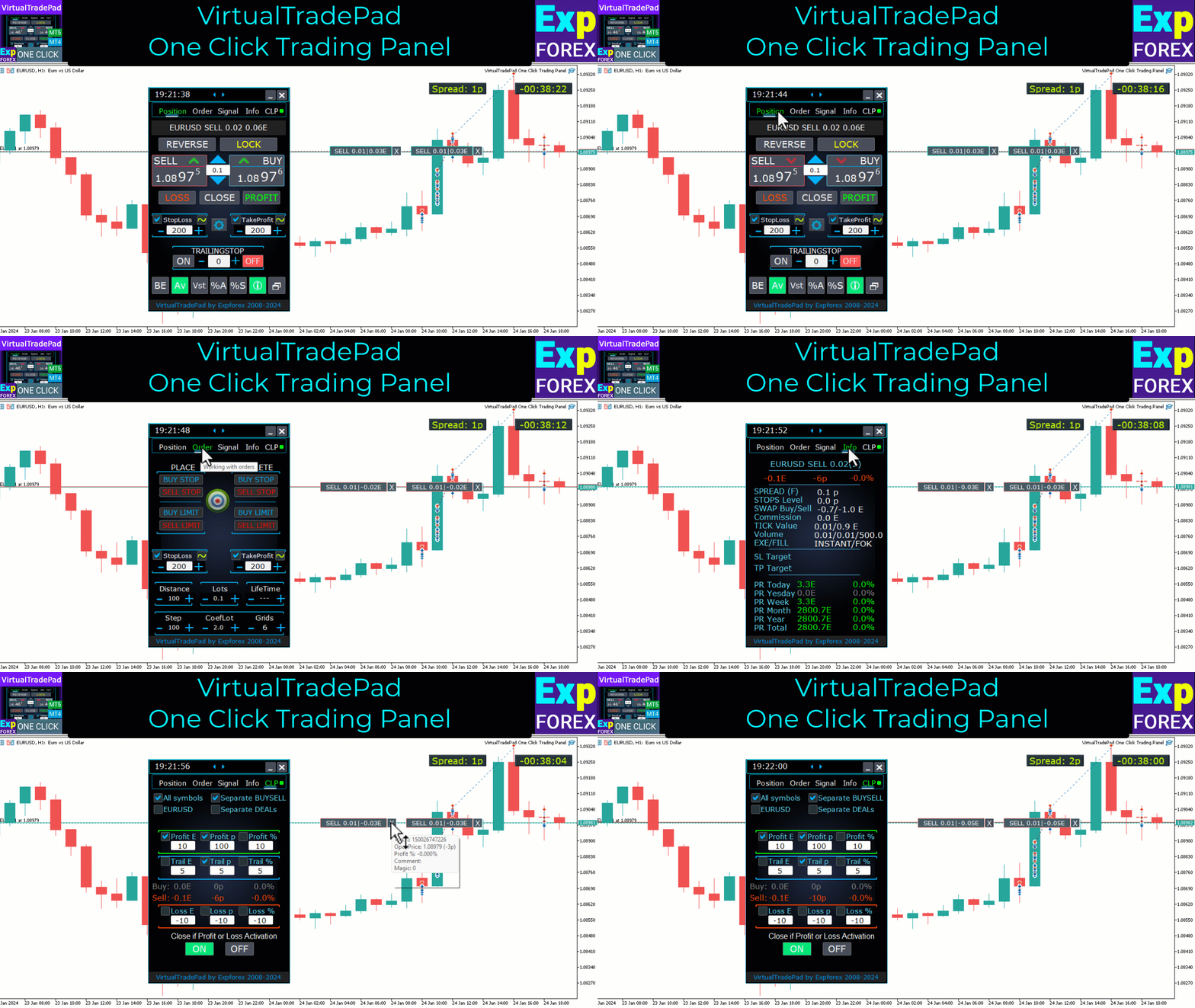
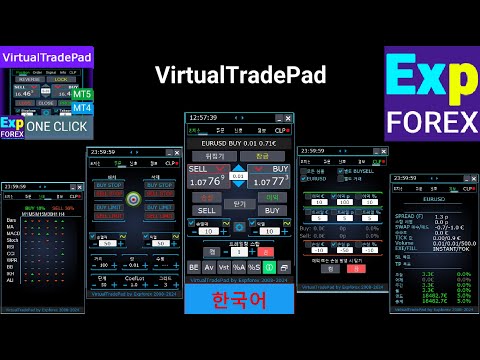
한 번의 클릭으로 거래할 수 있는 거래 패널. 위치 및 주문 작업! 차트 또는 키보드에서 거래.

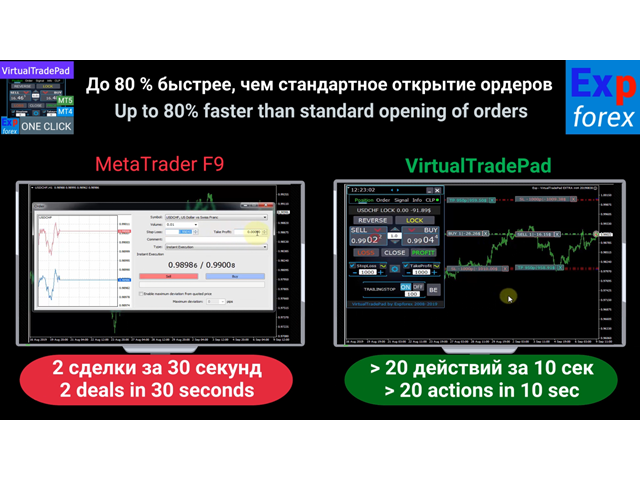
  • 거래 패널을 사용하면 차트에서 클릭 한 번으로 거래하고 표준 MetaTrader 컨트롤보다 30배 빠르게 거래 작업을 수행할 수 있습니다.
  • 거래자의 삶을 더 쉽게 만들고 거래자가 훨씬 빠르고 편리하게 거래 활동을 수행할 수 있도록 도와주는 매개변수 및 기능의 자동 계산.
  • 차트의 무역 거래에 대한 그래픽 팁 및 전체 정보.

열기 및 닫기, 반전 및 잠금, 부분 닫기/오토로트. 가상/실제 손절매/이익 실현/후행 정지/손익분기점, 주문 그리드 ....

MetaТrader 4  의 주요 요청 거래 제어판 : 구매, 판매, 구매 중지, 구매 제한, 판매 중지, 판매 제한, 닫기, 삭제, 수정, 후행 중지, 손절매, 테이크프로프트.

연결

  • 완전 자동 거래의 경우 권장합니다. 더 엑스커스텀
  • 전략 테스터 에서 거래하는 방법을 배우려면 무료 TesterPad 유틸리티를 확인하십시오.

작업 탭

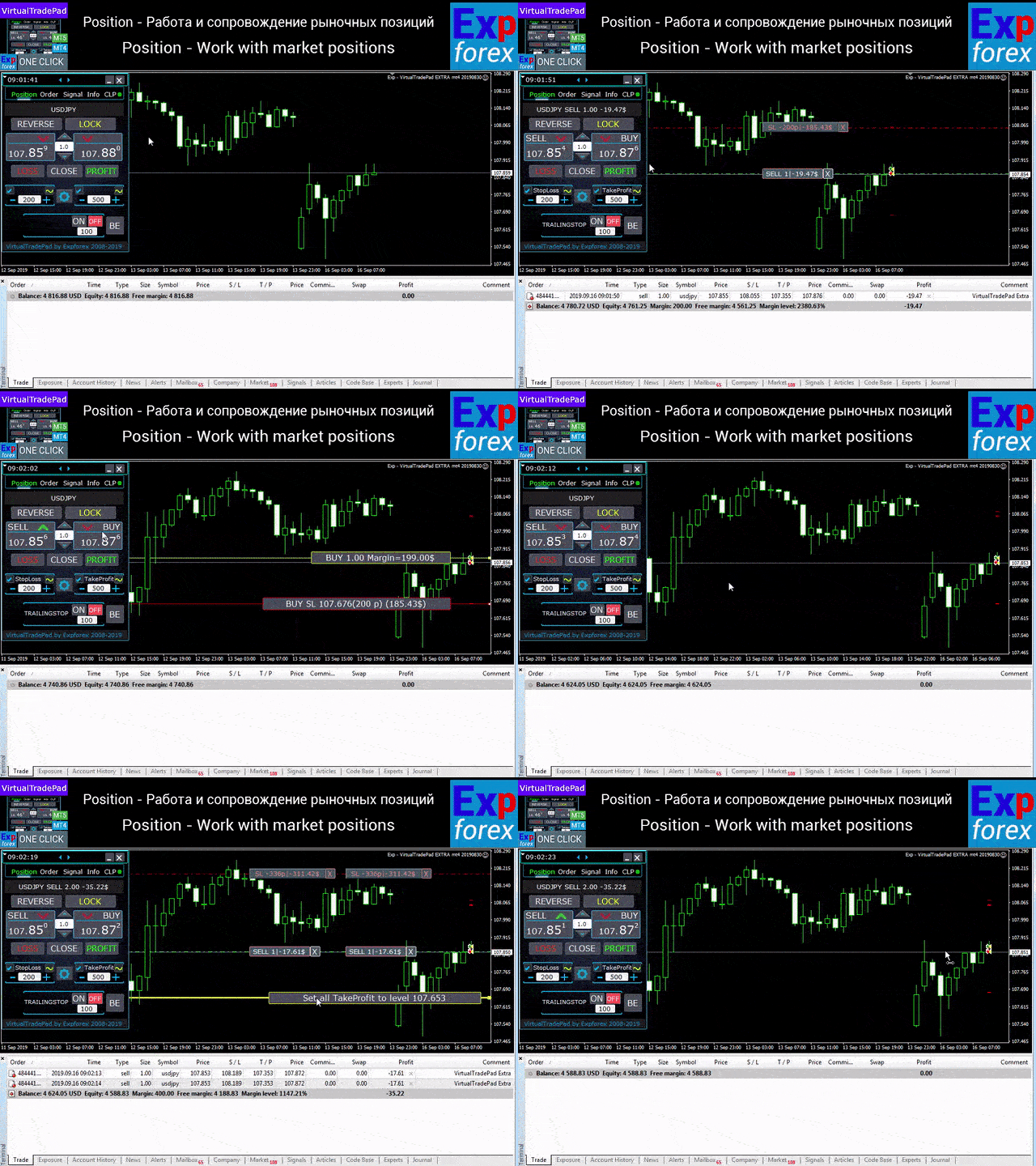
직책 탭 - 직책에 대한 작업:

  • 개장/마감 BUY 및 SELL,
  • 모든 위치를 반대로 하고,
  • 공통 위치를 잠그고,
  • 손절매 / 이익실현 ,
  • 포지션 그리드에 대한 공통 손절매/차익 설정,
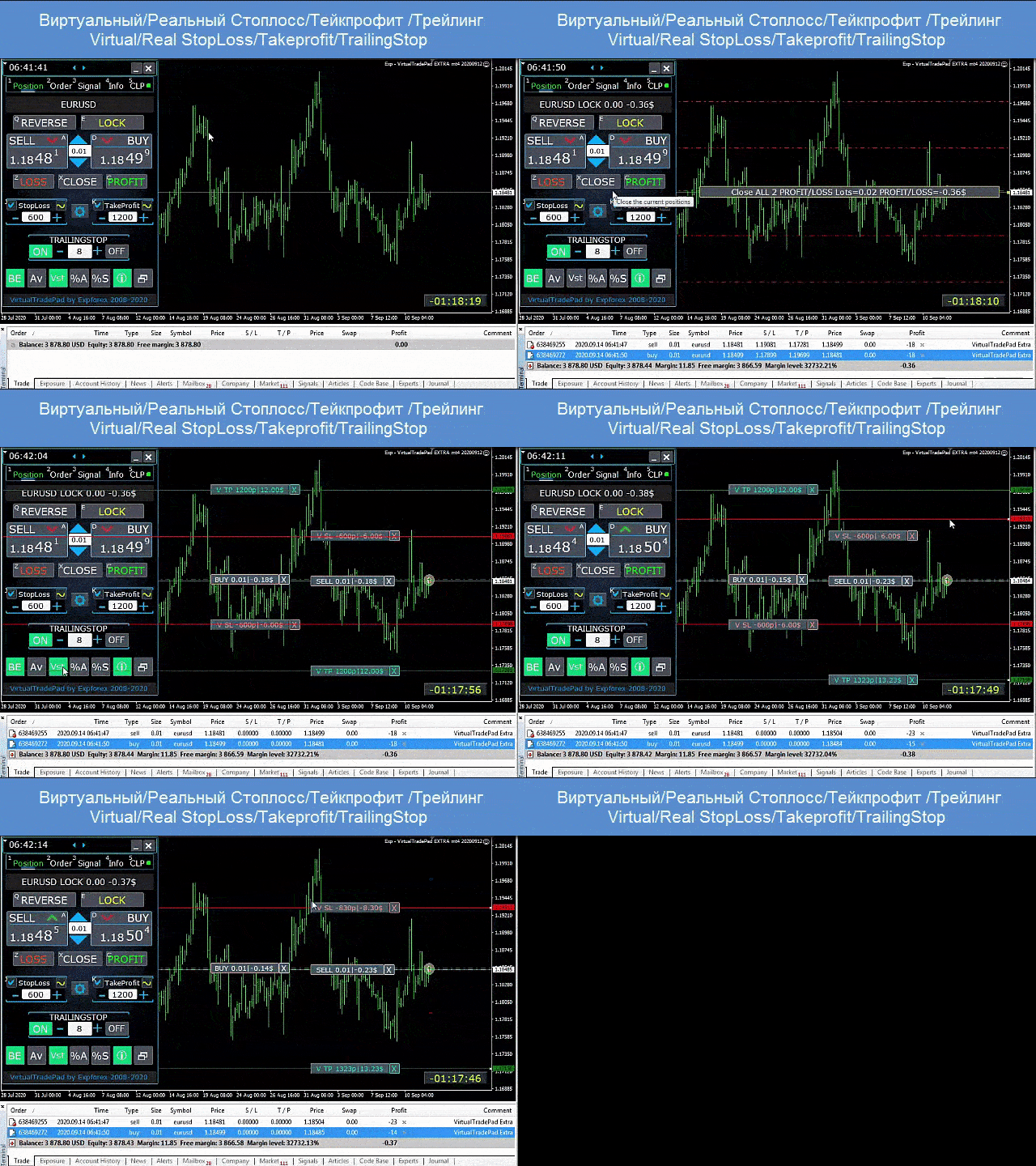
  • 후행 정지,
  • 손익분기점
  • 수익성/손실 포지션만 청산,
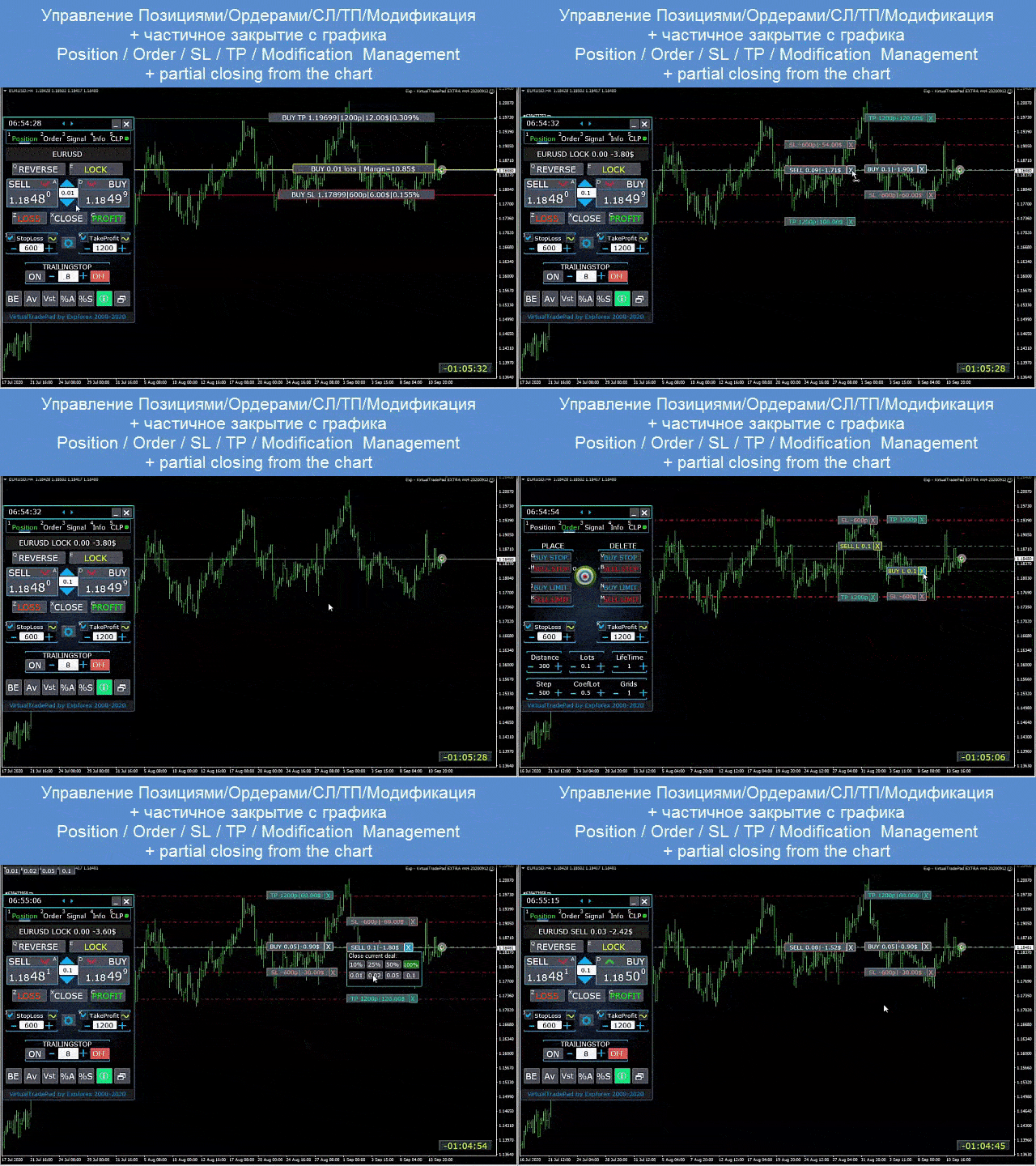
  • 포지션 관리/손절매/터미널 차트에서 차익 실현,
  • 차트 위치의 부분 청산
  • 잔고 또는 설정된 손절매의 백분율로서의 자동 로트/동적 로트
  • 실제/가상 손절매 활성화/비활성화 및 이익 실현
  • 평균 가격의 총 평균 트레일링 스탑/손익분기 위치 그리드

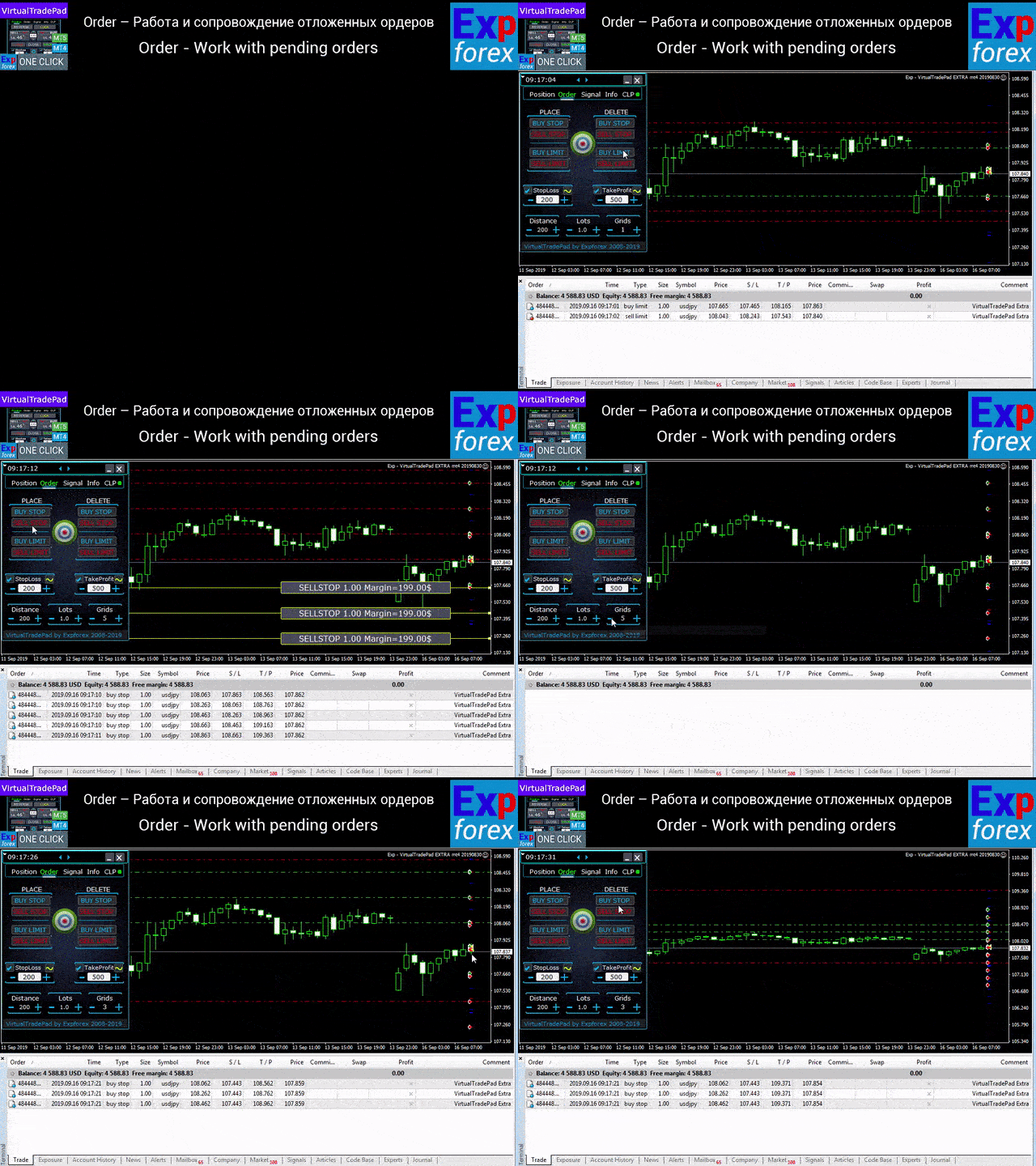
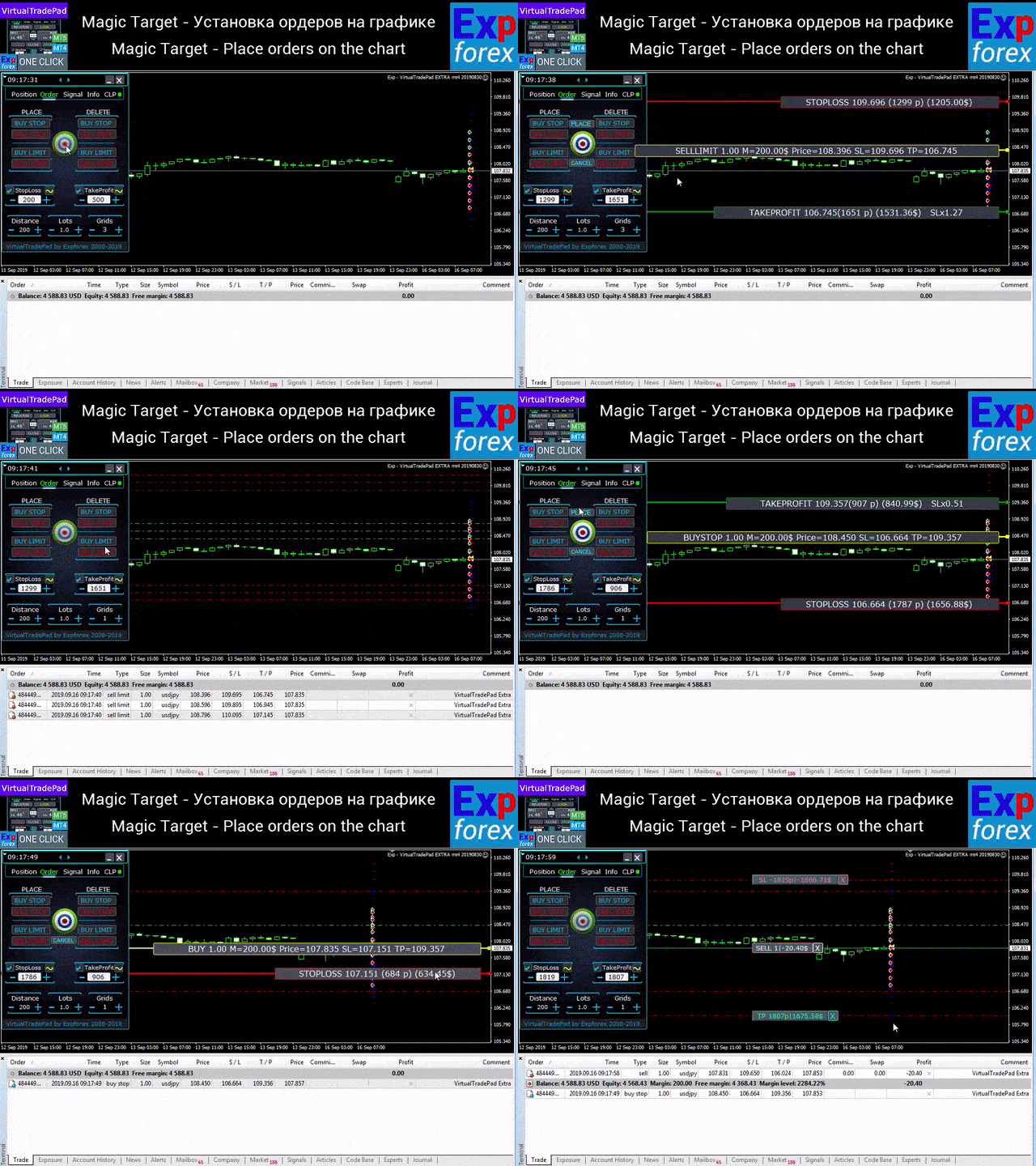
주문 탭 - 보류 및 지정가 주문 작업:

  • 보류/삭제 BuyStop SellStop BuyLimit SellLimit,
  • 로트, 그리드 거리,
  • 차트에서 마우스와 선으로 주문/위치 설정,
  • 전체 주문 시리즈에 대해 공통 손절매/차익 설정,
  • 차트에서 보류 중인 주문 작업! 차트에서 직접 주문 제거, 수정.

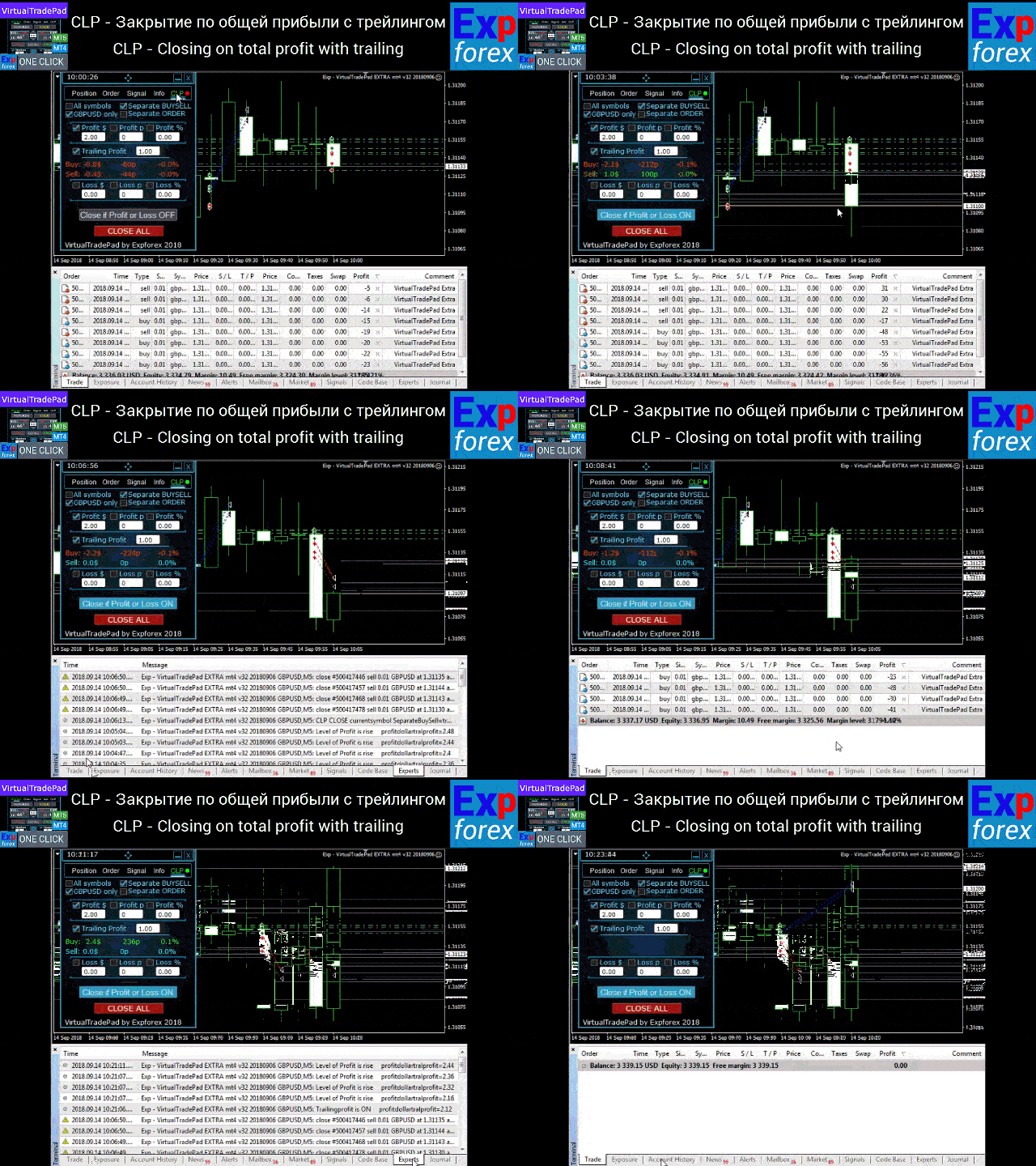
CLP 탭 - 총 손익에 대한 닫기 기능으로 작업합니다.

  • 포인트, 달러, 퍼센트 단위의 총 손익으로 마감합니다.
  • 별도로 닫기 BUY / SELL,
  • 가상 손절매 활성화/별도/일반 포지션의 차익 실현.
  • 포인트, 달러, 퍼센트 단위의 총 이익의 후행 정지.

    신호 탭

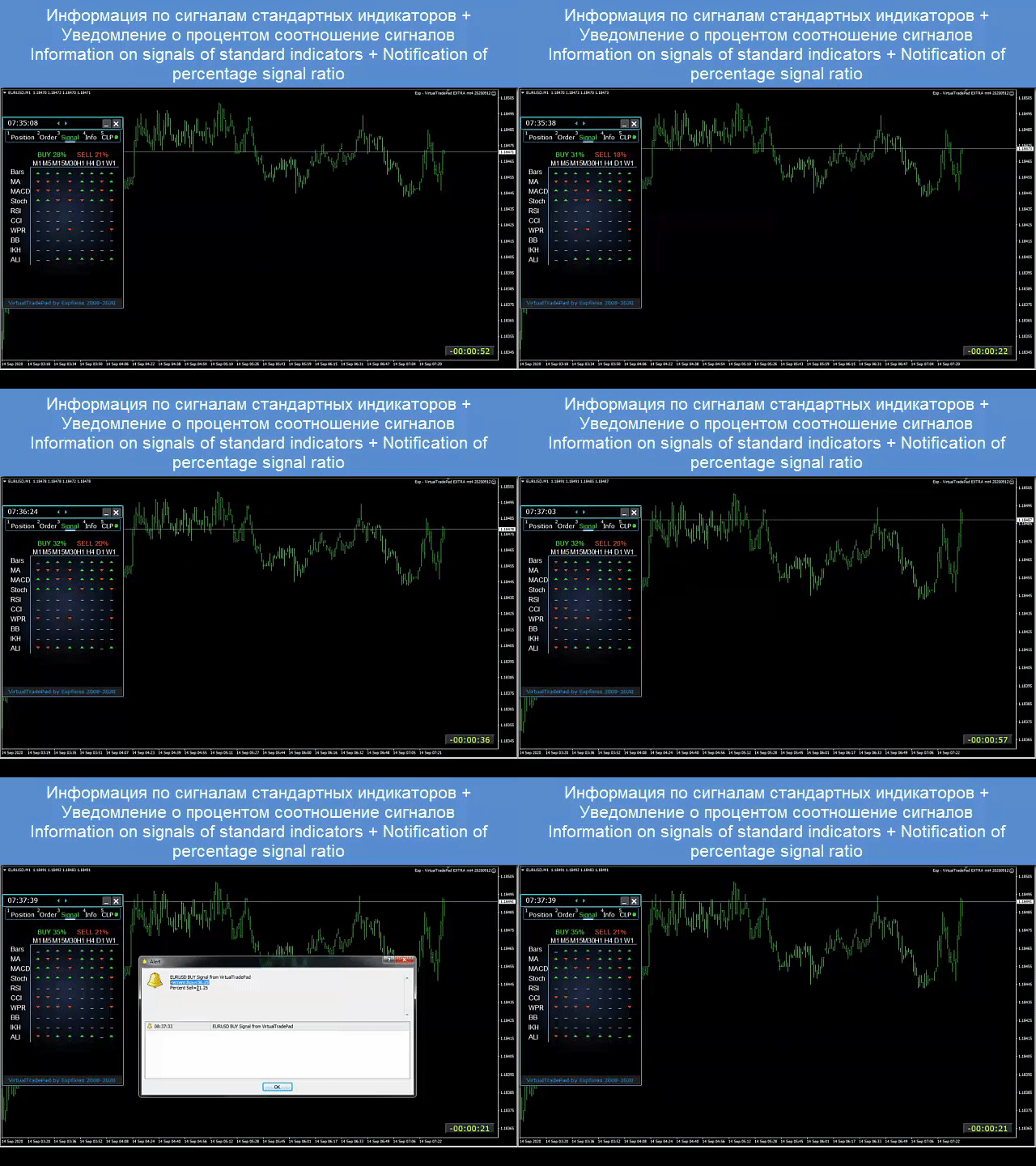
    10개의 표준 표시기와 8개의 타임프레임의 신호를 보여줍니다. 또한 BUY 및 SELL 방향에서 신호의 누적 백분율을 보여줍니다. 누적 신호가 초과되면 자동으로 포지션을 여는 것도 가능합니다.

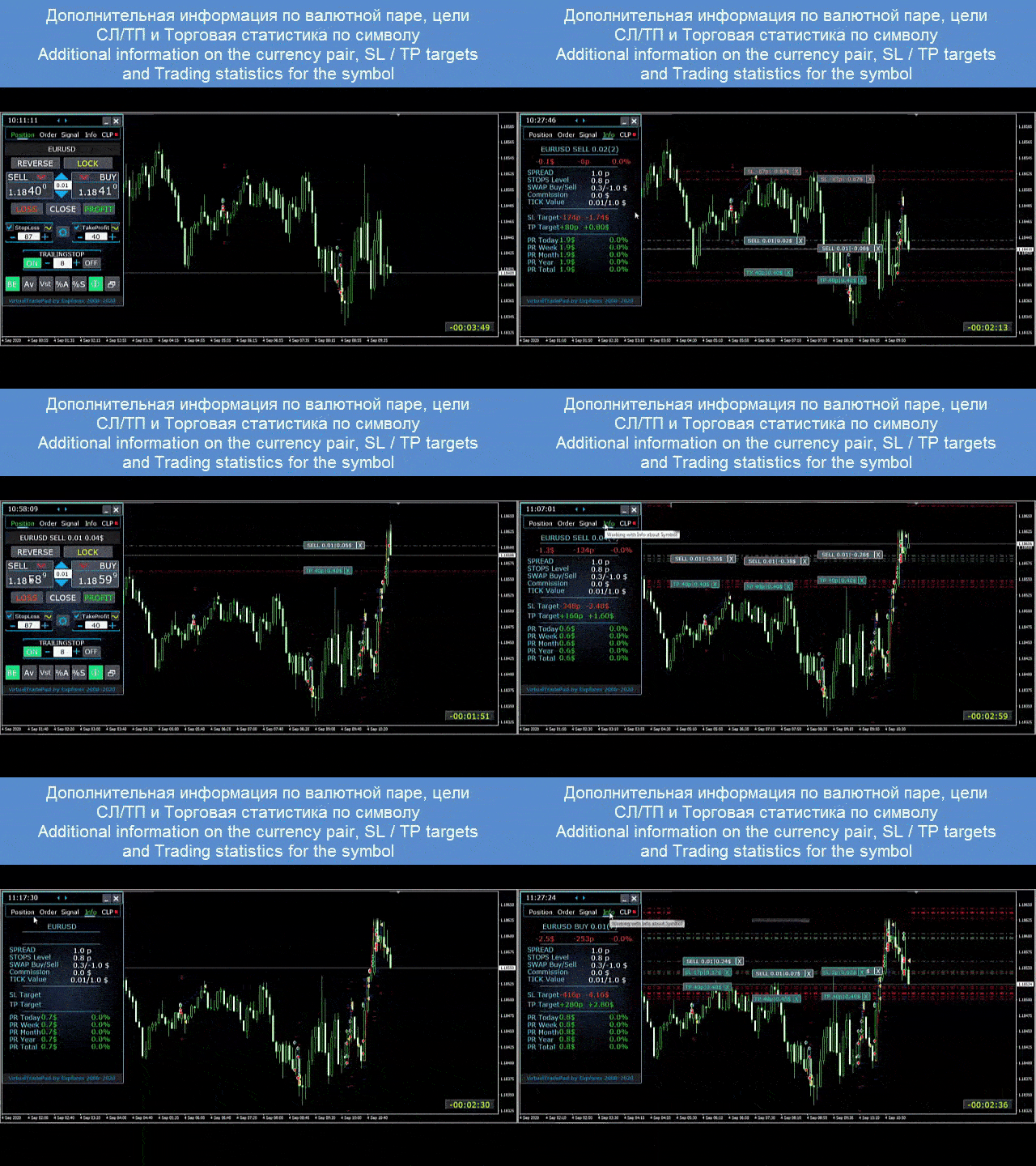
    정보 

    선택한 기호의 현재 사양, 현재 손절매 및 이익실현 목표, 현재 일, 과거 일, 주, 월에 대한 이익을 표시합니다.

    주요 특징:

    • 모든 계정 유형 및 브로커에서 작동합니다.
    • 특정 기술이 필요하지 않습니다.
    • 직관적이고 직관적인 인터페이스.
    • 가장 중요한 기능만.
    • 모든 명령에 대한 빠른 응답.
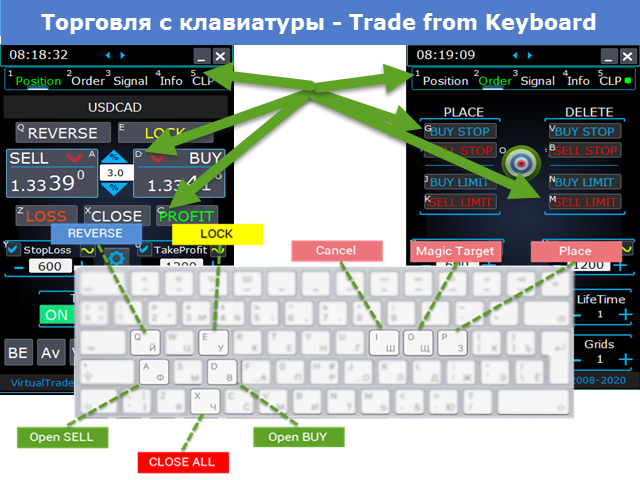
    • 키보드를 사용하여 거래(이렇게 하려면 설정에서 KeyBoardTrade 매개변수를 TRUE로 설정) 또는 차트의 버튼을 사용하십시오.

      #tags Expforex, Vladon, 수동 무역 , 무역 패널 , 패널 무역, 무역 유틸리티 , 자가 테스트 , 이익실현 , 도구 관리 , 관리 도구 , Forex 도우미 , Forex 무역 , 가상 무역 교육 , 빠른 도구, 수동 테스터, 수동 백테스트, 테스터패드 , Tradepad , Virtual Trade Pad, Торговая панель , 무역 패널 #tags Expforex, Vladon, Manual Trade , Trade Panel ,Panel Trade,Trade Utility ,Self Test ,Take Profit ,Tool Management ,Management Tool ,Forex helper ,Forex Trade ,Training virtual trade ,Quick Tool, Manual Tester, Manual Backtest,TesterPad, Tradepad, Virtual Trade Pad, Торговая панель , Trader Assistant ,CLP,CloseifProfitorLoss,Close Profit,Total Profit, Close if Profit or Loss , Trailing Profit, Smart Trailing Stop

      리뷰 89
      Chris Jacobs
      281
      Chris Jacobs 2026.03.26 18:35 
       

      since I've bought the virtual tradepanel my tradng improved alot and the developer just release an update and it is amazing Thanks for you hard work Vladislav and Vladislav is always available to answered questions

      talavera.merced
      66
      talavera.merced 2026.01.09 18:59 
       

      He cambiado ordenador por rotura, trato de instalar en uno nuevo y dice que no quedan activaciones. Si el otro no funciona y no está en uso, no se puede usar el indicador en el nuevo? hay que comprarlo de nuevo?

      hurshid
      33
      hurshid 2024.09.25 20:25 
       

      👍

      추천 제품
      Smartility
      Syed Oarasul Islam
      This utility is designed to help you with your Manual Trading. It allows different ways of closing trades. It can display total number of BUY and SELL orders individually and also their individual profits. It can enter trades without stopl loss and take profits. However upon selecting UseStopLossTakeProfit from the settings it can use best possible stop loss and take profits based on the market conditions. Upon selecting the CloseOppositeTrades  from the settings it can close opposite trades. Fo
      Candlestick Pattern Scanner is a multi-timeframe and multi-symbol dashboard and alert system that checks all timeframes and currency pairs for different candlestick patterns that are formed in them. Scanner is integrated with support and resistance zones so you can check the candlestick patterns in the most important areas of the chart to find breakout and reversal patterns in the price chart. Download demo version   (works on M30,D1,W1 timeframes and 20 symbols of Market Watch window) Read the
      TradePilot
      Hossein Khalil Alishir
      TradePilot Expert Advisor (EA) for MetaTrader 4 TradePilot is a professional and user-friendly Expert Advisor (EA) for MetaTrader 4 (MT4) . It simplifies automated trading , risk management , and trade execution using a smart trading panel . Perfect for beginners and experienced traders looking for a reliable trade manager EA with automated lot size calculation . Key Advantages User-Friendly Trading Panel: Customizable panel with buttons and hotkeys. Smart Risk Management: Supports percen
      Virtual Collider Manual   is a trading assistant with a built-in panel for manual trading. It automatically moves a position opened by a trader in profit using innovative adaptive grid algorithm of averaging and adaptive pyramiding Know-how of the grid algorithm of averaging and pyramiding of the   Virtual Collider Manual   trading robot is based on fully automatic adaptation of all characteristics of dynamically build order grid and pyramid with actual price movement with no need for adjusting
      Panel "panel_kjutaMultiTerminal" for trading. Opens, modifies, closes and deletes trading and pending orders from the chart using virtual lines, buttons and the active information terminal. Automatically opens an order by indicator levels. Hints in Russian, English or disabled. It has a number of functions for trailing virtual Take Profit lines and limit orders. Displays information on the active information terminal.  Hides and includes virtual lines S/L , T / P, buttons "<>","M","X", as well a
      This panel is a part of the SupDem-Pro trading system and is used to search for the best opportunities for any available instruments. Which can be selected manually in the Market Watch (open it with CTRL + M). Using this trading panel in combination with ShvedSupDem-Pro_Zone allows to analyze multiple currency pairs with a single click. The panel allows to load any instruments from the Market Watch, from 6 major currency pairs up to all instruments (480). The indicator parameters Button Width -
      VN Trade Panel II
      Vyacheslav Nekipelov
      4 (1)
      The new version of the trading panel, which now has the ability to separately close Buy and Sell orders, display targets for all orders on the chart, as well as the ability to use the panel to trade with brokers working on the FIFO rule. Also, the new version adds option buttons for separate management of open orders. It has a convenient visualized interface and intuitive control without a lot of additional tabs to which traders have to be distracted and switch their attention. Thanks to this,
      Utility, which draws buy or sell trendlines, which can also become support or resistances able to close any position on the screen Algorithm that calculates the gain of the position, at the touch closure of the line.   The benefits you get: Works on forex and CFD, timeframe from M1 to Weekly. Easy to use screen control panel. Audible warning messages at the touch of the line. Easy to use.
      Risk Commander
      Adisorn Soodkanueng
      Product Name: Risk Commander: Trade Assistant & Strategy Simulator Risk Commander is more than just a trade panel—it is a complete Manual Trading Ecosystem . It serves two powerful purposes: Live Assistant: Helps you execute trades with speed, precision, and perfect risk management in real-time markets. Training Simulator: Fully compatible with the Strategy Tester (Visual Mode) , allowing you to practice manual trading on historical data without risking a cent. NEW! Built-in Simulator Mode S
      About The Secret of Dow The Secret of Dow  is an unique system running on a complex set of algorithms and advanced machine learning computation mechanism to analyze massive sets of data from the neural network, and combines with a special set of price action movement analysis to optimize the trading decision, and it will then predicts the next best possible and potential moves of the Dow Jones (US30) prices. The advantages of The Secret of Dow:- Easy plug and play, worry free with easy param
      TP1 TP2 TP3 panel
      Denis Paul Richard Remanjon
      3.5 (2)
      TP1 TP2 TP3 panel is a simple tool designed for manual trading. It helps you to follow free or paid forex signals with multiple take profit (TP1 TP2 TP3). Fill the fields (volume, SL, TP1, TP2, TP3) in pips or price, press the ‘Sell’ or ‘Buy’ buttons and the program opens 3 identical orders. It also adds TP1 and TP2 lines on chart. When TP1 is reached, the program automatically closes order #1 and moves SL for order #2 and order #3 according to your settings. When TP2 is reached, the program aut
      캔들의 종가를 예측하는 지표입니다. 지표는 주로 D1 차트에서 사용하기 위한 것이. 이 지표는 전통적인 외환 거래와 바이너리 옵션 거래 모두에 적합합니다. 지표는 독립형 거래 시스템으로 사용하거나 기존 거래 시스템에 추가로 사용할 수 있습니다. 이 표시기는 현재 양초를 분석하여 양초 본체 내부의 특정 강도 요인과 이전 양초의 매개변수를 계산합니다. 따라서 지표는 시장 움직임의 추가 방향과 현재 양초의 종가를 예측합니다. 이 방법 덕분에 지표는 단기 및 중장기 거래 모두에 적합합니다. 지표를 사용하면 시장 상황을 분석하는 동안 지표가 생성할 잠재적 신호의 수를 설정할 수 있습니다. 표시기 설정에는 이를 위한 특별한 매개변수가 있습니다. 또한 인디케이터는 새로운 신호에 대해 차트의 메시지 형태, 이메일 및 PUSH 알림 형태로 알릴 수 있습니다. 구매 후 저에게 꼭 써주세요! 나는 당신에게 지표와 거래에 대한 나의 추천을 줄 것입니다! 또한 보너스를 받으세요!
      Trade Assistant Pro 36 in 1
      Makarii Gubaydullin
      4.76 (21)
      다기능 거래 도구: 로트 계산기, 그리드 주문, 위험/보상 비율, 거래 관리자, 수급 구역, 가격 행동 분석 등 데모 버전   |   사용자 설명서 트레이딩 어시스턴트 는 전략 테스터에서 작동하지 않습니다: 이 유틸리티 를 테스트하려면 데모 버전을 여기서 다운로드하세요. 질문 /개선 아이디어/버그 발견 시 저에게 연락 하세요 MT5 버전이 필요하시면, 여기서 사용 가능합니다 거래 프로세스 를 단순화, 가속화, 자동화하세요. 이 대시보드 로 표준 터미널 기능을 확장합니다. 트레이딩 패널 은 모든 거래 상품에서 작동합니다: 외환, 주식, 지수, 암호화폐 등. 1. 새로운 거래 열기 : 로트/위험/위험보상비 계산: 수동 거래의 위험 관리 로트 계산기 (위험 크기 기반 거래량 계산) 위험 계산기 (로트 크기 기반 위험 금액) 위험 보상 비율 그리드 주문: + 동적 거리 옵션 및 분할 로트 옵션 주문 활성화 트리거, + Buy StopLimit/Sell StopLimit: Mt4에서도 가능
      Trade Assistant Risk Calculator is the ultimate all-in-one floating trading panel designed for professional manual traders. It combines Visual Chart Trading , Automatic Risk Calculation , and Advanced Position Management into a single, sleek interface. Stop calculating lot sizes manually. Stop guessing your Risk:Reward ratio. With Trade Assistant Risk Calculator, you simply drag lines on the chart, and the EA calculates the exact lot size to match your risk percentage, equity, or money target.
      자동 주문 및 위험 관리를 위한 유틸리티입니다. 이익을 최대한 활용하고 손실을 제한할 수 있습니다. 트레이더를 위한 실무 트레이더가 만들었습니다. 유틸리티는 사용하기 쉽고 거래자가 수동으로 또는 고문의 도움을 받아 열린 시장 주문과 함께 작동합니다. 매직 넘버로 거래를 필터링할 수 있습니다. 유틸리티는 동시에 원하는 수의 주문을 처리할 수 있습니다. 다음과 같은 기능이 있습니다. 1. 손절매 및 이익 수준 설정 2. 후행 정지 수준으로 거래를 마감합니다. 3. 손익분기점 설정. 유틸리티는 다음을 수행할 수 있습니다. 1. 각 주문에 대해 개별적으로 작업(각 주문에 대해 수준이 별도로 설정됨) 2. 단방향 주문 바스켓으로 작업(레벨은 모든 주문에 대해 공통으로 설정되며 별도로 구매 및 판매) 3. 다방향 주문 바구니로 작업(레벨은 모든 주문에 대해 공통으로 설정되며 BUY 및 SELL 함께) 옵션: STOPLOSS - =-1이 사용되지 않는 경우 핍에서
      VR Cub
      Vladimir Pastushak
      VR Cub 은 고품질 진입점을 얻는 지표입니다. 이 지표는 수학적 계산을 용이하게 하고 포지션 진입점 검색을 단순화하기 위해 개발되었습니다. 지표가 작성된 거래 전략은 수년 동안 그 효율성을 입증해 왔습니다. 거래 전략의 단순성은 초보 거래자라도 성공적으로 거래할 수 있다는 큰 장점입니다. VR Cub은 포지션 개시 지점과 이익 실현 및 손절매 목표 수준을 계산하여 효율성과 사용 편의성을 크게 높입니다. 간단한 거래 규칙을 이해하려면 아래 전략을 사용한 거래 스크린샷을 살펴보세요. 설정, 세트 파일, 데모 버전, 지침, 문제 해결 등은 다음에서 얻을 수 있습니다. [블로그] 다음에서 리뷰를 읽거나 작성할 수 있습니다. [링크] 버전 [MetaTrader 5] 진입점 계산 규칙 포지션 개설 진입점을 계산하려면 VR Cub 도구를 마지막 최고점에서 마지막 최저점까지 늘려야 합니다. 첫 번째 지점이 두 번째 지점보다 빠른 경우, 거래자는 막대가 중간선 위에서 마감될 때까지 기다립니다
      | Fully-automated Smart Money Concept (ICT) inspired trading solution with multi-strategy capabilities | Built by a grid trader >> for grid traders.  This is MT4 version, click  here  for  Blue CARA MT5  (settings and logics are same in both versions)     Real monitoring signal  -->  Cara Gold Intro Blue CARA EA   ('CARA') - short for  C omprehensive  A lgorithmic R esponsive A dvisor is a next-gen  multi-currency    multi-timeframe  EA base on the widely known (and perhapse most popular) Inn
      The analyzer panel allows traders to add the pending order grid (Buy Limit, Sell Limit, Buy Stop, Sell Stop) quickly and efficiently.   Parameters stop mode - select stop setting mode every order - stop levels are set for each order separately position as - common stop levels for all orders order type - select pending order type Buy Limit Sell Limit Buy Stop Sell Stop magic - set a magic number for open orders if necessary. If position as mode is enabled, stop levels are corrected for all orders
      Savage Trades M.T.A.  is a Manual Trade Assistant expert advisor. This EA contains self-adaptive market algorithm, which uses price action patterns and standard trading indicators. 1.) Quickly Execute trade entries with the click of a button with your own predetermined Stop Loss and Take Profit. 2.) Non-Repainting retracement and reversal warnings indicated by arrows and system alert. 3.) Auto adjusting Support and Resistance levels with strength indicated by color shade. 4.) Auto adjusting Fibo
      The Infinity Expert Advisor is a scalper. When the resistance and support levels are broken, trades are opened in the direction of the price movement. Open positions are managed by several algorithms based on the current market situation (fixed stop loss and take profit, trailing stop, holding positions in case of trend indication, etc.). Requirements for the broker The EA is sensitive to spread, slippages and execution quality. It is strongly recommended not to use the EA for currencies with s
      Trading panel for manual trading. Has a fairly wide functionality. Allows you to automatically calculate the order size, open both market and pending orders. It has a wide range of options for closing orders, it is possible to partially close orders, close orders after reaching a certain profit or loss, separately close profitable and unprofitable, buy and sell, as well as pending orders. The panel also contains a simple implementation of a grid of pending orders, reverse and lock functions, tr
      Vizzion
      Joel Protusada
      Vizzion is a fully automated scalping Expert Advisor that can be run successfully using GBPJPY currency pair at H1 timeframe. Very Important This Expert Advisor can not run with any EAs in the same account. As part of the money management plan, it calculates and monitors the Margin Level % and assumes that all open trades are created by it. If you want an Expert Advisor that trades in a daily basis, this EA is not for you because using this requires a patience to wait for a few days or weeks on
      Trade with Gann on your side!! MASTER CIRCLE 360 CIRCLE CHART, originally created by Gann admitted that this is “The Mother of all charts”. It is one of the last studies that this great trader left for us. The numeric tab le is apparently quite simple like all the tables and is based on square numbers, the SQUARE OF 12 and is by evolution, one of the most important square numbers. Here we can find CYCLE, PRICE AND TIME thanks to angles and grades, to show past and future support and resistance.
      "Impulses and Corrections 4" is created to help traders navigate the market situation. The indicator shows multi-time frame upward and downward "Impulses" of price movements. These impulses are the basis for determining the "Base" , which is composed of zones of corrections of price movements, as well as "Potential" zones for possible scenarios of price movement. Up and down impulses are determined based on a modified formula of Bill Williams' "Fractals" indicator. The last impulse is always "U
      PatternMMB
      Mikhail Bilan
      The PatternMMB trading indicator finds the most common candlestick analysis patterns and provides trading recommendations based on them. The PatternMMB trading indicator is designed to search for candlestick patterns on the price chart and issue trading recommendations depending on the nature of the found candlestick pattern. It is also possible to send sound notifications when all or any of the selected patterns appear, with an explanation of the pattern and its interpretation. In addition, th
      Indicator function This index buys and sells according to the color, using time is one hour,Please run the test on a 30-minute cycle It is best to use 1H for testing   About update questions In order to be more suitable for market fluctuations, the company regularly updates the indicators   Product cycle and trading time applicable to indicators Applicable mainstream currency pair EUR/USD GBP/USD NZD/USD AUD/USD USD/JPY USD/CAD USD/CHF Applicable mainstream cross currency pair EUR/JPY EUR/GBP E
      Trading Helper
      Siarhei Vashchylka
      Trading Helper - Program for trading and money management. It works with pending and immediate orders, and is equipped with trailing stop, breakeven and take profit functions. Manual (Be sure to read before purchasing) Advantages 1. Comfortable trading in a few clicks. Immediate and pending orders are available in the panel 2. Fixed percent method. The panel can select the lot size based on a predetermined risk 3. Trading with a fixed lot. In a few clicks, select a lot and open a Trade 4. Posi
      목표 수익 도달 시 자동 수익 실현 EquityTargetCloser   — 는 MetaTrader 5용 유틸리티 전문가 어드바이저(EA)로,   순자산(Equity)이 현재 잔고를 지정된 수익 금액만큼 초과하면 모든 시장 포지션을 청산하고 예약 주문을 삭제합니다. 모든 포지션을 청산한 후 목표는 자동으로 상향 조정됩니다. 새 임계값 = 새 잔고 + 지정된 수익. EA는 거래를 시작하지 않고 기존 포지션만 관리하여 수익을 확실하게 고정하고 축적된 자금을 보호합니다. MT5-version:  https://www.mql5.com/en/market/product/169839 작동 방식 전문가 어드바이저는   순자산(Equity)   을 동적 목표와 지속적으로 비교합니다. 목표 =   현재 잔고(Balance) + plusMoney   (미국 달러). 순자산이 이 금액 이상이 되면 보호 기능이 작동합니다.   모든 시장 포지션   (모든 심볼)을 청산합니다. 매개변수   Delete p
      The “ SG Opposit Grid ” EA works with Virtual TakeProfit(or real) - at the trader's choice. The EA looks for signals to enter the market along the trend on D1 and H1 . If the signals coincide, the EA on the working period ( М1 - М30 depends on the trader's choice) looks for a confirming pattern and opens a position in the direction of the trend. If, after opening a position, the price moves in a profitable direction, the position is closed upon reaching the virtual TProfit with a profit. If the
      이 제품의 구매자들이 또한 구매함
      Trade Manager EA에 오신 것을 환영합니다. 이 도구는 거래를 보다 직관적이고 정확하며 효율적으로 만들기 위해 설계된 궁극적인 리스크 관리 도구 입니다. 단순한 주문 실행 도구가 아닌, 원활한 거래 계획, 포지션 관리 및 리스크 제어를 위한 종합 솔루션입니다. 초보자부터 고급 트레이더, 빠른 실행이 필요한 스캘퍼에 이르기까지 Trade Manager EA는 외환, 지수, 상품, 암호화폐 등 다양한 시장에서 유연성을 제공합니다. Trade Manager EA를 사용하면 복잡한 계산은 이제 과거의 일이 됩니다. 시장을 분석하고 진입, 손절 및 익절 수준을 차트의 수평선으로 표시한 후 리스크를 설정하면, Trade Manager가 이상적인 포지션 크기를 즉시 계산하고 SL 및 TP 값을 실시간으로 표시합니다. 모든 거래가 간편하게 관리됩니다. 주요 기능: 포지션 크기 계산기 : 정의된 리스크에 따라 거래 크기를 즉시 결정합니다. 간단한 거래 계획 : 진입, 손절, 익절을 위한
      The product will copy all telegram signal to MT4   ( which you are member  ) , also it can work as remote copier.  Easy to set up, copy order instant, can work with almost signal formats, image signal, s upport to translate other language to English Work with all type of channel or group, even channel have "Restrict Saving Content", work with  multi channel, multi MT5 Work as remote copier: with signal have ticket number, it will copy exactly via ticket number. Support to backtest signal. How to
      ManHedger MT4
      Peter Mueller
      5 (2)
      THIS EA IS A SEMI-AUTO EA, IT NEEDS USER INPUT. Manual & Test Version Please TEST this product before   BUYING  and watch my video about it. Contact me for user support or bug reports, or if you want the MT5 version! MT5 Version I do not guarantee any profits or financial success using this EA. With this Expert Advisor, you can: Implement your own   Zone Recovery   strategy to capitalize on trending markets. Create   Grid   trading strategies, to profit from ranging markets. Place orders easil
      Copy Cat More Trade Copier MT4 (복사 고양이 MT4) 는 단순한 로컬 트레이드 카피어가 아니라, 오늘날의 거래 환경을 위해 설계된 완전한 리스크 관리 및 실행 프레임워크입니다. Prop Firm 챌린지부터 개인 계좌 관리까지, 강력한 실행력, 자본 보호, 유연한 설정, 고급 거래 처리 기능을 통해 모든 상황에 적응합니다. 이 카피어는 Master(송신자) 와 Slave(수신자) 모드 모두에서 작동하며, 실시간으로 시장가/지정가 주문, 거래 수정, 부분 청산, Close By 작업을 동기화합니다. 데모 및 실계좌 모두 호환되며, 거래용 비밀번호 또는 투자자 비밀번호로도 사용할 수 있습니다. Persistent Trade Memory 기술을 통해 EA, 터미널, VPS가 재시작되더라도 거래가 복원됩니다. 여러 Master와 Slave를 동시에 관리할 수 있으며, 브로커 간 차이는 접두사/접미사 자동 감지 또는 심볼 매핑으로 처리됩니다. 매뉴얼/설정: Copy C
      Trade Manager MT4 DaneTrades
      Levi Dane Benjamin
      4.09 (11)
      거래 관리자는 위험을 자동으로 계산하는 동시에 거래를 빠르게 시작하고 종료하는 데 도움을 줍니다. 과잉 거래, 복수 거래 및 감정 거래를 방지하는 데 도움이 되는 기능이 포함되어 있습니다. 거래를 자동으로 관리할 수 있으며 계정 성과 지표를 그래프로 시각화할 수 있습니다. 이러한 기능은 이 패널을 모든 수동 거래자에게 이상적으로 만들고 MetaTrader 4 플랫폼을 향상시키는 데 도움이 됩니다. 다중 언어 지원. MT5 버전  |  사용자 가이드 + 데모 트레이드 매니저는 전략 테스터에서 작동하지 않습니다. 데모를 보려면 사용자 가이드로 이동하세요. 위기 관리 % 또는 $를 기준으로 위험 자동 조정 고정 로트 크기 또는 거래량과 핍을 기반으로 한 자동 로트 크기 계산을 사용하는 옵션 RR, Pips 또는 Price를 사용한 손익분기점 손실 설정 추적 중지 손실 설정 목표 달성 시 모든 거래를 자동으로 마감하는 최대 일일 손실률(%)입니다. 과도한 손실로부터 계정을 보호하고 과도한
      Trader Evolution MT4
      Siarhei Vashchylka
      5 (2)
      " Trader Evolution " - A utility designed for traders who use wave and technical analysis in their work. One tab of the utility is capable of money management and opening orders, and the other can help in making Elliott wave and technical analysis. Manual (Be sure to read before purchasing) | Version for MT5 Advantages 1. Trading in a few clicks. Immediate and pending orders are available in the panel 2. Money management. The program automatically selects the appropriate lot size 3. Simplifies
      Telegram to MT4 Coppy
      Sergey Batudayev
      3.75 (8)
      Telegram에서 MT4로:   최고의 신호 복사 솔루션 최첨단 유틸리티인   Telegram to MT4를   사용하여 거래를 간소화하세요. DLL 없이도 Telegram 채널과 채팅에서 MetaTrader 4 플랫폼으로 거래 신호를 직접 복사할 수 있습니다. 이 강력한 솔루션은 탁월한 정밀도와 맞춤 설정 옵션을 통해 원활한 신호 실행을 보장하여 시간을 절약하고 효율성을 높여줍니다. [ Instructions and DEMO ] 주요 특징 직접 Telegram API 통합 전화번호와 보안 코드를 통해 인증하세요. 사용자 친화적인 EXE 브리지를 사용하여 채팅 ID를 손쉽게 가져오고 관리하세요. 여러 채널/채팅을 추가, 삭제, 새로 고침하여 동시에 신호를 복사합니다. 고급 필터를 사용한 신호 파싱 사용자 정의 예외 단어(예: "보고서", "요약")가 포함된 원치 않는 신호를 건너뜁니다. 유연한 SL 및 TP 형식을 지원합니다: 가격, 핍 또는 포인트. 신호가 가격 대신 지점을 지정
      EchoTrade Telegram to MT4 Copier
      Perpetual Chinemerem Vincent
      5 (2)
      EchoTrade Telegram to MT5 Copier Seamless, Instant, and Reliable Signal Copying - Direct from Telegram to MetaTrader 4! The product does not run in the strategy tester but you can get free trial version   here  for testing before purchase. Tired of manually executing trades from Telegram signals? EchoTrade automates the process, instantly copying trades from any Telegram channel or group directly into your MT5 account—accurately, efficiently, and without delay. Key Features: Universal Compatib
      Comprehensive on chart trade panel with the unique ability to be controllable from mobile as well. Plus has a library of downloadable configuration, e.g. exit rules, extra panel buttons, pending order setup and more. Please see our product video. Works with all symbols not just currency pairs. Features On chart panel plus controllable from free app for Windows, iPhone and Android Built-in script engine with library of downloadable configuration, e.g. add 'Close All Trades in Profit' button, exit
      MT4 Professional Copy Trading System (MT4 버전) 산업급 초고속 LOCAL 트레이드 코피어 . 프로 트레이더/시그널 제공자/멀티계정 운영용. 산업급 LOCAL 아키텍처 동일 Windows 환경(같은 PC/같은 Windows VPS)에서 동작. 저지연, 높은 동기화, 24/7 무감시 운용. Master / Slave / Self + Cross Copy (MT4 ↔ MT5) Master/Slave/Self-Copier 지원. MT4→MT4, MT4→MT5, MT5→MT4, MT5→MT5. 중요: MT4↔MT5 크로스 카피는 MT4+MT5 두 버전 필요. 동작 방식 Master의 오픈/수정(SL/TP)/청산을 실시간 복제. 브로커 접두/접미 심볼 차이 자동 매핑. 핵심 판매 포인트 초고속 복제, 유연한 로트(고정/배수/Balance·Equity 비율), 심볼 매핑, 선택형 리스크 보호, 장기 안정(로그/정합성 체크).
      Riskless Pyramid
      Snapdragon Systems Ltd
      5 (1)
      Introduction This powerful MT4 trade mangement EA offers a way potentially to aggressively multiply trade profits in a riskfree manner. Once a trade has been entered with a defined stoploss and take profit target then the EA will add three pyramid add-on trades in order to increase the overall level of profit. The user sets the total combined profit target to be gained if everything works out. This can be specified either as a multiple of the original trade profit or as a total dollar amount. Fo
      TradeMirror 은 MT4/MT5 플랫폼을 위해 특별히 설계된 현지화된 주문 복사 도구로, 실시간 거래 작업을 동기화합니다. 제품 장점 금융 소프트웨어의 보안성, 안정성 및 개인정보 보호에 대한 높은 표준 요구사항을 기반으로, 우리는 세 가지 핵심 차원에서 심층 최적화를 수행했습니다: 직관적이고 간결한 그래픽 인터페이스로 누구나 쉽게 조작 가능 강화된 개인정보 보호 메커니즘으로 금융 환경의 민감한 데이터 격리 요구 충족 밀리초 단위의 주문 동기화로 신호 분배의 정확성과 지연 없음 보장 MT4/MT5 양 플랫폼과 완전히 호환되어 다양한 거래 환경에 원활하게 적용 지능형 시스템 모니터링과 이메일 알림을 결합하여 거래 안정성을 실시간으로 보장 핵심 기능 특성 제품은 다음과 같은 전문적인 복사 기능을 탑재하고 있습니다: 다중 계정 병렬 연결 이메일 실시간 푸시 맞춤형 로트 크기 조정 신호 필터링 메커니즘 역방향 거래 모드 손절매/이익실현 재설정 무료 체험 절차 정식 구매 전, 다음 단
      Dashboard.mq4 - 간단한 거래 관리자 수동 거래를 즐기고 거래를 간편하게 관리할 수 있는 방법을 찾는 트레이더를 위해 설계된 이 강력한 MQL4 유틸리티는 거래 효율성을 향상시켜 실시간 대시보드를 통해 거래를 관리할 수 있도록 도와줍니다. MetaTrader에 원활하게 통합되어 로트 크기 계산과 리스크 지표 추적을 간편하게 수행합니다. 주요 기능: 리스크 및 마진 표시 : 실시간 로트 크기, 마진 요구 사항 및 승률 계산을 통해 정확한 거래 결정을 지원합니다. 거래 관리 버튼 : 매수/매도 주문을 배치하고, 거래(모두, 수익성 있는 거래 또는 손실 거래)를 종료하거나, 이익 실현 및 손절매를 취소하는 버튼을 한 번의 클릭으로 제공합니다. 사용자 정의 가능한 승률 추적 : 현재 월, 최근 거래 또는 전체 히스토리와 같은 다양한 기간에 걸쳐 거래 성과를 분석할 수 있습니다. 인터랙티브하고 직관적인 UI : 빠른 액션을 위한 사용자 정의 가능한 버튼이 있는 명확하고 쉽게 탐색할
      Length Movement
      Pavel Verveyko
      5 (1)
      Measures the length of the selected movement in points, shows the duration of the movement, as well as the speed of movement.   Outputs the average value of each dimension. It is designed to calculate the expected target based on typical market movements. The intended goal will provide information about the ratio of the stop size to the possible profit and will allow you not to open positions with a small expected profit. It will also help you determine the point at which it is more logical to c
      Ultimate Trade Copier
      BLAKE STEVEN RODGER
      5 (2)
      This trade copy utility allows you to instantly and seamlessly replicate and synchronize unlimited orders from multiple master accounts to multiple slave accounts on your local machine. You can create custom channels (or portfolios) with advanced filtering capabilities to copy from multiple master accounts to multiple slave accounts. Moreover, you can tailor these channels with a range of lot sizing and trade condition options to ensure that copied trades outperform the original source. You can
      Auto Trade Copier
      Vu Trung Kien
      4.76 (84)
      Auto Trade Copier is designed to copy trades to multiple MT4, MT5 and cTrader accounts/terminals with 100% accuracy. The provider and receiver accounts must be on the same PC/VPS. With this tool, you can copy trades to receiver accounts on the same PC/VPS. All trading actions will be copied from provider to receiver perfectly. This version can be used on MT4 accounts only. For MT5 accounts, you must use Auto Trade Copier for MT5 . Reference: - For MT4 receiver, please download Trade Receiver Fre
      Ultimate Extractor - Professional Trading Analytics for MT4 Ultimate Extractor transforms your MetaTrader 4 trading history into actionable insights with comprehensive analytics, interactive charts, and real-time performance tracking. Ability to combine multiple accounts and MT4 and MT5 into a single dashboard. What It Does Automatically analyzes your MT4 trading history across all Expert Advisors and generates detailed HTML reports with interactive visualizations. Tracks live performance metric
      The product will copy all  Discord  signal   to MT4   ( which you are member  ) , also it can work as remote copier.  Easy to set up. Work with almost signal formats, support to translate other language to English Work with multi channel, multi MT4. Work with Image signal. Copy order instant, auto detect symbol. Work as remote copier: with signal have ticket number, it will copy exactly via ticket number. How to setup and guide: Let read all details about setup and download Discord To MetaTrader
      Automate Risk Management with Smart Trailing Stop Manager for MetaTrader 4 Looking for MetaTrader 5 version? I t is available separately in the Market:   Smart Trailing Stop Manager MT5 Full User Guide    –  Public channel:   CLICK HERE Struggling with manually adjusting stops and securing profits? Smart Trailing Stop Manager MT4 is an intelligent utility for MetaTrader 4 that automates trailing stops, break-even management, partial closes, and auto SL. Optimized specifically for MT4 users, it e


      Crystal Trade Manager PRO – MT4 고급 리스크 및 트레이드 관리 시스템 무료 버전: https://www.mql5.com/en/market/product/150632 개요 Crystal Trade Manager PRO(CTM)는 MetaTrader 4를 위한 전문급 거래 실행 및 리스크 관리 유틸리티입니다. 엄격한 실행, 견고한 자본 보호, 그리고 똑똑한 자동화를 필요로 하는 트레이더를 위해 설계되었습니다. 본 시스템은 계좌 리스크를 관리하고, 자본(EQ)을 보호하며, 일일 제한을 적용하고, SL/TP를 자동으로 설정하며, 전문급 기능을 갖춘 초고속 원클릭 트레이딩 패널을 제공합니다. Prop Firm 챌린지, 데이트레이딩, 스캘핑, 포트폴리오 매니저에게 최적화되어 있습니다. MT5 버전도 제공됩니다. 주요 기능 1. 고급 리스크 및 드로우다운 보호 기능 하루 드로우다운을 1%~70% 범위에서 설정 가능 설정한 한도를 초과할 경우 모든 포지션 즉시 종료 조건
      Ultimate Trailing Stop EA

      BLAKE STEVEN RODGER
      4.33 (15)
      This EA Utility allows you to manage (with advanced filtering) unlimited open orders (manual or EA) with 16 trailing stop methods: fixed, percent, ATR Exit, Chandelier Exit, Moving Average, Candle High Low Exit, Bollinger Bands, Parabolic, Envelope, Fractal, Ichimoku Kijun-Sen, Alligator, Exit After X Minutes or Bars, RSI and Stochastic. The trailing stop can be either real or virtual, and you can exit fully or with a partial close percent on touch or bar close.  Moreover, you can add (overrid
      Effortlessly calculate lot sizes and manage trades to save time and avoid costly errors The Trade Pad Pro EA is a tool for the Metatrader Platform that aims to help traders manage their trades more efficiently and effectively. It has a user-friendly visual interface that allows users to easily place and manage an unlimited number of trades, helping to avoid human errors and enhance their trading activity. One of the key features of the Trade Pad Pro EA is its focus on risk and position manageme
      Unlimited Trade Copier Pro is a tool to copy trade remotely to multiple MT4, MT5 and cTrader accounts at different computers/locations over internet. This is an ideal solution for you if you are a signal provider and want to copy your trades to other receivers globally on your own rules. One provider can copy trades to multiple receivers and one receiver can get trade from multiple providers as well. The provider can even set the subscription expiry for each receiver, so that receiver will not b
      --------------Welcome to use [MQL5 Signal Analyze Master]------------------  Function: Draw order tracks of MQL5 MT4 and MT5 signal on MT4 chart. [Using guide] 1.Use it as Experts. 2.Download history record from MQL5 signal(MT4 signal or MT5 signal).  3.Paste history record file below "MQL4/Files/" 4.Load [Signal Analyze Master] on the symbol chart what you want to analyze. 5.Paste the history record file name to parameter 'FileName' 6.Select  SignalType  match the history you download on MT4
      Custom Alerts AIO: 다중 시장을 동시에 모니터링 – 설정 없이 즉시 사용 가능 개요 Custom Alerts AIO 는 복잡한 설정 없이 즉시 사용할 수 있는 통합 시장 모니터링 도구입니다. FX Power, FX Volume, FX Dynamic, FX Levels, IX Power 등 필요한 모든 지표가 내장되어 있어 별도의 설치나 구성 없이 알림 기능을 바로 사용할 수 있습니다. 차트 그래픽 없이 작동하며, Forex, 금속, 지수, 암호화폐 등 주요 자산군을 모두 지원합니다. 주식(Symbols)은 별도로 입력하여 추가할 수 있으나, MetaTrader에서는 일반적으로 제한적으로만 사용됩니다. 1. 왜 Custom Alerts AIO를 선택해야 하나요? 추가 라이선스가 필요 없습니다 • 모든 Stein Investments 지표가 내장되어 있어 별도 구매가 필요 없습니다. • 즉시 알림 기능을 시작할 수 있어 빠르고 간편합니다. 모든 시장을 하나의 도구로
      Ultimate Drawdown Recovery MT4
      Freedom Uzochukwu Nnadi
      1 (1)
      The Ultimate Drawdown Recovery & Trade Protection EA for MT4! Your Trades Deserve a Second Chance. Give Them This Soldier. Struggling with floating losses or sudden drawdowns that threaten your account? Stop watching your trades drown in red and let the Ultimate Drawdown Recovery EA (UDR) recover, protect, and empower your trading strategy automatically. What Is UDR? UDR is an ultra-smart, lightning-fast MT4 Expert Advisor designed to recover drawdowns, secure break-even exits, manage trades wi

      EasyInsight AIO MT4
      Alain Verleyen
      4 (2)
      EASY Insight AIO – 스마트하고 손쉬운 트레이딩을 위한 올인원 솔루션 개요 외환, 금, 암호화폐, 지수, 심지어 주식까지 — 전 시장을 몇 초 만에, 수동 차트 확인이나 복잡한 설치, 인디케이터 설정 없이 스캔할 수 있다고 상상해 보세요. EASY Insight AIO 는 AI 기반 트레이딩을 위한 궁극의 플러그 앤 플레이(Plug & Play) 데이터 내보내기 도구입니다. 단 하나의 깔끔한 CSV 파일로 전체 시장 스냅샷을 제공하며, ChatGPT, Claude, Gemini, Perplexity 등 다양한 AI 플랫폼에서 즉시 분석할 수 있습니다. 창 전환, 복잡함, 차트 오버레이는 더 이상 필요 없습니다. 자동으로 내보내지는 순수하고 구조화된 데이터 인사이트만으로, 반복적인 차트 감시 대신 데이터 기반의 스마트한 의사결정에 집중할 수 있습니다. 왜 EASY Insight AIO인가요? 진정한 올인원 • 별도의 설정, 인디케이터 설치, 차트 오버레이가 필요 없습
      Strategy Builder offers an incredible amount of functionality. It combines a trade panel with configurable automation (covert indicators into an EA), real-time statistics (profit & draw down) plus automatic optimization of SL, TP/exit, trading hours, indicator inputs. Multiple indicators can be combined into an single alert/trade signal and can include custom indicators, even if just have ex4 file or purchased from Market. The system is easily configured via a CONFIG button and associated pop-up
      특별 할인 – 40% 할인 고급 거래 관리자 – 더 빠르고, 더 스마트하고, 더 안전한 수동 거래를 위한 최고의 올인원 솔루션 차트엔드 거래 관리자 AI로 수동 거래를 혁신하세요. 즉각적인 주문 실행, 시각적인 거래 계획, 강력한 위험 관리 기능을 하나의 직관적인 도구에 통합한 전문가급 차트 패널입니다. 차트를 벗어나지 않고도 그 어느 때보다 빠르게 주문을 실행하고, 위험을 관리하고, 수익을 보호할 수 있습니다. 정확성과 효율성을 높이고자 하는 모든 트레이더에게 적합합니다. MT4 전략 테스터에서 위험 부담 없이 테스트해 보세요 데모 버전을 다운로드하여 모의 거래 기능을 사용해 보세요. 실제 거래에 들어가기 전에 안전한 시뮬레이션 환경에서 주문 실행 연습, 위험 관리 규칙 테스트, 전략 개선을 할 수 있습니다. 자세한 사용자 설명서 및 단계별 가이드는 다음 링크를 참조하세요. https://www.mql5.com/en/blogs/post/764217 주요 장점: 빠른 거래
      RedFox Copier Pro
      Rui Manh Tien
      4.7 (10)
      Time saving and fast execution Whether you’re traveling or sleeping, always know that Telegram To Mt4 performs the trades for you. In other words, Our   Telegram MT4 Signal Trader  will analyze the trading signals you receive on your selected Telegram channels and execute them to your Telegram to MT4 account. Reduce The Risk Telegram To Mt4   defines the whole experience of copying signals from   Telegram signal copier to mt4 platforms. Users not only can follow all instructions from the signa
      제작자의 제품 더 보기
      Exp TickSniper PRO FULL
      Vladislav Andruschenko
      3.97 (58)
      Exp-TickSniper -   자동으로 각 통화 쌍에 대한 매개변수를 자동으로 선택하는 고속 틱 스캘퍼. 거래 매개 변수를 자동으로 계산하는 고문을 꿈꾸십니까? 자동으로 최적화되고 조정됩니까? MetaTrader 4용 시스템 정식 버전:       MetaTrader 4용   TickSniper   스캘퍼 TickSniper - 전체 설명       + 데모 + PDF EA는 10년 가까운 EA 프로그래밍 경험을 바탕으로 개발되었습니다. EA 전략은 모든 기호와 함께 작동합니다. 기간은 중요하지 않습니다. 로봇은 현재 시세, 틱 도달 속도, 스프레드 크기 및 기타 계약 사양 매개변수를 기반으로 합니다. 시스템은 유리한 정지 손실 및 이익 실현 수준을 자동으로 정의할 뿐만 아니라 평균 위치의 거리, 후행 정지 거리 등을 정의합니다. EA는 추세에 대해 추가 개방 시스템을 적용합니다("평균"). 설정은 실제 계정에서 테스트할 수 있도록 최적화되었습니다. Expert Advisor
      Exp COPYLOT CLIENT for MT5
      Vladislav Andruschenko
      3.82 (34)
      MT5용 트레이드 복사기는 metaТrader 5 플랫폼용 트레이드 복사기입니다   . 그것은 사이의   외환 거래를 복사합니다       모든 계정   COPYLOT MT5 버전의 경우   MT5   -   MT5, MT4   -   MT5 (또는 COPYLOT MT4 버전의 경우   MT4 -   MT4 MT5   -  MT4) 믿을 수 있는 복사기! MT4 버전 전체 설명   +DEMO +PDF 구입 방법 설치하는 방법     로그 파일을 얻는 방법     테스트 및 최적화 방법     Expforex의 모든 제품 МТ4 터미널에서 거래를 복사할 수도 있습니다(   МТ4   -   МТ4, МТ5   -   МТ4   ):   COPYLOT CLIENT for MT4 이 버전은 МТ5   -   МТ5, МТ4   -   МТ5   터미널 간을 포함합니다. 거래 복사기는 2/3/10 터미널 사이의 거래/포지션을 복사하기 위해 만들어졌습니다. 데모 계정 및 투자 계정에서
      Exp COPYLOT CLIENT for MT4
      Vladislav Andruschenko
      4.65 (66)
      MetaTrader 4용 트레이드 복사기.       모든 계정의 외환 거래, 포지션, 주문을 복사합니다. 그것은 최고의 무역 복사기 중 하나입니다       MT4 - MT4, MT5 - MT4       위해       카피롯 MT4       버전(또는       MT4 -  MT5   MT5 - MT5       위해       카피롯 MT5       버전). MT5 버전 전체 설명   +DEMO +PDF 구입 방법 설치하는 방법     로그 파일을 얻는 방법     테스트 및 최적화 방법     Expforex의 모든 제품 복사기   버전         MetaTrader 5   터미널 (   МТ5 - МТ5, МТ4 - МТ5   ) -   Copylot Client MT5 고유한 복사 알고리즘은 마스터 계정에서 고객 계정으로 모든 거래를 정확하게 복사합니다. 이 제품은 또한 높은 작동 속도에서 높은 오류 처리로 유명합니다. 강력한 기능 세트. 프로그램은 여러 터
      한 번의 클릭으로 거래할 수 있는 거래 패널.   위치 및 주문 작업!   차트 또는 키보드에서 거래. 당사의 거래 패널을 사용하면 차트에서 직접 클릭 한 번으로 거래를 실행할 수 있으며 표준 MetaTrader 컨트롤보다 30배 빠르게 거래 작업을 수행할 수 있습니다. 매개변수와 기능의 자동 계산을 통해 트레이더는 더욱 빠르고 편리하게 거래할 수 있습니다. 그래픽 팁, 정보 라벨, 무역 거래에 대한 전체 정보는 MetaTrader 차트에 있습니다. MT4 버전 전체 설명   +DEMO +PDF 구입 방법 설치하는 방법     로그 파일을 얻는 방법     테스트 및 최적화 방법     Expforex의 모든 제품 열기 및 닫기, 반전 및 잠금, 부분 닫기/오토로트. 가상/실제 손절매/이익 실현/후행 정지/손익분기점, 주문 그리드 ... MetaТrader 5   의 주요 주문 거래 컨트롤 패널: 구매, 판매, 구매 중지, 구매 제한, 판매 중지, 판매 제한, 닫기, 삭제, 수
      Exp5 AI Sniper for MT5
      Vladislav Andruschenko
      2 (2)
      우리 팀은 MetaTrader 터미널을 위한 최첨단 스마트 트레이딩 전문가 자문인 트레이딩 로봇을 소개하게 되어 기쁘게 생각합니다. AI Sniper   는  MT5 터미널 모두를 위해 설계된 지능형 자체 최적화 거래 로봇입니다. 스마트 알고리즘과 고급 거래 전략을 활용하여 거래 잠재력을 극대화합니다. 거래소 및 주식 시장 분야에서 15년의 경험을 바탕으로 우리는 혁신적인 전략 관리 기능, 추가 지능형 기능 및 사용자 친화적인 그래픽 인터페이스를 개발했습니다. AI Sniper   의 모든 기능은 최적화된 프로그램 코드와 엄격한 테스트를 통해 뒷받침됩니다. 고급 컴퓨팅 지능은 각 가격 변동 단계에서 세심한 기술 분석과 수천 가지 수학적 계산을 통해 거래에 가장 적합한 진입 및 청산 지점을 식별합니다. 추세가 약세이든 강세이든   AI Sniper는   신호를 정확하게 분석하여 정확한 매수 또는 매도 거래를 실행합니다. 비전. 사명. 전략. 최고의 도구를 통해 거래자에게 힘을 실어주
      Exp5 Swing PRO for MT5
      Vladislav Andruschenko
      5 (1)
      Swing 모델 기반 거래 전략에는 증가된 랏으로 두 개의 반대되는 보류 주문을 넣는 것이 포함됩니다. 시장 가격이 특정 방향으로 움직이면 주문 중 하나가 실행되고 다른 주문의 로트 크기가 늘어납니다. 이 접근 방식을 통해 거래자는 위험을 최소화하면서 이익을 얻을 수 있으므로 외환, 주식 및 상품을 거래하는 안정적인 방법이 됩니다. 금융 거래에서 이 전략을 사용하는 것은 특히 변동성이 큰 시장에서 정보에 입각한 의사 결정을 촉진하는 능력으로 널리 인식되어 왔습니다. 그 효과는 시장 동향을 파악하고 이를 활용하는 동시에 시장 위험에 대한 노출을 줄이는 능력에 기인합니다. 따라서 거래 성과를 최적화하려는 거래자들에게 인기 있는 선택입니다. ONLY for HEDGING account type EA는 세 가지 유형의 보류 주문 개시(TypeofTrade)를 제공합니다. 배치 후 자동 개설(즉시 AutoTrade 개설) 수동개설 후 개설 및 관리(수동개설 ManualTrade) 고/저 레벨
      Profit or Loss Pad
      Vladislav Andruschenko
      4.27 (11)
      이익 추적 기능으로 총 이익/손실에 도달하면 MetaTrader 5에서 포지션을 청산합니다.   CloseIfProfitorLoss with Trailing 가상 정류장(별도 주문)을   활성화할 수 있습니다. BUY 및 SELL 포지션을 별도로   계산 및 마감(BUY SELL 별도) , 모든 기호 또는 현재 기호만   닫고 계산(모든 기호) , 이익을 위해   후행   활성화( 후행 이익) 포지션은 예치 통화, 포인트, % 및 인출 금액을   기준으로 마감됩니다. 응용 프로그램은 다른 EA와 함께 또는 수동 거래와 함께 모든 계정에서 사용하도록 설계되었습니다. MT4 버전 전체 설명   +DEMO +PDF 구입 방법 설치하는 방법     로그 파일을 얻는 방법     테스트 및 최적화 방법     Expforex의 모든 제품 일부 쌍 또는 모든 쌍의 총 거래 잔액이 설정에 지정된 값보다 크거나 같으면 모든 위치가 닫히고 주문이 삭제됩니다. 이 버전은 지정된 이익 수준에서
      Exp Assistant 5
      Vladislav Andruschenko
      4.77 (125)
      자동 설정, 손실 중지, 이익 실현, 추적 중지, 손익분기 수준,   가상   중지 손실 및 이익 실현. Exp Assistant는   귀하의 직위 유지 관리를 조직하는 데 도움을 줄 것입니다. Expert Advisor라는 이 프로그램은   Real 또는 Virtual을   자동으로 설정하도록 설계되었습니다.       거래하는 동안 포지션에 대한   손실 중지 및 이익 실현   수준. Expert Advisor의 모든 작업을 차트의 제어판에서 쉽게 관리할 수 있습니다. 미결 포지션   에 대해 손절매, 이익실현,   추적 손절매   ,   손익분기   점을 설정하는 데 어려움이 있거나 수동으로 거래하는 것을 선호하는 경우 보조 도구를 사용할 수 있습니다. 거래에 대한 손절매 설정 및 이익 실현, 추적 손절 설정, 필요한 경우 손절매를 손익분기점으로 이동하는 등 필요한 작업을 자동으로 수행합니다. 보조 도구에는   포물선형 Sar   표시를   기반으로 하는 후행 중지 기능도 있습
      FREE
      Exp5 Duplicator
      Vladislav Andruschenko
      4.78 (9)
      Expert Advisor Duplicator   는   귀하의 계정 MetaTrader 5   에서 미리 설정된 횟수만큼 거래/포지션/신호를 반복합니다. 수동으로 또는 다른 Expert Advisor에 의해 열린 모든 거래를 복사합니다. 신호의 로트 크기를 늘릴 수 있습니다. 포지션을 복사하고 포지션을 기준으로 로트를 증가시킵니다! 다음 기능이 지원됩니다: 복사된 거래에 대한 사용자 지정 로트, StopLoss 복사, TakeProfit, 후행 정지 사용 등. MT4 버전 전체 설명 +DEMO +PDF 구입 방법 설치하는 방법     로그 파일을 얻는 방법     테스트 및 최적화 방법     Expforex의 모든 제품 연결 MetaTrader용 무역 복사기는 여기에서 사용할 수 있습니다:   COPYLOT 주목 참고   : 단말기간 거래용 복사기가 아닙니다. 복제기는 네팅 계정에서 사용할 수 없습니다. 전략 테스터에서 Expert Advisor를 테스트하고 비주얼 모드에
      CloseIfProfitorLoss with Trailing
      Vladislav Andruschenko
      4.87 (31)
      이익 추적 기능으로 총 이익/손실에 도달하면 MetaTrader 4에서 포지션을 청산합니다. 가상 정지 (별도 주문) 을 활성화할 수 있습니다. BUY 및 SELL 포지션을 별도로 계산하고 마감합니다 (BUY SELL 별도). 모든 심볼 또는 현재 심볼 만 닫고 계산합니다 (모든 심볼). 이익을 위해 후행 추적 을 활성화합니다 (후행 이익). 예금 통화, 포인트, 잔액의 %에 대한 총 손익을 마감합니다. 이 애플리케이션은 다른 EA와 함께 또는 수동 거래와 함께 모든 계정에서 사용하도록 설계되었습니다. MT5 버전 전체 설명 + DEMO + PDF 구입 방법 설치하는 방법 로그 파일을 얻는 방법 테스트 및 최적화 방법 Expforex의 모든 제품 일부 쌍 또는 모든 쌍의 총 거래 잔액이 설정에서 지정된 값보다 크거나 같으면 모든 포지션이 닫히고 주문이 삭제됩니다. 이 버전은 지정된 이익 수준에서 포지션을 마감할 수 있을 뿐만 아니라 더 나은 결과를 위해 이익을 추적할 수도 있습니다
      Exp5 The xCustomEA for MT5
      Vladislav Andruschenko
      4.27 (11)
      MetaTrader 5용 맞춤형 지표에 대한 범용 거래 고문. 전략의 빌더. Arrow   및 신호 버퍼로 표시기의 이름을 작성하면   EA xCustomEA   가 이러한 신호를 거래합니다. 또한 많은 내장 기능을 사용할 수 있습니다. MetaTrader4용 버전:   MetaTrader 4 터미널용   xCustomEA   버전 범용 거래 고문 xCustomEA의 기능은 다음 하나만 제외하고   고문 X의 모든 매개변수를 정확히 복제합니다. xCustomEA   는 맞춤형 지표에서 작동하며 MT5 터미널에 대한 거래 전략을 프로그래밍할 수 있습니다. xCustomEA   에는 인터넷이나 mql5 시장에서 다운로드할 수 있는 사용자 지정 지표에 대한 링크가 있습니다. The X EA의 표준 지표에서 +20 전략 우리의 새로운 조언자   xCustomEA   는 조언자 The X - Universal EA를   기반으로 합니다. 맞춤형 지표   와 어드바이저를 프로그래밍할 수 있습
      Averager FULL
      Vladislav Andruschenko
      4.62 (13)
      Exp-Averager는   평균 거래를 개시하여 특정 하락폭을 받은 거래를 평균화하도록 설계되었습니다. 고문은 추세와 추세에 반대하는 추가 포지션을 열 수 있습니다! 일련의 위치에 대한 평균 후행 중지를 포함합니다! 그들은 많이 증가하고 감소하고 있습니다. 수익성 없는 포지션을 평균 가격으로 끌어올리기 위한 인기 있는 전략입니다. MT4 버전 전체 설명 +DEMO +PDF 구입 방법 설치하는 방법     로그 파일을 얻는 방법     테스트 및 최적화 방법     Expforex의 모든 제품 연결 MetaTrader 5 터미널의 Expert Advisor에서 평균기 작동 예:   Exp - TickSniper   . 평균화 기능을 갖춘 범용 트레이딩 어드바이저   The X 메모 이것은 자동화된 거래 시스템이 아닙니다. 거래를 모니터링하고 손실이 발생할 경우 이익을 얻을 때까지 평균을 냅니다. 전략 테스터에서 Expert Advisor를 테스트하고 시각적 모드에서 EAPAD
      Lib5 EAPadPRO for MT5
      Vladislav Andruschenko
      4.5 (6)
      Library to add the Information Panel to your Expert Advisor for MetaTrader 5. We can not guarantee that the information and interface of the program will give you a profit on deals, but we will definitely say that even the simplest interface of the program can strengthen the first impression. Detailed description and instructions for adding our panel to your Expert Advisor are in our blog: LIB - EAPADPRO Step-by-step instruction Detailed description of our panel and instructions for using EAPADP
      FREE
      Exp Swing
      Vladislav Andruschenko
      4.51 (59)
      그것은 Swinger(Pendulum, Cheburashka)라고 하는 유명한 전략의 모델을 사용합니다. 전략은 두 개의 반대되는 보류 중인 주문을 배치하는 것입니다. 가격이 특정 방향으로 이동하면 하나의 보류 주문이 트리거되고 다른 주문의 로트 크기가 증가합니다. EA는 세 가지 유형의 개설 보류 주문(TypeofTrade)을 제공합니다. 배치 후 자동 개설(즉시 개설 AutoTrade) 수동 개봉 후 개봉 및 관리 (수동 개봉 ManualTrade) 높음/낮음 수준으로 열기(과거 막대 TFTrade의 경우 높음 낮음) OCO(One-Cancels-the-Other) 주문은 두 개의 주문으로 구성된 조건부 주문의 일종입니다. 두 번째 주문이 체결되면 첫 번째 주문은 자동으로 취소됩니다. 스윙 - 전체 설명 MT5 version 구입 방법 설치하는 방법     로그 파일을 얻는 방법     테스트 및 최적화 방법     Expforex의 모든 제품 작동 원리 시작 시 Expe
      FREE
      Exp5 Tester PAD for Strategy Tester
      Vladislav Andruschenko
      4.53 (30)
      이 유틸리티를 사용하면 전략 테스터에서 전략을 수동으로 테스트할 수 있습니다. 시각화 차트에서 원클릭 거래. 거래 기술을 테스트하기 위한 편리하고 완벽한 기능을 이제 전략 테스터에서도 사용할 수 있습니다. Forex Tester Pad는 전략 테스터를 위한 트레이딩 시뮬레이터입니다. 지표를 이용한 거래. 우리 유틸리티의 주요 기능 MT4 버전 전체 설명 +DEMO +PDF 구입 방법 설치하는 방법     로그 파일을 얻는 방법     테스트 및 최적화 방법     Expforex의 모든 제품 MetaTrader 전략 테스터 4 및 5에서 작동합니다. 거래, 포지션, 주문 관리 모든 지표로 작업할 가능성 Stoploss, Takeprofit, Trailingstop, 주문 그리드; EAPAD PRO 차트 친화적 대시보드; 1클릭으로 속도제어, 일시정지, 차트제어가 가능합니다. 등등. 경고: 이 패널은 전략 테스터를 위한 것입니다! 실시간 차트에서 원클릭 거래를 하려면   Meta
      FREE
      Exp5 COPYLOT MASTER for MT5
      Vladislav Andruschenko
      4.42 (12)
      Exp5 - COPYLOT MASTER는 MetaТrader 5 및 MetaTrader 4용 거래 복사기입니다. 모든 계정에서 Forex 거래를 복사합니다. 설치 이 Expert Advisor는 마스터 복사기입니다. 거래를 복사하려는 터미널에 Expert Advisor를 설치합니다. 텍스트 레이블 이름을 pathWrite로 지정하십시오(예: "COPY"). 거래를 복사하려는 터미널에 COPYLOT MASTER for MT5를 설치합니다. 그런 다음 복사하려는  MT4  터미널에 COPYLOT Client MT4를 설치합니다.  또는  MetaTrader 5용  Copylot 클라이언트 MT5 MT4용 COPYLOT MASTER를   다운로드할 수도 있습니다. COPYLOT - 전체 설명 및 매뉴얼 참고: 설정 목록은 설명 탭에서 찾을 수 있습니다. EA는 차트 1개로 설정해야 합니다! 기본적으로 저희 고문은 귀하의 계정에서 모든 포지션과 주문을 복사합니다! 주문은 활성화(포지션)
      FREE
      Exp4 Duplicator
      Vladislav Andruschenko
      4.5 (22)
      Expert Advisor   는   귀하의 계정 MetaTrader 4   에서 사전 설정된 횟수만큼 거래 및 포지션을 반복하거나 신호를 보냅니다. 수동으로 또는 다른 Expert Advisor에 의해 열린 모든 거래를 복사합니다. 포지션을 복사하고 포지션을 기준으로 로트를 증가시킵니다! 다른 EA의 수를 늘립니다. 다음 기능이 지원됩니다: 복사된 거래에 대한 사용자 지정 로트, 손절매 복사, 이익 실현, 후행 정지 사용. MT5 버전 전체 설명 +DEMO +PDF 구입 방법 설치하는 방법     로그 파일을 얻는 방법     테스트 및 최적화 방법     Expforex의 모든 제품 연결 MetaTrader용 무역 복사기는 여기에서 사용할 수 있습니다:   COPYLOT 주목 참고: 터미널 간 거래를 위한 복사기가 아닙니다. 전략 테스터에서 Expert Advisor를 테스트하고 비주얼 모드에서 EAPADPRO 도구 모음과 거래할 수 있습니다! 1개의 통화 쌍에 EA를 설
      SAFETYLOCK for MetaTrader 5 는 반대 방향의 안전 주문을 자동으로 배치하여 열린 포지션을 갑작스러운 시장 반전으로부터 보호하도록 설계된 프리미엄 리스크 관리 유틸리티입니다. 트레이더 또는 Expert Advisor (EA)가 포지션을 열면 SAFETYLOCK for MT5 는 즉시 해당하는 대기 주문(Buy Stop 또는 Sell Stop)을 생성합니다. 원래 포지션이 드로우다운에 들어가기 시작하면 대기 주문이 활성화되어 보호용 safety lock을 형성하며, 이를 통해 리스크를 줄이고 거래 관리를 안정화하는 데 도움을 줍니다. 이 Expert Advisor는 유연한 거래 제어 로직을 제공합니다. 원래 포지션을 닫거나, 활성화된 안전 포지션에 트레일링을 적용하거나, 수익을 더 효율적으로 관리하거나, 랏 크기를 늘려 복구 시나리오를 강화할 수 있습니다. 또한 SAFETYLOCK for MT5 는 대기 주문 가격을 실시간으로 동적으로 이동시켜, 더 정밀한 실행을

      Exp Tick Hamster MT5
      Vladislav Andruschenko
      3.59 (17)
      MetaTrader 5의 모든 거래 기호에 대한 모든 매개변수를 자동으로 최적화하는 전문가입니다. T rading EA 설정없이! 진드기   햄스터   - 이것은   고문을 설정하고 싶지 않은 초보자와 사용자를 위한 자동 거래 전문가입니다! 이 거래 고문의 거래 전략은   7년 동안 테스트되었습니다. 초보자를 위해 특별히 설계된 자동매매 전문가를 통해 그 어느 때보다 쉽게 거래할 수 있습니다. 어드바이저를 설정하는 번거로움과 작별하고 스트레스 없는 트레이딩을 시작하세요. 지금 바로 시작하여 성공적인 트레이딩을 위한 첫걸음을 내딛으세요. MT4 버전 전체 설명   +DEMO +PDF 구입 방법 설치하는 방법     로그 파일을 얻는 방법     테스트 및 최적화 방법     Expforex의 모든 제품 어떻게 작동합니까? 다운로드; 차트에 설치하십시오. 고문은 자동으로 거래됩니다. 리뷰를 남겨주세요. 전문가를 설정하는 방법? 아무것도 사용자 정의할 필요가 없습니다! 우리는 당신을
      MetaTrader 5용 프리미엄 부분 청산 및 트레일링 스톱 보조 EA. 수익 중인 포지션이 되돌림을 보일 때 일부 물량을 자동으로 청산하고, 남은 수량은 스마트한 트레일링 로직으로 계속 관리합니다. Exp Trail Partial Close PRO for MT5 는 부유 수익을 단계적으로 보호하도록 설계된 전문 트레이드 관리 Expert Advisor입니다. 이 EA는 수익 중인 오픈 포지션을 추적하고, 가격이 유리한 방향으로 움직일 때마다 수익 레벨을 고정한 뒤, 제어된 되돌림을 기다렸다가 지정된 일부 수량을 청산하고 남은 포지션을 계속 관리합니다. 이 알고리즘은 전체 포지션을 한 번에 닫는 대신 수익을 점진적으로 확보할 수 있도록 도와줍니다. 특히 추세 매매, 스윙 매매, 그리고 규율 있는 청산 관리가 필요한 수동 포지션에 매우 유용합니다. Exp Trail Partial Close FREE for MT4 전체 설명 +DEMO +PDF   구매 방법   설치 방법    
      Exp COPYLOT MASTER for MT4
      Vladislav Andruschenko
      4.52 (27)
      MetaТrader 4용 거래 복사기. 모든 계정에서 외환 거래, 포지션, 주문을 복사합니다. 오늘날 최고의 МТ4   -   МТ4, МТ5   -   МТ5, МТ4   -   МТ5, МТ5   -   МТ4 무역 복사기 중 하나입니다. 고유한 복사 알고리즘은 마스터 계정에서 고객 계정으로 모든 거래를 정확하게 복사합니다. 높은 작동 속도. 힘든 오류 처리. 강력한 기능 세트. 이러한 모든 자질은 단일 프로그램인 EXP - COPYLOT에 결합됩니다. 프로그램은 여러 터미널 바인딩에서 실행할 수 있습니다. 하나의 계정에서 거래되는 다양한 투자자 계정 거래의 동기화 장치로 사용하십시오. - COPYLOT은 거래를 다른 터미널로 복사합니다. 설치 CopyLot Master - 위치 및 주문을 복사하려는 계정에 설치할 전문가. 포지션을 투자 계좌로 복사하려는 터미널에 이 전문가를 설치하십시오. 텍스트 레이블 이름을 pathWrite(pathRead)로 지정하십시오(예: "COPY")
      FREE
      Exp Assistant 4
      Vladislav Andruschenko
      4.88 (76)
      자동 설정 손절매, 이익실현, 후행 정지, 손익분기점 수준, 가상 정지 활성화. Exp Assistant   는 직위 유지 관리를 도와드립니다. 이 전문가 고문은 필요한 모든 손절매를 설정하고 귀하의 포지션에 대한 이익 수준을 취할 것입니다. 모든 Expert Advisor 작업은 차트의 제어판에서 관리됩니다. 열린 포지션이 있지만 Expert Advisor가 손절매, 이익 실현, 후행 정지 또는 손익분기점을 설정할 수 없고 수동으로 거래하는 경우 보조자를 사용할 수 있습니다. 자동으로 손절매를 배치하고 거래에 대한 이익을 얻고 필요할 때 후행 손절매를 켜거나 손절매를 손익분기점으로 이동합니다. 또한 Parabolic Sar 표시기를 기반으로 한 후행 정지 기능이 있습니다. MT5 버전 전체 설명 +DEMO +PDF 구입 방법 설치하는 방법     로그 파일을 얻는 방법     테스트 및 최적화 방법     Expforex의 모든 제품 어시스턴트의 9가지 주요 기능: 매수 매도
      FREE
      Exp TickSniper
      Vladislav Andruschenko
      3.97 (30)
      Exp-TickSniper   는 각 통화 쌍에 대해 개별적으로 매개변수를 자동으로 선택하는 빠른 틱 스캘퍼입니다. EA는 10년 가까운 EA 프로그래밍 경험을 바탕으로 개발되었습니다. EA는 스마트 후행 정지를 사용하고 현재 통화 쌍 데이터, 시세, 사양 및 스프레드를 기반으로 단기 거래를 수행합니다. 평균화 전략은 신호 감지 알고리즘으로 인한 손실을 방지하는 데 사용됩니다. 오픈 포지션이 특정 손실을 입으면 포지션 평균화 기능이 발동됩니다. 극단적인 경우 TickSniper가 개설한 포지션에는 손절매가 수반됩니다. 자동 거래 시스템이 최소한의 이익을 얻을 수 없는 경우 포지션은 하나씩 손절매로 청산됩니다. 시스템은 유리한 정지 손실 및 이익 실현 수준을 자동으로 정의할 뿐만 아니라 평균 위치의 거리, 후행 정지 거리 등을 정의합니다. EA는 통화 쌍 사양, 현재 가격 및 전략의 일부인 기타 요소에서 이러한 매개변수에 대한 데이터를 얻습니다. 전체 MetaTrader 5 버전:
      Exp4 AI Sniper for MT4
      Vladislav Andruschenko
      2.33 (3)
      우리 팀은 MetaTrader 터미널을 위한 최첨단 스마트 트레이딩 전문가 자문인 트레이딩 로봇을 소개하게 되어 기쁘게 생각합니다. AI Sniper   는  MT4   터미널 모두를 위해 설계된 지능형 자체 최적화 거래 로봇입니다. 정교한 알고리즘과 최첨단 거래 방법론을 활용하는   AI Sniper는   거래 최적화의 우수성을 보여줍니다. 거래소와 주식 시장 모두에서 15년 이상의 폭넓은 경험을 바탕으로 우리 팀은 혁신적인 전략 관리 기능, 지능형 기능 및 직관적인 그래픽 인터페이스를 통합한 이 Expert Advisor를 제작했습니다. AI Sniper   의 각 측면은 엄격하게 테스트된 프로그램 코드에 의해 꼼꼼하게 설계되고 지원됩니다. 고급 컴퓨터 지능은 복잡한 기술 분석을 통해 작동하며 가격 변동이 있을 때마다 수천 건의 수학적 계산을 수행합니다. 이를 통해   AI Sniper는   강세 또는 약세 시장 추세에 관계없이 거래에 대한 최적의 진입 및 청산 지점을 정확히
      Ind5 Extra Report Pad
      Vladislav Andruschenko
      4.76 (34)
      Traders Diary: MetaTrader 5의 거래 계정에 대한 분석을 제공하는 통계 패널입니다. 분석 결과는 실시간으로 차트에 표시됩니다. 다중 통화 거래는 매우 인기가 있습니다.  MT4 버전 전체 설명 +PDF 구입 방법 설치하는 방법     로그 파일을 얻는 방법     테스트 및 최적화 방법     Expforex의 모든 제품 하지만 거래량이 많을수록 각 거래의 수익성을 분석하기는 더 어려워집니다. 월별 거래를 분석하고 각 거래별 통계를 계산하는 것은 훨씬 더 어려운 작업입니다. 트레이딩 시스템의 성과를 종합적으로 파악하고 싶다면 이 목표를 달성하는 데 도움이 되는 여러 도구를 사용할 수 있습니다. 이러한 도구에는 보고서, 통계, myfxbook, 트레이딩 일지, 계좌 분석, 수익률 통계, 분석, 혁신적인 대시보드 등이 있습니다. 이러한 도구를 활용하면 트레이딩 시스템의 성과를 자세히 분석하고 강점 및 잠재적 약점 영역에 대한 귀중한 통찰력을 얻을 수 있습니다
      FREE
      Exp THE X FULL
      Vladislav Andruschenko
      4.79 (29)
      표준 지표에서 작업하는 MetaTrader 5용 범용 자동 전문가 고문. 유니버셜EA 생성자 EA에는 다양한 기능이 제공됩니다. 20개의 신호 중 하나를 선택하여 포지션을 열고 20개의 필터 중 5개를 선택하여 MetaTrader 패키지에 포함된 표준 지표의 신호를 분류할 수 있습니다. 또한, 표시기 매개변수를 조정하고, 시간 프레임을 선택하고, 각 신호에 대한 신호 막대를 지정할 수 있습니다. 또한 메타 트레이더 4 터미널위한 X EA를 다운로드 할 수 있습니다   MT4에 대한 X 주의   ! 새로운 범용 거래 고문   Exp -   맞춤형 지표에서 작업하는 xCustomEA: MetaTrader 5   용   xCustomEA 확장 MetaTrader 4   용   xCustomEA 확장 EA에는 다음 기능이 포함됩니다. 반대 추세 평균, 추세 방향으로 추가 개방, 후행 정지, 손익분기점, 총 손익으로 마감, 가상 손절매 이익 실현 및 후행 정지, 포지션 또는 보류/지정가 주
      Exp SafetyLock PRO
      Vladislav Andruschenko
      4.57 (28)
      SAFETYLOCK for MetaTrader 4 는 급격한 시장 반전에 대비해 반대 방향의 안전 주문을 자동으로 배치하여 열린 포지션을 보호하도록 설계된 프리미엄 거래 보호 유틸리티입니다. 트레이더 또는 Expert Advisor (EA)가 포지션을 열자마자 SAFETYLOCK for MT4 는 반대 방향의 해당 대기 주문(Buy Stop 또는 Sell Stop)을 생성합니다. 시장이 원래 거래에 불리하게 움직이면 대기 주문이 활성화되어 보호 잠금 구조를 형성하며, 이를 통해 트레이더는 드로우다운을 제어하고 복구 로직을 더욱 효율적으로 구성할 수 있습니다. 이 Expert Advisor는 포지션을 유연하게 관리할 수 있도록 해줍니다. 원래 거래를 닫거나, 활성화된 안전 포지션에 트레일링을 적용하거나, 더 큰 랏으로 잠금 구조를 확장하거나, 시장 상황에 따라 여러 안전 관리 시나리오를 조합할 수 있습니다. SAFETYLOCK for MT4 는 또한 대기 주문 가격의 동적 이동을 지원

      Exp4 Tester PAD for Strategy Tester
      Vladislav Andruschenko
      4.89 (19)
      이 유틸리티를 사용하면 전략 테스터에서 전략을 수동으로 테스트할 수 있습니다. 시각화 차트에서 원클릭 거래. 최신 버전의 유틸리티는 거래자가 거래 전략을 수동으로 테스트할 수 있는 고급 기능을 제공합니다. 이제 전략 테스터를 사용하여 시뮬레이션된 환경에서 거래 전략의 효율성을 평가할 수 있습니다. 이 기능을 사용하면 거래 기술의 성과를 분석하고 이를 개선하여 거래 기술을 향상시킬 수 있습니다. 또한, 전략 테스터는 시각화 차트에서 원클릭 거래를 통해 편리하고 효율적인 거래 실행 방법을 제공합니다. 이 기능을 사용하면 다른 화면을 전환할 필요 없이 원하는 가격 수준에서 즉시 거래를 시작하고 종료할 수 있습니다. 전략 테스터에서 사용할 수 있는 전체 기능을 사용하면 거래 전략을 시뮬레이션 및 개선하고 결과를 분석하며 거래 기술을 효과적이고 효율적으로 최적화할 수 있습니다. MT5 버전 전체 설명 +DEMO +PDF 구입 방법 설치하는 방법     로그 파일을 얻는 방법     테스
      FREE
      Exp Averager
      Vladislav Andruschenko
      4.82 (22)
      Exp-Averager는   평균 거래를 개시하여 특정 하락폭을 받은 거래를 평균화하도록 설계되었습니다. 고문은 추세에 맞춰 또는 현재 추세에 반대하여 새로운 위치를 열 수 있는 능력이 있습니다. 또한 일련의 위치에 적용되는 스마트 트레일링 스톱 기능도 포함되어 있습니다. 고문은 직위의 로트 크기를 늘리거나 줄일 수 있습니다. 이는 손실 포지션을 평균 가격으로 가져오기 위해 널리 사용되는 전략입니다. MT5 버전 전체 설명 +DEMO +PDF 구입 방법 설치하는 방법     로그 파일을 얻는 방법     테스트 및 최적화 방법     Expforex의 모든 제품 연결 TickSniper   스캘퍼   의 평균화 시스템 예 평균화 기능을 갖춘 범용 트레이딩 어드바이저   The X Expert Advisor는 차트가 첨부된 통화 쌍에 대해 작업합니다. 예를 들어 EURUSD에 대한 평균을 활성화하려면 EURUSD 차트를 열고 Expert Advisor를 실행하십시오. 메모
      Ind5 InfoPad Information Panel
      Vladislav Andruschenko
      4.89 (9)
      INFOPad는 MetaTrader 5 터미널에서 선택한 통화 쌍에 대한 정보를 생성하는 정보 패널입니다. 이 표시기에는 5가지 기능이 있습니다. 선택한 기호에 대한 주요 및 주요 정보를 표시합니다. 매도호가 매수, 스프레드, 스탑 레벨, 스왑, 틱 값, 수수료 가격; SL 목표와 TP 목표의 미래 목표를 보여줍니다(설정된 손절매와 이익실현의 포인트 수, 달러 금액). 그것은 기간 동안 받은 이익을 보여줍니다: 오늘, 주, 월, 연도, 선택한 통화에 대한 총 이익; 현재 오픈 포지션, 로트(볼륨), 포지션 수, 포지션 이익(포인트, 달러, 퍼센트)을 보여줍니다. 미결 거래에 대한 차트에 대한 추가 정보를 표시합니다. 그것은 손절매 및 이익 수준 및 이러한 정지 수준의 목표를 보여줍니다. 심볼에서 트랜잭션이 열리거나 트랜잭션이 닫히거나 트랜잭션이 수정될 때 로그 파일에 정보를 기록합니다. 거래를 열 때, 거래를 닫을 때, 거래를 수정할 때 사운드 파일을 재생합니다. 거래 개시, 거래
      FREE
      필터:
      Chris Jacobs
      281
      Chris Jacobs 2026.03.26 18:35 
       

      since I've bought the virtual tradepanel my tradng improved alot and the developer just release an update and it is amazing Thanks for you hard work Vladislav and Vladislav is always available to answered questions

      Vladislav Andruschenko
      304215
      개발자의 답변 Vladislav Andruschenko 2026.03.27 02:25
      Thank you 😊
      talavera.merced
      66
      talavera.merced 2026.01.09 18:59 
       

      He cambiado ordenador por rotura, trato de instalar en uno nuevo y dice que no quedan activaciones. Si el otro no funciona y no está en uso, no se puede usar el indicador en el nuevo? hay que comprarlo de nuevo?

      Vladislav Andruschenko
      304215
      개발자의 답변 Vladislav Andruschenko 2026.01.10 02:33
      Lamentablemente, no es posible transferir una activación del ordenador antiguo al nuevo.
      Sin embargo, el producto incluye 10 activaciones.
      ¿Has utilizado ya las 10 activaciones?
      Jose Antonio Camara Martinez
      236
      Jose Antonio Camara Martinez 2025.05.28 18:10 
       

      사용자가 평가에 대한 코멘트를 남기지 않았습니다

      Vladislav Andruschenko
      304215
      개발자의 답변 Vladislav Andruschenko 2025.05.29 03:42
      ¡Hola!
      Claro, puede habilitar la función para eliminar las órdenes pendientes una vez que se alcanza el beneficio total. Para ello, en la configuración del Asesor Experto (F7), establezca la opción en "true":
      CLP_DeleteStopOrders
      Eliminar órdenes pendientes cuando se cierra por “beneficio o pérdida total”.
      Esto garantizará que las órdenes pendientes se eliminen automáticamente al cerrarse la operación con ganancia o pérdida general.
      tehass
      29
      tehass 2025.03.02 15:56 
       

      it's not good workingin tester strategy...

      Vladislav Andruschenko
      304215
      개발자의 답변 Vladislav Andruschenko 2025.03.02 16:59
      unfortunately, in the strategy tester there are big limitations in the panels. but these are limitations from metaquotes. I can't do anything.
      hurshid
      33
      hurshid 2024.09.25 20:25 
       

      👍

      MariolaCampos
      24
      MariolaCampos 2024.07.16 18:12 
       

      Mt5? Metatrader 5?

      Vladislav Andruschenko
      304215
      개발자의 답변 Vladislav Andruschenko 2024.07.16 18:44
      💎 VirtualTradePad MT5: https://www.mql5.com/en/market/product/167
      Pongthep Laprom
      225
      Pongthep Laprom 2024.05.11 02:18 
       

      It's a very good tool. The seller answers questions and solves problems clearly.

      CLÉCIO ALVES
      33
      CLÉCIO ALVES 2024.05.02 21:09 
       

      Good afternoon!! I bought the one click product today, or around 11 am, in the MT4 version. However, the platform I am operating does not accept operations in less than 5 minutes. In this sense, you need to change the version to MT5. Can you help me? You can see that only 01 activation of the product was carried out.

      It is worth mentioning that the information in the product description is that it would work for any platform and broker and it didn't work!!

      Vladislav Andruschenko
      304215
      개발자의 답변 Vladislav Andruschenko 2024.05.02 21:46
      you can write to the service desk, but if you have already completed the activation, the purchase cannot be canceled. These are the market rules, not mine. I don't have access to activation.
      Mohamedshah
      186
      Mohamedshah 2024.04.28 21:31 
       

      I have just purchased VirtualTradePad. I can see that the developer has put a huge effort and commitment to make the Virtual Tradepad perfect in all its parameters and functions available. I have checked many similar EA's in MQL5 and this the only EA I can recommend. Thank You! Vladislav Andruschenko for providing this robust EA at an affordable price.

      Vladislav Andruschenko
      304215
      개발자의 답변 Vladislav Andruschenko 2024.04.29 12:53
      Thank you very much. )))
      Andy Aryanto
      323
      Andy Aryanto 2024.04.20 16:47 
       

      Very good! Have been using it for 3 days, it increases my profits! Thank you very much

      Vladislav Andruschenko
      304215
      개발자의 답변 Vladislav Andruschenko 2024.04.20 17:11
      Thank you )))
      Gary
      92
      Gary 2024.03.28 09:25 
       

      사용자가 평가에 대한 코멘트를 남기지 않았습니다

      Vladislav Andruschenko
      304215
      개발자의 답변 Vladislav Andruschenko 2024.03.28 09:27
      Hello.
      All updates are free. You can download them from the terminal.
      How to do it: Instructions: You can install/buy/update any advisor from the terminal/website: 🏬🏬🏬
      MARKET MQL5.COM: HOW TO INSTALL ea from terminal?: https://www.mql5.com/en/blogs/post/734585
      ▶️Youtube: https://www.youtube.com/watch?v=zT76FoAjX9A
      romeito_x
      46
      romeito_x 2023.10.27 16:16 
       

      I was happy with it until after using it for a while it started placing orders with a lot of LAG or delay. It has cost me a lot of money because when I open the operations the virtualpad does nothing for a few seconds and suddenly it enters a lot of operations because when I pressed for it to enter several operations it did not enter them and I tried again and it still did not enter them and Of course, when the virtualpad suddenly reacted, it gave me a lot of orders. It has been doing this for several weeks and it is not because of my computer since it is very powerful. An Intel i7900 cost me €2,500. It's because of the virtualpad. Any possible solution? thank you

      Vladislav Andruschenko
      304215
      개발자의 답변 Vladislav Andruschenko 2023.12.17 14:01
      Hello. Do you have more info?
      Processing of chart events occurs on the MetaTrader terminal. After processing the “button” event, the order is sent to the server and the panel waits for a response.
      If you press the button several times, then the panel will send several orders to the server!
      jmparejog
      34
      jmparejog 2023.09.28 11:15 
       

      Hola. Sería posible añadir botones para el cierre de los buy y de los sell? Gracias.

      Vladislav Andruschenko
      304215
      개발자의 답변 Vladislav Andruschenko 2023.09.28 11:26
      Hola. Lamentablemente no podemos agregarlo ahora. sin posibilidad.
      marlowyip
      86
      marlowyip 2023.09.04 02:30 
       

      사용자가 평가에 대한 코멘트를 남기지 않았습니다

      lorrenzs
      71
      lorrenzs 2023.07.06 16:59 
       

      사용자가 평가에 대한 코멘트를 남기지 않았습니다

      Vladislav Andruschenko
      304215
      개발자의 답변 Vladislav Andruschenko 2023.07.06 19:53
      I don't have the opportunity to freelance. The program algorithm does not change with the update. In 2023, I only updated the compilation on the latest build of the terminal. Everything else works the same as before.
      Gabriel Muela Garcia
      139
      Gabriel Muela Garcia 2023.02.01 12:21 
       

      Hola necesitaría saber como activar una de las licencias en otro boker para poder usar el virtual Pad , si alguien me puede ayudar lo agradecería mucho .

      Vladislav Andruschenko
      304215
      개발자의 답변 Vladislav Andruschenko 2023.02.01 12:51
      Hola.
      Instrucciones: Puede instalar / comprar / actualizar cualquier asesor desde el terminal / sitio web: 🏬🏬🏬
      MARKET MQL5.COM: ¿CÓMO INSTALAR EA desde la terminal?: https://www.mql5.com/es/blogs/post/742965
      ppseksraygm
      36
      ppseksraygm 2022.12.23 23:02 
       

      Good morning I can't download the virtual .. can you solve this for me? thanks

      Vladislav Andruschenko
      304215
      개발자의 답변 Vladislav Andruschenko 2022.12.24 07:44
      Hello. What error you have ? Please write in discussion page.
      Instructions: You can install / buy / update any advisor from the terminal / website: 🏬🏬🏬
      MARKET MQL5.COM: HOW TO INSTALL ea from terminal?: https://www.mql5.com/en/blogs/post/734585
      Alexander Men
      1674
      Alexander Men 2022.12.21 20:43 
       

      Very useful too for manual scalping. Thank you

      Gregory Knobloch
      373
      Gregory Knobloch 2022.11.14 18:45 
       

      Vlad. Please test and upgrade this product. It has great potential but moving those yellow lines around to set stops and take profit does not work. It is too slow. this is a great concept but it seems that you are not testing your products in a live environment. Please help.

      Vladislav Andruschenko
      304215
      개발자의 답변 Vladislav Andruschenko 2022.11.14 20:00
      Thank you. Unfortunately, at the moment I do not have a working tool for this project to do something.
      Salah Abdulla Abdul Alteneiji
      218
      Salah Abdulla Abdul Alteneiji 2022.06.26 19:19 
       

      사용자가 평가에 대한 코멘트를 남기지 않았습니다

      리뷰 답변