Account Summary MT5

5

This is a MetaTrader 5 script. It helps to summarize all trades into every symbol.


Input

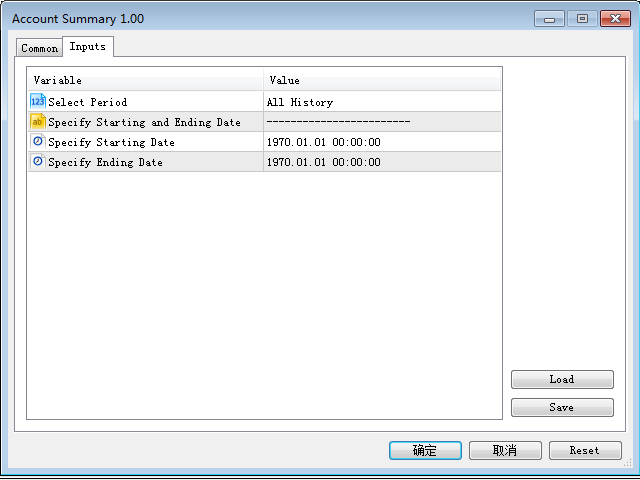
  • Select Period: This is 7-option input. It includes Last Month, This Month, Last Week, This Week, Today, All History, and Date Specified.
  • Specify Starting Date: Enter a date if you selected Date Specified in "Select Period" input.
  • Specify Ending Date: Enter a date if you selected Date Specified in "Select Period" input.

The summary is saved into a file in MQL5\Files folder.

MT4 Version: https://www.mql5.com/en/market/product/23802

리뷰 5
Charles John Phillips
199
Charles John Phillips 2021.11.16 07:28 
 

An excellent report creator. Provides the information needed with no extras. Thank you for making it available.

추천 제품
Reverse
Konstantin Chernov
1 (1)
A script for quick reversing positions and/or orders. If you need to reverse a position with the same volume, open an opposite position of a different volume, this script will save you from routine! Allow AutoTrading before running the script. Instructions: Run the script on the chart. This script is a limited version of the market product https://www.mql5.com/en/market/product/638 and allows reversing only positions. Input parameters are not required. Parameters such as changing the type of exi
FREE
MultiTradeNews
Leeank Andres Fernandez Molano
This script is designed for traders who need to quickly place trades across multiple currency pairs during critical news releases, where every second counts. With this tool, you can pre-select your desired currency pairs and assign independent volumes for each one. When a major news event hits, such as Non-Farm Payroll (NFP) or PMI data releases, the script allows you to execute all your trades instantly without the need to open each pair manually. Key Features: Customizable Pairs : Choose from
FREE
Script Name: Close All Positions Language: MQL5 Type: Utility Script Primary Function: Instantly close all open positions on the current trading account Purpose The “Close All Positions” script is a lightweight and efficient tool designed for traders using MetaTrader 5. Its main purpose is to help users quickly exit all active trades with a single click, especially during volatile market conditions or when risk management requires immediate action. Instead of manually closing each position on
FREE
Overview The script displays information about the trade account: Information about the trade account: Account - account number and type (Real, Contest or Demo); Name - name of the account owner; Company - name of a company that provide the access to trading; Server - trade server name; Connection State - connection state; Trade Allowed - shows whether trading is allowed on the account at the moment; Experts Allowed - shows whether it is allowed to trade using Expert Advisors; Balance - account
FREE
OMG Trading
OMG FZE LLC
5 (3)
[ My Products ]   ,   [ My Channel ] OMG Trading Panel 이제 스마트폰에서 직접 트레이딩 패널을 제어할 수 있습니다. MQL VPS에 OMG Trading Tool을 설치하면 패널이 24시간 내내 작동하는 동안 모바일 MetaTrader 5 앱에서 편안하게 거래할 수 있습니다. 또한 두 가지 유용한 전략인 스마트 마진 보호(Smart Margin Protection)와 그리드 전략(Grid Strategy)을 추가했습니다. 가격이 하락할 때 트리거되는 알람을 설정할 수도 있습니다. 주요 기능 모바일 MT5를 통한 원격 제어 스마트폰을 사용하여 어디서나 트레이딩 툴을 제어하세요! 주문의 커멘트(Comment) 필드에 특수 명령어가 포함된 대기 주문을 넣기만 하면 툴이 자동으로 지침을 실행합니다. 유연성과 이동성이 필요한 트레이더에게 적합합니다. 명령어 예시: `omg auto`- 자동 모드 ON/OFF 전환 `omg auto on` - 자동
FREE
QuickTrade Manager for MT5 Professional One-Click Trade Execution & Management Panel for MetaTrader 5 Trade faster. Manage smarter. Execute with precision. QuickTrade Manager is a powerful chart-side trading panel built for traders who want instant execution, cleaner workflow, and precise control over every position directly from the chart. No more slow manual adjustments. No more cluttered order management. Everything you need is in one professional panel . NEW IN THIS VERSION Modern Profession
FREE
MT5 to Telegram bot
Maksim Plotnikov
5 (1)
MT5 to Telegram Signals This utility is simple to use and supports a wide variety of settings: Pick your desired Telegram group and enter the bot token and the chat id Get notified when orders are placed, modified, executed, closed… or any combination of states Connect your broker account with Telegram and stop missing important notifications. Would you like to receive Telegram notifications? Are you looking for a simple way to share trade signals with your followers? Do you need to start docume
FREE
RegularExpressionsExamples — is an expert, which contains the graphical interface for running examples from the " RegularExpressions in MQL5 " library. The codes of these examples can be found in the library itself. These examples are for demonstration purposes only. They serve only to evaluate the library operation and its capabilities. They can also be found on the official Microsoft‎ website, in the descriptions of classes in the System.Text.RegularExpressions namespace. Each example can be
FREE
The indicator detects and displays М. Gartley's Butterfly pattern. The pattern is plotted by the extreme values of the ZigZag indicator (included in the resources, no need to install). After detecting the pattern, the indicator notifies of that by the pop-up window, a mobile notification and an email. The pattern and wave parameters are displayed on the screenshots. The default parameters are used for demonstration purposes only in order to increase the amount of detected patterns. Parameters z
The CloseByPercentLossOrProfit Expert Advisor closes all positions as the total profit of loss for the entire account reaches a specified value. The profit or loss is specified as percentage of the account balance. In addition, the Expert Advisor can delete pending orders. Allow AutoTrading before running the Expert Advisor. Instructions: Run the Expert Advisor on the chart. Input parameters: Language of messages displayed (EN, RU, DE, FR, ES) - the language of output messages (English, Russian,
FREE
Product Overview The Simple Telegram Copy Trader is a FREE unified Expert Advisor that combines both Master and Slave functionality in a single EA with easy mode switching. This simplified version focuses on OPEN TRADES ONLY , making it perfect for basic copy trading setups without the complexity of advanced features. Get professional-grade copy trading with complete lifecycle management: Telegram Signal Broadcaster MT5 (Master)   Telegram Signal Subscriber MT5 (Slave) Key Features Unified Des
FREE
Crimson FX
Michael Prescott Burney
Crimson EA emerges as a force to be reckoned with on the USDJPY M15 chart, embodying the perfect fusion of 50 meticulously crafted strategies that span across trend analysis, hedging, and scalping disciplines. This powerhouse operates beyond the confines of conventional stop-loss and take-profit mechanisms, relying instead on precise entry and exit signals generated from its strategic arsenal. Coupled with an advanced reversal function, Crimson EA offers a protective shield to safeguard invest
FREE
Phoenix Volume Panel
Nigel Nii Darku Narnor Darko
This is a comprehensive summary of the Phoenix Master Engine (MT5). This tool is designed as a high-performance "Execution Dashboard" that blends Smart Money Concepts (SMC) with real-time momentum tracking. Project: Phoenix Master Engine (v1.0) Platform: MetaTrader 5 Strategy Type: Order Flow & Momentum Execution Visual Style: Dark Mode (Indigo/Teal/Black) 1. Core Visual Features Dynamic Volume Profile: Unlike standard indicators, this renders a "no-flicker" horizontal volume profile in the cha
FREE
SymbolScope MT5는 거래 상품 사양에 대한 개인 비서입니다. 터미널에서 계약 사양을 찾아보거나 인터넷에서 데이터를 검색할 필요가 없습니다. 필요한 모든 정보는 차트의 우아하고 미니멀한 패널에서 항상 확인할 수 있습니다. 이것은 무엇을 위한 것인가? 트레이더에게 거래를 시작하기 전에 상품의 정확한 매개변수(포인트 가치, 계약 크기, 최소 로트, 스왑)를 아는 것은 매우 중요합니다. SymbolScope MT5는 현재 심볼에 대한 이 데이터를 즉시 제공하고 다른 상품으로 빠르게 전환하여 그 사양을 연구할 수 있도록 합니다. 주요 기능: 원클릭 전체 사양: INFO 버튼을 누르면 패널이 확장되어 선택된 심볼의 포괄적인 매개변수 목록을 보여줍니다. 모든 중요 매개변수를 한눈에: 현재 ASK 및 BID 가격. 포인트 값 (최소 가격 변동폭). 틱 값 및 틱 크기. 계약 크기. 최소 로트, 최대 로트 및 로트 변경 단위. 매수 포지션 및 매도 포지션에 대한 스왑 값. 빠른 심볼 전
FREE
Session Stat
Aleksandr Davydov
Session Stat is a utility for tracking the results of a trading session, as well as information about the position for the current instrument. The panel displays: Session statistics (for all instruments) Initial trading account balance Current trading account equity Profit during the operation of the utility Profit in % terms during the operation of the utility Session statistics (for the current instrument) Profit of the current position Profit of the current position in % terms Total volume
FREE
You may have found after a carefully planned trade something happened.  An unexpected event... You forgot to look the web calender or use any kind of program. This fills this gap in its own way. Features: - show all events as vertical lines - low, medium or high events... with different colors. -name of the events and numbers associated with the event are also shown such actual value, forecast value and previous value. The calendar information is obtained from your broker. It is a built-in serv
FREE
현재 심볼의 포지션 닫기 현재 심볼의 모든 포지션을 닫는 간단하고 신뢰할 수 있는 스크립트입니다. 반복 작업을 줄이고 소중한 시간을 절약하세요. 장점: 현재 자산에만 집중: 스크립트는 선택한 심볼의 거래만 닫으며, 다른 포지션에는 영향을 미치지 않습니다. 빠르고 편리함: 단 한 번 실행으로 모든 포지션을 몇 초 안에 닫을 수 있습니다. 모든 전략에 적합: 여러 포지션을 관리하는 사람과 단일 자산에 집중하는 사람 모두에게 이상적입니다. 안전성: 각 포지션을 처리하고 오류를 기록하여 완전한 제어를 보장합니다. 작동 원리: MetaTrader 5 터미널에서 스크립트를 실행하세요. 스크립트가 현재 심볼의 모든 오픈 포지션을 자동으로 찾습니다. 다른 자산에는 영향을 주지 않고 모든 거래를 한 번의 클릭으로 닫습니다. 이 도구는 누구에게 적합합니까? 단일 심볼의 포지션을 빠르게 닫아야 하는 트레이더. 단기 전략을 사용하는 사용자 및 속도를 중시하는 사람들. 시간을 절약하고 중요한 결정에 집중하
FREE
Fair Value Gap FGV
Jean Charles Vilhena Maia
5 (1)
Smart FVG Visualizer 는 시장의 불균형(Fair Value Gaps)을 자동적이고 정확하게 식별하도록 설계된 고성능 지표입니다. Smart Money Concepts (SMC) 및 ICT 방법론을 기반으로 하는 이 지표는 가격 불균형 구간을 시각화하여, 향후 가격이 끌어당겨지거나 반전될 수 있는 강력한 지점들을 표시해 줍니다. 주요 특징: 즉각적인 식별: 모든 타임프레임에서 상승 및 하락 FVG를 자동으로 감지합니다. 전문적인 시각화: 기관 거래 표준에 맞춰 "FVG" 텍스트 라벨이 포함된 색상 박스를 표시합니다. 성능 최적화: 가볍고 깨끗한 코드로 설계되어 여러 차트를 열어두어도 터미널이 느려지지 않습니다. 완벽한 커스터마이징: 트레이딩 템플릿에 맞춰 색상, 글꼴, 채우기 설정을 쉽게 조정할 수 있습니다.
FREE
Position Manager Pro v1.0 (MT5) Dual Magic Number Independent Group Manager with Live P&L Dashboard Overview Position Manager Pro   is a powerful trade management Expert Advisor for MetaTrader 5 that operates as an   overlay manager   — it does not open positions itself, but instead manages and monitors positions opened by other EAs or manually by the trader. The core concept is   two fully independent groups , each identified by a unique   Magic Number . Each group has its own Take Profit, Stop
FREE
VR Close Orders MT5
Vladimir Pastushak
1 (1)
The VR Close orders script is designed to close positions in the terminal at a profit or loss mark set by the trader. The program is written as a script and can work together on the same chart with any other indicators and expert advisors. The program has a simple visual panel and is easy to configure with the mouse. With this program's help, the trader can automatically close positions and delete orders depending on the conditions set.  There is often a situation when you need to close position
FREE
Enhanced FVG Enhanced FVG is a technical indicator for MetaTrader 5 that identifies Fair Value Gaps on the chart and measures the buyer-to-seller volume ratio within each detected gap. Volume classification is performed using M1 timeframe tick volume data, applying the same methodology used in standard Volume Profile analysis. How It Works The indicator scans three consecutive candlesticks to detect Fair Value Gaps. A Bullish FVG is identified when the high of the first candle does not overlap w
FREE
Script for quickly selecting a tool with high correlation. The script is placed on the tool to which you need to select the second correlating one. Then you can change the number of bars to calculate and the timeframe. The script iterates through all available symbols in the market overview and returns the 20 most correlated ones. You can use the selected pairs to trade with THE new SH expert Advisor
FREE
Quick Style MT5
Maxim Polishchuk
4.75 (12)
The Quick Style utility is designed for facilitation and acceleration of working with the properties of graphical objects. Left-click a graphical object while holding the Shift key to open the quick access window for configuring the object properties. In the window, you can change the color, style and line width with one click, including those of other graphical objects. All changes are displayed immediately. To close the Quick Style , simply click the free space on the chart. The utility is eas
FREE
Fully functional manual trade panel with lot size calculation, one-click trading, hidden (virtual) stop loss/take profit and pending orders, scale in and out of trades (partial close), auto SL/TP and more. Works with all symbols not just currency pairs. Brings an incredible amount of functionality to MetaTrader for free and for both demo and live accounts. Features Lot size calculation - based on % of account to risk, fixed amount or dynamic lots Automatic take profit based on risk reward ratio
FREE
Script to calculate equity and balance at a specific date and time.  This script makes up for a lack of MetaTrader account history, that does not show how the balance and equity changes in time. Balance calculation includes closed orders only. Equity calculation includes orders closed before and orders that are still open at the specified time. Example: date and time set to 2020/07/06 00:00. If I had a Buy 1 lot EURUSD position opened at price 1.12470 on the 2020/07/02, the program would ca
FREE
The script is intended for synchronization and loading into the Terminal of the desired (or maximum possible) history of quotes of the timeframes specified by the user for the symbols in the "Market Watch" window. The first download of the full history for one "new" symbol takes approximately one and a half to two minutes. Input parameters for running the script: 1. Desired history length (bars) - here we indicate the number of bars in the quote history that we would like to receive from t
FREE
Consensus Panel MIN
Miguel Garcia Rodriguez
Descripción corta Consensus MTF es un indicador gratuito de alineación multi-timeframe diseñado para mostrar el contexto real del mercado . No genera señales de entrada ni salida. Su objetivo es ayudar a evitar operar cuando el mercado no está alineado . Descripción completa Consensus MTF analiza la dirección del mercado en varios timeframes simultáneamente, evaluando la posición del precio respecto a su nivel de equilibrio en cada marco temporal. Cada timeframe se clasifica de forma indep
FREE
Heiken Ashi Smoother
Samuel Cavalcanti Costa
Professional trend-following Expert Advisor based on Heiken Ashi candles. Unlike traditional candlesticks, Heiken Ashi smooths price action and filters out market noise, making trends much easier to identify visually and algorithmically. This EA generates buy signals when two consecutive Heiken Ashi candles are bullish (green, close > open) and sell signals when two consecutive candles are bearish (red, close < open). The double-candle confirmation significantly reduces false signals during ma
TradeConsole
Musera Isaac
5 (1)
TradeConsole — On-Chart Trading Dashboard with Smart Alerts TradeConsole is a lightweight on-chart utility designed to help traders keep essential market context in one place. It combines session tracking, an upcoming economic news panel, a currency strength view, a quick technical bias summary, trade statistics, and one-click control tools. The purpose of the dashboard is to improve chart awareness, reduce screen clutter, and support faster decision-making during live trading. Main Features On
FREE
이 제품의 구매자들이 또한 구매함
Trade Assistant MT5
Evgeniy Kravchenko
4.42 (208)
거래당 위험 계산, 라인을 사용한 손쉬운 신규 주문, 부분 청산 기능을 통한 주문 관리, 7가지 유형의 트레일링 스탑 및 기타 유용한 기능을 제공합니다. 추가 자료 및 지침 설치 지침   -   애플리케이션 지침   -   데모 계정용 애플리케이션 평가판 라인 기능       - 차트에 개시선, 손절매, 차익실현을 표시합니다. 이 기능을 사용하면 새로운 주문을 쉽게 하고 개봉 전에 추가 특성을 볼 수 있습니다. 위기 관리       -       위험 계산 기능은 설정된 위험과 손절매 주문의 크기를 고려하여 새 주문의 볼륨을 계산합니다. 이를 통해 손절매 크기를 설정하고 동시에 설정된 위험을 존중할 수 있습니다. 로트 계산 버튼 - 위험 계산을 활성화/비활성화합니다. 필요한 위험 값은 위험 필드에 0에서 100 사이의 백분율 또는 예금 통화로 설정됩니다. 설정 탭에서 위험 계산 옵션을 선택합니다. $ 통화, % 잔액, % 지분, % 자유 마진, % 사용자 정의, % AB 이전
Trade Manager EA에 오신 것을 환영합니다. 이 도구는 거래를 보다 직관적이고 정확하며 효율적으로 만들기 위해 설계된 궁극적인 리스크 관리 도구 입니다. 단순한 주문 실행 도구가 아닌, 원활한 거래 계획, 포지션 관리 및 리스크 제어를 위한 종합 솔루션입니다. 초보자부터 고급 트레이더, 빠른 실행이 필요한 스캘퍼에 이르기까지 Trade Manager EA는 외환, 지수, 상품, 암호화폐 등 다양한 시장에서 유연성을 제공합니다. Trade Manager EA를 사용하면 복잡한 계산은 이제 과거의 일이 됩니다. 시장을 분석하고 진입, 손절 및 익절 수준을 차트의 수평선으로 표시한 후 리스크를 설정하면, Trade Manager가 이상적인 포지션 크기를 즉시 계산하고 SL 및 TP 값을 실시간으로 표시합니다. 모든 거래가 간편하게 관리됩니다. 주요 기능: 포지션 크기 계산기 : 정의된 리스크에 따라 거래 크기를 즉시 결정합니다. 간단한 거래 계획 : 진입, 손절, 익절을 위한
Local Trade Copier EA MT5
Juvenille Emperor Limited
4.96 (135)
Local Trade Copier EA MT5 를 사용하여 매우 빠른 거래 복사 경험을 해보세요. 1분 안에 간편하게 설정할 수 있으며, 이 거래 복사기를 사용하면 Windows 컴퓨터 또는 Windows VPS에서 여러 개의 MetaTrader 터미널 간에 거래를 0.5초 미만의 초고속 복사 속도로 복사할 수 있습니다. 초보자든 전문가든   Local Trade Copier EA MT5 는 다양한 옵션을 제공하여 사용자의 특정 요구에 맞게 맞춤 설정할 수 있습니다. 이는 수익 잠재력을 높이려는 모든 사람을 위한 최고의 솔루션입니다. 지금 사용해보시고 이것이 왜 시장에서 가장 빠르고 쉬운 무역용 복사기인지 알아보세요! 팁: 여기 에서 데모 계정에서 Local Trade Copier EA MT5 데모 버전을 다운로드하여 사용해 볼 수 있습니다. 다운로드한 무료 데모 파일을 MT5 >> File >> Open Data Folder >> MQL5 >> Experts 폴더에 붙여넣고 터
TradePanel MT5
Alfiya Fazylova
4.87 (153)
Trade Panel은 다기능 거래 도우미입니다. 이 애플리케이션에는 50개 이상의 수동 거래 기능이 포함되어 있으며 대부분의 거래 작업을 자동화할 수 있습니다. 주의! 할인은 시간 제한이 있으며, 매주 화요일마다 가격이 5달러씩 인상됩니다. (최대 100달러까지). 구매하기 전에 데모 계정에서 데모 버전을 테스트할 수 있습니다. 데모 계정용 애플리케이션 체험판 다운로드: https://www.mql5.com/en/blogs/post/750865 . 전체 지침 여기 . 거래. 한 번의 클릭으로 거래를 수행할 수 있습니다: 리스크 자동 계산과 함께 예약 주문 및 포지션 열기. 한 번의 클릭으로 여러 주문 및 포지션 열기. 주문 그리드 열기. 예약 주문 및 포지션을 그룹별로 닫기. 포지션 방향 전환 (Buy 닫기 > Sell 열기, Sell 닫기 > Buy 열기). 포지션 잠금 (부족한 포지션을 열어 Buy와 Sell 포지션의 수량을 동일하게 만들기). 모든 포지션 한 번의 클릭으로 부
베타 출시 Telegram to MT5 Signal Trader 는 곧 공식 알파 버전을 출시할 예정입니다. 일부 기능은 아직 개발 중이며, 작은 버그가 발생할 수 있습니다. 문제가 있으면 꼭 보고해 주세요. 여러분의 피드백은 소프트웨어 개선에 도움이 됩니다. Telegram to MT5 Signal Trader 는 Telegram 채널 또는 그룹의 거래 신호를 자동으로 MetaTrader 5 계정으로 복사하는 강력한 도구입니다. 공개 및 비공개 채널을 모두 지원하며, 여러 신호 제공자를 여러 MT5 계정에 연결할 수 있습니다. 소프트웨어는 빠르고 안정적으로 동작하며, 복사된 거래를 완벽히 제어할 수 있습니다. 인터페이스는 깔끔하며 대시보드와 차트가 시각적으로 구성되어 있고, 직관적인 네비게이션이 가능합니다. 여러 Signal Account를 관리하고, 공급자별 설정을 세밀하게 조정하며, 모든 동작을 실시간으로 모니터링할 수 있습니다. 필수 조건 MQL의 제한으로 인해 EA는 Te
Farmed Hedge Yield Farming | All Markets (Manual - Hybrid - Semi/Automated EA) MULTI-ASSET SUPPORT Trade any asset available on your broker - Forex: Major, Minor, Exotic pairs - Crypto: BTC, ETH, XRP, SOL, BNB - Stocks: Apple, Tesla, Amazon, Google, etc. - Commodities: Gold, Silver, Oil, Gas - Indices: US30, NAS100, SPX500, DAX40 - Any CFD your broker offers VERIFIED TRADING RESULTS - Farmed Hedge Yield Axi Copy:  https://www.mql5.com/en/signals/2356376 - Farmed Hedge Yield Exn Copy:   https:/
Exp COPYLOT CLIENT for MT5
Vladislav Andruschenko
3.82 (34)
MetaTrader 5용 전문 트레이드 복사기 MetaTrader 용 빠르고 전문적이며 신뢰할 수 있는 트레이드 복사기 입니다. COPYLOT 은 MT4와 MT5 터미널 간의 Forex 거래 복사를 지원하며, Hedge 및 Netting 계좌를 모두 지원합니다. COPYLOT MT5 버전 지원 구성: - MT5 Hedge → MT5 Hedge - MT5 Hedge → MT5 Netting - MT5 Netting → MT5 Hedge - MT5 Netting → MT5 Netting - MT4 → MT5 Hedge - MT4 → MT5 Netting MT4 버전 전체 설명 + DEMO + PDF 구매 방법 설치 방법 로그 파일 확인 방법 테스트 및 최적화 방법 Expforex의 모든 제품 MT4 터미널로도 거래를 복사할 수 있습니다(MT4 → MT4, MT5 → MT4): COPYLOT CLIENT for MT4 COPYLOT은 2개, 3개, 심지어 10개의 터미널과 동시에 작동할
HINN Lazy Trader
ALGOFLOW OÜ
5 (2)
Limited time offer: 20% off for a few days only!  - Annual subscription $360 instead of $450  - Lifetime plan $550 instead of $690 The core idea: using the user interface, you configure the parameters the chart must meet before entering a position (or positions), choose which entry models to use, and set the rules for when trading and planning should end. Lazy Trader  handles the rest: it  takes over all the routine chart watching and execution! full description  :: 3 key videos [1] ->  [2]   -
Trade Dashboard MT5
Fatemeh Ameri
4.94 (123)
Stop Losing Money From Execution Mistakes. Trade Dashboard turns your manual trading into a precise, rule-based system — in seconds. Open trades faster, control risk perfectly, and manage positions like a professional — without stress, hesitation, or calculation errors. One-click trade execution Automatic lot size based on your exact risk Full control of SL, TP, breakeven & trailing — directly on chart Download the demo version and experience the dashboard before buying.   You can fi
Trade copier MT5
Alfiya Fazylova
4.59 (41)
Trade Copier는 거래 계정 간의 거래를 복사하고 동기화하도록 설계된 전문 유틸리티입니다. 복사는 공급자의 계정/단말기에서 동일한 컴퓨터 또는 vps에 설치된 수신자의 계정/단말기로 발생합니다. 프로모션 - 이미 "Trade copier MT5"를 구매하셨다면, "Trade copier MT4"를 무료로 받으실 수 있습니다 (MT4 → MT5 및 MT4 ← MT5 복사용). 조건에 대한 자세한 정보를 원하시면, 개인 메시지를 통해 저희에게 문의해 주시기 바랍니다! 구매하기 전에 데모 계정에서 데모 버전을 테스트할 수 있습니다. 데모 버전 여기 . 전체 지침 여기 . 주요 기능 및 이점: 복사기는 "МТ5> МТ5", "МТ4> МТ5", "МТ5> МТ4" 복사를 지원합니다. 복사기는 데모 계정 > 실 계정, 실 계정 > 데모 계정, 데모 계정 > 데모 계정 및 실제 계정 > 실 계정 복사를 지원합니다. 복사기는 읽기 전용 암호가 적용된 투자자 계정에서 복사를 지원합니다. 하
Copy Cat More Trade Copier MT5 (복사 고양이 MT5) 는 오늘날의 거래 과제를 위해 설계된 로컬 거래 복사기이자 완전한 위험 관리 및 실행 프레임워크입니다. 프롭펌 챌린지부터 개인 포트폴리오 관리까지, 견고한 실행, 자본 보호, 유연한 구성 및 고급 거래 처리의 조합으로 모든 상황에 적응합니다. 복사기는 마스터(송신자)와 슬레이브(수신자) 모드 모두에서 작동하며, 시장 주문과 예약 주문, 거래 수정, 부분 청산 및 헷지 청산 작업의 실시간 동기화를 제공합니다. 데모 및 실계좌, 거래 또는 투자자 로그인과 호환되며, EA, 터미널 또는 VPS가 재시작되어도 지속적인 거래 메모리 시스템을 통해 복구를 보장합니다. 고유 ID로 여러 마스터와 슬레이브를 동시에 관리할 수 있으며, 브로커 간 차이는 접두사/접미사 조정 또는 사용자 정의 심볼 매핑을 통해 자동으로 처리됩니다. 매뉴얼/설정  | Copy Cat More MT4 | 채널  특별 기능: 설정이 간편함 —
The product will copy all telegram signal to MT5 ( which you are member) , also it can work as remote copier.  Easy to set up, copy order instant, can work with almost signal formats, image signal,  s upport to translate other language to English Work with all type of channel or group, even channel have "Restrict Saving Content", work with  multi channel, multi MT5 Work as remote copier: with signal have ticket number, it will copy exactly via ticket number. Support to backtest signal. How to s
Timeless Charts
Samuel Manoel De Souza
5 (4)
Timeless Charts is an advanced charting solution designed for professional traders seeking for custom charts / custom timeframes , including seconds charts / seconds timeframe, renko charts / renko bars, cluster charts / footprint charts and advanced tools present in most of the popular platforms. Unlike traditional offline charts or simplistic custom indicators, this solution constructs fully custom bars with true timestamp accuracy , down to miliseconds, allowing for a powerful and precise tr
Footprint Chart Pro — Professional OrderFlow EA for MetaTrader 5 Version 6.34 | Professional tool for real traders | Institutional-Grade Visualization DEMO USERS - PLEASE SELECT EVERY TICK / REAL TICK WHEN TESTING AND YOU HAVE DOWNLOADED HISTORICAL DATA. IF YOU SEE A WAITING SCREEN AND IT IS NOT DOWNLOADING, IT MEANS YOU HAVE LOW HISTORICAL DATA. TRY 1 MIN AND 5 MIN FIRST ON 1 DAY DATA. ONE DAY DATA SHOULD BE THE NEWEST AND MOST CURRENT DATE. PLEASE WAIT UNTIL THE MARKET HAS ROLLED OVER PERIOD.
Helios Pulse
Jonathan Mboya Kinaro
Helios Pulse v1.03 — 실시간 확률 대시보드|수동 트레이더를 위한 도구 Helios Pulse는 시장을 읽는 방식을 근본적으로 바꿔줍니다. 여러 지표 창을 번갈아 확인하며 상충하는 신호를 해석할 필요가 없습니다. 하나의 명확한 답 — 현재 시장의 방향성 편향을 보여주는 실시간 확률 퍼센티지가 매 틱마다 지속적으로 갱신됩니다. 이것은 또 하나의 시그널 화살표 패널이 아닙니다. Helios Pulse는 여러 기술적 차원 간의 일치 정도를 측정하고, 실제로 신뢰할 수 있는 확신도 점수를 산출하는 확률 엔진입니다. 방향뿐만 아니라 그 방향이 얼마나 확고한지, 그리고 지금 이 순간 강해지고 있는지 약해지고 있는지를 실시간으로 확인할 수 있습니다. 차트에서 보이는 것 컴팩트한 다크 테마 패널이 차트 위에 배치되며, 롱과 숏 두 개의 다이나믹 확률 카드가 표시됩니다. 시장 상황이 변함에 따라 카드의 색상 강도가 흐릿한 상태에서 선명한 상태로 전환되어, 숫자를 확인하기 전에 즉각적인
Anchor Trade Manager
Kalinskie Gilliam
5 (2)
Anchor: The EA Manager A coordination system for traders running multiple EAs. Anchor ensures only one EA can trade at a time, preventing conflicting positions and keeping your portfolio safer. Attach Anchor to any chart. Configure your EAs and their magic numbers. Anchor handles the rest. Built for portfolios. Built for discipline. Built for prop firms. The Problem Running multiple EAs on the same account creates risk. Two gold EAs can open opposite positions on the same candle. Three EA
MT5 to Telegram Signal Provider 는 사용하기 쉽고 완전히 커스터마이즈 가능한 유틸리티로, 특정 신호를 Telegram의 채팅, 채널 또는 그룹으로 전송하고, 귀하의 계정을 신호 제공자 로 만듭니다. 경쟁 제품과 달리 DLL 임포트를 사용하지 않습니다. [ 데모 ] [ 매뉴얼 ] [ MT4 버전 ] [ 디스코드 버전 ] [ 텔레그램 채널 ]  New: [ Telegram To MT5 ] 설정 단계별 사용자 가이드 가 제공됩니다. 텔레그램 API에 대한 지식은 필요하지 않습니다; 개발자가 제공하는 모든 것이 필요합니다. 주요 특징 구독자에게 보낸 주문 상세 정보를 커스터마이즈할 수 있습니다. 예를 들어, 브론즈, 실버, 골드와 같은 계층 구독 모델을 만들 수 있습니다. 골드 구독에서는 모든 신호를 받습니다. id, 심볼, 또는 코멘트로 주문을 필터링할 수 있습니다. 주문이 실행된 차트의 스크린샷이 포함됩니다 보낸 스크린샷에 닫힌 주문을 그려 추가 검증을 합니다
Trade Manager DashPlus
Henry Lyubomir Wallace
5 (13)
DashPlus 는 MetaTrader 5 플랫폼에서 거래 효율성과 효과를 향상시키기 위해 설계된 고급 거래 관리 도구입니다. 리스크 계산, 주문 관리, 고급 그리드 시스템, 차트 기반 도구 및 성과 분석 등 포괄적인 기능을 제공합니다. 주요 기능 1. 리커버리 그리드 불리한 시장 상황에서 거래를 관리하기 위한 평균화 및 유연한 그리드 시스템을 구현합니다. 거래 회복을 최적화할 수 있도록 전략적인 진입 및 종료 포인트를 제공합니다. 2. 스택 그리드 강한 시장 움직임 동안 포지션을 추가하여 유리한 거래에서 잠재적 수익을 극대화하도록 설계되었습니다. 유리한 시장 트렌드에서 승률을 높이며 거래를 확장할 수 있도록 합니다. 3. 손익(P&L) 라인 차트에서 잠재적인 수익 및 손실 시나리오를 시각적으로 표현합니다. 설정을 조정하고 P&L 라인을 드래그하여 실행 전에 다양한 거래 결과를 평가할 수 있습니다. 4. 바스켓 모드 동일한 심볼에 여러 포지션을 단일 집계 포지션으로 결합하여 관리합니
Seconds Chart MT5
Boris Sedov
4.59 (17)
Seconds Chart - MetaTrader 5에서 초 단위 차트를 생성하는 독특한 도구입니다. Seconds Chart 를 사용하면 초 단위로 설정된 타임프레임으로 차트를 작성할 수 있어, 표준 분 또는 시간 단위 차트에서는 불가능한 유연성과 정밀한 분석이 가능합니다. 예를 들어, S15 타임프레임은 15초 동안의 캔들로 구성된 차트를 의미합니다. 사용자 정의 심볼을 지원하는 모든 인디케이터와 전문가 어드바이저를 사용할 수 있습니다. 이를 사용하는 것은 표준 차트에서 거래하는 것만큼 편리합니다. 표준 도구와 달리, Seconds Chart 는 초고속 타임프레임에서도 높은 정확도와 지연 없이 작업할 수 있도록 지원합니다. Seconds Chart의 장점 1초부터 900초까지 의 타임프레임 지원. 내장 틱 데이터베이스 덕분에 역사 데이터 즉시 로딩 . 실시간 데이터 업데이트로 지연이나 차이 없음 . 여러 초 단위 차트를 동시에 생성 가능. Seconds Chart가 이상적인 경우
AntiOverfit PRO MT5
Enrique Enguix
5 (4)
EA를 구매하기 전에, 이 시스템이 정말 버티는지 아니면 백테스트에서 운 좋게 좋아 보였던 것뿐인지 먼저 확인하세요. 대부분의 로봇은 보기 좋은 백테스트와 함께 판매됩니다. 우상향 곡선. 좋은 Profit Factor. 의심할 이유가 거의 없어 보입니다. 그런데도 그런 EA들 중 많은 수가 시장이 그 과거 구간처럼 움직이지 않기 시작하는 순간 무너지기 시작합니다. 왜 그럴까요? 백테스트가 증명하는 것은 딱 한 가지뿐이기 때문입니다. 그 전략이 특정한 하나의 가격 경로에서는 작동했다는 것. 다른 경로에서도 버틴다는 뜻은 아닙니다. 견고하다는 뜻도 아닙니다. 당연히 당신의 돈을 쓸 가치가 있다는 뜻도 아닙니다. 당신이 EA를 사는 이유는 과거의 예쁜 곡선을 감상하기 위해서가 아닙니다. 계속 변하는 시장에서 실제로 쓰기 위해서입니다. AntiOverfit PRO가 하는 일 AntiOverfit PRO는 MetaTrader 5용 Expert Advisor가 정말 탄탄한지, 아니면 특정한
Trade Assistant 38 in 1
Makarii Gubaydullin
4.91 (23)
다기능 도구: 로트 계산기, 그리드 주문, R/R 비율, 트레이드 관리자, 수급 구역, 가격 행동 등 데모 버전   |   사용자 설명서 트레이드 어시스턴트   는 전략 테스터에서 작동하지 않습니다 :   여기에서 데모 버전을 다운로드  하여 유틸리티 를 테스트하세요. 질문/개선 아이디어/버그 발견 시 연락주세요 MT4 버전이 필요하시면 여기 에서 이용 가능합니다 거래   프로세스 를 간소화, 가속화, 자동화하세요. 이   대시보드 로 표준 터미널 기능을 확장합니다. 트레이딩 패널은  모든 거래 상품에서 작동: 외환, 주식, 지수, 암호화폐 등. 1. 새 거래 개시 : 로트 / 위험 / RR 계산 : 수동 거래를 위한 위험 관리 로트 계산기 (위험 크기 기반 거래량 계산) 위험 계산기 (로트 크기 기반 위험 금액) 위험 대비 보상   비율 그리드 주문:  + 동적 간격 옵션, 로트 분할 옵션 주문 활성화 트리거, + 매수 스톱리밋 / 매도 스톱리밋 가상 SL, 가상 TP (숨김
HINN MagicEntry Extra
ALGOFLOW OÜ
4.71 (14)
HINN MAGIC ENTRY – the ultimate tool for entry and position management! Place orders by selecting a level directly on the chart! full description   ::  demo-version  :: 60-sec-video-description Key features: - Market, limit, and pending orders - Automatic lot size calculation - Automatic spread and commission accounting - Unlimited partitial take-profits  - Breakeven and trailing stop-loss and take-profit  functions - Invalidation leves - Intuitive, adaptive, and customizable interface - Works
Poc Breakout Signal: The Ultimate Institutional Order Flow & Price Action System Elevate your trading with Poc Breakout, a comprehensive technical analysis tool designed to bridge the gap between retail trading and institutional market understanding. This all-in-one system combines powerful Buy/Sell signals, advanced Volume Profile analysis, real-time Order Flow (Depth of Market), and critical macroeconomic data to give you a clear, unambiguous edge in the markets. Poc Breakout Signal decodes c
Telegram to MT5 Coppy
Sergey Batudayev
5 (8)
Telegram에서 MT5로:   최고의 신호 복사 솔루션 DLL 없이도 Telegram 채널과 채팅에서 MetaTrader 5 플랫폼으로 거래 신호를 직접 복사하는 최신 도구인 Telegram to MT5를 사용하여 거래를 간소화하세요. 이 강력한 솔루션은 정밀한 신호 실행, 광범위한 사용자 정의 옵션을 제공하고 시간을 절약하며 효율성을 높여줍니다. [ Instructions and DEMO ] 주요 특징 직접 Telegram API 통합 전화번호와 보안 코드를 통해 인증하세요. 사용자 친화적인 EXE 브리지를 통해 채팅 ID를 쉽게 관리하세요. 여러 채널/채팅을 추가, 삭제, 새로 고침하여 동시에 신호를 복사합니다. 고급 필터를 사용한 신호 파싱 예외 단어(예: "보고서", "결과")가 포함된 원치 않는 신호를 건너뜁니다. 유연한 SL 및 TP 형식을 지원합니다: 가격, 핍 또는 포인트. 가격 대신 포인트를 지정하는 신호에 대한 진입 포인트를 자동으로 계산합니다. 주문 맞춤화 및
Advanced Dashboard Ultra
Mirel Daniel Gheonu
5 (1)
MT5용 통계 대시보드 & 저널 ULTRA (Stats Dashboard & Journal ULTRA) 완벽한 트레이딩 지휘 본부: 분석, 자동화 및 뉴스 인텔리전스. Stats Dashboard ULTRA는 Pro 분석 도구의 궁극적인 진화형입니다. 이는 MetaTrader 5를 전문 트레이딩 스테이션으로 변모시키며, 기관급 성과 분석과 자동화된 뉴스 보호 및 고급 심리 지표를 결합합니다. 완전한 통제력을 원하는 수동 트레이더와 EA 포트폴리오 관리자를 위해 설계되었습니다. ULTRA 버전의 새로운 기능 뉴스 인텔리전스 엔진 (News Intelligence Engine): 뉴스를 보기만 하지 말고 분석하십시오. 대시보드는 과거 뉴스 이벤트가 오픈된 포지션에 어떤 영향을 미쳤는지 시뮬레이션하여 포지션을 보유할지 청산할지 알려줍니다. EA 봇 가드 (자동 보호): 중요도가 높은 뉴스(High-Impact News) 발표 중에 다른 전문가 자문(EA)을 자동으로 일시 중지하고 시장이
Trade Manager DaneTrades
Levi Dane Benjamin
4.28 (29)
거래 관리자는 위험을 자동으로 계산하는 동시에 거래를 빠르게 시작하고 종료하는 데 도움을 줍니다. 과잉 거래, 복수 거래 및 감정 거래를 방지하는 데 도움이 되는 기능이 포함되어 있습니다. 거래를 자동으로 관리할 수 있으며 계정 성과 지표를 그래프로 시각화할 수 있습니다. 이러한 기능은 이 패널을 모든 수동 거래자에게 이상적으로 만들고 MetaTrader 5 플랫폼을 향상시키는 데 도움이 됩니다. 다중 언어 지원. MT4 버전  |  사용자 가이드 + 데모 트레이드 매니저는 전략 테스터에서 작동하지 않습니다. 데모를 보려면 사용자 가이드로 이동하세요. 위기 관리 % 또는 $를 기준으로 위험 자동 조정 고정 로트 크기 또는 거래량과 핍을 기반으로 한 자동 로트 크기 계산을 사용하는 옵션 RR, Pips 또는 Price를 사용한 손익분기점 손실 설정 추적 중지 손실 설정 목표 달성 시 모든 거래를 자동으로 마감하는 최대 일일 손실률(%)입니다. 과도한 손실로부터 계정을 보호하고 과도한
KT Equity Protector MT5
KEENBASE SOFTWARE SOLUTIONS
4.25 (4)
쉽고 간편하게 거래 자본을 보호하세요 거래 자본을 보호하는 것은 자본을 키우는 것만큼 중요합니다. KT Equity Protector는 귀하의 개인 리스크 매니저로서, 계좌의 순자산(에퀴티)을 지속적으로 모니터링하며, 사전에 설정한 손절 또는 수익 목표에 도달하면 모든 보유 및 예약 주문을 자동으로 종료하여 손실을 방지하거나 수익을 고정합니다. 감정적인 결정이나 추측은 이제 그만—KT Equity Protector가 24시간 내내 믿을 수 있는 자본 보호를 제공합니다. KT Equity Protector는 모든 차트를 자동으로 닫아 다른 전문가용 자동매매 프로그램(EA)의 거래를 중단시킬 수 있습니다. 이를 통해 EA를 수동으로 다시 시작할 때까지 어떠한 추가 거래도 이루어지지 않으며, 사용자는 완전한 통제권과 심리적 안정을 얻게 됩니다. 작동 방식 에퀴티 손절(손실 방지): 예를 들어 계좌 잔고가 $10,000이고 에퀴티 손절을 $1,000로 설정한 경우, 순자산이 $9,000로
Trader Evolution
Siarhei Vashchylka
5 (7)
" Trader Evolution " - A utility designed for traders who use wave and technical analysis in their work. One tab of the utility is capable of money management and opening orders, and the other can help in making Elliott wave and technical analysis. Manual (Be sure to read before purchasing) | Version for MT4 Advantages 1. Trading in a few clicks. Immediate and pending orders are available in the panel 2. Money management. The program automatically selects the appropriate lot size 3. Simplifies
Custom Alerts: 여러 시장을 동시에 모니터링하고 중요한 기회를 놓치지 마세요 개요 Custom Alerts 는 여러 종목에 걸쳐 잠재적 트레이딩 기회를 한눈에 파악하고자 하는 트레이더를 위한 동적인 솔루션입니다. FX Power, FX Volume, FX Dynamic, FX Levels, IX Power와 같은 Stein Investments의 주요 도구들과 통합되어, 여러 차트를 오가거나 기회를 놓치는 일 없이 중요한 시장 변화를 자동으로 알림으로 제공합니다. 이제 브로커가 제공하는 모든 자산군을 지원하며, 기호를 입력할 필요 없이 자산 유형만 선택하면 설정이 완료됩니다. 1. Custom Alerts가 트레이더에게 매우 유용한 이유 올인원 시장 모니터링 • Custom Alerts 는 외환, 금속, 암호화폐, 지수, 주식(브로커가 지원하는 경우)까지 다양한 자산군의 신호를 수집하고 통합합니다. • 여러 차트를 전환할 필요 없이 하나의 창에서 명확한 알림을 받아보
Grid Manual MT5
Alfiya Fazylova
4.9 (21)
"Grid Manual"은 주문 그리드 작업을 위한 거래 패널입니다. 이 유틸리티는 보편적이며 유연한 설정과 직관적인 인터페이스를 제공합니다. 그것은 손실을 평균화하는 방향뿐만 아니라 이익을 증가시키는 방향으로 주문 그리드와 함께 작동합니다. 거래자는 주문 그리드를 만들고 유지할 필요가 없으며 유틸리티에서 수행합니다. 거래자가 주문을 시작하는 것으로 충분하며 "Grid Manual"는 자동으로 그를 위한 주문 그리드를 생성하고 거래가 마감될 때까지 그와 동행할 것입니다. 전체 설명 및 데모 버전 여기 . 유틸리티의 주요 기능: 모바일 터미널을 포함하여 어떤 방식으로든 열린 주문과 함께 작동합니다. "제한" 및 "중지"의 두 가지 유형의 그리드와 함께 작동합니다. 고정 및 동적(ATR 표시기 기반)의 두 가지 유형의 그리드 간격 계산과 함께 작동합니다. 오픈 오더 그리드의 설정을 변경할 수 있습니다. 차트에서 각 주문 그리드의 손익분기점 수준을 표시합니다. 각 주문 그리드에 대한 이익
제작자의 제품 더 보기
이 어드바이저는 다음과 같은 기능을 제공합니다. 포지션 오픈: 가격이 추세선을 넘을 때 롱 또는 숏 주문을 오픈합니다. 청산: 가격이 추세선을 교차할 때 롱 또는 숏 포지션을 청산합니다. 추적 정지 손실 – EA는 추세선을 따라 장기 주문에 대한 정지 손실을 계속 늘리거나 단기 주문에 대한 정지 손실을 줄입니다. 선은 추세선일 수도 있고 수평선일 수도 있습니다.       추세선은 반경 또는 세그먼트일 수 있습니다. 라인은 해당 라인이 존재하는 기간에만 거래된다는 특징이 있습니다. 포지션을 개설하고 청산할 수 있는 이 라인에는 특정 이름이 있습니다. EA는 수동으로 선을 그리는 대신 선 그리기 패널을 제공합니다. 모든 오픈 및 청산 포지션의 스크린샷은 MQL5/Files/Cross Trend Line to Trade 폴더에 저장됩니다. EA는 헤징 계정에서만 작동합니다.   버전 MT4:   https://www.mql5.com/ko/market/product/4439 선 그리기
Slippage Monitor MT5
Ziheng Zhuang
4.33 (3)
This EA is designed to monitor the slippage of opening and closing orders, and save the records in csv file. It is useful to record the slippage and evaluate brokers. The record files are saved in the folder  MT5_Data_Folder\MQL5\Files.  Go to   "File " --> "Open Data Folder"   . Warning :   Do NOT open the files directly, otherwise it will affect the exectution of EA, just copy them to another folder and open them. Usage: Open a chart and load the EA on it, just need only one EA to run, it mo
FREE
이 어드바이저는 한 번의 클릭으로 여러 쌍을 거래할 수 있는 대시보드입니다. 딸깍 하는 소리       열려 있는       선택한 쌍에 대한 주문을 여는 버튼입니다. 딸깍 하는 소리       닫다       선택한 쌍의 주문을 마감하는 버튼입니다. 주문 로트는 사용자가 입력한 번호입니다. 양수는 매수 주문에 해당하고, 음수는 매도 주문에 해당합니다. 일부 주문이 아닌 전체 주문을 종료하려면   닫기 버튼을   클릭하세요. 최종 조치는 티켓 번호에 따라 달라지지 않습니다. 매직 입력을 0으로 설정하면 어드바이저가 수동 주문 마감을 동시에 도와줍니다. 다른 Advisor의 매직으로 Entry Magic을 구성함으로써 Advisor는 다른 Advisor가 개설한 주문을 동시에 마감할 수 있습니다. 삼각형 울타리       단 한 번의 클릭으로. 거래 기호는 사용자 정의 가능합니다. 시장 관찰에서 가져오거나 사용자가 입력합니다. 반: Magic – 조언자의 매직 넘버입니다. MaxLo
표시기는 두 부분으로 구성됩니다. 1부: 색상 양초가 주요 추세를 보여줍니다. 컬러 캔들(Color Candles)은 컬러 캔들스틱으로 시장 상태를 파악하는 것입니다. 스크린샷에서 보듯이, 색상이 아쿠아(Aqua)라면 시장은 매수 주문을 해야 하거나 매도 주문을 종료해야 하는 상태입니다. 색상이 토마토라면 짧은 주문을 하거나 긴 주문을 종료할 때입니다. 색상이 변경되는 경우 완료될 때까지 기다리는 것이 좋습니다(현재 막대가 닫힐 때까지). 파트 II: 밴드 그리기 안쪽 밴드는 안전 구역으로 정의되고, 바깥쪽 밴드는 마감 주문용으로 정의됩니다. 아래와 같은 거래 전략: 색상이 아쿠아이고 가격이 내부 밴드에 있는 경우 장기 주문을 하고, 가격이 외부 밴드를 넘으면 주문을 마감할 시간입니다. 색상이 토마토이고 가격이 안쪽 밴드에 있으면 짧은 주문을 하고, 가격이 바깥쪽 밴드를 넘으면 주문을 마감할 시간입니다. 참고   : 가격이 내부 밴드에 있을 때 진입 시장에만 해당됩니다. 이는 매우
Alpha Bands
Ziheng Zhuang
This indicator shows the main trend on the current chart. Features This indicator includes two bands, one is the inner white bands, another is the outer blue bands. If the white dotted line crosses down the white solid line, this means that the trend has changed to be bearish. If the white dotted line crosses up the white solid line, this means that the trend has changed to be bullish. Once the crossing happened, it will not repaint. Settings ShowColorCandle: if 'true', it will show the color
Slippage Monitor
Ziheng Zhuang
4.8 (5)
This EA is designed to monitor the slippage of opening and closing orders, and save the records in files. It is useful to record the slippage and evaluate brokers. The record files are saved in the folder  MT4_Data_Folder\MQL4\Files.  Go to "File " --> "Open Data Folder" . Warning : Do NOT open the files directly, otherwise it will affect the exectution of EA, just copy them to another folder and open them. Usage: Open a chart and load the EA on it, just need only one EA to run, it monitors al
FREE
This is a MetaTrader 4 script. It helps to summarize all trades into every symbol. Input Select Period: This is 7-option input. It includes Last Month, This Month, Last Week, This Week, Today, All History, and Date Specified. Specify Starting Date: Enter a date if you selected Date Specified in "Select Period" input. Specify Ending Date: Enter a date if you selected Date Specified in "Select Period" input. The summary is saved into a file in MQL4\Files folder. Also, there is pop-up window for a
FREE
Account Export
Ziheng Zhuang
5 (1)
This is a MetaTrader 4 script. It helps to export all trades into a CSV file as per Symbol and selected periods. Input Select Symbol: This is 2-option input. Select current symbol or all symbols to export its orders. Select Period: This is 7-option input. It includes Last Month, This Month, Last Week, This Week, Today, All History, and Date Specified. Specify Starting Date: Enter a date if you selected Date Specified in "Select Period" input. Specify Ending Date: Enter a date if you selected Da
FREE
이 어드바이저는 다음과 같은 기능을 제공합니다. 포지션 오픈: 가격이 추세선을 넘을 때 롱 또는 숏 주문을 오픈합니다. 청산: 가격이 추세선을 교차할 때 롱 또는 숏 포지션을 청산합니다. 추적 정지 손실 – EA는 추세선을 따라 장기 주문에 대한 정지 손실을 계속 늘리거나 단기 주문에 대한 정지 손실을 줄입니다. 선은 추세선일 수도 있고 수평선일 수도 있습니다.       추세선은 반경 또는 세그먼트일 수 있습니다. 라인은 해당 라인이 존재하는 기간에만 거래된다는 특징이 있습니다. 포지션을 개설하고 청산할 수 있는 이 라인에는 특정 이름이 있습니다. EA는 수동으로 선을 그리는 대신 선 그리기 패널을 제공합니다. 모든 오픈 및 청산 포지션의 스크린샷은 MQL4/Files/Cross Trend Line to Trade 폴더에 저장됩니다. EA는 다음과 함께 사용할 수 있습니다.   전략   라커룸. 결제하기 전에 전략 테스터로 시험해 보세요. 버전 МТ5:   https://www.m
표시기는 두 부분으로 구성됩니다. 1부: 색상 양초가 주요 추세를 보여줍니다. 컬러 캔들(Color Candles)은 컬러 캔들스틱으로 시장 상태를 파악하는 것입니다. 스크린샷에서 보듯이, 색상이 아쿠아(Aqua)라면 시장은 매수 주문을 해야 하거나 매도 주문을 종료해야 하는 상태입니다. 색상이 토마토라면 짧은 주문을 하거나 긴 주문을 종료할 때입니다. 색상이 변경되는 경우 완료될 때까지 기다리는 것이 좋습니다(현재 막대가 닫힐 때까지). 파트 II: 밴드 그리기 안쪽 밴드는 안전 구역으로 정의되고, 바깥쪽 밴드는 마감 주문용으로 정의됩니다. 아래와 같은 거래 전략: 색상이 아쿠아이고 가격이 내부 밴드에 있는 경우 장기 주문을 하고, 가격이 외부 밴드를 넘으면 주문을 마감할 시간입니다. 색상이 토마토이고 가격이 안쪽 밴드에 있으면 짧은 주문을 하고, 가격이 바깥쪽 밴드를 넘으면 주문을 마감할 시간입니다. 참고   : 가격이 내부 밴드에 있을 때 진입 시장에만 해당됩니다. 이는 매우
이 패널은 전문 자문가이며 6개의 거래 패널 그룹을 제공합니다. MT5 버전:   빠른 패널 커버 형질 대부분의 거래 작업은 이 패널의 버튼을 클릭하여 빠르게 수행할 수 있습니다. 패널 전환은 녹색 버튼을 클릭하는 것만큼 쉽습니다. EA는 전략 테스터의 시각적 차트에서 실행될 수 있으며 과거 데이터를 기반으로 거래를 연습할 수 있는 쉬운 방법을 제공합니다. 마우스 클릭만으로 손절매 변경 및 이익 실현(백테스팅 불가) 노란색 배경의 상자에 평균 가격을 표시하고 평균 가격에 대한 선을 그립니다.       여기를 클릭하세요 패널 대시보드에는 두 개의 열이 있습니다. 왼쪽 열은 매도에 관한 것이고 오른쪽 열은 매수에 관한 것입니다. 팔다:       판매 주문을 엽니다. 시작:       첫 번째 판매 주문을 마감합니다. 첫 번째는 공개 시간과 관련이 있습니다. 마지막:       마지막 매도 주문을 마감합니다. 마지막은 오픈시간을 의미합니다. 모두+:       판매 주문을 수익성
Quick Panel Pro
Ziheng Zhuang
5 (1)
이 EA는 유연한 리스크 관리와 6세트의 트레이딩 패널을 통합한 전문 트레이딩 도구입니다. MT5 버전:   Quick Panel Pro Hedging 형질 일괄 계산은 빠르고 쉽습니다. 정지선을 이동하면 즉시 계산이 이루어집니다. 대부분의 비즈니스 거래는 이 패널을 클릭하는 것만으로 빠르게 완료할 수 있습니다. 녹색 버튼을 클릭하기만 하면 패널 간을 빠르게 전환할 수 있습니다. EA는 Strategy Tester에서 실행될 수 있습니다. 이 기능을 사용하면 전략을 훈련하고 확인할 수 있습니다. (무료이므로 한번 사용해 보세요.) 마우스 클릭만으로 손절매 변경 및 이익 실현(백테스팅 불가) 노란색 배경의 상자에 평균 가격을 표시하고 평균 가격에 대한 선을 그립니다.       여기를 클릭하세요 제어판 대시보드는 두 개의 열로 구성됩니다. 왼쪽 칸은 매도용, 오른쪽 칸은 매수용입니다. 판매: 판매 주문을 엽니다. 첫째: 첫 번째 매도 주문을 마감합니다. 첫 번째는 영업시간에 관한 것입
이 지표는 8개 주요 통화(USD, EUR, GBP, AUD, NZD, CAD, CHF, JPY)의 상대적 강세를 보여줍니다. 힘 값은 0~100 범위에서 정규화됩니다. 60 이상의 값은 강함을 의미합니다. 40 미만의 수치는 약점을 나타냅니다. 기본 원리 USD,EUR,GBP,AUD,NZD,CAD,CHF,JPY의 8개 통화가 주어지고 각 통화 쌍을 결합하여 총 28개 통화 쌍이 생성되며 역알고리즘을 사용하여 8개 통화의 강도를 추출합니다. 이 28쌍 중에서 EURUSD,GBPUSD,AUDUSD,NZDUSD, USDCAD,USDCHF,USDJPY,EURGBP, EURAUD,EURNZD,EURCAD,EURCHF, EURJPY,GBPAUD,GBPNZD,GBPCAD, GBPCHF,GBPJPY,AUDNZD,AUDCAD, AUDCHF,AUDJPY,NZDCAD,NZDCHF, NZDJPY,CADCHF,CADJPY,CHFJPY 주요 용도 강도 값이 60 이상이면 강함을 의미하고, 40 미만은 약
Beta Bands
Ziheng Zhuang
5 (1)
This indicator shows main trend, entry zone and exit zone. This is a muti-timeframe indicator, so it is always repainting in the current period of the higher timeframe. Features Colorful Histogram: it indicates the main trend, the tomato means the market is bearish,and the sky blue means the market is bullish. Inner Blue Bands: it is entry zone for entry market, the market is relatively safe for entry. Outer Yellow Bands: it is exit zone for exit market, the market is oversold or overbought.
이 어드바이저는 한 번의 클릭으로 여러 쌍을 거래할 수 있는 대시보드입니다. 딸깍 하는 소리       열려 있는       선택한 쌍에 대한 주문을 여는 버튼입니다. 딸깍 하는 소리       닫다       선택한 쌍의 주문을 마감하는 버튼입니다. 주문 로트는 사용자가 입력한 번호입니다. 양수는 매수 주문에 해당하고, 음수는 매도 주문에 해당합니다. 일부 주문이 아닌 전체 주문을 종료하려면   닫기 버튼을   클릭하세요. 최종 조치는 티켓 번호에 따라 달라지지 않습니다. 매직 입력을 0으로 설정하면 어드바이저가 수동 주문 마감을 동시에 도와줍니다. 다른 Advisor의 매직으로 Entry Magic을 구성함으로써 Advisor는 다른 Advisor가 개설한 주문을 동시에 마감할 수 있습니다. 삼각형 울타리       단 한 번의 클릭으로. 거래 기호는 사용자 정의 가능합니다. 시장 관찰에서 가져오거나 사용자가 입력합니다. 반: Magic – 조언자의 매직 넘버입니다. MaxLo
Gamma Bands
Ziheng Zhuang
This indcator shows the trend with the color histogram. It is simple and easy to use. Usage: If the histogram changes from the aqua to the fuchsia, which means the trend is up. If the histogram changes from the fuchsia to the aqua,which means the trend is down. Inputs: MaPeriods: the periods of moving average. f1: the multiplier of inner bands f2: the multiplier of outer bands Popup Window Alert Email Alert Mobile Push Alert Alerts When the trend changes from the long trend to the short trend or
Pair Power Matrix
Ziheng Zhuang
3.67 (3)
This indicator is designed to show the pair power of the major 28 paris with RSI,Stochostic,and CCI. The power value is sorted from the weak to the strong. The weaker pairs: the pairs occurs at least 2 times in the top 3 rows The stronger pairs:   the pairs occurs at least 2 times in the bottom 3 rows Users can add another symbol, so it can calculate 28+1 symbols. My advice: https://www.mql5.com/en/blogs/post/729880 A free EA with Pair Power Matrix  ---  https://www.mql5.com/en/blogs/post/7328
The purpose of the inidcator is to identify the reversal point. The blue arrow is buy signal and the yellow star is its stop loss. The red arrow is sell signal and the yellow star is its stop loss. Alert feature: if there is a signal, the indicator will send alerts of  popup window,email or mobile push. Inputs: Popup Window Alert: it is false in default Email Alert : it is false in default Mobile Push Alert: it is false in default. MetaTrader 5 Version: Reversal Point Please note that the singal
감시. 이 조언은 계좌 헤징에만 사용됩니다. 메타트레이더 4 버전       Quick Panel Pro 형질 일괄 계산은 빠르고 쉽습니다. 정지선을 이동하면 즉시 계산이 이루어집니다. 대부분의 비즈니스 거래는 이 패널을 클릭하는 것만으로 빠르게 완료할 수 있습니다. 녹색 버튼을 클릭하기만 하면 패널 간을 빠르게 전환할 수 있습니다. 마우스 클릭만으로 손절매 변경 및 이익 실현(백테스팅 불가) 노란색 배경의 상자에 평균 가격을 표시하고 평균 가격에 대한 선을 그립니다.       여기를 클릭하세요 제어판 대시보드는 두 개의 열로 구성됩니다. 왼쪽 칸은 매도용, 오른쪽 칸은 매수용입니다. 판매: 판매 주문을 엽니다. 첫째: 첫 번째 매도 주문을 마감합니다. 첫 번째는 영업시간에 관한 것입니다. 마지막으로: 마지막 판매 주문을 마감합니다. 마지막으로 고려해야 할 것은 영업시간이다. all+: 이익이 있는 포지션을 청산하기 위한 매도 주문입니다. all-: 손실이 발생한 매도 주문을
참고: 이 EA는 위험 회피 계좌에서만 작동합니다. 메타 트레이더 4 버전       퀵 패널 이 패널은 여섯 그룹의 거래 패널을 제공하는 전문가 고문입니다. 특징 대부분의 거래 작업은 이러한 패널의 버튼을 클릭하여 신속하게 수행할 수 있습니다. 패널 간의 전환은 녹색 버튼을 클릭하는 것만으로 쉽게 할 수 있습니다. EA는 전략 테스터의 시각적 차트에서 실행할 수 있으며 기록 데이터를 사용하여 거래를 연습하는 간단한 방법을 제공합니다. 마우스를 클릭하여 정지 손실 및 테이크 프로핏을 빠르게 변경합니다(백 테스트에는 사용할 수 없음) 배경은 노란색 패널에 평균 가격을 표시하고 평균 가격 선을 그립니다.       여기를 클릭 패널 대시보드에는 두 개의 열이 포함되어 있습니다. 왼쪽 열은 판매에 관한 것이고 오른쪽 열은 구매에 관한 것입니다. sell:       판매 주문을 엽니다. first:       첫 번째 판매 주문을 닫습니다. 첫 번째는 영업 시간에 관한 것입니다. l
Gamma Bands   This indcator shows the trend with the color histogram. It is simple and easy to use. Usage: If the histogram changes from the aqua to the fuchsia, which means the trend is up. If the histogram changes from the fuchsia to the aqua,which means the trend is down. Inputs: MaPeriods: the periods of moving average. f1: the multiplier of inner bands f2: the multiplier of outer bands   Popup Window Alert Email Alert Mobile Push Alert Alerts When the trend changes for the long trend to the
The purpose of the inidcator is to identify the reversal point. The blue arrow is buy signal and the yellow star is its stop loss. The red arrow is sell signal and the yellow star is its stop loss. Please note that the singal is against trend,it could be continual fail. Alert feature: if there is a signal, the indicator will send alerts of  popup window,email or mobile push. Inputs: Popup Window Alert: it is false in default Email Alert : it is false in default Mobile Push Alert: it is false in
이 지표는 8개 주요 통화(USD, EUR, GBP, AUD, NZD, CAD, CHF, JPY)의 상대적 강세를 보여줍니다. 힘 값은 0~100 범위에서 정규화됩니다. 60 이상의 값은 강함을 의미합니다. 40 미만의 수치는 약점을 나타냅니다. 티켓 Only Show Current Pair   -       true인 경우 현재 차트 쌍만 표시됩니다. 그렇지 않으면 8개의 곡선이 모두 표시됩니다. Bars To Show   – 힘 곡선을 표시할 막대 수입니다. Ma Periods To Smooth Curves     : 강도 곡선을 평활화하는 이동 평균 기간 Suffix         - 문자 접미사. 지금은 설치가 필요하지 않습니다. Font Size         - 이미지 글꼴 크기, 기본값은 13입니다. Row Space         - 그려진 선 사이의 거리, 기본값은 17입니다. 두 곡선이 교차할 때 이를 알리는 데 사용할 수 있는 세 가지 입력이 있습니다. Sele
필터:
Charles John Phillips
199
Charles John Phillips 2021.11.16 07:28 
 

An excellent report creator. Provides the information needed with no extras. Thank you for making it available.

Mikhail Repnikov
409
Mikhail Repnikov 2020.05.27 21:36 
 

사용자가 평가에 대한 코멘트를 남기지 않았습니다

[삭제] 2019.11.04 17:47 
 

사용자가 평가에 대한 코멘트를 남기지 않았습니다

[삭제] 2019.01.14 08:28 
 

사용자가 평가에 대한 코멘트를 남기지 않았습니다

Nork
6187
Nork 2017.07.21 15:56 
 

사용자가 평가에 대한 코멘트를 남기지 않았습니다

리뷰 답변