RMT Prop Rules Monitor
- 유틸리티
- 버전: 1.0

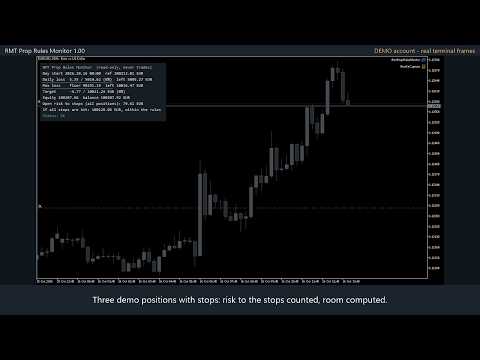
RMT Prop Rules Monitor is a read-only panel for evaluation and funded accounts on MetaTrader 5. It shows how much money is left before the daily-loss rule and the maximum-loss rule, and whether your open stop losses would break a rule if they were all hit.
It never opens, modifies or closes a trade. It runs as an Expert Advisor only because it uses the terminal's own profit calculation for every open position, which indicators are not allowed to call. Put it on its own chart (any symbol): it watches the whole account.
What the panel shows
- Day start (server time, reset hour of your choice) and the reference it measures from: day-start balance, or the higher of day-start balance and equity.
- Daily loss used, the limit, the percentage and the money left, with a usage bar.
- Maximum-loss floor, static (initial balance minus the limit) or trailing (highest equity seen minus the limit), and the money left.
- Progress to a profit target.
- Open risk of the whole account to the stop losses of all open positions, on every symbol, and the equity you would have if every stop were hit, with the verdict "within the rules" or "BREAKS daily rule".
- A position without a stop loss makes that worst case UNKNOWN and the status says "CHECK: a position has no stop loss". It is never counted as zero risk.
- When a limit has been reached, the status keeps saying so ("DAILY LIMIT REACHED today at 14:06") even if equity recovers afterwards, and after a restart of the terminal.
- Pop-up and push warnings at a usage level you choose (80% by default) and when a limit is reached: once per level, not on every tick.
How the day-start balance is found
It is rebuilt from today's deal history (balance minus today's trading results), so a restart of the terminal does not lose it. Deposits and withdrawals are not counted as results. The day-start equity can only be read if the monitor is running at the reset; when it was not, the panel says "reset unseen" and uses the balance.
Inputs
Initial balance (0 = balance when first attached), daily loss %, daily limit base (initial or day-start balance), daily reference (balance or higher of balance and equity), reset hour, maximum loss % and mode (static or trailing), profit target %, warning %, pop-up and push alerts, profile name, panel position, font size and colours.
Tested
- MetaQuotes-Demo, EUR hedging account, live: EURUSD, XAUUSD and USDJPY positions with stops (USD and JPY profits converted by the terminal), a position without a stop, a restart, the daily limit reached and remembered, the trailing floor.
- Strategy Tester, USD account: EURUSD, GBPUSD, USDJPY, XAUUSD; open risk equal to an independent calculation in every case; warnings once per level and day; invalid inputs refused at start.
Limits
- Check the exact rules of your firm: firms differ in reset time, in the reference (balance or equity) and in the trailing method. Set the inputs to match them.
- The monitor warns. It does not stop you or an EA from trading, and it never closes a position: you stay in charge of every order.
- The trailing high-water mark, the initial balance and a reached limit are kept in the terminal's global variables for this account and profile; another terminal or computer starts its own. Use a new profile name for a new challenge.
- Netting accounts, indices, stocks and crypto were not tested.
- In the Strategy Tester the panel follows the tester account; it is meant to be used on a live chart.