
Autotrail Lm Pro Manager
- 유틸리티
- 버전: 3.30
- 업데이트됨: 28 7월 2026

Professional management of manual trades across all symbols
Autotrail LM Pro Manager is a MetaTrader 5 Expert Advisor designed to automatically manage all manually opened positions, including trades on symbols other than the chart where the EA is installed.
You do not need to attach the manager to every chart.
For example, you can install it on a single XAUUSD chart and manage manual trades opened on:
-
XAUUSD
-
Forex pairs
-
Indices
-
Cryptocurrencies
-
Metals
-
Energies
-
Other CFDs offered by your broker
Its main feature is fully money-based trade management.
Stop Loss, Break-even and trailing management do not depend on the number of points travelled by the price. The system directly monitors the actual profit or loss of each individual position.
This solves one of the main limitations of traditional point-based trailing systems: every market has a different point value, tick size and volatility.
With Autotrail LM Pro Manager, the same money-management logic can be applied across completely different instruments.
WHY IT IS DIFFERENT FROM A STANDARD TRAILING STOPA traditional trailing stop works in points.
For example, 100 points on XAUUSD do not have the same financial value as 100 points on EURUSD, BTCUSD or an index.
The financial result also changes according to the trade volume.
Autotrail LM Pro Manager monitors the actual monetary result of the position.
When the trailing trigger is set to €0.80, it activates when that specific trade actually reaches €0.80 in profit, regardless of the symbol, the number of points travelled or the selected volume.
This makes trade management:
-
easier;
-
more consistent;
-
more precise;
-
easier to understand;
-
suitable for multi-symbol portfolios.
Monetary values follow the account currency. On a EUR-denominated account, the values directly represent euros.
VIRTUAL MONEY-BASED TRAILINGThe virtual trailing system is the core of the manager.
Unlike a standard trailing stop, the EA does not continuously move the Stop Loss on the broker’s server.
The program records the maximum profit reached by each individual position and calculates a protected profit level.
When the current profit falls back to the virtually protected level, the manager closes the position at market.
Example
Settings:
-
Trail Start: €0.80
-
Trail Lock: €0.20
-
Trail Step: €0.05
How it works:
-
The position reaches €0.80 profit.
-
The trailing system activates and virtually protects €0.20.
-
The profit rises to €0.85.
-
The protected level advances to €0.25.
-
The profit rises to €1.00.
-
The protected level advances to €0.40.
-
If the profit falls back to €0.40, the position is closed.
The trailing system follows the highest profit reached without being affected by point-value differences between symbols.
MONEY-BASED STOP LOSSThe manager can automatically apply a Stop Loss based on a predefined financial loss.
Example:
-
Stop Loss: €5.00
The system calculates the price distance required for the theoretical loss of the position to equal approximately €5.00.
The calculation is performed separately for every trade and considers:
-
symbol;
-
volume;
-
tick size;
-
tick value;
-
Buy or Sell direction.
The manager also uses a virtual monetary safety check.
If the real Stop Loss does not perfectly match the requested amount because of broker restrictions, slippage or market conditions, the EA continues monitoring the actual loss and may close the trade when the configured monetary threshold is reached.
MONEY-BASED BREAK-EVENBreak-even management is also based on monetary values rather than points.
Example:
-
Break-even Start: €0.50
-
Break-even Lock: €0.10
When the position reaches €0.50 profit, the system protects approximately €0.10.
This helps prevent a trade that has reached the selected profit level from completely turning into a losing position, except in cases involving slippage, gaps or abnormal market conditions.
Break-even is calculated individually for each symbol and trade volume.
MULTI-SYMBOL MANAGEMENT FROM ONE CHARTAutotrail LM Pro Manager can be installed on one chart while monitoring all manual positions in the trading account.
It does not matter whether the main chart is XAUUSD.
The manager can continue monitoring, for example:
-
a Buy position on EURUSD;
-
a Sell position on XAUUSD;
-
a NASDAQ position;
-
a BTCUSD position;
-
a position on any other available symbol.
The EA periodically scans all open positions.
This means that its management logic does not exclusively depend on new ticks arriving on the main chart symbol.
MANUAL TRADES ONLYWhen the manual-trade option is enabled, the manager controls only positions with Magic Number zero.
This allows other Expert Advisors to continue operating on the same account without automatically mixing their trades with manually opened positions.
Recommended configuration:
-
Manage All Symbols: true
-
Manage Manual Only: true
With this configuration, the program manages all manual positions while leaving trades opened by other robots separate.
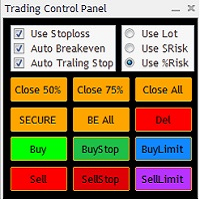
PROFESSIONAL DASHBOARDThe manager includes a graphical dashboard that provides quick access to the most important information and controls.
The dashboard can display or manage:
-
manager status;
-
number of managed positions;
-
combined floating profit;
-
monetary Stop Loss;
-
break-even activation level;
-
break-even locked profit;
-
trailing activation level;
-
initial trailing lock;
-
monetary trailing step;
-
default volume for manual buttons;
-
trend structure across selected timeframes;
-
main chart symbol information;
-
spread;
-
economic calendar;
-
Buy and Sell buttons;
-
closing of managed positions;
-
manager activation and deactivation.
One manager for the whole account
There is no need to attach a separate copy of the EA to every symbol.
Real monetary management
The behaviour does not change simply because a symbol has a different number of decimal places or point value.
Designed for manual trading
Open positions using your own trading strategy and let the manager handle risk and profit protection.
Progressive profit protection
The virtual trailing system follows the highest profit reached and progressively increases the protected amount.
Simple configuration
Parameters are expressed using clear monetary values.
Compatible with different volumes
Every position is calculated individually according to its trade size.
Separation from other robots
The manager can be configured to completely ignore trades opened by other Expert Advisors.
WHO IT IS DESIGNED FORAutotrail LM Pro Manager is suitable for:
-
discretionary traders;
-
manual scalpers;
-
intraday traders;
-
multi-symbol traders;
-
users who want to protect small profits quickly;
-
traders who do not want to manually calculate points, pips and tick values;
-
users who combine manual trades with automated trading systems.
The manager does not provide entry signals and does not decide when to buy or sell.
The trader remains fully responsible for the entry strategy, while the EA manages the position after it has been opened.
QUICK START GUIDE1. Installation
-
Open MetaTrader 5.
-
Select File.
-
Select Open Data Folder.
-
Open the MQL5 folder.
-
Open the Experts folder.
-
Copy the Expert Advisor file into the folder.
-
Open MetaEditor.
-
Compile the file.
-
Return to MetaTrader 5.
-
Refresh the Expert Advisor list.
2. Attaching the manager
-
Open any chart, such as XAUUSD.
-
Drag Autotrail LM Pro Manager onto the chart.
-
Allow algorithmic trading.
-
Enable the MetaTrader 5 Algo Trading button.
-
Confirm that the dashboard displays “AUTO MANAGER: ON”.
You do not need to open one chart for every symbol.
3. Recommended starting settings
Balanced example configuration:
-
Stop Loss Money: €5.00
-
Break-even Start: €0.50
-
Break-even Lock: €0.10
-
Trail Start: €0.80
-
Trail Lock: €0.20
-
Trail Step: €0.05
-
Manage All Symbols: true
-
Manage Manual Only: true
These values are examples only and should be adjusted according to account size, volume, symbol and trading strategy.
4. Opening trades
A trade can be opened:
-
manually from MetaTrader 5;
-
through the manager’s Buy and Sell buttons;
-
from MetaTrader 5 mobile;
-
from another terminal connected to the same trading account.
Once the position is detected, the manager automatically applies the configured management rules.
5. How virtual trailing works
Virtual trailing activates only when the position reaches the Trail Start amount.
Before that point, no virtual trailing protection is active.
After activation:
-
Trail Lock becomes protected;
-
each additional Trail Step increases the protected profit;
-
if the profit falls to the protected level, the position is closed.
6. Changing parameters
The main values can be changed directly from the dashboard.
After entering a new value:
-
confirm the change;
-
verify the displayed value;
-
make sure the manager remains active.
The new configuration is then applied according to the program’s management logic.
7. Virtual trailing requirements
Because trailing protection is virtual:
-
MetaTrader 5 must remain open;
-
the Expert Advisor must remain active;
-
Algo Trading must be enabled;
-
the account must remain connected to the broker;
-
the computer or VPS must have a stable connection.
A VPS is recommended for continuous operation.
RISK WARNINGAutotrail LM Pro Manager is a trade-management tool and does not guarantee profits.
Spread, commissions, swaps, slippage, market gaps, execution speed and broker specifications may cause actual results to differ from the configured theoretical values.
During fast market conditions, a position may be closed at a different amount from the virtually protected level.
Before using the manager on a live account, users should:
-
test it on a demo account;
-
verify its behaviour with their broker;
-
use volumes suitable for their account size;
-
avoid monetary settings that are too small compared with spread and commissions;
-
use a stable internet connection or VPS.
Trading involves a risk of capital loss.






























사용자가 평가에 대한 코멘트를 남기지 않았습니다