IMD TP Manager

IMD TP SL Manager — 포지션 바스켓의 이익실현·손절 관리

팀의 로봇을 논의하기 위해 채팅:가입


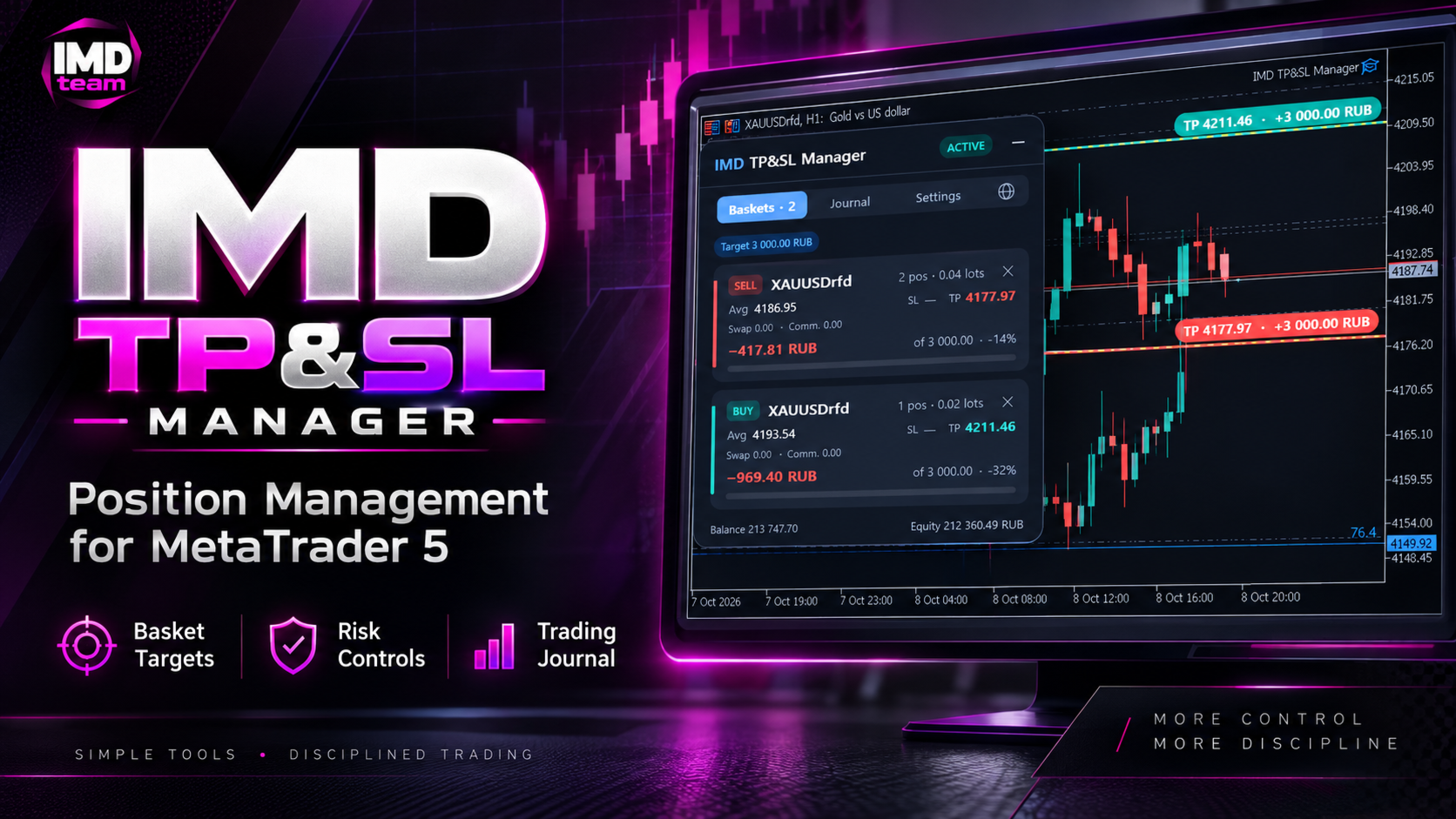
IMD TP SL Manager는 한 종목에서 여러 포지션을 보유하고, 미리 정한 손익에 도달하면 함께 청산하려는 트레이더를 위한 보조 EA입니다. 목표는 잔고 대비 비율 또는 계좌 통화 금액으로 설정합니다. EA는 평균 가격, 스왑, 수수료를 반영해 포지션 전체에 대한 공통 이익실현 가격을 계산하고 항상 최신 상태로 유지합니다.
이 EA는 신규 거래를 열지 않으며 매매 결정을 내리지 않습니다. 직접 또는 다른 EA로 진입한 포지션을 넘겨받아 관리합니다.
해결하는 문제
포지션이 여러 개이면 공통 이익실현 가격을 직접 다시 계산해야 하고, 스왑과 수수료 때문에 목표 손익에 도달하는 가격이 조금씩 바뀝니다. IMD TP SL Manager는 새 포지션, 스왑 부과, 부분 청산 등 변화가 있을 때마다 가격을 다시 계산합니다. 이익실현 가격은 언제나 설정한 금액과 일치합니다.
작동 방식
포지션은 종목과 방향별로 바스켓에 묶입니다. EA는 각 바스켓에 대해 다음을 계산합니다.
거래량 가중 평균 진입가
누적 스왑과 이미 부과된 수수료
청산 시 예상 수수료(거래 내역에서 자동 계산 또는 설정한 계수로 계산)
바스켓 손익이 목표와 같아지는 가격
교차 통화쌍은 터미널에 내장된 손익 계산으로 포인트 가치를 보정하므로, 가격에 따라 포인트 가치가 달라지는 종목에서도 정확한 가격이 산출됩니다.
목표, 손절, 포지션 관리
목표: 잔고 대비 비율 또는 계좌 통화의 고정 금액. 비율은 바스켓이 열린 시점의 잔고나 직접 지정한 금액을 기준으로 하므로 다른 바스켓이 청산되어도 목표가 바뀌지 않습니다.
바스켓 손절: 허용 손실을 비율 또는 금액으로 설정하며, 스왑과 수수료도 동일하게 반영합니다.
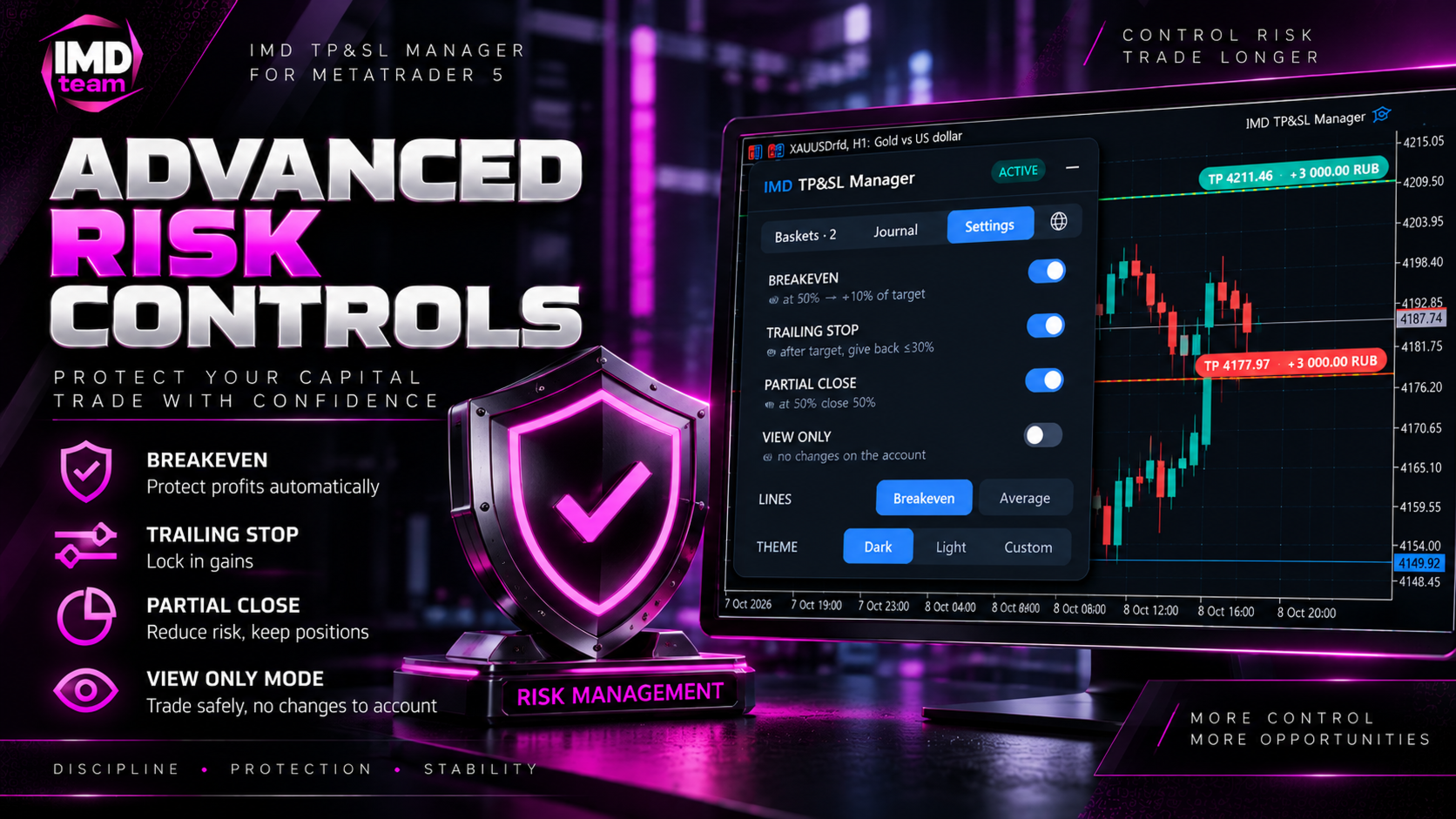
본전 이동: 바스켓이 목표까지 설정한 비율만큼 진행하면 손절을 수익 구간으로 옮깁니다.
수익 트레일링: 목표에 도달해도 바로 청산하지 않고 수익을 따라가며, 최고 수익에서 반납할 수 있는 비율을 제한합니다.
부분 청산: 중간 지점에서 설정한 비율의 거래량을 청산하고 나머지는 본전으로 옮길 수 있습니다. 확정된 손익은 바스켓 결과에 포함됩니다.
실행 방식
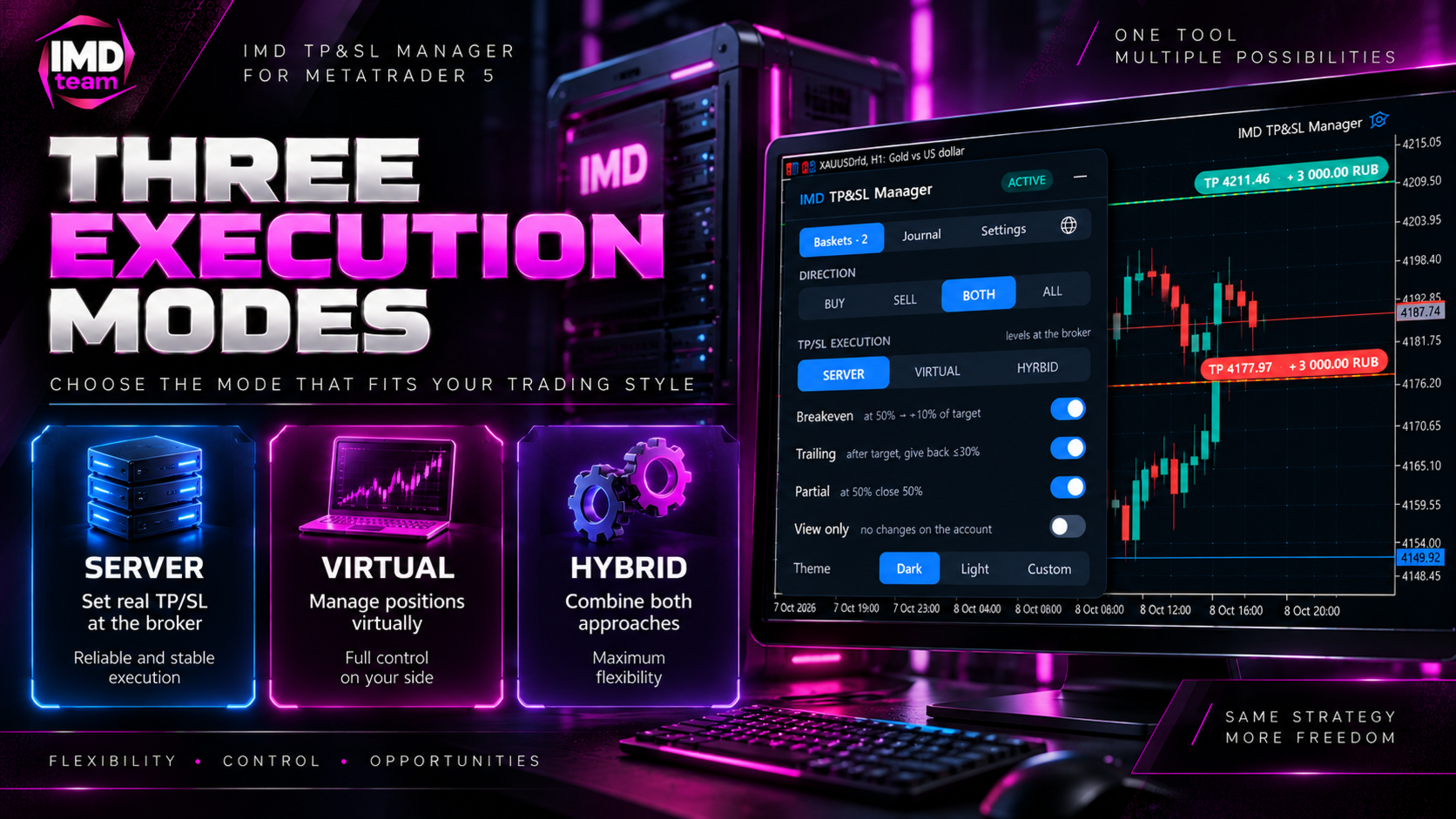
서버 가격: 이익실현과 손절을 브로커 서버에 설정하므로 터미널이 꺼져 있어도 작동합니다.
가상 가격: 브로커에게 보이지 않으며 EA가 직접 청산합니다.
하이브리드: 가상 가격에 더해 설정한 거리에 서버 보호 가격을 둡니다.
방향과 필터
매수만 또는 매도만.
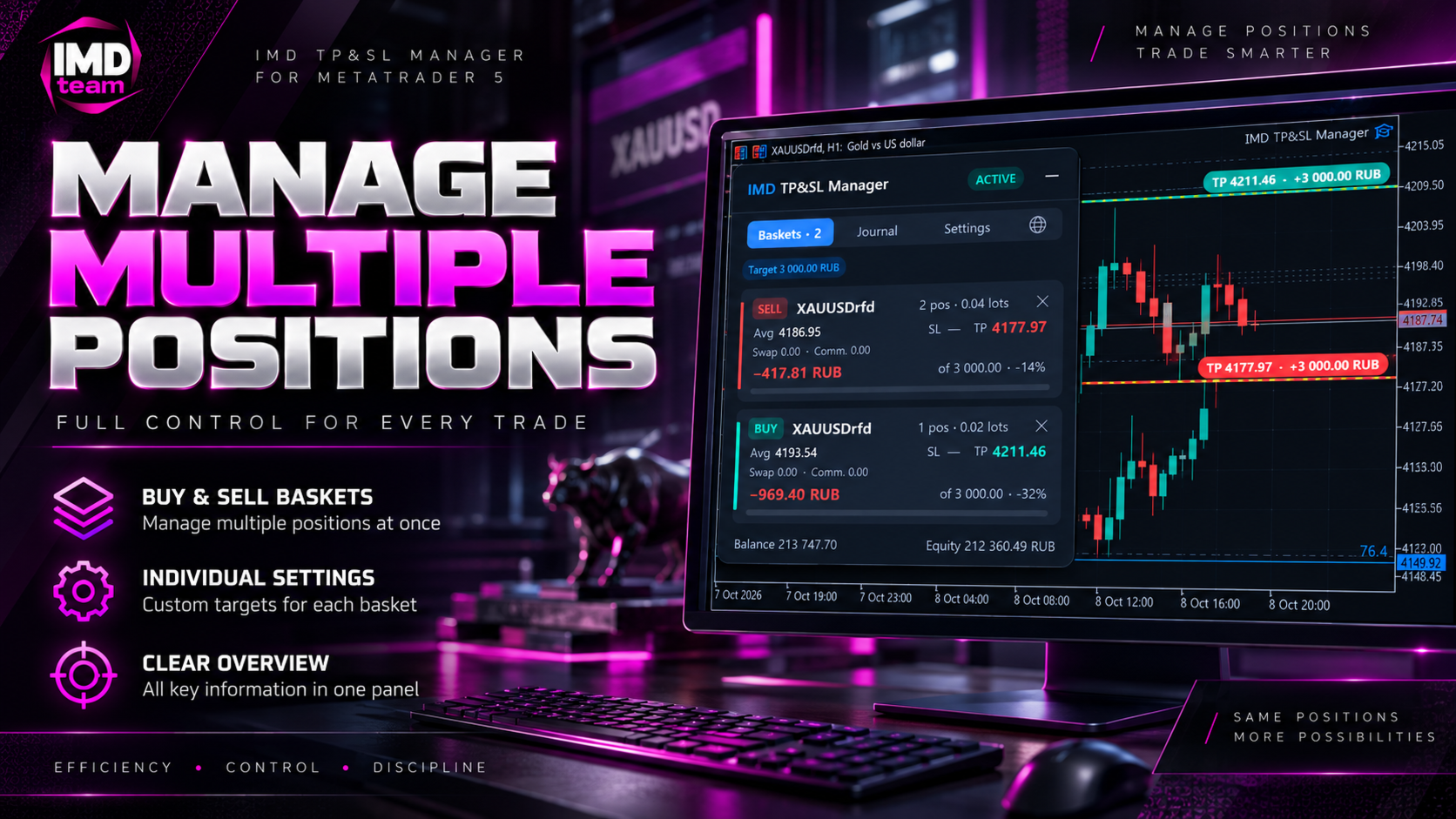
매수와 매도를 각각 관리: 각자의 가격과 목표를 가진 두 개의 독립된 바스켓.
모든 포지션 합산: 총 손익으로 청산되는 하나의 바스켓. 헤지 및 그리드 방식에 적합합니다. 헤지 계좌에서는 반대 포지션끼리 먼저 상계 청산하여 스프레드 비용을 줄입니다.
현재 종목 또는 계좌의 모든 종목.
모든 포지션, 수동 포지션만, 또는 특정 매직 넘버의 포지션.
컨트롤 패널
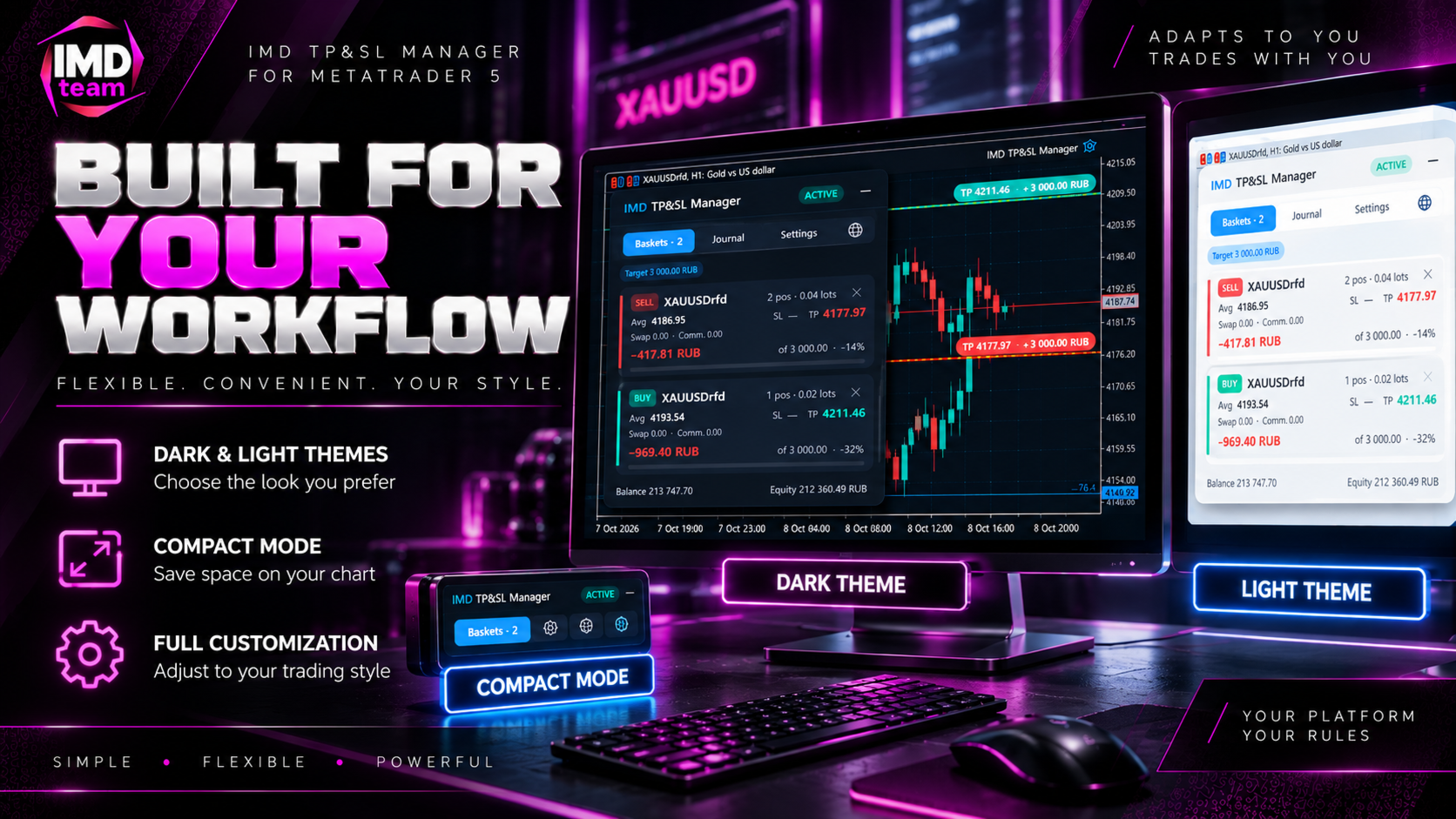
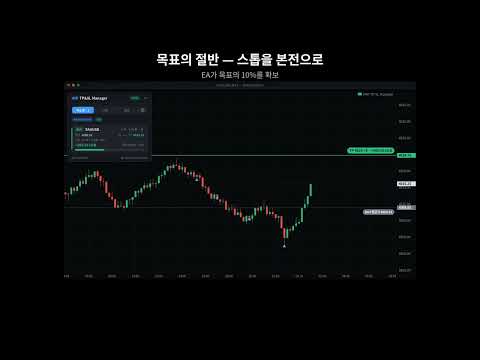
바스켓: 포지션 수와 거래량, 평균 가격, 손절 및 이익실현 가격, 스왑, 수수료, 현재 손익, 목표까지의 진행 막대를 카드로 보여 줍니다. 두 번 확인 후 바스켓을 수동으로 청산할 수 있습니다.
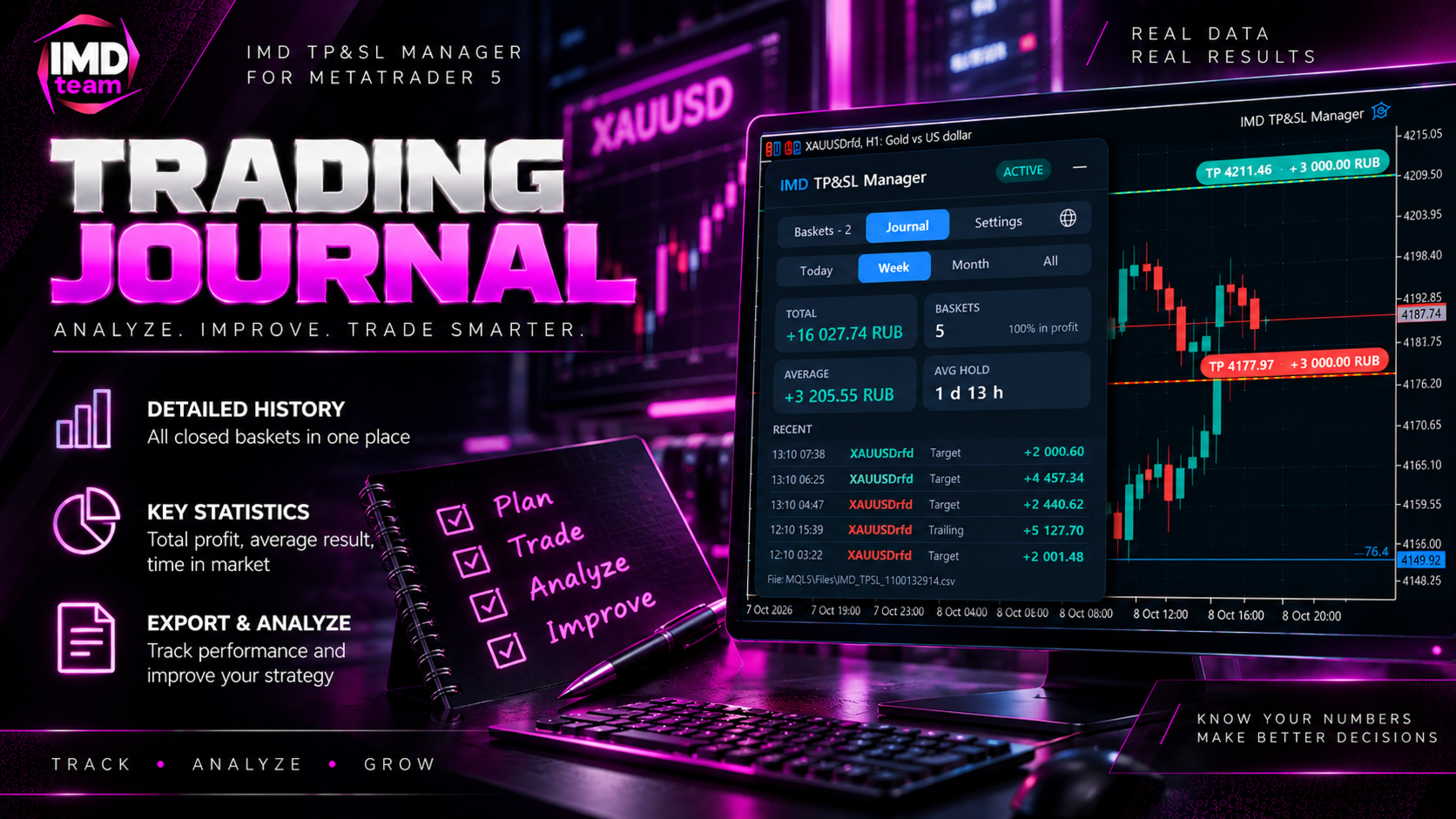
기록: 오늘, 이번 주, 이번 달 또는 전체 기간에 청산된 바스켓 통계 — 총 손익, 바스켓 수, 수익 비율, 평균 손익, 평균 보유 시간, 청산 사유, 최근 기록.
설정: 주요 파라미터를 EA를 다시 시작하지 않고 패널에서 바로 변경합니다.
헤더에는 EA의 현재 작동 상태가 표시되며, 언어는 별도 탭에서, 색상 테마는 설정에서 선택합니다. 패널은 마우스로 옮길 수 있고, 모든 바스켓의 총 손익을 보여 주는 작은 띠로 최소화할 수 있습니다. 패널에서 고른 설정은 즉시 저장되며 타임프레임 변경, 터미널 재시작, 컴퓨터의 예기치 않은 종료 후에도 유지됩니다.
차트 작업
라인 드래그: 목표 라인과 손절 라인을 마우스로 끌 수 있습니다. 끄는 동안 라인 옆에 현재 가격 기준 금액과 잔고 대비 비율이 표시되며, 놓으면 값이 적용됩니다.
추가 라인: 평균 가격과 스왑·수수료를 포함한 본전 가격. 각각 따로 켤 수 있습니다.
세 가지 색상 테마: 다크, 라이트, 사용자. 다크와 라이트는 차트 색상도 바꾸고, 사용자 테마는 차트를 그대로 둡니다. EA를 제거하면 차트의 원래 색상이 복원됩니다.
안정성
거래 가능 여부 확인: 알고리즘 거래 허용, 종목의 거래 시간, 최신 호가를 확인합니다. 시장이 닫혀 있으면 요청을 보내지 않고 오래된 가격으로 판단하지 않습니다.
오류 후 대기: 서버 오류가 나면 간격을 늘려 가며 요청을 다시 보냅니다.
브로커 제한: 최소 가격 거리와 동결 수준을 지킵니다. 가격 변경의 최소 폭은 틱 수와 스프레드 비율로 설정합니다.
롤오버: 롤오버 중에는 가격 변경을 멈춥니다. 스프레드가 넓을 때 EA 손절에 의한 청산을 막을 수도 있습니다.
종목당 관리 인스턴스 하나: 여러 차트에서 EA를 실행해도 포지션은 그중 하나만 관리하고, 나머지는 해당 상태를 표시합니다.
수동 손절: 직접 설정한 손절은 삭제하지 않습니다.
보기 전용 모드: 계좌를 전혀 변경하지 않고 계산과 라인만 표시합니다. 처음 사용할 때나 설정을 확인할 때 편리합니다.
기록과 알림
청산된 바스켓은 모두 MQL5폴더의 CSV 파일에 기록됩니다. 거래 내역 기준의 정확한 손익(부분 청산, 스왑, 수수료 포함), 청산 사유, 보유 시간이 담깁니다. 파일은 어떤 스프레드시트 프로그램에서도 열 수 있습니다. 바스켓이 청산되면 터미널 알림으로, 설정한 경우 모바일 기기 푸시 알림으로도 알려 줍니다.
인터페이스 언어
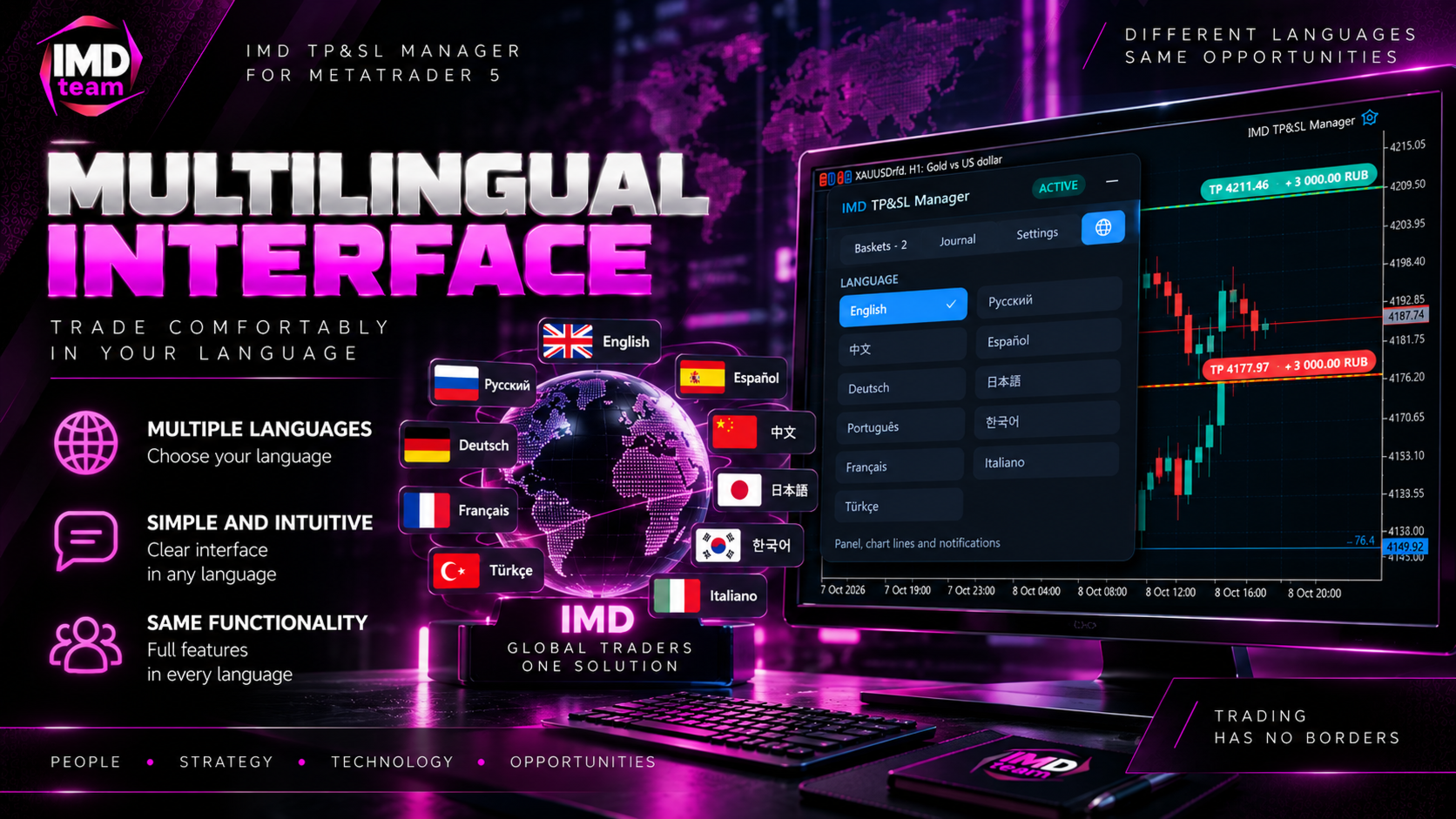
English, Русский, 中文, Español, Deutsch, 日本語, Português, 한국어, Français, Italiano, Türkçe. 언어는 패널의 버튼으로 바꾸며 패널, 차트 라인, 알림에 적용됩니다. 입력 파라미터의 Auto 옵션은 터미널 언어를 사용합니다.
시작하기
터미널에서 알고리즘 거래를 허용합니다.
포지션이 열려 있는 종목의 차트에 EA를 적용합니다.
보기 전용을 켜고 차트의 가격이 예상과 맞는지 확인합니다.
보기 전용을 끄면 EA가 가격 관리를 시작합니다.
참고 사항
EA는 실계좌와 데모 계좌에서 포지션을 열지 않습니다. 전략 테스터에서는 관리 기능을 보여 주기 위해 최소 거래량으로 데모 포지션을 엽니다. 이 기능은 입력 파라미터에서 끌 수 있습니다.
가상 가격, 본전 이동, 트레일링, 부분 청산은 터미널이 실행 중일 때 작동합니다. 터미널이 꺼질 수 있다면 서버 모드나 하이브리드 모드를 사용하세요.
헤지 계좌와 네팅 계좌를 모두 지원합니다.
이 EA는 포지션 관리 도구입니다. 거래 결과는 사용자의 판단과 시장 상황에 따라 달라지며, EA는 수익을 보장하지 않습니다.
추천 제품
This is a common, simple and easy to use but effective tool to manage trading risks for all traders. It also help trader places stop loss and take profit levels at the same time the order is filled. How to set the expert advisor's parameters to support your trading style? Lots size. Fixed lots size - For traders who prefered to trade with fixed lots size, they can input the lots size in 'User lots' menu in the expert advisor's properties. The input value should be from the 'Minimum Volume' to th
Professional risk management utility. Auto lot-size calculator + live risk panel. Works alongside any other EA — does not open trades independently. - **Auto lot size**: calculated from % risk per trade + SL distance in pips + balance - **Live dashboard**: Balance | Equity | Drawdown % | Suggested Lot | R:R ratio - **Daily drawdown alert**: notification when daily DD exceeds threshold - **Auto-close option**: closes all positions on daily DD breach (configurable) - Zero trade opening — purely a
Lot calculator tool MT5
Ernestas Kvedaras
3.67 (3)
More stable MetaTrader 4 version is available here:  Lot Calculator Tool . This tool helps you to automatically calculate and manage risk, conveniently place orders visually, schedule orders, trail stops, move them to break-even and more. Features Place market or pending orders using draggable lines Schedule orders Calculate and limit risk using various methods See current spread See time till next candle Set custom order comments Trail stops Move stops to break-even See order profit/loss in p
This tool will perform Trailing stop loss and Break even management for orders. Helps you limit or reduce the time spend watching orders on the screen, especially when you need to go to sleep. Just add this EA to 1 chart, you can manage all pairs. You can filter orders by comment, magic number, symbol and order ticket number. When Breakeven it can add shift/offset pips (to cover the commission...). You can try in strategy tester before purchase. The EA will add Buy and Sell alternately, so you
RRtoolBox
David Ruiz Moreno
RRtoolbox - Professional Tools: Risk:Reward Trading Tool (SL/TP Horizontals + Pending orders + Diagonals), Alerts set on trend lines (for alerts on diagonal levels), SelfManagement (BE, partials...), close/cancelling by time, Statistics, Info and trading on chart. One-Click Trading with Visual Risk:Reward Management RRtoolbox is a comprehensive trading panel that combines one-click order execution,  statistics and  powerful visual Risk:Reward tools, alerts set with trendlines, on chart butt
Golden Gestion TP SL No Limit MT5
Matthias Hubert Patrick Snidaro
Auto SL/TP Manager EA – Gestion Automatique Intelligente Auto SL/TP Manager EA est un Expert Advisor conçu pour automatiser la gestion des commandes avec une efficacité maximale et une grande discrétion. Il gère automatiquement : Le Stop Loss (SL) et le Take Profit (TP) Le Profit Lock (verrouillage progressif des bénéfices) Le Trailing Stop avec plusieurs méthodes avancées L' affichage masqué du SL et du TP pour plus de discrétion (non visible par le courtisan) C'est l'outil idéal pour les
Auto SL/TP Manager (자동 SL/TP 관리자) 다시는 수동 거래를 보호 없이 방치하지 마십시오! 급하게 포지션에 진입하느라 손절매(Stop Loss)나 익절(Take Profit) 설정을 잊은 적이 있으십니까? "Auto SL/TP Manager"는 당신에게 필수적인 안전망입니다. 이 Expert Advisor는 귀하의 계정을 24/7 모니터링하며, SL/TP가 누락된 모든 오픈 포지션에 대해 미리 정의된 리스크(SL) 및 수익(TP) 레벨을 자동으로 적용합니다. 이것은 수동 거래자 , 스캘퍼 , 또는 모바일 기기에서 연 거래를 포함하여 모든 거래가 자신의 전략에 따라 보호되기를 원하는 모든 사람에게 완벽한 도구입니다. 주요 기능 완전 자동화 : SL/TP가 없는 오픈 포지션을 지속적으로 스캔하고 적용합니다. 높은 설정 유연성 : 손절매와 익절을 핍(Pips) 단위로 쉽게 정의할 수 있습니다 (예: 5.0 = 50 포인트). 강력한 필터링 : 모든 심볼, 특정 심볼 또
Not just a lot calculator – SizerX is a complete trade manager for MetaTrader 5: position sizing, break-even, partial close, 4 trailing stop types, pyramiding, prop firm protection and OCO orders, all from one clean panel on your chart. Fully testable in the Strategy Tester – the free demo includes every feature. Try before you buy. PLAN & SIZE • Risk as % of balance, % of equity or a fixed amount – SizerX calculates the exact lot, rounded to your broker's lot step. • Plan with lines on
LotPilot
Zhanbolat Umirbayev
LotPilot is a risk management and position size calculator designed for manual trading in MetaTrader 5. The utility helps traders calculate an appropriate lot size before entering a trade. Instead of calculating position size manually, the trader sets the required risk parameters and LotPilot performs the calculation. The main purpose of LotPilot is to make position sizing faster and help maintain consistent risk management from trade to trade. Main features Position size calculation based
Rulekeeper
Timurbek Yusupov
Rulekeeper is a professional risk-management utility for MetaTrader 5, built for prop-firm traders (FTMO, FundedNext, The5ers, Apex, Topstep and any ECN account). It removes the human factor: tilt, overtrading and accidental rule violations. WHAT IT DOES 1. Daily Loss Limit — measures the day result from the balance at the close of the PREVIOUS trading day (configurable: day-start balance / day-start equity). When the limit is hit it closes all positions, removes pending orders and locks trad
Recovery Assistant Pro for MT5 Manual Recovery Trading Assistant Recovery Assistant Pro is a Manual Trading Assistant EA for Recovery trade calculations and management. Helps calculate the appropriate Lot Size. Designed to calculate Recovery trade parameters based on floating loss and the selected Target USD. Simplifies Recovery calculations that would otherwise require manual calculation. The trading panel provides direct access to the main Recovery functions from the chart. Includes a Recov
WHAT IT DOES ICT-SMC Order Flow Risk & Order Management EA is a semi-automatic trade management panel for MetaTrader 5 that puts risk first. You decide how much money you are willing to risk per trade — the EA calculates the exact lot size from your stop-loss distance, places the order (market or pending), and then manages the position automatically: price-based or R-based partial closes, breakeven, R-based trailing stop, and an R-multiple take-profit. Built for ICT / SMC order-flow discretiona
Medoxray Trade Manager
Mohamed Hussein Abdallah Abdelsalam
Medoxray Trade Manager – Manual Trading Panel with Interactive Risk / Reward Tool for MT5 Product Overview Medoxray Trade Manager is a professional manual trading panel for MetaTrader 5, designed to make trade execution and position management faster, easier, and more organized. It combines one-click trading, interactive chart-based Risk / Reward management, pending order placement, advanced position management, and a live Profit & Loss dashboard in one convenient interface. This is a manual tra
Equity Master Stop v2 MT5
Frank William Jr Colbert
Trading tool combining a sophisticated equity stop-loss, dynamic take-profit management (Breakeven & Trailing), and symbol-group-based closing logic. It is a complete risk management and trade supervision tool. Features: All features of `Equity Master Stop v1` (floating profit/loss limits, exit protection, skip hours). Take-Profit Override: Can force a TP on any order to lock in a `MAX_FLOATING_PROFIT`. Step Breakeven: Locks in increasing amounts of profit as a trade moves favorably (e.g., aft
Nebula Trading Manager
Sina Mohammadamin Shahriari Moghadam
This expert advisor named   TradeManager   provides a manual trading management panel in MetaTrader 5 that allows precise control over open positions. It is designed for traders who want dynamic management of Stop Loss (SL), Take Profit (TP), Break Even (BE), and Partial Close functionality. Key Features: Dynamic Trade Management : Manually set or drag-and-drop SL, TP, and BE levels. Supports partial closing at different profit levels (1:1, 1:1.5, 1:2). Automated Drawing : Automatically draw
Pattern Recognition EA
Claudiu-georgian Zavera
Pattern Recognition EA - From Learn to Earn. The market repeats itself. This EA finds every past repeat of the current candle sequence - and lets history vote the direction. ONE SHAPE. EVERY REPEAT IN HISTORY VOTES. The last N candles on your signal timeframe form a shape. The EA scans the history you choose - a fixed number of bars or everything your broker provides - for the SAME shape, and checks what happened next, every single time. Only when enough repeats exist AND a clear majority of t
우리의   Basic Support and Resistance   표시기는 기술 분석을 향상시키는 데 필요한 솔루션입니다.이 표시기는 차트/ MT4 버전 특징 피보나치 수준의 통합 : 지원 및 저항 수준과 함께 피보나치 수준을 표시하는 옵션과 함께, 우리의 지표는 시장 행동과 가능한 역전 영역에 대한 더 깊은 통찰력을 제공합니다. 성능 최적화 : 각 막대의 개구부에서만 확장 라인을 업데이트하는 옵션을 사용하여, 우리의 지표는 지원 및 저항 수준의 정확도를 희생하지 않고 최적의 성능을 보장합니다. 입력 주요 설정 Timeframe:  이 입력을 통해 차트에 더 높은 기간의 지지선과 저항선을 표시하도록 선택할 수 있습니다. Support/Resistance Strength [Number of Bars]:   이 입력을 사용하면 지지대와 저항의 강도를 결정할 수 있습니다.숫자가 높을수록지지/저항이 더 강해집니다. Price mode:  이 매개 변수를 사용하면 지원 및 저항 수준을
Capital Guard – Position Size & Risk Manager An Amazing Software For Risk Calulcation & Trading Management! Created by a Trader with over 27 years of Trading experience with the tools and functions traders need. Not filled with features and functions you just do not need. For The Lowest Price Possible. And It will never go up. I am a trader not a marketer. Here to help you get better in what you already do! 1st Class Support. You are never left alone. I am almost always online and will r
Scalper Pivot
Yosi Malatta Madsu
Scalper Pivot detects respectable small reversal areas that can be used to mark repeatable opportunity windows. For M1 timeframe. Setup/inputs: First, set one pip on price, e.g. EURUSD to 0.0001, USDJPY to 0.01, or XAUUSD to 0.1. Or select AUTO for autodetect common symbols. Set minimum and maximum range on pips, if you want scalp between 10 to 20 pips then set it to 10 and 20 respectively. Set detection window to any candle count you want. Set it too low or too high would be less accurate.
ZF Equity Protector Premium v2.0 The Ultimate Daily Loss Breaker for Smart Traders & Prop Firm Hunters Have you ever blown a Prop Firm account just because of "one bad day"? Or has emotional revenge trading destroyed weeks of hard-earned profits in a matter of hours? Put an end to account destruction right now. ZF Equity Protector Premium v2.0 is an advanced automated safety system (EA) specifically engineered to be your capital's ultimate line of defense. This EA acts as a cold, calculated circ
Drawing Assistant Tool for MT5 This is an assistant tool that allows you to create drawing objects with a single click from an on-chart panel, using settings independent of the standard MT5 objects. Dual Presets: You can draw two distinct styles for each object type, labeled "1" and "2", simply by clicking the respective buttons. Three Styles Available: Since these presets function independently from the standard MT5 toolbar objects, you effectively have access to three different object styles (
General Description Auto SL/TP Manager is a professional utility for MetaTrader 5 designed to automate the management of Stop Loss and Take Profit levels on open positions. The levels are calculated based on monetary risk values defined by the user, rather than fixed pip distances. This tool helps maintain consistent risk discipline without manual intervention. Main Functionality The EA continuously monitors all open positions and automatically applies Stop Loss and Take Profit levels when they
ASTANA TRADE PRO — Professional Trade Management Panel for MetaTrader 5 ASTANA TRADE PRO is a professional trade management utility for MetaTrader 5, designed for manual traders who want faster trade execution, better position control, and disciplined risk management from one premium trading panel. The utility does not use automatic entry signals and does not replace a trading strategy. It is created to help traders manage already planned trades more efficiently: open positions, manage TP stages
EA Risk Manager is a professional risk‑management Expert Advisor designed to protect your trading account and enforce disciplined money management. The EA does not open trades by itself – it only monitors and manages all existing positions (manual and automated) on the account. It is especially useful for traders who want to: Hard‑limit daily / weekly / monthly losses and profits. Restrict lot size and the number of open trades. Trade a basket of G7‑related Forex pairs using one centralized
THREE LAYERS OF SMC MARKUP IN ONE TOOL Liquidity pools, order blocks and a volume profile — the Smart Money markup that traders usually assemble from three separate indicators. SMC Liquidity OB Profile draws all of it in one tool, with a single block of input parameters and one visual language. Why not just stack three free SMC overlays? Because three overlays means three settings lists, three visual styles and triple the load on your chart. Here everything is computed in a single lightweight
Support Resistance Inversion is based on supports and resistance to find the points in which the currency will probably go in a defined direction. Inputs: Alarm ON/OFF: turn on or off alarm on screen. The indicator draws an arrow pointing the direction to follow based on when the price cross or bounce on a support or a resistance. Support Resistance Inversion can help you to choose the moment to do your trades in a specific direction, strengthening your trading strategy.
MTM Pro Manual Trading Panel
Choawana Malaikitsanachalee
MTM Manual Trade Manager is a professional trading dashboard designed for manual traders who want better control over risk and trade management. This Expert Advisor does NOT open trades automatically. All trading decisions and order executions are fully controlled by the trader. Main Features: - Manual Buy and Sell execution from the dashboard - Visual Stop Loss and Take Profit using drag & drop lines - Fixed Lot and Risk Percentage position sizing - Automatic Break Even management - Multiple
FREE
Risk Calculator Veqrix
Jose Luis Heredia Padilla
Risk Calculator Veqrix  Risk Calculator Veqrix is a risk calculation, visual trade planning, and manual order execution tool for MetaTrader 5. The EA automatically calculates the trade volume using the configured risk, entry price, and distance to the Stop Loss. It also displays the planned trade directly on the chart and distributes the total volume across up to three Take Profit targets. This tool does not generate trading signals . The user selects the direction, configures the levels, and
FREE
Lot Size Calculator Advanced – 드로다운 잔액을 고려한 포지션 크기 조정 도구 이 로트 사이즈 계산기는 선택한 리스크 비율과 손절매(Stop Loss) 거리에 기반합니다. 또한, 거래당 추가로 감수할 리스크 금액을 설정하는 새로운 기능이 추가되었습니다. 이 접근 방식은 리스크 증가를 즉시 두 배로 만드는 대신 시간에 걸쳐 분산함으로써, 드로다운을 원활하게 관리하는 데 도움이 됩니다. 이를 통해 더 나은 통제와 안전한 리스크 관리가 가능합니다. 이 도구는 외환, 금속, 지수, 상품 및 암호화폐 거래를 위해 설계되었습니다. 주요 기능 계좌 잔액과 선택된 리스크 비율에 따른 포지션 크기 계산 시각적 및 클릭 가능한 버튼: 시장가 주문 및 지정가 주문 모드 시각적 거래 레벨: 차트의 진입, 손절매, 이익실현 라인 시각적 리스크 대비 보상 비율(Risk-to-reward ratio) 표시 손절매 거리에 따라 자동으로 로트 조정 패널에 시각적으로 표시되는 손익 값 사용
Ultimate Pro Trading Panel — All-In-One Manual & Grid Trading Dashboard Pro Trading Panel   is an all-in-one on-chart control panel that gives discretionary and semi-automated traders a complete toolkit for entries, exits, risk management, and grid trading — without leaving the chart. Every function is visual, draggable, and updates in real time. If you want to test this utility feel free to download the basic preview version of this tool here:  https://www.mql5.com/en/market/product/181435 Who
이 제품의 구매자들이 또한 구매함
Trade Assistant MT5
Evgeniy Kravchenko
4.43 (216)
거래당 위험 계산, 라인을 사용한 손쉬운 신규 주문, 부분 청산 기능을 통한 주문 관리, 7가지 유형의 트레일링 스탑 및 기타 유용한 기능을 제공합니다. 추가 자료 및 지침 설치 지침   -   애플리케이션 지침   라인 기능       - 차트에 개시선, 손절매, 차익실현을 표시합니다. 이 기능을 사용하면 새로운 주문을 쉽게 하고 개봉 전에 추가 특성을 볼 수 있습니다. 위기 관리       -       위험 계산 기능은 설정된 위험과 손절매 주문의 크기를 고려하여 새 주문의 볼륨을 계산합니다. 이를 통해 손절매 크기를 설정하고 동시에 설정된 위험을 존중할 수 있습니다. 로트 계산 버튼 - 위험 계산을 활성화/비활성화합니다. 필요한 위험 값은 위험 필드에 0에서 100 사이의 백분율 또는 예금 통화로 설정됩니다. 설정 탭에서 위험 계산 옵션을 선택합니다. $ 통화, % 잔액, % 지분, % 자유 마진, % 사용자 정의, % AB 이전 일, % AB 이전 주, % AB 이전
Farmed Hedge Yield Farming | All Markets (Manual - Hybrid - Semi/Automated EA) VERIFIED TRADING RESULTS - Farmed Hedge Yield Axi Copy:  https://www.mql5.com/en/signals/2356376 - Farmed Hedge Yield Exn Copy:   https://www.mql5.com/en/signals/2356404 - Farmed Hedge Yield V Copy:  https://www.mql5.com/en/signals/2357156 IMPORTANT NOTICE: FarmedHedge is a MANUAL-FOCUSED TRADING UTILITY ,not a fully automated EA. Results shown on this Signal include manual trades and overall strategic management.
EA Overfitter
Stephen J Martret
5 (5)
That backtest looks great. But will it still be making money tomorrow, next week, next month? EA Overfitter re-runs your EA on 100 price histories it has never seen. One score tells you if the edge is real. A backtest tells you what an EA did on one price history — the one that happened to occur. What you cannot tell from it is how much of that result was the strategy and how much was the particular path. EA Overfitter answers that. It builds up to 100 synthetic price histories your EA has n
TradePanel MT5
Alfiya Fazylova
4.89 (176)
Trade Panel은 다기능 거래 도우미입니다. 이 애플리케이션에는 50개 이상의 수동 거래 기능이 포함되어 있으며 대부분의 거래 작업을 자동화할 수 있습니다. 앱 사용 설명서: https://www.mql5.com/en/blogs/post/756482 데모 계정용 앱 체험판: https://www.mql5.com/en/blogs/post/750865 앱 설치 방법: https://www.mql5.com/en/blogs/post/756239 시각 모드에서 앱 테스트 방법: https://www.mql5.com/en/blogs/post/770277 VPS MetaTrader에 앱 설치 방법: https://www.mql5.com/en/blogs/post/770190 거래. 한 번의 클릭으로 거래를 수행할 수 있습니다: 리스크 자동 계산과 함께 예약 주문 및 포지션 열기. 한 번의 클릭으로 여러 주문 및 포지션 열기. 주문 그리드 열기. 예약 주문 및 포지션을 그룹별로 닫기. 포지션
AI Agent Supervisor is NOT an Expert Advisor. AI Agent Supervisor   is a   multi-agent AI risk & portfolio supervisor   that watches every EA on your account and intervenes in real time.  WANT AN AI PORTFOLIO MANAGER WATCHING YOUR FLEET 24/7?   Run your fleet on the same brokers I do:   IC MARKETS , IC TRADING   .  Unlike the centralized stock market, Forex has no single, unified price feed.  Every broker sources liquidity from different providers, creating unique data streams. The Supervisor r
================================================================================ POC BREAKOUT - V20.72. Full Professional Grade Toolkit ================================================================================ POC Breakout is a full MetaTrader 5 trading dashboard for discretionary traders who want breakout signals, Point of Control (POC) context, volume profiles, order flow, market structure, news, alerts, and advanced trade planning in one professional workspace. Attached directly to you
Unlimited Trade Copier Pro MT5 is a tool to copy trade remotely to multiple MT4, MT5 and cTrader accounts at different computers/locations over internet. This is an ideal solution for you if you are a signal provider and want to copy your trades to other receivers globally on your own rules. One provider can copy trades to multiple receivers and one receiver can get trade from multiple providers as well. The provider can even set the subscription expiry for each receiver, so that receiver will n
News Trade EA MT5
Konstantin Kulikov
4.55 (11)
제가 몇 년 동안 사용하고 있는 유용한 로봇을 소개드립니다. 반자동뿐만 아니라 자동 모드로도 사용할 수 있습니다. >>> Chat <<< 본 프로그램에는 경제 캘린더의 뉴스별로 유연한 거래 설정이 포함되어 있습니다. 전략 테스터에서 확인할 수 없습니다. 진짜 작업뿐입니다. 최신 설정 아카이브 다운로드: https://www.mql5.com/en/blogs/post/747929 신호 모니터링: https://www.mql5.com/en/signals/author/test-standart 이 전문가를 위해 고유 설정 세트를 만들 때 블로그의 모든 매개변수에 대한 설명을 참조하십시오: https://www.mql5.com/en/blogs/post/748545 . 기본 설정 설명 작업은 한 차트에서 GBP(GBPUSD, EURGBP, GBPJPY, GBPCAD, GBPAUD, GBPCHF)와 쌍으로 이루어집니다. GBP는 가장 변동성이 큰 통화로서 거래 수행 시 거래를 성공적으로
Power Candles Strategy Scanner: 스스로 최적화하는 멀티 심볼 셋업 파인더 작은 움직임마다 울리는 스캐너는 결국 무시하게 됩니다. 분주한 캔들 마감 한 번에 알림이 연달아 쏟아지고, 정작 실제로 거래하는 단 하나의 셋업은 소음에 묻혀 버립니다. Power Candles Strategy Scanner 는 스스로 최적화하는 Power Candles 엔진을 Market Watch의 모든 심볼에서 실행하고, 당신이 직접 정한 필터를 통과한 것만 알려줍니다. 기준은 마지막 확정 캔들의 강도, 셋업의 손익비, 실시간 스프레드, 그리고 당신이 거래하는 자산군입니다. 심볼이 리스트에 들어오면 스캐너가 당신을 부릅니다. 필터로 걸러낸 것은 모두 조용히 남아 있고, 같은 캔들 마감에서 나온 모든 신호는 하나의 메시지로 도착합니다. 구매 전에 패널과 모든 필터를 확인하세요. 스크린샷, 전체 기능 투어, Power Candles와 함께 쓰는 워크플로: stein.investment
다음 업데이트 — 버전 2.52 곧 출시! [신규] 시장 분석 및 트레이딩 워크플로를 향상시키기 위해 설계된 4가지 주요 신규 기능을 기대해 주세요. 트레이딩 요구 사항을 충족하도록 설계된 4가지 새로운 기능으로 시장 분석을 한 단계 더 발전시킵니다. 다음 기능을 소개합니다: 1. TRADE OVERVIEW DASHBOARD 2. CONFLUENCE AT ZONE 3. STRONG & WEAK HIGH/LOW 4. OTE 1. TRADE OVERVIEW DASHBOARD 시장 전체 상황을 더 쉽게 파악할 수 있도록 도와주는 대시보드입니다. 트레이딩 의사결정을 지원하는 가이드를 제공하며, 하나의 화면에서 시장을 분석하고 체계적으로 트레이딩을 계획할 수 있도록 도와줍니다. 멀티 타임프레임 시장 개요 (Multi-Timeframe Market Overview) 시장 방향과 가격 구조를 더욱 명확하게 파악 시장 상황을 빠르게 확인 체계적인 시장 분석 및 진입 계획을 위한 가이드 2. CO
REVDEN AI Desk: REVDEN의 시장 컨텍스트 위에서, 당신만의 AI와 나누는 하나의 대화로 트레이딩을 운영하세요 하나의 대화로 트레이딩을 운영한다고 상상해 보세요. REVDEN AI Desk 는 이를 MetaTrader 5로 가져옵니다. 당신만의 AI에게 시장을 어떻게 읽는지 물으면, AI는 당신이 거래하는 종목에 대한 REVDEN의 전체 컨텍스트, 즉 각 종목의 상태와 리스크 현황, 예정된 발표를 바탕으로 답합니다. AI의 제안은 진입, 스톱, 타겟, 리스크를 갖추고 도착하며, 맞는 제안을 당신이 승인합니다. 규칙도 같은 방식으로 바뀝니다. 무엇을 바꿀지 적으면 AI가 새 룰북의 초안을 작성하고, 받아들일지 버릴지는 당신이 정합니다. 대화를 둘러싸고 시장 전체가 하나의 화면에 펼쳐집니다. 데스크와 설정 가이드를 확인하세요. 모든 화면, 모든 설정, 그리고 당신만의 AI와 함께하는 첫 단계: stein.investments/products/revden-ai-desk 당신
Zentriq Trade Manager
Mark Frederick Siebert
Experience trading without friction. Zentriq Trade Manager is a modern, high-performance trade management utility engineered with a high-DPI canvas interface, anticipatory workflow design, and an integrated Macroeconomic News Filter. Designed for discretionary traders, scalpers, and prop firm traders who demand speed, precision, zero-clutter ergonomics, and automated news event protection. User Manual Get the most out of Zentriq Trade Manager with the complete user manual: Complete User Manual:
GRat Crypto
Ivan Titov
4.5 (2)
Trade on crypto exchanges in MT5 with no limits! GRat_Crypto is a tool for manual and automated trading , including ANY available EA, ANY  cryptocurrency  on most popular crypto exchanges in the familiar MT5 environment 24/7. Features 1. ALL instruments of the 9 most popular crypto exchanges are available: Binance, BingX, Bybit, Coinbase, CoinEx, Kraken,   KuCoin, MEXC and OKX . 2. The ability to place ANY type of order available in MT5, both market and pending, to modify orders and positions,
RETAILBERG FOOTPRINT CHART PRO — Order-Flow Workspace for MetaTrader 5 Version 7.00  |  Professional System  |  31 tools  |  One chart A full 150-page illustrated User Manual is included. Please read the full manual to understand this feature packed footprint chart elements and ui. https://www.mql5.com/en/blogs/post/777982 DEMO / STRATEGY TESTER — PLEASE READ FIRST
Trade Indicator Assistant   is a powerful MT5 utility designed to turn indicators into automated trading systems. Its main feature is the ability to automatically detect an indicator’s   BUY and SELL signal buffers , without requiring you to know the buffer numbers, search through indicator settings, or modify the indicator source code. Bonus Indicator:   After purchasing Trade Indicator Assistant, contact me to receive   Trade Signal Pro   completely free as a bonus indicator. [Download Demo V
Strategy Builder offers an incredible amount of functionality. It combines a trade panel with configurable automation (covert indicators into an EA), real-time statistics (profit & draw down) plus automatic optimization of SL, TP/exit, trading hours, indicator inputs. Multiple indicators can be combined into an single alert/trade signal and can include custom indicators, even if just have ex4 file or purchased from Market. The system is easily configured via a CONFIG button and associated pop-u
Bots Builder Pro MT5
Andrey Barinov
4.17 (6)
This is exactly what the name says. Visual strategy builder . One of a kind. Turn your trading strategies and ideas into Expert Advisors without writing single line of code. Generate mql source code files with a few clicks and get your fully functional Expert Advisors, which are ready for live execution, strategy tester and cloud optimization. There are very few options for those who have no programming skills and can not create their trading solutions in the MQL language. Now, with Bots Builde
훌륭한 신호를 찾았지만 공급자의 로트가 너무 작습니까? 더 큰 위치 볼륨이 필요하지만 터미널 설정이 너무 좋지 않습니까? Signal Lot Manager는 필요한 볼륨의 중복 주문을 통해 공급자의 포지션 볼륨을 증가시킵니다. 주문을 복사하기 위한 로트 크기와 신호 이름을 설정하기만 하면 됩니다. Signal Lot Manager는 터미널에서 주문을 복제하기 위한 로트 승수 유틸리티입니다. 소스는 고문, 수동 거래, 별도의 거래 신호를 선택할 수 있습니다. 간단한 설정으로 다양한 기능을 제공할 뿐만 아니라 빠른 속도와 안정성을 제공합니다. Signal Lot Manager 설치 및 입력 가이드 EA에 대한 알림을 받으려면 MT4/MT5 터미널에 URL을 추가하십시오(스크린샷 참조). MT4 버전       https://www.mql5.com/en/market/product/34864 MT5 버전       https://www.mql5.com/en/market/product/416
The Patch
Mian Rameez Ali
The Patch It never opens a trade. It walks behind the ones that did. Every open position, every pending order — checked twice a second for the one thing that's easy to forget: a stop, a target. Found bare, it doesn't ask. It writes the missing number in, measured in points from wherever the position began, and moves on to the next. No strategy, no opinion on direction. Just the quiet assumption that nothing should ever sit on the market unprotected — not because someone decided it shouldn't,
Elliott Wave Helper
Siarhei Vashchylka
4.93 (14)
Elliott Wave Helper is a panel for constructing wave analysis. Manual (Be sure to read before purchasing) | Version for MT4 Advantages 1. Constructing wave analysis and wave structure in a few clicks 2. Availability of all wave analysis patterns, including triangles and combinations 3. All nine wave display styles, including a special circle font 4. Change colors and display styles of wave groups directly from the chart 5. Binding all elements to a set timeframe or timeframes 6. A template syste
Auto DCA EA
Truong Giang Hoang
5 (1)
All new interface and function Add telegram notify (you have to get Telegram bot API and chat ID). With this ea, you can earn 10-40% even more profit/month! 1. This EA is used to automatically take profit or DCA your orders on MT5 according to the parameters you set. You can enter first order on your phone or MT5 terminal on your computer and it automatically take profit or DCA your orders. 2. Enter buy/sell limit-stop price * Buy limit price/ Sell limit price/ Buy stop price/ Sell stop price:
YuClusters
Yury Kulikov
4.93 (43)
Attention: You can view the program operation in the free version  YuClusters DEMO .  YuClusters is a professional market analysis system. The trader has unique opportunities to analyze the flow of orders, trade volumes, price movements using various charts, profiles, indicators, and graphical objects. YuClusters operates on data based on Time&Sales or ticks information, depending on what is available in the quotes of a financial instrument. YuClusters allows you to build graphs by combining da
MT5 Trading Deck
Manuel Michiels
5 (2)
One button. One trade. MT5 Trading Deck is a hotkey trading panel for MetaTrader 5 that turns the platform into a keyboard-driven execution cockpit. Stop loss, take profit and lot size are pre-calculated for every key; the moment you press, a market order is live on the broker. A complete technical user manual is attached in the product Comments section. It documents every input parameter, the full hotkey map, the recommended Stream Deck XL layout, and the advanced workflows for Pre-Limit orders
Floor Watch
Syed Tauqeer Hussain Shah
Floor Watch One number, watched every thirty seconds: how far equity has fallen since the day began — or since its highest point, if it's told to trail the peak instead of the open. Cross the line and it doesn't argue. Every open position closes, every pending order vanishes, and anything that slips through afterward gets shut the moment it appears. Not asked. Removed. The floor holds until the clock turns 5 AM Pakistan time — then, and only then, does the day start over. One rule. No except
FUTURES ORDERFLOW FOOTPRINT CHART Professional OrderFlow EA for MetaTrader 5 Version 1.01| Professional tool for real traders | Institutional-Grade Visualization STRATEGY TESTER USERS - PLEASE SELECT EVERY REAL TICK WHEN TESTING AND YOU HAVE DOWNLOADED HISTORICAL DATA. IF YOU SEE A WAITING SCREEN AND IT IS NOT DOWNLOADING, IT MEANS YOU HAVE LOW HISTORICAL DATA. TRY 1 MIN AND 5 MIN FIRST ON 1 DAY DATA. ONE DAY DATA SHOULD BE THE NEWEST AND MOST CURRENT DATE. PLEASE WAIT UNTIL THE MARKET HAS ROL
The product will copy all  Discord  signal   to MT5   ( which you are member  ) , also it can work as remote copier.  Easy to set up. Work with almost signal formats, support to translate other language to English Work with multi channel, multi MT5. Work with Image signal. Copy order instant, auto detect symbol. Work as remote copier: with signal have ticket number, it will copy exactly via ticket number. How to setup and guide: Let read all details about setup and download Discord To MetaTrader
EasyInsight AIO MT5
Alain Verleyen
4.92 (12)
EASY Insight AIO – 스마트하고 손쉬운 트레이딩을 위한 올인원 솔루션 개요 외환, 금, 암호화폐, 지수, 심지어 주식까지 — 전 시장을 몇 초 만에, 수동 차트 확인이나 복잡한 설치, 인디케이터 설정 없이 스캔할 수 있다고 상상해 보세요. EASY Insight AIO 는 AI 기반 트레이딩을 위한 궁극의 플러그 앤 플레이(Plug & Play) 데이터 내보내기 도구입니다. 단 하나의 깔끔한 CSV 파일로 전체 시장 스냅샷을 제공하며, ChatGPT, Claude, Gemini, Perplexity 등 다양한 AI 플랫폼에서 즉시 분석할 수 있습니다. 창 전환, 복잡함, 차트 오버레이는 더 이상 필요 없습니다. 자동으로 내보내지는 순수하고 구조화된 데이터 인사이트만으로, 반복적인 차트 감시 대신 데이터 기반의 스마트한 의사결정에 집중할 수 있습니다. 왜 EASY Insight AIO인가요? 진정한 올인원 • 별도의 설정, 인디케이터 설치, 차트 오버레이가 필요 없습
한 번 구매하면 현재 제공 중이거나 앞으로 출시할 제 모든 MT4 및 MT5 지표를 추가 비용 없이 받을 수 있습니다. 구매 후 수령 방법을 안내받으려면 저에게 연락해 주세요. 10회 구매마다 가격을 50$씩 인상하여 최대 999$ 까지 올릴 예정입니다. 결제 시점의 Market 가격이 적용됩니다. 신뢰하는 지표는 그대로 사용하고, 관련 작업을 자동화하세요. 당신의 신호. 당신의 규칙. 당신의 거래 실행. 신뢰하는 MT5 지표가 있지만 여전히 차트를 지켜보고, 신호를 기다리고, 랏을 계산하고, 주문을 넣고, 각 포지션을 직접 관리하고 계신가요? Stratiora Signal Engine MT5는 이러한 단계를 연결합니다. 호환되는 매수·매도 버퍼 신호를 진입, 거래량 계산, Stop Loss, Take Profit, 필터, 포지션 관리 및 계좌 보호까지 이어지는 자동화 과정으로 전환할 수 있습니다. 지표나 거래 아이디어를 바꿀 때마다 별도의 EA를 의뢰하는 대신, 하나의 유연한 엔
Ultimate Extractor
Clifton Creath
5 (7)
Ultimate Extractor - Professional Trading Analytics for MT5 *****this is the local HTML version of Ultimate Extractor. !!!!!it is not compatible with Cloud!!!! For the online version please reach out to me directly****** Ultimate EA manager also now available when you use cloud pro and above for free!! Ultimate Extractor transforms your MetaTrader 5 trading history into actionable insights with comprehensive analytics, interactive charts, and real-time performance tracking. What It Does Automa
Master Your Trading Discipline   Stop losing your hard-earned gains to overtrading and emotional decisions. The Discipline Tool is your ultimate trading assistant, ensuring strict risk management in real-time. Key Protection Features: Advanced Drawdown Defense : Automatically halts trading if your daily drawdown exceeds a preset threshold (percentage or dollar amount). Real-Time Equity Lock : Safeguard profits by referencing peak equity, ensuring drawdown stays within control. Hard Profit Target
제작자의 제품 더 보기
IMD Gold EA
Aleksei Chedaev
IMD Gold EA – 적응형 자동매매 EA로, 그리드 매매와 마틴게일 전략을 사용하지 않으며 모든 거래에 손절매(Stop Loss)를 설정합니다. 팀의 로봇을 논의하기 위해 채팅: 가입 실시간 로봇 신호: 개방 IMD GOLD EA: 금(XAUUSD)용 엑스퍼트 어드바이저 소개. IMD GOLD EA는 주요 지지선과 저항선에서 금을 거래합니다. 진입 판단은 서로 독립적인 여섯 개의 알고리즘이 병렬로 내립니다. 덕분에 시스템이 분산됩니다. 한 가지 방식이 부진해도 나머지는 계속 작동합니다. 작동 방식 여섯 개의 진입 모듈이 중요한 가격 수준에서 기회를 찾으며 병렬로 작동합니다. 통합 리스크 모델: 포지션 크기는 잔고의 비율과 손절가까지의 거리로 계산됩니다. 손절과 익절은 터미널뿐 아니라 브로커 측에 설정됩니다. 다층 필터가 스프레드 확대, 불리한 시간대, 증거금 부족 같은 부적합한 조건에서 EA를 거래하지 않게 합니다. 모든 보유 포지션의 총 리스크 한도와 여유 증거금 예비분
IMD Fibo MT5
Aleksei Chedaev
5 (1)
IMDFIbo는 MetaTrader 5 터미널용 지표로, 과거 데이터를 기반으로 피보나치 레벨 그리드를 자동으로 구축합니다. 이 도구는 가격 차트에서 잠재적인 지지 및 저항 구역을 시각화하도록 설계되었습니다. 작동 원리 이 지표는 지정된 기간 동안의 과거 최고가와 최저가를 분석하고 이를 기반으로 피보나치 레벨을 구축합니다. 이 도구의 특징은 그리드의 재귀적 구축에 있습니다: 각 레벨 사이의 구간은 동일한 원칙에 따라 더 작은 레벨로 추가로 분할될 수 있습니다. 구축은 세 단계로 수행됩니다: 1차   — 지정된 전체 기간의 과거 최고가부터 최저가까지 계산된 레벨. 2차   — 현재 가격이 위치하는 1차 구간 내에 구축된 레벨. 3차   — 현재 가격이 포함된 2차 구간 내에 구축된 레벨. 이러한 접근 방식은 현재 거래되는 차트 영역에서 가격 레벨을 세분화할 수 있게 해줍니다. 지표 설정 이 지표는 다음 매개변수 그룹을 가지고 있습니다: 패널 디자인.   차트에서 제어 패널의 너비와
FREE
이 인디케이터는 실시간으로 거래 계좌를 스캔하고 현재 보유 중인 포지션을 분석하며, 필요 시 대기 주문까지 포함하여 수학적으로 두 가지 핵심 가격 레벨을 계산합니다. 손익분기점 라인 (BE) 포지션을 청산했을 때 총수익이 정확히 0이 되는 가격입니다. 수수료와 스왑을 반영할 수 있어, 브로커 비용을 잊고 실수로 손실 청산하는 것을 방지합니다. 목표가 라인 (Target/TP) 시세가 도달해야 지정된 금액, 예를 들어 정확히 100 USD 또는 계좌 잔고의 특정 비율, 예를 들어 잔고 대비 +2%의 수익을 얻을 수 있는 가격입니다. 모든 전략에 맞는 두 가지 계산 모드 설정에서 인디케이터가 거래를 어떻게 처리할지 선택할 수 있습니다. 분리 모드 헤징 계좌에 적합합니다. 매수 포지션과 매도 포지션을 별도로 계산합니다. 차트에는 매수 포지션용 손익분기점 라인과 목표가 라인, 매도 포지션용 라인이 각각 표시됩니다. 양방향 매매나 락 포지션을 사용하는 경우 매우 유용합니다. 통합 모드
FREE
IMD Fibo
Aleksei Chedaev
5 (5)
IMDFIbo는 MetaTrader 4 터미널용 지표로, 과거 데이터를 기반으로 피보나치 레벨 그리드를 자동으로 구축합니다. 이 도구는 가격 차트에서 잠재적인 지지 및 저항 구역을 시각화하도록 설계되었습니다. 작동 원리 이 지표는 지정된 기간 동안의 과거 최고가와 최저가를 분석하고 이를 기반으로 피보나치 레벨을 구축합니다. 이 도구의 특징은 그리드의 재귀적 구축에 있습니다: 각 레벨 사이의 구간은 동일한 원칙에 따라 더 작은 레벨로 추가로 분할될 수 있습니다. 구축은 세 단계로 수행됩니다: 1차 — 지정된 전체 기간의 과거 최고가부터 최저가까지 계산된 레벨. 2차 — 현재 가격이 위치하는 1차 구간 내에 구축된 레벨. 3차 — 현재 가격이 포함된 2차 구간 내에 구축된 레벨. 이러한 접근 방식은 현재 거래되는 차트 영역에서 가격 레벨을 세분화할 수 있게 해줍니다. 지표 설정 이 지표는 다음 매개변수 그룹을 가지고 있습니다: 패널 디자인. 차트에서 제어 패널의 너비와 높이를 설정할
FREE
IMD Trade Line
Aleksei Chedaev
5 (1)
이 인디케이터는 실시간으로 거래 계좌를 스캔하고 현재 보유 중인 포지션을 분석하며, 필요 시 대기 주문까지 포함하여 수학적으로 두 가지 핵심 가격 레벨을 계산합니다. 손익분기점 라인 (BE) 포지션을 청산했을 때 총수익이 정확히 0이 되는 가격입니다. 수수료와 스왑을 반영할 수 있어, 브로커 비용을 잊고 실수로 손실 청산하는 것을 방지합니다. 목표가 라인 (Target/TP) 시세가 도달해야 지정된 금액, 예를 들어 정확히 100 USD 또는 계좌 잔고의 특정 비율, 예를 들어 잔고 대비 +2%의 수익을 얻을 수 있는 가격입니다. 모든 전략에 맞는 두 가지 계산 모드 설정에서 인디케이터가 거래를 어떻게 처리할지 선택할 수 있습니다. 분리 모드 헤징 계좌에 적합합니다. 매수 포지션과 매도 포지션을 별도로 계산합니다. 차트에는 매수 포지션용 손익분기점 라인과 목표가 라인, 매도 포지션용 라인이 각각 표시됩니다. 양방향 매매나 락 포지션을 사용하는 경우 매우 유용합니다. 통합 모드
FREE
IMD Fibo EA
Aleksei Chedaev
IMD Fibo EA IMD Fibo EA 는 MetaTrader 5용 트레이딩 유틸리티로, 거래 구간 탐색, 시장 방향 분석, 계층형 Fibonacci 구조를 기반으로 한 거래 계획 생성을 지원합니다. 주요 기능: 다중 종목 스캐너 EMA / MACD / ADX 방향 분석 3단계 Fibonacci 구조 Entry / Stop Loss / Take Profit 계산 수동 지정가 주문 패널 가상 통계 IMD Fibo EA는 완전 자동매매 로봇이 아닙니다. 사용자의 확인 없이 거래를 자동으로 시작하지 않습니다. 분석과 거래 계획은 자동화되지만 최종 주문 여부는 사용자가 결정합니다. 용도 다음 작업을 지원합니다. 여러 종목 빠른 스캔 기술적 필터를 이용한 방향 분석 Fibonacci 기반 시장 구조 분석 거래 계획 생성 수동 지정가 주문 Fibonacci 구조 F1 — 메인 구간 전체 시장 구조. F2 — 내부 구간 F1 내부의 활성 가격 구조. F3 — 작업 구간 보다 정밀한 잠재 진입
FREE
IMD TP SL Manager — 포지션 바스켓의 이익실현·손절 관리 팀의 로봇을 논의하기 위해 채팅: 가입 IMD TP SL Manager는 한 종목에서 여러 포지션을 보유하고, 미리 정한 손익에 도달하면 함께 청산하려는 트레이더를 위한 보조 EA입니다. 목표는 잔고 대비 비율 또는 계좌 통화 금액으로 설정합니다. EA는 평균 가격, 스왑, 수수료를 반영해 포지션 전체에 대한 공통 이익실현 가격을 계산하고 항상 최신 상태로 유지합니다. 이 EA는 신규 거래를 열지 않으며 매매 결정을 내리지 않습니다. 직접 또는 다른 EA로 진입한 포지션을 넘겨받아 관리합니다. 해결하는 문제 포지션이 여러 개이면 공통 이익실현 가격을 직접 다시 계산해야 하고, 스왑과 수수료 때문에 목표 손익에 도달하는 가격이 조금씩 바뀝니다. IMD TP SL Manager는 새 포지션, 스왑 부과, 부분 청산 등 변화가 있을 때마다 가격을 다시 계산합니다. 이익실현 가격은 언제나 설정한 금액과 일치합니다.
IMD Triangles MT4
Aleksei Chedaev
IMD Triangles — 추세선 기반 삼각형 및 채널 스캐너 팀의 로봇을 논의하기 위해 채팅: 가입 IMD Triangles는 심볼 목록에서 추세선으로 이루어진 삼각형과 수평 채널을 찾아 돌파용 Buy Stop 및 Sell Stop 레벨을 계산하는 지표입니다. 이 지표는 거래를 열지 않으며 거래 결정을 내리지 않습니다. 패턴과 레벨을 보여 주고, 주문 여부는 트레이더가 결정합니다. 패턴을 찾는 방법 위쪽 선은 캔들의 고가를, 아래쪽 선은 저가를 지납니다. 터치는 이후 캔들이 선을 넘지 않을 때만 인정되며, 마지막으로 마감된 캔들(기본값 3개)은 터치로 사용하지 않습니다. 그래서 새 캔들이 나올 때마다 패턴이 다시 그려지지 않습니다. 삼각형은 다음 조건에서 표시됩니다. • 패턴의 첫 번째 밑변이 충분히 높을 때; • 두 선 모두 최근에 터치되었을 때; • 두 선이 설정한 거래일 수 안에 만날 때: 기본값은 오늘, 내일 또는 모레. 채널은 두 선이 거의 수평이고 평행할

IMD Triangles
Aleksei Chedaev
IMD Triangles — 추세선 기반 삼각형 및 채널 스캐너 팀의 로봇을 논의하기 위해 채팅: 가입 IMD Triangles는 심볼 목록에서 추세선으로 이루어진 삼각형과 수평 채널을 찾아 돌파용 Buy Stop 및 Sell Stop 레벨을 계산하는 지표입니다. 이 지표는 거래를 열지 않으며 거래 결정을 내리지 않습니다. 패턴과 레벨을 보여 주고, 주문 여부는 트레이더가 결정합니다. 패턴을 찾는 방법 위쪽 선은 캔들의 고가를, 아래쪽 선은 저가를 지납니다. 터치는 이후 캔들이 선을 넘지 않을 때만 인정되며, 마지막으로 마감된 캔들(기본값 3개)은 터치로 사용하지 않습니다. 그래서 새 캔들이 나올 때마다 패턴이 다시 그려지지 않습니다. 삼각형은 다음 조건에서 표시됩니다. • 패턴의 첫 번째 밑변이 충분히 높을 때; • 두 선 모두 최근에 터치되었을 때; • 두 선이 설정한 거래일 수 안에 만날 때: 기본값은 오늘, 내일 또는 모레. 채널은 두 선이 거의 수평이고 평행할
필터:
RosendorfWV
54
RosendorfWV 2026.10.22 07:35 

사용자가 평가에 대한 코멘트를 남기지 않았습니다

Aleksei Chedaev
1192
개발자의 답변 Aleksei Chedaev 2026.10.23 07:45
Рады, что утилита оказалась для Вас полезной, успешной торговли!
리뷰 답변