Chart Drawing Toolkit

4.9

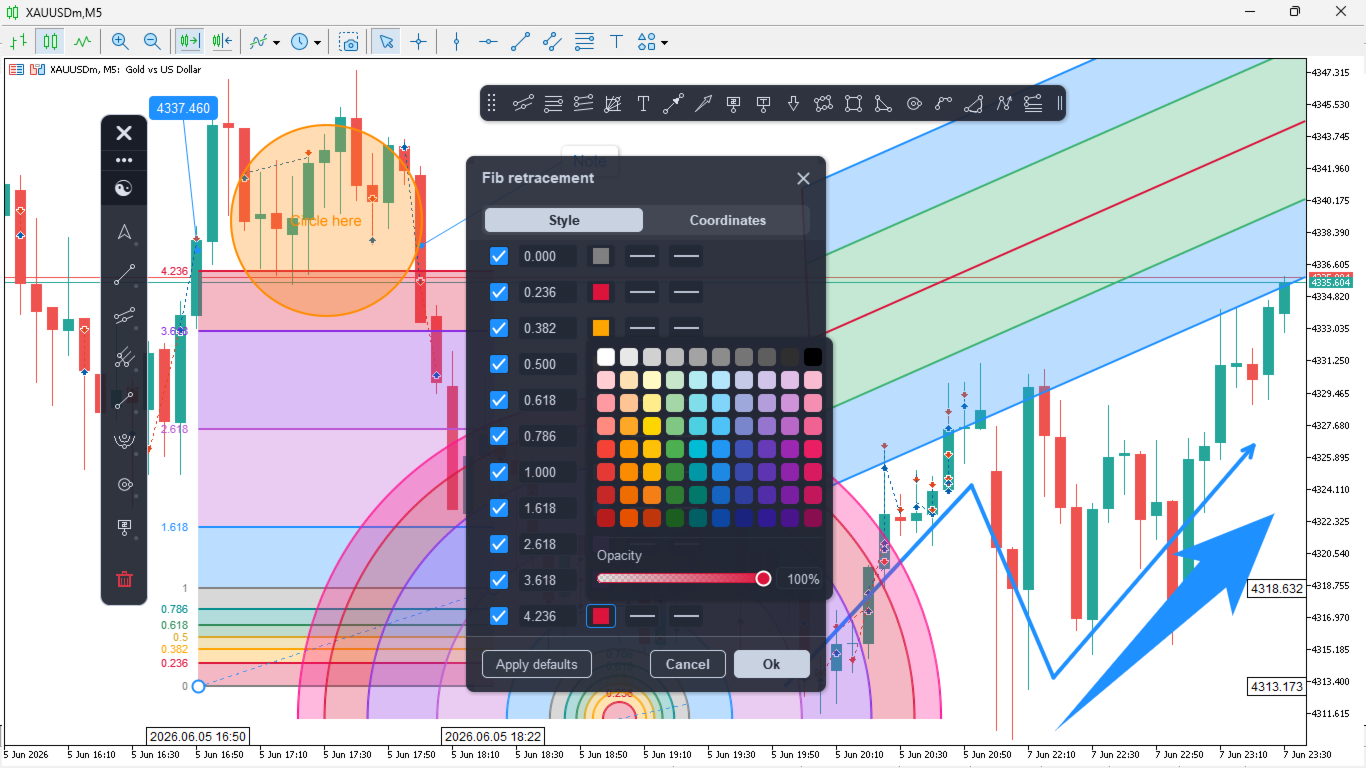
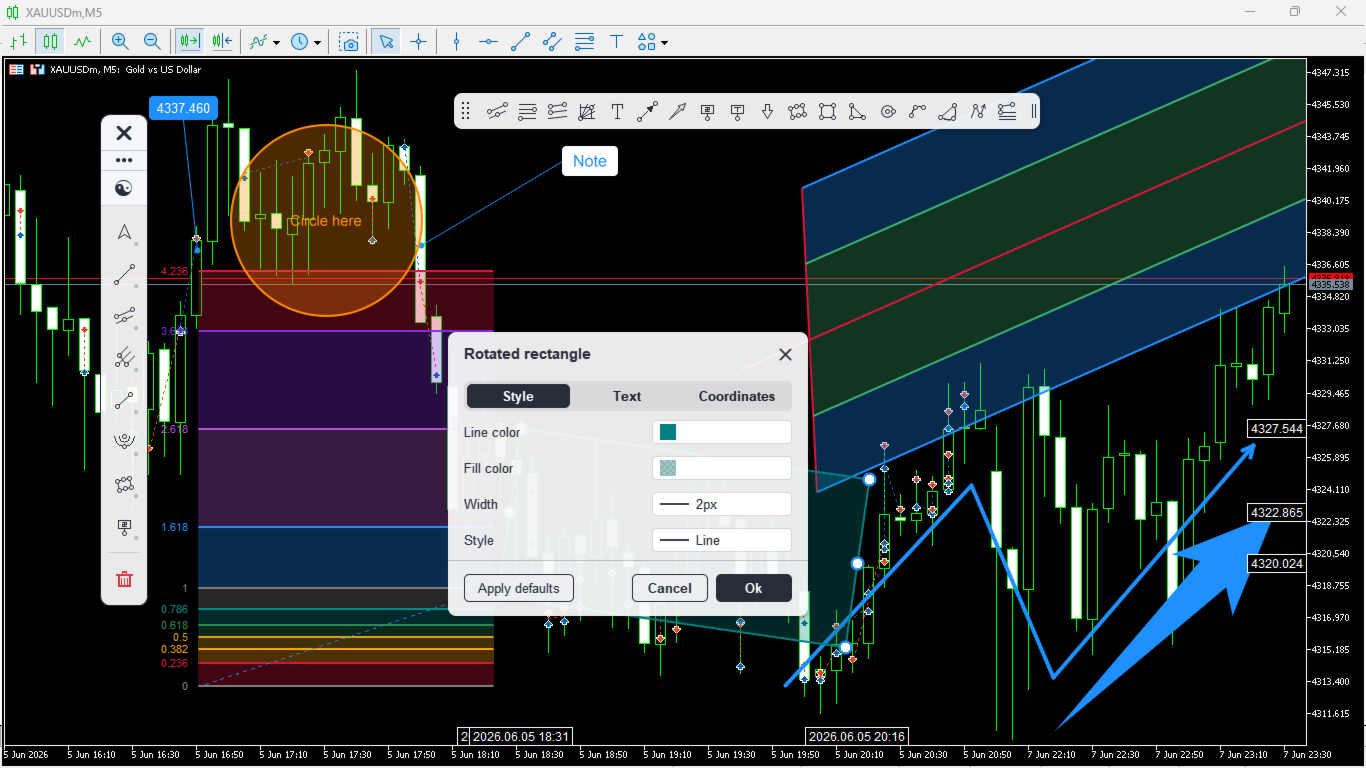
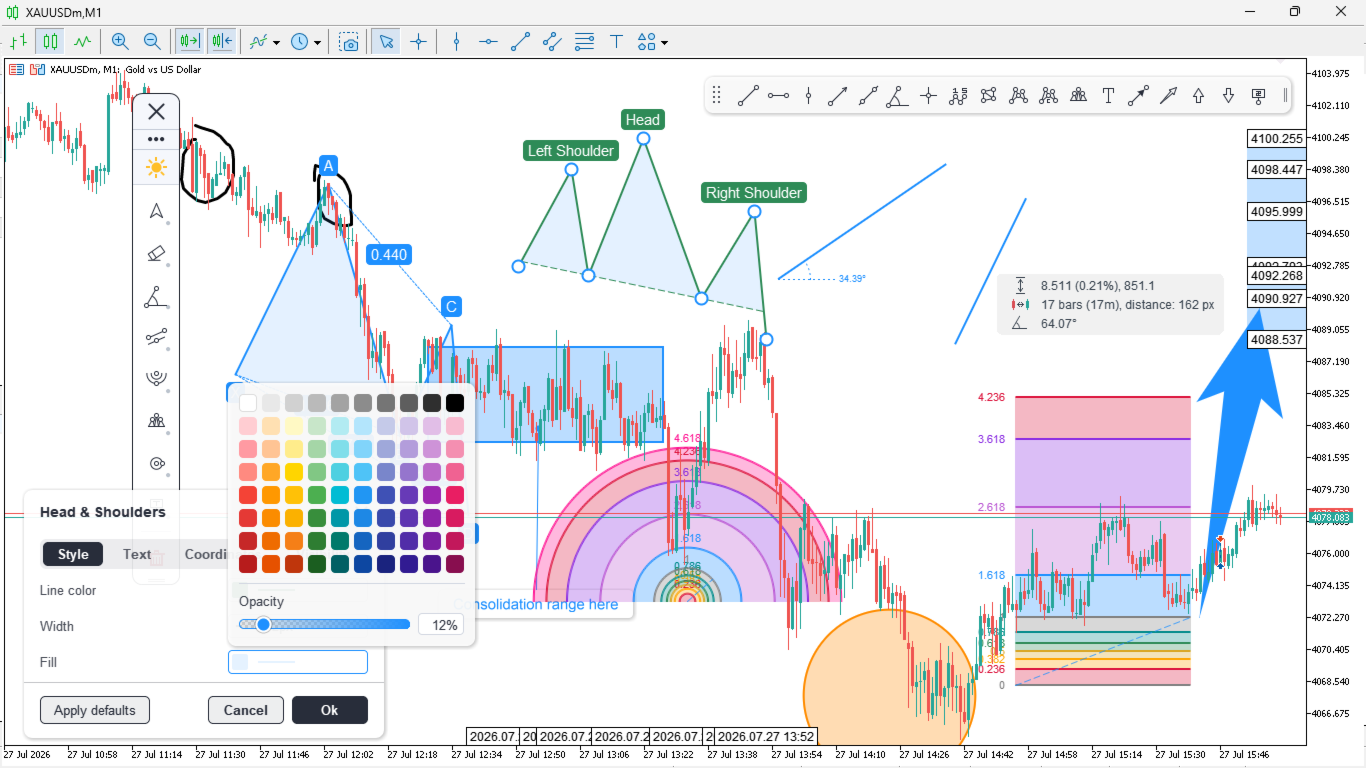
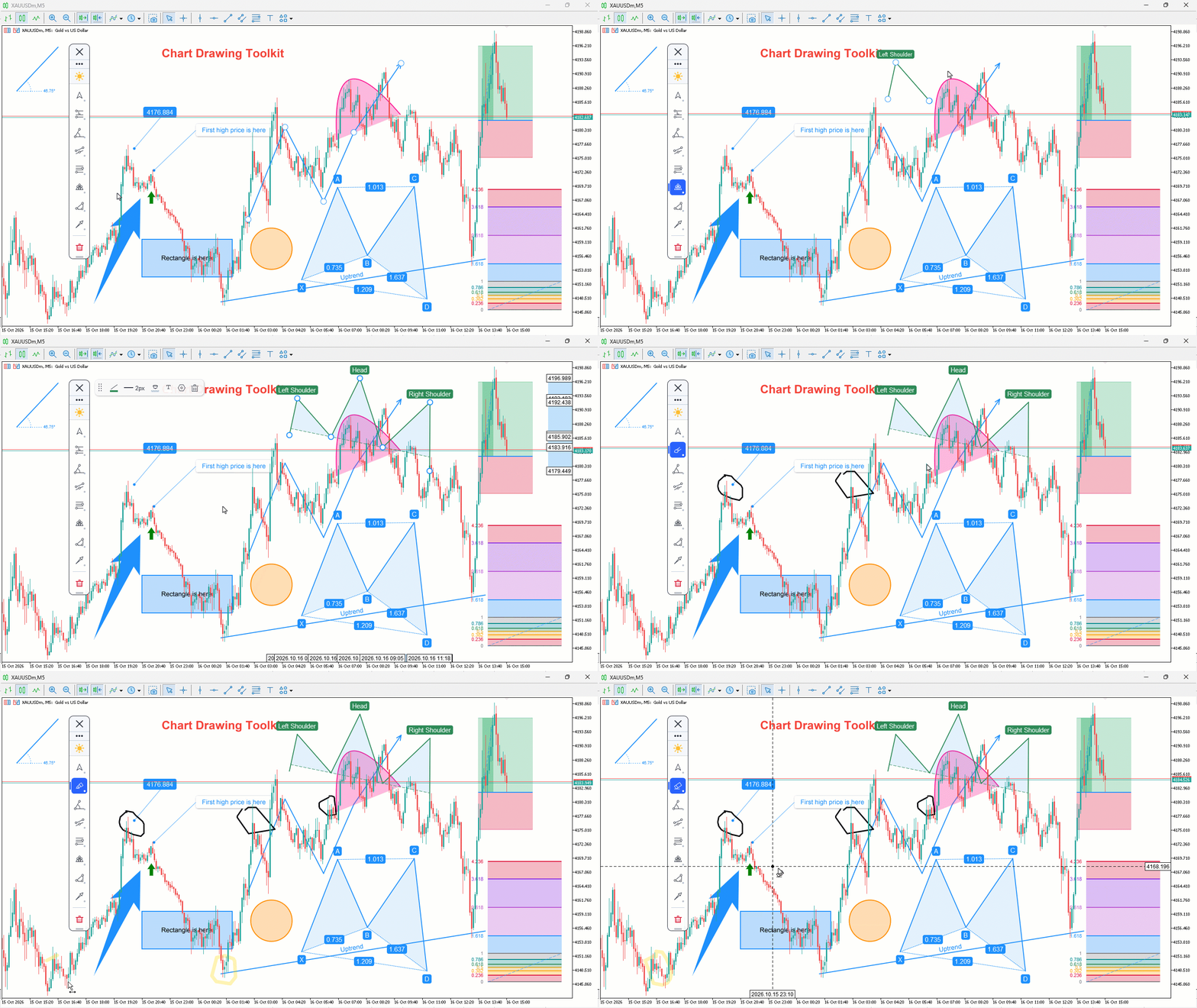
Chart Drawing Toolkit is a complete drawing and chart-analysis workspace for MetaTrader 5. It places more than 50 drawing and markup tools in one fast, clean panel that docks to the edge of your chart, so every manual analysis tool you need is a single click away. It runs as an indicator, so it works alongside your Expert Advisors and other indicators on the same chart.

JOIN ALL OUR TOOLS public channel for UPDATES: CLICK HERE.

Overview

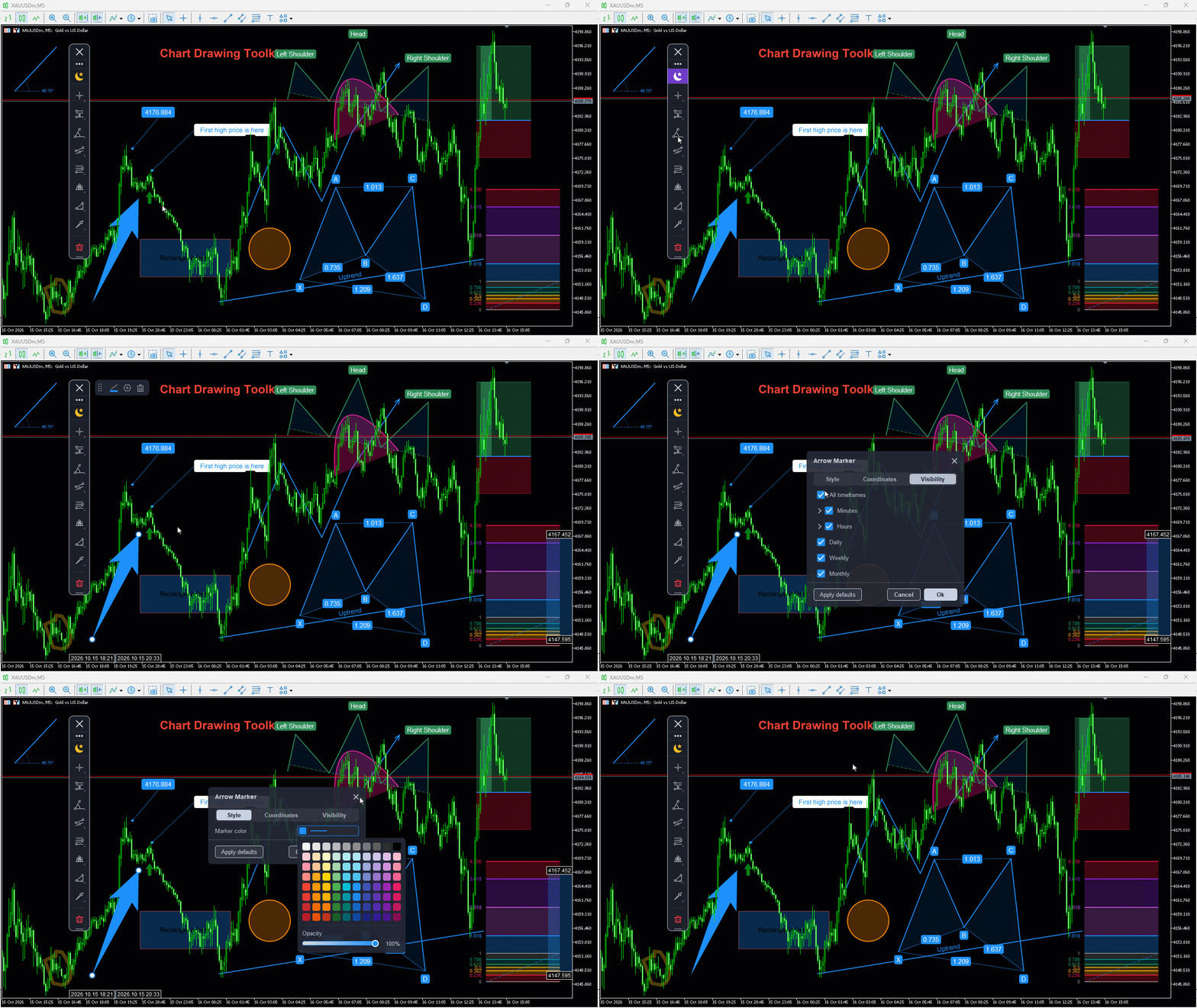
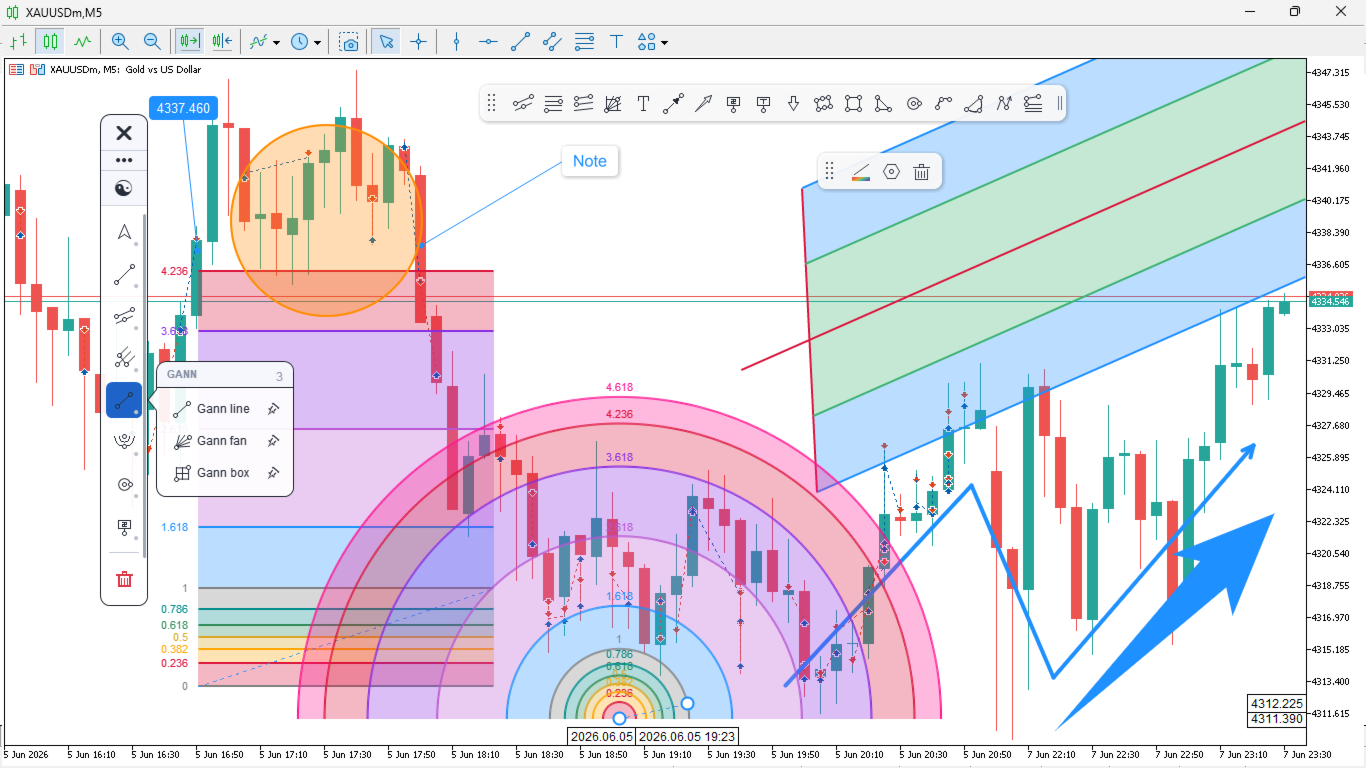
The toolkit combines a docking sidebar, a quick tool flyout, a pinned tools bar, a live properties bar for the selected object, and a settings window for precise control. Map market structure with trendlines and channels, project targets with Fibonacci, study geometry with Gann and pitchforks, mark harmonic patterns, sketch freehand, or annotate your ideas; all without cluttering your workspace.

Your drawings are saved automatically and come back exactly as you left them, on every symbol, across timeframe switches and terminal restarts.

Features

  • Docking sidebar that snaps to the left or right edge of the chart, floats freely, resizes, and scrolls when needed
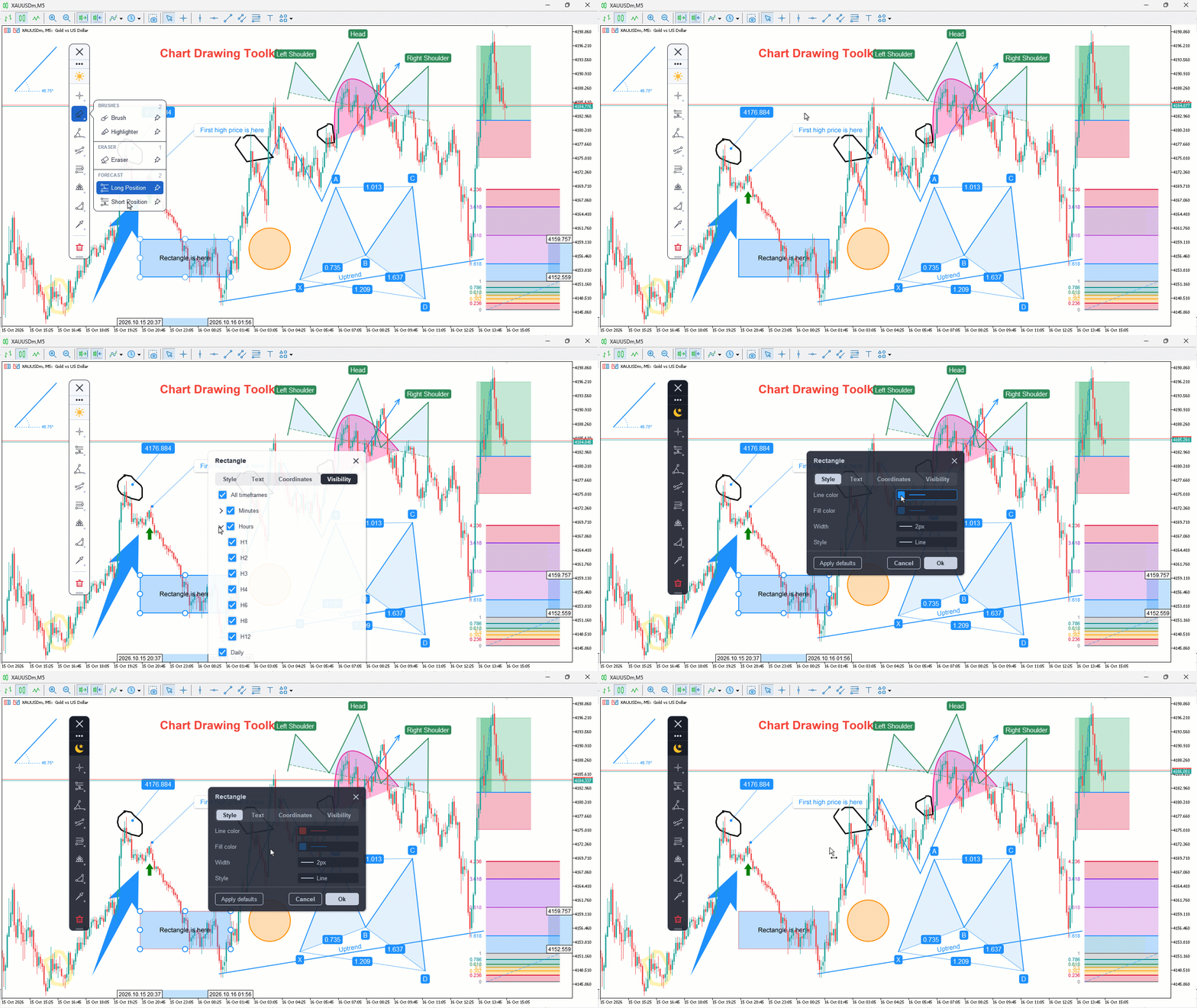
  • Quick tool flyout that opens each category and sizes itself to its own contents
  • Pinned tools bar for one-click access to the tools you use most
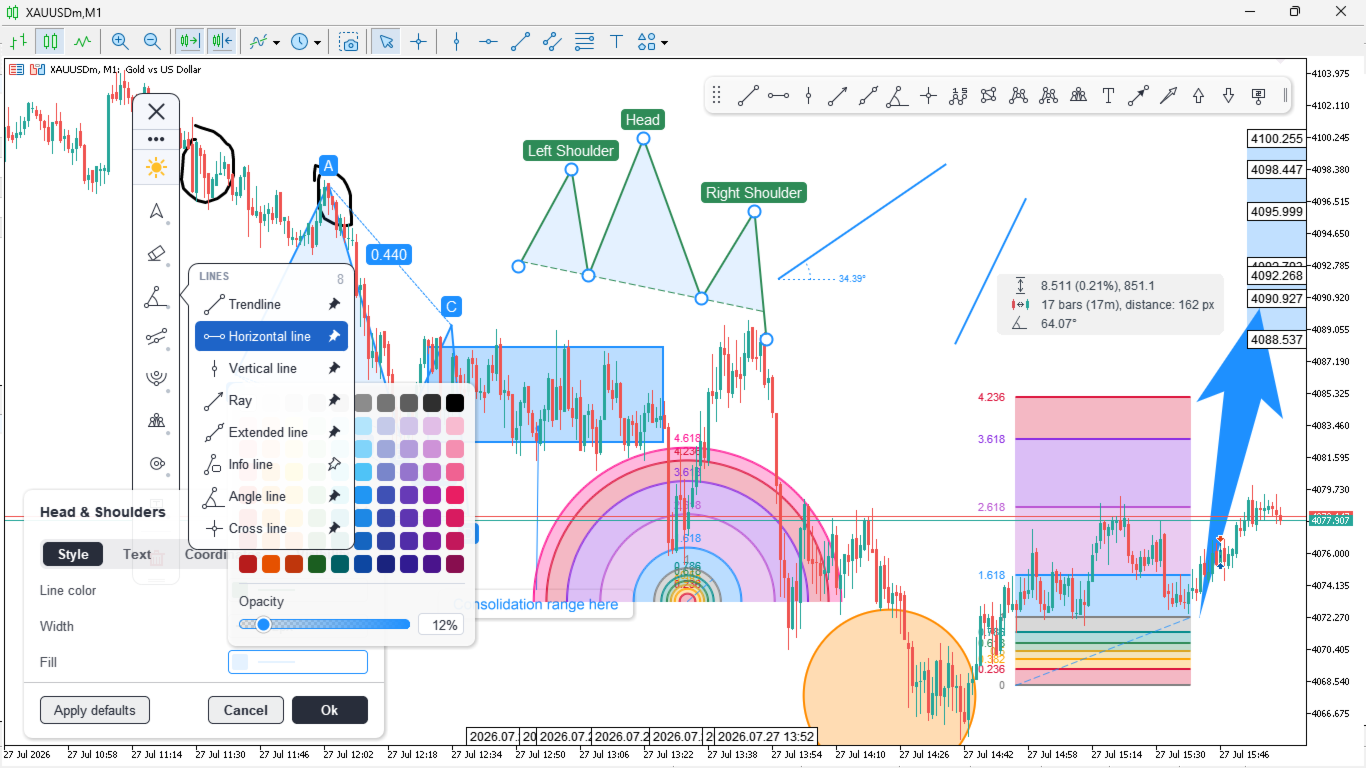
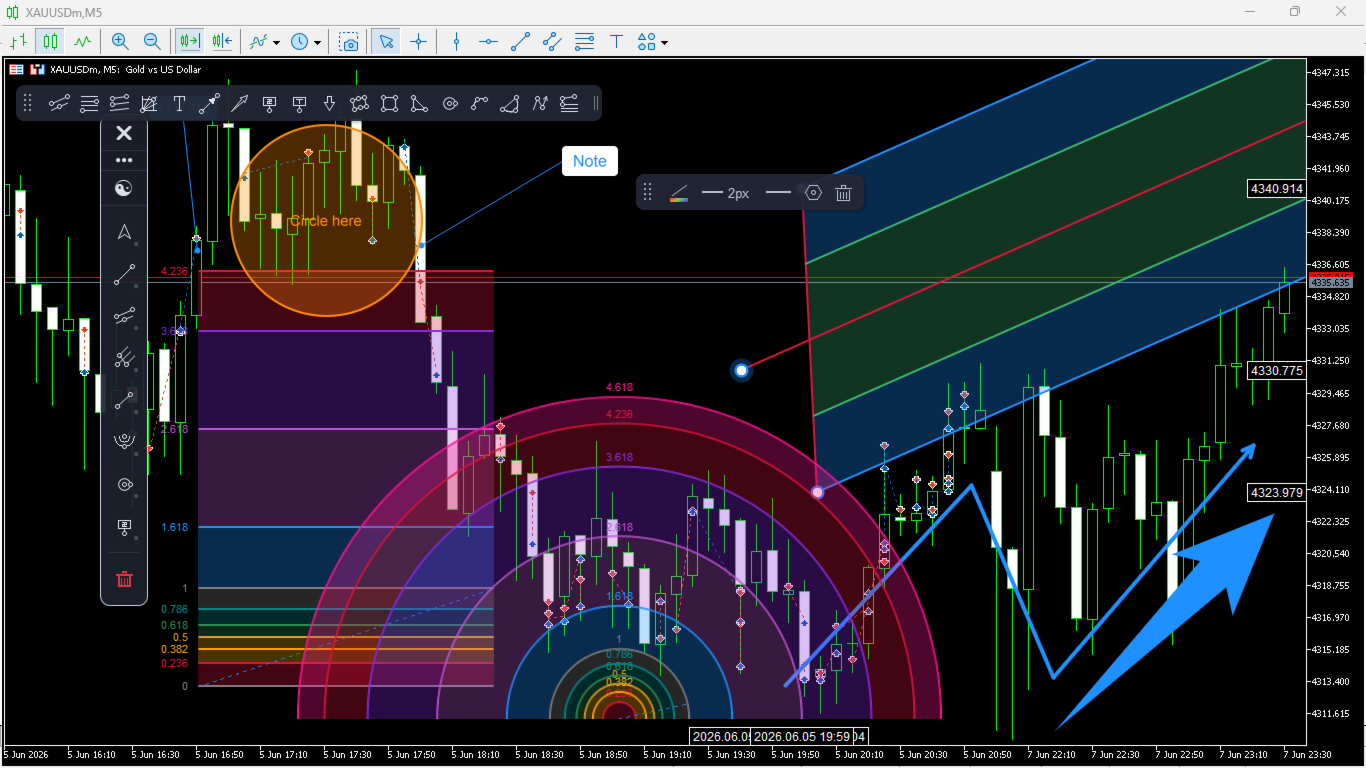
  • Live properties bar to adjust colour, line width, style, opacity, font, and alignment on the selected object
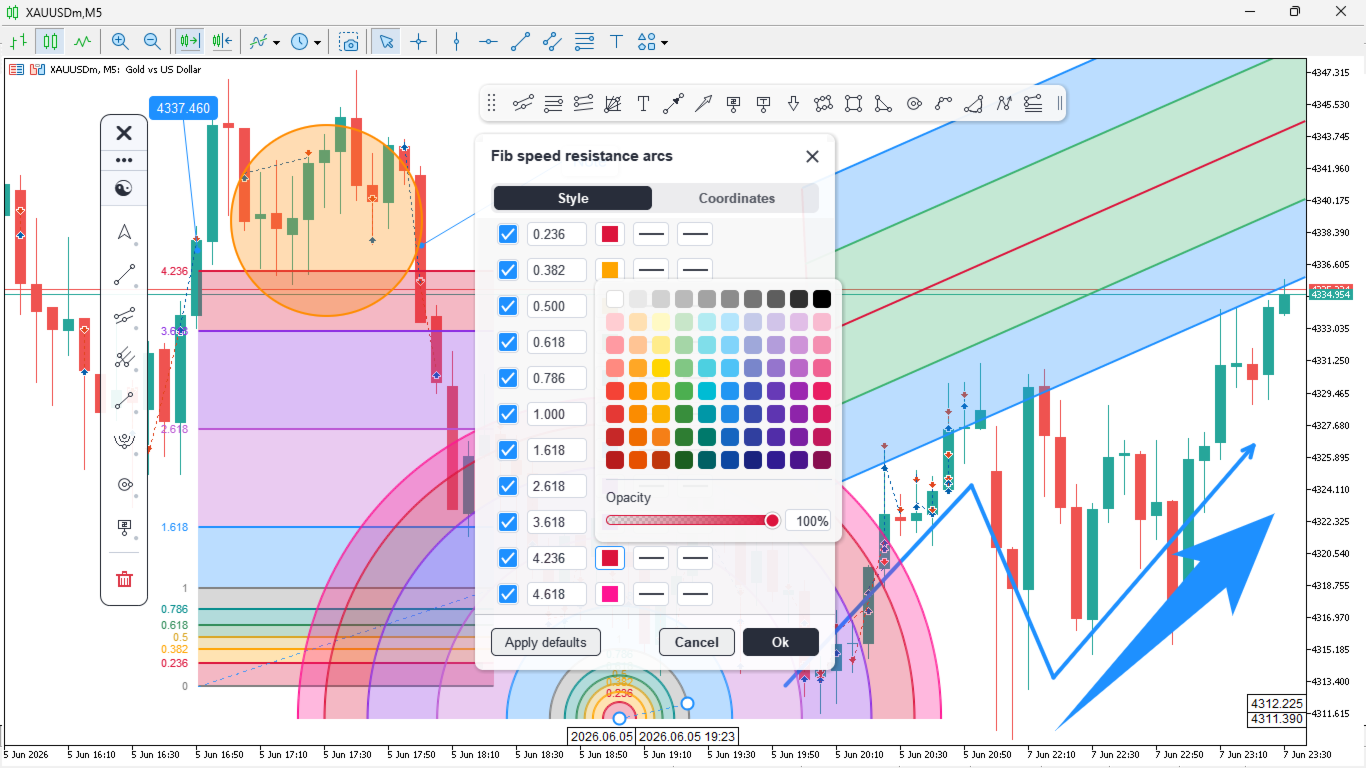
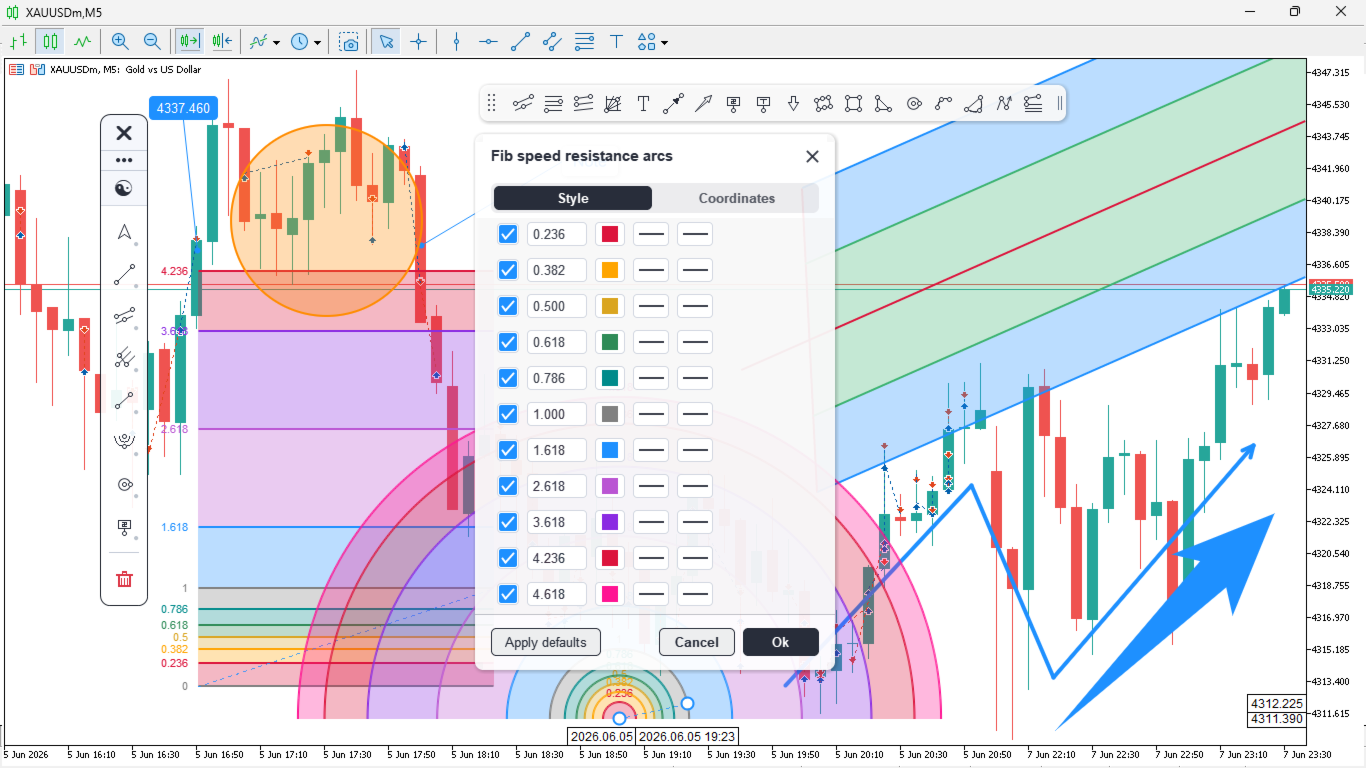
  • Settings window with Style, Text, Coordinates and Visibility tabs, including exact price and time coordinates you can type in
  • Per-object timeframe visibility; show a drawing only on the timeframes where it matters
  • Per-tool style memory; each tool remembers the last colour, width and style you used
  • Choose the drawing layer: keep drawings above the price bars, or place them behind the candles for zones and shaded areas. Whatever you choose, the object you are pointing at is always lifted to the front so you can see and grab it
  • Price and time tags on the axes for the selected object, with a connector band showing the range it spans
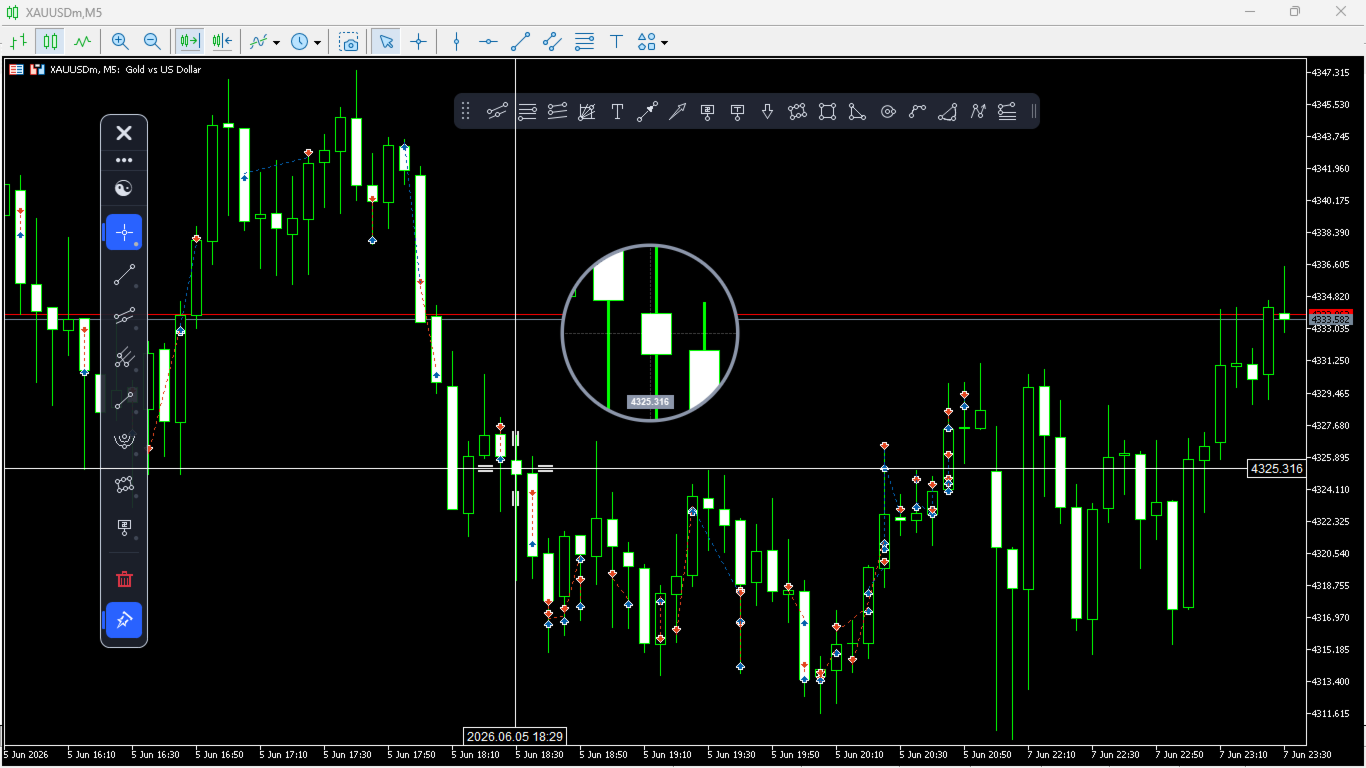
  • Precision crosshair with a magnifier lens, and a measure mode that reads price and time distance
  • Dark and light themes, plus DPI-aware scaling for high-resolution monitors
  • Automatic persistence of every drawing, per symbol
  • High-resolution, anti-aliased rendering that stays sharp at any chart scale

Tools

Cursors: Pointer, Crosshair

Lines: Trendline, Horizontal line, Vertical line, Ray, Extended line, Info line, Angle line, Cross line

Channels, pitchforks and Gann: Parallel channel, Regression trend, Standard deviation trend, Andrews pitchfork, Schiff pitchfork, Modified Schiff pitchfork, Gann line, Gann fan, Gann box

Fibonacci: Retracement, Expansion, Channel, Time zones, Speed resistance fan, Speed resistance arcs

Shapes: Rectangle, Rotated rectangle, Triangle, Ellipse, Circle, Arc, Curve, Path

Patterns: Elliott Wave, ABCD, XABCD, Cypher, Head & Shoulders

Annotations: Text, Note, Price note, Callout, Comment, Arrow, Arrow up, Arrow down, Arrow marker

Freehand and position tools: Brush, Highlighter, Eraser, Long position, Short position

How to use

  1. Attach the toolkit to any chart, on any symbol and timeframe.
  2. Click a category in the sidebar to open its tools, then select a tool and draw.
  3. Click any object to edit it in the properties bar, or open the settings window for full control.
  4. Pin your favorites, switch the theme, and dock the panel where it suits you.

Good to know

Works on all symbols and timeframes. It draws and annotates only and does not place trades.
리뷰 23
Mirel Daniel Gheonu
6891
Mirel Daniel Gheonu 2026.10.22 07:44 

An excellent product, I'll keep it just like that. A small suggestion: automatically adjust the application's colors and theme based on the default setting in MT5.

Jose Rodrgues Chaves
1237
Jose Rodrgues Chaves 2026.10.15 23:01 

Thank you! Love it!

EllieWelly
14
EllieWelly 2026.10.05 12:07 

Fantastic drawing tools. I use it on mt5 and the risk reward tool mostly but its seamless it makes it so much easier. Keep up the good work.

추천 제품
ConsistencyGuard
Vanessa Cristina Ribeiro Dos Anjos
버전 7.04 데이 트레이딩 규율과 계좌 보호를 더욱 강화하기 위한 주요 업데이트입니다. • 0분에서 60분까지 설정할 수 있는 Post-Session Review 모드. • 허용된 거래 횟수를 모두 완료한 후에도 MetaTrader 5를 열어 두고 차트를 검토하거나 스크린샷을 저장하고 트레이딩 저널을 작성할 수 있습니다. • 일일 거래 한도에 도달한 후 새로운 거래를 시도하면 Emergency Close 보호 기능이 활성화됩니다. • Emergency Close는 거래 세션을 잠그고 MetaTrader 5를 종료하기 전에 열린 포지션을 청산하고 대기 주문을 취소합니다. • 지속적인 일일 잠금 기능은 심각한 규칙 위반 이후 MetaTrader 5를 다시 실행하여 거래를 계속하는 것을 방지합니다. • 최대 허용 랏 크기 보호 기능. • 최대 랏 크기 증가는 7일 동안 잠깁니다. 더 작은 랏 크기를 사용하는 것은 계속 허용됩니다. • 거래 횟수 계산 기능 개선. • 포지션의 부분 청산은
FREE
Friend of the trend
Anderson De Assis
Friend of the Trend: Your Trend Tracker Master the market with Friend of the Trend , the indicator that simplifies trend analysis and helps you identify the best moments to buy, sell, or wait. With an intuitive and visually striking design, Friend of the Trend analyzes price movements and delivers signals through a colorful histogram: Green Bars : Signal an uptrend, indicating buying opportunities. Red Bars : Alert to a downtrend, suggesting potential selling points. Orange Bars : Represent cons
FREE
Donchian Breakout And Rsi
Mattia Impicciatore
4.5 (2)
개요 이 지표는 클래식 돈치안 채널(Donchian Channel) 의 향상된 버전으로, 실전 트레이딩을 위한 다양한 기능이 추가되었습니다. 표준 세 개의 선(상단, 하단, 중앙선) 외에도 브레이크아웃 을 감지하여 차트에 화살표로 시각적으로 표시하며, 차트를 깔끔하게 보기 위해 현재 추세 방향의 반대 라인만 표시 합니다. 지표 기능: 시각적 신호 : 브레이크아웃 시 컬러 화살표 표시 자동 알림 : 팝업, 푸시 알림, 이메일 RSI 필터 : 시장의 상대 강도를 기반으로 신호 검증 사용자 맞춤 설정 : 색상, 선 두께, 화살표 코드, RSI 임계값 등 동작 원리 돈치안 채널은 다음을 계산합니다: 상단선 : 최근 N개의 종가 완료 캔들에서 가장 높은 고가 하단선 : 최근 N개의 종가 완료 캔들에서 가장 낮은 저가 중앙선 : 고가와 저가의 평균값 상방 브레이크아웃 은 종가가 상단선을 돌파할 때 발생하며, 하방 브레이크아웃 은 종가가 하단선 아래로 내려갈 때 발생합니다. 이 지표는: 세 개의
FREE
MT5용 NAS100 Auto SL 및 TP 메이커를 소개합니다: 메타트레이더 5에서 나스닥 100 시장을 탐색하는 트레이더에게 없어서는 안될 보조 도구인 NAS100 Auto SL 및 TP 메이커로 손절 및 테이크프로핏 설정을 다시는 놓치지 마세요. 이 도구는 손절 및 테이크프로핏 레벨을 자동으로 관리할 수 있는 원활한 솔루션을 찾는 분들을 위해 설계되었습니다. 주요 특징: 손쉬운 자동화: 스톱로스 및/또는 테이크프로핏 없이 나스닥 100 거래를 자동으로 모니터링합니다. 사용자가 구성한 설정에 따라 레벨을 동적으로 조정합니다. 다양한 주문 유형: 나스닥 100의 시장가 및 지정가 주문 모두와 호환됩니다. 메타트레이더 5에서 사용할 수 있는 다양한 주문 유형을 지원합니다. 맞춤형 구성: 사용자 친화적인 매개변수 설정으로 추적 기본 설정 및 손절/익절 수준을 사용자 지정할 수 있습니다. 유연한 범위: 실행되는 특정 NAS100 상품 또는 거래되는 모든 상품에 대해 손절 및 테이크프
FREE
LT Donchian Channel
Thiago Duarte
4.86 (7)
Donchian Channel is an indicator created by Richard Donchian. It is formed by taking the highest high and the lowest low of the last specified period in candles. The area between high and low is the channel for the chosen period. Its configuration is simple. It is possible to have the average between the upper and lower lines, plus you have alerts when price hits one side. If you have any questions or find any bugs, please contact me. Enjoy!
FREE
ABQ Visual Risk Sizer
Cristian David Castillo Arrieta
ABQ Visual Risk Sizer - Institutional Risk & Trade Execution 카테고리: 유틸리티 / 리스크 관리 수동 로트 계산은 시간과 비용을 낭비하게 합니다. 현대 트레이딩, 특히 프랍 펌(Prop Firms) 계좌를 운영할 때 로트 계산 오류나 단 5초의 주문 지연은 일일 드로다운(Daily Drawdown) 규정 위반으로 이어지거나 최적의 진입 가격을 놓치는 원인이 됩니다. ABQ Visual Risk Sizer 는 이 문제를 완벽하게 해결하기 위해 설계된 기관급 도구입니다. 복잡한 리스크 수학 계산을 MetaTrader 5 차트 위에서 직접적이고 빠르며 100% 정확한 시각적 경험으로 변화시킵니다. 이제 외부 계산기나 엑셀 시트는 잊으십시오. 차트 위의 라인을 드래그하고 클릭 한 번으로 거래를 실행하기만 하면 됩니다. 왜 ABQ Visual Risk Sizer가 필요한가요? 프랍 펌을 위한 완벽한 보호: 모든 거래에서 사용자가 설정한 정확한
FREE
Candle Countdown Timer - Optimized Edition Overview Candle Countdown Timer is a lightweight, high-performance indicator that displays the exact time remaining until the current candle closes. Designed with efficiency as a top priority, this indicator provides traders with essential timing information without consuming unnecessary system resources. Whether you're a scalper watching every second on M1 charts, a day trader timing entries on H1, or a swing trader monitoring daily candles, this i
FREE
Trendline mt5 indicator
David Muriithi
4 (2)
Are you tired of drawing trendlines every time you're analyzing charts? Or perhaps you would like more consistency in your technical analysis. Then this is for you. This indicator will draw trend lines automatically when dropped on a chart. How it works Works similar to standard deviation channel found on mt4 and mt5. It has 2 parameters: 1. Starting Bar 2. Number of bars for calculation The   starting bar   is the bar which drawing of the trend lines will begin, while the   number of bars for c
FREE
Chart Pro Classic Dark v1.00 Chart Pro Classic Dark is a professional MT5 chart styling and customization tool designed to give your charts a clean, modern, and professional dark appearance. Key Features Dark Black Background — Applies a clean black background to the chart. ️ Candlestick Chart — Automatically configures the chart to use candlesticks. Bullish Candles — Green/Lime bullish candles. Bearish Candles — White bearish candles. Grid Removal — Hides the chart grid for a clean
FREE
MACD Enhanced
Nikita Berdnikov
4 (4)
Introducing the MACD  Enhanced – an advanced MACD (Moving Average Convergence Divergence) indicator that provides traders with extended capabilities for trend and momentum analysis in financial markets. The indicator uses the difference between the fast and slow exponential moving averages to determine momentum, direction, and strength of the trend, creating clear visual signals for potential entry and exit points. Attention! To achieve the best results, it is recommended to adapt the indicator
FREE
Free automatic Fibonacci is an indicator that automatically plots a Fibonacci retracement based on the number of bars you select on the BarsToScan setting in the indicator. The Fibonacci is automatically updated in real time as new highest and lowest values appears amongst the selected bars. You can select which level values to be displayed in the indicator settings. You can also select the color of the levels thus enabling the trader to be able to attach the indicator several times with differe
FREE
High Low Open Close
Alexandre Borela
4.98 (46)
이 프로젝트를 좋아한다면 5 스타 리뷰를 남겨주세요. 이 지표는 열리고, 높은, 낮은 및 마감 가격을 지정합니다. 기간과 그것은 특정한 시간대를 위해 조정될 수 있습니다. 이들은 많은 기관 및 전문가에 의해 보는 중요한 수준입니다 상인은 당신이 더 많은 것일 수있는 장소를 알고 도움이 될 수 있습니다 이름 * 사용 가능한 기간: 이전 날. 이전 주. 지난 달. 이전 분기. 이전 연도. 또는: 현재 날. 현재 주. 현재 달. 현재 분기. 현재 년.
FREE
IMPORTANT NOTE: This is a professional Trade Management Utility and on-chart assistant. It is NOT an automated trading robot. It does not open trades on its own. The UltraFast Trade Manager MT5 is the ultimate execution and risk-management suite designed to give you absolute control over your manual and algorithmic trades. When managing multiple positions, calculating complex net break-even points, or constantly monitoring the economic calendar, hesitation can lead to costly mistakes. This utili

FREE
================================================================ MATRIX CONDITION MONITOR Live Trade Condition Panel for MetaTrader 5 Fully Automatic -- Works with ALL Matrix EAs ================================================================ NEVER MISS A TRADE SETUP AGAIN Matrix Condition Monitor is a free utility that attaches to any chart and automatically checks all 10 trade conditions in real time -- showing you exactly why a trade will or will not open, and alerting you the moment ever
FREE
Exact Time — detailed time on the seconds chart. The utility shows the opening time of the selected candle. This is necessary when working with seconds charts. For example, it can be used on a seconds chart built using the Seconds Chart utility. Inputs Base corner — the chart corner to which an object Is attached. X distance — the horizontal distance from the chart corner. Y distance — the vertical distance from the chart corner. Text font — font name Font size — font size Color — text color
FREE
Girassol Sunflower MT5 Indicator
Saullo De Oliveira Pacheco
3.86 (7)
This is the famous Sunflower indicator for Metatrader5. This indicator marks possible tops and bottoms on price charts. The indicator identifies tops and bottoms in the asset's price history, keep in mind that the current sunflower of the last candle repaints, as it is not possible to identify a top until the market reverses and it is also not possible to identify a bottom without the market stop falling and start rising. If you are looking for a professional programmer for Metatrader5, please
FREE
ClearEdge Daily Candle New York-close daily candle on any timeframe, with candle countdown, live spread and volatility information. Overview  ClearEdge Daily Candle draws the current day's candle next to the live price on any chart timeframe. On the 1-minute, 5-minute, 15-minute, 1-hour or higher charts, you can see where the trading day opened, how far price has moved in both directions, and whether the day is currently bullish or bearish, without switching to the daily (D1) chart. Why bro
Rainbow MT5
Jamal El Alama
4 (1)
Description : Rainbow MT5 is a technical indicator based on Moving Average with period 34 and very easy to use. When price crosses above MA and MA changes color to green, then this is a signal to buy. When price crosses below MA and MA changes color to red, then this is a signal to sell. The Expert advisor ( Rainbow EA MT5 ) based on Rainbow MT5 indicator is now available here . MT4 version is available here .
FREE
This indicator show the candle remaining time on the chart and/or in the corner of the window. It also display notificaton (popup and push) when a new candle is formed (optional). You configure the timer on candles and at chart corner. I don't need to explain the functions because are very simple. MT4 version:  https://www.mql5.com/en/market/product/38677 Any doubt or suggestion please contact us. Enjoy! This is a free indicator, but it took hours to develop. If you want to pay me a coffee, I a
FREE
Short description Position sizing and margin calculator for MetaTrader 5 with separate BUY and SELL calculations. Full description QRM Risk Calculator is a position sizing and margin calculation utility for MetaTrader 5. It calculates BUY and SELL volume separately according to the selected percentage risk, stop-loss distance, account data, symbol specifications, and current Bid and Ask prices. The calculator displays the estimated monetary loss at the stop loss, theoretical reward at the take p
FREE
VFI Quantum
Nikita Berdnikov
5 (1)
Introducing VFI (Volume Flow Indicator) – a trading indicator that analyzes the relationship between volume and price movement to identify key trading opportunities. The indicator displays the strength and direction of volume flow, providing clear signals about potential entry and exit points. Signals are formed based on zero line crossovers, crossovers between the VFI line and its exponential moving average (EMA), and when the indicator exits overbought and oversold zones. Attention! This stra
FREE
Daily Support and Resistance Levels 는 클래식 피벗 포인트 방식으로 일중 거래 핵심 가격 레벨을 자동 계산/표시하는 전문 지표입니다. 주요 기능: 피벗 포인트(PP) 자동 계산 3개의 저항 레벨(R1, R2, R3) 3개의 지지 레벨(S1, S2, S3) 전일 고가/저가 표시 실시간 정보 패널 상승/하락 바이어스 표시 최근 레벨까지 거리 표시 색상/표시 완전 사용자 설정 매일 자동 업데이트 모든 타임프레임 지원 계산 방식: 전일 고가/저가/종가 기반 클래식 피벗 포인트. 트레이딩 활용: 지지/저항 반등 매매 돌파 전략 레인지 거래 방향성 판단 목표가 설정 사용 방법: 차트에 인디케이터 적용 레벨 자동 생성 가격 > PP = 상승 바이어스 가격 < PP = 하락 바이어스 S1-S3 = 지지 구간 R1-R3 = 저항 구간 설정 옵션: 피벗/지지/저항 색상 라인 굵기/스타일 가격 라벨 표시/숨기기 정보 패널 ON/OFF 패널 위치/폰트 크기 전일 고가/저가 표
FREE
EA Health Monitor
Allan Aparece Ninal
EA Health Monitor is a free indicator for MetaTrader 5 that shows how each Expert Advisor on your account is doing. It groups the account history by magic number. Every EA gets its own row. Manual trades have a row of their own, and a total sits at the bottom. It only reads the account history and open positions. It never opens, changes or closes a trade. Standalone: Everything is built in. You do not need to buy or install any other product named on this page. Quick start Attach EA Health Monit
FREE
Candle Status Pro – Multi-Timeframe Candle Status for MetaTrader 5 Candle Status Pro is a professional multi-timeframe indicator for MetaTrader 5 that displays the status of both the last closed candle and the current active candle across multiple timeframes in a clean and easy-to-read panel. Instead of displaying a countdown timer, the indicator visualizes the direction of each candle using colored candle icons. This allows you to instantly see whether the last or current candle of any selected
FREE
Advanced Risk Return Tool
Felipe Monteiro Rodrigues
Advanced Risk Return Tool 은 MetaTrader 5에서 위험/수익 구조를 계획하고 관리하기 위한 시각적 도구입니다. 차트에서 직접 매수 및 매도 구조를 생성하고 관리할 수 있으며, 진입, 목표 및 손절 수준을 시각적으로 배치하고 위험/수익 비율, 핍 거리, 거래량 및 금액 정보를 표시합니다. 구조는 마우스를 사용하여 차트에서 직접 조정할 수 있습니다. 주요 기능 시각적 위험/수익 구조 도구 패널에서 Buy 및 Sell 구조를 직접 생성할 수 있습니다. 각 구조는 다음 정보를 표시합니다. 진입 수준 목표 수준 손절 수준 위험/수익 비율 핍 거리 거래량 예상 이익 예상 손실 정보는 차트에서 설정된 수준에 따라 업데이트됩니다. 차트에서 직접 편집 마우스를 사용하여 다음 작업을 수행할 수 있습니다. 전체 구조 이동 진입 수준 조정 목표 수준 조정 손절 수준 조정 구조의 가로 길이 변경 개별 구조 선택 동일한 차트에서 여러 구조 사용 거래량 제어 계산에 사용되는 거래량은
FREE
Blahtech VWAP MT5
Blahtech Limited
5 (1)
Blahtech VWAP - Volume Weighted Average Price (VWAP) is the ratio of price to total volume. It provides an average price over a specified time interval.  Links [  Install  |  Update  |  Documentation   ] Feature Highlights Configurable VWAP Line Sessions, intervals, anchored or continuous Previous day settlement line Standard Deviation bands Alerts at bar close or real time Automatic Broker or Tick volumes Significantly reduced CPU usage Input Parameters Expert Advisor Mode  - Reserved for iCu
FREE
Lot Size Ruler
Joshua Akinetos Malik
SI Ruler A clean, one-click price ruler that shows points and exact dollar cost between any two levels on your chart. Every trader needs to quickly measure the distance between two price levels and know what it costs in real money. Most platforms make this harder than it should be. SI Ruler puts a single icon in the corner of your chart — click it, click your entry level, and drag to your stop or target. The label tells you instantly how many points that distance is and exactly what it costs in
FREE
PositionMap Pro — Account Overview Panel for MT5 A real-time panel that groups all open positions by symbol and shows Buy lots, Sell lots and net profit/loss directly on your chart — the whole account at a glance. Instead of counting lots symbol by symbol in the Terminal tab, PositionMap Pro groups everything automatically. You instantly see how much exposure you have on each symbol, split by direction. Panel example Symbol Buy Lot Sell Lot Net P/L EURUSD 0.50 — +12.30 XAUUSD — 1.00 −45.00 GBPUS
FREE
Important Lines
Terence Gronowski
4.88 (24)
This indicator displays Pivot-Lines, preday high and low, preday close and the minimum and maximum of the previous hour. You just have to put this single indicator to the chart to have all these important lines, no need to setup many single indicators. Why certain lines are important Preday high and low : These are watched by traders who trade in a daily chart. Very often, if price climbs over or falls under a preday low/high there is an acceleration in buying/selling. It is a breakout out of a
FREE
This robot sends Telegram notifications based on the coloring rules of PLATINUM Candle indicator. Example message for selling assets: [SPX][M15] PLATINUM TO SELL 11:45. Example message for buying assets : [EURUSD][M15] PLATINUM TO BUY 11:45 AM. Before enable Telegram notifications  you need to create a Telegram bot, get the bot API Key and also get your personal Telegram chatId. It's not possible to send messages to groups or channels. You can only send messages to your user chatId. You should
FREE
이 제품의 구매자들이 또한 구매함
Trade Assistant MT5
Evgeniy Kravchenko
4.43 (216)
거래당 위험 계산, 라인을 사용한 손쉬운 신규 주문, 부분 청산 기능을 통한 주문 관리, 7가지 유형의 트레일링 스탑 및 기타 유용한 기능을 제공합니다. 추가 자료 및 지침 설치 지침   -   애플리케이션 지침   라인 기능       - 차트에 개시선, 손절매, 차익실현을 표시합니다. 이 기능을 사용하면 새로운 주문을 쉽게 하고 개봉 전에 추가 특성을 볼 수 있습니다. 위기 관리       -       위험 계산 기능은 설정된 위험과 손절매 주문의 크기를 고려하여 새 주문의 볼륨을 계산합니다. 이를 통해 손절매 크기를 설정하고 동시에 설정된 위험을 존중할 수 있습니다. 로트 계산 버튼 - 위험 계산을 활성화/비활성화합니다. 필요한 위험 값은 위험 필드에 0에서 100 사이의 백분율 또는 예금 통화로 설정됩니다. 설정 탭에서 위험 계산 옵션을 선택합니다. $ 통화, % 잔액, % 지분, % 자유 마진, % 사용자 정의, % AB 이전 일, % AB 이전 주, % AB 이전
Trade Manager EA에 오신 것을 환영합니다. 이 도구는 거래를 보다 직관적이고 정확하며 효율적으로 만들기 위해 설계된 궁극적인 리스크 관리 도구 입니다. 단순한 주문 실행 도구가 아닌, 원활한 거래 계획, 포지션 관리 및 리스크 제어를 위한 종합 솔루션입니다. 초보자부터 고급 트레이더, 빠른 실행이 필요한 스캘퍼에 이르기까지 Trade Manager EA는 외환, 지수, 상품, 암호화폐 등 다양한 시장에서 유연성을 제공합니다. Trade Manager EA를 사용하면 복잡한 계산은 이제 과거의 일이 됩니다. 시장을 분석하고 진입, 손절 및 익절 수준을 차트의 수평선으로 표시한 후 리스크를 설정하면, Trade Manager가 이상적인 포지션 크기를 즉시 계산하고 SL 및 TP 값을 실시간으로 표시합니다. 모든 거래가 간편하게 관리됩니다. 주요 기능: 포지션 크기 계산기 : 정의된 리스크에 따라 거래 크기를 즉시 결정합니다. 간단한 거래 계획 : 진입, 손절, 익절을 위한
Local Trade Copier EA MT5
Juvenille Emperor Limited
4.94 (149)
Local Trade Copier EA MT5는 동일한 Windows 컴퓨터 또는 Windows VPS에서 여러 MetaTrader 5 계정 간에 거래를 복사하고 관리할 수 있는 빠르고 유연한 거래 복사기입니다. 로컬 거래 동기화 기능과 함께 Receiver 측에서 로트 크기, 리스크 관리, 거래 필터링, 심볼 매핑, 거래 관리 및 계정 보호를 독립적으로 설정할 수 있습니다. Transmitter와 Receiver 터미널을 약 1분 안에 설정하고, 동일한 브로커 또는 서로 다른 브로커의 계정 간에 수동 거래 또는 EA 거래를 복사할 수 있습니다. 적절한 조건에서는 로컬 MetaTrader 터미널 간의 거래 정보가 0.5초 이내 에 동기화될 수 있습니다. 실제 체결 속도는 브로커 지연 시간, 네트워크 상태, 컴퓨터/VPS 성능 및 터미널 부하에 따라 달라집니다. 구매 전에 무료 데모를 사용해 보세요 MT5 데모 계정에서 Local Trade Copier EA MT5의 모든 기능을
Telegram to MT5 Multi-Channel Copier   는 Telegram 및 Discord 채널의 트레이딩 시그널을 MetaTrader 5로 자동 복사합니다. 봇도, 브라우저 확장도, 수동 복사도 필요 없습니다. Telegram이나 Discord에 시그널이 도착하면 EA가 몇 초 안에 터미널에서 주문을 실행합니다. 그리고 채널을 복사하기 전에, 내장 백테스터가 그 채널이 내 계좌에서 어떤 결과를 냈을지 보여줍니다. 제품은 두 가지 구성 요소로 이루어집니다: Telegram 채널을 수신하는 Windows 애플리케이션과, MT5 터미널에서 시그널을 실행하는 본 EA입니다. MT4 버전도 제공됩니다   여기 . 설정 가이드와 앱 다운로드:   https://www.mql5.com/en/blogs/post/768988 텔레그램 시그널 채널을 백테스트하는 방법 을 확인하세요. 현재 가격은 향후 인상될 예정입니다. 작동 방식 앱은 여러분 자신의 Telegram 계정으로 연결되므
Farmed Hedge Yield Farming | All Markets (Manual - Hybrid - Semi/Automated EA) VERIFIED TRADING RESULTS - Farmed Hedge Yield Axi Copy:  https://www.mql5.com/en/signals/2356376 - Farmed Hedge Yield Exn Copy:   https://www.mql5.com/en/signals/2356404 - Farmed Hedge Yield V Copy:  https://www.mql5.com/en/signals/2357156 IMPORTANT NOTICE: FarmedHedge is a MANUAL-FOCUSED TRADING UTILITY ,not a fully automated EA. Results shown on this Signal include manual trades and overall strategic management.
내 거래 규칙에 맞춰 Telegram 신호 복사 Telegram to MT5 Signal Trader 는 공개 및 비공개 Telegram 채널과 그룹의 텍스트 기반 거래 신호를 MetaTrader 5로 자동 복사합니다. 하나의 데스크톱 앱에서 여러 신호 제공자와 MT5 계좌를 관리하고, 제공자마다 위험 관리 및 거래 설정을 개별적으로 지정 할 수 있습니다. 신호 복사에는 Telegram 봇이나 API 설정이 필요하지 않습니다. 전화번호 또는 QR 코드로 본인의 Telegram 계정에 로그인한 후, 이미 가입한 채널이나 그룹을 선택하면 됩니다. 봇을 만들거나 Telegram API 토큰, API ID 또는 API 해시를 입력할 필요가 없습니다. 포지션 크기를 선택하고, 여러 익절 목표에 청산 물량을 배분하며, 손익분기점 이동과 트레일링 스톱을 자동화하세요. 제공자의 신호를 따르면서도 실제 거래 방식은 직접 설정할 수 있습니다. 이 제품은 MT5 Expert Advisor와 필수 Win
TradePanel MT5
Alfiya Fazylova
4.88 (170)
Trade Panel은 다기능 거래 도우미입니다. 이 애플리케이션에는 50개 이상의 수동 거래 기능이 포함되어 있으며 대부분의 거래 작업을 자동화할 수 있습니다. 앱 사용 설명서: https://www.mql5.com/en/blogs/post/756482 데모 계정용 앱 체험판: https://www.mql5.com/en/blogs/post/750865 앱 설치 방법: https://www.mql5.com/en/blogs/post/756239 시각 모드에서 앱 테스트 방법: https://www.mql5.com/en/blogs/post/770277 VPS MetaTrader에 앱 설치 방법: https://www.mql5.com/en/blogs/post/770190 거래. 한 번의 클릭으로 거래를 수행할 수 있습니다: 리스크 자동 계산과 함께 예약 주문 및 포지션 열기. 한 번의 클릭으로 여러 주문 및 포지션 열기. 주문 그리드 열기. 예약 주문 및 포지션을 그룹별로 닫기. 포지션
================================================================================ POC BREAKOUT - V20.72. Full Professional Grade Toolkit ================================================================================ POC Breakout is a full MetaTrader 5 trading dashboard for discretionary traders who want breakout signals, Point of Control (POC) context, volume profiles, order flow, market structure, news, alerts, and advanced trade planning in one professional workspace. Attached directly to you
Strategy Ledger Pro
Abdullah Uygar Tuna
5 (11)
이제 한국어로 이용할 수 있습니다. Strategy Ledger Pro 는 MetaTrader 5용 읽기 전용 계좌 분석 패널입니다. 계좌 성과를 전문가 어드바이저(EA), 전략, 심볼, 매직 넘버별로 나누어 각각이 실제로 얼마나 기여하는지 보여줍니다. 패널은 11개 언어를 지원합니다: English, Français, Deutsch, Español, Italiano, Português, Русский, Türkçe, 中文, 日本語, 한국어. 데모를 다운로드하기 전에. Market은 모든 유료 제품의 데모를 전략 테스터에서만 실행합니다. 이 패널은 사용자 자신의 계좌 거래를 분석하는데, 전략 테스터에는 읽을 계좌 기록이 없으므로 데모는 빈 패널로 열리고 그 사실을 표시합니다. 이는 데모 방식에 따른 것이며 제품의 제약이 아닙니다. 이 설명의 동영상에서 실계좌에서 작동하는 패널을 확인할 수 있습니다. 모든 기능을 설명한 자세한 매뉴얼 (영문)과 토론 및 공지를 위한 AureusAI
News Trade EA MT5
Konstantin Kulikov
4.55 (11)
제가 몇 년 동안 사용하고 있는 유용한 로봇을 소개드립니다. 반자동뿐만 아니라 자동 모드로도 사용할 수 있습니다. >>> Chat <<< 본 프로그램에는 경제 캘린더의 뉴스별로 유연한 거래 설정이 포함되어 있습니다. 전략 테스터에서 확인할 수 없습니다. 진짜 작업뿐입니다. 터미널 설정에서 허용된 URL 목록에 뉴스 사이트를 추가해야 합니다. 서비스>설정 > 조언자>를 클릭합니다. "다음 URL에 대해 WebRequest 허용:" 확인란을 선택합니다. 다음을 추가합니다 (공백 삭제): https://  nfs.faireconomy.media 최신 설정 아카이브 다운로드: https://www.mql5.com/en/blogs/post/747929 신호 모니터링: https://www.mql5.com/en/signals/author/test-standart 이 전문가를 위해 고유 설정 세트를 만들 때 블로그의 모든 매개변수에 대한 설명을 참조하십시오: https://www.mql5.
Master Your Trading Discipline   Stop losing your hard-earned gains to overtrading and emotional decisions. The Discipline Tool is your ultimate trading assistant, ensuring strict risk management in real-time. Key Protection Features: Advanced Drawdown Defense : Automatically halts trading if your daily drawdown exceeds a preset threshold (percentage or dollar amount). Real-Time Equity Lock : Safeguard profits by referencing peak equity, ensuring drawdown stays within control. Hard Profit Target
Entry In The Zone with SMC Multi Timeframe is a real-time market analysis tool based on Smart Money Concepts (SMC), designed to analyze market structure, price direction, and key trading zones. It supports both Single-Timeframe and Multi-Timeframe Analysis, providing a clearer view of overall market structure across multiple timeframes, with real-time BUY / SELL signals designed with a strict focus on No-Repaint principles.   The signals are designed to help filter unclear setups and evaluate tr
The product will copy all telegram signal to MT5 ( which you are member) , also it can work as remote copier.  Easy to set up, copy order instant, can work with almost signal formats, image signal,  s upport to translate other language to English Work with all type of channel or group, even channel have "Restrict Saving Content", work with  multi channel, multi MT5 Work as remote copier: with signal have ticket number, it will copy exactly via ticket number. Support to backtest signal. How to s
Exp COPYLOT CLIENT for MT5
Vladislav Andruschenko
3.97 (35)
MetaTrader 5용 전문 트레이드 복사기 MetaTrader 용 빠르고 전문적이며 신뢰할 수 있는 트레이드 복사기 입니다. COPYLOT 은 MT4와 MT5 터미널 간의 Forex 거래 복사를 지원하며, Hedge 및 Netting 계좌를 모두 지원합니다. COPYLOT MT5 버전 지원 구성: - MT5 Hedge → MT5 Hedge - MT5 Hedge → MT5 Netting - MT5 Netting → MT5 Hedge - MT5 Netting → MT5 Netting - MT4 → MT5 Hedge - MT4 → MT5 Netting MT4 버전 전체 설명 + DEMO + PDF 구매 방법 설치 방법 로그 파일 확인 방법 테스트 및 최적화 방법 Expforex의 모든 제품 MT4 터미널로도 거래를 복사할 수 있습니다(MT4 → MT4, MT5 → MT4): COPYLOT CLIENT for MT4 COPYLOT은 2개, 3개, 심지어 10개의 터미널과 동시에 작동할
HINN MagicEntry Extra
ALGOFLOW OÜ
4.74 (19)
HINN MAGIC ENTRY – the ultimate tool for entry and position management! SIMPLE. FASTEST. INTUITIVE. MAX AUTOMATED. Place orders by selecting a level directly on the chart! full description   ::  demo-version  :: 60-sec-video-description Key features: - Market, limit, and pending orders - Automatic lot size calculation - Automatic spread and commission accounting - Unlimited partitial take-profits  - Breakeven and trailing stop-loss and take-profit  functions - Invalidation leves - Intuitive, a
EasyInsight AIO MT5
Alain Verleyen
4.92 (12)
EASY Insight AIO – 스마트하고 손쉬운 트레이딩을 위한 올인원 솔루션 개요 외환, 금, 암호화폐, 지수, 심지어 주식까지 — 전 시장을 몇 초 만에, 수동 차트 확인이나 복잡한 설치, 인디케이터 설정 없이 스캔할 수 있다고 상상해 보세요. EASY Insight AIO 는 AI 기반 트레이딩을 위한 궁극의 플러그 앤 플레이(Plug & Play) 데이터 내보내기 도구입니다. 단 하나의 깔끔한 CSV 파일로 전체 시장 스냅샷을 제공하며, ChatGPT, Claude, Gemini, Perplexity 등 다양한 AI 플랫폼에서 즉시 분석할 수 있습니다. 창 전환, 복잡함, 차트 오버레이는 더 이상 필요 없습니다. 자동으로 내보내지는 순수하고 구조화된 데이터 인사이트만으로, 반복적인 차트 감시 대신 데이터 기반의 스마트한 의사결정에 집중할 수 있습니다. 왜 EASY Insight AIO인가요? 진정한 올인원 • 별도의 설정, 인디케이터 설치, 차트 오버레이가 필요 없습
지원이 필요하신가요? 설정 방법이 궁금하신가요? 질문이 있으신가요? 여기에 고객님의 언어로 문의하세요, 빠른 답변: https://www.mql5.com/en/market/product/139088/comments 작동 데모 다운로드 Copy Cat More (카피캣) MT5 트레이드 카피어 (Trade Copier) 는 로컬 트레이드 카피어이자, 오늘날의 트레이딩 과제를 위해 설계된 완전한 리스크 관리 및 실행 프레임워크입니다. 프롭 펌 (prop firm) 챌린지부터 개인 포트폴리오 관리까지, 견고한 실행, 자본 보호, 유연한 설정, 고급 트레이드 처리의 조합으로 모든 상황에 적응합니다. 이 카피어는 마스터 (Master, 송신측) 와 슬레이브 (Slave, 수신측) 두 모드 모두에서 작동하며, 시장가 주문과 대기 주문, 트레이드 수정, 부분 청산, 상호 청산 (Close By) 작업을 실시간으로 동기화합니다. 데모 및 실거래 계좌, 트레이딩 또는 인베스터 로그인 모두와 호환
MT5 to Telegram Signal Provider 는 사용하기 쉽고 완전히 커스터마이즈 가능한 유틸리티로, 특정 신호를 Telegram의 채팅, 채널 또는 그룹으로 전송하고, 귀하의 계정을 신호 제공자 로 만듭니다. 경쟁 제품과 달리 DLL 임포트를 사용하지 않습니다. [ 데모 ] [ 매뉴얼 ] [ MT4 버전 ] [ 디스코드 버전 ] [ 텔레그램 채널 ]  New: [ Telegram To MT5 ] 설정 단계별 사용자 가이드 가 제공됩니다. 텔레그램 API에 대한 지식은 필요하지 않습니다; 개발자가 제공하는 모든 것이 필요합니다. 주요 특징 구독자에게 보낸 주문 상세 정보를 커스터마이즈할 수 있습니다. 예를 들어, 브론즈, 실버, 골드와 같은 계층 구독 모델을 만들 수 있습니다. 골드 구독에서는 모든 신호를 받습니다. id, 심볼, 또는 코멘트로 주문을 필터링할 수 있습니다. 주문이 실행된 차트의 스크린샷이 포함됩니다 보낸 스크린샷에 닫힌 주문을 그려 추가 검증을 합니다
Telegram To MT5 Ultra
Mirel Daniel Gheonu
5 (5)
Telegram To MT5 — 시그널 카피어 텔레그램 채널의 트레이딩 콜을 실제 MT5 주문으로 바꿔 드립니다 — 자동으로, 원하는 만큼의 계좌에서, 리스크와 규칙을 완전히 당신의 통제 아래 둡니다. Telegram To MT5는 이미 텔레그램에서 팔로우하고 있는 VIP / 시그널 채널을 당신의 MetaTrader 5 터미널에 연결합니다. 무료 동반 데스크톱 앱이 메시지를 읽고(봇을 차단하는 채널에서도 가능), 이 EA가 당신의 계좌에서 이를 실행합니다 — 당신만의 리스크 설정, 심볼 매핑, 익절(TP) 처리, 세션 및 뉴스 필터를 적용합니다. 이것은 블랙박스 전략이 아니라 시그널 카피어입니다. 어떤 채널을 신뢰할지, 각 거래의 수량과 관리 방식을 당신이 결정합니다. 단계별 설정 및 동반 앱 설치 가이드 작동 방식 [당신의 텔레그램 채널] -> [동반 데스크톱 앱] -> [MT5 + 이 EA] -> 주문 동반 데스크톱 앱(무료, 포함)은 당신의 텔레그램 계정으로 로그인하여 선택한
Signal TradingView to MT5 Pro Automator TradingView와 MetaTrader 5 간의 즉각적인 전문 실행 TradingView 알림과 MT5의 실제 실행을 연결하는 가장 강력한 커뮤니케이션 브리지로 거래 전략을 자동화하세요. 속도, 유연성 및 완벽한 위험 관리를 요구하는 트레이더를 위해 설계된 이 Expert Advisor는 모든 알림 메시지를 정확한 시장가 또는 지정가 주문으로 변환합니다. 강점 및 이점 범용 파싱 엔진(독점 기술): 모든 알림 형식에서 데이터를 자동으로 인식하고 추출할 수 있는 고급 기술입니다. 단일하고 엄격한 형식에 얽매일 필요가 없습니다. 시스템은 심볼, 액션, 가격, SL 및 TP를 자동으로 이해합니다. 실시간 실행: 지연 시간을 최소화하도록 최적화된 1초 미만의 초고속 폴링 기술. 신호 수신 후 몇 밀리초 내에 주문 실행이 이루어집니다. 기관 수준의 위험 관리: 다음 기준에 따른 자동적이고 정확한 로트(Lot) 크기 계
파워 캔들 전략 스캐너 - 자체 최적화 다중 종목 설정 찾기 도구 파워 캔들 전략 스캐너는 마켓 워치에 등록된 모든 종목에 대해 파워 캔들 지표와 동일한 자체 최적화 엔진을 동시에 실행합니다. 하나의 패널에서 현재 통계적으로 거래 가능한 종목, 각 종목별 최적의 전략, 최적의 손절매/익절 조합을 알려주며, 새로운 신호가 발생하면 즉시 알림을 전송합니다. 이 도구는 Stein Investments 에코시스템의 일부입니다. 18개 이상의 도구와 함께 당신의 1대1 AI 트레이딩 멘토 Max.  항상 대기 중, 모든 인디케이터를 깊이 있게 이해, 무언가를 차근차근 생각해보고 싶은 순간에 도움을 줍니다.  https://stein.investments 에서 만나보세요 완벽한 시장 모니터링. 종목당 3,000건 이상의 자동 최적화. 2가지 알림 유형. 한 번의 클릭으로 차트를 전환하고 바로 거래하세요. 이 도구가 필요한 이유 대부분의 다중 종목 스캐너는 가격 변동만 보여줍니다. 티커별
Trade copier MT5
Alfiya Fazylova
4.61 (57)
Trade Copier는 거래 계정 간의 거래를 복사하고 동기화하도록 설계된 전문 유틸리티입니다. 복사는 공급자의 계정/단말기에서 동일한 컴퓨터 또는 vps에 설치된 수신자의 계정/단말기로 발생합니다. 구매하기 전에 데모 계정에서 데모 버전을 테스트할 수 있습니다. 데모 버전 여기 . 전체 지침 여기 . 주요 기능 및 이점: 복사기는 "МТ5> МТ5", "МТ4> МТ5", "МТ5> МТ4" 복사를 지원합니다. 복사기는 데모 계정 > 실 계정, 실 계정 > 데모 계정, 데모 계정 > 데모 계정 및 실제 계정 > 실 계정 복사를 지원합니다. 복사기는 읽기 전용 암호가 적용된 투자자 계정에서 복사를 지원합니다. 하나의 공급자 터미널은 여러 수신 터미널로 트랜잭션을 보낼 수 있고 하나의 수신 터미널은 여러 공급자 터미널에서 트랜잭션을 수신할 수 있습니다. 복사기는 귀하 또는 귀하의 고문이 거래하는 동일한 터미널에서 작동할 수 있습니다. 높은 복사 속도(0.5초 미만). 복사기에는 간편
The Patch
Mian Rameez Ali
The Patch It never opens a trade. It walks behind the ones that did. Every open position, every pending order — checked twice a second for the one thing that's easy to forget: a stop, a target. Found bare, it doesn't ask. It writes the missing number in, measured in points from wherever the position began, and moves on to the next. No strategy, no opinion on direction. Just the quiet assumption that nothing should ever sit on the market unprotected — not because someone decided it shouldn't,
MetaTrader 5용 트레이딩 패널 — 차트와 키보드에서 실행하는 프로페셔널 원클릭 트레이딩 활동적인 트레이더를 위해 설계된 고급 Trading Panel로, MetaTrader 기본 인터페이스보다 훨씬 빠르고 직관적으로 포지션과 주문을 열고, 관리하고, 종료할 수 있습니다. 이 패널은 포지션 관리, 대기 주문 제어, 총수익 관리, 체결 속도를 하나의 전문적인 작업 공간에 통합하고 싶은 트레이더를 위한 솔루션입니다. 이것은 단순한 보조 유틸리티가 아닙니다. MetaTrader 5를 위한 진정한 trading cockpit입니다. 차트에서 직접 거래하고, 키보드로 빠르게 명령을 실행하며, 자동 계산과 시각적 가이드를 통해 수동 트레이딩을 더 빠르고, 더 명확하고, 더 편리하게 만들어 줍니다.  이 패널을 사용하면 차트에서 단 한 번의 클릭으로 거래를 실행할 수 있으며, 표준 MetaTrader 컨트롤보다 최대 30배 빠르게 거래 작업을 수행할 수 있습니다. 새로운 프리미엄 버전
Grid Manual MT5
Alfiya Fazylova
4.73 (22)
"Grid Manual"은 주문 그리드 작업을 위한 거래 패널입니다. 이 유틸리티는 보편적이며 유연한 설정과 직관적인 인터페이스를 제공합니다. 그것은 손실을 평균화하는 방향뿐만 아니라 이익을 증가시키는 방향으로 주문 그리드와 함께 작동합니다. 거래자는 주문 그리드를 만들고 유지할 필요가 없으며 유틸리티에서 수행합니다. 거래자가 주문을 시작하는 것으로 충분하며 "Grid Manual"는 자동으로 그를 위한 주문 그리드를 생성하고 거래가 마감될 때까지 그와 동행할 것입니다. 전체 설명 및 데모 버전 여기 . 유틸리티의 주요 기능: 모바일 터미널을 포함하여 어떤 방식으로든 열린 주문과 함께 작동합니다. "제한" 및 "중지"의 두 가지 유형의 그리드와 함께 작동합니다. 고정 및 동적(ATR 표시기 기반)의 두 가지 유형의 그리드 간격 계산과 함께 작동합니다. 오픈 오더 그리드의 설정을 변경할 수 있습니다. 차트에서 각 주문 그리드의 손익분기점 수준을 표시합니다. 각 주문 그리드에 대한 이익
Anchor Trade Manager
Kalinskie Gilliam
5 (9)
Your EAs cannot see each other, but Anchor can. Anchor gives you one place to coordinate your EAs, manage risk, and decide when trading is allowed. It works alongside the trading bots you already use without any changes to them. The Problem One EA opens a trade. Then another starts trading. The next thing you know, you wake up to multiple grids built across your account. Each EA may be doing exactly what it was designed to do, but together they can place far more risk on your account than you in
RETAILBERG FOOTPRINT CHART PRO — Order-Flow Workspace for MetaTrader 5 Version 7.00  |  Professional System  |  31 tools  |  One chart A full 150-page illustrated User Manual is included. Please read the full manual to understand this feature packed footprint chart elements and ui. https://www.mql5.com/en/blogs/post/777982 DEMO / STRATEGY TESTER — PLEASE READ FIRST
Telegram to MT5 Coppy
Sergey Batudayev
5 (10)
Telegram에서 MT5로:   최고의 신호 복사 솔루션 DLL 없이도 Telegram 채널과 채팅에서 MetaTrader 5 플랫폼으로 거래 신호를 직접 복사하는 최신 도구인 Telegram to MT5를 사용하여 거래를 간소화하세요. 이 강력한 솔루션은 정밀한 신호 실행, 광범위한 사용자 정의 옵션을 제공하고 시간을 절약하며 효율성을 높여줍니다. [ Instructions and DEMO ] 주요 특징 직접 Telegram API 통합 전화번호와 보안 코드를 통해 인증하세요. 사용자 친화적인 EXE 브리지를 통해 채팅 ID를 쉽게 관리하세요. 여러 채널/채팅을 추가, 삭제, 새로 고침하여 동시에 신호를 복사합니다. 고급 필터를 사용한 신호 파싱 예외 단어(예: "보고서", "결과")가 포함된 원치 않는 신호를 건너뜁니다. 유연한 SL 및 TP 형식을 지원합니다: 가격, 핍 또는 포인트. 가격 대신 포인트를 지정하는 신호에 대한 진입 포인트를 자동으로 계산합니다. 주문 맞춤화 및
The News Filter MT5
Leolouiski Gan
4.79 (24)
이 제품은 뉴스 시간 동안 모든 전문가 어드바이저 및 수동 차트를 필터링하여 수동 거래 설정이나 다른 전문가 어드바이저가 입력한 거래가 파괴될 수 있는 급격한 가격 상승으로부터 걱정하지 않아도 됩니다. 이 제품은 또한 뉴스 발표 전에 열린 포지션과 대기 주문을 처리할 수 있는 완전한 주문 관리 시스템이 함께 제공됩니다.   The News Filter  를 구매하면 더 이상 내장 뉴스 필터에 의존할 필요가 없으며 이제부터 모든 전문가 어드바이저를 여기서 필터링할 수 있습니다. 뉴스 선택 뉴스 소스는 Forex Factory의 경제 캘린더에서 얻어집니다. USD, EUR, GBP, JPY, AUD, CAD, CHF, NZD 및 CNY와 같은 어떤 통화 기준으로 선택할 수 있습니다. Non-Farm (NFP), FOMC, CPI 등과 같은 키워드 식별을 기준으로 선택할 수도 있습니다. 저, 중, 고 영향을 가지는 뉴스를 필터링할 수 있도록 선택할 수 있습니다. 차트와 관련된 뉴스만 선
Trade Indicator Assistant   is a powerful MT5 utility designed to turn indicators into automated trading systems. Its main feature is the ability to automatically detect an indicator’s   BUY and SELL signal buffers , without requiring you to know the buffer numbers, search through indicator settings, or modify the indicator source code. Bonus Indicator:   After purchasing Trade Indicator Assistant, contact me to receive   Trade Signal Pro   completely free as a bonus indicator. [Download Demo V
제작자의 제품 더 보기
Grid Scalper MA MT5 EA
Allan Munene Mutiiria
4.48 (111)
Grid Scalper MA MT5 EA Grid Scalper MT5 EA is a MetaTrader 5 expert advisor built around a dynamic grid trading engine with two selectable signal strategies — Price vs MA (price crossing a single moving average) and BOS (Break of Structure, trading confirmed swing high/low breakouts). When price moves against an open basket, the EA layers in additional grid trades at defined intervals, targeting recovery via a volume-weighted breakeven close. Note: The EA is developed under Gold ( XAUUSD ) curr
FREE
Grid Scalper Pro MT5
Allan Munene Mutiiria
Grid Scalper Pro is a dynamic grid Expert Advisor for MetaTrader 5 that turns adverse price movement into structured recovery. It opens a basket on a clean signal and, if price moves against it, layers additional trades at measured intervals, then closes the whole group at a volume-weighted breakeven-plus target. What separates the Pro edition is the intelligence wrapped around that engine: a structure-aware Smart Grid, a built-in Economic Calendar with automatic news pause, and a premium inte
Break of Structure BoS SMC EA
Allan Munene Mutiiria
4.43 (23)
This Break of Structure BoS SMC EA utilizes Smart Money Concepts (SMCs) to detect price movements that decisively break through swing lows or swing highs established by previous price action. When prices rise above swing highs or fall below swing lows, they signal a change in market sentiment and trend direction. This BoS EA can be a powerful tool for predicting market moves and making informed trading decisions. We advise you strongly to optimize the EA to get the best settings for your trading
FREE
Silver Bullet MT5
Allan Munene Mutiiria
5 (2)
Precision liquidity entries, timed to the ICT kill zones. Silver Bullet MT5 automates one of the most-watched intraday concepts in trading — the ICT Silver Bullet — with a discipline no human can hold tick for tick. It works only inside the three daily kill zones, waits for price to raid session liquidity, confirms a shift in market structure, and enters on the fair value gap that shift leaves behind. No chasing, no off-session trades — just the setup, executed the same way every time. How it t
FREE
Fair Value Gap SMC EA
Allan Munene Mutiiria
4.76 (17)
Fair Value Gap SMC EA is an automated Expert Advisor for MT5 trading platform that basically scans the current market conditions and environment , gets un-mitigated imbalances, or so called Fair Value Gaps, draws these levels on the chart, and trades them accordingly. For instance, it if finds a bullish FVG , it draws the box for visualization purposes, assigns it the color lime to indicate we anticipate a buy position and reversal momentum, and then if price reverts to the drawn box length, we
FREE
Order Blocks Scalper
Allan Munene Mutiiria
4.43 (7)
The Order Blocks Scalper EA is a next-generation, fully automated trading tool that identifies and trades key order block zones with precision and speed. Designed for traders seeking consistent entries and exits, this EA harnesses advanced market structure analysis to detect consolidation ranges, breakouts, and impulsive price movements, enabling optimal trade execution. Key Features Smart Order Block Detection : Identifies bullish and bearish order blocks based on institutional order flow. Each
FREE
Keltner Grid Scalper MT5 EA
Allan Munene Mutiiria
4.38 (8)
The Keltner Grid Scalper MT5 EA is an automated trading system for MetaTrader 5 platforms. It uses the Keltner Channel indicator for entry signals in a grid-based strategy. This EA generates trades based on Keltner Channel crossovers and manages them through baskets. We designed it for forex pairs on timeframes from M5 to H1 but you can test and optimize on any other. The system organizes trades into baskets, with options for lot sizing, breakeven adjustments, and trailing stops. It includes da
FREE
Supply and Demand Price Action MT5 EA
Allan Munene Mutiiria
3.89 (9)
The Supply and Demand Price Action MT5 EA is an automated trading system for MetaTrader 5 platforms. It identifies supply and demand zones based on price consolidation patterns and trades on zone retests (taps). This EA generates trades when price returns to valid zones after an initial breakout, with configurable risk management. We designed it for forex pairs on timeframes from M5 to H1, specifically developed on AUDUSD, M5 , but you can test and optimize on any other instrument or timeframe.
FREE
GRID Scalper MT5 EA
Allan Munene Mutiiria
4 (1)
GRID Scalper MT5 EA is a FULLY Automated Trading Expert Advisor whose control logic is based on the Grid Trading strategy. GRID Scalper MT5 EA   stands out from other expert advisors due to its remarkable approach to handling trades. With predefined optimization, the EA has proved to have a 75% rate of return. Basically, it uses martingale system to significantly counter trades that are in loss. The EA has added Break Even and Trail Stop mechanism that is activated when the set points deemed fit

Daily Range Breakout MT5 EA
Allan Munene Mutiiria
4 (8)
The Daily Range Breakout MT5 EA is a fully automated trading solution designed to identify and trade breakouts from the daily price range. It simplifies breakout trading with precise detection, customizable settings, and effective risk management options. Ideal for traders looking to capture market momentum, this EA helps identify high-probability breakout opportunities with minimal effort. How It Works Each day, the EA identifies the high and low price range based on a user-defined time windo
FREE
Spectra Zone Scalper
Allan Munene Mutiiria
3.44 (9)
Introducing Spectra Zone Scalper MT5 EA,   a revolutionary trading tool designed to help you navigate the Forex market with precision, efficiency, and adaptability. Whether you’re a seasoned professional or a trading enthusiast, this expert advisor offers the ultimate combination of cutting-edge technology and robust risk management to help you achieve your trading goals. NB: The default settings are for XAUUSD (Gold) with 3 digits, i.e., 0.001 (e.g., 2700.123). Plug and play! Any other currency
BOOM and CRASH Envelopes Scalper MT5 EA Unleash your trading potential with the BOOM and CRASH Envelopes Scalper MT5 EA , a meticulously crafted Expert Advisor designed for MetaTrader 5, tailored specifically for the high-octane Boom and Crash indices. This EA combines the precision of Envelopes and RSI indicators with a robust scalping strategy, offering traders a dynamic tool to capitalize on rapid market movements. Whether you're a seasoned scalper or a newcomer to synthetic indices, this EA
FREE
Martingale Zone Recovery MT5 EA
Allan Munene Mutiiria
2.5 (2)
Martingale Zone Recovery MT5 EA Revolutionize your trading with the Martingale Zone Recovery MT5 EA , a powerful expert advisor designed for traders who want robust and dynamic trade management with unmatched versatility. Key Features: RSI-Based Signal Generation : Utilizes the Relative Strength Index (RSI) to identify high-probability trade opportunities in both trending and ranging markets. Advanced Zone Recovery System : Employs a martingale-based strategy to recover losing trades within pred
FREE
Envelopes RSI Zone Scalper MT5 EA Unleash your trading edge with the Envelopes RSI Zone Scalper MT5 EA , an Expert Advisor for MetaTrader 5, engineered to thrive in any market—forex, commodities, stocks, or indices. This dynamic EA combines the precision of Envelopes and RSI indicators with a zone-based scalping strategy, offering traders a versatile tool to capitalize on price movements across diverse instruments. Whether you’re scalping quick profits or navigating trending markets, this EA del
FREE
Kumo Cloud MT5 EA
Allan Munene Mutiiria
Elevate your trading with Kumo Cloud MT5 EA , a sophisticated automated trading solution built for MetaTrader 5. This EA harnesses the power of the Ichimoku Cloud (Kumo) and the momentum-confirming Awesome Oscillator to identify and trade high-probability breakout opportunities. Note: The program uses a rare signal generation logic that is double confirmed, using the Kumo Cloudstrategy. Make sure you understand the strategy! Backtest it in strategy tester on any currency pair of your choice and
FREE
FXGold Machine
Allan Munene Mutiiria
The EA's Development Background: The FXGold Machine is a highly intelligent and sophisticated trading system for the MT4 trading platform developed in MQL4. It took a lot of our effort to develop and test in real-world settings . We started working on it in 2021, and after seeing how profitable it was, we automated it by adding an algorithm. Since then, a number of changes have been made to the EA to increase its accuracy in trading. The default settings are made for AUDUSD on 15M price chart P
Blacklist Trader
Allan Munene Mutiiria
Blacklist Trader MT4 EA Basic Background Parameters: Win Rate: 74% Back test period – From: 2023.01.02 Back test period – To: 2023.09.01 Period/Timeframe: M15 Symbol/Currency pair: AUDUSD , Australian Dollar vs US Dollar Spread: Current Input Parameters: Default About the EA Development: The Blacklist Trader EA is a highly intelligent trading system. We spent a lot of time working on it and improving it with live tests. We have been developing it since 2021 and it proved to be quite profitable,
SureFire Trading Deck
Allan Munene Mutiiria
4 (1)
" Hope for the best and prepare for the worst " - a SureFire Trading Deck rare phrase. SureFire Trading Deck EA is a tool that tracks and trails all your trades. It uses the thumb rule that market moves in any direction  thus no matter where the market moves, your trades are executed in order. The engine behind the power is Zone Recovery Algorithm  or so called The Surefire Forex Hedging Strategy. The EA has an inbuilt Moving Average Cross strategy which is just to take care of opening trades.

SpaceX EA Bot
Allan Munene Mutiiria
SpaceX EA Bot is a tool that combines volume , trend , price action and intensity indicators and finds the best trades available to take for the system to be effective. It incorporates the best trading strategies to predict the most accurate trend and automatically places trades respectivelly. Here is the best part of the Bot - if the prediction fails, it MANAGES the trades to breakeven and then trails the trades afterwards, and of course, this setting is left for the user to decide, and manages
Fast and Furious EA is one of the most wanted Expert Advisor programme or as some would like to refer to as ‘ TRADING BOT ’ in the market. The Fast and Furious EA, just as the name suggests, is an EA that is programmed to precisely scan the market and come up with validated trading signals . These signals can either be used automatically by the EA to make market orders or can be manually used by the trader to make personal trading decisions and be integrated to the trading system.  The Swiftness
Expert Trader Pro MT5 EA
Allan Munene Mutiiria
Expert Trader MT5 EA  is a FULLY Automated Trading Expert Advisor whose control logic is based on the  Zone Recovery  strategy. Expert Trader MT5 EA   stands out from other expert advisors due to its remarkable approach to handling trades. With predefined optimization, the EA has proved to have a   75%   rate of return. Basically, it uses SUREFIRE system to significantly counter trades that are in loss. The EA has added Break Even and Trail Stop mechanism that is activated when the set points de

Epicus Prime MT5 EA
Allan Munene Mutiiria
5 (1)
Epicus Prime Overview: Epicus Prime is a top-tier, superior, outstanding, unique, and exceptional solution in the world of algorithmic trading. In the realm of forex trading, Epicus Prime is engineered to handle significant and substancial tasks, and perform exceptionally well in the trading context, excelling remarkably in performance, accuracy, and reliability, which positions it as a leading, prominent and reliable option for traders. Strategy Elaboration: Epicus Prime is a system that analy
필터:
Mirel Daniel Gheonu
6891
Mirel Daniel Gheonu 2026.10.22 07:44 

An excellent product, I'll keep it just like that. A small suggestion: automatically adjust the application's colors and theme based on the default setting in MT5.

Allan Munene Mutiiria
236922
개발자의 답변 Allan Munene Mutiiria 2026.10.22 12:01
Thank you for the kind review and feedback. Sounds like a very excellent idea. We'll consider that in the next updates. Thank you. It helps make the tool better for current and future users.
Wongvarit Jarupatchanee
28
Wongvarit Jarupatchanee 2026.10.22 03:49 

사용자가 평가에 대한 코멘트를 남기지 않았습니다

Allan Munene Mutiiria
236922
개발자의 답변 Allan Munene Mutiiria 2026.10.22 11:58
Thank you for the kind review and feedback.
Jose Rodrgues Chaves
1237
Jose Rodrgues Chaves 2026.10.15 23:01 

Thank you! Love it!

Allan Munene Mutiiria
236922
개발자의 답변 Allan Munene Mutiiria 2026.10.16 12:43
Thank you for the kind review and feedback, and welcome.
EllieWelly
14
EllieWelly 2026.10.05 12:07 

Fantastic drawing tools. I use it on mt5 and the risk reward tool mostly but its seamless it makes it so much easier. Keep up the good work.

Allan Munene Mutiiria
236922
개발자의 답변 Allan Munene Mutiiria 2026.10.05 13:18
Thanks for the kind review and feedback. Most welcome.
Hamdi Bendherifa
18
Hamdi Bendherifa 2026.09.19 13:28 

mt4 no ?

Allan Munene Mutiiria
236922
개발자의 답변 Allan Munene Mutiiria 2026.09.19 21:15
Thanks for the kind review and feedback. There is no version for MT4 yet.
MaryamB77
24
MaryamB77 2026.09.18 16:34 

사용자가 평가에 대한 코멘트를 남기지 않았습니다

Allan Munene Mutiiria
236922
개발자의 답변 Allan Munene Mutiiria 2026.09.19 12:56
Hello. Thanks for the kind review and feedback. Sure. We'll consider that in the next updates. Thanks.
hamedpiei
78
hamedpiei 2026.09.10 19:42 

사용자가 평가에 대한 코멘트를 남기지 않았습니다

Allan Munene Mutiiria
236922
개발자의 답변 Allan Munene Mutiiria 2026.09.10 22:28
Thanks for the kind review and feedback.
Ahmed Sabba
191
Ahmed Sabba 2026.09.04 15:09 

thanks a lot

Allan Munene Mutiiria
236922
개발자의 답변 Allan Munene Mutiiria 2026.09.04 15:14
Thanks for the kind review and feedback. Welcome.
Duplicity 2020
23
Duplicity 2020 2026.09.04 03:20 

Es genial!!!!!!!! seria posible que le incluyeras el Volumen Profile?.. Gracias

Allan Munene Mutiiria
236922
개발자의 답변 Allan Munene Mutiiria 2026.09.04 15:04
Hello. Thanks for the kind review and feedback. Sure. We'll include it in the next updates. Welcome.
gooozvpn
14
gooozvpn 2026.09.02 12:22 

사용자가 평가에 대한 코멘트를 남기지 않았습니다

Allan Munene Mutiiria
236922
개발자의 답변 Allan Munene Mutiiria 2026.09.02 16:11
Thanks for the kind review and feedback. You could have just asked. It's nothing related to the product. Just try again.
Uncle_Dee
42
Uncle_Dee 2026.08.31 13:05 

What a Work! Masterpiece, congrats Thank you!

Allan Munene Mutiiria
236922
개발자의 답변 Allan Munene Mutiiria 2026.09.01 11:56
Thanks for the kind review and feedback. Welcome.
18969028741
15
18969028741 2026.08.26 07:43 

사용자가 평가에 대한 코멘트를 남기지 않았습니다

Allan Munene Mutiiria
236922
개발자의 답변 Allan Munene Mutiiria 2026.09.01 11:56
Thanks for the kind review and feedback. It's for MT5.
NOTEKU_29
56
NOTEKU_29 2026.08.20 17:00 

사용자가 평가에 대한 코멘트를 남기지 않았습니다

Allan Munene Mutiiria
236922
개발자의 답변 Allan Munene Mutiiria 2026.08.21 08:59
Thank you for the kind review and feedback. Welcome.
skipper13
94
skipper13 2026.08.14 13:23 

Danke für dieses Tool das Beste was ich bisher gesehen habe.

Allan Munene Mutiiria
236922
개발자의 답변 Allan Munene Mutiiria 2026.08.14 13:46
Thanks for the kind review and feedback. Welcome.
Alexey Didenko
32
Alexey Didenko 2026.08.12 15:14 

사용자가 평가에 대한 코멘트를 남기지 않았습니다

Allan Munene Mutiiria
236922
개발자의 답변 Allan Munene Mutiiria 2026.08.12 15:21
Hello. Thanks for the kind review and feedback. Most welcome.
Shaan Soomro
16
Shaan Soomro 2026.07.25 18:52 

사용자가 평가에 대한 코멘트를 남기지 않았습니다

Allan Munene Mutiiria
236922
개발자의 답변 Allan Munene Mutiiria 2026.07.25 19:48
Thank you for the kind review and feedback. Sure. Sounds cool, and we can consider it in the next updates.
Piotr.Bocianski87
25
Piotr.Bocianski87 2026.07.08 17:53 

사용자가 평가에 대한 코멘트를 남기지 않았습니다

Allan Munene Mutiiria
236922
개발자의 답변 Allan Munene Mutiiria 2026.07.09 11:36
Thanks for the kind review and feedback. We had not thought of those features you pointed at and sound cool to include them. We'll consider hat in the next updates. Thanks.
Kran5
904
Kran5 2026.06.23 02:53 

사용자가 평가에 대한 코멘트를 남기지 않았습니다

Allan Munene Mutiiria
236922
개발자의 답변 Allan Munene Mutiiria 2026.06.23 11:52
Thank you for the kind review and feedback.
Eft91 F
19
Eft91 F 2026.06.20 20:25 

사용자가 평가에 대한 코멘트를 남기지 않았습니다

Allan Munene Mutiiria
236922
개발자의 답변 Allan Munene Mutiiria 2026.06.22 12:07
Hello. Thanks for the kind review and feedback. Are you still facing any issues? We can help, or is it okay now? Thanks.
gustavoadolfo
24
gustavoadolfo 2026.06.18 12:53 

사용자가 평가에 대한 코멘트를 남기지 않았습니다

Allan Munene Mutiiria
236922
개발자의 답변 Allan Munene Mutiiria 2026.06.22 12:06
Thanks for the kind review and feedback. Welcome.
12
리뷰 답변