CasperIT Trade Manager Professional

5
  • 유틸리티
  • Imad Saadeh
    Imad Saadeh
    • IT Manager 에  Tannourine Mineral Water Co. SAL
    • 레바논
    • 1912
    5 (7)
    🔹 Professional gold & crypto trader (GMT+2)
    🔹 Developer of robust MT5 Expert Advisors & dashboards
    🔹 Focused on risk management, equity protection & automation
    🔹 Global community leader, sharing transparent trading solutions
  • 버전: 3.10
  • 업데이트됨: 15 6월 2026
  • 활성화: 10

**CasperIT Trade Manager Professional**


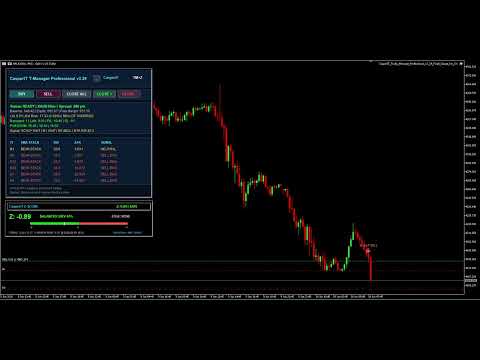
CasperIT Trade Manager Professional is a manual trading assistant for MetaTrader 5. It helps traders open, protect, monitor, and manage trades directly from the chart panel.
The product is designed for traders who enter trades manually and want better control over risk, stop loss, take profit, trailing stop, and position management.


**Main Advantages**
- Clean professional chart panel - One-click BUY and SELL buttons - Close all managed trades from the panel - Close only profitable trades - Close only losing trades - Automatic ATR-based Stop Loss and Take Profit - Risk-based lot calculation - Fixed lot option - Break-even protection - Early break-even mode for scalping - Adaptive ATR trailing stop - Two-stage trailing stop tightening - Spread guard before opening trades - Broker stop-level and volume-step checks - Duplicate-click protection during slow broker response - Broker response delay status shown on the panel - Manual and mobile trades can be managed - Optional management of trades from other magic numbers - Day, week, and month performance summary - Multi-timeframe EMA, RSI, and ATR dashboard - Signal status for scalp and swing trading conditions - Optional chart signal markers - Popup and sound alerts for new signals - Minimized panel mode for a cleaner chart
**How It Works**
The trader can open trades using the panel or place trades manually from MetaTrader desktop or mobile. When trade management is enabled, the EA can attach visible ATR-based SL/TP, move SL to break-even, trail profit, and protect managed positions according to the selected settings.
The EA does not promise profit. It is a trade management and decision-support tool. Trading results depend on the trader’s strategy, broker conditions, spread, execution speed, and market behavior.
**Panel Functions**
- **BUY**: opens a buy position using the selected lot/risk settings - **SELL**: opens a sell position using the selected lot/risk settings - **CLOSE ALL**: closes all managed trades - **CLOSE +**: closes managed trades currently in profit - **CLOSE -**: closes managed trades currently in loss - **Status Line**: shows ready state, spread block, order sending state, broker delay, or cooldown - **Performance Line**: shows day, week, and month result for managed trades - **Signal Line**: shows current scalp or swing signal status
**Inputs**
**Trading**
- **InpMagicNumber**: magic number used by the EA for panel orders - **InpManageManualTrades**: allows the EA to manage manually opened trades with magic number 0 - **InpManageExternalMagicTrades**: allows the EA to manage trades opened by other EAs or trade copiers - **InpManageOnlyChartSymbol**: if true, the EA manages only the current chart symbol - **InpConfirmCloseAll**: requires a second click before closing all managed trades - **InpFixedLot**: fixed lot size when auto lot is disabled - **InpUseAutoLot**: enables risk-based lot calculation - **InpRiskPercent**: account balance risk percentage used for panel trades - **InpAllowMinLotOverride**: allows broker minimum lot if calculated risk lot is too small - **InpMaxSpreadPoints**: maximum allowed spread before opening a trade - **InpSlippagePoints**: allowed slippage in points - **InpTradeClickCooldownSec**: cooldown time after trade clicks to reduce duplicate orders - **InpBrokerDelayWarnMs**: delay time before broker response warning appears on the panel - **InpUseAsyncTradeRequests**: sends trade requests asynchronously to reduce panel blocking - **InpBrokerRequestTimeoutSec**: releases pending order state if broker confirmation is not received
**Indicators**
- **InpEMA_Fast**: fast EMA period - **InpEMA_Mid**: middle EMA period - **InpEMA_Slow**: slow EMA period - **InpRSI_Period**: RSI period - **InpATR_Period**: ATR period - **InpATR_Mult_SL**: ATR multiplier for Stop Loss - **InpATR_Mult_TP**: ATR multiplier for Take Profit
**Protection and Management**
- **InpAttachInitialStopsToManual**: adds visible ATR SL/TP to managed trades that have no stops - **InpAttachTPWithInitialStops**: adds ATR Take Profit when attaching initial Stop Loss - **InpUseBreakEven**: enables break-even protection - **InpBE_TriggerATR**: ATR movement required before break-even is activated - **InpBE_LockPoints**: points locked beyond entry after break-even - **InpUseScalpEarlyBE**: enables faster break-even protection for scalping - **InpScalpBE_TriggerATR**: ATR movement required for scalp break-even - **InpScalpBE_LockPoints**: points locked beyond entry for scalp break-even - **InpUseTrailingStop**: enables ATR trailing stop - **InpTrailStartATR**: ATR movement required before trailing starts - **InpTrail_ATR_Mult**: ATR multiplier used for trailing distance - **InpTrailMinLockATR**: minimum ATR profit lock after trailing starts - **InpTrailTighten1ATR**: first ATR level for tighter trailing - **InpTrailTighten1Mult**: trailing multiplier after first tightening level - **InpTrailTighten2ATR**: second ATR level for tighter trailing - **InpTrailTighten2Mult**: trailing multiplier after second tightening level - **InpMinTrailStepPoints**: minimum SL movement step in points - **InpUseBasketProfitClose**: closes managed trades when basket profit target is reached - **InpBasketProfitMoney**: basket profit amount for auto-close - **InpUseBasketLossClose**: closes managed trades when basket loss limit is reached - **InpBasketLossMoney**: basket loss amount for auto-close
**Dashboard**
- **InpShowPanel**: shows or hides the chart panel - **InpPanelX**: panel horizontal position - **InpPanelY**: panel vertical position - **InpPanelW**: panel width - **InpRefreshSeconds**: dashboard refresh interval - **InpShowM1**: shows M1 timeframe row - **InpShowM5**: shows M5 timeframe row - **InpShowM15**: shows M15 timeframe row - **InpShowM30**: shows M30 timeframe row - **InpShowH1**: shows H1 timeframe row - **InpShowH4**: shows H4 timeframe row - **InpShowD1**: shows D1 timeframe row
**Chart Signals**
- **InpSignalMode**: selects scalp mode or swing mode - **InpShowSecureTrendSignals**: draws signal markers on the chart - **InpSignalRequireH4Confirm**: requires H4 confirmation for swing signals - **InpSignalLookbackBars**: number of bars used to keep recent signal objects - **InpSignalMinBarsBetween**: minimum bars between repeated signal labels - **InpSignalCampaignResetBars**: allows same-direction signal again after selected bars - **InpScalpRequireM15RsiSide**: requires M15 RSI to agree with scalp direction - **InpScalpRequireCandleSide**: requires the last closed candle to agree with signal direction - **InpSignalOffsetATR**: signal label distance from candle using ATR - **InpSignalPopupAlert**: enables popup alert for new signals - **InpSignalSoundAlert**: enables sound alert for new signals - **InpSignalSoundFile**: sound file used for signal alert
**Important Notes**
- This product is a manual trade manager and signal-status assistant. - It does not guarantee profit. - It should be tested on a demo account before live trading. - Use proper risk management and broker settings. - For best results, keep Algo Trading enabled and attach the EA to the symbol you want to manage.
리뷰 1
wymtb
448
wymtb 2026.06.16 08:30 

Please be aware, this EA will not open trades for you. But it will show you most important data and also is able to signal when buy or sell might could be executed. You can directly trigger a buy and sell from within the panel and the rest will be done by the EA. So far it looks like the defaults are working good for gold. So if you use it just to get a better view on the market or if you alo trigger buys or sells directly from the panel it is a great tool to optimze your trading.

추천 제품
Advanced Risk Return Tool
Felipe Monteiro Rodrigues
Advanced Risk Return Tool 은 MetaTrader 5에서 위험/수익 구조를 계획하고 관리하기 위한 시각적 도구입니다. 차트에서 직접 매수 및 매도 구조를 생성하고 관리할 수 있으며, 진입, 목표 및 손절 수준을 시각적으로 배치하고 위험/수익 비율, 핍 거리, 거래량 및 금액 정보를 표시합니다. 구조는 마우스를 사용하여 차트에서 직접 조정할 수 있습니다. 주요 기능 시각적 위험/수익 구조 도구 패널에서 Buy 및 Sell 구조를 직접 생성할 수 있습니다. 각 구조는 다음 정보를 표시합니다. 진입 수준 목표 수준 손절 수준 위험/수익 비율 핍 거리 거래량 예상 이익 예상 손실 정보는 차트에서 설정된 수준에 따라 업데이트됩니다. 차트에서 직접 편집 마우스를 사용하여 다음 작업을 수행할 수 있습니다. 전체 구조 이동 진입 수준 조정 목표 수준 조정 손절 수준 조정 구조의 가로 길이 변경 개별 구조 선택 동일한 차트에서 여러 구조 사용 거래량 제어 계산에 사용되는 거래량은
FREE
TradeManager Control Suite Manual trading with structured planning and controlled risk TradeManager Control Suite is a comprehensive trading panel for MetaTrader 5. It helps you prepare trades directly on the chart, calculate position size, place orders and manage open positions according to a plan defined in advance. You remain responsible for every entry. The application does not trade independently and does not use an automated trading strategy. It performs the calculations, sends the orde
Pattern Recognition EA
Claudiu-georgian Zavera
Pattern Recognition EA - From Learn to Earn. The market repeats itself. This EA finds every past repeat of the current candle sequence - and lets history vote the direction. ONE SHAPE. EVERY REPEAT IN HISTORY VOTES. The last N candles on your signal timeframe form a shape. The EA scans the history you choose - a fixed number of bars or everything your broker provides - for the SAME shape, and checks what happened next, every single time. Only when enough repeats exist AND a clear majority of t
Protect your funded accounts and personal capital with military-grade precision. This utility continuously monitors your floating equity against your daily starting balance. The moment your custom drawdown threshold is breached, it instantly liquidates all open positions, deletes pending orders, and completely unloads from the chart. Stop revenge trading and never fail a prop firm evaluation due to a margin breach again.
FREE
Truvana Trend Campaign Manager EA (TCM) Advanced Basket Management & Profit Locking Tool for Trend Traders Short Description Turn strong trends into managed campaigns. Truvana TCM is a professional trade management EA designed for traders who already know how to identify trends and execute entries. The EA automatically manages basket expansion, validates risk before adding positions, and locks profits using a broker-side Basket Stop Price (BSP). No martingale. No grid recovery. No signal genera
Grid Trading EA is a semi-automated one-click trading EA for both Normal Trading and Grid/Martingale Trading . Normal Trading Simply click Buy or Sell directly from the chart. The EA will automatically manage trades by: Setting Stop Loss and Take Profit Managing Trailing Stop Grid / Martingale Trading (For Hedging Account Type Only) When Grid Trading mode is enabled, the EA will automatically open additional grid orders at specified distances while increasing the lot size based on your settings.
RRtoolBox
David Ruiz Moreno
RRtoolbox - Professional Tools: Risk:Reward Trading Tool (SL/TP Horizontals + Pending orders + Diagonals), Alerts set on trend lines (for alerts on diagonal levels), SelfManagement (BE, partials...), close/cancelling by time, Statistics, Info and trading on chart. One-Click Trading with Visual Risk:Reward Management RRtoolbox is a comprehensive trading panel that combines one-click order execution,  statistics and  powerful visual Risk:Reward tools, alerts set with trendlines, on chart butt
DDKiller Pro
Njaratahiry Michael Randrianiaina
Stop Blowing Your Account. Once and For All. DDKiller Pro is the MT5 risk guardian that runs silently on your chart and shuts down trading the moment you hit a limit — whether you're grinding a prop firm challenge or managing your own CFD account. The problem every trader knows: You set your rules. You break them anyway. One revenge trade. One overleveraged position. One session that erases a month of gains. DDKiller Pro removes that decision from your hands entirely. What it does: The second yo
Trading Utility for Forex Currency Pairs Only not for Gold  Functions Auto Lot Calculation based on Risk Auto stoploss  Auto TakeProfit Breakeven Auto Close Half % Close in percentage with respect to the PIPs Pending Orders BuyLimit Sell Limit with distances BuyStop Sell Stop    with distances Trading Informations Risk in percentage For Multiple trades Combine Takeprofit and Combine Stoplosses
## Operating Principle **Manual Order Manager PRO BTC** is an Expert Advisor for MetaTrader 5 designed to **automatically manage trades opened manually by the trader**. The EA does not decide when to buy or sell. The user analyzes the market, chooses the direction, sets the lot size, and opens the position manually. From that point on, the system monitors the trade and applies the configured protection and management rules. The goal is to help the trader maintain a more disciplined approach
Trade Insight Pro Trade Insight Pro is an advanced trading performance analytics utility for MetaTrader 5. It transforms your MT5 trading history into clear and useful performance statistics directly on the chart. The utility is designed for traders who want to understand their historical results in greater detail, identify performance patterns, compare BUY and SELL behavior, and review their trading activity using objective data. Trade Insight Pro does not generate trading signals and does
Telegram2MT5 Signal Copier — Telegram 신호를 MetaTrader 5에서 자동으로 복사하세요 Telegram2MT5 Signal Copier를 사용하면, Telegram에서 받는 모든 신호가 여러분의 MetaTrader 5 계좌에서 즉시 자동으로 실행됩니다. 빠르고, 신뢰할 수 있으며, 완전히 사용자 지정 가능합니다. Windows Bridge APP 파일 및 튜토리얼 을 받아보세요 Bridge 파일은 로컬 웹 패널을 MT5 EA와 연결하는 데 필요합니다.  Windows 10 & Windows 11 — 64비트 — 그리고 2016년 이후 버전의 Windows Server와 호환됩니다 Main Features 완전 호환: 공개/비공개 채널 모두에서 완벽하게 작동하며, 어떠한 제한도 없습니다. 즉시 실행: ENTRY, STOP LOSS 및 최대 5개의 TAKE PROFIT 레벨을 밀리초 단위로 감지하고 주문을 실행합니다. (현재는 대기 주문 사용 권장)
Quant Panel
Kevin Craig E Gittins
Quant Panel is a strategy analysis utility for MetaTrader 5. It helps traders review several Expert Advisors or trading strategies running on the same account. The panel groups closed positions by Expert Advisor comment or magic number and calculates each strategy's results separately. You can compare strategy performance, review individual drawdowns and export detailed reports from one dashboard. Independent strategy analysis Each strategy has its own virtual starting balance and closed-trade b
Apex StopLoss Manager
Muhammad Hassan Muhammad Ahmad Atiyah
Apex StopLoss Manager MT5 Script – Stop Loss Control Utility Overview Apex StopLoss Manager is a trade management script for MetaTrader 5 designed to provide precise, rule-based control over Stop Loss behavior on existing open positions . The script focuses on manual execution and accuracy. It does not use automated trading logic, does not open trades, and runs once per attachment . Core Functionality The script provides two independent Stop Loss control functions, both enabled only through exp
Bastion is a monitor-and-close-only risk manager for prop-firm traders. It watches your account against your firm's daily-loss and maximum-drawdown limits in real time and force-closes your open positions BEFORE you cross a line. It never opens a trade of its own, so it stays fully within the tools allowed by FTMO, FundedNext, The5ers, FTUK and FXIFY. Why traders fail challenges A large share of failed evaluations end on a single daily-loss breach: a moment of inattention, a news spike, one tra
INTRODUCTORY LAUNCH OFFER: $139 • Exclusive introductory price for the first 10 copies only. • Price will be permanently adjusted to $279 after the first 10 activations. • Next price step: $199 -> Final price: $279. Fortress Risk Manager is an institutional-grade, all-in-one Capital Protection and Risk Management Cockpit built natively for MetaTrader 5. Engineered specifically for prop firm challenge accounts, funded trader programs, and discipl
Overview Mirror Signals Service EA (Text only)   is a powerful monitoring Expert Advisor that automatically sends   real-time Telegram notifications   for all important trade events on your MetaTrader 5 account. It is engineered specifically for   signal providers ,   trade-copier operators ,   auditors ,   educators , and   professional trading services   that require immediate, detailed, and reliable reporting. Everything from   entries, exits, SL/TP changes, comment changes, trailing sto
Только сейчас вы можете приобрести  TradeOps Command Center с 10% скидкой всего за 630$. Акция действует до 01.04.2026 Для получение инструкции об использование утилиты обратитесь в личные сообщения! TradeOps Command Center — Профессиональный инструмент контроля риска и дисциплины в трейдинге TradeOps Command Center — это многофункциональная утилита для MetaTrader 5, разработанная для трейдеров, которые стремятся к системному и дисциплинированному подходу к торговле. Продукт объединяет в себе у
My Trade History PRO 트레이드를 되돌아보세요 — 성공적인 트레이더가 되는 첫걸음. 성공한 트레이더는 단순히 거래만 하지 않습니다. 되돌아보고, 분석하고, 모든 포지션에서 배웁니다. My Trade History PRO 는 이 되돌아보기 과정을 쉽고, 시각적이며, 강력하게 만들어 줍니다. 수동 거래, 시그널 추종, EA 운영 등 어떤 스타일이든, 이 인디케이터는 전문적인 분석과 함께 완전한 거래 내역을 차트 위에 제공합니다. 주요 기능 1. 세 가지 강력한 보기 모드 한 번의 클릭으로 모드를 전환할 수 있습니다: 종료된 거래   — 청산된 모든 포지션의 전체 내역 진행 중인 거래   — 현재 실행 중인 모든 포지션 종료 + 진행 중   — 한눈에 보는 전체 그림 2. 세 가지 분석 레벨 모든 심볼 모드   — 계정의 모든 심볼에 대한 집계 통계 1-심볼 모드   — 단일 심볼의 성과에 대한 심층 분석 1-거래 모드   — 가장 상세한 보기. 특정 거래의 진입/청산 시간
Here   our more valuable tools SMC Trend Trading   ,  Easy SMC Trading  ,  Institutional SMC Architect Volume Analysis Tools  ,  Volume flow Profile  ,  Market volume profile  , FVG with Volume  , Liquidity Heatmap Profile  ,  Volume Spread Analysis Key Features 1.  Total Immersion UI (The "Blackout") Chart Masking:   Upon loading, the tool turns the background, grid, and candles pitch black. This hides the noise of the market ticks, allowing you to focus purely on your performance data withou
Gold Obsidian Crown은 MetaTrader 5용 전문가 자문(EA)으로, 여러 상위 시간대의 XAUUSD 구조를 모니터링합니다. 미리 정해진 청산 조건을 갖춘 대기 스톱 주문을 실행하며, 활성화된 구조들 간에 위험을 배분합니다. 로직 상위 시간대의 구조를 읽어 확인된 레벨 주변에 대기 스톱 주문을 배치합니다. 체결되지 않은 주문은 만료됩니다. 여러 독립적인 구조가 병렬로 작동하며, 각 구조는 고유의 지오메트리와 위험 예산 중 고유 몫을 가집니다. 청산 조건은 미리 정해져 있습니다. RiskBudgetPercent 입력값이 총 위험 예산을 설정합니다. 마틴게일, 그리드, 물타기(평균 단가 하향 조정)가 없으며, 손실 회복을 위해 사이즈를 늘리지 않습니다. 체결된 모든 포지션은 브로커 측 손절주문(stop loss)을 보유합니다. 입력값 위험 예산 (RiskBudgetPercent) 고정 lot 최대 lot Magic number 주문 코멘트 최대 스프레드 각 표의 행에는
Dr JAN Gold Manual Signals 는 MetaTrader 5용 골드 시장 수동 분석 도구입니다. 차트에 명확한 BUY 및 SELL 신호를 표시하고, 사용자가 거래 기회를 직접 평가할 수 있도록 구조화된 정보를 제공합니다. 주요 기능: BUY / SELL 신호 표시 진입 구간 표시 목표가 표시 리스크 / 신호 무효화 수준 신호 만료 시간 표시 명확한 차트 시각화 수동 의사결정 지원 골드 시장 분석용 자동 거래 실행 없음 주문 자동 진입 또는 청산 없음 포지션 자동 관리 없음 이 도구는 모든 거래 결정을 직접 관리하면서 차트에서 구조화된 기술 신호를 확인하려는 트레이더를 위해 설계되었습니다. 중요: 본 제품은 수동 분석 및 의사결정 지원 전용이며 자동으로 거래를 실행하지 않습니다. 이 도구는 사용자가 시장 상황을 직접 분석하고 최종 거래 결정을 스스로 내릴 수 있도록 설계되었습니다. 신호는 차트에 명확하게 표시되며, 사용자는 진입 여부를 직접 판단합니다. 자동 주문 실행이
EKAI Prop Guardian Pro
Ernestq Alonso Leiva Araya
EKAI Prop Guardian Pro The complete prop firm survival dashboard for MetaTrader 5 (Utility Expert Advisor — monitoring only, does NOT execute trades) Overview EKAI Prop Guardian Pro is the only MetaTrader 5 utility that combines three critical prop-firm survival engines in a single draggable, resizable, scrollable dashboard: a Rule Compliance Engine for 7 preset firms, a Behavior Engine that flags revenge trading and overtrading in real time, and a MAE/MFE Live Dashboard that measures the execut
Smart Risk Manager
Abderrahmane Benali
5 (1)
Smart Risk Manager – Master Your Trades with Precision and Confidence Take complete control of your manual trading with Smart Risk Manager , a professional all-in-one trade and risk management Expert Advisor for MetaTrader 5 . Designed for traders who value speed, precision, and capital protection, it simplifies every step of trade execution while ensuring your risk remains under control. Whether you trade Forex, Gold, Indices, or Cryptocurrencies , Smart Risk Manager helps you execute trades w
RiskPilot Pro
Mohamed Zein Mohamed Zein Soliman
RiskPilot Pro Plan risk clearly. Execute efficiently. Manage positions from one professional MT5 dashboard. RiskPilot Pro is a visual trade-planning and position-management utility for MetaTrader 5. It helps manual traders define risk before entry, calculate position size, place market or pending orders, and manage open positions from one chart panel. Important: RiskPilot Pro does not generate trading signals and does not choose trade direction. The trader defines the setup and remains responsib
Noize Absorption Index
Ekaterina Saltykova
Noize Absorption Index - is the manual trading system that measures the difference of pressure between bears forces and bulls forces. Green line - is a noize free index that showing curent situation. Zero value of index shows totally choppy/flat market.Values above zero level shows how powerfull bullish wave is and values below zero measures bearish forces.Up arrow appears on bearish market when it's ready to reverse, dn arrow appears on weak bullish market, as a result of reverse expectation.
Breakevan Utility
Jose Luis Thenier Villa
BreakEvan Utility  Is a simple tool in a panel with this utilities: This utility will draw a Golden Line in the chart applied showing the breakeven price, considering all the positions opened for that specific symbol. Also the information panel shows: Balance Breakeven Price for that chart Force Breakeven (for that symbol) as ON/OFF Force Breakeven Global (takes into account all trades opened) as ON/OFF Total Lots opened for Symbol Total Lots opened Global And two buttons: Force Breakeven: Whe
GGP Trade Copier MT5
Mohammadmahmood Pirayeh
GGP Trade Copier  EA is an automatic trading bot that can help traders automatically replicate the trading strategies and operations from one trading terminal to others by experiencing exceptionally fast trade copying system. Its easy-to-use setup allows you to copy trades between multiple MetaTrader terminals on the same Windows computer or Windows VPS with lightning-fast copying speeds of under 0.5 seconds. The software supports multiple trading varieties, including Forex, commodities, stocks
Time-Based Auto-Close Order Management Tool (MT5) — Technical Description Overview This is an automated order management EA based on time-algorithm logic. Its core function is to automatically execute preset closing operations when user-defined holding periods expire, aiming to help traders enforce predetermined rules mechanically and reduce emotional interference. Core Closing Modes Closing Mode Functional Definition Close All Closes all eligible positions when the set time is reached. Close
Trade Assistant MT5 — Trade Manager for Prop Firms Trade Manager for MT5 that calculates position size, manages risk, visualises your trade setup in real time and protects your account with built-in daily loss and trade limits — everything you need to trade with consistency and pass your prop firm challenge. > Trade Tab — Position Sizing & Execution **Automatic lot calculation** Enter your risk as a percentage of account balance or as a fixed dollar amount and the panel instantly calculates t
이 제품의 구매자들이 또한 구매함
Trade Assistant MT5
Evgeniy Kravchenko
4.43 (216)
거래당 위험 계산, 라인을 사용한 손쉬운 신규 주문, 부분 청산 기능을 통한 주문 관리, 7가지 유형의 트레일링 스탑 및 기타 유용한 기능을 제공합니다. 추가 자료 및 지침 설치 지침   -   애플리케이션 지침   라인 기능       - 차트에 개시선, 손절매, 차익실현을 표시합니다. 이 기능을 사용하면 새로운 주문을 쉽게 하고 개봉 전에 추가 특성을 볼 수 있습니다. 위기 관리       -       위험 계산 기능은 설정된 위험과 손절매 주문의 크기를 고려하여 새 주문의 볼륨을 계산합니다. 이를 통해 손절매 크기를 설정하고 동시에 설정된 위험을 존중할 수 있습니다. 로트 계산 버튼 - 위험 계산을 활성화/비활성화합니다. 필요한 위험 값은 위험 필드에 0에서 100 사이의 백분율 또는 예금 통화로 설정됩니다. 설정 탭에서 위험 계산 옵션을 선택합니다. $ 통화, % 잔액, % 지분, % 자유 마진, % 사용자 정의, % AB 이전 일, % AB 이전 주, % AB 이전
Trade Manager EA에 오신 것을 환영합니다. 이 도구는 거래를 보다 직관적이고 정확하며 효율적으로 만들기 위해 설계된 궁극적인 리스크 관리 도구 입니다. 단순한 주문 실행 도구가 아닌, 원활한 거래 계획, 포지션 관리 및 리스크 제어를 위한 종합 솔루션입니다. 초보자부터 고급 트레이더, 빠른 실행이 필요한 스캘퍼에 이르기까지 Trade Manager EA는 외환, 지수, 상품, 암호화폐 등 다양한 시장에서 유연성을 제공합니다. Trade Manager EA를 사용하면 복잡한 계산은 이제 과거의 일이 됩니다. 시장을 분석하고 진입, 손절 및 익절 수준을 차트의 수평선으로 표시한 후 리스크를 설정하면, Trade Manager가 이상적인 포지션 크기를 즉시 계산하고 SL 및 TP 값을 실시간으로 표시합니다. 모든 거래가 간편하게 관리됩니다. 주요 기능: 포지션 크기 계산기 : 정의된 리스크에 따라 거래 크기를 즉시 결정합니다. 간단한 거래 계획 : 진입, 손절, 익절을 위한
Farmed Hedge Yield Farming | All Markets (Manual - Hybrid - Semi/Automated EA) VERIFIED TRADING RESULTS - Farmed Hedge Yield Axi Copy:  https://www.mql5.com/en/signals/2356376 - Farmed Hedge Yield Exn Copy:   https://www.mql5.com/en/signals/2356404 - Farmed Hedge Yield V Copy:  https://www.mql5.com/en/signals/2357156 IMPORTANT NOTICE: FarmedHedge is a MANUAL-FOCUSED TRADING UTILITY ,not a fully automated EA. Results shown on this Signal include manual trades and overall strategic management.
Telegram to MT5 Multi-Channel Copier   는 Telegram 및 Discord 채널의 트레이딩 시그널을 MetaTrader 5로 자동 복사합니다. 봇도, 브라우저 확장도, 수동 복사도 필요 없습니다. Telegram이나 Discord에 시그널이 도착하면 EA가 몇 초 안에 터미널에서 주문을 실행합니다. 그리고 채널을 복사하기 전에, 내장 백테스터가 그 채널이 내 계좌에서 어떤 결과를 냈을지 보여줍니다. 제품은 두 가지 구성 요소로 이루어집니다: Telegram 채널을 수신하는 Windows 애플리케이션과, MT5 터미널에서 시그널을 실행하는 본 EA입니다. MT4 버전도 제공됩니다   여기 . 설정 가이드와 앱 다운로드:   https://www.mql5.com/en/blogs/post/768988 텔레그램 시그널 채널을 백테스트하는 방법 을 확인하세요. 현재 가격은 향후 인상될 예정입니다. 작동 방식 앱은 여러분 자신의 Telegram 계정으로 연결되므
내 거래 규칙에 맞춰 Telegram 신호 복사 Telegram to MT5 Signal Trader 는 공개 및 비공개 Telegram 채널과 그룹의 텍스트 기반 거래 신호를 MetaTrader 5로 자동 복사합니다. 하나의 데스크톱 앱에서 여러 신호 제공자와 MT5 계좌를 관리하고, 제공자마다 위험 관리 및 거래 설정을 개별적으로 지정 할 수 있습니다. 신호 복사에는 Telegram 봇이나 API 설정이 필요하지 않습니다. 전화번호 또는 QR 코드로 본인의 Telegram 계정에 로그인한 후, 이미 가입한 채널이나 그룹을 선택하면 됩니다. 봇을 만들거나 Telegram API 토큰, API ID 또는 API 해시를 입력할 필요가 없습니다. 포지션 크기를 선택하고, 여러 익절 목표에 청산 물량을 배분하며, 손익분기점 이동과 트레일링 스톱을 자동화하세요. 제공자의 신호를 따르면서도 실제 거래 방식은 직접 설정할 수 있습니다. 이 제품은 MT5 Expert Advisor와 필수 Win
================================================================================ POC BREAKOUT - V20.72. Full Professional Grade Toolkit ================================================================================ POC Breakout is a full MetaTrader 5 trading dashboard for discretionary traders who want breakout signals, Point of Control (POC) context, volume profiles, order flow, market structure, news, alerts, and advanced trade planning in one professional workspace. Attached directly to you
TradePanel MT5
Alfiya Fazylova
4.88 (170)
Trade Panel은 다기능 거래 도우미입니다. 이 애플리케이션에는 50개 이상의 수동 거래 기능이 포함되어 있으며 대부분의 거래 작업을 자동화할 수 있습니다. 앱 사용 설명서: https://www.mql5.com/en/blogs/post/756482 데모 계정용 앱 체험판: https://www.mql5.com/en/blogs/post/750865 앱 설치 방법: https://www.mql5.com/en/blogs/post/756239 시각 모드에서 앱 테스트 방법: https://www.mql5.com/en/blogs/post/770277 VPS MetaTrader에 앱 설치 방법: https://www.mql5.com/en/blogs/post/770190 거래. 한 번의 클릭으로 거래를 수행할 수 있습니다: 리스크 자동 계산과 함께 예약 주문 및 포지션 열기. 한 번의 클릭으로 여러 주문 및 포지션 열기. 주문 그리드 열기. 예약 주문 및 포지션을 그룹별로 닫기. 포지션
News Trade EA MT5
Konstantin Kulikov
4.55 (11)
제가 몇 년 동안 사용하고 있는 유용한 로봇을 소개드립니다. 반자동뿐만 아니라 자동 모드로도 사용할 수 있습니다. >>> Chat <<< 본 프로그램에는 경제 캘린더의 뉴스별로 유연한 거래 설정이 포함되어 있습니다. 전략 테스터에서 확인할 수 없습니다. 진짜 작업뿐입니다. 터미널 설정에서 허용된 URL 목록에 뉴스 사이트를 추가해야 합니다. 서비스>설정 > 조언자>를 클릭합니다. "다음 URL에 대해 WebRequest 허용:" 확인란을 선택합니다. 다음을 추가합니다 (공백 삭제): https://  nfs.faireconomy.media 최신 설정 아카이브 다운로드: https://www.mql5.com/en/blogs/post/747929 신호 모니터링: https://www.mql5.com/en/signals/author/test-standart 이 전문가를 위해 고유 설정 세트를 만들 때 블로그의 모든 매개변수에 대한 설명을 참조하십시오: https://www.mql5.
Master Your Trading Discipline   Stop losing your hard-earned gains to overtrading and emotional decisions. The Discipline Tool is your ultimate trading assistant, ensuring strict risk management in real-time. Key Protection Features: Advanced Drawdown Defense : Automatically halts trading if your daily drawdown exceeds a preset threshold (percentage or dollar amount). Real-Time Equity Lock : Safeguard profits by referencing peak equity, ensuring drawdown stays within control. Hard Profit Target
The product will copy all telegram signal to MT5 ( which you are member) , also it can work as remote copier.  Easy to set up, copy order instant, can work with almost signal formats, image signal,  s upport to translate other language to English Work with all type of channel or group, even channel have "Restrict Saving Content", work with  multi channel, multi MT5 Work as remote copier: with signal have ticket number, it will copy exactly via ticket number. Support to backtest signal. How to s
Entry In The Zone with SMC Multi Timeframe is a real-time market analysis tool based on Smart Money Concepts (SMC), designed to analyze market structure, price direction, and key trading zones. It supports both Single-Timeframe and Multi-Timeframe Analysis, providing a clearer view of overall market structure across multiple timeframes, with real-time BUY / SELL signals designed with a strict focus on No-Repaint principles.   The signals are designed to help filter unclear setups and evaluate tr
EasyInsight AIO MT5
Alain Verleyen
4.92 (12)
EASY Insight AIO – 스마트하고 손쉬운 트레이딩을 위한 올인원 솔루션 개요 외환, 금, 암호화폐, 지수, 심지어 주식까지 — 전 시장을 몇 초 만에, 수동 차트 확인이나 복잡한 설치, 인디케이터 설정 없이 스캔할 수 있다고 상상해 보세요. EASY Insight AIO 는 AI 기반 트레이딩을 위한 궁극의 플러그 앤 플레이(Plug & Play) 데이터 내보내기 도구입니다. 단 하나의 깔끔한 CSV 파일로 전체 시장 스냅샷을 제공하며, ChatGPT, Claude, Gemini, Perplexity 등 다양한 AI 플랫폼에서 즉시 분석할 수 있습니다. 창 전환, 복잡함, 차트 오버레이는 더 이상 필요 없습니다. 자동으로 내보내지는 순수하고 구조화된 데이터 인사이트만으로, 반복적인 차트 감시 대신 데이터 기반의 스마트한 의사결정에 집중할 수 있습니다. 왜 EASY Insight AIO인가요? 진정한 올인원 • 별도의 설정, 인디케이터 설치, 차트 오버레이가 필요 없습
파워 캔들 전략 스캐너 - 자체 최적화 다중 종목 설정 찾기 도구 파워 캔들 전략 스캐너는 마켓 워치에 등록된 모든 종목에 대해 파워 캔들 지표와 동일한 자체 최적화 엔진을 동시에 실행합니다. 하나의 패널에서 현재 통계적으로 거래 가능한 종목, 각 종목별 최적의 전략, 최적의 손절매/익절 조합을 알려주며, 새로운 신호가 발생하면 즉시 알림을 전송합니다. 이 도구는 Stein Investments 에코시스템의 일부입니다. 18개 이상의 도구와 함께 당신의 1대1 AI 트레이딩 멘토 Max.  항상 대기 중, 모든 인디케이터를 깊이 있게 이해, 무언가를 차근차근 생각해보고 싶은 순간에 도움을 줍니다.  https://stein.investments 에서 만나보세요 완벽한 시장 모니터링. 종목당 3,000건 이상의 자동 최적화. 2가지 알림 유형. 한 번의 클릭으로 차트를 전환하고 바로 거래하세요. 이 도구가 필요한 이유 대부분의 다중 종목 스캐너는 가격 변동만 보여줍니다. 티커별
MT5 to Telegram Signal Provider 는 사용하기 쉽고 완전히 커스터마이즈 가능한 유틸리티로, 특정 신호를 Telegram의 채팅, 채널 또는 그룹으로 전송하고, 귀하의 계정을 신호 제공자 로 만듭니다. 경쟁 제품과 달리 DLL 임포트를 사용하지 않습니다. [ 데모 ] [ 매뉴얼 ] [ MT4 버전 ] [ 디스코드 버전 ] [ 텔레그램 채널 ]  New: [ Telegram To MT5 ] 설정 단계별 사용자 가이드 가 제공됩니다. 텔레그램 API에 대한 지식은 필요하지 않습니다; 개발자가 제공하는 모든 것이 필요합니다. 주요 특징 구독자에게 보낸 주문 상세 정보를 커스터마이즈할 수 있습니다. 예를 들어, 브론즈, 실버, 골드와 같은 계층 구독 모델을 만들 수 있습니다. 골드 구독에서는 모든 신호를 받습니다. id, 심볼, 또는 코멘트로 주문을 필터링할 수 있습니다. 주문이 실행된 차트의 스크린샷이 포함됩니다 보낸 스크린샷에 닫힌 주문을 그려 추가 검증을 합니다
Trade Indicator Assistant   is a powerful MT5 utility designed to turn indicators into automated trading systems. Its main feature is the ability to automatically detect an indicator’s   BUY and SELL signal buffers , without requiring you to know the buffer numbers, search through indicator settings, or modify the indicator source code. Bonus Indicator:   After purchasing Trade Indicator Assistant, contact me to receive   Trade Signal Pro   completely free as a bonus indicator. [Download Demo V
The Patch
Mian Rameez Ali
The Patch It never opens a trade. It walks behind the ones that did. Every open position, every pending order — checked twice a second for the one thing that's easy to forget: a stop, a target. Found bare, it doesn't ask. It writes the missing number in, measured in points from wherever the position began, and moves on to the next. No strategy, no opinion on direction. Just the quiet assumption that nothing should ever sit on the market unprotected — not because someone decided it shouldn't,
Grid Manual MT5
Alfiya Fazylova
4.73 (22)
"Grid Manual"은 주문 그리드 작업을 위한 거래 패널입니다. 이 유틸리티는 보편적이며 유연한 설정과 직관적인 인터페이스를 제공합니다. 그것은 손실을 평균화하는 방향뿐만 아니라 이익을 증가시키는 방향으로 주문 그리드와 함께 작동합니다. 거래자는 주문 그리드를 만들고 유지할 필요가 없으며 유틸리티에서 수행합니다. 거래자가 주문을 시작하는 것으로 충분하며 "Grid Manual"는 자동으로 그를 위한 주문 그리드를 생성하고 거래가 마감될 때까지 그와 동행할 것입니다. 전체 설명 및 데모 버전 여기 . 유틸리티의 주요 기능: 모바일 터미널을 포함하여 어떤 방식으로든 열린 주문과 함께 작동합니다. "제한" 및 "중지"의 두 가지 유형의 그리드와 함께 작동합니다. 고정 및 동적(ATR 표시기 기반)의 두 가지 유형의 그리드 간격 계산과 함께 작동합니다. 오픈 오더 그리드의 설정을 변경할 수 있습니다. 차트에서 각 주문 그리드의 손익분기점 수준을 표시합니다. 각 주문 그리드에 대한 이익
Anchor Trade Manager
Kalinskie Gilliam
5 (9)
Your EAs cannot see each other, but Anchor can. Anchor gives you one place to coordinate your EAs, manage risk, and decide when trading is allowed. It works alongside the trading bots you already use without any changes to them. The Problem One EA opens a trade. Then another starts trading. The next thing you know, you wake up to multiple grids built across your account. Each EA may be doing exactly what it was designed to do, but together they can place far more risk on your account than you in
RETAILBERG FOOTPRINT CHART PRO — Order-Flow Workspace for MetaTrader 5 Version 7.00  |  Professional System  |  31 tools  |  One chart A full 150-page illustrated User Manual is included. Please read the full manual to understand this feature packed footprint chart elements and ui. https://www.mql5.com/en/blogs/post/777982 DEMO / STRATEGY TESTER — PLEASE READ FIRST
Floor Watch
Syed Tauqeer Hussain Shah
Floor Watch One number, watched every thirty seconds: how far equity has fallen since the day began — or since its highest point, if it's told to trail the peak instead of the open. Cross the line and it doesn't argue. Every open position closes, every pending order vanishes, and anything that slips through afterward gets shut the moment it appears. Not asked. Removed. The floor holds until the clock turns 5 AM Pakistan time — then, and only then, does the day start over. One rule. No except
한 번 구매하면 현재 제공 중이거나 앞으로 출시할 제 모든 MT4 및 MT5 지표를 추가 비용 없이 받을 수 있습니다. 구매 후 수령 방법을 안내받으려면 저에게 연락해 주세요. 10회 구매마다 가격을 50$씩 인상하여 최대 999$ 까지 올릴 예정입니다. 결제 시점의 Market 가격이 적용됩니다. 신뢰하는 지표는 그대로 사용하고, 관련 작업을 자동화하세요. 당신의 신호. 당신의 규칙. 당신의 거래 실행. 신뢰하는 MT5 지표가 있지만 여전히 차트를 지켜보고, 신호를 기다리고, 랏을 계산하고, 주문을 넣고, 각 포지션을 직접 관리하고 계신가요? Stratiora Signal Engine MT5는 이러한 단계를 연결합니다. 호환되는 매수·매도 버퍼 신호를 진입, 거래량 계산, Stop Loss, Take Profit, 필터, 포지션 관리 및 계좌 보호까지 이어지는 자동화 과정으로 전환할 수 있습니다. 지표나 거래 아이디어를 바꿀 때마다 별도의 EA를 의뢰하는 대신, 하나의 유연한 엔
Trader Evolution
Siarhei Vashchylka
5 (7)
" Trader Evolution " - A utility designed for traders who use wave and technical analysis in their work. One tab of the utility is capable of money management and opening orders, and the other can help in making Elliott wave and technical analysis. Manual (Be sure to read before purchasing) | Version for MT4 Advantages 1. Trading in a few clicks. Immediate and pending orders are available in the panel 2. Money management. The program automatically selects the appropriate lot size 3. Simplifies
EA Overfitter
Stephen J Martret
5 (1)
That backtest looks great. But will it still be making money tomorrow, next week, next month? EA Overfitter re-runs your EA on 100 price histories it has never seen. One score tells you if the edge is real. A backtest tells you what an EA did on one price history — the one that happened to occur. What you cannot tell from it is how much of that result was the strategy and how much was the particular path. EA Overfitter answers that. It builds up to 100 synthetic price histories your EA has n
Premium Trade Manager - 코치가 내장된 트레이딩 패널 Premium Trade Manager 는 차트 안에 트레이딩 코치를 심어놓은 도구입니다. 주문을 확정하기 전에, AI 트레이딩 코치 Max가 설정된 거래를 직접 읽고 명확한 판단을 내려줍니다. 스톱이 규율 있는 접근 방식에 맞는지, 리스크 크기가 합리적인지, 고영향 뉴스 이벤트가 몇 분 후에 있는지, 프롭 펌 한도에 근접했는지. 그 아래에는 완전한 실행 엔진이 있습니다. 원클릭 리스크 기반 진입, 차트에서 드래그로 세우고 거래가 진행되는 동안에도 계속 움직일 수 있는 플랜, 최대 4단계 분할 익절, 7가지 트레일링 방식, 실시간 프롭 펌 컴플라이언스, 뉴스 가드, 그리고 자체 비용을 평가하는 스프레드까지. 결정은 당신이 내립니다. Max가 두 번째 시선으로 확인합니다. 패널이 그 이후의 모든 것을 처리합니다. 구매 전에 직접 체험해 보세요. 브라우저에서 라이브 패널을 직접 클릭해볼 수 있습니다. 구매 전에 실제
Trade Manager DaneTrades
Levi Dane Benjamin
4.13 (31)
거래 관리자는 위험을 자동으로 계산하는 동시에 거래를 빠르게 시작하고 종료하는 데 도움을 줍니다. 과잉 거래, 복수 거래 및 감정 거래를 방지하는 데 도움이 되는 기능이 포함되어 있습니다. 거래를 자동으로 관리할 수 있으며 계정 성과 지표를 그래프로 시각화할 수 있습니다. 이러한 기능은 이 패널을 모든 수동 거래자에게 이상적으로 만들고 MetaTrader 5 플랫폼을 향상시키는 데 도움이 됩니다. 다중 언어 지원. MT4 버전  |  사용자 가이드 + 데모 트레이드 매니저는 전략 테스터에서 작동하지 않습니다. 데모를 보려면 사용자 가이드로 이동하세요. 위기 관리 % 또는 $를 기준으로 위험 자동 조정 고정 로트 크기 또는 거래량과 핍을 기반으로 한 자동 로트 크기 계산을 사용하는 옵션 RR, Pips 또는 Price를 사용한 손익분기점 손실 설정 추적 중지 손실 설정 목표 달성 시 모든 거래를 자동으로 마감하는 최대 일일 손실률(%)입니다. 과도한 손실로부터 계정을 보호하고 과도한
YuClusters
Yury Kulikov
4.93 (43)
Attention: You can view the program operation in the free version  YuClusters DEMO .  YuClusters is a professional market analysis system. The trader has unique opportunities to analyze the flow of orders, trade volumes, price movements using various charts, profiles, indicators, and graphical objects. YuClusters operates on data based on Time&Sales or ticks information, depending on what is available in the quotes of a financial instrument. YuClusters allows you to build graphs by combining da
Quant AI Agents
Ho Tuan Thang
5 (1)
Quant AI Agents are independent trading Expert Advisors. Instead of trading using a fixed strategy like other conventional EAs, Quant AI Agents   is a   multi-agent AI trading framework   that turns natural-language strategy prompts into live.  WANT THE SAME RESULTS AS MY LIVE SIGNAL?   Use the exact same brokers I do:   IC MARKETS , IC TRADING   .  Unlike the centralized stock market, Forex has no single, unified price feed.  Every broker sources liquidity from different providers, creating un
Daily Trading Limiter
AL MOOSAWI ABDULLAH JAFFER BAQER
5 (8)
• Please test the product in the Strategy Tester before purchasing to understand how it works. • If you face any issues, contact me via private message—I’m always available to help. • After purchase, send me a screenshot of your order to receive a FREE EA as a gift. Daily Trading Limiter — the rule you cannot break Every trader knows the number. Three trades. Two percent. One bad day and stop. And every trader has watched themselves take the fourth trade anyway. The problem was never knowing th
FUTURES ORDERFLOW FOOTPRINT CHART Professional OrderFlow EA for MetaTrader 5 Version 1.01| Professional tool for real traders | Institutional-Grade Visualization STRATEGY TESTER USERS - PLEASE SELECT EVERY REAL TICK WHEN TESTING AND YOU HAVE DOWNLOADED HISTORICAL DATA. IF YOU SEE A WAITING SCREEN AND IT IS NOT DOWNLOADING, IT MEANS YOU HAVE LOW HISTORICAL DATA. TRY 1 MIN AND 5 MIN FIRST ON 1 DAY DATA. ONE DAY DATA SHOULD BE THE NEWEST AND MOST CURRENT DATE. PLEASE WAIT UNTIL THE MARKET HAS ROL
Trading Chaos Expert
Hennadii Stanilevych
5 (11)
This software has no equals in the world and represents a universal trade "console" covering trading signals, automated market entry, setting of Stop Loss and Take Profit, as well as Trailing Profit for multiple trades at the same time in a single open window. Intuitive control of the Expert Advisor in "three clicks" ensures a comprehensive use of all its functions on different computers, including tablets PCs. Interacting with additional signal indicators that mark the chart to give a real mark
제작자의 제품 더 보기
Official Purchase Notice CasperIT AMI Trader is sold exclusively through the MQL5 Market. We do not authorize any Telegram channels, websites, or third-party sellers to distribute or sell this product. Software obtained from unofficial sources is not supported, does not receive updates, and may be modified or unsafe. CasperIT Adaptive Market Intelligence Trader MT5 Overview CasperIT Adaptive Market Intelligence Trader (AMI) is a fully automated Meta Trader 5 Expert Advisor that combines trend, m
SURFER WAVE RIDER — Multi-Symbol Adaptive Recovery EA for MetaTrader 5 Surfer Wave Rider is an adaptive recovery Expert Advisor for MetaTrader 5, designed to manage market exposure through structured entries, controlled recovery layers, symbol-aware volatility adaptation and multiple independent protection engines. SWR is not a blind martingale system. Automatic entries and recovery positions are governed by market direction, minimum price spacing, confirmed closed-candle reversal signals, sym
Dolphin Wave Rider IMM is an automated MetaTrader 5 strategy designed to evaluate structured trend opportunities using hourly price data. The strategy combines market-structure breaks with trend alignment and Relative Strength Index confirmation. By default, trading decisions use completed candles to reduce intrabar signal changes. ### Trade management Automatic entries use broker-adapted stop-loss and take-profit prices. Position volume can be calculated from an equity-risk percentage or a fixe
Floating DD Tracker — Free Risk Monitoring Indicator for MT5 Floating DD Tracker is a lightweight and professional MetaTrader 5 indicator designed to help traders monitor real-time floating drawdown directly on the chart. The indicator continuously tracks your current floating drawdown, records the highest drawdown reached, and displays the historical maximum DD with the exact date and time it occurred. Its compact neon-style dashboard is optimized for all chart sizes and provides instant visual
FREE
CasperIT Manual Trade Manager MT5 FREE CasperIT Manual Trade Manager is a free trading utility for MetaTrader 5. It helps manual traders open positions, control risk, and protect profitable trades from a compact chart panel. The utility does not generate automatic entry signals or promise profits. You remain in control of every trade. Main Features - One-click **BUY** and **SELL** buttons - Automatic risk-based lot calculation - ATR-based Stop Loss and Take Profit - Break-even protection aft
FREE
Trade Info Lightweight Dashboard MT5 Trade Info Lightweight Dashboard MT5 is a modern and lightweight performance dashboard designed for MetaTrader 5 traders who want to monitor trading results clearly and efficiently directly from the chart. The indicator displays detailed daily, weekly, monthly, and yearly trading statistics in a clean and professional interface without slowing down the platform. It is optimized for low resource usage and suitable for manual traders, scalpers, swing traders, a
FREE
CasperIT Volume Intelligence PRO Institutional Smart Money & Exhaustion Indicator for MT5 CasperIT Volume Intelligence PRO is an advanced institutional-grade volume and momentum analysis indicator designed for traders seeking deeper market insight beyond traditional indicators. Built with a proprietary Trend Memory Engine, the indicator combines smart volume analysis, momentum pressure detection, climax exhaustion logic, and scout signal technology to identify high-probability market conditions
CasperIT F22 Raptor Adaptive Gold Trading EA with Internal Auto Scalp, Loss Compression and Capital Protection CasperIT F22 Raptor is a professional adaptive trading system designed primarily for XAUUSD Gold trading. The EA combines trend-adaptive entries, basket management, controlled recovery logic, break-even protection, loss compression, session/news awareness, and a real-time institutional-style dashboard. The system is built for traders who want intelligent automation with capital protecti
CasperIT Gold Matrix Pro MT5 Institutional Hybrid Recovery EA for XAUUSD CasperIT Gold Matrix Pro MT5 is a professional XAUUSD trading system built for MetaTrader 5, designed around controlled recovery logic, adaptive basket management, intelligent execution filtering, and institutional-style risk compression. The EA was specifically optimized for Gold (XAUUSD) on the M5 timeframe and focuses on maintaining controlled drawdown behavior while allowing consistent structured recovery during volatil
CasperIT Risk Guardian MT5 CasperIT Risk Guardian MT5 is an account-risk management utility for MetaTrader 5. It helps traders monitor drawdown, review open exposure, receive warnings, and apply optional protection actions when configured limits are reached. The utility does not open trades or promise trading results. It is designed to support disciplined risk management for personal accounts and evaluation accounts. Main Advantages Monitor daily and overall account drawdown in real time. Use fi
CasperIT MTF TrendMatrix PRO Short Description Multi-timeframe trend matrix indicator with closed-bar chart signals, confidence filtering, continuation cooldowns and a historical signal report. Full Description CasperIT MTF Trend Matrix PRO is a chart-window indicator for MetaTrader 5. It summarizes trend conditions across multiple timeframes and displays the result in a compact panel. The indicator evaluates EMA alignment, RSI behavior, MACD momentum, price structure, ADX trend phase and ATR ma
CasperIT PSAR RSI Trend Signals PRO CasperIT PSAR RSI Trend Signals PRO is a clean chart indicator designed to help traders identify trend direction, reversal points, and continuation strength using PSAR and RSI logic. The indicator displays clear BUY and SELL signal dots directly on the chart, with optional signal wording and a professional dashboard panel. The dashboard shows the current trend, last signal, RSI strength, reversal statistics, strong signal count, recent dot activity, and a mult
CasperIT Z-Score Intelligence MT5 CasperIT Z-Score Intelligence is a professional market stretch indicator for MetaTrader 5. It uses Z-Score analysis to measure how far price has stretched from its statistical mean and presents the result through a clean institutional dashboard. The indicator is designed to help traders identify overbought, oversold, stretched, and extreme market conditions. It does not open trades. It provides market context, probability guidance, regime classification, and v
CasperIT Z-Score Gold Stochastic MA EA is an advanced XAUUSD trading system that combines Stochastic MA signal detection with institutional-grade Z-Score market stretch analysis, capital preservation controls, and adaptive profit protection. The EA is optimized for XAUUSD M30 and includes intelligent session filtering, previous-candle midpoint profit trailing, soft Z-Score risk balancing, and drawdown protection mechanisms designed to improve consistency during changing market conditions. Key Fe
Leopard Strike is an automated trading system for MetaTrader 5. It evaluates market direction using an EMA trend model, SuperTrend confirmation, RSI, Stochastic RSI, MACD momentum and reversal-candle conditions. The Expert Advisor can manage an initial position through controlled pyramiding and staged recovery. Recovery spacing can adapt to current volatility, while deeper recovery stages require progressively stronger confirmation. Crypto and silver instruments use separate spread, volatility a
필터:
wymtb
448
wymtb 2026.06.16 08:30 

Please be aware, this EA will not open trades for you. But it will show you most important data and also is able to signal when buy or sell might could be executed. You can directly trigger a buy and sell from within the panel and the rest will be done by the EA. So far it looks like the defaults are working good for gold. So if you use it just to get a better view on the market or if you alo trigger buys or sells directly from the panel it is a great tool to optimze your trading.

Imad Saadeh
1912
개발자의 답변 Imad Saadeh 2026.06.16 11:12
🙏 Thanks for your rating & detailed feedback! Glad the defaults work well for gold, and the panel helps optimize trading.
리뷰 답변



















