
CasperIT M Trade Manager
- 유틸리티
- 버전: 2.330
- 업데이트됨: 5 6월 2026

CasperIT Manual Trade Manager MT5 FREE
CasperIT Manual Trade Manager is a free trading utility for MetaTrader 5. It helps manual traders open positions, control risk, and protect profitable trades from a compact chart panel.
The utility does not generate automatic entry signals or promise profits. You remain in control of every trade.
- One-click **BUY** and **SELL** buttons - Automatic risk-based lot calculation - ATR-based Stop Loss and Take Profit - Break-even protection after a favorable price move - Adaptive trailing stop that tightens as profit grows - One-click closing of profitable trades with **CLOSE +** - One-click closing of losing trades with **CLOSE -** - **CLOSE ALL** button with confirmation protection - Spread guard to block entries during excessive spreads - Broker stop-level and volume-step validation - Management of manual trades on the current chart symbol - Compact glass-style panel with minimize and restore button
Multi-Timeframe Dashboard
The built-in dashboard displays:
- EMA stack direction - RSI value - ATR value - Market bias
Supported timeframes:
- M5 - M15 - M30 - H1 - H4 - D1
### Profit Protection
The adaptive trailing system gradually locks more profit as the trade moves in your favor:
- Initial trailing begins after a favorable ATR move - The stop loss is moved beyond the entry price - The trailing distance becomes tighter after stronger moves - Existing broker stop-distance rules are respected
How to Use
1. Attach the utility to a chart. 2. Confirm that the panel status shows **READY**. 3. Use **BUY** or **SELL** to open a managed trade. 4. Use **CLOSE +**, **CLOSE -**, or **CLOSE ALL** when needed. 5. Leave the utility attached to the chart so it can manage break-even and trailing-stop protection.
### Important Notes
- Designed for MetaTrader 5. - The utility manages the current chart symbol only. - Manual positions on the chart symbol are also protected. - The free Market edition uses optimized locked settings. - There are no external input parameters. - Test the utility on a demo account before using it on a live account. - A stop loss reduces risk but cannot guarantee an exact exit price during gaps, slippage, or fast market conditions.
Locked Market Preset
The free edition uses internal settings for:
- 1% automatic risk sizing - ATR-based Stop Loss and Take Profit - Break-even protection - Adaptive profit-lock trailing - Spread protection - Close-all confirmation - Multi-timeframe dashboard display
Disclaimer
Trading involves risk. This utility is a trade-management tool, not financial advice. It does not guarantee profits or prevent losses.
CasperIT Manual Trade Manager is a free trading utility for MetaTrader 5. It helps manual traders open positions, control risk, and protect profitable trades from a compact chart panel.
The utility does not generate automatic entry signals or promise profits. You remain in control of every trade.
- One-click **BUY** and **SELL** buttons - Automatic risk-based lot calculation - ATR-based Stop Loss and Take Profit - Break-even protection after a favorable price move - Adaptive trailing stop that tightens as profit grows - One-click closing of profitable trades with **CLOSE +** - One-click closing of losing trades with **CLOSE -** - **CLOSE ALL** button with confirmation protection - Spread guard to block entries during excessive spreads - Broker stop-level and volume-step validation - Management of manual trades on the current chart symbol - Compact glass-style panel with minimize and restore button
Multi-Timeframe Dashboard
The built-in dashboard displays:
- EMA stack direction - RSI value - ATR value - Market bias
Supported timeframes:
- M5 - M15 - M30 - H1 - H4 - D1
### Profit Protection
The adaptive trailing system gradually locks more profit as the trade moves in your favor:
- Initial trailing begins after a favorable ATR move - The stop loss is moved beyond the entry price - The trailing distance becomes tighter after stronger moves - Existing broker stop-distance rules are respected
How to Use
1. Attach the utility to a chart. 2. Confirm that the panel status shows **READY**. 3. Use **BUY** or **SELL** to open a managed trade. 4. Use **CLOSE +**, **CLOSE -**, or **CLOSE ALL** when needed. 5. Leave the utility attached to the chart so it can manage break-even and trailing-stop protection.
### Important Notes
- Designed for MetaTrader 5. - The utility manages the current chart symbol only. - Manual positions on the chart symbol are also protected. - The free Market edition uses optimized locked settings. - There are no external input parameters. - Test the utility on a demo account before using it on a live account. - A stop loss reduces risk but cannot guarantee an exact exit price during gaps, slippage, or fast market conditions.
Locked Market Preset
The free edition uses internal settings for:
- 1% automatic risk sizing - ATR-based Stop Loss and Take Profit - Break-even protection - Adaptive profit-lock trailing - Spread protection - Close-all confirmation - Multi-timeframe dashboard display
Disclaimer
Trading involves risk. This utility is a trade-management tool, not financial advice. It does not guarantee profits or prevent losses.


















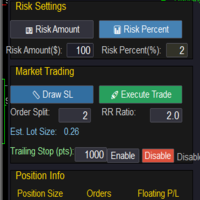


























Excellent work by Imaad Sheikh! This is a very smart and well-designed tool. It offers almost all the features and functionality available in premium products, making it highly useful and user-friendly. The attention to detail, smooth performance, and practical features reflect great development skills. Kudos to Imaad Sheikh for creating such an impressive solution. Keep up the outstanding work