
CasperIT Trade Manager Professional
- Utilità
-
Imad Saadeh
 🔹 Professional gold & crypto trader (GMT+2)
🔹 Developer of robust MT5 Expert Advisors & dashboards
🔹 Focused on risk management, equity protection & automation
🔹 Global community leader, sharing transparent trading solutions - Versione: 3.10
- Aggiornato: 15 giugno 2026
- Attivazioni: 10
**CasperIT Trade Manager Professional**
CasperIT Trade Manager Professional is a manual trading assistant for MetaTrader 5. It helps traders open, protect, monitor, and manage trades directly from the chart panel.
The product is designed for traders who enter trades manually and want better control over risk, stop loss, take profit, trailing stop, and position management.
- Clean professional chart panel - One-click BUY and SELL buttons - Close all managed trades from the panel - Close only profitable trades - Close only losing trades - Automatic ATR-based Stop Loss and Take Profit - Risk-based lot calculation - Fixed lot option - Break-even protection - Early break-even mode for scalping - Adaptive ATR trailing stop - Two-stage trailing stop tightening - Spread guard before opening trades - Broker stop-level and volume-step checks - Duplicate-click protection during slow broker response - Broker response delay status shown on the panel - Manual and mobile trades can be managed - Optional management of trades from other magic numbers - Day, week, and month performance summary - Multi-timeframe EMA, RSI, and ATR dashboard - Signal status for scalp and swing trading conditions - Optional chart signal markers - Popup and sound alerts for new signals - Minimized panel mode for a cleaner chart
**How It Works**
The trader can open trades using the panel or place trades manually from MetaTrader desktop or mobile. When trade management is enabled, the EA can attach visible ATR-based SL/TP, move SL to break-even, trail profit, and protect managed positions according to the selected settings.
The EA does not promise profit. It is a trade management and decision-support tool. Trading results depend on the trader’s strategy, broker conditions, spread, execution speed, and market behavior.
**Panel Functions**
- **BUY**: opens a buy position using the selected lot/risk settings - **SELL**: opens a sell position using the selected lot/risk settings - **CLOSE ALL**: closes all managed trades - **CLOSE +**: closes managed trades currently in profit - **CLOSE -**: closes managed trades currently in loss - **Status Line**: shows ready state, spread block, order sending state, broker delay, or cooldown - **Performance Line**: shows day, week, and month result for managed trades - **Signal Line**: shows current scalp or swing signal status
**Inputs**
**Trading**
- **InpMagicNumber**: magic number used by the EA for panel orders - **InpManageManualTrades**: allows the EA to manage manually opened trades with magic number 0 - **InpManageExternalMagicTrades**: allows the EA to manage trades opened by other EAs or trade copiers - **InpManageOnlyChartSymbol**: if true, the EA manages only the current chart symbol - **InpConfirmCloseAll**: requires a second click before closing all managed trades - **InpFixedLot**: fixed lot size when auto lot is disabled - **InpUseAutoLot**: enables risk-based lot calculation - **InpRiskPercent**: account balance risk percentage used for panel trades - **InpAllowMinLotOverride**: allows broker minimum lot if calculated risk lot is too small - **InpMaxSpreadPoints**: maximum allowed spread before opening a trade - **InpSlippagePoints**: allowed slippage in points - **InpTradeClickCooldownSec**: cooldown time after trade clicks to reduce duplicate orders - **InpBrokerDelayWarnMs**: delay time before broker response warning appears on the panel - **InpUseAsyncTradeRequests**: sends trade requests asynchronously to reduce panel blocking - **InpBrokerRequestTimeoutSec**: releases pending order state if broker confirmation is not received
**Indicators**
- **InpEMA_Fast**: fast EMA period - **InpEMA_Mid**: middle EMA period - **InpEMA_Slow**: slow EMA period - **InpRSI_Period**: RSI period - **InpATR_Period**: ATR period - **InpATR_Mult_SL**: ATR multiplier for Stop Loss - **InpATR_Mult_TP**: ATR multiplier for Take Profit
**Protection and Management**
- **InpAttachInitialStopsToManual**: adds visible ATR SL/TP to managed trades that have no stops - **InpAttachTPWithInitialStops**: adds ATR Take Profit when attaching initial Stop Loss - **InpUseBreakEven**: enables break-even protection - **InpBE_TriggerATR**: ATR movement required before break-even is activated - **InpBE_LockPoints**: points locked beyond entry after break-even - **InpUseScalpEarlyBE**: enables faster break-even protection for scalping - **InpScalpBE_TriggerATR**: ATR movement required for scalp break-even - **InpScalpBE_LockPoints**: points locked beyond entry for scalp break-even - **InpUseTrailingStop**: enables ATR trailing stop - **InpTrailStartATR**: ATR movement required before trailing starts - **InpTrail_ATR_Mult**: ATR multiplier used for trailing distance - **InpTrailMinLockATR**: minimum ATR profit lock after trailing starts - **InpTrailTighten1ATR**: first ATR level for tighter trailing - **InpTrailTighten1Mult**: trailing multiplier after first tightening level - **InpTrailTighten2ATR**: second ATR level for tighter trailing - **InpTrailTighten2Mult**: trailing multiplier after second tightening level - **InpMinTrailStepPoints**: minimum SL movement step in points - **InpUseBasketProfitClose**: closes managed trades when basket profit target is reached - **InpBasketProfitMoney**: basket profit amount for auto-close - **InpUseBasketLossClose**: closes managed trades when basket loss limit is reached - **InpBasketLossMoney**: basket loss amount for auto-close
**Dashboard**
- **InpShowPanel**: shows or hides the chart panel - **InpPanelX**: panel horizontal position - **InpPanelY**: panel vertical position - **InpPanelW**: panel width - **InpRefreshSeconds**: dashboard refresh interval - **InpShowM1**: shows M1 timeframe row - **InpShowM5**: shows M5 timeframe row - **InpShowM15**: shows M15 timeframe row - **InpShowM30**: shows M30 timeframe row - **InpShowH1**: shows H1 timeframe row - **InpShowH4**: shows H4 timeframe row - **InpShowD1**: shows D1 timeframe row
**Chart Signals**
- **InpSignalMode**: selects scalp mode or swing mode - **InpShowSecureTrendSignals**: draws signal markers on the chart - **InpSignalRequireH4Confirm**: requires H4 confirmation for swing signals - **InpSignalLookbackBars**: number of bars used to keep recent signal objects - **InpSignalMinBarsBetween**: minimum bars between repeated signal labels - **InpSignalCampaignResetBars**: allows same-direction signal again after selected bars - **InpScalpRequireM15RsiSide**: requires M15 RSI to agree with scalp direction - **InpScalpRequireCandleSide**: requires the last closed candle to agree with signal direction - **InpSignalOffsetATR**: signal label distance from candle using ATR - **InpSignalPopupAlert**: enables popup alert for new signals - **InpSignalSoundAlert**: enables sound alert for new signals - **InpSignalSoundFile**: sound file used for signal alert
**Important Notes**
- This product is a manual trade manager and signal-status assistant. - It does not guarantee profit. - It should be tested on a demo account before live trading. - Use proper risk management and broker settings. - For best results, keep Algo Trading enabled and attach the EA to the symbol you want to manage.
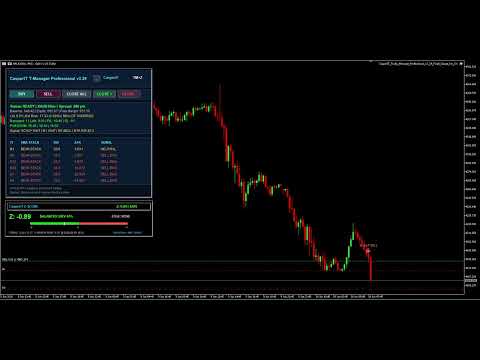















































Please be aware, this EA will not open trades for you. But it will show you most important data and also is able to signal when buy or sell might could be executed. You can directly trigger a buy and sell from within the panel and the rest will be done by the EA. So far it looks like the defaults are working good for gold. So if you use it just to get a better view on the market or if you alo trigger buys or sells directly from the panel it is a great tool to optimze your trading.