OpenAI Library MT5

The following library is proposed as a means of being able to use the OpenAI API directly on the metatrader, in the simplest way possible.

For more on the library's capabilities, read the following article:

https://www.mql5.com/en/blogs/post/756098

The files needed to use the library can be found here:

Manual

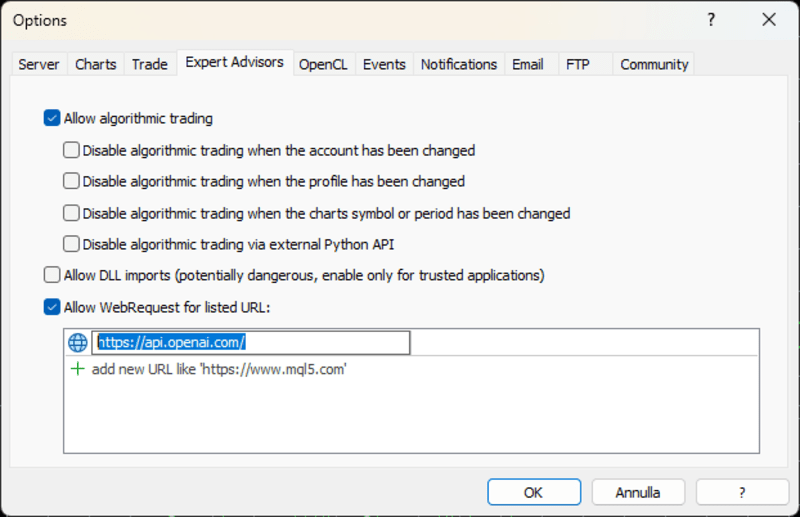
IMPORTANT: To use the EA you must add the following URL to allow you to access the OpenAI API as shown in the attached images

In order to use the library, you must include the following Header, which you can find at the following link:

https://www.mql5.com/en/blogs/post/756108

#import "StormWaveOpenAI.ex5"

COpenAI *iOpenAI(string);

CMessages *iMessages(void);

CTools *iTools(void);

#import

This is all you need to be able to Use the library with ease.

Below is an example of how you can use the library with ease and operate with the OpenAI API

#include <StormWaveOpenAI.mqh>      //--- Include the custom OpenAI header file for API integration
COpenAI *client;                    //--- Declare a pointer to the OpenAI client
CMessages *_message_;               //--- Declare a pointer for handling messages
//--- The OnStart function is the entry point of the script
OnStart()
  {
   client = iOpenAI("YOUR_API_KEY"); //--- Initialize the OpenAI client with your API key
   client.start_thread();            //--- Start a new thread for the OpenAI client to operate in
   string completion;                //--- Variable to store the API response
   _message_ = iMessages();          //--- Initialize the message handler
   string user_content = "Hi how are you?";   //--- Define the message content
   _message_.AddMessage(user_content, user);  //--- Add the message to the handler with a user identifier
   //--- Call the API to generate a completion based on the provided messages
   completion = client.completions_create(
                   /*model =        */  "gpt-3.5-turbo-0125", //--- Specify the model to use for the completion
                   /*messages =     */   _message_,           //--- Pass the messages to the API
                   /*max_tokens =   */   300,                 //--- Set the maximum number of tokens to generate
                   /*temperature =  */   1.0                  //--- Set the creativity level of the response
                );
   client.PrintResultMessage(); //--- Print the result of the API call
   delete _message_;            //--- Clean up the message handler
   delete client;               //--- Clean up the OpenAI client
  }

For further details, please feel free to contact me. I express my thanks in advance in case you decide to purchase this library. Should you encounter bugs, I would be grateful if you could contribute to the improvement of the library by privately sending me the problems you encounter so that I can make the necessary improvements.

추천 제품
First contact Telegram - @BerlinOG for more files and installation The   Telegram Signal EA   is a powerful tool designed to bridge your Telegram communications with your MetaTrader 5 (MT5) charts. It enables you to display messages from your Telegram channels, groups, and private chats directly on your MT5 charts as comments. This integration simplifies the process of monitoring trading signals and important messages while you're actively trading. Features Real-time Message Display : View mes

WalkForwardOptimizer MT5
Stanislav Korotky
3.78 (9)
WalkForwardOptimizer library allows you to perform rolling and cluster walk-forward optimization of expert advisers (EA) in MetaTrader 5. To use the library include its header file WalkForwardOptimizer.mqh into your EA source code, add call provided functions as appropriate. Once the library is embedded into EA, you may start optimization according to the procedure described in the User guide . When it's finished, intermediate results are saved into a CSV file and some special global variables.
NATS (Niguru Automatic Trailing Stop) will help you achieve more profits, by setting the trailing stop automatically. Pair this NATS application with EA, or can also be used as a complement to manual trading. A trailing stop is a powerful tool in trading that combines risk management and profit optimization.  A trailing stop is a type of market order that sets a stop-loss at a percentage below the market price of an asset, rather than a fixed number. It dynamically adjusts as the asset’s pric
FREE
이 제품은 지난 3년 동안 개발되었습니다. 이는 MQL5 프로그래밍 언어에서 모든 유형의 인공지능 및 머신러닝 코드를 다룰 수 있는 가장 진보된 코드베이스입니다. MetaTrader 5에서 많은 AI 기반의 트레이딩 로봇과 인디케이터를 만드는 데 사용되었습니다. 이 제품은 MQL5용 머신러닝에 대한 무료 오픈 소스 프로젝트의 프리미엄 버전입니다. 프로젝트 링크:  https://github.com/MegaJoctan/MALE5 . 무료 버전은 기능이 제한적이며, 문서화가 부족하고 유지보수가 원활하지 않습니다. 소규모 AI 모델을 위한 제품입니다. 이 프리미엄 제품은 AI 기반 트레이딩 로봇을 효과적으로 개발하는 데 필요한 모든 기능을 제공합니다. 이 라이브러리를 구매해야 하는 이유? 사용이 매우 간편하며, 코드 문법이 Python의 인기 있는 AI 라이브러리인 Scikit-learn, TensorFlow, Keras와 유사합니다. 잘 문서화됨 – 시작을 돕기 위한 다양한 동영상, 예
TeleSignal
Vincent Jean Robert Trolard
TeleSignal EA is an intelligent Expert Advisor designed to automatically send Telegram notifications whenever a position is opened, closed, or modified in MetaTrader 5 . It allows you to monitor your trades in real time , wherever you are — no need to keep your trading platform open. Through its direct integration with the Telegram API, you’ll receive clear and instant messages showing: Trade opened (symbol, lot size, order type, entry price) Trade closed (exit price, profit/loss, trade du
The MetaCOT 2 CFTC ToolBox Demo is a special version of the fully functional MetaCOT 2 CFTC ToolBox MT5 library. The demo version has no restrictions, however, unlike the fully functional version, it outputs data with a delay. The library provides access to the CFTC (U.S. Commodity Futures Trading Commission) reports straight from the MetaTrader terminal. The library includes all indicators that are based on these reports. With this library you do not need to purchase each MetaCOT indicator sepa

FREE
Introducing "TG Risk Service Manager" — your comprehensive toolkit for swift and precise risk management and lot size calculations in the dynamic world of trading. Designed to streamline development processes and enhance trading strategies, this indispensable library equips developers with essential tools for optimizing risk assessment and trade profitability. Metatrader4 Version |  All Products  |  Contact   Key Features: Efficient Lot Size Calculation : Harness the power of precise lot size c
This is a simplified and effective version of the library for walk forward analysis of trading experts. It collects data about the expert's trade during the optimization process in the MetaTrader tester and stores them in intermediate files in the "MQL5\Files" directory. Then it uses these files to automatically build a cluster walk forward report and rolling walk forward reports that refine it (all of them in one HTML file). Using the WalkForwardBuilder MT5 auxiliary script allows building othe


Sniper Utility Rimani sempre aggiornato sui tuoi trade, ovunque tu sia. Sniper Utility invia notifiche immediate ogni volta che uno dei tuoi ordini raggiunge il Take Profit o lo Stop Loss . Perfetta per trader attivi che desiderano monitorare le proprie operazioni senza dover controllare costantemente il terminale. ️ Funzionalità principali Notifica istantanea alla chiusura dell’ordine (TP o SL) Compatibile con notifiche push su dispositivi mobili Supporto per ordini manuali, EA e p
This library allows you to automatically filter events by symbol. Additionally, it requires the use of "flags" to classify events based on their importance (high, low, etc.). Properties: Our library is simple and only requires the export of four functions to work properly. Requirements: The library uses OnTimer , so it is not compatible with programs that also use this event. If your bot utilizes OnTimer , this may interfere with the library’s functionality and prevent event filtering. We recomm
FREE
Shawrie
Kevin Kipkoech
This Pine Script implements a Gaussian Channel + Stochastic RSI Strategy for TradingView . It calculates a Gaussian Weighted Moving Average (GWMA) and its standard deviation to form an upper and lower channel. A Stochastic RSI is also computed to determine momentum. A long position is entered when the price closes above the upper Gaussian band and the Stoch RSI K-line crosses above D-line . The position is exited when the price falls back below the upper band. The script includes commission, cap
LSTM Library
Thalles Nascimento De Carvalho
LSTM Library - MetaTrader 5용 고급 신경망 알고리즘 트레이딩을 위한 전문 신경망 라이브러리 LSTM Library는 MQL5 트레이딩 전략에 순환 신경망의 힘을 가져다줍니다. 이 전문적인 구현에는 일반적으로 특수 기계 학습 프레임워크에서만 볼 수 있는 고급 기능을 갖춘 LSTM, BiLSTM 및 GRU 네트워크가 포함되어 있습니다. "트레이딩을 위한 기계 학습의 성공 비결은 적절한 데이터 처리에 있습니다. 쓰레기를 넣으면 쓰레기가 나옵니다 – 예측의 품질은 절대 훈련 데이터의 품질을 넘을 수 없습니다." — 마르코스 로페즈 데 프라도 박사, Advances in Financial Machine Learning 주요 기능 LSTM, BiLSTM 및 GRU의 완전한 구현 더 나은 일반화를 위한 재귀 드롭아웃 다양한 최적화 알고리즘(Adam, AdamW, RAdam) 고급 정규화 기술 포괄적인 지표 평가 시스템 훈련 진행 시각화 클래스 가중치를 통한 불균형 데이터 지
This simple logging library is designed to provide clear and contextual log output with minimal hassle. It exposes five  methods: LogError Message (message) LogWarn Message (message) LogInfo Message (message) LogDebug Message (message) LogTrace Message (message) Each method prints the provided message to the console only if the severity level meets or exceeds the current threshold set by a global variable logLevel. This means you control the verbosity of your application's logs by adjusting logL
FREE
Binance Library
Hadil Mutaqin SE
5 (1)
The library is used to develop automatic trading on Binance Spot Market from MT5 platform. Support all order types: Limit, Market, StopLimit and StopMarket Support Testnet mode Automatically display the chart on the screen Usage: 1. Open MQL5 demo account 2. Download Header   file and EA sample   https://drive.google.com/uc?export=download&id=1kjUX7Hyy02EiwTLgVi8qdaCNvNzazjln Copy Binance.mqh to folder \MQL5\Include Copy  BinanceEA-Sample.mq5 to folder \MQL5\Experts 3. Allow WebRequest from MT5
MetaCOT 2 CFTC ToolBox is a special library that provides access to CFTC (U.S. Commodity Futures Trading Commission) reports straight from the MetaTrader terminal. The library includes all indicators that are based on these reports. With this library you do not need to purchase each MetaCOT indicator separately. Instead, you can obtain a single set of all 34 indicators including additional indicators that are not available as separate versions. The library supports all types of reports, and prov
MT4/5通用交易库(  一份代码通用4和5 ) #import "K Trade Lib5.ex5"    //简单开单    long OrderOpen( int type, double volume, int magic, string symbol= "" , string comment= "" , double opprice= 0 , double sl= 0 , double tp= 0 , int expiration= 0 , bool slsetmode= false , bool tpsetmode= false );    //复杂开单    void SetMagic( int magic, int magic_plus= 0 ); void SetLotsAddMode(int mode=0,double lotsadd=0);    long OrderOpenAdvance( int mode, int type, double volume, int step, int magic, string symbol= "" , string comm
FREE
Trade Dashboard MT5
Fatemeh Ameri
4.96 (106)
Tired of complex order placement and manual calculations? Trade Dashboard is your solution. With its user-friendly interface, placing orders becomes effortless, by a single click, you can open trades, set stop loss and take profit levels, manage trade lot size, and calculate risk to reward ratios, allowing you to only focus on your strategy. Say goodbye to manual calculations and streamline your trading experience with Trade Dashboard. Download  Demo Version  right now. You can find  Details of
Chart Notes = MULTI LINE TEXT INPUT ON CHART FOR MT5 is finally here! # sticky notes This indicator is a powerful text editor for placing notes on chart, similarly like the feature on Tradingview. There are 2 types of messages: anchored (on screen ) and free (on chart).  1. Anchored = stays on the same place on screen (x point, y point) -this text can be EDITED on click (first line is for dragging the message around- this line is edited via right clicking- >properties) -move the messages by dra
This Ea. is very unique in his function, and not designed to be traded automatic. as the first option.           It is a tool designed to be used by a mild experienced Forex trader that can: Trade  manual or automated and can try to find a good entry price levels Trader that can  enter the market using market or pending orders at specify price levels.          Please watch the video  about using the excel calculator  when using the breakeven technic .          The same idea  used for the breakev
This lightweight utility library provides essential functions for MQL5 developers to streamline and simplify expert advisor (EA) and indicator development. Whether you’re building trading algorithms or managing chart resources dynamically, this library offers clean and reusable building blocks to enhance your code quality and reduce repetition. Key Features Price Access Functions ASK(string symbol) – Get the current Ask price. BID(string symbol) – Get the current Bid price. Account Information
FREE
Here   is   the   English translation   of   your   description   for   the EA   (Expert   Advisor): --- This   is a   time -based   automatic trading   EA . It allows   you   to   set the   exact   time   for trading , down   to   the   second , and   specify the   maximum number   of   orders . You   can choose   to   place   either   buy   or   sell   orders . It   is possible to   set take   profit and   stop   loss   points . Additionally , you can   specify   how   long after   placing  
Trading Notes   is an innovative tool designed for traders to streamline their decision-making process by allowing them to write and display important reminders or short details directly over their trading charts. This essential feature ensures that traders have quick access to their personalized checklist before opening any positions, enhancing their trading efficiency and accuracy. MT4 Version -  https://www.mql5.com/en/market/product/120613 Key Features: Five Customizable Input Fields:   Trad
FREE
정적 텍스트 디스플레이 는 MetaTrader 5용 경량화되고 사용자 친화적인 전문가 어드바이저(EA)로, 트레이더들에게 영감을 주고 교육하기 위해 차트에 직접 동기를 부여하는 거래 팁을 표시합니다. 세련된 중앙 정렬 검은색 배경과 고정폭 폰트의 흰색 텍스트로, 이 EA는 간결하고 실행 가능한 조언을 주기적으로 교체되는 조각으로 제공하여 규율 있는 거래에 집중하게 합니다. 초보자와 숙련된 트레이더 모두에게 이상적이며, 리스크 관리, 인내, 전략 개발과 같은 핵심 원칙을 장려합니다. 주요 기능: 동적 팁 표시 : 사용자 정의 거래 팁을 50~60자 단위로 읽기 쉽게 나누어 몇 초마다 순환(지속 시간 사용자 지정 가능). 전문적인 디자인 : 차트 상단 중앙에 검은색 배경으로 팁을 표시하여 가독성과 균일한 패딩을 보장. 반응형 위치 조정 : 차트 크기 조정 또는 전환 시 텍스트와 배경 정렬을 자동으로 조정. 사용자 지정 가능 설정 : 폰트 크기, 텍스트 색상, 배경 색상, 표시 지속 시간
FREE
AI Trade Analyzer   는 지표 형식으로 구현된 지능형 시장 분석 도구입니다. 이 프로그램은 차트에 신호를 시각화하여 표시하고, 기술 지표와 뉴스 배경을 바탕으로 트레이더가 시장 상황을 평가하는 데 도움을 줍니다. 주요 기능: 1. 기술적 분석: 인기 있는 지표 지원: EMA(단기/장기), 이치모쿠, ADX, RSI, MACD, 스토캐스틱, ATR, 볼린저 밴드, 피벗 포인트, 피보나치. 추세, 차이점 및 주요 수준을 파악합니다. 2. 뉴스 배경을 활용한 작업: 지정된 매개변수(기간, 날짜)에 따라 경제적 이벤트를 수신합니다. 거시경제 데이터가 시장에 미칠 수 있는 영향을 고려합니다. 3. 자동화 및 사용자 정의: 잠재적 진입점, SL, TP를 계산하여 분석적 결론을 형성합니다. 확립된 매개변수에 따라 정보를 해석하는 능력을 바탕으로 시장 상황을 평가합니다. 4. 다국어 지원: 결과는 러시아어, 영어, 독일어, 인도네시아어로 표시될 수 있습니다. 5. 유연한 인터페이스:
Overview AlgoNLP.mqh   is a standalone MQL5 library that converts   human-written trading instructions   into   structured trade intents   that your Expert Advisor (EA) or indicator can understand. Example input: Buy gold at 2370 with TP 0.3% and SL 1% Output intent: Side: BUY | Type: LIMIT | Symbol: XAUUSD | Entry: 2370 | TP: 0.3% | SL: 1% | Lot: 0.00 This enables you to build   chat-controlled   or   Telegram-integrated EAs   that can interpret plain English commands and execute structured
FREE
This script is simply used to convert candlesticks into excel. This is beneficial to use when intergrating CHATGPT, CLAUDE AND ALL THE AIs. Better to use this than a screenshot like other do! Thank me later!! Just attach to the chat and you will find the converted excel in: C:\Users\Username\AppData\Roaming\MetaQuotes\Terminal\E3E3B02889D32F38295D39BF94B6AD4A\MQL5\Files
이 라이브러리를 사용하면 EA를 사용하여 거래를 관리할 수 있으며 설명에 언급된 스크립트 코드와 전체 프로세스를 보여주는 비디오의 데모 예제를 사용하여 모든 EA에 통합하기가 매우 쉽습니다. - Place Limit, SL Limit, Take Profit Limit 주문 - 플레이스 마켓, SL-마켓, TP-마켓 주문 - 지정가 주문 수정 - 주문 취소 - 쿼리 주문 - 레버리지, 마진 변경 - 위치 정보 얻기 그리고 더... MT5에 바이낸스 차트가 없는 경우를 제외하고 암호화폐 차트 대여는 선택 사항입니다. 스크립트 데모를 보려면 여기를 클릭하세요. 트레이딩 패널과 거래하고 싶다면 이 제품에 관심이 있으실 것입니다. 이 제품은 Crypto Charting의 애드온입니다. 이 라이브러리를 사용하면 EA를 사용하여 거래를 관리할 수 있으며 설명에 언급된 스크립트 코드와 전체 프로세스를 보여주는 비디오의 데모 예제를 사용하여 모든 EA에 통합하기가 매우 쉽습니
This script notifies a user about different events by playing sounds, sending emails and text messages to a mobile device. The following events are supported: New deals (in/in out/out). Expiration of Pending orders. The terminal disconnected. The terminal or the script closed. Please set a notification type for each event separately. If you need notifications via Email, please make sure that the settings on the Email tab are correct. If you need to receive notifications on a mobile device, pleas
Simple program i created, to help close all your orders instantly when you are busy scalping the market or if you want to avoid news days but still have a lot of orders and pending orders open and can't close them in time.. with this script all you're problems will be solved. Simple drag and drop and the script automatically does it's thing, quick and easy  also a very good tool to use when scalping
FREE
외환 포트폴리오를 관리하십시오. 당신이 서 있는 위치, 효과가 있는 것과 통증을 유발하는 것을 즉시 확인하십시오! MT4 버전은 여기에서 사용 가능: https://www.mql5.com/en/market/product/58375 Trade Manager 대시보드는 현재 외환 시장에서 각 포지션이 어디에 있는지 한 눈에 보여주고 위험 관리 및 통화 노출을 더 쉽게 이해할 수 있도록 설계되었습니다. 여러 포지션 또는 거래 그리드 및 바스켓 전략을 사용하여 점진적으로 시장으로 확장하는 거래자의 경우 이것이 핵심 정보입니다. 터미널에서 여러 위치를 모니터링하는 것은 종종 관리하기 어렵습니다. 저조한 위험을 과도하게 활용하고 사용하는 것은 신규 거래자와 일부 숙련된 거래자가 직면한 주요 문제입니다. 거래 관리자는 각 통화에 대한 노출을 개별적으로 표시하여 한 번에 양방향 거래를 하지 않도록 합니다. 특징: 공개 거래 - 통화 쌍별로 정렬된 현재 공개 거래를 모두 봅니다. 쌍뿐만 아니
이 제품의 구매자들이 또한 구매함
The library is dedicated to help manage your trades, calculate lot, trailing, partial close and other functions. Lot Calculation Mode 0: Fixed Lot. Mode 1: Martingale Lot (1,3,5,8,13) you can use it in different way calculate when loss=1 ,when profit=0. Mode 2: Multiplier Lot (1,2,4,8,16) you can use it in different way calculate when loss=1 ,when profit=0. Mode 3: Plus Lot (1,2,3,4,5) you can use it in different way calculate when loss=1 ,when profit=0. Mode 4: SL/Risk Lot calculate based on s
Cryptocurrency analysis has never been easier with Crypto Charts for MetaTrader 5. Now, trading on BitMEX has never been easier with BitMEX Trading API for MetaTrader 5. BitMEX Trading API library was built to be as easy to use as possible. Just include the library into your Expert Advisor or Script, call the corresponding methods and start trading! Features Trade on BitMEX and BitMEX Testnet. Build and automate your strategies. Concern more with the trading strategy logic and less with the co
Goliath Mt5
Nicolokondwani Biscaldi
Goliath MT5 - scalper fully automated Expert Advisor for medium-volatile forex markets P roperties: The Library trades 10 currency pairs (USDCHF, EURCHF, EURGBP, AUDUSD, USDCAD, GBPUSD, EURUSD, NZDUSD, CADCHF, EURAUD, EURCAD, AUDJPY) The Library does not use martingale The Library sets a fixed stop loss and take profit for all orders The Library only trades a user input volume The Library can be installed on any currency pair and any timeframe Recommendations: Before using on a real account, t
The library is used to develop automatic trading on Binance Futures Market from MT5 platform. Support Binance Futures USD-M and COIN-M Support Testnet mode Support all order types: Limit, Market, StopLimit, StopMarket, StopLoss and TakeProfit Automatically display the chart on the screen Usage: 1. Open MQL5 demo account 2. Download Header file and EA sample https://drive.google.com/uc?export=download&id=17fWrZFeMZoSvH9-2iv4WDJhcyxG2eW17 Copy BinanceFutures.mqh to folder \MQL5\Include Copy  Bina
EA Toolkit
Esteban Thevenon
EA Toolkit   is a library that allows any developer to quickly and easily program Advisor experts. It includes many functions and enumerations such as trailing stop, lot, stop loss management, market trading authorisations, price table updates, trading conditions and many more. Installation + Documentation : You will find all the information to install this library and the documentation of its functions on this GitHub : https://github.com/Venon282/Expert-Advisor-Toolkit WARNING : The installat
Hello everyone! I am a professional MQL programmer , Making EAs, Indicators and Trading Tools for my clients all over the world. I build 3-7 programs every week but I seldomly sell any ready-made Robots. Because I am fastidious and good strategy is so few...  this EA is the only one so far I think its good enough to be published here.  As we all know, the Ichimoku indicator has become world popular for decades, but still, only few people knows the right way of using it, and if we check the clo
Applying these methods, I managed to arrive at a nuanced conclusion that is crucial to understanding the importance of unique strategies in contemporary trading. Although the neural network advisor showed impressive efficiency in the initial stages, it proved to be highly unstable in the long run. Various factors such as market fluctuations, trend changes, external events, etc. cause its operation to be chaotic and eventually lead to instability. With these experiences, I accepted the challenge
Kaseki
Ben Mati Mulatya
The Hybrid Metaheuristic Algorithm (HMA) is a cutting-edge optimization approach that combines the strengths of genetic algorithms with the best features of population-based algorithms. Its high-speed computation ensures unparalleled accuracy and efficient search capabilities, significantly reducing the total time required for optimization while identifying optimal solutions in fewer iterations. HMA outperforms all known population optimization algorithms in both speed and accuracy. Use Cases AO
* * * * * * * 주로 XAUUSD를 거래하고 테스트할 때 XAUUSD로 조정하는 것을 권장하며 다른 거래 대상은 수익 효과를 보장할 수 없습니다 * * * * * * * * * * * * 테스트가 필요한 경우 메모 (본 후 가장 먼저 회신) 를 남겨 주십시오. 작업 성과를 보호하기 위해 특정한 매개 변수를 입력해야 합니다. 시스템의 기본 매개 변수는 캡처하여 철회하는 효과를 실현할 수 없습니다! 테스트가 필요한 경우 메모 (본 후 가장 먼저 회신) 를 남겨 주십시오. 작업 성과를 보호하기 위해 특정한 매개 변수를 입력해야 합니다. 시스템의 기본 매개 변수는 캡처하여 철회하는 효과를 실현할 수 없습니다! 테스트가 필요한 경우 메모 (본 후 가장 먼저 회신) 를 남겨 주십시오. 작업 성과를 보호하기 위해 특정한 매개 변수를 입력해야 합니다. 시스템의 기본 매개 변수는 캡처하여 철회하는 효과를 실현할 수 없습니다! *******************************
Bookeepr
Marvellous Peace Kiragu
Bookeepr is an advanced MQL5 trading bookkeeping software that automates trade logging, tracks real-time P&L, and integrates a ledger-style financial system for deposits, withdrawals, and expenses. It supports multi-currency assets , generates detailed performance reports , and provides risk management tools to help traders optimize their strategies. With secure cloud storage, exportable reports, and seamless MetaTrader 5 integration , Bookeepr ensures accurate, transparent, and hassle-free fina
A free indicator for those who purchase the full version This indicator is created by this Ai, with your desired settings Artificial Intelligence at your service Have a complete artificial intelligence and use it in your codes This artificial intelligence is trained to tell you on each candle whether the market is moving up or down. In general, artificial intelligence can be used in all markets, all timeframes and all symbols However, due to the increasing complexity and decreasing accuracy of
快速关仓,无需任何操作。 当前版本的一键关仓主要针对的是来不及手动关仓的情况,目前是不分交易标的类别,是对所有的持仓进行关仓。 未来可能升级的方向: 1、分类别、分标的关仓。 适用场景:开了多个标的的仓位,并且波动不一,快速频繁的波动影响了整体的判断。 2、增加只关闭盈利仓位、只关闭亏损仓位。 适用场景:持仓较多,趋势发生变化。 个人建议:一般建议选择一键全部关仓,因为如果行情与持仓方向一致,只关闭盈利仓位无形就是扩大了亏损。如果行情方向与持仓方向相反,只关闭亏损仓位,当前已盈利的后面又会变为亏损,盈利无法变现。 3、按照仓位顺序由大到小关仓、按照仓位顺序由小到大关仓。 适用 场景:行情发生波动,对于未来行情判断把握不确定的,可根据自己需求选择仓位关仓顺序,由大到小关仓的话,可以避免亏损的进一步扩大。 4、减小仓位量,保持绝对的安全距离。 适用 场景:对未来趋势相对确定,不想错过当前行情,但是认为当前持仓体量又有点大,想降低仓位。
[Gold Intelligent Trading EA | Risk Control is Steady, Profit Breakthrough] The intelligent trading EA, which is customized for the fluctuation characteristics of gold, takes the hard-core trading system as the core, and each order is derived from the accurate judgment of market trends and supporting pressures by quantitative models, so as to eliminate subjective interference and make trading decisions more objective and efficient. Equipped with multi-dimensional risk control system, dynamic s
Questo Expert Advisor (EA) è stato progettato per offrire un'esperienza di trading automatizzata di alto livello, adatta sia ai trader principianti che a quelli esperti. Utilizzando algoritmi avanzati e tecniche di analisi del mercato, l'EA è in grado di identificare opportunità di trading redditizie con precisione e velocità. L'EA è configurabile per operare su vari strumenti finanziari, tra cui forex, indici e materie prime, garantendo una flessibilità senza pari. Le caratteristiche princip
Automatic Replenishment Trading Within a Defined Range The EA operates only within the predefined price range . When an order is closed, filled, or cancelled (reducing the total number of orders), the EA will automatically place new orders to maintain the continuous operation of the trading strategy. This EA is designed for ranging / sideways market conditions . You can control the total number of orders using Max Orders . Example: Max Orders: 8 Active trades: 2 Pending Buy Limit orders: 6 In t
Automatic Replenishment Trading Within a Defined Range The EA operates   only within the predefined price range . When an order is   closed, filled, or cancelled   (reducing the total number of orders), the EA will   automatically place new orders   to maintain the continuous operation of the trading strategy. This EA is   designed for ranging / sideways market conditions . You can control the total number of orders using   Max Orders . Example: Max Orders:   8 Active trades:   2 Pending Sell L
Native Websocket
Racheal Samson
5 (6)
An   easy to use, fast,  asynchronous   WebSocket library  for MQL5. It supports: ws://   and   wss://  (Secure "TLS" WebSocket) text   and   binary   data It handles: fragmented message  automatically (large data transfer) ping-pong   frames  automatically (keep-alive handshake) Benefits: No DLL required. No OpenSSL installation required. Up to 128 Web Socket Connections from a single program. Various Log Levels for error tracing Can be synchronized to MQL5 Virtual Hosting . Completely native t
If you're a trader looking to use Binance.com and Binance.us exchanges directly from your MetaTrader 5 terminal, you'll want to check out Binance Library MetaTrader 5. This powerful tool allows you to trade all asset classes on both exchanges, including Spot, USD-M   and COIN-M futures, and includes all the necessary functions for trading activity. Important: you need to have source code to properly implement the library. With Binance Library MetaTrader 5, you can easily add instruments from Bi
The library is dedicated to help manage your trades, calculate lot, trailing, partial close and other functions. Lot Calculation Mode 0: Fixed Lot. Mode 1: Martingale Lot (1,3,5,8,13) you can use it in different way calculate when loss=1 ,when profit=0. Mode 2: Multiplier Lot (1,2,4,8,16) you can use it in different way calculate when loss=1 ,when profit=0. Mode 3: Plus Lot (1,2,3,4,5) you can use it in different way calculate when loss=1 ,when profit=0. Mode 4: SL/Risk Lot calculate based on s
Order Book, known also as Market Book, market depth, Level 2, - is a dynamically updated table with current volumes of orders to buy and to sell specific financial instument at price levels near Bid and Ask. MetaTrader 5 provides the means for receiving market book from your broker, but in real time only, without access to its history. The library OrderBook History Library reads market book state in the past from archive files, created by OrderBook Recorder . The library can be embedded into you
Cryptocurrency analysis has never been easier with Crypto Charts for MetaTrader 5. Now, trading on BitMEX has never been easier with BitMEX Trading API for MetaTrader 5. BitMEX Trading API library was built to be as easy to use as possible. Just include the library into your Expert Advisor or Script, call the corresponding methods and start trading! Features Trade on BitMEX and BitMEX Testnet. Build and automate your strategies. Concern more with the trading strategy logic and less with the co
Teclado trader, é uma BIBLIOTECA que você pode chamar no OnChartEvent para abrir posição de compra/venda/zerar, os botões padrões são: V = venda C = compra Z = zerar posições a mercado S = zerar posições opostas e depois a mercado X = zerar posições opostas Além da função de teclado, é possível mostrar os estados do ExpertAdvisor usando o MagicId, com informação de: lucro mensal, semanal, diario, e posição aberta, para isto use o OnTick, ou qualquer outro evento (OnTimer / OnTrade / OnBookEven
Goliath Mt5
Nicolokondwani Biscaldi
Goliath MT5 - scalper fully automated Expert Advisor for medium-volatile forex markets P roperties: The Library trades 10 currency pairs (USDCHF, EURCHF, EURGBP, AUDUSD, USDCAD, GBPUSD, EURUSD, NZDUSD, CADCHF, EURAUD, EURCAD, AUDJPY) The Library does not use martingale The Library sets a fixed stop loss and take profit for all orders The Library only trades a user input volume The Library can be installed on any currency pair and any timeframe Recommendations: Before using on a real account, t
Gold plucking machine   Gold plucking machine is an Expert Advisor designed specifically for trading gold. The operation is based on opening orders using the Fast and Slow lines indicator, thus the EA works according to the "Trend Follow" strategy, which means following the trend. Use grid strategy to place orders without stop loss operation, so please make sure the account has sufficient funds. magic number      -  is a special number that the EA assigns to its orders. Lot Multiplier        - 
Gold plucking machine S   Gold plucking machine  S Gold plucking machine S   is an Expert Advisor designed specifically for trading gold. The operation is based on opening orders using the Fast and Slow lines indicator, thus the EA works according to the "Trend Follow" strategy, which means following the trend. Use grid strategy to place orders without stop loss operation, so please make sure the account has sufficient funds. magic number        -  is a special number that the EA assigns to its
The library is used to develop automatic trading on Binance Futures Market from MT5 platform. Support Binance Futures USD-M and COIN-M Support Testnet mode Support all order types: Limit, Market, StopLimit, StopMarket, StopLoss and TakeProfit Automatically display the chart on the screen Usage: 1. Open MQL5 demo account 2. Download Header file and EA sample https://drive.google.com/uc?export=download&id=17fWrZFeMZoSvH9-2iv4WDJhcyxG2eW17 Copy BinanceFutures.mqh to folder \MQL5\Include Copy  Bina
MT4/5通用交易库(  一份代码通用4和5 ) #ifdef __MQL5__      #define KOD_TICKET ulong      #define KOD_MAGIC   long #else        #define KOD_TICKET long      #define KOD_MAGIC   int #endif class ODLIST; #import "K Trade Lib Pro 5.ex5"       //祝有个美好开始,运行首行加入    void StartGood() ;    //简单开单    long OrderOpen( int type, double volume, int magic, string symbol= "" , string comment= "" , double opprice= 0 , double sl= 0 , double tp= 0 , int expiration= 0 , bool slsetmode= false , bool tpsetmode= false );    //复杂开单
1. What is this The MT5 system comes with very few optimization results. Sometimes we need to study more results. This library allows you to output more results during backtest optimization. It also supports printing more strategy results in a single backtest. 2. Product Features The results of the optimized output are quite numerous. CustomMax can be customized. The output is in the Common folder. It is automatically named according to the name of the EA, and the name of the same EA will be au
T5L Library is necessary to use the EAs from TSU Investimentos, IAtrader and others. It contains all the functions framework needed to Expert Advisors working properly.  ツ - The Expert Advisors from  TSU Investimentos does not work without this library,  the T5L library can have updates during the year - At this Library you will find several funcionalities like order sends, buy and sell, trigger entry points check, candlestick analyses, supply and demmand marking and lines, and much more. 
AO Core
Andrey Dik
3.67 (3)
AO Core is the core of the optimization algorithm, it is a library built on the author's HMA (hybrid metaheuristic algorithm) algorithm. Pay attention to the MT5 Optimization Booster product , which makes it very easy to manage the regular MT5 optimizer . An example of using AO Core is described in the article: https://www.mql5.com/ru/articles/14183 https://www.mql5.com/en/blogs/post/756510 This hybrid algorithm is based on a genetic algorithm and contains the best qualities and properties of p
필터:
리뷰 없음
리뷰 답변