Trade Manager Pro Guardian
- 유틸리티
-
Tochukwu Joseph Unaegbu
 I'm Tochukwu Unaegbu, a forex trader with over 7 years of experience in the markets. My approach centers on price action and smart money concepts, reading market structure, value, and institutional footprints (order blocks, fair value gaps, liquidity) rather than relying on lagging indicators or
 - 버전: 1.0
- 활성화: 20
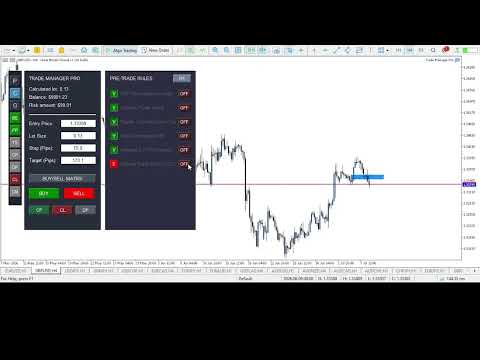
A complete discretionary trade-management cockpit for MetaTrader 5 — direction-aware position planning, prop-firm rule enforcement, a live correlation heat map, a pre-trade checklist gate, and one-click execution, all in a single on-chart panel.
Overview
Trade Manager Pro is not a signal-generating "black box" EA. It does not predict market direction and makes no profitability promises. Instead, it is a risk and execution management tool built for discretionary traders — particularly those trading prop-firm challenges — who already have a strategy and need discipline, speed, and hard rule enforcement wrapped around their manual trading.
Everything runs from one on-chart control panel: position sizing is calculated for you, correlated exposure is visible in real time, trades are checked against a rule engine before they're allowed to fire, and a Prop-Firm Guardian module can lock the panel out entirely if you breach your own risk limits — a feature designed specifically for anyone trading funded/evaluation accounts where a single rule breach ends the challenge.
Key Features
1. Direction-Aware Position Planning ("Buy/Sell Matrix")
- Draggable Entry / Stop-Loss / Take-Profit lines directly on the chart — move a line, and lot size recalculates live.
- A single button cycles through Hidden → Buy layout → Sell layout → Hidden. In Buy layout, the stop sits below entry and target above; in Sell layout, this automatically inverts (stop above, target below) — so the visual planning tool is always correctly oriented for the trade you're about to place, not just biased toward buy setups.
- Lot size is derived from your account balance, a configurable risk-per-trade percentage, and the actual distance to your stop, using the symbol's real tick value — not a fixed pip-value assumption.
- A max-combined-lots-per-currency-group cap prevents you from stacking correlated exposure past a limit you define.
2. Live Correlation Heat Map
A dedicated panel computes real Pearson correlation (on price returns, not raw price, to avoid misleading trend-driven correlation) between your current chart symbol and a configurable watchlist of other pairs — refreshed every tick. Each pair is color-coded by correlation strength:
- 🔴 Red — |correlation| ≥ 0.70 (high correlated risk, in either direction)
- 🟡 Gold — |correlation| ≥ 0.40 (moderate)
- 🟢 Green — below 0.40 (largely independent)
This gives you a cross-pair risk check that goes beyond a same-base-currency assumption — useful for spotting correlated exposure across pairs that don't share a base currency (e.g. EURUSD and GBPUSD both leaning against USD strength).
3. Prop-Firm Guardian
A dedicated compliance module that continuously monitors your account and hard-locks all trade execution the moment any of the following is breached:
- Maximum daily loss (% of starting balance)
- Maximum overall drawdown (% of starting balance, editable live from the panel)
- Daily profit target reached (optional lockout once you've hit your day's goal — helps prevent giving back gains)
- Consecutive-loss streak limit (revenge-trading circuit breaker)
- A cooldown timer after a loss, during which new trades are blocked
The starting balance can be auto-captured on EA load or manually set to match your prop-firm challenge's actual starting balance.
4. Pre-Trade Checklist Engine
An optional, fully toggleable 6-point checklist (HTF trend alignment, liquidity sweep, supply/demand zone tap, valid order block, imbalance/FVG, and Optimal Trade Entry) that must be manually confirmed — or auto-confirmed by the built-in OTE detector — before the panel will allow a trade to execute. Any individual checklist item can be switched off if it's not part of your strategy.
5. Automatic OTE (Optimal Trade Entry) Zone Detection
Using configurable swing-high/swing-low detection, the EA automatically plots the 61.8%–78.6% Fibonacci retracement zone between the most recent swing high and low, and visually + programmatically confirms when price is trading inside it — feeding directly into the checklist engine.
6. Full Automation Suite
Six independent, individually toggleable automations, controlled from quick-access sidebar buttons — all trigger distances and percentages are configurable inputs, not hardcoded:
| Toggle | Behavior |
|---|---|
| BE | Moves stop-loss to break-even once price moves a configurable number of pips in profit |
| PP | Automatically closes a configurable percentage of the position once a profit-pip target is hit |
| TS | Trails the stop-loss by a configurable pip distance once price is in profit |
| CP | Continuously closes any position currently in profit |
| DP | Continuously deletes all pending orders on the symbol |
| CL | One-click instant close of all currently losing positions |
7. Market & Pending Order Execution
- One-click Buy/Sell market execution using the calculated lot size, SL, and TP from the panel — automatically synced to whichever direction you click.
- A dedicated pending-order sub-panel for Buy Limit, Sell Limit, Buy Stop, and Sell Stop orders with independent price/lots/SL/TP fields.
- Bulk actions: close all profitable positions, close all losing positions, or delete all pending orders on the symbol with a single click.
8. Trade Journal
Automatically initializes a CSV journal file on first run for logging trade records.
The Interface
The panel is split into a compact sidebar and four mutually-exclusive switchable windows — opening one automatically closes any other that's open, so they never overlap:
- Sidebar — Navigation buttons for the four windows (P/C/G/CM) plus quick toggles for every automation (BE/PP/TS/CP/DP/CL).
- [P] Pending Orders — Place limit/stop pending orders.
- [C] Checklist — Review and confirm your pre-trade rules, and switch the working higher timeframe.
- [G] Guardian — Live view of your daily loss, drawdown, loss streak, and cooldown status against your configured limits, plus an editable rules-config section and a color-coded TRADING ALLOWED / LOCKED banner.
- [CM] Correlation Matrix — Live, color-coded correlation readout of your watchlist against the current chart symbol.
Full Input Reference
Core Matrix Settings
- Default Risk Percentage
- Max Combined Lots Per Currency Group
- Journal file name
Prop-Firm Guardian Parameters
- Starting Balance (0 = auto-capture on load)
- Daily Loss Limit (%)
- Max Drawdown (%)
- Max Consecutive Losses
- Cooldown After Loss (minutes)
- News lookahead/reinstate buffers
Checklist & Strategy Engine
- Require Checklist Validation (on/off)
- Swing detection sensitivity (left/right bars)
- OTE box color
Correlation Matrix Settings
- Comma-separated symbol watchlist (default: EURUSD, GBPUSD, USDJPY, USDCHF, AUDUSD)
- Correlation lookback period (bars)
Automation Settings
- Break Even Trigger (pips)
- Partial Profit Trigger (pips) and Close Percentage
- Trailing Stop Distance (pips)
- Daily Profit Target ($, 0 = disabled)
Recommended For
- Traders taking prop-firm evaluations/challenges who need automatic, unemotional enforcement of daily loss and drawdown rules.
- Discretionary ICT/Smart-Money-Concept traders who want a structured pre-trade checklist and OTE visualization without manually drawing Fibonacci retracements every time.
- Traders running multiple correlated pairs or baskets who want a live, real-math correlation check rather than eyeballing it.
- Anyone who wants risk-based position sizing calculated automatically instead of doing lot-size math by hand mid-session.
Important Technical Notes
- This EA is UI/chart-object driven. All panels are built from chart objects, not indicator buffers. To evaluate it in the Strategy Tester, you must use Visual Mode — the panel will not render or function in a standard fast/optimization backtest.
- The Correlation Matrix and the currency-exposure lot cap serve different purposes: the lot cap is an enforced limit on combined position size per base currency, while the correlation panel is an informational display — it does not automatically block trades, even at high correlation readings. Use it as a visual check before entering, not an automated gate.
- The Prop-Firm Guardian enforces limits based on account equity in real time; it is a risk-management aid, not a guarantee of compliance with any specific prop firm's rule wording — always cross-check against your firm's actual rulebook.
- This is a trade-management and execution-assistance tool. It does not analyze the market for entries beyond the optional OTE zone display, and past risk-management performance does not guarantee future results.