Alpha Grid Giant
- Experts
- 버전: 1.0
- 활성화: 10

Overview
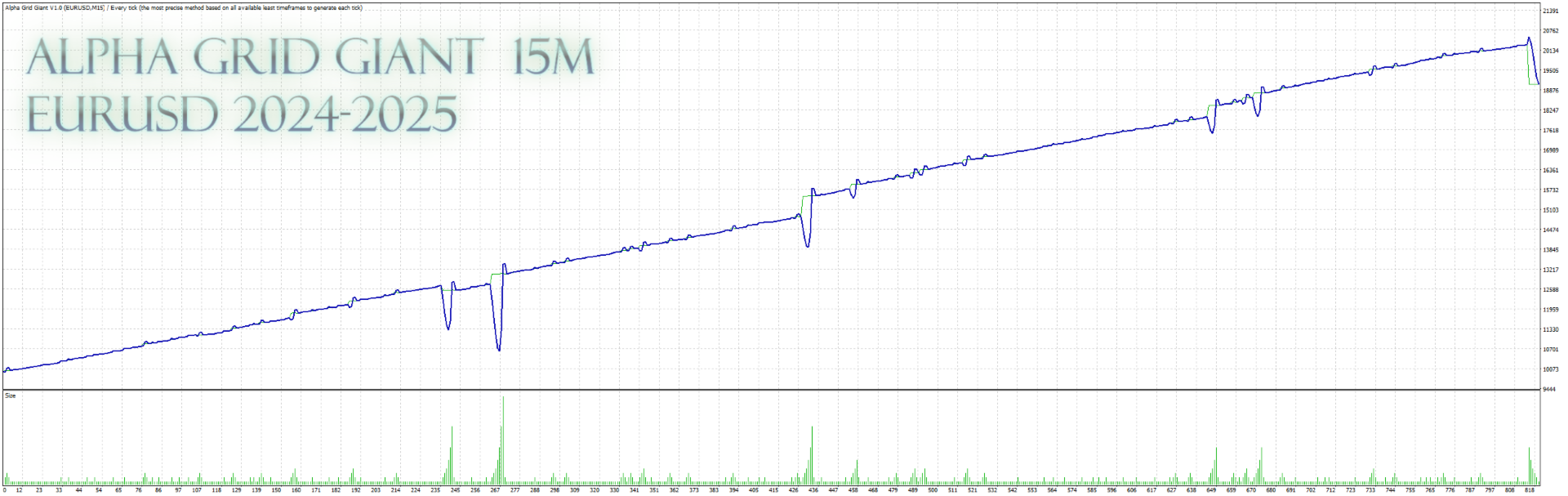
Alpha Grid Giant is an Expert Advisor for MetaTrader 4 that combines indicator-based entries with optional position scaling (grid-style) logic.
It can manage exits using a basket Take Profit method (based on pips or ATR) and can also close positions using a cumulative result threshold in account currency.
The EA includes entry, daily, and account protection limits, plus an optional News Filter.
All logic is evaluated on the current chart symbol and timeframe, so behavior should be validated per broker conditions.
What the EA Does
The EA looks for an initial buy/sell entry using a combination of Williams’ %R, Standard Deviation, and Alligator conditions.
After an initial position exists, it can add additional positions at a configured distance (pips) when price moves against the open price.
Lot sizing for added positions can be increased by multiplier or by fixed increment (user-selected mode).
Exit handling can be managed by updating Take Profit levels based on the basket average price (pips or ATR).
Optionally, it can close all positions when the cumulative floating result reaches a user-defined level (account currency).
Protection rules can block new entries, and account/daily limits can suspend trading or close positions when triggered.
Key Features
-
Indicator-based initial entry (Williams’ %R + StdDev + Alligator)
-
Optional grid-style position scaling with configurable distance and max trades
-
Two lot scaling modes: Multiply or Increment
-
Basket Take Profit management from average price (Pips or ATR)
-
Optional cumulative result close condition (account currency)
-
Entry/daily/account protections and optional News Filter
-
On-chart statistics panel (position and EA stats)
Risk Management & Safety Notes
Trading involves risk, and losses can occur.
Grid-style scaling and increasing lot sizes can raise exposure during adverse moves and may increase drawdowns.
Some positions may be opened without a fixed Stop Loss, depending on the selected settings and basket management logic.
Protection settings (max trades, stop-out percent rule, daily/account limits) can reduce risk but do not eliminate it.
Execution quality, spread, swaps, and minimum stop distance rules are broker-dependent and can change, especially during volatile periods.
Use Strategy Tester for historical simulation and confirm behavior on a demo account before any live use.
Inputs
Core
-
Magic_Number: unique identifier for EA orders
-
Entry_Amount: initial lot size
-
Stop_Loss: initial SL in pips (0 = disabled)
-
Take_Profit: base TP in pips (used when TP is pips-based)
Profit & Take Profit Logic
-
profit_type: TP-based basket management or account-currency threshold close
-
dollarProfit: cumulative result threshold in account currency (used when enabled)
-
takeProfitType: Pips or ATR
-
atr_period: ATR period (for ATR-based TP)
-
atr_multiplier: ATR multiplier (for ATR-based TP)
Indicators (Entry/Exit)
-
Williams’ %R: period, level
-
Standard Deviation: period, level
-
Alligator: jaw/teeth/lips periods and shifts
-
Envelopes: period, deviation % (used for close signal)
Grid / Scaling
-
martingaleMode: Multiply or Increment
-
multiplier / Incrementer: lot scaling method parameters
-
distance: spacing in pips for added positions
-
maxMGTrades: maximum added positions per direction
-
stopOutPercent: close-all rule based on cumulative result vs balance (%)
Protections, News, Display
-
Max_Spread / Max_OpenPos / Max_OpenLots: entry filters
-
MaxDailyLoss / Max_Daily_DD / Daily_Reset: daily limits
-
Min_Equity / MaxEquity_DD / Max_Equity: account protections
-
News_Priority / News_Currencies / before-after minutes: news filter
-
Pos_Stat / Robot_Stats: on-chart panel options
Setup
-
Install the EA in MT4 and restart the terminal (or refresh the Navigator).
-
Open the chart for the symbol you want to evaluate and choose the timeframe you plan to run.
-
Attach Alpha Grid Giant and enable Algo Trading.
-
Set Magic_Number (unique per chart), Entry_Amount, and review Profit/TP options (Pips or ATR).
-
If using scaling, set distance, maxMGTrades, and the lot scaling mode/values conservatively for evaluation.
-
(Optional) Configure protections (spread/exposure/daily/account) and News Filter permissions if you enable it.
Recommended Evaluation
Use Strategy Tester to run a historical simulation on your broker’s data and observe order placement, basket TP updates, and scaling behavior.
Test with realistic spreads and verify minimum stop distance (stop level), especially if you enable SL/TP.
Evaluate different market regimes (trending and ranging periods) to understand how scaling frequency changes.
Forward-test on a demo account to check execution, slippage sensitivity, and the News Filter behavior.
Review the Experts/Journal logs for blocked entries, protection triggers, and any order modification errors.
Compatibility
Platform: MetaTrader 4 (MT4).
Works on the current chart symbol and timeframe; parameters should be tuned and validated per instrument.
Broker conditions (digits, lot step, min/max lot, stop level, swaps) affect operation and may require adjustments.
If the News Filter is enabled, WebRequest permission must be allowed in the terminal settings.
FAQ
Q: Is this a grid or scaling EA?
A: It can add positions at a defined distance when a position is already open. This behavior is controlled by the scaling settings.
Q: Does it increase lot sizes?
A: It can, depending on the selected scaling mode (Multiply or Increment) and your parameter values.
Q: How is Take Profit managed?
A: TP can be updated for open positions using the basket average price, either by fixed pips or by ATR-based distance.
Q: Can it close all positions automatically?
A: Yes, it includes optional close-all conditions based on cumulative floating result (account currency) and a stop-out percent rule.
Q: Does it always use a Stop Loss?
A: Not necessarily. Stop Loss can be disabled, and some logic relies on basket management. Always evaluate risk and protections.
Q: Where is support provided?
A: Support is provided via MQL5 comments or MQL5 messages.