 MetaTrader 5
 Experts
 지표
지표
 라이브러리
라이브러리
 유틸리티
유틸리티
 위젯
위젯
 규칙
규칙
MetaTrader 4용 트레이딩 유틸리티
 다음은 MetaTrader 4에서 외환 거래를 단순화하는 거래 프로그램입니다. 아래 목록의 유틸리티 위로 마우스를 가져가면 해당 설명과 용도를 읽을 수 있습니다.
Local Trade Copier EA MT4는 동일한 Windows 컴퓨터 또는 Windows VPS에서 여러 MetaTrader 4 계정 간에 거래를 복사하고 관리할 수 있는 빠르고 유연한 거래 복사기입니다. 로컬 거래 동기화 기능과 함께 Receiver 측에서 로트 크기, 리스크 관리, 거래 필터링, 심볼 매핑, 거래 관리 및 계정 보호를 독립적으로 설정할 수 있습니다. Transmitter와 Receiver 터미널을 약 1분 안에 설정하고, 동일한 브로커 또는 서로 다른 브로커의 계정 간에 수동 거래 또는 EA 거래를 복사할 수 있습니다. 적절한 조건에서는 로컬 MetaTrader 터미널 간의 거래 정보가 0.5초 이내 에 동기화될 수 있습니다. 실제 체결 속도는 브로커 지연 시간, 네트워크 상태, 컴퓨터/VPS 성능 및 터미널 부하에 따라 달라집니다. 구매 전에 무료 데모를 사용해 보세요 MT4 데모 계정에서 Local Trade Copier EA MT4의 모든 기능을

Trade Manager EA에 오신 것을 환영합니다. 이 도구는 거래를 보다 직관적이고 정확하며 효율적으로 만들기 위해 설계된 궁극적인 리스크 관리 도구 입니다. 단순한 주문 실행 도구가 아닌, 원활한 거래 계획, 포지션 관리 및 리스크 제어를 위한 종합 솔루션입니다. 초보자부터 고급 트레이더, 빠른 실행이 필요한 스캘퍼에 이르기까지 Trade Manager EA는 외환, 지수, 상품, 암호화폐 등 다양한 시장에서 유연성을 제공합니다. Trade Manager EA를 사용하면 복잡한 계산은 이제 과거의 일이 됩니다. 시장을 분석하고 진입, 손절 및 익절 수준을 차트의 수평선으로 표시한 후 리스크를 설정하면, Trade Manager가 이상적인 포지션 크기를 즉시 계산하고 SL 및 TP 값을 실시간으로 표시합니다. 모든 거래가 간편하게 관리됩니다. 주요 기능: 포지션 크기 계산기 : 정의된 리스크에 따라 거래 크기를 즉시 결정합니다. 간단한 거래 계획 : 진입, 손절, 익절을 위한

MetaTrader 4용 전문 트레이드 복사기 MetaTrader 4 용 빠르고 안정적이며 전문적인 트레이드 복사기입니다. COPYLOT 은 MetaTrader 4 와 MetaTrader 5 터미널 간에 Forex 거래를 복사할 수 있으며, 다양한 계좌 유형과 운용 방식에 맞춰 유연한 동기화 환경을 제공합니다. COPYLOT MT4 버전 지원 방식: MetaTrader 4 → MetaTrader 4 MetaTrader 5 Hedge → MetaTrader 4 MetaTrader 5 Netting → MetaTrader 4 MT5 버전 상세 설명 + DEMO + PDF 구매 방법 설치 방법 로그 파일 확인 방법 테스트 및 최적화 방법 Expforex의 모든 제품 MetaTrader 5 버전 을 사용하면 MetaTrader 5 → MetaTrader 5 및 MetaTrader 4 → MetaTrader 5 복사도 지원됩니다: COPYLOT CLIENT for MT5 COPYLOT 은

거래당 위험 계산, 라인을 사용한 손쉬운 신규 주문, 부분 청산 기능을 통한 주문 관리, 7가지 유형의 트레일링 스탑 및 기타 유용한 기능을 제공합니다.
추가 자료 및 지침
설치 지침 - 애플리케이션 지침
라인 기능 - 차트에 개시선, 손절매, 차익실현을 표시합니다. 이 기능을 사용하면 새로운 주문을 쉽게 하고 개봉 전에 추가 특성을 볼 수 있습니다.
위기 관리 - 위험 계산 기능은 설정된 위험과 손절매 주문의 크기를 고려하여 새 주문의 볼륨을 계산합니다. 이를 통해 손절매 크기를 설정하고 동시에 설정된 위험을 존중할 수 있습니다. 로트 계산 버튼 - 위험 계산을 활성화/비활성화합니다. 필요한 위험 값은 위험 필드에 0에서 100 사이의 백분율 또는 예금 통화로 설정됩니다. 설정 탭에서 위험 계산 옵션을 선택합니다. $ 통화, % 잔액, % 지분, % 자유 마진, % 사용자 정의, % AB 이전 일, % AB 이전 주, % AB 이전 월.

Effortlessly calculate lot sizes and manage trades to save time and avoid costly errors
The Trade Pad Pro EA is a tool for the Metatrader Platform that aims to help traders manage their trades more efficiently and effectively. It has a user-friendly visual interface that allows users to easily place and manage an unlimited number of trades, helping to avoid human errors and enhance their trading activity. [ Installation Guide | Update Guide | Troubleshooting | FAQ | All Products ]
One of the k

This is an Utility to make your trading easier by putting at one click or a few clicks time-consuming tasks as order management and risk management. Contact for a free trial.
Features
Risk Management
Calculates automatically lots based on risk specified in either % or $ in the risk field and let you enter just by placing lines for SL TP etc and display real-time Risk Reward . TrueRisk so it includes commissions when calculating lot size on FX pairs only so you risk 1% with

다기능 거래 도구: 로트 계산기, 그리드 주문, 위험/보상 비율, 거래 관리자, 수급 구역, 가격 행동 분석 등 데모 버전 | 사용자 설명서 트레이딩 어시스턴트 는 전략 테스터에서 작동하지 않습니다: 이 유틸리티 를 테스트하려면 데모 버전을 여기서 다운로드하세요. 질문 /개선 아이디어/버그 발견 시 저에게 연락 하세요 MT5 버전이 필요하시면, 여기서 사용 가능합니다
거래 프로세스 를 단순화, 가속화, 자동화하세요. 이 대시보드 로 표준 터미널 기능을 확장합니다. 트레이딩 패널 은 모든 거래 상품에서 작동합니다: 외환, 주식, 지수, 암호화폐 등.
1. 새로운 거래 열기 : 로트/위험/위험보상비 계산: 수동 거래의 위험 관리 로트 계산기 (위험 크기 기반 거래량 계산) 위험 계산기 (로트 크기 기반 위험 금액) 위험 보상 비율 그리드 주문: + 동적 거리 옵션 및 분할 로트 옵션 주문 활성화 트리거, + Buy StopLimit/Sell StopLimit: Mt4에서도 가능

AW Shepherd Safety EA는 열린 포지션을 관리하는 EA입니다. 첫 주문은 트레이더가 패널에서 열고, 이후에는 EA가 바스켓을 직접 관리합니다: 추세 필터를 거쳐 복구 주문을 추가하고, TakeProfit, 트레일링 또는 손절로 해당 측을 청산하며, 청산 수준을 차트에 표시합니다. 매수와 매도는 따로 관리되며 양 측을 동시에 열어 둘 수 있습니다. 복구 주문은 가격 간격만으로 열리지 않고, Parabolic SAR, 두 개의 MA 또는 캔들 색상 기준으로 포지션 방향으로의 반전이 확인된 뒤에 열립니다. Orders Magic number가 일치하면 수동으로 또는 다른 EA가 연 포지션도 EA가 넘겨받아 관리합니다. EA가 포지션을 관리하는 방식: 1 트레이더가 Open Buy 또는 Open Sell 버튼으로 Order Size 필드의 거래량만큼 첫 주문을 엽니다. 2 가격이 포지션에 불리한 방향으로 Minimal step between recovery orders만큼 움

Rhino Chart Drawing Tools 는 MetaTrader 4에서 TradingView 스타일 의 차트 드로잉 환경을 제공합니다. 54개의 드로잉 도구 , 사용자 지정 가능한 툴바, 즐겨찾기, 빠른 스타일 설정, 객체 설정, 템플릿 및 객체 관리자를 제공합니다. 사용자 매뉴얼: 제품 사용 방법
무료 데모 버전: 데모 다운로드
MetaTrader 5 버전: Rhino Drawing Tools for MT5 드로잉 도구 그룹 객체 목록 라인 추세선, 레이, 연장선, 수평선, 수직선, 수평 레이, 교차선, 추세 각도, 화살표, 경로, 폴리라인 및 정보선. 채널 평행 채널, 회귀 채널, 플랫 채널, 분리 채널 및 피치포크. 피보나치 되돌림, 확장, 채널, 속도 팬 및 시간대. 간 간 박스 및 간 팬. 도형 사각형, 회전 사각형, 타원, 원, 삼각형 및 폴리라인. 주석 텍스트, 메모, 콜아웃, 가격 라벨, 표지판, 플래그 및 화살표 마크. 패턴 XABCD, ABCD, Cyphe

Trading History - A program for trading and money management on the history of quotes in stratagy tester. It can work with pending and immediate orders, and is equipped with trailing stop, breakeven and take profit functions. Very good for training and testing different strategies.
Manual (Be sure to read before purchasing)
Advantages
1. Allows you to test any trading strategy in the shortest possible time
2. An excellent simulator for trading training. You can gain months of trading experience

Trade Copier는 거래 계정 간의 거래를 복사하고 동기화하도록 설계된 전문 유틸리티입니다. 복사는 공급자의 계정/단말기에서 동일한 컴퓨터 또는 vps에 설치된 수신자의 계정/단말기로 발생합니다. 구매하기 전에 데모 계정에서 데모 버전을 테스트할 수 있습니다. 데모 버전 여기 . 전체 지침 여기 . 주요 기능 및 이점: 복사기는 "МТ4> МТ4", "МТ4> МТ5", "МТ5> МТ4" 복사를 지원합니다. 복사기는 데모 계정 > 실 계정, 실 계정 > 데모 계정, 데모 계정 > 데모 계정 및 실제 계정 > 실 계정 복사를 지원합니다. 복사기는 읽기 전용 암호가 적용된 투자자 계정에서 복사를 지원합니다. 하나의 공급자 터미널은 여러 수신 터미널로 트랜잭션을 보낼 수 있고 하나의 수신 터미널은 여러 공급자 터미널에서 트랜잭션을 수신할 수 있습니다. 복사기는 귀하 또는 귀하의 고문이 거래하는 동일한 터미널에서 작동할 수 있습니다. 높은 복사 속도(0.5초 미만). 복사기에는 간편

Multi Account Local Trade Copier 는 MetaTrader용 빠른 로컬 트레이드 카피어입니다: 동일한 Windows PC 또는 VPS의 MT4/MT5 터미널 간에, 하나의 마스터 계좌에서 여러 리시버 계좌로 거래를 복사하세요 — 본인의 실계좌, 데모 계좌, 프랍펌 계좌로. 같은 브로커든 다른 브로커든 상관없습니다. 이벤트 기반 으로 작동합니다: 마스터는 각 거래를 발생하는 순간 즉시 게시하고, 리시버는 모든 복사의 실제 지연 시간을 측정하고 기록 합니다 — 일반적으로 50-150ms 입니다. DLL 없음, 인터넷 브리지 없음, 설정 파일 없음. 하나의 EA, 두 가지 모드 원본 터미널에는 MASTER 로, 각 대상 터미널에는 RECEIVER 로 부착하세요. Master ID = AUTO 이면 리시버가 활성 마스터를 스스로 찾습니다: 드래그, 드롭, 끝. 하나의 마스터가 무제한 리시버 에 공급할 수 있고, 하나의 터미널에서 여러 리시버를 실행할 수 있으며, 한

Telegram to MT4 Multi-Channel Copier 는 Telegram 및 Discord 채널의 트레이딩 시그널을 MetaTrader 4로 자동 복사합니다. 봇도, 브라우저 확장도, 수동 복사도 필요 없습니다. Telegram이나 Discord에 시그널이 도착하면 EA가 몇 초 안에 터미널에서 주문을 실행합니다. 그리고 채널을 복사하기 전에, 내장 백테스터가 그 채널이 내 계좌에서 어떤 결과를 냈을지 보여줍니다. 제품은 두 가지 구성 요소로 이루어집니다: Telegram 채널을 수신하는 Windows 애플리케이션과, MT4 터미널에서 시그널을 실행하는 본 EA입니다. MT5 버전도 제공됩니다 여기 . 설정 가이드와 앱 다운로드: https://www.mql5.com/en/blogs/post/768988 텔레그램 시그널 채널을 백테스트하는 방법 을 확인하세요. 현재 가격은 향후 인상될 예정입니다. 작동 방식 앱은 여러분 자신의 Telegram 계정으로 연결되므

Trade Panel은 다기능 거래 도우미입니다. 이 애플리케이션에는 50개 이상의 수동 거래 기능이 포함되어 있으며 대부분의 거래 작업을 자동화할 수 있습니다. 앱 사용 설명서 : https://www.mql5.com/en/blogs/post/756482 데모 계정용 앱 체험판: https://www.mql5.com/en/blogs/post/750865 앱 설치 방법: https://www.mql5.com/en/blogs/post/756239 시각 모드에서 앱 테스트 방법: https://www.mql5.com/en/blogs/post/770277 VPS MetaTrader에 앱 설치 방법: https://www.mql5.com/en/blogs/post/770190 거래. 한 번의 클릭으로 거래를 수행할 수 있습니다: 리스크 자동 계산과 함께 예약 주문 및 포지션 열기. 한 번의 클릭으로 여러 주문 및 포지션 열기. 주문 그리드 열기. 예약 주문 및 포지션을 그룹별로 닫기. 포지션

The indicator has three main tools: Magnifier (Zoom chart), Ruler ( Time and Price scales ), and Crosshair. You can move it all around with your mouse and customize different formats for displaying , customize size and color of each element.
The Magnifier (zoom chart) allows you to display candles from any time frame and at different scales.
Hotkeys: 'Q' - higher timeframe, 'A' - lower timeframe, 'W' - decrease candle size, 'S' - increase candle size, 'Z' - show/hide zoom chart You can

Telegram에서 MT4로: 최고의 신호 복사 솔루션 최첨단 유틸리티인 Telegram to MT4를 사용하여 거래를 간소화하세요. DLL 없이도 Telegram 채널과 채팅에서 MetaTrader 4 플랫폼으로 거래 신호를 직접 복사할 수 있습니다. 이 강력한 솔루션은 탁월한 정밀도와 맞춤 설정 옵션을 통해 원활한 신호 실행을 보장하여 시간을 절약하고 효율성을 높여줍니다. [ Instructions and DEMO ] 주요 특징 직접 Telegram API 통합 전화번호와 보안 코드를 통해 인증하세요. 사용자 친화적인 EXE 브리지를 사용하여 채팅 ID를 손쉽게 가져오고 관리하세요. 여러 채널/채팅을 추가, 삭제, 새로 고침하여 동시에 신호를 복사합니다. 고급 필터를 사용한 신호 파싱 사용자 정의 예외 단어(예: "보고서", "요약")가 포함된 원치 않는 신호를 건너뜁니다. 유연한 SL 및 TP 형식을 지원합니다: 가격, 핍 또는 포인트. 신호가 가격 대신 지점을 지정

지원이 필요하신가요? 설정 방법이 궁금하신가요? 질문이 있으신가요? 여기에 고객님의 언어로 문의하세요, 빠른 답변: https://www.mql5.com/en/market/product/139089/comments
작동 체험판 다운로드
Copy Cat More (카피캣) MT4 트레이드 카피어 (Trade Copier) 는 단순한 로컬 트레이드 카피어가 아닙니다. 오늘날의 트레이딩 과제를 위해 설계된 완전한 리스크 관리 및 실행 프레임워크 (risk management and execution framework) 입니다. 프롭 펌 (prop firm) 챌린지부터 개인 포트폴리오 관리까지, 견고한 실행, 자본 보호, 유연한 설정, 고급 트레이드 처리의 조합으로 모든 상황에 적응합니다. 이 카피어는 마스터 (Master, 송신측) 와 슬레이브 (Slave, 수신측) 두 모드 모두에서 작동하며, 시장가 주문과 대기 주문, 트레이드 수정, 부분 청산, 상호 청산 (Close B

Trade Manager FX – MT4용 리스크 계산기, 트레이딩 패널 및 거래 관리
Trade Manager FX는 수동 트레이더를 위한 올인원 트레이딩 패널입니다. 차트에서 거래를 계획하면 패널이 리스크에 맞는 정확한 랏을 계산하고 클릭 한 번으로 주문합니다. 진입 후에는 손익분기, 트레일링 스톱, 부분 청산, 자산 보호로 포지션을 관리합니다.
추가 자료 및 설명서 설치 안내 - 사용자 매뉴얼 - MT5 버전
차트에서 진입, 손절(Stop Loss), 익절(Take Profit) 라인을 드래그하세요. 각 라인은 핍 거리, 위험 금액 또는 수익, 잔고 대비 %, R:R을 실시간으로 보여줍니다. 차트를 클릭해 진입가를 정하거나 정확한 가격을 입력하거나 시장을 따라가게 할 수 있습니다. SL/TP를 고정해 진입가를 옮겨도 가격을 유지하거나, 잠가서 실수로 움직이지 않게 할 수 있습니다. 포지션 크기 및 주문 고정 랏, 고정 금액 리스크, 잔고 %, 자산 %로 랏 계산 수수료

Trade Indicator Assistant is a powerful MT4 utility designed to turn indicators into automated trading systems. Its main feature is the ability to automatically detect an indicator’s BUY and SELL signal buffers , without requiring you to know the buffer numbers, search through indicator settings, or modify the indicator source code. Bonus Indicator: After purchasing Trade Indicator Assistant, contact me to receive Trade Signal Pro completely free as a bonus indicator.
[Download Demo Version]

복사기->편리하고 빠른 인터페이스 상호작용으로 사용자가 바로 사용 가능 ->>>> Windows 컴퓨터 또는 VPS Windows에서 사용하는 것이 좋습니다. 특징: 다양하고 개인화된 복사 거래 설정: 1. 다양한 신호 소스에 대해 다양한 로트 모드를 설정할 수 있습니다. 2. 다양한 신호 소스를 포워드 및 리버스 복사 거래에 대해 설정할 수 있습니다. 3. 신호는 주석으로 설정할 수 있습니다. 4. 계약 로트에 따라 로트를 교정할지 여부 다양하고 개인화된 복사 주문 설정 2: 1. 다양한 품종에 대해 다양한 로트 모드를 설정할 수 있습니다. 2. 정방향 및 역방향 복사 주문에 대해 다양한 품종을 설정할 수 있습니다. 3. 주석으로 신호를 설정할 수 있습니다. 4. 계약 로트에 따라 로트를 교정할지 여부
댓글 필터링, MAGIC 필터링, 시그널 로트 필터링, 로컬 제품 필터링 근무시간 설정 역동기화 SLAVE 닫힘 주문 바인딩 기능: 모든 주문은 설정된 신호 소스 주문

거래 관리자는 위험을 자동으로 계산하는 동시에 거래를 빠르게 시작하고 종료하는 데 도움을 줍니다. 과잉 거래, 복수 거래 및 감정 거래를 방지하는 데 도움이 되는 기능이 포함되어 있습니다. 거래를 자동으로 관리할 수 있으며 계정 성과 지표를 그래프로 시각화할 수 있습니다. 이러한 기능은 이 패널을 모든 수동 거래자에게 이상적으로 만들고 MetaTrader 4 플랫폼을 향상시키는 데 도움이 됩니다. 다중 언어 지원. MT5 버전 | 사용자 가이드 + 데모 트레이드 매니저는 전략 테스터에서 작동하지 않습니다. 데모를 보려면 사용자 가이드로 이동하세요. 위기 관리 % 또는 $를 기준으로 위험 자동 조정 고정 로트 크기 또는 거래량과 핍을 기반으로 한 자동 로트 크기 계산을 사용하는 옵션 RR, Pips 또는 Price를 사용한 손익분기점 손실 설정 추적 중지 손실 설정 목표 달성 시 모든 거래를 자동으로 마감하는 최대 일일 손실률(%)입니다. 과도한 손실로부터 계정을 보호하고 과도한

The product will copy all telegram signal to MT4 ( which you are member ) , also it can work as remote copier. Easy to set up, copy order instant, can work with almost signal formats, image signal, s upport to translate other language to English Work with all type of channel or group, even channel have "Restrict Saving Content", work with multi channel, multi MT5 Work as remote copier: with signal have ticket number, it will copy exactly via ticket number. Support to backtest signal. How to

Take a Break pauses your Expert Advisors when trading is a bad idea: before news, after a daily loss, outside your trading hours, or when a rule you wrote yourself says so. When the pause is over, your EAs simply continue. Account protection for all your EAs in one tool: news filter, drawdown and equity protection, time filter and custom rules. One EA on one chart protects the whole account, the free indicator gives every chart its own rules on top. Free demo | What is new in 26.09 | Support Ass

The AlgoKing Lightning Bolt Strategy is a trade manager and has multiple indicators built for a complete trading strategy. Here is a list of indicators built in.
Indicators Auto drawn Support and Resistance signals Auto drawn RSI Divergence signals Auto drawn Fibonacci Retracement signals with buy and sell entry lines. Lightning Bolt reversal signals. Auto drawn trend lines. Trade Management Auto take partials at simple moving average targets. Auto take partial and stop losses at Fibonacci ret

Hi Friends, " FCK Currency Strength Pro " is a auto & semi auto trading expert with direction of pair. Buy-Sell separate or multi currency in one click. The strategy of FCK Currency Strength Pro is a combination of custom indicator, Trendlines, Support & Resistance levels ( Price Action ) and most important secretive trading algorithm mentioned above. Download News Ex4 and csv file You need the following SDSnews.ex4 in MQL4/Libraries and the daylightsavings.csv in MQL4/Files.
Only 4 of 5 copi

News Filter EA: Advanced Algo Trading Assistant News Filter EA is an advanced algo trading assistant designed to enhance your trading experience. By using the News Filter EA , you can integrate a Forex economic news filter into your existing expert advisor, even if you do not have access to its source code. In addition to the news filter, you can also specify trading days and hours for your expert. The News Filter EA also includes risk management and equity protection features

An equity protection EA for MetaTrader that enforces your loss limits and profit target for you: when your account reaches a rule you set, it closes your trades on every symbol, before one bad day turns into a lost account. It suits prop firm challenges and personal accounts alike. Attach it to one chart, answer a few questions in the on-chart setup wizard, and it watches your whole account in the background while you trade by hand or with other EAs. What it protects Daily loss limit: a percenta

제품명 Trade Builder - 차트 기반 인터랙티브 비주얼 트레이드 매니저 및 리스크 어시스턴트 단순 설명 Trade Builder 로 거래를 보다 간단하게 만드십시오. 본 도구는 매우 편리한 트레이드 어시스턴트( Trade Assistant )이자 비주얼 트레이드 매니저( Trade Manager )입니다. 차트에서 진입, 손절(SL), 익절(TP) 라인을 직접 조정하면 적정 랏수와 손익비( risk reward ratio )가 실시간으로 자동 계산됩니다. 개요 체계적인 거래 관리( Trade Management )는 장기적인 트레이딩의 성공 열쇠입니다. Trade Builder 는 MetaTrader 차트상에 드래그할 수 있는 비주얼 대시보드를 제공하여 복잡한 수동 리스크 계산의 번거로움을 완전히 제거합니다. 라인을 조정하면 도구가 즉시 리스크 수학적 계산을 처리하며, 원클릭 또는 단축키를 활용한 빠른 진입가 설정이 가능합니다. 주요 기능: 인터랙티브 비주얼 트레이딩: 차트
FREE

Trade Dashboard simplifies how you open, manage, and control your trades, with built-in lot size calculation. It allows you to execute trades, manage risk, and control positions directly on the chart, with tools such as partial close, breakeven, and trailing stop. Designed to reduce manual work and help you stay focused on your trading decisions. A demo version is available for testing. Detailed explanations of features are provided within the MQL5 platform. Installation instructions are include

하나의 PC 또는 VPS에서 MetaTrader 터미널 간 로컬 거래 복사 기능을 제공합니다. MT5와 MT4 간에는 모든 방향으로 복사가 가능합니다. 복사 거래량은 자산 대비 백분율, 계좌 통화 기준, 또는 마스터 거래의 위험 분담률 기준으로 계산됩니다. 거래는 심볼, 매직 넘버, 주석, 거래량 필터를 사용하여 선택할 수 있습니다. 관리자 패널에서 가상 손절매/익절, 손익분기점, 트레일링 스톱, 바스켓 청산, 예약 청산 등 복사 거래의 모든 기능을 관리할 수 있습니다. 일일, 총액, 거래량 한도를 설정하여 계좌를 보호하고, 한도 초과 시 조기에 거래가 종료되도록 합니다.
사용 설명서 및 무료 데모
( 사용자 설명서 ) ( 데모: 설치 및 첫 실행 )
데모 버전은 데모 계좌에서 실행되며, 동일한 코드와 모든 기능을 시간 제한 없이 이용할 수 있습니다. 복사 소스 및 위험 수준은 트레이더가 직접 선택할 수 있으며, 실행, 종목명 일치, 복사 거래 관리는 제품에서 자동으로 처리

Easy Trade Executor는 MT4에서 빠른 포지션 크기 계산, 주문 실행 및 트레이드 관리를 위한 도구입니다. 차트에 Entry Price, Stop Loss, Take Profit 레벨을 직접 배치하고, 포지션 크기를 자동으로 계산한 후 몇 번의 클릭만으로 리스크가 관리된 트레이드를 실행할 수 있습니다.
왜 Easy Trade Executor를 선택해야 할까요?
Easy Trade Executor는 단순한 리스크 계산 이상의 기능을 원하는 트레이더를 위해 설계되었습니다. 트레이더는 차트에서 직접 빠르고 효율적으로 트레이드를 관리하고 싶어 합니다. 이 도구는 포지션 크기 계산, 주문 실행 및 트레이드 관리를 하나의 워크플로우로 통합하여 수동 계산이나 여러 터미널 창 간 전환 대신 트레이딩에 집중할 수 있도록 해줍니다. Easy Trade Executor의 주요 기능: 리스크 기반 자동 포지션 크기 계산; 차트에서 직접 Market Order 및 Pending Order

The Trade Manager Interface is a free utility designed to simplify manual trading in MetaTrader. Please leave a review, if you like the trade manager. It allows traders to visualize trades directly on the chart, calculate position size automatically, and manage orders with advanced features such as partial take profits, automatic breakeven, and trailing stops.
This tool focuses on risk control and execution precision, making trade management faster and more efficient. For the advanced trade
FREE

안녕하세요 여러분
트레이더를 위한 또 다른 무료 도구입니다.
보상 대비 위험 비율:
좋은 거래인지 아닌지 판단할 수 있도록 이익의 크기와 관련된 손실의 크기를 계산하는 것은 모든 거래자에게 편리합니다. 또한 손실과 이익을 핍과 백분율로 표시합니다.
원하는 각 부분의 색상을 설정할 수 있습니다. 이 패널과도 거래가 가능하다면?! 아래 링크 참조 Trader Assistant Mini MT4 아래 링크에서 MT5 버전을 확인할 수 있습니다.
Risk to Reward Ratio MT5
이 도구의 보다 전문적인 버전에 대한 내 새 제품을 볼 수 있습니다.
Pro Risk Management Panel MT5
즐기시기 바랍니다 ;)
마침내:
여러분의 생각과 피드백을 공유해 주시기 바랍니다.
거래자가 필요하다고 생각하는 정보를 제공하는 것이 중요합니다.
작가:
저는 MQL 언어 프로그래머로 3년 동안 다양한 프로젝트를 진행해 왔습니다.
저는 전기 엔지니어이고 어려운
FREE

RS Trade Copier - 진짜 그래픽 인터페이스를 갖춘 초고속 로컬 트레이드 카피어입니다. 계좌번호를 일일이 입력하지 마세요. 200개가 넘는 복잡한 입력 파라미터 목록은 이제 끝입니다. 여러 MT4와 MT5 터미널 간 거래 작업을 복사하기 위한 안정적이고 유연한 도구입니다. 이 도구는 경험 많은 트레이더, 신호 서비스, 개인 투자자 모두에게 적합합니다. 하나 또는 여러 시그널 소스(Provider)에서 하나 또는 여러 리시버(Client)로 트레이딩을 동기화 하여 높은 정밀도와 최소 지연 시간을 제공합니다. 간단한 자동 설정부터 고급 수동 구성까지 지원합니다. 수동 또는 다른 EA로 열린 주문에 간섭하지 않습니다. 모든 작업이 MT4 내부에서 로컬로 처리 되며 외부 서버 의존성 없이 실행됩니다. RS Trade Copier와 다른 솔루션 비교 RS Trade Copier 다른 솔루션 설정 시각적 단계별 마법사.
설정에 약 1분 소요. 200개 이상의 불분명한 입력 매개변수.

EchoTrade Telegram Signal Backtester VALIDATE TELEGRAM SIGNALS IN MINUTES - STOP GUESSING, START BACKTESTING Stop blowing accounts on "VIP" signals that don't deliver.
The EchoTrade Telegram Signal Backtester is the professional solution to audit, verify, and optimize any Telegram signal provider's performance on historical data. Most signal providers show you their wins but hide their losses. This tool reveals the naked truth. By combining a powerful Data Manager (included) with an advanced MT4

Trade Copier Global: The name speaks for itself. This copier allows you to copy orders between MT4 terminals even if they are not installed on the same computer.
Features Copying trades between MT4 terminals around the world with a short delay. Automatically recognizes symbol prefixes. Can connect many Slaves to the same Master. Supports pending and market orders. Supports partial order close (with limitations, see below) Can send messages and notifications to the Slaves from the Master Several

Unlimited Trade Copier Pro is a tool to copy trade remotely to multiple MT4, MT5 and cTrader accounts at different computers/locations over internet. This is an ideal solution for you if you are a signal provider and want to copy your trades to other receivers globally on your own rules. One provider can copy trades to multiple receivers and one receiver can get trade from multiple providers as well. The provider can even set the subscription expiry for each receiver, so that receiver will not b

Trade Simulator는 단순한 거래 패널이 아닙니다. 과거 데이터를 기반으로 실전과 유사한 거래 연습이 가능하며, 인터랙티브한 차트 조작도 지원합니다. 실시간 거래처럼 포지션을 진입하고, 손절 및 이익실현 레벨을 조정하며 결과를 확인할 수 있습니다. 또한 MT4의 전략 테스터에서도 직접 주문을 넣고 관리할 수 있습니다. 이 도구와 인터페이스는 실제 차트에서도 동일하게 사용할 수 있어 실거래도 가능합니다. 자세한 정보는 설정 및 사용자 가이드 를 참조하세요. 또한 MT5 버전 과 고급 버전 도 확인해 보세요. 주요 기능: Strategy Tester를 통한 시뮬레이션 환경에서 거래 가능 BUY / SELL / CLOSE 원클릭 버튼 손익분기점 및 TP/SL 라인 자동 표시 라인 드래그 앤 드롭으로 쉽게 조정 트레일링 스톱 기능 포함 실시간 차트에서도 동일하게 사용 가능 사용 방법 – 시뮬레이션 모드 (Strategy Tester) MT4에서 Strategy Tester를 엽니
FREE

The Multicharts Crosshair draws a cross hair in any linked chart. The indicator can be used for comparison of symbol price levels in different time frame or to compare candles of different instruments in the same time frame
How it works: It can works from every linked charts where the indicator is installed towards the others or from the chart where is istalled towards the following linked charts . It can be shown just pressing a the key of keyboard. After installing the indicators in the char

MT4 to Telegram Signal Provider 는 사용하기 쉽고 완전히 사용자 정의가 가능한 도구로, 텔레그램으로 신호를 보내어 계정을 신호 제공자로 변환할 수 있습니다. 메시지 형식은 완전히 사용자 정의가 가능합니다! 그러나 간단한 사용을 위해 미리 정의된 템플릿을 선택하고 메시지의 특정 부분을 활성화하거나 비활성화할 수도 있습니다. [ 데모 ] [ 매뉴얼 ] [ MT5 버전 ] [ 디스코드 버전 ] [ 텔레그램 채널 ] New: [ Telegram To MT5 ]
설정
단계별 사용자 가이드 가 제공됩니다. 텔레그램 API에 대한 지식이 필요 없으며, 개발자가 필요한 모든 것을 제공합니다.
주요 기능 구독자에게 보낸 주문 세부 정보를 사용자 정의할 수 있는 기능 예를 들어 브론즈, 실버, 골드와 같은 계층 구독 모델을 만들 수 있습니다. 골드 구독은 모든 신호 등을 받게 됩니다.
ID, 심볼 또는 코멘트별 주문 필터링
주문이 실행된 차트의 스크린샷을 포함 보낸

한 번의 클릭으로 주문을 개시할 수 있는 트레이딩 패널! 트레이더를 돕기 위해 세트 이익 실현, 손실 중지, 중지 및 제한 주문 보류, 손익분기점 전환, 트레일 등이 있습니다. % 단위로 부분 마감된 주문도 있습니다.
모든 매개변수는 사용자 정의 가능합니다. 전문가가 설치했습니다!
설정
랏 -- 0.02 로트 정지 손실 --- 700 정지 손실 TakeProfit --- 400 이익 실현 UseBreekeven ---- false 손익분기 꺼짐 ClosePersent--- 주문의 50% 마감 br시작 ---- 100 손익분기점 시작 br들여쓰기 ---- 5 손익분기점 UseSTtall ---- false 트롤 중지 끄기 UseTPtall ---- true Trall 테이크 온 TrStart -
FREE

Smart Trend Line Alert is a unique professional Trend Line, Support Line and Resistance Line Touch and Break out Alert with awesome Alert History feature, designed to help traders easily manage many charts and symbols without staring at the monitor.
Features Candle Break Out Alert, Price Touch Alert and Time Line Alert; 1 click for converting any drawn line into an alert line (Trend line and Horizontal line or Trend Line By Angle); Alerts History able to re-open closed charts or re-draw deleted

Equity Protect Pro: 안심 거래를 위한 종합 계좌 보호 전문가 계좌 보호, 자산 보호, 포트폴리오 보호, 다중 전략 보호, 수익 보호, 수익 확보, 거래 보안, 위험 관리 프로그램, 자동 위험 관리, 자동 청산, 조건부 청산, 예약 청산, 동적 청산, 추적 손절매, 원클릭 종료, 원클릭 청산, 원클릭 복원 등의 기능을 찾고 있다면 Equity Protect Pro가 바로 필요한 프로그램입니다. 설정이 간편하고 사전 설정된 조건이 충족되면 모든 차트를 닫을 수 있으며 신호 구독 취소도 지원합니다(이는 모든 거래 프로그램도 중지됨을 의미합니다). 이 시점에서 새로운 주문이 생성되지 않으며 최종적으로 모든 주문이 종료되어 예상치 못한 손실을 효과적으로 방지하고 안심하고 거래할 수 있습니다. Equity Protect Pro (Technical Manual) Equity Protect Pro Demo Version for yo u to test Equity Protect

King Trade Copier는 같은 컴퓨터나 VPS에서 실행되는 MetaTrader 터미널들을 연결합니다. 한 계좌에서 열린 거래는 다른 계좌에도 나타납니다. 이 파일에는 두 가지 역할이 모두 들어 있어서, 같은 다운로드 파일이 Mode에 무엇을 설정하느냐에 따라 송신 측이 되기도 하고 수신 측이 되기도 합니다. 모든 차트에서 패널은 이 터미널이 송신 중인지 수신 중인지 표시하고, 반대편 계좌의 이름을 알려 주며, 응답한 수신 측의 수를 세고, 마지막 신호가 얼마나 지났는지 보여 줍니다. 복사되지 않은 주문은 사라지지 않고 그 이유를 패널에 남깁니다. 복사되는 항목 시장가 주문, 진입과 청산 대기 주문: 생성, 수정, 삭제 Stop Loss와 Take Profit, 최초 값과 그 이후의 모든 변경 부분 청산과 추가된 거래량 각 변경이 개별적으로 추적되므로, 본전으로 옮겨진 뒤 트레일링되는 스톱도 주문이 열려 있는 동안 수신 계좌에 똑같은 방식으로 전달됩니다. 속도와 무인 운영

Universal copier of deals from MetaTrader 4 to MetaTrader 4 ( MT5<->MT5 version is available ; with both versions, you can copy MetaTrader 5<->MetaTrader 4, MetaTrader 4<->MetaTrader 5, MetaTrader 5<->MetaTrader 5, MetaTrader 4<->MetaTrader 4). Spread filter. Select the best price (start copying positions with a profit or loss). Configure the lot size, fixed or ratio-based (provider signals can be copied with an increased lot). Configure order copying (include pending orders or copy only open po

IMD TP SL Manager — 포지션 바스켓의 이익실현·손절 관리 팀의 로봇을 논의하기 위해 채팅: 가입
IMD TP SL Manager는 한 종목에서 여러 포지션을 보유하고, 미리 정한 손익에 도달하면 함께 청산하려는 트레이더를 위한 보조 EA입니다. 목표는 잔고 대비 비율 또는 계좌 통화 금액으로 설정합니다. EA는 평균 가격, 스왑, 수수료를 반영해 포지션 전체에 대한 공통 이익실현 가격을 계산하고 항상 최신 상태로 유지합니다. 이 EA는 신규 거래를 열지 않으며 매매 결정을 내리지 않습니다. 직접 또는 다른 EA로 진입한 포지션을 넘겨받아 관리합니다. 해결하는 문제 포지션이 여러 개이면 공통 이익실현 가격을 직접 다시 계산해야 하고, 스왑과 수수료 때문에 목표 손익에 도달하는 가격이 조금씩 바뀝니다. IMD TP SL Manager는 새 포지션, 스왑 부과, 부분 청산 등 변화가 있을 때마다 가격을 다시 계산합니다. 이익실현 가격은 언제나 설정한 금액과 일치합니다.
FREE

거래 포지션 및 백테스팅 도구:
"거래 포지션 및 백테스팅 도구"는 "리스크 리워드 비율 도구"로도 알려진 포괄적이고 혁신적인 지표로, 기술적 분석과 거래 전략을 향상시키기 위해 설계되었습니다. 리스크 도구는 외환 거래에서 효과적인 리스크 관리를 위한 포괄적이고 사용하기 쉬운 솔루션입니다. 입찰 가격, 손실 중지 (SL) 및 이익 중지 (TP)를 포함한 거래 포지션을 미리 볼 수 있어 다가올 거래에 대한 투명한 개요를 제공합니다. 사용자 친화적인 패널은 자동 잔액 및 사용자 정의 잔액 옵션과 함께 자동 로트 및 리스크 계산을 제공합니다. 시장 매수 및 매도, 바이 스톱 및 세일 스톱 주문을 포함한 다양한 거래 미리보기를 지원합니다. 이 도구는 구매 및 판매 설정과 함께 차트 어디서나 매우 사용자 정의 가능한 움직임을 제공하는 고급 리스크 리워드 비율 기능을 포함하고 있습니다. 거래 정보의 스마트한 표시는 개방용 로트 크기, 스톱 로스, TP 및 주문 유형과 같은 중요한 세부 정보
FREE

MT4 버전: https://www.mql5.com/en/market/product/91169 MT5 버전: https://www.mql5.com/en/market/product/110193 실시간 시그널: https://www.mql5.com/en/signals/2345410
"스마트 트레이더" 트레이딩 어시스턴트 전문가 자문을 소개합니다. 탁월한 적응력과 최첨단 위험 관리 전략으로 전 세계 전문 트레이더들이 신뢰하는 최고의 도구입니다.
"스마트 트레이더"의 핵심은 끊임없이 변화하는 시장 상황에 동적으로 대응하도록 세심하게 설계된 혁신적인 위험 관리 전환 시스템입니다. 정적인 위험 매개변수에 의존하는 기존 트레이딩 어시스턴트와 달리, "스마트 트레이더"는 고급 알고리즘을 활용하여 시장 데이터를 실시간으로 지속적으로 분석하고, 시장 변동성에 대한 노출을 최소화하면서 수익 잠재력을 극대화하는 위험 관리 방식을 지능적으로 조정합니다. "스마트 트레이더"의 차별점은 시장 상황에 따라

Strategy Builder offers an incredible amount of functionality. It combines a trade panel with configurable automation (covert indicators into an EA), real-time statistics (profit & draw down) plus automatic optimization of SL, TP/exit, trading hours, indicator inputs. Multiple indicators can be combined into an single alert/trade signal and can include custom indicators, even if just have ex4 file or purchased from Market. The system is easily configured via a CONFIG button and associated pop-up

MetaTrader 4 통화 강도 지표 이 통화 강도 지표 는 최대 28개 주요 통화쌍을 읽어 USD, EUR, GBP, JPY, CHF, CAD, AUD, NZD 등 8개 주요 통화에 각각 하나의 값을 산출합니다. 어느 통화가 주도하는지 알아보려고 차트를 하나씩 열 필요 없이, MetaTrader 4 차트의 패널 하나만 보면 어떤 통화가 매수되고 어떤 통화가 매도되는지 알 수 있습니다. 패널에 표시되는 내용 8개 통화 각각의 강도 막대와 백분율, 강한 순으로 정렬 멀티 타임프레임 매트릭스: 통화별로 세 개의 시간대를 나란히 표시하여 진입 전에 M15, H1, H4가 일치하는지 확인 각 행의 강도 히스토리. 20에서 60으로 올라온 통화와 90에서 60으로 내려온 통화는 다릅니다 최적 통화쌍 : 강도 차이가 가장 큰 조합을 정렬해 표시. 클릭하면 해당 차트가 열립니다 피할 통화쌍 : 두 통화가 함께 움직이면 거래할 여지가 없으며, 숨기지 않고 표시합니다 클릭 한 번으로 열리는 28

Break Even Trailing EA | 브레이크이븐 및 트레일링 스톱 자동화 매니저 Break Even Trailing EA는 MetaTrader 4/5에서 수동 거래자의 이익 보호를 자동화하도록 설계된 유틸리티 EA입니다. 이 도구는 수동 진입 이후의 리스크 관리와 이익 확보 과정을 자동으로 처리해주어, 트레이딩 효율성과 심리적 여유를 높여줍니다.
이 EA는 두 가지 주요 이익 보호 로직 을 제공하며, 거래 스타일에 따라 각각 단독 또는 동시에 사용할 수 있습니다. 1. 브레이크이븐 기능 (진입가 또는 진입가+알파로 스톱 이동) 포지션이 설정한 이익(핍 단위)에 도달하면, 스톱로스를 진입가 또는 진입가+추가 핍으로 자동 이동시킵니다. 이 기능을 통해 이익이 났을 때 더 이상 손실로 전환되는 상황을 예방할 수 있습니다. 브레이크이븐 오프셋(진입가+알파) 설정이 가능해, 수수료나 스프레드까지 감안한 확실한 이익 확보가 가능합니다. 2. 트레일링 스톱 기능 일정 이익 도달 후, 트
FREE

Partial Closure EA MT4 는 계정의 모든 거래를 부분 청산할 수 있게 해줍니다. 로트 크기의 선택된 비율 및/또는 티켓 번호로 수동 청산하거나, TP/SL 수준의 지정된 비율에 따라 자동으로 초기 로트 크기의 일부를 최대 10개의 이익 실현 및 10개의 손절매 수준에 걸쳐 청산할 수 있습니다. 특정 매직 번호, 코멘트 또는 심볼을 지정하거나 제외하여 계정 내 모든 거래 또는 선택한 거래를 관리할 수 있습니다.
팁: 부분 폐쇄 EA MT4의 무료 데모 버전을 다운로드하고 데모 계정에서 사용해 보십시오: 여기 다운로드한 무료 데모 파일을 MT4 >> File >> Open Data Folder >> MQL4 >> Experts 폴더에 붙여넣고 터미널을 다시 시작합니다. 무료 데모 버전은 데모 계정에서만 한 번에 4시간 동안 모든 기능을 사용할 수 있습니다. 평가판 기간을 재설정하려면 MT4 >> 도구 >> 전역 변수 >> Control + A >> 삭제로 이동하세
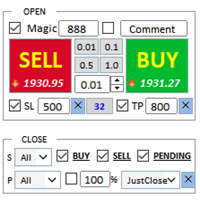
어시스턴트: 트레이드 어시스턴트-MT4 (클릭하여 다운로드) 트레이드 어시스턴트-MT5 (클릭하여 다운로드)
사용설명서를 주의 깊게 읽어보세요.
기초: 언어 선택 및 전환 지원(현재 중국어와 영어 지원) 자동 언어 인식 지원하다 단축키 열기 및 닫기 바인딩, 단축키를 사용하여 위치를 빠르게 열고 닫으세요... 단축키 닫기. 최대 30개의 단축키 지원 잠금 해제는 대부분의 기능을 지원합니다 다시 하다 운영 및 캔 테스트 환경에서 사용 가능 오픈 및 클로징 포지션 영역: 원클릭 포지션 오픈 ( 손절매 및 손절매의 편리한 설정, Lot Size 자동 계산 등의 편리한 기능 포함) 원클릭 닫기 (잠금), 미니멀리스트 스타일의 디자인으로, 마감 유형, 마감 유형(롱 주문, 숏 주문, 보류 주문), 이익이 0보다 큰 경우 주문을 마감할지 여부, 손실 주문을 마감할지 여부, 마감 비
FREE

Title : Trade Assistant Manager for MT4
Trade Assistant Manager — See your risk before you click Trade Assistant Manager is a MetaTrader 4 chart utility for discretionary traders who want a clear, visual way to size positions . Place your Entry, Stop Loss, and Take Profit directly on the chart. The panel shows the lot size, the money at risk, the profit target in money, and the reward-to-risk ratio — updated as you move the lines.
What you gain Faster decisions : - Automatically calcu
FREE

이익 추적 기능으로 총 이익/손실에 도달하면 MetaTrader 4에서 포지션을 청산합니다. 가상 정지 (별도 주문) 을 활성화할 수 있습니다. BUY 및 SELL 포지션을 별도로 계산하고 마감합니다 (BUY SELL 별도). 모든 심볼 또는 현재 심볼 만 닫고 계산합니다 (모든 심볼). 이익을 위해 후행 추적 을 활성화합니다 (후행 이익). 예금 통화, 포인트, 잔액의 %에 대한 총 손익을 마감합니다. 이 애플리케이션은 다른 EA와 함께 또는 수동 거래와 함께 모든 계정에서 사용하도록 설계되었습니다. MT5 버전 전체 설명 + DEMO + PDF 구입 방법 설치하는 방법 로그 파일을 얻는 방법 테스트 및 최적화 방법 Expforex의 모든 제품 일부 쌍 또는 모든 쌍의 총 거래 잔액이 설정에서 지정된 값보다 크거나 같으면 모든 포지션이 닫히고 주문이 삭제됩니다. 이 버전은 지정된 이익 수준에서 포지션을 마감할 수 있을 뿐만 아니라 더 나은 결과를 위해 이익을 추적할 수도 있습니다

거래하고자 하는 주요 영역을 파악한 후 자동으로 거래 지원 및 저항 또는 공급 및 수요 구역을 설정합니다. 이 EA를 사용하면 한 번의 클릭으로 매수 및 매도 구역을 그린 다음 가격이 바뀔 것으로 예상되는 정확한 위치에 배치할 수 있습니다. 그런 다음 EA는 해당 구역을 모니터링하고 구역에 대해 지정한 가격 액션에 따라 자동으로 거래를 수행합니다. 초기 거래가 수행되면 EA는 대상 구역이 되는 반대 구역에서 이익을 얻습니다. 그런 다음 거래를 종료하고 진입할 새 구역을 그리거나 이익을 얻고 즉시 반대 방향으로 거래를 역전하여 "항상 시장" 스타일 전략을 만드는 두 가지 선택이 있습니다.
입력 및 전략이 포함된 전체 매뉴얼은 여기에 있습니다: https://www.mql5.com/en/blogs/post/760256
이 EA는 시장에서 고정 또는 하드 스톱 로스를 사용하지 않는 포지션 트레이더 또는 달러 비용 평균 거래 전략을 위해 설계되었습니다. 대신, 다음에 가능한 지지 또는

如果产品有任何问题或者您需要在此产品上添加功能,请联系我 Contact/message me if you encounter any issue using the product or need extra feature to add on the base version.
Close Button provides you an intuitive, effective, and handy way to close your orders based on their type. The utility provides seven close options: Close All: close all orders, including trading and pending ones. Close Profit: close all orders which are in profit. Close Loss: close all orders which are in loss. Close Stop: close all stop orders. Close L
FREE

X1 Copy MT4는 단일 컴퓨터 또는 Windows VPS의 MetaTrader 터미널 간에 거래를 신속하게 동기화할 수 있는 간단하고 신뢰할 수 있는 솔루션입니다. 단 1분 만에 설치가 완료되며, 복잡한 기술적 루틴을 도구가 대신 처리하므로 트레이더는 거래에만 집중할 수 있습니다. 신호 복사나 개인 계좌 관리 등 어떤 상황에서도 X1은 높은 속도와 실행 정밀도를 보장합니다. X1 Copy MT4는 고품질 복사에 필요한 모든 필수 도구를 포함하는 완전 자율형 제품입니다. 이 프로그램은 일상적인 업무에서 신뢰성과 단순성을 중시하는 트레이더를 위해 설계되었습니다. 만약 자동 랏 스케일링, 맞춤형 SL/TP 오프셋 또는 고급 필터링과 같은 특정 리스크 관리 도구가 필요하다면, 더 복잡한 자산 관리 작업을 위해 설계된 전문가용 버전인 X2 Copy MT4를 확인해 보시기 바랍니다. 주요 기능 초고속 실행 — 터미널 간 거래 전송 속도 1초 미만 교차 플랫폼 지원 — MT4>MT4, MT
FREE

자동 설정 손절매, 이익실현, 후행 정지, 손익분기점 수준, 가상 정지 활성화.
Exp Assistant 는 직위 유지 관리를 도와드립니다. 이 전문가 고문은 필요한 모든 손절매를 설정하고 귀하의 포지션에 대한 이익 수준을 취할 것입니다. 모든 Expert Advisor 작업은 차트의 제어판에서 관리됩니다. 열린 포지션이 있지만 Expert Advisor가 손절매, 이익 실현, 후행 정지 또는 손익분기점을 설정할 수 없고 수동으로 거래하는 경우 보조자를 사용할 수 있습니다. 자동으로 손절매를 배치하고 거래에 대한 이익을 얻고 필요할 때 후행 손절매를 켜거나 손절매를 손익분기점으로 이동합니다. 또한 Parabolic Sar 표시기를 기반으로 한 후행 정지 기능이 있습니다. MT5 버전
전체 설명 +DEMO +PDF 구입 방법
설치하는 방법
로그 파일을 얻는 방법 테스트 및 최적화 방법 Expforex의 모든 제품 어시스턴트의 9가지 주요 기능:
매수 매도
FREE

한 번의 클릭으로 거래할 수 있는 거래 패널. 위치 및 주문 작업! 차트 또는 키보드에서 거래.
거래 패널을 사용하면 차트에서 클릭 한 번으로 거래하고 표준 MetaTrader 컨트롤보다 30배 빠르게 거래 작업을 수행할 수 있습니다. 거래자의 삶을 더 쉽게 만들고 거래자가 훨씬 빠르고 편리하게 거래 활동을 수행할 수 있도록 도와주는 매개변수 및 기능의 자동 계산. 차트의 무역 거래에 대한 그래픽 팁 및 전체 정보. 새로운 프리미엄 버전 출시: VirtualTradePad PRO SE 로 트레이딩 워크플로를 업그레이드하세요. MetaTrader 5 및 MetaTrader 4 를 위한 차세대 전문 트레이딩 패널입니다. MT5 버전
전체 설명 +DEMO +PDF 구입 방법
설치하는 방법
로그 파일을 얻는 방법 테스트 및 최적화 방법 Expforex의 모든 제품 열기 및 닫기, 반전 및 잠금, 부분 닫기/오토로트. 가상/실제 손절매/이익

# Zikiman Risk Panel Standard MT4
**Zikiman Risk Panel Standard MT4는 수동 매매 트레이더를 위한 MT4 트레이딩 패널이자 포지션 사이즈·로트 계산기입니다.** 고정 금액 리스크, 계좌 잔고 대비 리스크 비율 또는 고정 로트를 선택하고, 차트에서 Stop Loss와 Take Profit을 배치한 뒤 Market, Limit, Stop 주문을 준비할 수 있습니다.
진입 방향과 시점은 사용자가 직접 결정합니다. 이 도구는 매매 신호를 만들거나 자동으로 진입하지 않습니다.
## 리스크 기반 포지션 사이징
세 가지 방식을 지원합니다.
- **고정 금액 리스크** — 한 거래에서 감수할 계좌 통화 금액을 입력합니다. - **리스크 비율** — 현재 계좌 잔고의 일정 비율로 리스크를 설정합니다. - **고정 로트** — 원하는 거래량을 직접 입력합니다.
금액 또는 비율 모드에서는 예정 진입가와 Stop Loss 사이의 거리를 기준
FREE

R R Trade Assistant is a utility Expert Advisor for MetaTrader 4 built to help traders visually define trades and manage risk efficiently. This tool combines a graphical risk-reward interface with manual trade execution , allowing traders to easily set trade parameters directly on the chart. Users can define Entry, Stop-Loss, and Take-Profit levels , calculate lot size based on risk percentage, and execute trades directly from the control panel.
If you like the EA, feel free to lea
FREE

The Candle Timer indicator displays an advanced bar countdown timer on a chart. This study indicates the remaining time for the last candle in the chart.
Main features The indicator shows the remaining time for the last bar in the chart. Alert notifications for new bar. Works on every timeframe (M1, M5, M15, M30, H1, H4, D1, W1, MN). Customizable parameters (Colors, Text size, Visibility...). Ideal tool for all kinds of trading (Scalpers, intraday traders...). Very fast calculation. Availa
FREE

이 추세선 프로 표시기에 대한 자동 매개 변수 최적화 프로그램입니다 쉽고 빠르게 당신은 당신의 마음에 드는 추세선 프로 표시기에 대한 최적의 매개 변수를 선택합니다. 최적화에는 몇 초 밖에 걸리지 않습니다. 최적화할 수 있는 최고의 매개변수에 대한 각 쌍고기간:진폭,TP1-TP3,stoploss 에뿐만 아니라,값은 시간을 필터 및 카테고에 필터가 역사를 선택 섹션(일)
다른 시간대를 최적화하려면 다른 범위의 히스토리가 필요합니다:
M5-M15 계산 범위 매개 변수 설정(일)=60(3 개월) M30-H1 계산 범위 매개 변수 설정(일)=120(6 개월) H4 매개 변수 계산 범위 설정(일)=240(1 년) D1-W1 매개 변수 계산 범위 설정(일)=720(3 년) Mn1 매개 변수 계산 범위 설정(일)=1200(5 년) 최적화 후 매개 변수는 폴더의 기성품 세트 파일에 자동으로 저장됩니다.MQL4>Files>trendlineoptimizedsettings
최적화 유틸리티 사용

TPSpro 위험 관리자 모든 교육과 자본을 보유한 트레이더를 위한 전문적인 위험 관리를 위한 고유한 시스템입니다. 거래 손실과 거래 시 심각한 실수를 방지할 수 있습니다.
TPSpro Risk Manager는 주로 스캘퍼와 데이 트레이더를 위한 리스크 관리에 필요하지만 모든 거래 스타일의 트레이더가 성공적으로 사용합니다. 패널에는 3개의 열이 있으며 각 열에는 유용한 정보가 포함되어 있습니다.
첫 번째 열에는 당월 초의 계좌 정보가 표시됩니다. 즉, 전체 결과를 백분율과 예금 통화로 표시합니다. 두 번째 열에는 설정에 지정된 날짜의 위험이 표시됩니다. 세 번째 열에는 현재 계정 상황이 표시됩니다. 하루 동안 지정된 위험이 초과되거나 주문 수가 초과되면 Advisor는 모든 주문을 종료하고 새로운 주문을 열지 못하게 하여 트레이더를 "감정적 거래"로부터 보호합니다. "Risk Manager"를 사용하면 다음 매개변수에 따라 거래를 제어할 수 있습니다. 일일 손실 한도

XA Risk Reward Ratio Tool MT4 tool is a professional algorithm, that calculates risk of every transaction before it is finalized. It allows you to precisely estimate gain and possible loss. The professional tool can estimate levels of Take Profit and Stop Loss incredibly precisely, making investments more effective and safer. Using Risk Reward Ratio Tool, you can with one click carry out transactions, cancel position, set position rate, set opening point, TP, SL and many other features. List of
FREE

이 프로그램은 트레이더와 투자자를 위해 설계된 간단한 차트 플레이어로, 과거 시장 데이터를 재생하여 시장의 흐름과 가격 움직임을 더 잘 이해할 수 있도록 도와줍니다. 이 플레이어를 사용하면 다양한 전략을 검증하고, 시장 상황에 맞춘 트레이딩 연습도 효율적으로 수행할 수 있습니다. 캔들을 한 개씩 진행하며 시장 흐름을 순서대로 확인할 수 있습니다. 재생 중 언제든지 일시 정지하고 다시 재개할 수 있습니다.
[특징] 과거에서 미래 방향으로 자동 재생 일정 간격으로 1봉씩 진행 재생 중 일시 정지 가능 [ 재생 사양] 재생 방향: 과거 → 미래 재생 속도: 고정 이동 봉 수: 1봉 고정 재생 일시 정지 / 재개 END로 재생 종료 [조작 방법] Pause / Restart: 재생 일시 정지 / 재개 END: 재생 종료 및 프로그램 중지 본 제품은 'Player' 버전입니다. 보다 고도의 분석과 기능을 원하신다면 제목에
FREE
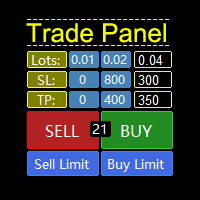
A "Trade Panel" that supports "strategy testing", with excellent compatibility, fast operation, and conforms to the habits of professional traders. At the same time, the design is compact, concise, clear at a glance, and comprehensive in functions. It is a powerful tool for manual operation! Function Description: Click Spread //Delete all arrow Click SL: // Delete stop loss Click TP: // Delete take profit Reverse //Backhand Locked /
FREE

Introduction This powerful MT4 trade mangement EA offers a way potentially to aggressively multiply trade profits in a riskfree manner. Once a trade has been entered with a defined stoploss and take profit target then the EA will add three pyramid add-on trades in order to increase the overall level of profit. The user sets the total combined profit target to be gained if everything works out. This can be specified either as a multiple of the original trade profit or as a total dollar amount. Fo

ATC Candle Timer는 현재 캔들의 남은 시간과 주요 심볼 정보를 하나의 작은 패널에 표시합니다.
이 도구는 포지션 도구, 거래 관리 및 성과 분석과 함께 All In One Trade Management Panel MT4 의 일부이기도 합니다. 캔들 타이머: 차트 타임프레임 또는 선택한 모든 타임프레임(주간 및 월간 포함)의 캔들 마감까지 카운트다운.
캔들이 얼마나 지났는지 보여주는 진행 표시줄.
현재 캔들 옆에 표시되는 선택적 카운트다운 레이블로, 패널의 버튼으로 켜거나 끌 수 있습니다.
캔들 마감 전 설정된 초 수에 선택적 알림. 심볼 정보: 포인트 및 핍 단위의 스프레드.
핍 단위의 오늘 범위.
선택한 일수 동안의 평균 일일 범위(ADR)로, 오늘 범위를 백분율로 표시: 75% 미만은 녹색, 75%부터는 호박색, 100%부터는 빨간색.
롱 및 숏 스왑.
브로커 서버 시간 및 선택적으로 컴퓨터의 현지 시간. 입력: 카운트다운 타임프레임 (기본값: 차트 타
FREE
MetaTrader 마켓 - 트레이더를 위한 로봇 및 기술 지표는 거래 터미널에서 바로 사용할 수 있습니다.
The MQL5.community 결제 시스템은 MQL5.com 사이트의 모든 등록된 사용자가 MetaTrader 서비스에서 트랜잭션을 수행할 수 있습니다. 여러분께서는 WebMoney, 페이팔, 또는 은행 카드를 통해 자금을 예치하거나 인출하실 수 있습니다.
