R R Trade Assistant

R R Trade Assistant is a utility Expert Advisor for MetaTrader 4 built to help traders visually define trades and manage risk efficiently.

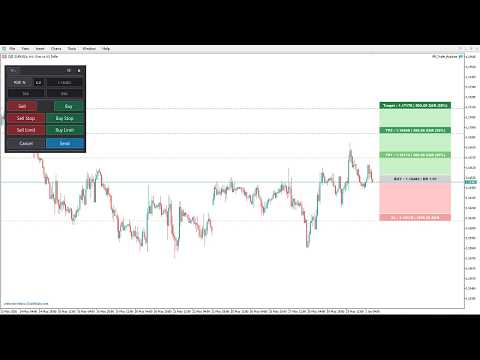
This tool combines a graphical risk-reward interface with manual trade execution, allowing traders to easily set trade parameters directly on the chart.


Users can define Entry, Stop-Loss, and Take-Profit levels, calculate lot size based on risk percentage, and execute trades directly from the control panel.


    Key Features

    Visual Risk-Reward Tool
    Drag rectangles and lines directly on the chart to define Entry, Stop-Loss, and Take-Profit zones.

    Risk-Based Lot Calculation
    Automatically calculates lot size according to the selected risk percentage or fixed lot size.

    Integrated Order Execution Panel
    Place market orders or pending orders directly from the control panel.

    Synchronized Inputs
    Panel inputs and chart objects update in real time, ensuring consistency between visual elements and parameters.

    Adjustable Visual Interface
    Resize the risk-reward tool and adjust label sizes for better chart visibility.

    Input Parameters

    Order Type
    Select the order type: Market, Limit, or Stop orders.

    Entry Price
    Set the entry level manually or drag it directly on the chart.

    Stop-Loss and Take-Profit
    Define levels visually on the chart or input them manually.

    Risk Mode
    Choose between percentage risk based on account balance or fixed lot size.

    Risk-Reward Ratio
    Automatically calculates the reward relative to the defined risk.

    Visual Scale
    Adjust the size and font of the risk-reward tool for better clarity.


    Quick Start (Important)

    Follow these steps to ensure the EA works correctly:

    1. Drag RR Trade Assistant onto your chart
    2. In the settings window, enable “Allow Algo Trading”
    3. Click OK to attach the EA
    4. Enable the main Algo Trading button in MT5 (top toolbar must be green)
    5. Use the panel to place a trade

    After attaching the EA check the following

    • Check the “Experts” and “Journal” tabs for error messages
    • Make sure your lot size meets broker requirements
    • Ensure Stop-Loss / Take-Profit are not too close to price
    • Confirm the market is open for the symbol
    Note

    It is recommended to test RR Trade Assistant on a demo account before using it on a live account in order to become familiar with the tool and optimize settings.

    Support & Feedback

    If you like the RR Trade Assistant tool and find it helpful, please consider leaving a positive review or 5-star rating on the MQL5 Market. Your feedback helps me improve the tool and create even better trading utilities for the community. Thank you for your support!

    추천 제품
    Current Price MT4
    Keni Chetankumar Gajanan -
    5 (1)
    A simple and useful Current Price Panel, which displays magnified current Bid, Ask prices and spread, movable anywhere on chart window using the mouse. Also provides an option to have as text at a static location showing bid or ask price along with spread, shown at any location on the chart. Allows display as pips or points along with spread highlighted in distinct color if it crosses the threshold point for the previous 100 ticks. Includes an option to show or hide the last digit (pipette) of t
    FREE
    Keyboard Trading
    Victor Christiaanse
    5 (1)
    Keyboard Trading  Open and Close orders with your keyboard. This tool allows you to open and close orders with your keyboard. As opening and closing orders with your keyboard is faster than with your mouse, this tool is very useful for Scalpers. How does it work? If you press the key "b", it will open a buy order with lot size, SL and TP as specified in the settings. If you press the key "s", it will open a sell order with lot size, SL and TP as specified in the settings. If you press the key "c
    FREE
    EA AccountTrailingStop MT4을 소개합니다. 이는 Expert Advisor로, MetaTrader 4에서 자동으로 수익을 관리하고 보호하여 거래 전략을 향상시키도록 설계되었습니다. 이 도구는 초보자와 전문가 모두에게 이상적이며, 다양한 거래 환경에서 동적인 수익 잠금을 위한 강력한 솔루션을 제공합니다. MQL 제품 설치 가이드 | MT4/MT5에서 구매한 MQL 제품 업데이트 | 일반 문제 해결 가이드 | 일반 설정 / 입력 가이드 | 백테스트 및 설정 파일 EA AccountTrailingStop MT4을 사용하면 사용자들은 유리한 시장 조건에서 수익 유지가 향상되고 수동 모니터링 시간이 줄어드는 등의 상당한 이점을 경험합니다. forex, 지수 및 암호화폐 거래자들은 전반적인 수익성이 눈에 띄게 증가했다고 보고하며, 이 EA는 거래 성과를 최적화하려는 모든 사람에게 필수 자산입니다. MQL 제품 설치 가이드 | MT4/MT5에서 구매한 MQL 제품 업데이트 |
    FREE
    Calc for MT4
    Radim Kucera
    5 (2)
    This indicator is designed to provide all useful information about symbol, account, positions and profit. It is developed for improving trader's money management. Parameters Calc can be divided to separate blocks. Each block is possible to hide, set its own color and other properties. Block symbol: This block displays information about actual SPREAD, POINT VALUE (in deposit currency for 1 lot), SWAP LONG and SHORT. Show symbol info - display/hide this block Color of symbol info - color of this
    FREE
    CleanView
    Sergey Batudayev
    CleanView — Chart Management Utility for MetaTrader 4 CleanView is a utility designed to simplify the management of chart appearance and graphical objects in MetaTrader 4. It provides a compact button panel located in the upper-left corner of the chart, allowing quick access to functions for visual customization, chart cleaning, and display control. Functions and Buttons Clear Chart — removes all graphical objects from the current chart except the utility buttons. Useful for quick cleanup of lin
    FREE
    Important! Demo version will work only on EURGBP. One Click Trader is a tool designed for MetaTrader 4 platform, which enables you to take your trading to the next level. It enables you to open, manage and close your trades in simple an efficient way by just one click of your mouse button. Up arrow minimizes the OCT panel Down arrow maximizes the OCT panel Right arrow displays the next panel with additional features Left arrow hides the panel with additional features Red SELL button enables you
    FREE
    The Order Info Box utility is designed to conveniently control the orders placed. If there are orders, the utility builds graphical informers for each order, indicating - the order type (position direction); - the order volume; - the profit (if the order is in the market); - optionally the order magic; - optionally the order comment. In addition, the utility builds informers for TakeProfits and StopLosses of orders, indicating the profit or loss that will occur when this TakeProfit or StopLoss i
    FREE
    Lot by Risk
    Sergey Vasilev
    4.83 (23)
    위험 거래 패널에 의해 많은 수동 거래를 위해 설계되었습니다. 이 명령을 보낼 수있는 다른 수단이다. 패널의 첫 번째 특징은 제어 라인을 사용하여 편리하게 주문할 수 있다는 것입니다. 두번째 특징은 정지 손실 선의 면전에서 주어진 위험을 위한 거래 양의 계산입니다. 제어 라인은 단축키를 사용하여 설정됩니다: 이익을-기본적으로 티 키; 가격-기본적으로 피 키; 정지 손실-기본적으로 키; 당신은 거래 패널의 설정에서 키를 직접 구성 할 수 있습니다. 작동 알고리즘: 1)-우리는(이 모든 레벨을 배치 할 필요가 없습니다)원하는 장소에 레벨을 배치; 2)–위험 지정(선택 사항); 3)-녹색 주문 보내기 버튼을 클릭하십시오.; 4)–우리는 배치 될 순서를 기다리고 있습니다,또는 오류 메시지와 경고가 나타납니다; 5)-우리는 전문가 고문에 마법에 의해 연결된 현재 기호에 대한 모든 주문을 닫으려면,다음 닫기 주문 버튼을 클릭합니다. 주문 보내기 버튼을 여러 번 눌러서는 안
    FREE
    TradeBox
    Aleksandr Butkov
    A small trading panel makes it easier for a trader to visually place pending orders, market,  as well as trailing and unloading the grid of orders.  It is installed as a regular adviser.   Parameters and description:   Lot Volume: 100 - in this field you can set, change the order volume at any time   Line UP - visual horizontal level for pending BuyStop and SellLimit orders   Line DN - visual horizontal level for BuyLimit and SellStop pending orders   Delete Lines - delete all lines from t
    FREE
    This simple but useful script calculates the lot in % of the deposit. It is indispensable for risk management. There is only one customizable parameter: MaxRisk - risk in % for lot calculation. The product works as a standard script. Launch it once on an appropriate chart and start trading using the calculated lot value. Genious is simplicity! Happy trading!
    FREE
    When executing an order, whether through the Metatrader ticket on a computer or the Metatrader app on a mobile device, either manual or pending, Easy Trade will automatically set the take profit and stop loss levels, as well as a limit order with its respective take profit and stop loss levels. It follows the trading strategy for market open (US30, US100, US500), but it can be applied to any market asset.
    FREE
    Crystal Trade Manager – 고급 MT4 리스크 & 트레이드 관리 도구 개요 Crystal Trade Manager (CTM)은 MetaTrader 4 전용 전문 유틸리티로, 리스크 관리·자동화·빠른 주문 실행 제어 를 위해 설계되었습니다. 트레이더가 자본을 보호하고, 일일 손실을 제한하며, 로트 크기를 제어하고, 핵심 주문 관리 기능 (Auto SL/TP, Break-Even, Trailing Stop)을 자동화할 수 있도록 도와줍니다. 이 툴은 수동 트레이더, Prop Firm 챌린지 참가자, 전문 펀드 매니저 에게 적합합니다. 주요 기능 1. 리스크 & 드로우다운 보호 일일 드로우다운 제한 (1%–70%) 설정 가능 제한 초과 시 모든 주문 자동 종료 옵션: 보류 주문 자동 삭제 일일 락아웃 → 다음날까지 신규 거래 차단 (Prop Firm 규정 준수) 2. 손익 목표 관리 일일 손익 목표를 USD로 설정 목표 달성 시 모든 포지션 자동 종료 Prop Firm 규
    FREE
    一键平仓小工具,可以针对买单、卖单和挂单进行批量操作,可以操作当前图表订单和所有订单,简单高效。 第一行第一个按钮是关闭当前图表 品种 所有买单,第二个按钮是关闭当前图表品种的所有卖单,第三个按钮是关闭当前图表 品种 的所有订单; 第二行 第一个按钮是删除当前图表 品种 所有买单挂单,第二个按钮是 删除 当前图表品种的所有卖单 挂单 ,第三个按钮是 删除 当前图表 品种 的所有 挂单 ; 第三行第一个按钮是关闭所有 品种的全部买单,第二个按钮是关闭所有 品种的全 卖单,第三个按钮是关闭所有 品种的全部订单; 第四行第一个按钮是删除所有 品种全部买单挂单 ,第二个按钮是 删除 全部品种 的全部卖单挂单 ,第三个按钮是删除 全部品种 的全部挂单 。 希望此程序能对您有用
    FREE
    Kalifx Equity Guard EA
    Calvin Andile Mahlangu
    5 (1)
    Kalifx Equity Guard — Account Protection Utility (MT4) Kalifx Equity Guard is a MetaTrader 4 utility that monitors account equity and floating losses and closes open positions when predefined risk limits are reached. It operates independently of trade entry logic and works with both manual trades and Expert Advisors. The utility runs continuously in the background after being attached to any chart and timeframe. Main Functions Monitors account equity drawdown using percentage or monetary thresh
    FREE
    EAsynRightNow - Professional Trading Expert Advisor for manual trading with advanced functionality EAsyRightNow is a multifunctional trading Expert Advisor for MetaTrader 4, featuring a Trading Panel with a user-friendly interface and extensive trading position management capabilities. Perfect for scalping, it works on all timeframes.  Key Features  1. Trading Modes - Single Orders: Management of one trading position - Multiple Orders: Ability to open multiple orders in the same direction - M
    FREE
    Utility for order reversal. Closes orders on the chart on which it is launched and opens orders with the opposite direction instead of them. Has a simple and intuitive graphical interface. It is also possible to automatically reverse newly opened orders. MT5 version of the utility -  https://www.mql5.com/en/market/product/74770 If you like this utility, take a look at my other products -   https://www.mql5.com/en/users/nina_yermolenko/seller
    FREE
    EasyClose MT4
    Nina Yermolenko
    4 (1)
    A simple and convenient utility for closing orders. It can close both all orders together as well as buy, sell or pending orders separately. Has an intuitive graphical interface. MT5 version of the utility -  https://www.mql5.com/en/market/product/78599 If you like this utility, take a look at my other products -   https://www.mql5.com/en/users/nina_yermolenko/seller
    FREE
    ATR Bands MT4
    Mykola Khandus
    ATR Bands with Take-Profit Zones for MT4 The ATR Bands indicator for MT4 is designed to assist traders in managing risk and navigating market volatility. By using the Average True Range (ATR), it helps identify key price levels and set realistic stop-loss and take-profit zones. Key Features: ATR-Based Bands : The indicator calculates dynamic upper and lower bands using ATR. These bands adjust based on price volatility, helping to indicate potential support and resistance levels. Customizable Par
    FREE
    Note: This is EA only panel for manage Orders ------------------------- EA  input inclde - EA_Comment   ------------------------ The panel include  - Lot size input for BUY and SELL button - Close ALL SELL orders (same symbol) - Close ALL BUY orders (same symbol) - Close ALL orders (same symbol) ------------------------- You can use on any pair and any time frame  Thanks
    FREE
    Perspect
    Matimu Romeo Ngoveni
    Perspect EA This version of the EA focusses on indicating points of interest on the chart, features include : Sessions (Asia/Gap/London/Gap/NewYork/Gap) Previous Daily/Weekly/Monthly highs and  lows  Previous Daily/Weekly/Monthly open and close price Round numbers (Ruler) Opening range Initial balance Multi time frame (Yearly view, monthly opening range) Customizable chart templates for low light users   The indicator will assist in advanced technical analysis, providing the user with desired
    FREE
    PanelManual
    Vasiliy Kolesov
    The panel for the MT4 terminal is designed to help the trader quickly set pending orders for a breakout of the previous bar. The utility calculates the order lot itself at the specified stop loss price and maximum loss percentage. The panel also has a button for converting to breakeven. When you click, the stop loss of an open position is converted to the order opening price.
    FREE
    Jvh Trading Information
    Jeremy Nicolaj Van Hoorn
    JVH Trading Information Panel v3.93 Professional Trading Dashboard for MetaTrader 4 The JVH Trading Information Panel is an advanced, real-time trading dashboard for MetaTrader 4 , designed to give traders a clear, structured overview of risk, performance and execution quality — all in one clean, dark-themed panel. Built for retail traders and prop-firm traders (FTMO, FundedNext, etc.) who require accurate, equity-based risk tracking and professional-level statistics. Key Advantages Liv
    FREE
    "All in One" panel. You can simultaneously control: up to 3 symbols; up to 6 periods; up to 31 popular signals. You can see the sum for all signals taking into account the weight of the signal Version for MetaTrader 4: https://www.mql5.com/ru/market/product/27880 Version for MetaTrader 5: https://www.mql5.com/ru/market/product/27830 Parameters NUM_BAR - number of the bar to analyze (set a value greater than 0 to work on closed bars). timeframe_1....timeframe_6 - working timeframes (if set to "c
    FREE
    Neonplox Trade Manager
    Mr Roberto Carlos Ferreira Silva
    n3oNpLoX Trade Manager Market Order. Stop Order. Limit Order. To help you Place trades based on the amount of Money in Dollars you want to risk. As it will show in the screenshots you can calculate the right Lot size for the money you want to risk. Calculates Lot Size based on the distance between Stop Loss and Entry Point. 5 Options for TP - (1RR,2RR,3RR,4RR,5RR) It will help you manage your risk and Place trades with the correct Lot Size. So you will not over expose yourself and your money
    FREE
    Daily Sacrifice Pro
    Jesse Frank Cornelson
    This is an expanded version of my Daily Sacrifice EA that closes old losing trades at the expense of a portion of your profits. This helps to slowly work away drawdown and accelerate the closure of martingale grids *** Pro Features *** Include/Exclude symbols.   These fields are empty by default, but if populated allow you to include only specific symbols or alternatively exclude specific symbols Execute on an hourly interval.   Allows the EA to be ran every so many hours rather than on a fixed
    FREE
    AQ RiskOptimizer
    HIT HYPERTECH INNOVATIONS LTD
    5 (1)
    Risk Optimizer is the absolute solution for applying risk management on your account. Bad risk management is the main reason that causes traders to lose money. Risk Optimizer calculates and suggests the correct lot size for each position according to your personal, customized risk profile. You can give directly your preferred risk as percentage (%) for each position or you can trust our algorithms to calculate and optimize according to your risk category selection. But it is not only that! Selec
    FREE
    MQLTA Auto Close Demo
    MQL4 Trading Automation
    Auto Close is an expert advisor that can assist you with your money and risk management rules. The EA can monitor your Balance, Equity, Margin, Global Profit and Global Loss and alert you in case any of these reaches a specified threshold. This Demo Version has Notification and Close features disabled, full version can be found https://www.mql5.com/en/market/product/29141 How does it work? Load the Auto Close EA in the chart and set the parameters you want to keep monitored. If any of the risk
    FREE
    바 닫을 때까지의 카운트다운 타이머, + 진행 상태 %:  #1 다기능 유틸리티 :   66+ 기능, 이 도구 포함  |   질문이 있으면 저에게 연락  하세요   |    MT5 버전 인디케이터 설정에서 다음을 구성할 수 있습니다: 계산용 시간 프레임; true / false: 더 높은 시간 프레임 옵션 (현재 사용 중인 다음: M15->M30, H4->D1...) 위치: 1 = 왼쪽 하단 모서리; 2 = 오른쪽 하단 모서리; 3 = 왼쪽 상단 모서리; 4 = 오른쪽 상단 모서리; 폰트 크기; 색상; 폰트 스타일; #1 다기능 유틸리티 :   66+ 기능, 이 도구 포함  |   질문이 있으면 저에게 연락  하세요   |    MT5 버전 #1 다기능 유틸리티 :   66+ 기능, 이 도구 포함  |   질문이 있으면 저에게 연락  하세요   |    MT5 버전 //----------
    FREE
    Tipu Trader
    Kaleem Haider
    3 (2)
    Tipu Trader is a part of Tipu Panel ecosystem that was developed out of need for quick and simple trading. Tipu Trader is an easy to use trade panel for commonly used trade functions. Create you own signals with Tipu Panel and trade along with Tipu Trader, a simple and easy to use trade panel. Features An easy to use trade panel for most commonly used trade functions. Create your own personal trade signals with Tipu Panel , and trade with Tipu Trader. Customizable Panel. The panel can be moved
    FREE
    Levels and risk calculator for the Antimartingale (or Antimartingala) technique Totally visual, setup everything from control panel Decide your risk and margin, it will calculate and show trading lavels on the chart Free version of the orginal Antimartingale EA:  https://www.mql5.com/en/market/product/53653 Public Signals using the Antimartingale's technique: https://www.mql5.com/en/signals/1016250 https://www.mql5.com/en/signals/1018964 This EA does not open trades, it only shows the trading le
    FREE
    이 제품의 구매자들이 또한 구매함
    Trade Assistant MT4
    Evgeniy Kravchenko
    4.43 (194)
    거래당 위험 계산, 라인을 사용한 손쉬운 신규 주문, 부분 청산 기능을 통한 주문 관리, 7가지 유형의 트레일링 스탑 및 기타 유용한 기능을 제공합니다. 추가 자료 및 지침 설치 지침 - 애플리케이션 지침 - 데모 계정용 애플리케이션 평가판 라인 기능       - 차트에 개시선, 손절매, 차익실현을 표시합니다. 이 기능을 사용하면 새로운 주문을 쉽게 하고 개봉 전에 추가 특성을 볼 수 있습니다. 위기 관리       -       위험 계산 기능은 설정된 위험과 손절매 주문의 크기를 고려하여 새 주문의 볼륨을 계산합니다. 이를 통해 손절매 크기를 설정하고 동시에 설정된 위험을 존중할 수 있습니다. 로트 계산 버튼 - 위험 계산을 활성화/비활성화합니다. 필요한 위험 값은 위험 필드에 0에서 100 사이의 백분율 또는 예금 통화로 설정됩니다. 설정 탭에서 위험 계산 옵션을 선택합니다. $ 통화, % 잔액, % 지분, % 자유 마진, % 사용자 정의, % AB 이전 일, % AB
    Local Trade Copier EA MT4
    Juvenille Emperor Limited
    4.96 (109)
    Local Trade Copier EA MT4 를 사용하여 매우 빠른 거래 복사 경험을 해보세요. 1분 안에 간편하게 설정할 수 있으며, 이 거래 복사기를 사용하면 Windows 컴퓨터 또는 Windows VPS에서 여러 개의 MetaTrader 터미널 간에 거래를 0.5초 미만의 초고속 복사 속도로 복사할 수 있습니다. 초보자든 전문가든 Local Trade Copier EA MT4 는 다양한 옵션을 제공하여 사용자의 특정 요구에 맞게 맞춤 설정할 수 있습니다. 이는 수익 잠재력을 높이려는 모든 사람을 위한 최고의 솔루션입니다. 지금 사용해보시고 이것이 왜 시장에서 가장 빠르고 쉬운 무역용 복사기인지 알아보세요! 팁: 여기 에서 데모 계정에서 Local Trade Copier EA MT4 데모 버전을 다운로드하여 사용해 볼 수 있습니다. 다운로드한 무료 데모 파일을 MT4 >> File >> Open Data Folder >> MQL4 >> Experts 폴더에 붙여넣고 터미널
    Trade Manager EA에 오신 것을 환영합니다. 이 도구는 거래를 보다 직관적이고 정확하며 효율적으로 만들기 위해 설계된 궁극적인 리스크 관리 도구 입니다. 단순한 주문 실행 도구가 아닌, 원활한 거래 계획, 포지션 관리 및 리스크 제어를 위한 종합 솔루션입니다. 초보자부터 고급 트레이더, 빠른 실행이 필요한 스캘퍼에 이르기까지 Trade Manager EA는 외환, 지수, 상품, 암호화폐 등 다양한 시장에서 유연성을 제공합니다. Trade Manager EA를 사용하면 복잡한 계산은 이제 과거의 일이 됩니다. 시장을 분석하고 진입, 손절 및 익절 수준을 차트의 수평선으로 표시한 후 리스크를 설정하면, Trade Manager가 이상적인 포지션 크기를 즉시 계산하고 SL 및 TP 값을 실시간으로 표시합니다. 모든 거래가 간편하게 관리됩니다. 주요 기능: 포지션 크기 계산기 : 정의된 리스크에 따라 거래 크기를 즉시 결정합니다. 간단한 거래 계획 : 진입, 손절, 익절을 위한
    Exp COPYLOT CLIENT for MT4
    Vladislav Andruschenko
    4.65 (66)
    MetaTrader 4용 트레이드 복사기.       모든 계정의 외환 거래, 포지션, 주문을 복사합니다. 그것은 최고의 무역 복사기 중 하나입니다       MT4 - MT4, MT5 - MT4       위해       카피롯 MT4       버전(또는       MT4 -  MT5   MT5 - MT5       위해       카피롯 MT5       버전). MT5 버전 전체 설명   +DEMO +PDF 구입 방법 설치하는 방법     로그 파일을 얻는 방법     테스트 및 최적화 방법     Expforex의 모든 제품 복사기   버전         MetaTrader 5   터미널 (   МТ5 - МТ5, МТ4 - МТ5   ) -   Copylot Client MT5 고유한 복사 알고리즘은 마스터 계정에서 고객 계정으로 모든 거래를 정확하게 복사합니다. 이 제품은 또한 높은 작동 속도에서 높은 오류 처리로 유명합니다. 강력한 기능 세트. 프로그램은 여러 터
    Trade copier MT4
    Alfiya Fazylova
    4.58 (33)
    Trade Copier는 거래 계정 간의 거래를 복사하고 동기화하도록 설계된 전문 유틸리티입니다. 복사는 공급자의 계정/단말기에서 동일한 컴퓨터 또는 vps에 설치된 수신자의 계정/단말기로 발생합니다. 구매하기 전에 데모 계정에서 데모 버전을 테스트할 수 있습니다. 데모 버전 여기 . 전체 지침 여기 . 주요 기능 및 이점: 복사기는 "МТ4> МТ4", "МТ4> МТ5", "МТ5> МТ4" 복사를 지원합니다. 복사기는 데모 계정 > 실 계정, 실 계정 > 데모 계정, 데모 계정 > 데모 계정 및 실제 계정 > 실 계정 복사를 지원합니다. 복사기는 읽기 전용 암호가 적용된 투자자 계정에서 복사를 지원합니다. 하나의 공급자 터미널은 여러 수신 터미널로 트랜잭션을 보낼 수 있고 하나의 수신 터미널은 여러 공급자 터미널에서 트랜잭션을 수신할 수 있습니다. 복사기는 귀하 또는 귀하의 고문이 거래하는 동일한 터미널에서 작동할 수 있습니다. 높은 복사 속도(0.5초 미만). 복사기에는 간편
    TradePanel MT4
    Alfiya Fazylova
    4.85 (93)
    Trade Panel은 다기능 거래 도우미입니다. 이 애플리케이션에는 50개 이상의 수동 거래 기능이 포함되어 있으며 대부분의 거래 작업을 자동화할 수 있습니다. 주의! 할인은 시간 제한이 있으며, 매주 화요일마다 가격이 5달러씩 인상됩니다. (최대 90달러까지). 구매하기 전에 데모 계정에서 데모 버전을 테스트할 수 있습니다. 데모 계정용 애플리케이션 체험판 다운로드: https://www.mql5.com/en/blogs/post/750865 . 전체 지침 여기 . 거래. 한 번의 클릭으로 거래를 수행할 수 있습니다: 리스크 자동 계산과 함께 예약 주문 및 포지션 열기. 한 번의 클릭으로 여러 주문 및 포지션 열기. 주문 그리드 열기. 예약 주문 및 포지션을 그룹별로 닫기. 포지션 방향 전환 (Buy 닫기 > Sell 열기, Sell 닫기 > Buy 열기). 포지션 잠금 (부족한 포지션을 열어 Buy와 Sell 포지션의 수량을 동일하게 만들기). 모든 포지션 한 번의 클릭으로 부분
    Trading History MT4
    Siarhei Vashchylka
    5 (9)
    Trading History - A program for trading and money management on the history of quotes in stratagy tester. It can work with pending and immediate orders, and is equipped with trailing stop, breakeven and take profit functions. Very good for training and testing different strategies. Manual (Be sure to read before purchasing) Advantages 1. Allows you to test any trading strategy in the shortest possible time 2. An excellent simulator for trading training. You can gain months of trading experience
    VirtualTradePad mt4 Extra
    Vladislav Andruschenko
    4.85 (61)
    한 번의 클릭으로 거래할 수 있는 거래 패널.   위치 및 주문 작업!   차트 또는 키보드에서 거래. 거래 패널을 사용하면 차트에서 클릭 한 번으로 거래하고 표준 MetaTrader 컨트롤보다 30배 빠르게 거래 작업을 수행할 수 있습니다. 거래자의 삶을 더 쉽게 만들고 거래자가 훨씬 빠르고 편리하게 거래 활동을 수행할 수 있도록 도와주는 매개변수 및 기능의 자동 계산. 차트의 무역 거래에 대한 그래픽 팁 및 전체 정보. MT5 버전 전체 설명   +DEMO +PDF 구입 방법 설치하는 방법     로그 파일을 얻는 방법     테스트 및 최적화 방법     Expforex의 모든 제품 열기 및 닫기, 반전 및 잠금, 부분 닫기/오토로트. 가상/실제 손절매/이익 실현/후행 정지/손익분기점, 주문 그리드 .... MetaТrader 4   의 주요 요청 거래 제어판   : 구매, 판매, 구매 중지, 구매 제한, 판매 중지, 판매 제한, 닫기, 삭제, 수정, 후행 중지, 손절매,
    The product will copy all telegram signal to MT4   ( which you are member  ) , also it can work as remote copier.  Easy to set up, copy order instant, can work with almost signal formats, image signal, s upport to translate other language to English Work with all type of channel or group, even channel have "Restrict Saving Content", work with  multi channel, multi MT5 Work as remote copier: with signal have ticket number, it will copy exactly via ticket number. Support to backtest signal. How to
    Copy Cat More Trade Copier MT4 (복사 고양이 MT4) 는 단순한 로컬 트레이드 카피어가 아니라, 오늘날의 거래 환경을 위해 설계된 완전한 리스크 관리 및 실행 프레임워크입니다. Prop Firm 챌린지부터 개인 계좌 관리까지, 강력한 실행력, 자본 보호, 유연한 설정, 고급 거래 처리 기능을 통해 모든 상황에 적응합니다. 이 카피어는 Master(송신자) 와 Slave(수신자) 모드 모두에서 작동하며, 실시간으로 시장가/지정가 주문, 거래 수정, 부분 청산, Close By 작업을 동기화합니다. 데모 및 실계좌 모두 호환되며, 거래용 비밀번호 또는 투자자 비밀번호로도 사용할 수 있습니다. Persistent Trade Memory 기술을 통해 EA, 터미널, VPS가 재시작되더라도 거래가 복원됩니다. 여러 Master와 Slave를 동시에 관리할 수 있으며, 브로커 간 차이는 접두사/접미사 자동 감지 또는 심볼 매핑으로 처리됩니다. 매뉴얼/설정: Copy C
    TradeMirror 은 MT4/MT5 플랫폼을 위해 특별히 설계된 현지화된 주문 복사 도구로, 실시간 거래 작업을 동기화합니다. 제품 장점 금융 소프트웨어의 보안성, 안정성 및 개인정보 보호에 대한 높은 표준 요구사항을 기반으로, 우리는 세 가지 핵심 차원에서 심층 최적화를 수행했습니다: 직관적이고 간결한 그래픽 인터페이스로 누구나 쉽게 조작 가능 강화된 개인정보 보호 메커니즘으로 금융 환경의 민감한 데이터 격리 요구 충족 밀리초 단위의 주문 동기화로 신호 분배의 정확성과 지연 없음 보장 MT4/MT5 양 플랫폼과 완전히 호환되어 다양한 거래 환경에 원활하게 적용 지능형 시스템 모니터링과 이메일 알림을 결합하여 거래 안정성을 실시간으로 보장 핵심 기능 특성 제품은 다음과 같은 전문적인 복사 기능을 탑재하고 있습니다: 다중 계정 병렬 연결 이메일 실시간 푸시 맞춤형 로트 크기 조정 신호 필터링 메커니즘 역방향 거래 모드 손절매/이익실현 재설정 무료 체험 절차 정식 구매 전, 다음 단
    Grid Manual MT4
    Alfiya Fazylova
    4.71 (17)
    "Grid Manual"은 주문 그리드 작업을 위한 거래 패널입니다. 이 유틸리티는 보편적이며 유연한 설정과 직관적인 인터페이스를 제공합니다. 그것은 손실을 평균화하는 방향뿐만 아니라 이익을 증가시키는 방향으로 주문 그리드와 함께 작동합니다. 거래자는 주문 그리드를 만들고 유지할 필요가 없으며 유틸리티에서 수행합니다. 거래자가 주문을 시작하는 것으로 충분하며 "Grid Manual"는 자동으로 그를 위한 주문 그리드를 생성하고 거래가 마감될 때까지 그와 동행할 것입니다. 전체 설명 및 데모 버전 여기 . 유틸리티의 주요 기능: 모바일 터미널을 포함하여 어떤 방식으로든 열린 주문과 함께 작동합니다. "제한" 및 "중지"의 두 가지 유형의 그리드와 함께 작동합니다. 고정 및 동적(ATR 표시기 기반)의 두 가지 유형의 그리드 간격 계산과 함께 작동합니다. 오픈 오더 그리드의 설정을 변경할 수 있습니다. 차트에서 각 주문 그리드의 손익분기점 수준을 표시합니다. 각 주문 그리드에 대한 이익
    Complete Trade Panel for the No Nonsense Forex method: This panel encapsulates almost all things you will need to execute your own NNFX algorithm, helping you trade even faster and easier. It has 3 parts: Symbol Panel Switch to any symbol in your charts quickly by pressing its name. Additional information can be displayed in the panel: currently open trades , correlation of those trades with other symbols (except if their stop loss is in breakeven or positive) and upcoming news (next daily candl
    경고: 이 EA는 테스터에서 작동하지 않습니다. 데모 또는 실제 계좌에서만 작동합니다. 데모를 시도하려면 저에게 연락하십시오. https://www.mql5.com/en/users/abudabi MT5 Version 키보드와 마우스로 MetaTrader 4에서 빠른 주문 보내기(배치하기): 원하는 가격 위로 커서를 이동하고 키를 누릅니다: 마켓에서 매수: E 리미트 매수: A 스탑 매수: Z 마켓에서 매도: Q 리미트 매도: D 스탑 매도: C (키 사용자 정의 가능) 주문이 보내졌을 때 Fast Keyboard Orders MT4는 주문 관리를 할 수 있습니다: 손절 주문 이익 주문 트레일링 스탑 손절 주문 손익분기점 주문 기능 또는 버그 수정을 제안하거나 질문이 있으면, 언제든지 https://www.mql5.com/ru/users/abudabi/에서 DM을 보내 주십시오. "Fast Keyboard Orders MT4"을 업데이트하겠습니다. 전체 매개변수: bool Lots
    CloseIfProfitorLoss with Trailing
    Vladislav Andruschenko
    4.87 (31)
    이익 추적 기능으로 총 이익/손실에 도달하면 MetaTrader 4에서 포지션을 청산합니다. 가상 정지 (별도 주문) 을 활성화할 수 있습니다. BUY 및 SELL 포지션을 별도로 계산하고 마감합니다 (BUY SELL 별도). 모든 심볼 또는 현재 심볼 만 닫고 계산합니다 (모든 심볼). 이익을 위해 후행 추적 을 활성화합니다 (후행 이익). 예금 통화, 포인트, 잔액의 %에 대한 총 손익을 마감합니다. 이 애플리케이션은 다른 EA와 함께 또는 수동 거래와 함께 모든 계정에서 사용하도록 설계되었습니다. MT5 버전 전체 설명 + DEMO + PDF 구입 방법 설치하는 방법 로그 파일을 얻는 방법 테스트 및 최적화 방법 Expforex의 모든 제품 일부 쌍 또는 모든 쌍의 총 거래 잔액이 설정에서 지정된 값보다 크거나 같으면 모든 포지션이 닫히고 주문이 삭제됩니다. 이 버전은 지정된 이익 수준에서 포지션을 마감할 수 있을 뿐만 아니라 더 나은 결과를 위해 이익을 추적할 수도 있습니다
    Telegram to MT4 Coppy
    Sergey Batudayev
    3.75 (8)
    Telegram에서 MT4로:   최고의 신호 복사 솔루션 최첨단 유틸리티인   Telegram to MT4를   사용하여 거래를 간소화하세요. DLL 없이도 Telegram 채널과 채팅에서 MetaTrader 4 플랫폼으로 거래 신호를 직접 복사할 수 있습니다. 이 강력한 솔루션은 탁월한 정밀도와 맞춤 설정 옵션을 통해 원활한 신호 실행을 보장하여 시간을 절약하고 효율성을 높여줍니다. [ Instructions and DEMO ] 주요 특징 직접 Telegram API 통합 전화번호와 보안 코드를 통해 인증하세요. 사용자 친화적인 EXE 브리지를 사용하여 채팅 ID를 손쉽게 가져오고 관리하세요. 여러 채널/채팅을 추가, 삭제, 새로 고침하여 동시에 신호를 복사합니다. 고급 필터를 사용한 신호 파싱 사용자 정의 예외 단어(예: "보고서", "요약")가 포함된 원치 않는 신호를 건너뜁니다. 유연한 SL 및 TP 형식을 지원합니다: 가격, 핍 또는 포인트. 신호가 가격 대신 지점을 지정
    G Labs Trade Manager
    Garry James Goodchild
    G-Labs Trade Manager is a professional on-chart trading panel for MetaTrader 4. It helps you plan trades, size positions from risk, manage open trades, and stay informed — while you stay in control of every decision. It is a trading utility, not a black-box signal or automated strategy. WHO IT IS FOR • Traders who want one place to set stop loss, take profit, and risk before clicking buy or sell. • Anyone who trades manually or semi-manually and wants faster execution and clearer risk. • Users w
    AW Workpad
    AW Trading Software Limited
    3.67 (3)
    AW Workpad는 수동 및 반자동 거래를 위해 설계된 다기능 거래 컨트롤 패널입니다. 예약 주문, 시장 포지션을 관리하고 광범위한 통계 데이터를 제공하며 고전적인 지표 그룹의 다중 기간 분석을 제공합니다. 이 유틸리티는 5개의 탭으로 표시됩니다.   POSITIONS, PENDING, CLOSE, INDICATORS, INFO.  각 탭에는 현재 시장 상황에 대한 주문 또는 정보를 처리하기 위한 자체 기능 그룹이 있습니다. MT5 버전 ->       여기   / 문제 해결 ->   여기     기능 또는 이점: 이 유틸리티는 모든 시간대와 기호(통화, 지수, 석유, 금속, 주식)에서 작동합니다. 각 패널의 모든 요소에는 추가로 레이블이 지정되어 있어 요소 위로 마우스를 가져가기만 하면 됩니다. AW Workpad 거래 패널에는 유연한 설정과 직관적인 패널 인터페이스가 있습니다. 가장 필요한 모든 기능을 하나의 제품에 담았습니다. 트레이딩 패널 탭: . 위치 - 이 탭에서는 시장
    Trade Dashboard MT4
    Fatemeh Ameri
    4.92 (53)
    Tired of complex order placement and manual calculations? Trade Dashboard is your solution. With its user-friendly interface, placing orders becomes effortless, by a single click, you can open trades, set stop loss and take profit levels, manage trade lot size, and calculate risk to reward ratios, allowing you to only focus on your strategy. Say goodbye to manual calculations and streamline your trading experience with Trade Dashboard. Download  Demo Version  right now. You can find  Details of
    The product will copy all  Discord  signal   to MT4   ( which you are member  ) , also it can work as remote copier.  Easy to set up. Work with almost signal formats, support to translate other language to English Work with multi channel, multi MT4. Work with Image signal. Copy order instant, auto detect symbol. Work as remote copier: with signal have ticket number, it will copy exactly via ticket number. How to setup and guide: Let read all details about setup and download Discord To MetaTrader
    Virtual SL TP Trailing Pro for MT4 – Client-Side Stop Loss / Take Profit and Trade Management Looking for MetaTrader 5 version?  I t is available separately in the Market:   Virtual SL TP Trailing Pro MT5 Public channel:   CLICK HERE Virtual SL TP Trailing Pro for MT4 is a trade management utility that keeps Stop Loss (SL) and Take Profit (TP) levels on the client side instead of sending them to the trading server. It is designed to help you manage exits in a structured way using a clear on-cha
    EchoTrade Telegram to MT4 Copier
    Perpetual Chinemerem Vincent
    5 (2)
    EchoTrade Telegram to MT5 Copier Seamless, Instant, and Reliable Signal Copying - Direct from Telegram to MetaTrader 4! The product does not run in the strategy tester but you can get free trial version   here  for testing before purchase. Tired of manually executing trades from Telegram signals? EchoTrade automates the process, instantly copying trades from any Telegram channel or group directly into your MT5 account—accurately, efficiently, and without delay. Key Features: Universal Compatib
    ManHedger MT4
    Peter Mueller
    5 (2)
    THIS EA IS A SEMI-AUTO EA, IT NEEDS USER INPUT. Manual & Test Version Please TEST this product before   BUYING  and watch my video about it. Contact me for user support or bug reports, or if you want the MT5 version! MT5 Version I do not guarantee any profits or financial success using this EA. With this Expert Advisor, you can: Implement your own   Zone Recovery   strategy to capitalize on trending markets. Create   Grid   trading strategies, to profit from ranging markets. Place orders easil
    Chart Button
    Chantal Sala
    3 (1)
    Chart Button is a very useful indicator that allows you to navigate all charts with a simple click. This tool has been designed to work both vertically and horizontally. The particularity of this navigator is that you can change more charts simultaneously setting the input value. This tool will give you the ability to optimize your navigation and speed up all your analyzes. Input Values Direction (the direction of symbols buttons) Horizontal Vertical 32 SYMBOLS Forex_Suffix_Symbols (add Forex S
    Automate Risk Management with Smart Trailing Stop Manager for MetaTrader 4 Looking for MetaTrader 5 version? I t is available separately in the Market:   Smart Trailing Stop Manager MT5 Full User Guide    –  Public channel:   CLICK HERE Struggling with manually adjusting stops and securing profits? Smart Trailing Stop Manager MT4 is an intelligent utility for MetaTrader 4 that automates trailing stops, break-even management, partial closes, and auto SL. Optimized specifically for MT4 users, it e
    Easy Order PRO MT4
    Yoshiki Takeuchi
    3.86 (7)
    MT4용입니다. MT5 버전은 다음 사이트를 참조하십시오. ・MT5    https://www.mql5.com/ja/market/product/72114 개요 라인을 이동하기만 하면 로트가 자동으로 로스컷 금액을 기입하여 계산됩니다. 다음 8가지 통화를 계산할 수 있습니다.( USD, EUR, GBP, JPY, AUD, NZD, CHF, NZD) 고정 금액 또는 잔액 비율을 선택할 수 있습니다. 위험 보상을 계산합니다. 시장가 주문, 지정가 주문, 스탑 주문이 자동으로 적용됩니다. FX, CFD 및 암호화 통화를 지원합니다. 노트 견적에서 정보를 얻으려면 견적의 모든 통화를 표시하십시오. 이 제품을 "Experts" 폴더에 넣으십시오. "Indicators" 폴더에서는 작동하지 않습니다. 공통설정의 "자동거래(MT4)","알고거래(MT5)" 권한과 "자동거래허용(MT4)", "알고거래허용"을 확인해주세요. 이 제품은 Windows용입니다. Linux 및 Mac은 작동하는 것으로
    MT4 to Telegram Signal Provider 는 사용하기 쉽고 완전히 사용자 정의가 가능한 도구로, 텔레그램으로 신호를 보내어 계정을 신호 제공자로 변환할 수 있습니다. 메시지 형식은 완전히 사용자 정의가 가능합니다! 그러나 간단한 사용을 위해 미리 정의된 템플릿을 선택하고 메시지의 특정 부분을 활성화하거나 비활성화할 수도 있습니다. [ 데모 ]  [ 매뉴얼 ] [ MT5 버전 ] [ 디스코드 버전 ] [ 텔레그램 채널 ]  New: [ Telegram To MT5 ] 설정 단계별 사용자 가이드 가 제공됩니다. 텔레그램 API에 대한 지식이 필요 없으며, 개발자가 필요한 모든 것을 제공합니다. 주요 기능 구독자에게 보낸 주문 세부 정보를 사용자 정의할 수 있는 기능 예를 들어 브론즈, 실버, 골드와 같은 계층 구독 모델을 만들 수 있습니다. 골드 구독은 모든 신호 등을 받게 됩니다. ID, 심볼 또는 코멘트별 주문 필터링 주문이 실행된 차트의 스크린샷을 포함 보낸
    Easy Lot Size Calculator  Stop calculating lot sizes manually and start trading visually. Automatic position lot size calculator for MT4 (MT5 also available) The Easy Lot Size Calculator is the ultimate trade management dashboard. It is designed for traders who need speed, precision, and strict risk management. Whether you are a scalper needing split-second execution or a swing trader demanding exact risk percentages, this EA handles the math so you can focus on the chart. Why Use This Calcu
    Chart Notes = MULTI LINE TEXT INPUT ON CHART FOR MT4   is finally here! # sticky notes This indicator is a powerful text editor for placing notes on chart, similarly like the feature on Tradingview.  There are 2 types of messages: anchored (on screen ) and free (on chart).  1. Anchored = stays on the same place on screen (x point, y point) -this text can be   EDITED on click   (first line is for dragging the message around- this line is edited via right clicking- >properties) -move the message
    특별 할인 – 40% 할인 고급 거래 관리자 – 더 빠르고, 더 스마트하고, 더 안전한 수동 거래를 위한 최고의 올인원 솔루션 차트엔드 거래 관리자 AI로 수동 거래를 혁신하세요. 즉각적인 주문 실행, 시각적인 거래 계획, 강력한 위험 관리 기능을 하나의 직관적인 도구에 통합한 전문가급 차트 패널입니다. 차트를 벗어나지 않고도 그 어느 때보다 빠르게 주문을 실행하고, 위험을 관리하고, 수익을 보호할 수 있습니다. 정확성과 효율성을 높이고자 하는 모든 트레이더에게 적합합니다. MT4 전략 테스터에서 위험 부담 없이 테스트해 보세요 데모 버전을 다운로드하여 모의 거래 기능을 사용해 보세요. 실제 거래에 들어가기 전에 안전한 시뮬레이션 환경에서 주문 실행 연습, 위험 관리 규칙 테스트, 전략 개선을 할 수 있습니다. 자세한 사용자 설명서 및 단계별 가이드는 다음 링크를 참조하세요. https://www.mql5.com/en/blogs/post/764217 주요 장점: 빠른 거래
    제작자의 제품 더 보기
    RR Trade Assistant
    Calvin Andile Mahlangu
    RR Trade Assistant is a utility Expert Advisor for MetaTrader 5 designed to help traders visually define trades and manage risk efficiently. This tool combines a graphical risk-reward interface with manual trade execution , allowing traders to easily set trade parameters directly on the chart. Users can define Entry, Stop-Loss, and Take-Profit levels , calculate lot size based on risk percentage, and execute trades directly from the control panel. Key Features Visual Risk-Reward Tool Drag re
    FREE
    Kalifx trailing stop EA
    Calvin Andile Mahlangu
    5 (6)
    KALIFX Trailing Stop Utility for MetaTrader 4 The KALIFX Trailing Stop Utility is a tool for automated stop-loss management on the MetaTrader 4 platform. It monitors open positions and dynamically adjusts the stop-loss level as the price moves in favor of the trade. The utility can also place initial stop-loss and take-profit levels and apply breakeven rules once the trade reaches a defined profit distance. Core Functionality 1. Trailing Stop Logic When the market moves in the direction of an o
    FREE
    Kalifx Equity Guard EA
    Calvin Andile Mahlangu
    5 (1)
    Kalifx Equity Guard — Account Protection Utility (MT4) Kalifx Equity Guard is a MetaTrader 4 utility that monitors account equity and floating losses and closes open positions when predefined risk limits are reached. It operates independently of trade entry logic and works with both manual trades and Expert Advisors. The utility runs continuously in the background after being attached to any chart and timeframe. Main Functions Monitors account equity drawdown using percentage or monetary thresh
    FREE
    Kalifx Local Trade Copier is built to replicate trades from one trading account (Master) to another (Slave) in real time. Its main purpose is to copy trading activity—such as opening, modifying, and closing trades—so that multiple accounts can follow the same strategy without manual intervention. This is especially useful for managing multiple accounts, testing strategies across different brokers, or mirroring trades between accounts. The EA operates in two modes: MASTER : Monitors trading a
    FREE
    Auto BE break even EA
    Calvin Andile Mahlangu
    5 (2)
    AUTO BE Utility – Breakeven Manager for MetaTrader 4 The AUTO BE Utility by KALIFX is a compact and efficient trade-management tool for MetaTrader 4. It automatically adjusts the stop-loss level to the breakeven point once the market price reaches a defined profit distance. This ensures that active trades are protected from reversals once they move into profit, without requiring manual intervention. Main Features Automatic Breakeven Control – Moves the stop-loss to breakeven when the price reac
    FREE
    Kalifx PS Calculator
    Calvin Andile Mahlangu
    KALIFX POSITION SIZE Calculator  – Risk & Lot Size Tool (MT4) KALIFX PS Calculator is a chart-based utility designed to help traders calculate position size and manage risk directly from a simple on-screen panel. It provides a structured way to define trade parameters and view calculated results before placing an order. Key Features On-Chart Control Panel: Manage all inputs and actions from a compact interface on the chart. Mode Switching: Toggle between Risk % and Fixed Lot modes. Order Type S
    FREE
    Kali Layers Toolbox
    Calvin Andile Mahlangu
    Kali Layers Toolbox – Smart Zone & Layered Trade Management Utility Layers Toolbox is a very useful and smart MT4 utility EA designed for traders who want precision control over zone-based pending orders and break-even (BE) management . Simply draw your trade zone on the chart, and the EA will automatically place multiple pending orders within that zone according to your settings. It works for both single trades and grouped positions , giving you maximum flexibility and accuracy in trade manage
    FREE
    Multi-Order Breakeven Manager – Utility for MT4 Overview The Multi-Order Breakeven Manager is a utility for MetaTrader 4 designed primarily for managing XAUUSD (Gold) trades. It automatically moves stop-loss levels to breakeven when open trades reach a predefined profit target. The tool supports multiple positions and includes a grouping system that manages clustered orders within a user-defined pip distance. It is suitable for both manual and automated trading setups. Features Multi-order manag
    FREE
    Auto BE 2 Edition
    Calvin Andile Mahlangu
    Auto BE 2 Edition– Trade Exit and ADR Panel Utility (MT4) Auto BE 2 Edition is a MetaTrader 4 utility designed to manage trade exits through automatic stop-loss placement, breakeven protection, and optional partial position closing. It also includes an optional ADR (Average Daily Range) panel that displays market range and volatility data directly on the chart. The tool supports structured and consistent trade management for both manual and Expert Advisor-driven trades. Main Functions Automatic
    FREE
    Bella EA
    Calvin Andile Mahlangu
    BELLA EA – Breakout Trading System for EURUSD Capture Key Level Breakouts. Ride the Trend. Protect Profits. The   BELLA EA   is a fully automated trading system designed to capture   price breakouts   at key levels (highs and lows) in the forex market. By entering trades when price breaks out of these critical points, BELLA EA aims to take advantage of rapid price movements to generate profits. With a   built-in trailing stop   and   partial profit closure   logic, the EA helps secure gains whi
    Red Cross Bot
    Calvin Andile Mahlangu
    Red Cross – USDJPY Breakout Expert Advisor Capture the Morning Breakout. Ride the Trend. Trade Automatically. The   Red Cross EA   is a fully automated trading system designed specifically for the   USDJPY   pair. Using a proven early-morning breakout strategy, it identifies the trading range, detects the breakout, and rides the trend until the optimal exit point — all without manual intervention. Born from a   battle-tested live trading strategy , the Red Cross EA combines precision, speed, an
    Kali FX Trade Manager
    Calvin Andile Mahlangu
    Kalifx Trade Manager   is a smart order-management EA utility designed for traders who want faster execution from an on-chart panel and safer automated position management using break-even, trailing stop, partial close, auto SL/TP, and equity protection. Core goals : - Reduce manual execution errors - Standardize risk per trade - Lock profits consistently - Protect account equity from abnormal drawdowns/floating loss ============================================================   KEY FEATURES ===
    X Tesla EA
    Calvin Andile Mahlangu
    X Tesla Expert Advisor – Trend-Following System for Tesla Stock Follow the Trend. Filter the Noise. Trade with Precision. The X Tesla EA is a fully automated trading system designed specifically for Tesla (TSLA) . It combines the power of two moving averages , the Parabolic SAR , and a rate of change (ROC) filter to capture strong trends and exit trades at the right moment. The system enters trades when price action aligns with the moving averages and Parabolic SAR, while the ROC filter confirm
    Bella Scalper
    Calvin Andile Mahlangu
    BELLA EA – Breakout Trading System for EURUSD Capture Key Level Breakouts. Ride the Trend. Protect Profits. The BELLA EA is a fully automated trading system designed to capture price breakouts at key levels (highs and lows) in the forex market. By entering trades when price breaks out of these critical points, BELLA EA aims to take advantage of rapid price movements to generate profits. With a built-in trailing stop and partial profit closure logic, the EA helps secure gains while reducing risk
    Red Cross
    Calvin Andile Mahlangu
    Red Cross – USDJPY Breakout Expert Advisor Capture the Morning Breakout. Ride the Trend. Trade Automatically. The Red Cross EA is a fully automated trading system designed specifically for the USDJPY pair. Using a proven early-morning breakout strategy, it identifies the trading range, detects the breakout, and rides the trend until the optimal exit point — all without manual intervention. Born from a battle-tested live trading strategy , the Red Cross EA combines precision, speed, and simplici
    Kalifx Trade manager
    Calvin Andile Mahlangu
    Kalifx Trade Manager is a smart order-management EA utility designed for traders who want faster execution from an on-chart panel and safer automated position management using break-even, trailing stop, partial close, auto SL/TP, and equity protection. Core goals : - Reduce manual execution errors - Standardize risk per trade - Lock profits consistently - Protect account equity from abnormal drawdowns/floating loss ============================================================   KEY FEATURES =====
    Blaq Slug
    Calvin Andile Mahlangu
    BLAQ SLUG   EXPERT ADVISOR Blaq Slug Scalper  is built to trade breakout movements based on a predefined daily price range and is optimized for GBPUSD on the H1 timeframe  with configurable support for other pairs . The system identifies a morning range and creates a dynamic “box”. Once the range formation period ends, the EA places  pending orders above and below the range to capture potential breakout movements. The EA also includes smart trade management features such as configurable risk pro
    Kalifx TradePad
    Calvin Andile Mahlangu
    KALIFX TRADEPAD – MT5 TRADING PANEL Kalifx TradePad is a smart and user-friendly trading panel for MetaTrader 5 designed to simplify trade execution, risk management, and order control directly from the chart. Instead of manually calculating lot sizes, stop losses, or take profits, TradePad allows traders to visually prepare trades using adjustable lines before sending the order. The panel provides instant access to market orders, pending orders, position management tools, and real-time risk cal
    필터:
    리뷰 없음
    리뷰 답변