Copy Trades Master

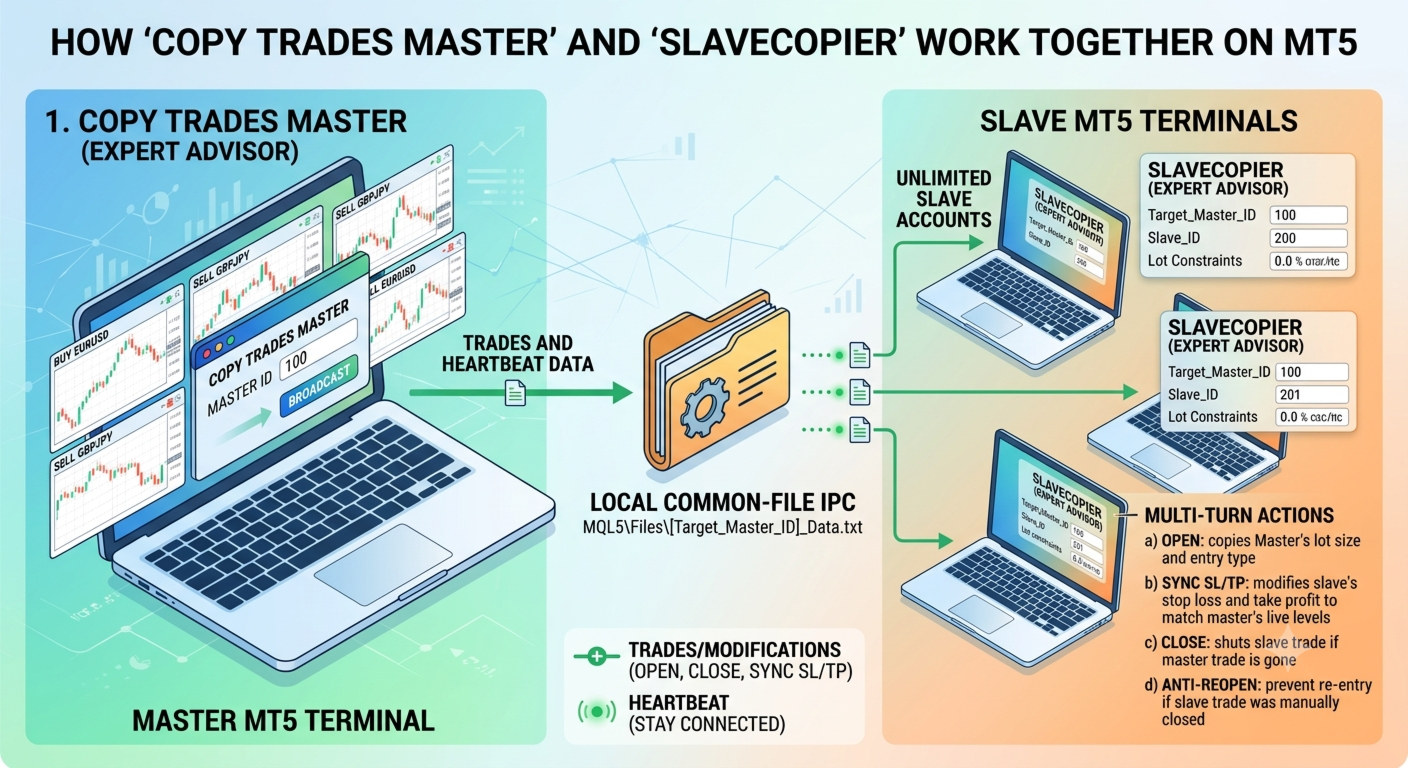
Overview Copy Trades Master is a high-performance local signal broadcaster for MetaTrader 5. It tracks active positions on your master account in real time and streams execution data directly to one or multiple SlaveCopier terminals running on the same PC or local network via ultra-fast local file IPC ( FILE_COMMON ).

https://www.mql5.com/en/market/product/189485

Key Features

  • Local Common-File IPC: Uses local file streaming ( MQL5\Files ) for near-zero latency execution without requiring external web servers or cloud APIs.

  • Multi-Slave Streaming: Broadcasts signal data to an unlimited number of slave accounts concurrently.

  • Heartbeat Verification: Emits continuous heartbeat timestamps every 200ms to guarantee slave receivers maintain an active connection.

  • Real-Time Track & Sync: Streamlines new order entries, dynamic Stop Loss and Take Profit modifications, and trade closures across all target instruments.

  • Assignable Master ID: Custom numerical ID support ( Master_ID ) to separate different master strategies running on the same machine.

Setup Instructions

  1. Master_ID: Assign a unique integer ID (e.g., 100 ) to represent this master instance.

  2. Update Interval: Set the broadcast frequency in milliseconds (default: 200ms ).

  3. Attach the EA to any active chart on your Master MT5 terminal and ensure Allow Algo Trading is enabled.

  4. Set the matching Target_Master_ID on all receiving SlaveCopier EAs.

Short Summary Version

  • High-Speed Signal Broadcaster: Streams live open positions, modifications (SL/TP), and trade exits to local slave terminals with minimal latency.

  • Configurable Master ID: Set a unique Master_ID so local slave receivers can target this specific master instance.

  • Built-in Heartbeat: Transmits live status signals to prevent slave execution when the master terminal is disconnected or offline.

  • Unlimited Slave Connectivity: Supports simultaneous broadcasting to an unlimited number of local MT5 slave accounts without performance degradation.

추천 제품
Title:   Smart Position Manager PRO - Advanced Risk & Position Manager Description: Smart Position Manager PRO is an all-in-one visual trade management and risk calculation tool designed for serious traders who prioritize iron discipline and strict risk management. Whether you are executing precise SMC or ICT setups on personal capital or managing large funded accounts on strict prop firms, this tool ensures you focus on counting percentages rather than emotional money swings. With a highly int
FREE
Copy your MT5 trades to accounts anywhere in the world with the   MetaToolsLab Master EA . Unlike local copiers that only work between terminals on the   same   PC or VPS, MetaToolsLab uses a secure cloud relay — so you can broadcast your trades to followers across   different computers, VPS providers, brokers, and continents , with   sub-second delivery   and   no broker passwords . Whether you're a signal provider, a multi-account trader, or an account manager, the Master EA installs in about
FREE
Trade assistant pro v8
Ahmed Mohammed Bakr Bakr
2 (1)
FREE FREE FREE Trade Assistant MT5 – Professional Trading & Risk Management Panel Trade Assistant MT5 is an advanced trading panel designed to help traders execute orders faster, safer, and more professionally . It simplifies manual trading by combining smart order management , precise risk control , and one-click execution , making it ideal for both beginners and advanced traders. This tool does not trade automatically . Instead, it empowers you with full control while applying professional-gra
FREE
Click Trading
Jawad Tauheed
5 (2)
One Click Trading – Auto TP SL Developer TraderLinkz Version 1.00 Category Utility What it does Adds missing TP and SL to your manual trades and pending orders Sets them once per ticket Lets you move TP and SL afterward Works on hedging and netting accounts Scans on every tick and reacts on trade events Why you want it You place faster entries You get consistent risk and exit targets You reduce fat finger errors You keep full manual control Quick start Attach the EA to any chart Keep TP and SL e
FREE
Spread Candle Clock Pro
Federico Ruben Vissio
5 (1)
Spread Candle Clock is a clock that displays the remaining time of the current candle along with the spread in real time directly on the chart. Features: Real-time candle countdown. Live spread (SP) display. Adjustable size. Customizable colors. Configurable position in all four corners. Compatible with all symbols and timeframes. Includes a button to minimize to a small panel.
FREE
no Trade operation, Robot Set auto SL to every manually Trade from a Phone Automatic Phone TradeManager Need just Set on 1 Symbol Auto BE Trigger is added that immediately sets a stop-loss for every () But does NOT calculate position size based on risk, allows the fixed  SL to   adjusted dynamically drag on Chart or Menu. It protects capital around the clock, reduces emotional mistakes, and ensures consistent risk management.
FREE
Equity monitor This is a simple means change informer. I wrote it for myself, maybe someone will need it... 1. Displays the change in funds for the day. Every day, when the terminal is first launched, it remembers the current funds and monitors changes throughout the day. 2. The first day of the month, well remembers the money and, within months, to monitor changes. 3. Well, it displays the profit of the open position. To work, you need to create 4 global variables: gvarEqityDay , gvarEq
FREE
Trade Mirror Follower
Nguyen Thanh Cong
5 (1)
Advanced Trade Mirror   is a powerful Forex tool designed for traders who need instant, seamless trade replication across multiple terminals on the same machine. With lightning-fast execution, it ensures zero lag in copying trades, maintaining precision and efficiency in high-speed trading environments. Get the Trade Mirror Master here:  https://www.mql5.com/en/market/product/133891 Specification: Master ID: Identity value of master terminal, please use a unique value to prevent duplicated mas
FREE
Introduction Welcome to the world of Forex trading, where every tick of the market can be influenced by news events. Introducing our expert advisor for MetaTrader, your ultimate tool for navigating the complexities of news trading. This innovative advisor is specifically designed to automate your trading strategy during key macroeconomic releases, ensuring you never miss an opportunity.  When important indicators are announced, volatility often spikes, creating potential for profit. Our expert
FREE
IMPORTANT NOTE: This is a professional Trade Management Utility and on-chart assistant. It is NOT an automated trading robot. It does not open trades on its own. The UltraFast Trade Manager MT5 is the ultimate execution and risk-management suite designed to give you absolute control over your manual and algorithmic trades. When managing multiple positions, calculating complex net break-even points, or constantly monitoring the economic calendar, hesitation can lead to costly mistakes. This utili
FREE
================================================================ MATRIX CONDITION MONITOR Live Trade Condition Panel for MetaTrader 5 Fully Automatic -- Works with ALL Matrix EAs ================================================================ NEVER MISS A TRADE SETUP AGAIN Matrix Condition Monitor is a free utility that attaches to any chart and automatically checks all 10 trade conditions in real time -- showing you exactly why a trade will or will not open, and alerting you the moment ever
FREE
Trade Mirror Master
Nguyen Thanh Cong
5 (1)
Advanced Trade Mirror   is a powerful Forex tool designed for traders who need instant, seamless trade replication across multiple terminals on the same machine. With lightning-fast execution, it ensures zero lag in copying trades, maintaining precision and efficiency in high-speed trading environments. Get the Trade Mirror Follower here:  https://www.mql5.com/en/market/product/133890 Specification: Master ID: Identity value of master terminal, please use a unique value to prevent duplicated mas
FREE
VR 컬러 레벨은 추세선, 직사각형, 텍스트 등의 요소를 사용하여 기술적 분석을 적용하는 사람들에게 편리한 도구입니다. 차트에 직접 텍스트를 추가하고 스크린샷을 찍는 것이 가능합니다. 설정, 세트 파일, 데모 버전, 지침, 문제 해결 등은 다음에서 얻을 수 있습니다. [블로그] 다음에서 리뷰를 읽거나 작성할 수 있습니다. [링크] 버전 [MetaTrader 4] 표시기 작업은 한 번의 클릭 으로 수행됩니다. 이렇게 하려면 선이 있는 버튼을 클릭하세요. 그러면 커서 아래에 추세선이 나타납니다. 그런 다음 커서를 움직여 선 위치 를 선택하고 다시 클릭하여 수정하면 됩니다. 표시기 의 특징은 스타일과 색상의 모든 변경 사항이 자동으로 저장되고 나중에 새로 생성된 모든 그래픽 개체에 적용된다는 것입니다. 이 지표에는 서로 다른 스타일의 추세선을 설정하기 위한 두 개의 독립 버튼, 서로 다른 스타일의 두 개의 독립 직사각형, 자체 스타일이 있는 하나의 텍스트 필드 및 스크린샷 생성용 버튼
FREE
Exp5 COPYLOT MASTER for MT5
Vladislav Andruschenko
4.42 (12)
Exp5 - COPYLOT MASTER는 MetaТrader 5 및 MetaTrader 4용 거래 복사기입니다. 모든 계정에서 Forex 거래를 복사합니다. 설치 이 Expert Advisor는 마스터 복사기입니다. 거래를 복사하려는 터미널에 Expert Advisor를 설치합니다. 텍스트 레이블 이름을 pathWrite로 지정하십시오(예: "COPY"). 거래를 복사하려는 터미널에 COPYLOT MASTER for MT5를 설치합니다. 그런 다음 복사하려는  MT4  터미널에 COPYLOT Client MT4를 설치합니다.  또는  MetaTrader 5용  Copylot 클라이언트 MT5 MT4용 COPYLOT MASTER를   다운로드할 수도 있습니다. COPYLOT - 전체 설명 및 매뉴얼 참고: 설정 목록은 설명 탭에서 찾을 수 있습니다. EA는 차트 1개로 설정해야 합니다! 기본적으로 저희 고문은 귀하의 계정에서 모든 포지션과 주문을 복사합니다! 주문은 활성화(포지션)
FREE
Copy your MT5 trades to accounts anywhere in the world with the   MetaToolsLab Slave EA . Unlike local copiers that only work between terminals on the   same   PC or VPS, MetaToolsLab uses a secure cloud relay — so you can broadcast your trades to followers across   different computers, VPS providers, brokers, and continents , with   sub-second delivery   and   no broker passwords . Whether you're a signal provider, a multi-account trader, or an account manager, the Slave EA installs in about a
FREE
GDS RiskLab TradeDesk Free Manual Trading Desk and Risk-Control Utility for MetaTrader 5 GDS RiskLab TradeDesk is a free chart-based utility for traders who want a cleaner manual trading workspace in MetaTrader 5. It is designed as a simple execution-support and risk-control panel. The goal is to keep the trading process more organized: review the chart, plan the trade, keep risk visible and execute manually with more structure. This tool does not generate buy or sell signals. It does not predic
FREE
Chart Pro Classic Dark v1.00 Chart Pro Classic Dark is a professional MT5 chart styling and customization tool designed to give your charts a clean, modern, and professional dark appearance. Key Features Dark Black Background — Applies a clean black background to the chart. ️ Candlestick Chart — Automatically configures the chart to use candlesticks. Bullish Candles — Green/Lime bullish candles. Bearish Candles — White bearish candles. Grid Removal — Hides the chart grid for a clean
FREE
목적: 마켓 워치 의 모든 심볼을 현재 시간 간격(TF)에 맞춰 default.tpl 템플릿으로 자동으로 열고, 현재 활성 차트를 제외한 모든 차트를 닫습니다. 수동 작업 없이 여러 종목을 빠르게 분석하기에 이상적입니다! 주요 기능: 자동화: 클릭 한 번으로 수십 개 차트를 열 수 있습니다. 안전성: 불필요한 차트를 닫고 현재 차트를 유지합니다. 유연성: 사용자 정의 default.tpl 템플릿 사용(사전 설정 필요!). 현재 시간 간격: 스크립트 실행 시 활성 차트의 TF와 동일하게 차트가 열립니다. 설치 방법: OpenAllSymbolsSafe.mq5 파일을 MetaTrader 5 터미널의 MQL5/Scripts 폴더에 복사합니다. 터미널을 재시작하거나 스크립트 목록을 새로 고칩니다(마우스 오른쪽 버튼 → 새로 고침 ). ️ 주의사항: default.tpl 이 MQL5/Profiles/Template/ 폴더에 있는지 확인하세요. 현재 차트를 제외
FREE
Quick Trade Panel Pro
Nicolas Olivier Menetrey
5 (1)
자동 랏 및 리스크 관리 원클릭 트레이딩 패널 Quick Trade Panel Pro 는 리스크를 완벽하게 통제하면서 빠르게 주문을 실행하고자 하는 트레이더를 위해 설계된 직관적인 트레이딩 패널입니다. 주요 기능 사용 가능한 마진 비율에 따른 자동 랏 크기 계산 포인트 단위로 설정 가능한 스탑로스, 모든 거래에 자동 적용 일관된 포지션 크기를 보장하기 위해 거래 시리즈 동안 랏 크기 고정 스마트 헤지 시스템 헤지 모드로 기존 거래와 반대 방향의 포지션 개설 가능 독립적인 헤지 비율 (50%, 100%, 200% 이상) 정밀한 컨트롤을 위한 방향별 거래 제한 자동 수익 보호 Auto Secure : 일정 수익 도달 시 스탑로스를 손익분기점으로 이동 Trailing Stop : 가격을 추적하여 수익을 보호하면서 승리 거래 유지 두 시스템을 함께 사용하여 최적의 보호 가능 현대적이고 심플하며 전문적인 인터페이스 실시간 표시: 최대 랏, 최종 랏, 헤지 랏 한도 도달 시 BUY/SE
FREE
GOM Trade Manager
Wannapach Chinnaprapa
GOM Trade Manager helps you execute trades the way you want it. Works on all instruments Forex, Commodities, & Crypto. It helps you with lot calculations, spread addition and balance calculations so you can just focus on actual trading. For full automatic planned management, stackable triggers and spread widening protection >> check out GOM Trade Manager Pro . ------------------------------------------NOTABLE FEATURES------------------------------------------ You set everything based on bid
FREE
Exact Time — detailed time on the seconds chart. The utility shows the opening time of the selected candle. This is necessary when working with seconds charts. For example, it can be used on a seconds chart built using the Seconds Chart utility. Inputs Base corner — the chart corner to which an object Is attached. X distance — the horizontal distance from the chart corner. Y distance — the vertical distance from the chart corner. Text font — font name Font size — font size Color — text color
FREE
AI Smart Risk Trade Manager is a professional trade-management utility panel for MetaTrader 5. It does not open trades on its own signal - instead it gives you a one-click, risk-based way to enter the market and then automatically manages every open position (yours or from any other EA) with breakeven, trailing and partial-close logic. Key features: One-click BUY / SELL panel buttons that size the position automatically from your chosen risk percent of account balance Automatic Stop Loss and Tak
FREE
Reversal Composite Candles
MetaQuotes Ltd.
3.69 (16)
The idea of the system is to indentify the reversal patterns using the calculation of the composite candle. The reversal patterns is similar to the "Hammer" and "Hanging Man" patterns in Japanese candlestick analysis. But it uses the composite candle instead the single candle and doesn't need the small body of the composite candle to confirm the reversal. Input parameters: Range - maximal number of bars, used in the calculation of the composite candle. Minimum - minimal size of the composite can
FREE
MT5 Trade Copier Master - Free Trade Broadcaster Require Slave EA: https://www.mql5.com/en/market/product/178686 This Master EA broadcasts trades but CANNOT copy them by itself. You MUST purchase and install the SyncTrade Copier Slave EA on a second MT5 terminal to copy trades. Without the Slave EA, this product does nothing useful on its own. Both MT5 terminals must be installed on the SAME computer for file sharing to work. They cannot be on different computers or VPS instances. What This Ma
FREE
Collective TP SL Manager is a MetaTrader 5 utility that manages a combined take-profit and stop-loss across many open positions on one symbol. Instead of setting TP/SL per order, it watches the net profit or loss of all (or filtered) positions and closes the basket when your target is reached. Features Basket-level targets: one collective take-profit and one collective stop-loss for the whole group of positions. Net P/L monitoring: continuously sums the profit/loss of all selected positions in
FREE
MT5용 NAS100 Auto SL 및 TP 메이커를 소개합니다: 메타트레이더 5에서 나스닥 100 시장을 탐색하는 트레이더에게 없어서는 안될 보조 도구인 NAS100 Auto SL 및 TP 메이커로 손절 및 테이크프로핏 설정을 다시는 놓치지 마세요. 이 도구는 손절 및 테이크프로핏 레벨을 자동으로 관리할 수 있는 원활한 솔루션을 찾는 분들을 위해 설계되었습니다. 주요 특징: 손쉬운 자동화: 스톱로스 및/또는 테이크프로핏 없이 나스닥 100 거래를 자동으로 모니터링합니다. 사용자가 구성한 설정에 따라 레벨을 동적으로 조정합니다. 다양한 주문 유형: 나스닥 100의 시장가 및 지정가 주문 모두와 호환됩니다. 메타트레이더 5에서 사용할 수 있는 다양한 주문 유형을 지원합니다. 맞춤형 구성: 사용자 친화적인 매개변수 설정으로 추적 기본 설정 및 손절/익절 수준을 사용자 지정할 수 있습니다. 유연한 범위: 실행되는 특정 NAS100 상품 또는 거래되는 모든 상품에 대해 손절 및 테이크프
FREE
Accounts Protector MT5
Vladimir Mametov
5 (5)
The Expert Advisor is designed to protect the account, fix profit (loss) and display current information about the account. Trading account protection is carried out by closing all open orders in the terminal and/or closing all charts. When running the Expert Advisor with default parameters, it will only display your account information and will be reduced in size. Next, you can set the conditions under which your trading account will be protected. Profit and loss limits can be set for daily pro
FREE
Trade Assistant JJC Academy
Jhonathan Alexis Jaramillo Cortez
JJC Academy Trade Assistant — 리스크 계산 및 포지션 관리 패널 더 이상 로트 사이즈를 수동으로 계산하지 마세요. 계산 실수로 드로다운을 초과하는 일도 이제 끝입니다. JJC Academy Trade Assistant는 제가 직접 개발하여 펀디드 계좌(funded accounts) 포트폴리오를 관리하는 데 실제로 사용하고 있는 트레이딩 패널입니다. 어떤 종목을 거래하든, 어떤 브로커를 사용하든, 어떤 프랍펌(prop firm)과 계약했든, 매 진입마다 설정한 리스크를 정확히 지킬 수 있도록 설계되었습니다. 실시간 리스크 계산기 **리스크 %**와 **손익비(R:R)**를 설정하면, 버튼을 누르기도 전에 로트 사이즈가 즉시 자동으로 계산됩니다. 리스크 계산 기준을 선택할 수 있습니다: 잔고(Balance) , 순자산(Equity) , 또는 계좌의 초기 잔고(Initial Balance) — 챌린지 계좌나 펀디드 계좌에 이상적입니다. 잔고는 변동하지만 드로다
FREE
Blodsalgo Analitycs
BLODSALGO LIMITED
5 (8)
Blodsalgo Analytics — 당신의 트레이딩을 해독하다. MetaTrader 5를 위한 무료 실시간 분석. Blodsalgo Analytics는 MetaTrader 5 터미널을 웹의 전문 분석 대시보드와 연결해 주는 무료 보조 유틸리티 입니다. 모든 체결, 모든 지표, 모든 미결제 포지션이 자동으로 동기화되어 각 계좌와 각 EA의 실제 성과를 확인할 수 있습니다. 모든 브로커를 한곳에서, 어떤 기기에서든 볼 수 있습니다. 설치 방법, 대시보드 주소, 모든 링크는 이 제품의 설치 및 링크 안내 댓글 에 정리되어 있습니다. MQL5 Market 지침상 제품 설명에는 외부 링크를 넣을 수 없어 관련 내용을 한곳에 모아 두었습니다. 이것은 매매용 EA가 아닙니다. 어떤 주문도 진입, 수정, 청산하지 않습니다. EA 옆에서 조용히 동작하는 읽기 전용 데이터 커넥터이며 매매에 전혀 개입하지 않습니다. BLODSALGO EA 보유자 전용입니다. 무료. 구독 없음. 숨은 비용 없음. 새
FREE
Friend of the trend
Anderson De Assis
Friend of the Trend: Your Trend Tracker Master the market with Friend of the Trend , the indicator that simplifies trend analysis and helps you identify the best moments to buy, sell, or wait. With an intuitive and visually striking design, Friend of the Trend analyzes price movements and delivers signals through a colorful histogram: Green Bars : Signal an uptrend, indicating buying opportunities. Red Bars : Alert to a downtrend, suggesting potential selling points. Orange Bars : Represent cons
FREE
이 제품의 구매자들이 또한 구매함
Trade Assistant MT5
Evgeniy Kravchenko
4.43 (216)
거래당 위험 계산, 라인을 사용한 손쉬운 신규 주문, 부분 청산 기능을 통한 주문 관리, 7가지 유형의 트레일링 스탑 및 기타 유용한 기능을 제공합니다. 추가 자료 및 지침 설치 지침   -   애플리케이션 지침   -   데모 계정용 애플리케이션 평가판 라인 기능       - 차트에 개시선, 손절매, 차익실현을 표시합니다. 이 기능을 사용하면 새로운 주문을 쉽게 하고 개봉 전에 추가 특성을 볼 수 있습니다. 위기 관리       -       위험 계산 기능은 설정된 위험과 손절매 주문의 크기를 고려하여 새 주문의 볼륨을 계산합니다. 이를 통해 손절매 크기를 설정하고 동시에 설정된 위험을 존중할 수 있습니다. 로트 계산 버튼 - 위험 계산을 활성화/비활성화합니다. 필요한 위험 값은 위험 필드에 0에서 100 사이의 백분율 또는 예금 통화로 설정됩니다. 설정 탭에서 위험 계산 옵션을 선택합니다. $ 통화, % 잔액, % 지분, % 자유 마진, % 사용자 정의, % AB 이전
Trade Manager EA에 오신 것을 환영합니다. 이 도구는 거래를 보다 직관적이고 정확하며 효율적으로 만들기 위해 설계된 궁극적인 리스크 관리 도구 입니다. 단순한 주문 실행 도구가 아닌, 원활한 거래 계획, 포지션 관리 및 리스크 제어를 위한 종합 솔루션입니다. 초보자부터 고급 트레이더, 빠른 실행이 필요한 스캘퍼에 이르기까지 Trade Manager EA는 외환, 지수, 상품, 암호화폐 등 다양한 시장에서 유연성을 제공합니다. Trade Manager EA를 사용하면 복잡한 계산은 이제 과거의 일이 됩니다. 시장을 분석하고 진입, 손절 및 익절 수준을 차트의 수평선으로 표시한 후 리스크를 설정하면, Trade Manager가 이상적인 포지션 크기를 즉시 계산하고 SL 및 TP 값을 실시간으로 표시합니다. 모든 거래가 간편하게 관리됩니다. 주요 기능: 포지션 크기 계산기 : 정의된 리스크에 따라 거래 크기를 즉시 결정합니다. 간단한 거래 계획 : 진입, 손절, 익절을 위한
Local Trade Copier EA MT5
Juvenille Emperor Limited
4.94 (149)
Local Trade Copier EA MT5는 동일한 Windows 컴퓨터 또는 Windows VPS에서 여러 MetaTrader 5 계정 간에 거래를 복사하고 관리할 수 있는 빠르고 유연한 거래 복사기입니다. 로컬 거래 동기화 기능과 함께 Receiver 측에서 로트 크기, 리스크 관리, 거래 필터링, 심볼 매핑, 거래 관리 및 계정 보호를 독립적으로 설정할 수 있습니다. Transmitter와 Receiver 터미널을 약 1분 안에 설정하고, 동일한 브로커 또는 서로 다른 브로커의 계정 간에 수동 거래 또는 EA 거래를 복사할 수 있습니다. 적절한 조건에서는 로컬 MetaTrader 터미널 간의 거래 정보가 0.5초 이내 에 동기화될 수 있습니다. 실제 체결 속도는 브로커 지연 시간, 네트워크 상태, 컴퓨터/VPS 성능 및 터미널 부하에 따라 달라집니다. 구매 전에 무료 데모를 사용해 보세요 MT5 데모 계정에서 Local Trade Copier EA MT5의 모든 기능을
Strategy Ledger Pro
Abdullah Uygar Tuna
5 (4)
이제 한국어로 이용할 수 있습니다. Strategy Ledger Pro 는 MetaTrader 5용 읽기 전용 계좌 분석 패널입니다. 계좌 성과를 전문가 어드바이저(EA), 전략, 심볼, 매직 넘버별로 나누어 각각이 실제로 얼마나 기여하는지 보여줍니다. 패널은 11개 언어를 지원합니다: English, Français, Deutsch, Español, Italiano, Português, Русский, Türkçe, 中文, 日本語, 한국어. 데모를 다운로드하기 전에. Market은 모든 유료 제품의 데모를 전략 테스터에서만 실행합니다. 이 패널은 사용자 자신의 계좌 거래를 분석하는데, 전략 테스터에는 읽을 계좌 기록이 없으므로 데모는 빈 패널로 열리고 그 사실을 표시합니다. 이는 데모 방식에 따른 것이며 제품의 제약이 아닙니다. 이 설명의 동영상에서 실계좌에서 작동하는 패널을 확인할 수 있습니다. 모든 기능을 설명한 자세한 매뉴얼 (영문)과 토론 및 공지를 위한 AureusAI
================================================================================ POC BREAKOUT - V20.72. Full Professional Grade Toolkit ================================================================================ POC Breakout is a full MetaTrader 5 trading dashboard for discretionary traders who want breakout signals, Point of Control (POC) context, volume profiles, order flow, market structure, news, alerts, and advanced trade planning in one professional workspace. Attached directly to you
TradePanel MT5
Alfiya Fazylova
4.88 (169)
Trade Panel은 다기능 거래 도우미입니다. 이 애플리케이션에는 50개 이상의 수동 거래 기능이 포함되어 있으며 대부분의 거래 작업을 자동화할 수 있습니다. 앱 사용 설명서 + 동영상 설명: https://www.mql5.com/en/blogs/post/772292 데모 계정용 앱 체험판: https://www.mql5.com/en/blogs/post/750865 앱 설치 방법: https://www.mql5.com/en/blogs/post/756239 시각 모드에서 앱 테스트 방법: https://www.mql5.com/en/blogs/post/770277 VPS MetaTrader에 앱 설치 방법: https://www.mql5.com/en/blogs/post/770190 거래. 한 번의 클릭으로 거래를 수행할 수 있습니다: 리스크 자동 계산과 함께 예약 주문 및 포지션 열기. 한 번의 클릭으로 여러 주문 및 포지션 열기. 주문 그리드 열기. 예약 주문 및 포지션을 그룹별로
Telegram to MT5 Multi-Channel Copier   는 Telegram 채널의 트레이딩 시그널을 MetaTrader 5로 자동 복사합니다. 봇도, 브라우저 확장도, 수동 복사도 필요 없습니다. Telegram에 시그널이 도착하면 EA가 몇 초 안에 터미널에서 주문을 실행합니다. 그리고 채널을 복사하기 전에, 내장 백테스터가 그 채널이 내 계좌에서 어떤 결과를 냈을지 보여줍니다. 제품은 두 가지 구성 요소로 이루어집니다: Telegram 채널을 수신하는 Windows 애플리케이션과, MT5 터미널에서 시그널을 실행하는 본 EA입니다. MT4 버전도 제공됩니다   여기 . 설정 가이드와 앱 다운로드:   https://www.mql5.com/en/blogs/post/768988 현재 가격은 향후 인상될 예정입니다. 작동 방식 앱은 여러분 자신의 Telegram 계정으로 연결되므로, 팔로우하는 모든 채널, 그룹, 토픽, 봇(비공개 및 VIP 포함)을 볼 수 있습니다. 시
내 거래 규칙에 맞춰 Telegram 신호 복사 Telegram to MT5 Signal Trader 는 공개 및 비공개 Telegram 채널과 그룹의 텍스트 기반 거래 신호를 MetaTrader 5로 자동 복사합니다. 하나의 데스크톱 앱에서 여러 신호 제공자와 MT5 계좌를 관리하고, 제공자마다 위험 관리 및 거래 설정을 개별적으로 지정 할 수 있습니다. 신호 복사에는 Telegram 봇이나 API 설정이 필요하지 않습니다. 전화번호 또는 QR 코드로 본인의 Telegram 계정에 로그인한 후, 이미 가입한 채널이나 그룹을 선택하면 됩니다. 봇을 만들거나 Telegram API 토큰, API ID 또는 API 해시를 입력할 필요가 없습니다. 포지션 크기를 선택하고, 여러 익절 목표에 청산 물량을 배분하며, 손익분기점 이동과 트레일링 스톱을 자동화하세요. 제공자의 신호를 따르면서도 실제 거래 방식은 직접 설정할 수 있습니다. 이 제품은 MT5 Expert Advisor와 필수 Win
Farmed Hedge Yield Farming | All Markets (Manual - Hybrid - Semi/Automated EA) VERIFIED TRADING RESULTS - Farmed Hedge Yield Axi Copy:  https://www.mql5.com/en/signals/2356376 - Farmed Hedge Yield Exn Copy:   https://www.mql5.com/en/signals/2356404 - Farmed Hedge Yield V Copy:  https://www.mql5.com/en/signals/2357156 IMPORTANT NOTICE: FarmedHedge is a MANUAL-FOCUSED TRADING UTILITY ,not a fully automated EA. Results shown on this Signal include manual trades and overall strategic management.
Premium Trade Manager - 코치가 내장된 트레이딩 패널 Premium Trade Manager 는 차트 안에 트레이딩 코치를 심어놓은 도구입니다. 주문을 확정하기 전에, AI 트레이딩 코치 Max가 설정된 거래를 직접 읽고 명확한 판단을 내려줍니다. 스톱이 규율 있는 접근 방식에 맞는지, 리스크 크기가 합리적인지, 고영향 뉴스 이벤트가 몇 분 후에 있는지, 프롭 펌 한도에 근접했는지. 그 아래에는 완전한 실행 엔진이 있습니다. 원클릭 리스크 기반 진입, 차트에서 드래그로 세우고 거래가 진행되는 동안에도 계속 움직일 수 있는 플랜, 최대 4단계 분할 익절, 7가지 트레일링 방식, 실시간 프롭 펌 컴플라이언스, 뉴스 가드, 그리고 자체 비용을 평가하는 스프레드까지. 결정은 당신이 내립니다. Max가 두 번째 시선으로 확인합니다. 패널이 그 이후의 모든 것을 처리합니다. 구매 전에 직접 체험해 보세요. 브라우저에서 라이브 패널을 직접 클릭해볼 수 있습니다. 구매 전에 실제
파워 캔들 전략 스캐너 - 자체 최적화 다중 종목 설정 찾기 도구 파워 캔들 전략 스캐너는 마켓 워치에 등록된 모든 종목에 대해 파워 캔들 지표와 동일한 자체 최적화 엔진을 동시에 실행합니다. 하나의 패널에서 현재 통계적으로 거래 가능한 종목, 각 종목별 최적의 전략, 최적의 손절매/익절 조합을 알려주며, 새로운 신호가 발생하면 즉시 알림을 전송합니다. 이 도구는 Stein Investments 에코시스템의 일부입니다. 18개 이상의 도구와 함께 당신의 1대1 AI 트레이딩 멘토 Max.  항상 대기 중, 모든 인디케이터를 깊이 있게 이해, 무언가를 차근차근 생각해보고 싶은 순간에 도움을 줍니다.  https://stein.investments 에서 만나보세요 완벽한 시장 모니터링. 종목당 3,000건 이상의 자동 최적화. 2가지 알림 유형. 한 번의 클릭으로 차트를 전환하고 바로 거래하세요. 이 도구가 필요한 이유 대부분의 다중 종목 스캐너는 가격 변동만 보여줍니다. 티커별
Exp COPYLOT CLIENT for MT5
Vladislav Andruschenko
3.97 (35)
MetaTrader 5용 전문 트레이드 복사기 MetaTrader 용 빠르고 전문적이며 신뢰할 수 있는 트레이드 복사기 입니다. COPYLOT 은 MT4와 MT5 터미널 간의 Forex 거래 복사를 지원하며, Hedge 및 Netting 계좌를 모두 지원합니다. COPYLOT MT5 버전 지원 구성: - MT5 Hedge → MT5 Hedge - MT5 Hedge → MT5 Netting - MT5 Netting → MT5 Hedge - MT5 Netting → MT5 Netting - MT4 → MT5 Hedge - MT4 → MT5 Netting MT4 버전 전체 설명 + DEMO + PDF 구매 방법 설치 방법 로그 파일 확인 방법 테스트 및 최적화 방법 Expforex의 모든 제품 MT4 터미널로도 거래를 복사할 수 있습니다(MT4 → MT4, MT5 → MT4): COPYLOT CLIENT for MT4 COPYLOT은 2개, 3개, 심지어 10개의 터미널과 동시에 작동할
HINN MagicEntry Extra
ALGOFLOW OÜ
4.74 (19)
HINN MAGIC ENTRY – the ultimate tool for entry and position management! SIMPLE. FASTEST. INTUITIVE. MAX AUTOMATED. Place orders by selecting a level directly on the chart! full description   ::  demo-version  :: 60-sec-video-description Key features: - Market, limit, and pending orders - Automatic lot size calculation - Automatic spread and commission accounting - Unlimited partitial take-profits  - Breakeven and trailing stop-loss and take-profit  functions - Invalidation leves - Intuitive, a
구매 후 저에게 메시지를 보내주시면 전체 매뉴얼 키트 + AI 기능을 테스트할 수 있는 3일간의 OpenAI API 체험 + 추가 보너스 선물을 제공해 드립니다 현재 가격은 8월 재출시 업데이트를 위한 기간 한정 할인 가격입니다 — 가격이 인상되기 전에 지금 에디션을 확보하세요. 다음 가격: $340 이것은 시장에서 지금까지 사용해 보았거나 본 어떤 트레이딩 패널과도 완전히 다릅니다. 현재 리테일 시장에서 이용할 수 있는 가장 혁신적인 AI 기반 트레이딩 패널 중 하나입니다. AI를 차트에 직접 연결한다고 상상해 보세요   — AI 추천, 계좌 감사, AI 트레이딩 신호 수신 및 클릭 한 번으로 실행. Telegram을 통해 스마트폰에서   전체 트레이딩 계좌를 관리한다고 상상해 보세요   — AI와 채팅하고, 즉각적인 알림을 받고, 거래를 관리하며 어디서든 계좌를 보호할 수 있습니다. 여러   EA를 실행하면서   각 EA의 성과를 개별적으로 모니터링하고, 거래를 관리하거나 특정
MT5 Trading Deck
Manuel Michiels
5 (2)
One button. One trade. MT5 Trading Deck is a hotkey trading panel for MetaTrader 5 that turns the platform into a keyboard-driven execution cockpit. Stop loss, take profit and lot size are pre-calculated for every key; the moment you press, a market order is live on the broker. A complete technical user manual is attached in the product Comments section. It documents every input parameter, the full hotkey map, the recommended Stream Deck XL layout, and the advanced workflows for Pre-Limit orders
Signal TradingView to MT5 Pro Automator TradingView와 MetaTrader 5 간의 즉각적인 전문 실행 TradingView 알림과 MT5의 실제 실행을 연결하는 가장 강력한 커뮤니케이션 브리지로 거래 전략을 자동화하세요. 속도, 유연성 및 완벽한 위험 관리를 요구하는 트레이더를 위해 설계된 이 Expert Advisor는 모든 알림 메시지를 정확한 시장가 또는 지정가 주문으로 변환합니다. 강점 및 이점 범용 파싱 엔진(독점 기술): 모든 알림 형식에서 데이터를 자동으로 인식하고 추출할 수 있는 고급 기술입니다. 단일하고 엄격한 형식에 얽매일 필요가 없습니다. 시스템은 심볼, 액션, 가격, SL 및 TP를 자동으로 이해합니다. 실시간 실행: 지연 시간을 최소화하도록 최적화된 1초 미만의 초고속 폴링 기술. 신호 수신 후 몇 밀리초 내에 주문 실행이 이루어집니다. 기관 수준의 위험 관리: 다음 기준에 따른 자동적이고 정확한 로트(Lot) 크기 계
Grid Manual MT5
Alfiya Fazylova
4.73 (22)
"Grid Manual"은 주문 그리드 작업을 위한 거래 패널입니다. 이 유틸리티는 보편적이며 유연한 설정과 직관적인 인터페이스를 제공합니다. 그것은 손실을 평균화하는 방향뿐만 아니라 이익을 증가시키는 방향으로 주문 그리드와 함께 작동합니다. 거래자는 주문 그리드를 만들고 유지할 필요가 없으며 유틸리티에서 수행합니다. 거래자가 주문을 시작하는 것으로 충분하며 "Grid Manual"는 자동으로 그를 위한 주문 그리드를 생성하고 거래가 마감될 때까지 그와 동행할 것입니다. 전체 설명 및 데모 버전 여기 . 유틸리티의 주요 기능: 모바일 터미널을 포함하여 어떤 방식으로든 열린 주문과 함께 작동합니다. "제한" 및 "중지"의 두 가지 유형의 그리드와 함께 작동합니다. 고정 및 동적(ATR 표시기 기반)의 두 가지 유형의 그리드 간격 계산과 함께 작동합니다. 오픈 오더 그리드의 설정을 변경할 수 있습니다. 차트에서 각 주문 그리드의 손익분기점 수준을 표시합니다. 각 주문 그리드에 대한 이익
Trade Dashboard MT5
Fatemeh Ameri
4.94 (134)
Trade Dashboard simplifies how you open, manage, and control your trades, with built-in lot size calculation. It allows you to execute trades, manage risk, and control positions directly on the chart, with tools such as partial close, breakeven, and trailing stop. Designed to reduce manual work and help you stay focused on your trading decisions. A demo version is available for testing. Detailed explanations of features are provided within the MQL5 platform. Installation instructions are include

EasyInsight AIO MT5
Alain Verleyen
4.92 (12)
EASY Insight AIO – 스마트하고 손쉬운 트레이딩을 위한 올인원 솔루션 개요 외환, 금, 암호화폐, 지수, 심지어 주식까지 — 전 시장을 몇 초 만에, 수동 차트 확인이나 복잡한 설치, 인디케이터 설정 없이 스캔할 수 있다고 상상해 보세요. EASY Insight AIO 는 AI 기반 트레이딩을 위한 궁극의 플러그 앤 플레이(Plug & Play) 데이터 내보내기 도구입니다. 단 하나의 깔끔한 CSV 파일로 전체 시장 스냅샷을 제공하며, ChatGPT, Claude, Gemini, Perplexity 등 다양한 AI 플랫폼에서 즉시 분석할 수 있습니다. 창 전환, 복잡함, 차트 오버레이는 더 이상 필요 없습니다. 자동으로 내보내지는 순수하고 구조화된 데이터 인사이트만으로, 반복적인 차트 감시 대신 데이터 기반의 스마트한 의사결정에 집중할 수 있습니다. 왜 EASY Insight AIO인가요? 진정한 올인원 • 별도의 설정, 인디케이터 설치, 차트 오버레이가 필요 없습
EA Overfitter
Stephen J Martret
5 (1)
That backtest looks great. But will it still be making money tomorrow, next week, next month? EA Overfitter re-runs your EA on 100 price histories it has never seen. One score tells you if the edge is real. A backtest tells you what an EA did on one price history — the one that happened to occur. What you cannot tell from it is how much of that result was the strategy and how much was the particular path. EA Overfitter answers that. It builds up to 100 synthetic price histories your EA has n
Telegram To MT5 Ultra
Mirel Daniel Gheonu
5 (5)
Telegram To MT5 — 시그널 카피어 텔레그램 채널의 트레이딩 콜을 실제 MT5 주문으로 바꿔 드립니다 — 자동으로, 원하는 만큼의 계좌에서, 리스크와 규칙을 완전히 당신의 통제 아래 둡니다. Telegram To MT5는 이미 텔레그램에서 팔로우하고 있는 VIP / 시그널 채널을 당신의 MetaTrader 5 터미널에 연결합니다. 무료 동반 데스크톱 앱이 메시지를 읽고(봇을 차단하는 채널에서도 가능), 이 EA가 당신의 계좌에서 이를 실행합니다 — 당신만의 리스크 설정, 심볼 매핑, 익절(TP) 처리, 세션 및 뉴스 필터를 적용합니다. 이것은 블랙박스 전략이 아니라 시그널 카피어입니다. 어떤 채널을 신뢰할지, 각 거래의 수량과 관리 방식을 당신이 결정합니다. 단계별 설정 및 동반 앱 설치 가이드 작동 방식 [당신의 텔레그램 채널] -> [동반 데스크톱 앱] -> [MT5 + 이 EA] -> 주문 동반 데스크톱 앱(무료, 포함)은 당신의 텔레그램 계정으로 로그인하여 선택한
EA Slipstream
Stephen J Martret
5 (1)
Your backtest filled every order at the price it asked for. Your account does not. EA Slipstream measures what execution costs your EA, using your own fills, slippages and spreads to show you the true performance of your EA. Special launch price of $99 for this week only. Price rises to $149 from the 26h September (when market closes) A backtest prices every trade at the level the EA named. In live trading a pending order fills at whatever price is available when it triggers, a stop closes where
Dynamic Fibonacci Grid
Tsvetan Tsvetanov
5 (1)
MT5용 Dynamic Fibonacci Grid Dashboard 최신 버전을 소개합니다. 많은 새로운 기능이 추가된 이번 대시보드는 거래 경험을 완전히 변화시키며, 시장과 가격 움직임을 완전히 새로운 관점에서 볼 수 있게 합니다. 여러 시간대와 여러 심볼을 동시에 분석하여 새로운 가능성을 발견하세요. 수동 거래와 포지션 관리에 친화적인 사용자 인터페이스와 미리 정의된 자동 전략을 적용할 수 있는 확장된 기능을 제공합니다. 또한 DFG는 이제 전략 테스터(Strategy Tester)에서 트레이딩 시뮬레이터로 완벽하게 작동하며, 과거 데이터를 사용하여 다양한 거래 조건을 재현할 수 있습니다. 시각 모드에서 수동 거래를 연습하고, 고속 모드에서 자동 전략을 테스트할 수 있습니다. 주요 기능 • Dynamic Fibonacci Bands 개념을 기반으로 한 다중 시간대 및 다중 심볼 고급 기술 분석 실시간 시장 모니터링 대시보드를 통해 탁월한 효율성을 경험할 수 있습니다. M1,
Telegram to MT5 Coppy
Sergey Batudayev
5 (10)
Telegram에서 MT5로:   최고의 신호 복사 솔루션 DLL 없이도 Telegram 채널과 채팅에서 MetaTrader 5 플랫폼으로 거래 신호를 직접 복사하는 최신 도구인 Telegram to MT5를 사용하여 거래를 간소화하세요. 이 강력한 솔루션은 정밀한 신호 실행, 광범위한 사용자 정의 옵션을 제공하고 시간을 절약하며 효율성을 높여줍니다. [ Instructions and DEMO ] 주요 특징 직접 Telegram API 통합 전화번호와 보안 코드를 통해 인증하세요. 사용자 친화적인 EXE 브리지를 통해 채팅 ID를 쉽게 관리하세요. 여러 채널/채팅을 추가, 삭제, 새로 고침하여 동시에 신호를 복사합니다. 고급 필터를 사용한 신호 파싱 예외 단어(예: "보고서", "결과")가 포함된 원치 않는 신호를 건너뜁니다. 유연한 SL 및 TP 형식을 지원합니다: 가격, 핍 또는 포인트. 가격 대신 포인트를 지정하는 신호에 대한 진입 포인트를 자동으로 계산합니다. 주문 맞춤화 및
Trade copier MT5
Alfiya Fazylova
4.61 (56)
Trade Copier는 거래 계정 간의 거래를 복사하고 동기화하도록 설계된 전문 유틸리티입니다. 복사는 공급자의 계정/단말기에서 동일한 컴퓨터 또는 vps에 설치된 수신자의 계정/단말기로 발생합니다. 프로모션 - 이미 "Trade copier MT5"를 구매하셨다면, "Trade copier MT4"를 무료로 받으실 수 있습니다 (MT4 → MT5 및 MT4 ← MT5 복사용). 조건에 대한 자세한 정보를 원하시면, 개인 메시지를 통해 저희에게 문의해 주시기 바랍니다! 구매하기 전에 데모 계정에서 데모 버전을 테스트할 수 있습니다. 데모 버전 여기 . 전체 지침 여기 . 주요 기능 및 이점: 복사기는 "МТ5> МТ5", "МТ4> МТ5", "МТ5> МТ4" 복사를 지원합니다. 복사기는 데모 계정 > 실 계정, 실 계정 > 데모 계정, 데모 계정 > 데모 계정 및 실제 계정 > 실 계정 복사를 지원합니다. 복사기는 읽기 전용 암호가 적용된 투자자 계정에서 복사를 지원합니다. 하
Trade Indicator Assistant   is a powerful MT5 utility designed to turn indicators into automated trading systems. Its main feature is the ability to automatically detect an indicator’s   BUY and SELL signal buffers , without requiring you to know the buffer numbers, search through indicator settings, or modify the indicator source code. Bonus Indicator:   After purchasing Trade Indicator Assistant, contact me to receive   Trade Signal Pro   completely free as a bonus indicator. [Download Demo V
The News Filter MT5
Leolouiski Gan
4.78 (23)
이 제품은 뉴스 시간 동안 모든 전문가 어드바이저 및 수동 차트를 필터링하여 수동 거래 설정이나 다른 전문가 어드바이저가 입력한 거래가 파괴될 수 있는 급격한 가격 상승으로부터 걱정하지 않아도 됩니다. 이 제품은 또한 뉴스 발표 전에 열린 포지션과 대기 주문을 처리할 수 있는 완전한 주문 관리 시스템이 함께 제공됩니다.   The News Filter  를 구매하면 더 이상 내장 뉴스 필터에 의존할 필요가 없으며 이제부터 모든 전문가 어드바이저를 여기서 필터링할 수 있습니다. 뉴스 선택 뉴스 소스는 Forex Factory의 경제 캘린더에서 얻어집니다. USD, EUR, GBP, JPY, AUD, CAD, CHF, NZD 및 CNY와 같은 어떤 통화 기준으로 선택할 수 있습니다. Non-Farm (NFP), FOMC, CPI 등과 같은 키워드 식별을 기준으로 선택할 수도 있습니다. 저, 중, 고 영향을 가지는 뉴스를 필터링할 수 있도록 선택할 수 있습니다. 차트와 관련된 뉴스만 선
Local Trade Copier EA 는 외부 소스에서 거래 신호를 실행해야 하거나 MAM 또는 PAMM 계정 없이 동시에 여러 계정을 관리해야 하는 개인 거래자 또는 계정 관리자를 위한 솔루션입니다. 최대 8개의 마스터 계정에서 무제한 슬레이브 계정으로 복사합니다. [ 설치 가이드 | 업데이트 가이드 | 문제 해결 | 자주하는 질문 | 모든 제품 ] 100% 자체 호스팅 설치 및 사용이 간편함 설치 프로그램, 구성 파일, 서버, 메모리 파이프 또는 DLL이 사용되지 않음 EA를 영원히 사용하기 위한 1000번의 활성화 로컬 실행, 네트워크 대기 시간 없음 필요한 모든 기능을 구현합니다. 최대 8개의 마스터 계정 및 무제한 슬레이브 계정 모든 브로커 및 DD/NDD/ECN/STP 실행과 함께 작동 다른 계정 통화를 사용하는 계정에서 작동 라이브 계정과 데모 계정 간에 구분 없이 작동 마스터 및 슬레이브 계정에서 기호 이름의 접미사 지원 매직 넘버 및 주문 댓글로 필터링 다른 거래
수동 매매를 위한 전문가용 트레이딩 패널로, 정밀한 진입부터 계좌 보호까지 매매의 전 과정을 차트 위 하나의 창에 담았습니다. 정해진 리스크에 정확히 맞춰 모든 포지션의 거래량을 산정하고, RR Tool로 차트에 직접 라인을 그려 거래를 설계하며, Market 주문과 예약 주문은 물론 Grid와 OCO까지 사용할 수 있습니다. 포지션 관리는 패널이 대신 처리합니다. 최대 다섯 단계 부분 청산, 여섯 가지 트레일링 스탑, 브레이크이븐, Virtual SL/TP를 지원합니다. 일간·주간·월간 한도가 예치금을 지키며, 기준을 넘기는 즉시 자동으로 발동됩니다. 가이드와 무료 Live 데모 무료 Live 데모 버전은 여기에서 이용할 수 있습니다 ( Free Live Demo ). 제품 사용 가이드는 여기에서 확인할 수 있습니다 ( User Manual ). NT Trade Manager는 트레이더의 모든 작업 흐름을 차트 위 작고 간결한 패널 하나에 모아, 터미널 창을 오갈 필요도, 진입할
Anchor Trade Manager
Kalinskie Gilliam
5 (9)
Your EAs cannot see each other, but Anchor can. Anchor gives you one place to coordinate your EAs, manage risk, and decide when trading is allowed. It works alongside the trading bots you already use without any changes to them. The Problem One EA opens a trade. Then another starts trading. The next thing you know, you wake up to multiple grids built across your account. Each EA may be doing exactly what it was designed to do, but together they can place far more risk on your account than you in
제작자의 제품 더 보기
Overview This Expert Advisor acts as a slave receiver designed to work seamlessly alongside the Copy Trades Master application. It reads broadcasted master signals in real time and automatically mirrors trade operations on the local slave account. https://www.mql5.com/en/market/product/189493 Key Features: Unlimited Slave Accounts: Broadcast signals from a single master to as many slave terminals as you need with no performance limit. Flexible Lot Management: Customize trade sizing using a lot m
FREE
Companion EA v.5.7: Your Ultimate Trading Command Center Companion EA v.5.7 is designed primarily as a high-performance Trading Assistant (Semi-Automated) . While it includes a fully capable auto-trading engine, its core purpose is to empower manual traders with advanced execution tools, dynamic order management, and on-chart controls that MetaTrader 5 lacks by default. Primary Utility: The Professional Assistant The EA serves as a "Companion" to your manual analysis, taking over the tedious a
필터:
리뷰 없음
리뷰 답변

















