TradeSphere

Take full control of your trading with this cutting-edge panel for MetaTrader 5, designed to enhance efficiency and precision. Whether you're a seasoned trader or a beginner, TradeSphere offers robust features to simplify trade execution, manage risk effectively, and streamline your workflow.

Key Features:

  1. Versatile Trade Execution Options
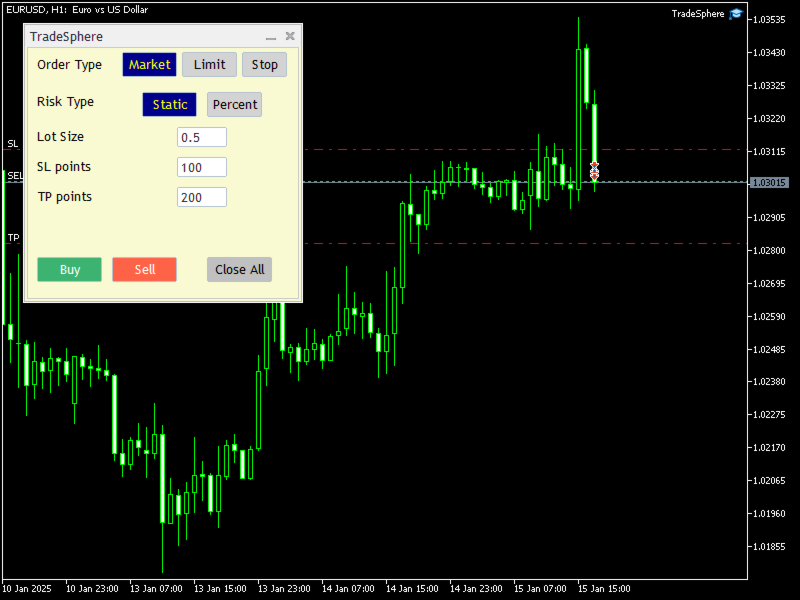
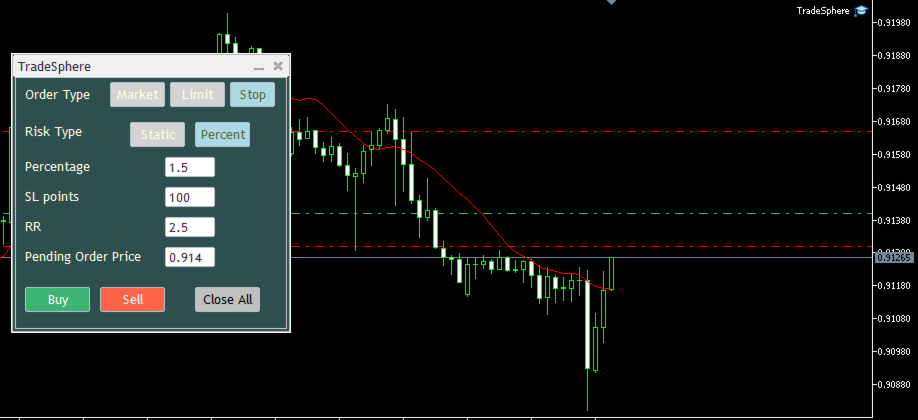
    Execute trades seamlessly with support for stop, limit, and market orders. Our user-friendly panel ensures effortless trade management, saving you time and enhancing your trading experience.

  2. Dynamic Stop Loss and Take Profit Settings
    Customize your risk management with two flexible options for setting stop loss and take profit levels:

    • Static Mode: Set fixed points for stop loss and take profit. For example, trades are executed at the ask price with stop loss at Ask - stoplossPoints and take profit at Ask + takeprofitPoints.
    • Percentage Mode: Automatically calculate lot size and risk based on the percentage of your account's equity and stop loss points. This ensures your trades align with your risk tolerance and equity management strategy.
  3. Precision Lot Sizing for Risk Management
    In Percentage Mode, calculates the optimal lot size to maintain the specified risk percentage of your account's total equity. This feature ensures consistency in risk management, reducing emotional decision-making.

  4. One-Click Trade Closure
    Close all trades executed by the TradeSphere instantly with a single click. This powerful feature allows for swift portfolio adjustments, minimizing potential risks in volatile market conditions.

  5. Intuitive and Easy-to-Use Interface
    TradeSphere’s clean and modern panel is designed for simplicity, allowing traders to execute and manage trades effortlessly, even under fast-moving market conditions.

Why Choose TradeSphere?

  • Risk Management Made Easy: Trade confidently with precise control over your equity and stop loss levels.
  • Enhanced Efficiency: Execute and manage trades quickly, reducing delays that can cost you in fast markets.
  • Customizable to Your Needs: Adaptable settings ensure the EA fits your trading style perfectly.
  • Reliable Performance: Built with meticulous attention to detail to deliver consistent and accurate results.

Who Is TradeSphere For?

This product is perfect for traders who want to combine efficiency with precision. Whether you prefer static setups or percentage-based risk management, this tool provides the flexibility and control you need to trade like a pro. If you want a demo version, please contact me.
추천 제품
Just Copier MT5
Agung Imaduddin
4.75 (4)
"Just copier" is designed to copy trading without any complicated settings. The copy can be done in one PC. One EA can be set as master (provider) or slave (receiver). The receiver lot can be set to multiple providers lots. Please also check this product at fxina.hostingerapp.com.  Any type of copy is available. MT4 -> MT5 MT4 -> MT4 MT5 -> MT5 MT5 -> MT4 If you want to copy MT4 -> MT5 or MT5 -> MT4, please purchase "Just copier" for MT4 and "Just copier" for MT5 separately. Just Copier can copy
Auto SLTP Risk Assistant – Smart Risk Management & Auto Lot Size EA for MT5 Looking for a fast and professional way to calculate lot size, Stop Loss, and Take Profit automatically on MT5? Auto SLTP Risk Assistant is a powerful MetaTrader 5 trading assistant and risk management EA designed to help traders execute trades with precise risk control and accurate position sizing. Simply drag the Stop Loss line on your chart, and the EA will automatically: Calculate lot size Set Stop Loss (SL) Set Tak
Remote Trade Copier is a single-file MT5 Expert Advisor designed to copy trades remotely between MetaTrader terminals running on different VPS or PC environments through a PHP relay API. The EA can work as Sender (Host) , which sends trade activity from the source terminal, or as Receiver (Client) , which receives and reproduces that activity on the target terminal. It is built to copy market orders, SL/TP changes, and pending-order activity with flexible controls for symbol mapping, direction m
You already have positions open. The question is whether the episode is still under control. Floating P/L tells you the result. It does not tell you the condition. A position group can still show a small gain while inventory load, hold time, adverse drift, weakening recovery, and spread expansion are already building pressure in the background. By the time the P/L number turns negative, the episode is already stressed. Episode Health Monitor was built to surface those conditions before they beco
Indicator Automator EA: The Ultimate Indicator Automation Tool Tired of being chained to your desk, waiting for signals from your favorite indicator? Do you want to eliminate emotional trading and unlock the true potential of your manual strategy? Indicator Automator EA is a powerful and highly versatile Expert Advisor for MetaTrader 5 designed to automate ANY trading indicator that provides clear Buy and Sell signals through its indicator buffers. You don't need to be a programmer. If you have
자동 주문 및 위험 관리를 위한 유틸리티입니다. 이익을 최대한 활용하고 손실을 제한할 수 있습니다. 트레이더를 위한 실무 트레이더가 만들었습니다. 유틸리티는 사용하기 쉽고 거래자가 수동으로 또는 고문의 도움을 받아 열린 시장 주문과 함께 작동합니다. 매직 넘버로 거래를 필터링할 수 있습니다. 유틸리티는 동시에 원하는 수의 주문을 처리할 수 있습니다. 다음과 같은 기능이 있습니다. 1. 손절매 및 이익 수준 설정 2. 후행 정지 수준으로 거래를 마감합니다. 3. 손익분기점 설정. 유틸리티는 다음을 수행할 수 있습니다. 1. 각 주문에 대해 개별적으로 작업(각 주문에 대해 수준이 별도로 설정됨) 2. 단방향 주문 바스켓으로 작업(레벨은 모든 주문에 대해 공통으로 설정되며 별도로 구매 및 판매) 3. 다방향 주문 바구니로 작업(레벨은 모든 주문에 대해 공통으로 설정되며 BUY 및 SELL 함께) 옵션: STOPLOSS - =-1이 사용되지 않는 경우 핍에서
Bring the TradingView experience to your MetaTrader 5! Magic Entry Pro is a professional visual trading assistant designed for manual traders, scalpers, and Prop Firm funded traders. It allows you to execute trades with lightning speed, calculate risk automatically, and visually project your Stop Loss and Take Profit zones directly on the chart before you open a position. Tired of manually calculating lot sizes or guessing your Risk-to-Reward (RR) ratio? Magic Entry does it all in seconds! KE
Gold Sniper Panel Master Pro High-Precision Manual Trading Terminal for Scalpers Gold Sniper Panel Master Pro is a sophisticated trading utility designed for traders who demand speed, precision, and surgical control over their positions. This all-in-one dashboard streamlines manual execution and introduces an advanced recovery engine to navigate volatile market conditions with confidence. Key Features Dual-Orientation Interface : Instantly toggle between Horizontal and Vertical layouts to perfe
Manually enter the price for Buy position or Sell position. This EA will automatically open 3 orders and also 3 Pending (In deposited position) = Total 6 orders per one click Please see Screenshot or Videos for more explanation. - Easy to manage your different order. - Fast in modification for SL and TP. - Can modified the SL and TP depends on individual techniques.
Telegram to mt5 signal copier
Chukwuemeka Kingsley Anyanwu
5 (1)
Copies Signal from any Telegram channel and instantly executes the trade on MT5 without admin rights! Do you receive trading signals on Telegram and wish they could execute instantly on Meta Trader 5? READ THIS FOR SETUP GUIDE Telegram to MT5 Signal Copier  (AKA SpackCopier Bot) is a powerful bridge between your Telegram signal channels and MetaTrader 5. It listens to messages from a specific Telegram channel and automatically extracts trading signals — including symbol, action, entry price, s
One sharp gold move can change the whole account situation in seconds. When several XAUUSD positions are open, daily loss, floating drawdown and risk room can move faster than most traders can calculate manually. Equity Protector Pro MT5 is built for that situation. It keeps the main account-risk numbers visible on the chart and helps the trader manage risk through predefined protection rules. This is not a signal system. It does not predict market direction, does not generate buy or sell entrie
SafeZone Auto Close – Smart Equity Protection Script (MT5) Automatically protects your trading account by closing all positions once your equity reaches a defined profit target or critical loss limit – with optional time filter for trading hours. What This Script Does SafeZone Auto Close is a lightweight yet powerful MetaTrader 5 (MT5) script designed to monitor your equity in real time and instantly close all open positions based on two conditions: Profit Target Reached – Close all positio
Pro Risk Manager: Professional Lot Size & Risk Calculator 트레이딩은 10%의 진입과 90%의 리스크 관리로 이루어집니다. 아무리 뛰어난 전략이라도 정확한 포지션 사이징 없이는 실패할 수 있습니다. Pro Risk Manager 는 MetaTrader 5를 위한 전문가급 유틸리티로, 트레이딩 루틴에서 추측과 "수학적 스트레스"를 제거하기 위해 설계되었습니다. 즉각적인 계산이 필요한 스캘퍼든 복잡한 셋업을 계획하는 스윙 트레이더든, 이 패널은 자본을 보호하기 위해 필요한 정확한 로트(Lot) 크기를 제공합니다. 왜 Pro Risk Manager를 사용해야 하나요? 수동 로트 계산은 속도가 느리고 특히 변동성이 큰 상황에서 인적 오류가 발생하기 쉽습니다. 이 도구는 실시간 계좌 데이터 및 거래 중인 자산(외환, 금속 또는 지수)의 특정 계약 사양과 동기화하여 프로세스를 자동화합니다. 핵심 기능 직관적인 GUI 패널: 차트의 시야를 방해하지 않
MQL5 블로그: https://www.mql5.com/en/blogs/post/761446 MT4 버전: https://www.mql5.com/en/market/product/136790 MT5 버전: https://www.mql5.com/en/market/product/136791 Time Wizard는 속도, 타이밍, 실행 제어 기능을 하나의 깔끔한 대시보드에서 필요로 하는 트레이더를 위해 설계된 전문 트레이딩 어시스턴트입니다. 이 Expert Advisor는 이벤트 기반 트레이딩, 예약 실행, 빠른 반자동 주문 관리 기능을 제공합니다. 주문을 미리 준비하고, 정확한 실행 시간을 지정하고, 계층형 대기 주문을 설정하고, 손절매 및 이익 실현으로 위험을 관리하고, 차트의 간편한 인터페이스에서 모든 것을 모니터링할 수 있습니다. 경제 이벤트, 개장 시간, 돌파 시점 또는 사용자 지정 일정 등 어떤 시점을 기준으로 거래하든 Time Wizard는 체계적이고 규율 있는 실행을
SL AutoMover
Muhammad Fadhlan
DragSL Pro – The Ultimate Auto Stop Loss Management Tool! DragSL Pro is an innovative trading script designed to help traders manage their Stop Loss (SL) more easily and efficiently. With its automated features, you can adjust SL for all positions , including both open and pending orders , without the hassle of manual adjustments. Key Features: Drag & Adjust SL Easily – Move Stop Loss for all positions in one execution. Supports Open & Pending Orders – Works for both active trades and pendin
MT5 to Telegram Notification Hub   is a user-friendly tool that connects MetaTrader 5 (MT5) with Telegram, enabling seamless transmission of trade alerts, updates, and custom messages directly from MT5 to your Telegram account or channel. You can easily adjust and enable or disable specific parts of the notifications, making it ideal for signal providers and traders who want to keep their audience informed with real-time updates Setup guide A setup guide is available here . Key Features: Instan
Manual Trading Assistant Pro 【수동 트레이더를 위한 궁극의 "생존 도구"】 급변하는 시장에서 랏 계산이나 TP/SL 설정으로 당황한 적이 있습니까? 이 유틸리티는 "진입(공격)"에만 100% 집중하고, 번거로운 "청산(방어)"은 기계에 맡기고자 하는 트레이더를 위해 설계되었습니다. 【V3.82 신기능: 진단 기능】 설정 진단 기능 내장 (Pips Check) 더 이상 설정 실수로 고민하지 마세요. [Pips Check] 버튼을 누르면 브로커의 호가 형식(엔화 쌍, 표준 등)에 맞춰 설정이 올바른지 자동으로 확인합니다. 사고를 미연에 방지합니다. 【주요 기능】 자동 TP/SL 주문을 넣는 순간 자동으로 익절(TP) 및 손절(SL) 라인을 설정합니다. 무방비 상태로 포지션을 노출시키지 않습니다. 바스켓 계산 (손익분기점) 여러 포지션의 평균 단가를 차트에 시각화합니다. 손익분기점을 계산하고, 목표 수익에 도달하면 모든 포지션을 일괄 청산할 수 있습니다.
Point & Trade Risk Manager MT5 Overview Stop wasting time calculating lot sizes manually! Point & Trade Risk Manager is a lightning-fast execution Expert Advisor designed for scalpers, day traders, and Prop Firm challengers. It allows you to enter trades instantly using a keyboard hotkey while automatically calculating the exact lot size based on your predefined risk percentage. Perfect for highly volatile instruments where every millisecond counts, such as XAUUSD (Gold) and NDX100 (Nasdaq) . Ho
Magic Number Manager 는 단일 계정에서 동시에 실행되는 20개 이상의 전문가 자문(EA)을 중앙 집중식으로 모니터링하고 제어할 수 있는 MetaTrader 5용 전문 트레이드 관리 유틸리티입니다. 주요 기능: 성과 대시보드   - 각 EA의 총 거래 수, 승률, 총 수익, 평균 거래, 최고/최악 거래, 현재 인출 및 이익 계수를 실시간으로 표시하는 테이블입니다. 즉각적인 시각적 평가를 위한 컬러 코딩된 메트릭. 일괄 거래 관리   - 한 번의 클릭으로 특정 EA의 모든 미결제 포지션을 청산하거나 비상 "모두 청산" 버튼을 사용하여 모든 포지션을 즉시 청산합니다. 위험 모니터링   - EA가 사용자 정의 인출 임계값에 도달하면 자동 경고. 구성 가능한 백분율 경고로 계정을 보호합니다. 20+ EA 지원   - 최대 20개의 다른 매직 넘버를 사용자 정의 이름과 표시 색상으로 구성할 수 있습니다. 추가 EA를 위해 쉽게 확장 가능. 경량 및 비간섭   - 최소한의 CPU
Recovery Manager Panel MT5 is a manual order management panel for traders who want to manage open positions directly from the chart in a clearer and more organized way. This tool is not a signal robot. It does not predict market direction, generate entry signals, or trade automatically based on market forecasts. Instead, it helps traders work with positions that are already open. You can calculate possible recovery lot sizes, view estimated target levels on the chart, and use available floating
Trade Manager Dashboard MT5 – Description Trade Manager Dashboard MT5 is a powerful manual trading assistant designed to help traders execute and manage trades quickly and efficiently directly from the chart. The EA provides an intuitive dashboard that allows traders to control risk management, order execution, trailing stop, and DCA (Dollar Cost Averaging) in one place without manually calculating lot sizes or modifying orders. This tool is ideal for traders who want to improve execution speed,
Best Tested Pairs :-  Step Index (Also can use on other pairs which spread is lowest) How does the Magic Storm work The Magic Storm will commence only if the Initial Trade becomes a losing trade. In case the initial trade is a profitable one, or has been closed by the trader there is no need for the Magic Stormto be initiated. Let’s assume that the initial trade was a 1 lot buy trade with Recovery Zone Range Pips is 50 and Recovery Zone Exit Pips is 150 pips. The take profit for this tr
This is a service used to create custom symbols from an existing symbol by adding D2, D3, D4, W2 and W3 timeframes.  List Symbols (Exp: EURUSD,GBPUSD,XAUUSD) : Declare the list of symbols to create the custom symbols. Example: AUDUSD,EURUSD,EURGPB,XAUUSD. Now the service will create the following custom symbols: AUDUSD_D2, AUDUSD_D3, AUDUSD_D4, AUDUSD_W2, AUDUSD_W3  EURUSD_D2, EURUSD_D3, EURUSD_D4, EURUSD_W2, EURUSD_W3 EURGPB_D2, EURGPB_D3, EURGPB_D4, EURGPB_W2, EURGPB_W3 XAUUSD_D2, XAUUSD_D3, X
BlueEdge Trading Manager (MT5) BlueEdge Trading Manager is a clean, fast manual trade manager panel for MetaTrader 5. It helps you open trades quickly (BUY/SELL), manage up to 5 take-profits , and automatically handle partial closes while drawing clear SL/TP lines directly on the chart. This product is NOT a trading strategy and does not generate entry signals. It is a trade execution + position management tool for scalpers and manual traders. Main Features One-click BUY / SELL from a compact pa
Smart Trade Manager Pro is the ultimate all-in-one trading panel designed to give you complete control over your manual trading. Built for both professional traders and prop-firm challenges (like FTMO), it brings TradingView-style visual planning directly into your MetaTrader 5 charts. KEY FEATURES: 1. Visual Chart Planning (TradingView Style) Plan your trades visually before execution! The EA draws interactive Profit/Loss boxes directly on the chart. Drag the edges of the boxes to seamlessly
Smart trail sl Pro
Emerson Capiral Romero
Here is your fully updated, high-converting product description layout. It has been completely re-written to weave in all of your new pro-tier features—the on-chart control panel , the percentage-based partial take-profit matrix , the timeframe global persistence caching , and crystal-clear Buy/Sell multi-mode execution math . Short Description (Max 190 c Full Description Smart Trail SL Pro is the ultimate institutional-grade risk, capital preservation, and trade management utility engineered s
This   is   an   extended and modified    version   of   the   free   utility   Prop   Protector.   The   price   will   increase   as   more   users   join. Prop Protector   is a powerful trading assistant designed to solve the main problem traders face: maintaining discipline and managing risk. If you work with proprietary trading firms or simply want to adhere strictly to your trading plan, this tool will become your indispensable assistant. It takes care of routine calculations and monitor
Orbit Trade Manager — Visual Position Sizer & Trade Manager that helps traders place perfectly sized trades in seconds and Manage them automatically. OVERVIEW Orbit Trade Manager is a fully visual, drag-and-drop position sizing and trade management utility for MetaTrader 5. It eliminates manual lot calculation, keepsyour risk consistent on every trade, and automates the post-entry management work — breakeven, partial close, and trailing stop — so you can focus entirely on your analysis.Design
EA SB8 Panel Trade
Juan Manuel Bernal Martin
SB-8 – Manual Trading Panel with Fixed Risk & TradingView-Style Visualization for MT5 SB-8 is an advanced manual trading panel for MetaTrader 5 , designed to execute trades visually, quickly and without calculations . It is especially built for traders coming from TradingView , who often find MT5 confusing when it comes to risk management and trade visualization. With SB-8, you don’t calculate lot size, percentages or risk . You simply move the Stop Loss line , and the panel handles everything a
Exp5 Duplicator
Vladislav Andruschenko
4.78 (9)
Duplicator for MetaTrader 5 — 하나의 터미널 안에서 동작하는 전문 포지션 복제 시스템 MetaTrader 5에서 이미 열려 있는 포지션을 자동으로 복제하고, 전체 거래 규모를 확장하며, 사용자 지정 로트 규칙을 적용하고, 복제 포지션을 정교한 로직으로 관리하려는 트레이더를 위한 신뢰성 높은 Expert Advisor입니다. 수동 매매, 알고리즘 매매, 그리고 이미 존재하는 포지션을 더 유연하게 관리하려는 사용자에게 적합한 실전형 도구입니다. Duplicator for MT5는 자체 매매 전략으로 새로운 포지션을 열지 않습니다. 이 제품의 역할은 MetaTrader 5 계정 안에 이미 존재하는 포지션을 감시하고, 사용자가 설정한 조건에 따라 복제 포지션을 생성하는 것입니다. 복제 횟수, 로트 크기, Stop Loss, Take Profit, 코멘트, 추가 관리 조건까지 세밀하게 설정할 수 있습니다. 서로 다른 플랫폼이나 다른 터미널 간 복사 기능이 아니라, 같
이 제품의 구매자들이 또한 구매함
Trade Assistant MT5
Evgeniy Kravchenko
4.43 (211)
거래당 위험 계산, 라인을 사용한 손쉬운 신규 주문, 부분 청산 기능을 통한 주문 관리, 7가지 유형의 트레일링 스탑 및 기타 유용한 기능을 제공합니다. 추가 자료 및 지침 설치 지침   -   애플리케이션 지침   -   데모 계정용 애플리케이션 평가판 라인 기능       - 차트에 개시선, 손절매, 차익실현을 표시합니다. 이 기능을 사용하면 새로운 주문을 쉽게 하고 개봉 전에 추가 특성을 볼 수 있습니다. 위기 관리       -       위험 계산 기능은 설정된 위험과 손절매 주문의 크기를 고려하여 새 주문의 볼륨을 계산합니다. 이를 통해 손절매 크기를 설정하고 동시에 설정된 위험을 존중할 수 있습니다. 로트 계산 버튼 - 위험 계산을 활성화/비활성화합니다. 필요한 위험 값은 위험 필드에 0에서 100 사이의 백분율 또는 예금 통화로 설정됩니다. 설정 탭에서 위험 계산 옵션을 선택합니다. $ 통화, % 잔액, % 지분, % 자유 마진, % 사용자 정의, % AB 이전
Trade Manager EA에 오신 것을 환영합니다. 이 도구는 거래를 보다 직관적이고 정확하며 효율적으로 만들기 위해 설계된 궁극적인 리스크 관리 도구 입니다. 단순한 주문 실행 도구가 아닌, 원활한 거래 계획, 포지션 관리 및 리스크 제어를 위한 종합 솔루션입니다. 초보자부터 고급 트레이더, 빠른 실행이 필요한 스캘퍼에 이르기까지 Trade Manager EA는 외환, 지수, 상품, 암호화폐 등 다양한 시장에서 유연성을 제공합니다. Trade Manager EA를 사용하면 복잡한 계산은 이제 과거의 일이 됩니다. 시장을 분석하고 진입, 손절 및 익절 수준을 차트의 수평선으로 표시한 후 리스크를 설정하면, Trade Manager가 이상적인 포지션 크기를 즉시 계산하고 SL 및 TP 값을 실시간으로 표시합니다. 모든 거래가 간편하게 관리됩니다. 주요 기능: 포지션 크기 계산기 : 정의된 리스크에 따라 거래 크기를 즉시 결정합니다. 간단한 거래 계획 : 진입, 손절, 익절을 위한
Local Trade Copier EA MT5
Juvenille Emperor Limited
4.96 (139)
Local Trade Copier EA MT5 를 사용하여 매우 빠른 거래 복사 경험을 해보세요. 1분 안에 간편하게 설정할 수 있으며, 이 거래 복사기를 사용하면 Windows 컴퓨터 또는 Windows VPS에서 여러 개의 MetaTrader 터미널 간에 거래를 0.5초 미만의 초고속 복사 속도로 복사할 수 있습니다. 초보자든 전문가든   Local Trade Copier EA MT5 는 다양한 옵션을 제공하여 사용자의 특정 요구에 맞게 맞춤 설정할 수 있습니다. 이는 수익 잠재력을 높이려는 모든 사람을 위한 최고의 솔루션입니다. 지금 사용해보시고 이것이 왜 시장에서 가장 빠르고 쉬운 무역용 복사기인지 알아보세요! 팁: 여기 에서 데모 계정에서 Local Trade Copier EA MT5 데모 버전을 다운로드하여 사용해 볼 수 있습니다. 다운로드한 무료 데모 파일을 MT5 >> File >> Open Data Folder >> MQL5 >> Experts 폴더에 붙여넣고 터
TradePanel MT5
Alfiya Fazylova
4.87 (157)
Trade Panel은 다기능 거래 도우미입니다. 이 애플리케이션에는 50개 이상의 수동 거래 기능이 포함되어 있으며 대부분의 거래 작업을 자동화할 수 있습니다. 구매하기 전에 데모 계정에서 데모 버전을 테스트할 수 있습니다. 데모 계정용 애플리케이션 체험판 다운로드: https://www.mql5.com/en/blogs/post/750865 . 전체 지침 여기 . 거래. 한 번의 클릭으로 거래를 수행할 수 있습니다: 리스크 자동 계산과 함께 예약 주문 및 포지션 열기. 한 번의 클릭으로 여러 주문 및 포지션 열기. 주문 그리드 열기. 예약 주문 및 포지션을 그룹별로 닫기. 포지션 방향 전환 (Buy 닫기 > Sell 열기, Sell 닫기 > Buy 열기). 포지션 잠금 (부족한 포지션을 열어 Buy와 Sell 포지션의 수량을 동일하게 만들기). 모든 포지션 한 번의 클릭으로 부분적으로 닫기. 모든 포지션의 테이크 프로핏과 스톱로스를 같은 가격 수준에 설정. 모든 포지션의 스톱로스를
베타 출시 Telegram to MT5 Signal Trader 는 곧 공식 알파 버전을 출시할 예정입니다. 일부 기능은 아직 개발 중이며, 작은 버그가 발생할 수 있습니다. 문제가 있으면 꼭 보고해 주세요. 여러분의 피드백은 소프트웨어 개선에 도움이 됩니다. Telegram to MT5 Signal Trader 는 Telegram 채널 또는 그룹의 거래 신호를 자동으로 MetaTrader 5 계정으로 복사하는 강력한 도구입니다. 공개 및 비공개 채널을 모두 지원하며, 여러 신호 제공자를 여러 MT5 계정에 연결할 수 있습니다. 소프트웨어는 빠르고 안정적으로 동작하며, 복사된 거래를 완벽히 제어할 수 있습니다. 인터페이스는 깔끔하며 대시보드와 차트가 시각적으로 구성되어 있고, 직관적인 네비게이션이 가능합니다. 여러 Signal Account를 관리하고, 공급자별 설정을 세밀하게 조정하며, 모든 동작을 실시간으로 모니터링할 수 있습니다. 필수 조건 MQL의 제한으로 인해 EA는 Te
AI Agent Supervisor is NOT an Expert Advisor. AI Agent Supervisor   is a   multi-agent AI risk & portfolio supervisor   that watches every EA on your account and intervenes in real time.  WANT AN AI PORTFOLIO MANAGER WATCHING YOUR FLEET 24/7?   Run your fleet on the same brokers I do:   IC MARKETS , IC TRADING   .  Unlike the centralized stock market, Forex has no single, unified price feed.  Every broker sources liquidity from different providers, creating unique data streams. The Supervisor r
Quant AI Agents
Ho Tuan Thang
5 (1)
Quant AI Agents are independent trading Expert Advisors. Instead of trading using a fixed strategy like other conventional EAs, Quant AI Agents   is a   multi-agent AI trading framework   that turns natural-language strategy prompts into live.  WANT THE SAME RESULTS AS MY LIVE SIGNAL?   Use the exact same brokers I do:   IC MARKETS , IC TRADING   .  Unlike the centralized stock market, Forex has no single, unified price feed.  Every broker sources liquidity from different providers, creating un
Trade Dashboard MT5
Fatemeh Ameri
4.95 (128)
Trade Dashboard simplifies how you open, manage, and control your trades, with built-in lot size calculation. It allows you to execute trades, manage risk, and control positions directly on the chart, with tools such as partial close, breakeven, and trailing stop. Designed to reduce manual work and help you stay focused on your trading decisions. A demo version is available for testing. Detailed explanations of features are provided within the MQL5 platform. Installation instructions are include
Exp COPYLOT CLIENT for MT5
Vladislav Andruschenko
3.91 (33)
MetaTrader 5용 전문 트레이드 복사기 MetaTrader 용 빠르고 전문적이며 신뢰할 수 있는 트레이드 복사기 입니다. COPYLOT 은 MT4와 MT5 터미널 간의 Forex 거래 복사를 지원하며, Hedge 및 Netting 계좌를 모두 지원합니다. COPYLOT MT5 버전 지원 구성: - MT5 Hedge → MT5 Hedge - MT5 Hedge → MT5 Netting - MT5 Netting → MT5 Hedge - MT5 Netting → MT5 Netting - MT4 → MT5 Hedge - MT4 → MT5 Netting MT4 버전 전체 설명 + DEMO + PDF 구매 방법 설치 방법 로그 파일 확인 방법 테스트 및 최적화 방법 Expforex의 모든 제품 MT4 터미널로도 거래를 복사할 수 있습니다(MT4 → MT4, MT5 → MT4): COPYLOT CLIENT for MT4 COPYLOT은 2개, 3개, 심지어 10개의 터미널과 동시에 작동할
The News Filter MT5
Leolouiski Gan
4.78 (23)
이 제품은 뉴스 시간 동안 모든 전문가 어드바이저 및 수동 차트를 필터링하여 수동 거래 설정이나 다른 전문가 어드바이저가 입력한 거래가 파괴될 수 있는 급격한 가격 상승으로부터 걱정하지 않아도 됩니다. 이 제품은 또한 뉴스 발표 전에 열린 포지션과 대기 주문을 처리할 수 있는 완전한 주문 관리 시스템이 함께 제공됩니다.   The News Filter  를 구매하면 더 이상 내장 뉴스 필터에 의존할 필요가 없으며 이제부터 모든 전문가 어드바이저를 여기서 필터링할 수 있습니다. 뉴스 선택 뉴스 소스는 Forex Factory의 경제 캘린더에서 얻어집니다. USD, EUR, GBP, JPY, AUD, CAD, CHF, NZD 및 CNY와 같은 어떤 통화 기준으로 선택할 수 있습니다. Non-Farm (NFP), FOMC, CPI 등과 같은 키워드 식별을 기준으로 선택할 수도 있습니다. 저, 중, 고 영향을 가지는 뉴스를 필터링할 수 있도록 선택할 수 있습니다. 차트와 관련된 뉴스만 선
Footprint Chart Pro — Professional OrderFlow EA for MetaTrader 5 Version 6.34 | Professional tool for real traders | Institutional-Grade Visualization DEMO USERS - PLEASE SELECT EVERY TICK / REAL TICK WHEN TESTING AND YOU HAVE DOWNLOADED HISTORICAL DATA. IF YOU SEE A WAITING SCREEN AND IT IS NOT DOWNLOADING, IT MEANS YOU HAVE LOW HISTORICAL DATA. TRY 1 MIN AND 5 MIN FIRST ON 1 DAY DATA. ONE DAY DATA SHOULD BE THE NEWEST AND MOST CURRENT DATE. PLEASE WAIT UNTIL THE MARKET HAS ROLLED OVER PERIOD.
Premium Trade Manager - MetaTrader 5를 위한 빠르고 규율 있는 거래 관리 도구 Premium Trade Manager 는 결정에만 집중하고 나머지 루틴은 패널이 처리하길 원하는 트레이더를 위한 도구입니다. 크기 계산, 주문 배치, 분할 청산, 트레일링, 뉴스 대응, 프롭 펌 한도 관리까지, 모든 거래에서 동일하게 규율 있는 방식으로 실행됩니다. MetaTrader 5용 빠른 온차트 패널로, 모든 거래에서 기계적인 작업을 완전히 없애줍니다. 방향, 종목, 타이밍은 당신이 결정합니다. 패널이 리스크에 맞춰 포지션 크기를 계산하고, 스톱과 타겟이 설정된 주문을 배치하고, 분할 청산으로 스케일아웃하고, 나머지를 트레일합니다. 펀디드 트레이더에게는 한 걸음 더 나아갑니다. 8개 주요 외환 프롭 펌의 실제 규칙을 내장하고, 각 한도까지 남은 거리를 실시간으로 표시하며, 하드 한도를 위반할 주문은 차단합니다. 구매 전에 직접 체험해 보세요. 인터랙티브 walkthro
Prop Firm Os
Gayathiri Gopalakrishnan
5 (1)
PROP FIRM OS Structured Trading Assistant for MetaTrader 5 PROP FIRM OS is a structured trading assistant designed for MetaTrader 5 users who prefer rule-based market analysis and organized trading workflows. The Expert Advisor combines market analysis tools, scanner functions, dashboard monitoring, alerts, risk-control settings, and trade management features inside one system. PROP FIRM OS is designed to help traders follow selected rules, filters, and monitoring conditions during trading activ
Farmed Hedge Yield Farming | All Markets (Manual - Hybrid - Semi/Automated EA) MULTI-ASSET SUPPORT Trade any asset available on your broker - Forex: Major, Minor, Exotic pairs - Crypto: BTC, ETH, XRP, SOL, BNB - Stocks: Apple, Tesla, Amazon, Google, etc. - Commodities: Gold, Silver, Oil, Gas - Indices: US30, NAS100, SPX500, DAX40 - Any CFD your broker offers VERIFIED TRADING RESULTS - Farmed Hedge Yield Axi Copy:  https://www.mql5.com/en/signals/2356376 - Farmed Hedge Yield Exn Copy:   https:/
파워 캔들 전략 스캐너 - 자체 최적화 다중 종목 설정 찾기 도구 파워 캔들 전략 스캐너는 마켓 워치에 등록된 모든 종목에 대해 파워 캔들 지표와 동일한 자체 최적화 엔진을 동시에 실행합니다. 하나의 패널에서 현재 통계적으로 거래 가능한 종목, 각 종목별 최적의 전략, 최적의 손절매/익절 조합을 알려주며, 새로운 신호가 발생하면 즉시 알림을 전송합니다. 이 도구는 Stein Investments 에코시스템의 일부입니다. 18개 이상의 도구와 함께 당신의 1대1 AI 트레이딩 멘토 Max.  항상 대기 중, 모든 인디케이터를 깊이 있게 이해, 무언가를 차근차근 생각해보고 싶은 순간에 도움을 줍니다.  https://stein.investments 에서 만나보세요 완벽한 시장 모니터링. 종목당 3,000건 이상의 자동 최적화. 2가지 알림 유형. 한 번의 클릭으로 차트를 전환하고 바로 거래하세요. 이 도구가 필요한 이유 대부분의 다중 종목 스캐너는 가격 변동만 보여줍니다. 티커별
The product will copy all telegram signal to MT5 ( which you are member) , also it can work as remote copier.  Easy to set up, copy order instant, can work with almost signal formats, image signal,  s upport to translate other language to English Work with all type of channel or group, even channel have "Restrict Saving Content", work with  multi channel, multi MT5 Work as remote copier: with signal have ticket number, it will copy exactly via ticket number. Support to backtest signal. How to s
Trade copier MT5
Alfiya Fazylova
4.55 (44)
Trade Copier는 거래 계정 간의 거래를 복사하고 동기화하도록 설계된 전문 유틸리티입니다. 복사는 공급자의 계정/단말기에서 동일한 컴퓨터 또는 vps에 설치된 수신자의 계정/단말기로 발생합니다. 프로모션 - 이미 "Trade copier MT5"를 구매하셨다면, "Trade copier MT4"를 무료로 받으실 수 있습니다 (MT4 → MT5 및 MT4 ← MT5 복사용). 조건에 대한 자세한 정보를 원하시면, 개인 메시지를 통해 저희에게 문의해 주시기 바랍니다! 구매하기 전에 데모 계정에서 데모 버전을 테스트할 수 있습니다. 데모 버전 여기 . 전체 지침 여기 . 주요 기능 및 이점: 복사기는 "МТ5> МТ5", "МТ4> МТ5", "МТ5> МТ4" 복사를 지원합니다. 복사기는 데모 계정 > 실 계정, 실 계정 > 데모 계정, 데모 계정 > 데모 계정 및 실제 계정 > 실 계정 복사를 지원합니다. 복사기는 읽기 전용 암호가 적용된 투자자 계정에서 복사를 지원합니다. 하
Custom Alerts AIO: 다중 시장을 동시에 모니터링 – 설정 없이 즉시 사용 가능 개요 Custom Alerts AIO 는 복잡한 설정 없이 즉시 사용할 수 있는 통합 시장 모니터링 도구입니다. FX Power, FX Volume, FX Dynamic, FX Levels, IX Power 등 필요한 모든 지표가 내장되어 있어 별도의 설치나 구성 없이 알림 기능을 바로 사용할 수 있습니다. 차트 그래픽 없이 작동하며, Forex, 금속, 지수, 암호화폐 등 주요 자산군을 모두 지원합니다. 주식(Symbols)은 별도로 입력하여 추가할 수 있으나, MetaTrader에서는 일반적으로 제한적으로만 사용됩니다. 1. 왜 Custom Alerts AIO를 선택해야 하나요? 추가 라이선스가 필요 없습니다 • 모든 Stein Investments 지표가 내장되어 있어 별도 구매가 필요 없습니다. • 즉시 알림 기능을 시작할 수 있어 빠르고 간편합니다. 모든 시장을 하나의 도구로
AntiOverfit PRO MT5
Enrique Enguix
5 (6)
EA를 구매하기 전에, 이 시스템이 정말 버티는지 아니면 백테스트에서 운 좋게 좋아 보였던 것뿐인지 먼저 확인하세요. 대부분의 로봇은 보기 좋은 백테스트와 함께 판매됩니다. 우상향 곡선. 좋은 Profit Factor. 의심할 이유가 거의 없어 보입니다. 그런데도 그런 EA들 중 많은 수가 시장이 그 과거 구간처럼 움직이지 않기 시작하는 순간 무너지기 시작합니다. 왜 그럴까요? 백테스트가 증명하는 것은 딱 한 가지뿐이기 때문입니다. 그 전략이 특정한 하나의 가격 경로에서는 작동했다는 것. 다른 경로에서도 버틴다는 뜻은 아닙니다. 견고하다는 뜻도 아닙니다. 당연히 당신의 돈을 쓸 가치가 있다는 뜻도 아닙니다. 당신이 EA를 사는 이유는 과거의 예쁜 곡선을 감상하기 위해서가 아닙니다. 계속 변하는 시장에서 실제로 쓰기 위해서입니다. AntiOverfit PRO가 하는 일 AntiOverfit PRO는 MetaTrader 5용 Expert Advisor가 정말 탄탄한지, 아니면 특정한
Timeless Charts
Samuel Manoel De Souza
5 (6)
Timeless Charts is an all-in-one trading utility for professional traders. It combines custom chart types such as Seconds Charts and Renko with advanced order flow analysis using Footprints , Clusters , Volume Profiles , VWAP studies, and anchored analysis tools for deeper market insight. Trading and position management are handled directly from the chart through an integrated trade management panel , while Market Replay and Virtual Accounts provide environments for practicing trading skills and
YuClusters
Yury Kulikov
4.93 (42)
Attention: You can view the program operation in the free version  YuClusters DEMO .  YuClusters is a professional market analysis system. The trader has unique opportunities to analyze the flow of orders, trade volumes, price movements using various charts, profiles, indicators, and graphical objects. YuClusters operates on data based on Time&Sales or ticks information, depending on what is available in the quotes of a financial instrument. YuClusters allows you to build graphs by combining da
Trade Manager DaneTrades
Levi Dane Benjamin
4.28 (29)
거래 관리자는 위험을 자동으로 계산하는 동시에 거래를 빠르게 시작하고 종료하는 데 도움을 줍니다. 과잉 거래, 복수 거래 및 감정 거래를 방지하는 데 도움이 되는 기능이 포함되어 있습니다. 거래를 자동으로 관리할 수 있으며 계정 성과 지표를 그래프로 시각화할 수 있습니다. 이러한 기능은 이 패널을 모든 수동 거래자에게 이상적으로 만들고 MetaTrader 5 플랫폼을 향상시키는 데 도움이 됩니다. 다중 언어 지원. MT4 버전  |  사용자 가이드 + 데모 트레이드 매니저는 전략 테스터에서 작동하지 않습니다. 데모를 보려면 사용자 가이드로 이동하세요. 위기 관리 % 또는 $를 기준으로 위험 자동 조정 고정 로트 크기 또는 거래량과 핍을 기반으로 한 자동 로트 크기 계산을 사용하는 옵션 RR, Pips 또는 Price를 사용한 손익분기점 손실 설정 추적 중지 손실 설정 목표 달성 시 모든 거래를 자동으로 마감하는 최대 일일 손실률(%)입니다. 과도한 손실로부터 계정을 보호하고 과도한
Seconds Chart MT5
Boris Sedov
4.59 (17)
Seconds Chart - MetaTrader 5에서 초 단위 차트를 생성하는 독특한 도구입니다. Seconds Chart 를 사용하면 초 단위로 설정된 타임프레임으로 차트를 작성할 수 있어, 표준 분 또는 시간 단위 차트에서는 불가능한 유연성과 정밀한 분석이 가능합니다. 예를 들어, S15 타임프레임은 15초 동안의 캔들로 구성된 차트를 의미합니다. 사용자 정의 심볼을 지원하는 모든 인디케이터와 전문가 어드바이저를 사용할 수 있습니다. 이를 사용하는 것은 표준 차트에서 거래하는 것만큼 편리합니다. 표준 도구와 달리, Seconds Chart 는 초고속 타임프레임에서도 높은 정확도와 지연 없이 작업할 수 있도록 지원합니다. 무료 데모: Seconds Chart v2.29 Demo.ex5 무료 데모를 다운로드하고 직접 확인하십시오: 완전한 기능 - 모든 기능을 제한 없이 사용 가능 24시간 테스트 - 정확성과 편리성을 평가하기에 충분한 시간 데모 계정만 - 대부분의 브로커에서 쉽게
================================================================================ POC BREAKOUT - V20.72. Full Professional Grade Toolkit ================================================================================ POC Breakout is a full MetaTrader 5 trading dashboard for discretionary traders who want breakout signals, Point of Control (POC) context, volume profiles, order flow, market structure, news, alerts, and advanced trade planning in one professional workspace. Attached directly to you
SMC Trade Pilot MT5 Smart Money Concepts 트레이더를 위한 반자동 트레이딩 어시스턴트. 차트 스크린샷이 포함된 신호를 Telegram에서 받고, 한 번의 탭으로 트레이드를 실행하세요. 컴퓨터에서 떨어져 있어도 휴대폰에서 포지션을 관리할 수 있습니다. 해결하는 문제 Smart Money 셋업은 당신을 기다리지 않습니다. Order Blocks와 Liquidity Sweeps는 런던 개장, 뉴욕 개장 또는 아시아 세션 중에 형성되며, 이때 당신은 업무 중이거나 회의 중이거나 화면에서 떨어져 있을 때가 많습니다. 차트를 확인할 즈음이면 셋업은 이미 지나갔습니다. SMC Trade Pilot은 당신의 휴대폰을 실시간 트레이딩 콕핏으로 바꿔줍니다. 어시스턴트는 SMC 신호를 찾기 위해 차트를 24시간 스캔합니다. 셋업이 형성되면 완전한 트레이드 티켓을 Telegram 채팅에 전송합니다: 차트 스크린샷, 방향, 진입 가격, 권장 손절, 권장 익절, 품질 점수. 결
MT5 to Telegram Signal Provider 는 사용하기 쉽고 완전히 커스터마이즈 가능한 유틸리티로, 특정 신호를 Telegram의 채팅, 채널 또는 그룹으로 전송하고, 귀하의 계정을 신호 제공자 로 만듭니다. 경쟁 제품과 달리 DLL 임포트를 사용하지 않습니다. [ 데모 ] [ 매뉴얼 ] [ MT4 버전 ] [ 디스코드 버전 ] [ 텔레그램 채널 ]  New: [ Telegram To MT5 ] 설정 단계별 사용자 가이드 가 제공됩니다. 텔레그램 API에 대한 지식은 필요하지 않습니다; 개발자가 제공하는 모든 것이 필요합니다. 주요 특징 구독자에게 보낸 주문 상세 정보를 커스터마이즈할 수 있습니다. 예를 들어, 브론즈, 실버, 골드와 같은 계층 구독 모델을 만들 수 있습니다. 골드 구독에서는 모든 신호를 받습니다. id, 심볼, 또는 코멘트로 주문을 필터링할 수 있습니다. 주문이 실행된 차트의 스크린샷이 포함됩니다 보낸 스크린샷에 닫힌 주문을 그려 추가 검증을 합니다
Signal TradingView to MT5 Pro Automator TradingView와 MetaTrader 5 간의 즉각적인 전문 실행 TradingView 알림과 MT5의 실제 실행을 연결하는 가장 강력한 커뮤니케이션 브리지로 거래 전략을 자동화하세요. 속도, 유연성 및 완벽한 위험 관리를 요구하는 트레이더를 위해 설계된 이 Expert Advisor는 모든 알림 메시지를 정확한 시장가 또는 지정가 주문으로 변환합니다. 강점 및 이점 범용 파싱 엔진(독점 기술): 모든 알림 형식에서 데이터를 자동으로 인식하고 추출할 수 있는 고급 기술입니다. 단일하고 엄격한 형식에 얽매일 필요가 없습니다. 시스템은 심볼, 액션, 가격, SL 및 TP를 자동으로 이해합니다. 실시간 실행: 지연 시간을 최소화하도록 최적화된 1초 미만의 초고속 폴링 기술. 신호 수신 후 몇 밀리초 내에 주문 실행이 이루어집니다. 기관 수준의 위험 관리: 다음 기준에 따른 자동적이고 정확한 로트(Lot) 크기 계
Telegram to MT5 Multi-Channel Copier 는 Telegram 채널의 트레이딩 시그널을 MetaTrader 5로 자동으로 직접 복사합니다. 봇도, 브라우저 확장 프로그램도, 수동 복사도 필요 없습니다. Telegram에서 시그널을 받으면 EA가 몇 초 안에 터미널에서 거래를 엽니다. 제품은 두 가지 구성 요소를 포함합니다: Telegram 채널을 듣는 Windows 애플리케이션과 MT5 터미널에서 시그널을 실행하는 이 Expert Advisor입니다. MT4 버전도 사용할 수 있습니다. 설치 가이드 및 애플리케이션 다운로드: https://www.mql5.com/en/blogs/post/768988 작동 방식 Windows 애플리케이션은 봇이 아닌 사용자 본인의 API 자격 증명을 사용하여 Telegram에 연결합니다. 즉, 비공개 및 VIP 채널을 포함하여 가입한 모든 채널, 그룹 또는 포럼 토픽을 읽을 수 있습니다. 시그널을 감지하면 이를 파싱하여 EA로
MetaTrader 5용 트레이딩 패널 — 차트와 키보드에서 실행하는 프로페셔널 원클릭 트레이딩 활동적인 트레이더를 위해 설계된 고급 Trading Panel로, MetaTrader 기본 인터페이스보다 훨씬 빠르고 직관적으로 포지션과 주문을 열고, 관리하고, 종료할 수 있습니다. 이 패널은 포지션 관리, 대기 주문 제어, 총수익 관리, 체결 속도를 하나의 전문적인 작업 공간에 통합하고 싶은 트레이더를 위한 솔루션입니다. 이것은 단순한 보조 유틸리티가 아닙니다. MetaTrader 5를 위한 진정한 trading cockpit입니다. 차트에서 직접 거래하고, 키보드로 빠르게 명령을 실행하며, 자동 계산과 시각적 가이드를 통해 수동 트레이딩을 더 빠르고, 더 명확하고, 더 편리하게 만들어 줍니다.  이 패널을 사용하면 차트에서 단 한 번의 클릭으로 거래를 실행할 수 있으며, 표준 MetaTrader 컨트롤보다 최대 30배 빠르게 거래 작업을 수행할 수 있습니다. 새로운 프리미엄 버전
The Ultimate TradingView to MT5 Bridge Automation 수동 매매와 지연 시간(Latency) 문제에서 벗어나세요. TradingView to MT5 Copier PRO 는 트레이딩뷰(TradingView) 알람을 메타트레이더 5(MT5)에서 직접 실행할 수 있는 가장 빠르고 안정적인 브릿지입니다. 사용자 지정 지표, 전략 테스터 스크립트, 수동 작도 등 무엇을 사용하든, 이 EA는 초고속 웹소켓(WebSocket) 기술 을 사용하여 매매를 즉시 실행합니다. 단순한 복사기와 달리, 이 PRO 버전에는 Arena Statistics 가 포함되어 있습니다. 이는 차트에서 직접 매매 성과, 드로다운(Drawdown), 샤프 지수(Sharpe ratio)를 분석할 수 있는 전문적인 내장 대시보드입니다. 주요 기능 트레이드 복사기 (Trade Copier) 초고속 실행: 표준 WebRequest보다 빠른 WebSocket 연결을 사용하여 슬리피지(Slippa
필터:
리뷰 없음
리뷰 답변