Master Control via Telegram for MT4

Master Control via Telegram can help you perform some management tasks on MT4/MT5 remotely via your Telegram by one click, easy to set up & use. Demo here

(see more Master Close Master Notify )

************************************************************************************

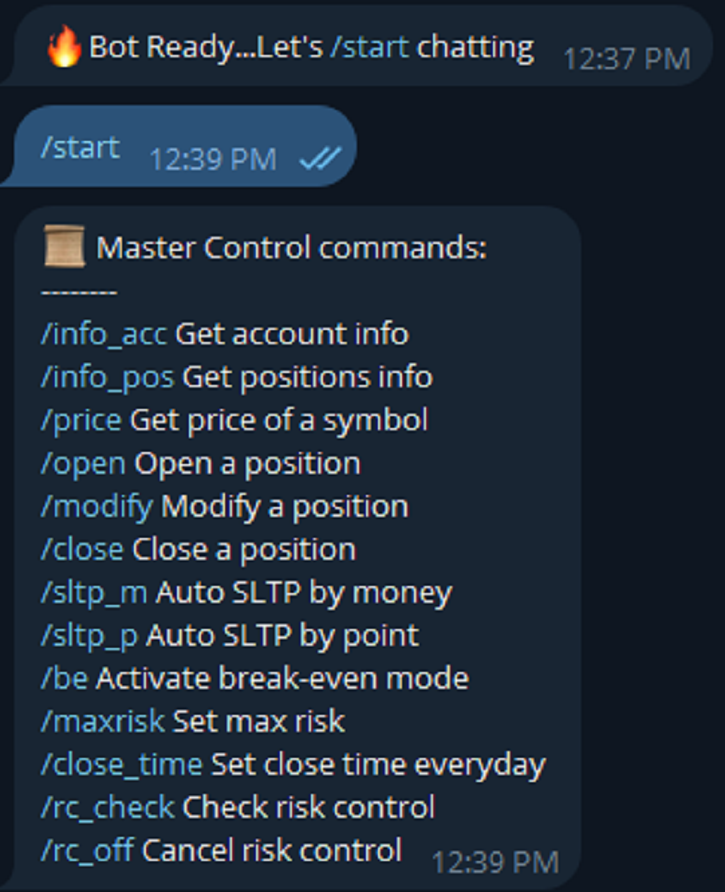
LIST OF COMMANDS:

info_acc - Get account info

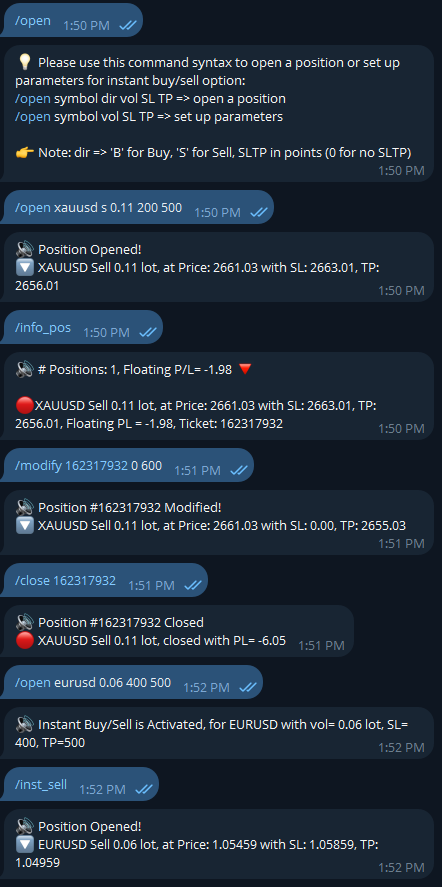
info_pos - Get positions details

price - Get symbol price

buy - Open a buy position

sell - Open a sell position

inst_set - Set parameters for instant trade

inst_buy - Instant buy

inst_sell - Instant sell

modify - Modify a position

close - Close a position

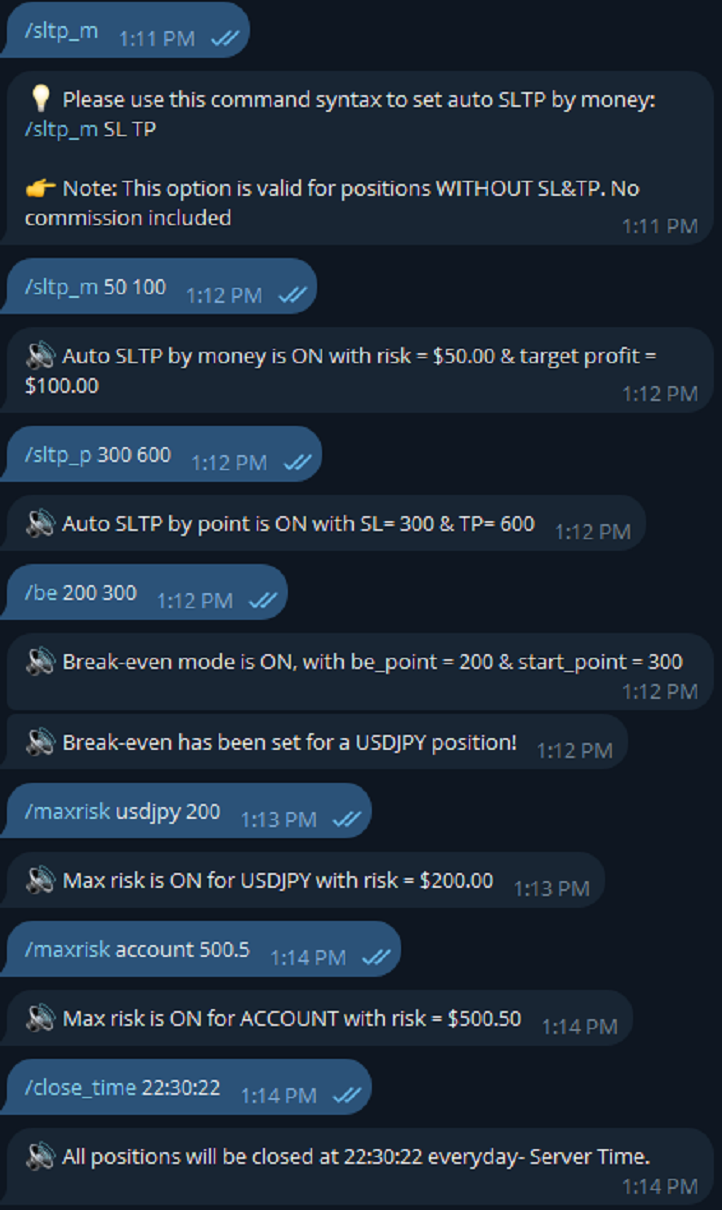
sltp_m - Auto SLTP by money

sltp_p - Auto SLTP by point 

be - Activate Break-even mode

maxrisk - Set max risk

close_time - Set close time everyday

rc_check -Check risk control modes 

rc_off - Cancel risk control modes

********************************************************************************************

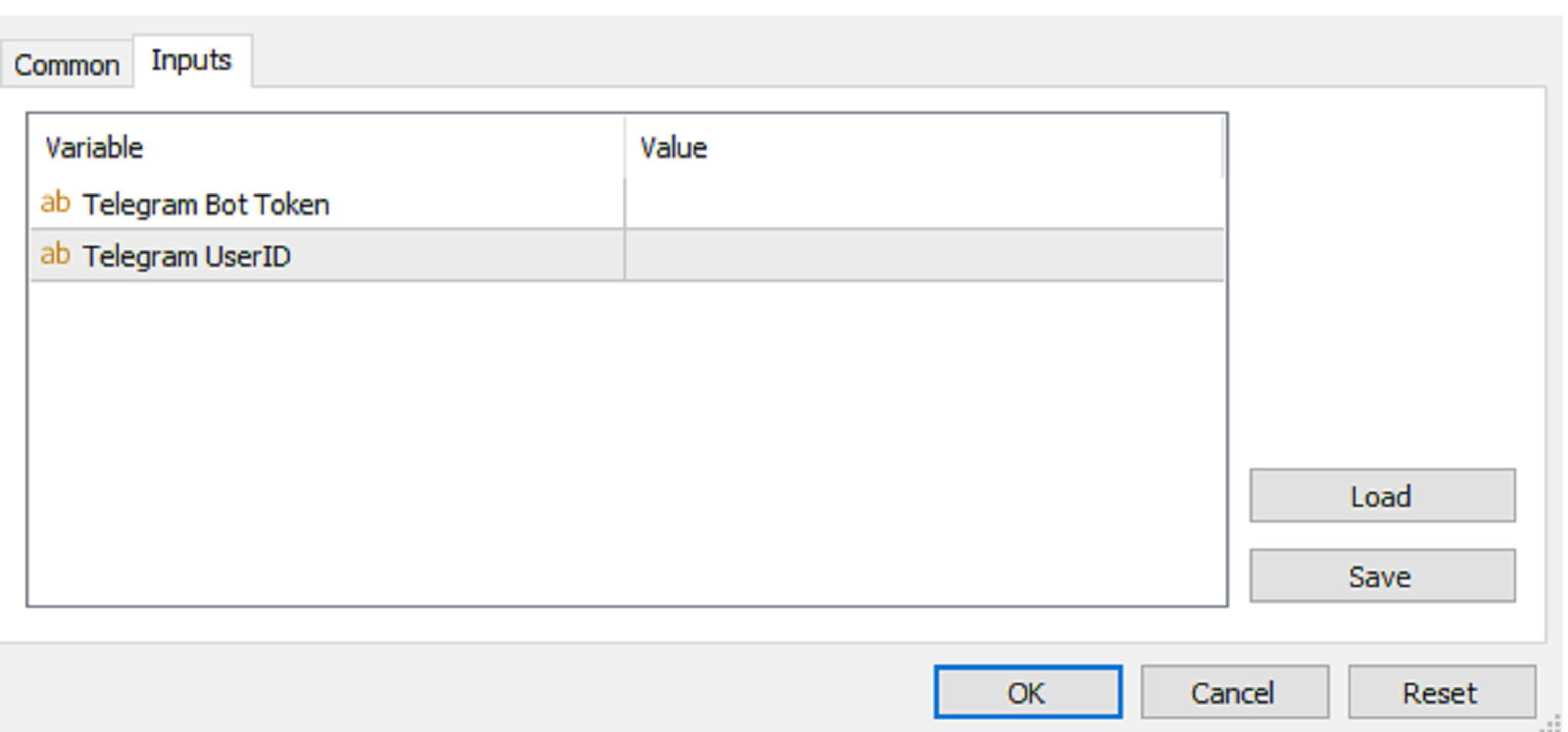
INPUTS:

Telegram Bot Token

Telegram User ID

*********************************************************************************************

HOW TO SET UP?

* Get inputs for EA:

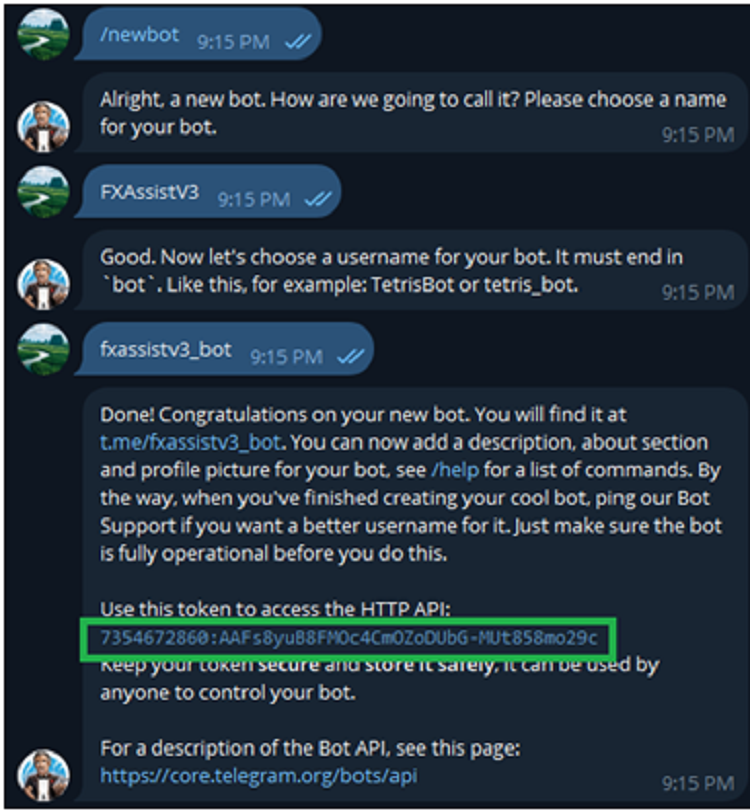
- Create a Telegram bot by @BotFather , and save your Bot Token. Find your bot by username & press "start".

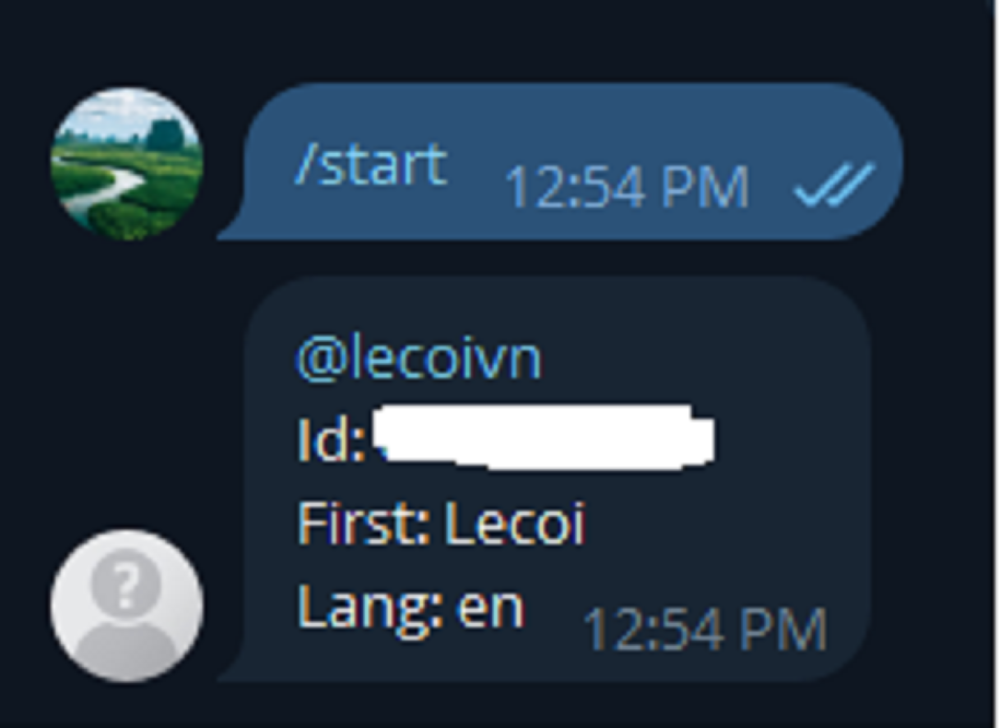
- Get your Telegram User ID by chatting with @userinfobot 

* Setup on your MT4/MT5:

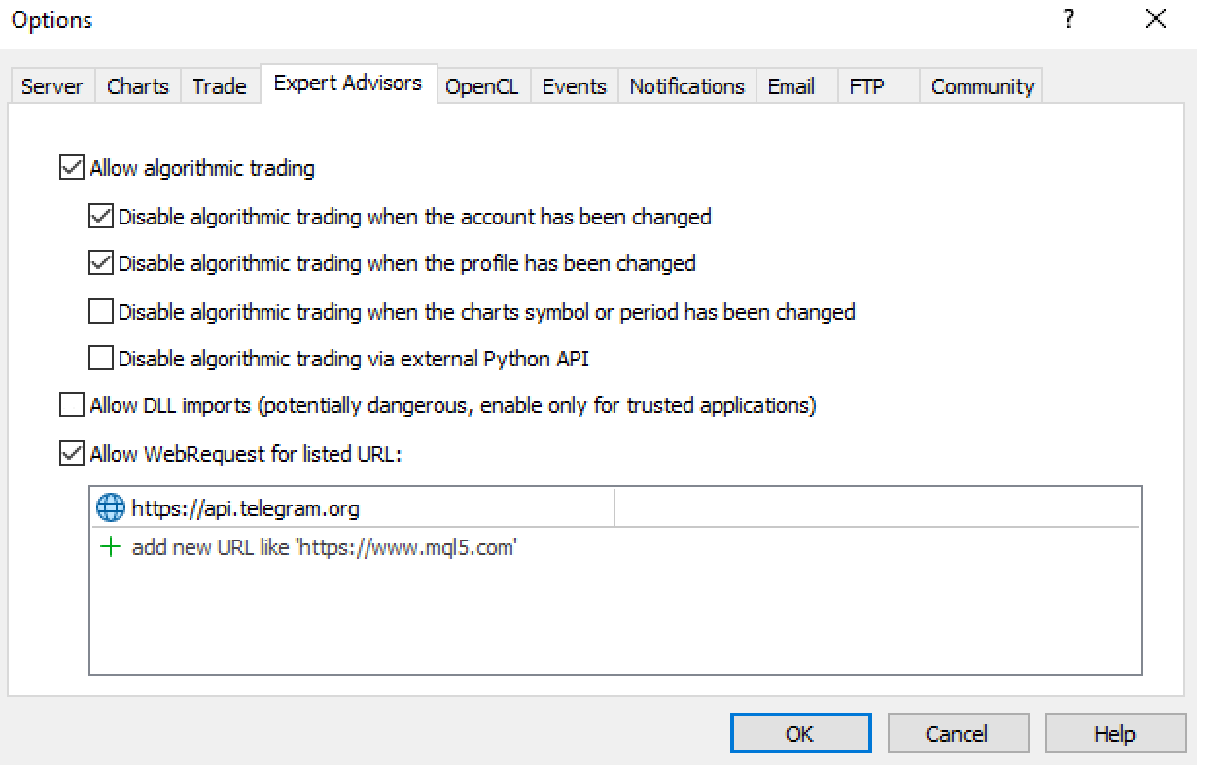
- MT4/MT5 => Tools => Options => Expert Advisors => Tick on Allow Algo Trading & Allow WebRequest, add  API Telegram to WebRequest

- Allow Algo Trading on EA 

* Create a command menu for your Telegram bot:

- Chat with @BotFather => /mybots => Select your bot => Edit Bot => Edit Commands => Copy/Paste command list above (You can set all the commands or just some common commands like start, info_acc, info_pos)
추천 제품
This tool working You can buy or sell from the button of this tool, the lot size can be filled manually, as for the close all buy button to end all buy positions, close all sell button to end all sell positions, Close All profit button to end  All  profit position, Close All Loss button to end all loss position, Delete Pending button to delete all Pending order, close all orders to end all orders. The variable, you can use close all percent for close all orders when profit in percent, if close
MT4 Send To Telegram – Real-Time Trade Alerts & Monitoring for Telegram MT4 Send To Telegram EA is a read-only monitoring and notification utility for MetaTrader 4. It sends clean, real-time trading activity from your MT4 account to Telegram , so you can stay informed from anywhere on mobile or desktop. Safe by design: this EA does not open, close, modify, or manage trades . It only monitors your account, sends alerts, and replies to supported read-only Telegram requests. Receive alerts for new
Master Close via Telegram can help you perform some management tasks on MT4/MT5 remotely via your Telegram by one click, easy to set up & use. Demo here (see more Master Notify   Master Control  ) ************************************************************************************ LIST OF COMMANDS: info_acc -  Get account info info_pen -   Get pending orders details info_pos -   Get positions details info_pos_sum -   Get positions summary close_pen -   Delete all pending orders close_pos_all -
This utility sends notification to trader’s MT4 (for MT5 version, checkout this link ) mobile app, to remind traders about their open positions. Super useful for part time traders to keep track and not forget any positions. To turn on notification, please visit this link (https://www.metatrader4.com/en/trading-platform/help/setup/settings_notifications) Features Keep track on open orders (pending orders, running orders) Customize time to send notification Customize notification interval (send ev

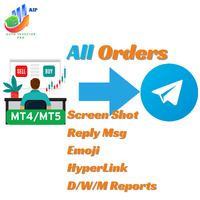
AIP – MT4/MT5 To Telegram 1         Main features of MT4/MT5 EA To Telegram: Send all types of orders (Open Order/Close Order/Partial Close/Modify Order/Pending Order/Delete Order) Close and Modify Order with replies to the corresponding Open Order   Support sending to both private, public channels and group, topic group  Support sending to multiple channels simultaneously Send Chart Screenshots Manage all symbols with a single EA on one terminal Automatic loading of templates, logos, and screen
Superior Telegram Signals Multi-Platform Trade Copier & Notification System   Available for MetaTrader 4 and MetaTrader 5 Superior Telegram Signals   is a utility that connects a trading terminal to the Telegram application. It is designed to send automated trade notifications, chart screenshots, and account status updates to a specified Telegram chat, channel, or group. Use Cases This tool can be used by: Signal Providers:   To automate the broadcasting of trade signals, modifications, and clos
Risk Control Utility MT4   designed for manual trading. It helps to calculate and control your risks, transfer transactions to breakeven and accompany positions with trailing stop. Easy to set up and use. It can be used for calculating a trading lot, calculating stop loss and take profit levels. Works with currency pairs, CFDs, stocks, indices, futures, cryptocurrencies Displays   volume,   potential loss and profit before   placing an order Ability to set the expiration time of a pending order
Close Asistent
Catur Sulistiyanto A Md Tem
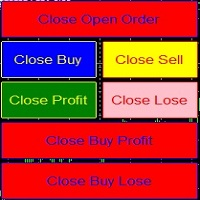
metatrader 4 close asisstent install ea in any pair and run it.. Congratulations on using the ea close assistant you can get free ea by registering FBS broker through my link https://fbs.partners?ibl=621087&ibp=24536958 Button Function : Close Open Order        = function to close all open orders Close Sell                    = function to close all open sell orders Close Buy                    = function to close all open buy orders Close Profit                 = function to close all profita
Master Notify via Telegram can help you perform some management tasks on MT4/MT5 remotely via your Telegram by one click, easy to set up & use. Demo here (see more Master Close   Master Control ) ************************************************************************************ LIST OF COMMANDS: info_acc -  Get account info info_pos -   Get positions details price -   Get symbol price noti_price   - Set price alert  noti_pl   - Set floating PL alert noti_equity - Set equity alert  noti_margin
"Binary Lab Simulator"는 거래 전략을 연습하고 검증하기 위해 설계된 도구입니다. 이 도구는 주말과 비거래 시간을 포함하여 24시간 연중무휴로 작동하며, 30초, 1분 및 3분과 같은 다양한 만료 기간을 지원하여 실제 거래와 유사한 환경을 만듭니다. 외부 도구와 호환되어 진입 결과를 분석할 수 있습니다. 여러 템플릿을 쉽게 저장할 수 있어 온라인 환경에서 시뮬레이터로 원활한 테스트가 가능합니다. "Binary Lab Simulator"는 단독으로 사용할 수 있지만, "SpeedManager", "Practice Simulator Sync" 및 "ArwByIdx"와 결합하면 기능이 향상됩니다. "SpeedManager"는 지정된 진입점에서 자동으로 정지합니다 "Practice Simulator Sync"는 다른 시간 프레임 및 통화 쌍과 차트를 동기화할 수 있습니다 "ArwByIdx"는 외부 지표 및 신호 도구와 통합되어 자동으로 진입점을 연결합니다 Signal Too
Overview The script displays information about the trade account and the current financial instrument. Information about the trade account: Account - account number and type (Real or Demo); Name - name of the account owner; Company - name of a company that provide the access to trading; Server - trade server name; Connection State - connection state; Trade Allowed - shows whether trading is allowed on the account at the moment; Balance - account balance; Equity - account equity; Credit - amount
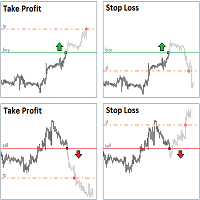
StopLoss and TakeProfit Utility MT4 for automatic setting of stop loss and take profit levels. Created by a professional trader for traders.   The utility   works with any market orders opened by a trader manually or using advisors. Can filter trades by magic number. The utility can work with any number of orders simultaneously. WHAT THE UTILITY CAN DO: Set virtual stop loss and take profit from 1 pip Real   stop loss and take profit W ork with each order separately (   stop loss and take prof
RiskManager
Roman Zhitnik
5 (4)
The Expert Advisor is a risk manager helping users to control their trading. In the settings, it is possible to specify the parameters at which the risk manager force closes the opened trades and closes the terminal as well, if it is needed to prevent opening trades on emotions, which do not correspond to the trading strategy. Risk Manager settings Check limit to close - check the equity limit Limit to close (account currency)   - equity limit that is checked when  Check limit to close is activ
Send periodic (Health Check) notification from your MT4 terminal to your mobile phone to be sure that your MT4 terminal is still running. When you did not receive the notification, it means that your terminal is unavailable. Optional information like Account Equity and Trading Pairs are also available. Notification Period - 1 Hour, 2 Hours, 4 Hours, 8 Hours, 12 Hours, 24 Hours Attach EA to any H1 chart
One Click Trader is a tool designed for MetaTrader 4 platform, which enables you to take your trading to the next level. It enables you to open, manage and close your trades in simple an efficient way by just one click of your mouse button. Up arrow minimizes the OCT panel Down arrow maximizes the OCT panel Right arrow displays the next panel with additional features Left arrow hides the panel with additional features Red SELL button enables you to open short market orders Red SELL STOP button e
Super Copier G&G  Super Copier G&G FREE Here Expert Advisor copies orders to several trading accounts (regardless of a broker) if their respective MetaTrader 4 terminals are opened on a single PC/VPS. The EA may copy from multiple (unlimited) initial accounts to a single target one or from a single initial account to multiple (unlimited) target ones. The work of other EAs and manual trading on initial and target accounts are not affected by the copier. Support for four methods of managing the c
AW Metatrader to Telegram
AW Trading Software Limited
귀하의 구독자가 귀하의 거래 터미널에서 귀하의 거래 이벤트를 놓치지 않도록 알림을 보내는 자동화된 시스템. 계정의 모든 거래 작업에 대해 Telegram 메신저에 알림을 보내는 유틸리티입니다. Telegram ->   HERE   / MT5 ->   HERE   의 채널에 유틸리티를 연결하는 단계별 지침 장점: 쉬운 설정과 자세한 설명, 조정 가능한 스크린샷을 보낼 수 있습니다. 이모티콘을 사용하여 사용자 정의 가능한 알림 텍스트, 오픈, 전체 또는 부분 마감에 대한 알림 조정 및 주문 수정, 기본적으로 알림을 보낼 때 텍스트 파일이 자동으로 다운로드되며, 대기 중인 주문의 배치 또는 삭제에 대한 알림 조정, 기호 및 매직 넘버로 편리한 필터링. 입력 변수: TELEGRAM BOT AND CHAT SETTINGS Telegram bot token - Enter the token number received after registering the bot in "BotFather" T
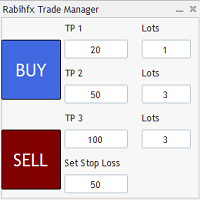
Introducing RabihFx Trade Manager New vesrion 2022 Update at 15/11/2022 and 100 activations now Rabihfx Trade Manager V2 is here with added Features click here Rabihfx Trade Manager is a trading utility tool (EA) allow you to place 3 orders with 3 take profit levels with custom  lot size for each trade with a stop loss  If your signal provider give you 3 take profit levels and a stop loss you will place these levels in  rabihfx trade manager with custom lot size for each level  and you choose
DepoControl – Full Control Over the Deposit Closers   Expert Advisor controls the overall account status and closes ALL market orders on the account when certain conditions occur. The trading robot closes ALL orders on the account in the following cases (by profit): Close ALL orders by a total profit on the account   in monetary terms . For example, suppose that the settings specify that   positions should be closed when profit of 100 is reached. In this case, the Expert Advisor closes all mark
ExPad
Igor Semyonov
ExPad  - a trade panel for comfortable trading on financial markets. Suitable for trading any financial instruments. In general, the panel is able to perform the following functions: Open and reverse of deals Operation with visible and hidden StopLoss and TakeProfit Independent management of visible and hidden StopLosses Profit protection due to Breakeven and Trailing Stop  Choice of technique for Trailing Stop Distance from market price Moving Average Bolinger Bands Middle Line High and Low pri
BreakEven ProSync EA – Trade Management & Risk Control Tool Overview BreakEven ProSync EA is an expert advisor for   MetaTrader 4  that helps traders manage open positions efficiently by   automating stop-loss adjustments   and ensuring position synchronization. This tool is designed for traders who want to standardize their stop-loss and take-profit levels across multiple trades while integrating a break-even function. The EA works by calculating the  average price   of all open positions and
This tool can help you close all open orders with one click, just click "Close all". If you only want to close the profitable orders, click the "Close profitable" button. After clicking, all the floating orders will be closed. All orders will be liquidated; if you only want to close the orders with floating losses, click the "Close losable" button. After clicking, all orders with floating losses will be liquidated.
Risk Controller Expert Advisor는 귀하의 계정에 있는 거래 고문의 전체 위험을 제어할 수 있는 프로그램입니다. 이 프로그램을 사용하면 모든 고문의 계정에 허용되는 최대 위험을 제어할 수 있습니다. 예를 들어, 최대 손실액의 30% 위험을 설정했습니다. 즉, 주식 거래 로봇이 30% 위험을 초과하면 위험 관리자가 고문의 모든 위치를 닫고 열려 있는 모든 차트를 닫을 수 있으므로 방지할 수 있습니다. 고문은 더 이상 일하지 않습니다. 전문가 고문은 평균적인 로봇을 마틴게일과 교환하고 불가항력 또는 기타 예상치 못한 상황에서 로봇의 최대 손실을 제한하려는 경우 "편안한 수면"에 필요합니다. 시장 반전. Советник Risk Controller, очень важная и по моему мнению необходимая программа для каждого трейдера который торгует роботами. 제어는 계정의 최대 손실에 해당하는 제한
EA Setting, Common Common 1)Long & Short -allow EA open short and long position Live Trading  1)Tick -Allow live trading Safety Tick All 1)Allow DLL import 2)Allow import of external experts 3)Allow modification Signal settings Inputs Variable Value Remarks  Open new series true  Make it default                                                           Trade BUY true Make it default Trade SELL true Make it default Support manual order true Make it default Max sell order 10 You may control EA m
Utility TimeLs Close Positions는 MetaTrader 5에서 포지션 종료를 관리하고 자동화하기 위한 도구입니다. 시간, 종목, 방향, 매직 넘버, 코멘트를 기준으로 오픈 포지션을 언제 어떻게 종료할지 유연하게 제어할 수 있습니다. 특정 요일에 거래를 비활성화할 수 있습니다 모든 오픈 포지션을 종료할 특정 시간을 설정할 수 있습니다 종목, 방향(매수/매도), 매직 넘버 또는 코멘트로 종료를 필터링할 수 있습니다 Deal 1, Deal 2, Deal 3과 같은 최대 3개의 일회성 종료 작업을 날짜와 시간 기준으로 설정할 수 있습니다 현재 설정 및 예정된 종료 작업을 보여주는 차트 정보 패널을 표시하거나 숨길 수 있습니다 차트에 표시되는 텍스트의 글꼴 크기와 색상을 사용자 지정할 수 있습니다
What this dashboard does The panel displays: Current Ichimoku signal per symbol Current Ichimoku signal per timeframe Key Ichimoku line values Signal direction summary Instead of switching charts manually, you can analyze the market structure in seconds. Available Ichimoku values Each cell may display: Tenkan-Sen Kijun-Sen Senkou Span A Senkou Span B Chikou Span Span A – Span B difference This allows detailed analysis or quick signal filtering. Signal types The dashboard can detect:
Telegram ChartSnap is an utility tool to bridge your MetaTrader 4 activities to your Telegram chat/group/channel. It will screen shot your MetaTrader 4 chart and send it to your dedicated Telegram chat/group/channel through a Telegram bot. The whole process will keep repeating based on a time cycle that predetermined by the user. It is a convenient tool for those who like to get access to their favorite system/dashboard that only available at MetaTrader Desktop. Beside that, trader can easily s
This trade panel is able to greatly simplify the work for news traders. The utility allows to place market or pending orders with a single mouse click. The trade panel is a good assistant for scalping, news trading and for opening a multitude deals. The orders are placed manually, the lines indicate distance for placing the orders. The trailing stop and breakeven features will take care of the deal, in case it is unable to reach the take profit level. The trade panel can work with both limit and
Tradingscenes Trading Panel     How will Trading Panel work ? Trading Panel is created as an Expert Advisor, which will enable traders to set pending orders, or mass pending orders in different types Limit orders with additional functions for taking profit as partial, trailing stop and also taking profit with differences price levels; let’s explain in every single functions for you as following parts: Read the full description here:   https://drive.google.com/file/d/10O10dBLLUcdT3MdPvKqO7L3CIFR
이 패널은 전문 자문가이며 6개의 거래 패널 그룹을 제공합니다. MT5 버전:   빠른 패널 커버 형질 대부분의 거래 작업은 이 패널의 버튼을 클릭하여 빠르게 수행할 수 있습니다. 패널 전환은 녹색 버튼을 클릭하는 것만큼 쉽습니다. EA는 전략 테스터의 시각적 차트에서 실행될 수 있으며 과거 데이터를 기반으로 거래를 연습할 수 있는 쉬운 방법을 제공합니다. 마우스 클릭만으로 손절매 변경 및 이익 실현(백테스팅 불가) 노란색 배경의 상자에 평균 가격을 표시하고 평균 가격에 대한 선을 그립니다.       여기를 클릭하세요 패널 대시보드에는 두 개의 열이 있습니다. 왼쪽 열은 매도에 관한 것이고 오른쪽 열은 매수에 관한 것입니다. 팔다:       판매 주문을 엽니다. 시작:       첫 번째 판매 주문을 마감합니다. 첫 번째는 공개 시간과 관련이 있습니다. 마지막:       마지막 매도 주문을 마감합니다. 마지막은 오픈시간을 의미합니다. 모두+:       판매 주문을 수익성
이 제품의 구매자들이 또한 구매함
Local Trade Copier EA MT4
Juvenille Emperor Limited
4.96 (110)
Local Trade Copier EA MT4 를 사용하여 매우 빠른 거래 복사 경험을 해보세요. 1분 안에 간편하게 설정할 수 있으며, 이 거래 복사기를 사용하면 Windows 컴퓨터 또는 Windows VPS에서 여러 개의 MetaTrader 터미널 간에 거래를 0.5초 미만의 초고속 복사 속도로 복사할 수 있습니다. 초보자든 전문가든 Local Trade Copier EA MT4 는 다양한 옵션을 제공하여 사용자의 특정 요구에 맞게 맞춤 설정할 수 있습니다. 이는 수익 잠재력을 높이려는 모든 사람을 위한 최고의 솔루션입니다. 지금 사용해보시고 이것이 왜 시장에서 가장 빠르고 쉬운 무역용 복사기인지 알아보세요! 팁: 여기 에서 데모 계정에서 Local Trade Copier EA MT4 데모 버전을 다운로드하여 사용해 볼 수 있습니다. 다운로드한 무료 데모 파일을 MT4 >> File >> Open Data Folder >> MQL4 >> Experts 폴더에 붙여넣고 터미널
Trade Manager EA에 오신 것을 환영합니다. 이 도구는 거래를 보다 직관적이고 정확하며 효율적으로 만들기 위해 설계된 궁극적인 리스크 관리 도구 입니다. 단순한 주문 실행 도구가 아닌, 원활한 거래 계획, 포지션 관리 및 리스크 제어를 위한 종합 솔루션입니다. 초보자부터 고급 트레이더, 빠른 실행이 필요한 스캘퍼에 이르기까지 Trade Manager EA는 외환, 지수, 상품, 암호화폐 등 다양한 시장에서 유연성을 제공합니다. Trade Manager EA를 사용하면 복잡한 계산은 이제 과거의 일이 됩니다. 시장을 분석하고 진입, 손절 및 익절 수준을 차트의 수평선으로 표시한 후 리스크를 설정하면, Trade Manager가 이상적인 포지션 크기를 즉시 계산하고 SL 및 TP 값을 실시간으로 표시합니다. 모든 거래가 간편하게 관리됩니다. 주요 기능: 포지션 크기 계산기 : 정의된 리스크에 따라 거래 크기를 즉시 결정합니다. 간단한 거래 계획 : 진입, 손절, 익절을 위한
Trade Assistant MT4
Evgeniy Kravchenko
4.43 (197)
거래당 위험 계산, 라인을 사용한 손쉬운 신규 주문, 부분 청산 기능을 통한 주문 관리, 7가지 유형의 트레일링 스탑 및 기타 유용한 기능을 제공합니다. 추가 자료 및 지침 설치 지침 - 애플리케이션 지침 - 데모 계정용 애플리케이션 평가판 라인 기능       - 차트에 개시선, 손절매, 차익실현을 표시합니다. 이 기능을 사용하면 새로운 주문을 쉽게 하고 개봉 전에 추가 특성을 볼 수 있습니다. 위기 관리       -       위험 계산 기능은 설정된 위험과 손절매 주문의 크기를 고려하여 새 주문의 볼륨을 계산합니다. 이를 통해 손절매 크기를 설정하고 동시에 설정된 위험을 존중할 수 있습니다. 로트 계산 버튼 - 위험 계산을 활성화/비활성화합니다. 필요한 위험 값은 위험 필드에 0에서 100 사이의 백분율 또는 예금 통화로 설정됩니다. 설정 탭에서 위험 계산 옵션을 선택합니다. $ 통화, % 잔액, % 지분, % 자유 마진, % 사용자 정의, % AB 이전 일, % AB
거래하고자 하는 주요 영역을 파악한 후 자동으로 거래 지원 및 저항 또는 공급 및 수요 구역을 설정합니다. 이 EA를 사용하면 한 번의 클릭으로 매수 및 매도 구역을 그린 다음 가격이 바뀔 것으로 예상되는 정확한 위치에 배치할 수 있습니다. 그런 다음 EA는 해당 구역을 모니터링하고 구역에 대해 지정한 가격 액션에 따라 자동으로 거래를 수행합니다. 초기 거래가 수행되면 EA는 대상 구역이 되는 반대 구역에서 이익을 얻습니다. 그런 다음 거래를 종료하고 진입할 새 구역을 그리거나 이익을 얻고 즉시 반대 방향으로 거래를 역전하여 "항상 시장" 스타일 전략을 만드는 두 가지 선택이 있습니다. 입력 및 전략이 포함된 전체 매뉴얼은 여기에 있습니다: https://www.mql5.com/en/blogs/post/760256 이 EA는 시장에서 고정 또는 하드 스톱 로스를 사용하지 않는 포지션 트레이더 또는 달러 비용 평균 거래 전략을 위해 설계되었습니다. 대신, 다음에 가능한 지지 또는
News Filter EA: Advanced Algo Trading Assistant News Filter EA is an advanced algo trading assistant designed to enhance your trading experience. By using the   News Filter EA , you can integrate a Forex economic news filter into your existing expert advisor, even if you do not have access to its source code. In addition to the news filter, you can also specify   trading days   and   hours   for your expert. The News Filter EA also includes   risk management   and   equity protection   features
DrawDown Limiter MT4
Haidar Lionel Haj Ali
5 (8)
Drawdown Limiter EA You are in the right place if you were searching for Drawdown control, Drawdown limiter, Balance protection, Equity Protection or Daily Drawdown Limit related to Prop Firm, FTMO, or Funded account trading, or if you want to protect your trading account. Have you suffered from controlling your drawdown when trading funded accounts? This EA is meant for you. Prop firms usually set a rule called “Trader Daily Drawdown”, and if it is not respected, you are disqualified.  I am an
Support and Resistance Dashboard for MT4 is a multi-timeframe and multi-symbol scanner and alert system that finds S/R zones and pivot points for all timeframes and symbols and alerts when price has interaction with them. If you are using support and resistance (or supply and demand) zones in your trading strategy, this dashboard and its alert and filtering system is a big time saver for you. Download demo version   (works on M 1,M5,M30,W1   timeframes) Full description of scanner parameters ->
작동 체험판 다운로드 Copy Cat More (카피캣) MT4 트레이드 카피어 (Trade Copier) 는 단순한 로컬 트레이드 카피어가 아닙니다. 오늘날의 트레이딩 과제를 위해 설계된 완전한 리스크 관리 및 실행 프레임워크 (risk management and execution framework) 입니다. 프롭 펌 (prop firm) 챌린지부터 개인 포트폴리오 관리까지, 견고한 실행, 자본 보호, 유연한 설정, 고급 트레이드 처리의 조합으로 모든 상황에 적응합니다. 이 카피어는   마스터 (Master, 송신측) 와 슬레이브 (Slave, 수신측)   두 모드 모두에서 작동하며, 시장가 주문과 대기 주문, 트레이드 수정, 부분 청산, 상호 청산 (Close By) 작업을 실시간으로 동기화합니다. 데모 및 실거래 계좌, 트레이딩 또는 인베스터 로그인 모두와 호환되며, EA·터미널·VPS가 재시작되더라도 영구 트레이드 메모리 (Persistent Trade Memory) 시
Telegram to MT4 Multi-Channel Copier 는 Telegram 채널의 트레이딩 신호를 자동으로 MetaTrader 4로 직접 복사합니다. 봇도, 브라우저 확장 프로그램도, 수동 복사도 필요 없습니다. Telegram에서 신호를 받으면 EA가 몇 초 안에 터미널에서 거래를 엽니다. 본 제품은 두 가지 구성 요소로 구성되어 있습니다: Telegram 채널을 감시하는 Windows 애플리케이션과 MT4 터미널에서 신호를 실행하는 이 Expert Advisor입니다. MT5 버전도 제공됩니다. 설정 가이드 및 애플리케이션 다운로드: https://www.mql5.com/en/blogs/post/768988 작동 방식 Windows 애플리케이션은 봇이 아닌 사용자 자신의 API 자격 증명을 사용하여 Telegram에 연결됩니다. 이는 프라이빗 및 VIP 채널을 포함하여 구독 중인 모든 채널, 그룹 또는 주제를 읽을 수 있음을 의미합니다. 신호를 감지하면 이를 파싱하여
TradePanel MT4
Alfiya Fazylova
4.84 (95)
Trade Panel은 다기능 거래 도우미입니다. 이 애플리케이션에는 50개 이상의 수동 거래 기능이 포함되어 있으며 대부분의 거래 작업을 자동화할 수 있습니다. 구매하기 전에 데모 계정에서 데모 버전을 테스트할 수 있습니다. 데모 계정용 애플리케이션 체험판 다운로드: https://www.mql5.com/en/blogs/post/750865 . 전체 지침 여기 . 거래. 한 번의 클릭으로 거래를 수행할 수 있습니다: 리스크 자동 계산과 함께 예약 주문 및 포지션 열기. 한 번의 클릭으로 여러 주문 및 포지션 열기. 주문 그리드 열기. 예약 주문 및 포지션을 그룹별로 닫기. 포지션 방향 전환 (Buy 닫기 > Sell 열기, Sell 닫기 > Buy 열기). 포지션 잠금 (부족한 포지션을 열어 Buy와 Sell 포지션의 수량을 동일하게 만들기). 모든 포지션 한 번의 클릭으로 부분적으로 닫기. 모든 포지션의 테이크 프로핏과 스톱로스를 같은 가격 수준에 설정. 모든 포지션의 스톱로스를
Strategy Builder offers an incredible amount of functionality. It combines a trade panel with configurable automation (covert indicators into an EA), real-time statistics (profit & draw down) plus automatic optimization of SL, TP/exit, trading hours, indicator inputs. Multiple indicators can be combined into an single alert/trade signal and can include custom indicators, even if just have ex4 file or purchased from Market. The system is easily configured via a CONFIG button and associated pop-up
The product will copy all telegram signal to MT4   ( which you are member  ) , also it can work as remote copier.  Easy to set up, copy order instant, can work with almost signal formats, image signal, s upport to translate other language to English Work with all type of channel or group, even channel have "Restrict Saving Content", work with  multi channel, multi MT5 Work as remote copier: with signal have ticket number, it will copy exactly via ticket number. Support to backtest signal. How to
PZ Trade Pad Pro MT4
PZ TRADING SLU
3.67 (3)
Effortlessly calculate lot sizes and manage trades to save time and avoid costly errors The Trade Pad Pro EA is a tool for the Metatrader Platform that aims to help traders manage their trades more efficiently and effectively. It has a user-friendly visual interface that allows users to easily place and manage an unlimited number of trades, helping to avoid human errors and enhance their trading activity. [ Installation Guide | Update Guide | Troubleshooting | FAQ | All Products ] One of the k
MT4 to Telegram Signal Provider 는 사용하기 쉽고 완전히 사용자 정의가 가능한 도구로, 텔레그램으로 신호를 보내어 계정을 신호 제공자로 변환할 수 있습니다. 메시지 형식은 완전히 사용자 정의가 가능합니다! 그러나 간단한 사용을 위해 미리 정의된 템플릿을 선택하고 메시지의 특정 부분을 활성화하거나 비활성화할 수도 있습니다. [ 데모 ]  [ 매뉴얼 ] [ MT5 버전 ] [ 디스코드 버전 ] [ 텔레그램 채널 ]  New: [ Telegram To MT5 ] 설정 단계별 사용자 가이드 가 제공됩니다. 텔레그램 API에 대한 지식이 필요 없으며, 개발자가 필요한 모든 것을 제공합니다. 주요 기능 구독자에게 보낸 주문 세부 정보를 사용자 정의할 수 있는 기능 예를 들어 브론즈, 실버, 골드와 같은 계층 구독 모델을 만들 수 있습니다. 골드 구독은 모든 신호 등을 받게 됩니다. ID, 심볼 또는 코멘트별 주문 필터링 주문이 실행된 차트의 스크린샷을 포함 보낸
수동 매매를 위한 전문가용 트레이딩 패널로, 정밀한 진입부터 계좌 보호까지 매매의 전 과정을 차트 위 하나의 창에 담았습니다. 정해진 리스크에 정확히 맞춰 모든 포지션의 거래량을 산정하고, RR Tool로 차트에 직접 라인을 그려 거래를 설계하며, Market 주문과 예약 주문은 물론 Grid와 OCO까지 사용할 수 있습니다. 포지션 관리는 패널이 대신 처리합니다. 최대 다섯 단계 부분 청산, 여섯 가지 트레일링 스탑, 브레이크이븐, Virtual SL/TP를 지원합니다. 일간·주간·월간 한도가 예치금을 지키며, 기준을 넘기는 즉시 자동으로 발동됩니다. 가이드와 무료 Live 데모 무료 Live 데모 버전은 여기에서 이용할 수 있습니다 ( Free Live Demo ). 제품 사용 가이드는 여기에서 확인할 수 있습니다 ( User Manual ). NT Trade Manager는 트레이더의 모든 작업 흐름을 차트 위 작고 간결한 패널 하나에 모아, 터미널 창을 오갈 필요도, 진입할
Trade Copier Global
Laszlo Tormasi
5 (15)
Trade Copier Global: The name speaks for itself. This copier allows you to copy orders between MT4 terminals even if they are not installed on the same computer. Features Copying trades between MT4 terminals around the world with a short delay. Automatically recognizes symbol prefixes. Can connect many Slaves to the same Master. Supports pending and market orders. Supports partial order close (with limitations, see below) Can send messages and notifications to the Slaves from the Master Several
목표 수익 도달 시 자동 수익 실현 EquityTargetCloser   — 는 MetaTrader 5용 유틸리티 전문가 어드바이저(EA)로,   순자산(Equity)이 현재 잔고를 지정된 수익 금액만큼 초과하면 모든 시장 포지션을 청산하고 예약 주문을 삭제합니다. 모든 포지션을 청산한 후 목표는 자동으로 상향 조정됩니다. 새 임계값 = 새 잔고 + 지정된 수익. EA는 거래를 시작하지 않고 기존 포지션만 관리하여 수익을 확실하게 고정하고 축적된 자금을 보호합니다. MT5-version:  https://www.mql5.com/en/market/product/169839 작동 방식 전문가 어드바이저는   순자산(Equity)   을 동적 목표와 지속적으로 비교합니다. 목표 =   현재 잔고(Balance) + plusMoney   (미국 달러). 순자산이 이 금액 이상이 되면 보호 기능이 작동합니다.   모든 시장 포지션   (모든 심볼)을 청산합니다. 매개변수   Delete p
복사기->편리하고 빠른 인터페이스 상호작용으로 사용자가 바로 사용 가능       ->>>> Windows 컴퓨터 또는 VPS Windows에서 사용하는 것이 좋습니다. 특징: 다양하고 개인화된 복사 거래 설정: 1. 다양한 신호 소스에 대해 다양한 로트 모드를 설정할 수 있습니다. 2. 다양한 신호 소스를 포워드 및 리버스 복사 거래에 대해 설정할 수 있습니다. 3. 신호는 주석으로 설정할 수 있습니다. 4. 계약 로트에 따라 로트를 교정할지 여부 다양하고 개인화된 복사 주문 설정 2: 1. 다양한 품종에 대해 다양한 로트 모드를 설정할 수 있습니다. 2. 정방향 및 역방향 복사 주문에 대해 다양한 품종을 설정할 수 있습니다. 3. 주석으로 신호를 설정할 수 있습니다. 4. 계약 로트에 따라 로트를 교정할지 여부 댓글 필터링, MAGIC 필터링, 시그널 로트 필터링, 로컬 제품 필터링 근무시간 설정 역동기화 SLAVE 닫힘 주문 바인딩 기능: 모든 주문은 설정된 신호 소스 주문
Grid Manual MT4
Alfiya Fazylova
4.71 (17)
"Grid Manual"은 주문 그리드 작업을 위한 거래 패널입니다. 이 유틸리티는 보편적이며 유연한 설정과 직관적인 인터페이스를 제공합니다. 그것은 손실을 평균화하는 방향뿐만 아니라 이익을 증가시키는 방향으로 주문 그리드와 함께 작동합니다. 거래자는 주문 그리드를 만들고 유지할 필요가 없으며 유틸리티에서 수행합니다. 거래자가 주문을 시작하는 것으로 충분하며 "Grid Manual"는 자동으로 그를 위한 주문 그리드를 생성하고 거래가 마감될 때까지 그와 동행할 것입니다. 전체 설명 및 데모 버전 여기 . 유틸리티의 주요 기능: 모바일 터미널을 포함하여 어떤 방식으로든 열린 주문과 함께 작동합니다. "제한" 및 "중지"의 두 가지 유형의 그리드와 함께 작동합니다. 고정 및 동적(ATR 표시기 기반)의 두 가지 유형의 그리드 간격 계산과 함께 작동합니다. 오픈 오더 그리드의 설정을 변경할 수 있습니다. 차트에서 각 주문 그리드의 손익분기점 수준을 표시합니다. 각 주문 그리드에 대한 이익
Auto Trade Copier
Vu Trung Kien
4.76 (85)
Auto Trade Copier is designed to copy trades to multiple MT4, MT5 and cTrader accounts/terminals with 100% accuracy. The provider and receiver accounts must be on the same PC/VPS. With this tool, you can copy trades to receiver accounts on the same PC/VPS. All trading actions will be copied from provider to receiver perfectly. This version can be used on MT4 accounts only. For MT5 accounts, you must use Auto Trade Copier for MT5 . Reference: - For MT4 receiver, please download Trade Receiver Fre
Trader Evolution MT4
Siarhei Vashchylka
5 (2)
" Trader Evolution " - A utility designed for traders who use wave and technical analysis in their work. One tab of the utility is capable of money management and opening orders, and the other can help in making Elliott wave and technical analysis. Manual (Be sure to read before purchasing) | Version for MT5 Advantages 1. Trading in a few clicks. Immediate and pending orders are available in the panel 2. Money management. The program automatically selects the appropriate lot size 3. Simplifies
Trading History MT4
Siarhei Vashchylka
5 (9)
Trading History - A program for trading and money management on the history of quotes in stratagy tester. It can work with pending and immediate orders, and is equipped with trailing stop, breakeven and take profit functions. Very good for training and testing different strategies. Manual (Be sure to read before purchasing) Advantages 1. Allows you to test any trading strategy in the shortest possible time 2. An excellent simulator for trading training. You can gain months of trading experience
Telegram to MT4 Coppy
Sergey Batudayev
4.09 (11)
Telegram에서 MT4로:   최고의 신호 복사 솔루션 최첨단 유틸리티인   Telegram to MT4를   사용하여 거래를 간소화하세요. DLL 없이도 Telegram 채널과 채팅에서 MetaTrader 4 플랫폼으로 거래 신호를 직접 복사할 수 있습니다. 이 강력한 솔루션은 탁월한 정밀도와 맞춤 설정 옵션을 통해 원활한 신호 실행을 보장하여 시간을 절약하고 효율성을 높여줍니다. [ Instructions and DEMO ] 주요 특징 직접 Telegram API 통합 전화번호와 보안 코드를 통해 인증하세요. 사용자 친화적인 EXE 브리지를 사용하여 채팅 ID를 손쉽게 가져오고 관리하세요. 여러 채널/채팅을 추가, 삭제, 새로 고침하여 동시에 신호를 복사합니다. 고급 필터를 사용한 신호 파싱 사용자 정의 예외 단어(예: "보고서", "요약")가 포함된 원치 않는 신호를 건너뜁니다. 유연한 SL 및 TP 형식을 지원합니다: 가격, 핍 또는 포인트. 신호가 가격 대신 지점을 지정
Custom Alerts AIO: 다중 시장을 동시에 모니터링 – 설정 없이 즉시 사용 가능 개요 Custom Alerts AIO 는 복잡한 설정 없이 즉시 사용할 수 있는 통합 시장 모니터링 도구입니다. FX Power, FX Volume, FX Dynamic, FX Levels, IX Power 등 필요한 모든 지표가 내장되어 있어 별도의 설치나 구성 없이 알림 기능을 바로 사용할 수 있습니다. 차트 그래픽 없이 작동하며, Forex, 금속, 지수, 암호화폐 등 주요 자산군을 모두 지원합니다. 주식(Symbols)은 별도로 입력하여 추가할 수 있으나, MetaTrader에서는 일반적으로 제한적으로만 사용됩니다. 1. 왜 Custom Alerts AIO를 선택해야 하나요? 추가 라이선스가 필요 없습니다 • 모든 Stein Investments 지표가 내장되어 있어 별도 구매가 필요 없습니다. • 즉시 알림 기능을 시작할 수 있어 빠르고 간편합니다. 모든 시장을 하나의 도구로
MACD Divergence Scanner is a multi-timeframe and multi-symbol dashboard and alert that checks all timeframes and symbols to find regular and hidden divergences between price chart and MACD indicator. This divergence scanner is integrated with support and resistance zones so you can check the MACD divergences in the most important areas of the chart to find trend reversals in the price chart. Download demo version   (works on M 1,M5,M30,W1   timeframes) Full description of scanner parameters ->  
King Trade Copier MT4
Mohammed Maher Al-sayed Mohammed Ahmed Saleh
King Trade Copier MT4 – Lightning-Fast Local Trade Copier (Master + Slave in ONE file) King Trade Copier is a professional local trade copier that mirrors every trading action from one Master account to unlimited Slave accounts on the same PC or VPS — with an internal copy latency of just a few milliseconds. It was built by a real trader for daily real-money use, with one goal: whatever happens on the Master must happen on the Slave, instantly and without exceptions. Watch the demo video to s
Telegram to MT4 Pro란 무엇인가요? Telegram to MT4 Pro 는 비공개, 공개 및 제한된 Telegram 채널과 그룹의 신호를 사용자의 MetaTrader 4 계정으로 자동 복사합니다. Telegram to MT4 Pro 는 모든 Telegram 채널 또는 그룹의 트레이딩 신호를 사용자의 MetaTrader 4 계정으로 실시간 자동 복사하는 전문 신호 복사기이며, 각 거래를 완전히 제어할 수 있습니다. 이 시스템은 함께 작동하는 두 부분으로 구성됩니다: 이 Expert Advisor — 거래 실행을 위해 MT4 차트에 설치됩니다 보조 데스크톱 앱 — TelegramMT4Pro.exe — Telegram에 연결하고 신호를 EA로 전달합니다 여러 Telegram 제공자를 여러 MT4 계정에 동시에 연결할 수 있습니다. 모든 설정은 계정별, 제공자별로 구성할 수 있습니다. 참고: 시스템은 자동으로 작동합니다. MetaTrader 내부에서 수동 연결 설정이 필요하지
SmartFastTrade AI
Muhammad Faisal Sagala
Transform Your Trading with SmartFastTrade AI: Speed and Ease at Your Fingertips! Introduction Are you a trader struggling with slow order execution? Do you want a tool that can assist you in making quick and accurate trading decisions? If yes, then SmartFastTrade AI is the answer to all your trading needs. With its unique combination of speed, user-friendliness, and advanced features, SmartFastTrade AI will help you unlock your full trading potential. Let's delve deeper into why this innovativ
The News Filter
Leolouiski Gan
5 (25)
이 제품은 뉴스 시간 동안 모든 전문가 어드바이저 및 수동 차트를 필터링하여 수동 거래 설정이나 다른 전문가 어드바이저가 입력한 거래가 파괴될 수 있는 급격한 가격 상승으로부터 걱정하지 않아도 됩니다. 이 제품은 또한 뉴스 발표 전에 열린 포지션과 대기 주문을 처리할 수 있는 완전한 주문 관리 시스템이 함께 제공됩니다. The News Filter  를 구매하면 더 이상 내장 뉴스 필터에 의존할 필요가 없으며 이제부터 모든 전문가 어드바이저를 여기서 필터링할 수 있습니다. 뉴스 선택 뉴스 소스는 Forex Factory의 경제 캘린더에서 얻어집니다. USD, EUR, GBP, JPY, AUD, CAD, CHF, NZD 및 CNY와 같은 어떤 통화 기준으로 선택할 수 있습니다. Non-Farm (NFP), FOMC, CPI 등과 같은 키워드 식별을 기준으로 선택할 수도 있습니다. 저, 중, 고 영향을 가지는 뉴스를 필터링할 수 있도록 선택할 수 있습니다. 차트와 관련된 뉴스만 선택하
RSI Divergence Scanner is a multi-timeframe and multi-symbol dashboard and alert that checks all timeframes and symbols to find divergences between price chart and RSI indicator. This divergence scanner is integrated with support and resistance zones so you can check the RSI divergences in the most important areas of the chart to find trend reversals in the price chart. Download demo version   (works on M 1,M5,M30,W1 timeframes) Full description of scanner parameters ->   click here . How to get
제작자의 제품 더 보기
Master Close via Telegram can help you perform some management tasks on MT4/MT5 remotely via your Telegram by one click, easy to set up & use. Demo here (see more Master Notify   Master Control  ) ************************************************************************************ LIST OF COMMANDS: info_acc -  Get account info info_pen -   Get pending orders details info_pos -   Get positions details info_pos_sum -   Get positions summary close_pen -   Delete all pending orders close_pos_all -
Auto SLTP Pro
Tuan Nghia Phan
5 (1)
Auto SLTP Pro can help you setSL & TP automatically for positions & pending orders * 2 modes: - Points - USD * Symbol Filter:  Select All or a specific symbol * For pending orders: Select true to set SLTP for pending orders Note: Only valid for positions (pending orders) without SL&TP! Join my channel here for more useful management tools: * Remote Tools via Telegram: Super Assistant, Master Close, Master Control, Master Notify * Free Tools: Tele Notify, Price Alert, Quick Close
FREE
Auto SLTP Pro for MT4
Tuan Nghia Phan
3.33 (3)
Auto SLTP Pro can help you setSL & TP automatically for positions & pending orders * 2 modes: - Points - USD * Symbol Filter:  Select All or a specific symbol * For pending orders: Select true to set SLTP for pending orders Note: Only valid for positions (pending orders) without SL&TP! Join my channel   here   for more useful management tools: * Remote Tools via Telegram: Super Assistant, Master Close, Master Control, Master Notify * Free Tools: Tele Notify, Price Alert, Quick Close 
FREE
Equity Aler t can help you send notifications to your personal Telegram when your account equity reaches/ drops below a preset value. Additionally,   you can check your MT4/5 account info anytime from your Telegram by simple command: /check .    Get more free useful EAs  here ! HOW TO SET UP?   * Get inputs for EA: - Telegram Bot Token: Create a Telegram bot by   @BotFather   ,   and save your Bot Token. Find your bot by username & press "start". - Telegram User ID: Use your User ID by chatting
FREE
Price Aler t can help you send notifications to your personal Telegram when the price crosses a preset value. Additionally, you can check your MT4/5 account info anytime from your Telegram by simple command: /check.  Get more free useful EAs  here ! HOW TO SET UP?   * Get inputs for EA: - Telegram Bot Token: Create a Telegram bot by   @BotFather   ,   and save your Bot Token. Find your bot by username & press "start". - Telegram User ID: Use your User ID by chatting with @ userinfobot   * Setup
FREE
Quick Close Pro by one click: * Close Buy positions * Close Sell positions * Close Win positions * Close All positions * Close All pending orders To close all positions by one click from your Telegram, please refer  Master Close . Thank you! Join my channel   here   for more useful EAs: - Tele Notify, Price Alert, Equity Alert, Remote Algo OnOff - Auto SLTP, Close Timer
FREE
Quick Close Pro by one click: * Close Buy positions * Close Sell positions * Close Win positions * Close All positions * Close All pending orders * Close All by Mobile: Select true to close all positions quicky from your Mobile by closing any position on Mobile. To close all positions by one click from your Telegram, please refer  Master Close . Join my channel here for more useful EAs.  Thank you!
FREE
Price Aler t can help you send notifications to your personal Telegram when the price crosses a preset value. Additionally,   you can check your MT4/5 account info anytime from your Telegram by simple command: /check .    Get more free useful EAs  here ! HOW TO SET UP?   * Get inputs for EA: - Telegram Bot Token: Create a Telegram bot by   @BotFather   ,   and save your Bot Token. Find your bot by username & press "start". - Telegram User ID: Use your User ID by chatting with @ userinfobot   *
FREE
IndiSig by Buffer Detect Signals from a Custom Indicator by Buffer & Send notifications to Telegram Channel or Open orders * Buy/Sell Buffer: You may get this info on MT4/5 Data Window (CTRL + D) * MT5 version: Add the indicator first, then the EA * MT4 version: Only works properly with default settings of the indicator Join https://t.me/fxassistant_vn for more useful EAs!
FREE
Tele Notify
Tuan Nghia Phan
Tele Notify can help you send notifications for opened & closed trades to a Telegram channel or your personal Telegram. (see Master Notify for full options of notifications/alerts: indicator data, price, news, etc. Get more EAs  here ) Update: Now you can check your account info anytime from your Telegram by simple command: /check. This option is only valid when you use your Telegram User ID on EA inputs *******************************************************************************************
FREE
Break-Even Pro  * 3 BE modes:    - RewardRisk_Single for single trade (only valid for positions with SL)    - Points_Single for single trade    - Points_DCA for multiple DCA trade * Start Value: value of RR or # points to start SL moving * Offset: distance in points between BE level & entry  * Symbol Filter: Select All or a specific symbol * Partial Close (%): Close % initial volume when moving SL to BE (0 for no partial close) Join my telegram channel here  for more useful free EAs. Thank you!
FREE
Tele Notify can help you send notifications for opened & closed trades to a Telegram channel or your personal Telegram. (see Master Notify for more options of notifications: price, equity, profit, etc. Get more EAs here ) Update: Now you can check your account info anytime from your Telegram by simple command: /check. This option is only valid when you use your Telegram User ID on EA inputs ******************************************************************************************** HOW TO SET U
FREE
IndiSig by Buffer Detect Signals from a Custom Indicator by Buffer & Send notifications to Telegram Channel or Open orders * Buy/Sell Buffer: You may get this info on MT4/5 Data Window (CTRL + D) * MT5 version: Add the indicator first, then the EA * MT4 version: Only works properly with default settings of the indicator Join  https://t.me/fxassistant_vn for more useful EAs!
FREE
Equity Aler t can help you send notifications to your personal Telegram when your account equity reaches/ drops below a preset value. Additionally,   you can check your MT4/5 account info anytime from your Telegram by simple command:   /check .    Get more free useful EAs  here ! HOW TO SET UP?   * Get inputs for EA: - Telegram Bot Token: Create a Telegram bot by   @BotFather   ,   and save your Bot Token. Find your bot by username & press "start". - Telegram User ID: Use your User ID by chatti
FREE
Master Notify via Telegram can help you perform some management tasks on MT4/MT5 remotely via your Telegram by one click, easy to set up & use. Demo here (see more Master Close   Master Control ) ************************************************************************************ LIST OF COMMANDS: info_acc -  Get account info info_pos -   Get positions details price -   Get symbol price noti_price   - Set price alert  noti_pl   - Set floating PL alert noti_equity - Set equity alert  noti_margin
Break-Even Pro   * 3 BE modes:    - RewardRisk_Single for single trade (only valid for positions with SL)    - Points_Single for single trade    - Points_DCA for multiple DCA trade * Start Value: value of RR or # points to start SL moving * Offset: distance in points between BE level & entry  * Symbol Filter: Select All or a specific symbol * Partial Close (%): Close % initial volume when moving SL to BE (0 for no partial close) Join my telegram channel   here  for more useful free EAs. Thank yo
FREE
* Super Assistant   is an useful management tool that helps traders perform management tasks on MT4/MT5 account remotely via  Telegram  such as: - Get info (account, details of positions, pending orders, floating PL, price, economic news, etc) - Open trade (open instantly with preset parameters) - Manage trade (set SLTP automatically, break-even mode, max risk, close time every day, etc) - Close trade (close all, buy, sell, win positions by one click, set awaiting close by PL, time) - Set up no
Copy signals from Telegram channel to MT4/MT5 (Telegram bot must be added as an Admin in the channel)  Input * Telegram bot token: Get your bot token by chatting with @BotFather * Multi- order for multi-tp signals * Signals filter by "not included text" * Option to Modify/Close by Reply message * Range Entry Mode: No open order if the price is out of range  Setup on your MT4/MT5: - MT4/MT5 => Tools => Options => Expert Advisors => Tick on Allow Algo Trading & Allow WebRequest, add  API Telegram
Master Close via Telegram can help you perform some management tasks on MT4/MT5 remotely via your Telegram by one click, easy to set up & use. Demo here (see more Master Notify   Master Control ) ************************************************************************************ LIST OF COMMANDS: info_acc -  Get account info info_pen -   Get pending orders details info_pos -   Get positions details info_pos_sum -   Get positions summary close_pen -   Delete all pending orders close_pos_all -  
Master Notify via Telegram can help you perform some management tasks on MT4/MT5 remotely via your Telegram by one click, easy to set up & use. Especially now this tool can work with indicator & send alert to Telegram. Demo here (see more Master Close   Master Control ) ************************************************************************************ LIST OF COMMANDS: info_acc -  Get account info info_pos -   Get positions details price -   Get symbol price news -   Get economic news noti_pri
Master Control via Telegram can help you perform some management tasks on MT4/MT5 remotely via your Telegram by one click, easy to set up & use. Demo here (see more  Master Close     Master Notify  ) ************************************************************************************ LIST OF COMMANDS: info_acc -  Get account info info_pos -   Get positions details price -   Get symbol price buy  -   Open a buy position sell  -   Open a sell position inst_set  -   Set parameters for instant trade
* Super Assistant is an useful management tool that helps traders perform management tasks on MT4/MT5 account remotely via Telegram such as: - Get info (account, details of positions, pending orders, floating PL, price, economic news, etc) - Open trade (open instantly with preset parameters) - Manage trade (set SLTP automatically, break-even mode, max risk, close time every day, etc) - Close trade (close all, buy, sell, win positions by one click, set awaiting close by PL, time) - Set up notifi
TeleCopy
Tuan Nghia Phan
Copy signals from Telegram channel to MT4/MT5 (Telegram bot must be added as an Admin in the channel) Input * Telegram bot token: Get your bot token by chatting with @BotFather * Multi- order for multi-tp signals * Signals filter by "not included text" * Option to Modify/Close by Reply message * Range Entry Mode: No open order if the price is out of range  Setup on your MT4/MT5: - MT4/MT5 => Tools => Options => Expert Advisors => Tick on Allow Algo Trading & Allow WebRequest, add  API Telegram  
필터:
리뷰 없음
리뷰 답변