Quick Close Pro

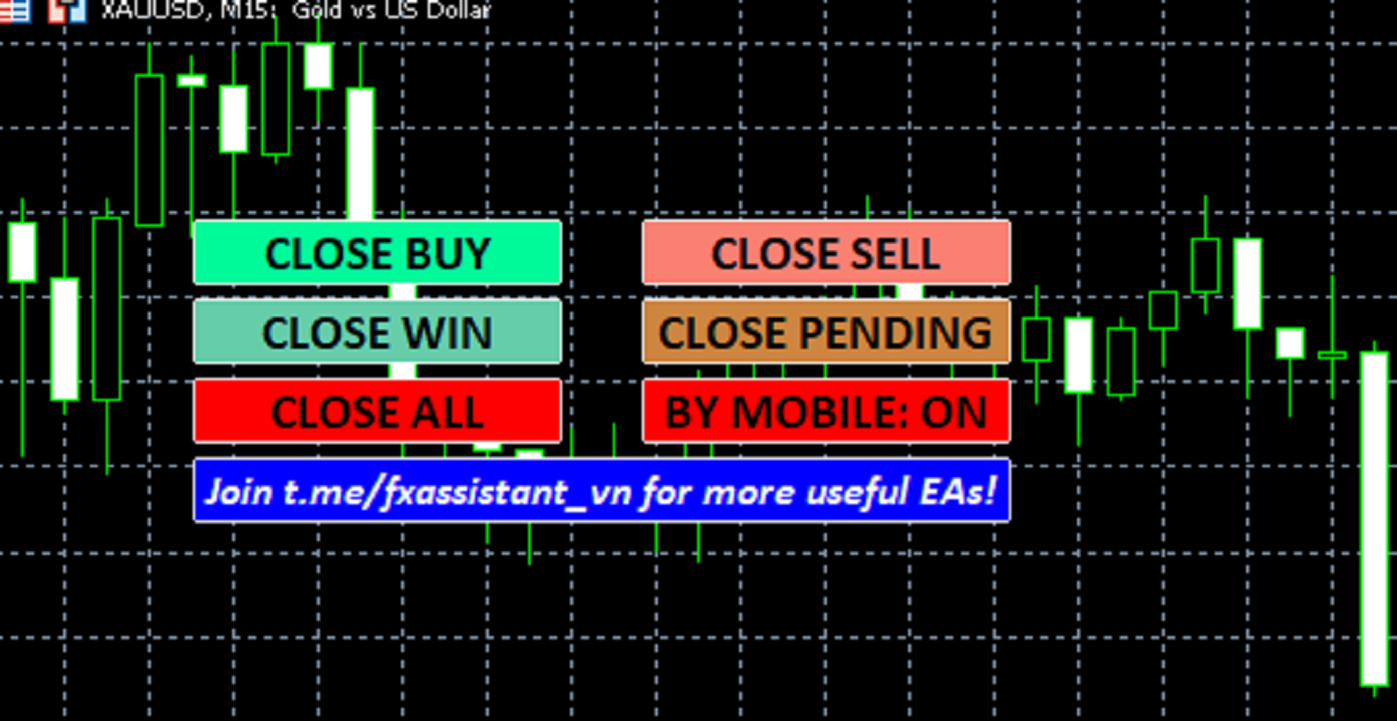
Quick Close Pro by one click:

* Close Buy positions

* Close Sell positions

* Close Win positions

* Close All positions

* Close All pending orders

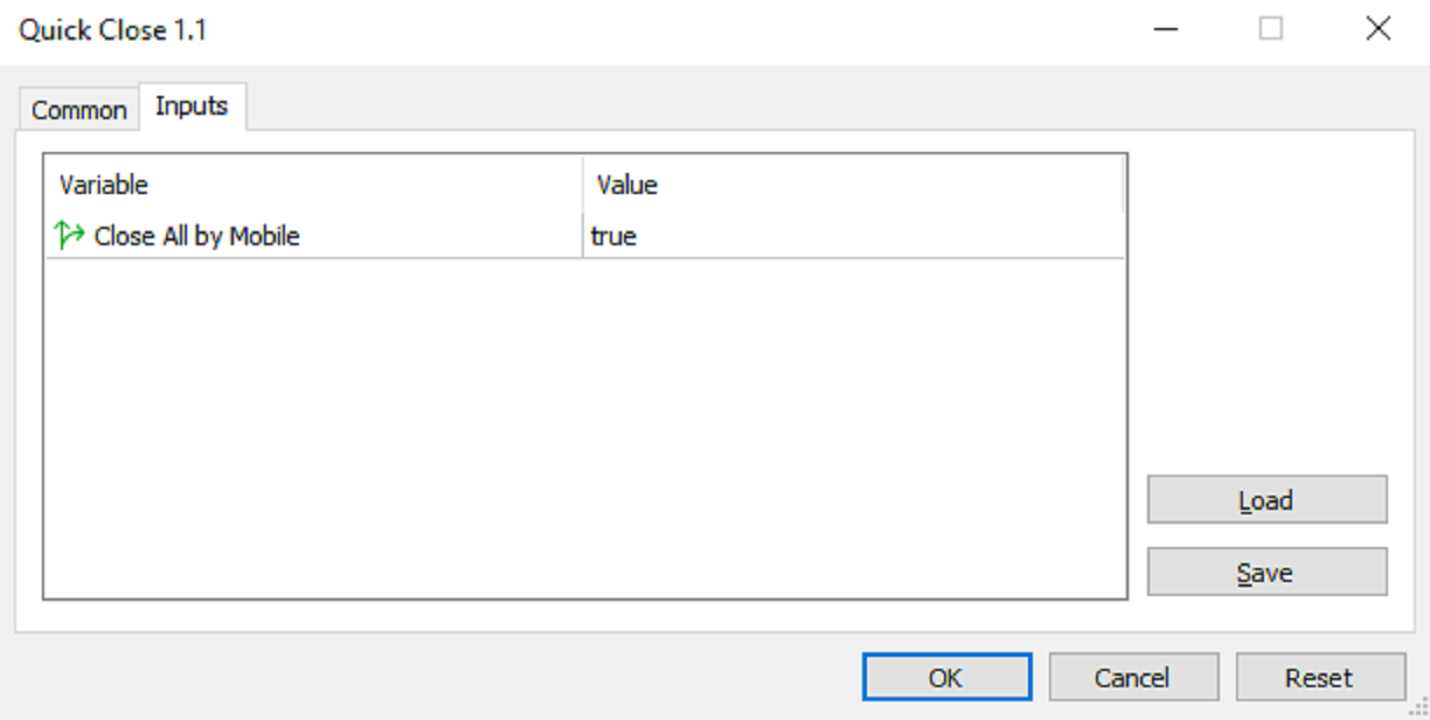
* Close All by Mobile: Select true to close all positions quicky from your Mobile by closing any position on Mobile. To close all positions by one click from your Telegram, please refer Master Close.

Join my channel here for more useful EAs. Thank you!
추천 제품
Input Description The indicator provides flexible options to display trading history directly on the chart, including: Days to show Profit Displays only trades executed within the last X days from the current time. Font Size Allows selecting the font size used to display trade information on the chart. Show Volume Enables or disables the display of trade volume for each position. Show Currency Enables or disables the display of the currency unit for profit values. Color for Win Trade Sets t
FREE
Axiom Trade — 특별 혜택 Axiom Trade을 30 미국 달러에 구매하고 Smart Universal Expert Advisor를 무료로 받으세요. 거래를 계획하세요. 위험을 설정하세요. 차트에서 관리하세요. Axiom Trade는 MT5의 시각적 주문 준비와 거래 관리를 결합합니다. 차트에서 가격 수준을 옮기고 실행 전에 수량과 위험을 확인하세요. 진입, 손절, 익절 선을 활용하는 시장가 주문과 예약 주문. 고정 랏, 위험 비율 기반 수량 및 손익비 계산. 부분 청산, 손익분기점 이동, 일곱 가지 추적 방식 및 보호 기능. 선택형 손실 회복 및 그리드 모드는 위험 노출과 낙폭을 늘릴 수 있습니다. 사용 전에 설정하고 테스트하세요. 패키지 구성 Axiom Trade Smart Universal Expert Advisor PDF 사용 설명서와 온라인 강좌. 설정 안내와 구매자 커뮤니티 이용 혜택. 스크린샷으로 인터페이스를 살펴보고 구매자 리뷰를 확인하세요. 간단한 3단계로
Assets can behave based on repetitive patterns on specific times of the day, for example at the opens and closes of the sessions. Daily Vertical Lines helps us draw vertical lines at any given time of the day as many days as required, as simple as sliding a vertical line. This free version only draws vertical lines, while the paid version (to be published) collects and presents technical and statistical information regarding the price behavior at that time of the day.
FREE
Babel Assistant
Iurii Bazhanov
4.33 (9)
Babel assistant 1 MT5 넷팅(netting) 로봇 "Babel_assistant_1"은 ZigZag 지표를 사용하여 M1, M5, M15, H1, H4, D1 및 W1 타임프레임 전반에 걸쳐 피보나치 수준을 생성하고, 매수 및 매도 트렌드의 강도를 계산합니다. 지정된 트렌드 수준 4.925를 초과하면 "Lot for open a position" 설정을 사용하여 포지션을 엽니다. 그런 다음, Babel은 특정 피보나치 수준에 대기 주문(pending orders)을 배치하고 지정된 손절매(Stop Loss) 및 이익실현(Take Profit) 라인을 설정합니다. 화면에는 포지션, 거래 및 트렌드의 현재 결과가 표시됩니다. 0.02랏 이상의 수동 포지션 증가는 로봇에 의해 자체 대기 주문의 트리거로 인식됩니다. 0.01랏의 대기 주문 또는 시장가 주문은 체결 시 단순히 포지션 볼륨을 변경합니다. 면책 조항: 아래에 제시된 자료는 정보 제공 및 교육 목적으로만 제공됩니다
FREE
The Definitive Performance Testing Solution for MetaTrader Environments What This Tool Does This specialized benchmark utility measures the performance of your MetaTrader environment, providing insights that impact your trading execution. Unlike generic system benchmarks, this tool evaluates performance specifically within the MetaTrader runtime environment. For Professional Traders & Developers: Performance Metrics : Measurements of calculation throughput and memory efficiency Trading-Specific
Simple Replay Simple Replay Bar-by-Bar Historical Price Action Replay for MetaTrader 5 Simple Replay is a utility Expert Advisor that lets you replay historical price bars one at a time on your MT5 chart. A curtain hides future bars so you only see what happened up to the current position — perfect for practicing price action and backtesting discretionary strategies. Features Play / Pause — Auto-play bars at adjustable speed (0.5x to 64x) Step Forward / Back — Move one bar at a time in either di
FREE
Session Box And Timer
Nguyen Thanh Trieu
Session Box And Timer 일중 거래(Intraday trading)는 주요 시장 세션 간의 전환을 모니터링해야 하지만, 일정을 수동으로 중첩하면 계산 오류가 발생하기 쉽습니다. 명확한 표시가 없으면 이전 세션의 주요 가격 수준과 유동성 영역을 쉽게 간과할 수 있습니다. Session Box And Timer는 거래 세션, 변동성 추세 및 카운트다운 타이머를 차트에 직접 시각화합니다. 표시 내용: - 세션 박스 (Session Boxes): 아시아, 런던, 뉴욕 세션을 나타내는 시각적인 색상 사각형으로, 라벨에 자동 계산된 핍 범위(pip range)가 표시됩니다. - 아시아 범위 수준: 아시아 세션의 고가 및 저가 투영을 오른쪽으로 수평선으로 연장하여 일중 돌파 기준으로 사용합니다. - 전일 고가/저가 (PDH/PDL): 전일의 고가 및 저가 경계를 표시하는 점선 수평선. - 사이클 라인 및 카운트다운 라벨: 예정된 세션 오픈 시점에 수직선을 그려 다음 세션이 시작될
FREE
Pivot Monster EA
Alexandre Vincent Traber
PIVOT MONSTER EA 개요 PIVOT MONSTER는 일일 피봇 레벨(Classic, Camarilla 또는 Woodie)과 전일 고가/저가 돌파를 결합하여 거래합니다. Bounce(반등), Breakout(돌파), Combo(합류) 세 가지 상호 교체 가능한 전략을 실행하며, 하루에 한 번 예약 주문을 배치하고 ATR 배수 또는 가격 대비 백분율로 통일된 SL/TP 산정 방식을 사용합니다. 고정된 인디케이터 오버레이가 아닌, 완전히 최적화 가능한 규칙 기반 피봇 시스템을 원하는 트레이더를 위해 설계되었습니다. 작동 방식 매 거래일 시작 시, EA는 전일 고가/저가/종가를 기반으로 피봇 레벨(PP, R1-R3, S1-S3)을 계산하고 전일 고가와 저가를 기록합니다. 선택한 전략에 따라 S1/R1 근처에 Buy Limit/Sell Limit 주문(Bounce), 전일 고가/저가를 초과하는 위치에 Buy Stop/Sell Stop 주문(Breakout), 또는 피봇 레벨과 전
FREE
Somewhere over the rainbow It is a system that tries to operate the market from the exhaustion of the trend with a correction algorithm that tries to cut losses at the cost of increasing the margin This system makes all the adjustments automatically, analyzing the pair and the market to decide which is the most efficient step to reach your destination. Somewhere over the rainbow is a multiple trade and multi lot system(The maximum batch can be up to 5 times the initial batch distributed in mult
BLZ Candle TImer
Moustapha Boulouz
4.48 (21)
BLZ 캔들 타이머: 트레이딩의 미래를 열다 현재 막대가 끝나고 새 막대가 나타나기까지 남은 시간을 알려주는 고급 막대 타이머 카운트 다운 인 BLZ 캔들 타이머로 최첨단 거래의 세계로 들어서십시오. 이 지표는 차트에서 마지막 막대의 남은 시간을 표시하여 시장 리듬보다 앞서 나갈 수 있도록 정밀도의 힘을 경험하십시오. 새 막대가 도착하면 적시에 알림을 보내 트레이딩 전략에 동적 우위를 더합니다. 다재다능함이 핵심입니다: - 빠른 속도의 *M1 차트주기*부터 넓은 시야의 *MN 차트주기*까지 모든 차트주기에서 원활하게 작동합니다. - 사용자 지정 가능한 매개 변수로 거래 경험을 맞춤화하여 선호도에 따라 *색상*, *텍스트 크기* 및 *가시성*을 가지고 놀 수 있습니다. *단순한 도구가 아니라 모든 트레이딩 스타일*에 맞는 다용도 동반자로 스캘퍼와 장중 트레이더의 요구를 충족합니다. 번개처럼 빠른 계산을 통해 *BLZ 캔들 타이머 *는 시장의 심장 박동과 동기화되어 한 비트도
FREE
Fibonacci MT5
Konstantin Chechnev
Fibonacci EA MT5 is an Expert Advisor for automating trading based on Fibonacci levels. It determines the minimum and maximum prices over a specified number of bars, builds Fibonacci levels, and opens trades when the current price reaches the selected levels. The EA can trade with the trend or against it, depending on the given parameters. It also allows you to configure levels for closing trades, risk management, and time filters. Features Automatic detection of local extremes and the construct
SessionSync   is a smart and elegant timing tool for MetaTrader 5, created to keep traders fully synchronized with the market. It shows the remaining time of the current candle in real time and displays the main trading clocks, including server time, local time, New York, and London. With a clean floating panel and an intuitive layout, SessionSync helps you track candle expiration and market sessions quickly and efficiently, without overloading your chart. Whether you trade price action, intrada
CSV News File Generator MT5 is a script specifically designed for the MQL5 platform. It enables the automated generation of CSV files containing economic calendar news, making it ideal for use in strategy simulators or as data for training artificial intelligence models. How Does It Work? The script gathers economic news directly from the MQL5 calendar, organizes the data into arrays, and converts it into CSV files for later use. Steps to Generate News Identify Event Codes: Find the event code
FREE
GDS RiskLab TradeDesk Renko Pro Edge Advanced Manual Execution and Risk-Control Cockpit for Renko Traders in MetaTrader 5 GDS RiskLab TradeDesk Renko Pro Edge is a professional chart-based trading cockpit for discretionary traders who use Renko charts, support and resistance zones, momentum context and structured risk control in MetaTrader 5. It is designed for traders who want to manage the full manual workflow from one place: market context, setup readiness, risk planning, order preparation an
FXSN EasyAlert
Davindra Adrian Pyankaroo
An Essential Tool for the Professional Trader Problem:  As a professional trader, you have worked out entry points across several charts and now your anticipating price action. At this stage, you are having to constantly check your mobile phone or PC across several charts hoping for those prices to be achieved Solution:  Enter all the prices for all charts into a single display and get instant notifications to your mobile phone or PC. Save yourself time and frustration Note:  This product wil
FREE
FXmans Trade Assistant EA Professional Trade Management, Dynamically Simplified. Ready to elevate your trading to an institutional level? Stop guessing and start managing your trades with the professional precision of large financial institutions. The FXmans Trade Assistant EA is designed for the serious MetaTrader 5 trader who demands absolute control over their trade entries, risk management, and execution targets. This isn't just another panel; it's a dynamic trade management system built wit
VenomQuant XAU
Ignacio Agustin Mene Franco
VenomQuant XAU — Overview VenomQuant XAU is a fully automated Expert Advisor designed for scalping XAU/USD (Gold) on the M1 timeframe. It combines Smart Money Concepts (SMC) with classic Price Action patterns and an adaptive risk management engine, delivering a high-frequency, low-latency trading system optimized for volatile precious metals markets. ️ Core Strategy The EA operates under a multi-confluence entry model that requires alignment in three independent layers before executing any
DeepInsight
Gustavo Santos Pedrosa
Title: DeepInsight: Flow and Market Context Analysis What is DeepInsight? DeepInsight is a technical analysis tool for MetaTrader 5, developed to assist in reading market dynamics. The indicator processes volume and price movement data to generate objective visual references, facilitating the identification of areas of interest on the chart. The tool functions as an auxiliary analysis dashboard, offering support for manual decision-making without performing automatic order execution. Operationa
Gold Sniper AI Pro
Salahaldeen Abedalqader Mah'd Alshaer
Gold Sniper AI – روبوت تداول الأموال الذكية Gold Sniper AI هو مستشار خبير متقدم مصمم خصيصًا لتداول XAUUSD (الذهب) باستخدام مفاهيم المال الذكي وتحليل حركة السعر. يقوم نظام التداول الآلي بتحليل عوامل السوق المتعددة قبل تنفيذ الصفقات للعثور على فرص ذات احتمالية عالية في سوق الذهب. ⸻ منطق الاستراتيجية يجمع برنامج Gold Sniper AI بين العديد من مفاهيم التداول الاحترافية، بما في ذلك: • الكشف عن اتجاهات السوق الأوروبية • تحليل هيكل السوق • عمليات مسح السيولة • كتل الطلبات • فجوات القيمة العادلة (F
EN DESARROLLO, TESTING PERIOD. PRISM KellyEngine aplica disciplina de riesgo profesional directamente en tu flujo MT5. Te ayuda a: definir lotaje de forma consistente, limitar sobrecarga de riesgo, proteger cuenta en escenarios de volatilidad. Ideal para traders que quieren dejar atras el lotaje por intuicion. Parametros principales  Riesgo base por operacion (%) Limite maximo de lotaje Umbral de confianza Multiplicadores de seguridad Incluye Motor de sizing adaptable Controles de limites de ri
Nexus HFT Pro
Daniel Ivan Stadelmann
Nexus HFT PRO Nexus HFT PRO is an Expert Advisor for MetaTrader 5 designed to identify short-term trading opportunities by analyzing real-time price action and market dynamics. The system incorporates flexible management that allows it to adapt to different financial instruments and risk profiles. Multi-pair XAUUSD recommended Key Features Automatic trade opening. Configurable risk management. Support for fixed and automatic lot sizes. Spread control. Advanced Stop Loss and Take Profit mana
NEXA Pivot Rebound Basic 1. 개요 NEXA Pivot Rebound Basic은 일일 피벗 레벨(S1, R1)을 기준으로 가격의 반등 가능성을 탐지하는 Expert Advisor입니다. 이 제품은 MetaTrader 5 플랫폼에서 작동하며, M15 차트 기준으로 설계되었습니다. 전일 고가, 저가, 종가를 기반으로 계산된 피벗 레벨과 RSI 및 Stochastic 보조지표를 함께 사용하여 진입 조건을 구성합니다. 본 제품은 자동 매매 전략 연구 및 트레이딩 자동화를 위한 도구입니다. 2. 전략 개요 전략은 다음 요소를 조합하여 신호를 생성합니다. 전일 기준 Pivot Point 계산 S1 / R1 레벨 접근 여부 확인 RSI 보조지표 Stochastic 교차 조건 최근 스윙 고점/저점 기반 손절 설정 고정 비율 기반 이익 목표(RR) 매수 조건은 가격이 S1 근처에 도달하고, 보조지표 조건이 충족될 때 발생합니다. 매도 조건은 가격이 R1 근처에 도달하고, 보조지
XAU Momentum Sniper
Napat Puangjunkum
XAUUSD MOMENTUM SNIPER AI  MMD Precision Sniper - Know exactly which pip the trend runs out of gas. XAUUSD Momentum Sniper AI is a revolutionary trading robot built on the elite "Momentum Mass Decay (MMD)" theory. Retail traders constantly get burned because they try to guess resistance and support lines. The reality is: Gold doesn't stop because it hits an imaginary line; it stops because it RUNS OUT OF FUEL. This AI converts Tick Volume into a measurement of "Fuel" and compares it against
Macd Gold Matrix
Ignacio Agustin Mene Franco
MACD GOLD MATRIX v1.00 — Expert Advisor for XAU/USD MACD GOLD MATRIX is a professional Expert Advisor designed and optimized exclusively for the XAU/USD (Gold) pair in MetaTrader 5. It combines two of the most robust indicators in technical analysis—the MACD and a Moving Average—to identify high-probability entries and manage trades completely automatically. Designed for beginner traders who want to trade Gold without complications. No complex configuration is required: simply attach it to th
No EA, no complex configuration – just run this script and see your professional trade setup instantly on the chart. The MTT   Breakout Trade Setup Pro   script is built for manual breakout traders who want   institutional‑grade risk management   without the overhead of an Expert Advisor. It uses a proprietary higher‑timeframe detection algorithm (calibrated for the 9:00 GMT+3 session) to identify the optimal breakout reference levels. Your Stop Loss distance is derived automatically from market
CleopatraEA
Rafal Pawel Bugno
CLEOPATRA — Smart Pyramid Trading System CLEOPATRA is an automated Expert Advisor for MetaTrader 5 designed around a structured pyramiding approach . Instead of increasing lot sizes, the system builds a position progressively by adding fixed-volume trades as price continues to move in the established direction. The strategy combines breakout detection, trend continuation and controlled position building. Its Smart Pyramid logic uses progressively wider spacing for later entries, helping reduce e
Aurus AI
Dmitriq Evgenoeviz Ko
Aurus AI : Multi-AI Architecture Aurus AI Core is more than just a trading advisor; it's a next-generation intelligent ecosystem based on the principle of multi-layered artificial intelligence consensus. The system consists of four specialized AI modules, each responsible for a separate stage of trade entry signal verification. Four-layer filter system The advisor opens a trade only when all four independent modules give an "APPROVED" signal: Market Sense Layer : Evaluates overall market volati
LineaResultadoyEjecucion
Juan Luis De Frutos Blanco
Result and Execution line, which shows the net global position, the expected profit at a given price level, and its percentage of the account balance. Additionally, with the line unselected, it executes position and/or order closing actions. You can move the line from one price to another by selecting it, to obtain information on the closing result of positions at different price levels. If you wish to close trades and/or orders, select this option in the EA parameters and then deselect the li
FREE
EQUITY DRAWDOWN MONITOR   This is a simple mt5 advisor that monitors the drawdon levels Features: Easy to use Useful for money managers How to Use  Load the EA once a single chart Type the maximum drawdown desired in inputs Leave the EA alone and never close that chart The EA monitors all trades and magic numbers in your account. Input Parameter Drawdown Percent:   Maximum drawdown in percentage terms allowable in the account. When the drawdown level is surpassed, the EA will close all trades
Candle Countdown Utility
AL MOOSAWI ABDULLAH JAFFER BAQER
Candle Countdown Know exactly when the next candle begins. Trade with perfect timing. Candle Countdown is a professional MetaTrader utility that displays a precise, real-time countdown timer for the current candle on any chart and timeframe. By showing exactly how much time remains before the current candle closes and the next one begins, the utility helps traders improve entry timing, manage exits more effectively, and avoid making decisions based on incomplete price action. Whether you're a sc
이 제품의 구매자들이 또한 구매함
Trade Assistant MT5
Evgeniy Kravchenko
4.43 (216)
거래당 위험 계산, 라인을 사용한 손쉬운 신규 주문, 부분 청산 기능을 통한 주문 관리, 7가지 유형의 트레일링 스탑 및 기타 유용한 기능을 제공합니다. 추가 자료 및 지침 설치 지침   -   애플리케이션 지침   -   데모 계정용 애플리케이션 평가판 라인 기능       - 차트에 개시선, 손절매, 차익실현을 표시합니다. 이 기능을 사용하면 새로운 주문을 쉽게 하고 개봉 전에 추가 특성을 볼 수 있습니다. 위기 관리       -       위험 계산 기능은 설정된 위험과 손절매 주문의 크기를 고려하여 새 주문의 볼륨을 계산합니다. 이를 통해 손절매 크기를 설정하고 동시에 설정된 위험을 존중할 수 있습니다. 로트 계산 버튼 - 위험 계산을 활성화/비활성화합니다. 필요한 위험 값은 위험 필드에 0에서 100 사이의 백분율 또는 예금 통화로 설정됩니다. 설정 탭에서 위험 계산 옵션을 선택합니다. $ 통화, % 잔액, % 지분, % 자유 마진, % 사용자 정의, % AB 이전
Trade Manager EA에 오신 것을 환영합니다. 이 도구는 거래를 보다 직관적이고 정확하며 효율적으로 만들기 위해 설계된 궁극적인 리스크 관리 도구 입니다. 단순한 주문 실행 도구가 아닌, 원활한 거래 계획, 포지션 관리 및 리스크 제어를 위한 종합 솔루션입니다. 초보자부터 고급 트레이더, 빠른 실행이 필요한 스캘퍼에 이르기까지 Trade Manager EA는 외환, 지수, 상품, 암호화폐 등 다양한 시장에서 유연성을 제공합니다. Trade Manager EA를 사용하면 복잡한 계산은 이제 과거의 일이 됩니다. 시장을 분석하고 진입, 손절 및 익절 수준을 차트의 수평선으로 표시한 후 리스크를 설정하면, Trade Manager가 이상적인 포지션 크기를 즉시 계산하고 SL 및 TP 값을 실시간으로 표시합니다. 모든 거래가 간편하게 관리됩니다. 주요 기능: 포지션 크기 계산기 : 정의된 리스크에 따라 거래 크기를 즉시 결정합니다. 간단한 거래 계획 : 진입, 손절, 익절을 위한
================================================================================ POC BREAKOUT - V20.72. Full Professional Grade Toolkit ================================================================================ POC Breakout is a full MetaTrader 5 trading dashboard for discretionary traders who want breakout signals, Point of Control (POC) context, volume profiles, order flow, market structure, news, alerts, and advanced trade planning in one professional workspace. Attached directly to you
Strategy Ledger Pro
Abdullah Uygar Tuna
5 (7)
이제 한국어로 이용할 수 있습니다. Strategy Ledger Pro 는 MetaTrader 5용 읽기 전용 계좌 분석 패널입니다. 계좌 성과를 전문가 어드바이저(EA), 전략, 심볼, 매직 넘버별로 나누어 각각이 실제로 얼마나 기여하는지 보여줍니다. 패널은 11개 언어를 지원합니다: English, Français, Deutsch, Español, Italiano, Português, Русский, Türkçe, 中文, 日本語, 한국어. 데모를 다운로드하기 전에. Market은 모든 유료 제품의 데모를 전략 테스터에서만 실행합니다. 이 패널은 사용자 자신의 계좌 거래를 분석하는데, 전략 테스터에는 읽을 계좌 기록이 없으므로 데모는 빈 패널로 열리고 그 사실을 표시합니다. 이는 데모 방식에 따른 것이며 제품의 제약이 아닙니다. 이 설명의 동영상에서 실계좌에서 작동하는 패널을 확인할 수 있습니다. 모든 기능을 설명한 자세한 매뉴얼 (영문)과 토론 및 공지를 위한 AureusAI
Local Trade Copier EA MT5
Juvenille Emperor Limited
4.94 (149)
Local Trade Copier EA MT5는 동일한 Windows 컴퓨터 또는 Windows VPS에서 여러 MetaTrader 5 계정 간에 거래를 복사하고 관리할 수 있는 빠르고 유연한 거래 복사기입니다. 로컬 거래 동기화 기능과 함께 Receiver 측에서 로트 크기, 리스크 관리, 거래 필터링, 심볼 매핑, 거래 관리 및 계정 보호를 독립적으로 설정할 수 있습니다. Transmitter와 Receiver 터미널을 약 1분 안에 설정하고, 동일한 브로커 또는 서로 다른 브로커의 계정 간에 수동 거래 또는 EA 거래를 복사할 수 있습니다. 적절한 조건에서는 로컬 MetaTrader 터미널 간의 거래 정보가 0.5초 이내 에 동기화될 수 있습니다. 실제 체결 속도는 브로커 지연 시간, 네트워크 상태, 컴퓨터/VPS 성능 및 터미널 부하에 따라 달라집니다. 구매 전에 무료 데모를 사용해 보세요 MT5 데모 계정에서 Local Trade Copier EA MT5의 모든 기능을
Telegram to MT5 Multi-Channel Copier   는 Telegram 채널의 트레이딩 시그널을 MetaTrader 5로 자동 복사합니다. 봇도, 브라우저 확장도, 수동 복사도 필요 없습니다. Telegram에 시그널이 도착하면 EA가 몇 초 안에 터미널에서 주문을 실행합니다. 그리고 채널을 복사하기 전에, 내장 백테스터가 그 채널이 내 계좌에서 어떤 결과를 냈을지 보여줍니다. 제품은 두 가지 구성 요소로 이루어집니다: Telegram 채널을 수신하는 Windows 애플리케이션과, MT5 터미널에서 시그널을 실행하는 본 EA입니다. MT4 버전도 제공됩니다   여기 . 설정 가이드와 앱 다운로드:   https://www.mql5.com/en/blogs/post/768988 텔레그램 시그널 채널을 백테스트하는 방법 을 확인하세요. 현재 가격은 향후 인상될 예정입니다. 작동 방식 앱은 여러분 자신의 Telegram 계정으로 연결되므로, 팔로우하는 모든 채널, 그룹,
TradePanel MT5
Alfiya Fazylova
4.88 (170)
Trade Panel은 다기능 거래 도우미입니다. 이 애플리케이션에는 50개 이상의 수동 거래 기능이 포함되어 있으며 대부분의 거래 작업을 자동화할 수 있습니다. 앱 사용 설명서: https://www.mql5.com/en/blogs/post/756482 데모 계정용 앱 체험판: https://www.mql5.com/en/blogs/post/750865 앱 설치 방법: https://www.mql5.com/en/blogs/post/756239 시각 모드에서 앱 테스트 방법: https://www.mql5.com/en/blogs/post/770277 VPS MetaTrader에 앱 설치 방법: https://www.mql5.com/en/blogs/post/770190 거래. 한 번의 클릭으로 거래를 수행할 수 있습니다: 리스크 자동 계산과 함께 예약 주문 및 포지션 열기. 한 번의 클릭으로 여러 주문 및 포지션 열기. 주문 그리드 열기. 예약 주문 및 포지션을 그룹별로 닫기. 포지션
내 거래 규칙에 맞춰 Telegram 신호 복사 Telegram to MT5 Signal Trader 는 공개 및 비공개 Telegram 채널과 그룹의 텍스트 기반 거래 신호를 MetaTrader 5로 자동 복사합니다. 하나의 데스크톱 앱에서 여러 신호 제공자와 MT5 계좌를 관리하고, 제공자마다 위험 관리 및 거래 설정을 개별적으로 지정 할 수 있습니다. 신호 복사에는 Telegram 봇이나 API 설정이 필요하지 않습니다. 전화번호 또는 QR 코드로 본인의 Telegram 계정에 로그인한 후, 이미 가입한 채널이나 그룹을 선택하면 됩니다. 봇을 만들거나 Telegram API 토큰, API ID 또는 API 해시를 입력할 필요가 없습니다. 포지션 크기를 선택하고, 여러 익절 목표에 청산 물량을 배분하며, 손익분기점 이동과 트레일링 스톱을 자동화하세요. 제공자의 신호를 따르면서도 실제 거래 방식은 직접 설정할 수 있습니다. 이 제품은 MT5 Expert Advisor와 필수 Win
Farmed Hedge Yield Farming | All Markets (Manual - Hybrid - Semi/Automated EA) VERIFIED TRADING RESULTS - Farmed Hedge Yield Axi Copy:  https://www.mql5.com/en/signals/2356376 - Farmed Hedge Yield Exn Copy:   https://www.mql5.com/en/signals/2356404 - Farmed Hedge Yield V Copy:  https://www.mql5.com/en/signals/2357156 IMPORTANT NOTICE: FarmedHedge is a MANUAL-FOCUSED TRADING UTILITY ,not a fully automated EA. Results shown on this Signal include manual trades and overall strategic management.
Exp COPYLOT CLIENT for MT5
Vladislav Andruschenko
3.97 (35)
MetaTrader 5용 전문 트레이드 복사기 MetaTrader 용 빠르고 전문적이며 신뢰할 수 있는 트레이드 복사기 입니다. COPYLOT 은 MT4와 MT5 터미널 간의 Forex 거래 복사를 지원하며, Hedge 및 Netting 계좌를 모두 지원합니다. COPYLOT MT5 버전 지원 구성: - MT5 Hedge → MT5 Hedge - MT5 Hedge → MT5 Netting - MT5 Netting → MT5 Hedge - MT5 Netting → MT5 Netting - MT4 → MT5 Hedge - MT4 → MT5 Netting MT4 버전 전체 설명 + DEMO + PDF 구매 방법 설치 방법 로그 파일 확인 방법 테스트 및 최적화 방법 Expforex의 모든 제품 MT4 터미널로도 거래를 복사할 수 있습니다(MT4 → MT4, MT5 → MT4): COPYLOT CLIENT for MT4 COPYLOT은 2개, 3개, 심지어 10개의 터미널과 동시에 작동할
Trade copier MT5
Alfiya Fazylova
4.61 (56)
Trade Copier는 거래 계정 간의 거래를 복사하고 동기화하도록 설계된 전문 유틸리티입니다. 복사는 공급자의 계정/단말기에서 동일한 컴퓨터 또는 vps에 설치된 수신자의 계정/단말기로 발생합니다. 구매하기 전에 데모 계정에서 데모 버전을 테스트할 수 있습니다. 데모 버전 여기 . 전체 지침 여기 . 주요 기능 및 이점: 복사기는 "МТ5> МТ5", "МТ4> МТ5", "МТ5> МТ4" 복사를 지원합니다. 복사기는 데모 계정 > 실 계정, 실 계정 > 데모 계정, 데모 계정 > 데모 계정 및 실제 계정 > 실 계정 복사를 지원합니다. 복사기는 읽기 전용 암호가 적용된 투자자 계정에서 복사를 지원합니다. 하나의 공급자 터미널은 여러 수신 터미널로 트랜잭션을 보낼 수 있고 하나의 수신 터미널은 여러 공급자 터미널에서 트랜잭션을 수신할 수 있습니다. 복사기는 귀하 또는 귀하의 고문이 거래하는 동일한 터미널에서 작동할 수 있습니다. 높은 복사 속도(0.5초 미만). 복사기에는 간편
파워 캔들 전략 스캐너 - 자체 최적화 다중 종목 설정 찾기 도구 파워 캔들 전략 스캐너는 마켓 워치에 등록된 모든 종목에 대해 파워 캔들 지표와 동일한 자체 최적화 엔진을 동시에 실행합니다. 하나의 패널에서 현재 통계적으로 거래 가능한 종목, 각 종목별 최적의 전략, 최적의 손절매/익절 조합을 알려주며, 새로운 신호가 발생하면 즉시 알림을 전송합니다. 이 도구는 Stein Investments 에코시스템의 일부입니다. 18개 이상의 도구와 함께 당신의 1대1 AI 트레이딩 멘토 Max.  항상 대기 중, 모든 인디케이터를 깊이 있게 이해, 무언가를 차근차근 생각해보고 싶은 순간에 도움을 줍니다.  https://stein.investments 에서 만나보세요 완벽한 시장 모니터링. 종목당 3,000건 이상의 자동 최적화. 2가지 알림 유형. 한 번의 클릭으로 차트를 전환하고 바로 거래하세요. 이 도구가 필요한 이유 대부분의 다중 종목 스캐너는 가격 변동만 보여줍니다. 티커별
Signal TradingView to MT5 Pro Automator TradingView와 MetaTrader 5 간의 즉각적인 전문 실행 TradingView 알림과 MT5의 실제 실행을 연결하는 가장 강력한 커뮤니케이션 브리지로 거래 전략을 자동화하세요. 속도, 유연성 및 완벽한 위험 관리를 요구하는 트레이더를 위해 설계된 이 Expert Advisor는 모든 알림 메시지를 정확한 시장가 또는 지정가 주문으로 변환합니다. 강점 및 이점 범용 파싱 엔진(독점 기술): 모든 알림 형식에서 데이터를 자동으로 인식하고 추출할 수 있는 고급 기술입니다. 단일하고 엄격한 형식에 얽매일 필요가 없습니다. 시스템은 심볼, 액션, 가격, SL 및 TP를 자동으로 이해합니다. 실시간 실행: 지연 시간을 최소화하도록 최적화된 1초 미만의 초고속 폴링 기술. 신호 수신 후 몇 밀리초 내에 주문 실행이 이루어집니다. 기관 수준의 위험 관리: 다음 기준에 따른 자동적이고 정확한 로트(Lot) 크기 계
MT5 to Telegram Signal Provider 는 사용하기 쉽고 완전히 커스터마이즈 가능한 유틸리티로, 특정 신호를 Telegram의 채팅, 채널 또는 그룹으로 전송하고, 귀하의 계정을 신호 제공자 로 만듭니다. 경쟁 제품과 달리 DLL 임포트를 사용하지 않습니다. [ 데모 ] [ 매뉴얼 ] [ MT4 버전 ] [ 디스코드 버전 ] [ 텔레그램 채널 ]  New: [ Telegram To MT5 ] 설정 단계별 사용자 가이드 가 제공됩니다. 텔레그램 API에 대한 지식은 필요하지 않습니다; 개발자가 제공하는 모든 것이 필요합니다. 주요 특징 구독자에게 보낸 주문 상세 정보를 커스터마이즈할 수 있습니다. 예를 들어, 브론즈, 실버, 골드와 같은 계층 구독 모델을 만들 수 있습니다. 골드 구독에서는 모든 신호를 받습니다. id, 심볼, 또는 코멘트로 주문을 필터링할 수 있습니다. 주문이 실행된 차트의 스크린샷이 포함됩니다 보낸 스크린샷에 닫힌 주문을 그려 추가 검증을 합니다
Premium Trade Manager - 코치가 내장된 트레이딩 패널 Premium Trade Manager 는 차트 안에 트레이딩 코치를 심어놓은 도구입니다. 주문을 확정하기 전에, AI 트레이딩 코치 Max가 설정된 거래를 직접 읽고 명확한 판단을 내려줍니다. 스톱이 규율 있는 접근 방식에 맞는지, 리스크 크기가 합리적인지, 고영향 뉴스 이벤트가 몇 분 후에 있는지, 프롭 펌 한도에 근접했는지. 그 아래에는 완전한 실행 엔진이 있습니다. 원클릭 리스크 기반 진입, 차트에서 드래그로 세우고 거래가 진행되는 동안에도 계속 움직일 수 있는 플랜, 최대 4단계 분할 익절, 7가지 트레일링 방식, 실시간 프롭 펌 컴플라이언스, 뉴스 가드, 그리고 자체 비용을 평가하는 스프레드까지. 결정은 당신이 내립니다. Max가 두 번째 시선으로 확인합니다. 패널이 그 이후의 모든 것을 처리합니다. 구매 전에 직접 체험해 보세요. 브라우저에서 라이브 패널을 직접 클릭해볼 수 있습니다. 구매 전에 실제
HINN MagicEntry Extra
ALGOFLOW OÜ
4.74 (19)
HINN MAGIC ENTRY – the ultimate tool for entry and position management! SIMPLE. FASTEST. INTUITIVE. MAX AUTOMATED. Place orders by selecting a level directly on the chart! full description   ::  demo-version  :: 60-sec-video-description Key features: - Market, limit, and pending orders - Automatic lot size calculation - Automatic spread and commission accounting - Unlimited partitial take-profits  - Breakeven and trailing stop-loss and take-profit  functions - Invalidation leves - Intuitive, a
EA Overfitter
Stephen J Martret
5 (1)
That backtest looks great. But will it still be making money tomorrow, next week, next month? EA Overfitter re-runs your EA on 100 price histories it has never seen. One score tells you if the edge is real. A backtest tells you what an EA did on one price history — the one that happened to occur. What you cannot tell from it is how much of that result was the strategy and how much was the particular path. EA Overfitter answers that. It builds up to 100 synthetic price histories your EA has n
구매 후 저에게 메시지를 보내주시면 전체 매뉴얼 키트 + AI 기능을 테스트할 수 있는 3일간의 OpenAI API 체험 + 추가 보너스 선물을 제공해 드립니다 현재 가격은 8월 재출시 업데이트를 위한 기간 한정 할인 가격입니다 — 가격이 인상되기 전에 지금 에디션을 확보하세요. 다음 가격: $340 이것은 시장에서 지금까지 사용해 보았거나 본 어떤 트레이딩 패널과도 완전히 다릅니다. 현재 리테일 시장에서 이용할 수 있는 가장 혁신적인 AI 기반 트레이딩 패널 중 하나입니다. AI를 차트에 직접 연결한다고 상상해 보세요   — AI 추천, 계좌 감사, AI 트레이딩 신호 수신 및 클릭 한 번으로 실행. Telegram을 통해 스마트폰에서   전체 트레이딩 계좌를 관리한다고 상상해 보세요   — AI와 채팅하고, 즉각적인 알림을 받고, 거래를 관리하며 어디서든 계좌를 보호할 수 있습니다. 여러   EA를 실행하면서   각 EA의 성과를 개별적으로 모니터링하고, 거래를 관리하거나 특정
Footprint Chart Pro — Professional OrderFlow EA for MetaTrader 5 Version 6.34 | Professional tool for real traders | Institutional-Grade Visualization DEMO USERS - PLEASE SELECT EVERY TICK / REAL TICK WHEN TESTING AND YOU HAVE DOWNLOADED HISTORICAL DATA. IF YOU SEE A WAITING SCREEN AND IT IS NOT DOWNLOADING, IT MEANS YOU HAVE LOW HISTORICAL DATA. TRY 1 MIN AND 5 MIN FIRST ON 1 DAY DATA. ONE DAY DATA SHOULD BE THE NEWEST AND MOST CURRENT DATE. PLEASE WAIT UNTIL THE MARKET HAS ROLLED OVER PERIOD.
EA Slipstream
Stephen J Martret
5 (1)
Your backtest filled every order at the price it asked for. Your account does not. EA Slipstream measures what execution costs your EA, using your own fills, slippages and spreads to show you the true performance of your EA. A backtest prices every trade at the level the EA named. In live trading a pending order fills at whatever price is available when it triggers, a stop closes wherever the market is when it is hit, and the spread at that moment is whatever the account was quoting. The differ
Trade Manager DaneTrades
Levi Dane Benjamin
4.23 (30)
거래 관리자는 위험을 자동으로 계산하는 동시에 거래를 빠르게 시작하고 종료하는 데 도움을 줍니다. 과잉 거래, 복수 거래 및 감정 거래를 방지하는 데 도움이 되는 기능이 포함되어 있습니다. 거래를 자동으로 관리할 수 있으며 계정 성과 지표를 그래프로 시각화할 수 있습니다. 이러한 기능은 이 패널을 모든 수동 거래자에게 이상적으로 만들고 MetaTrader 5 플랫폼을 향상시키는 데 도움이 됩니다. 다중 언어 지원. MT4 버전  |  사용자 가이드 + 데모 트레이드 매니저는 전략 테스터에서 작동하지 않습니다. 데모를 보려면 사용자 가이드로 이동하세요. 위기 관리 % 또는 $를 기준으로 위험 자동 조정 고정 로트 크기 또는 거래량과 핍을 기반으로 한 자동 로트 크기 계산을 사용하는 옵션 RR, Pips 또는 Price를 사용한 손익분기점 손실 설정 추적 중지 손실 설정 목표 달성 시 모든 거래를 자동으로 마감하는 최대 일일 손실률(%)입니다. 과도한 손실로부터 계정을 보호하고 과도한
Telegram To MT5 Ultra
Mirel Daniel Gheonu
5 (5)
Telegram To MT5 — 시그널 카피어 텔레그램 채널의 트레이딩 콜을 실제 MT5 주문으로 바꿔 드립니다 — 자동으로, 원하는 만큼의 계좌에서, 리스크와 규칙을 완전히 당신의 통제 아래 둡니다. Telegram To MT5는 이미 텔레그램에서 팔로우하고 있는 VIP / 시그널 채널을 당신의 MetaTrader 5 터미널에 연결합니다. 무료 동반 데스크톱 앱이 메시지를 읽고(봇을 차단하는 채널에서도 가능), 이 EA가 당신의 계좌에서 이를 실행합니다 — 당신만의 리스크 설정, 심볼 매핑, 익절(TP) 처리, 세션 및 뉴스 필터를 적용합니다. 이것은 블랙박스 전략이 아니라 시그널 카피어입니다. 어떤 채널을 신뢰할지, 각 거래의 수량과 관리 방식을 당신이 결정합니다. 단계별 설정 및 동반 앱 설치 가이드 작동 방식 [당신의 텔레그램 채널] -> [동반 데스크톱 앱] -> [MT5 + 이 EA] -> 주문 동반 데스크톱 앱(무료, 포함)은 당신의 텔레그램 계정으로 로그인하여 선택한
Dynamic Fibonacci Grid
Tsvetan Tsvetanov
5 (1)
MT5용 Dynamic Fibonacci Grid Dashboard 최신 버전을 소개합니다. 많은 새로운 기능이 추가된 이번 대시보드는 거래 경험을 완전히 변화시키며, 시장과 가격 움직임을 완전히 새로운 관점에서 볼 수 있게 합니다. 여러 시간대와 여러 심볼을 동시에 분석하여 새로운 가능성을 발견하세요. 수동 거래와 포지션 관리에 친화적인 사용자 인터페이스와 미리 정의된 자동 전략을 적용할 수 있는 확장된 기능을 제공합니다. 또한 DFG는 이제 전략 테스터(Strategy Tester)에서 트레이딩 시뮬레이터로 완벽하게 작동하며, 과거 데이터를 사용하여 다양한 거래 조건을 재현할 수 있습니다. 시각 모드에서 수동 거래를 연습하고, 고속 모드에서 자동 전략을 테스트할 수 있습니다. 주요 기능 • Dynamic Fibonacci Bands 개념을 기반으로 한 다중 시간대 및 다중 심볼 고급 기술 분석 실시간 시장 모니터링 대시보드를 통해 탁월한 효율성을 경험할 수 있습니다. M1,
Trade Indicator Assistant   is a powerful MT5 utility designed to turn indicators into automated trading systems. Its main feature is the ability to automatically detect an indicator’s   BUY and SELL signal buffers , without requiring you to know the buffer numbers, search through indicator settings, or modify the indicator source code. Bonus Indicator:   After purchasing Trade Indicator Assistant, contact me to receive   Trade Signal Pro   completely free as a bonus indicator. [Download Demo V
Welcome to ENTRY IN THE ZONE AND SMC MULTI TIMEFRAME Entry In The Zone and SMC Multi Timeframe is a real-time market analysis tool based on Smart Money Concepts (SMC), designed to analyze market structure, price direction, and key trading zones. It supports both Single-Timeframe Analysis and Multi-Timeframe Analysis, providing a clearer view of the overall market structure across multiple timeframes, with real-time BUY / SELL signals that do not repaint. It is designed to help filter trading opp
Grid Manual MT5
Alfiya Fazylova
4.73 (22)
"Grid Manual"은 주문 그리드 작업을 위한 거래 패널입니다. 이 유틸리티는 보편적이며 유연한 설정과 직관적인 인터페이스를 제공합니다. 그것은 손실을 평균화하는 방향뿐만 아니라 이익을 증가시키는 방향으로 주문 그리드와 함께 작동합니다. 거래자는 주문 그리드를 만들고 유지할 필요가 없으며 유틸리티에서 수행합니다. 거래자가 주문을 시작하는 것으로 충분하며 "Grid Manual"는 자동으로 그를 위한 주문 그리드를 생성하고 거래가 마감될 때까지 그와 동행할 것입니다. 전체 설명 및 데모 버전 여기 . 유틸리티의 주요 기능: 모바일 터미널을 포함하여 어떤 방식으로든 열린 주문과 함께 작동합니다. "제한" 및 "중지"의 두 가지 유형의 그리드와 함께 작동합니다. 고정 및 동적(ATR 표시기 기반)의 두 가지 유형의 그리드 간격 계산과 함께 작동합니다. 오픈 오더 그리드의 설정을 변경할 수 있습니다. 차트에서 각 주문 그리드의 손익분기점 수준을 표시합니다. 각 주문 그리드에 대한 이익
DrawDown Limiter
Haidar Lionel Haj Ali
5 (22)
DrawDown Limiter v5.0 — 고급 계좌 보호 컨트롤러 DrawDown Limiter v5.0은 거래 계좌를 모니터링하고 설정된 리스크, 수익, 뉴스, 일정, 롤오버 또는 포지션 수 제한에 도달했을 때 자동으로 대응하도록 설계된 클라이언트 측 계좌 보호 컨트롤러입니다. 하나의 전용 차트에서 수동 거래, 자동화 전략, 여러 Expert Advisor, 대기 주문 및 오픈 포지션 을 모니터링할 수 있습니다. 전체 계좌를 보호하거나 Magic Number를 사용하여 특정 EA 또는 여러 EA 그룹만 모니터링하도록 설정할 수도 있습니다. DrawDown Limiter의 목적은 단순히 드로다운을 표시하는 것이 아닙니다. 설정한 거래 규칙을 적극적으로 적용 하고 보호 조건이 활성화되어 있는 동안 해당 규칙을 계속 시행하는 것이 목적입니다. DrawDown Limiter v5.0은 단순히 얼마나 손실이 발생하고 있는지만 모니터링하는 것이 아니라, 전략이 언제 계속 거래할 수 있는지,
Exp5 Duplicator
Vladislav Andruschenko
4.78 (9)
Duplicator for MetaTrader 5 — 하나의 터미널 안에서 동작하는 전문 포지션 복제 시스템 MetaTrader 5에서 이미 열려 있는 포지션을 자동으로 복제하고, 전체 거래 규모를 확장하며, 사용자 지정 로트 규칙을 적용하고, 복제 포지션을 정교한 로직으로 관리하려는 트레이더를 위한 신뢰성 높은 Expert Advisor입니다. 수동 매매, 알고리즘 매매, 그리고 이미 존재하는 포지션을 더 유연하게 관리하려는 사용자에게 적합한 실전형 도구입니다. Duplicator for MT5는 자체 매매 전략으로 새로운 포지션을 열지 않습니다. 이 제품의 역할은 MetaTrader 5 계정 안에 이미 존재하는 포지션을 감시하고, 사용자가 설정한 조건에 따라 복제 포지션을 생성하는 것입니다. 복제 횟수, 로트 크기, Stop Loss, Take Profit, 코멘트, 추가 관리 조건까지 세밀하게 설정할 수 있습니다. 서로 다른 플랫폼이나 다른 터미널 간 복사 기능이 아니라, 같
Seconds Chart MT5
Boris Sedov
4.61 (18)
Seconds Chart - MetaTrader 5에서 초 단위 차트를 생성하는 독특한 도구입니다. Seconds Chart 를 사용하면 초 단위로 설정된 타임프레임으로 차트를 작성할 수 있어, 표준 분 또는 시간 단위 차트에서는 불가능한 유연성과 정밀한 분석이 가능합니다. 예를 들어, S15 타임프레임은 15초 동안의 캔들로 구성된 차트를 의미합니다. 사용자 정의 심볼을 지원하는 모든 인디케이터와 전문가 어드바이저를 사용할 수 있습니다. 이를 사용하는 것은 표준 차트에서 거래하는 것만큼 편리합니다. 표준 도구와 달리, Seconds Chart 는 초고속 타임프레임에서도 높은 정확도와 지연 없이 작업할 수 있도록 지원합니다. 무료 데모: Seconds Chart v2.29 Demo.ex5 무료 데모를 다운로드하고 직접 확인하십시오: 완전한 기능 - 모든 기능 사용 가능 24시간 테스트 - 정확성과 편리성을 평가하기에 충분한 시간 데모 계정만 - 대부분의 브로커에서 쉽게 개설 가능
Multi Account Local Trade Copier 는 MetaTrader용 빠른 로컬 트레이드 카피어입니다: 동일한 Windows PC 또는 VPS의 MT4/MT5 터미널 간에, 하나의 마스터 계좌에서 여러 리시버 계좌로 거래를 복사하세요 — 본인의 실계좌, 데모 계좌, 프랍펌 계좌로. 같은 브로커든 다른 브로커든 상관없습니다. 이벤트 기반 으로 작동합니다: 마스터는 각 거래를 발생하는 순간 즉시 게시하고, 리시버는 모든 복사의 실제 지연 시간을 측정하고 기록 합니다 — 일반적으로 50-150ms 입니다. DLL 없음, 인터넷 브리지 없음, 설정 파일 없음. 하나의 EA, 두 가지 모드 원본 터미널에는 MASTER 로, 각 대상 터미널에는 RECEIVER 로 부착하세요. Master ID = AUTO 이면 리시버가 활성 마스터를 스스로 찾습니다: 드래그, 드롭, 끝. 하나의 마스터가 무제한 리시버 에 공급할 수 있고, 하나의 터미널에서 여러 리시버를 실행할 수 있으며, 한
제작자의 제품 더 보기
Auto SLTP Pro
Tuan Nghia Phan
5 (1)
Auto SLTP Pro can help you setSL & TP automatically for positions & pending orders * 2 modes: - Points - USD * Symbol Filter:  Select All or a specific symbol * For pending orders: Select true to set SLTP for pending orders Note: Only valid for positions (pending orders) without SL&TP! Join my channel here for more useful management tools: * Remote Tools via Telegram: Super Assistant, Master Close, Master Control, Master Notify * Free Tools: Tele Notify, Price Alert, Quick Close
FREE
Master Close via Telegram can help you perform some management tasks on MT4/MT5 remotely via your Telegram by one click, easy to set up & use. Demo here (see more Master Notify   Master Control  ) ************************************************************************************ LIST OF COMMANDS: info_acc -  Get account info info_pen -   Get pending orders details info_pos -   Get positions details info_pos_sum -   Get positions summary close_pen -   Delete all pending orders close_pos_all -
Auto SLTP Pro for MT4
Tuan Nghia Phan
3.33 (3)
Auto SLTP Pro can help you setSL & TP automatically for positions & pending orders * 2 modes: - Points - USD * Symbol Filter:  Select All or a specific symbol * For pending orders: Select true to set SLTP for pending orders Note: Only valid for positions (pending orders) without SL&TP! Join my channel   here   for more useful management tools: * Remote Tools via Telegram: Super Assistant, Master Close, Master Control, Master Notify * Free Tools: Tele Notify, Price Alert, Quick Close 
FREE
Price Aler t can help you send notifications to your personal Telegram when the price crosses a preset value. Additionally, you can check your MT4/5 account info anytime from your Telegram by simple command: /check.  Get more free useful EAs  here ! HOW TO SET UP?   * Get inputs for EA: - Telegram Bot Token: Create a Telegram bot by   @BotFather   ,   and save your Bot Token. Find your bot by username & press "start". - Telegram User ID: Use your User ID by chatting with @ userinfobot   * Setup
FREE
Equity Aler t can help you send notifications to your personal Telegram when your account equity reaches/ drops below a preset value. Additionally,   you can check your MT4/5 account info anytime from your Telegram by simple command: /check .    Get more free useful EAs  here ! HOW TO SET UP?   * Get inputs for EA: - Telegram Bot Token: Create a Telegram bot by   @BotFather   ,   and save your Bot Token. Find your bot by username & press "start". - Telegram User ID: Use your User ID by chatting
FREE
Quick Close Pro by one click: * Close Buy positions * Close Sell positions * Close Win positions * Close All positions * Close All pending orders To close all positions by one click from your Telegram, please refer  Master Close . Thank you! Join my channel   here   for more useful EAs: - Tele Notify, Price Alert, Equity Alert, Remote Algo OnOff - Auto SLTP, Close Timer
FREE
Tele Notify
Tuan Nghia Phan
Tele Notify can help you send notifications for opened & closed trades to a Telegram channel or your personal Telegram. (see Master Notify for full options of notifications/alerts: indicator data, price, news, etc. Get more EAs  here ) Update: Now you can check your account info anytime from your Telegram by simple command: /check. This option is only valid when you use your Telegram User ID on EA inputs *******************************************************************************************
FREE
Break-Even Pro  * 3 BE modes:    - RewardRisk_Single for single trade (only valid for positions with SL)    - Points_Single for single trade    - Points_DCA for multiple DCA trade * Start Value: value of RR or # points to start SL moving * Offset: distance in points between BE level & entry  * Symbol Filter: Select All or a specific symbol * Partial Close (%): Close % initial volume when moving SL to BE (0 for no partial close) Join my telegram channel here  for more useful free EAs. Thank you!
FREE
IndiSig by Buffer Detect Signals from a Custom Indicator by Buffer & Send notifications to Telegram Channel or Open orders * Buy/Sell Buffer: You may get this info on MT4/5 Data Window (CTRL + D) * MT5 version: Add the indicator first, then the EA * MT4 version: Only works properly with default settings of the indicator Join  https://t.me/fxassistant_vn for more useful EAs!
FREE
Break-Even Pro   * 3 BE modes:    - RewardRisk_Single for single trade (only valid for positions with SL)    - Points_Single for single trade    - Points_DCA for multiple DCA trade * Start Value: value of RR or # points to start SL moving * Offset: distance in points between BE level & entry  * Symbol Filter: Select All or a specific symbol * Partial Close (%): Close % initial volume when moving SL to BE (0 for no partial close) Join my telegram channel   here  for more useful free EAs. Thank yo
FREE
IndiSig by Buffer Detect Signals from a Custom Indicator by Buffer & Send notifications to Telegram Channel or Open orders * Buy/Sell Buffer: You may get this info on MT4/5 Data Window (CTRL + D) * MT5 version: Add the indicator first, then the EA * MT4 version: Only works properly with default settings of the indicator Join https://t.me/fxassistant_vn for more useful EAs!
FREE
Price Aler t can help you send notifications to your personal Telegram when the price crosses a preset value. Additionally,   you can check your MT4/5 account info anytime from your Telegram by simple command: /check .    Get more free useful EAs  here ! HOW TO SET UP?   * Get inputs for EA: - Telegram Bot Token: Create a Telegram bot by   @BotFather   ,   and save your Bot Token. Find your bot by username & press "start". - Telegram User ID: Use your User ID by chatting with @ userinfobot   *
FREE
Equity Aler t can help you send notifications to your personal Telegram when your account equity reaches/ drops below a preset value. Additionally,   you can check your MT4/5 account info anytime from your Telegram by simple command:   /check .    Get more free useful EAs  here ! HOW TO SET UP?   * Get inputs for EA: - Telegram Bot Token: Create a Telegram bot by   @BotFather   ,   and save your Bot Token. Find your bot by username & press "start". - Telegram User ID: Use your User ID by chatti
FREE
Tele Notify can help you send notifications for opened & closed trades to a Telegram channel or your personal Telegram. (see Master Notify for more options of notifications: price, equity, profit, etc. Get more EAs here ) Update: Now you can check your account info anytime from your Telegram by simple command: /check. This option is only valid when you use your Telegram User ID on EA inputs ******************************************************************************************** HOW TO SET U
FREE
Master Notify via Telegram can help you perform some management tasks on MT4/MT5 remotely via your Telegram by one click, easy to set up & use. Demo here (see more Master Close   Master Control ) ************************************************************************************ LIST OF COMMANDS: info_acc -  Get account info info_pos -   Get positions details price -   Get symbol price noti_price   - Set price alert  noti_pl   - Set floating PL alert noti_equity - Set equity alert  noti_margin
Master Control via Telegram can help you perform some management tasks on MT4/MT5 remotely via your Telegram by one click, easy to set up & use. Demo here (see more Master Close   Master Notify  ) ************************************************************************************ LIST OF COMMANDS: info_acc -   Get account info info_pos -   Get positions details price -   Get symbol price buy  -   Open a buy position sell  -   Open a sell position inst_set  -   Set parameters for instant trade i
* Super Assistant   is an useful management tool that helps traders perform management tasks on MT4/MT5 account remotely via  Telegram  such as: - Get info (account, details of positions, pending orders, floating PL, price, economic news, etc) - Open trade (open instantly with preset parameters) - Manage trade (set SLTP automatically, break-even mode, max risk, close time every day, etc) - Close trade (close all, buy, sell, win positions by one click, set awaiting close by PL, time) - Set up no
Copy signals from Telegram channel to MT4/MT5 (Telegram bot must be added as an Admin in the channel)  Input * Telegram bot token: Get your bot token by chatting with @BotFather * Multi- order for multi-tp signals * Signals filter by "not included text" * Option to Modify/Close by Reply message * Range Entry Mode: No open order if the price is out of range  Setup on your MT4/MT5: - MT4/MT5 => Tools => Options => Expert Advisors => Tick on Allow Algo Trading & Allow WebRequest, add  API Telegram
Master Close via Telegram can help you perform some management tasks on MT4/MT5 remotely via your Telegram by one click, easy to set up & use. Demo here (see more Master Notify   Master Control ) ************************************************************************************ LIST OF COMMANDS: info_acc -  Get account info info_pen -   Get pending orders details info_pos -   Get positions details info_pos_sum -   Get positions summary close_pen -   Delete all pending orders close_pos_all -  
Master Notify via Telegram can help you perform some management tasks on MT4/MT5 remotely via your Telegram by one click, easy to set up & use. Especially now this tool can work with indicator & send alert to Telegram. Demo here (see more Master Close   Master Control ) ************************************************************************************ LIST OF COMMANDS: info_acc -  Get account info info_pos -   Get positions details price -   Get symbol price news -   Get economic news noti_pri
Master Control via Telegram can help you perform some management tasks on MT4/MT5 remotely via your Telegram by one click, easy to set up & use. Demo here (see more  Master Close     Master Notify  ) ************************************************************************************ LIST OF COMMANDS: info_acc -  Get account info info_pos -   Get positions details price -   Get symbol price buy  -   Open a buy position sell  -   Open a sell position inst_set  -   Set parameters for instant trade
* Super Assistant is an useful management tool that helps traders perform management tasks on MT4/MT5 account remotely via Telegram such as: - Get info (account, details of positions, pending orders, floating PL, price, economic news, etc) - Open trade (open instantly with preset parameters) - Manage trade (set SLTP automatically, break-even mode, max risk, close time every day, etc) - Close trade (close all, buy, sell, win positions by one click, set awaiting close by PL, time) - Set up notifi
TeleCopy
Tuan Nghia Phan
Copy signals from Telegram channel to MT4/MT5 (Telegram bot must be added as an Admin in the channel) Input * Telegram bot token: Get your bot token by chatting with @BotFather * Multi- order for multi-tp signals * Signals filter by "not included text" * Option to Modify/Close by Reply message * Range Entry Mode: No open order if the price is out of range  Setup on your MT4/MT5: - MT4/MT5 => Tools => Options => Expert Advisors => Tick on Allow Algo Trading & Allow WebRequest, add  API Telegram  
필터:
리뷰 없음
리뷰 답변