TimeLS Close Positions MT4

  • 유틸리티
  • Kaloyan Ivanov
    Kaloyan Ivanov
    http://www.kivanov.com
    저는 외환(Forex) 시장에서 8년 이상의 경험과 15년 이상의 프로그래밍 경력을 보유하고 있으며, MetaTrader 4 및 5용 자동화 시스템 개발을 전문으로 하고 있습니다.
    MQL4, MQL5는 물론 Java, JavaScript, C++도 다루지만, 주로 트레이딩 시스템 개발에 집중하고 있습니다.
  • 버전: 1.2
  • 활성화: 5

Utility TimeLs Close Positions는 MetaTrader 5에서 포지션 종료를 관리하고 자동화하기 위한 도구입니다. 시간, 종목, 방향, 매직 넘버, 코멘트를 기준으로 오픈 포지션을 언제 어떻게 종료할지 유연하게 제어할 수 있습니다.

특정 요일에 거래를 비활성화할 수 있습니다
모든 오픈 포지션을 종료할 특정 시간을 설정할 수 있습니다
종목, 방향(매수/매도), 매직 넘버 또는 코멘트로 종료를 필터링할 수 있습니다
Deal 1, Deal 2, Deal 3과 같은 최대 3개의 일회성 종료 작업을 날짜와 시간 기준으로 설정할 수 있습니다
현재 설정 및 예정된 종료 작업을 보여주는 차트 정보 패널을 표시하거나 숨길 수 있습니다
차트에 표시되는 텍스트의 글꼴 크기와 색상을 사용자 지정할 수 있습니다


추천 제품
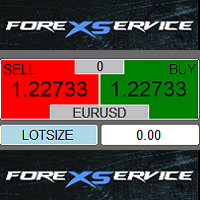
One Click Trader is a tool designed for MetaTrader 4 platform, which enables you to take your trading to the next level. It enables you to open, manage and close your trades in simple an efficient way by just one click of your mouse button. Up arrow minimizes the OCT panel Down arrow maximizes the OCT panel Right arrow displays the next panel with additional features Left arrow hides the panel with additional features Red SELL button enables you to open short market orders Red SELL STOP button e
DepoControl – Full Control Over the Deposit Closers   Expert Advisor controls the overall account status and closes ALL market orders on the account when certain conditions occur. The trading robot closes ALL orders on the account in the following cases (by profit): Close ALL orders by a total profit on the account   in monetary terms . For example, suppose that the settings specify that   positions should be closed when profit of 100 is reached. In this case, the Expert Advisor closes all mark
Introducing the OrderManager: A Revolutionary Utility for MT4 Manage your trades like a pro with the all-new Order Manager utility for MetaTrader 4. Designed with simplicity and ease-of-use in mind, the Order Manager allows you to effortlessly define and visualize the risk associated with each trade, enabling you to make informed decisions and optimize your trading strategy.  Key Features: Risk Management: Define the risk of your trades quickly and easily, allowing you to make better decisio
This EA gives traders a clean, full-window view of how large a position each Market Watch symbol can support at different percentages of account balance used as margin. It helps you quickly compare sizing options across symbols and risk levels without ever placing or modifying orders. The goal is simple position-size awareness so you can decide exposure before you trade. Benefits Shows lot size potential across Market Watch symbols at up to three different % of balance margin levels side-by-sid
FREE
Send periodic (Health Check) notification from your MT4 terminal to your mobile phone to be sure that your MT4 terminal is still running. When you did not receive the notification, it means that your terminal is unavailable. Optional information like Account Equity and Trading Pairs are also available. Notification Period - 1 Hour, 2 Hours, 4 Hours, 8 Hours, 12 Hours, 24 Hours Attach EA to any H1 chart
News Calculator and Trading Panel is a high-tech exclusive calendar indicator, which shows news for many currencies. At the same time, it is a versatile trading panel. The News Calculator indicator shows the news on the chart in a detailed form and draws vertical lines: for low, medium and high-impact news. The indicator contains multiple features. Many buttons are displayed on the chart, each button is responsible for a certain action. When a news event occurs, the indicator generates notificat
This tool can help you close all open orders with one click, just click "Close all". If you only want to close the profitable orders, click the "Close profitable" button. After clicking, all the floating orders will be closed. All orders will be liquidated; if you only want to close the orders with floating losses, click the "Close losable" button. After clicking, all orders with floating losses will be liquidated.
BreakEven ProSync EA – Trade Management & Risk Control Tool Overview BreakEven ProSync EA is an expert advisor for   MetaTrader 4  that helps traders manage open positions efficiently by   automating stop-loss adjustments   and ensuring position synchronization. This tool is designed for traders who want to standardize their stop-loss and take-profit levels across multiple trades while integrating a break-even function. The EA works by calculating the  average price   of all open positions and
All In One Trade Manager is a trade manager and one-click trading panel for manual traders on MetaTrader 4. It works as a trading assistant, risk manager and position size calculator in one dashboard. It brings together everything below in one panel: order entry with risk sizing automatic trade management advanced order types account protection statistics Its entry checks run in the background and tell you, before you click BUY or SELL, when something speaks against the trade. Also available
Virtual Exchange Reserve Equity Monitor In an environment where exchanges offer increasingly high leverage ratios, it is all the more important for traders to tightly regulate their level of equity .  This software is designed to be run in the background on any virtual private server that can run Meta Trader 4/5.  It implements basic equity control functions ahead of the broker---allowing users to set their own equity trailing stop, an equity limit to lock-in a certain profit margin, and a unive
FREE
AT24 Prop Firm Guard for MetaTrader 4 watches the whole account against the rules of a challenge or funded account and closes orders before a limit is broken. It opens no trades. What it does Daily loss: shows how much of your daily limit is used, with a bar and the amount left. The limit can be a percent of the initial balance or of the balance at the start of the day. You choose the server hour when the day starts. Maximum loss: the same for the total limit, counted from the initial balance
Close All Orders for MT4 script - closes absolutely all orders, whether pending or market ones. Orders are closed at the current profit/loss indicators at the time of closing. The script is suitable for moments when you need to quickly close all orders at the current indicators. The script is very easy to use, just drag the script onto the chart and it will do its job. Add me as a friend , I have many other useful products.
Trailing Stop Manager MT4 Trailing Stop Manager MT4 is a flexible trade management utility for MetaTrader 5 that automatically moves the Stop Loss as price moves in your favor. It is designed for traders who want to protect profits and manage open positions automatically while keeping control over how and which positions are managed. The manager currently includes two trailing methods: • Standard Trailing Stop • Fractals Trailing Stop It also includes a compact trading panel for opening, managi
Risk Controller Expert Advisor는 귀하의 계정에 있는 거래 고문의 전체 위험을 제어할 수 있는 프로그램입니다. 이 프로그램을 사용하면 모든 고문의 계정에 허용되는 최대 위험을 제어할 수 있습니다. 예를 들어, 최대 손실액의 30% 위험을 설정했습니다. 즉, 주식 거래 로봇이 30% 위험을 초과하면 위험 관리자가 고문의 모든 위치를 닫고 열려 있는 모든 차트를 닫을 수 있으므로 방지할 수 있습니다. 고문은 더 이상 일하지 않습니다. 전문가 고문은 평균적인 로봇을 마틴게일과 교환하고 불가항력 또는 기타 예상치 못한 상황에서 로봇의 최대 손실을 제한하려는 경우 "편안한 수면"에 필요합니다. 시장 반전. Советник Risk Controller, очень важная и по моему мнению необходимая программа для каждого трейдера который торгует роботами. 제어는 계정의 최대 손실에 해당하는 제한
Trade Desk for MT4
Mostafa Saad Saeed Shawara
Trade Desk 는 MetaTrader용 트레이드 패널이자 트레이드 매니저입니다. 차트에서 진입을 정하고 랏 계산기로 수량을 맞춘 뒤, 같은 패널에서 열린 포지션을 관리합니다. 손절, 여러 익절, 본절, 트레일링 스탑을 한곳에서 다룹니다. 추가 안내: 데모 계좌용 체험판 — MetaTrader 5용 Trade Desk 차트 도구의 대부분은 주문을 넣는 데까지만 돕습니다. 체결 뒤에는 포지션 매니저가 필요합니다. Trade Desk 는 두 일을 같은 차트에 둡니다. 레벨을 드래그하면서 위험 보상 비율을 바로 보고, 패널에서 보낸 다음, 별도의 주문 창을 열지 않고 열린 거래를 골라 조정합니다. 브로커로 가는 변경은 「업데이트」를 누를 때까지 미리보기이므로, 선을 끌어도 포지션이 실수로 바뀌지 않습니다. 주요 기능 차트 위의 트레이드 패널: Buy와 Sell 빠른 진입, 랏, 금액 위험, 계좌 대비 비율 위험을 레벨 표와 열린 포지션 목록 옆에 둡니다. 차트 트레이드 어시스턴트: 진
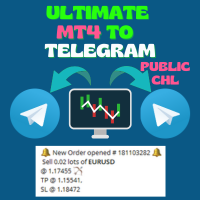
Ultimate MT4 to Telegram Public Channel sends controlled trades (via symbol, magic, comment) to a public telegram channel. It sends open and closed trades, including pending orders and TP/SL modifications, along with chart screenshots, to this public telegram channel. Additionally, you can send trade reports of open trades and summary profit/pip reports for day, week, or month. You can customize the design of the trade actions or reports with variables and emoticons.  A beautiful panel allows
FREE
Spread Control 은 MetaTrader 4 차트에서 현재 스프레드와 그 변화를 직접 확인할 수 있는 컴팩트한 인디케이터입니다. 기능 실시간 현재 스프레드 표시 최근 값의 기록을 보여주는 스프레드 변화 차트 표시 기간의 LOW / AVG / HIGH 계산 스프레드 상태에 따른 색상 표시: 정상 수준; 경고 수준; 위험 수준 현재 스프레드 값의 시각적 스케일 현재 Bid 및 Ask 표시 시장 활성 상태 표시: LIVE — 호가가 변경되고 있음; OFFLINE — 설정된 시간 동안 Bid와 Ask가 변경되지 않음 현재 심볼 및 타임프레임 표시 Full 및 Compact 모드 설정 Position X — 패널의 초기 가로 위치. Position Y — 패널의 초기 세로 위치. Refresh Interval — 인터페이스 새로고침 주기. Spread Sampling Interval — 스프레드 값을 기록에 저장하는 간격. Spread History Size — 저장되는 스프레드 기
Task Panel Nxfx Trade Manager Task Panel Nxfx Trade Manager is a trading utility designed to simplify manual trading, position management, and risk control in MetaTrader 4 and MetaTrader 5. The panel provides quick access to trading functions directly from the chart. Traders can place orders, configure Stop Loss and Take Profit levels, manage position sizes, and monitor open trades through a clear and convenient interface. The tool is suitable for scalping, day trading, swing trading, and other
FREE
FastMove
Adrian Ferreyra
FastMove is a panel with 5 buttons, a notification area and a text entry. Its goal is to enable quick and simple execution. Buttons: MOVE - Move the interface BUY - Start of buy process SELL - Start of sell process L - Select quantity of lots % - Select quantity of percent of balance Keyboard inputs ' ESC ' - Cancels the operation or return to the previous stage. ' F ' - Lock or unlock interface to prevent accidental executions. M - Move the interface. P - Exchange between pending orders or mark
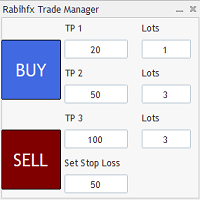
Introducing RabihFx Trade Manager New vesrion 2022 Update at 15/11/2022 and 100 activations now Rabihfx Trade Manager V2 is here with added Features click here Rabihfx Trade Manager is a trading utility tool (EA) allow you to place 3 orders with 3 take profit levels with custom  lot size for each trade with a stop loss  If your signal provider give you 3 take profit levels and a stop loss you will place these levels in  rabihfx trade manager with custom lot size for each level  and you choose
Market Data Logger 는 브로커의 마켓데이터(시세)를 파일에 저장을 하기 위한 유틸리티 입니다. 이 유틸리티를 이용해서, MT4 의 MarketWatch(종합시세)에 있는 시간, 매도, 매수, 고가, 저가 와 다양한 형태의 스프레드 (평균,Mode 등)를 csv 파일로 저장 할 수 있습니다. 이를 이용하면 다양한 사람들과 목적에 유용할 수 있습니다.  FX트레이더, 데이터를 분석하고자 하는 데이터 사이언티스트, 기업가, 저장 목적, 학문적 리서치, 마켓데이터가 필요한 머신러닝 개발자 등에 사용할 수 있습니다. 또한 이 유틸리티는 숙련된 기술을 이용해 개발되었고, 실행 중에 최소한의 리소스만 사용할 수 있도록 최적화 되어 있습니다. Market Data Logger 는 하나의 심볼에 대한 마켓데이터를 저장하도록 되어 있습니다. 만일 최대 64개의 심볼의 데이터를 다양한 주기와 추가 옵션을 이용하여 저장하기를 원하시면 Pro 버전 구매를 고려하시기 바랍니다. ===
FREE
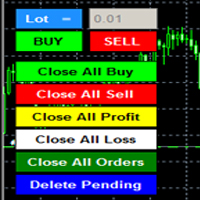
This tool working You can buy or sell from the button of this tool, the lot size can be filled manually, as for the close all buy button to end all buy positions, close all sell button to end all sell positions, Close All profit button to end  All  profit position, Close All Loss button to end all loss position, Delete Pending button to delete all Pending order, close all orders to end all orders. The variable, you can use close all percent for close all orders when profit in percent, if close
The professional utilities "Ichimoku Waves Meter" to analyse graphs using the correct interpretation of Ichimoku kinkōhyō! Is a graphic program that allows traders to quickly and easily measure the proportions between the indicated points on the price graph. This time and price indicator is a basic tool for analysing the chart according to the Ichimoku strategy on the MT4 platform. Using this tool allows an insightful and complete analysis of time waves as well as price waves in a very short ti
TradeManager Pro MT4
Siyasanga Stephen Mabokela
Introduction Managing a trade by hand often means an order ticket, a lot calculator, a stop-loss to edit and a set of personal rules to keep in mind. Trade Manager Pro puts these tasks in one panel on your chart. It is a manual trade manager, not an automated strategy. You decide when to enter. The panel handles order entry, position sizing, stop management and the risk limits you set for yourself. Two design choices set it apart. First, it has a Real mode and a Virtual mode. Virtual mode is
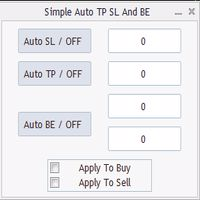
Program for automatic placement of stop loss and take profit orders. Values are calculated as points distance from open price. BreakEven option is also included. all options could be applied to BUY, SELL separately or together. Enter values ​​in points in the fields on the right side of the menu and press dedicated button to aplly your settings. If in doubt, The instruction is displayed in the tooltip.
FREE
"Binary Lab Simulator"는 거래 전략을 연습하고 검증하기 위해 설계된 도구입니다. 이 도구는 주말과 비거래 시간을 포함하여 24시간 연중무휴로 작동하며, 30초, 1분 및 3분과 같은 다양한 만료 기간을 지원하여 실제 거래와 유사한 환경을 만듭니다. 외부 도구와 호환되어 진입 결과를 분석할 수 있습니다. 여러 템플릿을 쉽게 저장할 수 있어 온라인 환경에서 시뮬레이터로 원활한 테스트가 가능합니다. "Binary Lab Simulator"는 단독으로 사용할 수 있지만, "SpeedManager", "Practice Simulator Sync" 및 "ArwByIdx"와 결합하면 기능이 향상됩니다. "SpeedManager"는 지정된 진입점에서 자동으로 정지합니다 "Practice Simulator Sync"는 다른 시간 프레임 및 통화 쌍과 차트를 동기화할 수 있습니다 "ArwByIdx"는 외부 지표 및 신호 도구와 통합되어 자동으로 진입점을 연결합니다 Signal Too
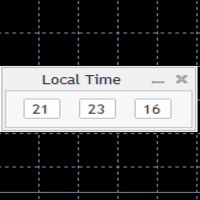
Simply clock. Local time as default. There are possible to Select: Local Time /Server Time /GMT Time as input. Please take into account that the local time is the most accurate. However ,this clock always uses local time seconds, even If GMT / Server Time Is selected.  I solved it this way to get more accuracy. Delays can occur when changing minutes or hours, if local time is not selected.
FREE
Trades Time Manager는 MetaTrader용 거래 예약 도구입니다. 동작, 심볼, 서버 날짜와 시간을 선택하면 도구가 대신 실행합니다. 주문 진입, 대기 주문 설정, 거래 청산, 손절을 본전으로 이동, 이익실현 변경, 대기 주문 취소를 처리합니다. 신호를 제공하지 않으며, 추가한 작업만 실행합니다. 뉴스나 세션 시작 시 진입하거나, 주말 전에 모든 포지션을 정리하거나, 정해진 시각에 거래를 본전으로 이동할 때 사용하세요. 한 번만 실행하거나 선택한 요일에 반복할 수 있습니다. Trades Time Manager 설치 및 입력 가이드 MT4 버전: https://www.mql5.com/ko/market/product/103716 MT5 버전: https://www.mql5.com/ko/market/product/103715 주요 기능 14가지 동작: Buy, Sell, Buy Stop, Sell Stop, Buy Limit, Sell Limit, Close Buy onl
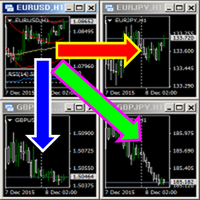
This utility can compare simultaneously time frames of different instruments and keep under control   the nine major time frames  of an instrument. It is composed by two changers, a crosshair and some additional components : the  multicharts time frames changer   is designed to simultaneously compare time frames for up  to thirty different sy th symbols with the  keyboard or the button the multicharts symbols changer can  link up to nine charts and control simultaneously the nine major time fra
Hedge Trader
Mohamed Amine Talbi
Hedge Trader is a panel that helps traders who use the hedging strategy in their trading. The panel style in simple and intuitive, and have the necessary shortcuts a fast trader would need for fast order execution. Features: - Auto double the lot after executing an order. The user only specifies the initial order, then the panel will automatically double the lot after an order execution. - Using basket for auto closing all orders on a predefined floating profit (with the possibility to turn it
이 제품의 구매자들이 또한 구매함
Trade Manager EA에 오신 것을 환영합니다. 이 도구는 거래를 보다 직관적이고 정확하며 효율적으로 만들기 위해 설계된 궁극적인 리스크 관리 도구 입니다. 단순한 주문 실행 도구가 아닌, 원활한 거래 계획, 포지션 관리 및 리스크 제어를 위한 종합 솔루션입니다. 초보자부터 고급 트레이더, 빠른 실행이 필요한 스캘퍼에 이르기까지 Trade Manager EA는 외환, 지수, 상품, 암호화폐 등 다양한 시장에서 유연성을 제공합니다. Trade Manager EA를 사용하면 복잡한 계산은 이제 과거의 일이 됩니다. 시장을 분석하고 진입, 손절 및 익절 수준을 차트의 수평선으로 표시한 후 리스크를 설정하면, Trade Manager가 이상적인 포지션 크기를 즉시 계산하고 SL 및 TP 값을 실시간으로 표시합니다. 모든 거래가 간편하게 관리됩니다. 주요 기능: 포지션 크기 계산기 : 정의된 리스크에 따라 거래 크기를 즉시 결정합니다. 간단한 거래 계획 : 진입, 손절, 익절을 위한
The product will copy all telegram signal to MT4   ( which you are member  ) , also it can work as remote copier.  Easy to set up, copy order instant, can work with almost signal formats, image signal, s upport to translate other language to English Work with all type of channel or group, even channel have "Restrict Saving Content", work with  multi channel, multi MT5 Work as remote copier: with signal have ticket number, it will copy exactly via ticket number. Support to backtest signal. How to
Trade Indicator Assistant is a powerful MT4 utility designed to turn indicators into automated trading systems. Its main feature is the ability to automatically detect an indicator’s   BUY and SELL signal buffers , without requiring you to know the buffer numbers, search through indicator settings, or modify the indicator source code. Bonus Indicator: After purchasing Trade Indicator Assistant, contact me to receive Trade Signal Pro completely free as a bonus indicator. [Download Demo Version]
Grid Manual MT4
Alfiya Fazylova
4.71 (17)
"Grid Manual"은 주문 그리드 작업을 위한 거래 패널입니다. 이 유틸리티는 보편적이며 유연한 설정과 직관적인 인터페이스를 제공합니다. 그것은 손실을 평균화하는 방향뿐만 아니라 이익을 증가시키는 방향으로 주문 그리드와 함께 작동합니다. 거래자는 주문 그리드를 만들고 유지할 필요가 없으며 유틸리티에서 수행합니다. 거래자가 주문을 시작하는 것으로 충분하며 "Grid Manual"는 자동으로 그를 위한 주문 그리드를 생성하고 거래가 마감될 때까지 그와 동행할 것입니다. 전체 설명 및 데모 버전 여기 . 유틸리티의 주요 기능: 모바일 터미널을 포함하여 어떤 방식으로든 열린 주문과 함께 작동합니다. "제한" 및 "중지"의 두 가지 유형의 그리드와 함께 작동합니다. 고정 및 동적(ATR 표시기 기반)의 두 가지 유형의 그리드 간격 계산과 함께 작동합니다. 오픈 오더 그리드의 설정을 변경할 수 있습니다. 차트에서 각 주문 그리드의 손익분기점 수준을 표시합니다. 각 주문 그리드에 대한 이익
Take a Break
Eric Emmrich
5 (32)
Take a Break pauses your Expert Advisors when trading is a bad idea: before news, after a daily loss, outside your trading hours, or when a rule you wrote yourself says so. When the pause is over, your EAs simply continue. Account protection for all your EAs in one tool: news filter, drawdown and equity protection, time filter and custom rules. One EA on one chart protects the whole account, the free indicator gives every chart its own rules on top. Free demo | What is new in 26.09 | Support Ass
The Price Action Dashboard is an innovative tool to help the trader to control a large number of financial instruments. This tool is designed to automatically suggest signals and price conditions. The Dashboard analyzes all major Time Frame suggesting price action conditions with graphic elements. The Dashboard can suggest you the strength of the trend identifying directional movement, it is an indispensable tool for those who want to open position themselves using market trends identifiers. The
PZ Trade Pad Pro MT4
PZ TRADING SLU
3.67 (3)
Effortlessly calculate lot sizes and manage trades to save time and avoid costly errors The Trade Pad Pro EA is a tool for the Metatrader Platform that aims to help traders manage their trades more efficiently and effectively. It has a user-friendly visual interface that allows users to easily place and manage an unlimited number of trades, helping to avoid human errors and enhance their trading activity. [ Installation Guide | Update Guide | Troubleshooting | FAQ | All Products ] One of the k
Riskless Pyramid
Snapdragon Systems Ltd
5 (1)
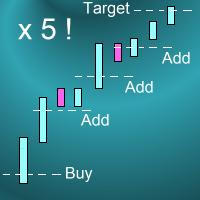
Introduction This powerful MT4 trade mangement EA offers a way potentially to aggressively multiply trade profits in a riskfree manner. Once a trade has been entered with a defined stoploss and take profit target then the EA will add three pyramid add-on trades in order to increase the overall level of profit. The user sets the total combined profit target to be gained if everything works out. This can be specified either as a multiple of the original trade profit or as a total dollar amount. Fo
Prop Guardian Risk Manager MT4 – Drawdown, Risk & Hedge Protection for Prop Firm and Managed Accounts Prop Guardian Risk Manager is a professional risk-control utility for MetaTrader 4, designed for prop firm traders, money managers and anyone who wants strict account-level risk protection. It does not generate trading signals, strategy entries or trading decisions. Instead, it runs in the background, monitors your account risk and can automatically block new exposure, close managed trades or ac
FCK CurrencyStrength Pro
Patel Hitendrakumar Mahendrabhai
Hi Friends, " FCK Currency Strength Pro " is a auto & semi auto trading expert with direction of pair. Buy-Sell separate or multi currency in one click. The strategy of  FCK Currency Strength Pro  is a combination of custom indicator, Trendlines, Support & Resistance levels ( Price Action ) and most important secretive trading algorithm mentioned above. Download News Ex4 and csv file You need the following SDSnews.ex4 in MQL4/Libraries and the daylightsavings.csv in MQL4/Files. Only 4 of 5 copi
TradeMirror 은 MT4/MT5 플랫폼을 위해 특별히 설계된 현지화된 주문 복사 도구로, 실시간 거래 작업을 동기화합니다. 튜토리얼 더 많은 튜토리얼을 보려면 Trademirror 튜토리얼 링크를 클릭하세요. 제품 장점 금융 소프트웨어의 보안성, 안정성 및 개인정보 보호에 대한 높은 표준 요구사항을 기반으로, 우리는 세 가지 핵심 차원에서 심층 최적화를 수행했습니다: 직관적이고 간결한 그래픽 인터페이스로 누구나 쉽게 조작 가능 강화된 개인정보 보호 메커니즘으로 금융 환경의 민감한 데이터 격리 요구 충족 밀리초 단위의 주문 동기화로 신호 분배의 정확성과 지연 없음 보장 MT4/MT5 양 플랫폼과 완전히 호환되어 다양한 거래 환경에 원활하게 적용 지능형 시스템 모니터링과 이메일 알림을 결합하여 거래 안정성을 실시간으로 보장 핵심 기능 특성 제품은 다음과 같은 전문적인 복사 기능을 탑재하고 있습니다: 다중 계정 병렬 연결 이메일 실시간 푸시 맞춤형 로트 크기 조정 신호 필터링 메커
Auto Trade Driver
Vu Trung Kien
4.6 (15)
Auto Trade Driver is an automatic powerful tool (run as Expert Advisor) that helps you to manage risk and control orders and maximize your profit in multi-protect/trailing-stop rules. This tool is very useful for both scalpers and trend followers. It not only calculates the trade risk exactly, but also protects and maximizes your profits in real-time. With this tool, the only thing you have to do is to enter trade by your own strategy, then it will auto-drive your position with exit strategy you
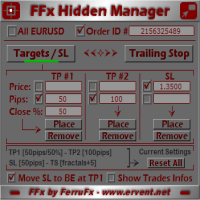
The FFx Hidden Manager panel will help you to manage easily your orders directly on the chart. Below all features described: TP, SL and TrailingStop are hidden Each order has its own lines on chart Drag & Drop any line to change the TP/SL as per your need Option to move automatically the SL line at breakeven when TP #1 is reached Option to choose the TP/SL type (by pips or price) Option to choose the TrailingStop type (by pips, MA, Fractals, PSAR or ATR) Define which order(s) you want to manage
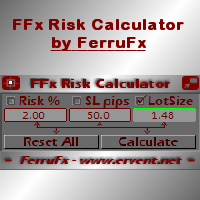
FFx Risk Calculator panel will help you to calculate very easily your trades size, SL or the risk directly on the chart. All features are described below: Option to select which parameter to calculate: Risk, Stop Loss or Lot Size The panel will show if the lot size is allowed according to the current account free margin Button to maximize/minimize the panel Drag and Drop the panel anywhere on the chart How to use it? Select the parameter you want to be calculated. It will be based on the 2 other
Trade Copier Pro
Vu Trung Kien
4.29 (14)
Trade Copier Pro is a tool to copy trade remotely to MT4, MT5 and cTrader accounts at different computers/locations over internet. This is an ideal solution for you if you are a signal provider and want to copy your trades to other receivers globally on your own rules. One provider can copy trades to multiple receivers and one receiver can get trade from multiple providers as well. The provider can even set the subscription expiry for each receiver, so that receiver will not be able to receive t
News Trader Pro
Vu Trung Kien
4.38 (16)
News Trader Pro is a unique robot that allows you to trade the news by your predefined strategy. It loads every piece of news from several popular Forex websites. You can choose any news and preset the strategy to trade it, and then News Trader Pro will trade that news by selected strategy automatically when the news comes. News release gives opportunity to have pips since the price usually has big move at that time. Now, with this tool, trading news becomes easier, more flexible and more exciti
FFx Watcher PRO
Eric Venturi-Bloxs
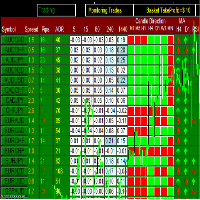
The FFx Watcher PRO is a dashboard displaying on a single chart the current direction of up to 15 standard indicators and up to 9 timeframes. It has 2 different modes: 1. Watcher mode: Multi Indicators User is able to select up to 15 indicators to be displayed User is able to select up to 9 timeframes to be displayed 2. Watcher mode: Multi Pairs User is able to select any number of pairs/symbols User is able to select up to 9 timeframes to be displayed This mode uses one of the standard indicat
THE [VIZUALIZER] is a MetaTrader (MT4) Script designed to visualize an account history. It will read the account statement and then will visualize the positions on chart in form of rectangles, showing the OpenTime, OpenPrice, CloseTime and ClosePrice. Generally, it has been developed to analyze the trading history, to observe how risky the particular positions were, allowing you to analyze the trading strategy from the account statement. It is working with standard MS Excel CSV files It is visua
Link for MT5 version:  https://www.mql5.com/en/market/product/211604?source=Site Trade Manager Pro — Manage chart-symbol trades from one compact chart panel. Place market and range-based pending orders, close positions in batches, apply configurable trailing stops, and move profitable trades to a break-even offset with one click.   Take control of trade management from your chart Trade Manager Pro brings the order and position controls many traders use throughout the trading day into one on
NickZ Tool
Nicolas Zouein
This is a must have tool for a serious trader. It saves your precious time spent for opening/closing trades, creating pending trades and modifying your TP/SL in bulk according to either pips or price. If you need to quickly open several pending orders (Buy Stop, Sell Stop) at a certain distance from each other, this script will do all the routine for you! The first time you use this handy tool, you will realize it has already paid for itself. Instructions: Drag and drop this script onto a chart.
The product combines a manual trade panel with the ability to perform actions automatically in a highly configurable way. Actions include capturing indicator values and then based on those values raising alerts, open/close or partially close trades, scale-in, setting up pending orders, adjusting stop loss, take profit and more. On-chart controls can be configured, such as tick boxes and buttons, so can be fully interactive. The EA also handles money management, news events, hidden stop loss, tak
Binary Options Copier Remote is an EA that allows to copy binary options trades between MT4 accounts at different computers. This is an ideal solution for signal provider, who want to share his trade with the others globally on his own rules. Provider can give free bonus license to 10 receivers. That means those 10 receivers can copy from provider by using Binary Options Receiver Free (no cost). From 11th one, receiver have to buy Binary Options Receiver Pro (paid version) in order to copy from
This panel is very simple to use and it is a very ally to manage your positions and orders. Also you can modify your risk, writing in fields directly on Panel. One click on buttons and the operation on market is done! Operations possible: BUY/SELL Break Even Split (close 50% all orders) Close All positions Hedging (opens reverse positions to cover) Close only BUY positions Close only SELL positions Close All pending orders Reverse all positions Please watch the video to verify the very simple u
Slow Pips OCO Trade Panel is an advanced trading panel for placing pending orders. Traders can use this panel to place two pending orders at once. One pending order would be of buy entry type and the other one would be of sell entry type. Both orders will have Stop Loss and Take Profit parameters. Since two pending orders are placed at the same time, the pending order for which the price hits first gets converted into a market order and the other pending order gets deleted (one order cancels the
This indicator changes the timeframe and chart profile for multiple charts. If you dispatched many charts (10~20 or more) in single MetaTrader terminal, it is very boring and difficult work to manage the timeframe and chart profile individually. If the indicators you use in a chart are numerous and the setting values are different from the default one, you might give up adding all the indicators to all charts. The changing of timeframes on multiple charts has the same problem, too. Whenever you
Elliott Wave Counter는 Elliott 파동의 빠르고 사용자 친화적인 수동 마크업을 위한 패널입니다. 색상과 마크 수준을 선택할 수 있습니다. 도구에서 만든 마지막 마크업과 전체 마크업을 제거하는 기능도 있습니다. 한 번의 클릭으로 마크업이 이루어집니다. 5번 클릭 - 5개의 웨이브가 있습니다! Elliott Wave Counter는 Elliott 파동의 초보자와 전문 분석가 모두에게 훌륭한 도구가 될 것입니다. Elliott Wave Counter 설치 및 입력 가이드 당신이 얻고 싶다면       EA 추가 URL(   http://autofxhub.com   ) MT5 터미널에 대한   알림   (스크린샷 참조). MT4 버전   https://www.mql5.com/en/market/product/14016 MT5 버전   https://www.mql5.com/en/market/product/15081 일반 입력: 웨이브 유형 버튼:   이 버튼을 사용하면 차트
If you wish to draw Support and Resistance lines, view: daily market opening, classical pivot levels, Fibonacci pivot levels, trend lines, Fibonacci levels, the remaining time to candle closing, and current spread. If you seek to place your orders with the exact lot that meets your desired stop loss risk. If you wish to do all this and more with just one click, then this is the perfect tool to use. This tool will allow you to feel more relaxed when deciding to open orders, as well as predicting
원 클릭 분석 도구는       키보드 단축키 기반 객체 생성       MetaTrader용 복사 도구입니다. 클릭 한 번으로 MetaTrader의 분석 도구를 쉽게 사용할 수 있습니다. 당사의 도구를 사용하면 지지 및 저항 수준, 피보나치 수준, 도형, 채널, 추세선 및 기타 모든 개체를 차트에 빠르게 그릴 수 있습니다. 버튼을 클릭하고 마우스를 움직이면 One Click Analysis Tool이 나머지 작업을 수행합니다. 이를 통해 시간을 절약하고 차트 분석을 보다 효율적으로 수행할 수 있으므로 분석을 기반으로 정보에 입각한 거래 결정을 내리는 데 집중할 수 있습니다. 개체 생성 외에도 One Click Analysis Tool에는 다음이 포함됩니다.       개체 복사기(   차트   동기화)를   사용하면 한 차트에서 다른 차트로 개체를 쉽게 복사할 수 있습니다. 이는 여러 차트가 열려 있고 차트 간에 개체를 복제해야 하는 경우에 특히 유용할 수 있습니다. 원 클릭 분석
Partial Close Expert는   여러 기능을 하나의 자동화 시스템으로 결합한 도구입니다. 이 EA는 위험 관리 및 잠재 수익 극대화를 위한 다양한 옵션을 제공하여 트레이더가 포지션을 더욱 효과적으로 관리할 수 있도록 지원합니다. Partial Close Expert를 사용하면 거래자는 다음을 설정할 수 있습니다.       부분 폐쇄       이익을 확보하기 위한 수준       트레일링 스톱       이익을 보호하고 손실을 제한하는 수준       손익분기점       가격이 불리하게 변동하더라도 거래가 손익분기점을 넘지 않도록 보장하는 수준과 여러 가지 다른 기능이 있습니다. 이 올인원 EA를 사용하면 트레이더는 거래를 지속적으로 모니터링할 필요가 없으므로 시간과 노력을 절약할 수 있습니다. EA는 시장 상황에 따라 미리 설정된 지시를 실행하여 트레이더에게 거래에 대한 유연성과 통제력을 제공합니다. 부분 닫기 전문가 첨부,       키보드의 "p"를 누르고  
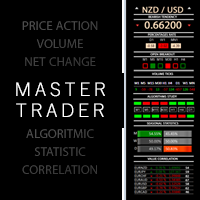
Master Trend Dashboard is a new generation indicator, compact, light and efficient. Each element of this Dashboard is designed to return specific signals as: Price Action, Breakout, Net Change (performance of the instrument), algorithmic studies, correlations and statistical calculations. This tool will change your way of trading allowing you to receive important information. See the Graphic Signals to understand every single signal below: Graphic Signals Symbol name and arrow color Green = Cur
제작자의 제품 더 보기
The 12 Ways
Kaloyan Ivanov
The 12 Ways – MetaTrader 5용 멀티 인디케이터 자동매매 EA 12가지 강력한 기술적 지표. 수백만 가지 거래 설정. 사실상 무한한 전략적 가능성. The 12 Ways 는 MetaTrader 5(MT5)를 위해 개발된 고도로 사용자 정의가 가능한 멀티 인디케이터 전문가 자문 시스템(Expert Advisor, EA)입니다. 가장 널리 사용되는 12가지 기술적 지표를 하나의 자동매매 시스템에 통합하여 트레이더가 다양한 거래 전략을 자유롭게 생성, 테스트 및 최적화할 수 있도록 설계되었습니다. 단일 지표나 고정된 거래 전략에 의존하는 대신, The 12 Ways는 지표를 활성화하거나 비활성화하고, 매개변수를 조정하며, 서로 다른 시간 프레임을 선택하여 자신만의 거래 로직을 구성할 수 있도록 합니다. 추세 추종, 추세 반전, 모멘텀 거래, 변동성 기반 전략 또는 복잡한 다중 지표 확인 시스템 등 어떤 거래 방식을 선호하든 The 12 Ways는 다양한 접근 방식을 연구
FREE
Expert Advisor 설명: Candle Cross DCR Candle Cross DCR는 MetaTrader 5용 완전 자동화된 전문가 조언자(EA)로, 캔들이 지수이동평균선(EMA)을 교차할 때 고정밀 거래 신호를 생성합니다. 선택적으로 DeMarker, CCI, RSI로 구성된 DCR 필터를 사용해 신호를 추가로 확인할 수 있습니다. 이 EA는 높은 사용자 정의 가능성을 지니며 스캘핑과 추세 추종 전략 모두에 적합합니다. 가격 행동 기반 진입 트리거와 멀티타임프레임 필터를 결합해 신호 정확도와 시장 정합성을 높입니다. 전략 로직 진입 조건 캔들이 EMA를 반대편에서 마감(close)할 때 거래 신호가 발생합니다. 매수(BUY): 현재 캔들이 EMA 위에서 마감되고 이전 캔들이 EMA 아래에서 마감된 경우 매도(SELL): 현재 캔들이 EMA 아래에서 마감되고 이전 캔들이 EMA 위에서 마감된 경우 선택 필터 (DCR 확인) 각 필터는 개별적으로 켜고 끌 수 있으며, 활성
FREE
The 7 Ways
Kaloyan Ivanov
RSI, MACD, Moving Average, Bollinger Bands, Stochastic Oscillator, ATR, and Ichimoku 이 전문가 어드바이저는 RSI, MACD, 이동 평균, 볼린저 밴드, 스토캐스틱 오실레이터, ATR, 이치모쿠 등 7개의 핵심 지표를 사용하여 사용자 지정 가능한 시간대에서 거래 신호를 생성합니다. 매수와 매도 방향을 각각 독립적으로 활성화하거나 비활성화할 수 있으며, 요일별 거래 제한과 양의 스왑 조건도 지원합니다. 리스크 관리는 고정된 테이크프로핏, 스톱로스, 롯 크기 설정을 통해 이루어지며, 기존 포지션이 있어도 신규 거래를 열 수 있습니다. 각 지표는 개별 설정값, 임계치, 비교 논리를 갖고 있어 진입 신호를 더욱 정교하게 만듭니다.
FREE
Expert Advisor 설명: Candle Cross DCR Candle Cross DCR는 MetaTrader 5용 완전 자동화된 전문가 조언자(EA)로, 캔들이 지수이동평균선(EMA)을 교차할 때 고정밀 거래 신호를 생성합니다. 선택적으로 DeMarker, CCI, RSI로 구성된 DCR 필터를 사용해 신호를 추가로 확인할 수 있습니다. 이 EA는 높은 사용자 정의 가능성을 지니며 스캘핑과 추세 추종 전략 모두에 적합합니다. 가격 행동 기반 진입 트리거와 멀티타임프레임 필터를 결합해 신호 정확도와 시장 정합성을 높입니다. 전략 로직 진입 조건 캔들이 EMA를 반대편에서 마감(close)할 때 거래 신호가 발생합니다. 매수(BUY): 현재 캔들이 EMA 위에서 마감되고 이전 캔들이 EMA 아래에서 마감된 경우 매도(SELL): 현재 캔들이 EMA 아래에서 마감되고 이전 캔들이 EMA 위에서 마감된 경우 선택 필터 (DCR 확인) 각 필터는 개별적으로 켜고 끌 수 있으며, 활성
FREE
Emilian MT4
Kaloyan Ivanov
Emilian: MetaTrader 4를 위한 전문 자문기 개요 이동 평균 지수(EMA)와 상대 강도 지수(RSI 21)를 사용하여 거래를 열고 닫는 Emilian 전문 자문기를 만나보세요. 맞춤형 위험 관리 전략을 제공하는 Emilian은 Average True Range (ATR 12) 또는 특정 pip 값들을 사용하여 이익 실현과 손절 레벨을 설정합니다. 주요 특징 이동 평균 크로스오버 전략: 크로스오버 신호를 위해 빠르고 느린 EMA를 활용합니다. RSI 21 확인: RSI 21을 통해 거짓 긍정을 줄이는 추가 확인 계층을 추가합니다. 유연한 포지셔닝: 완전히 거래 선호도에 맞게 조절 가능한 롱 및 숏 포지션을 허용합니다. 동적 위험 관리: ATR 기반 또는 pip 기반 이익 실현 및 손절 설정 사이에서 선택합니다. 입력 파라미터 LongPositions: 롱/구매 포지션을 열 수 있게 합니다. ShortPositions: 숏/판매 포지션을 열 수 있게 합니다. Lots
TimeLS MT4
Kaloyan Ivanov
MetaTrader 4를 위한 시간 기반 전문가 자문기 TimeLS МТ4 - Time Long Short 개요 우리의 시간 기반 전문가 자문기는 트레이더들에게 정확한 시장 타이밍의 이점을 주기 위해 설계되었습니다. 이 전문가 자문기는 롱 포지션과 숏 포지션 모두를 다룰 수 있으며 동시에 둘 다 열 수 있어, 비교할 수 없는 유연성을 제공합니다. 주요 기능: 1. 시간 특정 거래:    - 포지션을 열고 닫기 위한 정확한 시간과 분을 정의하여, 시장 시간, 뉴스 이벤트 또는 특정 거래 세션 주위로 전략적인 계획을 가능하게 합니다. 2. 동적 포지셔닝:    - 거래 전략에 따라 롱, 숏 또는 둘 다의 유형의 포지션을 열 수 있게 합니다. 3. 리스크 관리:    - 피프에서 사용자 정의 Take Profit 및 Stop Loss 레벨을 설정하여 맞춤형 리스크 관리를 할 수 있습니다. 4. 로트 크기 제어:    - 원하는 포지션의 크기를 로트로 열 수 있도록 결정하여,
EmaBB MT4
Kaloyan Ivanov
EmaBB MT4   : MT4용 전문가 자문 개요: EmaBB는 고급 및 사용자 정의 가능한 기능을 결합하여 귀하의 거래 전략을 최적화하는 최첨단 MT4 전문가 자문으로 두드러집니다. 이는 긴장/구매 및 짧은/판매 위치를 모두 열도록 세심하게 설계되어 거래 활동에 대한 유연성과 통제력을 제공합니다. 이는 지수 이동 평균(EMA), 볼린저 밴드 및 고급 추적 중지 전략의 힘을 조화롭게 통합하여 거래 진입 및 종료를 최적화합니다. 주요 특징: 이중 위치 결정: 거래 선호도 및 시장 조건에 맞게 롱/매수 및 숏/매도 위치를 모두 여는 능력. 최적화된 많은 관리: "많은" 매개 변수로 여는 위치의 크기를 제어하여 정확한 위험 관리를 가능하게 합니다. 긍정적인 스왑 제어: 일일 스왑이 0 또는 양수인 경우에만 위치를 열 수 있는 옵션으로 비용 효율적인 거래를 보장합니다. 동적인 이익 실현 및 손절: 파이프에서 사용자 정의 이익 실현 및 손절 수준을 설정하여 시장 변동성에 대한 거래를 보호합
MACDuck: 친절한 외환 도우미 안녕하세요! MACD 지표와 달콤한 이동 추세를 포착하는 것에 관한 우리의 작은 거래 친구, MACDuck을 만나보세요. 그것은 단순하고 효과적이며, 여러분의 거래 게임을 좋게 만들어주기 위해 설계되었습니다. MACDuck이 하는 멋진 것들: 크고 작은 쌍으로 작업: 주요 외환 쌍이든 작은 쌍이든, MACDuck이 여러분을 커버합니다. 방향을 선택하세요: 롱으로 갈까요? 숏으로? 둘 다? 여러분이 결정하세요! 스마트 스왑: 일일 스왑이 여러분을 끌어내리지 않을 때만 행동에 나섭니다. 트레일링 스톱 매직: 이익을 보호하기 위해 언제 물러설지 알고 있습니다. 여러분의 방식으로 맞춤 설정: 다양한 설정으로 MACDuck을 원하는 대로 작동하게 만드세요. 반대 방향으로 가면 종료: 시장이 다른 방향으로 가면 최소 손실로 반대 조건에서 종료합니다. 놀이로 즐기는 설정: 입력 매개변수:  롱 포지션: LONG/BUY 포지션을 열 수 있도록 활성화하거나 비활
C7x21 Crossing 소개 - SMA Crossover 전략용 맞춤형 전문 자문가 C7x21 Crossing과 함께 클래식하면서도 강력한 7/21 Simple Moving Average (SMA) 크로스오버 전략의 잠재력을 발휘하세요. 다양한 시장과 시간대에서 운영하도록 전문적으로 설계된 이 Expert Advisor (EA)는 시험된 SMA 크로스오버 접근 방식을 사용하며, 14기간 Commodity Channel Index (CCI) 필터의 추가 정밀도로 강화되었습니다. 주요 기능: • 동적 SMA 크로스오버 신호: C7x21 Crossing의 핵심은 빠른 7기간과 느린 21기간 SMA를 사용하는 이중 SMA 크로스오버 전략으로, 추세와 반대 추세 움직임 모두에서 이익을 얻을 수 있는 거래 진입점을 생성합니다. • 통합된 CCI 필터: 거래 진입점을 강화하면서 EA는 14기간 CCI를 사용하여 과매수 및 과매도 조건을 식별하는 강력한 필터로 작동하여 더 높은 가능성의 설정에
Emilian II MT4
Kaloyan Ivanov
이 EA의 첫 번째 버전은 무료였지만, 트레이더들의 높은 수요로 인해 더 많은 필터와 향상된 정확도를 갖춘 Emilian II를 개발하게 되었습니다. MACD, ADX, 프랙탈 기능이 추가되었으며, 향후 고객 요청에 따라 더 많은 기능이 업데이트될 예정입니다. 지금 구매하시면 모든 향후 업데이트와 기술 지원을 받으실 수 있습니다. 현재는 가능한 가장 저렴한 가격으로 제공되며, 앞으로 가격은 점차 상승할 예정입니다. Emilian II는 이동 평균선의 교차와 선택 가능한 기술 지표 필터를 활용하여 유연하고 다중 시간 프레임 기반의 자동 매매를 수행하는 엑스퍼트 어드바이저입니다. RSI, CCI, DeMarker, 거래량, ADX, MACD, 프랙탈과 같은 잘 알려진 기술 지표를 기반으로 하여 상위 시간대의 흐름에 맞춘 진입과 정밀한 제어를 원하는 트레이더에게 적합합니다. 전략 로직 개요 Emilian II의 핵심 로직은 다음을 기반으로 합니다: EMA 교차 빠른 EMA가 느린 EMA
Black Swan Breakout EA – 낮은 변동성 이후의 정밀한 진입 Black Swan Breakout EA는 MetaTrader 4/5용 자동 거래 시스템으로, 시장이 조용했던 시기 이후 발생하는 돌파 기회를 포착하여 거래를 실행합니다. 이 시스템은 Bollinger Bands(볼린저 밴드)를 사용해 가격 확장을 감지하며, 돌파의 강도와 품질을 확인할 수 있는 선택적 필터들을 포함하고 있습니다. 다양한 종목이나 시간대에 맞는 설정 파일(.set 파일)을 원하신다면, 친구 추가 후 메시지를 보내 주세요. 기꺼이 공유해 드리겠습니다. DeMarker, Fractals, CCI와 같은 몇 가지 새로운 기능과 지표가 추가되었으며, 거래할 요일과 시간 필터도 추가되었습니다. 계정에서 숫자로 레버리지를 사용할 수 있는 기능도 추가되었습니다. 지금 가능한 최저 가격에 구매하시면 향후 업데이트 및 지원을 받으실 수 있습니다. 더 나은 결과를 위해 이 EA의 진화를 응원해주세요. 전략 작
Forex Bacteria – MetaTrader 4/5용 자동매매 프로그램 (EA) Forex Bacteria는 MetaTrader 4/5 플랫폼을 위해 설계된 자동화된 전문가 어드바이저(EA)입니다. 자연에서 유익한 박테리아가 우리와 공생하듯이, 이 EA도 시장과 조화롭고 공생하는 방식으로 작동하는 것을 목표로 합니다. 이 EA는 즉시 사용 가능한 형태로 제공되며, 사용자께서는 리스크 관리 설정과 거래를 원하는 요일만 지정하시면 됩니다. 과거 12년 동안 집중적으로 테스트되고 최적화되었으며, 다음의 주요 통화쌍에서 최고의 성능을 발휘합니다: AUD/USD, USD/CHF, USD/JPY, EUR/USD. EA는 시장 상황에 따라 다양한 전략을 유연하게 적용합니다. 앞으로의 업데이트에서는 GBP/USD와 같은 더 많은 주요 통화쌍에 대한 호환성도 추가될 예정입니다. EA 또는 MT5 터미널이 실행되는 시스템의 시간대(UTC)를 반드시 정확하게 설정해 주세요. 양의 스왑(이자)을 제
TimeLS_LightSpeed는 MetaTrader 4/5용 시간 기반 전문가 어드바이저(EA)로, 사용자가 지정한 특정 시간에 맞춰 정밀하게 거래를 실행하고 관리하도록 설계되었습니다. 이 EA는 거래 가능 시간, 포지션 유형, 개별 매개변수를 가진 단일 예약 거래(Exclusive Deals) 등을 유연하게 제어할 수 있도록 다양한 설정 옵션을 제공합니다. 질문이 있으시면 언제든지 메시지 주세요. 일부 시장에 맞는 미리 설정된 .set 파일들이 있습니다. 주요 기능 및 설정 거래 허용 설정 롱(매수) 또는 숏(매도) 포지션의 개시 여부를 개별적으로 활성화하거나 비활성화할 수 있습니다. 일일 스왑이 양수일 때만 거래를 허용하는 옵션이 있으며, 이는 오버나이트 포지션을 유지하는 전략에 유리합니다. 요일별 거래 제어 월요일부터 일요일까지 원하는 요일을 선택하여 EA가 거래할 수 있도록 설정할 수 있습니다. 이는 시장 변동성 주기나 주요 뉴스 이벤트에 맞춰 전략을 조정하는 데 도움이 됩
이 전문가 어드바이저(EA)는 플러그 앤 플레이 방식으로 작동하며 USD/JPY에 최적화되어 있습니다. 사용할 레버리지를 선택할 수 있는 기능이 추가되었고, 몇 가지 세부 조정도 이루어졌습니다. 지금까지 중 가장 낮은 가격으로 제공됩니다. EA가 다양한 지역의 시간을 정확히 인식할 수 있도록, 입력 설정에서 올바른 UTC 시간대를 설정해 주세요. 향후 다른 통화쌍도 추가될 예정이지만, 현재까지는 USD/JPY에서 가장 좋은 결과를 보여주고 있습니다. 로트 크기는 계좌 잔액의 일정 비율로 계산됩니다. EA가 작동할 요일도 자유롭게 설정할 수 있습니다. 정보 패널이 활성화되어 있는지 확인하시고, 스왑 금리가 가능한 한 공정한 시장 기준에 가깝게 설정되어 있는지 확인해 주세요. 정보 패널에 표시되는 시간과 뉴욕 시간을 비교하여 UTC 입력이 정확한지 반드시 확인해 주세요. EA를 사용해 보시려는 경우 친구 요청을 보내주시고, 궁금한 점이 있다면 언제든지 편하게 연락 주세요.
Cupriavidus Bacteria 는 금(GOLD) 거래를 위해 특별히 설계된 완전 자동 시간 기반 트레이딩 시스템입니다. 이 전문가용 자동매매 프로그램(EA)은 설치 즉시 작동하는 "플러그 앤 플레이" 방식으로, 사용자가 따로 설정하거나 최적화할 필요가 없습니다. 전략 논리, 실행 타이밍, 리스크 제어 등이 모두 내장되어 있어 간단하면서도 안정적인 운용이 가능합니다. 이 EA의 이름은 실제로 존재하는 박테리아인   Cupriavidus metallidurans 에서 유래하였습니다. 이 박테리아는 금을 흡수하고 결정화하는 능력이 있으며, 이는 시장에서 지속적으로 가치를 추출하는 시스템의 목적과 정밀함을 상징합니다. Cupriavidus Bacteria 는 Ryzen 9 7950X, Ryzen 9 5950X, Intel Core i9 (12세대 및 13세대) 등 40대 이상의 고성능 CPU로 구성된 독립 서버 환경에서 철저하게 테스트되었습니다. 수백만 개의 틱 데이터를 기반으로 다
로트 크기를 변경하고 EA를 가능한 한 저렴한 가격으로 설정할 수 있는 기능이 추가되었습니다. 구매하시면 지원과 향후 업데이트를 받으실 수 있습니다. 발전을 위해 많은 지원 부탁드립니다. 이 EA는 설치 후 바로 사용할 수 있습니다. AussiePrecision 은 MetaTrader 5용으로 설계된 시간 기반의 전문가 어드바이저(EA)이며, AUD/USD 통화쌍에 특화되어 있습니다. 이 EA는 미리 정의된 통제 가능한 시점에 거래를 실행하도록 설계되어, 시간에 기반한 고정밀 자동 진입을 원하는 트레이더에게 이상적입니다. 모든 시간 관련 동작은 사용자가 지정한 UTC 오프셋에 맞춰 조정되어, 일관되고 정확한 스케줄링이 가능합니다. 이 EA는 지속적인 모니터링이 필요 없으며 완전 자동으로 작동합니다. 설정 관련 질문이나 맞춤 요청이 있으시면 언제든지 저에게 직접 문의해 주세요. 이 EA는 무료로 제공되므로, 다운로드하신 경우 친구 요청을 보내주시면 감사하겠습니다. 필요 시 지원을 제공
TimeLS
Kaloyan Ivanov
MetaTrader를 위한 시간 기반 전문가 자문기 TimeLS - Time Long Short 개요 우리의 시간 기반 전문가 자문기는 트레이더들에게 정확한 시장 타이밍의 이점을 주기 위해 설계되었습니다. 이 전문가 자문기는 롱 포지션과 숏 포지션 모두를 다룰 수 있으며 동시에 둘 다 열 수 있어, 비교할 수 없는 유연성을 제공합니다. 주요 기능: 1. 시간 특정 거래:    - 포지션을 열고 닫기 위한 정확한 시간과 분을 정의하여, 시장 시간, 뉴스 이벤트 또는 특정 거래 세션 주위로 전략적인 계획을 가능하게 합니다. 2. 동적 포지셔닝:    - 거래 전략에 따라 롱, 숏 또는 둘 다의 유형의 포지션을 열 수 있게 합니다. 3. 리스크 관리:    - 피프에서 사용자 정의 Take Profit 및 Stop Loss 레벨을 설정하여 맞춤형 리스크 관리를 할 수 있습니다. 4. 로트 크기 제어:    - 원하는 포지션의 크기를 로트로 열 수 있도록 결정하여, 노출에 대한
Emilian
Kaloyan Ivanov
Emilian: MetaTrader 5를 위한 전문 자문기 개요 이동 평균 지수(EMA)와 상대 강도 지수(RSI 21)를 사용하여 거래를 열고 닫는 Emilian 전문 자문기를 만나보세요. 맞춤형 위험 관리 전략을 제공하는 Emilian은 Average True Range (ATR 12) 또는 특정 pip 값들을 사용하여 이익 실현과 손절 레벨을 설정합니다. 주요 특징 이동 평균 크로스오버 전략: 크로스오버 신호를 위해 빠르고 느린 EMA를 활용합니다. RSI 21 확인: RSI 21을 통해 거짓 긍정을 줄이는 추가 확인 계층을 추가합니다. 유연한 포지셔닝: 완전히 거래 선호도에 맞게 조절 가능한 롱 및 숏 포지션을 허용합니다. 동적 위험 관리: ATR 기반 또는 pip 기반 이익 실현 및 손절 설정 사이에서 선택합니다. 입력 파라미터 LongPositions: 롱/구매 포지션을 열 수 있게 합니다. ShortPositions: 숏/판매 포지션을 열 수 있게 합니다. Lots
EmaBB
Kaloyan Ivanov
EmaBB: MT5용 전문가 자문 개요: EmaBB는 고급 및 사용자 정의 가능한 기능을 결합하여 귀하의 거래 전략을 최적화하는 최첨단 MT5 전문가 자문으로 두드러집니다. 이는 긴장/구매 및 짧은/판매 위치를 모두 열도록 세심하게 설계되어 거래 활동에 대한 유연성과 통제력을 제공합니다. 이는 지수 이동 평균(EMA), 볼린저 밴드 및 고급 추적 중지 전략의 힘을 조화롭게 통합하여 거래 진입 및 종료를 최적화합니다. 주요 특징: 이중 위치 결정: 거래 선호도 및 시장 조건에 맞게 롱/매수 및 숏/매도 위치를 모두 여는 능력. 최적화된 많은 관리: "많은" 매개 변수로 여는 위치의 크기를 제어하여 정확한 위험 관리를 가능하게 합니다. 긍정적인 스왑 제어: 일일 스왑이 0 또는 양수인 경우에만 위치를 열 수 있는 옵션으로 비용 효율적인 거래를 보장합니다. 동적인 이익 실현 및 손절: 파이프에서 사용자 정의 이익 실현 및 손절 수준을 설정하여 시장 변동성에 대한 거래를 보호합니다. 적응형
MACDucks swap
Kaloyan Ivanov
MACDuck: 친절한 외환 도우미 안녕하세요! MACD 지표와 달콤한 이동 추세를 포착하는 것에 관한 우리의 작은 거래 친구, MACDuck을 만나보세요. 그것은 단순하고 효과적이며, 여러분의 거래 게임을 좋게 만들어주기 위해 설계되었습니다. MACDuck이 하는 멋진 것들: 크고 작은 쌍으로 작업: 주요 외환 쌍이든 작은 쌍이든, MACDuck이 여러분을 커버합니다. 방향을 선택하세요: 롱으로 갈까요? 숏으로? 둘 다? 여러분이 결정하세요! 스마트 스왑: 일일 스왑이 여러분을 끌어내리지 않을 때만 행동에 나섭니다. 트레일링 스톱 매직: 이익을 보호하기 위해 언제 물러설지 알고 있습니다. 여러분의 방식으로 맞춤 설정: 다양한 설정으로 MACDuck을 원하는 대로 작동하게 만드세요. 반대 방향으로 가면 종료: 시장이 다른 방향으로 가면 최소 손실로 반대 조건에서 종료합니다. 놀이로 즐기는 설정: 입력 매개변수:  롱 포지션: LONG/BUY 포지션을 열 수 있도록 활성화하거나 비활
C7x21 Crossing
Kaloyan Ivanov
C7x21 Crossing 소개 - SMA Crossover 전략용 맞춤형 전문 자문가 C7x21 Crossing과 함께 클래식하면서도 강력한 7/21 Simple Moving Average (SMA) 크로스오버 전략의 잠재력을 발휘하세요. 다양한 시장과 시간대에서 운영하도록 전문적으로 설계된 이 Expert Advisor (EA)는 시험된 SMA 크로스오버 접근 방식을 사용하며, 14기간 Commodity Channel Index (CCI) 필터의 추가 정밀도로 강화되었습니다. 주요 기능: • 동적 SMA 크로스오버 신호: C7x21 Crossing의 핵심은 빠른 7기간과 느린 21기간 SMA를 사용하는 이중 SMA 크로스오버 전략으로, 추세와 반대 추세 움직임 모두에서 이익을 얻을 수 있는 거래 진입점을 생성합니다. • 통합된 CCI 필터: 거래 진입점을 강화하면서 EA는 14기간 CCI를 사용하여 과매수 및 과매도 조건을 식별하는 강력한 필터로 작동하여 더 높은 가능성의 설정에
Forex Bacteria
Kaloyan Ivanov
MetaTrader 5용 Forex Bacteria 전문가 어드바이저 Forex Bacteria는 MetaTrader 5를 위해 설계된 자동화된 전문가 어드바이저(EA)입니다. 유익한 박테리아가 자연에서 우리와 공생하듯이, 우리는 시장과 조화롭고 공생적으로 공존하기 위해 노력합니다. 이것은 플러그 앤 플레이 EA로, 위험 관리 선호도를 설정하고 거래하고 싶은 요일을 선택하기만 하면 됩니다. 지난 12년 동안 주로 집중하고 최적화되어 AUD/USD, USD/CHF, EUR/USD의 세 가지 주요 통화쌍에서 가장 잘 작동합니다. EA는 시장 상황에 기반한 몇 가지 전략을 활용하여 거래 방식을 조정합니다. 향후 업데이트에서는 USD/JPY 등과 같은 더 많은 주요 통화쌍을 포함하도록 호환성이 확대될 것입니다. EA/MT5 터미널이 위치한 설정에서 올바른 시간대(UTC)를 설정하십시오. 양의 일일 스왑을 제공하는 브로커를 사용하십시오. 설정에서 올바른 시간대(UTC)를 설정하십시오. 100
Emilian II
Kaloyan Ivanov
이 EA의 첫 번째 버전은 무료였지만, 트레이더들의 높은 수요로 인해 더 많은 필터와 향상된 정확도를 갖춘 Emilian II를 개발하게 되었습니다. MACD, ADX, 프랙탈 기능이 추가되었으며, 향후 고객 요청에 따라 더 많은 기능이 업데이트될 예정입니다. 지금 구매하시면 모든 향후 업데이트와 기술 지원을 받으실 수 있습니다. 현재는 가능한 가장 저렴한 가격으로 제공되며, 앞으로 가격은 점차 상승할 예정입니다. Emilian II는 이동 평균선의 교차와 선택 가능한 기술 지표 필터를 활용하여 유연하고 다중 시간 프레임 기반의 자동 매매를 수행하는 엑스퍼트 어드바이저입니다. RSI, CCI, DeMarker, 거래량, ADX, MACD, 프랙탈과 같은 잘 알려진 기술 지표를 기반으로 하여 상위 시간대의 흐름에 맞춘 진입과 정밀한 제어를 원하는 트레이더에게 적합합니다. 전략 로직 개요 Emilian II의 핵심 로직은 다음을 기반으로 합니다: EMA 교차 빠른 EMA가 느린 EMA
Black Swan Breakout EA – 낮은 변동성 이후의 정밀한 진입 DeMarker, Fractals, CCI와 같은 몇 가지 새로운 기능과 지표가 추가되었으며, 거래할 요일과 시간 필터도 추가되었습니다. 계정에서 숫자로 레버리지를 사용할 수 있는 기능도 추가되었습니다. 지금 가능한 최저 가격에 구매하시면 향후 업데이트 및 지원을 받으실 수 있습니다. 더 나은 결과를 위해 이 EA의 진화를 응원해주세요. Black Swan Breakout EA는 MetaTrader 4/5용 자동 거래 시스템으로, 시장이 조용했던 시기 이후 발생하는 돌파 기회를 포착하여 거래를 실행합니다. 이 시스템은 Bollinger Bands(볼린저 밴드)를 사용해 가격 확장을 감지하며, 돌파의 강도와 품질을 확인할 수 있는 선택적 필터들을 포함하고 있습니다. 다양한 종목이나 시간대에 맞는 설정 파일(.set 파일)을 원하신다면, 친구 추가 후 메시지를 보내 주세요. 기꺼이 공유해 드리겠습니다. 전략
Traicho
Kaloyan Ivanov
Traicho EA – 세 가지 EMA 기반의 트렌드 트레이딩 Traicho EA는 MetaTrader 5용으로 개발된 가볍고 실용적인 전문가 어드바이저 EA입니다. 세 가지 지수이동평균선 EMA를 활용한 단순한 추세 추종 전략에 기반하며 명확한 방향 신호와 간단한 포지션 관리를 원하는 트레이더에게 적합합니다 이 EA는 이해하기 쉽고 필요에 따라 커스터마이징 가능한 기본 프레임워크를 원하는 사용자에게 이상적입니다 다양한 종목과 시간대에 맞춘 set 파일을 원하시는 분은 친구 요청 후 메시지를 주세요 기꺼이 공유해 드립니다 핵심 전략 EA는 빠른 EMA 중간 EMA 느린 EMA 간의 관계를 기반으로 매매 시점을 결정합니다 다음 두 가지 모드를 선택할 수 있습니다 교차 모드 Crossover EMA가 올바른 순서로 교차할 때 진입 정렬 모드 Alignment 세 EMA가 모두 동일한 방향으로 정렬되어 있을 때만 진입 이 로직은 다음의 파라미터로 제어됩니다 true EMA 교차 기반 진

Prochlorococcus
Kaloyan Ivanov
이 전문가 어드바이저(EA)는 플러그 앤 플레이 방식으로 작동하며 USD/JPY에 최적화되어 있습니다. 사용할 레버리지를 선택할 수 있는 기능이 추가되었고, 몇 가지 세부 조정도 이루어졌습니다. 지금까지 중 가장 낮은 가격으로 제공됩니다. EA가 다양한 지역의 시간을 정확히 인식할 수 있도록, 입력 설정에서 올바른 UTC 시간대를 설정해 주세요. 향후 다른 통화쌍도 추가될 예정이지만, 현재까지는 USD/JPY에서 가장 좋은 결과를 보여주고 있습니다. 로트 크기는 계좌 잔액의 일정 비율로 계산됩니다. EA가 작동할 요일도 자유롭게 설정할 수 있습니다. 정보 패널이 활성화되어 있는지 확인하시고, 스왑 금리가 가능한 한 공정한 시장 기준에 가깝게 설정되어 있는지 확인해 주세요. 정보 패널에 표시되는 시간과 뉴욕 시간을 비교하여 UTC 입력이 정확한지 반드시 확인해 주세요. EA를 사용해 보시려는 경우 친구 요청을 보내주시고, 궁금한 점이 있다면 언제든지 편하게 연락 주세요.
TimeLS_LightSpeed는 MetaTrader 5용 시간 기반 전문가 어드바이저(EA)로, 사용자가 지정한 특정 시간에 맞춰 정밀하게 거래를 실행하고 관리하도록 설계되었습니다. 이 EA는 거래 가능 시간, 포지션 유형, 개별 매개변수를 가진 단일 예약 거래(Exclusive Deals) 등을 유연하게 제어할 수 있도록 다양한 설정 옵션을 제공합니다. 질문이 있으시면 언제든지 메시지 주세요. 일부 시장에 맞는 미리 설정된 .set 파일들이 있습니다. 주요 기능 및 설정 거래 허용 설정 롱(매수) 또는 숏(매도) 포지션의 개시 여부를 개별적으로 활성화하거나 비활성화할 수 있습니다. 일일 스왑이 양수일 때만 거래를 허용하는 옵션이 있으며, 이는 오버나이트 포지션을 유지하는 전략에 유리합니다. 요일별 거래 제어 월요일부터 일요일까지 원하는 요일을 선택하여 EA가 거래할 수 있도록 설정할 수 있습니다. 이는 시장 변동성 주기나 주요 뉴스 이벤트에 맞춰 전략을 조정하는 데 도움이 됩니
로트 크기를 변경하고 EA를 가능한 한 저렴한 가격으로 설정할 수 있는 기능이 추가되었습니다. 구매하시면 지원과 향후 업데이트를 받으실 수 있습니다. 발전을 위해 많은 지원 부탁드립니다. 이 EA는 설치 후 바로 사용할 수 있습니다. AussiePrecision 은 MetaTrader 5용으로 설계된 시간 기반의 전문가 어드바이저(EA)이며, AUD/USD 통화쌍에 특화되어 있습니다. 이 EA는 미리 정의된 통제 가능한 시점에 거래를 실행하도록 설계되어, 시간에 기반한 고정밀 자동 진입을 원하는 트레이더에게 이상적입니다. 모든 시간 관련 동작은 사용자가 지정한 UTC 오프셋에 맞춰 조정되어, 일관되고 정확한 스케줄링이 가능합니다. 이 EA는 지속적인 모니터링이 필요 없으며 완전 자동으로 작동합니다. 설정 관련 질문이나 맞춤 요청이 있으시면 언제든지 저에게 직접 문의해 주세요. 이 EA는 무료로 제공되므로, 다운로드하신 경우 친구 요청을 보내주시면 감사하겠습니다. 필요 시 지원을 제공
Cupriavidus Bacteria 는 금(GOLD) 거래를 위해 특별히 설계된 완전 자동 시간 기반 트레이딩 시스템입니다. 이 전문가용 자동매매 프로그램(EA)은 설치 즉시 작동하는 "플러그 앤 플레이" 방식으로, 사용자가 따로 설정하거나 최적화할 필요가 없습니다. 전략 논리, 실행 타이밍, 리스크 제어 등이 모두 내장되어 있어 간단하면서도 안정적인 운용이 가능합니다. 이 EA의 이름은 실제로 존재하는 박테리아인 Cupriavidus metallidurans 에서 유래하였습니다. 이 박테리아는 금을 흡수하고 결정화하는 능력이 있으며, 이는 시장에서 지속적으로 가치를 추출하는 시스템의 목적과 정밀함을 상징합니다. Cupriavidus Bacteria 는 Ryzen 9 7950X, Ryzen 9 5950X, Intel Core i9 (12세대 및 13세대) 등 40대 이상의 고성능 CPU로 구성된 독립 서버 환경에서 철저하게 테스트되었습니다. 수백만 개의 틱 데이터를 기반으로 다양한
#여름 세일 Top 23 Indicators는 가장 구성 가능한 EA 중 하나입니다. 생성할 수 있는 조합과 패턴은 거의 무한합니다. 이것은 여러분이 다루고자 하는 시장에 대해 매우 독창적이고 맞춤화된 접근 방식을 제공합니다. 수많은 조합 속에서 반복 가능하고 독특한 패턴을 찾는 능력은 여러분에게 큰 이점이 될 수 있습니다. Top 23 Indicators: //-------------------------------------- RSI – Relative Strength Index   MACD – Moving Average Convergence Divergence   MA – Moving Averages (SMA/EMA)   Bollinger Bands   Stochastic Oscillator   ATR – Average True Range   Ichimoku Kinko Hyo   ADX – Average Directional Index   Parabolic SAR
필터:
리뷰 없음
리뷰 답변