Manage Positions

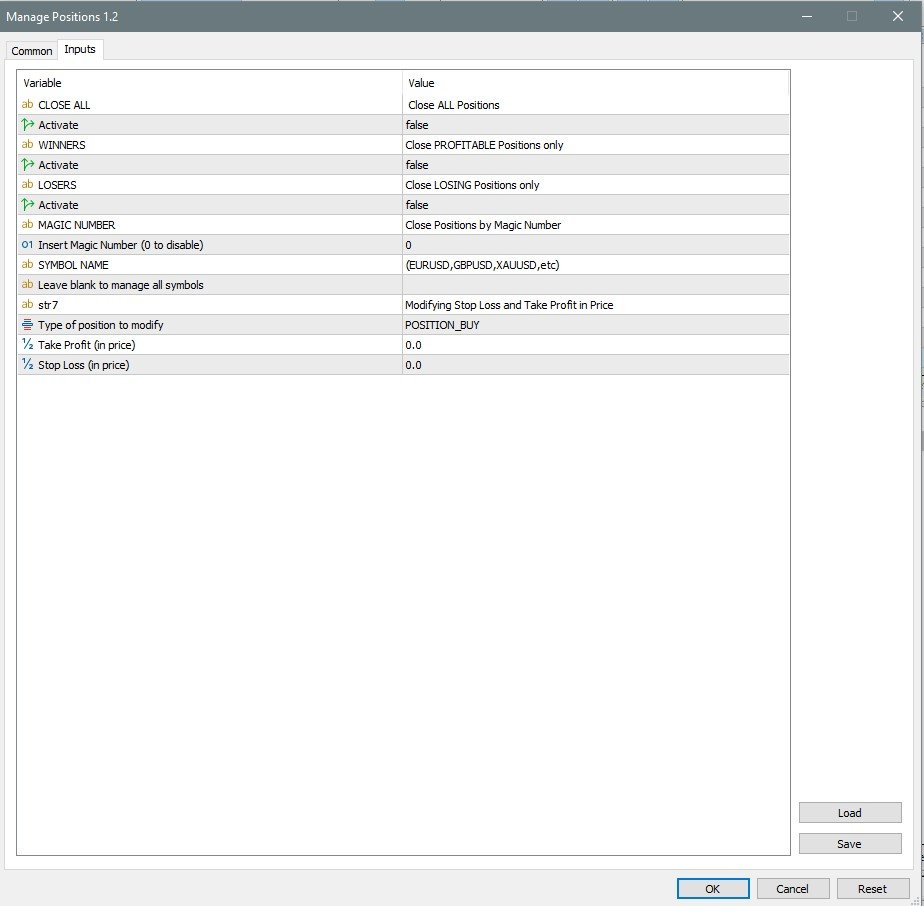
Manage Positions is an MT5 script designed with five distinct options for efficiently managing open positions. It offers versatile functionality, allowing for both global impact across all currency pairs and localized influence on specific pairs of interest. Additionally, users can target particular currency pairs to tailor their actions accordingly. For instance, leaving the "LEAVE BLANK to Manage Positions for ALL Symbols" field empty enables closing all positions universally, while specifying a currency pair limits actions to that pair exclusively, such as EURUSD. The "Close with magic number" option further enhances precision by facilitating targeted position closure. This script proves invaluable for effectively managing positions initiated manually or by expert advisors, catering to diverse trading needs.

Detailed "How to" guide you can be found inside the comments section

Key Functions:
  • CLOSE ALL: Closes all open positions, irrespective of profit or loss.
  • WINNERS: Closes all profitable positions.
  • LOSERS: Closes all positions incurring losses.
  • SYMBOL NAME: Enter the currency pair name for script action.
  • MAGIC NUMBER: Close Positions by Magic Number
  • Modifying Stop Loss and Take Profit: in Price

All my apps: Link 


Experience seamless trading execution with Manage Positions, enabling swift market exits with its lightning-fast response time in milliseconds. I trust this script will significantly aid your trading endeavors, particularly when swift market exits are imperative.

Requirements:

  •  MT5 platform
  •  Check section  >> What's New <<
  • If you buy now, you reserve the right to own new upgraded versions of the robot, which will appear at specific time intervals continuously.  

WARNING: I sell all my products only via MQL5 website. If you see it somewhere else, be aware of scam.

Support

If you have any questions, send me a DM: Link 

추천 제품
Trade assistant pro v8
Ahmed Mohammed Bakr Bakr
FREE FREE FREE Trade Assistant MT5 – Professional Trading & Risk Management Panel Trade Assistant MT5 is an advanced trading panel designed to help traders execute orders faster, safer, and more professionally . It simplifies manual trading by combining smart order management , precise risk control , and one-click execution , making it ideal for both beginners and advanced traders. This tool does not trade automatically . Instead, it empowers you with full control while applying professional-gra
FREE
DTK Scalping Panel
Thiago Pereira Pinho
A powerful and intuitive trade management tool designed for scalpers and intraday traders. Created to complement the Nampim Samba Scalper strategy , it allows traders to open, manage, and close positions quickly without leaving the chart.  Key Features: Customizable trading panel – choose position (left, right, center, top, bottom). One-click trading buttons – instantly open Buy/Sell trades with pre-set lot sizes. Close management – close last 1/2/3 trades or all Buy/Sell positions with one clic
FREE
Click Trading
Jawad Tauheed
5 (1)
One Click Trading – Auto TP SL Developer TraderLinkz Version 1.00 Category Utility What it does Adds missing TP and SL to your manual trades and pending orders Sets them once per ticket Lets you move TP and SL afterward Works on hedging and netting accounts Scans on every tick and reacts on trade events Why you want it You place faster entries You get consistent risk and exit targets You reduce fat finger errors You keep full manual control Quick start Attach the EA to any chart Keep TP and SL e
FREE
EasyClose MT5
Nina Yermolenko
5 (1)
A simple and convenient utility for closing orders. It can close both all orders together as well as buy, sell or pending orders separately. Has an intuitive graphical interface. MT4 version of the utility -  https://www.mql5.com/en/market/product/78601 If you like this utility, take a look at my other products -   https://www.mql5.com/en/users/nina_yermolenko/seller
FREE
Symbol Carousel EA provides a clear and structured way to monitor all your active trades. The Expert Advisor automatically cycles through all open orders, positions, both or all symbols in the Market Watch and switches the chart symbol accordingly. Each symbol is displayed for a defined amount of time before moving on to the next one, creating a clean and intuitive carousel-style view of your trading activity. This EA is designed purely for visual trade monitoring and does not open, modify, or c
FREE
Smart Trade R3
Eduardo Terra
5 (1)
Smart Trade R3 is a simple and easy-to-use trading panel. It replaces the standard MetaTrader 5 panel. This Expert Advisor is a derivative of Trade Panel R3, already in use by traders worldwide. It focuses on use in proprietary trading desks where risk controls and limits are very important. When making a trade, you don't need to worry about lot size, or even entry and exit prices; what matters is the stop loss size in points, and Smart Trade R3 will do the rest. Check the stop loss size (i
FREE
EmaRsi robot
Deepak Saini
https://youtu.be/KHhg88fXWTk?si=ZoVtpc-wpfTVImSL 5-Minute Trading Strategy | Quick & Effective for Beginners Welcome to our trading channel- the deepak trading In this video, we'll be exploring a simple 5-minute trading strategy that can help you capture quick market movements and make profitable trades. Whether you're a beginner or an experienced trader, this strategy is designed to give you clear entry and exit points using technical indicators like EMA, RSI, and Stochastic Oscillator.
FREE
Close Manager
ELITE FOREX TRADERS LLC
One-Click Trade Manager for MetaTrader 5 The Close Manager Buttons EA is a powerful utility designed to give you full control of your open positions and pending orders with just one click. Forget about manually closing trades one by one during fast market moves—this EA does it instantly, safely, and efficiently. Key Features Close All Trades – instantly close every open position Close Only Buy Trades – exit only BUY positions while keeping SELL trades running Close Only Sell Trades – exit only
FREE
LT Trade Panel Lite
Thiago Duarte
4.65 (51)
Have you missed any tools or shortcuts in Meta Trader? Simple things that would make your daily trading much easier ? We have the solution for you: our Trade Panel! This is an EA tool (Expert Advisor) that, if configured to controll all symbols, needs to be loaded only once. This is the Lite version (free) of our tool. Professional version:   https://www.mql5.com/en/market/product/42658 If you have some problemas with the shortcut buttons on chart on unpinned mode try change the tickets digi
FREE
Limit Open Positions EA "Limit Positions EA is a powerful utility tool designed to provide strict control over the number of open positions in your trading account. This Expert Advisor continuously monitors your trading activity and ensures that no new positions are opened once the specified limit is reached. Ideal for traders seeking to mitigate overexposure and manage risk effectively, Limit Positions EA works seamlessly across all symbols and timeframes. Whether you're managing a large port
FREE
Copying trading signals from the Telegram channel to MetaTrader. The utility will help you easily and simply   copy transactions from   your Telegram   channel or chat to the MetaTrader trading terminal almost instantly This is a DEMO version, restrictions - minimum lot Operational support in telegram chat: https://t.me/forex4up_chat Template for signals in the Telegram channel, chat (can be changed in the parameters) SYMBOL=EURUSD, TYPE=SELL, PRICE= 0.00000 , LOT= 0.01 , STOPLOSS= 0.00000
FREE
Swift Close Utility for closing Buy and Sell positions in MetaTrader 5. Purpose This utility is designed for batch closing of Buy or Sell positions on the current symbol. Operating Modes Close BUY   — Close all open Buy positions on the current symbol. Close SELL   — Close all open Sell positions on the current symbol. Magic Number Filtering The   MagicNumber   parameter allows the utility to target only positions opened by an Expert Advisor with the specified magic number. If   MagicNumber =
FREE
Core function Intelligent transaction management one-click opening and closing operation, which supports user-defined lots to set multiple closing modes: all closing, closing by direction and closing by profit and loss status. Professional risk control, real-time risk monitoring and spread control to avoid high-cost trading environment. Visual control panel has an intuitive graphical interface, and all functions can be operated with one button to display position information, profit and loss sta
FREE
Manual Assistant MT5
Igor Kotlyarov
4.75 (4)
Bonus when buying an indicator or an advisor from my list. Write to me in private messages to receive a bonus. Manual Assistant MT5 is a professional manual trading tool that will make your trading fast and comfortable. It is equipped with all the necessary functions that will allow you to open, maintain and close orders and positions with one click. It has a simple and intuitive interface and is suitable for both professionals and beginners. The panel allows you to place buy and sell orders w
FREE
History by Magic Number MT5 is a utility that filters trading history based on a selected Magic Number . It’s especially useful on accounts where multiple EA strategies run simultaneously and you need to isolate the performance of a single strategy . This tool is a non‑trading analytical Expert Advisor for MetaTrader 5, designed to provide precise evaluation of trading performance associated with a specific Magic Number within a user‑defined time range . It does not interfere with live trading
FREE
AllClosedMT5
Andrey Spiridonov
The AllClosedMT5 utility in the form of an expert. The utility is designed for closing all open positions simultaneously based on the total profit (in the deposit currency) of all open positions. The utility can be attached to any chart with any trading instrument. Parameters Profit - the total positive profit in the deposit currency, at which all open positions are closed (profit). Stop - the total negative profit in the deposit currency, at which all open positions are closed (loss). The valu
FREE
Simple spread update script for updating your backtesting data and getting them as close as possible to your broker trading spread. This step is often overlooked but very important to do if you want to have reliable backtests. Import downloaded data into your MT5 (e.g. dukascopy data), load specific period of ticks (usual time of your trading) and compare the provided spread with your broker at your trading time. To update the spread, load custom symbol to your market watch, open chart window a
FREE
CloseByLossOrProfit Expert Advisor closes all positions as their total profit or loss reaches a specified value (in deposit currency). In addition, it can delete pending orders. Allow AutoTrading before running the Expert Advisor. Usage: Run the Expert Advisor on a chart. Input Parameters:  Language of messages displayed (EN, RU, DE, FR, ES) - language of the output messages (English, Russian, German, French, Spanish); Profit in the currency  - profit in points; Loss in the currency  - loss in p
FREE
EA Utility Tool: Risk Consistency Manager The Risk Consistency Manager EA is a simple yet powerful tool that automates risk management across multiple open positions. It dynamically adjusts stop-loss levels to distribute a predefined total risk value (e.g., $10,000) evenly among all active trades. Key Features: Dynamic Risk Distribution: Automatically allocates an equal share of risk to each position (e.g. with total risk capital of $10,000, its will be distribute each trade with $3,333.33 risk
FREE
Daily Loss Traffic Light Guardian Daily Loss Traffic Light Guardian is a lightweight risk-management utility for MetaTrader 5. It displays a clear on-chart “traffic light” status panel for your daily loss usage and can optionally enforce a hard stop by closing newly opened positions once a critical drawdown level is reached. The tool is designed for traders who want an immediate, visual understanding of when to reduce risk and when to stop trading for the day. Key Features On-chart status panel
FREE
FXTrade Panel
Sakariya Bhaskar Nitinbhai
FXTrade Panel – 스마트하고 빠른 MT5 거래 관리자 FXTrade Panel은 원클릭 거래 실행 및 관리를 통해 거래 효율성을 높이도록 설계된 MetaTrader 5용 고급이면서도 사용하기 쉬운 거래 도구입니다. 주요 기능: • 계좌 개요: 계좌 번호, 레버리지, 잔고 및 현재 스프레드를 표시합니다.   • 로트 크기 제어: 직관적인 +/− 버튼으로 로트 크기를 조절할 수 있습니다.   • 리스크 관리: 핍 단위로 Stop Loss(SL), Take Profit(TP1, TP2) 및 Trailing Stop(TS)을 설정합니다.   • 원클릭 거래: BUY 및 SELL 주문을 즉시 실행합니다.   포지션 관리: • Close Buy — 모든 활성 매수 포지션을 닫습니다.   • Close Sell — 모든 활성 매도 포지션을 닫습니다.   • Close All — 모든 포지션을 청산합니다.   • Close Profit — 이익이 발생한 거래만 닫습니다.   •
FREE
Ultimate MT5 Auto SL/TP Assistant EA Our MT5 Expert Advisor is designed to automatically apply predefined SL and TP levels to any order you place – Fast, accurate, and fully automated, no manual errors, no delays. Perfect for scalpers, intraday traders, and anyone who values precision and speed. Auto SLTP Auto SL TP this is Utilities  Scalper Auto SL TP fast Open Close  https://www.mql5.com/en/market/product/158389
FREE
Lot by Risk MT5
Sergey Vasilev
4.93 (14)
위험 거래 패널에 의해 많은 수동 거래를 위해 설계되었습니다. 이 명령을 보낼 수있는 다른 수단이다. 패널의 첫 번째 특징은 제어 라인을 사용하여 편리하게 주문할 수 있다는 것입니다. 두번째 특징은 정지 손실 선의 면전에서 주어진 위험을 위한 거래 양의 계산입니다. 제어 라인은 단축키를 사용하여 설정됩니다: 이익을-기본적으로 티 키; 가격-기본적으로 피 키; 정지 손실-기본적으로 키; 당신은 거래 패널의 설정에서 키를 직접 구성 할 수 있습니다. 작동 알고리즘: 1)-우리는(이 모든 레벨을 배치 할 필요가 없습니다)원하는 장소에 레벨을 배치; 2)–위험 지정(선택 사항); 3)-녹색 주문 보내기 버튼을 클릭하십시오.; 4)–우리는 배치 될 순서를 기다리고 있습니다,또는 오류 메시지와 경고가 나타납니다; 5)-우리는 전문가 고문에 마법에 의해 연결된 현재 기호에 대한 모든 주문을 닫으려면,다음 닫기 주문 버튼을 클릭합니다. 주문 보내기 버튼을 여러 번 눌러서는 안
FREE
Manual Trading Panel is a simple, efficient and intuitive graphic tool that provides a controls to open, close and manage all your orders in MetaTrader 5. It is very useful in case you have to interact with other EA adding another position or delete all positions in a specific direction or all of themes. This EA can not be tested on strategy tester. In case of usage please try its functions on demo account before running on live trading. Functions presented to this version: Interacts only with p
FREE
Scalping Pro Tool
Ewa Kornelia Harmida
5 (1)
This plugin is designed to enhance trading efficiency and risk management in scalping strategies. Key features include: -One-Click Trade Execution: With a single click, the plugin opens two trades simultaneously, each with its own Take Profit (TP1 and TP2) targets. -Automatic Stop Loss Adjustment: The plugin automatically adjusts the Stop Loss (SL) to Break Even (BE) once the price reaches halfway towards TP1, securing partial profits. -Account Protection Features: It includes built-in protecti
FREE
Look Back My Trading History MT5
Sa No Tsuyoshi Kokorozashi
5 (2)
Description This is a utility tool for MT5 reminding traders of all the entry points by highlighting trading history. For those who just started to learn trading, one of the most efficient tips to improve their trading skill is to look back their own trading history. However, trade history arrow shown on MT5 chart is simply too small to find out, which will keep traders away from reviewing their trade, especially stupid mistakes like overtrading. By clearly showing their trade history and face i
FREE
Indicator Removal Script for MetaTrader 5 (Version 1.4) The Delete  All Indicators Script is a powerful and user-friendly tool designed for MetaTrader 5 (MT5) to instantly remove all indicators from the main chart, sub-windows, or both, with a single click. Developed by Louis MattFX , this script (Version 1.4) simplifies chart management, saving traders time and effort when resetting their workspace for fresh analysis or new trading strategies. Key Features Flexible Removal Options : Choose to c
FREE
목적: 마켓 워치 의 모든 심볼을 현재 시간 간격(TF)에 맞춰 default.tpl 템플릿으로 자동으로 열고, 현재 활성 차트를 제외한 모든 차트를 닫습니다. 수동 작업 없이 여러 종목을 빠르게 분석하기에 이상적입니다! 주요 기능: 자동화: 클릭 한 번으로 수십 개 차트를 열 수 있습니다. 안전성: 불필요한 차트를 닫고 현재 차트를 유지합니다. 유연성: 사용자 정의 default.tpl 템플릿 사용(사전 설정 필요!). 현재 시간 간격: 스크립트 실행 시 활성 차트의 TF와 동일하게 차트가 열립니다. 설치 방법: OpenAllSymbolsSafe.mq5 파일을 MetaTrader 5 터미널의 MQL5/Scripts 폴더에 복사합니다. 터미널을 재시작하거나 스크립트 목록을 새로 고칩니다(마우스 오른쪽 버튼 → 새로 고침 ). ️ 주의사항: default.tpl 이 MQL5/Profiles/Template/ 폴더에 있는지 확인하세요. 현재 차트를 제외
FREE
Are you an MT5 trader who needs rapid, reliable risk management? ​Introducing this essential utility – a powerful, free Expert Advisor designed to instantly close all open positions on your MetaTrader 5 account with a single, dedicated action. This tool is a must-have for emergency market exits or quick, decisive profit-taking. ​ Why is this a FREE tool? ​I am a professional MQL developer actively focused on delivering   5-star solutions   and   securing custom MQL5 Freelance Jobs . This free ut
FREE
이 제품의 구매자들이 또한 구매함
Trade Assistant MT5
Evgeniy Kravchenko
4.42 (207)
거래당 위험 계산, 라인을 사용한 손쉬운 신규 주문, 부분 청산 기능을 통한 주문 관리, 7가지 유형의 트레일링 스탑 및 기타 유용한 기능을 제공합니다. 추가 자료 및 지침 설치 지침   -   애플리케이션 지침   -   데모 계정용 애플리케이션 평가판 라인 기능       - 차트에 개시선, 손절매, 차익실현을 표시합니다. 이 기능을 사용하면 새로운 주문을 쉽게 하고 개봉 전에 추가 특성을 볼 수 있습니다. 위기 관리       -       위험 계산 기능은 설정된 위험과 손절매 주문의 크기를 고려하여 새 주문의 볼륨을 계산합니다. 이를 통해 손절매 크기를 설정하고 동시에 설정된 위험을 존중할 수 있습니다. 로트 계산 버튼 - 위험 계산을 활성화/비활성화합니다. 필요한 위험 값은 위험 필드에 0에서 100 사이의 백분율 또는 예금 통화로 설정됩니다. 설정 탭에서 위험 계산 옵션을 선택합니다. $ 통화, % 잔액, % 지분, % 자유 마진, % 사용자 정의, % AB 이전
Trade Manager EA에 오신 것을 환영합니다. 이 도구는 거래를 보다 직관적이고 정확하며 효율적으로 만들기 위해 설계된 궁극적인 리스크 관리 도구 입니다. 단순한 주문 실행 도구가 아닌, 원활한 거래 계획, 포지션 관리 및 리스크 제어를 위한 종합 솔루션입니다. 초보자부터 고급 트레이더, 빠른 실행이 필요한 스캘퍼에 이르기까지 Trade Manager EA는 외환, 지수, 상품, 암호화폐 등 다양한 시장에서 유연성을 제공합니다. Trade Manager EA를 사용하면 복잡한 계산은 이제 과거의 일이 됩니다. 시장을 분석하고 진입, 손절 및 익절 수준을 차트의 수평선으로 표시한 후 리스크를 설정하면, Trade Manager가 이상적인 포지션 크기를 즉시 계산하고 SL 및 TP 값을 실시간으로 표시합니다. 모든 거래가 간편하게 관리됩니다. 주요 기능: 포지션 크기 계산기 : 정의된 리스크에 따라 거래 크기를 즉시 결정합니다. 간단한 거래 계획 : 진입, 손절, 익절을 위한
Local Trade Copier EA MT5
Juvenille Emperor Limited
4.96 (124)
Local Trade Copier EA MT5 를 사용하여 매우 빠른 거래 복사 경험을 해보세요. 1분 안에 간편하게 설정할 수 있으며, 이 거래 복사기를 사용하면 Windows 컴퓨터 또는 Windows VPS에서 여러 개의 MetaTrader 터미널 간에 거래를 0.5초 미만의 초고속 복사 속도로 복사할 수 있습니다. 초보자든 전문가든   Local Trade Copier EA MT5 는 다양한 옵션을 제공하여 사용자의 특정 요구에 맞게 맞춤 설정할 수 있습니다. 이는 수익 잠재력을 높이려는 모든 사람을 위한 최고의 솔루션입니다. 지금 사용해보시고 이것이 왜 시장에서 가장 빠르고 쉬운 무역용 복사기인지 알아보세요! 팁: 여기 에서 데모 계정에서 Local Trade Copier EA MT5 데모 버전을 다운로드하여 사용해 볼 수 있습니다. 다운로드한 무료 데모 파일을 MT5 >> File >> Open Data Folder >> MQL5 >> Experts 폴더에 붙여넣고 터
TradePanel MT5
Alfiya Fazylova
4.86 (148)
Trade Panel은 다기능 거래 보조원입니다. 이 애플리케이션에는 수동 거래를 위한 50개 이상의 거래 기능이 포함되어 있으며 대부분의 거래 작업을 자동화할 수 있습니다. 전략 테스터에서는 애플리케이션이 작동하지 않습니다. 구매하기 전에 데모 계정에서 데모 버전을 테스트할 수 있습니다. 데모 버전 여기 . 전체 지침 여기 . 거래. 한 번의 클릭으로 거래 작업을 수행할 수 있습니다: 자동 위험 계산을 통해 지정가 주문 및 포지션을 엽니다. 한 번의 클릭으로 여러 주문과 포지션을 열 수 있습니다. 주문 그리드를 엽니다. 그룹별 대기 주문 및 포지션을 마감합니다. 포지션 반전(매수 청산 후 매도 개시 또는 매도 청산 후 매수 개시). 포지션 고정(매수 포지션과 매도 포지션의 양을 동일하게 하는 추가 포지션 개설). 한 번의 클릭으로 모든 포지션을 부분 청산합니다. 모든 포지션의 이익실현과 손절매를 동일한 가격 수준으로 설정합니다. 모든 포지션에 대한 손절매를 해당 포지션의 손익 분기
Trade Dashboard MT5
Fatemeh Ameri
4.96 (114)
Tired of complex order placement and manual calculations? Trade Dashboard is your solution. With its user-friendly interface, placing orders becomes effortless, by a single click, you can open trades, set stop loss and take profit levels, manage trade lot size, and calculate risk to reward ratios, allowing you to only focus on your strategy. Say goodbye to manual calculations and streamline your trading experience with Trade Dashboard. Download  Demo Version  right now. You can find  Details of
베타 출시 Telegram to MT5 Signal Trader 는 곧 공식 알파 버전을 출시할 예정입니다. 일부 기능은 아직 개발 중이며, 작은 버그가 발생할 수 있습니다. 문제가 있으면 꼭 보고해 주세요. 여러분의 피드백은 소프트웨어 개선에 도움이 됩니다. 가격은 20건 판매 후 인상됩니다. 남은 $90 카피: 2/20 . Telegram to MT5 Signal Trader 는 Telegram 채널 또는 그룹의 거래 신호를 자동으로 MetaTrader 5 계정으로 복사하는 강력한 도구입니다. 공개 및 비공개 채널을 모두 지원하며, 여러 신호 제공자를 여러 MT5 계정에 연결할 수 있습니다. 소프트웨어는 빠르고 안정적으로 동작하며, 복사된 거래를 완벽히 제어할 수 있습니다. 인터페이스는 깔끔하며 대시보드와 차트가 시각적으로 구성되어 있고, 직관적인 네비게이션이 가능합니다. 여러 Signal Account를 관리하고, 공급자별 설정을 세밀하게 조정하며, 모든 동작을 실시간으로
Trade copier MT5
Alfiya Fazylova
4.61 (36)
Trade Copier는 거래 계정 간의 거래를 복사하고 동기화하도록 설계된 전문 유틸리티입니다. 복사는 공급자의 계정/단말기에서 동일한 컴퓨터 또는 vps에 설치된 수신자의 계정/단말기로 발생합니다. 구매하기 전에 데모 계정에서 데모 버전을 테스트할 수 있습니다. 데모 버전 여기 . 전체 지침 여기 . 주요 기능 및 이점: 복사기는 "МТ5> МТ5", "МТ4> МТ5", "МТ5> МТ4" 복사를 지원합니다. 복사기는 데모 계정 > 실 계정, 실 계정 > 데모 계정, 데모 계정 > 데모 계정 및 실제 계정 > 실 계정 복사를 지원합니다. 복사기는 읽기 전용 암호가 적용된 투자자 계정에서 복사를 지원합니다. 하나의 공급자 터미널은 여러 수신 터미널로 트랜잭션을 보낼 수 있고 하나의 수신 터미널은 여러 공급자 터미널에서 트랜잭션을 수신할 수 있습니다. 복사기는 귀하 또는 귀하의 고문이 거래하는 동일한 터미널에서 작동할 수 있습니다. 높은 복사 속도(0.5초 미만). 복사기에는 간편
HINN MagicEntry Extra
ALGOFLOW OÜ
4.67 (12)
HINN MAGIC ENTRY – the ultimate tool for entry and position management! Place orders by selecting a level directly on the chart! full description   ::  demo-version Key features: - Market, limit, and pending orders - Automatic lot size calculation - Automatic spread and commission accounting - Unlimited partitial take-profits  - Breakeven and trailing stop-loss and take-profit  functions - Invalidation leves - Intuitive, adaptive, and customizable interface - Works with any assets and account t
Farmed Hedge Yield Farming - Professional Pair Trading Dashboard (Manual - Hybrid - Semi/Automated EA) VERSION 3 - WILD HARVEST UPDATE Trading Approach: - Manual Trading: Primary focus - Auto Pilot: Optional supplementary feature - Full Automation: Not the main purpose Recommended Timeframe: H1-H4 DEMO VERSION Download the free demo to test functionality. Use Strategy Tester with Visual Mode to see how it works. VERIFIED TRADING RESULTS - Farmed Hedge Yield Axi Copy: https://www.mql5.com/en/si
Copy Cat More Trade Copier MT5 (복사 고양이 MT5) 는 오늘날의 거래 과제를 위해 설계된 로컬 거래 복사기이자 완전한 위험 관리 및 실행 프레임워크입니다. 프롭펌 챌린지부터 개인 포트폴리오 관리까지, 견고한 실행, 자본 보호, 유연한 구성 및 고급 거래 처리의 조합으로 모든 상황에 적응합니다. 복사기는 마스터(송신자)와 슬레이브(수신자) 모드 모두에서 작동하며, 시장 주문과 예약 주문, 거래 수정, 부분 청산 및 헷지 청산 작업의 실시간 동기화를 제공합니다. 데모 및 실계좌, 거래 또는 투자자 로그인과 호환되며, EA, 터미널 또는 VPS가 재시작되어도 지속적인 거래 메모리 시스템을 통해 복구를 보장합니다. 고유 ID로 여러 마스터와 슬레이브를 동시에 관리할 수 있으며, 브로커 간 차이는 접두사/접미사 조정 또는 사용자 정의 심볼 매핑을 통해 자동으로 처리됩니다. 매뉴얼/설정  | Copy Cat More MT4 | 채널  특별 기능: 설정이 간편함 —
Exp COPYLOT CLIENT for MT5
Vladislav Andruschenko
3.82 (34)
MT5용 트레이드 복사기는 metaТrader 5 플랫폼용 트레이드 복사기입니다   . 그것은 사이의   외환 거래를 복사합니다       모든 계정   COPYLOT MT5 버전의 경우   MT5   -   MT5, MT4   -   MT5 (또는 COPYLOT MT4 버전의 경우   MT4 -   MT4 MT5   -  MT4) 믿을 수 있는 복사기! MT4 버전 전체 설명   +DEMO +PDF 구입 방법 설치하는 방법     로그 파일을 얻는 방법     테스트 및 최적화 방법     Expforex의 모든 제품 МТ4 터미널에서 거래를 복사할 수도 있습니다(   МТ4   -   МТ4, МТ5   -   МТ4   ):   COPYLOT CLIENT for MT4 이 버전은 МТ5   -   МТ5, МТ4   -   МТ5   터미널 간을 포함합니다. 거래 복사기는 2/3/10 터미널 사이의 거래/포지션을 복사하기 위해 만들어졌습니다. 데모 계정 및 투자 계정에서
Equity Protect Pro: 안심 거래를 위한 종합 계좌 보호 전문가 계좌 보호, 자산 보호, 포트폴리오 보호, 다중 전략 보호, 수익 보호, 수익 확보, 거래 보안, 위험 관리 프로그램, 자동 위험 관리, 자동 청산, 조건부 청산, 예약 청산, 동적 청산, 추적 손절매, 원클릭 종료, 원클릭 청산, 원클릭 복원 등의 기능을 찾고 있다면 Equity Protect Pro가 바로 필요한 프로그램입니다. 설정이 간편하고 사전 설정된 조건이 충족되면 모든 차트를 닫을 수 있으며 신호 구독 취소도 지원합니다(이는 모든 거래 프로그램도 중지됨을 의미합니다). 이 시점에서 새로운 주문이 생성되지 않으며 최종적으로 모든 주문이 종료되어 예상치 못한 손실을 효과적으로 방지하고 안심하고 거래할 수 있습니다. Equity Protect Pro Demo Version for yo u to test   Equity Protect Pro MT4 Demo.ex4 Equity Protect Pro M
Trade Manager DashPlus
Henry Lyubomir Wallace
5 (13)
DashPlus 는 MetaTrader 5 플랫폼에서 거래 효율성과 효과를 향상시키기 위해 설계된 고급 거래 관리 도구입니다. 리스크 계산, 주문 관리, 고급 그리드 시스템, 차트 기반 도구 및 성과 분석 등 포괄적인 기능을 제공합니다. 주요 기능 1. 리커버리 그리드 불리한 시장 상황에서 거래를 관리하기 위한 평균화 및 유연한 그리드 시스템을 구현합니다. 거래 회복을 최적화할 수 있도록 전략적인 진입 및 종료 포인트를 제공합니다. 2. 스택 그리드 강한 시장 움직임 동안 포지션을 추가하여 유리한 거래에서 잠재적 수익을 극대화하도록 설계되었습니다. 유리한 시장 트렌드에서 승률을 높이며 거래를 확장할 수 있도록 합니다. 3. 손익(P&L) 라인 차트에서 잠재적인 수익 및 손실 시나리오를 시각적으로 표현합니다. 설정을 조정하고 P&L 라인을 드래그하여 실행 전에 다양한 거래 결과를 평가할 수 있습니다. 4. 바스켓 모드 동일한 심볼에 여러 포지션을 단일 집계 포지션으로 결합하여 관리합니
Telegram to MT5 Coppy
Sergey Batudayev
5 (8)
Telegram에서 MT5로:   최고의 신호 복사 솔루션 DLL 없이도 Telegram 채널과 채팅에서 MetaTrader 5 플랫폼으로 거래 신호를 직접 복사하는 최신 도구인 Telegram to MT5를 사용하여 거래를 간소화하세요. 이 강력한 솔루션은 정밀한 신호 실행, 광범위한 사용자 정의 옵션을 제공하고 시간을 절약하며 효율성을 높여줍니다. [ Instructions and DEMO ] 주요 특징 직접 Telegram API 통합 전화번호와 보안 코드를 통해 인증하세요. 사용자 친화적인 EXE 브리지를 통해 채팅 ID를 쉽게 관리하세요. 여러 채널/채팅을 추가, 삭제, 새로 고침하여 동시에 신호를 복사합니다. 고급 필터를 사용한 신호 파싱 예외 단어(예: "보고서", "결과")가 포함된 원치 않는 신호를 건너뜁니다. 유연한 SL 및 TP 형식을 지원합니다: 가격, 핍 또는 포인트. 가격 대신 포인트를 지정하는 신호에 대한 진입 포인트를 자동으로 계산합니다. 주문 맞춤화 및
The product will copy all telegram signal to MT5 ( which you are member) , also it can work as remote copier.  Easy to set up, copy order instant, can work with almost signal formats, image signal,  s upport to translate other language to English Work with all type of channel or group, even channel have "Restrict Saving Content", work with  multi channel, multi MT5 Work as remote copier: with signal have ticket number, it will copy exactly via ticket number. Support to backtest signal. How to s
Ultimate Extractor
Clifton Creath
5 (9)
Ultimate Extractor - Professional Trading Analytics for MT5 *****this is the local HTML version of Ultimate Extractor. Check out Ultimate Extractor Cloud on mql5 for the Cloud version****** Ultimate Extractor transforms your MetaTrader 5 trading history into actionable insights with comprehensive analytics, interactive charts, and real-time performance tracking. What It Does Automatically analyzes your MT5 trading history across all Expert Advisors and generates detailed HTML reports with inte
Seconds Chart MT5
Boris Sedov
4.59 (17)
Seconds Chart — MetaTrader 5에서 초 단위 차트를 생성하는 독특한 도구입니다. Seconds Chart 를 사용하면 초 단위로 설정된 타임프레임으로 차트를 작성할 수 있어, 표준 분 또는 시간 단위 차트에서는 불가능한 유연성과 정밀한 분석이 가능합니다. 예를 들어, S15 타임프레임은 15초 동안의 캔들로 구성된 차트를 의미합니다. 사용자 정의 심볼을 지원하는 모든 인디케이터와 전문가 어드바이저를 사용할 수 있습니다. 이를 사용하는 것은 표준 차트에서 거래하는 것만큼 편리합니다. 표준 도구와 달리, Seconds Chart 는 초고속 타임프레임에서도 높은 정확도와 지연 없이 작업할 수 있도록 지원합니다. Seconds Chart의 장점 1초부터 900초까지 의 타임프레임 지원. 내장 틱 데이터베이스 덕분에 역사 데이터 즉시 로딩 . 실시간 데이터 업데이트로 지연이나 차이 없음 . 여러 초 단위 차트를 동시에 생성 가능. Seconds Chart가 이상적인 경우
MT5 to Telegram Signal Provider 는 사용하기 쉽고 완전히 커스터마이즈 가능한 유틸리티로, 특정 신호를 Telegram의 채팅, 채널 또는 그룹으로 전송하고, 귀하의 계정을 신호 제공자 로 만듭니다. 경쟁 제품과 달리 DLL 임포트를 사용하지 않습니다. [ 데모 ] [ 매뉴얼 ] [ MT4 버전 ] [ 디스코드 버전 ] [ 텔레그램 채널 ]  New: [ Telegram To MT5 ] 설정 단계별 사용자 가이드 가 제공됩니다. 텔레그램 API에 대한 지식은 필요하지 않습니다; 개발자가 제공하는 모든 것이 필요합니다. 주요 특징 구독자에게 보낸 주문 상세 정보를 커스터마이즈할 수 있습니다. 예를 들어, 브론즈, 실버, 골드와 같은 계층 구독 모델을 만들 수 있습니다. 골드 구독에서는 모든 신호를 받습니다. id, 심볼, 또는 코멘트로 주문을 필터링할 수 있습니다. 주문이 실행된 차트의 스크린샷이 포함됩니다 보낸 스크린샷에 닫힌 주문을 그려 추가 검증을 합니다
Trade Manager DaneTrades
Levi Dane Benjamin
4.36 (28)
거래 관리자는 위험을 자동으로 계산하는 동시에 거래를 빠르게 시작하고 종료하는 데 도움을 줍니다. 과잉 거래, 복수 거래 및 감정 거래를 방지하는 데 도움이 되는 기능이 포함되어 있습니다. 거래를 자동으로 관리할 수 있으며 계정 성과 지표를 그래프로 시각화할 수 있습니다. 이러한 기능은 이 패널을 모든 수동 거래자에게 이상적으로 만들고 MetaTrader 5 플랫폼을 향상시키는 데 도움이 됩니다. 다중 언어 지원. MT4 버전  |  사용자 가이드 + 데모 트레이드 매니저는 전략 테스터에서 작동하지 않습니다. 데모를 보려면 사용자 가이드로 이동하세요. 위기 관리 % 또는 $를 기준으로 위험 자동 조정 고정 로트 크기 또는 거래량과 핍을 기반으로 한 자동 로트 크기 계산을 사용하는 옵션 RR, Pips 또는 Price를 사용한 손익분기점 손실 설정 추적 중지 손실 설정 목표 달성 시 모든 거래를 자동으로 마감하는 최대 일일 손실률(%)입니다. 과도한 손실로부터 계정을 보호하고 과도한
DrawDown Limiter
Haidar Lionel Haj Ali
5 (20)
Drawdown Limiter EA You are in the right place if you were searching for Drawdown control, Drawdown limiter, Balance protection, Equity Protection or Daily Drawdown Limit related to Prop Firm, FTMO, or Funded account trading, or if you want to protect your trading account. Have you suffered from controlling your drawdown when trading funded accounts? This EA is meant for you. Prop firms usually set a rule called “Trader Daily Drawdown”, and if it is not respected, you are disqualified.  I am an
YuClusters
Yury Kulikov
4.93 (43)
Attention: You can view the program operation in the free version  YuClusters DEMO .  YuClusters is a professional market analysis system. The trader has unique opportunities to analyze the flow of orders, trade volumes, price movements using various charts, profiles, indicators, and graphical objects. YuClusters operates on data based on Time&Sales or ticks information, depending on what is available in the quotes of a financial instrument. YuClusters allows you to build graphs by combining da
한 번의 클릭으로 거래할 수 있는 거래 패널.   위치 및 주문 작업!   차트 또는 키보드에서 거래. 당사의 거래 패널을 사용하면 차트에서 직접 클릭 한 번으로 거래를 실행할 수 있으며 표준 MetaTrader 컨트롤보다 30배 빠르게 거래 작업을 수행할 수 있습니다. 매개변수와 기능의 자동 계산을 통해 트레이더는 더욱 빠르고 편리하게 거래할 수 있습니다. 그래픽 팁, 정보 라벨, 무역 거래에 대한 전체 정보는 MetaTrader 차트에 있습니다. MT4 버전 전체 설명   +DEMO +PDF 구입 방법 설치하는 방법     로그 파일을 얻는 방법     테스트 및 최적화 방법     Expforex의 모든 제품 열기 및 닫기, 반전 및 잠금, 부분 닫기/오토로트. 가상/실제 손절매/이익 실현/후행 정지/손익분기점, 주문 그리드 ... MetaТrader 5   의 주요 주문 거래 컨트롤 패널: 구매, 판매, 구매 중지, 구매 제한, 판매 중지, 판매 제한, 닫기, 삭제, 수
Custom Alerts AIO: 다중 시장을 동시에 모니터링 – 설정 없이 즉시 사용 가능 개요 Custom Alerts AIO 는 복잡한 설정 없이 즉시 사용할 수 있는 통합 시장 모니터링 도구입니다. FX Power, FX Volume, FX Dynamic, FX Levels, IX Power 등 필요한 모든 지표가 내장되어 있어 별도의 설치나 구성 없이 알림 기능을 바로 사용할 수 있습니다. 차트 그래픽 없이 작동하며, Forex, 금속, 지수, 암호화폐 등 주요 자산군을 모두 지원합니다. 주식(Symbols)은 별도로 입력하여 추가할 수 있으나, MetaTrader에서는 일반적으로 제한적으로만 사용됩니다. 1. 왜 Custom Alerts AIO를 선택해야 하나요? 추가 라이선스가 필요 없습니다 • 모든 Stein Investments 지표가 내장되어 있어 별도 구매가 필요 없습니다. • 즉시 알림 기능을 시작할 수 있어 빠르고 간편합니다. 모든 시장을 하나의 도구로
Timeless Charts
Samuel Manoel De Souza
5 (3)
Timeless Charts is an advanced charting solution designed for professional traders seeking for custom charts / custom timeframes , including seconds charts / seconds timeframe, renko charts / renko bars, cluster charts / footprint charts and advanced tools present in most of the popular platforms. Unlike traditional offline charts or simplistic custom indicators, this solution constructs fully custom bars with true timestamp accuracy , down to miliseconds, allowing for a powerful and precise tr
Dynamic Fibonacci Grid
Tsvetan Tsvetanov
5 (1)
MT5용 Dynamic Fibonacci Grid Dashboard 최신 버전을 소개합니다. 많은 새로운 기능이 추가된 이번 대시보드는 거래 경험을 완전히 변화시키며, 시장과 가격 움직임을 완전히 새로운 관점에서 볼 수 있게 합니다. 여러 시간대와 여러 심볼을 동시에 분석하여 새로운 가능성을 발견하세요. 수동 거래와 포지션 관리에 친화적인 사용자 인터페이스와 미리 정의된 자동 전략을 적용할 수 있는 확장된 기능을 제공합니다. 또한 DFG는 이제 전략 테스터(Strategy Tester)에서 트레이딩 시뮬레이터로 완벽하게 작동하며, 과거 데이터를 사용하여 다양한 거래 조건을 재현할 수 있습니다. 시각 모드에서 수동 거래를 연습하고, 고속 모드에서 자동 전략을 테스트할 수 있습니다. 주요 기능 • Dynamic Fibonacci Bands 개념을 기반으로 한 다중 시간대 및 다중 심볼 고급 기술 분석 실시간 시장 모니터링 대시보드를 통해 탁월한 효율성을 경험할 수 있습니다. M1,
Grid Manual MT5
Alfiya Fazylova
4.9 (20)
"Grid Manual"은 주문 그리드 작업을 위한 거래 패널입니다. 이 유틸리티는 보편적이며 유연한 설정과 직관적인 인터페이스를 제공합니다. 그것은 손실을 평균화하는 방향뿐만 아니라 이익을 증가시키는 방향으로 주문 그리드와 함께 작동합니다. 거래자는 주문 그리드를 만들고 유지할 필요가 없으며 유틸리티에서 수행합니다. 거래자가 주문을 시작하는 것으로 충분하며 "Grid Manual"는 자동으로 그를 위한 주문 그리드를 생성하고 거래가 마감될 때까지 그와 동행할 것입니다. 전체 설명 및 데모 버전 여기 . 유틸리티의 주요 기능: 모바일 터미널을 포함하여 어떤 방식으로든 열린 주문과 함께 작동합니다. "제한" 및 "중지"의 두 가지 유형의 그리드와 함께 작동합니다. 고정 및 동적(ATR 표시기 기반)의 두 가지 유형의 그리드 간격 계산과 함께 작동합니다. 오픈 오더 그리드의 설정을 변경할 수 있습니다. 차트에서 각 주문 그리드의 손익분기점 수준을 표시합니다. 각 주문 그리드에 대한 이익
Risk Manager for MT5
Sergey Batudayev
4.35 (17)
MT5의 Expert Advisor Risk Manager는 매우 중요하며 제 생각에는 모든 거래자에게 필요한 프로그램입니다. 이 Expert Advisor를 사용하면 거래 계정의 위험을 제어할 수 있습니다. 위험 및 이익 통제는 금전적 측면과 백분율 측면에서 모두 수행될 수 있습니다. Expert Advisor가 작동하려면 통화 쌍 차트에 첨부하고 예금 통화 또는 현재 잔액의 %로 허용되는 위험 값을 설정하기만 하면 됩니다. [Instruction for Risk Manager parameters] 어드바이저 기능 이 위험 관리자는 위험을 제어하는 ​​데 도움이 됩니다. - 거래를 위해 - 하루 - 일주일 동안 - 한 달 동안 당신은 또한 제어할 수 있습니다 1) 거래 시 최대 허용 랏 2) 1일 최대 주문 수 3) 하루 최대 수익 4) 지분 인수 이익 설정 그게 다가 아닙니다. 설정에서 자동 설정을 지정하면 고문이 기본 SL 및 TP를 설정할 수도 있습니다. 상
Smart Stop Manager – 전문 트레이더 수준의 자동 스톱로스 실행 개요 Smart Stop Manager는 Smart Stop 라인업의 실행 계층으로, 여러 개의 오픈 포지션을 보유한 트레이더를 위해 설계된 구조적이고 신뢰할 수 있으며 완전 자동화된 스톱로스 관리 시스템입니다. 모든 활성 거래를 지속적으로 모니터링하고, Smart Stop 시장 구조 로직을 사용해 최적의 스톱레벨을 계산하며, 명확하고 투명한 규칙에 따라 스톱을 자동으로 업데이트합니다. 단일 자산부터 전체 멀티심볼 포트폴리오까지, Smart Stop Manager는 모든 거래에 규율, 일관성, 그리고 완전한 리스크 가시성을 제공합니다. 감정적 판단을 제거하고, 수동 작업을 줄이며, 모든 스톱이 항상 시장 구조 기반의 논리적 진행을 따르도록 보장합니다. 하이라이트 시장 구조 기반 자동 스톱 배치 • 모든 오픈 포지션을 평가하여 Smart Stop 로직에 기반한 최적의 스톱로스를 자동 적용합니다. 포트폴
Smart Stop Scanner – 실제 시장 구조 기반의 멀티자산 스톱로스 분석 시스템 개요 Smart Stop Scanner는 여러 시장에서 스톱로스 구조를 전문적으로 모니터링하기 위해 설계된 강력한 도구입니다. 실제 시장 구조, 핵심 브레이크아웃, 가격 행동 로직을 기반으로 가장 의미 있는 스톱 영역을 자동으로 감지하며, 고해상도(DPI 지원)의 깔끔하고 일관된 패널에 모든 정보를 표시합니다. 포렉스(FOREX), 금, 지수, 금속, 암호화폐 등 다양한 자산군을 지원합니다. 스톱 레벨 계산 방식 이 시스템은 기존의 인디케이터 공식을 사용하지 않습니다. 대신 브레이크아웃, 더 높은 고점, 더 낮은 저점 과 같은 실제 시장 구조 이벤트를 분석합니다. 스톱 레벨은 이러한 구조적 지점에서 직접 생성되므로 시장의 실제 움직임과 자연스럽게 일치하며, 더 신뢰도 높은 스톱 시스템을 제공합니다. 주요 기능 • 고정밀 멀티자산 호환성 포렉스, 금속, 금, 지수, 암호화폐 등 다양한
설치 가이드:    여기를 클릭하세요! 여러 전문가 자문가의 의견을 종합적으로 분석합니다. 매직 넘버를 기준으로 EA 결과를 비교해 보세요. 수익성 및 손실 추이 추적 날짜 범위를 기준으로 결과 필터링 시각적 형평성 곡선 및 상세 지표 1분 안에 사용 준비 완료 EA 포트폴리오 분석기 EA 포트폴리오 분석기는   여러 전문가용 투자 자문 시스템(EA)의 실시간 성과를   명확하고 체계적인 방식으로   모니터링하도록 설계된   전문 분석 도구 입니다. 동일한 계정에서 여러 개의 EA를 실행할 때 각 EA가 전체 결과에 어떻게 기여하는지 파악하기 어려울 수 있습니다. EA 포트폴리오 분석기를 사용하면   매직 넘버를 기준으로 EA를 필터링하고 조합하여 특정   EA 하나, 선택한 몇 개의 EA 또는 전체 포트폴리오   의 성과를 확인할 수 있습니다   . 이를 통해 다양한 EA 조합을   쉽게 테스트하고   자산 곡선이 어떻게 함께 움직이는지 확인할 수 있습니다. 이를 통해   보다
제작자의 제품 더 보기
SmartCloser MT5  SmartCloser MT5 is an advanced service application designed for the MetaTrader 5 platform that enables traders to automatically close open positions based on predefined profitability and loss criteria. This application is not a trading robot or script; it functions as a continuously active service within the trading environment, providing users with control and flexibility in managing their positions. Key Features: Close All Positions: Ability to close all open positions on the
FREE
AutoPilot Trading Service for MetaTrader 5 is an advanced application designed to enhance the MT5 platform by automating and optimizing both manual and algorithmic trading activities. By integrating seamlessly into the (recommended but not mandatory) <terminal_directory>\MQL5\Services directory, this service not only supports the automation of trading strategies but also improves the execution of trades, whether they are initiated manually or through Expert Advisors (EAs). The AutoPilot Trading
FREE
Auto Position Manager is a unique services application of its kind across the entire MQL5 market, setting new standards for applications of this type. The Services app is a compact but powerful tool that significantly impacts the entire system. Its user-friendly interface and start-stop system make it excellent for automating repetitive tasks. Once it's set up, the service can be toggled on or off with a single click. Crucially, the configuration persists even if the platform is turned off and
FREE
CyberExpert
Dragan Drenjanin
CyberExpert  is a cutting-edge Expert Advisor (EA) designed for the MetaTrader 5 (MT5) platform, offering traders a streamlined yet powerful tool for automated forex trading. Built with a philosophy of simplicity within complexity, this EA features a minimalist user interface that doesn’t compromise on performance. Introduces significant enhancements over previous iterations, reflecting a complete redesign focused on efficiency, pre-optimized settings, and adaptability. Whether you're an experi
Hulk
Dragan Drenjanin
5 (1)
The Hulk Expert Advisor for MT5 The Hulk is a powerful Expert Advisor designed for MetaTrader 5, optimized for trading on XAUEUR , USDCAD, XAUUSD, BTCUSD , LNKUSD, and GBPCAD, etc., with an H1  timeframe . For multi-symbol trading, a unique magic number is automatically added to each symbol to ensure seamless operation. Key Features: Multi-symbol trading on the same chart ( use a comma as a separator).  Ex: XAUEUR,USDCAD,XAUUSD,GBPCAD 50 Independent Strategies : Includes 22 indicator-based and
Jurgen
Dragan Drenjanin
The Jurgen Expert Advisor is part of my advanced series of trading robots published on MQL5 and represents a sophisticated algorithmic solution fully integrated into the system. Depending on the chosen timeframe—for example, H1 or H4—the EA generates different trade frequencies. If you opt for XAUUSD on H1 , the robot is capable of closing over 500 total trades (more than 1,000 individual deals) within a single year. On the H4 timeframe, the frequency is naturally lower. This version of the rob
Portuguese
Dragan Drenjanin
Introducing Portuguese EA for MT5: Precision Trading, Simplified The Portuguese EA is an expertly designed automated trading solution for MetaTrader 5, tailored to empower traders with a robust, flexible, and user-friendly experience. Built with a focus on precision and adaptability, this Expert Advisor (EA) combines advanced signal logic with a streamlined interface, making it suitable for both novice traders and seasoned professionals. Whether you’re looking to capitalize on market trends or
Kral
Dragan Drenjanin
KRAL – Professional Expert Advisor for MetaTrader 5 Welcome to KRAL —a sophisticated and reliable Expert Advisor designed exclusively for the MetaTrader 5 platform. Engineered for traders who demand precision, adaptability, and consistent performance, KRAL serves as a powerful ally in navigating today’s dynamic financial markets. Key Features Comprehensive Order Management —Supports market, stop, and limit orders with flawless execution. Flexible Trade Direction —Choose buy-only, sell-only, or
Crypto Hunter
Dragan Drenjanin
5 (1)
Crypto Hunter 전문가 고문 Crypto Hunter Expert Advisor(EA)는 BTC/USD 거래를 위해 특별히 설계되었습니다. 미니멀한 디자인으로 사용자 친화적인 이 로봇은 모든 수준의 트레이더에게 이상적입니다. Crypto Hunter의 거래 빈도는 정확성을 높이기 위해 의도적으로 낮게 설정되어 있습니다. 이러한 의도적인 접근 방식을 통해 로봇은 빈번한 거래보다는 고품질 거래에 집중할 수 있습니다. 또한 Crypto Hunter는   Crypto Kong   ,   Kon AI   ,   Crypto Monkey   등과 같은 다른 로봇과 효과적으로 연동하여 다각화된 거래 포트폴리오를 구축할 수 있습니다. 이 전략을 통해 여러 로봇이 동일한 심볼에 대해 서로 다른 규칙을 적용하여 거래할 수 있으므로 암호화폐 거래에 대한 균형 잡히고 포괄적인 접근 방식을 제공합니다. 최적의 성능을 위해서는 가상 사설 서버(VPS)와 함께 Crypto Hunter를 사용하는 것이
Crypto Kong
Dragan Drenjanin
크립토 콩(Crypto Kong): 차세대 암호화폐 자동매매 시스템 크립토 콩 은 MetaTrader 5 전용 초강력 EA입니다. 암호화폐 시장을 위해 완전히 새롭게 설계되었으며, 최고급 기술 지표 + 지능형 리스크 관리로 24시간 365일 여러분 대신 100 % 자동으로 거래합니다. 상세 자료 MQL5 공식 블로그 글: “ Introducing Crypto Kong: Your Path to Smart Cryptocurrency Trading ” 영상 튜토리얼: https://youtu.be/aQLU2TpFxzM 핵심 기능 & 거래 로직 기본 설정은 BTCUSD H4 에 최적화 (중기 전략) 진입: 다중 지표 고정밀 조합 필터 청산: ATR 기반 변동성 연동 계산 트레일링 스탑 & 손익분기점 완전 자유 조정 주말 자동 휴식 (금요일 22:30 종료 → 일요일 05:30 재개) → 유동성 갭 완벽 회피 정말 수익이 날까? 실계좌 데이터만이 진실을 말해줍니다. 지금 바로 MQL5 글 안
Crypto MonKey
Dragan Drenjanin
Crypto Monkey는 비트코인 거래를 위해 특별히 개발된 저희 자동 거래 로봇 제품군의 최신 제품입니다. 미니멀한 디자인으로 기존 출시된 앱의 디자인과 완벽하게 어우러집니다.       이 온라인 스토어에서       Crypto Monkey는 매수 및 매도 시장가 주문을 생성할 수 있는 사전 정의된 진입 규칙을 제공합니다. 또한, 로봇에는 이익실현(TP), 손절매(SL), 추적 손절매(TS), 손익분기점(BE)과 같은 청산 신호 규칙도 포함되어 있습니다. 기본적으로 로봇은 BTCUSD 통화쌍을 거래하도록 설정되어 있으며, H1 시간대에서 작동하므로 해당 통화쌍에 대한 추가 작업이 필요하지 않습니다. 이 플랫폼에서 제공되는 다른 거래 로봇(Expert Advisors)과 함께 로봇을 더 광범위한 포트폴리오에 통합하려는 경우, 그렇게 할 수 있습니다.       LINK의 경우   ,   각 로봇에 고유 ID 또는 매직 넘버를 할당해야 합니다. 또한 로봇의 거래 빈도가 높지 않으
LionKing
Dragan Drenjanin
Lion King EA v13 – MetaTrader 5용 고급 신경망 기반 전문가 어드바이저 Lion King EA   는 MetaTrader 5용 강력하고 유연한 자동 거래 시스템으로, 특히   H1 시간 프레임에서 XAUUSD(금) 거래   에 최적화되어 있습니다. 버전 13에서는 주요 업그레이드가 이루어졌습니다. 검증된 알고리즘 코어에 적응형 지능을 부여하는 완전 통합형   신경망이   도입되어 트레이더에게 전례 없는 선택과 제어 기능을 제공합니다. 세 가지 강력한 거래 모드 라이온 킹은 다양한 거래 스타일과 선호도에 맞춰   세 가지 운영 모드를   제공합니다. 순수 알고리즘 모드   (신경망 비활성화): 이 EA는 볼린저 밴드, 이동 평균, CCI 및 변동성 분석을 기반으로 한 신뢰할 수 있는 진입/청산 신호를 제공하는 자체 개발의 검증된 기술 지표 로직을 사용합니다. 머신 러닝 없이 일관성 있는 규칙 기반 거래를 선호하는 트레이더에게 이상적입니다. 신경망을 신호 필터로
Yukimura
Dragan Drenjanin
유키무라   - 정밀함과 간결함의 만남 YUKIMURA는 정교한 내부 로직을 갖추고 있음에도 불구하고   사용자 친화적인 단순함을   염두에 두고 설계되었습니다. 손쉬운 관리에 필요한 모든 필수 제어 기능을 제공하여 수동 거래를 선호하는 트레이더도 쉽게 사용할 수 있습니다. 기본적으로 YUKIMURA는   H1 시간 프레임의 EURUSD   에 최적화되어 있으며, 이는 지난 6개월간의 광범위한 테스트를 통해 가장 안정적이고 효과적인 설정으로 입증되었습니다. 로봇은 다른 통화쌍 거래도 지원하지만, 최적의 성능을 위해서는   EURUSD H1   시간 프레임을 권장하며 가장 간편하게 사용할 수 있습니다. 이 전략은 여러   ATR 기반 지표를   활용하여 동적으로 청산 규칙을 계산합니다. 손절매(Stop Loss) 및 익절(Take Profit) 수준은 사용자 지정 가능한 계수를 사용하여 시장 변동성에 맞춰 지능적으로 설정됩니다. 모든 진입 조건과 거래 규칙은 일관성을 위해 신중하게 사
Error EA
Dragan Drenjanin
Error EA Introducing Error EA: Your Advanced Forex Trading Companion for MT5 Error EA is a cutting-edge Expert Advisor (EA) designed for the MetaTrader 5 (MT5) platform, crafted to elevate your forex trading experience. This sophisticated tool empowers traders with unparalleled flexibility, precision, and automation in trading currency pairs. Capable of operating across a wide range of timeframes, Error EA adapts seamlessly to various trading styles, making it an ideal companion for both novice
PredatorEA
Dragan Drenjanin
5 (1)
Predator EA 소개 Predator는 MetaTrader 5(MT5) 플랫폼을 위한 최첨단 전문가 자문(EA)으로, 외환 거래를 간소화하고 향상시키도록 설계되었습니다. 이 EA는 다양한 통화쌍과 시간대에 맞춰 사전 최적화되어 있어 신뢰할 수 있는 자동화 솔루션을 찾는 트레이더에게 적합합니다. 명세서 플랫폼   : MT5 계좌 유형   : 최적의 성과를 위해서는 헤지 계좌를 권장합니다. Predator의 잠재력을 끌어내려면 테스트가 필수적입니다. MT5의 전략 테스터를 사용하여 사용 가능한 모든 통화 쌍의 성과를 평가하고 XAUUSD-H1과 같은 가장 성과가 좋은 통화 쌍을 파악하세요. 성과는 계좌와 시장 환경에 따라 다르므로 브로커의 상황에 맞게 설정을 조정하세요. 왜 Predator를 선택해야 할까요? Predator는 단순성과 고급 자동화의 조화, 효율성 최적화, 그리고 다양한 전략에 대한 적응성을 자랑합니다. 향후 업그레이드와 전담 지원은 일관된 결과를 추구하는 트레
TripleDouble
Dragan Drenjanin
5 (1)
Triple Double EA —A Surprisingly Powerful Little Beast Honestly, I have to admit—Triple Double is a quirky little robot. When I say "little," I don't mean the number of inputs; I mean the core mechanism I built inside it. Why quirky? Because it consistently performs far better than I ever expected . Sometimes even I look back at the code and wonder how something so seemingly simple turned out to be this effective. This EA shines on lower timeframes like M15 and M30 , but it also delivers excelle
Cyber Ape
Dragan Drenjanin
This robot features a simple user interface design, yet beneath its surface lies a wealth of advanced capabilities that enable a variety of functions. You have the freedom to create various order types, including market, stop, and limit orders, and you can choose to buy or sell. The strategy is fully customizable to suit your preferences, and you can select the calculation method for all exit levels, choosing between percentages or pips. What’s particularly interesting about this robot is that i
Bip
Dragan Drenjanin
1 (1)
BiP is an advanced trading system designed to offer dynamic and intelligent trade management. The system identifies potential entries (both long and short) by scanning through eight different signals, ensuring a solid strategy for pinpointing market opportunities. Additionally, it incorporates two distinct exit rules for managing active positions, offering flexibility in both long and short trades.  The latest update brings notable enhancements, including new trading engines with expanded funct
TheThing
Dragan Drenjanin
The Thing is an Expert Advisor (EA) designed for the MetaTrader 5 platform, aimed at automating trading strategies across various financial instruments. It incorporates a range of configurable parameters to support different market conditions and user preferences, allowing for customization without requiring deep knowledge. This EA is structured as a high-frequency trading system, capable of generating frequent signals depending on the timeframe and instrument. Initial testing has indicated suit
TripleDoublePro
Dragan Drenjanin
Triple Double Pro   전문가 어드바이저는 모든 상품 거래를 지원하는 범용 로봇입니다. 기본적으로   H1 시간대의 XAUUSD에 최적화되어 있습니다.   간단히 연결하고 작동시키세요. 이 전문가 어드바이저에 가장 적합한 통화쌍이나 지수를 찾으려면 Strategy Tester에서 사용 가능한 모든 통화쌍에 대해 간단한 테스트를 실행해 보세요. 가장 높은 성과를 기록한 통화쌍은 결과에서 바로 눈에 띌 것입니다. 중요 참고 사항: 이 로봇은 의도적으로   낮음에서 중간 정도의 거래 빈도   에 맞춰 설계되었습니다. 거래량을 늘리는 것이 아니라, 매우 정밀하게, 그리고 높은 확률의 설정만 입력하는 것이 목표였습니다.   EURUSD, XAUUSD, AUDJPY, DXY   등의 다른 심볼에서도 매우 우수한 성능을 발휘합니다. 여러 심볼에서 동시에 실행할 때는 각 차트에   고유한 매직 넘버   (예: 555001, 555002 등)를 설정하십시오. 한 쌍에 인스턴스를 하나만
AdamMT5
Dragan Drenjanin
Adam—MetaTrader 5용 신경망 거래 로봇 안녕하세요 여러분, 이 페이지를 방문하셨다면 아마도 이 트레이딩 로봇에 대해 더 자세히 알고 싶으실 겁니다. 이 설명은 구매를 유도하기 위한 것이 아닙니다. 로봇의 기능, 작동 방식, 그리고 올바른 사용법을 명확하고 간략하게 설명하기 위한 것입니다. 이 버전의 새로운 기능은 무엇입니까? 이번 업데이트 버전은 이전 버전과 크게 다르지 않습니다. 주요 변경 사항은 외관 개선과 사용자 편의성 향상입니다. 고정된 로트 크기가 다시 돌아왔습니다. 입력 매개변수의 수가 줄어들었고, 사용하지 않는 옵션은 인터페이스를 깔끔하고 단순하게 유지하기 위해 숨겨졌습니다. 핵심 개념 이 로봇은 메모리와 CPU 성능을 매우 적게 사용하는 경량 신경망을 기반으로 구축되었습니다. 처음부터 이것이 핵심 아이디어였습니다. 시스템에 과부하를 주지 않고 모든 컴퓨터, 노트북 또는 VPS에서 효율적으로 실행될 수 있는 EA를 만드는 것이었습니다. 로봇은 특정 데이터를
Thor MT5
Dragan Drenjanin
5 (1)
Thor EA: 강력한 골드 트레이딩 알고리즘 (XAUUSD) Thor EA 트레이딩 로봇은 최첨단 자동화 기술과 정교한 지능형 시장 분석 메커니즘이 조화를 이루는 현대적인 자동 트레이딩 솔루션입니다. 이 전문가 어드바이저는 인기 있는 XAUUSD (금/달러) 상품을 H1 (1시간) 타임프레임에서 트레이딩하도록 신중하게 개발 및 사전 최적화되어, 이 시장을 위해 특화된 효과적인 도구로 만들어졌습니다. Thor EA의 주요 이점은 "즉시 사용 가능"한 준비 상태입니다. 복잡한 초기 설정, 세밀한 매개변수 최적화 또는 작동 로직에 대한 심층 연구에 시간과 노력을 들일 필요가 없습니다. 이 로봇은 시작 과정을 극대화하여 단순화합니다: 설치하고 기본적인 위험 관리 매개변수를 설정하면 완전 자동 모드로 분석을 수행하고 거래를 실행하며 트레이딩을 시작합니다. Thor EA의 개발 철학은 신뢰성과 투명성에 기반합니다. 이 로봇은 명확한 의사 결정 알고리즘을 사용하여 시장 노이즈를 필터링하고 전략
Crypto Digger
Dragan Drenjanin
Crypto Digger Expert Advisor: 다재다능하고 강력한 트레이딩 솔루션 Crypto Digger Expert Advisor(EA)는 다양한 시장 조건에서 유연성, 정밀성 및 적응성을 위해 설계된 최첨단 트레이딩 도구입니다. 암호화폐, 외환 페어, 금속 또는 기타 자산을 거래하든, 이 범용 애플리케이션은 강력한 기능과 동적 리스크 관리로 트레이더에게 힘을 실어줍니다. BTCUSD 통화 쌍에서 최적의 성능을 발휘하도록 사전 구성되어 있지만, Crypto Digger의 다재다능한 설계로 거의 모든 거래 심볼에 원활하게 적응할 수 있어 다양한 시장에 이상적인 선택입니다. 주요 기능 및 이점 보편적 적용 가능성:   Crypto Digger는 BTCUSD/XRPUSD/LNKUSD/H4 거래에서 탁월한 성능을 발휘하지만, 정교한 알고리즘으로 인해 외환 페어(EURUSD/H4), 금속(XAUUSD/H4, XAUEUR/H4), 지수 등과 호환되는 범용 도구입니다. 지원되는 전체
Gold Digger MT5
Dragan Drenjanin
Gold Digger EA – Latest Version for MT5 Platform In the world of automated gold trading (XAUUSD), where volatility can create massive opportunities—but also significant risks—the right tool makes all the difference. Gold Digger EA is one of those robots that keeps evolving and adapting to the market, and the latest version brings real improvements that make it even more competitive. If you're looking for a reliable “gold miner” for the MetaTrader 5 platform, this could be a serious candidate wor
KongAI
Dragan Drenjanin
Kong AI 는 최신 뉴얼 네트워크 기반 트레이딩 로봇 시리즈의 대표 제품입니다. 귀금속, 외환(Forex) 쌍, 암호화폐 쌍 거래에 특화되어 있습니다. 기본 설정은 다음 순서대로 최고의 성과를 내도록 최적화되어 있습니다: XAUUSD(금) → XAUEUR → EURUSD → GBPJPY → LINKUSD → BTCUSD → 기타 종목 본인 계좌 유형과 트레이딩 스타일에 가장 잘 맞는 종목·타임프레임을 찾는 방법: 모든 종목에 백테스트를 돌려보세요. H1부터 시작 → H4 → H2 → H3 → 더 짧은 타임프레임(M15, M30 등) 순으로 테스트 특히 XAUUSD의 M15·M30 에서 뉴얼 네트워크가 압도적인 성과를 보여줍니다. 스타일별 추천: 고빈도 거래 원함 → XAUUSD M15 또는 M30 안정적·보수적 운용 원함 → H1, H4 이상 Kong AI는 최첨단 기술을 적용했습니다: 실행 시 과거 데이터 + 실시간 데이터를 동시에 학습 수집된 모든 데이터를 영구 보관하는 전용
TripleDoubleNeural - 강화 학습 에이전트 기반 전문가 어드바이저 (Reinforcement Learning Agent) 알고리즘 트레이딩을 사랑하는 동지 여러분, TripleDoubleNeural 을 소개합니다. 이것은   진정한   자가 학습형   강화 학습 에이전트로,   세 가지 방식 으로 스스로를 훈련합니다: 일반 백테스트 중 최적화 과정 중 실시간   실전 또는 데모 계좌에서 가장 쉬운 사용법 :   XAUUSD H1   차트(또는 선호하는 페어)에 첨부하고, 모든 설정을 스크린샷과 동일하게 유지하세요(로트 0.01, TP 계수 3.0, SL 계수 4.0, 트레일링 계수 0.6, 반대 거래 = false). 그리고   실시간으로 실행 하세요. 로봇은 이전 지식을 불러와   모든 거래마다 지속적으로 향상 될 것입니다. 더 빠른 훈련을 원하시나요?   전략 테스터를 열고 → XAUUSD H1 선택 →   테스트를 반복 실행 하세요.   에퀴티 곡선을 주의 깊게
Golden Boy EA
Dragan Drenjanin
Golden Boy EA is a sophisticated Expert Advisor (EA) designed for the MetaTrader 5 (MT5) platform to simplify and enhance your Forex trading experience. With its intuitive, user-friendly interface, Golden Boy ensures seamless navigation and setup, making it accessible to both novice and seasoned traders. Initially developed with a focus on trading XAUUSD (gold), the EA offers adaptability to various symbols through re-optimization and additional training. Whether targeting gold markets exclusive
Neo Hulk
Dragan Drenjanin
Neo Hulk is a user-friendly and powerful Expert Advisor (EA) for MetaTrader 5 (MT5), designed to make automated trading simple, reliable, and effective. Perfect for traders of all levels, Neo Hulk combines advanced trading strategies with easy-to-use settings, allowing you to trade multiple markets with confidence. Whether you're new to trading or an experienced professional, Neo Hulk helps you automate your trades while keeping risk under control. Visit Neo Hulk LP . Key Benefits Beginner-Frien
필터:
리뷰 없음
리뷰 답변