 MetaTrader 5
 Experts
 지표
지표 라이브러리
라이브러리 유틸리티
유틸리티 위젯
위젯 규칙
규칙
불행히도 "Panel Super Order Demo"은 더 이상 구매할 수 없습니다.
이전에 이 제품을 구입 한 경우 제한 사항없이 계속 사용할 수 있습니다. 그리고 새로운 사본의 설치는 활성화 회수가 남아있을 때까지 가능합니다.
- Metatrader 4 터미널을 엽니다.
- 설정에서 MQL5.Community 계정 자격 증명을 지정하십시오. 메뉴 도구 \ 옵션 \ 커뮤니티.
- "시장" 탭으로 이동 한 다음 "구매" 탭으로 이동합니다.
- 제품 이름의 오른쪽에있는 "설치"버튼을 클릭하십시오.
자세한 내용은 문서를 참조하십시오.
다른 metatrader 4 앱을 확인하십시오

소품 회사 준비 완료! ( 세트파일 다운로드 ) 출시 프로모션: 현재 가격으로 몇 장 남지 않았습니다! 최종 가격: 990$ 1EA를 무료로 받으세요(2개의 거래 계정에 대해) -> 구매 후 저에게 연락하세요 Ultimate Combo Deal -> click here JOIN PUBLIC GROUP: Click here Live Signal LATEST MANUAL
골드 리퍼에 오신 것을 환영합니다! 매우 성공적인 Goldtrade Pro를 기반으로 구축된 이 EA는 동시에 여러 기간에 걸쳐 실행되도록 설계되었으며 거래 빈도를 매우 보수적인 것부터 극단적인 변동까지 설정할 수 있는 옵션이 있습니다. EA는 여러 확인 알고리즘을 사용하여 최적의 진입 가격을 찾고 내부적으로 여러 전략을 실행하여 거래 위험을 분산시킵니다. 모든 거래에는 손절매와 이익 실현이 있지만, 위험을 최소화하고 각 거래의 잠재력을 극대화하기 위해 후행 손절매와 후행 이익 이익도 사용합니

Scalping Robot Pro is a professional trading system designed specifically for fast and precise scalping on XAUUSD using the M1 timeframe. The system is built to capture short term market movements with accurate execution and controlled risk management. It focuses on real time price behavior, momentum shifts, short term volatility, and selective grid based trade management techniques to identify high probability trading opportunities in the gold market. Scalping Robot Pro is optimized for tra

프로모션 시작! 449$에 얼마 남지 않았습니다! 다음 가격: 599$ 최종 가격: 999$ 1EA를 무료로 받으세요(2개의 거래 계정에 대해) -> 구매 후 저에게 연락하세요
Ultimate Combo Deal -> click here
New live signal: https://www.mql5.com/en/signals/2084890 Live Signal high risk : https://www.mql5.com/en/signals/2242498
Live Signal Set Prop Firm Set JOIN PUBLIC GROUP: Click here Parameter overview
Gold Trade Pro는 금 거래 EA의 클럽에 합류하지만 한 가지 큰 차이점이 있습니다. 이것은 진정한 거래 전략입니다. "실제 거래 전략"이란 무엇을 의미합니까? 아시다시피 시장에 있는 거의 모든 Gold EA는 단순한 그리드/마팅게일 시스템으로 시장이 초기

Aura Neuron은 Aura 시리즈 거래 시스템을 이어가는 독특한 전문가 자문입니다. 고급 신경망과 최첨단 클래식 거래 전략을 활용하여 Aura Neuron은 뛰어난 잠재적 성과를 가진 혁신적인 접근 방식을 제공합니다. 완전 자동화된 이 전문가 자문은 및 XAUUSD(GOLD)와 같은 통화 쌍을 거래하도록 설계되었습니다. 1999년부터 2023년까지 이러한 쌍에서 일관된 안정성을 입증했습니다. 이 시스템은 마팅게일, 그리드 또는 스캘핑과 같은 위험한 자금 관리 기술을 피하므로 모든 브로커 조건에 적합합니다. Aura Neuron은 다층 퍼셉트론(MLP) 신경망으로 구동되어 시장 추세와 움직임을 예측하는 데 활용합니다. MLP는 피드포워드 인공 신경망(ANN)의 한 유형으로, 특히 단일 숨겨진 계층으로 구성될 때 "바닐라" 신경망이라고도 합니다. MLP에는 입력 계층, 숨겨진 계층 및 출력 계층이라는 세 가지 필수 계층이 포함됩니다. 입력 노드를 제외한 각 뉴런은 비선형 활성화

Quantum King EA - 모든 트레이더를 위해 개선된 지능형 파워
IMPORTANT! After the purchase please send me a private message to receive the installation manual and the setup instructions.
특별 출시 가격 라이브 신호: 여기를 클릭하세요
MT5 버전 : 여기를 클릭하세요
퀀텀 킹 채널: 여기를 클릭하세요
***Quantum King MT4를 구매하시면 Quantum StarMan을 무료로 받으실 수 있습니다!*** 자세한 내용은 비공개로 문의하세요!
규칙 정확하고 규율 있게 거래하세요.
퀀텀 킹 EA 구조화된 그리드의 강점과 적응형 마팅게일의 지능을 하나의 완벽한 시스템으로 통합했습니다. M5에서 AUDCAD를 위해 설계되었으며, 꾸준하고 통제된 성장을 원하는 초보자와 전문가 모두를 위해 구축되었습니다.
퀀

볼텍스 - 미래를 위한 투자
메타트레이더 플랫폼에서 금(XAU/USD) 거래를 위해 특별히 제작된 볼텍스 골드 EA 전문 어드바이저입니다. 독점 지표와 개발자의 비밀 알고리즘을 사용하여 구축된 이 EA는 금 시장에서 수익성 있는 움직임을 포착하도록 설계된 종합 트레이딩 전략을 사용합니다. 전략의 주요 구성 요소에는 이상적인 진입 및 청산 지점을 정확하게 알려주는 CCI 및 파라볼릭 인디케이터와 같은 클래식 인디케이터가 포함됩니다. Vortex Gold EA의 핵심은 고급 신경망 및 머신러닝 기술입니다. 이러한 알고리즘은 과거 데이터와 실시간 데이터를 지속적으로 분석하여 EA가 진화하는 시장 추세에 더 정확하게 적응하고 대응할 수 있도록 합니다. 딥러닝을 활용하여 Vortex Gold EA는 패턴을 인식하고 지표 매개변수를 자동으로 조정하며 시간이 지남에 따라 성능을 개선합니다. 독점 지표, 머신 러닝, 적응형 트레이딩 알고리즘이 결합된 Vortex Gold EA의 강력한 조합입니다

Gann Made Easy 는 mr.의 이론을 사용하여 최고의 거래 원칙을 기반으로 하는 전문적이고 사용하기 쉬운 Forex 거래 시스템입니다. W.D. 간. 이 표시기는 Stop Loss 및 Take Profit Levels를 포함하여 정확한 BUY 및 SELL 신호를 제공합니다. PUSH 알림을 사용하여 이동 중에도 거래할 수 있습니다. 구매 후 거래 방법 안내 및 유용한 추가 지표를 무료로 받으시려면 저에게 연락주세요! 아마도 Gann 거래 방법에 대해 이미 여러 번 들었을 것입니다. 일반적으로 Gann의 이론은 초보자 거래자뿐만 아니라 이미 거래 경험이 있는 사람들에게도 매우 복잡한 것입니다. Gann의 거래 방식은 이론적으로 적용하기 쉽지 않기 때문입니다. 나는 그 지식을 연마하고 Forex 지표에 최고의 원칙을 적용하기 위해 몇 년을 보냈습니다. 표시기는 적용하기가 매우 쉽습니다. 차트에 첨부하고 간단한 거래 권장 사항을 따르기만 하면 됩니다. 지표는 지속적으로 시장 분석

Real Trading Account LIVE SIGNAL VT MARKETS: https://www.mql5.com/en/signals/2363526 Join SmiteFX Algos MQL5 Public Chat : https://www.mql5.com/en/messages/03e4dab0b20bdd01
Fortune is an automated breakout Expert Advisor for MetaTrader 4 & 5, developed primarily for XAUUSD. The EA identifies potential breakout and breakdown zones based on recent market structure, then manages each trade according to the risk percentage set by the user. Every position is opened with predefined Stop Loss and

Quantum Nexus 는 정량 분석, 다단계 검증, 추세 추종 알고리즘, 포지션 추적 메커니즘 및 통계 모니터링을 하나의 통합 자동매매 시스템에 결합한 혁신적인 Expert Advisor입니다. 이 제품을 구현하기 위해 수십 년의 개발 경험과 1년의 준비 기간을 투입하여 Quant v5를 개발했습니다. Quant v5는 전략의 통계적 우위를 수학적으로 입증하기 위한 지속적인 롤링 OOS 테스트를 갖춘 헤지펀드 수준의 정량 분석 도구입니다. 가격 정책 초기 고객을 위한 30% 한정 할인은 2026년 7월 31일까지 제공됩니다. 가격은 10회 구매마다 100 USD씩 인상됩니다. 가격 인상은 영구적으로 적용됩니다. 최종 가격: 30 000 USD.
결과 실거래에서 높은 위험과 ULTRA 모드를 적용한 Quantum Nexus는 현재 250% 이상의 수익을 보이고 있습니다. 추가 실거래 계정에서는 보통 위험과 MEDIUM 모드로 현재 30% 이상의 결과를 기록하고 있습니다. 과거 데

FastBull Market Sentiment 는 총 계좌 가치 5억 USD 이상에 해당하는 수천 개의 포지션을 집계하는 데이터 피드입니다. Scalp On Scalp Off 는 직접 API 연동을 통해 이 데이터를 즉시 가져와 거래 시 활용할 수 있습니다. 시장 심리는 사용자 지정이 가능하고 사용하기 쉬운 패널 형태로 차트에 직접 표시됩니다. 실시간 신호: 여기를 클릭
그리드 또는 마틴게일을 사용하지 않고 단일 진입 거래를 관리합니다. 적응형 동적 트레일링 스톱 및 이익 실현 기능.
설정은 매우 간단하며 15초 이내에 완료할 수 있습니다. API URL을 허용된 WebRequest에 추가하기만 하면 됩니다.
권장 설정 차트: EURUSD, GBPUSD, XAUUSD 시간 프레임: H1
입력 항목 Market Sentiment URL - 이 URL을 WebRequest에 추가 Market Sentiment Filter - 시장 심리 필터 활성화 또는 비활성화 Market Senti

Expert Gold Moon Scalper is a fully automated Expert Advisor designed specifically for the Gold market (XAUUSD). The EA combines price action analysis, tick-based market behavior, and technical indicator confirmation to identify high-probability trading opportunities. The strategy uses Stop Orders to capture momentum during Gold's fast price movements, helping reduce premature entries in volatile conditions. Positions are managed with a combination of scalping logic, dynamic trailing, and predef

Adaptive Gold Scalper Important Pre-notice: This strategy requires a long period of practical verification, and favorable trading returns cannot be guaranteed in the short run. Traders must select brokers with ultra-low order latency, minimal slippage and zero/low stop level requirement; poor broker conditions will lead to disastrous trading results. I have over 14 years of professional trading experience. With proper brokerage conditions and sufficient running time, this fully automated scalp

Prop Firm Sniper MT4 is a professional market structure indicator that automatically identifies high-probability BUY and SELL opportunities using BOS and CHoCH analysis.
Recommended Timeframes: For backtesting, use the indicator on M5 or M15 for Gold (XAUUSD), and M15 or H1 for more volatile Forex pairs such as GBPUSD, USDJPY, EURGBP , and similar markets.
CONTACT ME AFTER PURCHASE TO CLAIM YOUR FREE BONUSES!
Prop Firm Sniper is a professional market structure indicator designed t

Super Signal – Skyblade Edition
전문가용 노리페인트 / 노래그 트렌드 신호 시스템, 뛰어난 승률 제공 | MT4 / MT5용 1분, 5분, 15분과 같은 낮은 타임프레임에서 가장 좋은 성능을 보입니다.
핵심 기능: Super Signal – Skyblade Edition은 추세 매매를 위해 설계된 스마트 신호 시스템입니다.
이 시스템은 다중 필터 로직을 활용하여, 명확한 방향성과 실질적인 모멘텀이 수반된 고품질 추세만을 감지합니다. 이 시스템은 고점 또는 저점을 예측하지 않으며 , 다음 세 가지 조건이 모두 충족될 때만 신호를 발생시킵니다: 명확한 추세 방향 강화되는 모멘텀 건전한 변동성 구조 또한, 시장 세션 기반의 유동성 분석을 통해 신호의 신뢰성과 타이밍을 더욱 향상시킵니다. 신호 특성: 모든 화살표 신호는 100% 리페인트 없음 / 지연 없음 신호가 한 번 발생하면 고정되며, 깜빡이거나 사라지지 않음 차트 상의 시각적 화살표, 정보 패널, 팝업 알

업데이트 — 2025년 12월 2024년 11월 말, Aurum이 공식적으로 판매를 시작했습니다.
그 이후 뉴스 필터, 추가 보호 조건, 복잡한 제한 없이도 실제 시장 환경에서 꾸준히 운용되며 안정적인 성과를 유지해 왔습니다. Live Signal (launch April 14, 2026)
1년간의 실전 운용은 이 트레이딩 시스템의 신뢰성을 명확하게 증명했습니다.
그리고 실제 데이터와 통계를 기반으로, 2025년 12월 대규모 업데이트가 진행되었습니다:
프리미엄 패널 전면 개편 및 모든 해상도에 최적화 확장된 거래 보호 시스템 추가 Forex Factory 기반의 강력한 뉴스 필터 추가 신호 정확도를 높이는 추가 필터 2종 추가 최적화, 실행 속도 및 전반적인 안정성 향상 손실 후 안전한 복구를 위한 Recovery 기능 추가 프리미엄 스타일의 새로운 차트 테마 적용
EA 소개
Aurum — 골드(XAU/USD) 전용 프리미엄 자동매매 EA
Aurum은 금 시장에서 안정적이

Neuro Poseidon is a new indicator by Daria Rezueva. It combines precise trading signals with adaptive TP/SL levels - creating best possible trades as a result! Message me and get Neuro Poseidon Assistant as a gift to automize your trading process!
What makes it stand out?
1. Proven profitability on all assets and timeframes
2. Only confirmed BUY and SELL signals present on the chart
3. Adaptive TP & SL levels generated by the software for each trade
4. Easy to understand - suitable for all

Trade Manager EA에 오신 것을 환영합니다. 이 도구는 거래를 보다 직관적이고 정확하며 효율적으로 만들기 위해 설계된 궁극적인 리스크 관리 도구 입니다. 단순한 주문 실행 도구가 아닌, 원활한 거래 계획, 포지션 관리 및 리스크 제어를 위한 종합 솔루션입니다. 초보자부터 고급 트레이더, 빠른 실행이 필요한 스캘퍼에 이르기까지 Trade Manager EA는 외환, 지수, 상품, 암호화폐 등 다양한 시장에서 유연성을 제공합니다. Trade Manager EA를 사용하면 복잡한 계산은 이제 과거의 일이 됩니다. 시장을 분석하고 진입, 손절 및 익절 수준을 차트의 수평선으로 표시한 후 리스크를 설정하면, Trade Manager가 이상적인 포지션 크기를 즉시 계산하고 SL 및 TP 값을 실시간으로 표시합니다. 모든 거래가 간편하게 관리됩니다. 주요 기능: 포지션 크기 계산기 : 정의된 리스크에 따라 거래 크기를 즉시 결정합니다. 간단한 거래 계획 : 진입, 손절, 익절을 위한

Trend Catcher EA는 개발자가 자체 개발한 맞춤형 적응형 추세 분석 지표를 사용하여 시장 가격 움직임을 분석합니다. 단기적인 노이즈를 제거하고 근본적인 모멘텀 강도, 변동성 확대, 가격 구조 움직임에 집중하여 진정한 시장 방향을 파악합니다. 이동 평균, RSI, 변동성 필터와 같은 특수 맞춤형 지표의 평활화 및 추세 필터링 기능을 결합하여 사전 정의된 거래 조건에 따라 자동으로 거래를 실행합니다.
이 시스템은 모든 가격 움직임에 반응하기보다는 추세가 형성되고 있음을 확인한 후, 동적 균형 영역으로의 제어된 되돌림을 포착하여 주요 추세 방향으로 진입합니다. 마틴게일/그리드 EA입니다.
적용 통화쌍 및 시간 프레임: 이 EA는 XAUUSD 또는 EURUSD, GBPUSD, USDCAD, AUDUSD, AUDCAD, NZDCAD, NZDUSD 등 주요 통화쌍에서 M15 이상의 시간 프레임(H1 등)에서 높은 정확도로 작동합니다.
설정:
새 시리즈 열기 – True/Fa

MULTI SNIPER EA는 MT4 플랫폼에서 약 90%의 정확도를 제공하는 정밀 자동 거래 시스템입니다.
이 수익성 있는 스캘핑 EA는 현재 시장에서 가장 안정적인 시스템 중 하나입니다. No grid! No martingale!
MQL5 웹사이트에서만 제공되는 오리지널 제품입니다. 테스트 및 거래를 위해 EA Set_files를 다운로드하세요: GBPAUD Set_file GBPCAD Set_file - 복리 계산법 및 스캘핑 기법을 구현했습니다. - 시스템은 시장 변동성에 따라 동적 손절매(SL)를 자동으로 설정합니다. - EA는 기본적으로 자동(랏 계산) 위험 관리 기능과 고정 랏 옵션을 제공합니다. - 거래 진입 민감도 매개변수 조정 가능. - 주말 거래 갭 없음. - 1분 단위 정확도의 정밀한 작동 시간 필터. - 스프레드 디스플레이 내장. - 로봇에 손익분기점 기능 탑재. - 계좌 레버리지: 1:30~1:2000 범위. - 가장 권장되는 통화쌍은 GBP

Expert Advisor는 수익성이 없는 포지션을 회수하도록 설계된 시스템입니다. 작성자의 알고리즘은 손실 위치를 잠그고 여러 부분으로 분할하고 각 부분을 별도로 닫습니다. 손쉬운 설정, 하락 시 지연된 시작, 다른 Expert Advisors 잠금, 비활성화, 추세 필터링을 통한 평균화 및 손실 위치의 부분 마감이 하나의 도구에 내장되어 있습니다. 전체 그룹에서만 주문을 마감하는 그리드 전략과 달리 더 낮은 예금 부하로 손실을 줄일 수 있는 부분에서 마감 손실을 사용하여 손실과 함께 더 안전한 작업을 보장합니다. 주문이 복원되는 방법: 1 EA는 선택한 상품의 다른 창을 닫아 수익성이 없는 EA를 끕니다(선택 사항). 2 EA는 처리된 모든 주문에 대해 TakeProfit 및 StopLoss 수준을 재설정하고 해당 식별자가 있는 보류 주문을 삭제합니다. 3 EA는 수익성이 없는 주문의 일부를 충당하고 총 포지션 볼륨을 줄이기 위해 이익을 사용하기 위해 처리된 모든 수익성 있

M1 SNIPER 는 사용하기 쉬운 거래 지표 시스템입니다. M1 시간대에 맞춰 설계된 화살표 지표입니다. 이 지표는 M1 시간대 스캘핑을 위한 단독 시스템으로 사용할 수 있으며, 기존 거래 시스템의 일부로도 사용할 수 있습니다. 이 거래 시스템은 M1 시간대 거래용으로 특별히 설계되었지만, 다른 시간대에도 사용할 수 있습니다. 원래는 XAUUSD와 BTCUSD 거래를 위해 이 방법을 설계했지만, 다른 시장 거래에도 유용하다는 것을 알게 되었습니다. 이 지표의 신호는 추세 방향과 반대로 거래될 수 있습니다. 저는 지표의 신호를 활용하여 양방향으로 거래할 수 있도록 돕는 특별한 거래 기법을 알려드립니다. 이 방법은 특별한 동적 지지선과 저항선 가격 영역을 활용하는 것을 기반으로 합니다. 구매하시면 M1 SNIPER 화살표 지표를 바로 다운로드하실 수 있습니다. 또한, 아래 스크린샷에 표시된 Apollo Dynamic SR 지표는 M1 SNIPER 도구를 사용하는 모든 사용자에게 무료로

트렌드 캐처 인디케이터
트렌드 캐처 인디케이터는 개발자가 자체 개발한 맞춤형 적응형 트렌드 분석 지표들을 조합하여 시장 가격 움직임을 분석합니다. 단기적인 노이즈를 제거하고 근본적인 모멘텀 강도, 변동성 확대, 가격 구조 움직임에 집중하여 진정한 시장 방향을 파악합니다. 또한 이동 평균, RSI, 변동성 필터와 같은 맞춤형 지표들을 활용하여 가격을 평활화하고 트렌드를 필터링합니다.
실제 운영 모니터링 및 기타 제품은 다음 링크에서 확인하실 수 있습니다: https://www.mql5.com/en/users/mechanic/seller
텔레그램에서는 EA나 설정 파일을 판매하지 않습니다. 사기이니 주의하세요. 모든 설정 파일은 블로그에서 무료로 제공됩니다. 중요! 구매 후 즉시 연락 주시면 사용 방법 및 보너스를 드립니다!

BB Return — 금(XAUUSD) 거래를 위한 전문가 어드바이저(EA)입니다. 이 트레이딩 아이디어는 이전에 제가 수동 트레이딩 에서 사용하던 방식에서 출발했습니다. 전략의 핵심은 Bollinger Bands(볼린저 밴드) 범위로의 가격 회귀이지만, 기계적이거나 매번의 터치마다 진입하지는 않습니다. 금 시장에서는 밴드만으로는 충분하지 않기 때문에, EA에는 약하거나 비효율적인 시장 상황을 걸러내는 추가 필터가 적용되어 있습니다. 회귀 로직이 실제로 타당한 경우에만 거래가 실행됩니다. Global update on June 14th 거래 원칙 — 본 전략은 그리드, 마틴게일, 물타기(평균단가) 기법을 사용하지 않습니다. EA는 고정 로트 또는 AutoRisk 모드로 운용할 수 있습니다. BB Return은 스프레드, 슬리피지 및 브로커의 호가 방식 차이에 민감하지 않으며, Standard, ECN, Pro, Raw, Razor 등 모든 계좌 유형과 모든 브로

이 제품은 2026년 시장에 맞게 업데이트되었으며 최신 MT5 빌드에 최적화되었습니다. 가격 업데이트 안내:
Smart Trend Trading System은 현재 $99 에 제공됩니다.
다음 30회 구매 후 가격은 $199 로 인상됩니다. 특별 혜택: Smart Trend Trading System 구매 후 저에게 개인 메시지를 보내시면 Smart Universal EA를 무료 로 받을 수 있으며, Smart Trend 신호를 자동 거래로 전환할 수 있습니다. Smart Trend Trading System은 리페인트 없음, 재그리기 없음, 지연 없음의 완전한 트레이딩 시스템으로, 더 깨끗한 신호, 더 나은 추세 방향, 그리고 더 체계적인 시장 거래 방식을 원하는 트레이더를 위해 제작되었습니다. Online course , manual and [download presets] . 이 시스템은 추세 감지, 반전 구간, Smart Cloud, 트레일링 스톱 로직, 지지와 저항, 캔들

GHS (Gann HiLo System ) is an expert advisor that trades the resumption of a trend after a pullback, using the Gann HiLo Activator as its directional reference. It does not chase price or try to anticipate reversals: it waits for the line to define a trend, waits for price to pull back against it, and enters only when the market clears the prior extreme of the move, confirming it wants to resume its direction. The Gann HiLo indicator is calculated inside the advisor itself, so no external indic

XGen Scalper MT4 - 전문 자동 거래 시스템
XGen Scalper는 고급 알고리즘 구조와 검증된 기술적 분석을 결합하여 모든 시장에서 일관된 결과를 제공하는 최첨단 전문가 자문 시스템입니다. 이 강력한 거래 시스템은 외환 쌍, 금과 은 같은 귀금속, 암호화폐 및 상품 지수에서 원활하게 작동합니다.
고급 알고리즘 기술
특허받은 파동 스캐닝 알고리즘은 시장 데이터를 실시간으로 처리하여 수동 투자자가 놓치기 쉬운 높은 확률의 거래 기회를 식별합니다. 시스템은 변화하는 시장 조건에 지속적으로 적응하며, 추세, 범위 및 변동성 환경에서 효과적으로 작동합니다.
범용 호환성
특정 쌍을 위해 설계된 전통적인 EA와 달리, XGen은 모든 상품에서 우수한 성능을 발휘합니다.
전문적인 제어 패널
실시간 계정 지표, 상세한 거래 통계 및 시스템 상태를 보여주는 세련된 인터페이스로 거래 성과를 모니터링하세요. 통합된 파동 시각화는 시스템이 시장 조건을 어떻게 해석하는지 정확히

이 제품은 2026년 시장에 맞게 업데이트되었으며 최신 MT5 빌드에 최적화되었습니다. 가격 업데이트 안내:
Atomic Analyst는 현재 $99 에 제공됩니다.
다음 30회 구매 후 가격은 $199 로 인상됩니다. 특별 혜택: Atomic Analyst 구매 후 저에게 개인 메시지를 보내시면 Smart Universal EA를 무료 로 받을 수 있으며, Atomic Analyst 신호를 자동 거래로 전환할 수 있습니다. Atomic Analyst는 리페인트 없음, 재그리기 없음, 지연 없음의 Price Action 거래 인디케이터로, 수동 거래, 신호 명확성, EA 자동화를 위해 설계되었습니다. User manual: settings, inputs and strategy. & User Manual PDF . 가격 움직임, 강도, 모멘텀, 다중 시간대 방향 및 고급 필터를 분석하여 트레이더가 노이즈를 줄이고 약한 세팅을 피하며 더 체계적인 거래 결정을 내릴 수 있도

Local Trade Copier EA MT4 를 사용하여 매우 빠른 거래 복사 경험을 해보세요. 1분 안에 간편하게 설정할 수 있으며, 이 거래 복사기를 사용하면 Windows 컴퓨터 또는 Windows VPS에서 여러 개의 MetaTrader 터미널 간에 거래를 0.5초 미만의 초고속 복사 속도로 복사할 수 있습니다.
초보자든 전문가든 Local Trade Copier EA MT4 는 다양한 옵션을 제공하여 사용자의 특정 요구에 맞게 맞춤 설정할 수 있습니다. 이는 수익 잠재력을 높이려는 모든 사람을 위한 최고의 솔루션입니다. 지금 사용해보시고 이것이 왜 시장에서 가장 빠르고 쉬운 무역용 복사기인지 알아보세요! 팁: 여기 에서 데모 계정에서 Local Trade Copier EA MT4 데모 버전을 다운로드하여 사용해 볼 수 있습니다. 다운로드한 무료 데모 파일을 MT4 >> File >> Open Data Folder >> MQL4 >> Experts 폴더에 붙여넣고 터미널

바이패스 제너레이터 는 기관급 알고리즘을 기반으로 하는 XAUUSD용 결정론적 스캘핑 시스템입니다. 실시간 신호: 여기를 클릭
이것은 아무런 판단 없이 거래를 계속 열어 증거금을 소진시키고 예치금을 불필요한 위험에 노출시키는 일반적인 EA가 아닙니다. 모든 진입은 단 하나의 포지션을 개설하기 전에 16개의 독립적인 검증 단계를 통과합니다. 그리드는 사용하지 않으며, 모든 거래에는 가상 손익실현(Take Profit)과 손절매(Stop Loss)가 적용됩니다. 백테스트 곡선은 비현실적인 성과를 위해 최적화되지 않았습니다. 21년간의 과거 데이터를 기반으로 개발 및 검증되었으며, 실제 시장에서의 성과를 통해 확인된 후 공개되었습니다. 수익 중인 거래는 트레일링 메커니즘을 통해 수익을 확대할 수 있습니다. 시스템은 동시에 하나의 포지션만 보유하도록 엄격하게 제한됩니다. 그리드, 마틴게일 또는 로트 크기 평균화는 사용하지 않으며, 이에 따라 선형적인 위험 모델이 유지되고 통제됩니다. 거래

루프홀 시스템은 글로벌 통화 강도 미터에 지속적으로 연결하여 결정을 내릴 수 있는 통화 쌍용 미드레인지 스캘핑 시스템입니다. 중요! 구매 후 상세하고 포괄적인 지침을 위해 연락하세요!
현재 가격은 상승합니다. 한정 기간 가격: 79 USD 단발 거래만. 그리드나 마틴게일 사용 금지. 일일 변동성에 적응하는 지능형 트레일링 스탑 종료 통화 강도 미터는 모든 주요 외환 쌍의 강도를 실시간으로 모니터링하는 온라인 데이터베이스로, 매일 수백만 건의 거래 데이터를 기반으로 합니다. 루프홀 시스템은 이 데이터를 즉시 가져와 거래 결정에 활용할 수 있습니다. 설정은 매우 간단하며, URL을 허용된 WebRequests에 추가하기만 하면 거래를 시작할 수 있습니다.
권장 차트: EURUSD, GBPUSD
시간대: H1
입력 항목 로트 크기 계산 방법 - 자동 로트 또는 고정 로트 선택
고정 로트 크기 - 고정 로트 크기 자동 로트 - 계좌 통화 이 금액당 0.01 로트 최대 스프레드 - 포지션

통화 강도 마법사는 성공적인 거래를 위한 올인원 솔루션을 제공하는 매우 강력한 지표입니다. 표시기는 여러 시간 프레임의 모든 통화 데이터를 사용하여 이 또는 해당 외환 쌍의 힘을 계산합니다. 이 데이터는 특정 통화의 힘을 확인하는 데 사용할 수 있는 사용하기 쉬운 통화 지수 및 통화 전력선의 형태로 표시됩니다. 필요한 것은 거래하려는 차트에 표시기를 부착하는 것뿐입니다. 표시기는 거래하는 통화의 실제 강세를 보여줍니다. 지표는 또한 추세와 거래할 때 유리하게 사용할 수 있는 구매 및 판매 거래량 압력의 극한값을 보여줍니다. 지표는 또한 피보나치에 기반한 가능한 대상을 보여줍니다. 표시기는 PUSH 알림을 포함한 모든 유형의 알림을 제공합니다. 구매 후 연락주세요. 나는 당신과 거래 팁을 공유하고 당신에게 무료로 훌륭한 보너스 지표를 줄 것입니다! 나는 당신에게 행복하고 유익한 거래를 기원합니다!

거래당 위험 계산, 라인을 사용한 손쉬운 신규 주문, 부분 청산 기능을 통한 주문 관리, 7가지 유형의 트레일링 스탑 및 기타 유용한 기능을 제공합니다.
추가 자료 및 지침
설치 지침 - 애플리케이션 지침 - 데모 계정용 애플리케이션 평가판
라인 기능 - 차트에 개시선, 손절매, 차익실현을 표시합니다. 이 기능을 사용하면 새로운 주문을 쉽게 하고 개봉 전에 추가 특성을 볼 수 있습니다.
위기 관리 - 위험 계산 기능은 설정된 위험과 손절매 주문의 크기를 고려하여 새 주문의 볼륨을 계산합니다. 이를 통해 손절매 크기를 설정하고 동시에 설정된 위험을 존중할 수 있습니다. 로트 계산 버튼 - 위험 계산을 활성화/비활성화합니다. 필요한 위험 값은 위험 필드에 0에서 100 사이의 백분율 또는 예금 통화로 설정됩니다. 설정 탭에서 위험 계산 옵션을 선택합니다. $ 통화, % 잔액, % 지분, % 자유 마진, % 사용자 정의, % AB 이전 일, % AB

MetaTrader 4용 전문 트레이드 복사기 MetaTrader 4 용 빠르고 안정적이며 전문적인 트레이드 복사기입니다. COPYLOT 은 MetaTrader 4 와 MetaTrader 5 터미널 간에 Forex 거래를 복사할 수 있으며, 다양한 계좌 유형과 운용 방식에 맞춰 유연한 동기화 환경을 제공합니다. COPYLOT MT4 버전 지원 방식: MetaTrader 4 → MetaTrader 4 MetaTrader 5 Hedge → MetaTrader 4 MetaTrader 5 Netting → MetaTrader 4 MT5 버전 상세 설명 + DEMO + PDF 구매 방법 설치 방법 로그 파일 확인 방법 테스트 및 최적화 방법 Expforex의 모든 제품 MetaTrader 5 버전 을 사용하면 MetaTrader 5 → MetaTrader 5 및 MetaTrader 4 → MetaTrader 5 복사도 지원됩니다: COPYLOT CLIENT for MT5 COPYLOT 은

Capture every opportunity: your go-to indicator for profitable trend trading Trend Trading is an indicator designed to profit as much as possible from trends taking place in the market, by timing pullbacks and breakouts. It finds trading opportunities by analyzing what the price is doing during established trends. [ Installation Guide | Update Guide | Troubleshooting | FAQ | All Products ] Trade financial markets with confidence and efficiency Profit from established trends without getting whips

Gold Signal Swing Pro XAUUSD with Auto TP SL (MT4) — XAUUSD 스윙 트레이딩을 위한 7층 필터 + RR 보증 시스템 리페인트 없음. 리드로 없음. 지연 없음. 모든 신호는 확정 후 고정됩니다. 구매자 보너스: 매수 라이선스 구매 시 AI Zone Radar ($59 상당) + PDF 매뉴얼 무료 제공. 구매 후 MQL5에서 메시지를 보내주세요. AI Zone Radar: https://www.mql5.com/en/market/product/175834 MT5 버전도 판매 중: https://www.mql5.com/en/market/product/170916?source=Site +Profile+Seller 활발한 트레이딩 커뮤니티의 골드 트레이더들이 사용하고 신뢰합니다. 정밀성과 사용 편의성을 위해 구축되었습니다. 이런 분에게 추천 업무나 일상으로 바빠 M5/M15 차트를 볼 수 없는 트레이더 엄선된 고품질 신호만으로 거래하고 싶은 분 야
자동화된 수요 및 공급 구역의 차세대. 모든 차트에서 작동하는 새롭고 혁신적인 알고리즘. 모든 구역은 시장의 가격 움직임에 따라 동적으로 생성됩니다.
두 가지 유형의 경고 --> 1)가격이 영역에 도달할 때 2)새로운 영역이 형성될 때
당신은 더 이상 쓸모없는 지표를 얻을 수 없습니다. 입증된 결과로 완벽한 거래 전략을 얻을 수 있습니다.
새로운 기능:
가격이 공급/수요 영역에 도달하면 경고
새로운 공급/수요 구역이 생성되면 알림
푸시 알림 알림
핍의 영역 너비 레이블
기동특무부대에 한 번 더 시간이 주어집니다. 따라서 현재보다 위의 2개의 시간 프레임 대신 현재보다 높은 3개의 시간 프레임을 볼 수 있습니다.
Alerts/Zones/MTF 기능을 활성화/비활성화하는 버튼
당신이 얻는 이점:
거래에서 감정을 제거하십시오.
거래 항목을 객관화하십시오.
높은 확률 설정을 사용하여 수익

Advisor AW Double Grids MT4 - 정보 거래 패널과 간단한 설정을 갖춘 공격적이고 완전 자동화된 그리드 어드바이저입니다. 이 전략은 한 방향의 볼륨을 곱하는 동시 양방향 작업으로 구성됩니다. 내장된 자동 로트 계산, 포지션 볼륨 증가의 다양한 변형 및 기타 기능이 구현됩니다. 지침 -> 여기 / 문제 해결 -> 여기 / MT5 버전 -> 여기
고문의 거래 방식: AW Double Grids는 반대 방향으로 진행되는 한 쌍의 주문을 통해 양방향 거래를 수행합니다. AW Double Grids는 반대 방향으로 두 개의 주문을 열어 거래를 시작합니다. 수익성 있는 주문을 마감한 후, 어드바이저는 다시 두 개의 주문을 열어 열린 방향의 볼륨을 곱합니다. 열린 주문이 있는 경우, 어드바이저는 설정에 따라 TakeProfit을 포인트로 변경할 수 있습니다. TakeProfit은 동적이거나 고정될 수 있습니다. 입력 매개변수: 주요 설정 Siz

Scalper Inside PRO Scalper Inside PRO is an intraday trend and scalping indicator that uses exclusive built-in algorithms to evaluate market direction and key target levels. The indicator automatically calculates entry and exit points and several profit target levels, and it shows detailed performance statistics, so you can see how different instruments and strategies behaved on historical data. This helps you select instruments that fit current market conditions. You can also connect your own a
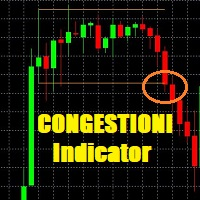
This indicator is very usefull to TRADE Trading Ranges and helps identify the following TREND. Every Trader knows that any market stay 80% of the time in trading ranges and only 20% of the time in TREND; this indicator has been built to help traders trade trading ranges. Now instead of waiting for the next TREND, You can SWING TRADE on trading ranges with this simple yet very effective indicator.
TRADING with CONGESTIONI INDICATOR:
The CONGESTIONI Indicator identify a new trading range and ale

DayTrader PRO DayTrader PRO는 존 에러스(John Ehlers)의 Laguerre 필터와 강력한 자동 최적화 엔진을 결합한 고급 트레이딩 지표입니다. 고정된 파라미터를 사용하는 대신, 최근 시장 상황을 바탕으로 최적의 설정을 자동으로 검색하므로 지속적인 수동 조정 없이도 변화하는 시장 변동성에 대응할 수 있습니다. 이 지표는 명확한 매수(BUY) 및 매도(SELL) 신호를 생성하며, 현재 시장 변동성을 기준으로 계산된 적응형 손절매(Stop Loss) 및 익절(Take Profit) 레벨을 제공합니다. 내장된 추세, 효율성 지수(Efficiency Ratio), 변동성 및 캔들 필터 기능은 저품질의 진입 신호를 제거하여 신호의 정확도를 높여줍니다. 실시간 성능 대시보드에서는 현재 최적화된 설정값, 수익 요인(Profit Factor), 승률(Win Rate), 최대 낙폭(Drawdown) 및 기타 트레이딩 통계를 확인할 수 있습니다. 또한 DayTrader PR

Meta Trader 플랫폼에서 거래자가 고급 시장 분석을 할 수 있도록 지원하기 위해 개발된 정교한 금 거래 로봇인 One Gold EA를 소개합니다. 당사의 독점 기술은 신경망과 데이터 기반 알고리즘을 활용하여 과거 및 실시간 금 시장 데이터를 분석하여 의사 결정에 도움이 되는 통찰력을 제공합니다. 기존의 수동 전략과 달리 One Gold EA는 최소한의 개입으로 작동하여 거래 프로세스를 간소화하고 관련 위험을 줄이는 것을 목표로 합니다. 고급 신경 플러그인을 사용하면 로봇의 분석 기능이 향상되지만 다른 거래 도구와 마찬가지로 One Gold EA는 수익을 보장하지 않는다는 점에 유의하는 것이 중요합니다. 그러나 보다 정보에 입각하고 데이터 기반 통찰력을 제공하여 거래 성과를 개선할 수 있는 잠재력을 가지고 설계되었습니다. One Gold EA는 인간 거래자가 파악하기 어려울 수 있는 패턴과 추세를 감지하기 위해 금 시장을 지속적으로 모니터링합니다. 이 시스템은 다양한 시장 상황

현재 20% 할인!
초보자 또는 전문가 트레이더를 위한 최고의 솔루션!
이 표시기는 Exotic Pairs Commodities, Indexes 또는 Futures와 같은 기호에 대한 통화 강도를 표시하는 데 특화되어 있습니다. 금, 은, 석유, DAX, US30, MXN, TRY, CNH 등의 진정한 통화 강도를 보여주기 위해 9번째 줄에 모든 기호를 추가할 수 있습니다. 이것은 독특하고 고품질이며 저렴한 거래 도구입니다. 우리는 많은 독점 기능과 새로운 공식을 통합했습니다. 새로운 추세 또는 스캘핑 기회의 정확한 트리거 포인트를 정확히 찾아낼 수 있기 때문에 거래가 어떻게 개선될지 상상해 보십시오.
사용 설명서: 여기를 클릭 https://www.mql5.com/en/blogs/post/708876
모든 시간대에 작동합니다. TREND를 빠르게 확인할 수 있습니다! 새로운 기본 알고리즘을 기반으로 설계되어 잠재적인 거래를 더욱 쉽게 식별하고 확인할 수 있습니다. 8개의

GoldJump EA is an Expert Advisor based on a gold scalping strategy specifically designed for the M1 timeframe with a structured risk management approach. This EA utilizes fast price movements during the Asian trading session to identify entry opportunities, targeting short yet consistent market moves. The system is equipped with Drawdown control (DD Max), measured Stop Loss (SL), and optimized Take Profit (TP) features to maintain performance stability and efficient margin usage. The GoldJump EA

ZORYK — MetaTrader 4용 XAUUSD 전문 신호 및 트레이드 플래닝 시스템
이런 경험이 있을 것입니다.
골드를 분석하고 진입을 기다린 뒤 마침내 포지션을 열었지만 가격이 곧바로 반대 방향으로 움직입니다. 너무 일찍 청산하거나 Stop Loss를 옮기거나 몇 초 동안 망설입니다. 그 후 시장은 내가 없이도 처음 예상했던 목표까지 정확히 움직입니다.
문제는 항상 방향이 아니었습니다.
진짜 문제는 불확실성이었습니다.
정확한 진입 위치를 몰랐습니다. 어느 지점에서 원래의 트레이드 아이디어가 무효가 되는지 몰랐습니다. 가까운 수익을 확보해야 할지 더 큰 움직임을 기다려야 할지 판단하기 어려웠습니다. 현재 setup이 정말 강한지 아니면 단지 새로운 거래를 억지로 찾고 있는지도 확신하기 어려웠습니다.
골드는 매우 빠르게 움직입니다. 명확한 계획이 없다면 좋은 분석도 몇 초 만에 나쁜 결정으로 바뀔 수 있습니다.
ZORYK는 이 문제를 해결하기 위해 개발되었습니다.

KURAMA GOLD SIGNAL PRO (MT4) — 7중 필터 · 자동 TP/SL · 품질 점수 · 시그널 기록 저장 | XAUUSD 완전 트레이딩 시스템
실시간 리페인트 없음. 시그널이 나타나는 순간 화살표, 진입, TP, SL이 그 자리에 고정되어 이후 절대 움직이지 않습니다. 여러분이 거래하는 것은 바로 이 실시간 시그널입니다. 그리고 v7.20에서는 실제로 발신된 모든 시그널이 자동 저장되어 재시작 후에도 정확히 복원됩니다.
구매자 전용 보너스 평생 라이선스를 구매하시면 AI Zone Radar($59 상당) + 완전 PDF 매뉴얼을 무료로 드립니다. 제품 가격에 더해 $59 상당의 보너스가 따라옵니다. 구매 후 MQL5로 메시지를 보내주세요. AI Zone Radar: https://www.mql5.com/en/market/product/175834
골드 트레이더 커뮤니티에서 실제로 사용되며 정확성과

AFTrade Scalper EA is an automated trading robot designed for XAUUSD using a breakout-based scalping approach. The EA focuses on very short-term opportunities with controlled risk management, fixed lot options, trading session filters, and a three-stage trailing stop system consisting of Trailing Start, Trailing Stop, and Trailing Step. No grid and no martingale, every trade has a defined Take Profit and Stop Loss.
Please see below live signal of this EA :
Live Signal Broker IC Markets (startin
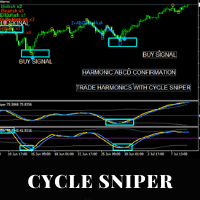
Please contact us after your purchase and we will send you the complimentary indicators to complete the system Cycle Sniper is not a holy grail but when you use it in a system which is explained in the videos, you will feel the difference. If you are not willing to focus on the charts designed with Cycle Sniper and other free tools we provide, we recommend not buying this indicator. We recommend watching the videos about the indiactor and system before purchasing.
Videos, settings and descri

EA Gold Stuff 는 금 거래를 위해 특별히 고안된 전문가 고문입니다. 작업에 기반의 개방의 주문 금을 사용하여 물건의 표시는,그래서 고문 작품에 따라"트렌드를 따라"전략을 의미,다음과 같은 추세이다.
중요! 구매 후 즉시 저에게 연락하여 지침과 보너스를 받으십시오! 강력한 지원 및 트렌드 스캐너 표시기의 무료 사본을 받으실 수 있습니다. 메시지를 보내주세요. 나! 실시간 결과는 여기에서 볼 수 있습니다
매개 변수
새로운 시리즈 열기-주문의 새로운 시리즈의 온/오프 시작. 시작 로트-시작 로트. 무역 구매-전문가 고문이 구매할 수 있도록하십시오. 무역 판매-전문가 고문이 판매 할 수있게하십시오. 사용하지면서 기능을 사용한 고문이 무역은 모두 구매 및 판매하는 방향,기능 장애인,고문관이 무역에 단 하나의 방향이다. 돈 Manadgement 를 사용-온/오프 자동 로트 계산의 사용. 오토롯. 각 0.01 로트에 대한 자유 마진-각 0.01 로트 단위의 개방을위한

BlueDigitsFx 공식 생태계 액세스 인프라 업데이트, 트레이딩 리소스, 제품 출시 정보 및 BlueDigitsFx 공식 생태계에 대한 액세스를 받아보세요. Telegram 생태계
웹사이트
MT5 버전 BlueDigitsFx Easy 123 System — MT4용 강력한 반전 및 돌파 감지 시스템 시장 반전과 돌파를 포착하기 위한 올인원 비재도색(Non-Repaint) 시스템 — 구조적 분석, 명확성 및 확인 기반 트레이딩을 중요하게 생각하는 트레이더를 위해 설계되었습니다. BlueDigitsFx Easy 123 System은 시장 구조 변화, 돌파 및 추세 반전을 쉽고 명확하게 식별할 수 있도록 도와주는 MT4용 시각적 지표 및 알림 시스템입니다. 이 지표는 구조화된 "123" 패턴을 기반으로 작동합니다. 1단계 : 잠재적인 추세 소진 구간에서 큰 화살표(Big Arrow)를 표시하여 새로운 고점 또는 저점을 식별합니다. 2단계 : 시장 구조 돌파를 감지하여 잠재적인

ORIX System — GBPUSD 통화쌍을 대상으로 M5 타임프레임에 맞게 개발된 트레이딩 로봇입니다. 본 EA는 가격 움직임과 시장 구조 요소를 분석하는 기반으로 작동하며, 표준 기술적 지표를 사용하지 않습니다. 마틴게일, 그리드 트레이딩, 역방향 평균매수, 헤지, 손절매 없는 거래, 고빈도 또는 무작위 거래를 사용하지 않습니다. Live signals
주요 요구 사항 및 권장 사항 거래 통화쌍: GBPUSD
타임프레임: M5
최소 예치금: 0.01랏 기준 100 USD / EUR부터
브로커: 고품질 시세를 제공하는 신뢰할 수 있는 ECN 브로커
계좌 유형: ECN / RAW / Razor (Netting 및 Hedging 모드 지원)
VPS: EA의 안정적이고 지속적인 실행을 위해 권장
권장 리스크: 거래당 1%–5% (리스크는 단일 거래의 스탑로스를 기준으로 계산됨)
설정: 기본값
거래 로직 및 리스크 관리 전략 유형: 가격 행동 및 시장 구조 분석을 통한 주요 반전 구

Info:
Working trading pairs : XAUUSD, GOLD Timeframe: H1 Min deposit: $100 Min leverage 1:20 Works with any broker, though an ECN broker is recommended Live signal : https://www.mql5.com/en/signals/2382616 Features:
No martingale No grid trading No averaging No dangerous money management techniques Hard stop loss and take profit for every trade Stable results since 1999 with 99.9% quality quotes Not sensitive to broker conditions Easy to install and use FTMO and Prop firm ready Complies wi

수동 매매를 위한 전문가용 트레이딩 패널로, 정밀한 진입부터 계좌 보호까지 매매의 전 과정을 차트 위 하나의 창에 담았습니다. 정해진 리스크에 정확히 맞춰 모든 포지션의 거래량을 산정하고, RR Tool로 차트에 직접 라인을 그려 거래를 설계하며, Market 주문과 예약 주문은 물론 Grid와 OCO까지 사용할 수 있습니다. 포지션 관리는 패널이 대신 처리합니다. 최대 다섯 단계 부분 청산, 여섯 가지 트레일링 스탑, 브레이크이븐, Virtual SL/TP를 지원합니다. 일간·주간·월간 한도가 예치금을 지키며, 기준을 넘기는 즉시 자동으로 발동됩니다. 가이드와 무료 Live 데모 무료 Live 데모 버전은 여기에서 이용할 수 있습니다 ( Free Live Demo ). 제품 사용 가이드는 여기에서 확인할 수 있습니다 ( User Manual ). NT Trade Manager는 트레이더의 모든 작업 흐름을 차트 위 작고 간결한 패널 하나에 모아, 터미널 창을 오갈 필요도, 진입할

Session Breakout PRO는 자동화된 Forex 거래를 위해 설계된 전문 Breakout EA로, 클래식 Session Breakout 전략을 기반으로 개발되었습니다.
이 EA는 London Breakout 및 Asian Session Breakout을 포함한 다양한 거래 세션을 지원하며, 고급 신호 필터링 시스템, 적응형 리스크 관리(Risk Management), 그리고 현대적인 리스크 제어 기능을 결합하고 있습니다. 유연한 설정 시스템을 통해 통화쌍, CFD, 지수, 귀금속 및 기타 금융상품은 물론 다양한 시장 환경과 거래 스타일에 맞게 전략을 조정할 수 있습니다. Gold Signal : https://www.mql5.com/ko/signals/2378603 기본 설정은 XAUUSD H1 (GOLD H1)에 최적화되어 있습니다. | Session_Breakout_PRO_GOLD_H1.set | Reports.zip 모든 범위 돌파가 수익 거래로 이어지지 않

News Filter EA: Advanced Algo Trading Assistant News Filter EA is an advanced algo trading assistant designed to enhance your trading experience. By using the News Filter EA , you can integrate a Forex economic news filter into your existing expert advisor, even if you do not have access to its source code. In addition to the news filter, you can also specify trading days and hours for your expert. The News Filter EA also includes risk management and equity protection features

현재 30% 할인!
이 대시보드는 여러 기호와 최대 9개의 타임프레임에서 작동하는 매우 강력한 소프트웨어입니다. 주요 지표(최상의 리뷰: 고급 공급 수요)를 기반으로 합니다. Advanced Supply Demand
대시보드는 훌륭한 개요를 제공합니다. 다음과 같이 표시됩니다. 영역 강도 등급을 포함하여 필터링된 공급 및 수요 값, 영역에 대한/및 영역 내 Pips 거리, 중첩된 영역을 강조 표시하고 모든 (9) 시간 프레임에서 선택한 기호에 대해 4가지 종류의 경고를 제공합니다. 그것은 당신의 개인적인 필요에 맞게 고도로 구성 가능합니다!
당신의 혜택!
모든 트레이더에게 가장 중요한 질문:
시장에 진입하기에 가장 좋은 수준은 무엇입니까? 최고의 성공 기회와 위험/보상을 얻으려면 강력한 공급/수요 영역 내 또는 그 근처에서 거래를 시작하십시오.
손절매를 위한 최적의 장소는 어디입니까? 가장 안전하려면 강력한 수요/공급 구역 아래/위에 정류장을 두십시오.

특별 출시 가격! 단돈 79달러! 10개 판매 후 가격이 인상되어 최종 가격은 199달러가 됩니다. 구매 후 연락 주시면 완전 자동화되고 최적화된 설정 파일을 사용하여 돌파 신호를 거래할 수 있는 무료 보너스 EA를 드립니다.
깔끔한 세션 브레이크아웃을 자신감 있게 활용하세요! ORB Seeker는 정확성, 단순성, 유연성 및 명확한 차트 구조를 원하는 트레이더를 위해 개발된 전문적인 시가 범위 돌파(ORB) 지표입니다. 이 프로그램은 모든 금융 상품에 대해 장전 거래 또는 사용자 지정 세션 범위를 자동으로 표시하고, 진입, 손절매, 목표 수익 및 선택적으로 50% 부분 목표 수익 수준을 포함한 명확한 돌파 신호를 제공합니다. 모든 계산은 실시간으로 차트에 직접 표시됩니다. 런던 개장, 뉴욕 세션, 아시아 세션 또는 사용자 지정 시장 시간대를 선택하여 거래하세요. ORB Seeker는 사용자가 선택한 세션 시간에 맞춰 작동하므로 시장 범위, 돌파 수준 및 거래 레벨을 정확하게 확

CRT Candle Range Theory HTF MT4. Ultimate CRT Indicator: Advanced ICT Concepts and Malaysian SnR Trading System Master the Market Maker's Footprints with the Most Advanced Candle Range Theory Indicator Unlock the true power of Smart Money Concepts (SMC) and trade precisely like the institutions with the Ultimate CRT Indicator . Built exclusively for serious traders, this indicator automates the highly effective Candle Range Theory (CRT) , a core pillar of ICT Concepts (Inner Circle Trader

BUY 1 and GET 1 FREE - Promotion!
Buy GOLD Scalper PRO with a huge –60% discount and GET 1 FREE EA by your choice! Promo Price: $177
(Regular Price: $447 — You Save $270!) After purchase contact me to get your GIFT EA! You can also contact me to get the list of available GIFT EAs! Live Results: https://www.mql5.com/en/signals/2353871 GOLD Scalper PRO is a fully automated trading system which takes much of the work out of trading, leaving you free to do other things! You should not be fooled

BUY 1 and GET 1 FREE - Promotion!
Buy Forex GOLD Investor with a huge –60% discount and GET 1 FREE EA by your choice! Promo Price: $217
(Regular Price: $547 — You Save $330! ) After purchase contact me to get your GIFT EA! You can also contact me to get the list of available GIFT EAs! Forex GOLD Investor is one of the best expert advisors developed to trade on GOLD(XAUUSD) in the forex market. Forex GOLD Investor consists of 3 trading systems . The first one is based on scalping trading strat

VR Smart Grid는 MetaTrader 4와 MetaTrader 5를 위해 개발된 완전한 기능의 거래 어드바이저이며, 고전적인 그리드 거래 전략을 기반으로 구축되었습니다. 로봇은 독립적으로 포지션을 개설하고, 관리하고, 일부를 결제하여 시장 변화에 적응하는 효율적인 주문 격자를 만듭니다. 15년간의 개발을 거쳐 이 어드바이저는 수천 번의 변형과 테스트를 거쳤습니다. 이는 실제 계정과 데모 계정의 체계적인 개선 결과입니다. 세트 파일, 제품의 데모 버전, 지침 및 보너스를 사용할 수 있습니다. [블로그]
버전: [MetaTrader 5] 지능형 포지션 평균화 VR Smart Grid의 주요 특징 중 하나는 여러 평균화 모드입니다. 스마트 평균화와 부분 평균화가 포함됩니다. 로봇은 현재 시장 상황을 분석하고 포지션을 최적의 부분으로 분할하며 평균 마감 가격을 계산합니다. 이는 현재 시장 가격에 최대한 가깝게 됩니다. 이 접근 방식은 주문 격자를 유연하게 관리하고 차트를 지속적으

Wall Street Robot is a professional trading system developed exclusively for US stock indices, focused on S&P500 and Dow Jones. These markets are known for their high liquidity, structured movements and strong reaction to global economic flows, making them ideal for algorithmic trading strategies based on precision and discipline. By concentrating only on these indices, the system is able to adapt closely to their behavior, volatility patterns and intraday dynamics, instead of trying to oper

next price 250$ Holy grail gold EA is a fully automated expert Advisor using an advanced search and breakdown mechanism for local extrema. The system does Not use the Grid, does Not use martingale and other risky strategies. All trades are protected by StopLoss ! ------------------------------ ------------------------------ ------------------------------ -------------------------- SIGNAL ===== https://www.mql5.com/fr/signals/1380191?source=Site+Signals+My ------------------------------ ---------

The XG Gold Robot MT4 is specially designed for Gold. We decided to include this EA in our offering after extensive testing . XG Gold Robot and works perfectly with the XAUUSD, GOLD, XAUEUR pairs. XG Gold Robot has been created for all traders who like to Trade in Gold and includes additional a function that displays weekly Gold levels with the minimum and maximum displayed in the panel as well as on the chart, which will help you in manual trading. It’s a strategy based on Price

Gold Pro Scalper
Precise entry points for currencies, crypto, metals, stocks, indices! Indicator 100% does not repaint!!!
If a signal appeared, it does not disappear! Unlike indicators with redrawing, which lead to loss of deposit, because they can show a signal, and then remove it.
Trading with this indicator is very easy.
Wait for a signal from the indicator and enter the deal, according to the arrow
(Blue arrow - Buy, Red - Sell).
I recommend using it with the Trend Filter (download