
DrawDown Limiter MT4
- ユーティリティ
-
Haidar Lionel Haj Ali
 I am committed to developing high-performance trading solutions for MetaTrader 5. Backed by over nine years of live-market experience, I designed and deliver Expert Advisors, custom indicators, and utilities that minimize complexity and maximize precision in real-world conditions.
 - バージョン: 5.0
- アップデート済み: 19 9月 2026
- アクティベーション: 10
DrawDown Limiter v5.0 — Advanced Account Protection Controller
DrawDown Limiter v5.0 is a client-side account protection controller designed to supervise your trading account and automatically react when configured risk, profit, news, schedule, rollover, or position limits are reached.
It can monitor manual trades, automated strategies, multiple Expert Advisors, pending orders and floating positions from one dedicated chart. It can protect the complete account or be configured to supervise a specific EA or group of EAs using Magic Numbers.
The objective of DrawDown Limiter is not only to display your drawdown. Its purpose is to actively enforce your configured trading rules and keep enforcing them while a protection condition remains active.
Need help or have questions? Check DrawDown Limiter User Guide
I am Lio, don't hesitate to reach out! We are always available to respond, help, and improve.
One Unified Protection System
DrawDown Limiter v5.0 introduces a unified protection response. Depending on your configuration, when a protection condition is triggered the EA can:
- Activate a shared entry-block signal for compatible Expert Advisors.
- Isolate local strategy charts before closing trades.
- Delete protected pending orders.
- Close protected positions or preserve only pre-existing exposure.
- Continue removing new exposure while protection remains active.
- Quarantine newly opened strategy charts during protection.
- Automatically restore captured charts when all protection conditions have safely cleared.
Closing strategy charts before positions is especially important when other EAs are running on the same terminal: it helps prevent a strategy from immediately recreating a position that DrawDown Limiter has just closed.
Protection Conditions
DrawDown Limiter v5.0 can activate protection for multiple independent reasons:
- Maximum Daily Drawdown
- Maximum Account Drawdown
- Maximum Account Profit
- Daily Profit Target
- Breakeven Protection
- Rollover Security
- Scheduled Protection
- Economic News Protection
- Holiday and All-Day News Protection
- Maximum Open Positions
- Maximum Positions Opened During the Trading Range
Several protection causes can exist at the same time. The EA does not release protection simply because one condition has cleared. Full protection remains active until every active protection cause is legitimately cleared.
Daily Drawdown — Choose How Your Risk Is Actually Calculated
Different trading programs and account rules calculate daily drawdown differently. DrawDown Limiter v5.0 therefore separates the daily risk reference from the method used to measure the current loss.
Daily risk reference options:
- Initial Deposit
- Account Balance at the beginning of the range
- Account Equity at the beginning of the range
- Higher of Equity or Balance
- Fixed Risk in Account Currency
Daily drawdown tracking methods:
- Open And Closed Positions — combines negative closed P/L since reset with current floating P/L.
- Start-Of-Range Equity — measures the decline from the equity captured when the current protection range started.
- High-Water Equity — tracks the highest equity reached during the range and measures drawdown from that peak.
Swap and commission can also be included in the calculations when required.
This flexibility allows the limiter to be configured according to the actual drawdown formula you need rather than forcing every account to use the same calculation.
Flexible Daily Reset Cycle
A trading day does not necessarily reset at midnight on your computer or even at midnight on the broker server.
DrawDown Limiter can define the protection range using:
- Daily Bar Open
- Broker Server Time
- A Configured Time Zone
Configured Time Zone mode supports a fixed standard UTC offset together with optional European or United States daylight-saving rules.
The selected range controls the reset of daily drawdown calculations, daily targets, breakeven state, schedules and range-position counters.
Chart Vault — Isolate, Protect and Restore Your Strategies
One of the major additions in DrawDown Limiter v5.0 is the Chart Vault.
When chart protection is enabled, DrawDown Limiter can capture eligible strategy charts before closing them. The captured information includes the symbol, timeframe, chart configuration and saved template information required to reopen the chart later.
During an active protection event the Chart Vault can:
- Save eligible strategy charts.
- Close those charts before protected positions are closed.
- Keep the DrawDown Limiter controller running.
- Quarantine newly opened strategy charts while protection remains active.
- Track captured, closed, restored and failed charts.
With Close + Restore Charts, the saved charts can automatically reopen when all protection causes have cleared, the new range is valid and the system confirms that restoration is safe.
A Manual Reopen mode is also available when you prefer to decide when the captured charts should be restored.
Choose What Happens to Existing Positions
Protection does not always have to mean closing everything. v5.0 provides two main trade-response modes:
- Close Protected Trades — repeatedly closes positions and removes pending orders within the configured scope while protection remains active.
- Keep Pre-Existing Exposure — preserves exposure that existed when protection started while deleting pending orders and preventing additional exposure from being maintained.
This allows temporary restrictions such as news or schedules to protect against new exposure while still permitting an existing position to remain under management when your trading rules allow it.
Daily Profit Target
DrawDown Limiter is not limited to loss protection.
A Daily Profit Target can be defined as either:
- A percentage of the daily reference, or
- A fixed amount in account currency.
When the target is reached you can choose between:
- Notify Only, or
- Activate Protection Until Reset.
This can be used to enforce a daily trading objective and stop additional trading once the desired result for the current range has been reached.
Breakeven Protection
v5.0 also introduces Breakeven Protection.
You can configure a positive daily result at which breakeven protection becomes armed. If the trading result subsequently returns to breakeven, DrawDown Limiter activates the configured protection response.
For example, the system can arm after a profitable start to the day and protect the account if that accumulated result is later completely given back.
Maximum Account Profit Protection
A separate Maximum Account Profit level can be configured as an account-wide objective.
When the configured account profit level is reached, DrawDown Limiter activates the full protection response and prevents continued trading under that configuration.
This is independent from the Daily Profit Target and is intended for objectives that apply to the complete account rather than a single trading day.
News Protection
DrawDown Limiter v5.0 can automatically activate protection around selected economic events.
Depending on platform and configuration, supported news sources include the MQL5 Economic Calendar, Forex Factory and Investing.com.
News protection can be filtered using:
- Selected currencies
- Low, moderate and high impact events
- Included event keywords
- Excluded event keywords
- Minutes before an event
- Minutes after an event
- Holiday protection
- All-day protection
When a qualifying news restriction becomes active, it uses the same configurable trade and chart protection system as the other full protection conditions.
If news protection is enabled and the configured source cannot provide reliable data, DrawDown Limiter uses a fail-closed approach rather than assuming that it is safe to trade.
Scheduled Protection
DrawDown Limiter can automatically activate protection at a scheduled broker-server time.
The schedule can run:
- Every day, or
- On a selected weekday.
Once triggered, the selected protection response remains active until the next legitimate daily range begins.
This can be useful when your strategy should stop trading before a specific market period, rollover, weekend or other predefined time.
Rollover Security Zone
A profitable trading day can hide a large floating loss that becomes dangerous immediately after the daily reset.
The Rollover Security Zone specifically addresses this situation.
During the configured number of minutes before the next daily reset, DrawDown Limiter can enforce a maximum floating loss expressed as a percentage of the daily risk allowance.
If the floating loss reaches this rollover allowance, full protection is triggered before the account enters the next trading range.
Overtrading Protection — Without Closing Your Allowed Trades
DrawDown Limiter provides two independent position controls:
- Maximum Simultaneously Open Positions
- Maximum Positions Opened During the Current Range
Unlike a full drawdown protection event, position-count protection uses excess-only control.
Positions already inside the permitted allowance remain open and strategy charts remain available. Additional or excess exposure is removed while the valid positions can continue to be managed.
Pending orders that could exceed the allowed exposure can also be deleted.
New-Trade Risk Alerts
DrawDown Limiter can inspect newly detected positions and provide advisory alerts when:
- A trade has no visible Stop Loss.
- The estimated risk exceeds a configured percentage of balance.
- The estimated risk exceeds a configured percentage of equity.
- The estimated risk exceeds a configured fixed monetary value.
These checks are alerts. They do not modify the trade or automatically add a Stop Loss.
Protect the Whole Account or Individual Strategies
DrawDown Limiter supports three monitoring scopes:
- All Trades
- One EA Magic Number
- Multiple EA Magic Numbers
This makes it possible to create a layered portfolio-protection structure.
For example, one master DrawDown Limiter can protect the complete account while additional instances supervise smaller risk budgets assigned to individual Expert Advisors or groups of strategies.
The account master continues to control the complete portfolio even when individual strategy limits are configured separately.
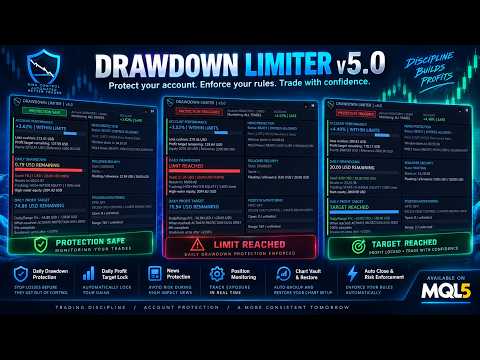
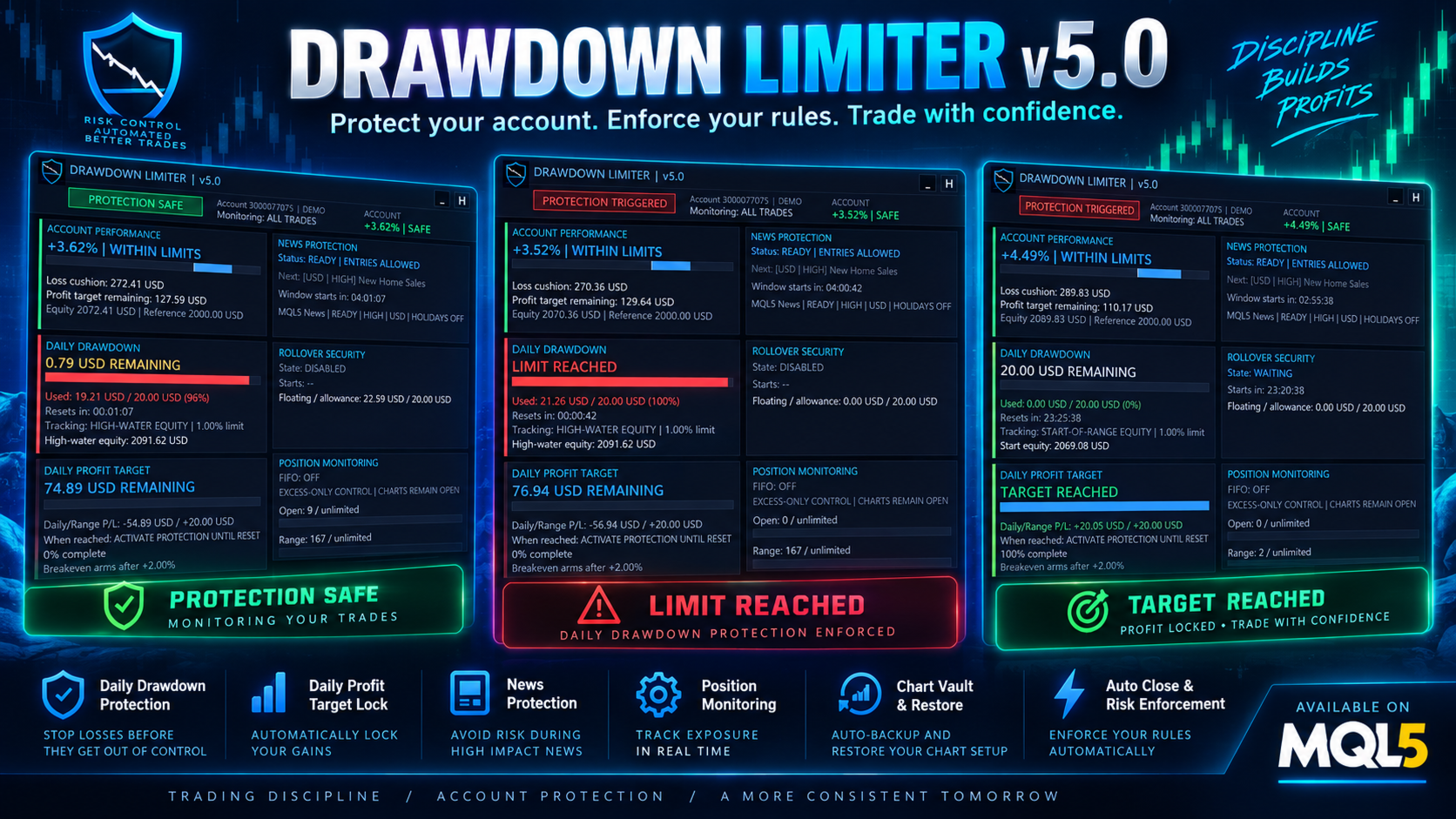
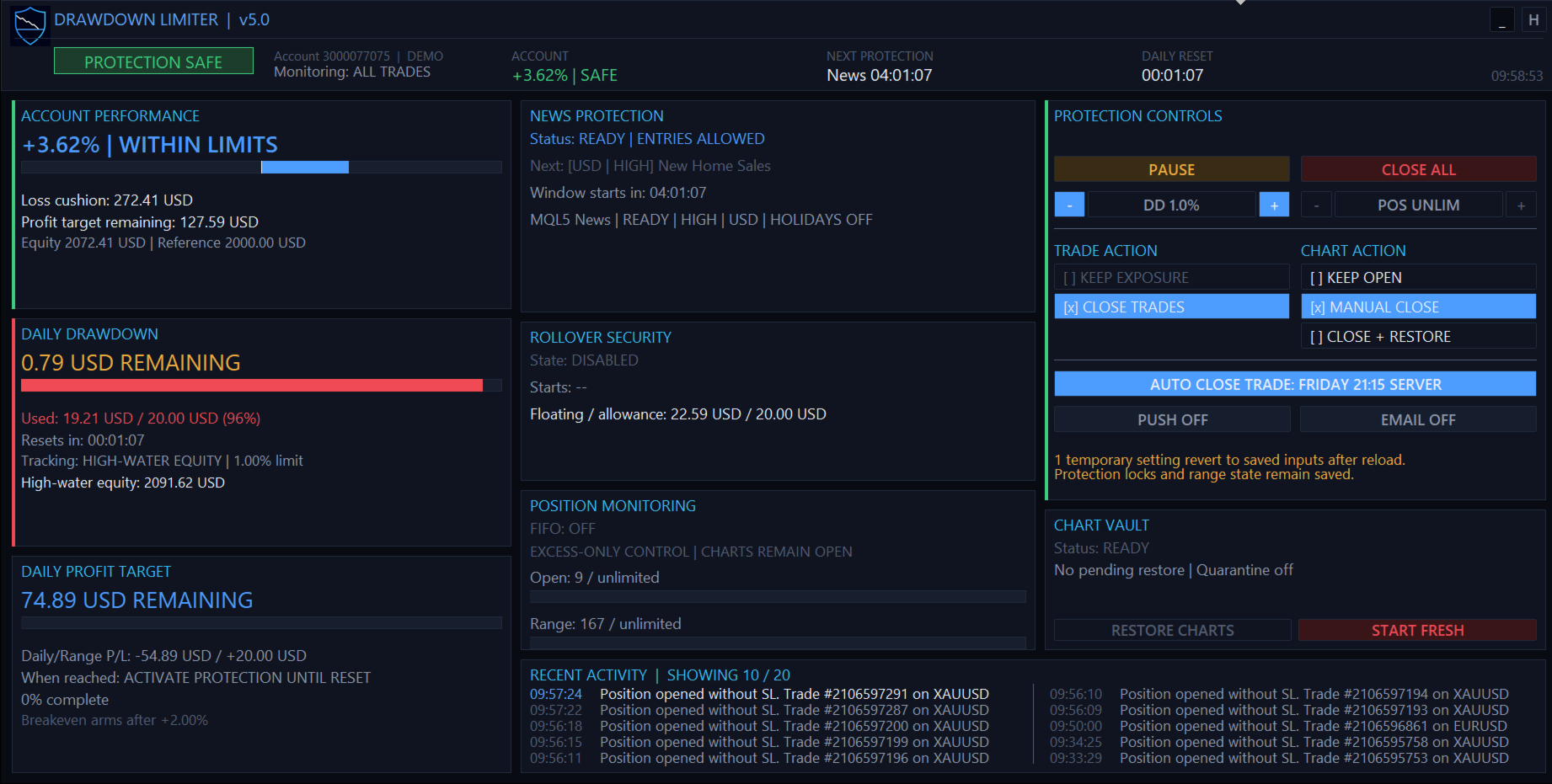
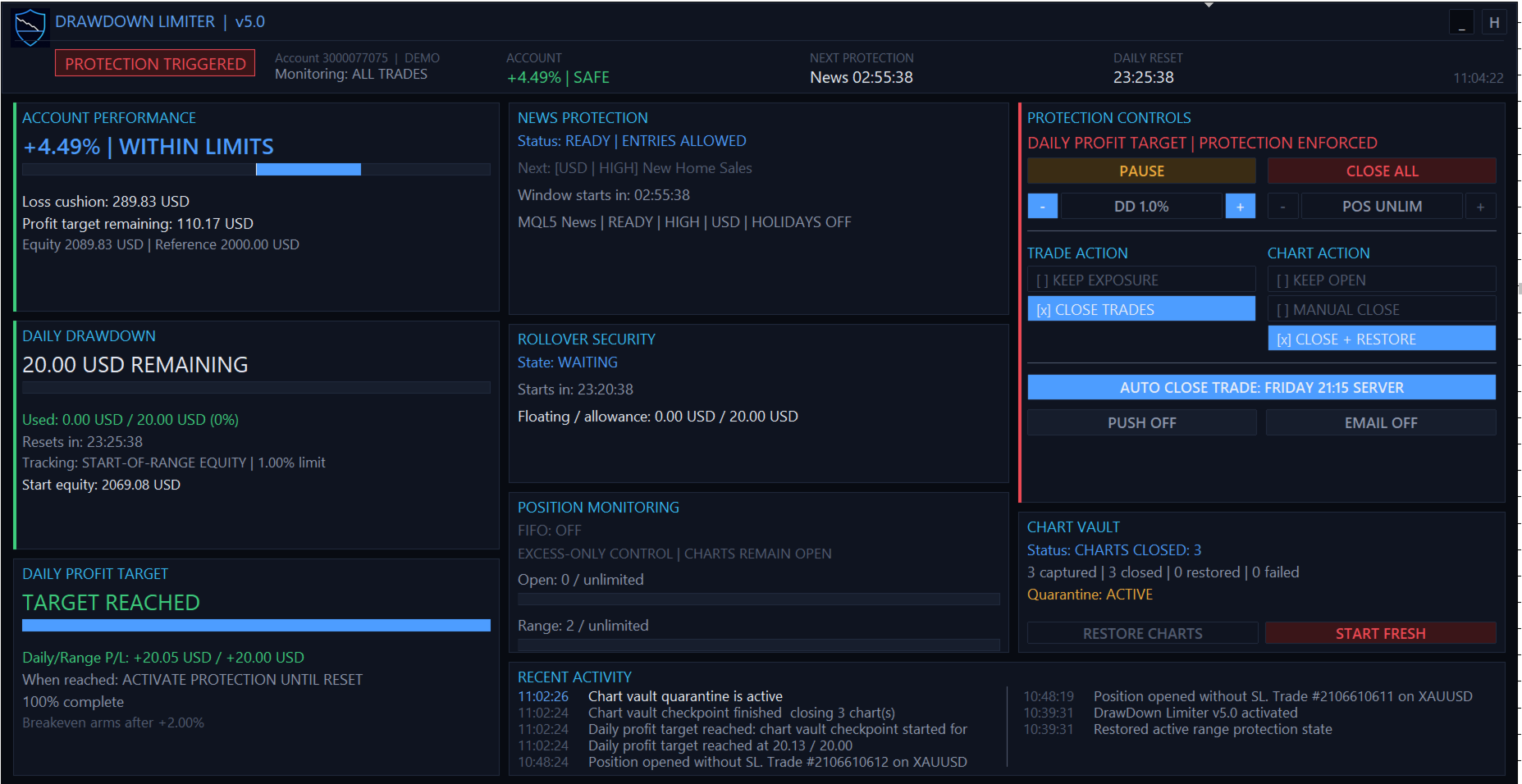
Advanced Protection Dashboard
v5.0 introduces a responsive protection dashboard designed to display the account state and active protection system rather than simply showing isolated indicators.
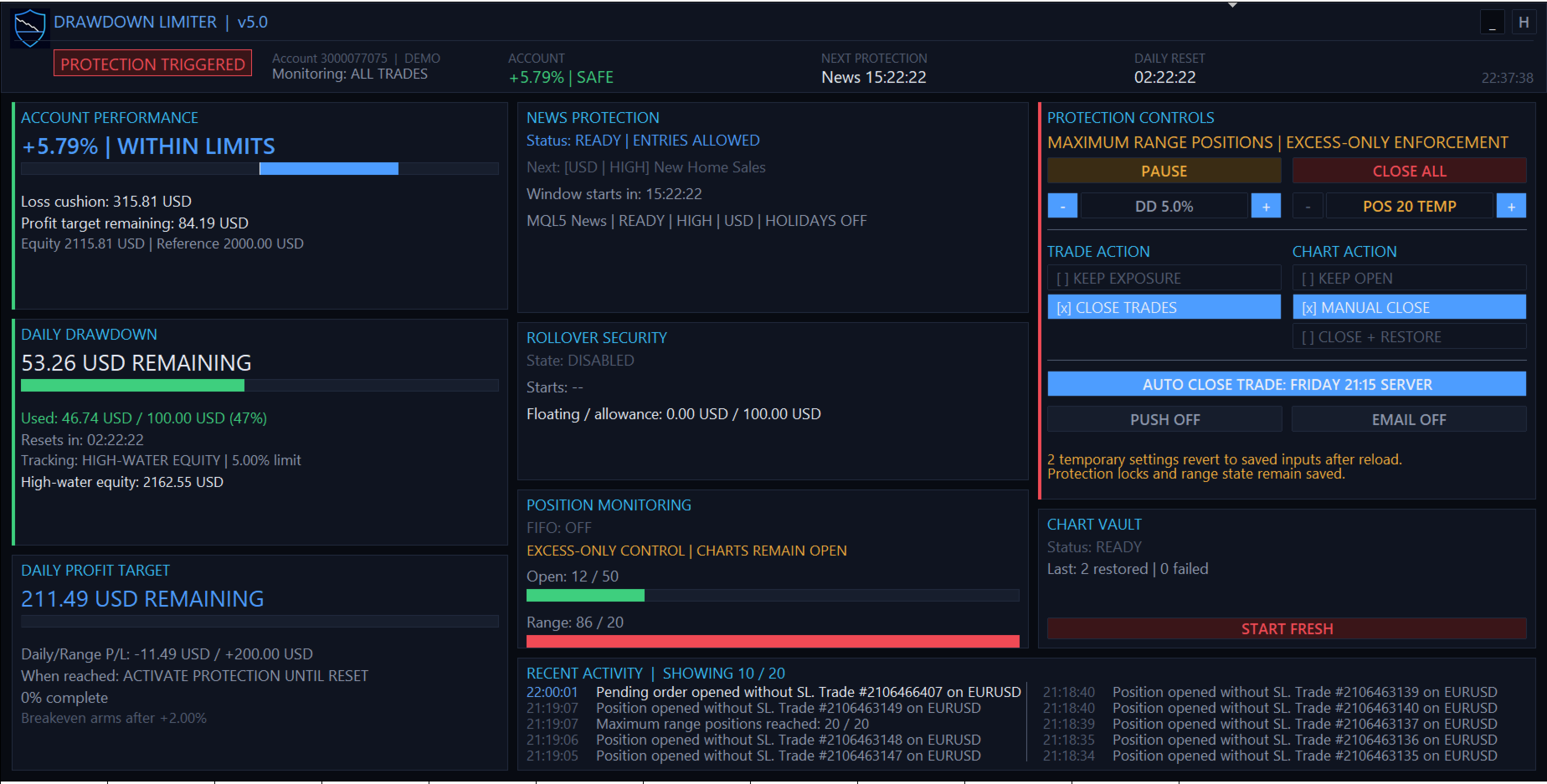
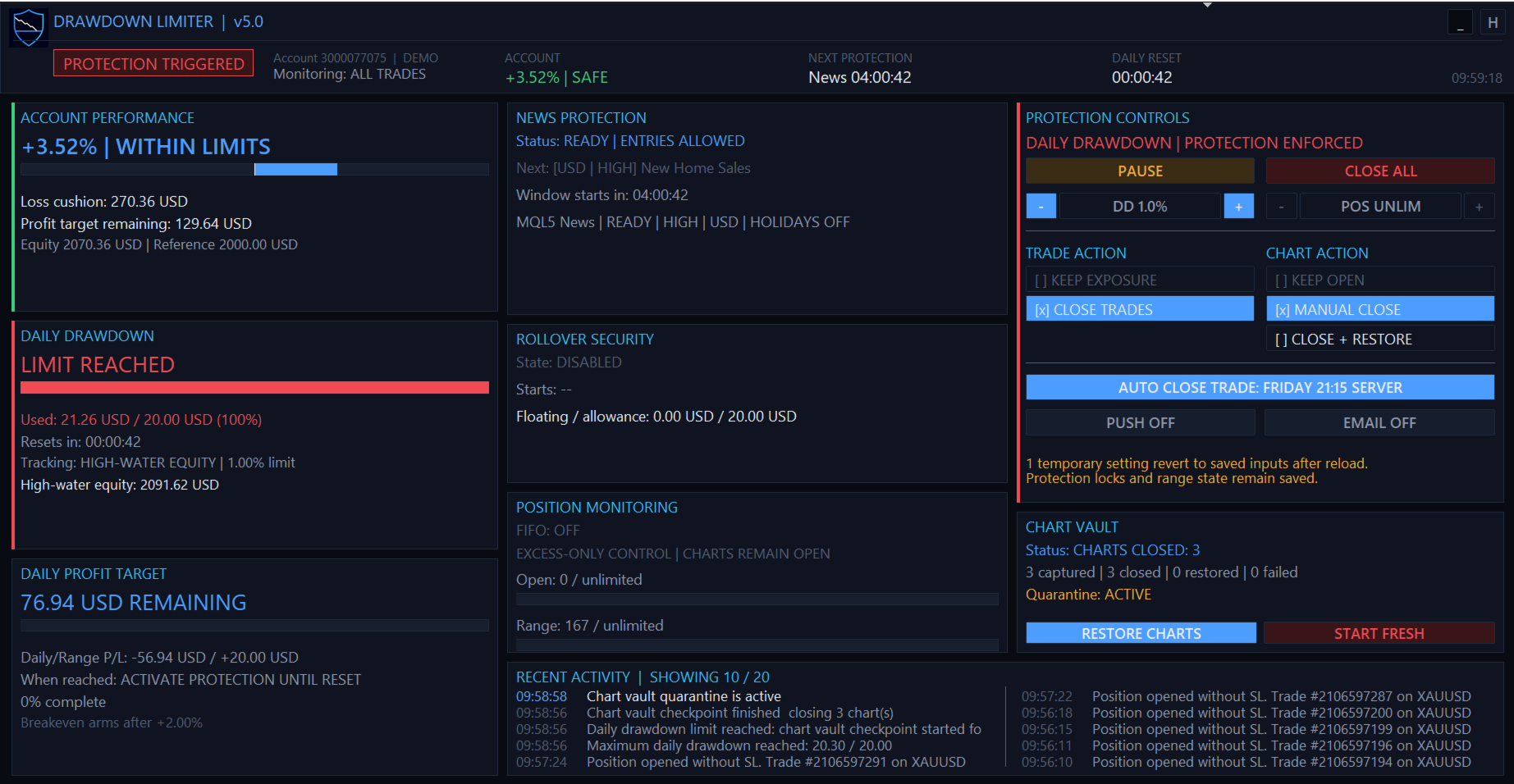
The dashboard provides information including:
- Current protection status
- Account performance
- Account loss cushion
- Daily drawdown used and remaining
- Daily and account profit progress
- Next protection event
- Daily reset countdown
- News protection status
- Rollover security status
- Open and range-position limits
- Selected trade and chart actions
- Chart Vault status
- Recent protection activity
The dashboard automatically adapts between wide, standard, dense and minimal layouts according to the available chart size.
Direct Controls From the Dashboard
The protection dashboard also provides operational controls, including:
- PAUSE for eligible temporary protections and advisory checks.
- CLOSE ALL for an emergency one-time close of managed exposure.
- Temporary adjustment of the daily drawdown percentage.
- Temporary adjustment of the maximum range-position limit.
- Trade-action selection.
- Chart-action selection.
- Push and email notification toggles.
- Scheduled auto-protection control.
- Manual chart restoration where applicable.
Temporary dashboard changes do not silently overwrite your saved EA inputs. Reloading the EA returns temporary settings to the configured input values while persistent protection state remains protected.
Persistent Protection State
A protection event is not cancelled simply by removing and reattaching the EA or restarting MetaTrader.
DrawDown Limiter persists important protection and range state so that an active restriction cannot normally be bypassed by restarting the EA.
If persistence or range-transition information becomes invalid, the system is designed to fail closed and retain protection until a valid state can be recovered.
A guarded Start Fresh procedure is available when you intentionally need to discard an old limiter state and initialize a completely new protection range.
Developer Integration
DrawDown Limiter can publish a shared MetaTrader Global Variable that compatible Expert Advisors can check before attempting a new entry.
Developers can integrate this entry-block contract directly into their own EAs so their strategies cooperate with DrawDown Limiter instead of waiting for a newly opened trade to be detected and removed.
FIFO Support
For accounts requiring FIFO handling, DrawDown Limiter provides configurable FIFO closing modes, including support for partial-close handling where applicable.
Notifications
Protection events can be reported using:
- Panel and terminal logging
- MetaTrader push notifications
- Email notifications
- Push and email together
Designed for Funded Accounts and Personal Risk Management
DrawDown Limiter can be configured for strict funded-account rules as well as personal trading-account discipline.
The included protection model can accommodate different:
- Daily loss formulas
- Overall account loss limits
- Profit objectives
- Daily reset time zones
- News restrictions
- Position limits
- Rollover requirements
- EA-specific risk budgets
Preset configurations can therefore be built for different trading programs while retaining a safety margin between the limiter's trigger and the external account limit.
Important — Understand the Protection Model
DrawDown Limiter is a client-side MetaTrader controller.
It observes the state visible to the terminal and then applies the configured protection response. It cannot force a broker to reject an order before the broker accepts it.
Trades submitted from a mobile application, web terminal, API, signal service, copier, another MetaTrader terminal or another external system cannot be controlled before they become visible to the terminal running DrawDown Limiter.
The EA also cannot act while the MetaTrader terminal is closed, disconnected, frozen or unable to trade.
For this reason, configure an appropriate safety buffer between your DrawDown Limiter thresholds and any hard external limit. Execution latency, spread, slippage, commission, swap and fast market movements can affect the final closing result.
Recommended Setup
For maximum local account protection:
- Run DrawDown Limiter on one dedicated chart.
- Use All Trades scope for account-wide protection.
- Configure the daily reset and drawdown calculation to match your actual account rules.
- Use Close Protected Trades when exposure must be removed.
- Use Close + Restore Charts when local automated strategies should be isolated during protection.
- Configure a safety margin below any external maximum loss threshold.
- Test the complete protection and restoration workflow on a demo account before live use.
























































everything I need. Fortunatly it didn't need to close yet. But the settings are very good for all kinds of prop firm requirements.