RM Trade Manager

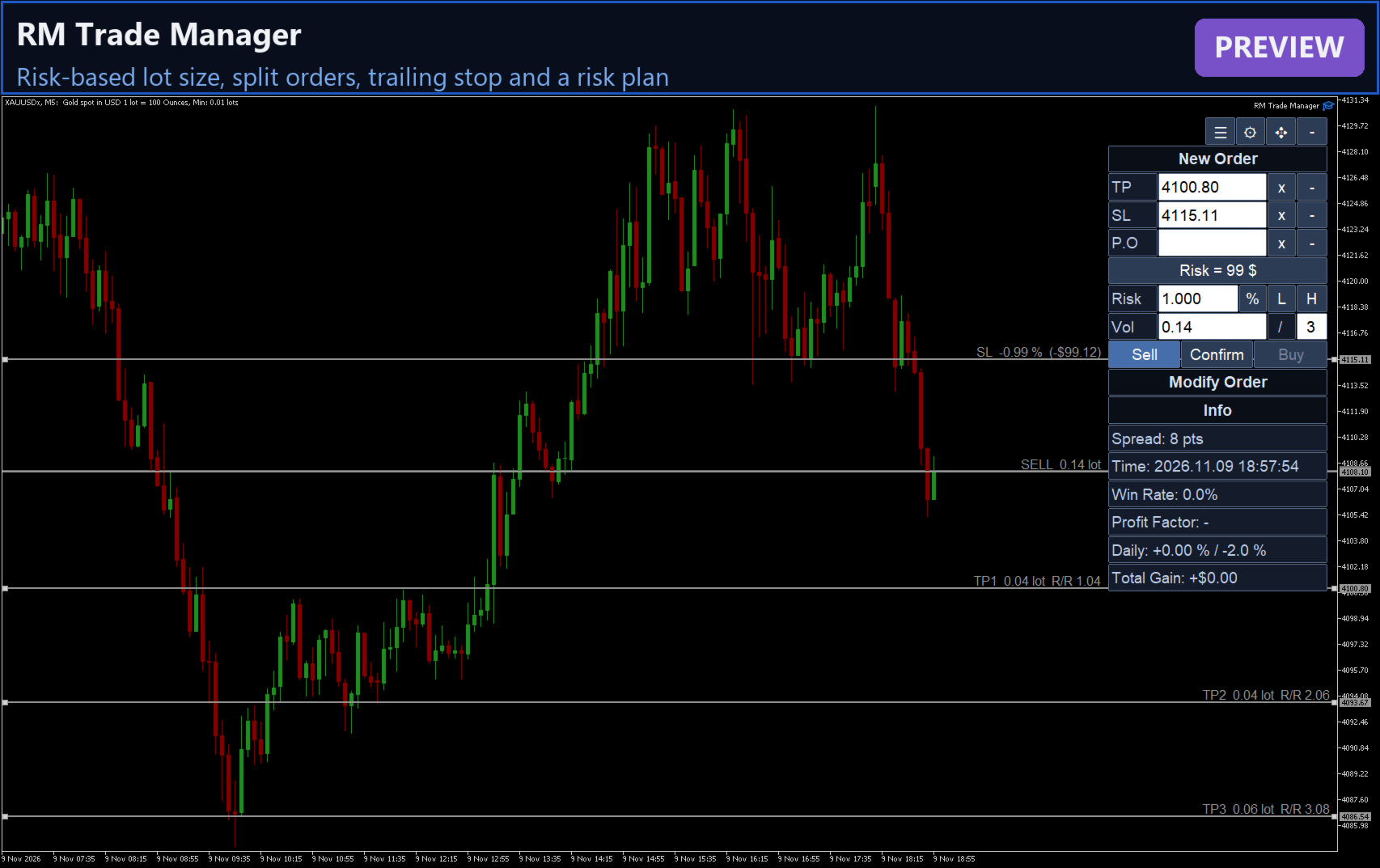
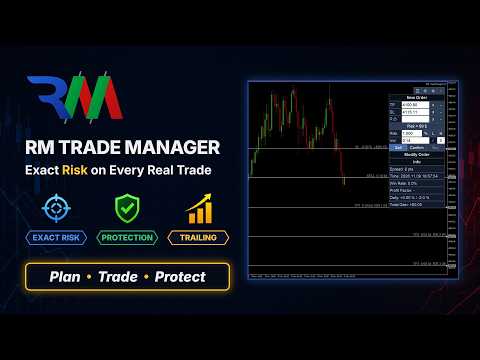
RM Trade Manager は裁量トレーダーのための取引管理パネルです。リスクに基づくエントリー、分割注文、トレーリングストップ、リスクプランを、ライブチャート上で扱えます。

いつ取引するかを決めるのはあなたです。RM Trade Manager は計算と定型作業を引き受けます。ストップロスとリスクからロット数を計算し、それぞれ独自のテイクプロフィットを持つ分割注文を送信し、ストップを動かし、1日の損失上限を守り、重要指標の発表から距離を置けるようにします。

トレーダーが使う理由

  • すべての取引でリスクが正確:リスクは残高の % または金額で指定し、ロット数は SL までの距離から手数料込みで算出されます。
  • 分割決済がシンプル:1クリックで複数の注文を送信し、それぞれに独自の TP を設定します。
  • プロップファーム口座のルール:口座全体の1日の損失上限と利益目標、最大保有ポジション数、ニュースフィルター。
  • 画面に張り付く作業を削減:6種類のトレーリングストップ、建値決済(ブレークイーブン)、部分決済をひとつのパネルから操作できます。

新規注文(New Order)

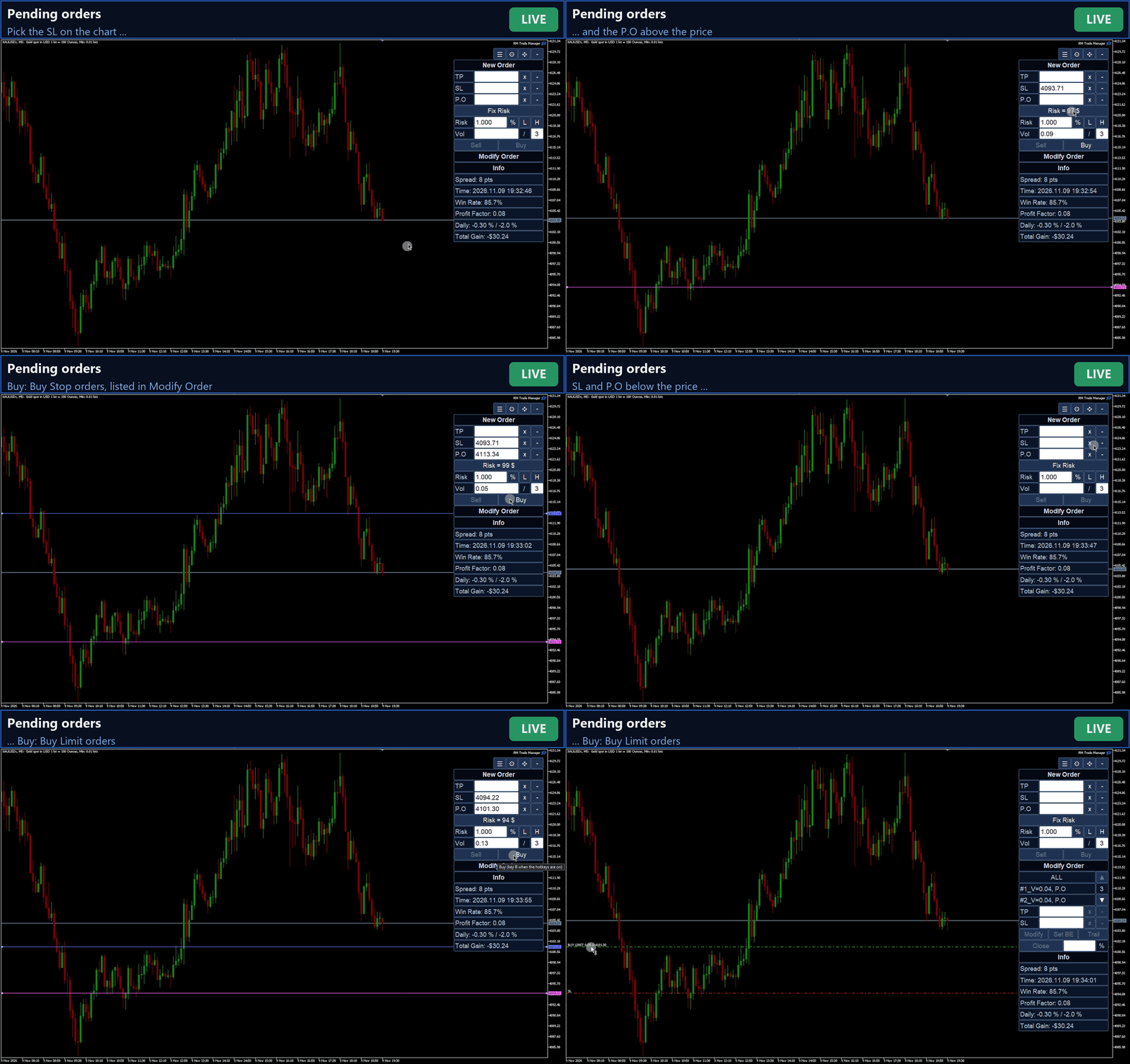
  • 成行の Buy / Sell、または指定価格での待機注文(価格のどちら側かによってリミットかストップを自動選択)。
  • TP、SL、エントリー価格:入力するか、チャート上で十字カーソルで選び、その後ラインをドラッグできます。
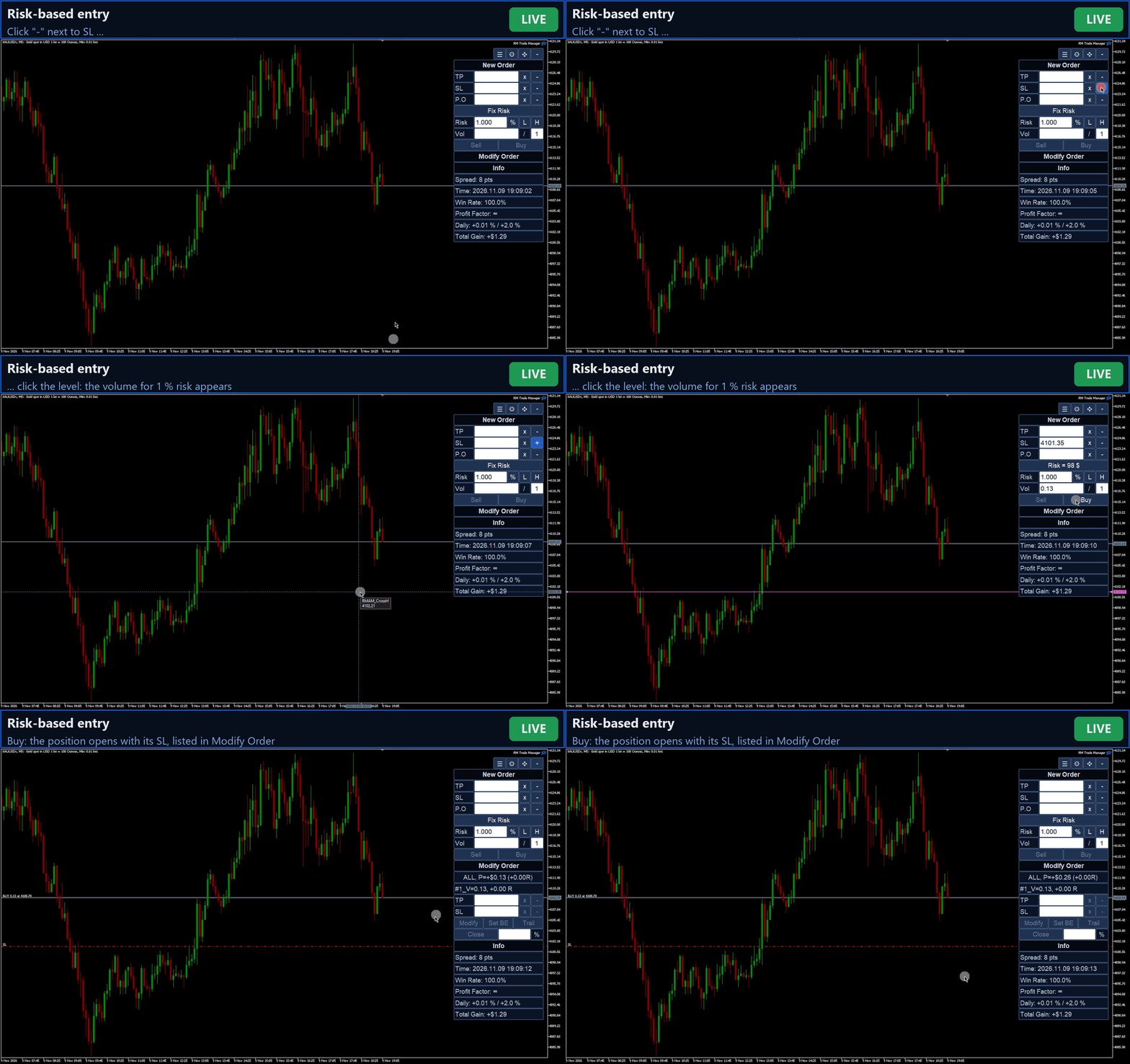
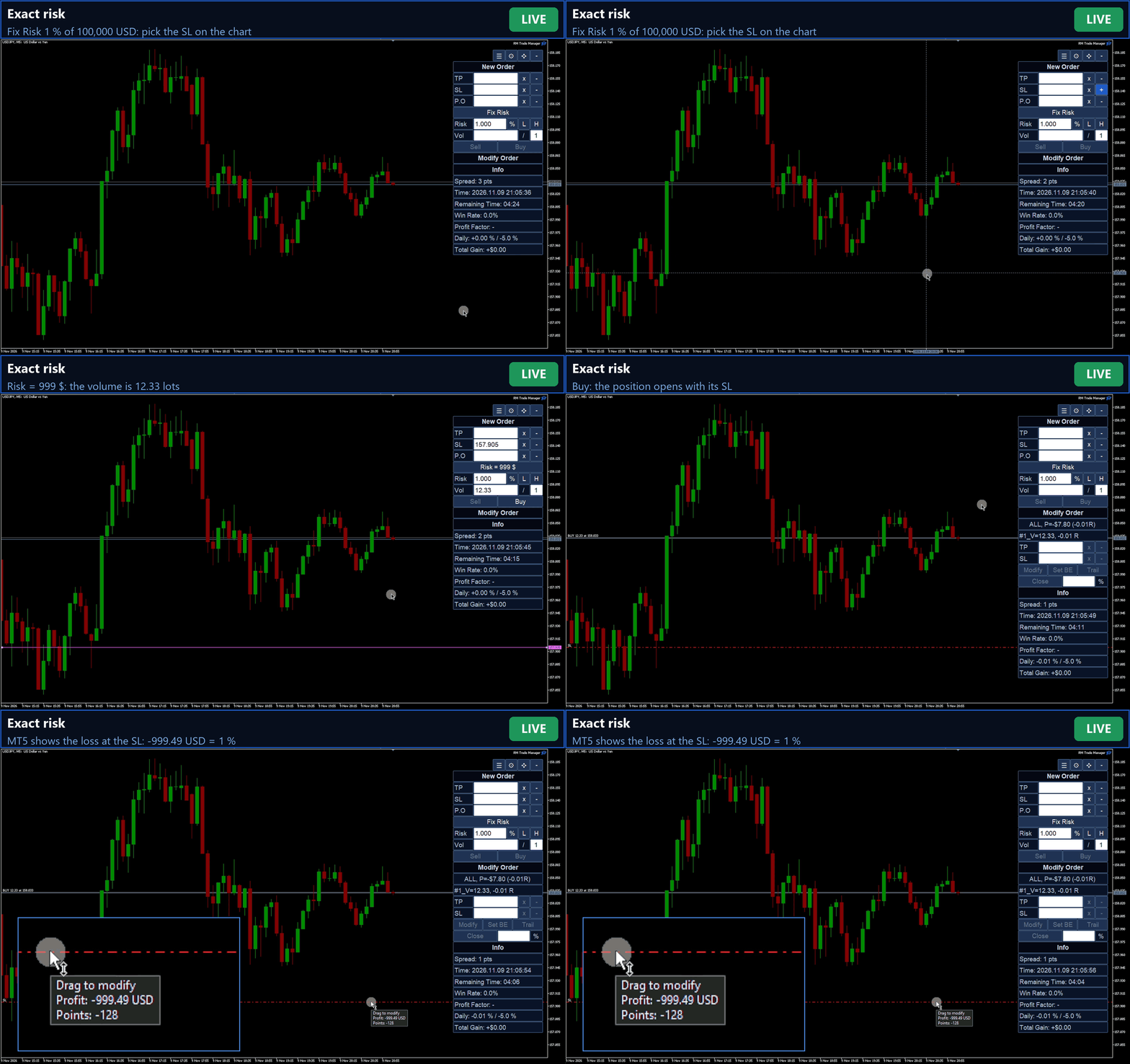
  • Fix Risk:リスクを % または金額で指定。L / H で半分または2倍に。ロット数は SL までの距離から算出され、ブローカーのステップに丸められ、ロット制限と照合されます。
  • Fix Vol:任意の固定ロット数。
  • 手数料をリスクに算入:ブローカーが設定した銘柄の手数料ルールから読み取るため、SL での損失はリスクの範囲内に収まります。入力パラメーターで指定することもできます。
  • 口座通貨の実際の為替レートに基づくティック価値:クロス通貨、円ペア、貴金属、指数、暗号資産でも正しくロット計算されます。
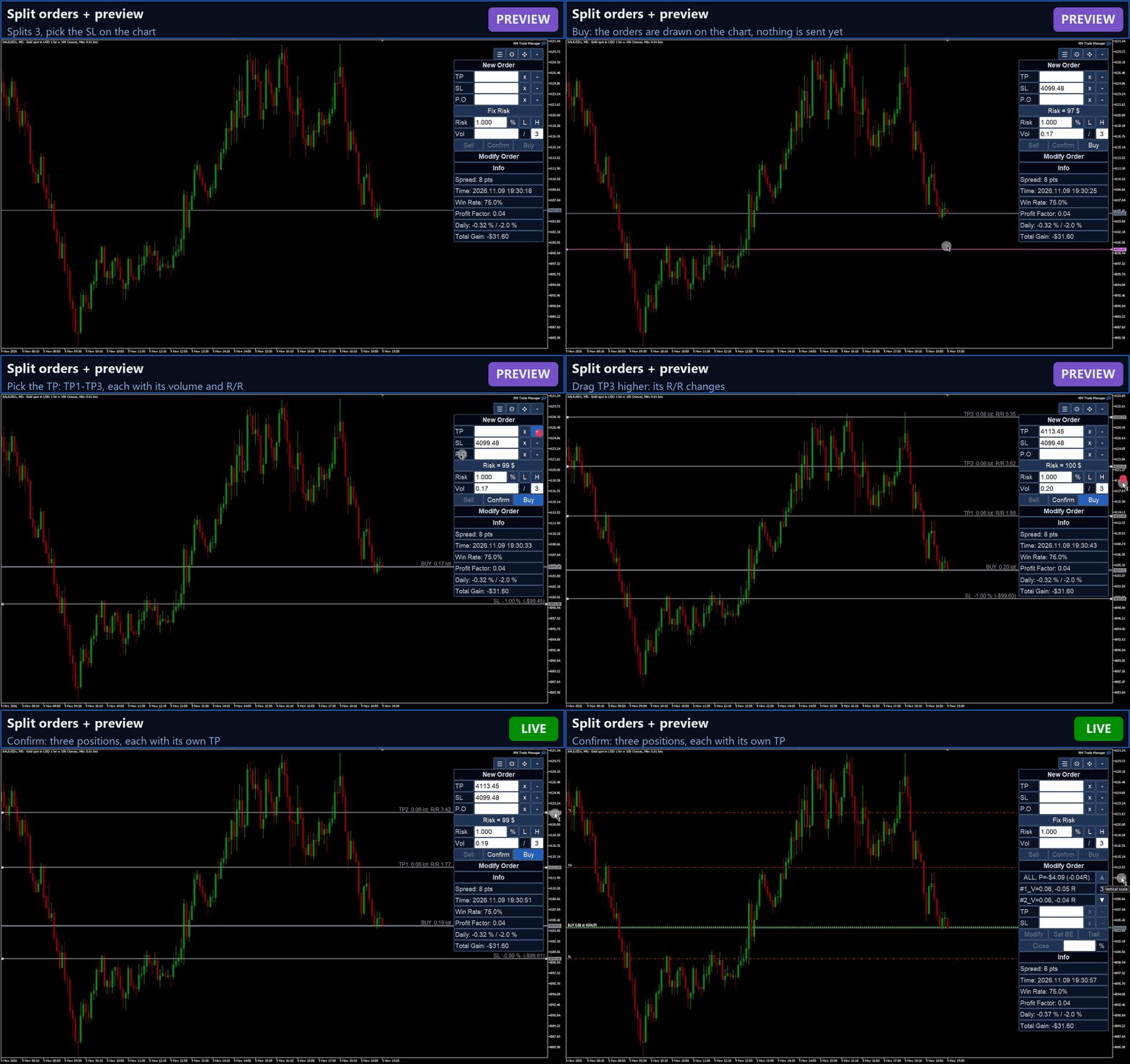
  • 分割注文:ロットを複数の注文に分けます。TP1 はあなたの TP、TP2、TP3 ... はその距離の 2倍、3倍です。
  • プレビューモード(任意):まず注文全体をチャート上で確認できます。ロット数、リスク、各 TP の R/R が表示され、任意のラインをドラッグしてから Confirm します。
  • 必要証拠金が余剰証拠金を超える注文は送信されません(待機注文も同様)。

ポジション管理(Modify Order)

  • 手動で出した注文も含め、銘柄のポジションと待機注文の一覧を、含み損益を R の倍数で表示します。
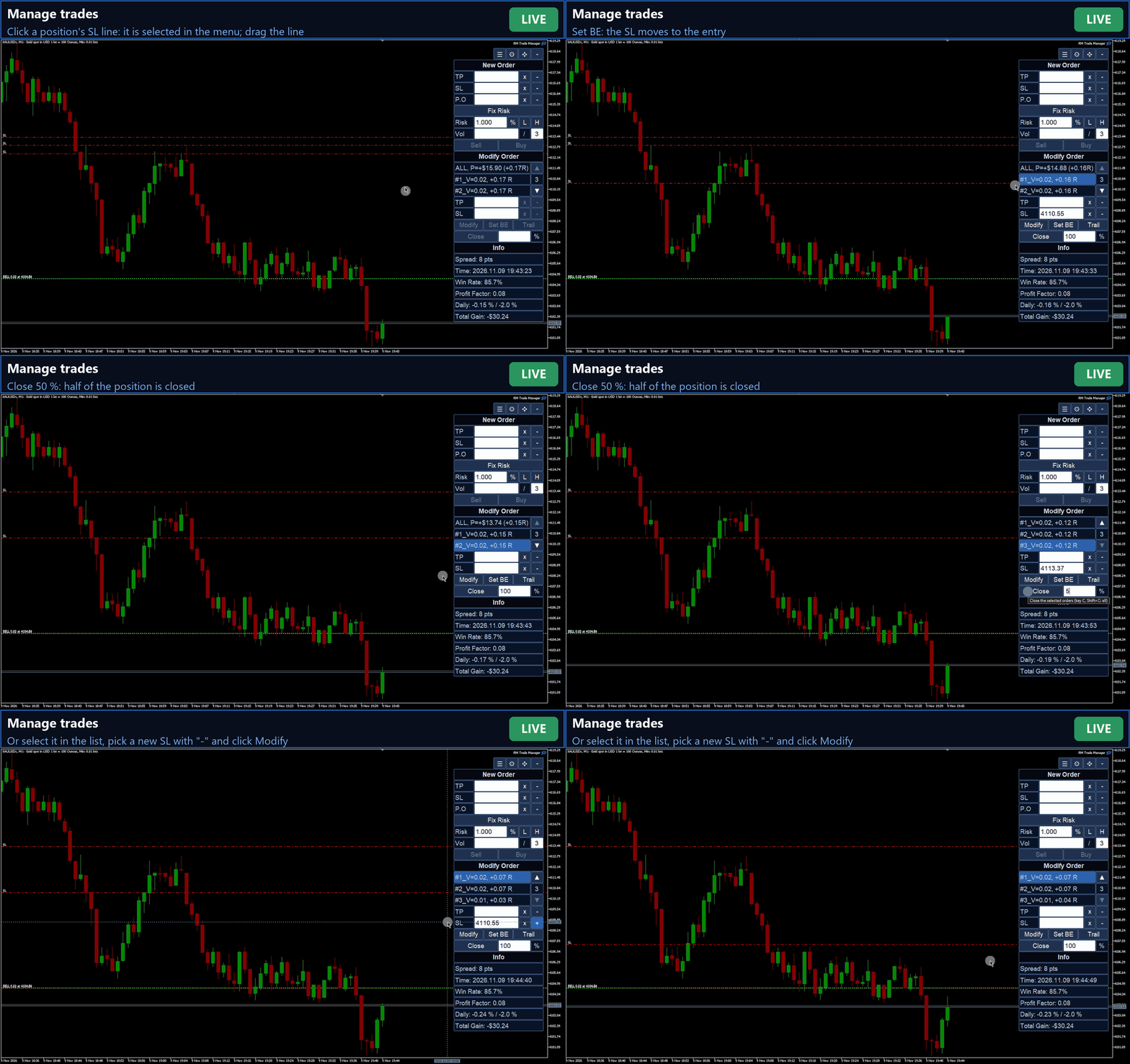
  • 1つ、複数、またはすべてを選択し、SL / TP の変更、ブレークイーブン設定、割合を指定した決済ができます。
  • チャート上の取引のエントリー、SL、TP ラインをクリックすると選択され、ラインをドラッグすると価格を変更できます。

トレーリングストップ

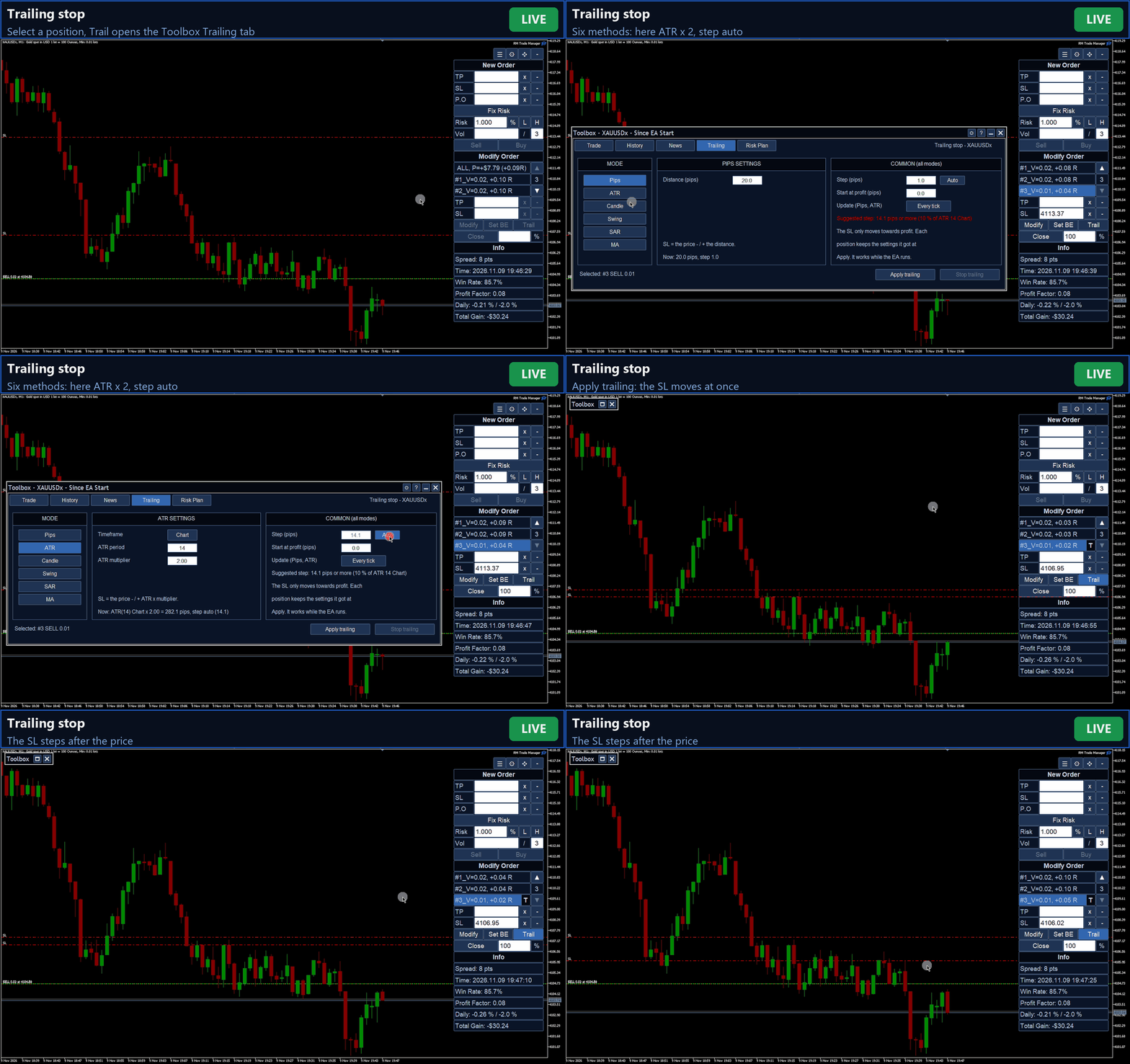
  • 6つの方式:固定 pips、ATR x 倍率、ローソク足(直近 N 本の安値 / 高値)、スイング(直近のフラクタル)、Parabolic SAR、移動平均線。
  • インジケーターの時間足、価格からのオフセット、N pips の利益で開始。
  • ステップ:SL の最小移動幅。手入力または Auto(ATR 14 の 10 %、相場に追従)。pips と ATR では、ティックごとに追従するか、足の確定時に1回動かすかを選べます。
  • 各ポジションが独自の設定を保持します。SL は利益方向にのみ動き、ブローカーのストップレベルとフリーズレベルを守ります。

リスクプラン(Risk Plan)

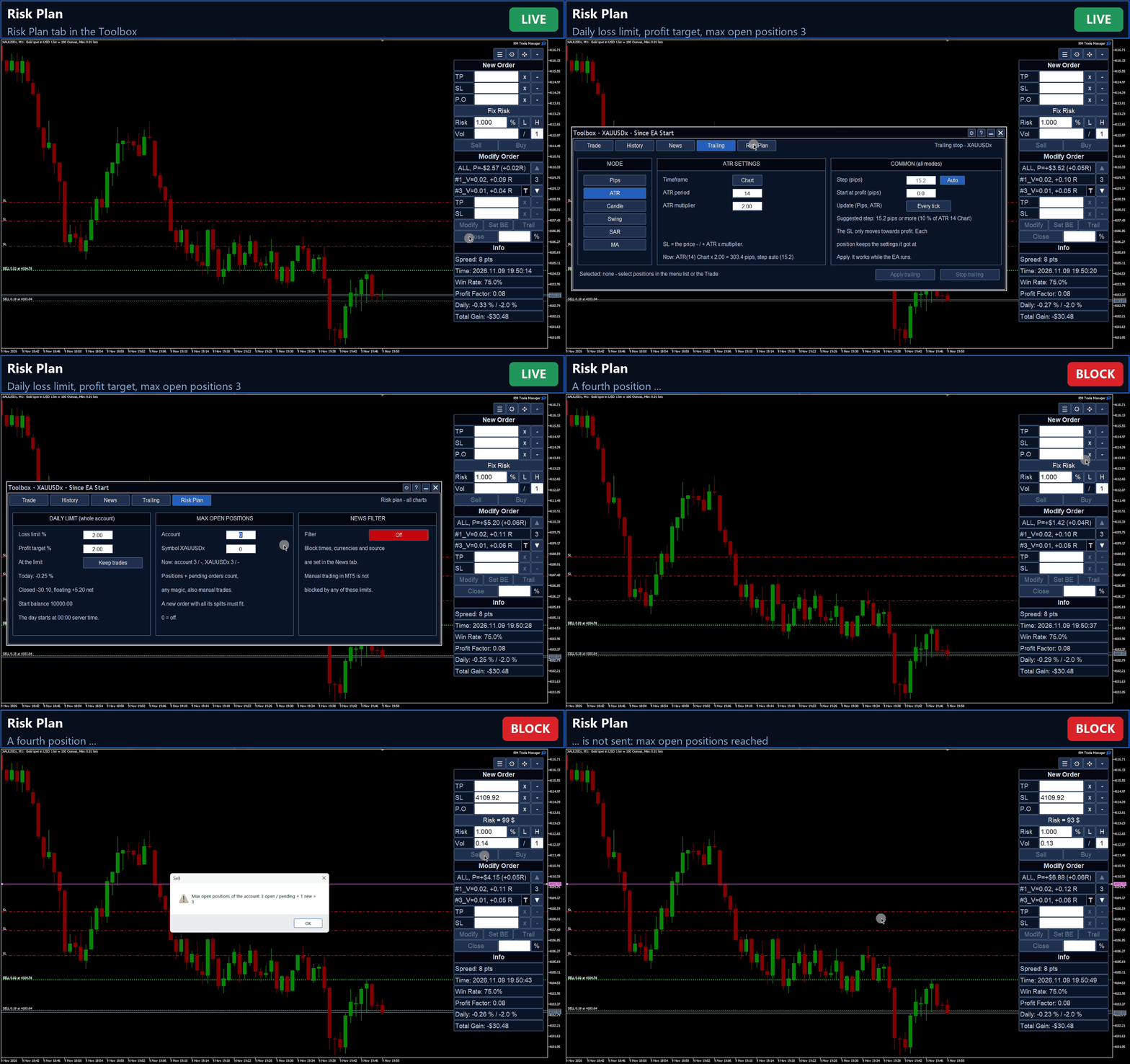
  • 口座全体の1日の損失上限と利益目標。サーバー日の開始時点の残高に対する % で計算します(決済済み取引と含み損益の合計、決済手数料を差し引いた値)。上限に達するとサーバー時間の0時まで新規注文は出せず、アラートが鳴ります。オプションで全ポジションを決済できます。
  • 口座と銘柄ごとの最大保有ポジション数(ポジションと待機注文の合計)。
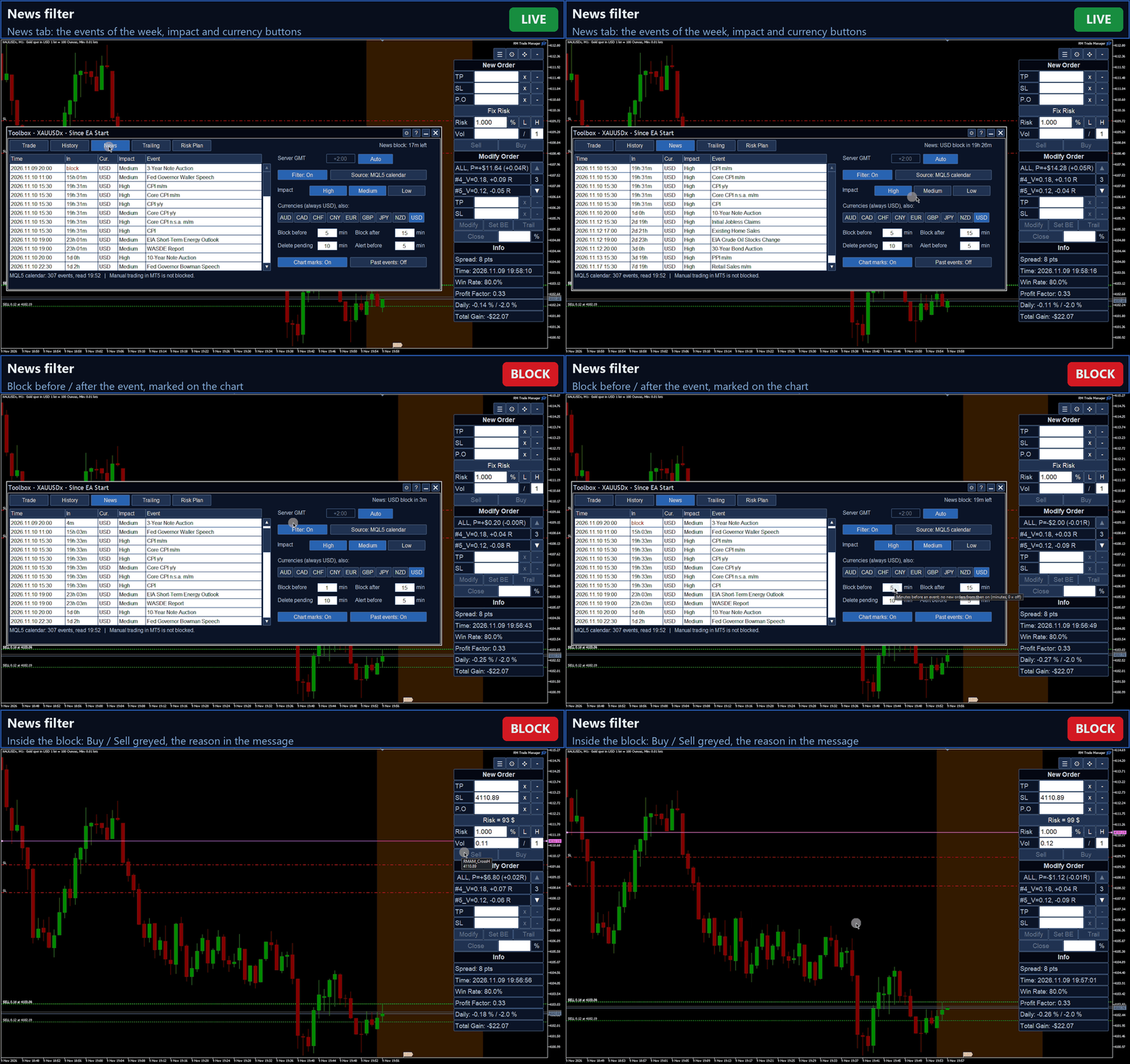
  • ニュースフィルター:MQL5 経済カレンダー(または ForexFactory)から、銘柄の通貨と選択した重要度のイベントを対象にします。イベントの15分前から15分後まで新規注文を停止し、イベント前に待機注文を削除し、ブロック前にアラートを出し、チャートにマークを表示します(時間はすべて調整可能)。

Toolbox と統計

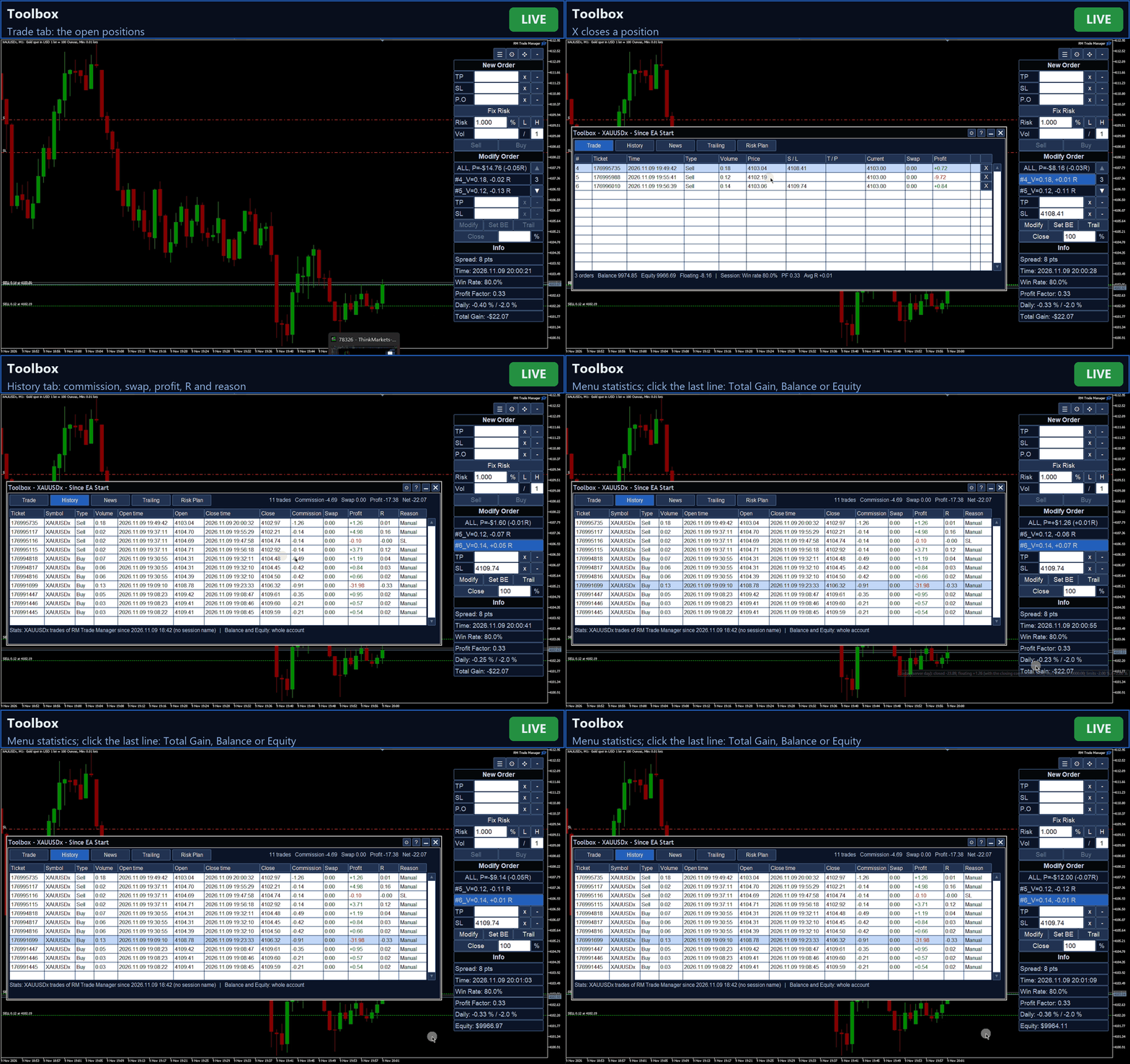
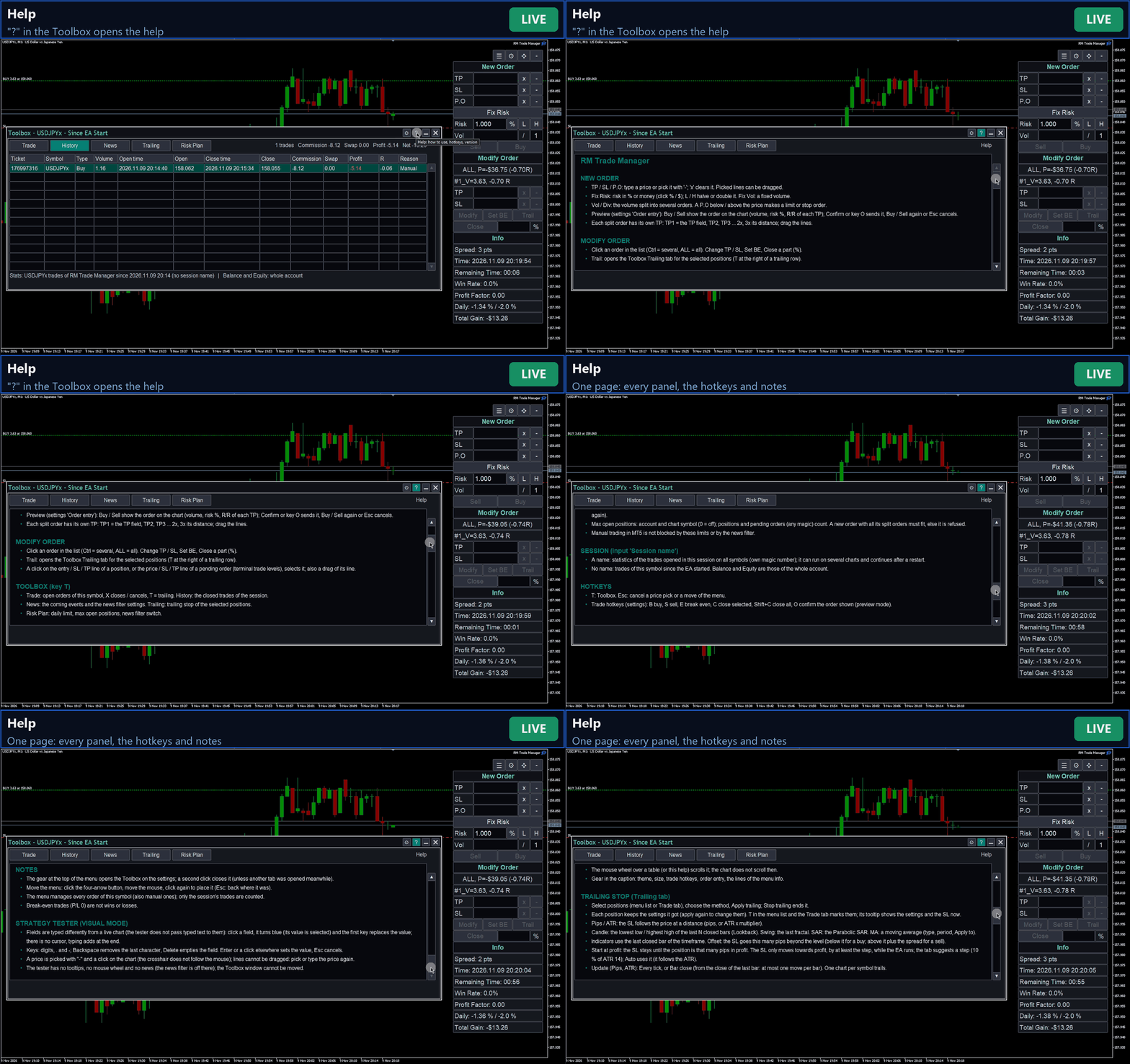
  • 移動可能なウィンドウ(ホットキー T):保有中の取引、手数料・スワップ・損益・R を含むセッション履歴、今後のニュース、トレーリング、リスクプラン、設定、ヘルプ。
  • 表示を選べる情報行:当日の結果、次のニュース、スプレッド、サーバー時刻、足の残り時間、勝率、プロフィットファクター、平均 R、総利益。
  • セッション:名前を付けると、全銘柄にわたって再起動後も戦略ごとの取引を集計します。名前がない場合、統計は EA 起動以降のこの銘柄が対象です。

外観とキー操作

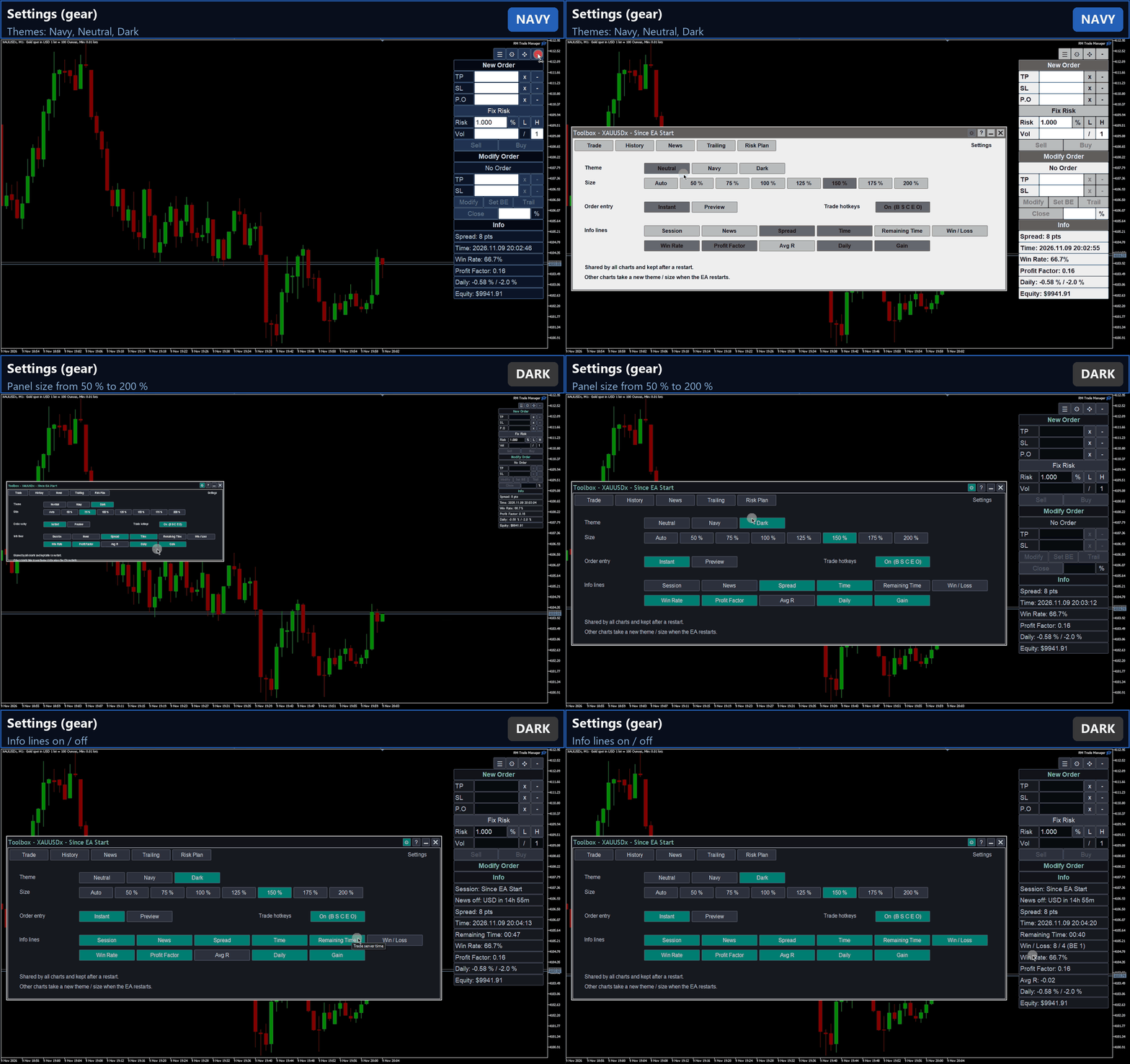
3つのカラーテーマ(Neutral、Navy、Dark)と、高解像度画面向けに 50 % から 200 % までのパネルサイズ。任意の取引ホットキー:B 買い、S 売り、E ブレークイーブン、C 選択中を決済、Shift+C 全決済、O プレビューモードで表示中の注文を確定。常時有効:T で Toolbox を開き、Esc で価格選択やプレビューをキャンセル。

使い始め方

  1. Algo Trading を有効にし、取引する銘柄のチャートに RM Trade Manager を適用します。メニューは右上に表示され、4方向矢印のボタンで移動できます。
  2. 任意、最初に一度だけ:Toolbox(ボタンまたは T)を開き、Risk Plan(1日の損失上限、利益目標、最大ポジション数、ニュースフィルター)を設定します。設定(メニュー上部の歯車)では、テーマ、サイズ、取引ホットキー、注文入力モード(Instant または Preview)を選びます。
  3. SL を設定:価格を入力するか、"-" をクリックしてからチャート上の価格をクリックします。待機注文の場合は、エントリー価格(P.O)も同じ方法で設定します。必要に応じて TP を追加します。
  4. サイズを選択:
    • Fix Risk:リスクを入力し、% または $ をクリックして残高の % と金額を切り替えます。ロット数は SL までの距離から計算されます。
    • Fix Vol:Fix Risk をクリックして Fix Vol に切り替え、ロット数を入力します。
    Vol の横に分割注文の数を入力します(1 = 単一の注文)。
  5. Instant モード:Buy または Sell を押すと、注文はすぐに送信されます。
    Preview モード:Buy または Sell を押すと、注文がチャート上に描画されます(エントリーにロット数、SL にリスク、各 TP にロット数と R/R)。ラインをドラッグして調整し、Confirm(または O)を押します。もう一度 Buy / Sell を押すか Esc でキャンセルします。
  6. Modify Order で取引を管理:一覧で選ぶかチャート上のラインをクリックし、SL / TP の変更、ブレークイーブン設定、部分決済、または Trail を押します。
  7. Toolbox の Trailing タブで方式と設定を選び、Apply trailing を押します。他のタブには保有中の取引、履歴、今後のニュース、リスクプランが表示されます。

入力パラメーター

パラメーター 既定値 説明
Session name 空 名前を付けると、このセッションの取引を全銘柄で集計します(専用のマジックナンバー)。空 = EA 起動以降のこの銘柄。
Base magic number 20261029 注文のマジックナンバー。
Max slippage of market orders 10 ポイント 成行注文の許容スリッページ。
Commission per lot per side -1(自動) リスク計算に使用。-1 = 銘柄の手数料ルールから。それ以外の値はそのまま使用されます。

その他の設定はすべてパネルで行い、ターミナルに保存されます。

重要な注意事項

ご購入前にお読みください。

  • RM Trade Manager は、ボタンを押すとあなたの口座で実際の注文を出します。まずはデモ口座でお試しください。
  • トレーリングストップ、1日の上限到達時の決済、ニュース前の待機注文の削除は、MetaTrader と EA が稼働している間のみ動作します。ブローカーのサーバーには保存されません。
  • 1日の上限、最大ポジション数、ニュースフィルターがブロックするのは、RM Trade Manager から出した注文だけです。MetaTrader での手動取引はブロックされません。
  • ニュース:MQL5 カレンダーは設定なしで使えます。ForexFactory を使う場合は、ツール > オプション > エキスパートアドバイザ に https://nfs.faireconomy.media を追加してください。
  • ストラテジーテスター(デモ):ビジュアルモードでは、パネルで注文を出して管理できます。ただしテスター自体にいくつかの制限があります。入力欄の入力方法が異なる(欄をクリックし、入力して Enter。ヘルプ参照)、ラインはドラッグできない("-" とクリックで価格を選択)、ツールチップ・マウスホイール・ニュースがない、Toolbox ウィンドウを移動できない、などです。ビジュアルモードでない場合、EA は最小ロットの取引を1回開いて閉じるだけです。
  • USD 建てのヘッジ口座(デモ)で、FX、貴金属、暗号資産の銘柄を使ってテストしました。ネッティング口座(1注文につき TP は1つ)や他の口座通貨にも対応していますが、テストは少なめです。
  • インターフェースは英語です。デスクトップ版 MetaTrader 5 専用で、MetaTrader 4 には対応していません。DLL は使用していません。

RM Trade Manager は裁量取引のためのツールです。投資助言ではなく、利益を約束するものではありません。

おすすめのプロダクト
Product Name MT5 Gold & Silver Multi-Language Trading Panel V17.00 Introduction This is a professional trading panel designed specifically for manual gold and silver traders. It supports five languages: English, Chinese, Spanish, Arabic, and German. The panel automatically detects gold and silver symbols, so users do not need to enter symbol codes manually. It is compatible with most brokers worldwide, including standard accounts, zero spread accounts, and raw spread accounts. Users only need t
Atlas Trade Desk MT5 Atlas Trade Desk MT5 is a visual trade panel, risk manager and lot calculator for manual MetaTrader 5 traders. Plan market and pending orders directly on the chart, calculate position size from your selected risk, adjust Entry, Stop Loss and Take Profit visually, and manage open positions from one clean dashboard. The tool is built for discretionary traders who want faster order preparation, clearer risk control and safer position management without switching between multipl
# Ronin Copier - Tactical Prop Sync **プロップトレーダーのための完全ローカル・DLL不要・超低遅延コピーツール** **アーリーアダプター特別価格(数量限定):** - **先着10本:** **$59**(現在のステージ) - **次の10本:** **$99** - **定価:** **$199** *※レビューおよび販売マイルストーン達成ごとに自動で値上げされます。* --- 複数のプロップファーム(FTMO、FundedNext、Alpha Capital等)やプライベートブローカー口座を運用していませんか?   **Ronin Copier** は、同一PCまたはWindows VPS上の複数のMT5ターミナル間で、複雑なネットワーク設定、WebRequest、危険な外部DLLを一切使わずにミリ秒レベルの高速トレード同期を実現します。 状態整合(State Reconciliation)アーキテクチャと極薄のタクティカルHUDを搭載し、注文の取りこぼし、実行遅延、証拠金変動によるロット再計算エラーを徹底的に排除しました。
Telegram2MT5 Signal Copier — TelegramのシグナルをMetaTrader 5で自動コピー Telegram2MT5 Signal Copierを使えば、Telegramで受け取ったあらゆるシグナルが、あなたのMetaTrader 5口座で即座に自動執行されます。 高速・信頼性・フルカスタマイズ対応。 Windows Bridge APP ファイルとチュートリアル を入手してください Bridgeファイルは、ローカルWebパネルをMT5 EAに接続するために必要です Windows 10 & Windows 11(64ビット)および Windows Server 2016以降に対応 Main Features 完全な互換性: 公開チャンネル・非公開チャンネルのどちらでも問題なく動作し、制限はありません。 瞬時の執行: ENTRY、STOP LOSS、最大5つのTAKE PROFITレベルをミリ秒単位で検出して発注します。(現時点ではペンディングオーダーを使用) カスタムパターン対応: コーディング不要で、Telegramチャンネルが使っているシグナルの
Profit return — an Expert Advisor for funds trading ( SFP ). I previously used this trading idea in manual trading. The core of the strategy is a return of price to the Bollinger Bands range, but not blindly and not on every touch. For the fund market, bands alone are not enough, so the EA uses additional filters that eliminate weak and non-working market situations. Trades are opened only when the return logic is truly justified.
口座の各 EA が本当はいくら稼いでいるかが分かります。Halberd Portfolio Monitor は口座の取引履歴をマジック番号ごとに分け、戦略ごとに取引数、勝率、プロフィットファクター、純損益、ドローダウン、保有ポジションと健康状態を表示します。読み取り専用で、取引は一切しません。 1つの口座で複数の EA を動かすと、MetaTrader に表示される残高は全部の合計だけです。静かに負け続けている戦略が、勝っている戦略の陰に隠れてしまうことがあります。Halberd Portfolio Monitor は口座の履歴を読み、EA ごとに1行ずつ並べます。どの EA が口座を支えていて、どの EA が崩れ始めているかが分かります。 このプログラムは注文の発注・変更・決済を行いません。ご自分の口座の履歴と保有ポジションを読むだけです。データがターミナルの外に出ることはありません。 戦略ごとに表示するもの 取引数、勝率、プロフィットファクター。 純損益、最大ドローダウン、その戦略の最高値からの現在のドローダウン(決済済みの取引、口座通貨)。 直近の期間(既定は30日)の損益。 保
ZenTrade Manager MT5 Stop Computing. Start Trading. Are you tired of missing perfect entries because you were busy calculating pip distances, lot sizes, or monetary risk? Do you overthink your Stop Loss and Take Profit levels, only to watch the market reverse while you're adjusting lines? ZenTrade Manager MT5 removes the mental load of order management, allowing you to focus 100% on what matters: Reading the Market. You handle the high-level analysis and decide when to enter; ZenTrade handles t
TradePulseMonitor for MetaTrader 4 & 5 OVERVIEW TradePulseMonitor is a real-time, on-chart dashboard that shows everything you need to know about your position on the current symbol: profit, risk, exposure, margin, swaps and historical performance . All data is consolidated in a compact panel in the lower-right corner of the chart, so you no longer need to keep switching to the Terminal window. All position, profit and risk figures refer to the symbol of the chart the indicator is attached to. P
FREE
Recovery Manager Panel MT5 is a manual order management panel for traders who want to manage open positions directly from the chart in a clearer and more organized way. This tool is not a signal robot. It does not predict market direction, generate entry signals, or trade automatically based on market forecasts. Instead, it helps traders work with positions that are already open. You can calculate possible recovery lot sizes, view estimated target levels on the chart, and use available floating
Forget about enabling templates when you launch the window. Auto Template Master Service  is a professional utility tool that runs as a system service in MetaTrader 5, and it will do it for you. Unlike traditional indicators or expert advisors (EAs), the program runs in the background of the entire terminal and doesn't require you to add it to each window individually. As soon as you open a new chart of any instrument (Forex, Stocks, Crypto), the service immediately detects the new window and a
MetaTrader 5 用 RiskFrame Trade Manager チャート上で完全な取引プランを構築し、注文がブローカーへ送られる前に検証し、同じパネルからポジションを管理します。 RiskFrame は MetaTrader 5 用の手動取引プランニング、発注、ポジション管理ユーティリティです。独自の相場判断を持つ裁量トレーダーが、アイデアをより明確に注文へ変換できるよう設計されています。 Entry、Stop Loss、Take Profit、必要に応じて TP2 をチャート上に配置します。RiskFrame は選択したリスクからロットを計算し、予定リスクと想定結果を表示し、送信前に取引を検証し、同じ画面からポジションを管理できます。 RiskFrame はシグナルを生成せず、独立して売買しません。判断はトレーダーが行い、RiskFrame は準備、検証、実行、管理を支援します。 マニュアル: RiskFrame の完全マニュアルを開く 実行前に完全なプランを確認 Visual Trade Plan - Entry、Stop Loss、Take Profit、任意の
VIBAVINA SmartVolume Copier When Individual Trades Are Too Small to Copy A common challenge in trade copying appears when the Master opens many small or minimum-volume positions, while the Slave account has significantly smaller capital. If every trade is reduced individually, the calculated Slave volume may fall below the broker's minimum lot size. For example: Master: 12 BUY positions x 0.01 lot Total BUY volume = 0.12 lot Lot Ratio = 0.25 A trade-by-trade copier would need: 0.01 x 0.
Initial Balance Session  The Initial Balance Indicator is a professional-grade tool for MetaTrader 5 traders, designed to enhance your trading by visualizing key price levels during the Australia, Tokyo, London, and US market sessions. This indicator plots the Initial Balance (IB) range—the high, low, and midpoint prices—formed during the first hour of each session, with a customizable box to highlight the range and optional extension levels for advanced analysis. Optimized for smooth, flicker-f
Trade Assistant 38 in 1
Makarii Gubaydullin
4.91 (23)
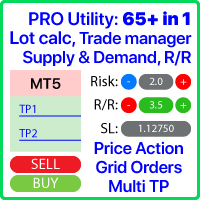
多機能ツール:ロット計算、グリッド注文、R/R比率、トレードマネージャー、サプライ&デマンドゾーン、プライスアクションなど デモ版   |   ユーザーマニュアル トレードアシスタント   はストラテジーテスターでは動作しません :   こちらからデモ版をダウンロード  して ユーティリティ をテストできます。 ご質問、改善のご提案、バグ発見の場合は ご連絡ください MT4版が必要な場合は こちら から入手できます トレード   プロセス を簡素化、高速化、自動化。   ダッシュボード で標準端末の機能を拡張。 トレードパネルは  あらゆる取引商品で動作:外国為替、株式、インデックス、暗号通貨など。 1. 新規トレードの実行 :ロット / リスク / R/R計算 :手動トレードのためのリスク管理 ロット計算機(リスクサイズに基づく取引量計算) リスク計算機(ロットサイズに基づくリスク額) リスクリワード   比率 グリッド注文:  + 動的間隔オプション、スプリットロットオプション 注文のアクティベーショントリガー、+ バイストップリミット / セルストップリミット 仮想SL、仮想
This tool will perform Trailing stop loss and Break even management for orders. Helps you limit or reduce the time spend watching orders on the screen, especially when you need to go to sleep. Just add this EA to 1 chart, you can manage all pairs. You can filter orders by comment, magic number, symbol and order ticket number. When Breakeven it can add shift/offset pips (to cover the commission...). You can try in strategy tester before purchase. The EA will add Buy and Sell alternately, so you
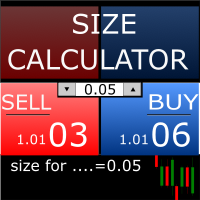
Size Calculator allow you to calculate the size you need for your position giving two parametres: the number of pips risked and the money risked, for example if you want to risk 20 USD on 200 pips, then you will need to input 200 in the case reserved for pips and 20 in the case reserved for risk, the size will appear in left top carner of the chart in your metatrader 4 platform,    Size Calculator  support the following symbols : EURUSD GBPUSD AUDUSD NZDUSD  GOLD WTI  EURJPY GBPJPY USDJPY AUDJP
**Forex Trade Manager Pro MT5** **Trade Manager MT5** は、MetaTrader 5向けの包括的なトレード管理ユーティリティです。トレードを計画する瞬間から決済する瞬間まで、ポジションのあらゆる側面を完全にコントロールできます。リスクを真剣に考えるトレーダー、つまり規律を築き始めた初心者から、複数のポジションにわたって瞬時の実行を必要とするプロのスキャルパーまで、幅広く対応できるように設計されています。 このツールは任意のチャートに装着でき、クリーンでコンパクトなパネルを表示します。チャート上に直接、ドラッグ可能な水平線を使用して、意図するエントリー、ストップロス、テイクプロフィットの各レベルをマークします。Trade Managerは、定義されたリスクに基づいて正しいポジションサイズを即座に計算し、ストップロスとテイクプロフィットの値をpipsと口座通貨でリアルタイムに表示し、計画中のトレードのリスク・リワード比率を表示します。手動計算は一切必要ありません。リスクを一度定義すれば、ツールが残りのすべてを処理します。 **ポジ
AlgoDevMT5 Trade Manager Pro AlgoDevMT5 Trade Manager Pro is a professional trade management and risk control utility for MetaTrader 5. Designed for discretionary traders and funded account traders, this utility helps traders plan trades visually, calculate position size instantly, and manage risk with precision. Trade Manager Pro does not generate trading signals, open trades automatically, or provide investment advice. It is a trader-assistance utility designed to improve consistency and risk
Trailing Stop Manager MT5 Trailing Stop Manager MT5 is a flexible trade management utility for MetaTrader 5 that automatically moves the Stop Loss as price moves in your favor. It is designed for traders who want to protect profits and manage open positions automatically while keeping control over how and which positions are managed. The manager currently includes two trailing methods: • Standard Trailing Stop • Fractals Trailing Stop It also includes a compact trading panel for opening, managi
MNtradepro Trading Panel – Scalping Manager SHORT DESCRIPTION Manual trading manager for MetaTrader 5 with fast order execution, on-chart TP/SL control, Break Even, spread protection, and risk management tools. DESCRIPTION MNtradepro Trading Panel is a manual trading manager for MetaTrader 5, designed for fast execution and active trade management from a single chart. The panel allows you to open, manage, and protect trades using buttons, hotkeys, and on-chart controls, without opening stand
Use for risk management and opening positions as per the user settings. The user is allowed to set the stop loss and take profits in pips. The user can also choose the risk percentage per trade that he/she wants to use while opening the trade. The volume of the trade that the user wants to sent shall be calculator according to the stoploss and the risk percentage that the user has selected.
RRtoolbox - Professional Tools: Risk:Reward Trading Tool (SL/TP Horizontals + Pending orders + Diagonals), Alerts set on trend lines (for alerts on diagonal levels), SelfManagement (BE, partials...), close/cancelling by time, Statistics, Info and trading on chart. One-Click Trading with Visual Risk:Reward Management RRtoolbox is a comprehensive trading panel that combines one-click order execution,  statistics and  powerful visual Risk:Reward tools, alerts set with trendlines, on chart butt
説明 Easy Trader Assistant は、明確なリスク管理でより速く取引できるように設計された、MetaTrader 5 向けの手動執行パネルです。エントリー、決済、調整のすべてをチャート上で管理でき、ウィンドウを切り替える時間を無駄にしません。 ポジションサイズの計算、SL/TP の管理、取引を開く前のリスクの直接的な可視化を統合しています。考え方はシンプルです。ミスを減らし、執行をより正確にすることです。 アプローチ 各エントリーは手動で決定されるが、技術的なリスク管理を伴う裁量戦略の実取引で使用されています。 主な機能 • パネルから買い・売り注文を発注 • 設定したリスクに基づく自動ロット計算 • ストップロスとテイクプロフィットの迅速な設定 • リスクと利益を金額とポイントの両方で表示 • ポジションを守るための損益分岐点ボタン • ワンクリックで全ポジションを決済 • オープン中の取引のアクティブな管理 • チャート上に直接表示される SL と TP のライン • 迅速な執行に焦点を当てた軽量インターフェース リスク管理 • リスクをドルまたはパーセントで設定
FREE
EA Health Monitor is a free indicator for MetaTrader 5 that shows how each Expert Advisor on your account is doing. It groups the account history by magic number. Every EA gets its own row. Manual trades have a row of their own, and a total sits at the bottom. It only reads the account history and open positions. It never opens, changes or closes a trade. Standalone: Everything is built in. You do not need to buy or install any other product named on this page. Quick start Attach EA Health Monit
FREE
XBOOT BOLETA PRO Professional Manual Trading Panel for MetaTrader 5 XBOOT Boleta Pro is a complete trading panel designed for traders who execute manual trades and want greater speed, organization, and control during every trading session. More than a standard Buy and Sell panel, XBOOT Boleta Pro combines powerful trading tools into a single interface, helping traders analyze the market, manage risk, execute orders, and monitor trading performance without leaving the chart. Its purpose is to sim
MT5 History Checker Can you trust the historical data behind your MT5 backtest? MT5 History Checker is a diagnostic utility designed to identify missing periods and coverage problems in the historical data supplied by your MetaTrader 5 broker. Select the symbol and date range you want to examine and run the checker. The utility analyses the available history and provides a clear PASS, WARNING or FAIL result. What it checks Historical tick-hour coverage M1 historical-data coverage Missing periods
FREE
Account Risk Guardian — あなたのリスクルールで、口座全体を見守ります 各ストラテジーは自分の取引だけを管理しており、口座全体を見ている人はいません。複数の Expert Advisor と裁量取引を同時に動かすと、ドローダウン、リスク、取引数が意図した以上に積み上がることがあります。 Account Risk Guardian は1つのチャートに設置するだけで、口座全体を監視します。裁量取引も、あらゆる Expert Advisor の取引も、すべての銘柄が対象です。価格が更新されるたびに、ドローダウン、ストップロスまでのリスク、エクスポージャー、証拠金、取引の活動状況を、あなたが設定した上限と比較します。上限を超えると、あなたが選んだ方法で対応します。アラート、新規取引のブロック、またはクローズしてロックのいずれかです。取引を新規にオープンすることはなく、シグナルも出さず、ストップロスの設定や移動も一切行いません。 主な機能 日次・週次・月次・累計のドローダウン。 期間ごとに、% または金額で独自の上限と独自の基準を設定できます。 日次・週次・月次:期間開始時
Rehoboth TradeGate Manager — MT5 Execution Validation & Trade Management TradeGate Manager places a validation layer between your trading decision and the market. TradeGate Manager is available for both MetaTrader 5 and MetaTrader 4 versions. Before an order is sent, TradeGate checks the instrument, spread, stop protection and market conditions against limits you define. If a required condition fails, the order is refused and the panel tells you   what failed and why . Once a position is open,
DESCRIPTION: Position Size Calculator — On-Chart Risk Management Tool Never risk too much on a single trade again. This calculator displays real-time position sizing for 3 risk levels simultaneously, calculated from your live account balance and current ATR-based stop loss distance. DISPLAYS 3 RISK SCENARIOS AT ONCE: Risk Level 1 (1%): Risk amount in dollars + Lot size Risk Level 2 (2%): Risk amount in dollars + Lot size Risk Level 3 (3%): Risk amount in dollars + Lot size All lot sizes are dyna
FREE
My Trade History PRO 自分のトレードを見直すことは、成功するトレーダーになるための第一歩です。成功しているトレーダーはただトレードをするだけではありません。すべてのポジションを振り返り、分析し、そこから学んでいます。 My Trade History PRO は、その見直しを簡単で視覚的にします。手動でトレードする場合でも、シグナルに従う場合でも、EA を運用する場合でも、このインジケーターは自分のトレード履歴をチャート上に完全に表示し、実用的な分析機能も提供します。MetaTrader 4 と MetaTrader 5 で同じ機能を備えています。 MT4 版: https://www.mql5.com/ja/market/product/50206 MT5 版: https://www.mql5.com/ja/market/product/199179 主な機能 1. 3 つの表示モード 決済済みトレード - クローズしたポジションの履歴 保有トレード - 現在保有中のポジション 決済済み + 保有トレード - 両方を一目で確認 モードボタンを 1 回クリックす
このプロダクトを購入した人は以下も購入しています
Trade Assistant MT5
Evgeniy Kravchenko
4.43 (216)
取引 ごとのリスクの 計算、新規注文 の 簡単 な 設置、部分的 な 決済機能 を 持 つ 注文管理、 7 種類 のトレーリングストップなど 、便利 な 機能 を 備 えています 。 追加の資料と説明書 インストール手順   -   アプリケーションの手順   ライン機能 チャート上にオープニングライン、ストップロス、テイクプロフィットを表示します。この機能により、新規注文を簡単に設定することができ、注文を出す前にその特徴を確認することができます。   リスク計算 リスク計算機能は、設定されたリスクとストップロス注文のサイズを考慮して、新規注文のボリュームを計算します。ストップロスの大きさを自由に設定できると同時に、設定したリスクを守ることができます。 Lot calc ボタン - リスク 計算 を 有効 / 無効 にします 。 Risk フィールドでは 、必要 なリスクの 値 を 0 から 100 までのパーセンテージまたは 預金通貨 で 設定 します 。 設定」 タブで 、 リスク 計算 の 種類 を 選択 します :「 $ 通貨」、「 % 残高」、「 % エクイティ 」、「
Farmed Hedge Yield Farming | All Markets (Manual - Hybrid - Semi/Automated EA) VERIFIED TRADING RESULTS - Farmed Hedge Yield Axi Copy:  https://www.mql5.com/en/signals/2356376 - Farmed Hedge Yield Exn Copy:   https://www.mql5.com/en/signals/2356404 - Farmed Hedge Yield V Copy:  https://www.mql5.com/en/signals/2357156 IMPORTANT NOTICE: FarmedHedge is a MANUAL-FOCUSED TRADING UTILITY ,not a fully automated EA. Results shown on this Signal include manual trades and overall strategic management.
Trade Manager EAへようこそ。これは、取引をより直感的、正確、そして効率的にするために設計された究極の リスク管理ツール です。これは単なるオーダー実行ツールではなく、包括的な取引計画、ポジション管理、リスク管理のためのソリューションです。初心者から上級者、迅速な実行を必要とするスキャルパーまで、Trade Manager EAはあらゆるニーズに対応し、為替、指数、商品、暗号通貨などさまざまな市場で柔軟に対応します。 Trade Manager EAを使用すると、複雑な計算が過去のものになります。市場を分析し、エントリーポイント、ストップロス、テイクプロフィットのレベルをチャート上のラインでマークし、リスクを設定するだけで、Trade Managerが最適なポジションサイズを即座に計算し、SLとTPをピップ、ポイント、口座通貨でリアルタイムに表示します。すべての取引が簡単かつ効果的に管理されます。 主な機能: ポジションサイズ計算機 :定義されたリスクに基づいて取引サイズを瞬時に決定します。 簡単な取引計画 :エントリー、ストップロス、テイクプロフィットを設定するためのド
Telegram to MT5 Multi-Channel Copier   は、 Telegram と Discord チャンネルのトレードシグナルを MetaTrader 5 へ自動コピーします。ボット不要、ブラウザ拡張不要、手動コピー不要。Telegram や Discord にシグナルが届くと、EA が数秒であなたのターミナルに注文を出します。 さらに、チャンネルをコピーする前に、内蔵バックテスターでそのチャンネルがあなたの口座でどう動いたかを確認できます。 製品は 2 つのコンポーネントで構成されます:Telegram チャンネルを監視する Windows アプリと、MT5 ターミナルでシグナルを執行する本 EA です。MT4 版もあります   こちら . 購入前にお試しください:   アプリは無料でダウンロードできます。ご自身のチャンネルを接続し、各シグナルがどのように読み取られるかをご確認ください。Backtest タブと実際の取引には、購入またはレンタルした EA が必要です。このページの無料デモはストラテジーテスターでのみ動作し、テスターでは Telegram と D
TradePanel MT5
Alfiya Fazylova
4.88 (172)
Trade Panelは多機能なトレーディングアシスタントです。アプリには手動取引用の50以上のトレーディング機能が搭載されており、ほとんどの取引作業を自動化することができます。 アプリの説明書: https://www.mql5.com/en/blogs/post/756482 デモ口座用アプリの試用版: https://www.mql5.com/en/blogs/post/750865 アプリのインストール方法: https://www.mql5.com/en/blogs/post/756239 アプリをビジュアルモードでテストする方法: https://www.mql5.com/en/blogs/post/770277 VPSのMetaTraderにアプリをインストールする方法: https://www.mql5.com/en/blogs/post/770190 取引。 ワンクリックで取引操作を行うことができます: リスクを自動計算して指値注文やポジションを開く。 複数の注文やポジションをワンクリックで開く。 注文のグリッドを開く。 保留中の注文やポジションをグループごとに閉じる
News Trade EA MT5
Konstantin Kulikov
4.55 (11)
僕自身が数年間使っている便利なロボットをご紹介します。半自動モードでも完全自動モードでもお使いいただけます。 >>> Chat <<< 当プログラムは経済指標カレンダーで発表されるニュースをもとにした取引の柔軟な設定が可能です。戦略テスターでは確認不可です。実際の取引のみです。 最新の設定アーカイブをダウンロードしてください: https://www.mql5.com/en/blogs/post/747929 シグナルモニタリング: https://www.mql5.com/en/signals/author/test-standart 当該エキスパート・アドバイザーのためのカスタマイズ設定セットを作る場合は、ブログの全パラメータの説明を参照してください :   https://www.mql5.com/en/blogs/post/748545 。 基本的なデフォルト設定について 一つのチャートからGBPとの通貨ペア(GBPUSD、EURGBP、GBPJPY、GBPCAD、GBPAUD、GBPCHF)で取引をします。GBPは最もボラティリティの高い通貨のため、取引が成功するチ
自分の取引ルールで Telegram のシグナルをコピー Telegram to MT5 Signal Trader は、Telegram の公開・非公開チャンネルやグループから、テキスト形式の取引シグナルを MetaTrader 5 へ自動でコピーします。1つのデスクトップアプリで複数の配信者と MT5 口座を管理し、 配信者ごとにリスクと取引設定を個別に指定 できます。 シグナルのコピーに Telegram ボットや API 設定は必要ありません。 電話番号または QR コードでご自身の Telegram アカウントにログインし、すでに参加しているチャンネルやグループを選ぶだけです。ボットの作成や、Telegram API トークン、API ID、API hash の入力は不要です。 ポジションサイズを選び、複数の利確水準に分けて決済し、建値へのストップ移動やトレーリングストップを自動化できます。配信者のシグナルを受け取りながら、実際の取引方法は自分で管理できます。 本製品は、この MT5 エキスパートアドバイザ(EA)と、必須の Windows 連携アプリで構成されます。 インス
================================================================================ POC BREAKOUT - V20.72. Full Professional Grade Toolkit ================================================================================ POC Breakout is a full MetaTrader 5 trading dashboard for discretionary traders who want breakout signals, Point of Control (POC) context, volume profiles, order flow, market structure, news, alerts, and advanced trade planning in one professional workspace. Attached directly to you
The product will copy all telegram signal to MT5 ( which you are member) , also it can work as remote copier.  Easy to set up, copy order instant, can work with almost signal formats, image signal,  s upport to translate other language to English Work with all type of channel or group, even channel have "Restrict Saving Content", work with  multi channel, multi MT5 Work as remote copier: with signal have ticket number, it will copy exactly via ticket number. Support to backtest signal. How to s
EA Overfitter
Stephen J Martret
5 (3)
That backtest looks great. But will it still be making money tomorrow, next week, next month? EA Overfitter re-runs your EA on 100 price histories it has never seen. One score tells you if the edge is real. A backtest tells you what an EA did on one price history — the one that happened to occur. What you cannot tell from it is how much of that result was the strategy and how much was the particular path. EA Overfitter answers that. It builds up to 100 synthetic price histories your EA has n
Power Candles Strategy Scanner - 自動最適化型マルチシンボル設定ファインダー パワーキャンドル・ストラテジー・スキャナーは 、パワーキャンドル・インジケーターを駆動するのと全く同じ自己最適化エンジンを、マーケットウォッチに登録されているすべての銘柄に対して並行して実行します。1つのパネルで、現在統計的に取引可能な銘柄、各銘柄で勝率の高い戦略、最適なストップロス/テイクプロフィットの組み合わせが表示され、新たなシグナルが発生した瞬間に通知が届きます。 このツールは、Stein Investmentsのエコシステムの一部です。  18種類以上のツールをすべて閲覧し、AIを活用したセットアップの推奨を受け取り、  https://stein.investments でコミュニティに参加しましょう 市場動向を網羅。銘柄ごとに3,000件以上の自動最適化。2種類のアラート。ワンクリックでチャートを切り替えて即座にアクション。 なぜこれが必要なのか 多くのマルチ銘柄スキャナーは、 価格の動き (ボラティリティ、変動率、銘柄ごとのRSI)を表示するだけです。それ
Your EAs cannot see each other, but Anchor can. Anchor gives you one place to coordinate your EAs, manage risk, and decide when trading is allowed. It works alongside the trading bots you already use without any changes to them. The Problem One EA opens a trade. Then another starts trading. The next thing you know, you wake up to multiple grids built across your account. Each EA may be doing exactly what it was designed to do, but together they can place far more risk on your account than you in
次回アップデート — バージョン 2.52 近日公開!【新機能】 市場分析とトレードワークフローを強化する、4つの主要な新機能にご期待ください 皆様のトレードニーズに応える4つの新機能により、市場分析を次のレベルへと引き上げます。新機能をご紹介します: 1. TRADE OVERVIEW DASHBOARD 2. CONFLUENCE AT ZONE 3. STRONG & WEAK HIGH/LOW 4. OTE 1. TRADE OVERVIEW DASHBOARD 市場全体の状況をより簡単に把握できるダッシュボードです。トレード判断をサポートするガイダンスを提供し、市場分析とトレード計画を体系的に行えるよう支援します。すべてを1つの画面で確認できます。 マルチタイムフレーム市場概要(Multi-Timeframe Market Overview) 市場の方向性と価格構造をより明確に把握 市場状況をすばやく確認 体系的な市場分析とエントリー計画のためのガイダンス 2. CONFLUENCE AT ZONE 価格が重要なゾーンに入るとき…いくつのサポート要因が一致しているかを確認で
Trade Indicator Assistant   is a powerful MT5 utility designed to turn indicators into automated trading systems. Its main feature is the ability to automatically detect an indicator’s   BUY and SELL signal buffers , without requiring you to know the buffer numbers, search through indicator settings, or modify the indicator source code. Bonus Indicator:   After purchasing Trade Indicator Assistant, contact me to receive   Trade Signal Pro   completely free as a bonus indicator. [Download Demo V
EA Auditor
Stephen J Martret
5 (7)
EA Auditor is an independent analysis tool for traders evaluating Expert Advisors and trading signals on MetaTrader 5. It audits backtest reports, reviews posted developer signals, and cross-verifies the two against each other to help traders assess strategies before committing capital. The MQL5 market offers a wide range of Expert Advisors from many developers, with varying approaches, quality, and transparency. EA Auditor provides a consistent, data-driven framework for reviewing them, answer
Trade Manager は、リスクを自動的に計算しながら、取引を迅速に開始および終了するのに役立ちます。 過剰取引、復讐取引、感情的な取引を防止する機能が含まれています。 取引は自動的に管理され、アカウントのパフォーマンス指標はグラフで視覚化できます。 これらの機能により、このパネルはすべてのマニュアル トレーダーにとって理想的なものとなり、MetaTrader 5 プラットフォームの強化に役立ちます。多言語サポート。 MT4バージョン  |  ユーザーガイド + デモ Trade Manager はストラテジー テスターでは機能しません。 デモについてはユーザーガイドをご覧ください。 危機管理 % または $ に基づくリスクの自動調整 固定ロットサイズを使用するか、ボリュームとピップに基づいた自動ロットサイズ計算を使用するオプション RR、Pips、または価格を使用した損益分岐点ストップロス設定トレーリングストップロス設定 目標に達したときにすべての取引を自動的に終了するための 1 日あたりの最大損失 (%)。 過度のドローダウンからアカウントを保護し、オーバートレードを防ぎます
MT5 to Telegram Signal Provider は、Telegramのチャット、チャンネル、またはグループに 指定された シグナルを送信することができる、完全にカスタマイズ可能な簡単なユーティリティです。これにより、あなたのアカウントは シグナルプロバイダー になります。 競合する製品とは異なり、DLLのインポートは使用していません。 [ デモ ] [ マニュアル ] [ MT4版 ] [ Discord版 ] [ Telegramチャンネル ]  New: [ Telegram To MT5 ] セットアップ ステップバイステップの ユーザーガイド が利用可能です。 Telegram APIの知識は必要ありません。必要な全ては開発者から提供されます。 主な特長 購読者に送信する注文の詳細をカスタマイズする機能 例えば、Bronze、Silver、Goldといった階層型のサブスクリプションモデルを作成できます。Goldサブスクリプションでは、すべてのシグナルが提供されます。 id、シンボル、またはコメントによって注文をフィルターできます 注文が実行されたチャート
RETAILBERG FOOTPRINT CHART PRO — Order-Flow Workspace for MetaTrader 5 Version 7.00  |  Professional System  |  31 tools  |  One chart A full 150-page illustrated User Manual is included. Please read the full manual to understand this feature packed footprint chart elements and ui. https://www.mql5.com/en/blogs/post/777982 DEMO / STRATEGY TESTER — PLEASE READ FIRST
Trader Evolution
Siarhei Vashchylka
5 (7)
" Trader Evolution " - A utility designed for traders who use wave and technical analysis in their work. One tab of the utility is capable of money management and opening orders, and the other can help in making Elliott wave and technical analysis. Manual (Be sure to read before purchasing) | Version for MT4 Advantages 1. Trading in a few clicks. Immediate and pending orders are available in the panel 2. Money management. The program automatically selects the appropriate lot size 3. Simplifies
DrawDown Limiter
Haidar Lionel Haj Ali
5 (23)
DrawDown Limiter v5.0 — 高度な口座保護コントローラー DrawDown Limiter v5.0 は、取引口座を監視し、設定されたリスク、利益、ニュース、スケジュール、ロールオーバー、またはポジション数の制限に達した際に自動的に対応する、クライアント側で動作する口座保護コントローラーです。 1つの専用チャートから、 手動取引、自動売買戦略、複数のExpert Advisor、指値・逆指値注文、保有ポジション を監視できます。口座全体を保護することも、Magic Numberを使用して特定のEAまたは複数のEAのみを監視することもできます。 DrawDown Limiter の目的は、単にドローダウンを表示することではありません。 設定した取引ルールを積極的に適用し 、保護条件が有効である限り、そのルールを継続的に実行することを目的としています。 DrawDown Limiter v5.0 は、損失額だけを監視するのではなく、戦略がいつ取引を継続できるのか、どのエクスポージャーを維持できるのか、いつ取引を停止すべきか、そして自動売買環境をいつ安全に再開できるのかま
チャート型トレードアシスタント&リスク管理パネル マルチモードSL&TP(ATR、リスクリワード比R:R、ポイント、口座通貨)、リアルタイム分析、経済指標カレンダーを搭載した多機能チャート上ツール Ergotick Trade Manager は、裁量トレーダー、プロップファーム挑戦中のトレーダー、およびスキャルパー向けに設計された、オールインワンのプロフェッショナルなトレード用パネルです。ロット数の自動・瞬時計算、マルチモードでのストップロス(SL)やテイクプロフィット(TP)の設定、高度な一括決済(Basket)管理、口座のリアルタイム統計、そしてチャート上に経済指標を表示するニュースカレンダー機能を、MetaTrader 5の洗練された1つのユーザーインターフェースに統合しました。 ポジションサイズの計算に手動で時間を取られるのはもう終わりにしましょう。ミリ秒単位でロットサイズを自動計算し、適切にリスク管理された注文を瞬時に執行するとともに、内蔵された「日次損失制限保護」機能で大切な資金を保護します。 主な特徴 1. インタラクティブなビジュアルツール&自動ロット数計算機能 チャ
Master Your Trading Discipline   Stop losing your hard-earned gains to overtrading and emotional decisions. The Discipline Tool is your ultimate trading assistant, ensuring strict risk management in real-time. Key Protection Features: Advanced Drawdown Defense : Automatically halts trading if your daily drawdown exceeds a preset threshold (percentage or dollar amount). Real-Time Equity Lock : Safeguard profits by referencing peak equity, ensuring drawdown stays within control. Hard Profit Target
Dealer's Panel No signal decides anything here — a hand does. One click, and the panel calculates what's underneath: lot size from risk, target from a 30-step balance ladder that remembers exactly how far an account has climbed. Toggle between market and pending without touching an input field. Set a stop, and the take-profit can write itself — a fixed share of the balance, translated into price with no arithmetic left for the trader to get wrong. One trade live at a time; it won't let a seco
My Chart Generator
Trade The Volume Waves Single Member P.C.
5 (1)
What if your chart adapted to the market instead of the clock?   THE PROBLEM IT SOLVES   Instead of trying to find the best indicator that fits your timeframe chart, build a chart and find the most appropriate indicator.   My Chart Generator is a MetaTrader 5 background service that builds  live, fully historical three types of custom charts :1. Range/Volume Balanced chart, 2.  Range/Volume Absorption chart and 3. Constant Volume chart from any symbol — Forex pairs, crypto, indices, commodities,
AlgoRadar
Stephen J Martret
5 (4)
AlgoRadar is an on-chart analytics dashboard for MT5 that aggregates Expert Advisor performance across multiple accounts, brokers, and platforms, including both MT4 and MT5 data, into a single live view on your MT5 chart. All analysis runs from the chart interface, with no external applications or manual report processing required. EA Analysis and Ranking For traders running multiple Expert Advisors, AlgoRadar provides a consolidated view of each EA's performance across accounts. Active EAs a
REVDEN AI Desk:あなた自身の AI との一つの会話で、REVDEN のマーケットコンテキストをもとにトレードを運営する トレードのすべてを一つの会話で運営する姿を想像してみてください。 REVDEN AI Desk はそれを MetaTrader 5 にもたらします。あなた自身の AI に相場をどう読んでいるかを尋ねると、AI はあなたが取引する銘柄について REVDEN の完全なコンテキストをもとに答えます。銘柄の状態、リスク像、今後の指標発表まで含めてです。AI の提案はエントリー、ストップ、ターゲット、リスクとともに届き、合うものをあなたが承認します。ルールの変更も同じ方法です。変えたい点を書けば、AI が新しいルールブックの草案を作り、採用するかどうかはあなたが決めます。会話の周りには、マーケット全体が一つの画面にまとまっています。 デスクとセットアップガイドをご覧ください。 すべての画面、すべての設定、そしてあなた自身の AI との最初のステップ: stein.investments/products/revden-ai-desk AI との一つの会話、マーケッ
PRO LOCAL TRADE COPIER MT5 — ALL-IN-ONE MASTER & SLAVE EDITION ============================================================== Pro Local Trade Copier MT5 is an institutional-grade, ultra-low-latency trade duplication utility engineered for professional traders, prop firm challenge traders, and multi-account managers operating on the same PC or Windows VPS. Unlike traditional copiers that require separate Master and Slave files or complex external DLL configurations, Pro Local Trade Copier MT5
EASY Insight AIO – スマートで手間いらずな取引のオールインワンソリューション 概要 数秒で市場全体——FX、ゴールド、暗号資産、指数、さらには株式まで——を、手作業のチャート確認や複雑なセットアップ・インジケーター導入なしにスキャンできたらどうでしょうか? EASY Insight AIO はAIトレードのための究極のプラグ&プレイ型エクスポートツールです。市場全体のスナップショットを、クリーンなCSVファイルで一括出力。ChatGPT、Claude、Gemini、Perplexityなど、さまざまなAIプラットフォームで即座に解析できます。 ウィンドウの切り替えやグラフのごちゃごちゃしたオーバーレイはもう不要。自動エクスポートされる純粋で構造化されたインサイトだけで、無駄なチャート監視に悩まされず、スマートなデータ主導の判断に集中できます。 なぜEASY Insight AIOなのか? 本当のオールインワン • セットアップ不要、インジケーターのインストール不要、チャートへのオーバーレイ不要。インストールして起動し、エクスポートするだけです。 マルチアセット対
Grid Manual MT5
Alfiya Fazylova
4.74 (23)
「Grid Manual」は、注文のグリッドを操作するための取引パネルです。 ユーティリティはユニバーサルで、柔軟な設定と直感的なインターフェイスを備えています。 それは、損失を平均化する方向だけでなく、利益を増やす方向でも注文のグリッドで機能します。 トレーダーは注文のグリッドを作成して維持する必要はありません。 すべてが「Grid Manual」によって行われます。 注文を開くだけで十分であり、「Grid Manual」は注文のグリッドを自動的に作成し、非常に閉じるまでそれに付随します。 完全な説明とデモバージョン ここ。 ユーティリティの主な機能と機能 ユーティリティは、モバイル端末から開かれた注文を含め、あらゆる方法で開かれた注文を処理します。 「制限」と「停止」の2種類のグリッドで機能します。 グリッド間隔の計算には、固定と動的(ATRインジケーターに基づく)の2つの方法で機能します。 オープンオーダーグリッドの設定を変更できます。 チャート上の各注文グリッドの損益分岐点を表示します。 各注文グリッドの利益率を表示します。 ワンクリックでグリッドから収益性の高い注文を閉じるこ
YuClusters
Yury Kulikov
4.93 (43)
Attention: You can view the program operation in the free version  YuClusters DEMO .  YuClusters is a professional market analysis system. The trader has unique opportunities to analyze the flow of orders, trade volumes, price movements using various charts, profiles, indicators, and graphical objects. YuClusters operates on data based on Time&Sales or ticks information, depending on what is available in the quotes of a financial instrument. YuClusters allows you to build graphs by combining da
作者のその他のプロダクト
RM Simulator
Mohammadreza Mahdi Mavaddat
RM Simulator は、MetaTrader 5 を実際のティックを再生するトレード練習ルームに変えます。 銘柄と開始日を選びます。RM Simulator は銘柄のコピー(例:GBPUSD.RMS)を作成し、お使いのブローカーの実際の過去ティックを、あなたが操作するシミュレーション時刻まで流し込みます。バーは、実際の相場とまったく同じようにティックごとに形成されます。パネルで隠しているのではなく、未来の値動きはまだチャート上に存在しないだけです。 これは実際の銘柄チャートなので、普段お使いのものはすべてライブチャートと同じように動作します。インジケーター、テンプレート、描画物、そして同じ時点を表示する他の時間足のチャートを何枚でも使えます。 トレーダーが使う理由 実際の過去データで裁量手法を練習 できます。リアルタイムより速く、資金を失うこともありません。 セットアップを振り返り、数値で評価 できます。各トレードを日誌に記録し、手法、セットアップ、時間足、感情、ミスごとの統計を確認できます。 ファンディッドアカウント(資金提供型)チャレンジのルールで訓練 できます。1 トレード

RM Chart Anchor
Mohammadreza Mahdi Mavaddat
5 (1)
RM Chart Anchor keeps your chart position when you switch timeframes in MetaTrader 5. In MetaTrader 5 a timeframe change brings the chart back to the latest bars. If you study a setup from last month on M15 and click H1 to see the bigger picture, you have to scroll back and find it again, on every switch. RM Chart Anchor uses the gray Fixed Chart Position triangle that MetaTrader 5 already shows on the time scale at the bottom of the chart when auto scroll is off. The bar above the triangle stay
RM Divergence Pro
Mohammadreza Mahdi Mavaddat
5 (1)
RM Divergence Pro - RSI ダイバージェンスおよびインアビリティ インジケーター: これは、市場構造に基づいた非再描画 RSI ダイバージェンス指標です。 確定したRSIスイング、価格の値動き、および構造フィルターを使用して、レギュラーダイバージェンス、ヒドゥンダイバージェンス、インアビリティ(Inability)、およびポテンシャルダイバージェンスを検出します。 概要: RM Divergence Pro は、構造ロジックに焦点を当てた RSI ベースのダイバージェンス ツールです。 確定したRSIのスイングハイ・スイングローと価格構造の値動きを組み合わせて使用し、ダイバージェンス、トレンドの疲弊、および継続パターンの失敗を検出します。 これにより、裁量トレーダーに適したテクニカルシグナルが得られます。 主な特徴と機能: RSIスイング確認後の非再描画ロジック RSI スイングベースの検出 (生の RSI 値ではない) 1 つのツールで複数の信号タイプ: 規則的なダイバージェンス (RD) ヒドゥンダイバージェンス (HD) 無能 (IA) 潜在的な発散 (P-D
RM Sync Master
Mohammadreza Mahdi Mavaddat
5 (1)
RM Sync Master - Multi-Chart and Multi-Timeframe Synchronization RM Sync Master is a free utility for MetaTrader 5 that synchronizes multiple open charts to the same market time and price reference. It is designed for traders who work with multiple timeframes or multiple symbols and need to examine the same market moment across several charts without manually scrolling and positioning each chart. How It Works RM Sync Master uses a synchronized vertical time line as a common reference between cha
FREE
RM Multi-Chart Backtester Multi-Timeframe Manual Backtesting for MetaTrader 5. Are you tired of the limits of the MT5 Strategy Tester? Do you want true multi-timeframe manual backtesting, with several charts open at once and no accidental look at future price action? RM Multi-Chart Backtester turns your normal MetaTrader 5 charts into an interactive, fully synchronized replay. Test your ICT, SMC, Price Action or mechanical strategies on many timeframes at the same moment in history, with your ow
Overview: RM Market Structure Pro (MSP) is an advanced, non-repainting market structure analyzer built for Price Action traders, Smart Money / ICT analysts, and Scalpers. Unlike rigid traditional Elliott Wave tools that break during extended trends or clutter your chart with invalid wave overlap, MSP utilizes a Dynamic Sequential Wave & Structure Engine. It automatically distinguishes between trending impulse movements (1, 2, 3 ... N) and sideways consolidation ranges (a, b, c ... z), giving yo
フィルタ:
レビューなし
レビューに返信