Candle Data HTTP Exporter

Candle Data HTTP Exporter

説明

この EA は、お使いのターミナルをアプリケーション向けの過去およびリアルタイムのレート(OHLC、ローソク足)データの提供元にします。
インターネット上には多くのマーケットデータ提供サービスがありますが、実際には提供されるデータの品質が常に良いとは限りません。さらに、こうしたサービスは割高なことが多く、通常は銘柄ごとに月額の利用料がかかります。
この EA を使えば、ターミナルで表示されているものとまったく同じレートデータ、つまり取引や相場分析の根拠としているデータそのものをアプリケーションに提供できます。
ティックデータを提供する Tick Data HTTP Exporter と組み合わせれば、相場分析に必要なデータ一式がそろいます。

機能

  • あらかじめ設定した外部の HTTP URL へレートデータを送信します。
  • すべてのローソク足の配信を保証し、中断時には最後に送信したローソク足から再開します。
  • ローソク足のタイムスタンプのオフセットの保存先を 2 種類から選べます:
    • ローカルファイル(デフォルト、自動管理)
    • お使いのサーバー上の HTTP アドレス(アプリケーションとの連携用)
  • HTTP リクエストが失敗した場合は再試行し、ローソク足を確実に配信します。
  • バッチサイズを設定してデータを転送できます。

設定

入力パラメータ 説明 デフォルト
dataProvider データ提供元の名前を指定します。
この名前は URL テンプレート内で {dataProvider} として使用できます。
-
maxRatesPerBatch 1 回のバッチで送信できるローソク足の最大本数。 10000 本
debugLogsEnabled デバッグログを有効にするかどうか。 true
targetExportUrlTemplate レートデータの送信先となる、お使いのサーバー上のアドレスの URL テンプレート。
使用できるプレースホルダー:dataProvider。
-
shouldReExportHistoricalRates 入力パラメータ startExportFromTimestampMillis で指定した時点から、ローソク足を再エクスポートするオプション。 false
startExportFromTimestampMillis shouldReExportHistoricalRates が true の場合、ミリ秒で指定したタイムスタンプ(サーバー時刻、つまりターミナルに表示される時刻)からローソク足を送信します。 1672531200000 (2023-01-01 00:00:00)
exportedSymbolsSource ローソク足をエクスポートする銘柄の取得元。選択肢:'HTTP_ENDPOINT' または 'EA_INPUT'。 EA_INPUT
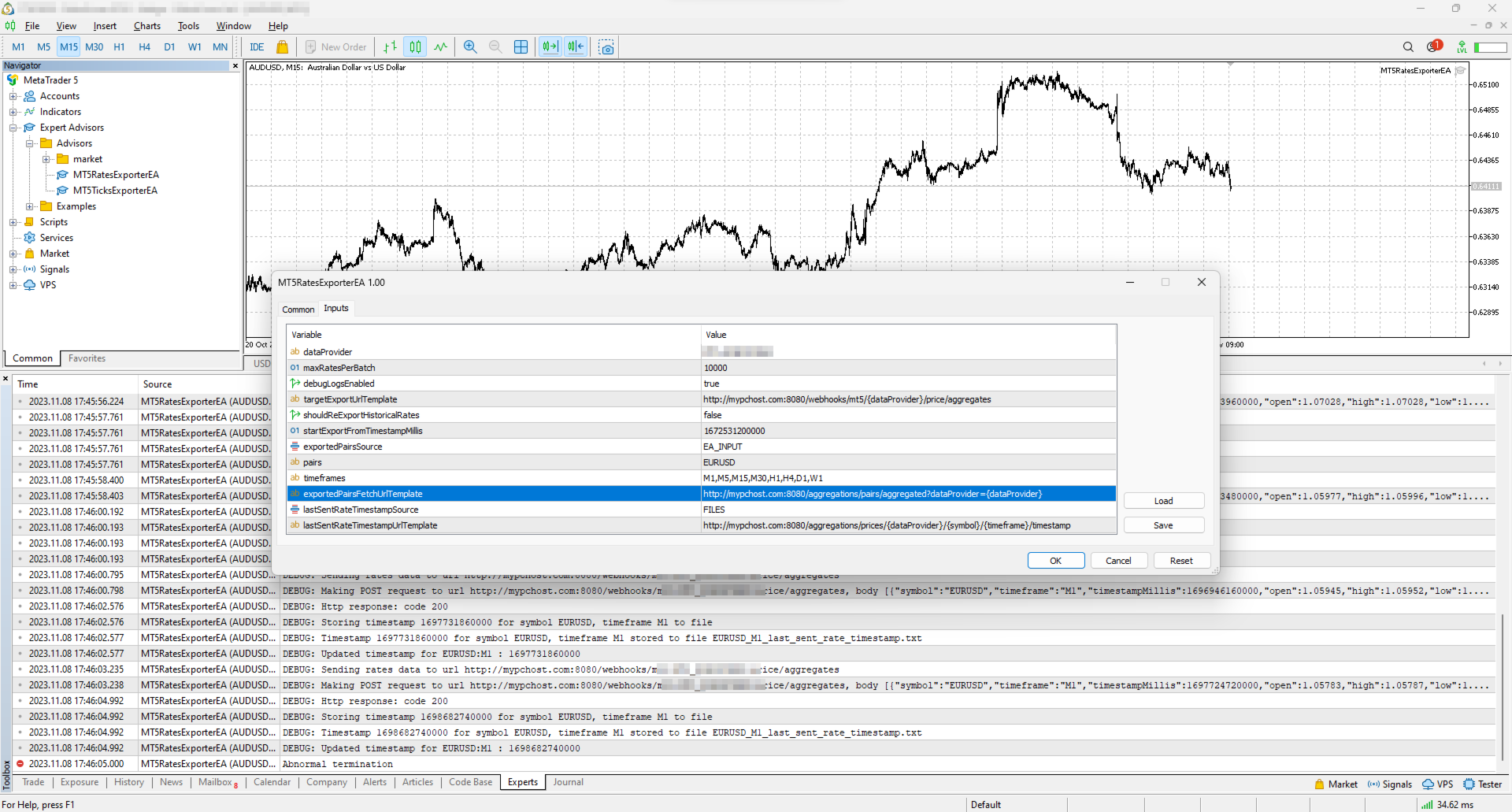
symbols exportedSymbolsSource が 'EA_INPUT' の場合に、ローソク足をエクスポートする銘柄を指定します。 EURUSD,AUDUSD,GBPUSD,USDCAD,USDJPY,USDCHF
timeframes エクスポートするローソク足の時間足を指定します。 M1,M5,M15,M30,H1,H4,D1,W1
exportedSymbolsFetchUrlTemplate 銘柄リストを取得する URL テンプレート。exportedSymbolsSource='HTTP_ENDPOINT' の場合に使用します。
使用できるプレースホルダー:dataProvider。
-
lastSentRateTimestampSource 最後に送信したローソク足のタイムスタンプの保存先。選択肢:'HTTP_ENDPOINT' または 'FILES'。 FILES
lastSentRateTimestampUrlTemplate 最後に送信したローソク足のタイムスタンプを取得・保存する URL テンプレート。lastSentRateTimestampSource='HTTP_ENDPOINT' の場合に使用します。
使用できるプレースホルダー:dataProvider, symbol, timeframe。
-
serverTimeZoneMode ローソク足の時刻を UTC に変換するためのサーバー時刻の設定。AUTO(デフォルト)はサーバー時刻を自動判別し、明示的に選ぶこともできます:US_DST(ニューヨーククローズ)、EU_DST(東ヨーロッパ時間)、NO_DST、MANUAL(manualServerGmtOffsetMinutes)— 明示的に選ぶと、全履歴について正確なタイムスタンプが得られます。 AUTO
manualServerGmtOffsetMinutes MANUAL で使用する、GMT からのサーバーのオフセット(分)。 120

EA の動作

初期化時に、エキスパートアドバイザー (EA) は次の処理を行います:

  1. オフセットのリセット確認:EA は変数 shouldReExportHistoricalRates を確認し、特定のタイムスタンプから過去のレートデータをエクスポートする必要があるかを判断します。再エクスポートが必要な場合、EA は次の処理を行います:

    • startExportFromTimestampMillis の値を新しいタイムスタンプのオフセットとして設定します。
    • lastSentRateTimestampSource の設定に従い、このオフセットをローカルファイルに確実に保存するか、お使いのサーバー上の指定アドレスへ送信します。
  2. レートデータの定期取得と送信:EA には 10 秒ごとに作動するタイマーが組み込まれています。作動するたびに、EA は次の処理を行います:

    • 最後に保存したオフセット(直近のローソク足のタイムスタンプ)から現在までのレートデータをブローカーに要求します。送信するのは確定したローソク足のみで、形成中のローソク足は確定後に送信されます。
    • 取得したレートデータを JSON に変換し、入力パラメータ targetExportUrlTemplate から生成される URL へ送信します。

これらの処理により、EA は最新のレートデータを途切れることなく自動で外部へ提供し、アプリケーションや分析ツールに常に最新の市場情報を届けます。

使い方

EA が設定済みの URL へローソク足のエクスポートを開始するために、最低限必要な手順は次のとおりです:

  • お使いのサーバー上に、POST リクエストを受け付けるアドレス(URL は targetExportUrlTemplate から生成)を用意します。このアドレスの要件は次のとおりです:

    • 下記の JSON 構造のレートデータを受け付けること。
    • 受信に成功したらステータスコード 200 を返すこと。
  • ターミナルがお使いのサーバーへデータを送信できるようにします:「ツール > オプション > エキスパートアドバイザー」(Tools > Options > Expert Advisors)を開き、"Allow WebRequest for listed URL" にチェックを入れ、サーバーのアドレス(例:https://data.example.com)を追加します。

    • localhost でローカルにテストする場合は、Windows では 'C:\Windows\System32\drivers\etc\hosts'、Linux 系のシステムでは '/etc/hosts' にホスト名を作成し、そのホスト名を targetExportUrlTemplate で使用してください。
  • ターミナルで任意のチャートに EA を適用し、次の入力パラメータを設定します:

    • dataProvider と targetExportUrlTemplate:必須です(これらがないと EA は起動しません)。
    • startExportFromTimestampMillis:ローソク足を取得したい開始タイムスタンプを設定します。
    • symbols と timeframes:ローソク足が必要な銘柄と時間足。
    • shouldReExportHistoricalRates:初回の実行時は、最後に送信したローソク足のタイムスタンプを記録するファイルを EA がすべて作成できるよう、true に設定する必要があります。初回の実行後は false に戻してください(戻さないと、再起動のたびに startExportFromTimestampMillis からすべてを送信し直します)。

注意:ストラテジーテスターはインターネット経由のデータ送信をブロックするため、EA はテスターでは動作しません。

オフセットの管理

EA は、中断やターミナルの再起動後にエクスポートを続行できるよう、最後に送信に成功したローソク足のタイムスタンプ(オフセット)を保持します。
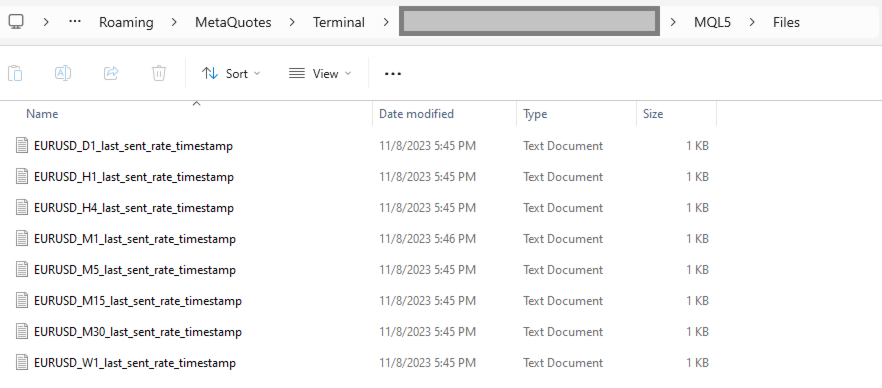
デフォルトでは、タイムスタンプはターミナルの MQL5\Files フォルダーに自動作成されるファイルに保存されます。ファイルは銘柄と時間足ごとに 1 つずつ作られます。

ファイルの代わりに、お使いのサーバー上の個別のアドレスでオフセットを読み書きすることもできます。
この機能を使うには、lastSentRateTimestampSource を 'HTTP_ENDPOINT' に設定し、lastSentRateTimestampUrlTemplate で定義した URL に従ってサーバー上にアドレスを用意します。
サーバー側では、オフセットをデータベース(PostgreSQL など)に保存できます。特定の銘柄のローソク足を再エクスポートしたい場合は、データベースのテーブルにあるタイムスタンプの値を更新するだけで済みます。

オフセットとは。オフセットは最後に配信したローソク足の始値の時刻で、ブローカーのサーバー時刻(ターミナルに表示される時刻)での 1970-01-01 からのミリ秒数です(UTC ではありません)。オフセットをサーバーで保持する場合は、EA が送信した数値をそのまま返してください。

エクスポートする銘柄の管理

デフォルトでは、EA は入力パラメータ symbols を使って、ローソク足をエクスポートする銘柄を決定します。
お使いのサーバー上の個別のアドレスから銘柄リストを取得することもできます。
この機能を使うには、exportedSymbolsSource を 'HTTP_ENDPOINT' に設定し、exportedSymbolsFetchUrlTemplate で定義した URL に従ってサーバー上にアドレスを用意します。

EA の外部からの管理

lastSentRateTimestampSource と exportedSymbolsSource の両方を 'HTTP_ENDPOINT' に設定すると、EA を完全に外部から制御できます:

  • ターミナルで何も操作せずに、特定の銘柄の再エクスポートを開始できます。
  • ターミナルの入力パラメータを変更せずに、エクスポートする銘柄を指定できます。

アプリケーション連携用 REST API 仕様

HTTP アドレス 説明 メソッド リクエスト レスポンス
targetExportUrlTemplate レートデータを送信する URL。
timestampMillis はローソク足の始値の時刻(UTC)、spread の単位はポイントです。
POST ヘッダー:
Content-Type: application/json
ボディ
[
  {
    "symbol": "EURUSD",
    "timeframe": "H1",
    "timestampMillis": 1670001234000,
    "open": 1.12345,
    "high": 1.12500,
    "low": 1.12200,
    "close": 1.12400,
    "tickVolume": 1234,
    "spread": 12,
    "realVolume": 0
  },
  ...
]
ローソク足を正常に受信した場合はレスポンスコード 200
exportedSymbolsFetchUrlTemplate EA が 'targetExportUrlTemplate' から生成される URL へエクスポートする銘柄のリストを取得するための URL です。 GET   ヘッダー:
Content-Type: text/plain
ボディ(カンマ区切りの銘柄リスト)
EURUSD,GBPUSD,AUDUSD,BTCUSD
lastSentRateTimestampUrlTemplate エクスポートを開始するタイムスタンプを取得するための URL です。
ボディは EA が送信したとおりのオフセットです。
GET   ヘッダー:
Content-Type: text/plain
ボディ
1625135912000
lastSentRateTimestampUrlTemplate 'targetExportUrlTemplate' から生成される URL への、最後に成功した POST リクエストのタイムスタンプを保存するための URL です。
ボディはオフセットです。
POST ヘッダー:
Content-Type: text/plain
ボディ
1625135912000
 

無料版(NZDUSD のみ)

タグ:レート, ローソク足, 価格, 価格集計, ストリーム, ストリーミング, エクスポート, webhook, 連携, http, rest, FX, 暗号資産, データ, 過去データ, リアルタイム, rest api, データ提供, データフィード, ohlc
おすすめのプロダクト
Ultimate Risk Manager for MT5 Every trader knows the feeling: a promising setup appears, but fear of a large loss prevents you from pulling the trigger. You hesitate, overthink, and often miss the opportunity. The root cause is not a lack of strategy – it is the absence of guaranteed loss control. The Ultimate Risk Manager solves this problem completely. This tool lets you trade exactly how you want – any style, any frequency, any risk per trade – while ensuring that your total loss over a ch
FREE
Introducing   Order Blocks Breaker , a brand-new way to identify and leverage order blocks in your trading strategy. After developing multiple order block tools with unique concepts, I’m proud to present this tool that takes things to the next level. Unlike previous tools,   Order Blocks Breaker   not only identifies order blocks but also highlights   Breaker Order Blocks —key areas where the price is likely to retest after a breakout. MT4 -  https://www.mql5.com/en/market/product/124101/ This t
Crypto_Forex MT5用インジケーター「 WPR with 2 Moving Averages 」(リペイント機能なし) - WPR自体はスキャルピングに最適なオシレーターの1つです。 - 「WPR and 2 Moving Averages」インジケーターを使用すると、WPRオシレーターの高速移動平均線と低速移動平均線を確認できます。 - このインジケーターを使用すると、価格調整を早期に把握できます。 - このインジケーターはパラメータで簡単に設定でき、どの時間枠でも使用できます。 - 買いと売りのエントリー条件は画像で確認できます。 - WPR MA クロスの PC およびモバイル アラート付き。 買いシグナルの条件例: (1) - 高速MAが低速MAを下向きにクロスし、WPR値が-50を下回っている場合:買いトレードを開きます。 (2) - WPR値が-20を超える買われすぎゾーンに入ったら:買いトレードを終了します。 売りシグナルの条件例: (1) - 高速MAが低速MAを下向きにクロスし、WPR値が-50を超えている場合:売りトレードを開きます。 (2) WP
This indicator is especially for the binary trading. Time frame is 1 minutes and exp time 5 or 3 minutes only. You must be use martingale 3 step. So you must put lots size is 10 % at most. You should use Mt2 trading platform to connect with my indicator to get more signal without human working. This indicator wining rate is over 80% but you may get 100% of profit by using martingale 3 step. You should use MT2 Trading Platform to connect meta trader platform and binary platform . You can get mt2
FREE
Real-Time Spread Display Tool A   real-time spread display tool   is a specialized software or application designed to provide traders and investors with instant, live data on the   spread —the difference between the bid price (the price at which buyers are willing to purchase an asset) and the ask price (the price at which sellers are willing to sell it)—for various financial instruments. This tool is critical in markets such as forex (FX), stocks, futures, and cryptocurrencies, where price f
CosmiCLab SMC FIBO CosmiCLab SMC FIBO is a professional trading indicator designed for traders who use Smart Money Concepts (SMC), market structure analysis and Fibonacci retracement levels. The indicator automatically detects market swings and builds Fibonacci levels based on the latest impulse movement. It also identifies market structure changes such as BOS (Break of Structure) and CHOCH (Change of Character), helping traders understand the current market direction. CosmiCLab SMC FIBO also pr
概要 このインジケーターは、クラシックな ドンチャンチャネル を強化したバージョンで、実践的なトレード機能を追加しています。 標準の3本線(上限、下限、中央線)に加え、 ブレイクアウト を検出し、チャート上に矢印で視覚的に表示します。また、チャートを見やすくするために、 現在のトレンド方向と逆側のラインのみを表示 します。 インジケーターの機能: 視覚的シグナル :ブレイクアウト時にカラフルな矢印を表示 自動通知 :ポップアップ、プッシュ通知、Eメール RSIフィルター :市場の相対的な強弱に基づいてシグナルを検証 カスタマイズ可能 :色、ラインの太さ、矢印コード、RSI閾値など 動作原理 ドンチャンチャネルは次のように計算します: 上限線 :直近N本のクローズ済みローソク足の最高値 下限線 :直近N本のクローズ済みローソク足の最安値 中央線 :最高値と最安値の平均値 上方ブレイクアウト は終値が上限線を超えたときに発生し、 下方ブレイクアウト は終値が下限線を下回ったときに発生します。 インジケーターは以下を行います: 3本のドンチャンラインを描画 方向転換後の最初のブレイクアウト
FREE
This utility EA will display simple renko, hence the name essential renko. The renko will be shown in a new tab and using custom symbol. Please do note (especially for those who new to Renko), that Renko does not follow timeline as it will follow price movement. That's why it has a lot of potential where you can attach any EA that you want and use any custom indicator in this new custom symbol for renko. Always use M1 timeframe. Most of the time you don't need to change anything. But if you d
FREE
GDS Renko Pip ST Chart - Pip-Based Renko Chart Indicator for MetaTrader 5 GDS Renko Pip ST Chart is a pip-based Renko chart indicator for MetaTrader 5. It helps traders build and study cleaner Renko price movement using a practical fixed pip or point-based brick structure. This tool is designed as a Renko chart foundation for manual analysis. It does not predict the market, does not generate buy or sell signals and does not decide whether a trade should be opened. Renko EDGE EA Golden Delta | A
DESCRIPTION: Position Size Calculator — On-Chart Risk Management Tool Never risk too much on a single trade again. This calculator displays real-time position sizing for 3 risk levels simultaneously, calculated from your live account balance and current ATR-based stop loss distance. DISPLAYS 3 RISK SCENARIOS AT ONCE: Risk Level 1 (1%): Risk amount in dollars + Lot size Risk Level 2 (2%): Risk amount in dollars + Lot size Risk Level 3 (3%): Risk amount in dollars + Lot size All lot sizes are dyna
FREE
Smart Adaptive Renko Pro – Dynamic ATR & Fixed Box Renko Indicator Smart Adaptive Renko Pro is a powerful non-time-based Renko indicator designed to eliminate market noise and reveal true price momentum with precision. Unlike standard chart candles, this indicator builds Renko bricks based purely on price movement — helping traders focus on trend strength, reversals, and clean breakout structures. Key Features Adaptive ATR-Based Box Size (Auto-adjusts to market volatility) Fixed Pip Box M
DF Fib Trader Pro DF Fib Trader Proは、MetaTrader 5向けに設計された自動取引システムです。 フィボナッチベースの価格水準とトレンドおよびストラクチャー分析を組み合わせ、エントリーポイントとエグジットポイントを決定します。このEAはロングポジションとショートポジションの両方をサポートし、リスク管理パラメータも組み込まれています。 主な機能: • フィボナッチ・リトレースメントとエクステンション・ロジックを用いて、エントリーポイント、SLポイント、TPポイントをプロットします。 • ロットサイズと損切り/利益確定レベルを設定可能 • エントリーポイントは1つまたは2つから選択可能 • 市場状況に応じて、固定または動的な損切り/利益確定をサポート • 複数の時間枠と通貨ペアに対応 • 最大スプレッド、スリッページ、取引頻度の制御オプションを搭載 • 自動取引管理:損益分岐点、トレーリングストップ、部分決済オプション • 希望に応じて成行注文もサポート入力項目の概要: • リスク管理:ロットサイズ、取引ごとのリスク、最大取引回数 • エントリー
FREE
Backstop enforces the two rules that end funded accounts. A daily loss limit and a maximum loss limit, applied to everything on the account — every Expert Advisor, every symbol, and every trade you place by hand. Attach it to any one chart and it governs the whole terminal. It does not trade. It has no strategy, no signals and no opinion about the market. It is a governor. What it does Daily loss limit — measured from balance at the reset, equity at the reset, or a fixed account size. Firms diff
FREE
Overview Mirror Signals Service EA (Text only)   is a powerful monitoring Expert Advisor that automatically sends   real-time Telegram notifications   for all important trade events on your MetaTrader 5 account. It is engineered specifically for   signal providers ,   trade-copier operators ,   auditors ,   educators , and   professional trading services   that require immediate, detailed, and reliable reporting. Everything from   entries, exits, SL/TP changes, comment changes, trailing sto
FibRetrace Zones 最新スイングのフィボナッチ・リトレースメントゾーン FibRetrace Zones は、エキスパートアドバイザー FibRetrace の無料ビジュアルコンパニオンです。フィボナッチ・リトレースメントのレベルを描画し、最新のスイングにおけるプルバックゾーンをハイライト表示します。トレード前に、リトレースメントのエントリーポイントがどこに揃うかを確認できます。 ゾーンは方向別に色分けされています。強気セットアップは緑、弱気セットアップは赤です。すべてのシンボル・時間足に対応し、確定したバーがリペイントされることはありません。 主な機能 調整可能なルックバックによる自動スイング検出 クラシックなフィボナッチレベル(23.6%、38.2%、50%、61.8%、78.6%)を個別に表示切替可能 色をカスタマイズできるハイライト付きプルバックゾーン 方向カラーコーディング:緑 = 強気、赤 = 弱気 バー確定でコンファーム — リペイントなし。形成中バー向けのオプションのライブ更新あり 使い方 任意のチャートに適用してください。価格が色付きゾーンに押し戻された
FREE
Indicator Description 4 Hull MA Color + Envelopes is a powerful trend-following indicator for MetaTrader 5 that combines four Hull Moving Averages (HMA) with Moving Average Envelopes to clearly identify market direction, trend strength, and potential reversal or pullback zones. This indicator is designed to reduce noise, react quickly to price movement, and provide a clean visual structure for professional trading.   Key Features   4 Hull Moving Averages (20, 50, 100, 200) Automatic color change
FREE
Renko subwindow
Alexandre Vincent Traber
Overview Renko SubWindowは、メインチャートに影響を与えずに、独立したインジケーターウィ ンドウ内にカラーローソク足でレンコブロックチャートを描画します。ブロックサイズは ポイントで固定するか、ATRを使ってボラティリティに応じて動的に調整できます。 How it works 現在の銘柄/時間足の終値からレンコブロックを再構築します。 価格が前のブロックの終値から設定したブロックサイズを超えると新しいブロックが形成 されます。 ブロックは色付きローソク足として表示され、陽線・陰線の色が区別 されます。 新しいバー形成時、または時間足/履歴変更時のみ再計算し、軽量で 安定した動作を保ちます。 Inputs Renko_BrickPoints: 固定ブロックサイズ(ポイント);0の場合はATRを使用 Renko_ATR _Period: BrickPointsが0の場合のATR期間 Renko _MaxBricks: ウィンドウに表示する最大ブロック数 Recommended setup 任意の銘柄・時間足で使用可能。主要 Forexペアではブロックサイズ50-15
FREE
Automated Timeframe cycling with Symbols centered.  Force every timeframe onto one clock window, so the story you see on Daily is the same story you are slicing on H4, H1, and M1.  Traders usually flip timeframes and lose the span. A Daily chart shows a few weeks, then M15 shows a few hours, and the eye treats them as different markets. TASSERACT locks the window to N bars of the highest enabled timeframe — default 10 Daily — and maps every lower timeframe to that same stretch. You stay inside o
FREE
== LT RAINBOW TREND - 36本の移動平均線を持つトレンドインジケーター == 概要 LT Rainbow Trendは、36本の移動平均線を同時に処理し、スマートなカラーシステム(レインボー)を搭載した先進的なトレンド分析テクニカルインジケーターです。主力のトレンド方向へ最大の視覚的明瞭さをもって取引したいトレーダーのために開発され、マルチタイムフレーム分析の複雑さを、シンプルでカラフル、かつ非常に直感的なビジュアルへと変換します。 「トレンドは友達(The trend is your friend)」であることを理解しているトレーダーに最適です。このインジケーターは、トレンドの強さ、方向、そして潜在的な反転を常に事前に見極めることを可能にします。 仕組み インジケーターは、4つのトレンドゾーンに分散された36本の移動平均線を監視します: 赤(トレンド転換ゾーン) 31〜20番目の移動平均線 トレンドが反転する可能性を示す強いサイン オレンジ(トレンド減速ゾーン) 19〜10番目の移動平均線 トレンドの勢いが失われつつあるが、継続の可能性もあるサ
FoxWave Volume Suite combines three essential volume-based tools into a single indicator: a horizontal Volume Profile with Point of Control and Value Area, a real-time volume spike detector with instant alerts, and a buy/sell pressure delta gauge. No need to run three separate indicators — everything you need to read volume is in one clean Fox Wave panel. What it does Volume Profile (POC / VAH / VAL) Builds a horizontal histogram showing how much volume traded at each price level over your cho
GDS Renko Matrix - Free Multi-Scale Renko Overview Indicator for MetaTrader 5 GDS Renko Matrix is a free multi-scale Renko overview indicator for MetaTrader 5. It helps traders monitor Renko structure, direction and chart context in a compact matrix-style view. The purpose of this tool is to provide a faster visual overview of Renko behavior without turning the chart into a signal system. It does not predict the market and does not generate buy or sell signals. Renko EDGE EA Golden Delta | Alg
FREE
GOM Trade Manager helps you execute trades the way you want it. Works on all instruments Forex, Commodities, & Crypto. It helps you with lot calculations, spread addition and balance calculations so you can just focus on actual trading. For full automatic planned management, stackable triggers and spread widening protection >> check out GOM Trade Manager Pro . ------------------------------------------NOTABLE FEATURES------------------------------------------ You set everything based on bid
FREE
Introducing the “Symbol Cost Info MT5” indicator – your ultimate tool for staying ahead in the forex market! This innovative indicator is designed to empower traders with real-time cost information, directly on their charts. Here’s why every trader needs the “Symbol Cost Info MT5” in their arsenal: Real-Time Spread Monitoring : Keep a close eye on the spread for any currency pair, ensuring you enter the market at the most cost-effective times. Pip Value at Your Fingertips : Instantly know the v
FREE
ConsistencyGuard
Vanessa Cristina Ribeiro Dos Anjos
バージョン 7.04 デイトレードの規律と口座保護をさらに強化するための大型アップデートです。 • Post-Session Review モードを追加。レビュー時間は 0~60分の範囲で設定できます。 • 許可された取引回数を完了した後も、MetaTrader 5 を開いたままにして、チャートの確認、スクリーンショットの保存、トレード日誌の記録を行うことができます。 • 1日の取引回数上限に達した後に新しい取引を行うと、Emergency Close 保護機能が作動します。 • Emergency Close は未決済ポジションを決済し、保留中の注文をキャンセルした後、取引セッションをロックして MetaTrader 5 を終了します。 • 永続的なデイリーロックにより、重大なルール違反後に MetaTrader 5 を再起動して取引を続けることを防止します。 • 最大許可ロットの保護機能。 • 最大ロットの引き上げは7日間ロックされます。より小さいロットでの取引は引き続き可能です。 • 取引回数のカウントを改善。 • ポジションの部分決済は新しい取引としてカウントされません。 •
FREE
Inverted_Chart_EA Utility Expert Advisor Inverted_Chart_EA creates and maintains a mirror-inverted chart of any symbol and timeframe. It automatically generates a custom instrument (e.g. US30_INV ) and keeps its price history updated in real time, with bars mirrored around a chosen pivot. This utility gives traders a new way to analyze the market from a different perspective by flipping the chart upside down. Why use an inverted chart? Highlight hidden patterns – price formations that look ordin
Backtesting PRO
Raul Benjamin Correa Reyes
Backtesting PRO: Make a review of the market based on the available history of your broker. Practice your strategies and verify them in seconds. Remember to maintain excellent risk management, check your days and hours of operation. R emember to start it in the shortest period to operate. Any questions or suggestions can be sent to this email: autoeducacion0110@gmail.com
FREE
ATC Economic Calendar and News Panelは、MetaTrader 5内蔵の経済カレンダーをチャート上に直接表示するので、別のウィンドウを開かずに今後の発表を確認できます。 このツールは、ポジションツール、トレード管理、パフォーマンス分析とともに、 All In One Trade Management Panel MT5 の一部でもあります。 主な機能: • 選択した通貨の次の高影響イベントと、それまでのライブカウントダウンを表示する「次の高影響」カード。 • 日別のイベントリスト。矢印ボタンで日を前後に移動したり、今日にジャンプしたりできます。 • 各イベントは、影響の色、通貨、時刻、名前、および実績値、予測値、前回値を表示します。実績値は予測を上回ると緑、下回ると赤になります。 • 発表前の最後の5分間、イベント時刻が赤いカウントダウンに変わります。 • 通貨フィルター(主要通貨とチャートシンボルの通貨)と影響フィルター(高、中、低)。選択内容はチャートごとに記憶されます。 • カレンダーが新しいデータを公開すると、値が自動的に更新さ
FREE
- وصف المنتج - مؤشر احترافي متكامل لا يعد KING Fusion MACD-Vol من KING TRADING EA مجرد MACD آخر — فهو عبارة عن مجموعة أدوات تداول كاملة تجمع بين مؤشرات احترافية متعددة في نافذة فرعية واحدة أنيقة. لم تعد بحاجة إلى تحميل مخططك بأدوات منفصلة. يجمع هذا المؤشر بين: MACD مع خطوط مزدوجة ورسم بياني مكبر رسم بياني ملون ومثبت بالحجم ملصقات ديناميكية مع قيم المؤشرات في الوقت الفعلي (ATR، ADX، RSI، Volume) عداد تنازلي للبار التنبيهات المتقاطعة (مرئية + صوتية) كل ما تحتاجه من الوضوح والسرعة والدقة -
FREE
The   Close script   is a simple tool that allows traders to close their trades by three methods. Just run the script and choose the close method. Closing methods Symbol  - Allows closing all open trades for a specific symbol. All_Trades  - Allows closing all open trades. Magic_Number  - Allows closing all open trades according to their magic number. Recommendation AutoTrading functions must be activated.  If the AutoTrading function is disabled, the script will not work. EA should be stopped.
FREE
Important Lines
Terence Gronowski
4.88 (24)
This indicator displays Pivot-Lines, preday high and low, preday close and the minimum and maximum of the previous hour. You just have to put this single indicator to the chart to have all these important lines, no need to setup many single indicators. Why certain lines are important Preday high and low : These are watched by traders who trade in a daily chart. Very often, if price climbs over or falls under a preday low/high there is an acceleration in buying/selling. It is a breakout out of a
FREE
このプロダクトを購入した人は以下も購入しています
Telegram to MT5 Multi-Channel Copier   は、 Telegram と Discord チャンネルのトレードシグナルを MetaTrader 5 へ自動コピーします。ボット不要、ブラウザ拡張不要、手動コピー不要。Telegram や Discord にシグナルが届くと、EA が数秒であなたのターミナルに注文を出します。 さらに、チャンネルをコピーする前に、内蔵バックテスターでそのチャンネルがあなたの口座でどう動いたかを確認できます。 製品は 2 つのコンポーネントで構成されます:Telegram チャンネルを監視する Windows アプリと、MT5 ターミナルでシグナルを執行する本 EA です。MT4 版もあります   こちら . セットアップガイドとアプリのダウンロード:   https://www.mql5.com/en/blogs/post/768988 Telegramのシグナルチャンネルをバックテストする方法 をご覧ください。 現在の価格は今後値上げされます。 仕組み アプリはあなた自身の Telegram アカウントで接続するため、フォロ
================================================================================ POC BREAKOUT - V20.72. Full Professional Grade Toolkit ================================================================================ POC Breakout is a full MetaTrader 5 trading dashboard for discretionary traders who want breakout signals, Point of Control (POC) context, volume profiles, order flow, market structure, news, alerts, and advanced trade planning in one professional workspace. Attached directly to you
The Patch It never opens a trade. It walks behind the ones that did. Every open position, every pending order — checked twice a second for the one thing that's easy to forget: a stop, a target. Found bare, it doesn't ask. It writes the missing number in, measured in points from wherever the position began, and moves on to the next. No strategy, no opinion on direction. Just the quiet assumption that nothing should ever sit on the market unprotected — not because someone decided it shouldn't,
Floor Watch
Syed Tauqeer Hussain Shah
Floor Watch One number, watched every thirty seconds: how far equity has fallen since the day began — or since its highest point, if it's told to trail the peak instead of the open. Cross the line and it doesn't argue. Every open position closes, every pending order vanishes, and anything that slips through afterward gets shut the moment it appears. Not asked. Removed. The floor holds until the clock turns 5 AM Pakistan time — then, and only then, does the day start over. One rule. No except
Power Candles Strategy Scanner - 自動最適化型マルチシンボル設定ファインダー パワーキャンドル・ストラテジー・スキャナーは 、パワーキャンドル・インジケーターを駆動するのと全く同じ自己最適化エンジンを、マーケットウォッチに登録されているすべての銘柄に対して並行して実行します。1つのパネルで、現在統計的に取引可能な銘柄、各銘柄で勝率の高い戦略、最適なストップロス/テイクプロフィットの組み合わせが表示され、新たなシグナルが発生した瞬間に通知が届きます。 このツールは、Stein Investmentsのエコシステムの一部です。  18種類以上のツールをすべて閲覧し、AIを活用したセットアップの推奨を受け取り、  https://stein.investments でコミュニティに参加しましょう 市場動向を網羅。銘柄ごとに3,000件以上の自動最適化。2種類のアラート。ワンクリックでチャートを切り替えて即座にアクション。 なぜこれが必要なのか 多くのマルチ銘柄スキャナーは、 価格の動き (ボラティリティ、変動率、銘柄ごとのRSI)を表示するだけです。それ
一度の購入で、現在提供中および今後リリースする私のすべての MT4・MT5 インジケーターを追加料金なしで受け取れます。 購入後、受け取り方法について私にお問い合わせください。 10 件の購入ごとに 50$ ずつ、最大 999$ まで値上げする予定です。購入手続き時に Market に表示される価格が適用されます。 信頼するインジケーターをそのままに。周辺の取引作業を自動化。 あなたのシグナル。あなたのルール。あなたの取引執行。 信頼する MT5 インジケーターはあるのに、チャートの監視、シグナル待ち、ロット計算、発注、各ポジションの管理を手作業で行っていませんか? Stratiora Signal Engine MT5 は、これらの作業をつなぎます。対応する買い・売りバッファのシグナルを、エントリー、取引量計算、Stop Loss、Take Profit、フィルター、ポジション管理、口座保護までの自動処理に変換できます。 インジケーターや取引アイデアを変えるたびに別の EA を依頼する代わりに、柔軟な一つのエンジンで各シグナルの取引方法を決められます。 あなたのシグナル。あなたのル
Daily Trading Limiter
AL MOOSAWI ABDULLAH JAFFER BAQER
5 (8)
• Please test the product in the Strategy Tester before purchasing to understand how it works. • If you face any issues, contact me via private message—I’m always available to help. • After purchase, send me a screenshot of your order to receive a FREE EA as a gift. Daily Trading Limiter — the rule you cannot break Every trader knows the number. Three trades. Two percent. One bad day and stop. And every trader has watched themselves take the fourth trade anyway. The problem was never knowing th
VirtualTradePad PRO SE MT5 — MetaTrader 5向けプロフェッショナル取引コントロールセンター VirtualTradePad PRO SE は、 MetaTrader 5 向けのプレミアムなチャートベースの取引パネルであり、トレード管理ワークスペースです。より速い執行、明確なポジション管理、構造化されたトレード管理、視覚的なレベル計画、そしてチャート上で完結するプロフェッショナルなワークフローを求めるトレーダー向けに設計されています。 これは単なる BUY / SELL パネルではありません。PRO SE は、手動取引、予約注文、ポジション管理、部分決済、バスケット損益管理、平均化レベル、ATMルール、シグナル監視、リアルタイム市場情報、ストラテジーテスター (Strategy Tester) ワークフロー、VPS向け運用を、1つの連携されたインターフェースに統合します。 MT4版 | 完全な説明とスクリーンショット | 購入方法 | インストール方法 | ログファイルの取得方法 | テストと最適化の方法 | Expforex のすべての製品 PRO
FUTURES ORDERFLOW FOOTPRINT CHART Professional OrderFlow EA for MetaTrader 5 Version 1.01| Professional tool for real traders | Institutional-Grade Visualization STRATEGY TESTER USERS - PLEASE SELECT EVERY REAL TICK WHEN TESTING AND YOU HAVE DOWNLOADED HISTORICAL DATA. IF YOU SEE A WAITING SCREEN AND IT IS NOT DOWNLOADING, IT MEANS YOU HAVE LOW HISTORICAL DATA. TRY 1 MIN AND 5 MIN FIRST ON 1 DAY DATA. ONE DAY DATA SHOULD BE THE NEWEST AND MOST CURRENT DATE. PLEASE WAIT UNTIL THE MARKET HAS ROL
Trading Chaos Expert
Hennadii Stanilevych
5 (11)
This software has no equals in the world and represents a universal trade "console" covering trading signals, automated market entry, setting of Stop Loss and Take Profit, as well as Trailing Profit for multiple trades at the same time in a single open window. Intuitive control of the Expert Advisor in "three clicks" ensures a comprehensive use of all its functions on different computers, including tablets PCs. Interacting with additional signal indicators that mark the chart to give a real mark
The product will copy all telegram signal to MT5 ( which you are member) , also it can work as remote copier.  Easy to set up, copy order instant, can work with almost signal formats, image signal,  s upport to translate other language to English Work with all type of channel or group, even channel have "Restrict Saving Content", work with  multi channel, multi MT5 Work as remote copier: with signal have ticket number, it will copy exactly via ticket number. Support to backtest signal. How to s
Footprint Chart Pro — Professional OrderFlow EA for MetaTrader 5 Version 6.34 | Professional tool for real traders | Institutional-Grade Visualization DEMO USERS - PLEASE SELECT EVERY TICK / REAL TICK WHEN TESTING AND YOU HAVE DOWNLOADED HISTORICAL DATA. IF YOU SEE A WAITING SCREEN AND IT IS NOT DOWNLOADING, IT MEANS YOU HAVE LOW HISTORICAL DATA. TRY 1 MIN AND 5 MIN FIRST ON 1 DAY DATA. ONE DAY DATA SHOULD BE THE NEWEST AND MOST CURRENT DATE. PLEASE WAIT UNTIL THE MARKET HAS ROLLED OVER PERIOD.
YuClusters
Yury Kulikov
4.93 (43)
Attention: You can view the program operation in the free version  YuClusters DEMO .  YuClusters is a professional market analysis system. The trader has unique opportunities to analyze the flow of orders, trade volumes, price movements using various charts, profiles, indicators, and graphical objects. YuClusters operates on data based on Time&Sales or ticks information, depending on what is available in the quotes of a financial instrument. YuClusters allows you to build graphs by combining da
Farmed Hedge Yield Farming | All Markets (Manual - Hybrid - Semi/Automated EA) VERIFIED TRADING RESULTS - Farmed Hedge Yield Axi Copy:  https://www.mql5.com/en/signals/2356376 - Farmed Hedge Yield Exn Copy:   https://www.mql5.com/en/signals/2356404 - Farmed Hedge Yield V Copy:  https://www.mql5.com/en/signals/2357156 IMPORTANT NOTICE: FarmedHedge is a MANUAL-FOCUSED TRADING UTILITY ,not a fully automated EA. Results shown on this Signal include manual trades and overall strategic management.
AI Arbitron — an MT5 Spot vs Future Gold Arbitrage Bot designed to capture price discrepancies between correlated Spot and Future instruments through hedged, non-directional trading. Platform: MT5 Asset: Mainly Gold (XAUUSD) using Spot + Future/CFD price feeds. Core strategy: It monitors the price gap between Spot and Future. When the gap reaches your defined threshold, it opens hedged positions—typically Buy Spot + Sell Future (or the reverse depending on the gap). Exit: Positions are closed
EASY Insight AIO – スマートで手間いらずな取引のオールインワンソリューション 概要 数秒で市場全体——FX、ゴールド、暗号資産、指数、さらには株式まで——を、手作業のチャート確認や複雑なセットアップ・インジケーター導入なしにスキャンできたらどうでしょうか? EASY Insight AIO はAIトレードのための究極のプラグ&プレイ型エクスポートツールです。市場全体のスナップショットを、クリーンなCSVファイルで一括出力。ChatGPT、Claude、Gemini、Perplexityなど、さまざまなAIプラットフォームで即座に解析できます。 ウィンドウの切り替えやグラフのごちゃごちゃしたオーバーレイはもう不要。自動エクスポートされる純粋で構造化されたインサイトだけで、無駄なチャート監視に悩まされず、スマートなデータ主導の判断に集中できます。 なぜEASY Insight AIOなのか? 本当のオールインワン • セットアップ不要、インジケーターのインストール不要、チャートへのオーバーレイ不要。インストールして起動し、エクスポートするだけです。 マルチアセット対
Timeless Charts
Samuel Manoel De Souza
5 (8)
Timeless Charts is an all-in-one trading utility for professional traders. It combines custom chart types such as Seconds Charts and Renko with advanced order flow analysis using Footprints , Clusters , Volume Profiles , VWAP studies, and anchored analysis tools for deeper market insight. Trading and position management are handled directly from the chart through an integrated trade management panel , while Market Replay and Virtual Accounts provide environments for practicing trading skills and
One button. One trade. MT5 Trading Deck is a hotkey trading panel for MetaTrader 5 that turns the platform into a keyboard-driven execution cockpit. Stop loss, take profit and lot size are pre-calculated for every key; the moment you press, a market order is live on the broker. A complete technical user manual is attached in the product Comments section. It documents every input parameter, the full hotkey map, the recommended Stream Deck XL layout, and the advanced workflows for Pre-Limit orders
EA Slipstream
Stephen J Martret
5 (1)
Your backtest filled every order at the price it asked for. Your account does not. EA Slipstream measures what execution costs your EA, using your own fills, slippages and spreads to show you the true performance of your EA. A backtest prices every trade at the level the EA named. In live trading a pending order fills at whatever price is available when it triggers, a stop closes wherever the market is when it is hit, and the spread at that moment is whatever the account was quoting. The differ
EA Overfitter
Stephen J Martret
5 (1)
That backtest looks great. But will it still be making money tomorrow, next week, next month? EA Overfitter re-runs your EA on 100 price histories it has never seen. One score tells you if the edge is real. A backtest tells you what an EA did on one price history — the one that happened to occur. What you cannot tell from it is how much of that result was the strategy and how much was the particular path. EA Overfitter answers that. It builds up to 100 synthetic price histories your EA has n
Copy your MT5 trades to Interactive Brokers You keep using MT5. Every order you open or close is sent to your IB account. In real time. No coding. No changes to your strategy or EA. Try it first Rent 1 month: $30. Test on a live or paper account. What it does Real-time copying: same direction, reverse, or one side only. Map any MT5 symbol to any IB symbol. Set a lot ratio for each. Forex, Futures, Stocks, CFDs, Metals and Crypto. Position sync: both accounts checked, any difference fixed. Optio
MT5 用 Dynamic Fibonacci Grid Dashboard の最新バージョンを紹介します。 数多くの新機能を搭載したこの新しいダッシュボードは、トレード体験を一新し、市場や価格アクションをまったく新しい視点から見ることができます。複数のタイムフレームと複数のシンボルを同時に分析することで、新たな可能性を発見できます。手動トレードやポジション管理のための使いやすいインターフェース、そしてあらかじめ設定された自動売買戦略を適用するための拡張機能を備えています。さらに、DFGはストラテジーテスター内でトレーディングシミュレーターとして完全に機能し、過去データを使用してさまざまな市場環境を再現できます。ビジュアルモードで手動トレードを練習したり、高速モードで自動売買戦略をテストしたりすることが可能です。 主な特徴 • Dynamic Fibonacci Bands の概念に基づく、複数タイムフレームおよび複数シンボルの高度なテクニカル分析。 リアルタイム市場監視ダッシュボードにより、これまでにない効率性を体験できます。M1、M5、M15、H1 のチャートから得られる複雑な
Quant Panel
Kevin Craig E Gittins
Quant Panel is a strategy analysis utility for MetaTrader 5. It helps traders review several Expert Advisors or trading strategies running on the same account. The panel groups closed positions by Expert Advisor comment or magic number and calculates each strategy's results separately. You can compare strategy performance, review individual drawdowns and export detailed reports from one dashboard. Independent strategy analysis Each strategy has its own virtual starting balance and closed-trade b
Mentfx Mmanage mt5
Anton Jere Calmes
4.25 (8)
The added video will showcase all functionality, effectiveness, and uses of the trade manager. Drag and Drop Trade Manager. Draw your entry and have the tool calculate the rest. Advanced targeting and close portions of a trade directly available in tool (manage trades while you sleep). Market order or limit order on either side with factored spread. Just draw the entry, the tool does the rest. Hotkey setup to make it simple. Draw where you want to enter, and the stop loss, the tool calculates al
VERON LINK MASTER MT5 — Real-time Multi-Account Dashboard & Sync Controller Veron Link Master is a high-performance, centralized monitoring and synchronization control center designed for MetaTrader 5. Built specifically for traders managing multiple accounts, prop firm portfolios, grid/martingale EAs, or client networks, Veron Link Master provides a seamless, ultra-modern dark-themed GUI dashboard directly on your MT5 terminal. Pricing Structure: Take advantage of our early-bird pricing before
EA Auditor
Stephen J Martret
5 (5)
EA Auditor is an independent analysis tool for traders evaluating Expert Advisors and trading signals on MetaTrader 5. It audits backtest reports, reviews posted developer signals, and cross-verifies the two against each other to help traders assess strategies before committing capital. The MQL5 market offers a wide range of Expert Advisors from many developers, with varying approaches, quality, and transparency. EA Auditor provides a consistent, data-driven framework for reviewing them, answer
Veron Link Slave – Synchronized Grid, Martingale & Breakout Management Short Description Advanced synchronization tool designed to manage Grid, Martingale, and Breakout EAs. Automatically sends close-basket signals to the Master account upon profit target completion, minimizing slippage across different brokers. Full Description Veron Link Slave is a specialized utility developed to enhance the execution efficiency and risk management of multi-account or multi-broker trading setups. It is desig
The core idea: using the user interface, you configure the parameters the chart must meet before entering a position (or positions), choose which entry models to use, and set the rules for when trading and planning should end. Lazy Trader  handles the rest: it  takes over all the routine chart watching and execution! full description  :: 3 key videos [1] ->  [2]   ->  [3] What can it do? - Understands Larry Williams market structure - Understands swing market structure by Michael Huddleston
Quant AI Agents are independent trading Expert Advisors. Instead of trading using a fixed strategy like other conventional EAs, Quant AI Agents   is a   multi-agent AI trading framework   that turns natural-language strategy prompts into live.  WANT THE SAME RESULTS AS MY LIVE SIGNAL?   Use the exact same brokers I do:   IC MARKETS , IC TRADING   .  Unlike the centralized stock market, Forex has no single, unified price feed.  Every broker sources liquidity from different providers, creating un
Features   With MT5 to Interactive Brokers(IB) Trader, you can: 1. Load chart data from IB to MT5, and Analyze with all standard or customer Indicators. 2. Place Orders to IB Account Directly in MT5. 3. Make your Own EAs upon IB Securities by only making minus changes of the trading function. Usage 1) Installation Copy the "Mt5ToIBTraderEn.ex4" and sample files to [MT5 Data Folder]->MQL5->Experts.  2)  MT5 Settings Add the IP Address to the MT5 Allowed URLs in 'Tools->Options->Expert Adviso
作者のその他のプロダクト
Tick Data HTTP Exporter NZDUSD この無料版は NZDUSD のみをエクスポートし、フルバージョンの Tick Data HTTP Exporter は任意の銘柄をエクスポートできます。 説明 この EA は、お使いのターミナルをアプリケーション向けの過去およびリアルタイムのティックデータの提供元にします。 インターネット上には多くのマーケットデータ提供サービスがありますが、実際には提供されるデータの品質が常に良いとは限りません。さらに、こうしたサービスは割高なことが多く、通常は銘柄ごとに月額の利用料がかかります。 この EA を使えば、ターミナルで表示されているものとまったく同じティックデータ、つまり取引や相場分析の根拠としているデータそのものをアプリケーションに提供できます。 レートデータ(OHLC、ローソク足)を提供する Candle Data HTTP Exporter と組み合わせれば、相場分析に必要なデータ一式がそろいます。 機能 あらかじめ設定した外部の HTTP URL へティックデータを送信します。 すべてのティックの配信を保証し、中断時に
FREE
Candle Data HTTP Exporter NZDUSD この無料版は NZDUSD のみをエクスポートし、フルバージョンの Candle Data HTTP Exporter は任意の銘柄をエクスポートできます。 説明 この EA は、お使いのターミナルをアプリケーション向けの過去およびリアルタイムのレート(OHLC、ローソク足)データの提供元にします。 インターネット上には多くのマーケットデータ提供サービスがありますが、実際には提供されるデータの品質が常に良いとは限りません。さらに、こうしたサービスは割高なことが多く、通常は銘柄ごとに月額の利用料がかかります。 この EA を使えば、ターミナルで表示されているものとまったく同じレートデータ、つまり取引や相場分析の根拠としているデータそのものをアプリケーションに提供できます。 ティックデータを提供する Tick Data HTTP Exporter と組み合わせれば、相場分析に必要なデータ一式がそろいます。 機能 あらかじめ設定した外部の HTTP URL へレートデータを送信します。 すべてのローソク足の配信を保証し、中断時
FREE
Tick Data HTTP Exporter 説明 この EA は、お使いのターミナルをアプリケーション向けの過去およびリアルタイムのティックデータの提供元にします。 インターネット上には多くのマーケットデータ提供サービスがありますが、実際には提供されるデータの品質が常に良いとは限りません。さらに、こうしたサービスは割高なことが多く、通常は銘柄ごとに月額の利用料がかかります。 この EA を使えば、ターミナルで表示されているものとまったく同じティックデータ、つまり取引や相場分析の根拠としているデータそのものをアプリケーションに提供できます。 レートデータ(OHLC、ローソク足)を提供する Candle Data HTTP Exporter と組み合わせれば、相場分析に必要なデータ一式がそろいます。 機能 あらかじめ設定した外部の HTTP URL へティックデータを送信します。 すべてのティックの配信を保証し、中断時には最後に送信したティックから再開します。 ティックのタイムスタンプのオフセットの保存先を 2 種類から選べます: ローカルファイル(デフォルト、自動管理) お使いのサー
フィルタ:
レビューなし
レビューに返信