Candle Data HTTP Exporter
- Utilitaires
- Version: 2.0
- Mise à jour: 11 octobre 2026
- Activations: 5

Candle Data HTTP Exporter
Description
The EA turns your terminal into a historical/realtime rates (OHLC, candles) data provider for your application.
There are many market data providers on the internet, but in practice, the data provided is not always of good quality. Moreover, these services are often more expensive and typically require monthly subscription fees per each symbol.
With this EA, you can feed your application with exactly the same rates data that you see in the terminal, the same data on which you base your trades and market analysis.
Together with the Tick Data HTTP Exporter, which provides tick data, a complete data set necessary for market analysis is offered.
Capabilities
- Enables the transmission of rates data to a pre-configured external HTTP URL.
- Guarantees the delivery of every rate, with the capability to resume from the last sent rate in case of disruptions.
- Offers two storage options for rate timestamp offsets:
- Local files (default, managed automatically)
- HTTP endpoint (for integration with applications)
- Ensures reliable delivery of rates, with retry mechanisms for HTTP request failures.
- Allows for data transfer with configurable batching.
Configuration
| Input | Description | Default |
|---|---|---|
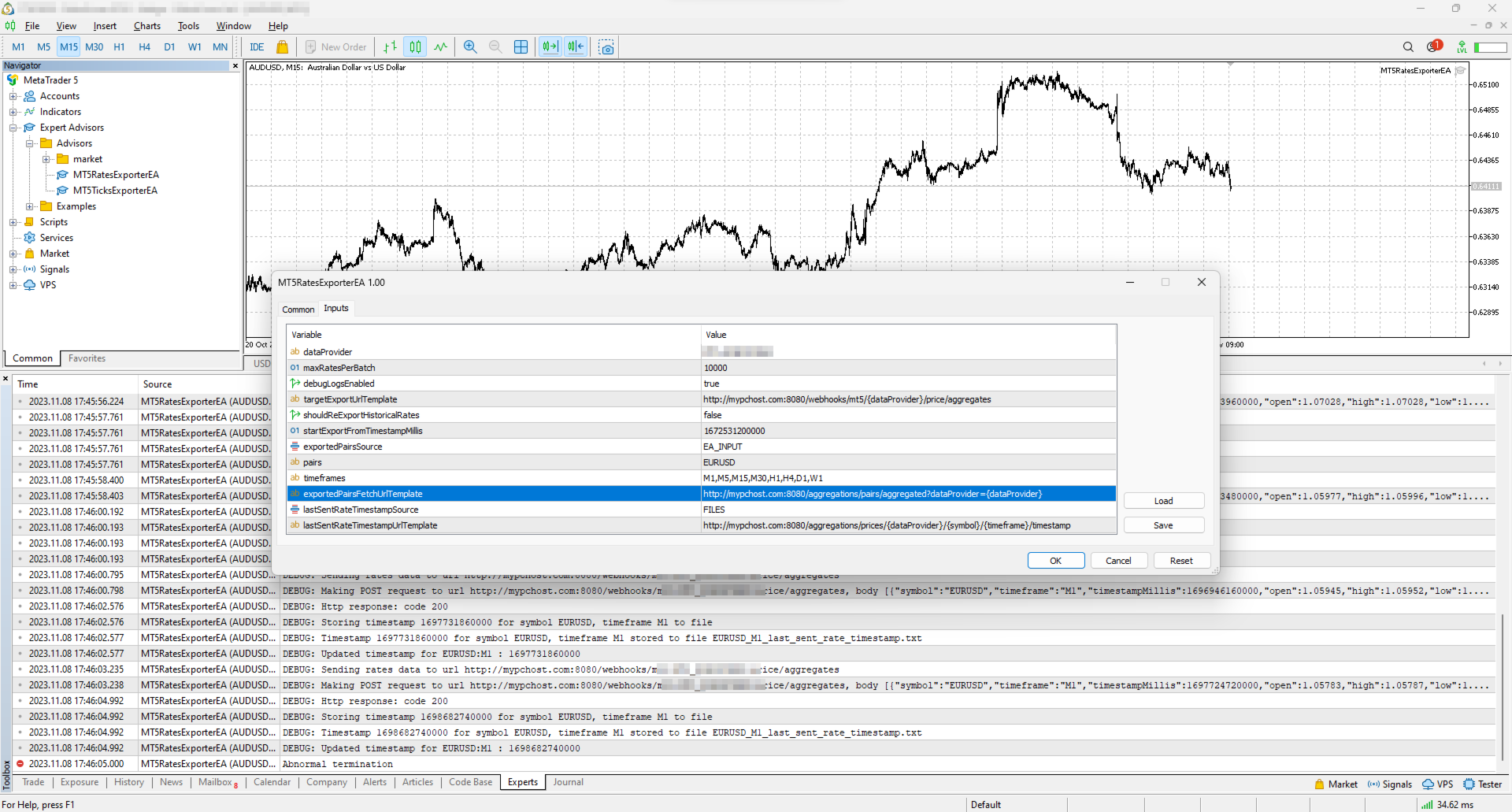
| dataProvider | Specifies the name of the data provider. This name can then be used in URL templates as {dataProvider}. | - |
| maxRatesPerBatch | Maximum number of rates that can be sent in a single batch. | 10000 rates |
| debugLogsEnabled | Whether to enable debug logs. | false |
| targetExportUrlTemplate | URL template for the endpoint where the rates data will be sent. Supported placeholders: dataProvider. | - |
| shouldReExportHistoricalRates | Option to re-export rates starting from a specific value, as specified in the startExportFromTimestampMillis input. | false |
| startExportFromTimestampMillis | If shouldReExportHistoricalRates is set to true, rates will be sent starting from the timestamp specified in milliseconds (on the server clock, the time the terminal shows). | 1672531200000 (2023-01-01 00:00:00) |
| exportedSymbolsSource | Source for the symbols for which rates will be exported. Options are: 'HTTP_ENDPOINT' or 'EA_INPUT'. | EA_INPUT |
| symbols | In cases where exportedSymbolsSource is set to 'EA_INPUT', this setting specifies for which symbols rates will be exported. | EURUSD,AUDUSD,GBPUSD,USDCAD,USDJPY,USDCHF |
| timeframes | Specifies the timeframes for the rates to be exported. | M1,M5,M15,M30,H1,H4,D1,W1 |
| exportedSymbolsFetchUrlTemplate | URL template to fetch the symbols. Used in case exportedSymbolsSource='HTTP_ENDPOINT'. Supported placeholders: dataProvider. | - |
| lastSentRateTimestampSource | Source for the timestamp of the last sent rate. Options are: 'HTTP_ENDPOINT' or 'FILES'. | FILES |
| lastSentRateTimestampUrlTemplate | URL template to fetch/store the timestamp of the last sent rate. Used in case lastSentRateTimestampSource='HTTP_ENDPOINT'. Supported placeholders: dataProvider, symbol, timeframe. | - |
| serverTimeZoneMode | The server clock, used to convert candle times to UTC. AUTO (default) detects the server clock; or choose it explicitly: US_DST (New York close), EU_DST (Eastern European), NO_DST, MANUAL (manualServerGmtOffsetMinutes) — an explicit choice gives exact timestamps for the whole history. | AUTO |
| manualServerGmtOffsetMinutes | Server offset from GMT in minutes, used with MANUAL. | 120 |
EA Workflow Description
Upon initialization, the Expert Advisor (EA) performs the following operations:
-
Reset Offset Check: The EA checks the shouldReExportHistoricalRates variable to determine if there's a need to export historical rates data from a specific timestamp. If a re-export is required, it:
- Establishes the startExportFromTimestampMillis value as the new timestamp offset.
- Saves this offset securely, either locally in a file or by sending it to a designated HTTP endpoint, based on the configuration set by lastSentRateTimestampSource.
-
Periodic Rates Data Harvesting and Sending: The EA is programmed with a timer set to activate every 10 seconds. Upon each activation, the EA:
- Requests rates data from the broker, starting from the last stored offset (the most recent rate timestamp) to the present moment. Only closed candles are sent: the candle that is still forming is sent after it closes.
- Converts the acquired rates data into JSON and sends it to the predefined URL derived from the targetExportUrlTemplate input.
By executing these steps, the EA ensures a continuous and automated stream of the most recent rates data for external use, keeping your application or analysis tools supplied with up-to-the-minute market information.
Usage
Below are the minimum actions required for the EA to start exporting rates to your configured URL:
-
Implement an HTTP endpoint that handles a POST request on a URL derived from the targetExportUrlTemplate. This endpoint should:
- Accept rates data with the JSON structure described below.
- Respond with a 200 status code if the reception is successful.
-
Allow the terminal to send data to your server: open Tools > Options > Expert Advisors, tick the box "Allow WebRequest for listed URL" and add your server address, e.g. https://data.example.com.
- If you are testing locally on localhost, create a hostname in 'C:\Windows\System32\drivers\etc\hosts' on Windows or '/etc/hosts' on Linux-based systems. Use this hostname in the targetExportUrlTemplate.
-
Attach the EA to any chart in the terminal and configure the following inputs:
- dataProvider and targetExportUrlTemplate: required; the EA does not start without them.
- startExportFromTimestampMillis: set the timestamp from which you need to get rates.
- symbols and timeframes: the symbols and timeframes you need rates for.
- shouldReExportHistoricalRates: this must be set to true on the first run so that the EA creates all necessary files for tracking the last sent rate timestamp. After the first run set it back to false, otherwise every restart sends everything again from startExportFromTimestampMillis.
Note: the EA does not work in the Strategy Tester, because the tester blocks sending data over the internet.
Offset Management
The EA maintains the timestamp (offset) of the last successfully sent rate in order to continue the export process in the event of disruptions or a terminal restart.
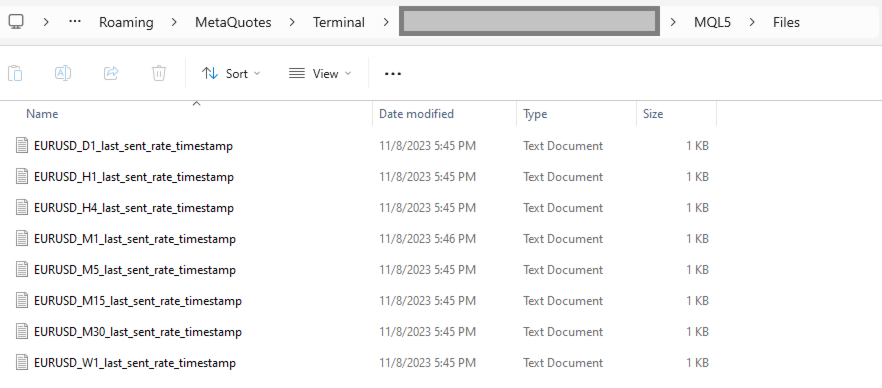
By default, timestamps are stored in files that are automatically created in the terminal's MQL5\Files folder. There is a separate file for each symbol and timeframe.
Additionally, there is an option to use separate HTTP endpoints for reading/storing the offset instead of files.
To use this feature, set lastSentRateTimestampSource to 'HTTP_ENDPOINT' and implement HTTP endpoints based on the URL defined in lastSentRateTimestampUrlTemplate.
As a backend solution, you can choose to store offsets in a database (such as PostgreSQL). If you need to re-export rates for a specific symbol, you would only need to update the timestamp values in the database table.
What the offset is. The offset is the open time of the last delivered candle, in milliseconds since 1970-01-01 on the broker's server clock (the time the terminal shows), not UTC. If you keep offsets on your server, return exactly the number the EA posted.
Exported Symbols Management
By default, the EA uses the input symbols to determine for which symbols rates need to be exported.
However, there is also an option to retrieve the list of symbols from a separate HTTP endpoint.
To utilize this feature, set exportedSymbolsSource to 'HTTP_ENDPOINT' and implement an endpoint using the URL defined in exportedSymbolsFetchUrlTemplate.
EA External Management
If you set both lastSentRateTimestampSource and exportedSymbolsSource to 'HTTP_ENDPOINT', then the EA can be fully controlled externally:
- You can initiate re-export for specific symbols without needing to perform any actions in the terminal.
- You can specify which symbols to export without having to change the inputs in the terminal.
REST API Specification for Application Integration
| HTTP Endpoint | Description | Method | Request | Response |
|---|---|---|---|---|
| targetExportUrlTemplate | URL for sending rates data. timestampMillis is the candle open time in UTC; spread is in points. | POST | Headers: Content-Type: application/json Body [
{
"symbol": "EURUSD",
"timeframe": "H1",
"timestampMillis": 1670000400000,
"open": 1.12345,
"high": 1.12500,
"low": 1.12200,
"close": 1.12400,
"tickVolume": 1234,
"spread": 12,
"realVolume": 0
},
...
] | Response Code 200 in case rates are obtained successfully |
| exportedSymbolsFetchUrlTemplate | The URL is used to retrieve the list of symbols that the EA will export to the URL derived from 'targetExportUrlTemplate'. | GET | Headers: Content-Type: text/plain Body (comma separated list of symbols) EURUSD,GBPUSD,AUDUSD,BTCUSD | |
| lastSentRateTimestampUrlTemplate | The URL is utilized to fetch the specific timestamp from which the export process should begin. The body is the offset exactly as the EA posted it. | GET | Headers: Content-Type: text/plain Body 1625135912000 | |
| lastSentRateTimestampUrlTemplate | The URL is used to store the timestamp of the last successful POST request made to the URL derived from 'targetExportUrlTemplate'. The body is the offset. | POST | Headers: Content-Type: text/plain Body 1625135912000 |
Free version (NZDUSD only)
Tags: rates, rate, price, price aggregate, stream, streaming, export, exporting, webhook, webhooks, integration, http, rest, forex, crypto, data, historical, realtime, rest api, provider, data feed, ohlc