Tick Data HTTP Exporter

Tick Data HTTP Exporter

説明

この EA は、お使いのターミナルをアプリケーション向けの過去およびリアルタイムのティックデータの提供元にします。
インターネット上には多くのマーケットデータ提供サービスがありますが、実際には提供されるデータの品質が常に良いとは限りません。さらに、こうしたサービスは割高なことが多く、通常は銘柄ごとに月額の利用料がかかります。
この EA を使えば、ターミナルで表示されているものとまったく同じティックデータ、つまり取引や相場分析の根拠としているデータそのものをアプリケーションに提供できます。
レートデータ(OHLC、ローソク足)を提供する Candle Data HTTP Exporter と組み合わせれば、相場分析に必要なデータ一式がそろいます。

機能

  • あらかじめ設定した外部の HTTP URL へティックデータを送信します。
  • すべてのティックの配信を保証し、中断時には最後に送信したティックから再開します。
  • ティックのタイムスタンプのオフセットの保存先を 2 種類から選べます:
    • ローカルファイル(デフォルト、自動管理)
    • お使いのサーバー上の HTTP アドレス(アプリケーションとの連携用)
  • HTTP リクエストが失敗した場合は再試行し、ティックを確実に配信します。
  • バッチサイズを設定してデータを転送できます。

設定

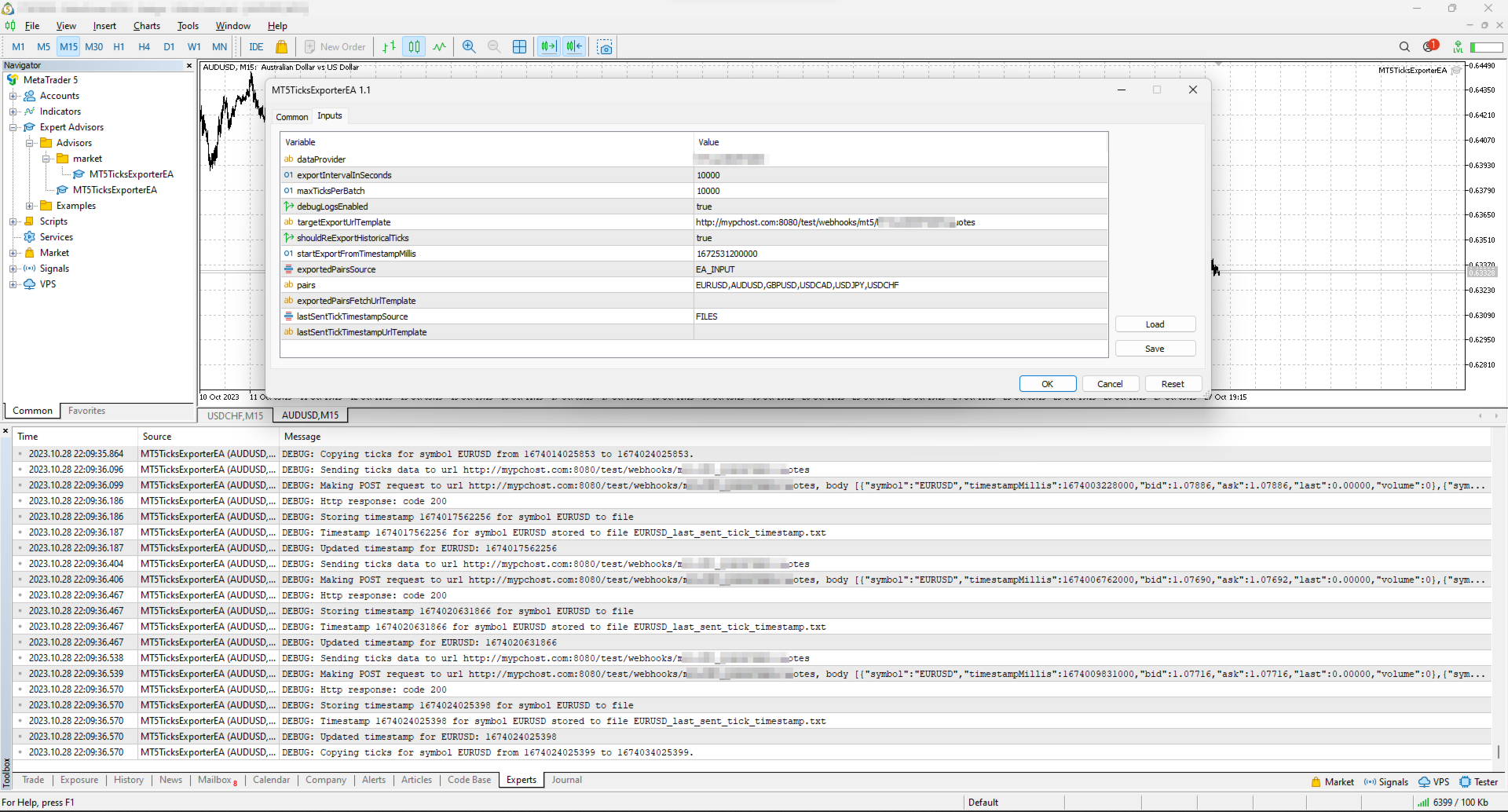
入力パラメータ 説明 デフォルト
dataProvider データ提供元の名前を指定します。
この名前は URL テンプレート内で {dataProvider} として使用できます。
-
tickQueryingIntervalDurationSeconds ブローカーからティックを照会する期間の長さ(秒)。 10000 秒
maxTicksPerBatch 1 回のバッチで送信できるティックの最大数。 10000 ティック
debugLogsEnabled デバッグログを有効にするかどうか。 false
dataSendingIntervalMilliseconds ティックを照会して外部 URL へ送信する周期。 10000 ミリ秒
targetExportUrlTemplate ティックデータの送信先となる、お使いのサーバー上のアドレスの URL テンプレート。
使用できるプレースホルダー:dataProvider。
-
shouldReExportHistoricalTicks 入力パラメータ startExportFromTimestampMillis で指定した時点から、ティックを再エクスポートするオプション。 false
startExportFromTimestampMillis shouldReExportHistoricalTicks が true の場合、ミリ秒で指定したタイムスタンプ(サーバー時刻、つまりターミナルに表示される時刻)からティックを送信します。 1672531200000 (2023-01-01 00:00:00)
exportedSymbolsSource ティックをエクスポートする銘柄の取得元。選択肢:'HTTP_ENDPOINT' または 'EA_INPUT'。 EA_INPUT
symbols exportedSymbolsSource が 'EA_INPUT' の場合に、ティックをエクスポートする銘柄を指定します。 EURUSD,AUDUSD,GBPUSD,USDCAD,USDJPY,USDCHF
exportedSymbolsFetchUrlTemplate 銘柄リストを取得する URL テンプレート。exportedSymbolsSource='HTTP_ENDPOINT' の場合に使用します。
使用できるプレースホルダー:dataProvider。
-
lastSentTickTimestampSource 最後に送信したティックのタイムスタンプの保存先。選択肢:'HTTP_ENDPOINT' または 'FILES'。 FILES
lastSentTickTimestampUrlTemplate 最後に送信したティックのタイムスタンプを取得・保存する URL テンプレート。lastSentTickTimestampSource='HTTP_ENDPOINT' の場合に使用します。
使用できるプレースホルダー:dataProvider, symbol。
-
serverTimeZoneMode ティックの時刻を UTC に変換するためのサーバー時刻の設定。AUTO(デフォルト)はサーバー時刻を自動判別し、明示的に選ぶこともできます:US_DST(ニューヨーククローズ)、EU_DST(東ヨーロッパ時間)、NO_DST、MANUAL(manualServerGmtOffsetMinutes)— 明示的に選ぶと、全履歴について正確なタイムスタンプが得られます。 AUTO
manualServerGmtOffsetMinutes MANUAL で使用する、GMT からのサーバーのオフセット(分)。 120

EA の動作

初期化時に、エキスパートアドバイザー (EA) は次の処理を行います:

  1. オフセットのリセット確認:EA は変数 shouldReExportHistoricalTicks を確認し、特定のタイムスタンプから過去のティックデータをエクスポートする必要があるかを判断します。再エクスポートが必要な場合、EA は次の処理を行います:

    • startExportFromTimestampMillis の値を新しいタイムスタンプのオフセットとして設定します。
    • lastSentTickTimestampSource の設定に従い、このオフセットをローカルファイルに確実に保存するか、お使いのサーバー上の指定アドレスへ送信します。
  2. ティックデータの定期取得と送信:EA には dataSendingIntervalMilliseconds で定義した間隔で作動するタイマーが組み込まれています。作動するたびに、EA は次の処理を行います:

    • 最後に保存したオフセット(直近のティックのタイムスタンプ)から現在までのティックデータをブローカーに要求します。
    • 取得したティックデータを JSON に変換し、入力パラメータ targetExportUrlTemplate から生成される URL へ送信します。

これらの処理により、EA は最新のティックデータを途切れることなく自動で外部へ提供し、アプリケーションや分析ツールに常に最新の市場情報を届けます。

使い方

EA が設定済みの URL へティックのエクスポートを開始するために、最低限必要な手順は次のとおりです:

  • お使いのサーバー上に、POST リクエストを受け付けるアドレス(URL は targetExportUrlTemplate から生成)を用意します。このアドレスの要件は次のとおりです:

    • 下記の JSON 構造のティックデータを受け付けること。
    • 受信に成功したらステータスコード 200 を返すこと。
  • ターミナルがお使いのサーバーへデータを送信できるようにします:「ツール > オプション > エキスパートアドバイザー」(Tools > Options > Expert Advisors)を開き、"Allow WebRequest for listed URL" にチェックを入れ、サーバーのアドレス(例:https://data.example.com)を追加します。

    • localhost でローカルにテストする場合は、Windows では 'C:\Windows\System32\drivers\etc\hosts'、Linux 系のシステムでは '/etc/hosts' にホスト名を作成し、そのホスト名を targetExportUrlTemplate で使用してください。
  • ターミナルで任意のチャートに EA を適用し、次の入力パラメータを設定します:

    • dataProvider と targetExportUrlTemplate:必須です(これらがないと EA は起動しません)。
    • startExportFromTimestampMillis:ティックを取得したい開始タイムスタンプを設定します。
    • symbols:ティックが必要な銘柄を設定します。
    • shouldReExportHistoricalTicks:初回の実行時は、最後に送信したティックのタイムスタンプを記録するファイルを EA がすべて作成できるよう、true に設定する必要があります。初回の実行後は false に戻してください(戻さないと、再起動のたびに startExportFromTimestampMillis からすべてを送信し直します)。

注意:ストラテジーテスターはインターネット経由のデータ送信をブロックするため、EA はテスターでは動作しません。

オフセットの管理

EA は、中断やターミナルの再起動後にエクスポートを続行できるよう、最後に送信に成功したティックのタイムスタンプ(オフセット)を保持します。
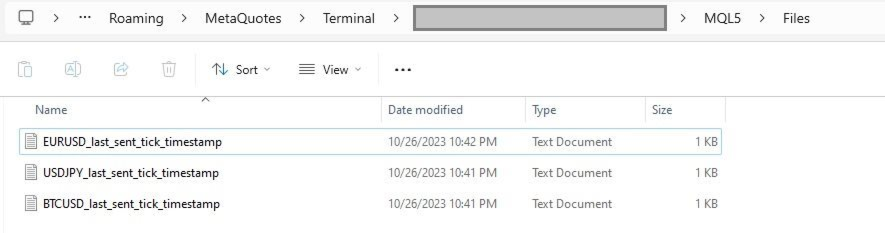
デフォルトでは、タイムスタンプはターミナルの MQL5\Files フォルダーに自動作成されるファイルに保存されます。ファイルは銘柄ごとに 1 つずつ作られます。

ファイルの代わりに、お使いのサーバー上の個別のアドレスでオフセットを読み書きすることもできます。
この機能を使うには、lastSentTickTimestampSource を 'HTTP_ENDPOINT' に設定し、lastSentTickTimestampUrlTemplate で定義した URL に従ってサーバー上にアドレスを用意します。
サーバー側では、オフセットをデータベース(PostgreSQL など)に保存できます。特定の銘柄のティックを再エクスポートしたい場合は、データベースのテーブルにあるタイムスタンプの値を更新するだけで済みます。

オフセットとは。オフセットは最後に配信したティックの時刻で、ブローカーのサーバー時刻(ターミナルに表示される時刻)での 1970-01-01 からのミリ秒数です(UTC ではありません)。オフセットをサーバーで保持する場合は、EA が送信した数値をそのまま返してください。

エクスポートする銘柄の管理

デフォルトでは、EA は入力パラメータ symbols を使って、ティックをエクスポートする銘柄を決定します。
お使いのサーバー上の個別のアドレスから銘柄リストを取得することもできます。
この機能を使うには、exportedSymbolsSource を 'HTTP_ENDPOINT' に設定し、exportedSymbolsFetchUrlTemplate で定義した URL に従ってサーバー上にアドレスを用意します。

EA の外部からの管理

lastSentTickTimestampSource と exportedSymbolsSource の両方を 'HTTP_ENDPOINT' に設定すると、EA を完全に外部から制御できます:

  • ターミナルで何も操作せずに、特定の銘柄の再エクスポートを開始できます。
  • ターミナルの入力パラメータを変更せずに、エクスポートする銘柄を指定できます。

アプリケーション連携用 REST API 仕様

HTTP アドレス 説明 メソッド リクエスト レスポンス
targetExportUrlTemplate ティックデータを送信する URL。
timestampMillis はティックの時刻(UTC)です。
POST ヘッダー:
Content-Type: application/json
ボディ
[
    {
        "symbol": "EURUSD",
        "bid": 1.18000,
        "ask": 1.18020,
        "last": 1.18010,
        "volume": 1234.56,
        "timestampMillis": 1625135912000
    },
    ...
]
ティックを正常に受信した場合はレスポンスコード 200
exportedSymbolsFetchUrlTemplate EA が 'targetExportUrlTemplate' から生成される URL へエクスポートする銘柄のリストを取得するための URL です。 GET   ヘッダー:
Content-Type: text/plain
ボディ(カンマ区切りの銘柄リスト)
EURUSD,GBPUSD,AUDUSD,BTCUSD
lastSentTickTimestampUrlTemplate エクスポートを開始するタイムスタンプを取得するための URL です。
ボディは EA が送信したとおりのオフセットです。
GET   ヘッダー:
Content-Type: text/plain
ボディ
1625135912000
lastSentTickTimestampUrlTemplate 'targetExportUrlTemplate' から生成される URL への、最後に成功した POST リクエストのタイムスタンプを保存するための URL です。
ボディはオフセットです。
POST ヘッダー:
Content-Type: text/plain
ボディ
1625135912000
 

重要:この EA をご購入の前に、お使いのブローカーが過去のティックデータのエクスポートに対応しているかご確認ください。ティックデータの有無や取得できる期間はブローカーによって異なります。

無料版(NZDUSD のみ)

タグ:ティック, 気配値, 価格, ストリーム, ストリーミング, エクスポート, webhook, 連携, http, rest, FX, 暗号資産, データ, 過去データ, リアルタイム, rest api, データ提供, データフィード
おすすめのプロダクト
The "MR Volume Profile 5" indicator is a charting tool that displays trading volume at different price levels rather than time intervals. A key concept in volume profile is the point of control (POC)—the price level with the highest volume traded during the session or time range. While tools like VWAP or OBV provide volume trends, the "MR Volume Profile 5" indicator offers granular detail about where the most market activity occurs at specific price levels. This makes it a more precise tool for
This indicator allows you to enjoy the two most popular products for analyzing request volumes and market deals at a favorable price: Actual Depth of Market Chart Actual Tick Footprint Volume Chart This product combines the power of both indicators and is provided as a single file. The functionality of Actual COMBO Depth of Market AND Tick Volume Chart is fully identical to the original indicators. You will enjoy the power of these two products combined into the single super-indicator! Below is
Let us introduce you to a new era of neural indicators for financial markets! Intelligent Moving is a unique indicator that trains its neural network in real time! You no longer need to look for the optimal indicator parameters for each specific situation. No more late signals. The artificial intelligence is able to adapt itself and predict any market movements. Visually, the indicator is drawn as a main solid moving average line, two dotted lines of standard deviations and signal arrows. For
"Trade Manager Pro Institutional Terminal (TMPRO)" is a commercial-grade, on-chart trading terminal designed specifically for manual traders, scalpers, and Prop-Firm funded traders. Built natively for MetaTrader 5, it completely replaces the clunky default order window with a high-resolution, TradingView-style interface. Whether you need pixel-perfect Auto-Lot sizing, 4-Tier Virtual Partial Take Profits, or advanced Prop-Firm anti-scalp protections,TMPRO executes your strategy with institutiona
各タイムフレームでの価格変動を計算:浮動または直近の終了バーを対象に。 多機能ユーティリティ :66以上の機能を含むこのツール  |   質問があればご連絡ください   |    MT4バージョン 計算対象の   シフト   を選択できます: 浮動(現在の)バー; 直近の終了(前の)バー; 価格値のタイプ   は、上部行の青いスイッチを使用して選択できます: ピップ; 市場ポイント; パーセント値 (%); 価格値; バーのサイズ計算方法   は、青いボタンを使用して選択できます: ボディ :(始値 - 終値) 価格; シャドー :(高値 - 安値) 価格; ユーティリティはグラフ上に 別ウィンドウ   で表示されます: ウィンドウはグラフ上の任意の場所に移動可能:どこでもドラッグ; インターフェースは " ^ " ボタンで最小化可能です; インジケーターの設定で以下を構成できます: ダーク / ライトインターフェーステーマ; インターフェースサイズ倍率; フォントサイズとスタイル; プログラムファイルは " Indicators " ディレクトリに配置してください。
Local Copy Trader Utility - Professional Copy Trading System Overview Local Copy Trader Utility is the complete solution for mirroring trades between MetaTrader 5 accounts. With both Master and Slave functionality in one powerful Expert Advisor, it delivers reliable, lightning-fast trade copying with zero external dependencies. Perfect for managing multiple accounts, following trading signals, or transferring trades between brokers, this system ensures your positions stay perfectly synchronized
インディケータは現在のクオートを作成し、これを過去のものと比較して、これに基づいて価格変動予測を行います。インジケータには、目的の日付にすばやく移動するためのテキスト フィールドがあります。 オプション: シンボル - インジケーターが表示するシンボルの選択; SymbolPeriod - 指標がデータを取る期間の選択; IndicatorColor - インジケータの色; HorisontalShift - 指定されたバー数だけインディケータによって描画されたクオートのシフト; Inverse - true は引用符を逆にします。false - 元のビュー。 ChartVerticalShiftStep - チャートを垂直方向にシフトします (キーボードの上下矢印)。 次は日付を入力できるテキストフィールドの設定で、「Enter」を押すとすぐにジャンプできます。
This Volume Delta Profile is an advanced MetaTrader 5 indicator that visualizes   volume delta (order flow imbalance)   using a volume profile-style histogram. It shows the difference between buying and selling pressure at specific price levels, helping traders identify supply and demand zones. This indicator provides a unique perspective on market dynamics by visualizing the imbalance between buying and selling pressure, offering insights beyond traditional volume analysis. Core Concept Positiv
VP hidden
Emr Aljnaby
4.33 (12)
The indicator works to convert normal volume into levels and determine financial liquidity control points. It is very similar in function to Fixed Volume Profile. But it is considered more accurate and easier to use than the one found on Trading View because it calculates the full trading volumes in each candle and in all the brokers present in MetaTrade, unlike what is found in Trading View, as it only measures the broker’s displayed prices. To follow us on social media platforms: telegram
FREE
TRINITY TREND — ひとつのEAで3つのトレンド市場(Bitcoin・Ethereum・USDJPY) AT A GLANCE(MT5 バックテスト — 過去の検証値で、実運用の記録ではありません) - 1つの EA で、相関の低い3つのトレンド市場を BTCUSD H4 のチャート1枚から運用:BTCUSD・ETHUSD・USDJPY のドンチャン・ブレイクアウトを SMA200 の方向に - 長期(2019.01〜2026.06・テスターが生成したティック):Standard(既定)+1,021%/プロフィットファクター 1.91/有効証拠金ドローダウン 14.1% - 100% 実ティックの検証(2026.01〜2026.08・38 取引):Standard はプロフィットファクター 1.25/有効証拠金ドローダウン 12.9%、Defensive はプロフィットファクター 1.34/有効証拠金ドローダウン 6.4% - Ultra は実ティックで損失でした(プロフィットファクター 0.93/有効証拠金ドローダウン 75.3%)。そのため v2.38 で既定を St
重要なお知らせ – ライセンスとアクティベーションが必要です ======================================================== アクティベーション手順: ご購入完了後、直ちに当社までご連絡いただき、ライセンスキー、パスワード、またはアクティベーション詳細をお受け取りください。これらがないとソフトウェアは動作しません。スムーズなアクティベーションプロセスを保証し、ご質問にお答えいたします。 --- Volume Delta Profile V2 Enhanced ================================ プロフェッショナルな出来高・デルタ分析ツール -------------------------------------------- 概要 ---- **Volume Delta Profile** は、従来の出来高プロファイル分析と高度なデルタおよびインバランス検出を組み合わせたプロフェッショナルグレードの分析ツールです。この総合的なインジケーターは、トレーダーに市場ダイナミクスの詳細なビュ
# Smart Market Structure Suite The **Smart Market Structure Suite** is a technical analysis utility for MetaTrader 5 that integrates four distinct structural engines into a unified charting workspace. By combining structural high-low pivots, institutional order blocks with support-resistance flips, momentum-driven supply/demand zones, and divergence-proof oscillator levels, this utility helps traders identify key horizontal boundaries, order flow footprints, and structural transitions. The eng
Volume Profile は、プロや機関投資家が使用する最も強力な分析ツールの1つです。画面の下部に取引が行われた時期のみを表示する従来のボリュームインジケーターとは異なり、Volume Profile はそれらの取引がどの価格レベルで行われたかを正確に表示します。これにより、市場構造の明確なX線ビジョンが得られ、スマートマネー (smart money) や機関投資家がどこでポジションを蓄積または分配しているかを正確に確認できます。 Volume Profile が機関投資家の注文と Support/Resistance を検出する方法 このインジケーターは、価格スケールに対してボリュームを水平にプロットすることで、実際の過去のトランザクションに基づいて真の需要と供給のゾーンを自然に明らかにします。標準的な Volume Profile のルールに基づいて、市場を読み取る方法は次のとおりです。 Point of Control (POC): これは、選択した期間内で最も取引量が多い特定の価格レベルです。POC は、買い手と売り手の両方が受け入れた最も公正な価格を表します。機関投資
The MarketProfileTPO indicator for MetaTrader 5 is a powerful tool designed to bring the Market Profile concept, based on Time Price Opportunity (TPO) analysis , directly onto your main chart window. This indicator calculates and displays the price distribution over a specified period, highlighting key areas of market activity and concentration. It is particularly optimized for high-volatility instruments like NAS100, US30, and XAUUSD when used on the M1 (1-minute) timeframe, offering a detailed
FREE
ZoneCore MT5
Frederic Jacques Collomb
ZONECORE — Volume Profile & Pivot Levels 外科的な精度で、最も取引された価格ゾーンを特定する。 MT4 version ZONECOREとは? ZONECOREは、**ボリュームプロファイル(Volume Profile) と 高出来高ピボットレベル(Pivot Levels)**を組み合わせた、プロフェッショナルグレードの指標です。市場が最も長く滞在し、最大の出来高で取引された価格ゾーンを明確に示します。これらのゾーンは価格を引き寄せる磁石のように機能します——それらを把握することで、サポート、レジスタンス、高確率な反転ゾーンの特定において決定的な優位性を得ることができます。 3つの独立した計算モード ZONECOREは、同時に有効化できる3つの完全に独立したモードを提供します: Periodモード — 設定可能な本数のローソク足(デフォルト200本)に基づいて計算されるボリュームプロファイル。スイングトレードや日中分析に最適です。 Dailyモード — カスタマイズ可能な開始・終了時刻を設定した現在のセッションに基づいて計算されるプロファ
Default Symbol: Gold (XAUUSD) Default Timeframe: 15 minutes (M15) For other symbols or timeframes, adjust the settings to match the market. Volume Profile POC Breakout builds a volume profile from recent candles, finds the Point of Control (POC) and marks clean breakouts of that level. Each breakout is shown as a complete trade plan with entry, stop loss and three take profit levels, filtered by the higher timeframe trend and rated by a quality score. The indicator does not open trades. It is a
CVD SmoothFlow Pro
Thalles Nascimento De Carvalho
CVD SmoothFlow Pro - すべての資産に対応した無制限のボリューム分析! CVD SmoothFlow Pro は、精密で無制限のボリューム分析を求めるトレーダーに最適なソリューションです。Cumulative Volume Delta(CVD)の計算と高度なノイズフィルタリングを使用することで、プロ版はあらゆる金融資産の取引に必要な柔軟性と精度を提供します。 CVD SmoothFlow Pro が提供するもの: クリアな分析 :ノイズをフィルタリングし、すべての金融資産における重要なボリュームの動きを際立たせます。 ️ 正確な計算 :買いと売りの差を監視し、外為、インデックス、暗号通貨などの資産におけるボリュームの詳細な動きを提供します。 直感的なインターフェース :データの表示が明確で、分析がわかりやすく効率的です。 トレンドの特定 :市場のトレンドを自信を持って特定し、情報に基づいた意思決定をサポートします。 実用的な用途: リアルタイムで任意の資産における買い手と売り手のバランスを監視します。 ボリュームに基づいてトレンドの反転
Crazy Buffalo is an EA that trades exclusively Gold. A very high accuracy EA, producing maximum 1 single trade per day protected with stop loss and managed smart dynamic trailing profit. In the backtests you see since Last year (2025) with 1K capital, achieved 1.965M USD net profits with only 11.24% DD at a high risk configuration. The EA does not use any martingale or Grid risky systems.  Attach the EA on the M1 Gold/XAUUSD chart. The EA is a simple plug and play. you only need to specify the
Description: The Volume Profile displays detailed informations of historical trading activities at certain price levels (Market Profile). Locate the areas with the best prices in the market and get an advantage over other market participants. Features: Customizable Market Profile Shows the "fair" Value Area with 70% of all Volume Shows critical low volume zones Shows VPOC, VAL and VAH Points integrated resource management to reduce the load while working with multiple charts Works on all timefr
Was: $299  Now: $99  Supply Demand uses previous price action to identify potential imbalances between buyers and sellers. The key is to identify the better odds zones, not just the untouched ones. Blahtech Supply Demand indicator delivers functionality previously unavailable on any trading platform. This 4-in-1 indicator not only highlights the higher probability zones using a multi-criteria strength engine, but also combines it with multi-timeframe trend analysis, previously confirmed swings a
ClusterSecondForex
Rafil Nurmukhametov
4.67 (3)
The utility allows you to build different types of graphs: Seconds chart from 1 second to 86400 seconds Tick chart from 1 tick and above The volume chart Delta chart Renko chart Range chart Product demo https://www.mql5.com/ru/channels/clustersecondforex Built-in indicators for volumetric analysis: daily market profile and market profile of the selected timeframe, Cluster Search Imbalance VWAP Dynamic POC, VAH, VAL the profile depth of the market vertical volume with various display options, del
VOLUME PROFILE SAF-XII MT5専用プロフェッショナル・マーケットプロファイル分析ツール(グリッドトレードに最適な「ドリーム・インジケーター」) ボリュームプロファイル(価格帯別出来高)とは? ボリュームプロファイルは、従来の「時間軸」の出来高とは異なり、「特定の価格帯」での取引活動を表示するプロ仕様のツールです。選択した期間内の「どこで」取引が行われたかを可視化し、以下のポイントを特定します: バリューエリア (VAH/VAL) :全取引の大部分が行われた価格帯。 ポイント・オブ・コントロール (POC) :最も出来高が集中した単一の価格水準。 リクイディティ・イムバランス :各価格帯における強気(買い)と弱気(売り)の優劣。 サポレジ(支持・抵抗) :実際の取引活動に基づいた自然な価格水準。 3つの動作モード — 「設定したらあとはお任せ」 VP_MANUAL(スイングトレード・重要ライン分析) 垂直ラインをドラッグして分析範囲を手動で設定。 ラインを動かした時のみ再計算されるため軽量。 用途 :指標発表前分析、決算発表、特定の期間分析。 VP_AUTO(スキ
Heiken Ashi Stacked Pro is a chart overlay indicator that combines smooth Heiken Ashi visual trend candles, a real-time bar completion timer, and an on-hover crosshair HUD for instant price and wick-to-body ratio diagnostics. Marketplace Description Overview Heiken Ashi Stacked Pro upgrades standard Heiken Ashi candle visuals with an interactive HUD. Designed for trend followers and price action traders, it filters out market noise using colored candles while supplying precise candle metric read
DDKiller Pro
Njaratahiry Michael Randrianiaina
Stop Blowing Your Account. Once and For All. DDKiller Pro is the MT5 risk guardian that runs silently on your chart and shuts down trading the moment you hit a limit — whether you're grinding a prop firm challenge or managing your own CFD account. The problem every trader knows: You set your rules. You break them anyway. One revenge trade. One overleveraged position. One session that erases a month of gains. DDKiller Pro removes that decision from your hands entirely. What it does: The second yo
Haven Volume Profileは、取引量の分布に基づいて重要な価格レベルを識別するための多機能なボリュームプロファイル分析インジケーターです。市場をより深く理解し、重要なエントリーポイントとエグジットポイントを特定したいプロのトレーダー向けに設計されています。 その他の製品 ->  こちら 主な機能: Point of Control (POC) 計算 - 最大の取引活動が行われるレベルで、最も流動性の高いレベルを特定するのに役立ちます Value Area(高い活動の領域)の定義とカスタマイズ可能な取引量の割合で、取引範囲をより正確に評価できます ティックボリュームと実際の取引量の両方に対応し、さまざまな市場タイプや取引戦略に対応しています 計算期間(日数)の柔軟な設定により、任意の時間枠にツールを適応させることができます ターミナルのライトテーマとダークテーマに自動的に適応し、ユーザーインターフェースの視覚的な体験を向上させます レベルの視覚化が明確で、スタイルや色をカスタマイズでき、グラフ分析と迅速な意思決定を支援します このインジケーターは、重要な価格レベルや統合ゾー
FREE
Win Streak Size Creep Mirror は、自分の口座の確定した取引履歴だけを読み、「連勝が続いている間に、自分のふだんの水準より大きいロットで新規ポジションを開いた」というパターンを1つだけ数えるツールです。予測も助言もしません。パネルに出るのは、すでにこの口座で起きたことの実測値だけです。 数字の作り方: 全銘柄・全マジック番号を対象に、最大31日分の確定した約定を読み込みます(チャートの銘柄に限らない、口座全体の集計です)。当日より前の30日間から、新規エントリーのロットの中央値を求めて 30d median lot として表示し、同じ30日間の1日あたり新規エントリー件数の中央値を 30d daily median として表示します。どちらも平均ではなく中央値を使うため、1件だけ大きな取引があっても基準値全体が引きずられません。その30日間のエントリーが5件に満たない場合は、十分な標本が無いということなので、無理に数字を出さず「Collecting history」と表示します。 Current win streak は、直近の利益確定から遡って、損失また
FREE
ClusterSecond
Rafil Nurmukhametov
4.78 (32)
The utility allows you to build different types of graphs: Seconds chart from 1 second to 86400 seconds Tick chart from 1 tick and above The volume chart Delta chart Renko chart Range chart Demo version of the utility https://www.mql5.com/ru/channels/clustersecond Built-in indicators for volumetric analysis: daily market profile and market profile of the selected timeframe, Cluster Search Imbalance VWAP Dynamic POC, VAH, VAL the profile depth of the market vertical volume with various display op
PROP VOLUME PROFILE ==================== Cumulative Volume Profile for MetaTrader 5 -------------------------------------------- Prop Volume Profile shows you where price has spent the most time and volume over the selected period - directly on your chart, in a clean vertical profile on the right edge. One glance tells you the "fair value" zone, the strongest price level, and whether the current price is stretched far above or below where the market actually trades. HIGHLIGHTS ---------- -
FREE
TradeControl Pro – MetaTrader向け高度トレード管理ツール TradeControl Pro は、MetaTrader上でチャート内から直接トレードポジションを体系的かつ効率的に管理するためのトレードマネジメントツールです。明確に設計されたユーザーインターフェース、自動計算機能、そして多様なトレード手法に対応する柔軟な操作性を備えています。 統合されたオンチャートパネルは表形式で構成され、 Execution 、 Close 、 Info の3つの主要タブに分かれています。視認性と直感的な操作性を重視した設計となっています。 機能ごとに整理された分かりやすい構造 すべての主要トレード指標をリアルタイムで更新 追加ウィンドウなしでチャート上から直接操作可能 タブ: Execution(トレードの計画と実行) Executionセクションでは、新規トレードの計画および実行を行います。 Open Calc(保留注文設定) Open Calc を使用すると、チャート上に以下の3つのラインが自動的に表示されます: エントリー価格(Entry) ストップロス(SL) テイ
MT5用ボリュームプロファイルVPVR ボリュームプロファイルVPVRは、高度なボリュームプロファイル(可視範囲)をチャート上に直接再現する、強力で高性能なMetaTrader 5インジケーターです。取引活動が集中している場所を視覚化することで、市場構造を深く理解し、トレーダーが重要な価格レベルを正確に特定するのに役立ちます。 このインジケーターは、価格レベルごとのボリューム分布を動的に分析し、詳細なヒストグラムをチャート上に直接表示します。これにより、市場の受容ゾーン、拒否ゾーン、流動性クラスターを一目で把握できます。 主な機能 • 可視範囲モードと固定範囲モード VPVR(可視ローソク足に合わせて自動調整)と、より精密な分析のための独自のカスタム範囲をシームレスに切り替えられます。 • ポイントオブコントロール(POC) 取引量が最も多い価格レベル(市場の関心度が最も高いレベル)を自動的に検出し、ハイライト表示します。 • バリューエリア(VAH / VAL) 設定可能なパーセンテージ(デフォルト70%)に基づいてバリューエリアの高値と安値を表示し、適正価格帯を
このプロダクトを購入した人は以下も購入しています
Telegram to MT5 Multi-Channel Copier   は、 Telegram と Discord チャンネルのトレードシグナルを MetaTrader 5 へ自動コピーします。ボット不要、ブラウザ拡張不要、手動コピー不要。Telegram や Discord にシグナルが届くと、EA が数秒であなたのターミナルに注文を出します。 さらに、チャンネルをコピーする前に、内蔵バックテスターでそのチャンネルがあなたの口座でどう動いたかを確認できます。 製品は 2 つのコンポーネントで構成されます:Telegram チャンネルを監視する Windows アプリと、MT5 ターミナルでシグナルを執行する本 EA です。MT4 版もあります   こちら . セットアップガイドとアプリのダウンロード:   https://www.mql5.com/en/blogs/post/768988 Telegramのシグナルチャンネルをバックテストする方法 をご覧ください。 現在の価格は今後値上げされます。 仕組み アプリはあなた自身の Telegram アカウントで接続するため、フォロ
================================================================================ POC BREAKOUT - V20.72. Full Professional Grade Toolkit ================================================================================ POC Breakout is a full MetaTrader 5 trading dashboard for discretionary traders who want breakout signals, Point of Control (POC) context, volume profiles, order flow, market structure, news, alerts, and advanced trade planning in one professional workspace. Attached directly to you
The Patch It never opens a trade. It walks behind the ones that did. Every open position, every pending order — checked twice a second for the one thing that's easy to forget: a stop, a target. Found bare, it doesn't ask. It writes the missing number in, measured in points from wherever the position began, and moves on to the next. No strategy, no opinion on direction. Just the quiet assumption that nothing should ever sit on the market unprotected — not because someone decided it shouldn't,
Floor Watch
Syed Tauqeer Hussain Shah
Floor Watch One number, watched every thirty seconds: how far equity has fallen since the day began — or since its highest point, if it's told to trail the peak instead of the open. Cross the line and it doesn't argue. Every open position closes, every pending order vanishes, and anything that slips through afterward gets shut the moment it appears. Not asked. Removed. The floor holds until the clock turns 5 AM Pakistan time — then, and only then, does the day start over. One rule. No except
Power Candles Strategy Scanner - 自動最適化型マルチシンボル設定ファインダー パワーキャンドル・ストラテジー・スキャナーは 、パワーキャンドル・インジケーターを駆動するのと全く同じ自己最適化エンジンを、マーケットウォッチに登録されているすべての銘柄に対して並行して実行します。1つのパネルで、現在統計的に取引可能な銘柄、各銘柄で勝率の高い戦略、最適なストップロス/テイクプロフィットの組み合わせが表示され、新たなシグナルが発生した瞬間に通知が届きます。 このツールは、Stein Investmentsのエコシステムの一部です。  18種類以上のツールをすべて閲覧し、AIを活用したセットアップの推奨を受け取り、  https://stein.investments でコミュニティに参加しましょう 市場動向を網羅。銘柄ごとに3,000件以上の自動最適化。2種類のアラート。ワンクリックでチャートを切り替えて即座にアクション。 なぜこれが必要なのか 多くのマルチ銘柄スキャナーは、 価格の動き (ボラティリティ、変動率、銘柄ごとのRSI)を表示するだけです。それ
一度の購入で、現在提供中および今後リリースする私のすべての MT4・MT5 インジケーターを追加料金なしで受け取れます。 購入後、受け取り方法について私にお問い合わせください。 10 件の購入ごとに 50$ ずつ、最大 999$ まで値上げする予定です。購入手続き時に Market に表示される価格が適用されます。 信頼するインジケーターをそのままに。周辺の取引作業を自動化。 あなたのシグナル。あなたのルール。あなたの取引執行。 信頼する MT5 インジケーターはあるのに、チャートの監視、シグナル待ち、ロット計算、発注、各ポジションの管理を手作業で行っていませんか? Stratiora Signal Engine MT5 は、これらの作業をつなぎます。対応する買い・売りバッファのシグナルを、エントリー、取引量計算、Stop Loss、Take Profit、フィルター、ポジション管理、口座保護までの自動処理に変換できます。 インジケーターや取引アイデアを変えるたびに別の EA を依頼する代わりに、柔軟な一つのエンジンで各シグナルの取引方法を決められます。 あなたのシグナル。あなたのル
Daily Trading Limiter
AL MOOSAWI ABDULLAH JAFFER BAQER
5 (8)
• Please test the product in the Strategy Tester before purchasing to understand how it works. • If you face any issues, contact me via private message—I’m always available to help. • After purchase, send me a screenshot of your order to receive a FREE EA as a gift. Daily Trading Limiter — the rule you cannot break Every trader knows the number. Three trades. Two percent. One bad day and stop. And every trader has watched themselves take the fourth trade anyway. The problem was never knowing th
VirtualTradePad PRO SE MT5 — MetaTrader 5向けプロフェッショナル取引コントロールセンター VirtualTradePad PRO SE は、 MetaTrader 5 向けのプレミアムなチャートベースの取引パネルであり、トレード管理ワークスペースです。より速い執行、明確なポジション管理、構造化されたトレード管理、視覚的なレベル計画、そしてチャート上で完結するプロフェッショナルなワークフローを求めるトレーダー向けに設計されています。 これは単なる BUY / SELL パネルではありません。PRO SE は、手動取引、予約注文、ポジション管理、部分決済、バスケット損益管理、平均化レベル、ATMルール、シグナル監視、リアルタイム市場情報、ストラテジーテスター (Strategy Tester) ワークフロー、VPS向け運用を、1つの連携されたインターフェースに統合します。 MT4版 | 完全な説明とスクリーンショット | 購入方法 | インストール方法 | ログファイルの取得方法 | テストと最適化の方法 | Expforex のすべての製品 PRO
FUTURES ORDERFLOW FOOTPRINT CHART Professional OrderFlow EA for MetaTrader 5 Version 1.01| Professional tool for real traders | Institutional-Grade Visualization STRATEGY TESTER USERS - PLEASE SELECT EVERY REAL TICK WHEN TESTING AND YOU HAVE DOWNLOADED HISTORICAL DATA. IF YOU SEE A WAITING SCREEN AND IT IS NOT DOWNLOADING, IT MEANS YOU HAVE LOW HISTORICAL DATA. TRY 1 MIN AND 5 MIN FIRST ON 1 DAY DATA. ONE DAY DATA SHOULD BE THE NEWEST AND MOST CURRENT DATE. PLEASE WAIT UNTIL THE MARKET HAS ROL
Trading Chaos Expert
Hennadii Stanilevych
5 (11)
This software has no equals in the world and represents a universal trade "console" covering trading signals, automated market entry, setting of Stop Loss and Take Profit, as well as Trailing Profit for multiple trades at the same time in a single open window. Intuitive control of the Expert Advisor in "three clicks" ensures a comprehensive use of all its functions on different computers, including tablets PCs. Interacting with additional signal indicators that mark the chart to give a real mark
The product will copy all telegram signal to MT5 ( which you are member) , also it can work as remote copier.  Easy to set up, copy order instant, can work with almost signal formats, image signal,  s upport to translate other language to English Work with all type of channel or group, even channel have "Restrict Saving Content", work with  multi channel, multi MT5 Work as remote copier: with signal have ticket number, it will copy exactly via ticket number. Support to backtest signal. How to s
Footprint Chart Pro — Professional OrderFlow EA for MetaTrader 5 Version 6.34 | Professional tool for real traders | Institutional-Grade Visualization DEMO USERS - PLEASE SELECT EVERY TICK / REAL TICK WHEN TESTING AND YOU HAVE DOWNLOADED HISTORICAL DATA. IF YOU SEE A WAITING SCREEN AND IT IS NOT DOWNLOADING, IT MEANS YOU HAVE LOW HISTORICAL DATA. TRY 1 MIN AND 5 MIN FIRST ON 1 DAY DATA. ONE DAY DATA SHOULD BE THE NEWEST AND MOST CURRENT DATE. PLEASE WAIT UNTIL THE MARKET HAS ROLLED OVER PERIOD.
YuClusters
Yury Kulikov
4.93 (43)
Attention: You can view the program operation in the free version  YuClusters DEMO .  YuClusters is a professional market analysis system. The trader has unique opportunities to analyze the flow of orders, trade volumes, price movements using various charts, profiles, indicators, and graphical objects. YuClusters operates on data based on Time&Sales or ticks information, depending on what is available in the quotes of a financial instrument. YuClusters allows you to build graphs by combining da
Farmed Hedge Yield Farming | All Markets (Manual - Hybrid - Semi/Automated EA) VERIFIED TRADING RESULTS - Farmed Hedge Yield Axi Copy:  https://www.mql5.com/en/signals/2356376 - Farmed Hedge Yield Exn Copy:   https://www.mql5.com/en/signals/2356404 - Farmed Hedge Yield V Copy:  https://www.mql5.com/en/signals/2357156 IMPORTANT NOTICE: FarmedHedge is a MANUAL-FOCUSED TRADING UTILITY ,not a fully automated EA. Results shown on this Signal include manual trades and overall strategic management.
AI Arbitron — an MT5 Spot vs Future Gold Arbitrage Bot designed to capture price discrepancies between correlated Spot and Future instruments through hedged, non-directional trading. Platform: MT5 Asset: Mainly Gold (XAUUSD) using Spot + Future/CFD price feeds. Core strategy: It monitors the price gap between Spot and Future. When the gap reaches your defined threshold, it opens hedged positions—typically Buy Spot + Sell Future (or the reverse depending on the gap). Exit: Positions are closed
EASY Insight AIO – スマートで手間いらずな取引のオールインワンソリューション 概要 数秒で市場全体——FX、ゴールド、暗号資産、指数、さらには株式まで——を、手作業のチャート確認や複雑なセットアップ・インジケーター導入なしにスキャンできたらどうでしょうか? EASY Insight AIO はAIトレードのための究極のプラグ&プレイ型エクスポートツールです。市場全体のスナップショットを、クリーンなCSVファイルで一括出力。ChatGPT、Claude、Gemini、Perplexityなど、さまざまなAIプラットフォームで即座に解析できます。 ウィンドウの切り替えやグラフのごちゃごちゃしたオーバーレイはもう不要。自動エクスポートされる純粋で構造化されたインサイトだけで、無駄なチャート監視に悩まされず、スマートなデータ主導の判断に集中できます。 なぜEASY Insight AIOなのか? 本当のオールインワン • セットアップ不要、インジケーターのインストール不要、チャートへのオーバーレイ不要。インストールして起動し、エクスポートするだけです。 マルチアセット対
Timeless Charts
Samuel Manoel De Souza
5 (8)
Timeless Charts is an all-in-one trading utility for professional traders. It combines custom chart types such as Seconds Charts and Renko with advanced order flow analysis using Footprints , Clusters , Volume Profiles , VWAP studies, and anchored analysis tools for deeper market insight. Trading and position management are handled directly from the chart through an integrated trade management panel , while Market Replay and Virtual Accounts provide environments for practicing trading skills and
One button. One trade. MT5 Trading Deck is a hotkey trading panel for MetaTrader 5 that turns the platform into a keyboard-driven execution cockpit. Stop loss, take profit and lot size are pre-calculated for every key; the moment you press, a market order is live on the broker. A complete technical user manual is attached in the product Comments section. It documents every input parameter, the full hotkey map, the recommended Stream Deck XL layout, and the advanced workflows for Pre-Limit orders
EA Slipstream
Stephen J Martret
5 (1)
Your backtest filled every order at the price it asked for. Your account does not. EA Slipstream measures what execution costs your EA, using your own fills, slippages and spreads to show you the true performance of your EA. A backtest prices every trade at the level the EA named. In live trading a pending order fills at whatever price is available when it triggers, a stop closes wherever the market is when it is hit, and the spread at that moment is whatever the account was quoting. The differ
EA Overfitter
Stephen J Martret
5 (1)
That backtest looks great. But will it still be making money tomorrow, next week, next month? EA Overfitter re-runs your EA on 100 price histories it has never seen. One score tells you if the edge is real. A backtest tells you what an EA did on one price history — the one that happened to occur. What you cannot tell from it is how much of that result was the strategy and how much was the particular path. EA Overfitter answers that. It builds up to 100 synthetic price histories your EA has n
Copy your MT5 trades to Interactive Brokers You keep using MT5. Every order you open or close is sent to your IB account. In real time. No coding. No changes to your strategy or EA. Try it first Rent 1 month: $30. Test on a live or paper account. What it does Real-time copying: same direction, reverse, or one side only. Map any MT5 symbol to any IB symbol. Set a lot ratio for each. Forex, Futures, Stocks, CFDs, Metals and Crypto. Position sync: both accounts checked, any difference fixed. Optio
MT5 用 Dynamic Fibonacci Grid Dashboard の最新バージョンを紹介します。 数多くの新機能を搭載したこの新しいダッシュボードは、トレード体験を一新し、市場や価格アクションをまったく新しい視点から見ることができます。複数のタイムフレームと複数のシンボルを同時に分析することで、新たな可能性を発見できます。手動トレードやポジション管理のための使いやすいインターフェース、そしてあらかじめ設定された自動売買戦略を適用するための拡張機能を備えています。さらに、DFGはストラテジーテスター内でトレーディングシミュレーターとして完全に機能し、過去データを使用してさまざまな市場環境を再現できます。ビジュアルモードで手動トレードを練習したり、高速モードで自動売買戦略をテストしたりすることが可能です。 主な特徴 • Dynamic Fibonacci Bands の概念に基づく、複数タイムフレームおよび複数シンボルの高度なテクニカル分析。 リアルタイム市場監視ダッシュボードにより、これまでにない効率性を体験できます。M1、M5、M15、H1 のチャートから得られる複雑な
Quant Panel
Kevin Craig E Gittins
Quant Panel is a strategy analysis utility for MetaTrader 5. It helps traders review several Expert Advisors or trading strategies running on the same account. The panel groups closed positions by Expert Advisor comment or magic number and calculates each strategy's results separately. You can compare strategy performance, review individual drawdowns and export detailed reports from one dashboard. Independent strategy analysis Each strategy has its own virtual starting balance and closed-trade b
Mentfx Mmanage mt5
Anton Jere Calmes
4.25 (8)
The added video will showcase all functionality, effectiveness, and uses of the trade manager. Drag and Drop Trade Manager. Draw your entry and have the tool calculate the rest. Advanced targeting and close portions of a trade directly available in tool (manage trades while you sleep). Market order or limit order on either side with factored spread. Just draw the entry, the tool does the rest. Hotkey setup to make it simple. Draw where you want to enter, and the stop loss, the tool calculates al
VERON LINK MASTER MT5 — Real-time Multi-Account Dashboard & Sync Controller Veron Link Master is a high-performance, centralized monitoring and synchronization control center designed for MetaTrader 5. Built specifically for traders managing multiple accounts, prop firm portfolios, grid/martingale EAs, or client networks, Veron Link Master provides a seamless, ultra-modern dark-themed GUI dashboard directly on your MT5 terminal. Pricing Structure: Take advantage of our early-bird pricing before
EA Auditor
Stephen J Martret
5 (5)
EA Auditor is an independent analysis tool for traders evaluating Expert Advisors and trading signals on MetaTrader 5. It audits backtest reports, reviews posted developer signals, and cross-verifies the two against each other to help traders assess strategies before committing capital. The MQL5 market offers a wide range of Expert Advisors from many developers, with varying approaches, quality, and transparency. EA Auditor provides a consistent, data-driven framework for reviewing them, answer
Veron Link Slave – Synchronized Grid, Martingale & Breakout Management Short Description Advanced synchronization tool designed to manage Grid, Martingale, and Breakout EAs. Automatically sends close-basket signals to the Master account upon profit target completion, minimizing slippage across different brokers. Full Description Veron Link Slave is a specialized utility developed to enhance the execution efficiency and risk management of multi-account or multi-broker trading setups. It is desig
The core idea: using the user interface, you configure the parameters the chart must meet before entering a position (or positions), choose which entry models to use, and set the rules for when trading and planning should end. Lazy Trader  handles the rest: it  takes over all the routine chart watching and execution! full description  :: 3 key videos [1] ->  [2]   ->  [3] What can it do? - Understands Larry Williams market structure - Understands swing market structure by Michael Huddleston
Quant AI Agents are independent trading Expert Advisors. Instead of trading using a fixed strategy like other conventional EAs, Quant AI Agents   is a   multi-agent AI trading framework   that turns natural-language strategy prompts into live.  WANT THE SAME RESULTS AS MY LIVE SIGNAL?   Use the exact same brokers I do:   IC MARKETS , IC TRADING   .  Unlike the centralized stock market, Forex has no single, unified price feed.  Every broker sources liquidity from different providers, creating un
Features   With MT5 to Interactive Brokers(IB) Trader, you can: 1. Load chart data from IB to MT5, and Analyze with all standard or customer Indicators. 2. Place Orders to IB Account Directly in MT5. 3. Make your Own EAs upon IB Securities by only making minus changes of the trading function. Usage 1) Installation Copy the "Mt5ToIBTraderEn.ex4" and sample files to [MT5 Data Folder]->MQL5->Experts.  2)  MT5 Settings Add the IP Address to the MT5 Allowed URLs in 'Tools->Options->Expert Adviso
作者のその他のプロダクト
Tick Data HTTP Exporter NZDUSD この無料版は NZDUSD のみをエクスポートし、フルバージョンの Tick Data HTTP Exporter は任意の銘柄をエクスポートできます。 説明 この EA は、お使いのターミナルをアプリケーション向けの過去およびリアルタイムのティックデータの提供元にします。 インターネット上には多くのマーケットデータ提供サービスがありますが、実際には提供されるデータの品質が常に良いとは限りません。さらに、こうしたサービスは割高なことが多く、通常は銘柄ごとに月額の利用料がかかります。 この EA を使えば、ターミナルで表示されているものとまったく同じティックデータ、つまり取引や相場分析の根拠としているデータそのものをアプリケーションに提供できます。 レートデータ(OHLC、ローソク足)を提供する Candle Data HTTP Exporter と組み合わせれば、相場分析に必要なデータ一式がそろいます。 機能 あらかじめ設定した外部の HTTP URL へティックデータを送信します。 すべてのティックの配信を保証し、中断時に
FREE
Candle Data HTTP Exporter NZDUSD この無料版は NZDUSD のみをエクスポートし、フルバージョンの Candle Data HTTP Exporter は任意の銘柄をエクスポートできます。 説明 この EA は、お使いのターミナルをアプリケーション向けの過去およびリアルタイムのレート(OHLC、ローソク足)データの提供元にします。 インターネット上には多くのマーケットデータ提供サービスがありますが、実際には提供されるデータの品質が常に良いとは限りません。さらに、こうしたサービスは割高なことが多く、通常は銘柄ごとに月額の利用料がかかります。 この EA を使えば、ターミナルで表示されているものとまったく同じレートデータ、つまり取引や相場分析の根拠としているデータそのものをアプリケーションに提供できます。 ティックデータを提供する Tick Data HTTP Exporter と組み合わせれば、相場分析に必要なデータ一式がそろいます。 機能 あらかじめ設定した外部の HTTP URL へレートデータを送信します。 すべてのローソク足の配信を保証し、中断時
FREE
Candle Data HTTP Exporter 説明 この EA は、お使いのターミナルをアプリケーション向けの過去およびリアルタイムのレート(OHLC、ローソク足)データの提供元にします。 インターネット上には多くのマーケットデータ提供サービスがありますが、実際には提供されるデータの品質が常に良いとは限りません。さらに、こうしたサービスは割高なことが多く、通常は銘柄ごとに月額の利用料がかかります。 この EA を使えば、ターミナルで表示されているものとまったく同じレートデータ、つまり取引や相場分析の根拠としているデータそのものをアプリケーションに提供できます。 ティックデータを提供する Tick Data HTTP Exporter と組み合わせれば、相場分析に必要なデータ一式がそろいます。 機能 あらかじめ設定した外部の HTTP URL へレートデータを送信します。 すべてのローソク足の配信を保証し、中断時には最後に送信したローソク足から再開します。 ローソク足のタイムスタンプのオフセットの保存先を 2 種類から選べます: ローカルファイル(デフォルト、自動管理) お使いのサ
フィルタ:
レビューなし
レビューに返信