Candle Data HTTP Exporter

Candle Data HTTP Exporter

Description

The EA turns your terminal into a historical/realtime rates (OHLC, candles) data provider for your application.
There are many market data providers on the internet, but in practice, the data provided is not always of good quality. Moreover, these services are often more expensive and typically require monthly subscription fees per each symbol.
With this EA, you can feed your application with exactly the same rates data that you see in the terminal, the same data on which you base your trades and market analysis.
Together with the Tick Data HTTP Exporter, which provides tick data, a complete data set necessary for market analysis is offered.

Capabilities

  • Enables the transmission of rates data to a pre-configured external HTTP URL.
  • Guarantees the delivery of every rate, with the capability to resume from the last sent rate in case of disruptions.
  • Offers two storage options for rate timestamp offsets:
    • Local files (default, managed automatically)
    • HTTP endpoint (for integration with applications)
  • Ensures reliable delivery of rates, with retry mechanisms for HTTP request failures.
  • Allows for data transfer with configurable batching.

Configuration

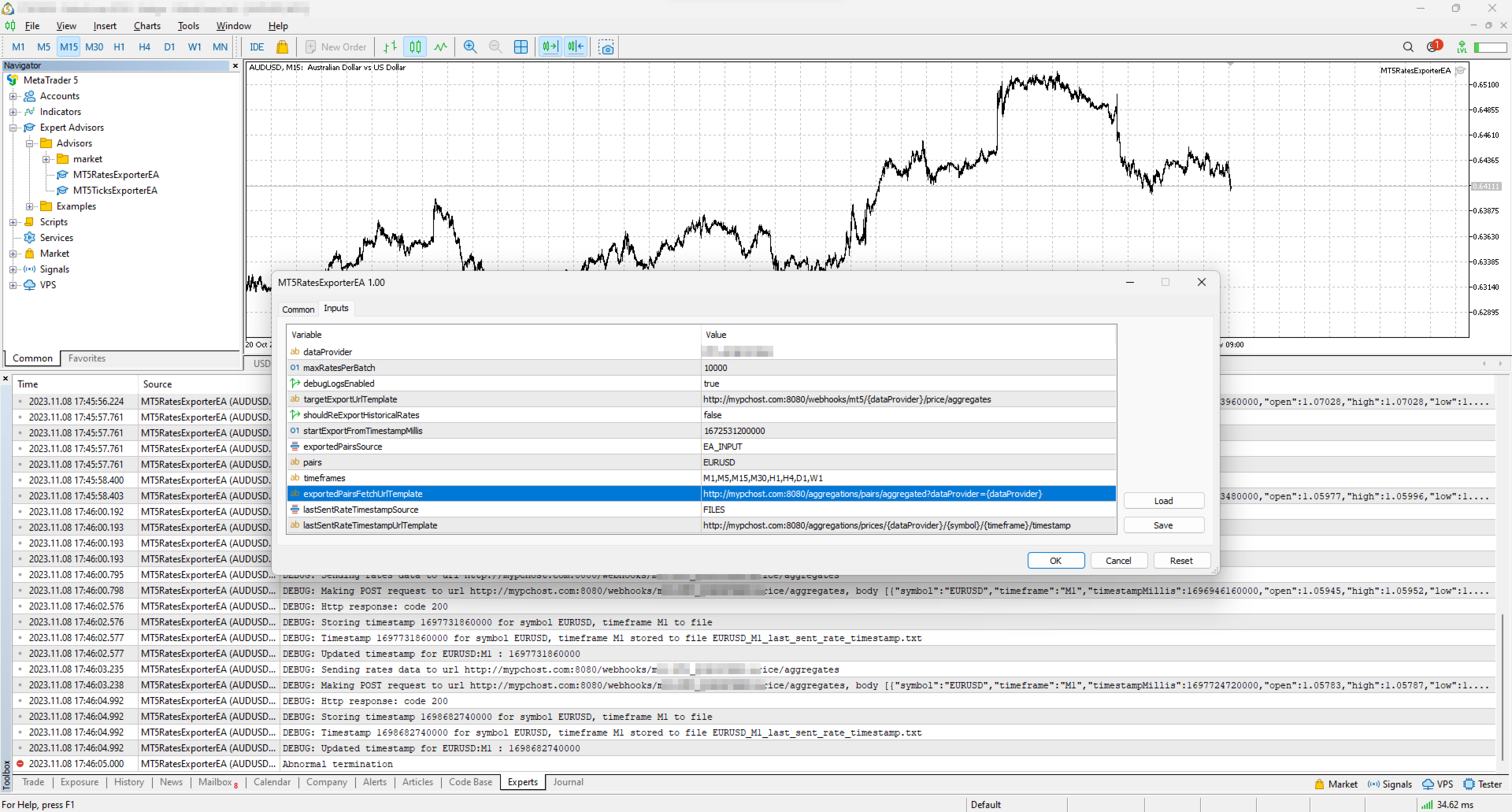
Input Description Default
dataProvider Specifies the name of the data provider.
This name can then be used in URL templates as {dataProvider}.
-
maxRatesPerBatch Maximum number of rates that can be sent in a single batch. 10000 rates
debugLogsEnabled Whether to enable debug logs. false
targetExportUrlTemplate URL template for the endpoint where the rates data will be sent.
Supported placeholders: dataProvider.
-
shouldReExportHistoricalRates Option to re-export rates starting from a specific value, as specified in the startExportFromTimestampMillis input. false
startExportFromTimestampMillis If shouldReExportHistoricalRates is set to true, rates will be sent starting from the timestamp specified in milliseconds (on the server clock, the time the terminal shows). 1672531200000 (2023-01-01 00:00:00)
exportedSymbolsSource Source for the symbols for which rates will be exported. Options are: 'HTTP_ENDPOINT' or 'EA_INPUT'. EA_INPUT
symbols In cases where exportedSymbolsSource is set to 'EA_INPUT', this setting specifies for which symbols rates will be exported. EURUSD,AUDUSD,GBPUSD,USDCAD,USDJPY,USDCHF
timeframes Specifies the timeframes for the rates to be exported. M1,M5,M15,M30,H1,H4,D1,W1
exportedSymbolsFetchUrlTemplate URL template to fetch the symbols. Used in case exportedSymbolsSource='HTTP_ENDPOINT'.
Supported placeholders: dataProvider.
-
lastSentRateTimestampSource Source for the timestamp of the last sent rate. Options are: 'HTTP_ENDPOINT' or 'FILES'. FILES
lastSentRateTimestampUrlTemplate URL template to fetch/store the timestamp of the last sent rate. Used in case lastSentRateTimestampSource='HTTP_ENDPOINT'.
Supported placeholders: dataProvider, symbol, timeframe.
-
serverTimeZoneMode The server clock, used to convert candle times to UTC. AUTO (default) detects the server clock; or choose it explicitly: US_DST (New York close), EU_DST (Eastern European), NO_DST, MANUAL (manualServerGmtOffsetMinutes) — an explicit choice gives exact timestamps for the whole history. AUTO
manualServerGmtOffsetMinutes Server offset from GMT in minutes, used with MANUAL. 120

EA Workflow Description

Upon initialization, the Expert Advisor (EA) performs the following operations:

  1. Reset Offset Check: The EA checks the shouldReExportHistoricalRates variable to determine if there's a need to export historical rates data from a specific timestamp. If a re-export is required, it:

    • Establishes the startExportFromTimestampMillis value as the new timestamp offset.
    • Saves this offset securely, either locally in a file or by sending it to a designated HTTP endpoint, based on the configuration set by lastSentRateTimestampSource.
  2. Periodic Rates Data Harvesting and Sending: The EA is programmed with a timer set to activate every 10 seconds. Upon each activation, the EA:

    • Requests rates data from the broker, starting from the last stored offset (the most recent rate timestamp) to the present moment. Only closed candles are sent: the candle that is still forming is sent after it closes.
    • Converts the acquired rates data into JSON and sends it to the predefined URL derived from the targetExportUrlTemplate input.

By executing these steps, the EA ensures a continuous and automated stream of the most recent rates data for external use, keeping your application or analysis tools supplied with up-to-the-minute market information.

Usage

Below are the minimum actions required for the EA to start exporting rates to your configured URL:

  • Implement an HTTP endpoint that handles a POST request on a URL derived from the targetExportUrlTemplate. This endpoint should:

    • Accept rates data with the JSON structure described below.
    • Respond with a 200 status code if the reception is successful.
  • Allow the terminal to send data to your server: open Tools > Options > Expert Advisors, tick the box "Allow WebRequest for listed URL" and add your server address, e.g. https://data.example.com.

    • If you are testing locally on localhost, create a hostname in 'C:\Windows\System32\drivers\etc\hosts' on Windows or '/etc/hosts' on Linux-based systems. Use this hostname in the targetExportUrlTemplate.
  • Attach the EA to any chart in the terminal and configure the following inputs:

    • dataProvider and targetExportUrlTemplate: required; the EA does not start without them.
    • startExportFromTimestampMillis: set the timestamp from which you need to get rates.
    • symbols and timeframes: the symbols and timeframes you need rates for.
    • shouldReExportHistoricalRates: this must be set to true on the first run so that the EA creates all necessary files for tracking the last sent rate timestamp. After the first run set it back to false, otherwise every restart sends everything again from startExportFromTimestampMillis.

Note: the EA does not work in the Strategy Tester, because the tester blocks sending data over the internet.

Offset Management

The EA maintains the timestamp (offset) of the last successfully sent rate in order to continue the export process in the event of disruptions or a terminal restart.
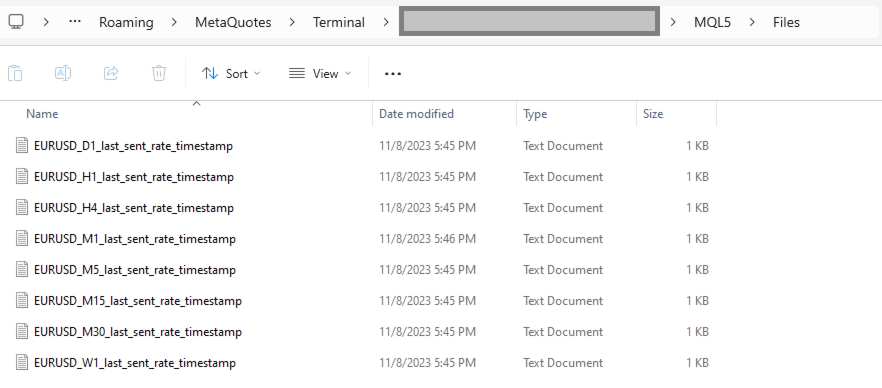
By default, timestamps are stored in files that are automatically created in the terminal's MQL5\Files folder. There is a separate file for each symbol and timeframe.

Additionally, there is an option to use separate HTTP endpoints for reading/storing the offset instead of files.
To use this feature, set lastSentRateTimestampSource to 'HTTP_ENDPOINT' and implement HTTP endpoints based on the URL defined in lastSentRateTimestampUrlTemplate.
As a backend solution, you can choose to store offsets in a database (such as PostgreSQL). If you need to re-export rates for a specific symbol, you would only need to update the timestamp values in the database table.

What the offset is. The offset is the open time of the last delivered candle, in milliseconds since 1970-01-01 on the broker's server clock (the time the terminal shows), not UTC. If you keep offsets on your server, return exactly the number the EA posted.

Exported Symbols Management

By default, the EA uses the input symbols to determine for which symbols rates need to be exported.
However, there is also an option to retrieve the list of symbols from a separate HTTP endpoint.
To utilize this feature, set exportedSymbolsSource to 'HTTP_ENDPOINT' and implement an endpoint using the URL defined in exportedSymbolsFetchUrlTemplate.

EA External Management

If you set both lastSentRateTimestampSource and exportedSymbolsSource to 'HTTP_ENDPOINT', then the EA can be fully controlled externally:

  • You can initiate re-export for specific symbols without needing to perform any actions in the terminal.
  • You can specify which symbols to export without having to change the inputs in the terminal.

REST API Specification for Application Integration

HTTP Endpoint Description Method Request Response
targetExportUrlTemplate URL for sending rates data.
timestampMillis is the candle open time in UTC; spread is in points.
POST Headers:
Content-Type: application/json
Body
[
  {
    "symbol": "EURUSD",
    "timeframe": "H1",
    "timestampMillis": 1670000400000,
    "open": 1.12345,
    "high": 1.12500,
    "low": 1.12200,
    "close": 1.12400,
    "tickVolume": 1234,
    "spread": 12,
    "realVolume": 0
  },
  ...
]
Response Code 200 in case rates are obtained successfully
exportedSymbolsFetchUrlTemplate The URL is used to retrieve the list of symbols that the EA will export to the URL derived from 'targetExportUrlTemplate'. GET   Headers:
Content-Type: text/plain
Body (comma separated list of symbols)
EURUSD,GBPUSD,AUDUSD,BTCUSD
lastSentRateTimestampUrlTemplate The URL is utilized to fetch the specific timestamp from which the export process should begin.
The body is the offset exactly as the EA posted it.
GET   Headers:
Content-Type: text/plain
Body
1625135912000
lastSentRateTimestampUrlTemplate The URL is used to store the timestamp of the last successful POST request made to the URL derived from 'targetExportUrlTemplate'.
The body is the offset.
POST Headers:
Content-Type: text/plain
Body
1625135912000
 

Free version (NZDUSD only)

Tags: rates, rate, price, price aggregate, stream, streaming, export, exporting, webhook, webhooks, integration, http, rest, forex, crypto, data, historical, realtime, rest api, provider, data feed, ohlc
Produtos recomendados
GDS Renko Pip ST Chart - Pip-Based Renko Chart Indicator for MetaTrader 5 GDS Renko Pip ST Chart is a pip-based Renko chart indicator for MetaTrader 5. It helps traders build and study cleaner Renko price movement using a practical fixed pip or point-based brick structure. This tool is designed as a Renko chart foundation for manual analysis. It does not predict the market, does not generate buy or sell signals and does not decide whether a trade should be opened. Renko EDGE EA Golden Delta | A
FREE
This indicator is especially for the binary trading. Time frame is 1 minutes and exp time 5 or 3 minutes only. You must be use martingale 3 step. So you must put lots size is 10 % at most. You should use Mt2 trading platform to connect with my indicator to get more signal without human working. This indicator wining rate is over 80% but you may get 100% of profit by using martingale 3 step. You should use MT2 Trading Platform to connect meta trader platform and binary platform . You can get mt2
FREE
Introducing   Order Blocks Breaker , a brand-new way to identify and leverage order blocks in your trading strategy. After developing multiple order block tools with unique concepts, I’m proud to present this tool that takes things to the next level. Unlike previous tools,   Order Blocks Breaker   not only identifies order blocks but also highlights   Breaker Order Blocks —key areas where the price is likely to retest after a breakout. MT4 -  https://www.mql5.com/en/market/product/124101/ This t
Donchian Breakout And Rsi
Mattia Impicciatore
4.33 (3)
Descrição geral Este indicador é uma versão aprimorada do Canal Donchian clássico, enriquecida com funções práticas para o trading real. Além das três linhas padrão (máxima, mínima e linha do meio), o sistema detecta breakouts e os mostra visualmente com setas no gráfico, exibindo apenas a linha oposta à direção da tendência atual para uma leitura mais limpa. O indicador inclui: Sinais visuais : setas coloridas nos breakouts Notificações automáticas : alerta pop-up, push e e-mail Filtro RSI : pa
FREE
Renko Perfection Indicator You will receive lifetime free upgrades and updates from us. You will also receive support via comments. Introdução e Visão Geral O Renko Perfection Indicator é um indicador para MetaTrader 5 (MT5) projetado para filtrar o ruído do mercado e focar puramente no movimento do preço. Ao contrário dos gráficos tradicionais, ele constrói blocos Renko apenas quando o preço se move uma quantidade predefinida, ignorando o tempo. Isso fornece uma visão mais clara da estrutura do
Real-Time Spread Display Tool A   real-time spread display tool   is a specialized software or application designed to provide traders and investors with instant, live data on the   spread —the difference between the bid price (the price at which buyers are willing to purchase an asset) and the ask price (the price at which sellers are willing to sell it)—for various financial instruments. This tool is critical in markets such as forex (FX), stocks, futures, and cryptocurrencies, where price f
Renko subwindow
Alexandre Vincent Traber
Overview Renko SubWindow desenha um gráfico Renko em velas coloridas numa janela de indicador separada, sem afetar o gráfico principal. O tamanho do tijolo pode ser fixo em pontos ou calculado dinamicamente via ATR para tijolos adaptativos baseados na volatilidade. How it works Reconstrói os tijolos Renko a partir dos preços de fecho do símbolo/timeframe atual. Um novo tijolo é formado quando o preço ultrapassa o tamanho definido a partir do fecho do tijolo anterior. Os tijolos são representado
FREE
Renko Chart
Marcin Konieczny
3.5 (10)
This indicator allows to display Renko charts in the indicator window. Renko charts show only price movements that are bigger than the specified box size. It helps to eliminate noise and allows to focus on main trends. Time is not a factor here. Only price movements are taken into account. That's why Renko chart is not synchronized with the main chart it is attached to. Indicator works in two modes: CLOSE - only close prices are taken into account while building the chart HIGH_LOW - only high/l
FREE
Indicador Crypto_Forex "WPR com 2 Médias Móveis" para MT5, sem repintura. - O WPR em si é um dos melhores osciladores para scalping. - O indicador "WPR e 2 Médias Móveis" permite visualizar as Médias Móveis Rápida e Lenta do oscilador WPR. - O indicador oferece oportunidades para identificar correções de preço muito cedo. - É muito fácil configurar este indicador através de parâmetros, podendo ser usado em qualquer período gráfico. - Você pode ver as condições de entrada de compra e venda nas
This utility EA will display simple renko, hence the name essential renko. The renko will be shown in a new tab and using custom symbol. Please do note (especially for those who new to Renko), that Renko does not follow timeline as it will follow price movement. That's why it has a lot of potential where you can attach any EA that you want and use any custom indicator in this new custom symbol for renko. Always use M1 timeframe. Most of the time you don't need to change anything. But if you d
FREE
Five Minute Drive
Kenan Ozkarakas
5 (2)
"Five Minute Drive" indicator that is designed to be used in the 5 minute timeframe only. One of its most important advantages is that it shows the general trend in the upper time frames when looking at the 5-minute timeframe. Therefore, when opening positions in the 5 minute timeframe, when it is in line with the trends in the upper timeframes, you are less likely to be upside down. If you can interpret the curvilinear and linear lines drawn by this indicator on the graphic screen with your geo
FREE
GDS Renko Pip ST - Fixed Brick Renko Chart Tool for MetaTrader 5 GDS Renko Pip ST is a Renko chart tool for MetaTrader 5 designed for traders who want to build and study fixed brick Renko movement using a practical pip or point-based setup. The purpose of this tool is simple: create a cleaner Renko structure so the trader can observe direction, brick runs, pullbacks, support and resistance behavior without normal candle noise. This is not a signal indicator and it does not predict the market. It
FREE
DESCRIPTION: Position Size Calculator — On-Chart Risk Management Tool Never risk too much on a single trade again. This calculator displays real-time position sizing for 3 risk levels simultaneously, calculated from your live account balance and current ATR-based stop loss distance. DISPLAYS 3 RISK SCENARIOS AT ONCE: Risk Level 1 (1%): Risk amount in dollars + Lot size Risk Level 2 (2%): Risk amount in dollars + Lot size Risk Level 3 (3%): Risk amount in dollars + Lot size All lot sizes are dyna
FREE
GDS Renko Matrix - Free Multi-Scale Renko Overview Indicator for MetaTrader 5 GDS Renko Matrix is a free multi-scale Renko overview indicator for MetaTrader 5. It helps traders monitor Renko structure, direction and chart context in a compact matrix-style view. The purpose of this tool is to provide a faster visual overview of Renko behavior without turning the chart into a signal system. It does not predict the market and does not generate buy or sell signals. Renko EDGE EA Golden Delta | Alg
FREE
Ping-Monitor — Never Miss a Tick Again! Do you run EAs and worry about silent chart freezes or data feed stalls ?  This utility is your ultimate watchdog, alerting you the moment your charts stop receiving updates. Ping-Monitor is designed to detect when a chart freezes or the data feed stalls, even if MT5 still shows that the connection is active. It works by tracking the time of the last incoming tick. Every time the chart receives a new price update, the EA records the timestamp. Then, on a
FREE
Renko Chartt
George Njau Ngugi
Smart Adaptive Renko Pro – Dynamic ATR & Fixed Box Renko Indicator Smart Adaptive Renko Pro is a powerful non-time-based Renko indicator designed to eliminate market noise and reveal true price momentum with precision. Unlike standard chart candles, this indicator builds Renko bricks based purely on price movement — helping traders focus on trend strength, reversals, and clean breakout structures. Key Features Adaptive ATR-Based Box Size (Auto-adjusts to market volatility) Fixed Pip Box M
Donker Guard
Muhammad Karman Kadir
Automatic Stop Loss and Take Profit for your manual trades. Choose the distance in price, points, pips, percent, ATR or money. Works on any symbol. Never opens trades. Donker Guard makes sure every manual position gets a Stop Loss and a Take Profit, even when you open trades in a hurry from your phone, the one-click panel or the order window. Attach it to a chart once, and every new position is protected within a fraction of a second. The EA is completely passive: on a live or demo account it
FREE
This is the copier module for the TradeCoach system. It is free with the purchase of our 3 in 1 trade sorting and distribution system. This piece is intended for any trades that you make through the system to be copied to any other accounts you are in charge of Add them to as many accounts as your VPS will allow. This Trade Copier Links to the TradeCoach system found here:
FREE
JT360 DNA Mini PnL Pointer V1.04 Public Compacto. Claro. Sempre à vista. O JT360 DNA Mini PnL Pointer é um indicador leve para MetaTrader 5 que apresenta o lucro ou prejuízo flutuante agregado de todas as posições abertas no símbolo do gráfico atual. O seu design compacto combina o PnL baseado no risco, expresso em R, uma pequena barra visual e uma matriz de cores configurável. As cores características da JT360 — turquesa e magenta — destacam os valores extremos e facilitam a identificação rápid
FREE
Indicator Description 4 Hull MA Color + Envelopes is a powerful trend-following indicator for MetaTrader 5 that combines four Hull Moving Averages (HMA) with Moving Average Envelopes to clearly identify market direction, trend strength, and potential reversal or pullback zones. This indicator is designed to reduce noise, react quickly to price movement, and provide a clean visual structure for professional trading.   Key Features   4 Hull Moving Averages (20, 50, 100, 200) Automatic color change
FREE
Aggression Volume Profile
Edson Cavalca Junior
4.55 (11)
Esse indicador plota no gráfico o perfil de volume por Preço Há 5 formas de visualização: Por Volume Total negociado;  (Premium Version); Volume em Ticks (Forex);  Separado por Compradores e Vendedores;  (Premium Version); Somente Compradores;  (Premium Version); Somente Vendedores e;  (Premium Version); Saldo de negócios (Compradores - Vendedores).  (Premium Version); É possível selecionar quantos dias será calculado os perfis. (Premium Version); No dia atual ele recalcula os dados do histog
FREE
DF Fib Trader Pro O DF Fib Trader Pro é um sistema de negociação automatizado desenvolvido para o MetaTrader 5. Utiliza níveis de preços baseados em Fibonacci combinados com análise de tendências e estrutura para definir pontos de entrada e saída. O EA suporta posições longas e curtas e inclui parâmetros de gestão de risco integrados. Principais Recursos: • Utiliza a lógica de retração e extensão de Fibonacci para traçar pontos de entrada, SL e TP. • Tamanho de lote e níveis de stop loss/take
FREE
FoxWave Volume Suite combines three essential volume-based tools into a single indicator: a horizontal Volume Profile with Point of Control and Value Area, a real-time volume spike detector with instant alerts, and a buy/sell pressure delta gauge. No need to run three separate indicators — everything you need to read volume is in one clean Fox Wave panel. What it does Volume Profile (POC / VAH / VAL) Builds a horizontal histogram showing how much volume traded at each price level over your cho
NQX Flag Continuation Daily Bias é um indicador de sinais para MetaTrader 5: sinais de continuação em bandeira (só sinaliza na direção do viés diário). Lógica NQX proprietária que detecta uma bandeira curta que retoma o impulso. Só sinaliza na direção do viés diário. Desenha a entrada sugerida, um stop curto e alvos longos (3:1, 5:1, 10:1, até 20:1 no swing); você decide. O que ele desenha no gráfico - Uma seta no candle de sinal fechado (nunca repinta um sinal fechado). - A entrada sugerida, um
Este indicador irá espelhar os ativos em uso em outro metatrader, podendo escolher o timeframe e um template. Esta é a versão Cliente MT5, e precisa da versão Server do Metatrader 4 ou 5: Metatrader 4 Mirror Chart Server:  https://www.mql5.com/en/market/product/88644 Metatrader 5 Mirror Chart Server:   https://www.mql5.com/en/market/product/88652 Detalhes de como funciona no vídeo.
FREE
Are you tired of drawing trendlines every time you're analyzing charts? Or perhaps you would like more consistency in your technical analysis. Then this is for you. This indicator will draw trend lines automatically when dropped on a chart. How it works Works similar to standard deviation channel found on mt4 and mt5. It has 2 parameters: 1. Starting Bar 2. Number of bars for calculation The   starting bar   is the bar which drawing of the trend lines will begin, while the   number of bars for c
FREE
CosmiCLab SMC FIBO CosmiCLab SMC FIBO is a professional trading indicator designed for traders who use Smart Money Concepts (SMC), market structure analysis and Fibonacci retracement levels. The indicator automatically detects market swings and builds Fibonacci levels based on the latest impulse movement. It also identifies market structure changes such as BOS (Break of Structure) and CHOCH (Change of Character), helping traders understand the current market direction. CosmiCLab SMC FIBO also pr
FvgGold Fair Value Gap EA for XAUUSD
Fouad Ben Ennaceur Ben Salem Raissi
FvgGold — Fair Value Gap EA for XAUUSD FvgGold is an Expert Advisor for MetaTrader 5 designed for automated trading on Gold (XAUUSD). It combines Fair Value Gap (FVG) detection, optional Order Block confluence, higher-timeframe trend filtering, and configurable trading-session controls. The EA evaluates detected price imbalances using configurable criteria and assigns a score to each setup. Trades are considered only when the configured filters and minimum score requirements are satisfied. Strat
FREE
Important Lines
Terence Gronowski
4.88 (24)
This indicator displays Pivot-Lines, preday high and low, preday close and the minimum and maximum of the previous hour. You just have to put this single indicator to the chart to have all these important lines, no need to setup many single indicators. Why certain lines are important Preday high and low : These are watched by traders who trade in a daily chart. Very often, if price climbs over or falls under a preday low/high there is an acceleration in buying/selling. It is a breakout out of a
FREE
Backstop enforces the two rules that end funded accounts. A daily loss limit and a maximum loss limit, applied to everything on the account — every Expert Advisor, every symbol, and every trade you place by hand. Attach it to any one chart and it governs the whole terminal. It does not trade. It has no strategy, no signals and no opinion about the market. It is a governor. What it does Daily loss limit — measured from balance at the reset, equity at the reset, or a fixed account size. Firms diff
FREE
Os compradores deste produto também adquirem
Trade Assistant MT5
Evgeniy Kravchenko
4.43 (216)
Ajuda a calcular o risco por comércio, a fácil instalação de uma nova encomenda, gestão de encomendas com funções de fecho parcial, trailing stop de 7 tipos e outras funções úteis. Materiais e instruções adicionais Instruções de instalação   -   Instruções para a aplicação   Função de linha Mostra no gráfico a linha de Abertura, Stop Loss, Take Profit. Com esta função é fácil definir uma nova ordem e ver as suas características adicionais antes da abertura.   Gestão de risco A função de cálcul
Bem-vindo ao Trade Manager EA—uma ferramenta de gestão de risco criada para tornar o trading mais intuitivo, preciso e eficiente. Não é apenas uma ferramenta para executar ordens, mas uma solução abrangente para planejamento de operações, gerenciamento de posições e controle de risco. Seja você um iniciante, trader avançado ou scalper que precisa de execução rápida, o Trade Manager EA adapta-se às suas necessidades, oferecendo flexibilidade em todos os mercados, desde forex e índices até commodi
Black Week: compra por 69.99 USD. A oferta termina na sexta-feira, 27 de novembro. O Telegram to MT5 Multi-Channel Copier copia automaticamente os sinais de trading dos seus canais de Telegram e Discord diretamente para o MetaTrader 5. Sem bots, sem extensões de navegador, sem copiar à mão. O sinal chega ao Telegram ou ao Discord e o EA abre a operação no seu terminal em poucos segundos. E antes de copiar um canal, o backtester integrado mostra o que esse canal teria feito na sua conta. O produt
Farmed Hedge Yield Farming | All Markets (Manual - Hybrid - Semi/Automated EA) VERIFIED TRADING RESULTS - Farmed Hedge Yield Axi Copy:  https://www.mql5.com/en/signals/2356376 - Farmed Hedge Yield Exn Copy:   https://www.mql5.com/en/signals/2356404 - Farmed Hedge Yield V Copy:  https://www.mql5.com/en/signals/2357156 IMPORTANT NOTICE: FarmedHedge is a MANUAL-FOCUSED TRADING UTILITY ,not a fully automated EA. Results shown on this Signal include manual trades and overall strategic management.
EA Overfitter
Stephen J Martret
5 (5)
That backtest looks great. But will it still be making money tomorrow, next week, next month? EA Overfitter re-runs your EA on 100 price histories it has never seen. One score tells you if the edge is real. A backtest tells you what an EA did on one price history — the one that happened to occur. What you cannot tell from it is how much of that result was the strategy and how much was the particular path. EA Overfitter answers that. It builds up to 100 synthetic price histories your EA has n
TradePanel MT5
Alfiya Fazylova
4.89 (175)
Trade Panel é um assistente de negociação multifuncional. O aplicativo contém mais de 50 funções de negociação para trading manual e permite automatizar a maioria das tarefas de negociação. Instruções para o aplicativo: https://www.mql5.com/pt/blogs/post/762435 Versão de teste do aplicativo para conta demo: https://www.mql5.com/pt/blogs/post/762547 Como instalar o aplicativo: https://www.mql5.com/pt/blogs/post/762548 Como testar o aplicativo no modo visual: https://www.mql5.com/pt/blogs/post/770
Copie sinais do Telegram com suas próprias regras de negociação Telegram to MT5 Signal Trader copia automaticamente sinais de negociação em texto de canais e grupos públicos e privados do Telegram para o MetaTrader 5. Gerencie vários provedores e contas MT5 em um único aplicativo para desktop, com configurações individuais de risco e de negociação para cada provedor . Você não precisa de um bot do Telegram nem configurar uma API para copiar sinais. Basta entrar com sua própria conta do Telegram
AI Agent Supervisor is NOT an Expert Advisor. AI Agent Supervisor   is a   multi-agent AI risk & portfolio supervisor   that watches every EA on your account and intervenes in real time.  WANT AN AI PORTFOLIO MANAGER WATCHING YOUR FLEET 24/7?   Run your fleet on the same brokers I do:   IC MARKETS , IC TRADING   .  Unlike the centralized stock market, Forex has no single, unified price feed.  Every broker sources liquidity from different providers, creating unique data streams. The Supervisor r
================================================================================ POC BREAKOUT - V20.72. Full Professional Grade Toolkit ================================================================================ POC Breakout is a full MetaTrader 5 trading dashboard for discretionary traders who want breakout signals, Point of Control (POC) context, volume profiles, order flow, market structure, news, alerts, and advanced trade planning in one professional workspace. Attached directly to you
Unlimited Trade Copier Pro MT5 is a tool to copy trade remotely to multiple MT4, MT5 and cTrader accounts at different computers/locations over internet. This is an ideal solution for you if you are a signal provider and want to copy your trades to other receivers globally on your own rules. One provider can copy trades to multiple receivers and one receiver can get trade from multiple providers as well. The provider can even set the subscription expiry for each receiver, so that receiver will n
News Trade EA MT5
Konstantin Kulikov
4.55 (11)
Apresento um robô útil que eu mesmo uso há vários anos. Pode ser usado nos modos semiautomático e totalmente automático. >>> Chat <<< O programa contém configurações flexíveis para negociação nas notícias do calendário econômico. Não pode ser verificado no testador de estratégia. Somente trabalho real. Descarregue o ficheiro mais recente de definições: https://www.mql5.com/en/blogs/post/747929 Monitorização de sinais: https://www.mql5.com/en/signals/author/test-standart Ao criar suas próprias
The product will copy all telegram signal to MT5 ( which you are member) , also it can work as remote copier.  Easy to set up, copy order instant, can work with almost signal formats, image signal,  s upport to translate other language to English Work with all type of channel or group, even channel have "Restrict Saving Content", work with  multi channel, multi MT5 Work as remote copier: with signal have ticket number, it will copy exactly via ticket number. Support to backtest signal. How to s
Astro Trade MT5
Indra Maulana
5 (8)
25% discount on the release of the tool: only for the next 3 buyers Send a message to receive a demo version. AstroTrade Trading Assistant AstroTrade is a comprehensive multi-functional trading utility developed for the MetaTrader 5 platform. It integrates essential tools for trade execution, risk management, and technical monitoring into a single unified interface. The application is designed to assist traders in managing their daily operations through a visual and structured environment. Vi
News Filter EA
Rashed Samir
5 (2)
News Filter EA: Advanced Algo Trading Assistant News Filter EA is an advanced algo trading assistant designed to enhance your trading experience. By using the News Filter EA , you can integrate a Forex economic news filter into your existing expert advisor, even if you do not have access to its source code. In addition to the news filter, you can also specify trading days and hours for your expert. The News Filter EA also includes risk management  and equity protection features. MT4 Version Ma
Power Candles Strategy Scanner: localizador de setups multissímbolo que se otimiza sozinho Um scanner que apita a cada tremida ensina você a ignorá-lo. Um fechamento de vela agitado, alerta atrás de alerta, e o único setup que você realmente opera se afoga no ruído. Power Candles Strategy Scanner roda o motor auto-otimizável do Power Candles em cada símbolo da sua Market Watch e só alerta sobre o que passa pelos seus próprios filtros: a força da última vela fechada, a relação retorno/risco do se
Encontrou um ótimo sinal, mas o lote de um provedor é muito pequeno? Você precisa de um volume de posição maior, mas as configurações do terminal são muito ruins? O Signal Lot Manager aumentará o volume da posição do provedor por meio de uma ordem duplicada do volume necessário. Basta definir um tamanho de lote e um nome de sinal para copiar pedidos. O Signal Lot Manager é um utilitário multiplicador de lotes para duplicar pedidos em seu terminal. A fonte pode ser selecionada por qualquer consul
Expert advisor de order block, BOS e ChoCH para MetaTrader 5, com alertas no Telegram SMC Trade Pilot MT5 lê a estrutura de mercado no seu gráfico e envia o sinal para o Telegram. Marca os rompimentos de estrutura (BOS) e as mudanças de caráter (ChoCH), desenha order blocks com pontuação de força , acompanha os fair value gaps (FVG) e os liquidity sweeps, mostra um volume profile com point of control, value area high e value area low, e resume tudo num painel compacto com módulo multi-tempo gráf
Trade Manager DashPlus
Henry Lyubomir Wallace
4.85 (13)
DashPlus é uma ferramenta avançada de gerenciamento de operações projetada para melhorar a eficiência e a eficácia das suas transações na plataforma MetaTrader 5. Ela oferece um conjunto completo de funcionalidades, incluindo cálculo de risco, gestão de ordens, sistemas de grade avançados, ferramentas baseadas em gráficos e análise de desempenho. Principais Funcionalidades 1. Grade de Recuperação Implementa um sistema de grade flexível e de média para gerenciar operações em condições adversas de
KT Equity Protector MT5
KEENBASE SOFTWARE SOLUTIONS
3.6 (5)
An equity protection EA for MetaTrader that enforces your loss limits and profit target for you: when your account reaches a rule you set, it closes your trades on every symbol, before one bad day turns into a lost account. It suits prop firm challenges and personal accounts alike. Attach it to one chart, answer a few questions in the on-chart setup wizard, and it watches your whole account in the background while you trade by hand or with other EAs. What it protects Daily loss limit: a percenta
Custom Alerts: Monitore vários mercados e não perca nenhuma oportunidade importante Visão geral Custom Alerts é uma solução dinâmica para traders que desejam monitorar configurações potenciais em vários instrumentos a partir de um único local. Integrando dados de nossas ferramentas principais — como FX Power, FX Volume, FX Dynamic, FX Levels e IX Power — o Custom Alerts notifica automaticamente sobre movimentos importantes do mercado, sem a necessidade de alternar entre diversos gráficos ou pe
Assistente de Trading no Gráfico e Painel de Gestão de Risco Ferramenta completa no gráfico com Stop Loss (SL) e Take Profit (TP) multimodo (ATR, R:R, pontos, moeda da conta), análises em tempo real e calendário econômico O Ergotick Trade Manager é um painel de trading profissional tudo-em-um, desenvolvido para traders discricionários, traders em avaliação de mesa proprietária (prop firms) e scalpers. Ele combina cálculos automáticos e instantâneos de tamanho de lote, configurações multimodo de
Conheça o seu risco antes de clicar. Gerencie a operação depois. Arraste as linhas, clique em BUY ou SELL e o tamanho do lote é calculado para você. Depois, gerencie a operação com break even, fechamento parcial, múltiplos alvos e mais. O Mercurial Position Sizing PRO é uma ferramenta MT5 para traders manuais. Ele calcula o lote correto com base no seu saldo, no seu percentual de risco e na distância do stop loss, e depois abre a operação com SL e TP já definidos. Inclui tudo o que a versão gra
Os sinais dos seus canais do Telegram, copiados para o MetaTrader 4 e o MetaTrader 5 em poucos segundos. O TradingMind Signal Bridge lê os canais e grupos que você escolhe, reconhece cada sinal com regras rápidas embutidas, repassa os mais bagunçados a um modelo de IA, incluindo sinais publicados como capturas de tela, e entrega a ordem a um expert advisor no seu terminal. Um filtro de notícias, a proteção de contas de mesa proprietária e um bot do Telegram para controle remoto garantem que a de
VirtualTradePad PRO SE MT5 — centro profissional de controle de trading para MetaTrader 5 VirtualTradePad PRO SE é um painel de trading premium baseado no gráfico e um ambiente de gerenciamento de operações para MetaTrader 5 . Ele foi desenvolvido para traders que desejam execução mais rápida, controle de posições mais claro, gerenciamento de trades estruturado, planejamento visual de níveis e um fluxo de trabalho profissional diretamente no gráfico. Não é apenas um painel de COMPRA / VENDA. O P
Prop Guardian Risk Manager MT5 – Drawdown, Risk & Hedge Protection for Prop Firm and Managed Accounts Prop Guardian Risk Manager is a professional risk-control utility for MetaTrader 5, designed for prop firm traders, money managers and anyone who wants strict account-level risk protection. It does not generate trading signals, strategy entries or trading decisions. Instead, it runs in the background, monitors your account risk and can automatically block new exposure, close managed positions or
Próxima Atualização — Versão 2.52 em Breve! [NOVO] Prepare-se para 4 Grandes Novos Recursos Projetados para Aprimorar sua Análise de Mercado e seu Fluxo de Trabalho de Trading Estamos levando a análise de mercado a um novo nível com 4 novos recursos desenvolvidos para atender às suas necessidades de trading. Apresentamos: 1. TRADE OVERVIEW DASHBOARD 2. CONFLUENCE AT ZONE 3. STRONG & WEAK HIGH/LOW 4. OTE 1. TRADE OVERVIEW DASHBOARD Um painel que ajuda você a compreender mais facilmente o panoram
REVDEN AI Desk: Conduza Seu Trading a Partir de Uma Conversa com Sua Própria IA, sobre o Contexto de Mercado do REVDEN Imagine conduzir seu trading a partir de uma única conversa. O REVDEN AI Desk traz isso para o MetaTrader 5: você pergunta à sua própria IA como ela lê o mercado, e ela responde a partir do contexto completo do REVDEN sobre os símbolos que você opera, com o estado de cada um, o quadro de risco e as divulgações que vêm pela frente. As propostas dela chegam com entrada, stop, alvo
MT5 to Telegram MultiChannel Sender   envia automaticamente as suas operações do MetaTrader 5 para o Telegram — para um ou vários canais, grupos ou chats privados. Cada abertura, alteração de SL/TP, fechamento parcial, fechamento e ordem pendente é publicada em segundos, e um painel no gráfico permite gerir um canal completo e um canal limitado a partir da mesma conta. Sem programação e sem preencher parâmetros. Procura a direção contrária, copiar operações do Telegram para o MT5? Veja   Telegra
EA Auditor
Stephen J Martret
5 (7)
EA Auditor is an independent analysis tool for traders evaluating Expert Advisors and trading signals on MetaTrader 5. It audits backtest reports, reviews posted developer signals, and cross-verifies the two against each other to help traders assess strategies before committing capital. The MQL5 market offers a wide range of Expert Advisors from many developers, with varying approaches, quality, and transparency. EA Auditor provides a consistent, data-driven framework for reviewing them, answer
Zentriq Trade Manager
Mark Frederick Siebert
Experience trading without friction. Zentriq Trade Manager is a modern, high-performance trade management utility engineered with a high-DPI canvas interface, anticipatory workflow design, and an integrated Macroeconomic News Filter. Designed for discretionary traders, scalpers, and prop firm traders who demand speed, precision, zero-clutter ergonomics, and automated news event protection. User Manual Get the most out of Zentriq Trade Manager with the complete user manual: Complete User Manual:
Mais do autor
Tick Data HTTP Exporter NZDUSD This free version exports NZDUSD only; the full version, Tick Data HTTP Exporter , exports any symbol. Description The EA turns your terminal into a historical/realtime tick data provider for your application. There are many market data providers on the internet, but in practice, the data provided is not always of good quality. Moreover, these services are often more expensive and typically require monthly subscription fees per each symbol. With this EA, you can fe
FREE
Candle Data HTTP Exporter NZDUSD This free version exports NZDUSD only; the full version, Candle Data HTTP Exporter , exports any symbol. Description The EA turns your terminal into a historical/realtime rates (OHLC, candles) data provider for your application. There are many market data providers on the internet, but in practice, the data provided is not always of good quality. Moreover, these services are often more expensive and typically require monthly subscription fees per each symbol. Wit
FREE
Tick Data HTTP Exporter Description The EA turns your terminal into a historical/realtime tick data provider for your application. There are many market data providers on the internet, but in practice, the data provided is not always of good quality. Moreover, these services are often more expensive and typically require monthly subscription fees per each symbol. With this EA, you can feed your application with exactly the same tick data that you see in the terminal, the same data on which you b
Filtro:
Sem comentários
Responder ao comentário