PropBlaster Copier Duo

PropBlaster Copier Duo - Copy Trades to a Second Account

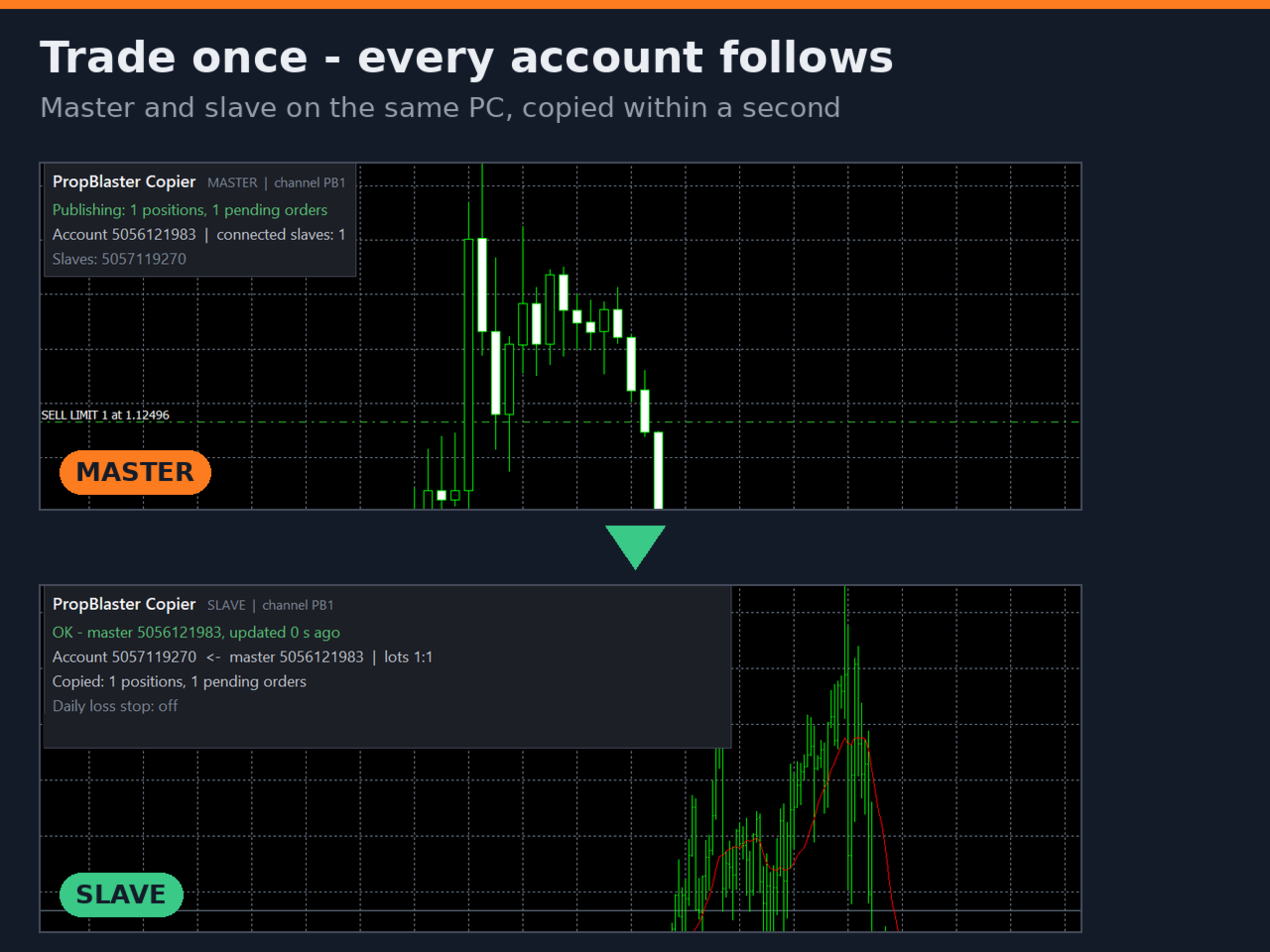
Copy trades from one MT5 account to one other account on the same PC or VPS. Lots 1:1, stop loss, take profit, partial closes and closes are mirrored. One EA for master and slave.

Runs locally - no server, no DLLs, no web requests. It copies trades but does not open trades of its own.

Quick start

1. Give each account its own MetaTrader 5 installation on the same PC or VPS and run both at the same time.
2. Master terminal: drag PropBlaster Copier Duo onto any chart, Mode = MASTER, choose a channel name, allow Algo Trading.
3. Slave terminal: the same EA with Mode = SLAVE and the same channel name, allow Algo Trading. Place a small test trade on the master and watch it appear on the slave.


PropBlaster Copier Duo copies your trades from one MetaTrader 5 account (the master) to one other MT5 account (the slave) on the same computer or VPS.

Attach the same EA to one chart in each terminal: MASTER in the terminal you trade in, SLAVE in the terminal that should copy, with the same channel name on both sides.

What is copied

- New market positions, with the same lot size (1:1)
- Stop loss and take profit, including later changes
- Partial closes and closes

Safety

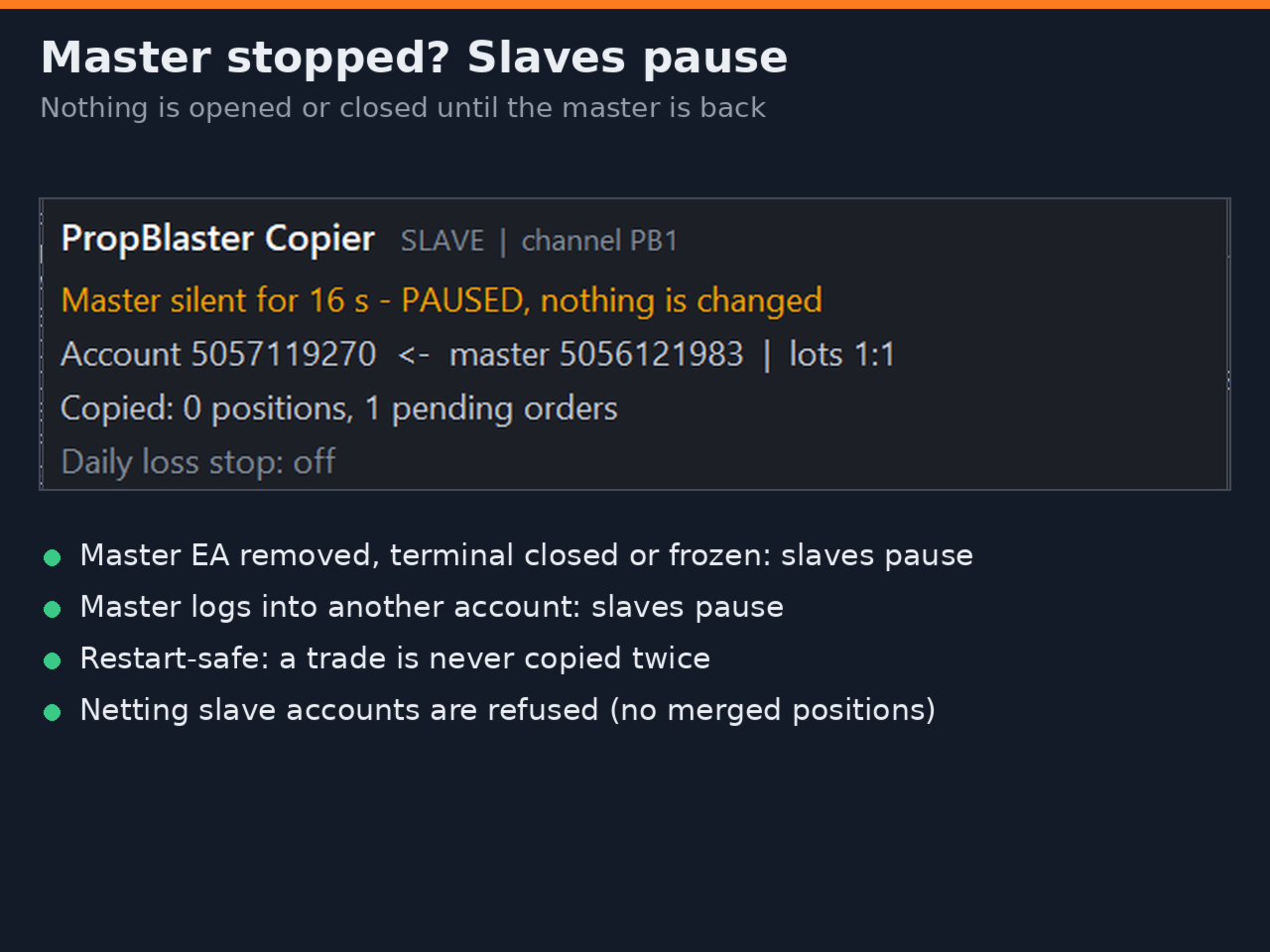
- If the master stops (EA removed, terminal closed or frozen), the slave pauses and changes nothing
- A restart never opens a trade twice
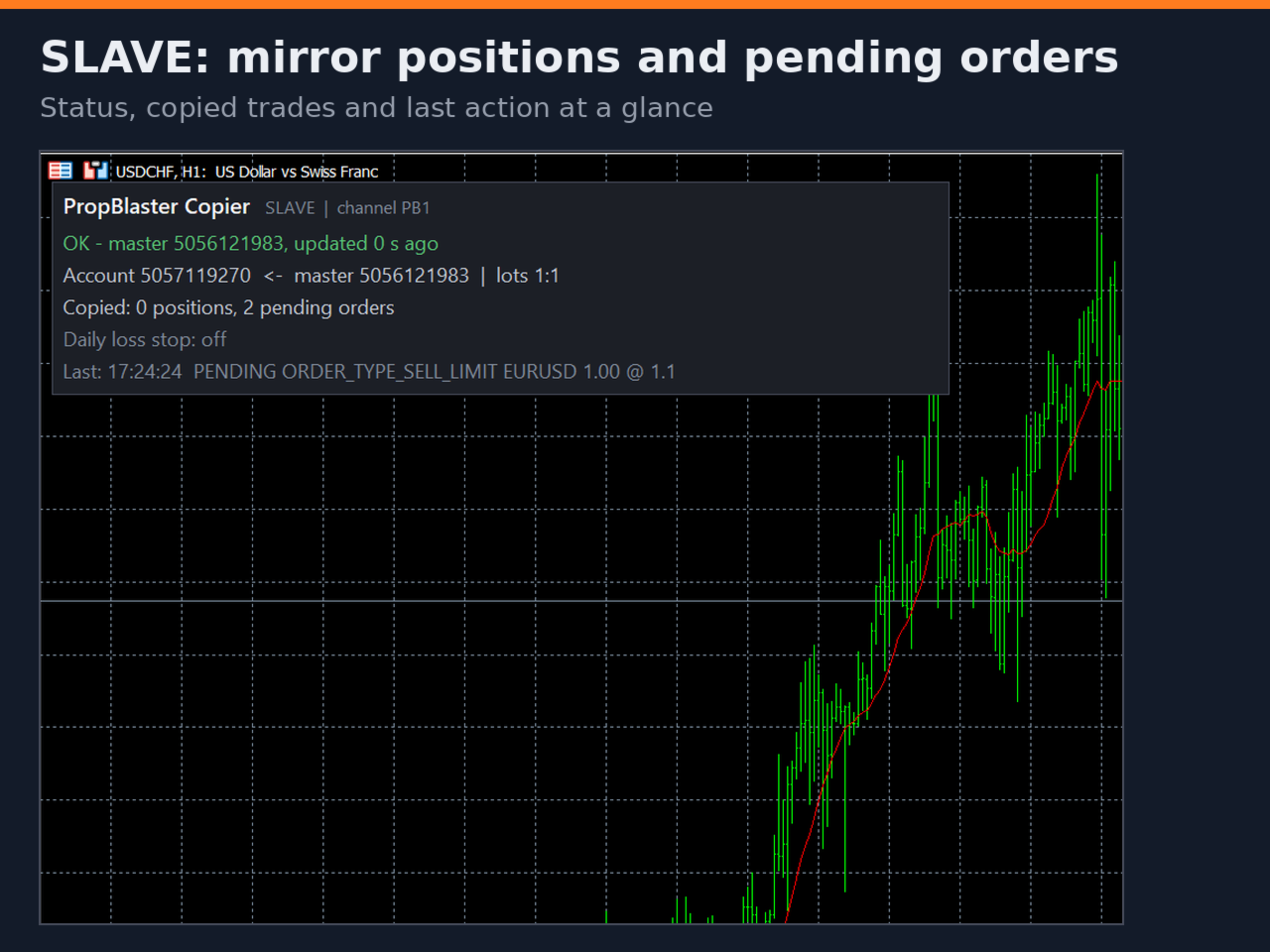
- A panel shows the status, the copied trades and the last action

Requirements

- Both terminals run on the same Windows PC or VPS
- One MetaTrader 5 installation per account. MetaTrader 5 runs only once per installation folder: for a second account at the same broker, run the installer again, click "Settings" instead of "Next" and choose a new folder (for example C:\MT5\Account2)
- The same symbol names on both accounts (for example two accounts at the same broker)
- The slave account must be a hedging account
- No DLLs, no internet connection required

Need more? The full version PropBlaster Copier copies to any number of accounts and adds pending orders, lot scaling (multiplier, fixed lot, balance or equity ratio, risk %), symbol mapping for different brokers, reverse copying, filters and a daily loss stop per account.

Important – please check your prop firm's rules

Many prop firms allow copying only between your own accounts, some do not allow it at all, and copying someone else's trades is usually forbidden. Check the rules of your prop firm before you use a trade copier. Delays and slippage can lead to different results on master and slave. Trading involves risk.

Strategy Tester note

Copying needs two terminals running live. In the Strategy Tester, the EA opens one small demonstration position at a time with stop loss and take profit. This happens only in the tester.

PropBlaster tools for MetaTrader 5

Free: Daily Loss Guard (daily loss limit) · Position Sizer (lot size from your risk) · Copier Duo (one master, one slave) · Stats (trading statistics) · Drawdown Meter (prop firm rule dashboard)
Paid: Guard (prop firm presets and full rule set) · Trade Panel (lot size and trade management) · Copier (any number of accounts) · Stats Pro (breakdown by EA, consistency check, CSV export)
You find them all under "More from author" on this page.

PropBlaster Cockpit is a separate Windows desktop app by the same author: trade journal, rule book and pre-trade check for several accounts. It is not sold in the Market, and this product works without it.

おすすめのプロダクト
Pro Trade Manager Panel は、MetaTrader 5 のチャート上の1つのパネルに手動トレードの流れをまとめます。トレードをビジュアルで計画し、リスクからポジションサイズを自動計算し、注文を出し、管理・保護まで行えます。FX、金属、株価指数などに対応します。 ビジュアルなトレード計画 エントリー、ストップロス、テイクプロフィットのボックスをチャート上に表示し、ドラッグして調整できます。 テイクプロフィットは1〜3段階(ロット分割)。オプションのステップSL:TP1到達後にSLをエントリー価格へ、TP2到達後にTP1へ移動します。 ワンクリックで買い/売りを切り替え。LimitまたはStop注文は自動選択、成行でも発注できます。 ロット、金額リスク、SLまでの距離、リスクリワードをリアルタイム表示します。 複数のトレードプラン(新機能) チャート上に BUY と SELL のプランを最大 8 つ同時に保持できます。各プランは独自のリスク、ロット、分割利確、Step SL を持ちます。 チャート、パネルの一覧、または上部バーでプランをクリックすると編集できます。選択
Account Dashboard は、毎日確認する数値を口座履歴から直接読み取り、1 つの軽量なパネルに表示します。本製品はインジケーターです。口座を読み取るだけで、取引することは決してありません。無料で、制限は一切ありません。 ライブ口座 残高、有効証拠金、含み損益、証拠金維持率、保有エクスポージャー 期間別の成績 本日、今週、今月、および全履歴の純損益 金額と、各期間開始時の残高に対する % で表示(入金と出金は除外) 選択した期間の詳細 ワンクリックで Day、Week、Month、All を切り替え トレード数、勝率、プロフィットファクター、最良・最悪のトレード 現在および最長の連敗、決済ベースの最大ドローダウン(入金・出金はドローダウンに含まれません) 統計の計算はユニットテスト済み(36 項目のチェック) 戦略ごとに個別表示 シンボル別・マジックナンバー別の成績(裁量トレードはマジック 0)を影響度順に表示 シンボルおよび/またはマジックナンバーで絞り込み、1 つの EA や 1 つの市場だけを追跡できます すっきり軽量 移動・最小化が可能なパネル。すべてのオブジェクトは
FREE
トレードレポートtoCSV — 取引履歴を、パッと開ける1枚のCSVに MT5標準のレポートに物足りなさを感じていませんか?このスクリプトなら、エントリーから決済までの情報を1トレード=1行にまとめて、Excelでそのまま使えるCSVとして出力できます。 出力項目 エントリー時間・タイプ(BUY/SELL)・ロット・通貨ペア・エントリー価格・決済逆指値・決済指値・決済時間・決済価格・手数料・スワップ・損益額・損益pips・マジックナンバー・保有時間・決済理由(SL/TP/手動/EA)・コメント 特長 出力言語を日本語/英語からその場で選択可能。 手数料・コメントも、エントリー側と決済側を突き合わせて正確に反映 期間指定に対応。「先月分だけ」「特定の1ヶ月だけ」など自在に絞り込み可能 ️ チャートにドラッグ&ドロップするだけで実行、追加設定は不要 CSVの保存場所:MT5のファイル→データフォルダを開く→MQL5→File 裁量トレードの振り返りにも、EAの運用ログ分析にも。今日から使える、実務目線のシンプルなツールです。 MT4版もあります
FREE
Correlation Risk Manager
Eugenio Gustavo Guilarte Homayden
You think you're diversified. Your correlations say otherwise. MetaTrader shows you every position you hold. The margin, the floating P/L, the lot size, all of it. What it doesn't show you is whether your trades are secretly the same bet. And that's usually what takes the account down. Say you open five trades, 1% risk on each. Feels like 5% at stake. Spread out, sensible. But three of them are long the same dollar move under different tickers, so when one bad print hits, all three drop together

Trade Desk
Mostafa Saad Saeed Shawara
Trade Desk は MetaTrader 向けのトレードパネルとトレードマネージャーです。チャート上でエントリーを決め、ロット計算機で数量を出し、同じパネルから保有ポジションを管理します。損切り、複数の利確、建値、トレーリングストップに対応します。 追加の説明: デモ口座向け体験版 — MetaTrader 4 向け Trade Desk チャート上のツールの多くは注文を出すところまでです。約定のあとはポジションマネージャーが必要です。 Trade Desk はその両方を同じチャートに置きます。レベルをドラッグしてリスク報酬比をその場で確認し、パネルから送信します。その後、別の注文ウィンドウを開かずに、開いている取引を選んで調整できます。ブローカーへの変更は 「更新」を押すまでプレビューのままなので、ラインをドラッグしてもポジションは誤って変わりません。 主な機能 チャート上のトレードパネル: Buy と Sell のクイックエントリー、ロット、金額リスク、口座に対する割合リスクを、レベル表と保有ポジション一覧の横に配置します。 チャート上のトレードアシスタント: エントリー、損
Boleta ata
Samuel Henrique Almeida Ferreira
BOLETA ATA is a quick-execution trading panel for MetaTrader 5, built for manual traders who want to buy, sell, and manage positions without leaving the chart. Compact, straightforward, and with built-in protection automations. Main Panel Stop Loss and Take Profit with an on/off checkbox and an editable field — click and type the value directly, no need to open settings Lot size field (Qty) , editable at any time 3 clickable lot presets : a single click applies the value to the Qty field; a doub
FREE
News Guard EA - protect your EA portfolio from high-impact news News Guard does NOT open trades. It watches the built-in MetaTrader 5 economic calendar and protects the trades of your other EAs (and your manual trades) before and after high-impact news such as NFP, CPI and FOMC. Most EAs are not built for news. Spreads widen, price jumps and stop losses slip. A few trades opened just before the release can wipe out the profit of many normal trades. News Guard runs on one chart and takes care o
無料の MT5 トレードパネル&注文管理ツール:損切りリスクからの自動ロット計算、チャート上でのエントリー・損切り・利確ラインのドラッグ操作、手数料・スワップ込みのワンクリック建値決済、同じチャート上での過去相場リプレイに対応。注文ボタンを押すまで注文は一切送信されません。Windows 版および Mac 版 MetaTrader 5、ヘッジ口座・ネッティング口座の両方で動作します。 売買方向を選ぶと、エントリー・利確・損切りが下書きラインとしてチャートに現れます。チャート上で位置を調整し、ロットとリスクを確認してから発注できます。チャート下の注文パネルには、スマホ版や他の EA からの取引も含めてすべて記録されます。 日々のトレードで変わること • 損切り幅からロットを自動計算:リスクを金額または有効証拠金の%で入力して損切りラインをドラッグすると、損切り幅に応じてロット数が自動計算されます。 • チャート上でそのまま注文変更:ラインをドラッグ(離した時点で反映)するか、ライン右端の価格欄に直接入力。注文ダイアログを開く必要はありません。 • ワンクリックで建値決済:ポジションラ
FREE
Smart Sync SL/TP Panel: The Ultimate Trade Management Dashboard For high-frequency manual traders and systematic grid operators, managing risk across multiple positions on a single asset can be a logistical nightmare. The Smart Sync SL/TP Panel is an advanced MQL5 utility engineered to eliminate the friction of mass order modification, giving you total control over your risk parameters in a fraction of a second. If you execute entries like a machine gun, this tool helps you place precise and uni
Account Performance Report turns the history of your account into one HTML report that you open in any browser: balance and drawdown, the result of each Expert Advisor and each symbol, a daily P&L calendar, monthly returns and the usual statistics. The main figures are also shown on the chart, and the report is kept up to date while the terminal runs. How To Use Attach Account Performance Report to any chart of the account. It does not trade, so any symbol and timeframe will do. The report is wr
FREE
Trade Utility Pro is a bot utility designed to help you manage trades more easily, quickly, and accurately. This utility features a control panel interface and supports MetaTrader 5 exclusively. This utility does not link to any account information or external sources, ensuring safety. Main Features: Open Trade Support: Lot size calculation Fixed Lot: Custom input lot required Money Risk Lot: Automatically calculated based on stop loss and money risk Account % Risk Lot: Automatically calculated
FREE
This Expert Advisor monitors all open positions across all symbols in MetaTrader 5. Whenever a Stop Loss (SL) or Take Profit (TP) is manually set or adjusted on any position, the EA automatically applies that value to all other open positions , regardless of symbol or order type (Buy/Sell). This ensures consistent and synchronized SL and TP levels across your account. Perfect for mobile trading via tablet or smartphone!
FREE
SMT Trade Planner は、 MetaTrader 用のプロフェッショナルなチャート上リスク計算機・取引実行パネルです。リスク設定に基づいてロットサイズを計算し、チャート上で直接ドラッグ可能なエントリー、ストップロス、テイクプロフィットラインを表示し、設定可能なリスクルールに照らして取引を検証し、ワンクリックで取引を実行できます。   動作原理 Trade Plannerを任意のチャートにアタッチします。パネルにアカウント情報とリスク選択ボタンが表示されます。チャート上にエントリー価格(青)、ストップロス(赤)、テイクプロフィット(緑)の3本の水平線が表示されます。ラインをドラッグして取引設定を調整します。すべての計算がリアルタイムで更新されます。方向はSLの位置から自動検出されます。BUYまたはSELLをクリックして実行します。   パネルセクション アカウント:残高、証拠金維持率、余剰証拠金のリアルタイム表示。リスク設定:4つのクイック選択ボタン。取引計画:方向、エントリー価格、SLとTPのピップス距離。LINKモードでSL/TP比率を維持。ロットサイズ:リスク%に基づ
Advanced Account Dashboard & Risk Monitor (MT5) This script provides a real-time on-chart dashboard for monitoring account performance, risk exposure, and execution conditions in MetaTrader 5. It is designed for traders who want clear visibility of account health and risk awareness during live trading or VPS operation. The script does not open trades and does not interfere with any strategy logic . Key Features Account Metrics Live equity, balance, and floating profit/loss Open position count an
FREE
MNFM Manual Entry MT5
Khalid Abdullah M Altuwaijri
MNFM Manual Entry MT5 is a compact manual trading utility for MetaTrader 5. Set the lot size in the dashboard and click BUY or SELL to send one market order on the current chart symbol. Each order is opened with Magic Number 0 and the comment “MNFM Manual Entry”. The dashboard displays open buy and sell net results and counts positions with Magic Number 0. This utility does not open trades automatically. It does not place pending orders, read news, or manage stop loss, take profit, trailing sto
FREE
One Click Breakeven Function: For multiple orders of the same currency but different order types (sell or buy), under the condition that the overall position is profitable, set the same stop-loss level or take-profit level. For example: there are currently 10 EURUSD orders, including 7 sell orders and 3 buy orders. When the overall position is profitable, if the overall take-profit for sell orders is set to 50 points: (1) When the total profit of the 7 sell orders is greater than the total loss
このユーティリティは、ローソク足が手動で配置されたトレンドラインに触れたときに、より明確な未決注文であるかのように注文をオープンします。  これはどの資産にも使用でき、注文を開くとタッチしたラインが削除され、矢印が作成されます。この場合、これは価格反転操作に使用され、強気のローソク足がボトムアップラインに触れたときに売り注文をオープンし、弱気のローソク足がトップダウンラインに触れたときに買い注文をオープンします。  ストップロスとテイプロフィットを調整できます。このユーティリティは、価格が上昇および下降のサポートラインとレジスタンスライン(両方とも水平線など)に達したときに、注文を開いて画面を終了するようにプログラムできるため、非常に便利です。価格が上昇および下降のサポートラインとレジスタンスラインに達したときに、チャートパターンに非常に機能します。そして垂直。 最新のアップデートでは複数行を配置できるようになりました。 非常に重要: Meta trader 5 には取引履歴があり、注文がクローズされて線が引かれると、この線がロボットのロジックと混同され、不要な注文がオープンさ
FREE
It is a utility that posts customized messages on Telegram based on account trading activity. Once the utility is on the chart, with each new position opened from the same chart symbol the utility is added, a customized message will be sent to the Telegram group defined in the input parameters. The utility will post to the Telegram group if a new position is opened and if it is the same symbol as the chart the utility is running on. If you are using an Expert Advisor for Buy and Sell and want to
Trade Control Panel Function Normal One Click Function Close All Close All Profit Close All Loss Close All Pending Order Close All Sell Close All Buy Advance One Click Function 1.  Close Partial Lot Sell by Percent It will help you partial close for all open position by desire percent you wanted. No longer partial close one by one for every open position Manual input for desire percent 2. Close Partial Lot Buy by Percent It will help you partial close for all open position by desire percent
Algo Trading Indicaor MT5 The ATC ALGO indicator has been developed to work on the MetaTrader 5 platform. It has the same specifications and zones as the MetaTrader 4 version. There may be slight lag, which we believe is due to differences in MetaTrader 5 programming. We will work on improving it, God willing. MT5 Version                    https://www.mql5.com/en/market/product/170028 MT4 Version                    https://www.mql5.com/en/market/product/88034 With this indicator , you’ll have
Connector Solutions Binance is a utility program for copying trades on the Binance exchange. It will be helpful if you trade in MetaTrader 5 but want your trades to be placed on a cryptocurrency exchange like Binance. Connector Solutions Binance copies trades from the demo account placed through MetaTrader 5 (on this demo account must be cryptocurrencies with which you want to work). This version of Connector Solutions Binance is free and, therefore, only works with AAVEUSDT so that you can
FREE
無料の Windows 用 Telegram Bridge が必要です SENDORIQ Telegram Signal Copier MT5 では、Bot API と MTProto のどちらを使用する場合も、無料の SENDORIQ Telegram Bridge v1.32 が必要です。 Bridge は Windows x64 に別途インストールし、Telegram メッセージを受信する間は起動しておく必要があります。MQL5 Market で提供される製品は MetaTrader 5 用 EA です。Bridge はアクセス許可のある Telegram ソースからメッセージを受け取り、処理したシグナルを EA に転送します。SENDORIQ Control Center は不要です。 インストールガイドと無料 Bridge のダウンロード: SENDORIQ Telegram Signal Copier MT5 - Installation and Setup Guide (MQL5 Blog) . ガイドには ZIP のリンク、SHA-256 チェックサム、画面例、およびセ
エントリーポイントは見つかりました。ここからが面倒な作業、ロットサイズです。ストップまでの距離、ティック価値、口座通貨、横には電卓……そして入力している間にも価格は動き続けます。結局「だいたい」で丸めてしまう。その「だいたい」こそが、1 % のつもりだったリスクを想定以上の損失に変えてしまう原因です。 さらに状況を悪くするブローカーもあります。あるデモサーバーでは、ゴールドのティック価値が 1.0 ではなく 0.1 になっていました。つまり「1 %」のロットが実際には 10 % のロットだったのです。この数値を信じる計算ツールでは何もわかりません。気づくのはストップに掛かったときです。 Clearstop Trade Manager はその手順をまるごと不要にします。赤いラインをストップロスを置きたい位置に置くだけ。ストップに掛かったときの損失がちょうど設定したリスクになるようロットが計算され、パネルにはリスク金額と利益見込み額が表示され、ワンクリックで注文が送信されます。その後はチャートを見ている間も、トレードはあなたのルールどおりに管理されます。 以前:電卓、当て推量、手動で
Expert Advisorを使用すると、別のエキスパートによって行われ、csvファイルに保存されたトランザクションの実行をシミュ これは、別のサーバー上の取引戦略の結果を確認するのに役立ちます。 Account History Exporterなどの別のプログラムを使用して、アカウントの取引履歴を目的の形式のcsvファイルにエクスポートしたり、Expert History Exporterからexpertにプログラムコードを接続して履歴をエクスポートしたりすることができます。 ファイルの先頭に次のような行があるはずです: DATE,TICKET,TYPE,SYMBOL,VOLUME,ENTRY,PRICE,STOPLOSS,TAKEPROFIT,PROFIT,COMMISSION,FEE,SWAP,MAGIC ,COMMENT つまり、他の情報がその前にある可能性があります。 それらの後とファイルの最後には、1つのトランザクションのコンマ区切りのフィールド値を持つ行があります。 行内のフィールドの値: DATE - date in the format YYYY.M
FREE
Info Exporter MT5は、ターミナル情報、アカウント情報、取引履歴、注文履歴をローカルCSVファイルへエクスポートし、メールを送信したり、Apps ScriptでデプロイされたURLを使用してGoogleスプレッドシートに直接エクスポートしたりできます。 CSVへのエクスポート、メールを使用したエクスポート、Googleスプレッドシートへのエクスポートから選択できます。また、エクスポートしたファイル名やスプレッドシート名を変更することもできます。 使用する入力パラメータ: export terminal informations ? : 端末情報をエクスポートするかどうかを選択します。値は true または false に変更できます。 terminal info file or sheet name : デフォルトは「 Terminal_Info 」ですが、入力プロンプトで変更できます。 export historical deals ? : 取引履歴をエクスポートするかどうかを選択します。値は true または false に変更できます。デフォルトは false で、
FREE
Lodestar
Alex Amuyunzu Raymond
LODESTAR — The Session-Aware Execution Engine That Trades Like a Desk, Not a Bot "LODESTAR — Where Institutional Session Logic Meets Retail Accessibility." What Lodestar Actually Is Lodestar is not another grid martingale, not another RSI crossover, not another "holy grail" repackaged from a YouTube tutorial. Lodestar is a conditional, cost-aware session execution engine — a research-grade Expert Advisor for MetaTrader 5 that trades the world's major cash and futures sessions using the same logi
ゴールド自動売買の7年間のバックテスト結果 単利 累計収益率 +681.83% | 最大下落率 17.27% 複利 累計収益率 +35,554.55% | 最大下落率 22.93% 開始資金は各8,000米ドルです。単利の終了残高は62,546.19米ドル(純利益54,546.19米ドル)、複利の終了残高は2,852,364.12米ドル(純利益2,844,364.12米ドル)でした。 2019年9月9日~2026年9月8日、GOLDの1時間足を使ったMT5のシミュレーションです。収益率は7年累計で、最大下落率は含み損益を含む口座資金がピークから最も大きく下がった割合です。MT5が報告した実ティックの割合は66%です。実口座の運用実績や将来の収益を示すものではありません。 Aurum Starは、MT5でゴールドの売買サインと自動売買を切り替えて使えるツールです。このEAには、チャートから発注や決済ができる裁量補助ツール(オーラムアシスト)が付属しています。 サインを使うときは、チャートの買い・売りの合図を見て、エントリーするかを自分で決めます。付属の裁量補助ツール(オーラムアシ
VRD Insight は、MT5 用の読み取り専用 EA パフォーマンストラッカー兼トレードアナライザーです。口座の統計をマジックナンバーごとに分けるので、各 EA が口座をどのように使っているか(結果、保有ロットとポジション、取引状況)を、口座のドローダウンと並べて 1 つのチャートパネルで確認できます。 複数の EA で 1 つの口座を共有していると、口座全体の合計からは、どの EA が資金を支え、どの EA が資金をリスクにさらしているのかが見えません。Insight は EA ごとに専用の行を設けるため、各 EA をその EA 自身の数値で判断できます。 EA ごとのパフォーマンス追跡 どの EA が口座に貢献し、どの EA が損失を出しているかがわかります。マジックナンバーごとに 1 行で、決済済みの結果、取引回数、保有ロット、保有ポジション数を表示します。 EA をクリックすると詳細カードが開きます。利益、勝率、取引回数、保有ロット、そして自動参照レベルに対するステータス(OK、WARN、INTERVENE、ABANDON)を表示します。 取引が止まった EA に気づけま
FREE
TradingX Hotkeys
Johannes Stephanus Lombard
Inputs Available Lotsizes Partial Close % You can change lotsizes as you require On an open chart click once to select chart to be able to use hotkeys on specific chart. All Pairs can be used with this expert We created this expert to be able to still trade C300 with a 0.06 Lotsize If you enter a 0.6 lot and close 0.90% you can trade with 0.06 Lot Keys to be used: B -Buy S -Sell C -Close Profitable D -Breakeven (Note if stoploss is set it won't break even) P -Partial close X -Close all
NS Financas Clear All Objects Automatically Script for quick removal of all objects from your chart (lines, shapes, symbols, etc ...) Don't waste any more time trying to find all the objects on your screen for removal. Use this script and in one click all objects will be removed from the chart automatically. Also, it is possible to configure hotkeys to make the script even faster in its use. NS Financas Clear All Objects Automatically does not remove indicators. Take the opportunity to visit our
FREE
このプロダクトを購入した人は以下も購入しています
Trade Assistant MT5
Evgeniy Kravchenko
4.43 (216)
取引 ごとのリスクの 計算、新規注文 の 簡単 な 設置、部分的 な 決済機能 を 持 つ 注文管理、 7 種類 のトレーリングストップなど 、便利 な 機能 を 備 えています 。 追加の資料と説明書 インストール手順   -   アプリケーションの手順   ライン機能 チャート上にオープニングライン、ストップロス、テイクプロフィットを表示します。この機能により、新規注文を簡単に設定することができ、注文を出す前にその特徴を確認することができます。   リスク計算 リスク計算機能は、設定されたリスクとストップロス注文のサイズを考慮して、新規注文のボリュームを計算します。ストップロスの大きさを自由に設定できると同時に、設定したリスクを守ることができます。 Lot calc ボタン - リスク 計算 を 有効 / 無効 にします 。 Risk フィールドでは 、必要 なリスクの 値 を 0 から 100 までのパーセンテージまたは 預金通貨 で 設定 します 。 設定」 タブで 、 リスク 計算 の 種類 を 選択 します :「 $ 通貨」、「 % 残高」、「 % エクイティ 」、「
Trade Manager EAへようこそ。これは、取引をより直感的、正確、そして効率的にするために設計された究極の リスク管理ツール です。これは単なるオーダー実行ツールではなく、包括的な取引計画、ポジション管理、リスク管理のためのソリューションです。初心者から上級者、迅速な実行を必要とするスキャルパーまで、Trade Manager EAはあらゆるニーズに対応し、為替、指数、商品、暗号通貨などさまざまな市場で柔軟に対応します。 Trade Manager EAを使用すると、複雑な計算が過去のものになります。市場を分析し、エントリーポイント、ストップロス、テイクプロフィットのレベルをチャート上のラインでマークし、リスクを設定するだけで、Trade Managerが最適なポジションサイズを即座に計算し、SLとTPをピップ、ポイント、口座通貨でリアルタイムに表示します。すべての取引が簡単かつ効果的に管理されます。 主な機能: ポジションサイズ計算機 :定義されたリスクに基づいて取引サイズを瞬時に決定します。 簡単な取引計画 :エントリー、ストップロス、テイクプロフィットを設定するためのド
Local Trade Copier EA MT5
Juvenille Emperor Limited
4.94 (150)
Local Trade Copier EA MT5 は、同一の Windows PC または Windows VPS 上で稼働する複数の MetaTrader 5 口座間で、取引をコピーおよび管理するための高速で柔軟なトレードコピーツールです。 ローカルでの取引同期に加え、Receiver 側でロットサイズ、リスク管理、取引フィルター、シンボルマッピング、取引管理、口座保護を個別に設定できます。 Transmitter と Receiver のターミナルは約 1分 で設定でき、同一ブローカーまたは異なるブローカーの口座間で、手動取引や EA による取引をコピーできます。適切な条件下では、ローカルの MetaTrader ターミナル間で取引情報を 0.5秒未満 で同期できます。実際の約定速度は、ブローカーのレイテンシー、ネットワーク状況、PC/VPS の性能、ターミナルの負荷によって異なります。 ご購入前に無料デモをお試しください Local Trade Copier EA MT5 の完全機能版無料デモ を、MT5 デモ口座で 1回につき4時間 テストできます。 Local Trad
Black Week: 購入価格 69.99 USD。このオファーは 11 月 27 日(金)に終了します。 Telegram to MT5 Multi-Channel Copier   は、 Telegram と Discord チャンネルのトレードシグナルを MetaTrader 5 へ自動コピーします。ボット不要、ブラウザ拡張不要、手動コピー不要。Telegram や Discord にシグナルが届くと、EA が数秒であなたのターミナルに注文を出します。 さらに、チャンネルをコピーする前に、内蔵バックテスターでそのチャンネルがあなたの口座でどう動いたかを確認できます。 製品は 2 つのコンポーネントで構成されます:Telegram チャンネルを監視する Windows アプリと、MT5 ターミナルでシグナルを執行する本 EA です。MT4 版もあります   こちら . 購入前にお試しください:   アプリは無料でダウンロードできます。ご自身のチャンネルを接続し、各シグナルがどのように読み取られるかをご確認ください。Backtest タブと実際の取引には、購入またはレンタルした E
Farmed Hedge Yield Farming | All Markets (Manual - Hybrid - Semi/Automated EA) VERIFIED TRADING RESULTS - Farmed Hedge Yield Axi Copy:  https://www.mql5.com/en/signals/2356376 - Farmed Hedge Yield Exn Copy:   https://www.mql5.com/en/signals/2356404 - Farmed Hedge Yield V Copy:  https://www.mql5.com/en/signals/2357156 IMPORTANT NOTICE: FarmedHedge is a MANUAL-FOCUSED TRADING UTILITY ,not a fully automated EA. Results shown on this Signal include manual trades and overall strategic management.
TradePanel MT5
Alfiya Fazylova
4.89 (174)
Trade Panelは多機能なトレーディングアシスタントです。アプリには手動取引用の50以上のトレーディング機能が搭載されており、ほとんどの取引作業を自動化することができます。 アプリの説明書: https://www.mql5.com/en/blogs/post/756482 デモ口座用アプリの試用版: https://www.mql5.com/en/blogs/post/750865 アプリのインストール方法: https://www.mql5.com/en/blogs/post/756239 アプリをビジュアルモードでテストする方法: https://www.mql5.com/en/blogs/post/770277 VPSのMetaTraderにアプリをインストールする方法: https://www.mql5.com/en/blogs/post/770190 取引。 ワンクリックで取引操作を行うことができます: リスクを自動計算して指値注文やポジションを開く。 複数の注文やポジションをワンクリックで開く。 注文のグリッドを開く。 保留中の注文やポジションをグループごとに閉じる
EA Overfitter
Stephen J Martret
5 (4)
That backtest looks great. But will it still be making money tomorrow, next week, next month? EA Overfitter re-runs your EA on 100 price histories it has never seen. One score tells you if the edge is real. A backtest tells you what an EA did on one price history — the one that happened to occur. What you cannot tell from it is how much of that result was the strategy and how much was the particular path. EA Overfitter answers that. It builds up to 100 synthetic price histories your EA has n
自分の取引ルールで Telegram のシグナルをコピー Telegram to MT5 Signal Trader は、Telegram の公開・非公開チャンネルやグループから、テキスト形式の取引シグナルを MetaTrader 5 へ自動でコピーします。1つのデスクトップアプリで複数の配信者と MT5 口座を管理し、 配信者ごとにリスクと取引設定を個別に指定 できます。 シグナルのコピーに Telegram ボットや API 設定は必要ありません。 電話番号または QR コードでご自身の Telegram アカウントにログインし、すでに参加しているチャンネルやグループを選ぶだけです。ボットの作成や、Telegram API トークン、API ID、API hash の入力は不要です。 ポジションサイズを選び、複数の利確水準に分けて決済し、建値へのストップ移動やトレーリングストップを自動化できます。配信者のシグナルを受け取りながら、実際の取引方法は自分で管理できます。 本製品は、この MT5 エキスパートアドバイザ(EA)と、必須の Windows 連携アプリで構成されます。 インス
Strategy Ledger Pro
Abdullah Uygar Tuna
5 (17)
日本語に対応しました。 Strategy Ledger Pro は、MetaTrader 5 用の読み取り専用の口座分析パネルです。口座の成績をエキスパートアドバイザー(EA)、戦略、銘柄、マジックナンバーごとに分け、それぞれが実際にどれだけ貢献しているかを明らかにします。 パネルは 11 言語に対応しています:English、Français、Deutsch、Español、Italiano、Português、Русский、Türkçe、中文、日本語、한국어。 デモをお試しください。 ストラテジーテスターのビジュアルモードで実行すると、パネルは組み込みのサンプル口座で開き、すべてのページを対話形式で案内します。表示されるのはサンプルデータであり、何も保存されません。ご自身の口座では、パネルは実際の履歴を読み取ります。 デモの実行手順は、こちらの ブログ記事 をご覧ください。 この説明内の動画では、実口座でのパネルの動作をご覧いただけます。 すべての機能を解説した詳しい マニュアル (英語)と、情報交換やお知らせのための AureusAI Trading Suite グループを
Exp COPYLOT CLIENT for MT5
Vladislav Andruschenko
3.97 (35)
MetaTrader 5 用のプロフェッショナル取引コピー機 MetaTrader 向けの高速・高性能・信頼性の高い 取引コピー機 です。 COPYLOT は、MT4 と MT5 のターミナル間で Forex 取引をコピーでき、 Hedge 口座と Netting 口座の両方に対応しています。 COPYLOT MT5 版の対応構成: - MT5 Hedge → MT5 Hedge - MT5 Hedge → MT5 Netting - MT5 Netting → MT5 Hedge - MT5 Netting → MT5 Netting - MT4 → MT5 Hedge - MT4 → MT5 Netting MT4 版 完全な説明 + DEMO + PDF 購入方法 インストール方法 ログファイルの取得方法 テストと最適化の方法 Expforex のすべての製品 MT4 ターミナルへのコピーも可能です(MT4 → MT4、MT5 → MT4): COPYLOT CLIENT for MT4 COPYLOT は、2台、3台、さらには10台のターミナル間で同時に動作できる、プロフェッ
AI Agent Supervisor is NOT an Expert Advisor. AI Agent Supervisor   is a   multi-agent AI risk & portfolio supervisor   that watches every EA on your account and intervenes in real time.  WANT AN AI PORTFOLIO MANAGER WATCHING YOUR FLEET 24/7?   Run your fleet on the same brokers I do:   IC MARKETS , IC TRADING   .  Unlike the centralized stock market, Forex has no single, unified price feed.  Every broker sources liquidity from different providers, creating unique data streams. The Supervisor r
The product will copy all telegram signal to MT5 ( which you are member) , also it can work as remote copier.  Easy to set up, copy order instant, can work with almost signal formats, image signal,  s upport to translate other language to English Work with all type of channel or group, even channel have "Restrict Saving Content", work with  multi channel, multi MT5 Work as remote copier: with signal have ticket number, it will copy exactly via ticket number. Support to backtest signal. How to s
================================================================================ POC BREAKOUT - V20.72. Full Professional Grade Toolkit ================================================================================ POC Breakout is a full MetaTrader 5 trading dashboard for discretionary traders who want breakout signals, Point of Control (POC) context, volume profiles, order flow, market structure, news, alerts, and advanced trade planning in one professional workspace. Attached directly to you
Power Candles Strategy Scanner:自己最適化するマルチシンボル・セットアップファインダー わずかな動きのたびに鳴るスキャナーは、やがて無視されるようになります。慌ただしいローソク足の確定ひとつでアラートが次々と届き、本当にトレードしたい唯一のセットアップがノイズに埋もれてしまう。 Power Candles Strategy Scanner は、自己最適化する Power Candles エンジンを Market Watch のすべてのシンボルで動かし、あなた自身のフィルターを通過したものだけを知らせます。基準は、直近の確定足の強さ、セットアップのリスクリワード、リアルタイムのスプレッド、そしてあなたがトレードする資産クラスです。シンボルがリストに入った瞬間、スキャナーがあなたを呼びます。フィルターで外したものはすべて静かなまま。同じローソク足の確定で出たヒットは、すべて1通のメッセージにまとめて届きます。 購入前にパネルとすべてのフィルターをご覧ください。 スクリーンショット、全機能のツアー、Power Candles との連携ワークフロー: stein.
Unlimited Trade Copier Pro MT5 is a tool to copy trade remotely to multiple MT4, MT5 and cTrader accounts at different computers/locations over internet. This is an ideal solution for you if you are a signal provider and want to copy your trades to other receivers globally on your own rules. One provider can copy trades to multiple receivers and one receiver can get trade from multiple providers as well. The provider can even set the subscription expiry for each receiver, so that receiver will n
HINN MAGIC ENTRY – the ultimate tool for entry and position management! SIMPLE. FASTEST. INTUITIVE. MAX AUTOMATED. Place orders by selecting a level directly on the chart! full description   ::  demo-version  :: 60-sec-video-description Key features: - Market, limit, and pending orders - Automatic lot size calculation - Automatic spread and commission accounting - Unlimited partitial take-profits  - Breakeven and trailing stop-loss and take-profit  functions - Invalidation leves - Intuitive, a
Timeless Charts
Samuel Manoel De Souza
5 (9)
Timeless Charts is an all-in-one trading utility for professional traders. It combines custom chart types such as Seconds Charts and Renko with advanced order flow analysis using Footprints , Clusters , Volume Profiles , VWAP studies, and anchored analysis tools for deeper market insight. Trading and position management are handled directly from the chart through an integrated trade management panel , while Market Replay and Virtual Accounts provide environments for practicing trading skills and
News Trade EA MT5
Konstantin Kulikov
4.55 (11)
僕自身が数年間使っている便利なロボットをご紹介します。半自動モードでも完全自動モードでもお使いいただけます。 >>> Chat <<< 当プログラムは経済指標カレンダーで発表されるニュースをもとにした取引の柔軟な設定が可能です。戦略テスターでは確認不可です。実際の取引のみです。 最新の設定アーカイブをダウンロードしてください: https://www.mql5.com/en/blogs/post/747929 シグナルモニタリング: https://www.mql5.com/en/signals/author/test-standart 当該エキスパート・アドバイザーのためのカスタマイズ設定セットを作る場合は、ブログの全パラメータの説明を参照してください :   https://www.mql5.com/en/blogs/post/748545 。 基本的なデフォルト設定について 一つのチャートからGBPとの通貨ペア(GBPUSD、EURGBP、GBPJPY、GBPCAD、GBPAUD、GBPCHF)で取引をします。GBPは最もボラティリティの高い通貨のため、取引が成功するチ
VirtualTradePad PRO SE MT5 — MetaTrader 5向けプロフェッショナル取引コントロールセンター VirtualTradePad PRO SE は、 MetaTrader 5 向けのプレミアムなチャートベースの取引パネルであり、トレード管理ワークスペースです。より速い執行、明確なポジション管理、構造化されたトレード管理、視覚的なレベル計画、そしてチャート上で完結するプロフェッショナルなワークフローを求めるトレーダー向けに設計されています。 これは単なる BUY / SELL パネルではありません。PRO SE は、手動取引、予約注文、ポジション管理、部分決済、バスケット損益管理、平均化レベル、ATMルール、シグナル監視、リアルタイム市場情報、ストラテジーテスター (Strategy Tester) ワークフロー、VPS向け運用を、1つの連携されたインターフェースに統合します。 MT4版 | 完全な説明とスクリーンショット | 購入方法 | インストール方法 | ログファイルの取得方法 | テストと最適化の方法 | Expforex のすべての製品 PRO
Strategy Builder offers an incredible amount of functionality. It combines a trade panel with configurable automation (covert indicators into an EA), real-time statistics (profit & draw down) plus automatic optimization of SL, TP/exit, trading hours, indicator inputs. Multiple indicators can be combined into an single alert/trade signal and can include custom indicators, even if just have ex4 file or purchased from Market. The system is easily configured via a CONFIG button and associated pop-u
25% discount on the release of the tool: only for the next 3 buyers Send a message to receive a demo version. AstroTrade Trading Assistant AstroTrade is a comprehensive multi-functional trading utility developed for the MetaTrader 5 platform. It integrates essential tools for trade execution, risk management, and technical monitoring into a single unified interface. The application is designed to assist traders in managing their daily operations through a visual and structured environment. Vi
MetaTrader 5 用トレーディングパネル — チャートとキーボードから行うプロフェッショナルなワンクリック取引 アクティブトレーダーのために設計された高機能 Trading Panel。標準の MetaTrader 操作よりも、はるかに速く、直感的に、そして効率的に取引を実行できます。 本パネルは、ポジション管理、未決注文管理、利益コントロール、執行スピードをひとつのプロフェッショナルなワークスペースに集約した実践的なソリューションです。 これは単なる補助ツールではありません。MetaTrader 5 のための本格的な trading cockpit です。チャートから直接操作し、キーボードで素早くコマンドを実行し、自動計算や視覚的なガイドを活用することで、手動トレードをより速く、より明確に、より快適にします。 このパネルを使えば、チャート上からワンクリックで注文を実行でき、標準の MetaTrader コントロールと比べて最大 30 倍速く取引操作を行うことができます。 新しいプレミアム版が利用可能です: VirtualTradePad PRO SE で取引ワークフローを強
News Filter EA: Advanced Algo Trading Assistant News Filter EA is an advanced algo trading assistant designed to enhance your trading experience. By using the News Filter EA , you can integrate a Forex economic news filter into your existing expert advisor, even if you do not have access to its source code. In addition to the news filter, you can also specify trading days and hours for your expert. The News Filter EA also includes risk management  and equity protection features. MT4 Version Ma
Equity Protect Pro: 安心取引のための総合的な口座保護エキスパート 口座保護、資産保護、ポートフォリオ保護、マルチ戦略保護、利益保護、利益確定、取引セキュリティ、リスク管理プログラム、自動リスク管理、自動決済、条件付き決済、スケジュール決済、動的決済、トレーリングストップロス、ワンクリッククローズ、ワンクリック決済、ワンクリック復元などの機能をお探しなら、Equity Protect Pro が最適なプログラムです。 設定は簡単で、事前設定された条件に達すると、すべてのチャートを閉じることができ、シグナルサブスクリプションのキャンセルもサポートします(これは、すべての取引プログラムも停止することを意味します)。この時点で、新しい注文は生成されなくなり、最終的にすべての注文が閉じられ、予期せぬ損失を効果的に防止し、安心して取引できるようになります。 Equity Protect Pro (Technical Manual) Equity Protect Pro Demo Version for yo u to test   Equity Protect Pro MT4
サポートが必要ですか?設定方法は?ご質問は?こちらでお客様の言語でどうぞ、迅速に返信します: https://www.mql5.com/en/market/product/139088/comments 動作デモ版ダウンロード Copy Cat More (コピーキャット・モア) MT5 トレードコピー (Trade Copier) は、ローカルのトレードコピーであり、今日のトレード課題のために設計された完全なリスク管理・執行フレームワークです。プロップファーム (prop firm) のチャレンジから個人のポートフォリオ管理まで、堅牢な執行、資金保護、柔軟な設定、高度なトレード処理の組み合わせによって、あらゆる状況に適応します。 このコピーは、マスター (Master、送信側) とスレーブ (Slave、受信側) の両モードで動作し、成行注文・指値注文、トレードの変更、部分決済、両建て決済 (Close By) 操作をリアルタイムで同期します。デモ口座と実口座、トレード用ログインと投資家ログインの両方に対応し、永続的トレードメモリ (Persistent Trade Memory
素晴らしい信号を見つけましたが、プロバイダーの敷地が小さすぎますか?より大きなポジションボリュームが必要ですが、ターミナルの設定が悪すぎますか? Signal Lot Manager は、必要な量の重複注文によってプロバイダーのポジション量を増やします。 ロットサイズと注文をコピーするシグナルの名前を設定するだけです。 Signal Lot Manager は、端末上で注文を複製するためのロット乗数ユーティリティです。ソースは、任意のアドバイザー、手動取引、個別の取引シグナルを選択できます。簡単なセットアップで幅広い機能を備え、高速性と信頼性も備えています。 Sign Lot Manager インストールおよび入力ガイド EA に関する通知を受け取りたい場合は、URL を MT4/MT5 ターミナルに追加してください (スクリーンショットを参照)。 MT4のバージョン     https://www.mql5.com/en/market/product/34864 MT5のバージョン     https://www.mql5.com/en/market/product/41610 一
Trade copier MT5
Alfiya Fazylova
4.61 (57)
Trade Copierは、取引口座間の取引をコピーして同期するように設計された専門的なユーティリティです。 コピーは、同じコンピューターまたはvps にインストールされている、サプライヤーのアカウント/端末から受信者のアカウント/端末に行われます。 購入する前に、デモ アカウントでデモ バージョンをテストできます。 デモ版 こちら 。 詳細な説明は こちら 。 主な機能と利点: MT5ネッティングアカウントを含む、MT5> MT5、MT4> MT5、MT5> MT4のコピーをサポートします。 高いコピー速度(0.5秒未満)。 ベンダーモードと受信者モードは同じ製品内に実装されています。 チャートから直接リアルタイムでコピーを制御できる、簡単で直感的なインターフェイス。 接続が切断されたり、端末が再起動されたりしても、設定と位置が失われることはありません。 コピーするシンボルを選択できます。また、受信者のシンボルを置き換えることもできます(例:EURUSD> USDJPY)。 各シンボルごとにコピーの個別設定を行うことができます。 バックコピーをサポートします。 特定の注文のみのコピー
MetaTrader 5 用の order block・BOS・ChoCH エキスパートアドバイザー、Telegram 通知付き SMC Trade Pilot MT5 はチャート上の市場構造を読み取り、シグナルを Telegram に送信します。構造のブレイク(BOS)と性格の変化(ChoCH)を表示し、 強度スコア付きの order block を描画し、fair value gap(FVG)と liquidity sweep を追跡し、point of control、value area high、value area low を含む volume profile を表示し、マルチタイムフレームパネル、コンフルエンススコア、kill zone セッションを備えたコンパクトなダッシュボードにまとめます。 確定と同時に表示し、その後に確認 ブレイクはローソク足の確定と同時に PENDING と表示されます。確認を待たずに表示され、新たな高値または安値が確認した時点で確定に変わります。設定した本数のローソク足で自動的に期限切れとなり、価格が無効化した場合は消えます。送信する通知は設定
KT Equity Protector MT5
KEENBASE SOFTWARE SOLUTIONS
3.6 (5)
An equity protection EA for MetaTrader that enforces your loss limits and profit target for you: when your account reaches a rule you set, it closes your trades on every symbol, before one bad day turns into a lost account. It suits prop firm challenges and personal accounts alike. Attach it to one chart, answer a few questions in the on-chart setup wizard, and it watches your whole account in the background while you trade by hand or with other EAs. What it protects Daily loss limit: a percenta
Trade Manager DashPlus
Henry Lyubomir Wallace
4.85 (13)
DashPlus は、MetaTrader 5プラットフォーム上での取引効率と効果を向上させるために設計された高度なトレード管理ツールです。リスク計算、注文管理、高度なグリッドシステム、チャートベースのツール、パフォーマンス分析など、包括的な機能を提供します。 主な機能 1. リカバリーグリッド 逆境の市場環境下で取引を管理するための平均化および柔軟なグリッドシステムを実装します。 取引回復のための戦略的なエントリーおよびエグジットポイントを可能にします。 2. スタックグリッド 強い市場の動きの中でポジションを追加することで、有利な取引での潜在的なリターンを最大化するように設計されています。 トレンド市場で利益を得られるよう、勝ち取引を拡大します。 3. 損益(P&L)ライン チャート上に直接、潜在的な利益と損失のシナリオを視覚的に表示します。 設定を調整し、P&Lラインをドラッグして、実行前にさまざまな取引結果を評価します。 4. バスケットモード 同じシンボルでの複数ポジションの管理を簡素化し、それらを単一の集約ポジションにまとめます。 平均価格に基づいて、ストップロスやテイクプ
作者のその他のプロダクト
PropBlaster Position Sizer calculates the right lot size for every trade. Plan the trade on the chart, drag the stop loss line, and the panel shows lot, risk and R:R before you send the order. It only sends the orders you click. 100 % native MQL5 - no DLLs, no web requests. Quick start 1. Drag the EA onto the chart of the symbol you trade and allow Algo Trading. 2. In the inputs, set your risk per trade (% of balance, % of equity, a fixed amount or % of the daily loss room left today) and your c
FREE
PropBlaster Drawdown Meter shows on one panel how close your account is to the rules of your prop firm challenge. Pick your program from the list, or enter your own rules once. The meter then watches the whole account: manual trades, trades from the mobile app and trades from other Expert Advisors. Monitor only: it never opens, changes or closes a trade on your account. Run it next to your own EAs or your trade copier without any side effects. Quick start Attach the meter to any one chart of the
FREE
PropBlaster Daily Loss Guard - Daily Loss Limit Guard Free risk-management utility that stops you from breaking your daily loss limit. It closes rule-breaking trades, can close everything at the limit, caps trades per day and makes a stop loss mandatory. It never opens a trade. 100 % native MQL5 - no DLLs, no web requests. Quick start 1. Attach the EA to one chart only (any symbol) and allow Algo Trading. It watches the whole account. 2. Set the daily loss limit in % and the server hour at whi

FREE
PropBlaster Stats shows the key statistics of your MT5 account directly on the chart. It reads your trade history and never opens, closes or changes a trade. Quick start 1. Attach the EA to any chart. 2. Optional: filter by magic number or symbols in the inputs. 3. Choose the period (today, this week, this month or all history) with one click in the panel. Key figures - Today, this week, this month or all history with one click - Net profit, trades, win rate, profit factor - Average win and lo
FREE
PropBlaster Guard is a risk-management utility for MetaTrader 5. It keeps one trading account inside the rules of your prop-firm challenge, or inside your own trading plan. Choose your prop program from the list, or set your own rules once in the inputs. From then on, the Guard watches every trade on the account: manual trades, trades from the mobile app and trades from other Expert Advisors. It never opens a trade on its own. 100 % native MQL5 - no DLLs, no web requests, no external files. Quic
PropBlaster Copier - Local Trade Copier for Prop Accounts Try it first for free: PropBlaster Copier Duo copies one master to one slave account on the same PC or VPS. Test your setup with it, then switch to this full version for more accounts, lot scaling and symbol mapping. PropBlaster Copier works between MetaTrader 5 terminals only (no MetaTrader 4). Copy trades from one MT5 account to any number of other accounts on the same PC or VPS. One EA for master and slave, lot scaling, symbol mappin
PropBlaster Trade Panel lets you plan a trade directly on the chart. Drag the stop loss line, and the panel calculates the lot size from your risk. It then manages the open trade for you: break-even, trailing stop and partial close. The panel only sends the orders you click. It never trades on its own. 100 % native MQL5 - no DLLs, no web requests. Every screenshot on this page is from a live demo chart. Quick start 1. Drag the EA onto the chart of the symbol you trade and allow Algo Trading. 2.
PropBlaster Stats Pro shows the statistics of your MT5 account directly on the chart. It reads your trade history and answers the questions that matter: which EA, which symbol and which hours make or lose money, how deep was the drawdown, and are you within the consistency rule of your prop firm. Quick start 1. Attach the EA to any chart. 2. Optional: set magic number or symbol filters and, for prop accounts, the consistency limit (default 30 %) and your profit target in the inputs. 3. Choose th
フィルタ:
レビューなし
レビューに返信