PropBlaster Copier Duo

PropBlaster Copier Duo - Copy Trades to a Second Account

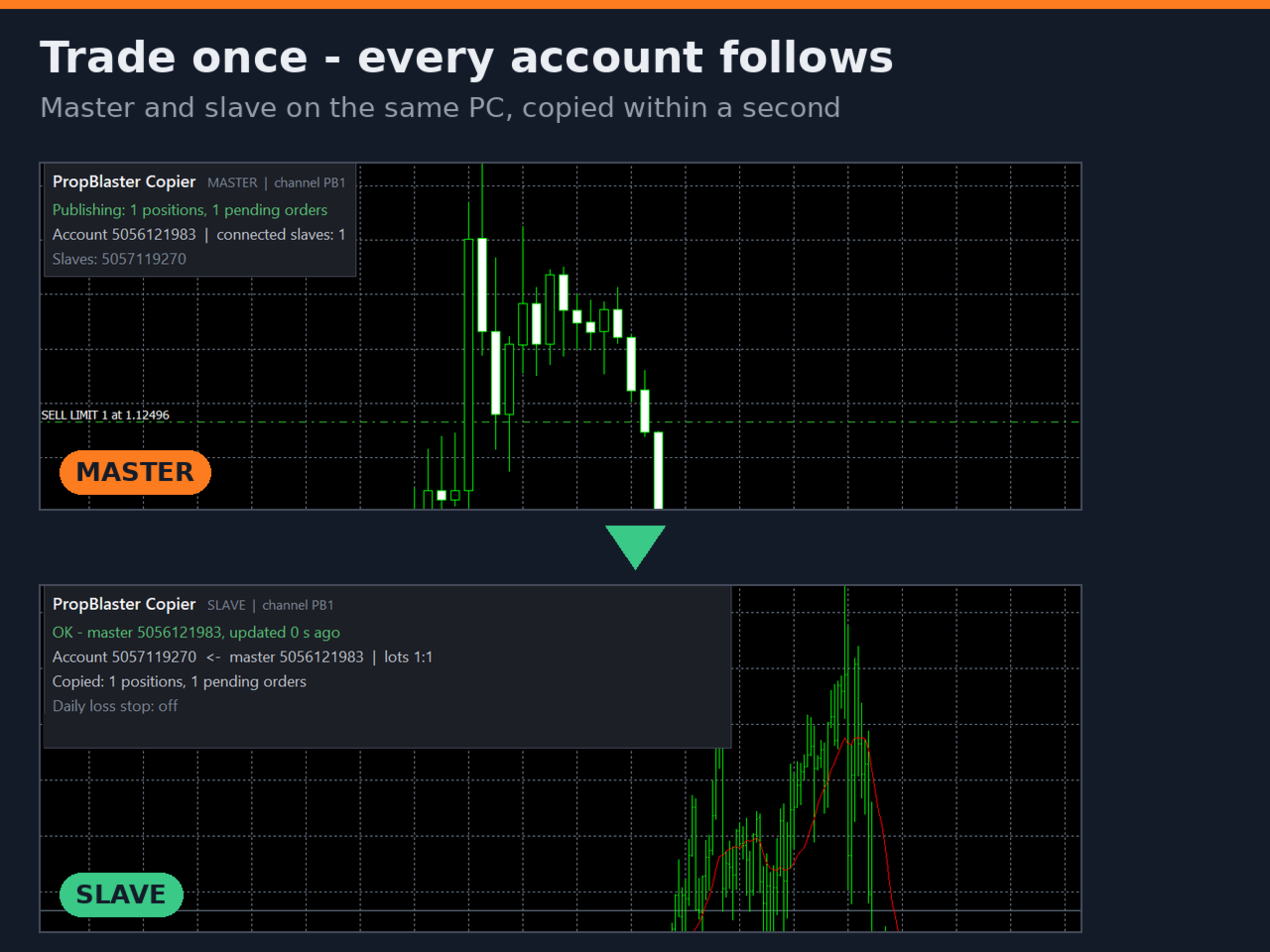
Copy trades from one MT5 account to one other account on the same PC or VPS. Lots 1:1, stop loss, take profit, partial closes and closes are mirrored. One EA for master and slave.

Runs locally - no server, no DLLs, no web requests. It copies trades but does not open trades of its own.

Quick start

1. Give each account its own MetaTrader 5 installation on the same PC or VPS and run both at the same time.
2. Master terminal: drag PropBlaster Copier Duo onto any chart, Mode = MASTER, choose a channel name, allow Algo Trading.
3. Slave terminal: the same EA with Mode = SLAVE and the same channel name, allow Algo Trading. Place a small test trade on the master and watch it appear on the slave.


PropBlaster Copier Duo copies your trades from one MetaTrader 5 account (the master) to one other MT5 account (the slave) on the same computer or VPS.

Attach the same EA to one chart in each terminal: MASTER in the terminal you trade in, SLAVE in the terminal that should copy, with the same channel name on both sides.

What is copied

- New market positions, with the same lot size (1:1)
- Stop loss and take profit, including later changes
- Partial closes and closes

Safety

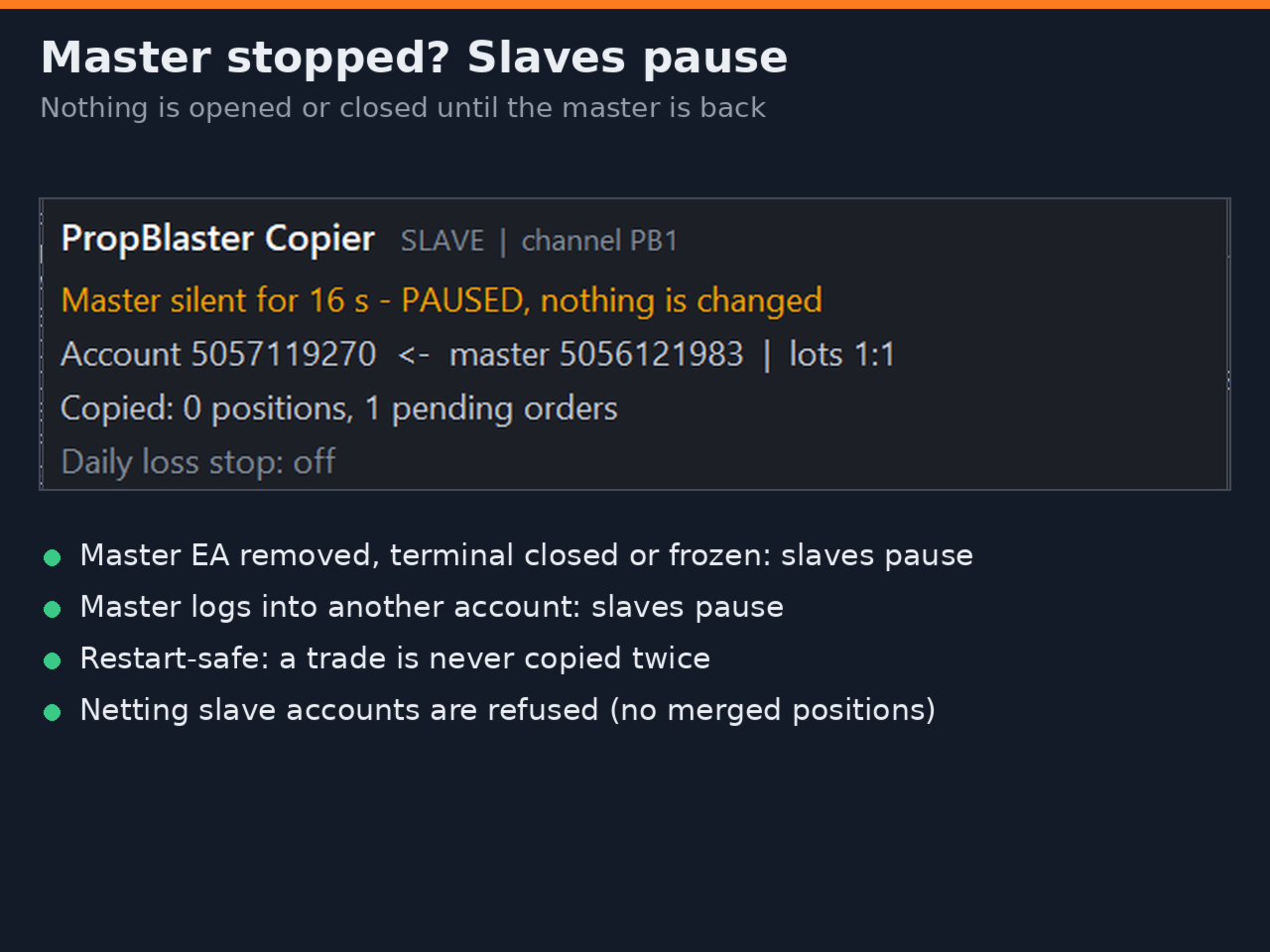
- If the master stops (EA removed, terminal closed or frozen), the slave pauses and changes nothing
- A restart never opens a trade twice
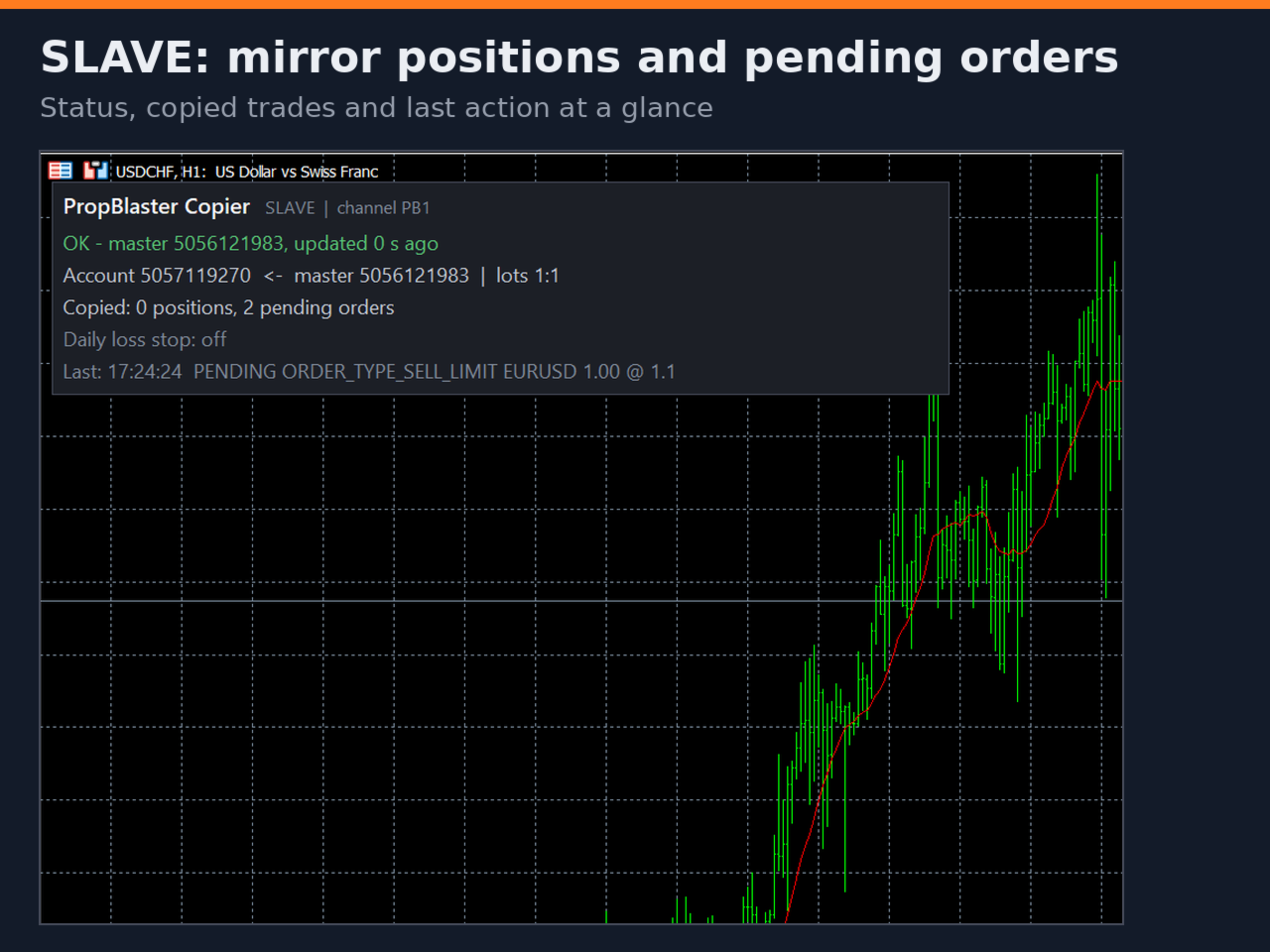
- A panel shows the status, the copied trades and the last action

Requirements

- Both terminals run on the same Windows PC or VPS
- One MetaTrader 5 installation per account. MetaTrader 5 runs only once per installation folder: for a second account at the same broker, run the installer again, click "Settings" instead of "Next" and choose a new folder (for example C:\MT5\Account2)
- The same symbol names on both accounts (for example two accounts at the same broker)
- The slave account must be a hedging account
- No DLLs, no internet connection required

Need more? The full version PropBlaster Copier copies to any number of accounts and adds pending orders, lot scaling (multiplier, fixed lot, balance or equity ratio, risk %), symbol mapping for different brokers, reverse copying, filters and a daily loss stop per account.

Important – please check your prop firm's rules

Many prop firms allow copying only between your own accounts, some do not allow it at all, and copying someone else's trades is usually forbidden. Check the rules of your prop firm before you use a trade copier. Delays and slippage can lead to different results on master and slave. Trading involves risk.

Strategy Tester note

Copying needs two terminals running live. In the Strategy Tester, the EA opens one small demonstration position at a time with stop loss and take profit. This happens only in the tester.

PropBlaster tools for MetaTrader 5

Free: Daily Loss Guard (daily loss limit) · Position Sizer (lot size from your risk) · Copier Duo (one master, one slave) · Stats (trading statistics) · Drawdown Meter (prop firm rule dashboard)
Paid: Guard (prop firm presets and full rule set) · Trade Panel (lot size and trade management) · Copier (any number of accounts) · Stats Pro (breakdown by EA, consistency check, CSV export)
You find them all under "More from author" on this page.

PropBlaster Cockpit is a separate Windows desktop app by the same author: trade journal, rule book and pre-trade check for several accounts. It is not sold in the Market, and this product works without it.

Prodotti consigliati
Pro Trade Manager Panel riunisce tutto il tuo trading manuale in un unico pannello sul grafico di MetaTrader 5: pianifica l'operazione in modo visivo, lascia che il pannello calcoli la dimensione dal tuo rischio, invia gli ordini, poi gestiscili e proteggili. Funziona su Forex, metalli, indici e altri simboli. PIANIFICAZIONE VISIVA DEI TRADE Riquadri di ingresso, Stop Loss e Take Profit disegnati sul grafico; trascinali per regolarli. 1, 2 o 3 livelli di Take Profit (lotto diviso). Step SL opzio
Account Dashboard mostra in un unico pannello leggero i numeri che controlli ogni giorno, letti direttamente dallo storico del tuo conto. È un indicatore: legge soltanto il conto e non può mai fare trading. Gratuito, senza limiti. Conto in tempo reale Saldo, equity, profitto/perdita flottante, livello di margine ed esposizione aperta Risultati per periodo Risultato netto di oggi, di questa settimana, di questo mese e dell'intero storico In denaro e in % del saldo all'inizio di ogni periodo, escl
FREE
Trade Report to CSV
Hirabayashi Masayuki
Trade Report to CSV — Your Trade History, One Clean Row at a Time Tired of MT5's built-in reports leaving you wanting more? This script turns your closed trade history into a tidy, ready-to-analyze CSV — one row per trade, no digging required. Fields exported Entry time, Type (BUY/SELL), Lots, Symbol, Entry price, Stop loss, Take profit, Close time, Close price, Commission, Swap, Profit, Profit in pips, Magic number, Holding time, Close reason (SL/TP/manual/EA), Comment Highlights Choose you
FREE
Correlation Risk Manager
Eugenio Gustavo Guilarte Homayden
You think you're diversified. Your correlations say otherwise. MetaTrader shows you every position you hold. The margin, the floating P/L, the lot size, all of it. What it doesn't show you is whether your trades are secretly the same bet. And that's usually what takes the account down. Say you open five trades, 1% risk on each. Feels like 5% at stake. Spread out, sensible. But three of them are long the same dollar move under different tickers, so when one bad print hits, all three drop together

Trade Desk
Mostafa Saad Saeed Shawara
Trade Desk è un pannello di trading e un gestore operazioni per MetaTrader. Preparate l'ingresso sul grafico, calcolate la size con un calcolatore di lotti e gestite le posizioni aperte dallo stesso pannello: stop loss , più obiettivi, pareggio e trailing stop. Istruzioni aggiuntive: Versione di prova per conti demo — Trade Desk per MetaTrader 4 La maggior parte degli strumenti sul grafico aiuta solo ad aprire l'operazione. Dopo l'esecuzione serve ancora un gestore di posizioni. Trade Desk tiene
Boleta ata
Samuel Henrique Almeida Ferreira
BOLETA ATA is a quick-execution trading panel for MetaTrader 5, built for manual traders who want to buy, sell, and manage positions without leaving the chart. Compact, straightforward, and with built-in protection automations. Main Panel Stop Loss and Take Profit with an on/off checkbox and an editable field — click and type the value directly, no need to open settings Lot size field (Qty) , editable at any time 3 clickable lot presets : a single click applies the value to the Qty field; a doub
FREE
News Guard EA
Anurak Saetung
News Guard EA - protect your EA portfolio from high-impact news News Guard does NOT open trades. It watches the built-in MetaTrader 5 economic calendar and protects the trades of your other EAs (and your manual trades) before and after high-impact news such as NFP, CPI and FOMC. Most EAs are not built for news. Spreads widen, price jumps and stop losses slip. A few trades opened just before the release can wipe out the profit of many normal trades. News Guard runs on one chart and takes care o
Pannello di trading e gestore ordini gratuito per MT5: calcolo automatico del lotto dal rischio dello stop loss, trascinamento delle linee di entrata, stop loss e take profit sul grafico, uscita a pareggio (break-even) in un clic comprensiva di commissioni e swap, e replay dello storico sullo stesso grafico. Nulla viene inviato finché non premete il pulsante d'ordine. Funziona su MetaTrader 5 per Windows e Mac, conti hedging e netting. Scegliete una direzione: entrata, take profit e stop loss c
FREE
Smart Sync SL and TP
Syamsurizal Dimjati
Smart Sync SL/TP Panel: The Ultimate Trade Management Dashboard For high-frequency manual traders and systematic grid operators, managing risk across multiple positions on a single asset can be a logistical nightmare. The Smart Sync SL/TP Panel is an advanced MQL5 utility engineered to eliminate the friction of mass order modification, giving you total control over your risk parameters in a fraction of a second. If you execute entries like a machine gun, this tool helps you place precise and uni
Account Performance Report turns the history of your account into one HTML report that you open in any browser: balance and drawdown, the result of each Expert Advisor and each symbol, a daily P&L calendar, monthly returns and the usual statistics. The main figures are also shown on the chart, and the report is kept up to date while the terminal runs. How To Use Attach Account Performance Report to any chart of the account. It does not trade, so any symbol and timeframe will do. The report is wr
FREE
Trade Utility Pro
Sovannara Voan
3.88 (94)
Trade Utility Pro is a bot utility designed to help you manage trades more easily, quickly, and accurately. This utility features a control panel interface and supports MetaTrader 5 exclusively. This utility does not link to any account information or external sources, ensuring safety. Main Features: Open Trade Support: Lot size calculation Fixed Lot: Custom input lot required Money Risk Lot: Automatically calculated based on stop loss and money risk Account % Risk Lot: Automatically calculated
FREE
Synchronizer
PATRICK PAARSCH
This Expert Advisor monitors all open positions across all symbols in MetaTrader 5. Whenever a Stop Loss (SL) or Take Profit (TP) is manually set or adjusted on any position, the EA automatically applies that value to all other open positions , regardless of symbol or order type (Buy/Sell). This ensures consistent and synchronized SL and TP levels across your account. Perfect for mobile trading via tablet or smartphone!
FREE
SMT Trade Planner e un calcolatore di rischio professionale e pannello di esecuzione ordini direttamente sul grafico MetaTrader. Calcola la dimensione del lotto, mostra linee visuali di entrata, Stop Loss e Take Profit trascinabili sul grafico, valida il trade contro regole di rischio configurabili e permette l'esecuzione con un clic.   Come funziona Allega il Trade Planner a qualsiasi grafico. Il pannello mostra le informazioni del conto e pulsanti di selezione rapida del rischio. Tre linee ori
Account and Market Dashboard
Ezekiel Bronal Nyangweso
Advanced Account Dashboard & Risk Monitor (MT5) This script provides a real-time on-chart dashboard for monitoring account performance, risk exposure, and execution conditions in MetaTrader 5. It is designed for traders who want clear visibility of account health and risk awareness during live trading or VPS operation. The script does not open trades and does not interfere with any strategy logic . Key Features Account Metrics Live equity, balance, and floating profit/loss Open position count an
FREE
MNFM Manual Entry MT5
Khalid Abdullah M Altuwaijri
MNFM Manual Entry MT5 is a compact manual trading utility for MetaTrader 5. Set the lot size in the dashboard and click BUY or SELL to send one market order on the current chart symbol. Each order is opened with Magic Number 0 and the comment “MNFM Manual Entry”. The dashboard displays open buy and sell net results and counts positions with Magic Number 0. This utility does not open trades automatically. It does not place pending orders, read news, or manage stop loss, take profit, trailing sto
FREE
One Click Breakeven Function: For multiple orders of the same currency but different order types (sell or buy), under the condition that the overall position is profitable, set the same stop-loss level or take-profit level. For example: there are currently 10 EURUSD orders, including 7 sell orders and 3 buy orders. When the overall position is profitable, if the overall take-profit for sell orders is set to 50 points: (1) When the total profit of the 7 sell orders is greater than the total loss
TrendLine Pending Order Tool
Marcelo Guimaraes de Lima
Questa utility apre gli ordini quando la candela tocca la linea di tendenza posizionata manualmente, come se fosse un ordine pendente più articolato.  Può essere utilizzato su qualsiasi asset, quando apre l'ordine elimina la linea che ha toccato e crea Freccia. In questo caso viene utilizzata per operazioni di inversione del prezzo, apre un ordine di vendita quando la candela rialzista tocca la linea bottom-up e apre un ordine di acquisto quando la candela ribassista tocca la linea top-down. 
FREE
Signals for Telegram
Elidio Xavier Guimaraes
It is a utility that posts customized messages on Telegram based on account trading activity. Once the utility is on the chart, with each new position opened from the same chart symbol the utility is added, a customized message will be sent to the Telegram group defined in the input parameters. The utility will post to the Telegram group if a new position is opened and if it is the same symbol as the chart the utility is running on. If you are using an Expert Advisor for Buy and Sell and want to
Trade Control Panel
Jerry Jilun Anak Liban
Trade Control Panel Function Normal One Click Function Close All Close All Profit Close All Loss Close All Pending Order Close All Sell Close All Buy Advance One Click Function 1.  Close Partial Lot Sell by Percent It will help you partial close for all open position by desire percent you wanted. No longer partial close one by one for every open position Manual input for desire percent 2. Close Partial Lot Buy by Percent It will help you partial close for all open position by desire percent
Algo Trading Indicaor MT5 The ATC ALGO indicator has been developed to work on the MetaTrader 5 platform. It has the same specifications and zones as the MetaTrader 4 version. There may be slight lag, which we believe is due to differences in MetaTrader 5 programming. We will work on improving it, God willing. MT5 Version                    https://www.mql5.com/en/market/product/170028 MT4 Version                    https://www.mql5.com/en/market/product/88034 With this indicator , you’ll have
Connector Solutions Binance is a utility program for copying trades on the Binance exchange. It will be helpful if you trade in MetaTrader 5 but want your trades to be placed on a cryptocurrency exchange like Binance. Connector Solutions Binance copies trades from the demo account placed through MetaTrader 5 (on this demo account must be cryptocurrencies with which you want to work). This version of Connector Solutions Binance is free and, therefore, only works with AAVEUSDT so that you can
FREE
Bridge Telegram gratuita per Windows obbligatoria SENDORIQ Telegram Signal Copier MT5 richiede la SENDORIQ Telegram Bridge v1.32 gratuita, sia con Bot API sia con MTProto. La Bridge si installa separatamente su Windows x64 e deve rimanere attiva per ricevere i messaggi Telegram. Il prodotto MQL5 Market è l’Expert Advisor (EA) per MetaTrader 5; la Bridge riceve messaggi dalle fonti Telegram autorizzate e inoltra i segnali elaborati all’EA. SENDORIQ Control Center non è necessario. Guida all’insta
Clearstop Trade Manager
Adrien Silvio Felipe Dimino
Ha trovato il suo setup. Ora arriva la parte noiosa: la dimensione del lotto. Distanza dallo stop, valore del tick, valuta del conto, una calcolatrice a lato... e il prezzo continua a muoversi mentre digita. Così arrotonda a «più o meno giusto». E «più o meno giusto» è proprio il modo in cui un rischio previsto dell'1 % diventa una perdita più grande di quella che aveva accettato. Alcuni broker peggiorano le cose. Su un server demo abbiamo trovato l'oro con un valore del tick di 0.1 invece di 1
Advisor consente di simulare l'esecuzione delle transazioni effettuate da un altro esperto e salvato in un file csv. Questo può essere utile per verificare i risultati della strategia di trading su un altro server. Utilizzare un altro programma, ad esempio Account History Exporter, per esportare la cronologia delle transazioni sul conto in un file csv nel formato desiderato, oppure collegare al proprio esperto il codice del programma Expert History Exporter per esportare la cronologia. All'
FREE
Info Exporter MT5 supporta l'esportazione di informazioni sul terminale, informazioni sul conto, cronologia delle transazioni e cronologia degli ordini in un file CSV locale, l'invio di email e l'esportazione diretta su Fogli Google tramite l'URL distribuito tramite script dell'app. È possibile scegliere tra l'esportazione in CSV, l'esportazione tramite email o l'esportazione su Fogli Google. È anche possibile modificare i nomi dei file esportati e dei fogli. Parametri di input utilizzati: expor
FREE
Lodestar
Alex Amuyunzu Raymond
LODESTAR — The Session-Aware Execution Engine That Trades Like a Desk, Not a Bot "LODESTAR — Where Institutional Session Logic Meets Retail Accessibility." What Lodestar Actually Is Lodestar is not another grid martingale, not another RSI crossover, not another "holy grail" repackaged from a YouTube tutorial. Lodestar is a conditional, cost-aware session execution engine — a research-grade Expert Advisor for MetaTrader 5 that trades the world's major cash and futures sessions using the same logi
Aurum Star
Shingo Tanno
Gold automated trading over seven years — MT5 backtest results Fixed capital: +681.83% cumulative return | 17.27% maximum equity drawdown Compounding: +35,554.55% cumulative return | 22.93% maximum equity drawdown Both tests started with USD 8,000. Fixed capital ended at USD 62,546.19 (net profit USD 54,546.19). Compounding ended at USD 2,852,364.12 (net profit USD 2,844,364.12). The tests used the hourly GOLD chart from 9 September 2019 to 8 September 2026. Returns cover the full seven years.
VRD Insight è uno strumento di monitoraggio delle prestazioni degli EA e di analisi dei trade per MT5, in sola lettura. Suddivide le statistiche del conto per magic number, così vedi come ogni EA usa il conto: il suo risultato, i lotti e le posizioni aperte e l'attività di trading, accanto al drawdown del conto, in un unico pannello sul grafico. Quando più EA condividono un conto, i totali del conto nascondono quale EA sostiene il capitale e quale lo mette a rischio. Insight dà a ogni EA una rig
FREE
TradingX Hotkeys
Johannes Stephanus Lombard
Inputs Available Lotsizes Partial Close % You can change lotsizes as you require On an open chart click once to select chart to be able to use hotkeys on specific chart. All Pairs can be used with this expert We created this expert to be able to still trade C300 with a 0.06 Lotsize If you enter a 0.6 lot and close 0.90% you can trade with 0.06 Lot Keys to be used: B -Buy S -Sell C -Close Profitable D -Breakeven (Note if stoploss is set it won't break even) P -Partial close X -Close all
NS Financas Clear All Objects Automatically
Luiz Guilherme Neves Da Silva
5 (1)
NS Financas Clear All Objects Automatically Script for quick removal of all objects from your chart (lines, shapes, symbols, etc ...) Don't waste any more time trying to find all the objects on your screen for removal. Use this script and in one click all objects will be removed from the chart automatically. Also, it is possible to configure hotkeys to make the script even faster in its use. NS Financas Clear All Objects Automatically does not remove indicators. Take the opportunity to visit our
FREE
Gli utenti di questo prodotto hanno anche acquistato
Trade Assistant MT5
Evgeniy Kravchenko
4.43 (216)
It helps to calculate the risk per trade, the easy installation of a new order, order management with partial closing functions, trailing stop of 7 types and other useful functions. Additional materials and instructions Installation instructions - Application instructions Line function -   shows on the chart the Opening line, Stop Loss, Take Profit. With this function it is easy to set a new order and see its additional characteristics before opening.   Risk management  - The risk calculation
Forex Trade Manager MT5
InvestSoft
4.98 (693)
Benvenuto a Trade Manager EA, lo strumento definitivo per la gestione del rischio , progettato per rendere il trading più intuitivo, preciso ed efficiente. Non è solo uno strumento per l'esecuzione degli ordini, ma una soluzione completa per la pianificazione delle operazioni, la gestione delle posizioni e il controllo del rischio. Che tu sia un principiante, un trader avanzato o uno scalper che necessita di esecuzioni rapide, Trade Manager EA si adatta alle tue esigenze, offrendo flessibilità s
Telegram to MT5 MultiChannel Copier
Sergio Marquez Uroz
4.73 (26)
Black Week: acquisto a 69.99 USD. L'offerta termina venerdì 27 novembre. Telegram to MT5 Multi-Channel Copier   copia automaticamente i segnali di trading dai tuoi canali Telegram e Discord direttamente su MetaTrader 5. Niente bot, niente estensioni del browser, niente copia manuale. Il segnale arriva su Telegram o Discord e l'EA apre l'operazione nel tuo terminale in pochi secondi. E prima di copiare un canale, il backtester integrato ti mostra cosa avrebbe fatto quel canale sul tuo conto. Il p
Local Trade Copier EA MT5
Juvenille Emperor Limited
4.94 (150)
Local Trade Copier EA MT5 è un trade copier rapido e flessibile per copiare e gestire operazioni tra più conti MetaTrader 5 sullo stesso computer Windows o Windows VPS. Combina la sincronizzazione locale delle operazioni con controlli lato Receiver per dimensione del lotto, gestione del rischio, filtraggio delle operazioni, mappatura dei simboli, gestione delle operazioni e protezione del conto. Configura i terminali Transmitter e Receiver in circa 1 minuto e copia operazioni manuali o aperte d
FarmedHedge Pair Trading Dashboard
Tanapisit Tepawarapruek
5 (7)
Farmed Hedge Yield Farming | All Markets (Manual - Hybrid - Semi/Automated EA) VERIFIED TRADING RESULTS - Farmed Hedge Yield Axi Copy:  https://www.mql5.com/en/signals/2356376 - Farmed Hedge Yield Exn Copy:   https://www.mql5.com/en/signals/2356404 - Farmed Hedge Yield V Copy:  https://www.mql5.com/en/signals/2357156 IMPORTANT NOTICE: FarmedHedge is a MANUAL-FOCUSED TRADING UTILITY ,not a fully automated EA. Results shown on this Signal include manual trades and overall strategic management.
TradePanel MT5
Alfiya Fazylova
4.89 (174)
Trade Panel è un assistente commerciale multifunzionale. L'applicazione contiene più di 50 funzioni di trading per il trading manuale e permette di automatizzare la maggior parte delle attività commerciali. Istruzioni per l'applicazione: https://www.mql5.com/it/blogs/post/762331 Versione di prova dell'applicazione per un conto demo: https://www.mql5.com/it/blogs/post/762419 Come installare l'applicazione: https://www.mql5.com/it/blogs/post/762362 Come testare l'applicazione in modalità visuale:

EA Overfitter
Stephen J Martret
5 (4)
That backtest looks great. But will it still be making money tomorrow, next week, next month? EA Overfitter re-runs your EA on 100 price histories it has never seen. One score tells you if the edge is real. A backtest tells you what an EA did on one price history — the one that happened to occur. What you cannot tell from it is how much of that result was the strategy and how much was the particular path. EA Overfitter answers that. It builds up to 100 synthetic price histories your EA has n
Strategy Ledger Pro
Abdullah Uygar Tuna
5 (17)
Ora disponibile in italiano. Strategy Ledger Pro è un pannello di analisi del conto in sola lettura per MetaTrader 5. Separa i risultati del conto per Expert Advisor, strategia, simbolo e numero magic, così puoi vedere quanto contribuisce davvero ciascuno. Il pannello è disponibile in 11 lingue: English, Français, Deutsch, Español, Italiano, Português, Русский, Türkçe, 中文, 日本語 e 한국어. Prima di scaricare la demo. Il Market esegue la demo di qualsiasi prodotto a pagamento solo nello Strategy Teste
Copia i segnali Telegram con le tue regole di trading Telegram to MT5 Signal Trader copia automaticamente i segnali di trading testuali dai canali e gruppi Telegram pubblici e privati in MetaTrader 5. Gestisci più fornitori e conti MT5 da un'unica applicazione desktop, con impostazioni di rischio e di trading specifiche per ogni fornitore . Per copiare i segnali non servono bot Telegram né configurazioni API. Accedi semplicemente con il tuo account Telegram tramite numero di telefono o codice QR
Exp COPYLOT CLIENT for MT5
Vladislav Andruschenko
3.97 (35)
Copiatore professionale di trade per MetaTrader 5 Un copiatore di trade veloce, professionale e affidabile per MetaTrader . COPYLOT consente di copiare operazioni Forex tra terminali MT4 e MT5 con supporto per conti Hedge e Netting . La versione MT5 di COPYLOT supporta: - MT5 Hedge → MT5 Hedge - MT5 Hedge → MT5 Netting - MT5 Netting → MT5 Hedge - MT5 Netting → MT5 Netting - MT4 → MT5 Hedge - MT4 → MT5 Netting Versione MT4 Descrizione completa + DEMO + PDF Come acquistare Come installare Come ot
AI Agents Supervisor
Ho Tuan Thang
5 (1)
AI Agent Supervisor is NOT an Expert Advisor. AI Agent Supervisor   is a   multi-agent AI risk & portfolio supervisor   that watches every EA on your account and intervenes in real time.  WANT AN AI PORTFOLIO MANAGER WATCHING YOUR FLEET 24/7?   Run your fleet on the same brokers I do:   IC MARKETS , IC TRADING   .  Unlike the centralized stock market, Forex has no single, unified price feed.  Every broker sources liquidity from different providers, creating unique data streams. The Supervisor r
================================================================================ POC BREAKOUT - V20.72. Full Professional Grade Toolkit ================================================================================ POC Breakout is a full MetaTrader 5 trading dashboard for discretionary traders who want breakout signals, Point of Control (POC) context, volume profiles, order flow, market structure, news, alerts, and advanced trade planning in one professional workspace. Attached directly to you
Power Candles Strategy Scanner: ricerca di setup multi-simbolo che si ottimizza da sola Uno scanner che suona a ogni minimo movimento ti abitua a ignorarlo. Una chiusura di candela movimentata, un avviso dopo l'altro, e l'unico setup su cui operi davvero affoga nel rumore. Power Candles Strategy Scanner esegue il motore auto-ottimizzante di Power Candles su ogni simbolo del tuo Market Watch e ti avvisa solo di ciò che supera i tuoi filtri: la forza dell'ultima candela chiusa, il rapporto rendime
The product will copy all telegram signal to MT5 ( which you are member) , also it can work as remote copier.  Easy to set up, copy order instant, can work with almost signal formats, image signal,  s upport to translate other language to English Work with all type of channel or group, even channel have "Restrict Saving Content", work with  multi channel, multi MT5 Work as remote copier: with signal have ticket number, it will copy exactly via ticket number. Support to backtest signal. How to s
Unlimited Trade Copier Pro MT5 is a tool to copy trade remotely to multiple MT4, MT5 and cTrader accounts at different computers/locations over internet. This is an ideal solution for you if you are a signal provider and want to copy your trades to other receivers globally on your own rules. One provider can copy trades to multiple receivers and one receiver can get trade from multiple providers as well. The provider can even set the subscription expiry for each receiver, so that receiver will n
SMC Trade Pilot MT5
Prime Horizon
5 (1)
Expert advisor order block, BOS e ChoCH per MetaTrader 5, con avvisi su Telegram SMC Trade Pilot MT5 legge la struttura di mercato sul vostro grafico e invia il segnale su Telegram. Segnala le rotture di struttura (BOS) e i cambi di carattere (ChoCH), disegna order block con punteggio di forza , traccia i fair value gap (FVG) e i liquidity sweep, mostra un volume profile con point of control, value area high e value area low, e riassume tutto in un pannello compatto con modulo multi-timeframe, p
HINN MagicEntry Extra
ALGOFLOW OÜ
4.74 (19)
HINN MAGIC ENTRY – the ultimate tool for entry and position management! SIMPLE. FASTEST. INTUITIVE. MAX AUTOMATED. Place orders by selecting a level directly on the chart! full description   ::  demo-version  :: 60-sec-video-description Key features: - Market, limit, and pending orders - Automatic lot size calculation - Automatic spread and commission accounting - Unlimited partitial take-profits  - Breakeven and trailing stop-loss and take-profit  functions - Invalidation leves - Intuitive, a
News Trade EA MT5
Konstantin Kulikov
4.55 (11)
Presento un utile robot che io stesso utilizzo da diversi anni. Questo robot può essere utilizzato sia in modalità semiautomatica che completamente automatica. >>> Chat <<< Il programma contiene le impostazioni flessibili per fare trading sulle notizie del calendario economico. Non può essere verificato nel tester delle strategie. Soltanto il vero lavoro. Scarica l'ultimo archivio di impostazioni: https://www.mql5.com/en/blogs/post/747929 Monitoraggio dei segnali: https://www.mql5.com/en/signa
Exp5 VirtualTradePad PRO SE for MT5
Vladislav Andruschenko
5 (1)
VirtualTradePad PRO SE MT5 — centro di controllo professionale per il trading su MetaTrader 5 VirtualTradePad PRO SE è un pannello di trading premium basato sul grafico e un ambiente di gestione delle operazioni per MetaTrader 5 . È progettato per i trader che desiderano esecuzione più rapida, controllo più chiaro delle posizioni, gestione strutturata delle operazioni, pianificazione visiva dei livelli e un workflow professionale direttamente dal grafico. Non è soltanto un semplice pannello BUY
Timeless Charts
Samuel Manoel De Souza
5 (9)
Timeless Charts è un'utilità di trading completa progettata per trader professionisti. Combina tipi di grafici personalizzati come Grafici a Secondi e Renko con analisi avanzata del flusso ordini tramite Footprints , Clusters , Profili di Volume , studi VWAP e strumenti di analisi ancorata per una visione più approfondita del mercato. Il trading e la gestione delle posizioni vengono eseguiti direttamente dal grafico tramite un pannello integrato di gestione delle operazioni , mentre Market Repla
Equity Protect Pro: Il tuo esperto di protezione del conto completo per un trading senza preoccupazioni Se stai cercando funzionalità come protezione del conto, protezione del capitale proprio, protezione del portafoglio, protezione multi-strategia, protezione dei profitti, raccolta dei profitti, sicurezza del trading, programmi di controllo del rischio, controllo automatico del rischio, liquidazione automatica, liquidazione condizionale, liquidazione programmata, liquidazione dinamica, trailin
Strategy Builder offers an incredible amount of functionality. It combines a trade panel with configurable automation (covert indicators into an EA), real-time statistics (profit & draw down) plus automatic optimization of SL, TP/exit, trading hours, indicator inputs. Multiple indicators can be combined into an single alert/trade signal and can include custom indicators, even if just have ex4 file or purchased from Market. The system is easily configured via a CONFIG button and associated pop-u
Astro Trade MT5
Indra Maulana
5 (8)
25% discount on the release of the tool: only for the next 3 buyers Send a message to receive a demo version. AstroTrade Trading Assistant AstroTrade is a comprehensive multi-functional trading utility developed for the MetaTrader 5 platform. It integrates essential tools for trade execution, risk management, and technical monitoring into a single unified interface. The application is designed to assist traders in managing their daily operations through a visual and structured environment. Vi
VirtualTradePad One Click Trading Panel
Vladislav Andruschenko
4.59 (74)
Pannello di trading per MetaTrader 5 — controllo professionale del trading in un clic dal grafico e dalla tastiera Un pannello di trading avanzato progettato per trader attivi, pensato per aprire, gestire e chiudere operazioni molto più velocemente rispetto all’interfaccia standard di MetaTrader. Questa soluzione è dedicata a chi desidera controllare posizioni, ordini pendenti, profitto totale ed esecuzione da un unico spazio di lavoro professionale. Non si tratta di un semplice utilitario. È u
News Filter EA
Rashed Samir
5 (2)
News Filter EA: Advanced Algo Trading Assistant News Filter EA is an advanced algo trading assistant designed to enhance your trading experience. By using the News Filter EA , you can integrate a Forex economic news filter into your existing expert advisor, even if you do not have access to its source code. In addition to the news filter, you can also specify trading days and hours for your expert. The News Filter EA also includes risk management  and equity protection features. MT4 Version Ma
Telegram To MT5 Ultra
Mirel Daniel Gheonu
5 (5)
Telegram To MT5 — Copiatore di segnali Trasforma le indicazioni di trading dei tuoi canali Telegram in veri ordini MT5 — automaticamente, su quanti account vuoi, con rischio e regole totalmente sotto il tuo controllo. Telegram To MT5 collega i canali VIP / di segnali che già segui su Telegram al tuo terminale MetaTrader 5. Un'app desktop companion gratuita legge i messaggi (anche dai canali che bloccano i bot), e questo Expert Advisor li esegue sul tuo conto — applicando le tue impostazioni di r
Trade Manager DashPlus
Henry Lyubomir Wallace
4.85 (13)
DashPlus è uno strumento avanzato di gestione delle operazioni progettato per migliorare l'efficienza e l'efficacia del trading sulla piattaforma MetaTrader 5. Offre una suite completa di funzionalità, tra cui calcolo del rischio, gestione degli ordini, sistemi di griglia avanzati, strumenti basati su grafici e analisi delle prestazioni. Caratteristiche Principali 1. Griglia di Recupero Implementa un sistema di griglia flessibile e di media per gestire le operazioni in condizioni di mercato avve
Hai trovato un ottimo segnale, ma il lotto di un fornitore è troppo piccolo? Hai bisogno di un volume di posizione maggiore, ma le impostazioni del terminale sono troppo scadenti? Signal Lot Manager aumenterà il volume della posizione del fornitore mediante un ordine duplicato del volume necessario. Basta impostare una dimensione del lotto e un nome di un segnale da cui copiare gli ordini. Signal Lot Manager è un'utilità moltiplicatrice di lotti per duplicare gli ordini sul tuo terminale. La fon
Trade copier MT5
Alfiya Fazylova
4.61 (57)
Trade Copier è un'utilità professionale progettata per copiare e sincronizzare le transazioni tra conti di trading. La copiatura avviene dal conto/terminale del fornitore al conto/terminale del destinatario, che sono installati sullo stesso computer o vps. Prima di acquistare, puoi testare la versione demo su un account demo. Versione demo qui . Istruzioni complete qui . Funzionalità e vantaggi principali: Supporta la copia degli ordini: MT5> MT5, MT4> MT5, MT5> MT4, inclusi i conti di compensaz
Trade Manager DaneTrades
Levi Dane Benjamin
4.13 (31)
Trade Manager per aiutarti a entrare e uscire rapidamente dalle operazioni calcolando automaticamente il tuo rischio. Incluse funzionalità che ti aiutano a prevenire l'eccessivo trading, il vendetta trading e il trading emotivo. Le operazioni possono essere gestite automaticamente e i parametri di performance del conto possono essere visualizzati in un grafico. Queste caratteristiche rendono questo pannello ideale per tutti i trader manuali e aiuta a migliorare la piattaforma MetaTrader 5. Suppo
Altri dall’autore
PropBlaster Position Sizer calculates the right lot size for every trade. Plan the trade on the chart, drag the stop loss line, and the panel shows lot, risk and R:R before you send the order. It only sends the orders you click. 100 % native MQL5 - no DLLs, no web requests. Quick start 1. Drag the EA onto the chart of the symbol you trade and allow Algo Trading. 2. In the inputs, set your risk per trade (% of balance, % of equity, a fixed amount or % of the daily loss room left today) and your c
FREE
PropBlaster Drawdown Meter shows on one panel how close your account is to the rules of your prop firm challenge. Pick your program from the list, or enter your own rules once. The meter then watches the whole account: manual trades, trades from the mobile app and trades from other Expert Advisors. Monitor only: it never opens, changes or closes a trade on your account. Run it next to your own EAs or your trade copier without any side effects. Quick start Attach the meter to any one chart of the
FREE
PropBlaster Daily Loss Guard - Daily Loss Limit Guard Free risk-management utility that stops you from breaking your daily loss limit. It closes rule-breaking trades, can close everything at the limit, caps trades per day and makes a stop loss mandatory. It never opens a trade. 100 % native MQL5 - no DLLs, no web requests. Quick start 1. Attach the EA to one chart only (any symbol) and allow Algo Trading. It watches the whole account. 2. Set the daily loss limit in % and the server hour at whi
FREE
PropBlaster Stats shows the key statistics of your MT5 account directly on the chart. It reads your trade history and never opens, closes or changes a trade. Quick start 1. Attach the EA to any chart. 2. Optional: filter by magic number or symbols in the inputs. 3. Choose the period (today, this week, this month or all history) with one click in the panel. Key figures - Today, this week, this month or all history with one click - Net profit, trades, win rate, profit factor - Average win and lo
FREE
PropBlaster Guard is a risk-management utility for MetaTrader 5. It keeps one trading account inside the rules of your prop-firm challenge, or inside your own trading plan. Choose your prop program from the list, or set your own rules once in the inputs. From then on, the Guard watches every trade on the account: manual trades, trades from the mobile app and trades from other Expert Advisors. It never opens a trade on its own. 100 % native MQL5 - no DLLs, no web requests, no external files. Quic
PropBlaster Copier - Local Trade Copier for Prop Accounts Try it first for free: PropBlaster Copier Duo copies one master to one slave account on the same PC or VPS. Test your setup with it, then switch to this full version for more accounts, lot scaling and symbol mapping. PropBlaster Copier works between MetaTrader 5 terminals only (no MetaTrader 4). Copy trades from one MT5 account to any number of other accounts on the same PC or VPS. One EA for master and slave, lot scaling, symbol mappin
PropBlaster Trade Panel lets you plan a trade directly on the chart. Drag the stop loss line, and the panel calculates the lot size from your risk. It then manages the open trade for you: break-even, trailing stop and partial close. The panel only sends the orders you click. It never trades on its own. 100 % native MQL5 - no DLLs, no web requests. Every screenshot on this page is from a live demo chart. Quick start 1. Drag the EA onto the chart of the symbol you trade and allow Algo Trading. 2.
PropBlaster Stats Pro shows the statistics of your MT5 account directly on the chart. It reads your trade history and answers the questions that matter: which EA, which symbol and which hours make or lose money, how deep was the drawdown, and are you within the consistency rule of your prop firm. Quick start 1. Attach the EA to any chart. 2. Optional: set magic number or symbol filters and, for prop accounts, the consistency limit (default 30 %) and your profit target in the inputs. 3. Choose th
Filtro:
Nessuna recensione
Rispondi alla recensione