News Guard EA
- ユーティリティ
- バージョン: 1.1
- アップデート済み: 17 11月 2026
- アクティベーション: 20

News Guard EA - protect your EA portfolio from high-impact news
News Guard does NOT open trades. It watches the built-in MetaTrader 5 economic calendar and protects the trades of your other EAs (and your manual trades) before and after high-impact news such as NFP, CPI and FOMC.
Most EAs are not built for news. Spreads widen, price jumps and stop losses slip. A few trades opened just before the release can wipe out the profit of many normal trades. News Guard runs on one chart and takes care of the whole account, so you do not have to switch EAs off by hand before every release.
KEY FEATURES
1. News lock around every important release
- You choose how long the lock lasts, for example 30 minutes before and 30 minutes after the news.
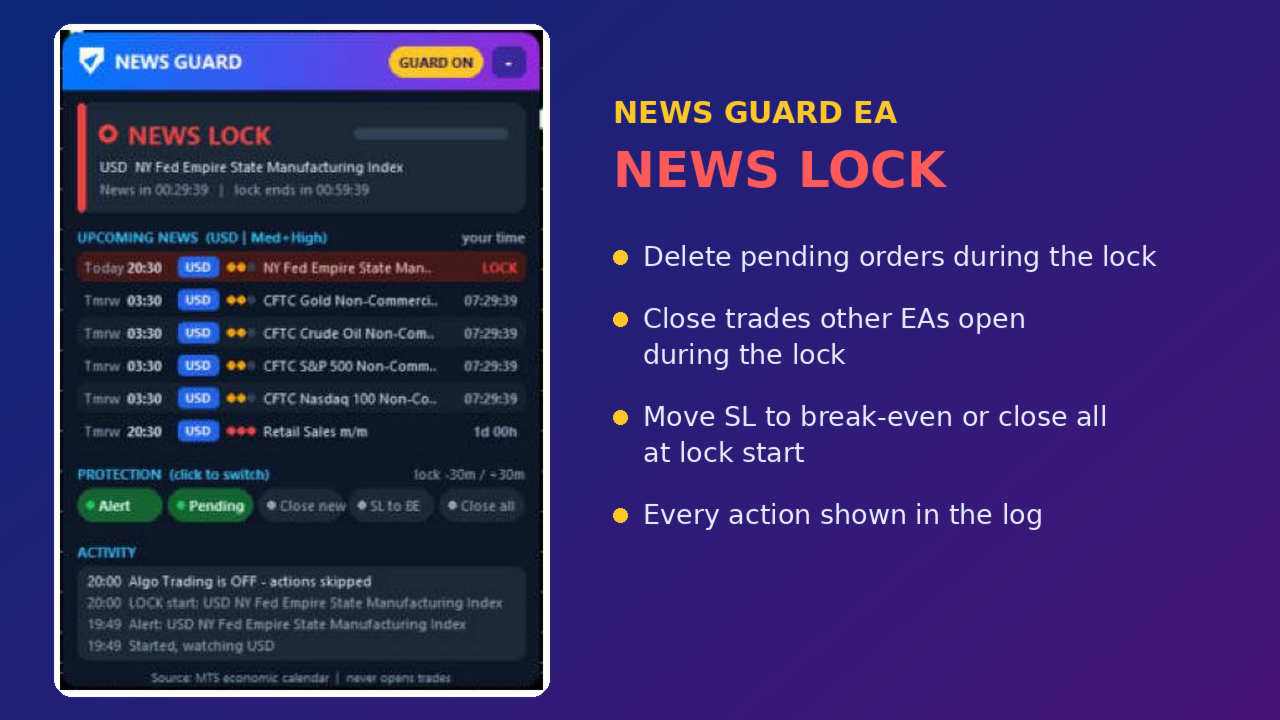
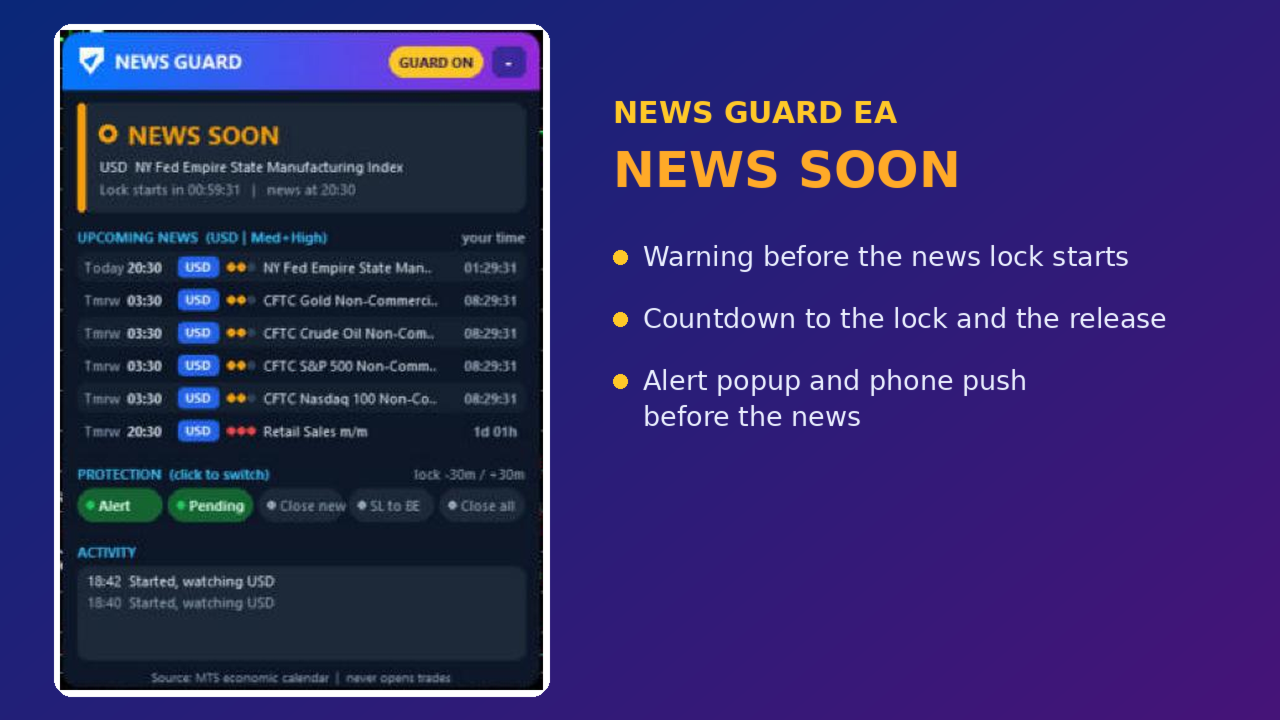
- The panel shows a clear status: SAFE TO TRADE (green), NEWS SOON (amber) or NEWS LOCK (red), with a live countdown.
2. Five protections - switch each one on or off with one click on the panel
- Alert: popup, sound and optional push notification to your phone before the news.
- Pending: delete pending orders during the lock, so they are not filled by a news spike.
- Close new: close any trade that another EA opens during the lock.
- SL to BE: at lock start, move the stop loss of profitable trades to break-even (with an offset).
- Close all: close all trades at lock start, for the safest approach.
3. Upcoming news list
- The next news releases with time (in your computer's time), currency, impact level and countdown.
- Filter by currency (AUTO uses the chart symbol, plus USD) and by impact (High only, or Medium and High).
- Skip events by keyword, for example "Speech" or "Auction".
4. Protect only what you want
- Protect symbols that use the news currency (for example USD news protects XAUUSD, EURUSD and US indices), only the chart symbol, or all symbols.
- Filter by magic number: protect all EAs, only listed EAs, or all except listed EAs.
5. Activity log on the panel
- Every action is shown on the panel and in the Experts journal, for example "Deleted pending #123" or "Closed #456 (opened in lock)".
MORE
- Modern panel that scales with your screen. Minimize it with one click.
- Uses only the built-in MT5 economic calendar: no DLL, no web requests, no extra setup.
- Works with any broker, any symbol and any EA.
HOW TO USE
1. Attach News Guard EA to any one chart of the account.
2. Turn on "Allow Algo Trading" so it can delete orders, move stop losses and close trades.
3. Choose the protections on the panel. Settings such as lock time, currencies and impact are in the inputs.
IMPORTANT NOTES
- News Guard cannot switch off other EAs. It protects your account by deleting pending orders, moving stop losses and closing trades according to your settings.
- News times come from the MetaTrader 5 economic calendar. Keep your terminal online so the calendar can update.
- The Strategy Tester has no economic calendar, so the demo version shows sample news times to let you see how the panel and the protections work.
- News Guard can manage trades opened by any EA or by hand on the same account, but only while it is running with "Allow Algo Trading" on. If your EAs run on a VPS, run News Guard there too.
- Some EAs open a new trade again right after one is closed. With "Close new" on, News Guard will close it again each time, and every close costs the spread. For such EAs, use "Close all" before the news or exclude them with the magic number filter.
- Grid and martingale EAs may not handle it well when some trades of their basket are closed by another program. Exclude them with the magic number filter, or test on a demo account first.
- Closing trades during fast markets can have slippage. This product does not predict or promise any trading result.