Seconds Candle Forge
- ユーティリティ
- バージョン: 1.0
- アクティベーション: 5

⏱️ SECONDS CANDLE FORGE – See what the M1 chart hides
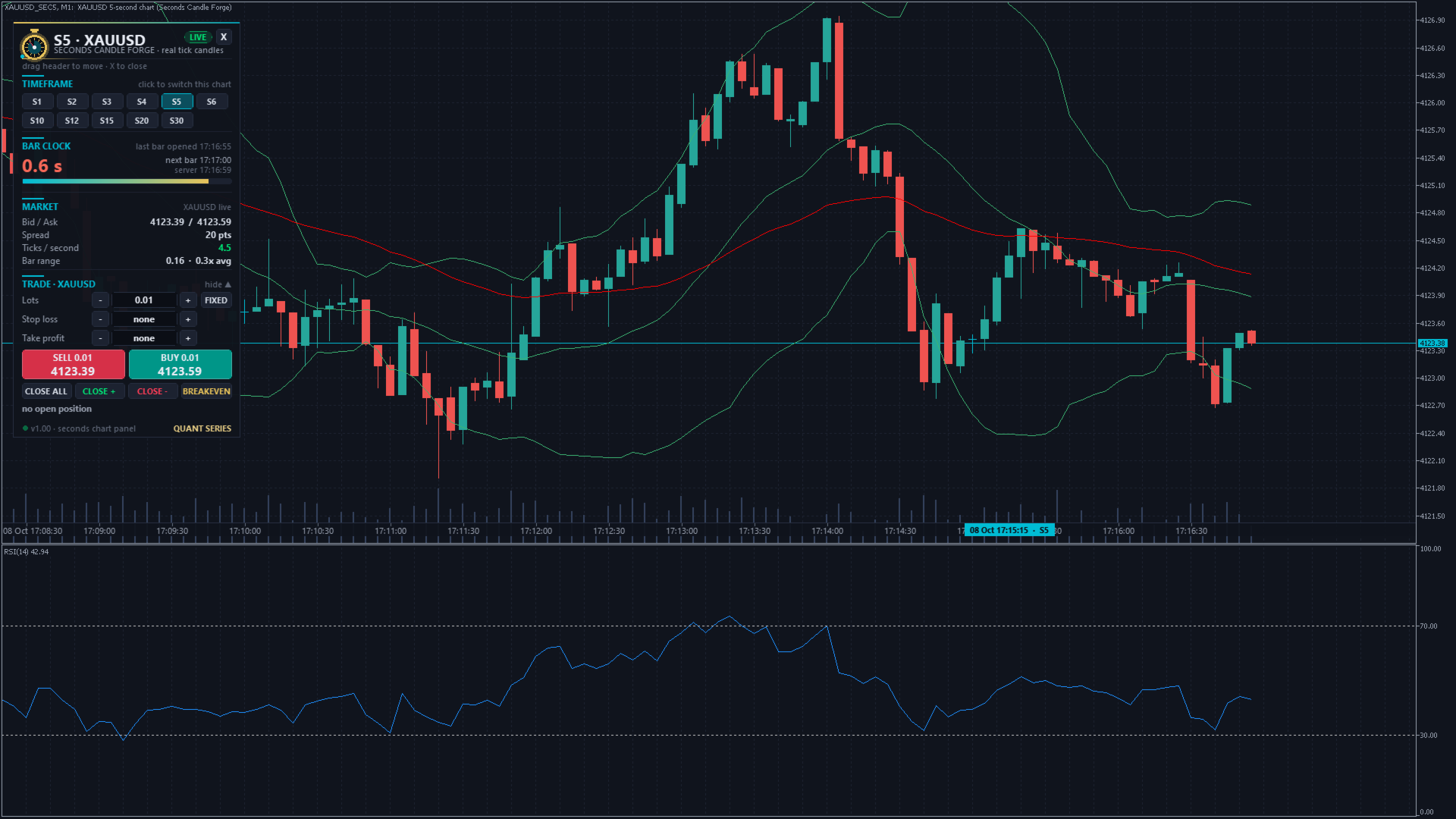
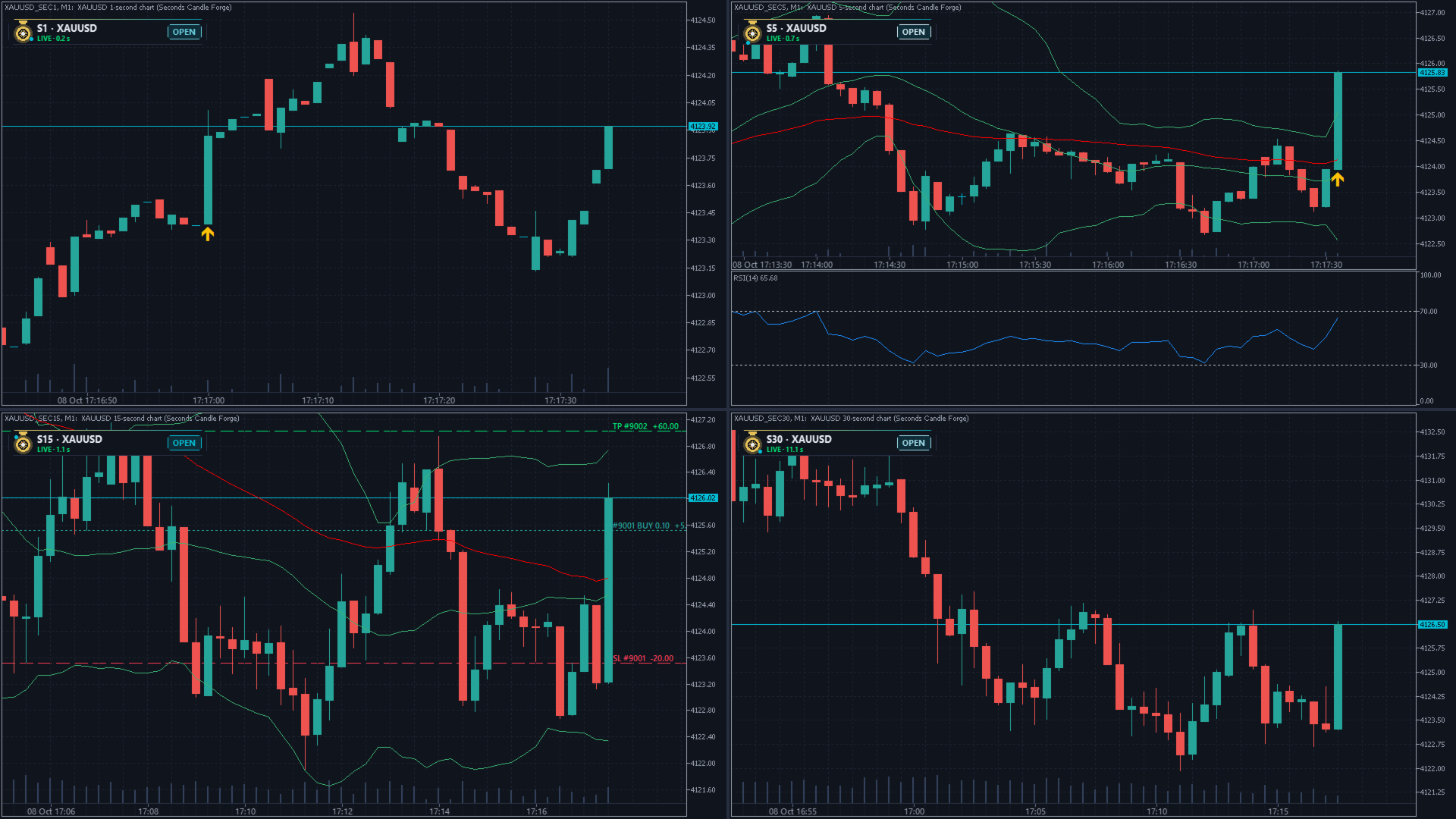
One M1 candle can hide a spike, a stop hunt, a fake breakout and the real entry – all in 60 seconds. MetaTrader 5 stops at M1. Seconds Candle Forge opens real 1-second to 3600-second candle charts built from your broker's own ticks, live, tick by tick. And they are not pictures: they are normal MT5 charts. Your indicators, drawings, templates and even your Expert Advisors run on them.
✅ S1 … S3600 – any seconds timeframe ✅ Real tick data, exact OHLC ✅ Indicators + EAs work on it ✅ One-click trading ✅ One file, no DLL
🔥 WHY TRADERS USE SECONDS CHARTS
- 🎯 Sniper entries – find the exact candle where the move starts, instead of guessing inside an M1 bar.
- ⚡ News & opening spikes – watch NFP, CPI or the US open second by second and see who really pushed the price.
- 🛑 Tighter stops – a 5-second structure gives you a stop that fits the setup, not a 1-minute bar.
- 🧠 Read the order flow – ticks per second, spread and candle range show you when the market speeds up.
- 🧪 Test scalping EAs – every seconds chart is a custom symbol, so your EA can be tested on S5 or S15 candles with real ticks.
⚡ EVERYTHING INSIDE
- 🕯️ Any seconds timeframe – buttons S1, S2, S3, S4, S5, S6, S10, S12, S15, S20, S30 by default, any list from 1 to 3600 seconds possible (7, 45, 90, 300 …).
- 📊 Real MT5 charts – Moving Averages, Bollinger Bands, RSI, MACD, your own custom indicators, trend lines, Fibonacci, templates: everything calculates on the seconds candles.
- 🔴 Live, tick by tick – every tick of the symbol goes into every open seconds chart within milliseconds.
- 📚 Instant history – up to 5,000 candles per chart (adjustable), built from the broker's real tick history. Older candles fill in the background while the chart is already live.
- 🎯 Exact candles – open, high, low, close and tick volume of every candle match the raw broker ticks one to one.
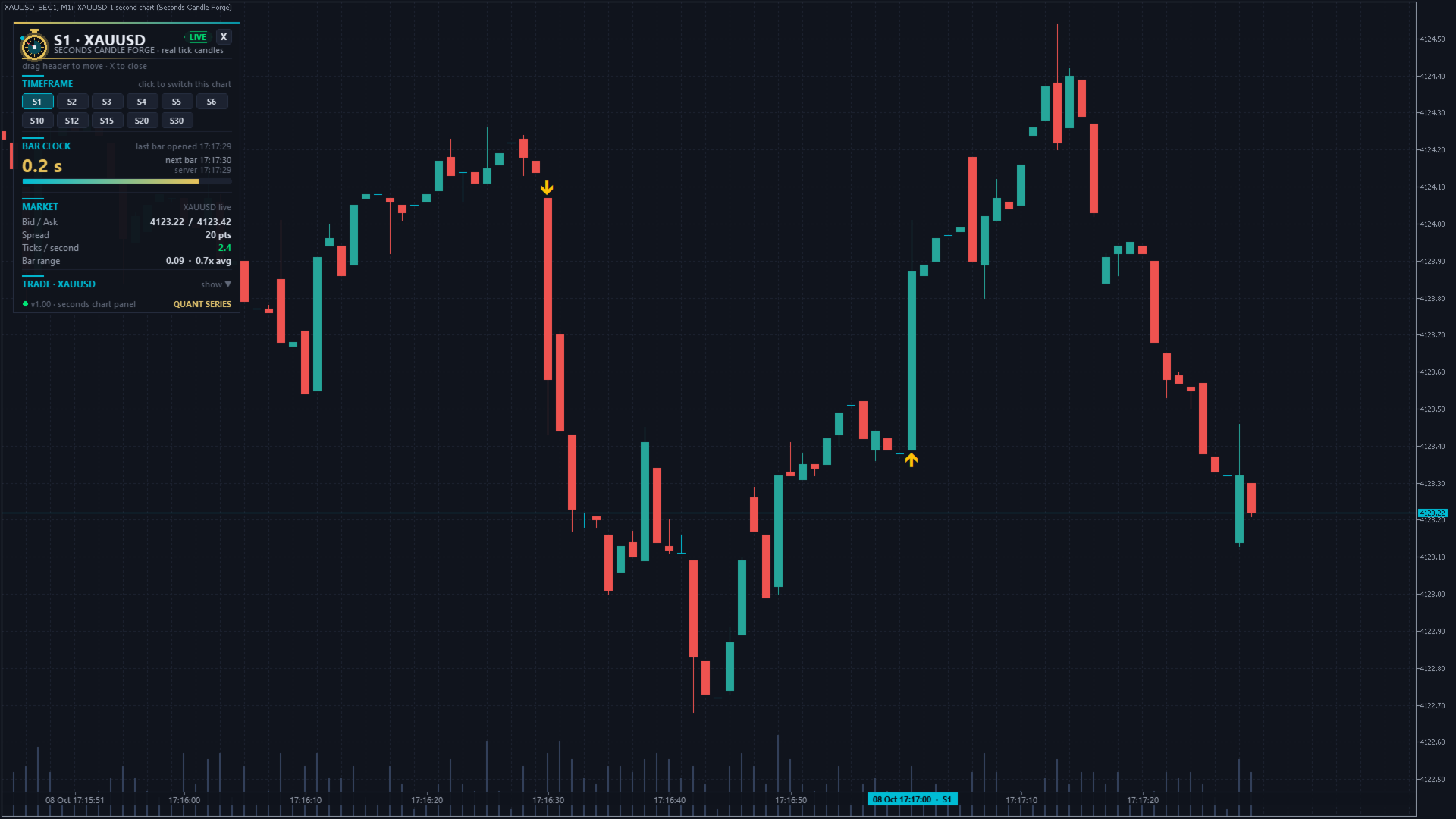
- 🕐 Real-time axis with seconds – the time scale shows the real time of every candle down to the second, plus a time tag at your mouse.
- ⏳ Bar clock – countdown to the close of the running candle on the server clock, with a progress bar that flashes in the last second.
- 💹 Market box – bid / ask, spread, ticks per second and the range of the running candle vs. the last 50 candles.
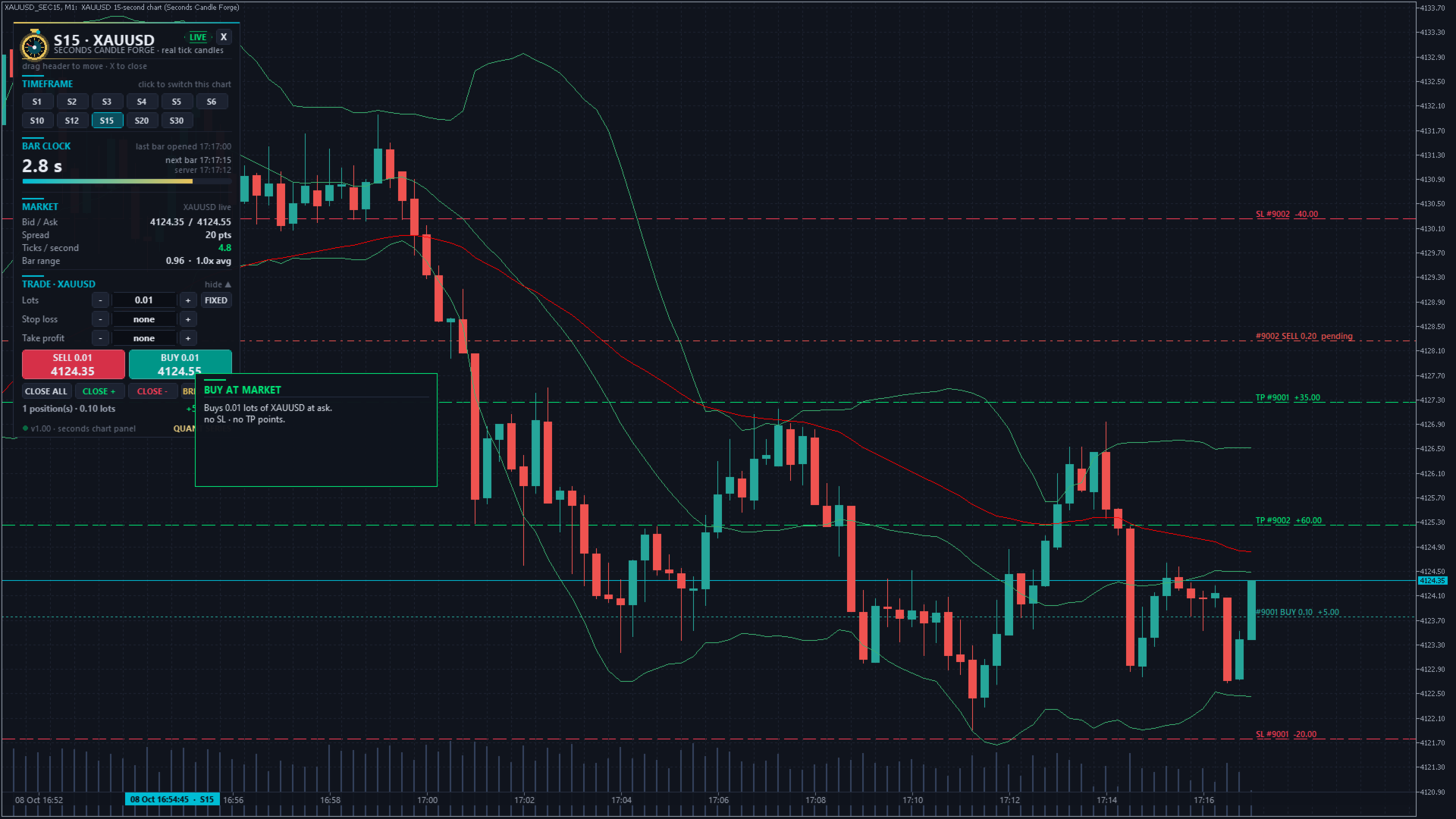
- 🖱️ One-click trade panel – BUY / SELL with fixed lots or risk % of equity, SL and TP in points, CLOSE ALL, CLOSE winners, CLOSE losers, BREAKEVEN. Orders go straight to the real symbol.
- 📍 Your positions on the seconds chart – entry, SL and TP of every position and pending order with live profit in money. Drag the SL or TP line to move it at the broker.
- ⚠️ Spike alert – a candle 4× bigger than average gets an arrow on the chart plus popup, sound or push notification.
- 🔁 Switch timeframe on the same chart – S5 → S15 with one click, your indicators stay.
- 📥 Tick history loader – one click downloads the last 30 days of ticks from the broker server for deeper seconds history.
- 🗓️ Static charts – choose a From / To date and get a fixed seconds chart of exactly that period, e.g. the minute of a news release.
- 💾 Restart-proof – close MetaTrader, start it again: the seconds charts come back, missing candles are rebuilt from the tick history, and the feed continues.
- 🎨 Dark quant design – movable panels with tooltips on every element, a close button that turns the panel into a small pill with the countdown, and dark or classic chart colors.
🛠️ START IN 60 SECONDS
- Open a normal chart of your symbol (XAUUSD, EURUSD, US500, BTCUSD … any timeframe).
- Drag Seconds Candle Forge from Navigator → Expert Advisors → Market onto it. Tick "Allow Algo Trading" if you want to trade from the seconds charts.
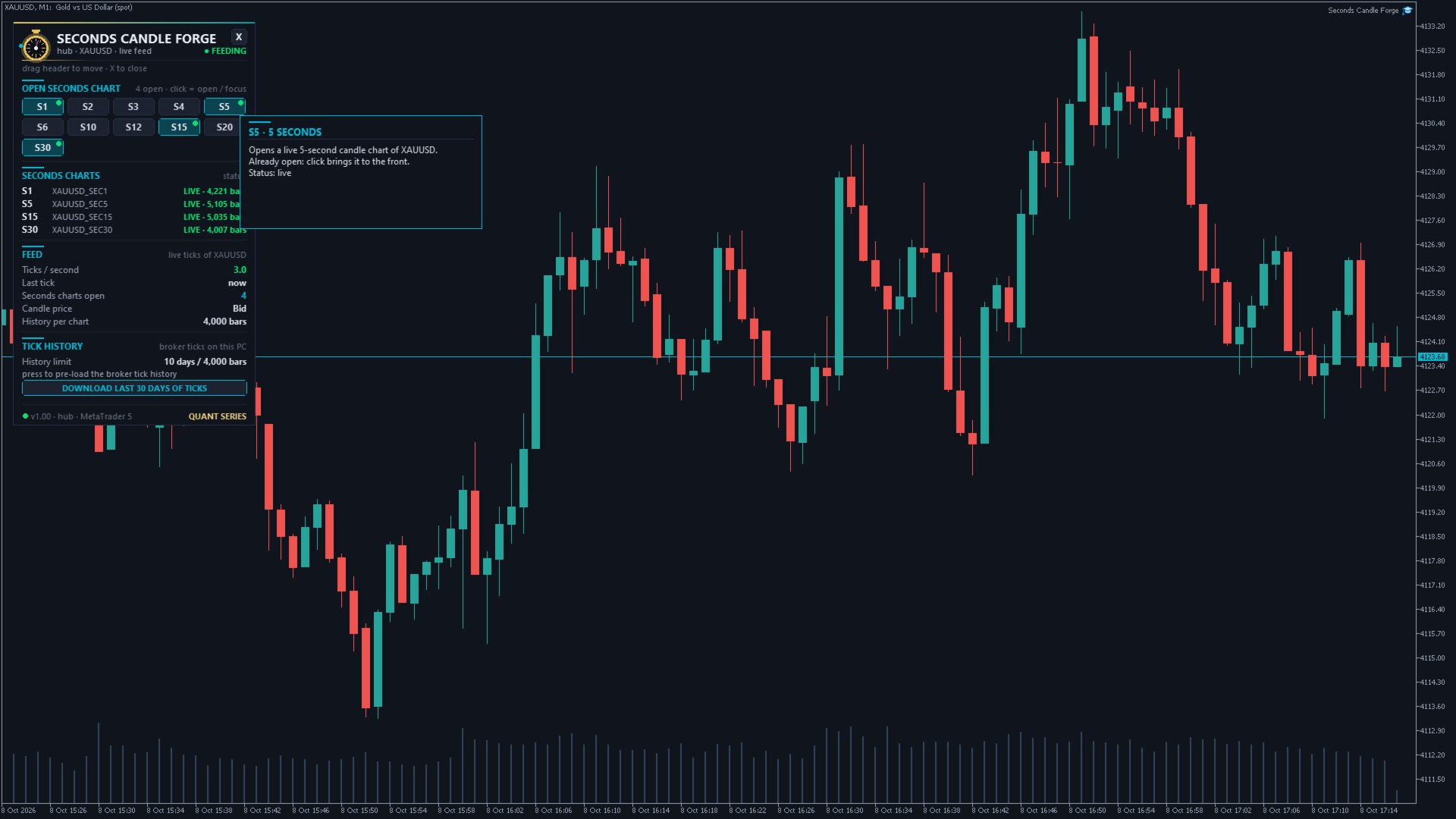
- Click S5 in the panel. A second later your live 5-second chart opens, with history.
That's it. The panel of the seconds charts is built into the EA. Nothing else to install, no DLL, no web requests.
📖 HOW IT WORKS
The hub. The EA on your normal chart is the hub. It reads every tick and writes the seconds candles into custom symbols such as XAUUSD_SEC5 (group "Seconds Candle Forge"). One hub feeds all seconds charts of its symbol – keep it running. For more symbols, drop it on a chart of each symbol. A second hub on the same symbol waits in STANDBY and takes over automatically if the first one is removed.
The hub panel. OPEN SECONDS CHART (buttons; a green dot = open, yellow = building; clicking an open one brings it to the front) · SECONDS CHARTS (status and candles of every chart) · FEED (ticks per second, last tick, candle price) · TICK HISTORY (history limit + loader).
The panel on every seconds chart. Header with status (LIVE / BUILDING / DORMANT / HUB OFF / STATIC) · TIMEFRAME buttons · BAR CLOCK · MARKET box · TRADE section (click the title to show / hide). Drag the header to move the panel, click X to shrink it to a pill, click the pill to open it again. Hover over anything for an explanation.
Good to know. MetaTrader only knows minute bars, so each seconds candle is stored as one M1 bar of the custom symbol on its own clock. The candles are exact – the panel replaces the date scale with the real time axis so you always see the true time. Switch the seconds chart to M5 and every bar holds 5 seconds candles (S5 → 25 seconds).
💡 READY-MADE IDEAS
- Gold at the US open: S5 + S15 side by side, 20 EMA on both, trade from the S5 panel with 0.5 % risk.
- News replay: From 14:25 / To 14:45 on the release day → a static S1 chart of the whole move.
- EA test on seconds candles: Strategy Tester → symbol XAUUSD_SEC5, M1, "Every tick based on real ticks".
- Crypto 24/7: works on BTCUSD and every symbol with ticks, weekends included.
⚙️ INPUTS
- Seconds timeframes – button list, 1 … 3600 (default 1,2,3,4,5,6,10,12,15,20,30)
- Open these seconds charts on start – e.g. 5,15
- History – bars per chart (5,000), max days of ticks (10), From / To date (0 = live)
- Candles – price Bid / Ask / Mid / Last, colors dark quant / classic / keep mine
- Seconds chart – real time axis, bar clock, trade panel, position lines (each on / off)
- Trading – lots, risk %, SL, TP, magic number, slippage, confirmation before every order
- Alerts – spike alert, spike factor (4.0), popup, sound, push
- Tick loader – days to download (30)
- Panel – show, start position, tooltips
- Strategy Tester: demo trades – tester only (see below)
🧪 FREE DEMO IN THE STRATEGY TESTER
The Strategy Tester cannot open extra chart windows, so in the tester the hub draws a live preview of the seconds candles right inside its panel (visual mode). To show the trade functions it opens a demo trade with the minimum volume every 4 hours of tester time and closes it after 1 hour. This happens only in the tester – in live trading Seconds Candle Forge never opens a trade by itself. It only executes the buttons you click.
❓ FAQ
- Which brokers? Every MT5 broker, hedging and netting. History depth depends on your broker's tick history – use the loader for more.
- Does it trade automatically? No. Live it only executes your clicks and line drags.
- Several symbols? Yes, one hub per symbol.
- Hub chart closed? The seconds charts show HUB OFF. Drop the EA again and it rebuilds the missing candles from the tick history.
- Remove the panel from a seconds chart? Ctrl+I → "SCF Panel" → Delete. The chart keeps updating.
Trading involves risk. Seconds charts move fast – always use a stop loss and a position size you can afford.