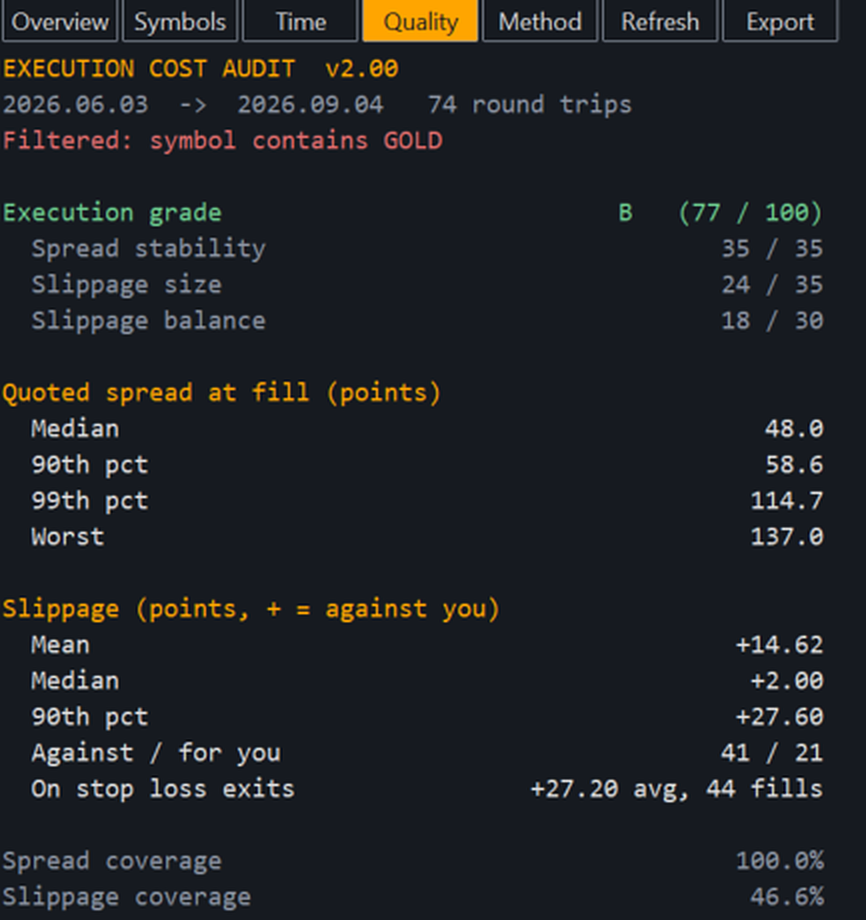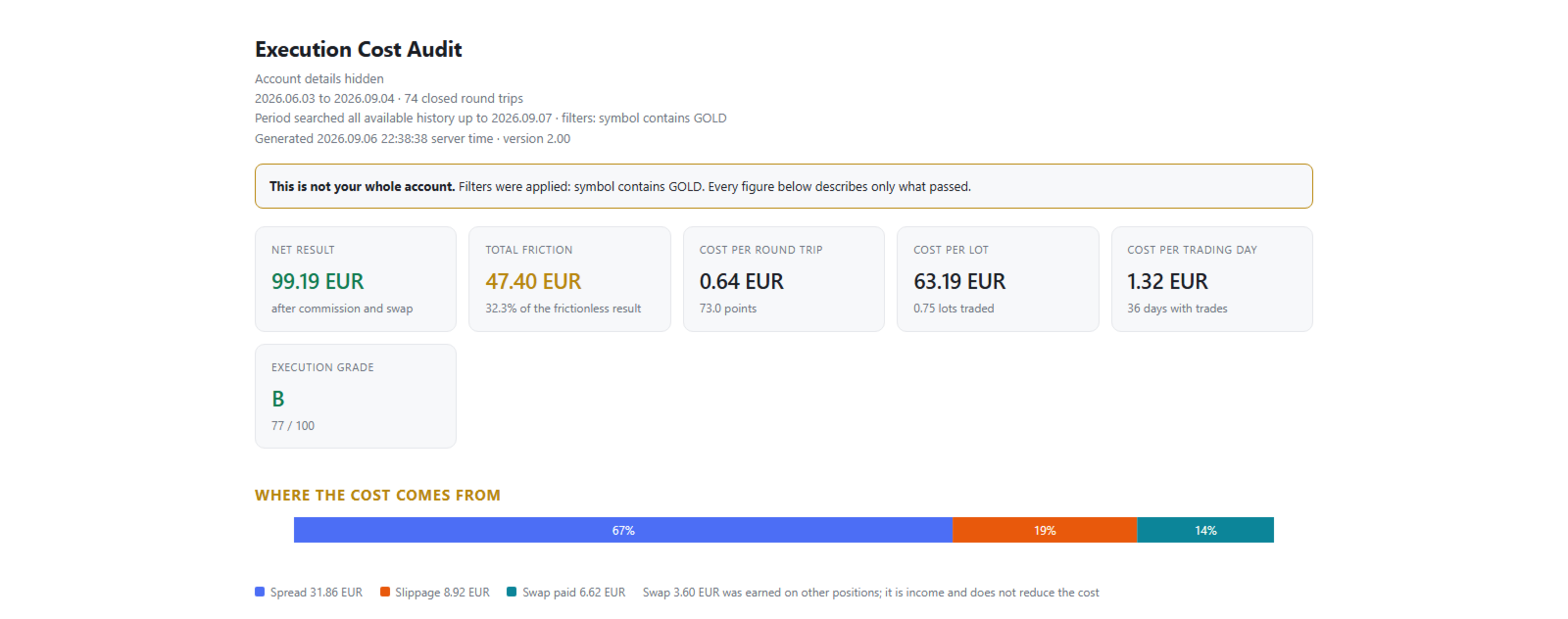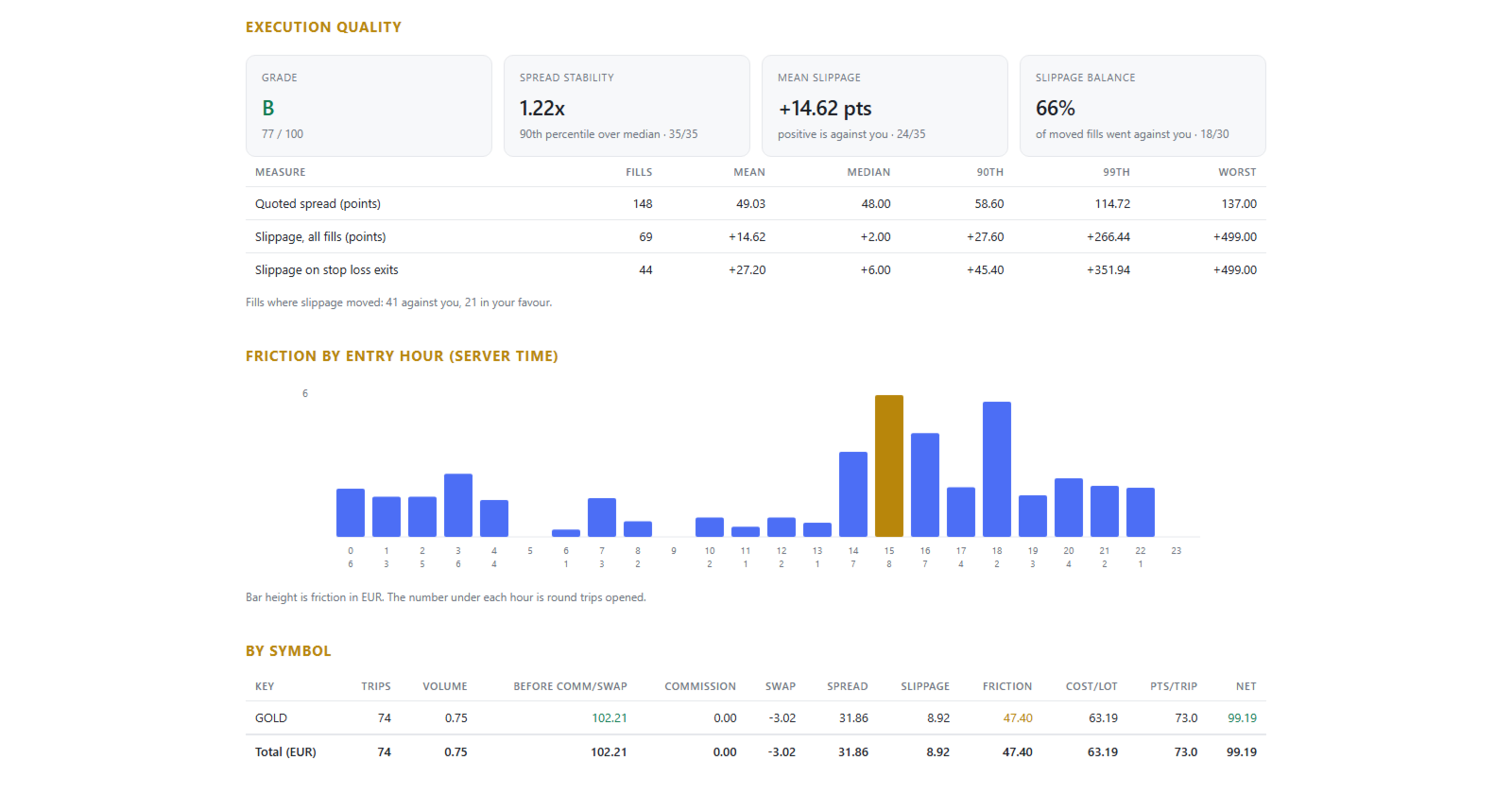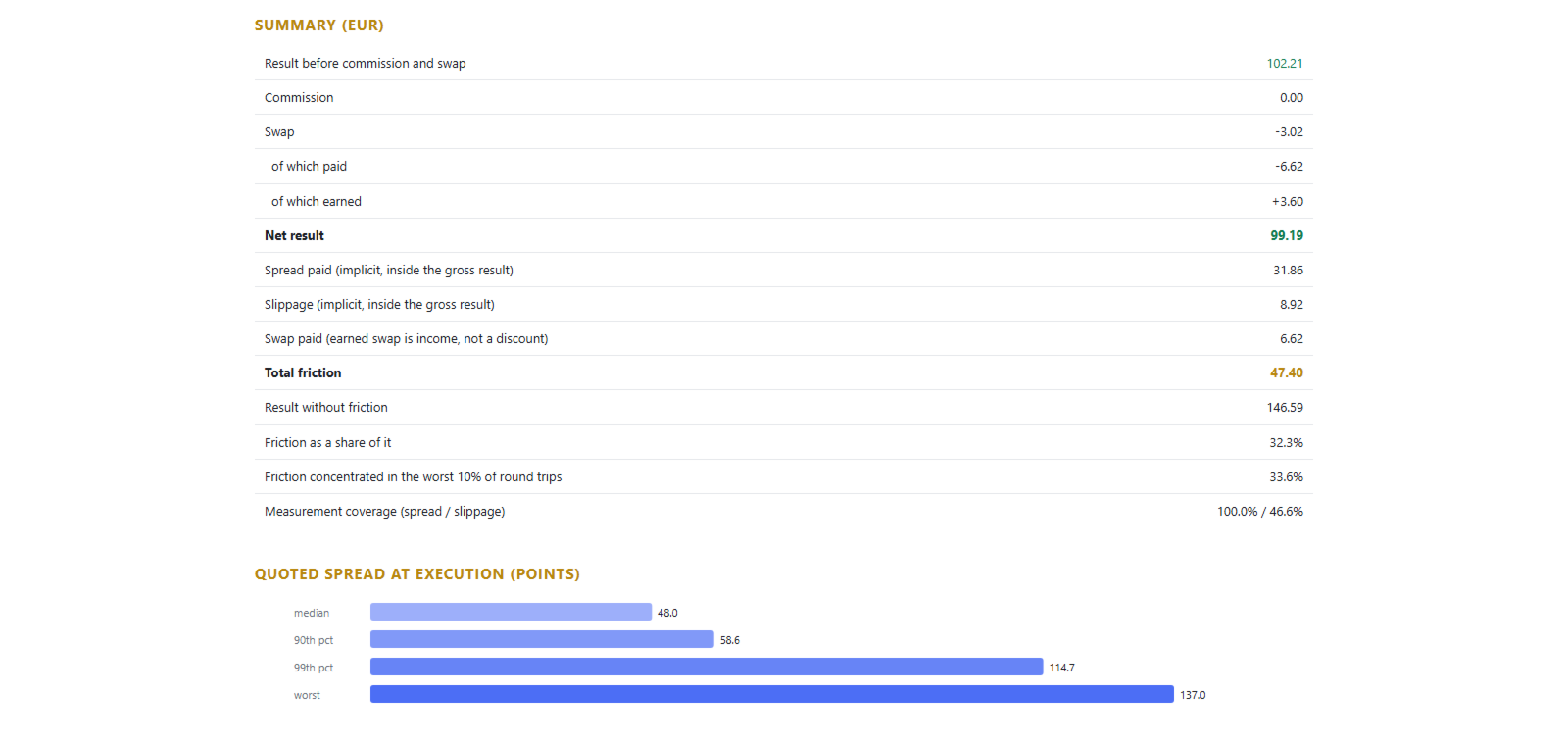
Execution Cost Audit

自分のトレードに実際いくらかかっているのか、考えたことはありますか。Execution Cost Audit は、口座にすでにある決済済みの履歴を読み、こう答えます。各約定の瞬間に提示されていたスプレッド、各約定がどれだけ滑ったか、そしてその上に手数料とスワップがいくら加わったか。事前にインストールしておくものも、待つ時間もありません。読むだけで、注文を送ることは決してありません。


なぜ作ったのか

自分のトレードにいくらかかっているのかを知りたかったのですが、見つかるツールはどれも同じ答えでした。インストールして、数週間後にまた来てください、と。しかし履歴はもう口座にあったのです。すべての約定と、すべての価格とともに。各約定の瞬間のスプレッドは、ブローカーのティックアーカイブにありました。部品はすべて揃っていて、誰もそれを組み立てていなかっただけでした。

そこで、それを組み立てるものを書きました。チャートに載せると、すでにある決済済みの履歴を読み、各約定から一つひとつの往復取引を再構成し、ティックアーカイブを参照して、約定のミリ秒に何が提示されていたか、そして約定が注文の要求した価格からどれだけ離れたかを調べます。手数料とスワップは約定そのものから取ります。一分後には、直近九十日、あるいは直近一年、あるいはターミナルが記憶しているすべてが、いくらかかったのかが分かります。

注文を出すことも、変更することも、決済することもありません。コードのどこにも取引関数はなく、自動売買をオンにしておく必要もありません。


何を教えてくれるか

- スプレッド。各約定の瞬間に提示されていたそのままの値です。いま画面に出ている値でも、ブローカーの平均でも、M1 バーのスプレッド欄でもありません。M1 の欄は、スプレッドが広がった一分も含めて一分間を平均してしまいます。
- スリッページ。注文が要求したものと得たものとの差です。成行注文なら要求価格、ストップやリミットならその水準。符号は、正の数が常に不利を意味するよう揃えてあります。
- 手数料、諸費用、スワップ。往復取引ごとに、約定から直接。
- そして、ある約定についてティックアーカイブに何もなければ、そう伝えます。その約定は捏造されず、未計測のまま残り、レポートはそれが全体のどれだけだったかを示します。


四つのコストを混ぜない

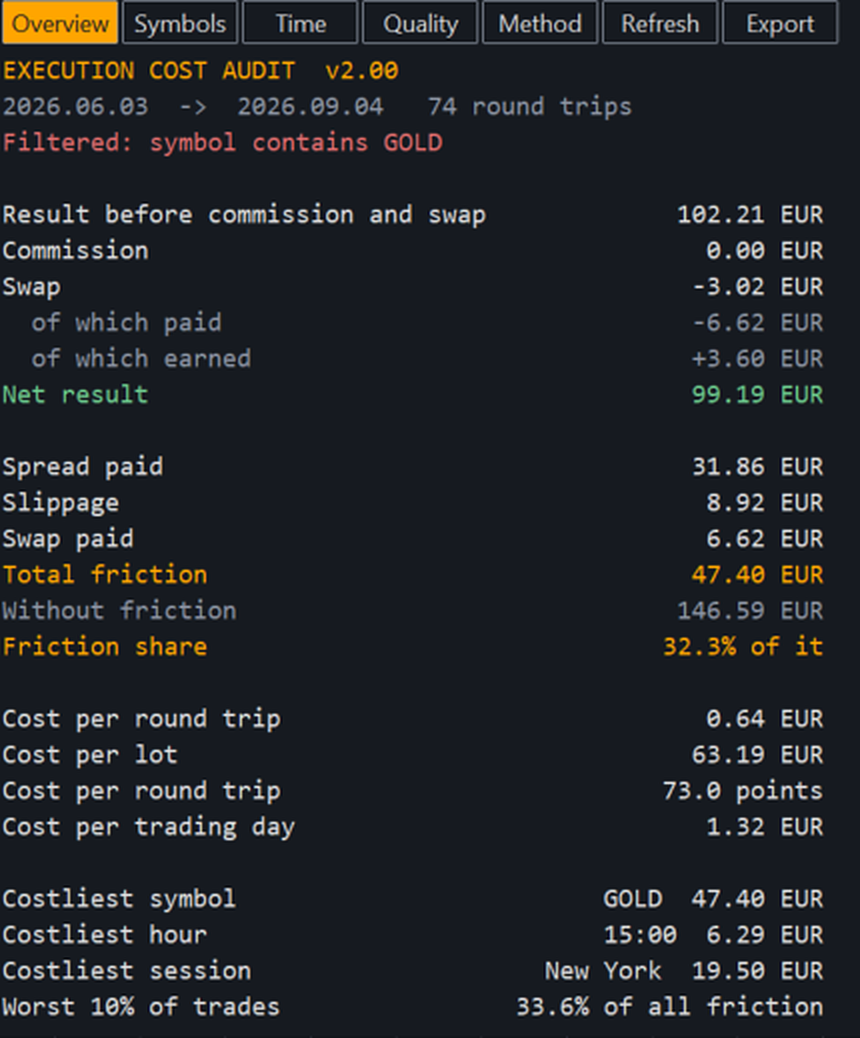
やりがちな間違いがあります。スプレッド、スリッページ、手数料、スワップを足し合わせ、その全部を粗利益から引くことです。これは二重計上です。スプレッドとスリッページはすでに粗利益の中に入っています。あなたは Ask で買い、Bid で売ったからです。手数料とスワップはその上に課されます。レポートはこれらを分けて扱います。実際に口座に届いた金額と、その隣に、同じ取引が手数料もスワップもなく仲値で約定していたら得られたはずの金額を示します。コストを百分率で表すときは、この二つ目の数字が分母です。

スワップも同じ丁寧さで扱います。結果の中では差し引き後の値として表示され、その後、支払った分と受け取った分に分けて示されます。コストとして数えるのは支払った分だけなので、コストの各行を足せば必ず合計に一致します。


お金はどこへ行ったか

すべての数字を、銘柄別、エントリー時刻別、曜日別、セッション別、売買方向別、マジックナンバー別、そしてポジションの決済理由別に分解します。ストップロス決済のスリッページは別枠で報告します。驚きはたいていそこにあるからです。さらに、最もコストのかかった往復取引の上位十件と、摩擦コスト全体のうち最悪の一割にどれだけが集中しているかも分かります。思っているより大きいことが多く、そして変えられる何かを指し示しています。


ブローカーはあなたをどう約定させているか

ブローカーに問える三つのこと。どれも、あなたの戦略が良いかどうかとは無関係です。

1. スプレッドは安定しているか。提示スプレッドの 90 パーセンタイルを中央値と比べます。何も起きていないときにしか当てはまらない宣伝上のスプレッドは、ここで露わになります。
2. スリッページはどれだけ大きいか。その銘柄の典型的なスプレッドを基準に測るので、ゴールドの数ポイントと EURUSD の数ポイントが同じ扱いにはなりません。
3. 偏っていないか。動いた約定のうち、いくつが不利な方向に動いたか。いつも一方向にしか滑らない板は、遅延の問題ではありません。

この三つを合わせて 0 から 100 のスコアとアルファベットの等級にします。サンプルが足りない項目は除外し、残りを再配分するので、ブローカーがティックアーカイブを公開していない口座でも、約定に基づいて評価されます。


ポイントをお金に換える、自分をごまかさずに

よくある近道は現在のティック価値を使うことですが、それは今日の為替レートを四か月前の取引に持ち込んでしまいます。代わりに、決済済みの各ポジションが自分の実現損益から自分の換算係数を較正します。既知の距離を動き、既知の結果を計上したのですから、それがその瞬間にブローカーが適用した換算を、クロスレートも含めて明らかにします。ティック価値は、ほとんど動かなかったポジションのための予備に過ぎません。


何を除外したかを伝える

フィルターをかけたレポートは、完全なレポートとまったく同じに見えます。だからこそ、七十件の取引がある口座の四件だけを監査して、コストは問題ないと結論づけてしまう人がいるのです。このレポートは常に、監査した取引の期間、検索した期間、有効なフィルター、そしてその期間の外に決済済みの往復取引がいくつあるかを明記します。パネルでも、HTML レポートでも、CSV でも。


何が出てくるか

- チャート上のパネル。Overview、Symbols、Time、Quality、Method の五ページ。どの隅にも固定でき、チャートの高さに合わせて自動調整され、収まりきらないときはスクロールします。
- 単体で完結する HTML レポート。グラフは内蔵、外部ファイルなし。どのパソコンでも開け、きれいに印刷できます。ブローカーに送るにも、半年後の自分に送るにも向いています。
- 往復取引ごとに一行の CSV。UTF-8 とバイト順マーク、区切り文字は選択可能。ご自身の表計算ソフト用です。


買う前に試す

ストラテジーテスターには監査すべき口座履歴がありません。そこでテスターでは、ティックの流れの上に模擬的な取引セットを組み立て、代わりにそれを監査します。注文は一切送りません。スプレッド、判断から約定までの値動き、ストップロスの約定は、すべてその銘柄と期間についてブローカーが記録したティックから来ているので、約定に関する数字はそのブローカーのその銘柄を表しています。作り物なのは取引のスケジュールだけで、どの画面にもそう書いてあります。「実際のティックに基づいた全ティック」モデルを使ってください。OHLC モデルと始値モデルは約定のタイミングを測るには疎すぎるティックを生成し、そうなった場合、レポートは未計測のまま残した約定の数を示します。

便利な副作用もあります。任意の銘柄と期間に向ければ、口座を開く前に自問したかもしれない問いに答えてくれます。このブローカーでこの銘柄を取引していたら、いくらかかっていたのか、と。


必要なもの

MetaTrader 5、DLL 不要。ヘッジ口座でもネッティング口座でも、どの銘柄でも、どの時間足でも。スプレッドの計測には、取引した銘柄のティックアーカイブが必要です。ある銘柄で初めて実行するとき、ターミナルがティックをダウンロードする間、一分ほどかかることがあります。パネルとレポートはまだ欠けている銘柄の名前を示し、監査は数分間、自動で再試行します。


主なパラメーター

- 期間: 直近 N 日、任意の日付範囲、または利用可能な全履歴。
- フィルター: 銘柄(ブローカーのサフィックスの有無を問わず)、マジックナンバーとその範囲、売買方向、最小ロット。
- 計測: 気配値の検索ウィンドウ(ミリ秒)、約定ごとにスプレッドの半分か全部か、資金換算の自動較正か現在のティック価値か。
- セッション: サーバー時間でのアジア、ロンドン、ニューヨークの時間帯。日付をまたぐ設定も可。
- パネル: 隅、オフセット、フォントサイズ、色、自動更新の間隔。
- レポート: HTML と CSV の個別オンオフ、CSV の区切り文字、初回監査時のエクスポート、口座情報の非表示、レポートのフォルダーと名前のサフィックス。
- ストラテジーテスターのデモ: ロット、一日あたりの取引数、保有時間、想定手数料、ストップ距離。


限界、率直に

- 完全に決済された往復取引だけを数えます。未決済のポジションは往復の半分であり、半分の往復には計測すべき出口がありません。
- マーケット執行の口座では、注文に要求価格が付かないため、エントリーのスリッページは計測できません。レポートは空白を埋める代わりに、カバー率を示します。
- 一部のサーバーでは、成行注文が約定価格で記録されます。口座上のすべての成行約定がちょうどゼロのスリッページを示す場合、それらは完璧と評価されるのではなく未計測として扱われ、レポートはそう伝えます。
- スプレッドとスリッページは、アーカイブに記録されているものの計測であり、そのアーカイブはブローカーのものです。
- 約定の等級は約定を表すものであって、収益性ではありません。完璧なブローカーでも、負ける戦略を勝たせることはできません。


ご質問

レポートの中で辻褄が合わないものがあれば、製品のコメント欄で聞くか、MQL5 で私にプライベートメッセージを送ってください。どちらも読んでいます。説明のつかないレポートこそ、私が知りたい類のものです。
おすすめのプロダクト
Gann Box MT5
Frederic Jacques Collomb
Gann Box インジケーターは、トレーダーが市場の重要なレベルを特定し、活用するのを支援するために設計された強力で多機能なツールです。このインジケーターを使用すると、チャート上に長方形を描くことができ、それが自動的に 0, 0.25, 0.50, 0.75, 1 の戦略的レベルを持つ複数のゾーンに分割されます。価格がこれらのレベルのいずれかに達すると、アラートがトリガーされ、トレーディングの意思決定に貴重な支援を提供します。描いたゾーンに対する市場の動きを即座に把握できます。ゾーンをトレースするには、単純な長方形を描いて名前を GannBox に変更するだけです。 このインジケーターは、 サポートとレジスタンス の概念を使用するトレーダー、 サプライとデマンド 、 ICTテクニック 、または**公正価値ギャップ(FVG)**の専門家など、すべてのタイプのトレーダー向けに設計されています。 デイトレーダー、スイングトレーダー、またはポジショントレーダーであろうと、 Gann Box は市場の動きをより良く理解し予測する手助けをし、反応性とパフォーマンスを向上させます。 MT4バージョ
概要 外国為替や金融市場では、迅速な反応と正確な意思決定が非常に重要です。しかし、標準のMetaTrader 5端末は最小でも1分のチャートしかサポートしておらず、トレーダーが市場の変動に敏感であることを制限しています。この問題を解決するために、 秒単位チャートキャンドルインジケーター を導入しました。このインジケーターを使用すれば、1秒から30秒の市場の動向をサブチャートで簡単に表示・分析できます。 主な機能 複数の秒単位タイムフレームのサポート :このインジケーターは、以下のタイムフレームを選択でき、さまざまな取引戦略に対応します: S1 : 1秒 S2 : 2秒 S3 : 3秒 S4 : 4秒 S5 : 5秒 S10 : 10秒 S15 : 15秒 S20 : 20秒 S30 : 30秒 リアルタイム更新 :秒単位チャートはリアルタイムで更新され、各瞬間に最新の市場情報を提供します。これにより、迅速な取引判断が可能になります。 ユーザーフレンドリーなインターフェース :インジケーターはサブチャートに表示され、直感的で使いやすいです。異なるタイムフレームに素早く切り替えて市場を迅速
BossFXTradePanelEA (MT5)  [First 10 copies sold at 50 USD price will increase to 99USD] BossFXTradePanelEA is a fully interactive trade management panel designed for MetaTrader 5, providing traders with an easy-to-use, one-click interface to execute and manage trades. This EA simplifies trade execution , risk management, and position control by combining market orders, stop loss, take profit, trailing stops, and breakeven functionalities into a single, intuitive panel.  Key features include: On
Strategy Manager is a  Multi-Time-Frame & Multi-Currency  Dashboard for  Metatrader 4 and 5. Thanks to a free, external graphical user interface, build your own strategy by combining any indicators and loading them into the dashboard to see the result ! In addition, you can precisely  set-up your Auto-trading & Notifications and use indicators for Stop-Loss, partial profit or limit. Filter your automatic trading & notifications with forex calendar and more. Open and Manage your orders directly w
Trend Pyramid v5.00 | Gold XAUUSD Floating‑Profit Pyramid EA   This floating‑profit pyramid gold EA only adds positions after existing orders generate floating profit, avoiding blind position‑adding under loss conditions. It adopts EMA20 plus ADX24 dual‑indicator filter to filter false oscillation signals and reduce invalid order openings. Multiple hard risk controls are built‑in to protect your account.   Core advantages   1. Add positions only on floating profit, no position‑adding at loss: a
This program is a GUI for issuing orders that can be done more quickly. Faster TP SL setting This program is not an automated trading platform. Trading is risky, please manage your risk. We do not accept any responsibility. It should be tried with Demo before using it with Real. Normally, the setting sets the risk to 1:1 to shift manually or to enter the risk to x:1, where x can be entered and everything can move freely. Thank you to all customers who have purchased our products. We would like t
MATTRIX Position Monitor An 8x8 currency matrix dashboard that gives you a live overview of all  your open positions across the 28 Forex majors in one compact panel.  Designed for traders who manage multiple currency exposures and want  to see direction, hedging, profit, and risk at a glance. WHAT YOU SEE: The 8x8 matrix is organized by the Big8 currency hierarchy: EUR, GBP, AUD, NZD, USD, CAD, CHF, JPY. - Lower triangle (28 cells): one cell per Forex major pair   Cell color = direction:    
Plug & Play portfolio - series of high-quality EURUSD H1 strategies for maximized success. The 4th out of 8 strategies  portfolio set.  Each EA works well as a standalone, works even better as portfolio. Triple tested  - backtest, robustness tests , portfolio correlation. Uses a well-known CCI indicator combined with an ADX indicator. Why to buy Fully automatic EA with really easy set-up. Only risk amount to be set and you are good to go. Developed using genetic algorithms on 'in sample' data
DynamicSR Utility— A State-Aware Zone Defense Matrix for Advanced Market Structure Analysis Hello Traders, Welcome to DynamicSR Utility , a state-aware support and resistance intelligence system engineered for traders who want to move beyond static retail levels and analyze zones through a more structured, data-driven approach. If you have followed my technical article series published on the official MQL5 platform , you have already seen the foundation behind this framework: zone scoring, lifec
1 つのチャートで完全な制御を実現。 各チャートのオブジェクト、色、設定を個別に管理する時間を無駄にする必要はありません。     チャート同期マネージャーを 使用すると、     すべてのMetaTraderチャートを同期、コピー、制御します   たった 1 つのパネルといくつかのショートカットを使用して、瞬時に実行できます。 一度描いたら、どこでも更新。チャートをワンクリックで開閉。ワークスペースを整理整頓。     シンボルベースのオブジェクト管理 。重要な詳細を見逃すことはありません。     スプレッド表示、カウントダウンタイマー、ローソク足クローズアラートなど。 時間を節約し、エラーを減らし、よりスマートに取引します。 Chart Sync Manager インストールと入力ガイド EA に関する通知を受け取りたい場合は、URL (   http://www.betasoft.dev   ) MT4/MT5 ターミナル (スクリーンショットを参照) を追加します。 MT4バージョン https://www.mql5.com/en/market/product/1484
革新的な Trades Time Manager を使用して、取引ルーチンを簡単に管理できます。この強力なツールは、指定された時間に注文執行を自動化し、取引アプローチを変革します。 購入から注文の設定まで、すべて手動介入なしで、さまざまな取引アクションのためのパーソナライズされたタスク リストを作成します。 Trades Time Manager のインストールと入力ガイド EA に関する通知を受け取りたい場合は、MT4/MT5 ターミナルに URL を追加してください (スクリーンショットを参照)。 MT4のバージョン     https://www.mql5.com/en/market/product/103716 MT5のバージョン     https://www.mql5.com/en/market/product/103715 手動監視に別れを告げ、合理化された効率を採用します。直感的なインターフェイスにより、シンボル、約定時間、価格、ストップロス (SL)、テイクプロフィット (TP) ポイント、ロットサイズなどの正確なパラメーターを設定できます。 このツールの柔軟性は、市
MT5 Trade To Telegram MT5 Trade To Telegram is a professional trade signal bridge for MetaTrader 5. It monitors trades, positions, and pending orders placed on your MT5 account and sends clean, structured signal updates to your Telegram bot, group, channel, or private chat. It is designed for traders, signal providers, educators, account managers, and trading communities who need fast trade communication with flexible TP/SL handling, inverse signal mode, live target monitoring, and a modern on-
Trade Panel HotKey – MT5 Scalping Utility Fast Trade Panel HotKey is a lightweight MT5 trading utility designed for traders who need to open, manage, and close positions as quickly as possible . The main purpose of this tool is to reduce the time between a trading decision and execution. Instead of moving the mouse, opening order windows, or manually modifying multiple positions, most important actions can be performed instantly through customizable keyboard hotkeys or directly from the compact
Is your trade at a loss? Does not matter ! You can use this Extra martingale tool.  In the set loss of your trade or your EA's trade , this tool will open another trade at a better price. It can also open multiple trades at different distances and with different lot sizes. Each trade will be assigned a TakeProfit. This tool has a lot of settings. You can set variable lot sizes, variable trade distances, variable TakeProfit sizes, maximum total profit or loss in money. You can also close trades
Daily Telegram Market Briefing — Professional FX Session Briefing for MT5 Daily Telegram Market Briefing is a MetaTrader 5 Expert Advisor that compiles a clean, actionable morning brief for the instrument on your chart and delivers it to your Telegram group or channel at a time you choose. It combines previous day OHLC levels, an Asia session range computed in your local time, a directional bias and short outlook, and a curated list of today’s high-impact macro events (from the ForexFactory cal
Pending Orders Grid Complete System   opens any combination of Buy Stop, Sell Stop, Buy Limit and Sell Limit pending orders and closes all existing pending orders. Only one time of the pending order at the same time!!! You will have a possibility to put a legitimate   Open Price   for the first position in the grid. Usually it should in the area of Support/Resistance lines. You just need to drop this script on the chart of a desired currency pair. Input Parameters Before placing all pending ord
Launch   price!  The price will increase by $10 with every 3 purchases. Final price $88. Trading ICT, FVG, SMT, liquidity sweeps, or price action? Stop switching between TradingView and your trading platform just to mark session highs/lows, adjust session boxes, and track liquidity zones manually. Accurate Sessions   is a clean and practical MetaTrader 5 indicator designed to help traders visualise key market sessions, important price levels, and timing information directly on the chart. It giv
Trailing Stop Manager MT5 Trailing Stop Manager MT5 is a flexible trade management utility for MetaTrader 5 that automatically moves the Stop Loss as price moves in your favor. It is designed for traders who want to protect profits and manage open positions automatically while keeping control over how and which positions are managed. The manager currently includes two trailing methods: • Standard Trailing Stop • Fractals Trailing Stop It also includes a compact trading panel for opening, managi
Telegram to MT5 Pro — 高度なTelegramシグナルコピー機(自動修正・マルチTP・リスク管理・完全トレード管理) Telegram to MT5 Pro — プロフェッショナル Telegram シグナルコピーツール Telegram to MT5 Pro は、TelegramのシグナルをMetaTrader 5アカウントへ自動で直接実行する高性能トレードコピーシステムです。リスク管理、執行、トレード管理を完全に制御できます。 本システムは2つのコンポーネントで構成されています: • MetaTrader 5内で動作するExpert Advisor(EA) • Telegramと接続しシグナルをローカルでEAへ送信するコンパニオンデスクトップアプリ 両方は同じPC上で動作する必要があります。MQL5の制限によりEAはTelegramへ直接接続できません。ブリッジがTelegram処理を担当し、EAが取引を実行します。 サポートとインストール支援 完全なPDFインストール&ユーザーガイドが提供されます。 サポート内容: • 完全PDFユーザーガイド(全設定説明)
ADX Hedge Master
Itumeleng Mohlouwa Kgotso Tladi
ADX HEDGE MASTER  Advanced Hedging & Trend Following EA Revolutionary Trading Solution for Maximum Profit Potential The   ADX HEDGE MASTER   is a sophisticated Expert Advisor designed to dominate the forex market through intelligent hedging strategies combined with precision trend-following algorithms. This cutting-edge EA leverages the power of the Average Directional Index (ADX) to identify optimal market conditions while executing dynamic hedging positions for consistent profitability.
ProBridger
Marius Ovidiu Sunzuiana
How Traders and Analysts Can Use the Data Export Bridge to Improve Their Analytics The MQL Data Export Bridge unlocks a new level of analytical power by transforming MetaTrader into a real‑time data provider for any external research environment. Here are the most impactful ways different users can apply the bridge to enhance their trading performance. Build Predictive Models with Machine Learning Who benefits: Quantitative traders, data scientists, algorithm developers How it helps: Export t
Welcome to Smart Algo Trade Panel Manager MT5 - the ultimate   risk management tool designed to make trading more effective based on user needs.  It is a comprehensive solution for seamless trade planning, position management, and enhanced control over risk. It does not matter weather you a beginner or an advanced trader, or a scalper needing rapid executions, SmartAlgo Trade Panel  adapts to your needs offering flexibility across all markets of your choice. You can put SL, Lot and TP of choice
Online Accounts Manager MT5
Kyra Nickaline Watson-gordon
5 (1)
OneClick Online Account Manager is a powerful utility that helps you to manage all your accounts from a centralized panel. It is suitable for all single account traders and specially for multiple accounts traders. The utility help you to : Monitor status of all accounts on a private web page. Some information such as account connection status, account profit, DD, Balance, Equity, Margin Level, Number of positions and orders, Daily and Weekly profit/loss and also overall summation of all these p
This Expert Advisor works on the signals of the Parabolic indicator, while analyzing the readings of other indicators, especially Stochastic. Sets pending orders, as a rule, they are triggered when a local trend reversal occurs. If the trading conditions become unsuitable, it can delete pending orders. It has many settings, the stop loss can also move along the parabolic with other parameters. Recommended timeframes: M5, M15, M30, H1. Before trading, optimize the EA parameters for your account
️ UMNi-CMND MT5 Remote Command & Trade Control System UMNi-CMND turns Telegram into a full remote control panel for your MetaTrader terminal. Send commands from your phone to open trades, manage positions, query account status, and receive complete trade telemetry — all without touching the platform. KEY FEATURES Full remote trade execution via Telegram Open, close, and manage positions by command Move SL/TP, set breakeven, partial close Live status, account, and position
あなたの取引ジャーナルを自動で作成。決済されたすべての取引が自動的に記録されます — チャートのスクリーンショット、詳細な統計、カレンダー形式のダッシュボード付き。100%ローカル動作、サブスクリプション不要。 AutoJournalは、バックグラウンドで静かに動作し、取引履歴をプロフェッショナルなHTMLジャーナルに変換するユーティリティです。手動でのデータ入力も、スプレッドシートも、外部サービスも不要です。すべてがあなたのコンピューター上で生成・保存され、裁量取引でもEAによる取引でも同じように機能します。 ボーナス情報:   Aureon NASDAQ の購入者は、1取引口座分のAutoJournalを無料で受け取れます。 自動的に記録される内容 決済された各取引は、次の情報を含むカードとしてジャーナルに追加されます: エントリー価格と決済価格、ストップロスとテイクプロフィット、ロットサイズ、保有時間、売買方向、 オープンディールとクローズディール両方の手数料とスワップを含む 純損益、口座に対する割合、リスクリワード比率、チケットID。勝ちトレード、負けトレード、ブレークイーブ
# Telegram Signal Forwarder EA for MetaTrader 5 ## Overview This Expert Advisor automatically forwards all trading activity to a Telegram channel or group. It tracks **positions AND pending orders** in real-time and sends formatted signals. **Key Feature:** All follow-up messages (close, partial close, modify, delete) are sent as **replies to the original signal** in Telegram, creating a clean threaded conversation for each trade. ## Signal Types ### For Positions (Market Orders) - **OPEN
Pro Trade Utility for MetaTrader 5 Pro Trade Utility is a professional manual trading assistant designed for traders who want precision, speed and clarity — without automated strategies. This tool does not trade automatically . It helps you execute and manage trades correctly with proper risk control. Key Features  Risk & Position Management Risk-based automatic lot size calculation Risk shown clearly in account currency Adjustable Stop Loss (points) Fixed Risk:Reward display  Trade Executio
FX Power: 通貨の強弱を分析して、より賢い取引を実現 概要 FX Power は主要通貨と金の実際の強弱をあらゆる市場状況で理解するための必須ツールです。強い通貨を買い、弱い通貨を売ることで、 FX Power は取引の意思決定を簡素化し、高い確率の取引機会を見出します。トレンドを追従する場合でも、極端なデルタ値を使用して反転を予測する場合でも、このツールはあなたの取引スタイルに完全に適応します。ただ取引するだけではなく、 FX Power で賢く取引をしましょう。 1. なぜ FX Power がトレーダーにとって非常に有益なのか 通貨と金のリアルタイム強弱分析 • FX Power は主要通貨と金の相対的な強弱を計算し、マーケットダイナミクスに関する明確な洞察を提供します。 • どの資産がリードしているか、または後れを取っているかを監視して、取引するペアを賢く選びましょう。 マルチタイムフレームの包括的なビュー • 短期、中期、長期のタイムフレームで通貨と金の強弱を追跡し、マーケットトレンドに基づいて取引戦略を調整できます。 • スキャルピングからスイングトレード
DeepTrade SessionIntel
Yasir Mohammed Sachit Sachit
Most session tools try to cover everything. DeepTrade Session Intel does the opposite — it focuses on what actually moves the market: the London and New York sessions, tuned for Gold (XAUUSD) and US30. It maps the liquidity and the real activity window so you trade when the market is alive, not when it's dead.   WHAT IT SHOWS - London and New York session boxes drawn at their real server hours - Session HIGH and LOW lines — the liquidity that price hunts - Pre-session breakout range — the conso
このプロダクトを購入した人は以下も購入しています
Trade Assistant MT5
Evgeniy Kravchenko
4.41 (216)
取引 ごとのリスクの 計算、新規注文 の 簡単 な 設置、部分的 な 決済機能 を 持 つ 注文管理、 7 種類 のトレーリングストップなど 、便利 な 機能 を 備 えています 。 追加の資料と説明書 インストール手順   -   アプリケーションの手順   -   デモアカウント用アプリケーションの試用版 ライン機能 チャート上にオープニングライン、ストップロス、テイクプロフィットを表示します。この機能により、新規注文を簡単に設定することができ、注文を出す前にその特徴を確認することができます。   リスク計算 リスク計算機能は、設定されたリスクとストップロス注文のサイズを考慮して、新規注文のボリュームを計算します。ストップロスの大きさを自由に設定できると同時に、設定したリスクを守ることができます。 Lot calc ボタン - リスク 計算 を 有効 / 無効 にします 。 Risk フィールドでは 、必要 なリスクの 値 を 0 から 100 までのパーセンテージまたは 預金通貨 で 設定 します 。 設定」 タブで 、 リスク 計算 の 種類 を 選択 します :「 $ 通
Trade Manager EAへようこそ。これは、取引をより直感的、正確、そして効率的にするために設計された究極の リスク管理ツール です。これは単なるオーダー実行ツールではなく、包括的な取引計画、ポジション管理、リスク管理のためのソリューションです。初心者から上級者、迅速な実行を必要とするスキャルパーまで、Trade Manager EAはあらゆるニーズに対応し、為替、指数、商品、暗号通貨などさまざまな市場で柔軟に対応します。 Trade Manager EAを使用すると、複雑な計算が過去のものになります。市場を分析し、エントリーポイント、ストップロス、テイクプロフィットのレベルをチャート上のラインでマークし、リスクを設定するだけで、Trade Managerが最適なポジションサイズを即座に計算し、SLとTPをピップ、ポイント、口座通貨でリアルタイムに表示します。すべての取引が簡単かつ効果的に管理されます。 主な機能: ポジションサイズ計算機 :定義されたリスクに基づいて取引サイズを瞬時に決定します。 簡単な取引計画 :エントリー、ストップロス、テイクプロフィットを設定するためのド
Farmed Hedge Yield Farming | All Markets (Manual - Hybrid - Semi/Automated EA) VERIFIED TRADING RESULTS - Farmed Hedge Yield Axi Copy:  https://www.mql5.com/en/signals/2356376 - Farmed Hedge Yield Exn Copy:   https://www.mql5.com/en/signals/2356404 - Farmed Hedge Yield V Copy:  https://www.mql5.com/en/signals/2357156 * Before purchasing, please feel free to send me a message if you have any questions about the product or setup. - You can test the system using Strategy Tester: Visual Mode , a
ベータリリース Telegram to MT5 Signal Trader はまもなく正式なアルファ版をリリースします。いくつかの機能はまだ開発中で、小さな不具合に遭遇する可能性があります。問題が発生した場合はぜひご報告ください。皆さまのフィードバックがソフトウェア改善に役立ちます。 Telegram to MT5 Signal Trader は、 Telegram のチャンネルやグループからの取引シグナルを自動的に MetaTrader 5 にコピーする強力なツールです。 パブリックおよびプライベートの両方のチャネルに対応し、複数のシグナル提供元を複数のMT5口座に接続可能です。ソフトウェアは高速で安定し、すべての取引を細かく制御できます。 インターフェースは直感的で、ダッシュボードとチャートは見やすく設計されており、リアルタイムで動作状況をモニターできます。 必要環境 MQL の制限により、EA は Telegram と通信するためのデスクトップアプリが必要です。 インストーラーは公式の インストールガイド にあります。 主な機能 マルチプロバイダー: 複数の Telegram
TradePanel MT5
Alfiya Fazylova
4.88 (167)
Trade Panelは多機能なトレーディングアシスタントです。アプリには手動取引用の50以上のトレーディング機能が搭載されており、ほとんどの取引作業を自動化することができます。 アプリの説明書+ビデオガイド: https://www.mql5.com/en/blogs/post/756482 デモ口座用アプリの試用版: https://www.mql5.com/en/blogs/post/750865 アプリのインストール方法: https://www.mql5.com/en/blogs/post/756239 アプリをビジュアルモードでテストする方法: https://www.mql5.com/en/blogs/post/770277 VPSのMetaTraderにアプリをインストールする方法: https://www.mql5.com/en/blogs/post/770190 取引。 ワンクリックで取引操作を行うことができます: リスクを自動計算して指値注文やポジションを開く。 複数の注文やポジションをワンクリックで開く。 注文のグリッドを開く。 保留中の注文やポジションをグルー
================================================================================ POC BREAKOUT - V20.72. Full Professional Grade Toolkit ================================================================================ POC Breakout is a full MetaTrader 5 trading dashboard for discretionary traders who want breakout signals, Point of Control (POC) context, volume profiles, order flow, market structure, news, alerts, and advanced trade planning in one professional workspace. Attached directly to you
That backtest looks great. But will it still be making money tomorrow, next week, next month? EA Overfitter re-runs your EA on 100 price histories it has never seen. One score tells you if the edge is real. A backtest tells you what an EA did on one price history — the one that happened to occur. What you cannot tell from it is how much of that result was the strategy and how much was the particular path. EA Overfitter answers that. It builds up to 100 synthetic price histories your EA has n
Telegram to MT5 Multi-Channel Copier   は、Telegram チャンネルのトレードシグナルを MetaTrader 5 へ自動コピーします。ボット不要、ブラウザ拡張不要、手動コピー不要。Telegram にシグナルが届くと、EA が数秒であなたのターミナルに注文を出します。 製品は 2 つのコンポーネントで構成されます:Telegram チャンネルを監視する Windows アプリと、MT5 ターミナルでシグナルを執行する本 EA です。MT4 版もあります   こちら . セットアップガイドとアプリのダウンロード: https://www.mql5.com/en/blogs/post/768988 仕組み Windows アプリは、ボットではなくあなた自身の API 認証情報で Telegram に接続します。そのため、プライベートや VIP を含む、購読中のあらゆるチャンネル・グループ・トピックを読めます。あなたに直接メッセージを送るシグナルボット、個人チャット、さらには自分の「保存済みメッセージ」もソースとして使えます。シグナルを検出すると解
25% discount on the release of the tool: only for the next 3 buyers Send a message to receive a demo version. AstroTrade Trading Assistant AstroTrade is a comprehensive multi-functional trading utility developed for the MetaTrader 5 platform. It integrates essential tools for trade execution, risk management, and technical monitoring into a single unified interface. The application is designed to assist traders in managing their daily operations through a visual and structured environment. Vi
HINN MAGIC ENTRY – the ultimate tool for entry and position management! SIMPLE. FASTEST. INTUITIVE. MAX AUTOMATED. Place orders by selecting a level directly on the chart! full description   ::  demo-version  :: 60-sec-video-description Key features: - Market, limit, and pending orders - Automatic lot size calculation - Automatic spread and commission accounting - Unlimited partitial take-profits  - Breakeven and trailing stop-loss and take-profit  functions - Invalidation leves - Intuitive, a
Premium Trade Manager - コーチ内蔵型トレードパネル Premium Trade Manager は、AIトレーディングコーチをあなたのチャートの中に置き、その下に完全な執行エンジンを備えたツールです。いつも通りにトレードをセットアップし、あなた専任のAIトレーディングコーチ Max にそのセットアップをそのまま読み取らせて、発注前に率直な見解を伝えてもらいましょう。ストップの幅が規律あるアプローチに合っているか、リスクサイズは適切か、高影響のニュースイベントが数分後に迫っていないか、プロップファームの制限に近づいていないか。その下には、クリックの後をすべて処理するエンジンが備わっています。ワンクリックのリスクサイズ計算による発注、チャート上でドラッグして組み立て、発注後も動かせるプラン、最大4段階の分割利確、7種類のトレール方式、リアルタイムのプロップファームコンプライアンス、ニュースガード、そしてコストを自ら採点するスプレッド機能。判断はあなたが下す。Max がもう一度確認する。後のことはすべてパネルが担う。 購入前に実際に触れて試せます。 ブラウザ上でライブ
Exp COPYLOT CLIENT for MT5
Vladislav Andruschenko
3.97 (35)
MetaTrader 5 用のプロフェッショナル取引コピー機 MetaTrader 向けの高速・高性能・信頼性の高い 取引コピー機 です。 COPYLOT は、MT4 と MT5 のターミナル間で Forex 取引をコピーでき、 Hedge 口座と Netting 口座の両方に対応しています。 COPYLOT MT5 版の対応構成: - MT5 Hedge → MT5 Hedge - MT5 Hedge → MT5 Netting - MT5 Netting → MT5 Hedge - MT5 Netting → MT5 Netting - MT4 → MT5 Hedge - MT4 → MT5 Netting MT4 版 完全な説明 + DEMO + PDF 購入方法 インストール方法 ログファイルの取得方法 テストと最適化の方法 Expforex のすべての製品 MT4 ターミナルへのコピーも可能です(MT4 → MT4、MT5 → MT4): COPYLOT CLIENT for MT4 COPYLOT は、2台、3台、さらには10台のターミナル間で同時に動作できる、プロフェッ
Anchor: The EA Manager Your EAs cannot see each other, but Anchor can. Anchor gives you one place to coordinate your EAs, manage risk, and decide when trading is allowed. It works alongside the trading bots you already use without any changes to them. The Problem One EA opens a trade. Then another starts trading. The next thing you know, you wake up to multiple grids built across your account. Each EA may be doing exactly what it was designed to do, but together they can place far more risk on y
Power Candles Strategy Scanner - 自動最適化型マルチシンボル設定ファインダー パワーキャンドル・ストラテジー・スキャナーは 、パワーキャンドル・インジケーターを駆動するのと全く同じ自己最適化エンジンを、マーケットウォッチに登録されているすべての銘柄に対して並行して実行します。1つのパネルで、現在統計的に取引可能な銘柄、各銘柄で勝率の高い戦略、最適なストップロス/テイクプロフィットの組み合わせが表示され、新たなシグナルが発生した瞬間に通知が届きます。 このツールは、Stein Investmentsのエコシステムの一部です。  18種類以上のツールをすべて閲覧し、AIを活用したセットアップの推奨を受け取り、  https://stein.investments でコミュニティに参加しましょう 市場動向を網羅。銘柄ごとに3,000件以上の自動最適化。2種類のアラート。ワンクリックでチャートを切り替えて即座にアクション。 なぜこれが必要なのか 多くのマルチ銘柄スキャナーは、 価格の動き (ボラティリティ、変動率、銘柄ごとのRSI)を表示するだけです。それ
Grid Manual MT5
Alfiya Fazylova
4.73 (22)
「Grid Manual」は、注文のグリッドを操作するための取引パネルです。 ユーティリティはユニバーサルで、柔軟な設定と直感的なインターフェイスを備えています。 それは、損失を平均化する方向だけでなく、利益を増やす方向でも注文のグリッドで機能します。 トレーダーは注文のグリッドを作成して維持する必要はありません。 すべてが「Grid Manual」によって行われます。 注文を開くだけで十分であり、「Grid Manual」は注文のグリッドを自動的に作成し、非常に閉じるまでそれに付随します。 完全な説明とデモバージョン ここ。 ユーティリティの主な機能と機能 ユーティリティは、モバイル端末から開かれた注文を含め、あらゆる方法で開かれた注文を処理します。 「制限」と「停止」の2種類のグリッドで機能します。 グリッド間隔の計算には、固定と動的(ATRインジケーターに基づく)の2つの方法で機能します。 オープンオーダーグリッドの設定を変更できます。 チャート上の各注文グリッドの損益分岐点を表示します。 各注文グリッドの利益率を表示します。 ワンクリックでグリッドから収益性の高い注文を閉じるこ
Signal TradingView to MT5 Pro Automator TradingViewとMetaTrader 5間の即時プロフェッショナル実行 TradingViewのシグナル(アラート)とMT5での実際の約定を繋ぐ、最も強固なコミュニケーションブリッジで、取引戦略を自動化します。スピード、柔軟性、そして完璧なリスク管理を求めるトレーダー向けに設計されたこのExpert Advisorは、あらゆるアラートメッセージを正確な成行または指値注文に変換します。 強みと利点 ユニバーサルパーシングエンジン(独自技術): あらゆるアラート形式からデータを自動的に認識し、抽出できる高度なテクノロジー。単一の固定フォーマットに制限されることはありません。システムはシンボル(銘柄)、アクション、価格、SL(ストップロス)、TP(テイクプロフィット)を自動的に理解します。 リアルタイム実行: レイテンシ(遅延)を最小限に抑えるよう最適化された、1秒未満の超高速ポーリング技術。シグナルを受信してから数ミリ秒以内に注文が実行されます。 機関投資家レベルのリスク管理: 以下に基づく自動かつ正確
この製品は、ニュースタイム中にすべてのエキスパートアドバイザーと手動チャートをフィルタリングするため、急激な価格変動によるマニュアルトレードのセットアップの破壊や他のエキスパートアドバイザーによって入力された取引について心配する必要はありません。この製品には、ニュースのリリース前にオープンポジションとペンディングオーダーを処理できる完全な注文管理システムも付属しています。 The News Filter  を購入すると、将来のエキスパートアドバイザーのためにビルトインのニュースフィルターに頼る必要はなく、今後はすべてのエキスパートアドバイザーをここからフィルタリングできます。 ニュース選択 ニュースソースは、Forex Factoryの経済カレンダーから取得されます。 USD、EUR、GBP、JPY、AUD、CAD、CHF、NZD、CNYなど、任意の通貨数に基づいて選択できます。 Non-Farm(NFP)、FOMC、CPIなどのキーワード識別に基づいて選択することもできます。 影響レベルによってフィルタリングするニュースを選択することができ、低、中、高の影響範囲から選択できます。
Trade Dashboard simplifies how you open, manage, and control your trades, with built-in lot size calculation. It allows you to execute trades, manage risk, and control positions directly on the chart, with tools such as partial close, breakeven, and trailing stop. Designed to reduce manual work and help you stay focused on your trading decisions. A demo version is available for testing. Detailed explanations of features are provided within the MQL5 platform. Installation instructions are include
Trade Copier Ultimate
Janitha Sandaruwan Amaradasa Wickramasingha Arachchilage
5 (5)
Trade Copier Ultimate - Telegram to MT5 Signal Copier Trade Copier Ultimate automatically copies Telegram trading signals into MetaTrader 5. The EA can read signal messages, detect the symbol, order type, entry price, Stop Loss, Take Profit levels and selected update commands, then execute or manage the trade in MT5 using your lot and risk settings. It is more than a basic Telegram to MT5 copier. TCU also supports Bot API and user-account Bridge workflows, Discord signal routing, local MT5 to MT
FUTURES ORDERFLOW FOOTPRINT CHART Professional OrderFlow EA for MetaTrader 5 Version 1.01| Professional tool for real traders | Institutional-Grade Visualization STRATEGY TESTER USERS - PLEASE SELECT EVERY REAL TICK WHEN TESTING AND YOU HAVE DOWNLOADED HISTORICAL DATA. IF YOU SEE A WAITING SCREEN AND IT IS NOT DOWNLOADING, IT MEANS YOU HAVE LOW HISTORICAL DATA. TRY 1 MIN AND 5 MIN FIRST ON 1 DAY DATA. ONE DAY DATA SHOULD BE THE NEWEST AND MOST CURRENT DATE. PLEASE WAIT UNTIL THE MARKET HAS ROL
Ultimate Extractor - Professional Trading Analytics for MT5 *****this is the local HTML version of Ultimate Extractor. !!!!!it is not compatible with Cloud!!!! For the online version please reach out to me directly****** Ultimate EA manager also now available when you use cloud pro and above for free!! Ultimate Extractor transforms your MetaTrader 5 trading history into actionable insights with comprehensive analytics, interactive charts, and real-time performance tracking. What It Does Automa
Risk Manager Pro MT5 is an account protection Expert Advisor for traders who want strict risk control inside MetaTrader 5. The utility monitors your account equity, daily and weekly results, drawdown, open positions, trade count, consecutive losses, and trading hours. When a configured limit is reached, it can automatically close positions, cancel pending orders, stop other EAs, send notifications, or close the terminal. Instead of relying on discipline during a stressful trading session, you de
あなたがメンバーである任意のチャネルから(プライベートおよび制限されたものを含む)シグナルを直接あなたのMT5にコピーします。  このツールは、トレードを管理し監視するために必要な多くの機能を提供しながら、ユーザーを考慮して設計されています。 この製品は使いやすく、視覚的に魅力的なグラフィカルインターフェースで提供されています。設定をカスタマイズして、数分で製品を使用を開始できます! ユーザーガイド + デモ  | MT4版 | Discord版 デモを試してみたい場合は、ユーザーガイドにアクセスしてください。 Telegram To MT5 受信機は、ストラテジーテスターで動作しません! Telegram To MT5の特徴 複数のチャネルから一度にシグナルをコピー プライベートおよび制限されたチャネルからシグナルをコピー BotトークンまたはChat IDは必要ありません   (必要に応じて使用することができます) リスク%または固定ロットを使用して取引 特定のシンボルを除外 すべてのシグナルをコピーするか、コピーするシグナルをカスタマイズするかを選択 すべてのシグナルを認
The product will copy all telegram signal to MT5 ( which you are member) , also it can work as remote copier.  Easy to set up, copy order instant, can work with almost signal formats, image signal,  s upport to translate other language to English Work with all type of channel or group, even channel have "Restrict Saving Content", work with  multi channel, multi MT5 Work as remote copier: with signal have ticket number, it will copy exactly via ticket number. Support to backtest signal. How to s
Prop Firm Os
Gayathiri Gopalakrishnan
5 (1)
PROP FIRM OS Structured Trading Assistant for MetaTrader 5 PROP FIRM OS is a structured trading assistant designed for MetaTrader 5 users who prefer rule-based market analysis and organized trading workflows. The Expert Advisor combines market analysis tools, scanner functions, dashboard monitoring, alerts, risk-control settings, and trade management features inside one system. PROP FIRM OS is designed to help traders follow selected rules, filters, and monitoring conditions during trading activ
MT5 to Telegram Signal Provider は、Telegramのチャット、チャンネル、またはグループに 指定された シグナルを送信することができる、完全にカスタマイズ可能な簡単なユーティリティです。これにより、あなたのアカウントは シグナルプロバイダー になります。 競合する製品とは異なり、DLLのインポートは使用していません。 [ デモ ] [ マニュアル ] [ MT4版 ] [ Discord版 ] [ Telegramチャンネル ]  New: [ Telegram To MT5 ] セットアップ ステップバイステップの ユーザーガイド が利用可能です。 Telegram APIの知識は必要ありません。必要な全ては開発者から提供されます。 主な特長 購読者に送信する注文の詳細をカスタマイズする機能 例えば、Bronze、Silver、Goldといった階層型のサブスクリプションモデルを作成できます。Goldサブスクリプションでは、すべてのシグナルが提供されます。 id、シンボル、またはコメントによって注文をフィルターできます 注文が実行されたチャート
News Filter EA: Advanced Algo Trading Assistant News Filter EA is an advanced algo trading assistant designed to enhance your trading experience. By using the News Filter EA , you can integrate a Forex economic news filter into your existing expert advisor, even if you do not have access to its source code. In addition to the news filter, you can also specify trading days and hours for your expert. The News Filter EA also includes risk management  and equity protection features. MT4 Version Ma
Trade Manager DashPlus
Henry Lyubomir Wallace
4.85 (13)
DashPlus は、MetaTrader 5プラットフォーム上での取引効率と効果を向上させるために設計された高度なトレード管理ツールです。リスク計算、注文管理、高度なグリッドシステム、チャートベースのツール、パフォーマンス分析など、包括的な機能を提供します。 主な機能 1. リカバリーグリッド 逆境の市場環境下で取引を管理するための平均化および柔軟なグリッドシステムを実装します。 取引回復のための戦略的なエントリーおよびエグジットポイントを可能にします。 2. スタックグリッド 強い市場の動きの中でポジションを追加することで、有利な取引での潜在的なリターンを最大化するように設計されています。 トレンド市場で利益を得られるよう、勝ち取引を拡大します。 3. 損益(P&L)ライン チャート上に直接、潜在的な利益と損失のシナリオを視覚的に表示します。 設定を調整し、P&Lラインをドラッグして、実行前にさまざまな取引結果を評価します。 4. バスケットモード 同じシンボルでの複数ポジションの管理を簡素化し、それらを単一の集約ポジションにまとめます。 平均価格に基づいて、ストップロスやテイクプ
EA Auditor
Stephen J Martret
5 (5)
EA Auditor is an independent analysis tool for traders evaluating Expert Advisors and trading signals on MetaTrader 5. It audits backtest reports, reviews posted developer signals, and cross-verifies the two against each other to help traders assess strategies before committing capital. The MQL5 market offers a wide range of Expert Advisors from many developers, with varying approaches, quality, and transparency. EA Auditor provides a consistent, data-driven framework for reviewing them, answer
フィルタ:
レビューなし
レビューに返信