Universal Indicator to Telegram Alerts MT5

Universal Indicator to Telegram Alerts is a smart trading tool that works seamlessly with both MT5 and Telegram, offering traders more flexibility and convenience.

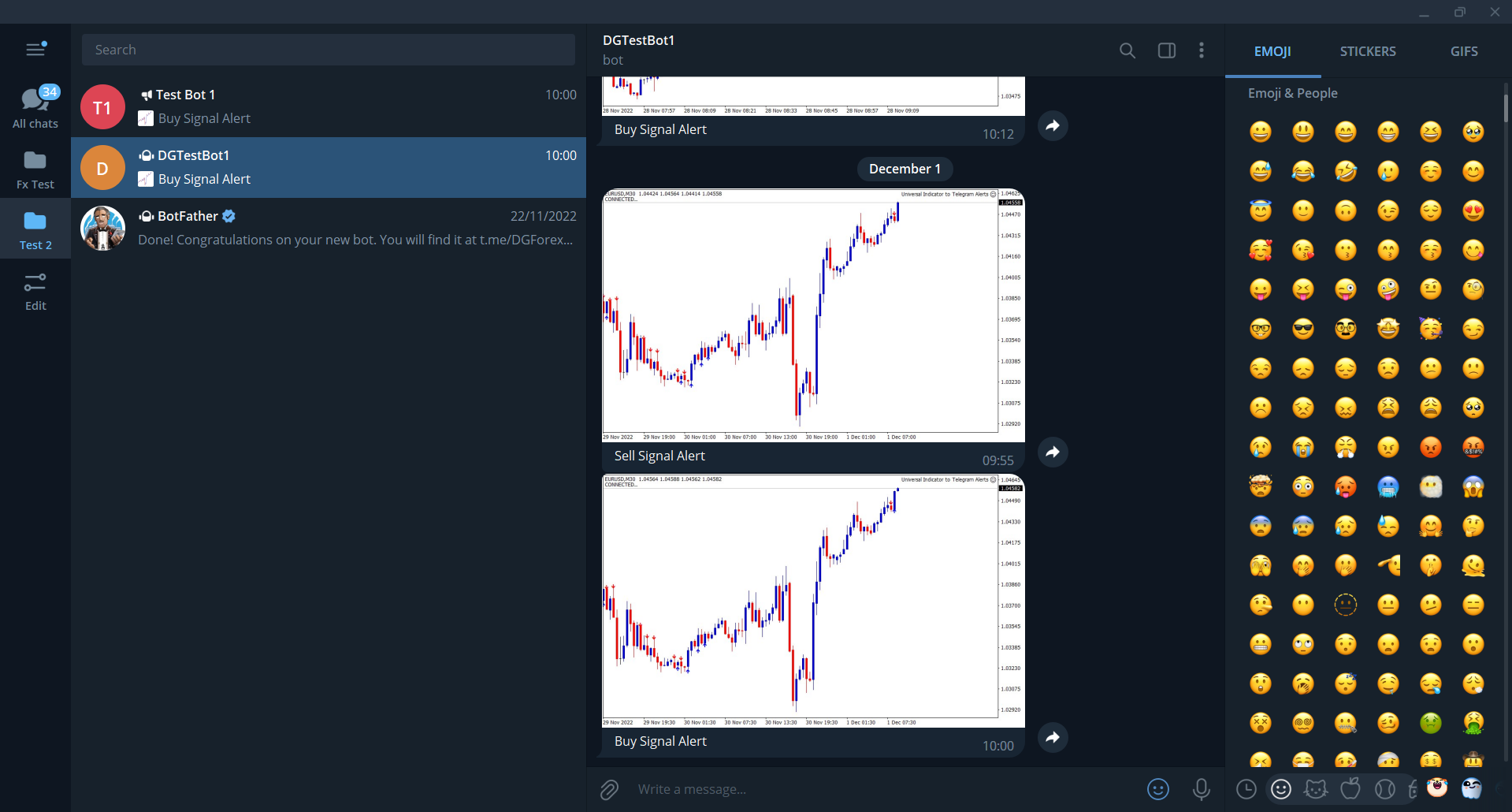
It connects your MT5 platform to Telegram, sending real-time alerts and chart screenshots directly to your Telegram from any indicator with buffers. This means you can stay updated on your trades even when you're not at your computer. Whether you're on your phone or tablet, you'll never miss an important trading opportunity.

The alerts include clear chart screenshots, so you can easily see the trade setup and make quick, informed decisions. Plus, the tool has an easy-to-use interface, making it simple for traders of all levels to set up and customize alerts to fit their needs.


Overall, this EA is a must-have tool for traders who want to stay ahead of the game. It allows you to stay connected to the markets and make informed trades, even when you're away from your computer. With its real-time alerts and screenshots, this EA is the perfect companion for traders who want to take their trading to the next level.


An easy step by step setup guide is available here.

No knowledge of Telegram API is required.


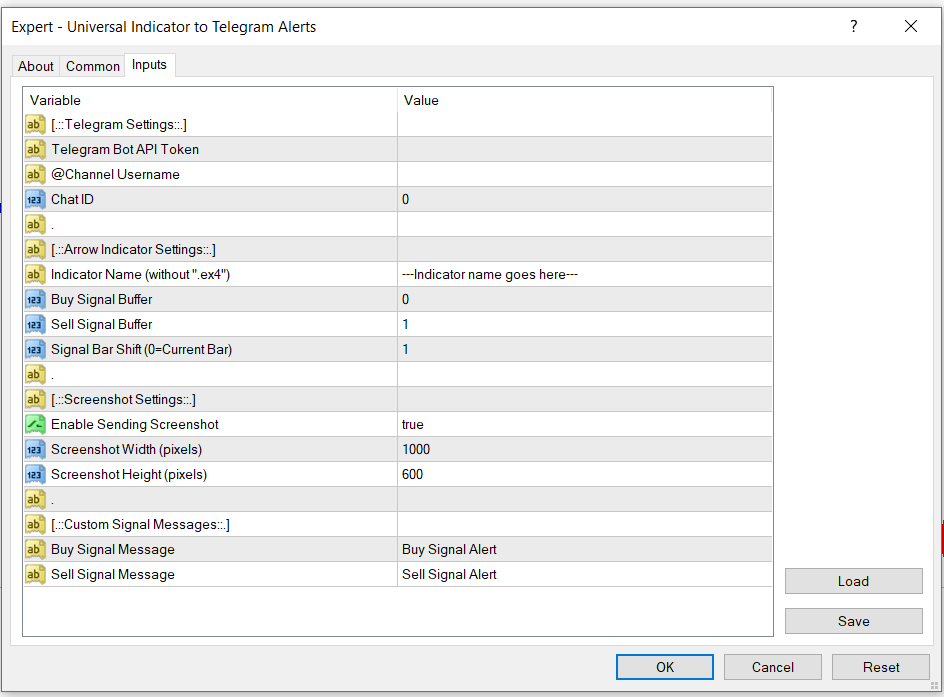
Parameters:

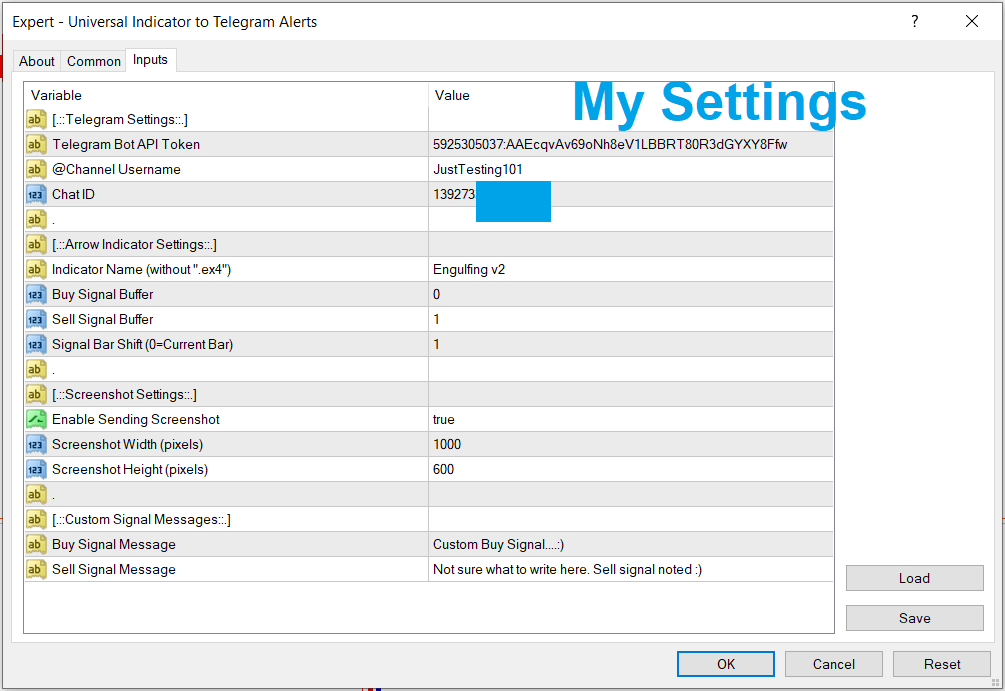
Telegram Bot API Token

-This is the unique token you'll get on telegram once you have your bot setup.

-Copy the token from telegram then paste it here.


Channel username

-In case you'll be using your telegram channel to receive the alerts, you'll need to copy and paste the username here.


Chat ID

-In case you'll want to receive the alerts directly to your bot's chats', you'll need to copy and paste your chat id here from @userinfobot.


Indicator Name

-This is your desired indicator's name. 

-The indicator should be located in your "...\MQL5\Indicators\..." folder.


Buy Signal Buffer

-This is the buffer position of the buy signals on the indicator. 


Sell Signal Buffer

-This is the buffer position of the sell signals on the indicator. 

Note: 

-Your indicator's buffer numbers can be located in the data window (shortcut: ctrl+d) of the mt5.

-The first buffer is usually but not restricted to 0.


Signal Bar Shift

-Refers to the bar number from the most recent candle on the chart.

-The most recent candle on the chart is always 0, the next one is 1, and so on..


Enable Sending Screenshot

-Choose whether or not to send a screenshot of the chart once the alert comes up.


Screenshot Width (pixels)

-The preferred width of the image captured.


Screenshot Height (pixels)

-The preferred height of the image captured.


Buy Signal Message

-The message that should come up on the buy signal alert. Customize it as you wish.


Sell Signal Message

-The message that should come up on the sell signal alert. Customize it as you wish.
おすすめのプロダクト
Global Stop Loss and Take Profit Manager Drag Lines Auto Apply Already using my free Global Stop Loss and Take Profit Setter? This is the always on version. Instead of setting levels once, you drag two lines on the chart and every manual position on that symbol — plus every new one you open — instantly inherits the Stop Loss and Take Profit. No clicking into each order. No forgetting a stop. Global Stop Loss and Target Manager is a drag-and-drop risk tool for manual traders on MetaTrader 5. Pu
このツールを使用すると、「すべて閉じる」をクリックするだけで、開いている注文をすべてワンクリックで閉じることができます。 収益性の高い注文のみをクローズしたい場合は、「収益性の高い注文をクローズする」ボタンをクリックすると、すべての変動注文がクローズされます。 変動損失のある注文のみを決済したい場合は、「損失可能注文を決済する」ボタンをクリックすると、変動損失のあるすべての注文が決済されます。 このツールは1年間テストされています. ワンクリックポジションクローズ機能は非常に完成しています. ポジションクローズはタイムリーであり、遅延範囲は小さいです. もちろん、遅延はあなたの地域やネットワーク環境にも関係します.ご注意ください。 履歴データのバックテスト プロセス中、このツールのパフォーマンスはさらに完璧になり、100 件の注文すべてを閉じるのに最長 0.495 秒しかかかりませんでした。 実際の取引プロセス中、私のポジション注文の最大数はわずか 26 で、すべてのポジションが決済されるまでにかかった時間は 1.28 秒でした。
MQL Tool "Ofir Email to Telegram": Never Miss a Trading Alert Again! Tired of missing important alerts from your indicators and Expert Advisors (EAs)? Ofir Email to Telegram is the solution you've been waiting for! This revolutionary MQL tool automatically forwards all email alerts from your indicators and EAs directly to your Telegram account. Never again will you miss a trading opportunity or important notification! Here are just a few of the benefits of Ofir Email to Telegram: Quick and easy
All In One Trade Manager is a trade manager and one-click trading panel for manual traders on MetaTrader 5. It works as a trading assistant, risk manager and position size calculator in one dashboard. It brings together everything below in one panel: order entry with risk sizing automatic trade management advanced order types account protection statistics Its entry checks run in the background and tell you, before you click BUY or SELL, when something speaks against the trade. Also available
お使いの会社の1日の損失上限とドローダウン上限を一度入力するだけです。Multi-Account Risk Sync Panel は一日中、これらの上限に照らして口座を確認し、上限に達した瞬間に、保有中のポジションを決済し、待機注文を削除し、自らを停止します。プロップファームのチャレンジ、ファンデッドアカウント、そして厳格な損失上限のあるあらゆる口座向けに作られています。 取引は開かず、取引のコピーも行わず、他の口座には一切触れません。このページのスクリーンショットはすべて、ライブのデモチャートからのものです。 主な機能 1日の損失上限を、割合または固定金額で設定。基準は残高、有効証拠金、またはその高い方 全体のドローダウン。固定型またはトレーリング型で、日中ピークまたは日末ピークを選択可能 チャート上のキルスイッチボタン。上限違反のたびに同じ動作を実行:ポジションを決済し、その後に待機注文を削除(専用のオン/オフ設定あり) ポジションが残っている間は停止しません。拒否されたリクエストはログに記録され、再試行されます お使いの会社のタイムゾーンでのリセット時刻(夏時間対応) 同じPCま
DDKiller Pro
Njaratahiry Michael Randrianiaina
Stop Blowing Your Account. Once and For All. DDKiller Pro is the MT5 risk guardian that runs silently on your chart and shuts down trading the moment you hit a limit — whether you're grinding a prop firm challenge or managing your own CFD account. The problem every trader knows: You set your rules. You break them anyway. One revenge trade. One overleveraged position. One session that erases a month of gains. DDKiller Pro removes that decision from your hands entirely. What it does: The second yo
TradeDesk EA — Semi-Automatic Trading and Account Discipline Panel for MT5 English Description Faster execution with rules that remain in force TradeDesk EA is a bilingual semi-automatic trading assistant for MetaTrader 5. It combines order execution, position sizing, trade management, conditional tasks, account statistics, and optional discipline controls in one compact panel. It can be used with Forex, metals, indices, energy products, stocks, and other CFD instruments made available by th
Trade Panel Pro — MetaTrader 5向けプロフェッショナル・リスク管理・注文執行ターミナル Trade Panel Pro は、MetaTrader 5向けに開発された高度なオールインワン型取引・リスク管理ユーティリティです。アクティブなデイトレーダーやプロフェッショナルのために設計されており、正確なリスク計算と超高速な注文執行を実現し、資産保護と多段階利確トレードの管理を容易にします。 主なメリットと特徴 自動ロット計算: 面倒な手動計算は不要です!設定したUSDリスク金額とストップロス(SL)までの距離に基づき、正確なロットサイズを瞬時に計算します。 ️ 完全インタラクティブなビジュアルライン(革新的機能): 数値を手入力する必要はありません。チャート上で直接、エントリー(EP)、ストップロス(SL)、テイクプロフィット(TP)ラインをドラッグするだけでトレードを管理できます。リスク指標、ロットサイズ、予測利益はラインの移動に合わせてリアルタイムで動的に再計算されます! 完全多言語対応: パネルのインターフェースは自動的に言語設定に適応し
Chart EA Builder
Mostafa Saad Saeed Shawara
Chart EA Builder — チャートから直接利用できるビジュアルEAビルダー 詳細と、デモ口座向け体験版 価格: 現在の価格 $30 は、最初の 10 名向けの期間限定オープン価格です。通常価格は $99 です。 概要:自動化への架け橋 すべてのトレーダーは成功する戦略の自動化を望んでいますが、その過程では急な MQL5 の学習曲線、繰り返し発生する開発コスト、未検証の AI 生成コードのリスク、または Web ベースのビルダーの制約が伴うことがよくあります。 Chart EA Builder は、チャート上で直接、シンプルでインタラクティブかつ視覚的なワークフローにより、戦略を自動 Expert Advisor に変換するのを支援します。 主な機能 ワークスペースはわかりやすいタブで整理されており、Expert Advisor 作成の各段階をチャート上で直接利用できます。 インジケーター: 標準またはカスタムインジケーターを選択し、時間足、期間、シフトを視覚的に設定します。 戦略: 式ポップアップでエントリーとエグジットのロジックを構築します。条件は明確で読みやすく、例:
Position Prime
Mariana Cordeiro Neves Fernandes
今すぐ無料デモ版をダウンロードして、購入前にストラテジーテスターのすべてのリスク管理機能をテストしてください! Position Prime は、MetaTrader 5 (MT5) 向けの機関投資家レベルの視覚的実行アシスタントおよびリスクマネージャーです。スピードと精度を求めるトレーダーのために開発され、手動でのロット計算の手間を省き、チャートを真のトレーディングデスクに変えます。ほんの数秒で取引の計画、実行、そして資金の保護が可能です。 ️ リスク管理と自動ロット計算 動的計算 (Dynamic Calculation): リスクを金額($)または口座残高のパーセンテージ(%)で設定します。チャート上でストップロス(SL)のラインをドラッグすると、パネルが正確なロットサイズを自動的に計算します。 リアルタイム予測: 注文を開く前に、リスクリワード(RR)、予想利益、潜在的な損失を画面上で直接視覚化します。 1日の損失ロック (Daily Loss): 1日の最大損失額の制限を設定します。この制限に達すると、パネルが新規取引をブロックし、オーバートレードや感情的なミスから
## Operating Principle **Manual Order Manager PRO BTC** is an Expert Advisor for MetaTrader 5 designed to **automatically manage trades opened manually by the trader**. The EA does not decide when to buy or sell. The user analyzes the market, chooses the direction, sets the lot size, and opens the position manually. From that point on, the system monitors the trade and applies the configured protection and management rules. The goal is to help the trader maintain a more disciplined approach
Telegram to MT5 Pro — 高度なTelegramシグナルコピー機(自動修正・マルチTP・リスク管理・完全トレード管理) Telegram to MT5 Pro — プロフェッショナル Telegram シグナルコピーツール Telegram to MT5 Pro は、TelegramのシグナルをMetaTrader 5アカウントへ自動で直接実行する高性能トレードコピーシステムです。リスク管理、執行、トレード管理を完全に制御できます。 本システムは2つのコンポーネントで構成されています: • MetaTrader 5内で動作するExpert Advisor(EA) • Telegramと接続しシグナルをローカルでEAへ送信するコンパニオンデスクトップアプリ 両方は同じPC上で動作する必要があります。MQL5の制限によりEAはTelegramへ直接接続できません。ブリッジがTelegram処理を担当し、EAが取引を実行します。 サポートとインストール支援 完全なPDFインストール&ユーザーガイドが提供されます。 サポート内容: • 完全PDFユーザーガイド(全設定説明)
EA Hedger MT5
Sergej Chukhista
3 (2)
Have you bought a trading advisor, subscribed to a signal, or are you trading manually ?! Don't forget about risk management. EA Hedger   is a professional trading utility with many settings that allows you to manage risks using hedging. Hedging is a trading technique that involves opening opposite positions to those already open positions. With the help of hedging, the position can be completely or partially blocked (locked). For example, you have three open positions on your account: EURUSD b
Prop Risk Guard は、口座のリスク管理ルールを自動的に適用します。1つのチャートに追加するだけで、口座内のすべてのポジションを監視します。設定した上限に達すると、ポジションを決済し、指値・逆指値などの保留中注文を削除して取引をロックします。これにより、1回の大きな損失や制御不能になったEAによって、評価口座や資金提供口座のルールに違反することを防ぎます。 1日の損失上限 パーセンテージ、固定金額、またはその両方で設定できます(より厳しい上限が適用されます)。 1日の開始時点の残高、1日の開始時点の有効証拠金(Equity)、またはその2つのうち高い方を基準に計算します。 毎日のリセット時刻は、サーバー時間に基づいて自由に設定できます。 ロックは次のリセットまで維持され、リセット後は取引が自動的に再開されます。 入金および出金は、1日の損失として計上されません。 最大ドローダウン 固定式: 初期残高を基準に計算します。 トレーリング式: 有効証拠金(Equity)の最高到達点を基準に計算します。 初期残高までのトレーリング: 有効証拠金の上昇に合わせて上限が引き上げられ、初
Crash5 EA ,I s a automatic robot that has the level of professional decision when to take a trade without any emotion. The bot will help in your scalping decision making with its own TP (take profit) and SL (stop loss) with the trail stop when in profit. This is a trend based spike catching ,looking on whats happening in real time charts no repainting of any signals. The robot helps in making decisions on the candle stick pattern opened and closed lat price with the help of RSI ,MACD and the EMA
1. Brief Description of Gina Panel Code Functionality for End User The "Gina Panel" is a customizable trading dashboard Expert Advisor (EA) for MetaTrader 5 (MT5). It provides a graphical user interface (GUI) overlay on your chart to simplify trading and account management. Key functionalities include: Account Monitoring : Displays real-time balance, equity, profit/loss, margin levels, and net positions in a compact panel. Trade Execution : Quick buttons for buying/selling at market, setting lot
Instructions for Using Reverse Copier EA Attach EA to Charts Open MetaTrader and attach the EA to any chart on both accounts (master & slave). Make sure AutoTrading is enabled. Master Account (Signal Sender) Set Mode = Master in EA settings. This account will send trade signals. Slave Account (Signal Receiver) Set Mode = Slave in EA settings. This account will receive trades in reverse (opposite direction). Lot Multiplier In Slave EA settings, set Multiplier to control lot size. Example: 1.0
Open Risk Budget Cap enforces a total open stop-loss risk budget across your account. It does not choose direction and does not open discretionary trades on a live chart. Attach it to one chart; the symbol and timeframe do not matter. What it measures Every open position and every pending order is priced to its stop-loss in account currency using OrderCalcProfit. Positions or orders without a stop-loss are counted and shown on the panel as "without stop-loss". They are excluded from the budget
Hisoka Trade Panel — v6.91 Description: Hisoka Trade Panel is a comprehensive on-chart trade management Expert Advisor for MetaTrader 5. It places a draggable, collapsible panel directly on your chart and lets you manage open positions — break-even locks, trailing stops, partial closes, and SL/TP modification — with one click. All risk math is dollar-based, so the same "BE 5$" button locks $5 of profit consistently across XAUUSD, BTCUSD, EURUSD or any other instrument, regardless of contract siz
CosmiCLab SMC FIBO CosmiCLab SMC FIBO is a professional trading indicator designed for traders who use Smart Money Concepts (SMC), market structure analysis and Fibonacci retracement levels. The indicator automatically detects market swings and builds Fibonacci levels based on the latest impulse movement. It also identifies market structure changes such as BOS (Break of Structure) and CHOCH (Change of Character), helping traders understand the current market direction. CosmiCLab SMC FIBO also pr
MT5 SRP Smart Risk Panel
AMIRUL SHAFIQ BIN OTHMAN Shafiq
Smart Risk Panel Smart Risk Panelは、手動トレーダーのためのコントロールセンターをMetaTraderチャート上に直接配置します。 成行・保留注文、エントリー後のポジション管理、まとめ操作、口座保護を、チャートとEA Inputsを何度も行き来せずに扱えます。 パネルはスピードと分かりやすさを重視しています。ツールは目的ごとに整理され、現在の状態は常に確認でき、アクティブなセッションで使う操作がチャートの近くに保たれます。 エントリーから保護まで — すべてチャート上で 注文準備と実行には Trading Panel 、エントリー後の管理には Modify Orders 、5つの対応リモートコマンドには Telegram を使用します。Quick Actionsは直接的な一括操作を追加し、Profit ProtectionはTarget Profit、Target Loss、Max Drawdownをカバーします。 主なコントロールと機能 Trading Panel — 価格、ロット、数量、間隔を指定してBUY、SELL、BUY LIMIT、BUY ST
This Expert Advisor monitors all open positions across all symbols in MetaTrader 5. Whenever a Stop Loss (SL) or Take Profit (TP) is manually set or adjusted on any position, the EA automatically applies that value to all other open positions , regardless of symbol or order type (Buy/Sell). This ensures consistent and synchronized SL and TP levels across your account. Perfect for mobile trading via tablet or smartphone!
FREE
One Click Trader  is a tool designed for MetaTrader 4 platform, which enables you to take your trading to the next level. It enables you to open, manage and close your trades in simple an efficient way by just one click of your mouse button. "-"   ,  "+"  change OCT window size  Up arrow minimizes the OCT panel Down arrow maximizes the OCT panel Right arrow displays the next panel with additional features Left arrow hides the panel with additional features Red  SELL  button enables you to open s
Veron Link Slave – Synchronized Grid, Martingale & Breakout Management Short Description Advanced synchronization tool designed to manage Grid, Martingale, and Breakout EAs. Automatically sends close-basket signals to the Master account upon profit target completion, minimizing slippage across different brokers. Full Description Veron Link Slave is a specialized utility developed to enhance the execution efficiency and risk management of multi-account or multi-broker trading setups. It is desig
This utility provides the ability to use hot keys in manual trading instantly responding to the current market situation. You can assign hot keys to open/close positions by their type, open/close all positions on the current chart and remove all orders on the current chart. You can also assign hot keys for five predefined trade volumes and switch between them if necessary with no need to change the volume manually from time to time. It is also possible to set the auto calculation of a trade volu
Trade Plan Desk MT5 は、注文を実行する前にトレード計画を整理し、確認するためのトレード管理ダッシュボードです。 方向、エントリー、Stop Loss、Take Profit、リスクを設定すると、ブローカー条件に基づいて適切なロット数、予定リスクリワード比を計算し、取引前チェックを実行します。 主な機能: • Entry / Stop Loss / Take Profit の計画 • パーセントまたは金額によるリスク設定 • ブローカー条件に基づく自動ロット計算 • PASS / WARNING / FAIL の事前チェック • スプレッド、証拠金、最小距離、ブローカールールの確認 • Market / Stop / Limit 注文 • Netting / Hedging 対応 • SL/TP変更、部分決済、ポジション量変更の監視 • Planned vs Actual 比較 • R、P&L、MFE、MAE、giveback、capture efficiency • 履歴保存と再起動後の状態復元 • Compact / Details を備えたサイズ変更可能な
GoldPulseZ v1.0 — Manual Gold Trading EA for MetaTrader 5 GoldPulseZ is a professional manual trading assistant designed exclusively for XAUUSD (Gold) on MetaTrader 5. Built for active traders who want full control of their entries while benefiting from smart trade management automation. Timeframe: M15 Broker: Any broker Key Features: One-Click Trading Panel — Instantly place Buy or Sell orders directly from the chart dashboard with your pre-set lot size, SL, and TP. Automatic Trailing Stop — Lo
Noetrix Sentinel
Julien Jeremy Rodrigue Gazagnaire
Noetrix Sentinel 1.10 Noetrix Sentinel is a native, read-only MetaTrader 5 operational supervision utility. It monitors terminal connectivity, latency, trading permissions, chart and EA presence, watched market feeds, optional Magic mappings, alerts and diagnostic evidence from a single chart. ## Safety and distribution - MetaEditor result: `0 errors, 0 warnings`. - Entry point: `MQL5/Experts/NoetrixSentinel/NoetrixSentinel.mq5`. - No trading library, order submission, position close, order
FREE
Haven MT5 to Telegram 2.0 — MT5の取引をTelegramへ公開 Haven MT5 to Telegram は、MetaTrader 5 の取引イベントをTelegramへ自動公開するためのユーティリティです。 ポジションの新規建て・決済、Stop Loss と Take Profit の変更、部分決済、指値・逆指値注文のイベントを監視します。メッセージにはチャートのスクリーンショット、Trade ID、取引結果を含めることもできます。 ユーザーガイド   |   その他の 製品 ->  こちら . Haven MT5 to Telegram  2.0 の新機能 バージョン2.0では、新しいインターフェースと再設計された取引イベント公開システムを導入しました。 SIMPLE モード 主要な設定を1つの画面にまとめています。Telegram接続の確認、主要な通知タイプの有効・無効、 スクリーンショット、初回シグナルの公開方法を設定できます。 ADVANCED モード 拡張インターフェースには、公開、表示、レポート、診断の各セクションがあります。SIMP
Easy Trade Executor は、MT5向けの高速なポジションサイズ計算、注文執行、およびトレード管理ツールです。 Open Price、Stop Loss、Take Profit レベルをチャート上に直接配置し、自動的にポジションサイズを計算して、数回のクリックだけでリスクを管理しながら取引を開始できます。 なぜ Easy Trade Executor を選ぶのか? Easy Trade Executor は、単にリスク計算を行うだけでなく、チャート上で迅速かつ効率的に取引を管理したいトレーダーのために開発されました。 このツールは、ポジションサイズ計算、注文執行、トレード管理を1つのワークフローに統合し、手動計算やターミナルの複数ウィンドウを頻繁に切り替えることなく、トレードそのものに集中できるようにします。 Easy Trade Executor の主な機能: リスクに基づく自動ポジションサイズ計算; チャート上から直接 Market Order と Pending Order を発注; 自動的なポジション管理のための Trailing Stop; ワンクリックでの決
このプロダクトを購入した人は以下も購入しています
Trade Assistant MT5
Evgeniy Kravchenko
4.43 (216)
取引 ごとのリスクの 計算、新規注文 の 簡単 な 設置、部分的 な 決済機能 を 持 つ 注文管理、 7 種類 のトレーリングストップなど 、便利 な 機能 を 備 えています 。 追加の資料と説明書 インストール手順   -   アプリケーションの手順   ライン機能 チャート上にオープニングライン、ストップロス、テイクプロフィットを表示します。この機能により、新規注文を簡単に設定することができ、注文を出す前にその特徴を確認することができます。   リスク計算 リスク計算機能は、設定されたリスクとストップロス注文のサイズを考慮して、新規注文のボリュームを計算します。ストップロスの大きさを自由に設定できると同時に、設定したリスクを守ることができます。 Lot calc ボタン - リスク 計算 を 有効 / 無効 にします 。 Risk フィールドでは 、必要 なリスクの 値 を 0 から 100 までのパーセンテージまたは 預金通貨 で 設定 します 。 設定」 タブで 、 リスク 計算 の 種類 を 選択 します :「 $ 通貨」、「 % 残高」、「 % エクイティ 」、「
Trade Manager EAへようこそ。これは、取引をより直感的、正確、そして効率的にするために設計された究極の リスク管理ツール です。これは単なるオーダー実行ツールではなく、包括的な取引計画、ポジション管理、リスク管理のためのソリューションです。初心者から上級者、迅速な実行を必要とするスキャルパーまで、Trade Manager EAはあらゆるニーズに対応し、為替、指数、商品、暗号通貨などさまざまな市場で柔軟に対応します。 Trade Manager EAを使用すると、複雑な計算が過去のものになります。市場を分析し、エントリーポイント、ストップロス、テイクプロフィットのレベルをチャート上のラインでマークし、リスクを設定するだけで、Trade Managerが最適なポジションサイズを即座に計算し、SLとTPをピップ、ポイント、口座通貨でリアルタイムに表示します。すべての取引が簡単かつ効果的に管理されます。 主な機能: ポジションサイズ計算機 :定義されたリスクに基づいて取引サイズを瞬時に決定します。 簡単な取引計画 :エントリー、ストップロス、テイクプロフィットを設定するためのド
Telegram to MT5 Multi-Channel Copier   は、 Telegram と Discord チャンネルのトレードシグナルを MetaTrader 5 へ自動コピーします。ボット不要、ブラウザ拡張不要、手動コピー不要。Telegram や Discord にシグナルが届くと、EA が数秒であなたのターミナルに注文を出します。 さらに、チャンネルをコピーする前に、内蔵バックテスターでそのチャンネルがあなたの口座でどう動いたかを確認できます。 製品は 2 つのコンポーネントで構成されます:Telegram チャンネルを監視する Windows アプリと、MT5 ターミナルでシグナルを執行する本 EA です。MT4 版もあります   こちら . セットアップガイドとアプリのダウンロード:   https://www.mql5.com/en/blogs/post/768988 Telegramのシグナルチャンネルをバックテストする方法 をご覧ください。 現在の価格は今後値上げされます。 仕組み アプリはあなた自身の Telegram アカウントで接続するため、フォロ
TradePanel MT5
Alfiya Fazylova
4.88 (170)
Trade Panelは多機能なトレーディングアシスタントです。アプリには手動取引用の50以上のトレーディング機能が搭載されており、ほとんどの取引作業を自動化することができます。 アプリの説明書: https://www.mql5.com/en/blogs/post/756482 デモ口座用アプリの試用版: https://www.mql5.com/en/blogs/post/750865 アプリのインストール方法: https://www.mql5.com/en/blogs/post/756239 アプリをビジュアルモードでテストする方法: https://www.mql5.com/en/blogs/post/770277 VPSのMetaTraderにアプリをインストールする方法: https://www.mql5.com/en/blogs/post/770190 取引。 ワンクリックで取引操作を行うことができます: リスクを自動計算して指値注文やポジションを開く。 複数の注文やポジションをワンクリックで開く。 注文のグリッドを開く。 保留中の注文やポジションをグループごとに閉じる
自分の取引ルールで Telegram のシグナルをコピー Telegram to MT5 Signal Trader は、Telegram の公開・非公開チャンネルやグループから、テキスト形式の取引シグナルを MetaTrader 5 へ自動でコピーします。1つのデスクトップアプリで複数の配信者と MT5 口座を管理し、 配信者ごとにリスクと取引設定を個別に指定 できます。 シグナルのコピーに Telegram ボットや API 設定は必要ありません。 電話番号または QR コードでご自身の Telegram アカウントにログインし、すでに参加しているチャンネルやグループを選ぶだけです。ボットの作成や、Telegram API トークン、API ID、API hash の入力は不要です。 ポジションサイズを選び、複数の利確水準に分けて決済し、建値へのストップ移動やトレーリングストップを自動化できます。配信者のシグナルを受け取りながら、実際の取引方法は自分で管理できます。 本製品は、この MT5 エキスパートアドバイザ(EA)と、必須の Windows 連携アプリで構成されます。 インス
================================================================================ POC BREAKOUT - V20.72. Full Professional Grade Toolkit ================================================================================ POC Breakout is a full MetaTrader 5 trading dashboard for discretionary traders who want breakout signals, Point of Control (POC) context, volume profiles, order flow, market structure, news, alerts, and advanced trade planning in one professional workspace. Attached directly to you
News Trade EA MT5
Konstantin Kulikov
4.55 (11)
僕自身が数年間使っている便利なロボットをご紹介します。半自動モードでも完全自動モードでもお使いいただけます。 >>> Chat <<< 当プログラムは経済指標カレンダーで発表されるニュースをもとにした取引の柔軟な設定が可能です。戦略テスターでは確認不可です。実際の取引のみです。端末の設定メニューを開いて許可URLリストにニュースサイトを追加する必要があります。サービス > 設定 > エキスパート・アドバイザーをクリックしてください。”次のURLの WebRequestを許可する:"にチェックを入れてください。次のURLを追加してください(空白は削除します): https://  nfs.faireconomy.media 最新の設定アーカイブをダウンロードしてください: https://www.mql5.com/en/blogs/post/747929 シグナルモニタリング: https://www.mql5.com/en/signals/author/test-standart 当該エキスパート・アドバイザーのためのカスタマイズ設定セットを作る場合は、ブログの全パラメータの説明
Dealer's Panel No signal decides anything here — a hand does. One click, and the panel calculates what's underneath: lot size from risk, target from a 30-step balance ladder that remembers exactly how far an account has climbed. Toggle between market and pending without touching an input field. Set a stop, and the take-profit can write itself — a fixed share of the balance, translated into price with no arithmetic left for the trader to get wrong. One trade live at a time; it won't let a seco
Farmed Hedge Yield Farming | All Markets (Manual - Hybrid - Semi/Automated EA) VERIFIED TRADING RESULTS - Farmed Hedge Yield Axi Copy:  https://www.mql5.com/en/signals/2356376 - Farmed Hedge Yield Exn Copy:   https://www.mql5.com/en/signals/2356404 - Farmed Hedge Yield V Copy:  https://www.mql5.com/en/signals/2357156 IMPORTANT NOTICE: FarmedHedge is a MANUAL-FOCUSED TRADING UTILITY ,not a fully automated EA. Results shown on this Signal include manual trades and overall strategic management.
MT5 to Telegram Signal Provider は、Telegramのチャット、チャンネル、またはグループに 指定された シグナルを送信することができる、完全にカスタマイズ可能な簡単なユーティリティです。これにより、あなたのアカウントは シグナルプロバイダー になります。 競合する製品とは異なり、DLLのインポートは使用していません。 [ デモ ] [ マニュアル ] [ MT4版 ] [ Discord版 ] [ Telegramチャンネル ]  New: [ Telegram To MT5 ] セットアップ ステップバイステップの ユーザーガイド が利用可能です。 Telegram APIの知識は必要ありません。必要な全ては開発者から提供されます。 主な特長 購読者に送信する注文の詳細をカスタマイズする機能 例えば、Bronze、Silver、Goldといった階層型のサブスクリプションモデルを作成できます。Goldサブスクリプションでは、すべてのシグナルが提供されます。 id、シンボル、またはコメントによって注文をフィルターできます 注文が実行されたチャート
次回アップデート — バージョン 2.52 近日公開!【新機能】 市場分析とトレードワークフローを強化する、4つの主要な新機能にご期待ください 皆様のトレードニーズに応える4つの新機能により、市場分析を次のレベルへと引き上げます。新機能をご紹介します: 1. TRADE OVERVIEW DASHBOARD 2. CONFLUENCE AT ZONE 3. STRONG & WEAK HIGH/LOW 4. OTE 1. TRADE OVERVIEW DASHBOARD 市場全体の状況をより簡単に把握できるダッシュボードです。トレード判断をサポートするガイダンスを提供し、市場分析とトレード計画を体系的に行えるよう支援します。すべてを1つの画面で確認できます。 マルチタイムフレーム市場概要(Multi-Timeframe Market Overview) 市場の方向性と価格構造をより明確に把握 市場状況をすばやく確認 体系的な市場分析とエントリー計画のためのガイダンス 2. CONFLUENCE AT ZONE 価格が重要なゾーンに入るとき…いくつのサポート要因が一致しているかを確認で
VirtualTradePad PRO SE MT5 — MetaTrader 5向けプロフェッショナル取引コントロールセンター VirtualTradePad PRO SE は、 MetaTrader 5 向けのプレミアムなチャートベースの取引パネルであり、トレード管理ワークスペースです。より速い執行、明確なポジション管理、構造化されたトレード管理、視覚的なレベル計画、そしてチャート上で完結するプロフェッショナルなワークフローを求めるトレーダー向けに設計されています。 これは単なる BUY / SELL パネルではありません。PRO SE は、手動取引、予約注文、ポジション管理、部分決済、バスケット損益管理、平均化レベル、ATMルール、シグナル監視、リアルタイム市場情報、ストラテジーテスター (Strategy Tester) ワークフロー、VPS向け運用を、1つの連携されたインターフェースに統合します。 MT4版 | 完全な説明とスクリーンショット | 購入方法 | インストール方法 | ログファイルの取得方法 | テストと最適化の方法 | Expforex のすべての製品 PRO
RETAILBERG FOOTPRINT CHART PRO — Order-Flow Workspace for MetaTrader 5 Version 7.00  |  Professional System  |  31 tools  |  One chart A full 150-page illustrated User Manual is included. Please read the full manual to understand this feature packed footprint chart elements and ui. https://www.mql5.com/en/blogs/post/777982 DEMO / STRATEGY TESTER — PLEASE READ FIRST
Grid Manual MT5
Alfiya Fazylova
4.73 (22)
「Grid Manual」は、注文のグリッドを操作するための取引パネルです。 ユーティリティはユニバーサルで、柔軟な設定と直感的なインターフェイスを備えています。 それは、損失を平均化する方向だけでなく、利益を増やす方向でも注文のグリッドで機能します。 トレーダーは注文のグリッドを作成して維持する必要はありません。 すべてが「Grid Manual」によって行われます。 注文を開くだけで十分であり、「Grid Manual」は注文のグリッドを自動的に作成し、非常に閉じるまでそれに付随します。 完全な説明とデモバージョン ここ。 ユーティリティの主な機能と機能 ユーティリティは、モバイル端末から開かれた注文を含め、あらゆる方法で開かれた注文を処理します。 「制限」と「停止」の2種類のグリッドで機能します。 グリッド間隔の計算には、固定と動的(ATRインジケーターに基づく)の2つの方法で機能します。 オープンオーダーグリッドの設定を変更できます。 チャート上の各注文グリッドの損益分岐点を表示します。 各注文グリッドの利益率を表示します。 ワンクリックでグリッドから収益性の高い注文を閉じるこ
Your EAs cannot see each other, but Anchor can. Anchor gives you one place to coordinate your EAs, manage risk, and decide when trading is allowed. It works alongside the trading bots you already use without any changes to them. The Problem One EA opens a trade. Then another starts trading. The next thing you know, you wake up to multiple grids built across your account. Each EA may be doing exactly what it was designed to do, but together they can place far more risk on your account than you in
The Patch It never opens a trade. It walks behind the ones that did. Every open position, every pending order — checked twice a second for the one thing that's easy to forget: a stop, a target. Found bare, it doesn't ask. It writes the missing number in, measured in points from wherever the position began, and moves on to the next. No strategy, no opinion on direction. Just the quiet assumption that nothing should ever sit on the market unprotected — not because someone decided it shouldn't,
Power Candles Strategy Scanner - 自動最適化型マルチシンボル設定ファインダー パワーキャンドル・ストラテジー・スキャナーは 、パワーキャンドル・インジケーターを駆動するのと全く同じ自己最適化エンジンを、マーケットウォッチに登録されているすべての銘柄に対して並行して実行します。1つのパネルで、現在統計的に取引可能な銘柄、各銘柄で勝率の高い戦略、最適なストップロス/テイクプロフィットの組み合わせが表示され、新たなシグナルが発生した瞬間に通知が届きます。 このツールは、Stein Investmentsのエコシステムの一部です。  18種類以上のツールをすべて閲覧し、AIを活用したセットアップの推奨を受け取り、  https://stein.investments でコミュニティに参加しましょう 市場動向を網羅。銘柄ごとに3,000件以上の自動最適化。2種類のアラート。ワンクリックでチャートを切り替えて即座にアクション。 なぜこれが必要なのか 多くのマルチ銘柄スキャナーは、 価格の動き (ボラティリティ、変動率、銘柄ごとのRSI)を表示するだけです。それ
Trader Evolution
Siarhei Vashchylka
5 (7)
" Trader Evolution " - A utility designed for traders who use wave and technical analysis in their work. One tab of the utility is capable of money management and opening orders, and the other can help in making Elliott wave and technical analysis. Manual (Be sure to read before purchasing) | Version for MT4 Advantages 1. Trading in a few clicks. Immediate and pending orders are available in the panel 2. Money management. The program automatically selects the appropriate lot size 3. Simplifies
YuClusters
Yury Kulikov
4.93 (43)
Attention: You can view the program operation in the free version  YuClusters DEMO .  YuClusters is a professional market analysis system. The trader has unique opportunities to analyze the flow of orders, trade volumes, price movements using various charts, profiles, indicators, and graphical objects. YuClusters operates on data based on Time&Sales or ticks information, depending on what is available in the quotes of a financial instrument. YuClusters allows you to build graphs by combining da
Prop Guardian Risk Manager MT5 – Drawdown, Risk & Hedge Protection for Prop Firm and Managed Accounts Prop Guardian Risk Manager is a professional risk-control utility for MetaTrader 5, designed for prop firm traders, money managers and anyone who wants strict account-level risk protection. It does not generate trading signals, strategy entries or trading decisions. Instead, it runs in the background, monitors your account risk and can automatically block new exposure, close managed positions or
The product will copy all telegram signal to MT5 ( which you are member) , also it can work as remote copier.  Easy to set up, copy order instant, can work with almost signal formats, image signal,  s upport to translate other language to English Work with all type of channel or group, even channel have "Restrict Saving Content", work with  multi channel, multi MT5 Work as remote copier: with signal have ticket number, it will copy exactly via ticket number. Support to backtest signal. How to s
Floor Watch
Syed Tauqeer Hussain Shah
Floor Watch One number, watched every thirty seconds: how far equity has fallen since the day began — or since its highest point, if it's told to trail the peak instead of the open. Cross the line and it doesn't argue. Every open position closes, every pending order vanishes, and anything that slips through afterward gets shut the moment it appears. Not asked. Removed. The floor holds until the clock turns 5 AM Pakistan time — then, and only then, does the day start over. One rule. No except
EA Auditor
Stephen J Martret
5 (6)
EA Auditor is an independent analysis tool for traders evaluating Expert Advisors and trading signals on MetaTrader 5. It audits backtest reports, reviews posted developer signals, and cross-verifies the two against each other to help traders assess strategies before committing capital. The MQL5 market offers a wide range of Expert Advisors from many developers, with varying approaches, quality, and transparency. EA Auditor provides a consistent, data-driven framework for reviewing them, answer
Trade Manager DashPlus
Henry Lyubomir Wallace
4.85 (13)
DashPlus は、MetaTrader 5プラットフォーム上での取引効率と効果を向上させるために設計された高度なトレード管理ツールです。リスク計算、注文管理、高度なグリッドシステム、チャートベースのツール、パフォーマンス分析など、包括的な機能を提供します。 主な機能 1. リカバリーグリッド 逆境の市場環境下で取引を管理するための平均化および柔軟なグリッドシステムを実装します。 取引回復のための戦略的なエントリーおよびエグジットポイントを可能にします。 2. スタックグリッド 強い市場の動きの中でポジションを追加することで、有利な取引での潜在的なリターンを最大化するように設計されています。 トレンド市場で利益を得られるよう、勝ち取引を拡大します。 3. 損益(P&L)ライン チャート上に直接、潜在的な利益と損失のシナリオを視覚的に表示します。 設定を調整し、P&Lラインをドラッグして、実行前にさまざまな取引結果を評価します。 4. バスケットモード 同じシンボルでの複数ポジションの管理を簡素化し、それらを単一の集約ポジションにまとめます。 平均価格に基づいて、ストップロスやテイクプ
Trade Copier Ultimate
Janitha Sandaruwan Amaradasa Wickramasingha Arachchilage
5 (5)
Trade Copier Ultimate - Telegram to MT5 Signal Copier Trade Copier Ultimate automatically copies Telegram trading signals into MetaTrader 5. The EA can read signal messages, detect the symbol, order type, entry price, Stop Loss, Take Profit levels and selected update commands, then execute or manage the trade in MT5 using your lot and risk settings. It is more than a basic Telegram to MT5 copier. TCU also supports Bot API and user-account Bridge workflows, Discord signal routing, local MT5 to MT
一度の購入で、現在提供中および今後リリースする私のすべての MT4・MT5 インジケーターと自動売買ロボット(EA)を追加料金なしで受け取れます。 購入後、受け取り方法について私にお問い合わせください。 10 件の購入ごとに 50$ ずつ、最大 999$ まで値上げする予定です。購入手続き時に Market に表示される価格が適用されます。 信頼するインジケーターをそのままに。周辺の取引作業を自動化。 あなたのシグナル。あなたのルール。あなたの取引執行。 信頼する MT5 インジケーターはあるのに、チャートの監視、シグナル待ち、ロット計算、発注、各ポジションの管理を手作業で行っていませんか? Stratiora Signal Engine MT5 は、これらの作業をつなぎます。対応する買い・売りバッファのシグナルを、エントリー、取引量計算、Stop Loss、Take Profit、フィルター、ポジション管理、口座保護までの自動処理に変換できます。 インジケーターや取引アイデアを変えるたびに別の EA を依頼する代わりに、柔軟な一つのエンジンで各シグナルの取引方法を決められます。 あ
Signal TradingView to MT5 Pro Automator TradingViewとMetaTrader 5間の即時プロフェッショナル実行 TradingViewのシグナル(アラート)とMT5での実際の約定を繋ぐ、最も強固なコミュニケーションブリッジで、取引戦略を自動化します。スピード、柔軟性、そして完璧なリスク管理を求めるトレーダー向けに設計されたこのExpert Advisorは、あらゆるアラートメッセージを正確な成行または指値注文に変換します。 強みと利点 ユニバーサルパーシングエンジン(独自技術): あらゆるアラート形式からデータを自動的に認識し、抽出できる高度なテクノロジー。単一の固定フォーマットに制限されることはありません。システムはシンボル(銘柄)、アクション、価格、SL(ストップロス)、TP(テイクプロフィット)を自動的に理解します。 リアルタイム実行: レイテンシ(遅延)を最小限に抑えるよう最適化された、1秒未満の超高速ポーリング技術。シグナルを受信してから数ミリ秒以内に注文が実行されます。 機関投資家レベルのリスク管理: 以下に基づく自動かつ正確
DrawDown Limiter
Haidar Lionel Haj Ali
5 (23)
DrawDown Limiter v5.0 — 高度な口座保護コントローラー DrawDown Limiter v5.0 は、取引口座を監視し、設定されたリスク、利益、ニュース、スケジュール、ロールオーバー、またはポジション数の制限に達した際に自動的に対応する、クライアント側で動作する口座保護コントローラーです。 1つの専用チャートから、 手動取引、自動売買戦略、複数のExpert Advisor、指値・逆指値注文、保有ポジション を監視できます。口座全体を保護することも、Magic Numberを使用して特定のEAまたは複数のEAのみを監視することもできます。 DrawDown Limiter の目的は、単にドローダウンを表示することではありません。 設定した取引ルールを積極的に適用し 、保護条件が有効である限り、そのルールを継続的に実行することを目的としています。 DrawDown Limiter v5.0 は、損失額だけを監視するのではなく、戦略がいつ取引を継続できるのか、どのエクスポージャーを維持できるのか、いつ取引を停止すべきか、そして自動売買環境をいつ安全に再開できるのかま
Master Your Trading Discipline   Stop losing your hard-earned gains to overtrading and emotional decisions. The Discipline Tool is your ultimate trading assistant, ensuring strict risk management in real-time. Key Protection Features: Advanced Drawdown Defense : Automatically halts trading if your daily drawdown exceeds a preset threshold (percentage or dollar amount). Real-Time Equity Lock : Safeguard profits by referencing peak equity, ensuring drawdown stays within control. Hard Profit Target
Telegram チャンネルのシグナルを、数秒で MetaTrader 4 と MetaTrader 5 にコピーします。TradingMind Signal Bridge は、あなたが選んだチャンネルやグループを読み取り、高速な内蔵ルールで各シグナルを認識します。形式が崩れたメッセージは、スクリーンショットで投稿されたシグナルも含めて AI モデルに渡し、注文をターミナル上のエキスパートアドバイザー(EA)へ送ります。ニュースフィルター、プロップファーム口座の保護機能、リモート操作用の Telegram ボットにより、何を取引するかの判断は常にあなたの手元に残ります。 この製品でできること TradingView のアラートと、あらゆる Telegram チャンネル・グループのシグナル Telegram アカウント数にもシグナル元の数にも制限なし ルールで解析できなかったメッセージは AI が読み取り、スクリーンショットにも対応 Telegram ボットへのコマンド一つで、スマートフォンからすべての取引を停止 初めての方へ。スクリーンショット付きの詳しい設定手順はブログにあります:
作者のその他のプロダクト
Stay ahead of market movements with precision and efficiency using DG Price Alerts , a MetaTrader 4 indicator designed for traders who demand accuracy and flexibility. This powerful tool is crafted to provide instant notifications when price levels are touched or breached, ensuring that you never miss a crucial market opportunity. Key Features: User-Friendly Interface: Seamlessly navigate through our intuitive graphical user interface. Effortlessly set up alerts by placing horizontal lines, tren
FREE
DG Equity Monitor is a useful tool that keeps track of the daily transactions made on the account. The EA automatically and instantly closes all the trades running based on two conditions: 1. If the daily profit target is hit. 2. If the maximum drawdown is reached. An alert is sent immediately one of the above conditions are met. Parameters: Show Account Info -Choose whether or not to display the Account Info on the chart. Show Pop Up Alert -Show alert on chart when either condition 1 or 2 are
FREE
Universal Indicator to Telegram Alerts  is a smart trading tool that works seamlessly with both MT4 and Telegram, offering traders more flexibility and convenience. It connects your MT4 platform to Telegram, sending real-time alerts and chart screenshots directly to your Telegram from any indicator with buffers. This means you can stay updated on your trades even when you're not at your computer. Whether you're on your phone or tablet, you'll never miss an important trading opportunity. The ale
DG Trade Manager is a modern trade panel for MetaTrader 4. It sizes each position from the risk you choose, lets you set the entry, stop loss and take profit by dragging lines on the chart, and helps you manage the trade afterwards. It also keeps your rules in one place and automatically turns your closed trades into notes and insights you can learn from. Why use the trade manager? Many trading mistakes happen around the entry: a lot size worked out in a hurry, a stop loss moved “just this once”
DG Trade Manager is a modern trade panel for MetaTrader 5. It sizes each position from the risk you choose, lets you set the entry, stop loss and take profit by dragging lines on the chart, and helps you manage the trade afterwards. It also keeps your rules in one place and automatically turns your closed trades into notes and insights you can learn from. Why use the trade manager? Many trading mistakes happen around the entry: a lot size worked out in a hurry, a stop loss moved “just this once
フィルタ:
レビューなし
レビューに返信