Murena Core IV
- エキスパート
- バージョン: 18.6
- アクティベーション: 5

Murena Core IV
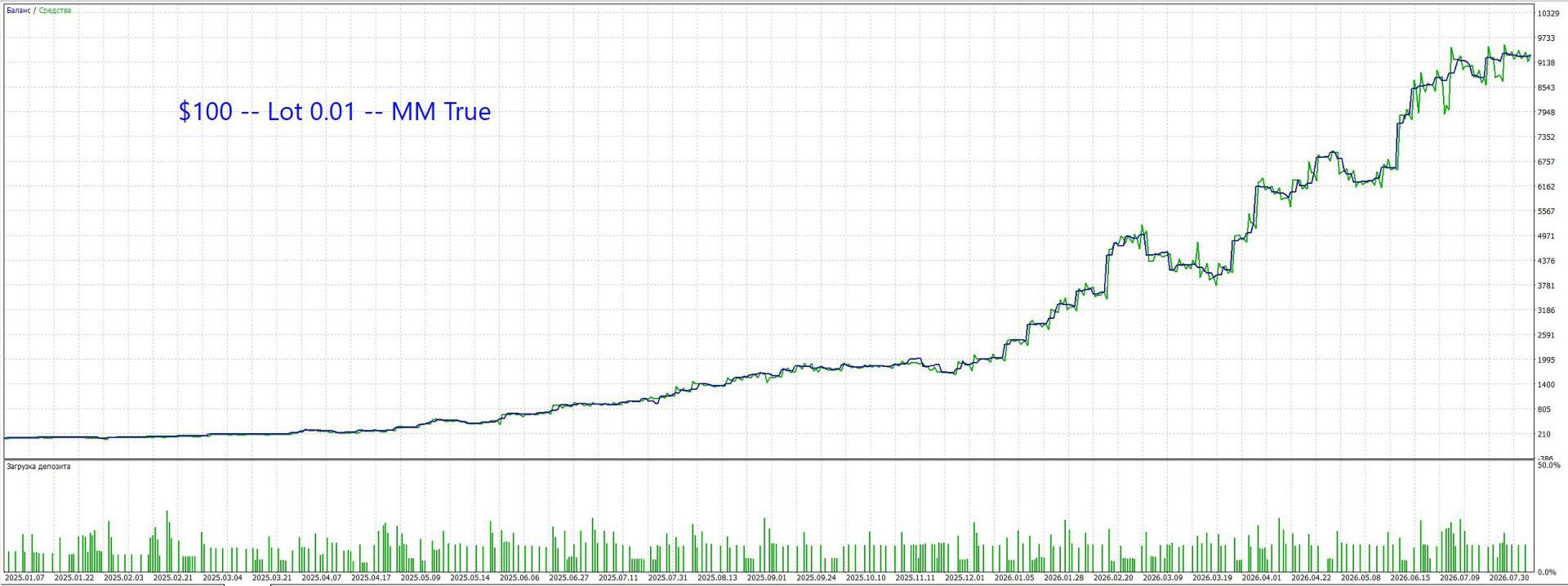
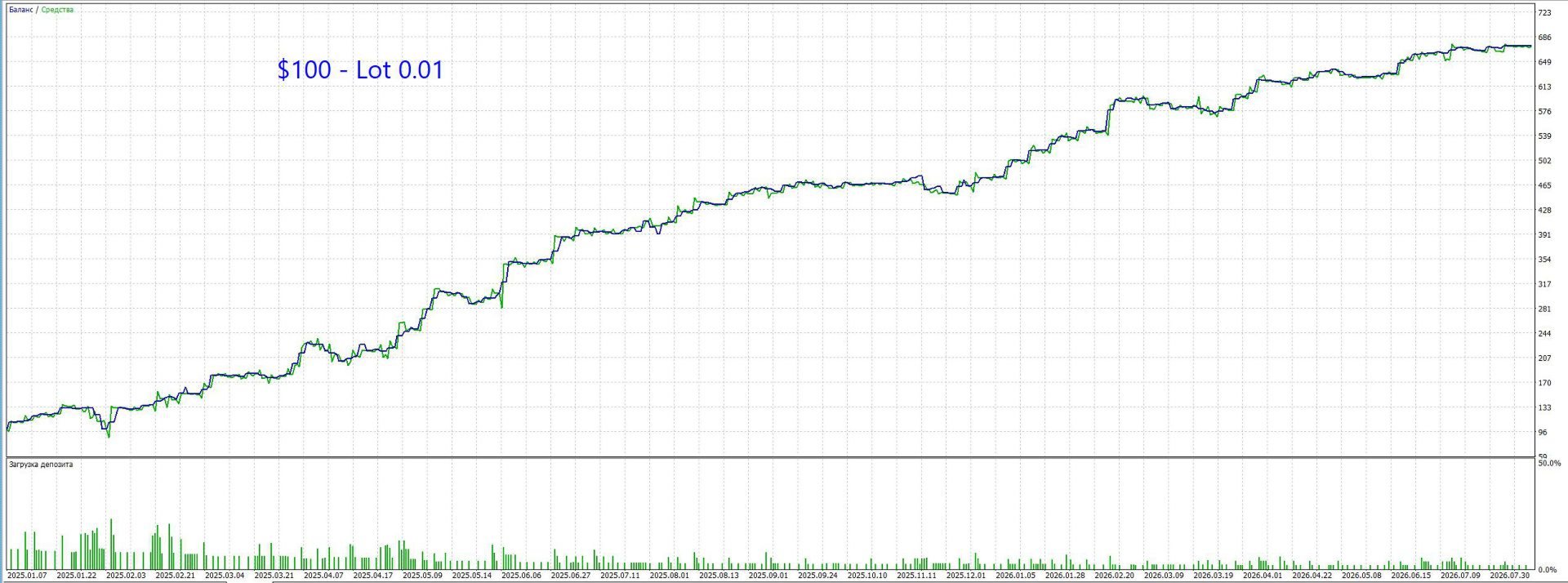
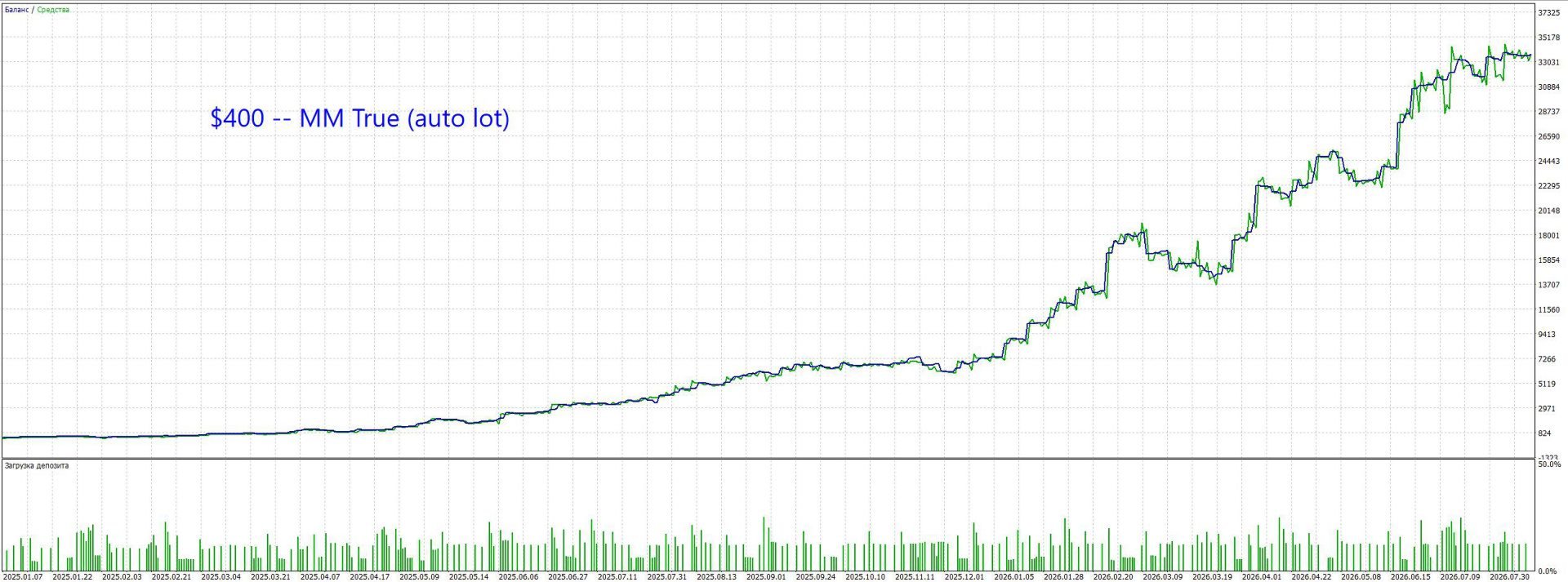
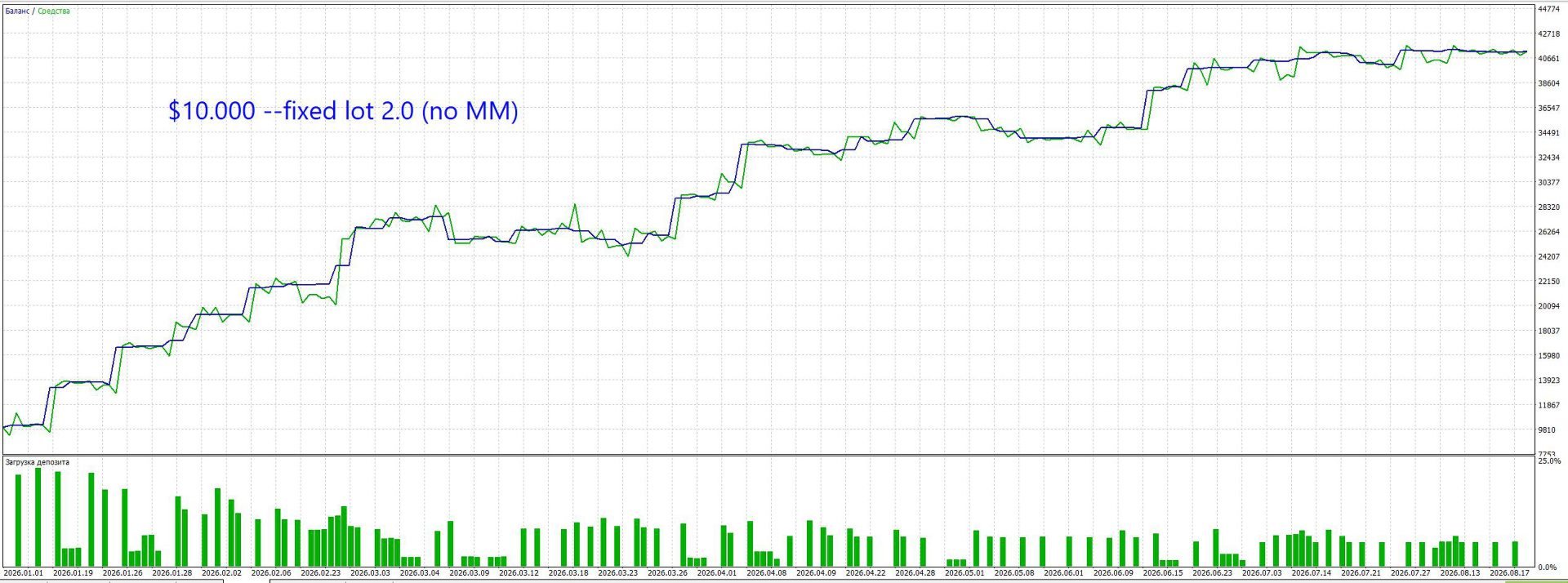
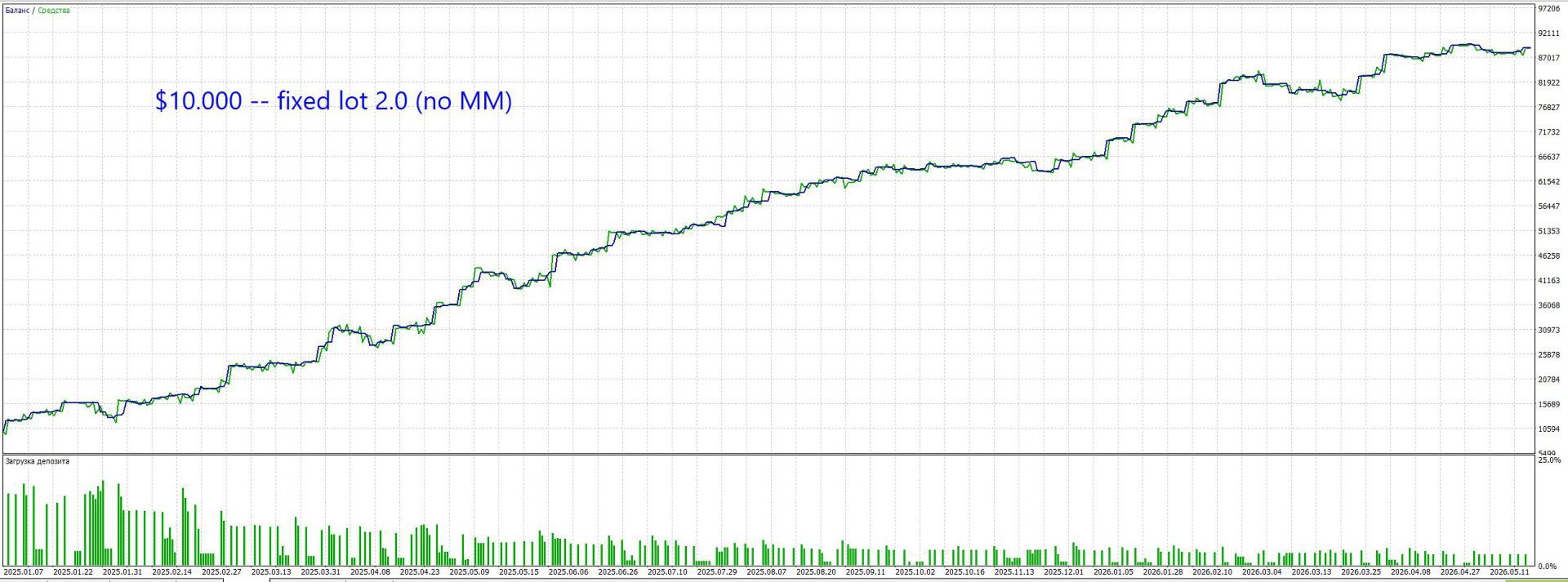
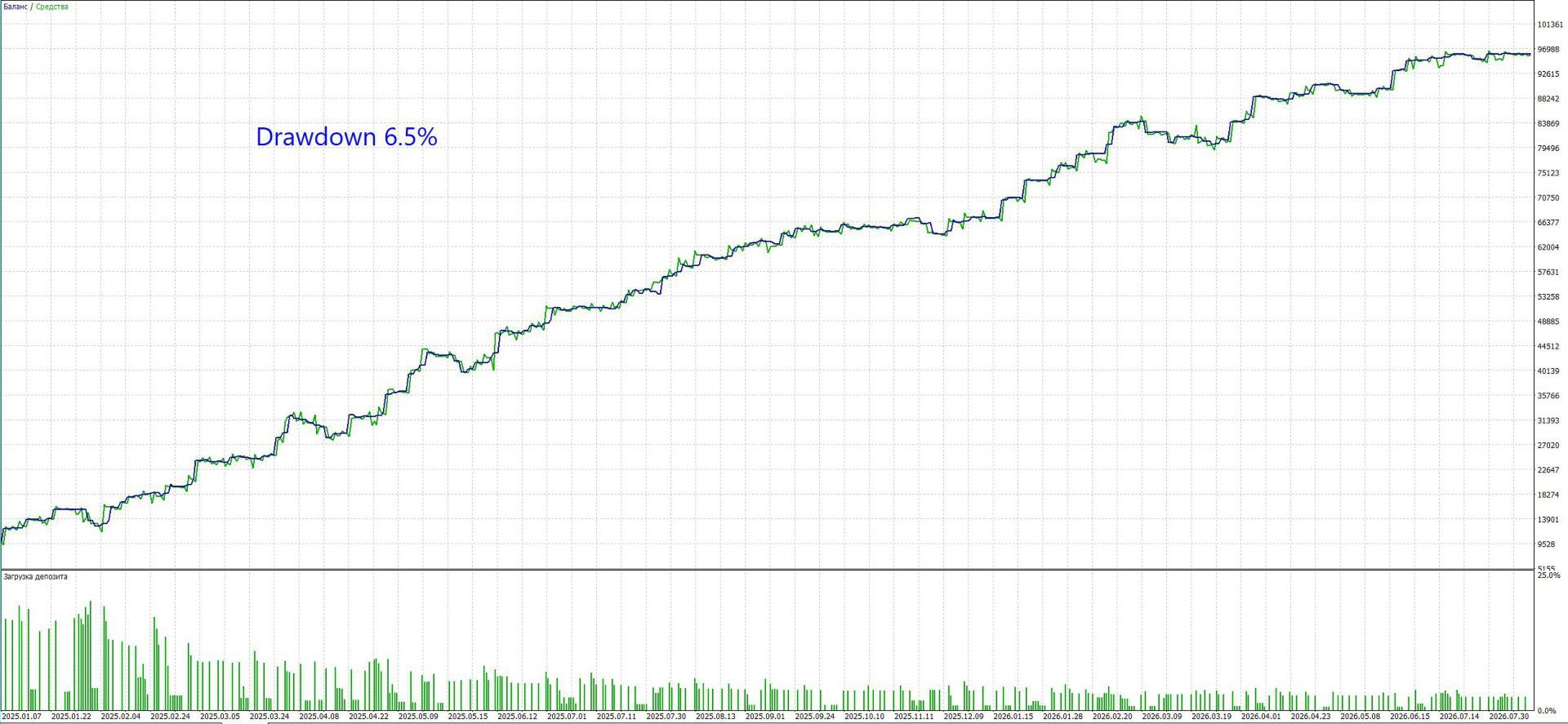
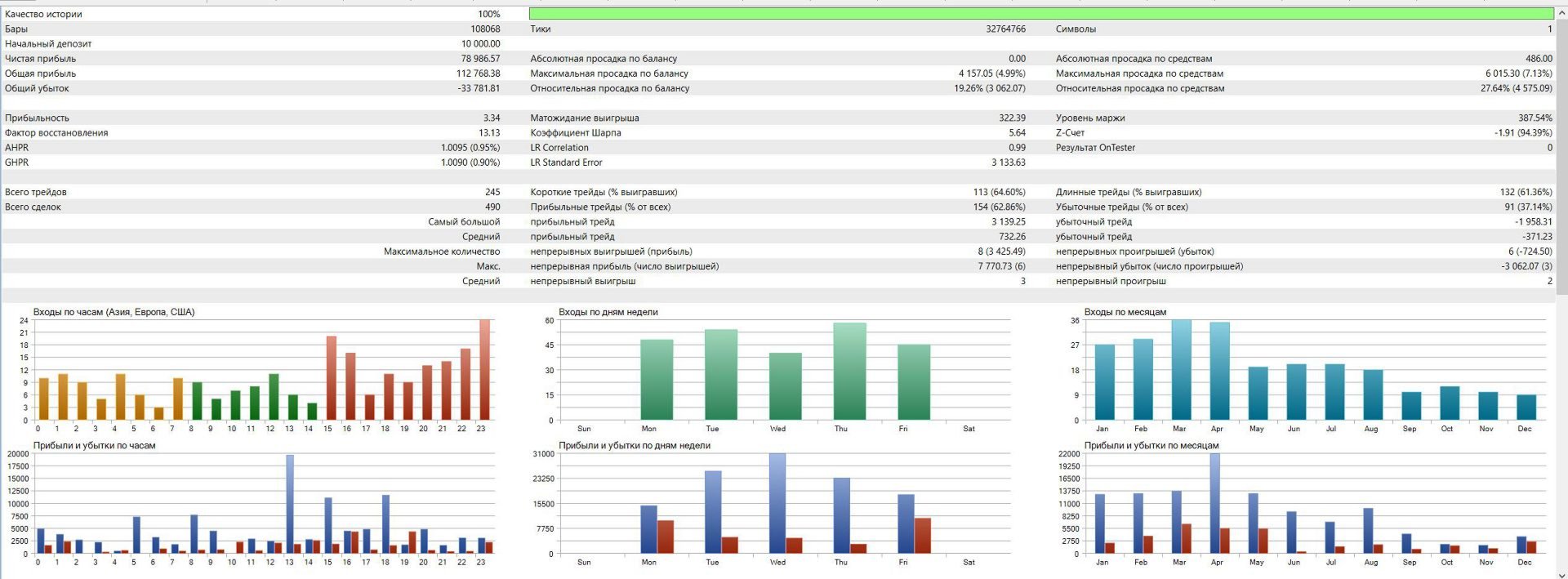
Fully automated Expert Advisor for MetaTrader 5 on EURUSD M5. Operates on the proprietary ZET-Engine core, capable of reading raw, dense tick liquidity, and Chrono-DSP spectral wave synchronization. Completely excludes martingale and grid strategies: mandatory server-side StopLoss on every trade, while the adaptive Smart Exit maximizes trend profits and cuts losses early. Profit factor above 3+ with drawdowns under 8%, stable equity growth on fixed lots with safe compounding acceleration via built-in Dynamic MM.
About the System & Concept
Murena Core IV is a fully autonomous algorithmic trading system designed to capture and hold directional multi-day price swings for 1 to several days (swing trading) on the EURUSD M5 timeframe.
The system is the result of nearly a year of intensive research and quantitative development by FFIninvest Quant Lab, involving over 250 code architecture iterations and more than 1,500 real-tick backtests and stress checks. We deliberately rejected chaotic high-frequency scalping and dangerous averaging grids. The system functions as a strict logical algorithm: a position is opened only when statistical probability and market momentum are strictly on the side of profit.
Key Technologies & Modules
- Proprietary ZET-Engine Core: Scans the microstructure of raw tick flow to detect phase exhaustion in the market cycle. The algorithm does not guess breakout directions blindly; instead, it enters synchronously with natural price flow at moments when local counter-momentum is depleted.
- [Q-Core] Vector Differential: Calculates the divergence between price action dynamics and accumulated kinetic momentum energy, identifying reliable reversal points before the main directional wave begins.
- [VSA-Matrix] Liquidity Climax Interceptor: An intelligent volume-spread filter. Discards trade signals if an abnormal volume spike is detected on the signal bar (exceeding 2.75x the moving average), protecting the position from opening against an institutional news breakout.
- [Chrono-DSP] Spectral Wave Synchronization: Using digital signal processing (Hilbert Transform), the algorithm continuously measures the physical wavelength of the dominant market cycle. This allows the system to automatically adapt profit-taking speed to the live market pace (in both high-volatility trends and quiet ranges).
- [Kinetic-Scale] Elastic Risk Horizon: Physical protective StopLoss and TakeProfit levels scale automatically: they expand during wide multi-day trends (capturing movements of 500–1300+ points) and compress during tight consolidations to protect capital.
- [Smart-Kinetic] Smart Exit (Why No Rigid Trailing Stop): Traditional fixed-point trailing stops inevitably cut multi-day swing positions prematurely on normal market noise. Murena Core IV uses a dynamic Smart Exit that continuously monitors momentum energy decay and locks in profit near the apex of the wave cycle.
Calibration Stability (Short Period vs 1.5 Years)
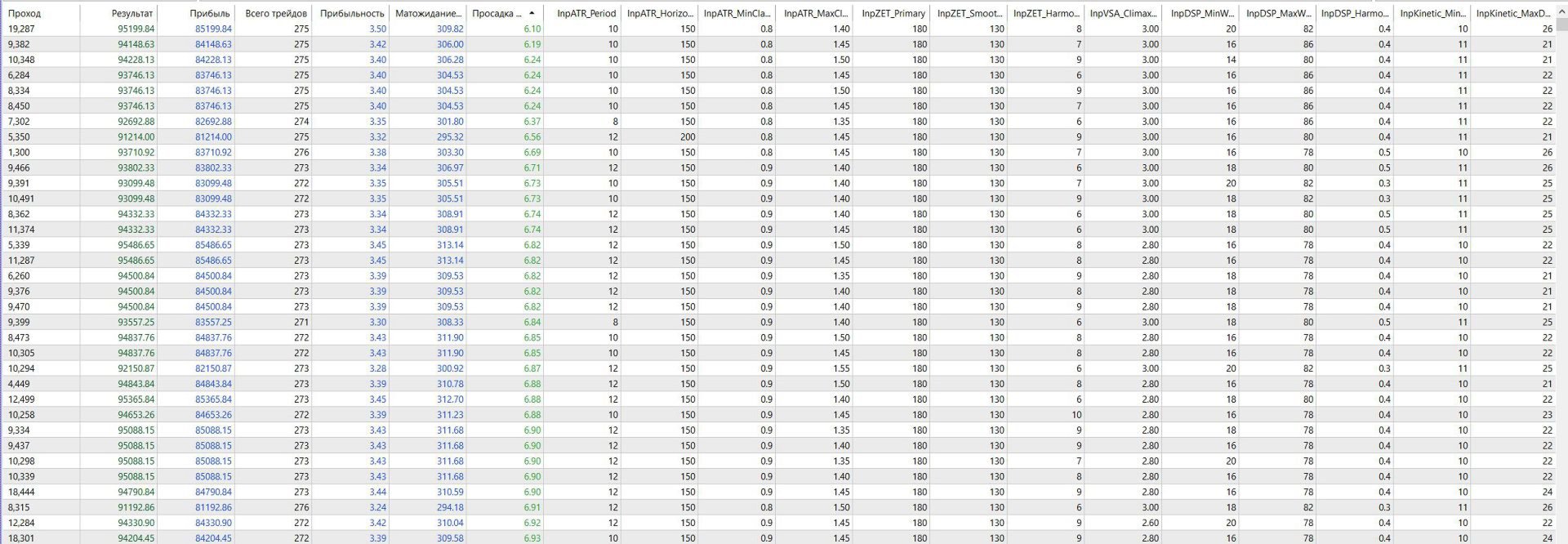
- Local Optimization (3–6 Months): Demonstrates an explosive Profit Factor (PF 5.0–7.0+) and maximum capital growth tailored to the current micro-regime, but is more sensitive to broader market phase shifts.
- Global Calibration over 1.5 Years (Factory Default): Pre-installed by default. Provides maximum structural stability, a smooth equity curve, and minimal drawdown (under 8%) across all volatility seasons, trading a small fraction of peak profit for long-term safety. Highly recommended for live trading.
Money Management & Risk Profile
Minimum Start: Technically, the EA can operate starting from $100–$200 (using micro-lots of 0.01 or Cent accounts), but to unlock the full potential of the system, the recommended deposit is $400 or more.
This is directly tied to the position volume distribution architecture: the algorithm splits each series into 3 orders in a 50% / 25% / 25% ratio. To establish the minimum safe working lot combination (0.02 + 0.01 + 0.01 lots) while maintaining safe margin levels and low drawdown, a balance of at least $400 is required. Dynamic lot compounding (Dynamic MM) is also recommended starting from $400.
Safety Rules:
- Zero Martingale: Position volume is never increased to recover losses.
- Physical Server Protection: Every trade is protected by hard StopLoss and TakeProfit placed on the broker's server immediately upon execution.
- Positive Mathematical Edge: Baseline TakeProfit is ~1.6x larger than the initial StopLoss.
- System Recovery & VPS Resilience: All trade states are stored in non-volatile terminal memory ( GlobalVariables ). If your VPS or terminal reboots, the EA automatically restores full tracking and trailing states from the registry.
Trading Environment Requirements
The EA utilizes high-precision tick-flow analysis, requiring quality execution infrastructure:
- Platform: MetaTrader 5 (MT5) only.
- Currency Pair: EURUSD.
- Timeframe: M5.
- Account Type: ECN / Raw Spread / PRO (floating raw spread from 0.0 pips and Market Execution).
- Leverage: 1:100 or higher (1:30–1:50 supported with conservative lot sizing).
- VPS Server: Recommended for 24/5 uptime (any stable ping under 150–300 ms is sufficient).
- Local PC: Works reliably on a home PC provided stable internet and uninterrupted power (system safely tolerates weekend shutdowns).
Recommended Brokers with Dense Tick Liquidity:
- Dukascopy Bank (Swiss ECN SWFX Liquidity).
- Tickmill (PRO / VIP / RAW Accounts, Equinix LD4 London servers).
Tests, Comparisons & Demo Accounts
- Live Testing: Dukascopy Bank provides an identical quote feed on both Demo and Live accounts. A standard Demo account is valid for 14 days; after opening a Live account with $100+, the time limitation on the Demo account can be removed to make it permanent.
Parameter Guide (Settings Manual)
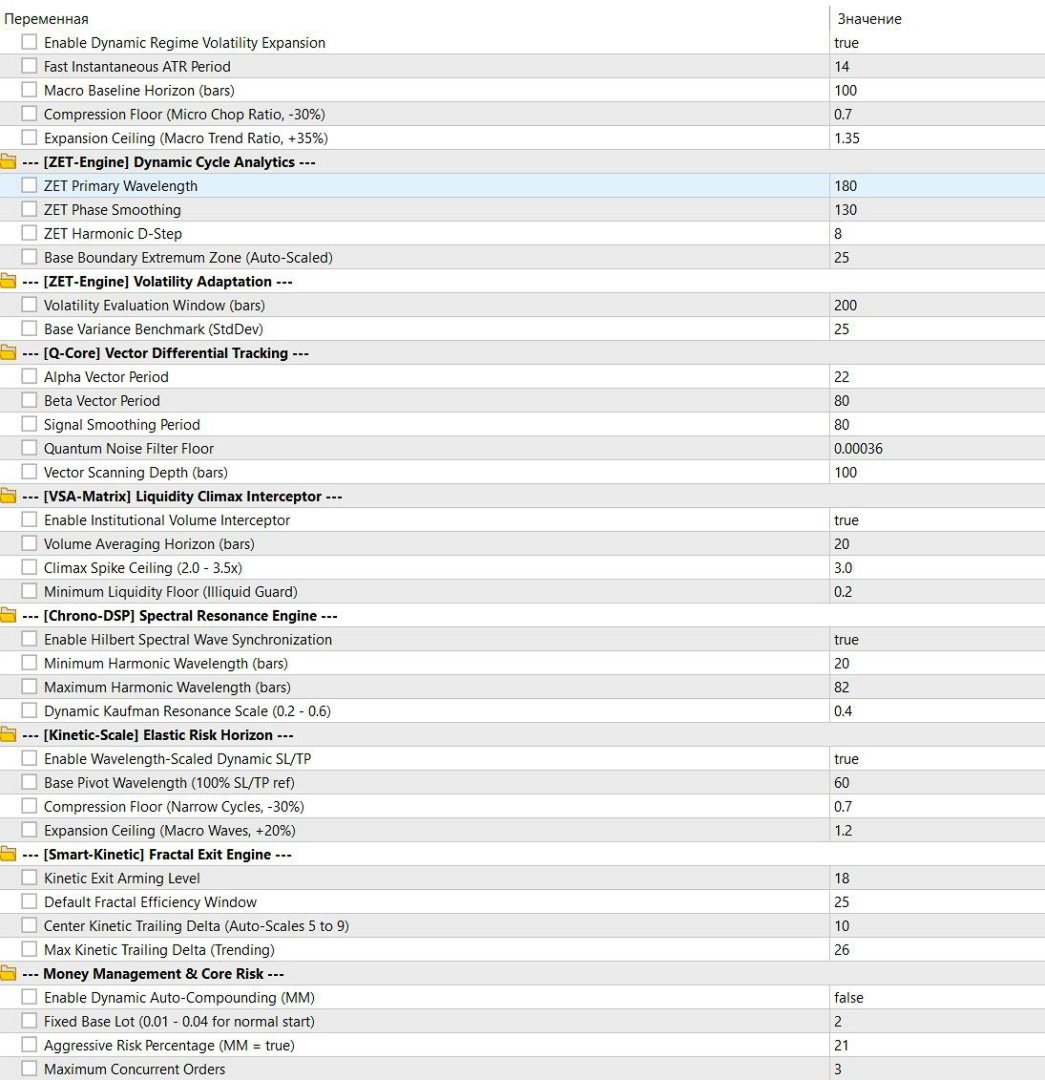
1. [ZET-Engine] Dynamic Cycle Analytics
- InpZET_Primary — Primary cycle wavelength period for the analytical core.
- InpZET_Smoothing — Phase smoothing factor to filter out market noise.
- InpZET_Harmonic — Harmonic step differential of the cycle.
- InpZET_Boundary — Base extremum zone boundary for identifying reversal points.
2. [ZET-Engine] Volatility Adaptation
- InpZET_ScanWindow — Historical lookback window (bars) for evaluating active volatility.
- InpZET_BaseVariance — Base variance benchmark used to normalize cycle boundaries.
3. [Q-Core] Vector Differential Tracking
- InpCore_Alpha — Fast momentum vector period.
- InpCore_Beta — Slow baseline vector period.
- InpCore_Signal — Signal line smoothing period for the vector core.
- InpCore_NoiseFloor — Noise filter threshold for eliminating flat market chop.
- InpCore_VectorDepth — History scanning depth for vector trajectory modeling.
4. [VSA-Matrix] Liquidity Climax Interceptor
- UseVSA_Matrix — Master switch for the tick volume climax filter.
- InpVSA_ScanWindow — Volume averaging window to establish normal liquidity baseline.
- InpVSA_ClimaxRatio — Volume spike threshold above which signals are discarded (protection against breakout traps).
- InpVSA_ActivityFloor — Lower activity floor (protection against illiquid midnight rollovers).
5. [Chrono-DSP] Spectral Resonance Engine
- UseChronoDSP — Master switch for spectral wave cycle exit synchronization.
- InpDSP_MinWavelength — Minimum allowed market cycle wavelength.
- InpDSP_MaxWavelength — Maximum allowed market cycle wavelength.
- InpDSP_HarmonicScale — Resonance window scale factor for adaptive profit taking.
6. [Kinetic-Scale] Elastic Risk Horizon
- UseElasticRiskScale — Master switch for dynamic wavelength-scaled StopLoss and TakeProfit.
- InpElastic_BasePivot — Pivot wavelength for 100% nominal StopLoss and TakeProfit sizing.
- InpElastic_MinScale — Compression floor for StopLoss during fast micro-cycles (-30%).
- InpElastic_MaxScale — Expansion ceiling for StopLoss and TakeProfit during wide macro trends (+20%).
7. [Smart-Kinetic] Fractal Exit Engine
- InpKinetic_ApexZone — Kinetic energy threshold that arms the smart exit mechanism.
- InpKinetic_ERDefault — Default calculation window for market fractal efficiency.
- InpKinetic_MinDelta — Minimum pullback delta from peak energy to close position during ranging markets.
- InpKinetic_MaxDelta — Maximum pullback delta from peak energy to hold position during strong trends.
8. Money Management & Core Risk
- InpUseDynamicMM — Enables automated dynamic lot calculation based on free margin.
- InpFixedBaseLot — Fixed base lot allocation (when InpUseDynamicMM = false ).
- RiskPercent — Risk percentage for compounding formula (when InpUseDynamicMM = true ).
- MaxOrders — Maximum concurrent orders in a series (locked to 3).
- StopLoss — Base protective StopLoss in 5-digit points (800 points = 80 pips).
- TakeProfit — Base calculated TakeProfit in 5-digit points (1300 points = 130 pips).
- Magic — Unique expert identifier for order tracking.
- Slippage — Maximum allowed execution price slippage.
- TradeDelaySec — Latency safety buffer between sending consecutive order requests.
9. [Optional] Weekend & Stagnant Risk Shields
- UseFridayClose — Closes all open positions on Friday evening before the weekend (Prop-Firm / FTMO compliance mode).
- InpFridayCloseHour — Friday close trigger hour (GMT).
- InpFridayCloseMin — Friday close trigger minute.
- UseStaleLossGuard — Emergency closure option for stagnant red positions.
- InpStaleLossHours — Maximum time (hours) a trade is permitted to float in negative territory before termination.
Quick Start Guide
- Attach Murena Core IV to a single EURUSD M5 chart.
- For deposits of $100–$300: keep InpUseDynamicMM = false and set InpFixedBaseLot = 0.01 or 0.02 . On a $100 account, the broker will execute orders at the minimum 0.01 lot while maintaining stable operation.
- For deposits of $400 or more: you can set fixed lot to 0.04 (which divides into 0.02 + 0.01 + 0.01) or enable InpUseDynamicMM = true . When MM is enabled, the EA calculates lot sizes automatically.
- Ensure that the "Allow Algo Trading" button is activated in MT5.
- All default settings are pre-configured to the factory "Golden Setup" — loading external (.set) files is not required.
- If desired, you can optimize the EA in the MT5 Strategy Tester to tailor parameters to your trading style. Increasing risk percentage boosts potential profits while increasing deposit load, whereas lowering risk brings drawdowns and stress to minimal levels.
Recommended Optimization Variables
Below is the complete list of all working parameters in the exact sequence they appear in the MT5 settings window.
All variables directly influence algorithm performance, categorized into two distinct tiers:
- [Stable] — Structural baseline constants. Verified across extensive multi-month testing to guarantee core system safety. Modifying or optimizing these is not recommended, as they are already set to factory standards.
- [Optimization] — Primary levers for fine-tuning to live market dynamics. If you plan to periodically adapt the system to recent market conditions, run optimization strictly on these variables.
1. [ATR-Matrix] Dynamic Regime Auto-Regulator
- UseATR_AutoRegulator — [Stable] (Master switch for dynamic regime engine)
- InpATR_Period — [Optimization] (Sensitivity of local volatility sampling)
- InpATR_HorizonWindow — [Stable] (Macro baseline horizon for average ATR calculation)
- InpATR_MinClamp — [Stable] (Compression floor for low volatility)
- InpATR_MaxClamp — [Optimization] (Expansion ceiling for strong impulse trends)
2. [ZET-Engine] Dynamic Cycle Analytics
- InpZET_Primary — [Optimization] (Primary wavelength period of market cycle)
- InpZET_Smoothing — [Optimization] (Phase smoothing coefficient)
- InpZET_Harmonic — [Stable] (Harmonic differential step)
- InpZET_Boundary — [Optimization] (Base boundary of extremum reversal zone)
3. [ZET-Engine] Volatility Adaptation
- InpZET_ScanWindow — [Stable] (Internal variance calculation window)
- InpZET_BaseVariance — [Stable] (Base variance benchmark for normalization)
4. [Q-Core] Vector Differential Tracking
- InpCore_Alpha — [Stable] (Fast momentum vector period)
- InpCore_Beta — [Stable] (Slow baseline vector period)
- InpCore_Signal — [Stable] (Signal line smoothing period)
- InpCore_NoiseFloor — [Stable] (Noise floor filter for flat chop)
- InpCore_VectorDepth — [Stable] (History depth for vector projection)
5. [VSA-Matrix] Liquidity Climax Interceptor
- UseVSA_Matrix — [Stable] (Volume filter master switch)
- InpVSA_ScanWindow — [Stable] (Volume averaging window)
- InpVSA_ClimaxRatio — [Stable] (Climax volume surge exclusion threshold)
- InpVSA_ActivityFloor — [Stable] (Illiquid night session exclusion floor)
6. [Chrono-DSP] Spectral Resonance Engine
- UseChronoDSP — [Stable] (Spectral wave exit synchronization switch)
- InpDSP_MinWavelength — [Stable] (Minimum cycle wavelength boundary)
- InpDSP_MaxWavelength — [Stable] (Maximum cycle wavelength boundary)
- InpDSP_HarmonicScale — [Stable] (Resonance scale for exit adaptation)
7. [Kinetic-Scale] Elastic Risk Horizon
- UseElasticRiskScale — [Stable] (Elastic SL/TP scaling switch)
- InpElastic_BasePivot — [Stable] (Pivot wavelength for 100% nominal SL/TP size)
- InpElastic_MinScale — [Stable] (StopLoss compression floor on short cycles)
- InpElastic_MaxScale — [Stable] (StopLoss/TakeProfit expansion ceiling on macro trends)
8. [Smart-Kinetic] Fractal Exit Engine
- InpKinetic_ApexZone — [Optimization] (Smart exit arming threshold)
- InpKinetic_ERDefault — [Stable] (Fractal efficiency calculation window)
- InpKinetic_MinDelta — [Optimization] (Minimum pullback delta for profit lock in ranges)
- InpKinetic_MaxDelta — [Optimization] (Maximum pullback delta to hold strong trends)
9. Money Management & Core Risk
- InpUseDynamicMM — [Stable] (Mode selector: Fixed Lot or Auto MM)
- InpFixedBaseLot — [Stable] (Base lot sizing for your deposit)
- RiskPercent — [Stable] (Risk percentage when Dynamic MM is active)
- MaxOrders — [Stable] (Order series limit, locked to 3)
- StopLoss — [Stable] (Base hard StopLoss)
- TakeProfit — [Stable] (Base calculated TakeProfit)
- Magic — [Stable] (Unique expert ID)
- Slippage — [Stable] (Maximum permitted slippage)
- TradeDelaySec — [Stable] (Order execution latency buffer)
10. [Optional] Weekend & Stagnant Risk Shields
- UseFridayClose — [Stable] (Friday pre-weekend close for Prop accounts)
- InpFridayCloseHour — [Stable] (Friday exit trigger hour, GMT)
- InpFridayCloseMin — [Stable] (Friday exit trigger minute)
- UseStaleLossGuard — [Stable] (Emergency closure switch for stagnant red positions)
- InpStaleLossHours — [Stable] (Maximum duration a losing trade is tolerated)
Summary: Out of 35 total parameters, only 7 key variables (in ATR-Matrix , ZET-Engine , and Smart-Kinetic ) are designated for periodic optimization. The remaining 28 variables form an invariant, robust protective chassis ensuring long-term capital safety.
Risk Disclaimer: Trading Forex involves substantial financial risk. Past performance in backtesting does not guarantee future live profitability. Always evaluate algorithm behavior on a demo account before risking real capital.