
FJD Lot Calculator Indicator MT5
- インディケータ
- バージョン: 2.21
- アップデート済み: 5 8月 2026

FJD Lot Calculator & Risk Manager Indicator MT5
FJD Lot Calculator & Risk Manager Indicator is an advanced, high-performance on-chart risk management tool built specifically for manual traders, prop firm challenge takers, and analytical traders in MetaTrader 5.
Because it operates 100% as a Native Chart Indicator, it does NOT require AutoTrading / AlgoTrading to be enabled in MT5. It provides instant position size calculations and real-time account risk tracking directly on your chart canvas.
🌟 Key Features
-
Dual Interactive Chart Lines:
-
SET SL LINE (Orange): Places a draggable Stop Loss line on your chart.
-
SET ENTRY (Blue): Places a draggable Entry price line on your chart to calculate risk for potential Limit orders.
-
-
Smart Dynamic Calculation:
-
Calculates exact Lot Size from current Market Price to SL line.
-
If the Entry line is active, it automatically calculates Lot Size between the planned Entry Price and Stop Loss Price.
-
-
Real-Time Account Risk Dashboard:
-
Symbol Risk: Tracks active position count, total Take Profit potential in $, total Stop Loss risk in $, and floating profit for the current chart symbol.
-
Global Summary (All Symbols): Calculates aggregate active positions, total TP potential $, and total SL risk $ across ALL open trades in your entire account.
-
-
No AutoTrading Required: Runs cleanly as an indicator without needing Expert Advisor permissions or AutoTrading buttons enabled.
-
Independent One-Click Minimize / Maximize (− / +): Both the lot calculator panel and the risk dashboard can be collapsed into ultra-compact 30px header bars.
-
100% Smooth Draggable Panels: Easily move both panels anywhere on your chart using mouse drag.
-
Customizable Risk Percentage & Steps: Adjust Risk Per Trade % on the fly using + and − buttons with your preferred precision step (e.g., 0.1%, 0.25%, 0.5%).
-
Template Persistent: All input settings save seamlessly when saving chart templates (.tpl).
-
Universal Asset Support: Native support for Forex, Gold (XAUUSD), Silver, Crypto, Indices, and CFDs.
-
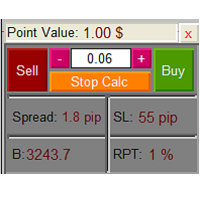
Live Market Info: Displays live Spread (in pips) and Stop Loss distance dynamically.
🚀 How It Works
-
Attach FJD Lot Calculator Indicator to any chart.
-
Select your desired Risk Per Trade (%) using the + / − buttons or input settings.
-
Click SET SL LINE to place the Stop Loss line.
-
(Optional) Click SET ENTRY if you want to calculate risk for a Limit/Pending order.
-
Drag the line(s) to your technical levels on the chart.
-
Instantly read the exact Calculated Lot Size, SL Distance, and Account Risk $ from the panel and enter your trade manually!
⚙️ Input Parameters
--- Risk & SL Settings ---
-
Initial Risk Per Trade (%): Sets your default starting risk percentage (e.g., 1.0%).
-
Risk Increase/Decrease Step (%): Determines the step increment for + and − buttons (e.g., 0.1%, 0.5%).
-
Default SL Line Distance (in pips): Initial placement distance for the SL line when drawn (e.g., 5.0 pips).
--- Risk Dashboard Settings ---
-
Show Risk Dashboard (ON / OFF): Enable or disable the floating Risk Dashboard.
-
Show All Symbols Summary (ON / OFF): Enable or disable the account-wide global position summary.
-
Dashboard Start X Position: Horizontal starting position of the dashboard.
--- UI Position ---
-
Panel Display X Position / Y Position: Default panel starting coordinates on chart.
💡 Why Choose FJD Lot Calculator Indicator?
-
Prop Firm Friendly: Guarantees strict risk management compliance on every manual trade entry.
-
Zero Chart Lag: Written in lightweight, modular MQL5 OOP code for maximum responsiveness.
-
Modern Fintech Aesthetics: Beautiful Slate & Accent theme with subtle shadows and clean typography.
Author: Amirhossein Farjad
Website: www.Farjad.org





































ユーザーは評価に対して何もコメントを残しませんでした