Trading Rules Enforcer

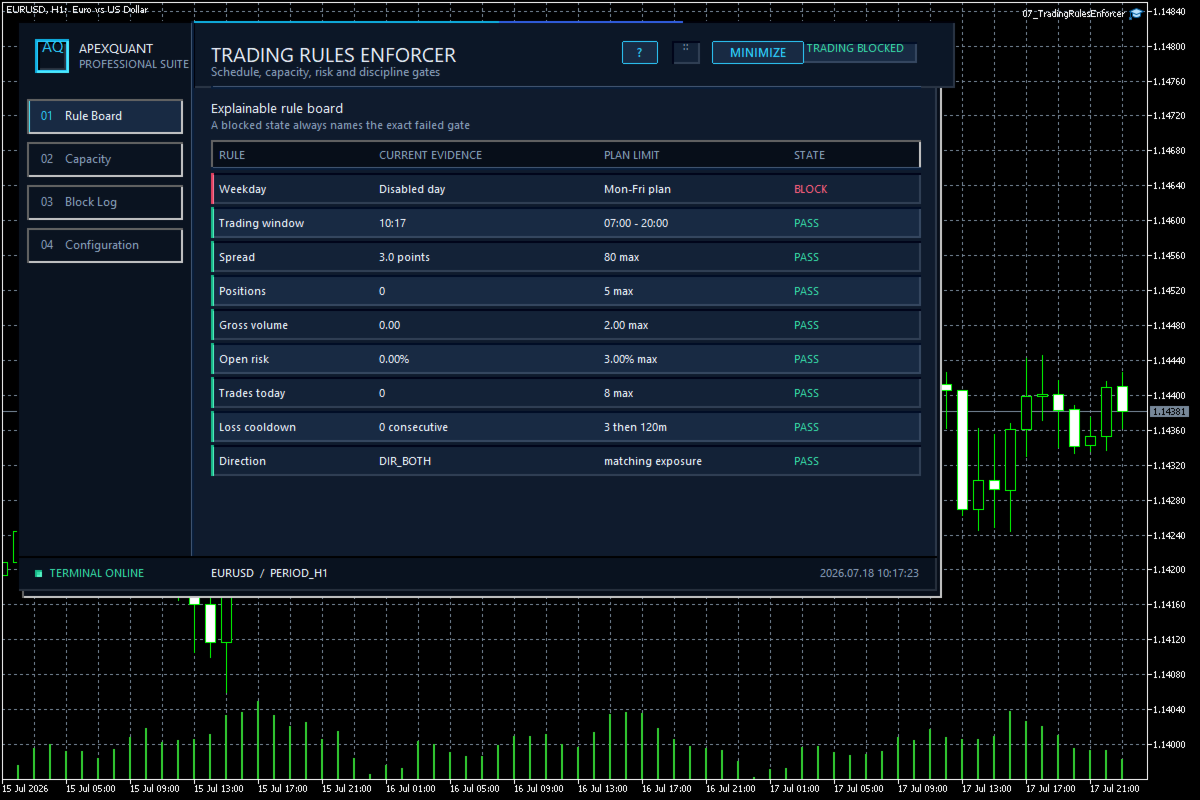
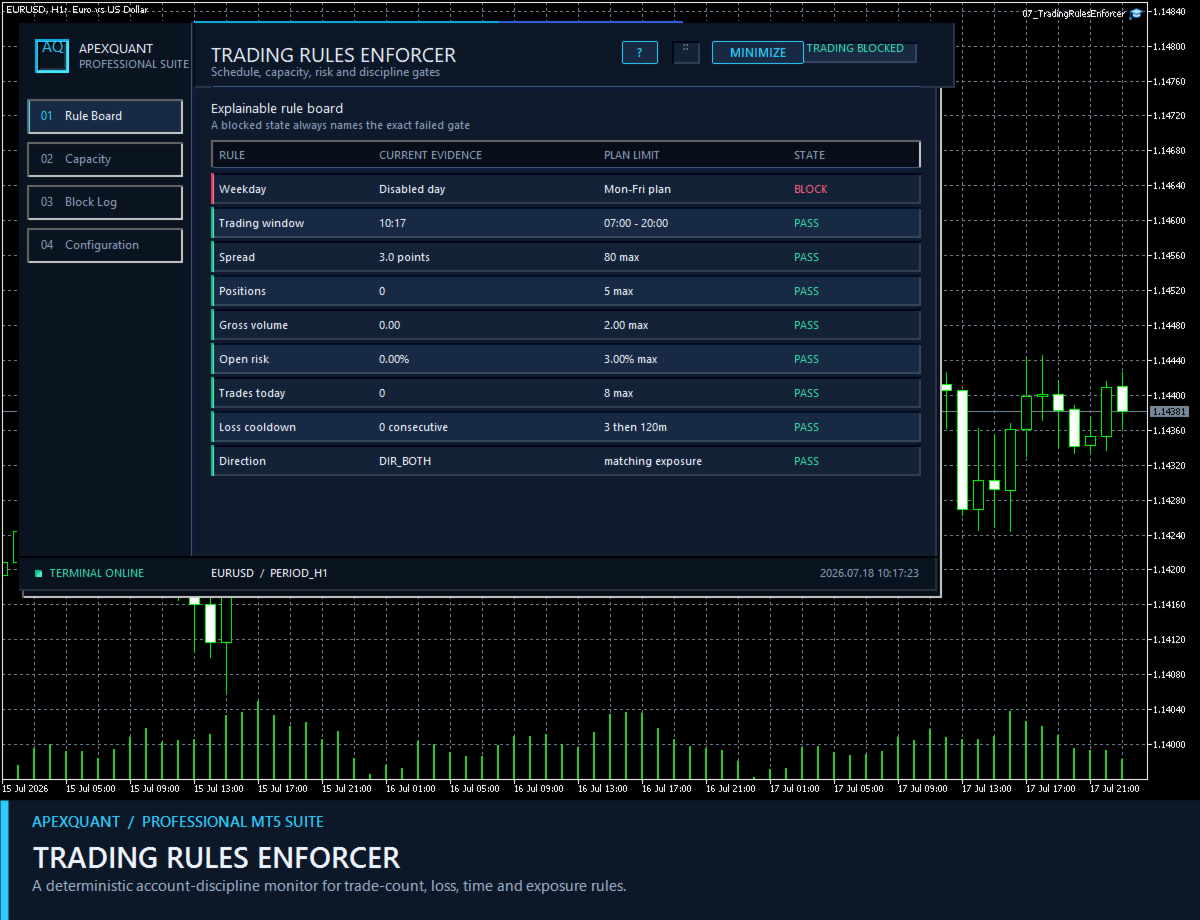
Trading Rules Enforcer is a deterministic account-discipline monitor for trade-count, loss, time and exposure rules.

Key functions:
- Clear rule status dashboard
- Trading-session restrictions
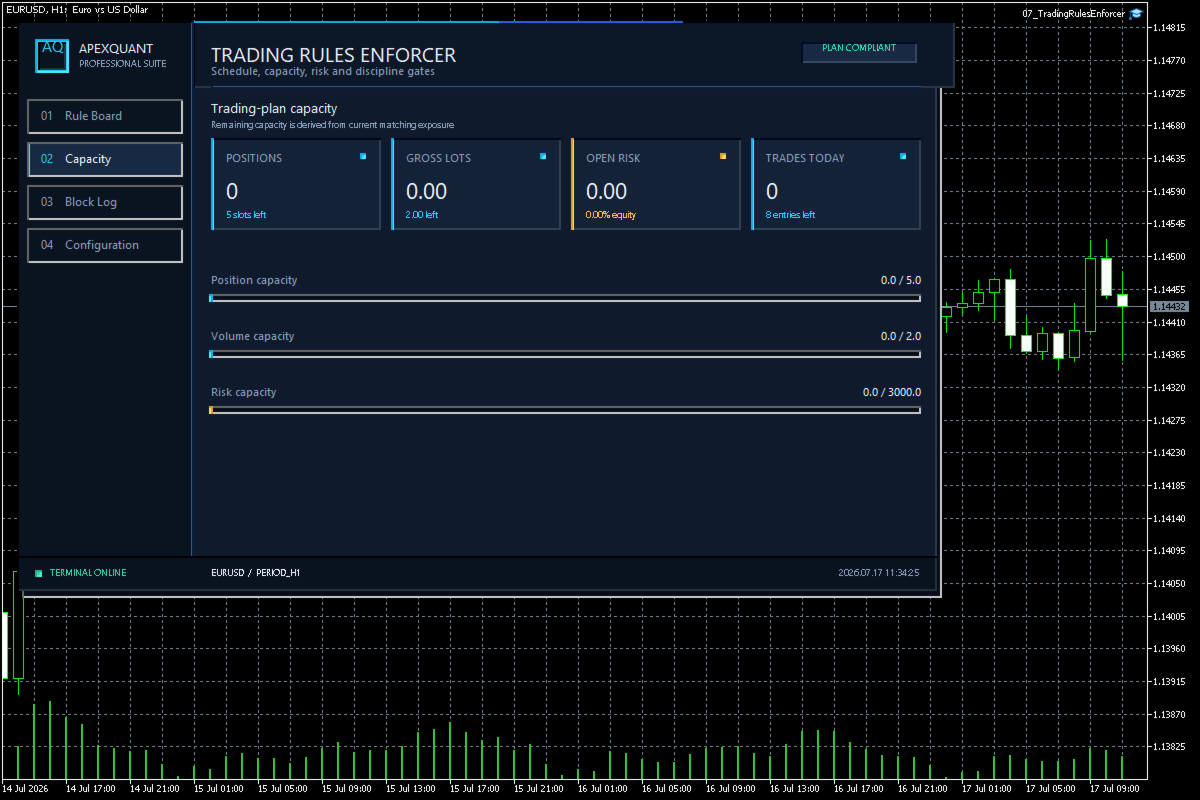
- Overtrading controls
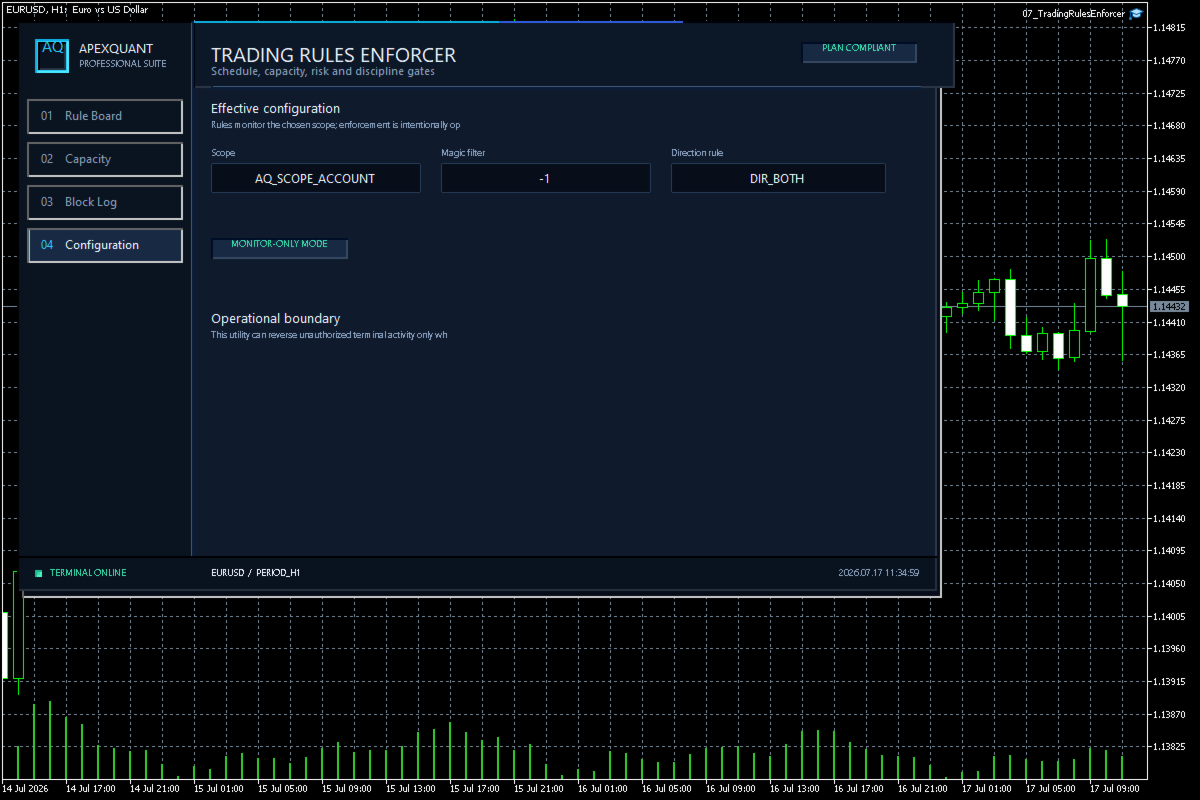
- Symbol and Magic Number scope
- Daily loss and exposure monitoring
- Clear blocking reasons
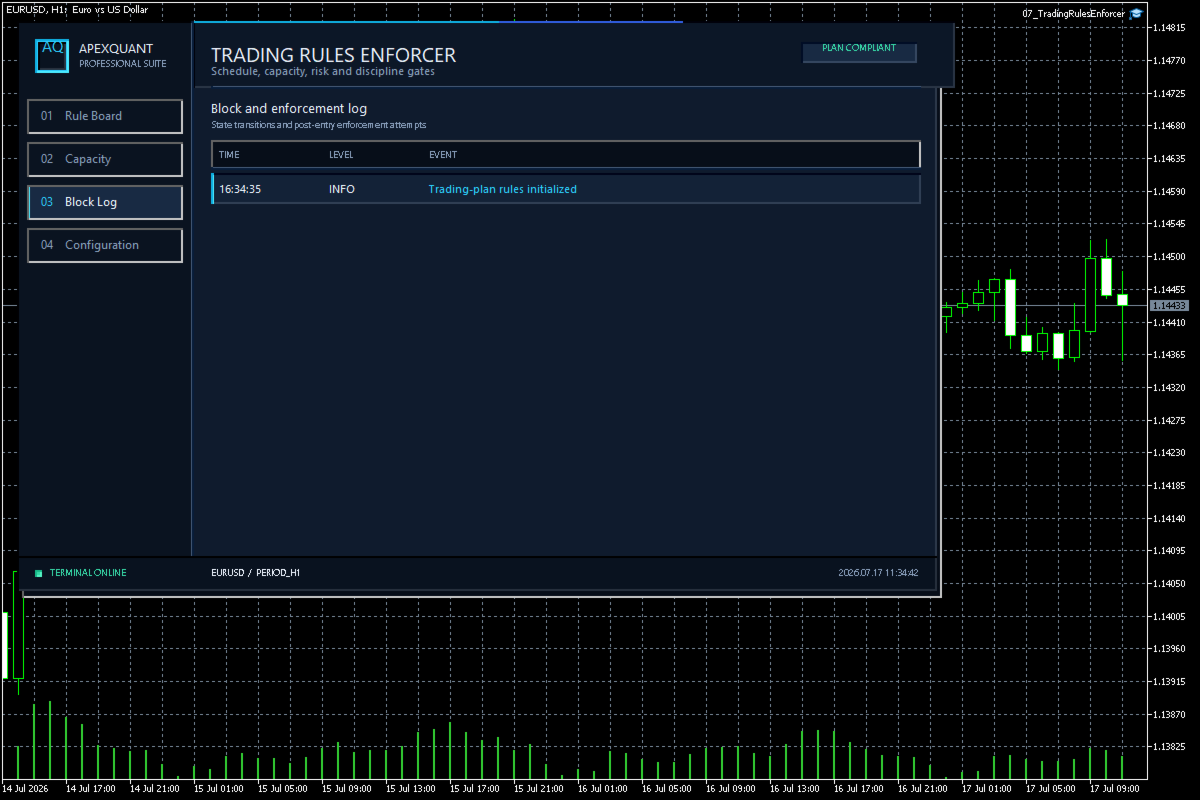
- Operational event history

The utility enforces rules configured by the user. It does not generate entry signals, predict market direction or guarantee trading results. Test all rule combinations and enforcement actions on a demo account before live use.
おすすめのプロダクト
MT5 Telegram Notifier — Real-Time Account Monitoring Stay informed and in control of your trading account from anywhere. This utility Expert Advisor sends instant notifications and detailed reports directly to your Telegram chat. Key Benefits Real-Time Alerts : Receive notifications when positions open, close, or pending orders change. Risk Management : Margin level alerts help you act before critical thresholds. Hedging Support : Displays every position individually using ticket-based logic. O
Multi Chart Synchronizer: 究極のマルチチャート同期装置  Multi Chart Synchronizer は、マルチタイムフレーム分析とヒストリカルバックテストを効率化するために設計されたプロフェッショナルグレードの同期ツールです。チャートを手動で調整する手間が省けるため、プライスアクションと戦略策定に集中できます。 主なメリット 履歴バックテストに最適化:   過去の市場データを分析して優位性を高めるトレーダーに最適です。 シームレスなMTF分析:   同じ銘柄の複数のチャートを瞬時に同期します。上位時間枠でトレンドの成立を特定すると、キーを1回押すだけで、下位時間枠のチャートもすべてその瞬間に合わせて同期されます。 多用途アプリケーション:   複数の時間枠にわたってエントリー条件を確認する必要がある裁量トレーダーと EA 開発者の両方にとって不可欠なツールです。 主な特徴 インスタント同期(Qキー):   特定のローソク足にマウスを移動し、   「Q」   キーを押すだけです。その瞬間、同じ銘柄の開いているすべてのチャートに垂直同期ラインが表示されます
Check out my TRADE PLANNER MT5 – strongly recommended to anticipate account scenarios before risking any money. This is a multi-symbol, multi-timeframe, table-based indicator for MetaTrader 5 that identifies 46 types of candlestick formations. Each formation has its own image for easier recognition. The indicator includes popular patterns such as Engulfing, Hammer, Three Line Strike, Piercing, and Doji-like candles. You can check the full list of patterns in the screenshots below. Also you can
RED ZONE Monitor Loss-Cut & Break-Even Risk Monitor for Averaging Traders (MT5) RED ZONE Monitor is a risk management indicator for traders who use averaging, scaling-in, or multiple open positions . It visually displays: The loss-cut (liquidation) risk zone The break-even price Based on current open positions, lots, and margin conditions This indicator does not provide entry signals. It does not promise profits. It shows where your account actually fails if price moves against you. What RED ZO
ATTENTION: the utility cannot work in the Strategy Tester, if you want to try the demo version for free for a week, or have any questions, write me an email! You can find my address on my user profile. TrendLine Auto Executor is a software capable of identifying the trendlines you have drawn on the chart and opening orders as soon as they are touched or exceeded. The software allows you to manage two orders at a time for each chart by tracking two groups of trendlines, one for each order, and e
MA Flow No.2 See the Flow of Bulls & Bears at a Glance, and Keep the Rhythm of the Market in Your Hands Tired of staring at dozens of moving averages until your eyes blur? Unsure when to enter, or where to place your stop? MA Flow No.2 upgrades the humble moving average into a complete trend-trading system. No more scattered lines on your chart — instead, a living "river of bulls and bears". Up to 100 moving averages roll together in real time. On every single bar, you can see at a glance w
トレードチャンスを逃したくないけど、ずっとチャートを見続けるのは辛い・・・・ そんなあなたのために、この商品が存在します!! Touch Alert Pro - 商品概要 価格がアラートオブジェクトに到達したら「MetaTrader5」アプリに通知を送るインジケーターです。チャート上のボタンを押して自由にアラートオブジェクトを追加・削除できます。また、アラートオブジェクトごとに通知上限回数を設定することができます。自動売買の機能はないため、トレード補助のツールとしてお使いください。 - 機能説明 ①コントロールパネル 6つのボタンで構成されています。上からボタンの機能を紹介します。 ・水平線作成ボタン:アラート機能を持つ水平線を1つチャート上に設置します。 ・チャネルライン作成ボタン:アラート機能を持つチャネルラインを1つチャート上に設置します。 ・トレンドライン作成ボタン:アラート機能を持つトレンドラインを1つチャート上に設置します。 ・フィボナッチリトレースメント作成ボタン:アラート機能を持つフィボナッチリトレースメントを1つチャート上に設置します。 ・フィボナ
Visual Dolphin Indicator
AL MOOSAWI ABDULLAH JAFFER BAQER
Visual Dolphin Indicator Unlock the rhythm of the market with the Visual Dolphin Indicator, your ultimate tool for identifying and capitalizing on market trends with clarity and confidence. Designed for both novice and experienced traders, this indicator eliminates the noise and guesswork, providing crystal-clear buy and sell signals directly on your chart. The Logic Behind the Waves The core of the Visual Dolphin Indicator is a sophisticated yet intuitive dual-wave system based on moving avera
# Engulfing Quality Score - Not all engulfings are equal *Category: Pattern Recognition | Difficulty: intermediate | Window: chart window (overlaid on price) | Markets: Universal (Forex, indices, commodities, crypto, stocks) | Suggested timeframes: M15, M30, H1, H4, D1* ## Short description > Checks the engulfing pattern and scores it on four additional criteria, flagging only those exceeding the quality threshold. ## Full description ### Overview The engulfing pattern is among the best k
The “Summary Risk Target” indicator is designed to show the total number of transactions made on a single pair. The transactions counted include active positions as well as pending orders . By setting a stop loss for each trade, this indicator displays the total potential risk (loss) that may be incurred. This helps traders easily understand their overall risk exposure without the need for manual calculations. Likewise, for take profit , if the TP level is defined—either in terms of pips or at a
FREE
Our offer also includes a free panel — Indicator Panel — which allows you to show or hide indicators created by BOToBRACIA ->  MT4  /   MT5 Our offer also includes a version for MetaTrader 4 ->  https://www.mql5.com/en/market/product/179248?source=Site+Market+Product+Page#description Indicator Panel   is a tool designed to manage the visibility of technical analysis objects generated by our indicators. Instead of enabling/disabling individual indicators or manually removing chart objects, a si
FREE
Moving Spread
Jose Maria Molina Sanchez
Moving Spread – リアルタイム市場コストモニター 平均スプレッドをリアルタイムで監視し、高コスト期間の取引を回避します。 このインジケーターの機能 Moving Spread は、時間の経過とともに市場の 平均スプレッド(ポイント単位) を測定し、その変化を示します。これは、エントリー時のコストが高すぎる場合を把握するのに不可欠なツールです。このような状況では、取引開始前から利益が損なわれる可能性があります。 なぜこれが重要ですか? スプレッドが高いということは、市場への出入りに多くの費用がかかることを意味します。このインジケーターは、こうした瞬間を特定し、コストが高すぎるときに取引を避けるのに役立ちます。 動作方法 現在のスプレッドを別ウィンドウに表示 します。赤いラインが平均値を表しています。 スプレッドが設定されたしきい値(例:> 0)を超えると、 自動アラート を表示します。 スキャルパーおよびデイトレーダーに最適 です。これにより、「ブリーディング」(継続的な損失)による隠れた損失を回避できます。 実際の例 添付画像のように、資産や時間
FREE
Guardian Magic GT
Carlos Eduardo Rivas Istacuy
Guardian Magic GT - Risk Management Expert Advisor for MetaTrader 5 PROTECT YOUR TRADING CAPITAL WITH INTELLIGENT RISK MANAGEMENT Guardian Magic GT is a professional-grade Expert Advisor designed to safeguard your trading operations by implementing sophisticated risk control mechanisms. Whether you run a single bot or manage multiple automated trading systems simultaneously, Guardian Magic GT provides real-time monitoring and automatic position management to ensure your account stays within your
Opening Range Gap (ORG) Automatically maps the daily Opening Range Gap — one of the most-watched institutional reference points — directly on your chart. The Opening Range Gap is the price void left between the previous session's close and the new session's open. Smart-money traders treat this zone as a magnet and a decision point: price often returns to fill it, reacts at its edges, or uses it as a launchpad for the day's expansion. This indicator removes the guesswork — it detects the gap the
# Dynamic Pivot Zones - Pivots as zones, not lines *Category: Support and Resistance | Difficulty: beginner | Window: chart window (overlaid on price) | Markets: Universal (Forex, indices, commodities, crypto, stocks) | Suggested timeframes: M5, M15, M30, H1* ## Short description > Turns pivots into zones whose width depends on the previous period volatility. The levels stay fixed for the whole session, with no recalculation. ## Full description ### Overview Classic pivots are infinitely
Welcome to ENTRY IN THE ZONE AND SMC MULTI TIMEFRAME Entry In The Zone and SMC Multi Timeframe is a real-time market analysis tool based on Smart Money Concepts (SMC), designed to analyze market structure, price direction, and key trading zones. It supports both Single-Timeframe Analysis and Multi-Timeframe Analysis, providing a clearer view of the overall market structure across multiple timeframes, with real-time BUY / SELL signals that do not repaint. It is designed to help filter trading opp
SlopeChannelB – 価格の傾斜チャネルを構築するテクニカル分析ツールで、市場の現状を評価し、取引シグナルを見つけるためのユニークな機会を提供します。 インジケーターの主な特徴: 価格の傾斜チャネル : このインジケーターは、サポートとレジスタンスのレベルを視覚化するのに役立ち、トレンドの逆転または継続の可能性を示すことができます。 ラインの色と背景の強調表示が異なる : 傾斜したサポートとレジスタンスのレベルは異なる色で表示され、チャネル自体はさらに背景で強調され、チャートの視覚的分析を簡素化します。 ライン計算のための3つのオプション : このインジケーターは回帰分析を使用してチャネルラインを構築します。3つの方法から選択できます: Robust(デフォルト) – 外れ値に強い方法。 OLS(最小二乗法) . Median(中央値計算) . 最適なモデル選択 : SlopeChannelBは5つの品質基準の分析に基づいて最も適切なチャネルラインのバリエーションを自動的に選択します。 品質パラメータはチャートに直接表示され、結果の評価に役立ちます。また、ボタンを使
Global Stop Loss and Take Profit Manager Drag Lines Auto Apply Already using my free Global Stop Loss and Take Profit Setter? This is the always on version. Instead of setting levels once, you drag two lines on the chart and every manual position on that symbol — plus every new one you open — instantly inherits the Stop Loss and Take Profit. No clicking into each order. No forgetting a stop. Global Stop Loss and Target Manager is a drag-and-drop risk tool for manual traders on MetaTrader 5. Pu
Target Smart Order
Markeysuel De Sousa Ferreira
TARGET SMART ORDER Indicator Custom indicator for MetaTrader 5 that displays detailed information about each trade directly on the chart, showing real-time profit/loss, Take Profit and Stop Loss levels for each active order. Main Features: Real Profit Display Real-Time Profit/Loss: Shows the current value of each position. Continuous Update: Values ​​are updated tick by tick Dynamic Colors: Green for profit, red for loss. TP/SL Lines: Draws horizontal targets at Take Profit and Stop Loss l
Non-Repainting. Non-Redrawing. Non-Lagging. Signals appear only on confirmed bars. What you see on history is exactly what appeared in real time. Built specifically for Gold (XAUUSD) traders. Gold ML Supertrend MT5 is the only Supertrend indicator on MQL5 that learns. Instead of using a fixed multiplier, it runs a K-means clustering algorithm on recent price data to find the optimal band width. Then it adapts that width per trading session (Asia/London/NY) based on what actually worked. The resu
Save your time . Select area and the trend line will draw automatically . Draw a support and resistance line for the selected range with two mouse clicks .  If you need to, you can also draw a line for support and resistance based on separate areas. The resistance trend line is drawn based on the first and last highs inside the selected area; The support trend line is drawn based on first and last lows inside the selected area;
DRX SPREAD MONITOR は、ブローカーのスプレッドをリアルタイムで可視化・分析するために設計されたプロフェッショナルなユーティリティです。ニュースイベント、ロールオーバー、または流動性の低いセッション中のスプレッド拡大によって引き起こされる隠れたコストを特定するのに役立ちます。 このツールは、約定品質を確保し、取引コストが統計的に高すぎる場合のトレードを回避する必要があるスキャルパーやゴールドトレーダーにとって不可欠です。 主な機能 リアルタイムヒストグラム: 別のウィンドウにスプレッド履歴を表示し、通常、高、極端なレベルを色分けします。 動的移動平均(MA): 平均スプレッドの傾向を計算し、一時的なスパイクと構造的なスプレッドの増加を区別するのに役立ちます。 視覚的「イコライザー」モード: チャートを乱雑にすることなく、市場の流動性状況に関する即時フィードバックを提供する独自のバーチャート表示です。 ライブデータパネル: チャート上のコンパクトなダッシュボードで以下を表示します: 現在のスプレッド 平均スプレッド(時間ベース) 最小/最大記録 音声警告システム: スプレ
FREE
TerminalBridge Account Analytics is an on-chart account statistics indicator for MetaTrader 5. It organizes closed trading activity into day, week, month, quarter and year views. Account-wide records include all symbols by default. Main features - Live floating profit or loss - Recorded daily maximum floating loss - Floating-loss percentage, occurrence time and data status - Today, All, Last 1 Month, Last 3 Months and Custom history ranges - Built-in calendar for custom date selection - Filt
FREE
Advantage The analyzer provides an opportunity to examine correlation in history, for example, for the previous month excluding the current one, thus allowing you to evaluate symbol movement in history. It can be conveniently used in conjunction with the LineSyncMirrorCharts analyzer. Charts are synchronized by a market type: Forex, CFD, Futures, and Indices. The analyzer calculates the distance covered by the price on a specified period in points. The tool fits pairs and portfolio traders. Des
This tool is used to generate a K - line reflection chart of a currency pair for foreign exchange transactions. For example, if the currency pair is EURUSD, a custom currency pair named EURUSD_ref is generated and a chart for that currency pair is opened. The price of a custom pair of currency is the inverse of the price of the original pair, which is the equivalent of a new pair of currency, the USDEUR. The usage is simple, put it on any chart, the new chart will open, and then draw the corr
GDS Renko Mirror MT5 Multi-Scale Renko Structure Comparison for MetaTrader 5 GDS Renko Mirror MT5 is a premium Renko context indicator for MetaTrader 5. It helps traders compare Renko market structure across different brick sizes and read whether movement looks clean, noisy, aligned or fragmented. The purpose of Mirror is not to generate buy or sell signals. The purpose is to help the trader understand how the same market movement appears through different Renko scales before making a manual dec
The DD_Profit_Monitor MT5  indicator is a trading tool developed by the Dagangduit Core Team . This indicator is designed to monitor profits in real-time with the following key features: All Time Profit : Displays the total profit earned since the beginning of the trading account's usage. This feature helps traders see the overall performance of their trading activities. Daily Profit : Displays daily profits, allowing traders to monitor their daily performance more specifically. Key Features: Al
Order PnL
Juan Pablo Sanchez Correa
Visualize your floating profits and losses in real-time directly above your open order line. Order PnL  is a minimalist indicator that calculates and renders the current floating (Profit + Swap) right above the entry price, allowing you to maintain 100% focus on the chart. Key Points: Dynamic Positioning: The text follows the entry price when scrolling or zooming. Zero Lag Visual: Optimized using a millisecond timer; it does not freeze the interface or overload tick processing. Clean Design: Au
概要 Candle Timer Countdown Pro は、現在のローソク足が終了するまでの残り時間を、滑らかで正確なカウントダウンとして表示します。さらに、円形のプログレスアーク(進行表示)を組み合わせることで、残り時間を瞬時に視覚的に把握できます。 ティック間で停止したり、時間がずれてしまう他のタイマーとは異なり、本インジケーターはサーバー時間の補間(Server Time Interpolation)を使用し、M1 から MN まであらゆる時間足で途切れのないスムーズなカウントダウンを実現します。 1分足でのスキャルピングでも、H4でのスイングトレードでも、現在のローソク足が正確にいつ確定するのかを把握することで、エントリータイミングの最適化、ローソク足パターンの確認、そして早すぎる判断の回避に役立ちます。 このタイマーが他と違う理由 多くの MT5 用キャンドルタイマーは TimeCurrent() のみに依存しており、新しいティックが到着したときにしか更新されません。低ボラティリティ時や上位時間足では、ティックの間隔が数秒空くことがあり、その間タイマーが停止し、その後突
TheRealPrice v3.0 | Ultimate Spread & Ask Visualizer TheRealPrice is a high-precision utility for MetaTrader 5 designed to expose the hidden cost of every trade: The Spread . While standard charts only display the Bid price, professional traders know that buy orders and short-exits happen at the Ask price. TheRealPrice bridges this gap by drawing a dynamic, real-time horizontal line that tracks the exact Ask level, providing a clear visual representation of the current market spread. Why do you
このプロダクトを購入した人は以下も購入しています
Trade Assistant MT5
Evgeniy Kravchenko
4.41 (216)
取引 ごとのリスクの 計算、新規注文 の 簡単 な 設置、部分的 な 決済機能 を 持 つ 注文管理、 7 種類 のトレーリングストップなど 、便利 な 機能 を 備 えています 。 追加の資料と説明書 インストール手順   -   アプリケーションの手順   -   デモアカウント用アプリケーションの試用版 ライン機能 チャート上にオープニングライン、ストップロス、テイクプロフィットを表示します。この機能により、新規注文を簡単に設定することができ、注文を出す前にその特徴を確認することができます。   リスク計算 リスク計算機能は、設定されたリスクとストップロス注文のサイズを考慮して、新規注文のボリュームを計算します。ストップロスの大きさを自由に設定できると同時に、設定したリスクを守ることができます。 Lot calc ボタン - リスク 計算 を 有効 / 無効 にします 。 Risk フィールドでは 、必要 なリスクの 値 を 0 から 100 までのパーセンテージまたは 預金通貨 で 設定 します 。 設定」 タブで 、 リスク 計算 の 種類 を 選択 します :「 $ 通
Trade Manager EAへようこそ。これは、取引をより直感的、正確、そして効率的にするために設計された究極の リスク管理ツール です。これは単なるオーダー実行ツールではなく、包括的な取引計画、ポジション管理、リスク管理のためのソリューションです。初心者から上級者、迅速な実行を必要とするスキャルパーまで、Trade Manager EAはあらゆるニーズに対応し、為替、指数、商品、暗号通貨などさまざまな市場で柔軟に対応します。 Trade Manager EAを使用すると、複雑な計算が過去のものになります。市場を分析し、エントリーポイント、ストップロス、テイクプロフィットのレベルをチャート上のラインでマークし、リスクを設定するだけで、Trade Managerが最適なポジションサイズを即座に計算し、SLとTPをピップ、ポイント、口座通貨でリアルタイムに表示します。すべての取引が簡単かつ効果的に管理されます。 主な機能: ポジションサイズ計算機 :定義されたリスクに基づいて取引サイズを瞬時に決定します。 簡単な取引計画 :エントリー、ストップロス、テイクプロフィットを設定するためのド
Farmed Hedge Yield Farming | All Markets (Manual - Hybrid - Semi/Automated EA) VERIFIED TRADING RESULTS - Farmed Hedge Yield Axi Copy:  https://www.mql5.com/en/signals/2356376 - Farmed Hedge Yield Exn Copy:   https://www.mql5.com/en/signals/2356404 - Farmed Hedge Yield V Copy:  https://www.mql5.com/en/signals/2357156 IMPORTANT NOTICE: FarmedHedge is a MANUAL-FOCUSED TRADING UTILITY ,not a fully automated EA. Results shown on this Signal include manual trades and overall strategic management.
ベータリリース Telegram to MT5 Signal Trader はまもなく正式なアルファ版をリリースします。いくつかの機能はまだ開発中で、小さな不具合に遭遇する可能性があります。問題が発生した場合はぜひご報告ください。皆さまのフィードバックがソフトウェア改善に役立ちます。 Telegram to MT5 Signal Trader は、 Telegram のチャンネルやグループからの取引シグナルを自動的に MetaTrader 5 にコピーする強力なツールです。 パブリックおよびプライベートの両方のチャネルに対応し、複数のシグナル提供元を複数のMT5口座に接続可能です。ソフトウェアは高速で安定し、すべての取引を細かく制御できます。 インターフェースは直感的で、ダッシュボードとチャートは見やすく設計されており、リアルタイムで動作状況をモニターできます。 必要環境 MQL の制限により、EA は Telegram と通信するためのデスクトップアプリが必要です。 インストーラーは公式の インストールガイド にあります。 主な機能 マルチプロバイダー: 複数の Telegram
Local Trade Copier EA MT5
Juvenille Emperor Limited
4.94 (148)
Local Trade Copier EA MT5 は、同一の Windows PC または Windows VPS 上で稼働する複数の MetaTrader 5 口座間で、取引をコピーおよび管理するための高速で柔軟なトレードコピーツールです。 ローカルでの取引同期に加え、Receiver 側でロットサイズ、リスク管理、取引フィルター、シンボルマッピング、取引管理、口座保護を個別に設定できます。 Transmitter と Receiver のターミナルは約 1分 で設定でき、同一ブローカーまたは異なるブローカーの口座間で、手動取引や EA による取引をコピーできます。適切な条件下では、ローカルの MetaTrader ターミナル間で取引情報を 0.5秒未満 で同期できます。実際の約定速度は、ブローカーのレイテンシー、ネットワーク状況、PC/VPS の性能、ターミナルの負荷によって異なります。 ご購入前に無料デモをお試しください Local Trade Copier EA MT5 の完全機能版無料デモ を、MT5 デモ口座で 1回につき4時間 テストできます。 Local Trad
================================================================================ POC BREAKOUT - V20.72. Full Professional Grade Toolkit ================================================================================ POC Breakout is a full MetaTrader 5 trading dashboard for discretionary traders who want breakout signals, Point of Control (POC) context, volume profiles, order flow, market structure, news, alerts, and advanced trade planning in one professional workspace. Attached directly to you
Telegram to MT5 Multi-Channel Copier   は、Telegram チャンネルのトレードシグナルを MetaTrader 5 へ自動コピーします。ボット不要、ブラウザ拡張不要、手動コピー不要。Telegram にシグナルが届くと、EA が数秒であなたのターミナルに注文を出します。 さらに、チャンネルをコピーする前に、内蔵バックテスターでそのチャンネルがあなたの口座でどう動いたかを確認できます。 製品は 2 つのコンポーネントで構成されます:Telegram チャンネルを監視する Windows アプリと、MT5 ターミナルでシグナルを執行する本 EA です。MT4 版もあります   こちら . セットアップガイドとアプリのダウンロード:   https://www.mql5.com/en/blogs/post/768988 現在の価格は今後値上げされます。 仕組み Windows アプリは、ボットではなくあなた自身の API 認証情報で Telegram に接続します。そのため、プライベートや VIP を含む、購読中のあらゆるチャンネル・グループ・トピッ
TradePanel MT5
Alfiya Fazylova
4.88 (167)
Trade Panelは多機能なトレーディングアシスタントです。アプリには手動取引用の50以上のトレーディング機能が搭載されており、ほとんどの取引作業を自動化することができます。 アプリの説明書+ビデオガイド: https://www.mql5.com/en/blogs/post/772292 デモ口座用アプリの試用版: https://www.mql5.com/en/blogs/post/750865 アプリのインストール方法: https://www.mql5.com/en/blogs/post/756239 アプリをビジュアルモードでテストする方法: https://www.mql5.com/en/blogs/post/770277 VPSのMetaTraderにアプリをインストールする方法: https://www.mql5.com/en/blogs/post/770190 取引。 ワンクリックで取引操作を行うことができます: リスクを自動計算して指値注文やポジションを開く。 複数の注文やポジションをワンクリックで開く。 注文のグリッドを開く。 保留中の注文やポジションをグルー
EA Overfitter
Stephen J Martret
5 (1)
That backtest looks great. But will it still be making money tomorrow, next week, next month? EA Overfitter re-runs your EA on 100 price histories it has never seen. One score tells you if the edge is real. A backtest tells you what an EA did on one price history — the one that happened to occur. What you cannot tell from it is how much of that result was the strategy and how much was the particular path. EA Overfitter answers that. It builds up to 100 synthetic price histories your EA has n
25% discount on the release of the tool: only for the next 3 buyers Send a message to receive a demo version. AstroTrade Trading Assistant AstroTrade is a comprehensive multi-functional trading utility developed for the MetaTrader 5 platform. It integrates essential tools for trade execution, risk management, and technical monitoring into a single unified interface. The application is designed to assist traders in managing their daily operations through a visual and structured environment. Vi
HINN MAGIC ENTRY – the ultimate tool for entry and position management! SIMPLE. FASTEST. INTUITIVE. MAX AUTOMATED. Place orders by selecting a level directly on the chart! full description   ::  demo-version  :: 60-sec-video-description Key features: - Market, limit, and pending orders - Automatic lot size calculation - Automatic spread and commission accounting - Unlimited partitial take-profits  - Breakeven and trailing stop-loss and take-profit  functions - Invalidation leves - Intuitive, a
Exp COPYLOT CLIENT for MT5
Vladislav Andruschenko
3.97 (35)
MetaTrader 5 用のプロフェッショナル取引コピー機 MetaTrader 向けの高速・高性能・信頼性の高い 取引コピー機 です。 COPYLOT は、MT4 と MT5 のターミナル間で Forex 取引をコピーでき、 Hedge 口座と Netting 口座の両方に対応しています。 COPYLOT MT5 版の対応構成: - MT5 Hedge → MT5 Hedge - MT5 Hedge → MT5 Netting - MT5 Netting → MT5 Hedge - MT5 Netting → MT5 Netting - MT4 → MT5 Hedge - MT4 → MT5 Netting MT4 版 完全な説明 + DEMO + PDF 購入方法 インストール方法 ログファイルの取得方法 テストと最適化の方法 Expforex のすべての製品 MT4 ターミナルへのコピーも可能です(MT4 → MT4、MT5 → MT4): COPYLOT CLIENT for MT4 COPYLOT は、2台、3台、さらには10台のターミナル間で同時に動作できる、プロフェッ
MT5 to Telegram Signal Provider は、Telegramのチャット、チャンネル、またはグループに 指定された シグナルを送信することができる、完全にカスタマイズ可能な簡単なユーティリティです。これにより、あなたのアカウントは シグナルプロバイダー になります。 競合する製品とは異なり、DLLのインポートは使用していません。 [ デモ ] [ マニュアル ] [ MT4版 ] [ Discord版 ] [ Telegramチャンネル ]  New: [ Telegram To MT5 ] セットアップ ステップバイステップの ユーザーガイド が利用可能です。 Telegram APIの知識は必要ありません。必要な全ては開発者から提供されます。 主な特長 購読者に送信する注文の詳細をカスタマイズする機能 例えば、Bronze、Silver、Goldといった階層型のサブスクリプションモデルを作成できます。Goldサブスクリプションでは、すべてのシグナルが提供されます。 id、シンボル、またはコメントによって注文をフィルターできます 注文が実行されたチャート
Premium Trade Manager - コーチ内蔵型トレードパネル Premium Trade Manager は、AIトレーディングコーチをあなたのチャートの中に置き、その下に完全な執行エンジンを備えたツールです。いつも通りにトレードをセットアップし、あなた専任のAIトレーディングコーチ Max にそのセットアップをそのまま読み取らせて、発注前に率直な見解を伝えてもらいましょう。ストップの幅が規律あるアプローチに合っているか、リスクサイズは適切か、高影響のニュースイベントが数分後に迫っていないか、プロップファームの制限に近づいていないか。その下には、クリックの後をすべて処理するエンジンが備わっています。ワンクリックのリスクサイズ計算による発注、チャート上でドラッグして組み立て、発注後も動かせるプラン、最大4段階の分割利確、7種類のトレール方式、リアルタイムのプロップファームコンプライアンス、ニュースガード、そしてコストを自ら採点するスプレッド機能。判断はあなたが下す。Max がもう一度確認する。後のことはすべてパネルが担う。 購入前に実際に触れて試せます。 ブラウザ上でライブ
Telegram To MT5 — シグナルコピア Telegram チャンネルのトレードコールを、実際の MT5 注文に変換します — 自動で、好きなだけの口座に対応し、リスクとルールは完全にあなたの管理下に置けます。 Telegram To MT5 は、あなたが Telegram で既にフォローしている VIP / シグナルチャンネルを MetaTrader 5 端末に接続します。無料の付属デスクトップアプリがメッセージを読み取り(ボットを禁止しているチャンネルでも可能)、この EA があなたの口座でそれらを執行します — あなた自身のリスク設定、シンボルマッピング、テイクプロフィット処理、セッションおよびニュースフィルターを適用します。 これはシグナルコピアであり、ブラックボックス戦略ではありません。どのチャンネルを信頼するか、各トレードのロットと管理方法をあなたが決めます。 ステップバイステップの設定と付属アプリのインストールガイド 仕組み [あなたの Telegram チャンネル] -> [付属デスクトップアプリ] -> [MT5 + この EA] -> 注文 付属デスクトッ
Strategy Ledger Pro は MetaTrader 5 向けの読み取り専用の口座分析パネルです。口座の成績をエキスパートアドバイザー、戦略、銘柄、マジックナンバーごとに分けて表示します。 すべての機能を解説した詳細な マニュアル 。 MetaTrader は口座全体でひとつの残高しか表示しません。複数の EA が同時に取引すると、その残高では各 EA の貢献が分かりません。Strategy Ledger Pro は口座履歴を読み取り、決済済みポジションを再構築し、戦略に割り当て、その結果をひとつのパネルに表示します。 本製品は注文の発注・変更・決済を行いません。取引戦略を含まず、インジケーターを作成せず、チャート価格も読み取りません。 主な機能 EA・個別戦略・銘柄・マジックナンバー別の成績。 プリセット期間と任意の日付範囲。 確定損益と含み損益、建玉エクスポージャー、取引統計、pips、ドローダウン、エクイティ曲線。 手数料、スワップ、コスト負担率、推定エントリー/エグジットのスリッページと合計。 固定ルールに基づく成績評価、文章による要約、状態マーク。 セットアッ
Signal TradingView to MT5 Pro Automator TradingViewとMetaTrader 5間の即時プロフェッショナル実行 TradingViewのシグナル(アラート)とMT5での実際の約定を繋ぐ、最も強固なコミュニケーションブリッジで、取引戦略を自動化します。スピード、柔軟性、そして完璧なリスク管理を求めるトレーダー向けに設計されたこのExpert Advisorは、あらゆるアラートメッセージを正確な成行または指値注文に変換します。 強みと利点 ユニバーサルパーシングエンジン(独自技術): あらゆるアラート形式からデータを自動的に認識し、抽出できる高度なテクノロジー。単一の固定フォーマットに制限されることはありません。システムはシンボル(銘柄)、アクション、価格、SL(ストップロス)、TP(テイクプロフィット)を自動的に理解します。 リアルタイム実行: レイテンシ(遅延)を最小限に抑えるよう最適化された、1秒未満の超高速ポーリング技術。シグナルを受信してから数ミリ秒以内に注文が実行されます。 機関投資家レベルのリスク管理: 以下に基づく自動かつ正確
Power Candles Strategy Scanner - 自動最適化型マルチシンボル設定ファインダー パワーキャンドル・ストラテジー・スキャナーは 、パワーキャンドル・インジケーターを駆動するのと全く同じ自己最適化エンジンを、マーケットウォッチに登録されているすべての銘柄に対して並行して実行します。1つのパネルで、現在統計的に取引可能な銘柄、各銘柄で勝率の高い戦略、最適なストップロス/テイクプロフィットの組み合わせが表示され、新たなシグナルが発生した瞬間に通知が届きます。 このツールは、Stein Investmentsのエコシステムの一部です。  18種類以上のツールをすべて閲覧し、AIを活用したセットアップの推奨を受け取り、  https://stein.investments でコミュニティに参加しましょう 市場動向を網羅。銘柄ごとに3,000件以上の自動最適化。2種類のアラート。ワンクリックでチャートを切り替えて即座にアクション。 なぜこれが必要なのか 多くのマルチ銘柄スキャナーは、 価格の動き (ボラティリティ、変動率、銘柄ごとのRSI)を表示するだけです。それ
Your EAs cannot see each other, but Anchor can. Anchor gives you one place to coordinate your EAs, manage risk, and decide when trading is allowed. It works alongside the trading bots you already use without any changes to them. The Problem One EA opens a trade. Then another starts trading. The next thing you know, you wake up to multiple grids built across your account. Each EA may be doing exactly what it was designed to do, but together they can place far more risk on your account than you in
Seconds Chart - MetaTrader 5で秒足チャートを作成するユニークなツールです。 Seconds Chart を使用すると、秒単位のタイムフレームでチャートを構築でき、標準的な分足や時間足チャートでは得られない柔軟性と分析精度を実現します。例えば、 S15 は15秒足を表します。カスタムシンボルをサポートしているインジケーターやEAをすべて使用できます。標準的なチャートと同様に便利に操作できます。 標準的なツールとは異なり、 Seconds Chart は超短期のタイムフレームでも高い精度と遅延なく作業できるように設計されています。 Free Demo: Seconds Chart v2.29 Demo.ex5 無料デモをダウンロードしてご自身でお確かめください: 完全機能版 - すべての機能が利用可能 24時間テスト - 精度と利便性を評価するのに十分な時間 デモ口座のみ - ほとんどのブローカーで簡単に開設可能 GBPCADチャートのみ - ほとんどの端末で利用可能 これらの制限はデモ版のみに適用されます。製品版は、あらゆる口座タイプ(リアル、デモ、コンテス
Trade Dashboard simplifies how you open, manage, and control your trades, with built-in lot size calculation. It allows you to execute trades, manage risk, and control positions directly on the chart, with tools such as partial close, breakeven, and trailing stop. Designed to reduce manual work and help you stay focused on your trading decisions. A demo version is available for testing. Detailed explanations of features are provided within the MQL5 platform. Installation instructions are include
Footprint Chart Pro — Professional OrderFlow EA for MetaTrader 5 Version 6.34 | Professional tool for real traders | Institutional-Grade Visualization DEMO USERS - PLEASE SELECT EVERY TICK / REAL TICK WHEN TESTING AND YOU HAVE DOWNLOADED HISTORICAL DATA. IF YOU SEE A WAITING SCREEN AND IT IS NOT DOWNLOADING, IT MEANS YOU HAVE LOW HISTORICAL DATA. TRY 1 MIN AND 5 MIN FIRST ON 1 DAY DATA. ONE DAY DATA SHOULD BE THE NEWEST AND MOST CURRENT DATE. PLEASE WAIT UNTIL THE MARKET HAS ROLLED OVER PERIOD.
Grid Manual MT5
Alfiya Fazylova
4.73 (22)
「Grid Manual」は、注文のグリッドを操作するための取引パネルです。 ユーティリティはユニバーサルで、柔軟な設定と直感的なインターフェイスを備えています。 それは、損失を平均化する方向だけでなく、利益を増やす方向でも注文のグリッドで機能します。 トレーダーは注文のグリッドを作成して維持する必要はありません。 すべてが「Grid Manual」によって行われます。 注文を開くだけで十分であり、「Grid Manual」は注文のグリッドを自動的に作成し、非常に閉じるまでそれに付随します。 完全な説明とデモバージョン ここ。 ユーティリティの主な機能と機能 ユーティリティは、モバイル端末から開かれた注文を含め、あらゆる方法で開かれた注文を処理します。 「制限」と「停止」の2種類のグリッドで機能します。 グリッド間隔の計算には、固定と動的(ATRインジケーターに基づく)の2つの方法で機能します。 オープンオーダーグリッドの設定を変更できます。 チャート上の各注文グリッドの損益分岐点を表示します。 各注文グリッドの利益率を表示します。 ワンクリックでグリッドから収益性の高い注文を閉じるこ
Timeless Charts
Samuel Manoel De Souza
5 (8)
Timeless Charts is an all-in-one trading utility for professional traders. It combines custom chart types such as Seconds Charts and Renko with advanced order flow analysis using Footprints , Clusters , Volume Profiles , VWAP studies, and anchored analysis tools for deeper market insight. Trading and position management are handled directly from the chart through an integrated trade management panel , while Market Replay and Virtual Accounts provide environments for practicing trading skills and
FUTURES ORDERFLOW FOOTPRINT CHART Professional OrderFlow EA for MetaTrader 5 Version 1.01| Professional tool for real traders | Institutional-Grade Visualization STRATEGY TESTER USERS - PLEASE SELECT EVERY REAL TICK WHEN TESTING AND YOU HAVE DOWNLOADED HISTORICAL DATA. IF YOU SEE A WAITING SCREEN AND IT IS NOT DOWNLOADING, IT MEANS YOU HAVE LOW HISTORICAL DATA. TRY 1 MIN AND 5 MIN FIRST ON 1 DAY DATA. ONE DAY DATA SHOULD BE THE NEWEST AND MOST CURRENT DATE. PLEASE WAIT UNTIL THE MARKET HAS ROL
Trade copier MT5
Alfiya Fazylova
4.61 (56)
Trade Copierは、取引口座間の取引をコピーして同期するように設計された専門的なユーティリティです。 コピーは、同じコンピューターまたはvps にインストールされている、サプライヤーのアカウント/端末から受信者のアカウント/端末に行われます。 キャンペーン - すでに「Trade copier MT5」をご購入の方は、「Trade copier MT4」を無料で入手できます(MT4 → MT5 および MT4 ← MT5 のコピー用)。詳細な条件については、どうぞ個別メッセージでお問い合わせください。 購入する前に、デモ アカウントでデモ バージョンをテストできます。 デモ版 こちら 。 詳細な説明は こちら 。 主な機能と利点: MT5ネッティングアカウントを含む、MT5> MT5、MT4> MT5、MT5> MT4のコピーをサポートします。 高いコピー速度(0.5秒未満)。 ベンダーモードと受信者モードは同じ製品内に実装されています。 チャートから直接リアルタイムでコピーを制御できる、簡単で直感的なインターフェイス。 接続が切断されたり、端末が再起動されたりしても、設定と位
Ultimate Extractor - Professional Trading Analytics for MT5 *****this is the local HTML version of Ultimate Extractor. !!!!!it is not compatible with Cloud!!!! For the online version please reach out to me directly****** Ultimate EA manager also now available when you use cloud pro and above for free!! Ultimate Extractor transforms your MetaTrader 5 trading history into actionable insights with comprehensive analytics, interactive charts, and real-time performance tracking. What It Does Automa
Risk Manager Pro MT5 is an account protection Expert Advisor for traders who want strict risk control inside MetaTrader 5. The utility monitors your account equity, daily and weekly results, drawdown, open positions, trade count, consecutive losses, and trading hours. When a configured limit is reached, it can automatically close positions, cancel pending orders, stop other EAs, send notifications, or close the terminal. Instead of relying on discipline during a stressful trading session, you de
あなたがメンバーである任意のチャネルから(プライベートおよび制限されたものを含む)シグナルを直接あなたのMT5にコピーします。  このツールは、トレードを管理し監視するために必要な多くの機能を提供しながら、ユーザーを考慮して設計されています。 この製品は使いやすく、視覚的に魅力的なグラフィカルインターフェースで提供されています。設定をカスタマイズして、数分で製品を使用を開始できます! ユーザーガイド + デモ  | MT4版 | Discord版 デモを試してみたい場合は、ユーザーガイドにアクセスしてください。 Telegram To MT5 受信機は、ストラテジーテスターで動作しません! Telegram To MT5の特徴 複数のチャネルから一度にシグナルをコピー プライベートおよび制限されたチャネルからシグナルをコピー BotトークンまたはChat IDは必要ありません   (必要に応じて使用することができます) リスク%または固定ロットを使用して取引 特定のシンボルを除外 すべてのシグナルをコピーするか、コピーするシグナルをカスタマイズするかを選択 すべてのシグナルを認
作者のその他のプロダクト
Global Session Map turns one MetaTrader 5 chart into a clear session workspace. It shows which major trading sessions are active in broker time, when the next transition occurs, and where session overlaps appear. The panel is designed for discretionary traders who need reliable time context without entry signals or profit claims. Session windows and display preferences are configurable and remain available after chart or terminal restarts. Main functions • Sydney, Tokyo, London and New York s
FREE
Session Range Laboratory is a professional statistical workspace for traders who want to understand how a selected market session behaves before making discretionary decisions. Instead of producing entry signals, the utility measures completed session ranges, compares the current range with historical distributions, and presents breakout and follow-through context in a structured five-page dashboard. MAIN FEATURES • Live session range with current high, low, total points and ADR share • Histor
Volatility Regime Monitor is a professional MetaTrader 5 dashboard for classifying current volatility with transparent, measurable context. It combines ATR, recent bar-range statistics and historical percentiles to show whether the market is compressed, normal or expanding without generating entry signals. MAIN FEATURES • ATR and recent range context • Historical volatility percentile state • Compression, normal and expansion classification • Historical regime table • Transparent thresholds and
Multi Symbol Opportunity Scanner is a professional MetaTrader 5 market-watch dashboard that ranks symbols using transparent trend, volatility, spread and session components. It helps traders compare multiple instruments from one screen without presenting opaque or guaranteed trade signals. MAIN FEATURES • Multi-symbol and multi-timeframe market rows • Separate trend, volatility, spread and session component scores • Configurable filters and transparent ranking logic • Fast chart-open action for
Trade Condition Inspector is a professional MetaTrader 5 preflight dashboard for checking a hypothetical market or pending order before execution. It brings broker permissions, symbol constraints, margin estimates and stop geometry into one transparent inspection workflow. MAIN FEATURES • Draggable Entry, Stop Loss and Take Profit levels • Trading-permission and session checks • Current spread, quote freshness and volume validation • Stops Level and Freeze Level compliance checks • Supported or
Execution Quality Monitor is a professional MetaTrader 5 utility for measuring and reviewing order-execution conditions. It records requested and filled prices, spread, slippage, return codes and a practical latency proxy so execution quality can be examined with consistent evidence. MAIN FEATURES • Requested-price versus filled-price comparison • Spread and slippage measurement • Execution latency proxy and return-code history • Percentile and distribution summaries • Aggregation by broker, se
EA Risk Inspector is a professional MetaTrader 5 dashboard for reviewing the live risk created by Expert Advisors and open positions. It groups exposure by Magic Number and strategy context, highlights missing protection and presents account-level concentration in a transparent operational view. MAIN FEATURES • Position and EA grouping by Magic Number • Stop Loss validity and uncovered-exposure checks • Strategy-level risk and position summaries • Symbol and directional concentration analysis •
Broker Environment Inspector is a professional MetaTrader 5 compatibility and diagnostics utility for examining the current terminal, account and symbol environment. It presents trading permissions, quote conditions, contract settings and supported execution capabilities in a clear technical dashboard. MAIN FEATURES • Terminal connection and trading-permission flags • Quote freshness and current spread inspection • Trading-session availability • Contract size, tick size and tick value details •
Session Breakout Executor is a deterministic MetaTrader 5 Expert Advisor for executing a defined session-range breakout workflow with OCO pending orders. The strategy, risk gates and lifecycle states are visible in a professional dashboard, while automatic entry is disabled by default. MAIN FEATURES • Configurable session range construction • Guarded manual arming before order placement • Broker-aware pending-order validation • OCO sibling cancellation after one side activates • Spread, permiss
Price Action Order Executor is a deterministic MetaTrader 5 Expert Advisor for executing a user-defined price-action zone as a controlled one-shot workflow. The zone remains adjustable on the chart, while candidate detection, manual arming and order management are shown through an explicit professional dashboard. MAIN FEATURES • Draggable price-action zone • Transparent candidate and qualification phase • Manual arming before execution • Broker-aware order validation and safety gates • One-shot
Prop Challenge Executor is a deterministic MetaTrader 5 Expert Advisor that combines rules-based execution with prop-style account protection gates. Daily and total loss limits, progress context, session controls and explicit arming states are presented in a professional operational dashboard. Automatic entry is disabled by default. MAIN FEATURES • Daily-loss and total-loss protection gates • Target and progress context • Configurable session and blackout filters • Spread, quote and trading-per
ApexQuant Gold Regime Executor is a MetaTrader 5 Expert Advisor for deterministic XAUUSD execution with transparent market-state evidence, adaptive risk controls, managed exits and an auditable seven-page dashboard. It does not use martingale, grid recovery or averaging down. The interface supports English and Simplified Chinese. STRATEGY FAMILIES • Expansion breakout with closed-bar range confirmation • Controlled pullback into the prevailing value zone • Optional range rejection with volatili
Prop Challenge Command Center is an account-control dashboard for monitoring prop-style daily and overall loss rules, target progress, minimum trading days, consistency, open risk and account state. Key functions: - Configurable rule profiles - Persisted daily and peak-equity baselines - Daily and overall drawdown monitoring - Profit-target and minimum-day progress - Consistency and exposure views - Warning ladder with guarded lock, reset and flatten controls - Event history for operational rev

Daily Drawdown Guardian is a focused daily-loss monitor with balance, equity and trailing reference modes. Key functions: - Broker-time daily rollover - Configurable warning thresholds - Persisted daily baseline - Symbol and Magic Number scope - Pending-order cancellation - Optional scoped position flattening - Guarded manual unlock and baseline reset - Event history for operational review This product monitors and enforces limits configured by the user. It does not provide entry signals or gu
Portfolio Risk Sentinel is a portfolio risk dashboard for stop-defined exposure across symbols and strategies. Key functions: - Total and remaining portfolio risk - Concentration monitoring - Uncovered-position detection - Pending-order risk - Strategy grouping - ATR-based stress view - Guarded mitigation controls Positions without usable stop-loss levels are clearly reported as undefined risk. The product is a monitoring and risk-control utility; it does not provide entry signals or guarantee
Currency Exposure Matrix is a currency-level exposure dashboard derived from current open positions. Key functions: - Gross and net currency exposure - Long and short decomposition - Deposit-currency conversion - Concentration warnings - Transparent handling when conversion symbols are unavailable The utility helps users understand aggregated currency exposure across their portfolio. It does not generate entry signals, predict market direction or guarantee trading results. Review broker symbol
Position Risk Architect is a visual trade-planning utility with draggable Entry, Stop Loss and three target levels. Key functions: - Risk-based volume calculation - Margin preview - Reward-to-risk target planning - Persisted chart geometry - Broker stop-level and volume validation - Guarded order execution Trading is disabled by default and must be deliberately enabled by the user. The product does not predict market direction or guarantee trading results. Verify all levels, calculated volume
Equity Lock Manager is an equity and high-water-mark protection utility. Key functions: - Initial-equity and peak-equity reference modes - Configurable arming thresholds - Clear lock and breach states - Scoped pending-order cancellation - Optional full or partial position close - Persisted recovery state - Confirmed baseline reset controls The utility enforces protection settings configured by the user. It does not provide entry signals, predict market direction or guarantee trading results. T
Multi Strategy Risk Allocator is a strategy-budget dashboard organized by Magic Number and configured risk allocation. Key functions: - Per-strategy risk usage and remaining budget - Allocation comparison across multiple strategies - Runtime enable and disable state - Persistent strategy toggles - Exportable allocation snapshots - Clear dashboard for portfolio-level risk oversight The utility helps monitor and coordinate risk budgets configured by the user. It does not generate entry signals,
Precision Trade Console is a visual execution and staged-management console with draggable Entry, Stop Loss and three target levels. Key functions: - Market, limit and stop order modes - Percentage, cash and fixed-lot position sizing - Margin and spread safety gates - Three staged take-profit levels and partial exits - Breakeven management - Fixed-distance or ATR-based trailing stops - Persistent trade plans - Optional keyboard workflow - Timed confirmation for order placement and bulk-close ac
Advanced Position Manager is a ticket-aware utility for managing existing positions. Key functions: - Selected ticket, current symbol, Magic Number and all-position scopes - Breakeven management - Partial-close controls - Fixed-distance, ATR-based and previous-bar trailing stops - Close By support for hedging accounts - Guarded bulk-close operations - Optional keyboard workflow - Clear position and action status display Trade actions are disabled by default. The utility manages positions accor
Pending Order Architect is a visual pending-order planner for ladder structures and OCO workflows. Key functions: - Draggable base-price and stop-loss lines - Equal-risk distribution across pending orders - Broker capability and symbol-rule checks - Live pending-order inventory - Optional sibling cancellation for OCO workflows - Guarded order placement and cancellation - Optional keyboard workflow - Clear planning and order-status panels Order placement is disabled by default. The utility subm
Basket Trade Commander is a multi-leg basket planner with leg-level risk and runtime control. Key functions: - Configurable symbols, directions and allocation weights - Per-leg and basket-level volume checks - Margin and symbol-rule validation - Persistent enable and disable toggles for each leg - Guarded basket execution - Scoped unwind controls - Clear basket composition and status display Trade execution is disabled by default. The utility submits and manages basket instructions configured
Session Trade Controller is a broker-time session and trade-permission controller. Key functions: - User-configured trading windows - Live countdown to the next session change - Weekday permission rules - Clear open, closed and transition states - Position and pending-order visibility - Explicit reasons when trading is outside the permitted schedule - Dashboard view based on broker server time The utility monitors and applies time permissions configured by the user. It does not generate entry
Local Trade Synchronizer is a local-terminal snapshot and recovery synchronizer for terminals on the same machine or in a shared local-file environment. Key functions: - Master and follower operating modes - Prefix and suffix symbol mapping - Configurable volume scaling - Atomic local snapshots - Snapshot freshness checks - Deterministic queue reconstruction - Rejection of malformed or stale snapshots - Clear synchronization and recovery status The utility synchronizes user-configured trade st
Performance Intelligence Dashboard is an account-history dashboard for recent trading performance and change over time. Key functions: - Net trading results - Win rate and trade-count statistics - Profit factor - Drawdown monitoring - Daily performance series - Rolling-period comparison - Detailed trade tables - Clear account-history summary panels The utility analyzes account history available in MetaTrader 5. It does not generate entry signals, predict market direction or guarantee future re
Trade Excursion Laboratory is an excursion-analysis utility for completed trades, including maximum adverse excursion and maximum favorable excursion reconstruction. Key functions: - Maximum adverse excursion reconstruction - Maximum favorable excursion reconstruction - Trade-efficiency metrics - Excursion distribution views - Detailed completed-trade inspection - CSV export for further analysis - Clear account-history scope and processing status Accuracy depends on the historical bars availab
Session Performance Analytics is a completed-trade analysis utility grouped by user-configured market sessions. Key functions: - Completed-trade counts by session - Session win rate - Net result by session - Excursion statistics - Comparative session tables - Explicit time-boundary configuration - Clear account-history and session scope The utility analyzes completed trades using the configured session boundaries and available account history. It does not generate entry signals, predict market
Strategy Attribution Matrix is a performance and relationship view grouped by Magic Number or comment prefix. Key functions: - Strategy-level trading results - Contribution analysis - Drawdown by strategy group - Correlation estimates between selected groups - Detailed selected-group trade view - Magic Number and comment-prefix grouping - Clear account-history scope and status The utility analyzes available account history. Correlation estimates and attribution results depend on data completen
Trading Discipline Journal is an editable on-chart journal linked to account trades. Key functions: - Setup classification - Emotion and context fields - Custom tags and notes - Rule-adherence score - Journal search and filtering - Screenshot-reference field - Reversible CSV persistence for special characters - Clear trade-linked journal records The utility records and organizes information entered by the user. It does not provide trading signals, predict market direction or guarantee trading
フィルタ:
レビューなし
レビューに返信