Lot Architect

Lot Architect — Trade Panel & Risk-Based Position Size Calculator for MT5

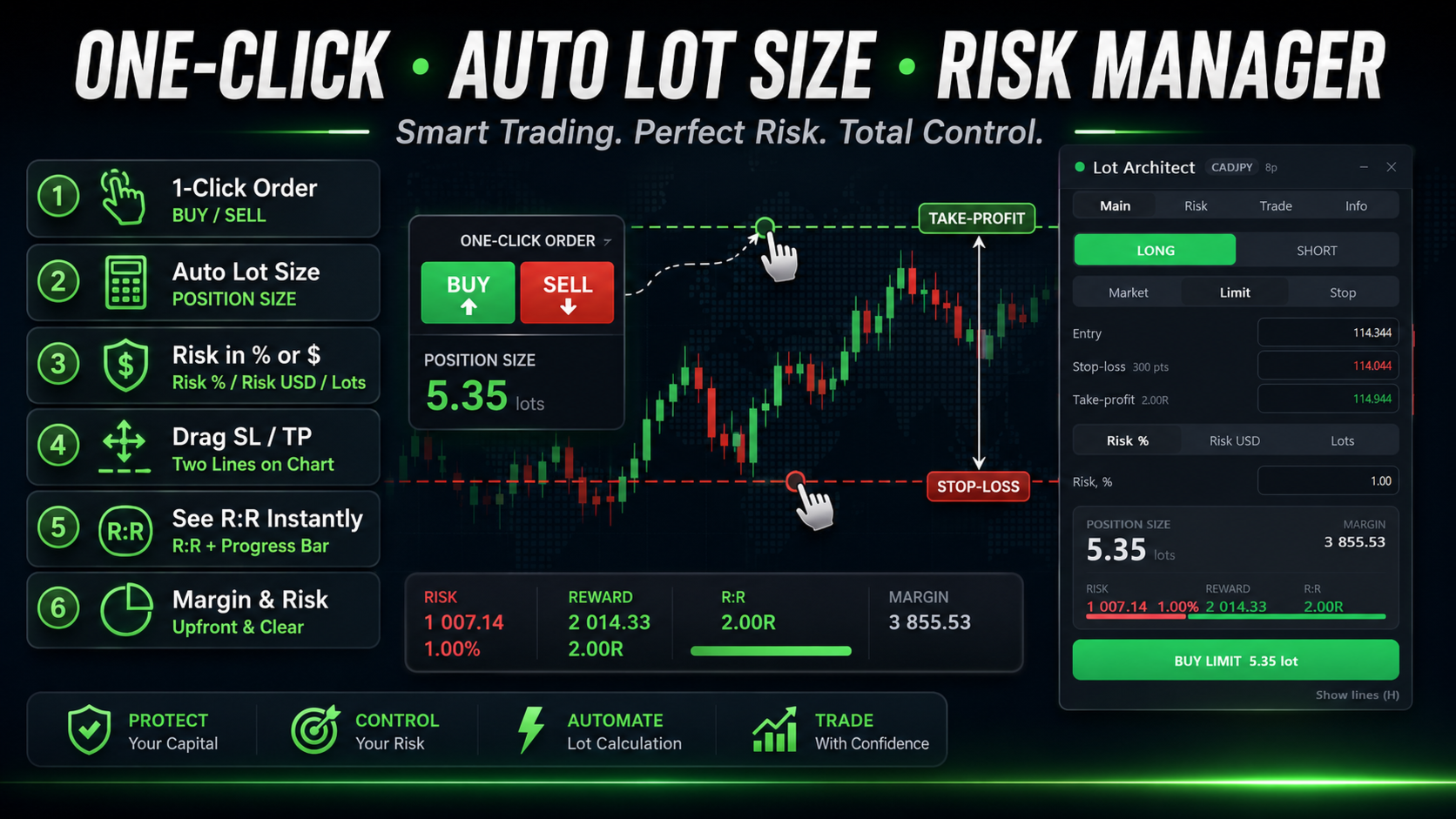
Lot Architect is a one-click trade panel and risk-based position size calculator for MetaTrader 5. It works out your exact lot size from the risk you choose, shows risk, reward and risk-to-reward (R:R) before you enter, and places Market, Limit or Stop orders in a single click. In short: position sizing, risk management and fast trade execution in one clean panel on your chart.


The problem every trader knows

Most accounts don't blow up because the analysis was wrong — they blow up because the position size was. Doing lot size math by hand at the moment of entry is slow and dangerous: one wrong decimal can wipe out an account, and "eyeballing" the volume throws your whole money management plan out the window. A proper lot size calculator and risk manager should do this instantly, so you never guess again.

--------------------------------

What Lot Architect does

  • Position sizing by risk, not guesswork — set risk as % of account, a fixed money amount, or a fixed lot; the panel returns the exact volume instantly.
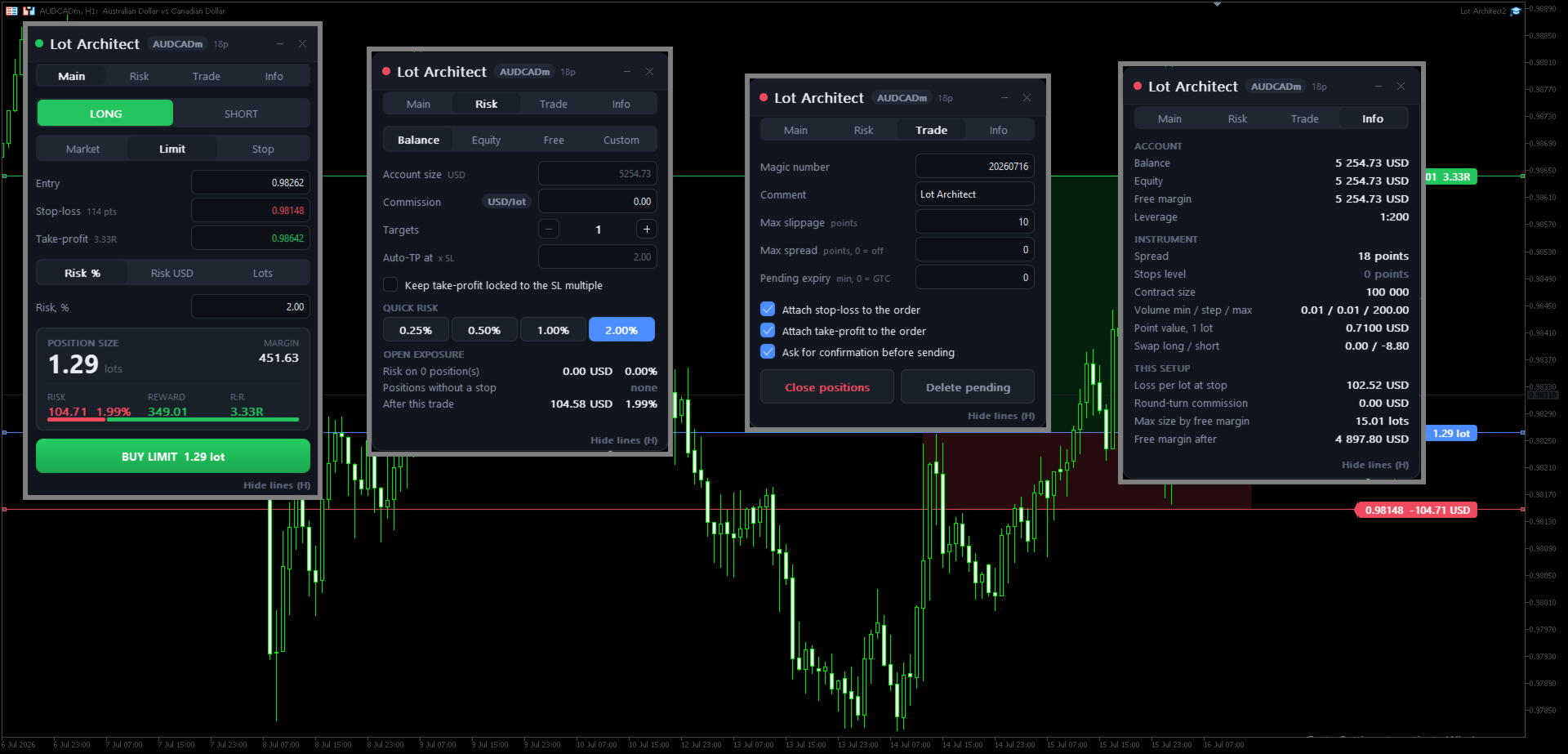
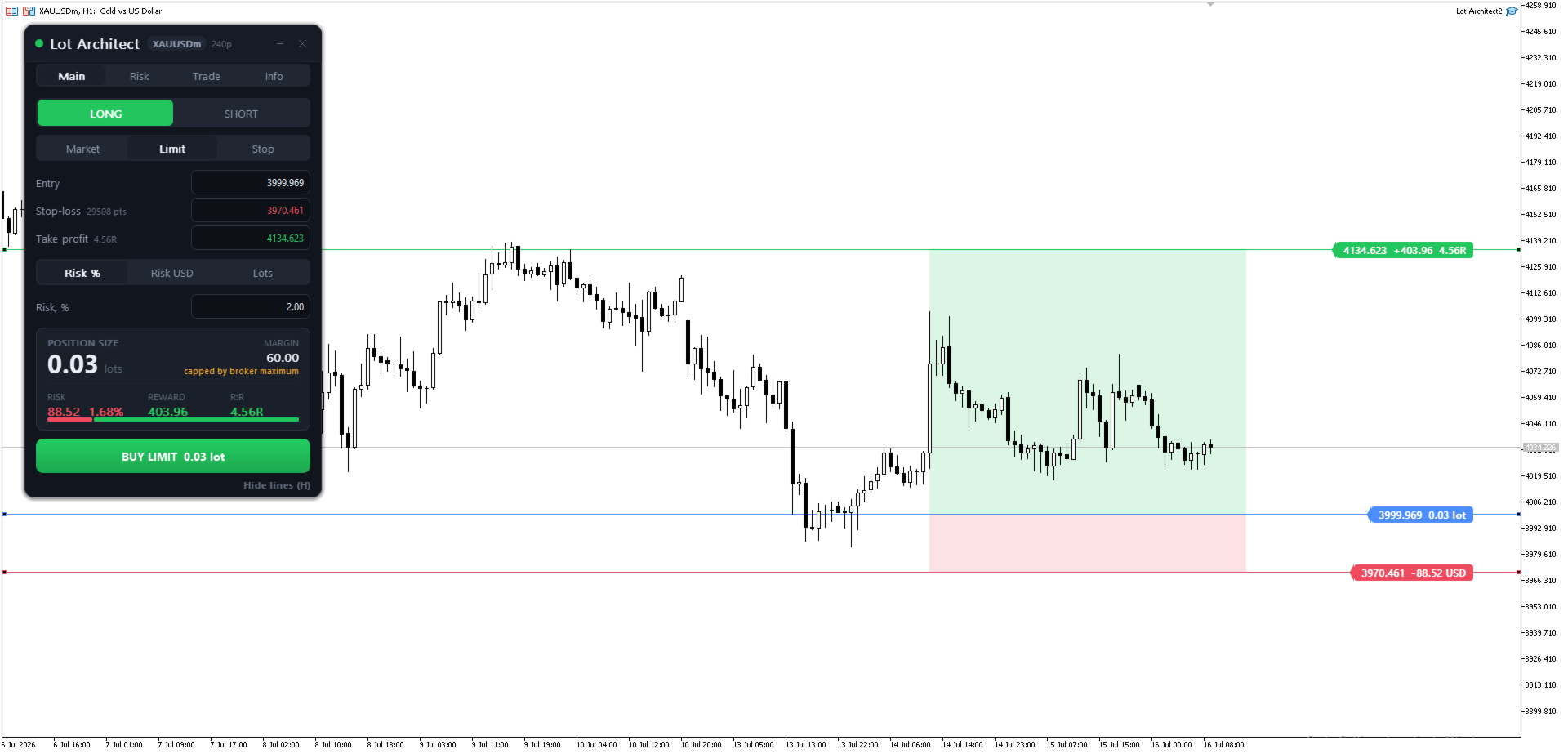
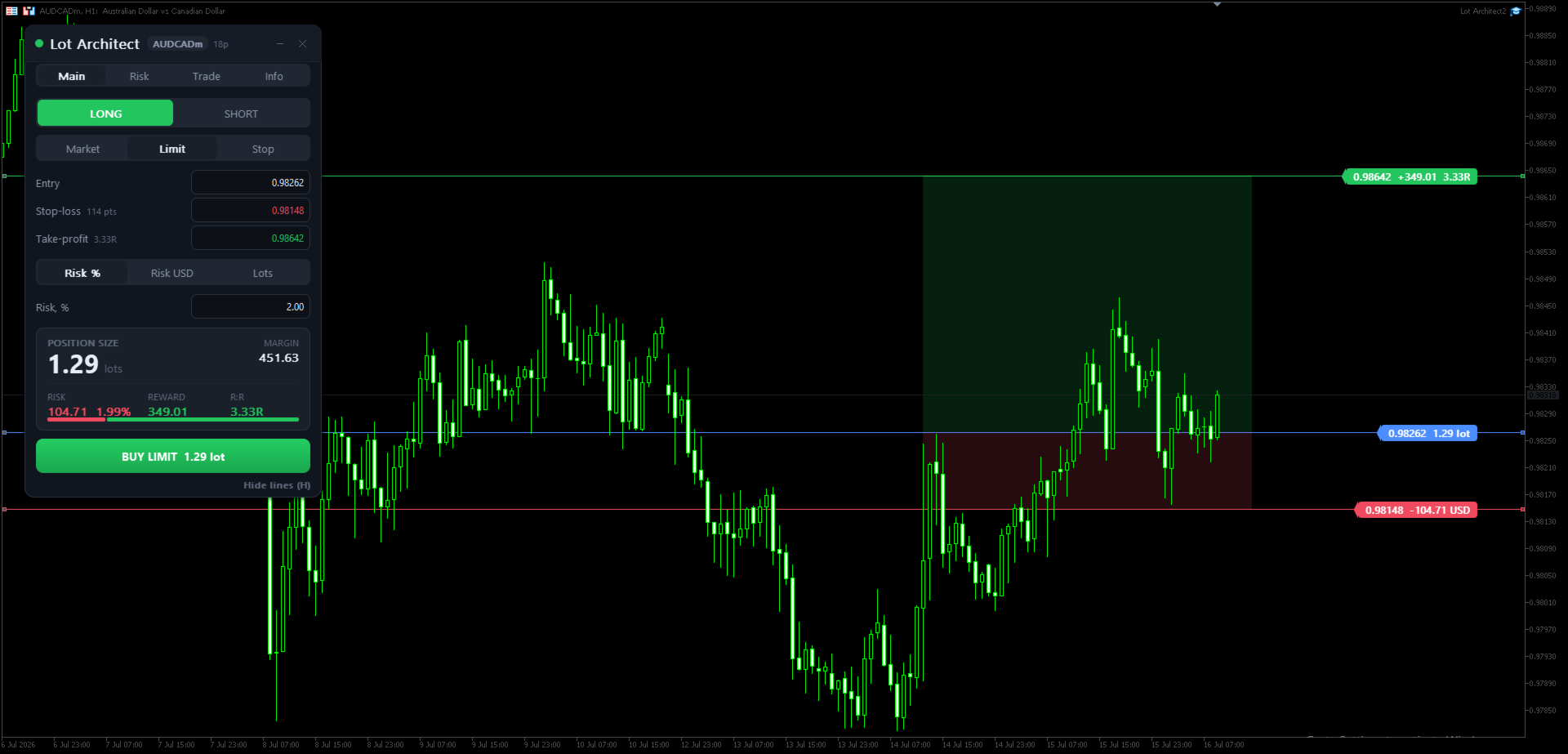
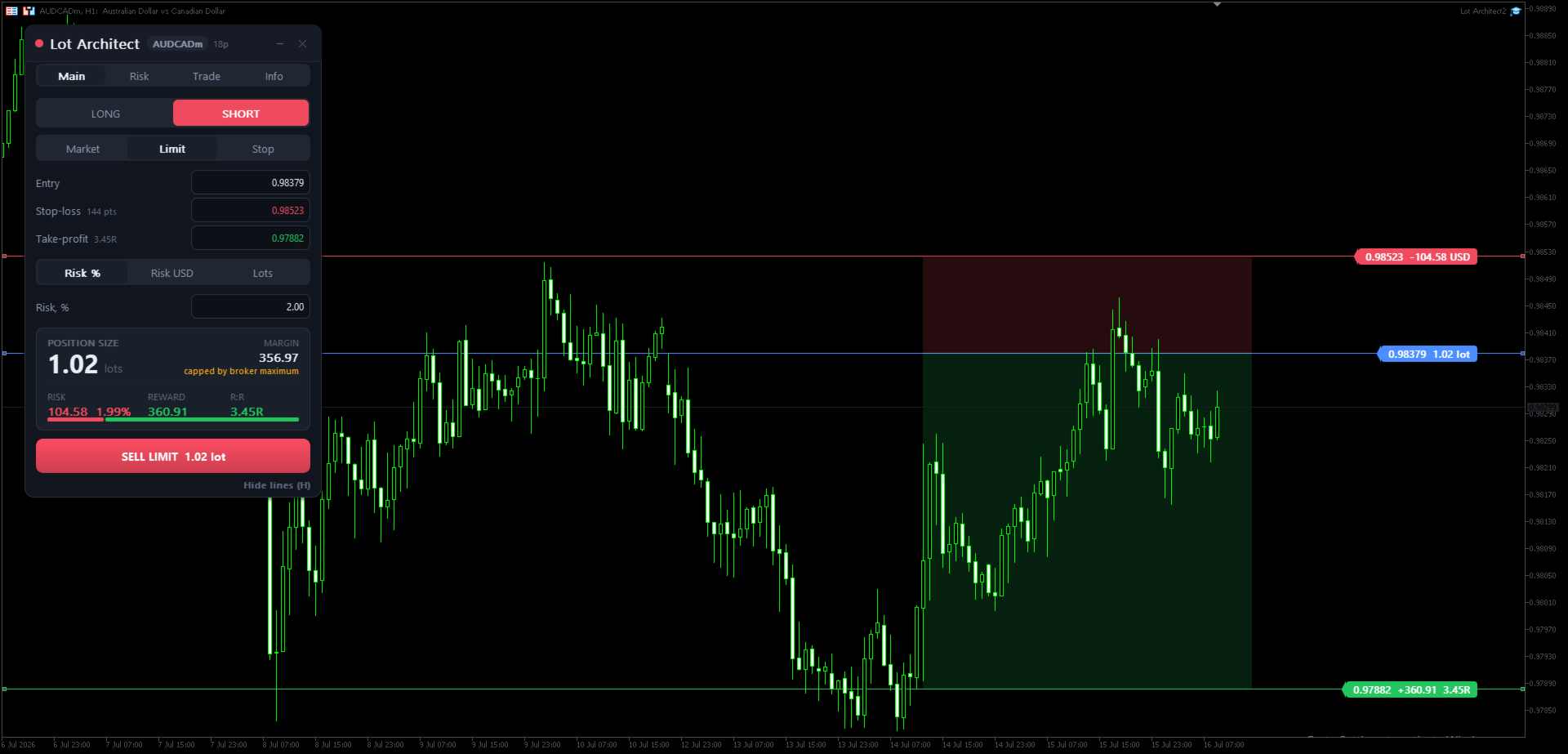
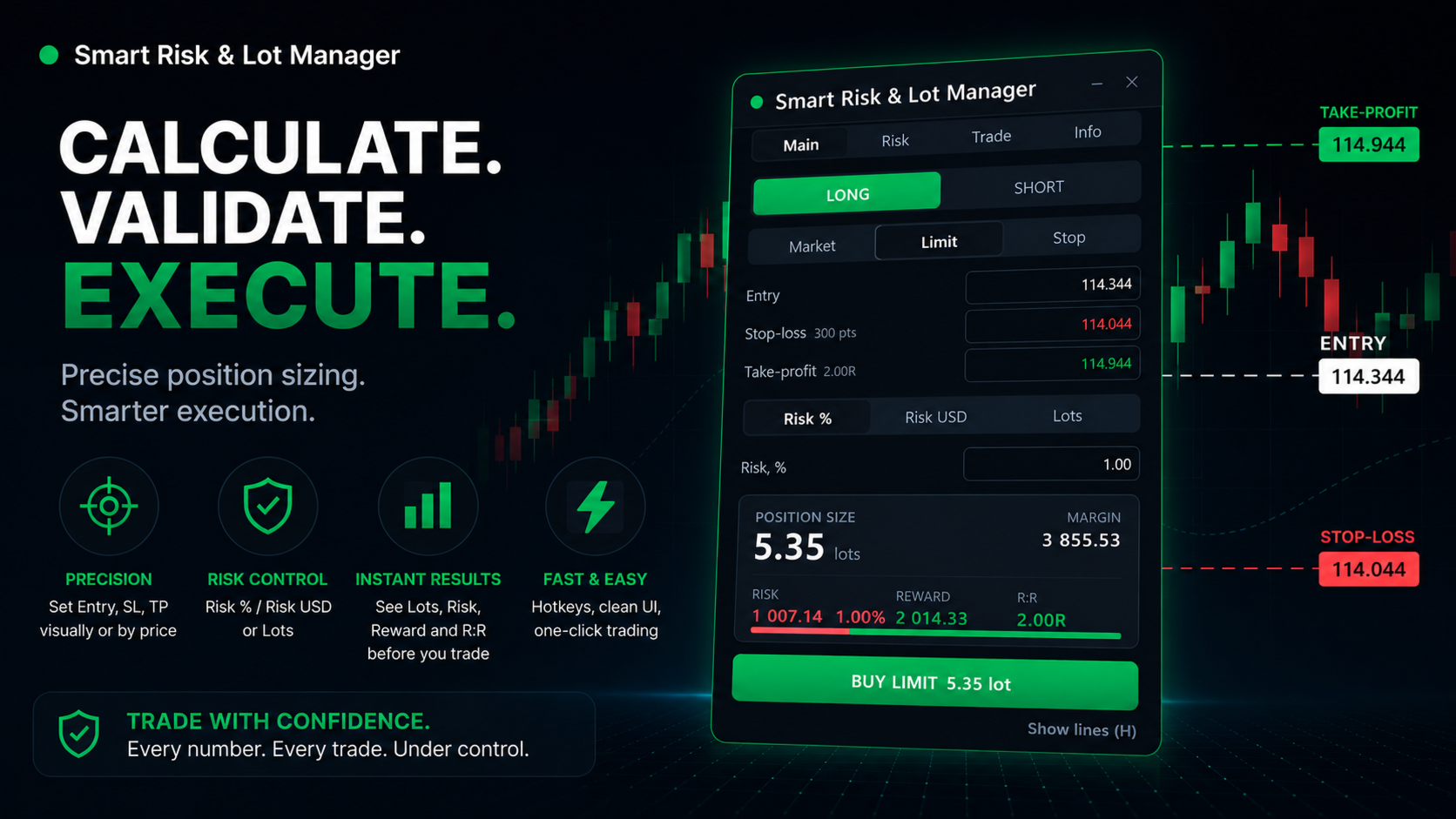
  • Drag Entry / Stop-Loss / Take-Profit on the chart — stop loss and take profit levels update lot size, risk, reward and R:R live, with shaded risk/reward zones.
  • See the trade before you take it — volume, required margin, money at risk (with %), potential reward and risk-to-reward ratio on one card.
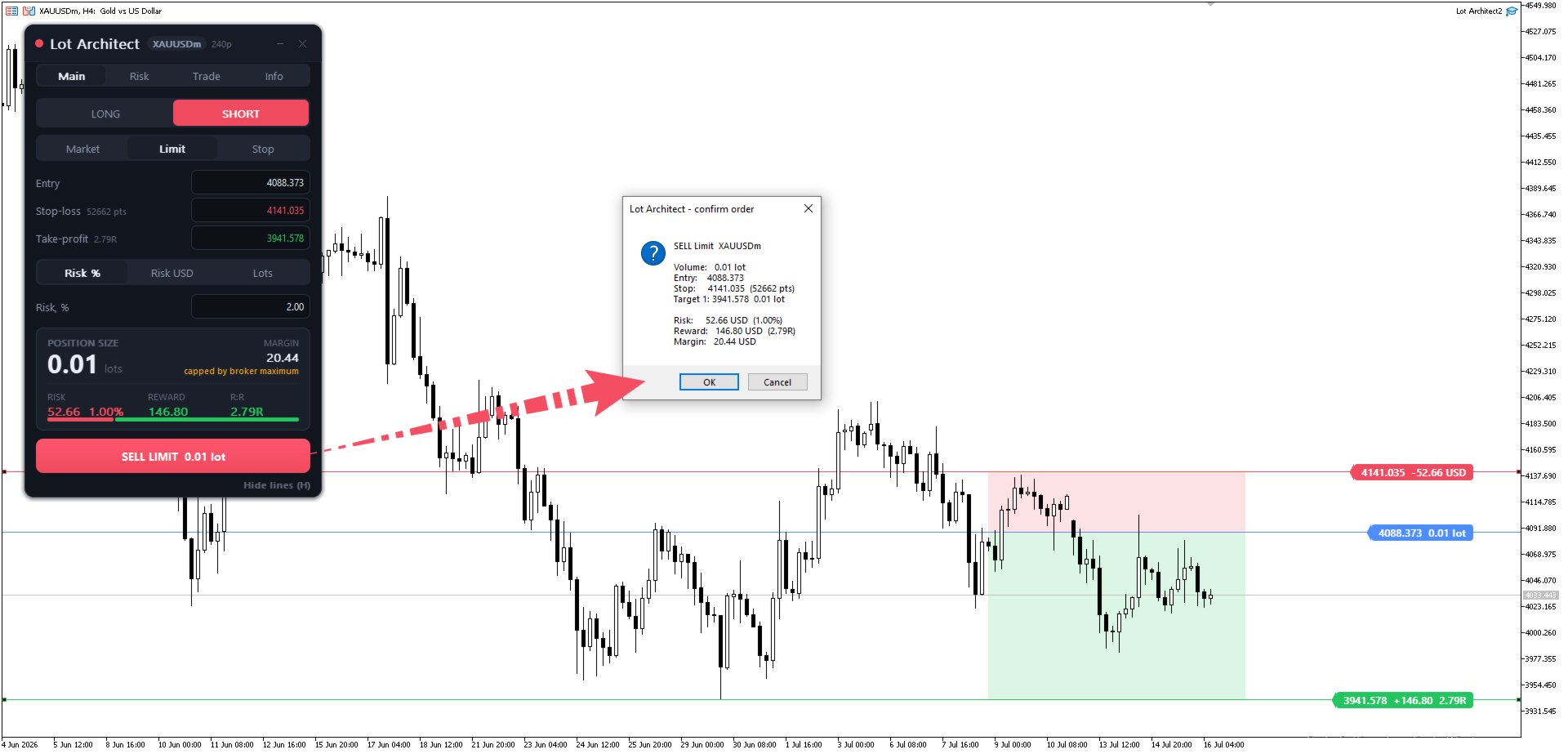
  • One-click trade execution with a safety net — the order button refuses and explains why on wide spread, low margin, a level inside the broker's stops level, or a target on the wrong side of entry.
  • Up to 4 take-profit targets with automatic volume split.
  • Market, Limit and Stop orders, commission input, and a portfolio risk manager that flags positions with no stop-loss.

Accurate on Forex, Gold (XAUUSD), indices and CFDs — every figure uses the terminal's own contract data.

--------------------------------

Why traders use this trade manager

  • Discipline by default — a fixed, visible risk per trade on every order.
  • Faster than the market — from idea to filled order in seconds.
  • Built for prop / funded accounts, where a hard risk management rule is non-negotiable.

--------------------------------

Quick start

  1. Attach Lot Architect to your chart.
  2. Choose LONG / SHORT and Market / Limit / Stop.
  3. Drag the Entry / Stop-Loss / Take-Profit lines, or type the prices.
  4. Pick Risk % / Risk $ / Lots and enter the value.
  5. Read the result card, then click BUY / SELL.

Hotkeys: Shift+T trade · Tab flip · O order type · H lines · ` minimize. Enable AutoTrading to send orders (the position size calculator works without it).

--------------------------------

Detailed guide to each function:


Header

  1. Symbol & spread badge — Shows the traded symbol and the live spread at a glance.
  2. Minimize / Close — Collapse the panel or remove it from the chart.


Tabs
3. Main | Risk | Trade | Info — Switch views: sizing, risk settings, execution options, and account/symbol info.


Trade setup
4. LONG / SHORT — Pick your trade direction in one tap.
5. Market / Limit / Stop — Choose the order type: instant or pending entry.


Price levels (drag on chart or type)
6. Entry — Your entry price (drag the line or type it).
7. Stop-Loss — Your stop price; the badge shows the distance in points.
8. Take-Profit — Your target price; the badge shows the reward-to-risk (R:R).


Risk input
9. Risk % | Risk USD | Lots — Size the trade by account %, a fixed money amount, or a fixed lot.
10. Risk value — Enter your risk (e.g. 1.00 = 1% of the account).


Result card — the answer
11. POSITION SIZE — The exact lot size for your risk, calculated instantly.
12. MARGIN — Margin required to open the trade.
13. RISK — Money at risk if the stop is hit, with % of account.
14. REWARD — Potential profit at your target.
15. R:R — Reward-to-risk ratio, with a visual risk/reward bar.


Action
16. BUY / SELL button — Places the order in one click, with the calculated lot size.
17. Show / Hide lines (H) — Toggle the Entry/SL/TP lines and zones on the chart (hotkey H).

--------------------------------

Get Lot Architect now — the trade panel, lot size calculator and risk manager that keeps your position sizing and risk management correct on every single trade in MetaTrader 5.

Utility for position sizing and order execution. It does not predict markets or guarantee profit — you control every trade. Test on a demo account first.
おすすめのプロダクト
SAB Advance Assistant は、MetaTrader 5 向けの手動トレード管理パネルです。すべてのトレードを チャート上で視覚的に組み立て、リスクを正確にコントロールし、内蔵エンジンに部分利確・建値 (ブレークイーブン)・トレーリングを任せられます。すべては、すっきりとしたサイズ変更可能な 1つのパネルから。 表計算に頼らず精度を求める裁量トレーダーおよび ICT/SMC トレーダー向けに設計。 主な機能 - ドラッグ可能な Entry・Stop Loss・TP1〜TP5・Final TP ライン、ライブ表示付き(pips、金額、   R:R、%、価格) - 残高のリスク%または固定金額からロットを自動計算 - 最大5つの部分利確(TP ごとに%または正確なロットで配分)+残りを決済する Final TP - 移動可能な建値ライン(TP1 または SL 基準でトリガー)、マウスで調整 - %または pips のトレーリングストップ、TP1 到達後に作動 - Link モード:完全なセットアップを用意し、R:R を保ったままブロック全体(Entry+SL+TP)を
**Forex Trade Manager Pro MT5** **Trade Manager MT5** は、MetaTrader 5向けの包括的なトレード管理ユーティリティです。トレードを計画する瞬間から決済する瞬間まで、ポジションのあらゆる側面を完全にコントロールできます。リスクを真剣に考えるトレーダー、つまり規律を築き始めた初心者から、複数のポジションにわたって瞬時の実行を必要とするプロのスキャルパーまで、幅広く対応できるように設計されています。 このツールは任意のチャートに装着でき、クリーンでコンパクトなパネルを表示します。チャート上に直接、ドラッグ可能な水平線を使用して、意図するエントリー、ストップロス、テイクプロフィットの各レベルをマークします。Trade Managerは、定義されたリスクに基づいて正しいポジションサイズを即座に計算し、ストップロスとテイクプロフィットの値をpipsと口座通貨でリアルタイムに表示し、計画中のトレードのリスク・リワード比率を表示します。手動計算は一切必要ありません。リスクを一度定義すれば、ツールが残りのすべてを処理します。 **ポジ
Trade Control Panel Function Normal One Click Function Close All Close All Profit Close All Loss Close All Pending Order Close All Sell Close All Buy Advance One Click Function 1.  Close Partial Lot Sell by Percent It will help you partial close for all open position by desire percent you wanted. No longer partial close one by one for every open position Manual input for desire percent 2. Close Partial Lot Buy by Percent It will help you partial close for all open position by desire percent
Risk Control Utility MT5 designed for manual trading. It helps to calculate and control your risks, transfer transactions to breakeven and accompany positions with trailing stop. Easy to set up and use. It can be used for calculating a trading lot, calculating stop loss and take profit levels. Works with currency pairs, CFDs, stocks, indices, futures, cryptocurrencies Displays   volume,   potential loss and profit before   placing an order Ability to set the expiration time of a pending order Tr
Partial
Pablo Filipe Soares De Almeida
パーシャルクローズマネージャー – 取引量を自動調整する便利ツール パーシャルクローズマネージャーは、MetaTrader 5上でポジションを部分的に決済するための強力なツールです。取引中のリスク管理をより柔軟に行うことができ、利益の一部を確保しながら残りのポジションを伸ばすといった戦略を簡単に実現します。手動入力を減らし、スムーズな操作性と高い精度を両立しています。 主な機能: 部分決済機能: クリック一つで保有中のポジションの一部を決済可能。スキャルピングからスイングトレードまで幅広く対応します。 自動ボリューム計算: ツールが自動的に決済ロット数を計算し、入力ミスを防ぎつつスピーディに実行。 複数注文対応: 同一銘柄の複数ポジションに対して同時に部分決済を適用でき、時間の節約になります。 ドラッグ移動可能なテーブル: テーブルヘッダーをドラッグして、チャート上の好きな位置に自由に配置可能。 パーシャルクローズマネージャーは、資金管理やポジション制御をよりスマートに行いたいトレーダーにとって、欠かせないプロフェッショナル向けツールです。
Trade Panel HotKey – MT5 Scalping Utility Fast Trade Panel HotKey is a lightweight MT5 trading utility designed for traders who need to open, manage, and close positions as quickly as possible . The main purpose of this tool is to reduce the time between a trading decision and execution. Instead of moving the mouse, opening order windows, or manually modifying multiple positions, most important actions can be performed instantly through customizable keyboard hotkeys or directly from the compact
Risk calculator for MetaTrader 5. Precision Position Calculator is a MetaTrader 5 utility that helps calculate trade volume based on the risk configured by the user. The panel allows the user to work with Entry, Stop Loss and up to three Take Profit levels directly on the chart. Main description Precision Position Calculator is a utility for MetaTrader 5 designed to help calculate the volume of a trade before opening it. The panel allows the user to configure risk, select the order type, set th
Utility for know the performance of your acoount. From dialog you can filter data in this modes: - You can include or not include the open positions - You can include or not the closed positions - You can filter the data by date (from, to) - You can filter the data by simbols (multi selection) - You can filter the data by magic number (multi selection) On bottom of table, are show the total of: - Number of data - Total size - Total commissions paid - Total swap paids - Total profits - Total
This Expert Advisor monitors all open positions across all symbols in MetaTrader 5. Whenever a Stop Loss (SL) or Take Profit (TP) is manually set or adjusted on any position, the EA automatically applies that value to all other open positions , regardless of symbol or order type (Buy/Sell). This ensures consistent and synchronized SL and TP levels across your account. Perfect for mobile trading via tablet or smartphone!
Trade Manager Panel ## Short description  Manage your manual trades with one click: automatic break-even, trailing stop, two-level partial close and risk-based lot sizing — all from a single on-chart panel. --- ## Full description Trade Manager Panel is an on-chart utility that takes care of your open trades so you can focus on the market instead of the order ticket. Drop it on any chart and it manages every position on that symbol automatically, while an interactive panel lets you size new
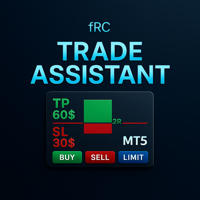
Manual trading panel — opens one test trade for validation only. fRC Trade Assistant — Smart Manual Trading Panel fRC Trade Assistant is an intelligent trading panel designed for manual traders. It allows you to open positions with one click, calculate lot size based on your predefined risk, and automatically place Stop Loss (SL) and Take Profit (TP) levels. For example, if your balance is $1000 and you set a 1% risk , the panel automatically calculates the appropriate lot size. When the trad
Smart Remote Trade Assistant MT5:MetaTrader 5用Telegram経由リモート取引パネル Smart Remote Trade Assistant MT5は、MetaTrader 5用の高度なパネルです。Telegramから直接、迅速かつ安全に取引をリモートで管理したいトレーダーのために設計されています。 Windows Bridge アプリファイルとチュートリアルを入手 Telegram取引パネルをMT5 EAに接続するためにBridgeファイルが必要です。Windows 10およびWindows 11(64ビット版)、Windows Server 2016以降に対応しています。現在ベータ版のため、特別価格となっております。販売数が10件に達するごとに価格が上昇します。今すぐお求めください! 従来のMQL5パネルは取引ターミナル内でのみ機能しますが、このアシスタントを使えば、スマートフォンの取引アシスタントインターフェース上のボタンをタップするか、チャットのようにコマンドを直接入力するだけで、注文の発注、リスク調整、エントリーパラメー
RiskPilot Pro
Mohamed Zein Mohamed Zein Soliman
RiskPilot Pro Plan risk clearly. Execute efficiently. Manage positions from one professional MT5 dashboard. RiskPilot Pro is a visual trade-planning and position-management utility for MetaTrader 5. It helps manual traders define risk before entry, calculate position size, place market or pending orders, and manage open positions from one chart panel. Important: RiskPilot Pro does not generate trading signals and does not choose trade direction. The trader defines the setup and remains responsib
Guardian Magic GT
Carlos Eduardo Rivas Istacuy
Guardian Magic GT - Risk Management Expert Advisor for MetaTrader 5 PROTECT YOUR TRADING CAPITAL WITH INTELLIGENT RISK MANAGEMENT Guardian Magic GT is a professional-grade Expert Advisor designed to safeguard your trading operations by implementing sophisticated risk control mechanisms. Whether you run a single bot or manage multiple automated trading systems simultaneously, Guardian Magic GT provides real-time monitoring and automatic position management to ensure your account stays within your
EA Name: Advanced Manual Trading Panel with Martingale & Risk Management Platform: MetaTrader 5 Description The Advanced Manual Trading Panel is a powerful and intuitive Expert Advisor designed for traders who want full control over their trading operations combined with automated risk management features. Whether you are a scalper, day trader, or swing trader, this panel provides an all-in-one solution to manage your positions efficiently directly from the chart. With a clean and compact graph
SHINO TRADE MANAGER PRO — MT5対応プロフェッショナル向け汎用トレード管理システム 重要なお知らせ SHINO TRADE MANAGER PROはトレード管理ツールであり、シグナルプロバイダーではありません。 市場予測や自動エントリーシグナルの生成は行いません。 高度なプロフェッショナルツールを用いて、既存のポジションを自動的に管理・保護することを目的としています。 --- 概要 SHINO TRADE MANAGER PROは、プロフェッショナルレベルのポジション管理を求めるMetaTrader 5トレーダー向けに設計された、強力かつインテリジェントな多機能トレード管理ツールです。 この汎用マネージャーは、以下の銘柄を自動的に検出し、管理します。 手動取引 エキスパートアドバイザー(EA)取引 複数銘柄のポジション FX 金 仮想通貨 指数 商品 スキャルピング、デイトレード、スイングトレード、プロップファームトレーダーなど、どのようなトレーダーであっても、SHINO TRADE MANAGER PRO
Trade Panel Pro — MetaTrader 5向けプロフェッショナル・リスク管理・注文執行ターミナル Trade Panel Pro は、MetaTrader 5向けに開発された高度なオールインワン型取引・リスク管理ユーティリティです。アクティブなデイトレーダーやプロフェッショナルのために設計されており、正確なリスク計算と超高速な注文執行を実現し、資産保護と多段階利確トレードの管理を容易にします。 主なメリットと特徴 自動ロット計算: 面倒な手動計算は不要です!設定したUSDリスク金額とストップロス(SL)までの距離に基づき、正確なロットサイズを瞬時に計算します。 ️ 完全インタラクティブなビジュアルライン(革新的機能): 数値を手入力する必要はありません。チャート上で直接、エントリー(EP)、ストップロス(SL)、テイクプロフィット(TP)ラインをドラッグするだけでトレードを管理できます。リスク指標、ロットサイズ、予測利益はラインの移動に合わせてリアルタイムで動的に再計算されます! 完全多言語対応: パネルのインターフェースは自動的に言語設定に適応し
This utility provides the ability to use hot keys in manual trading instantly responding to the current market situation. You can assign hot keys to open/close positions by their type, open/close all positions on the current chart and remove all orders on the current chart. You can also assign hot keys for five predefined trade volumes and switch between them if necessary with no need to change the volume manually from time to time. It is also possible to set the auto calculation of a trade volu
Flexible receiver with lot scaling, symbol mapping and filters. Ideal receiver for MT4 → MT5 trade copying. Receive trades automatically from MT4 or MT5 master accounts. Designed for fast, flexible and reliable multi-account copying. Main Features • MT4 Master → MT5 Slave • MT5 Master → MT5 Slave • Lot size management: Same Lot Fixed Lot Multiply Lot Balance Based Lot • Symbol Mapping Example: XAUUSD = GOLD EURUSD = EURUSD.a • Include Symbols filter • Include Magics filter • Reverse Trades mode
Risk Trade Panel は、手動トレード向けのチャートパネル付き MetaTrader 5 ユーティリティ Expert です。エントリーシグナルは出さず、グリッドやマーチンも使いません。売買の判断はあなた次第。ロット、ストップ、ポジション管理をパネルが支援します。 機能 - 固定ロット、または SL 距離に対する残高(または証拠金)リスク% - デフォルト SL/TP 付きの成行 BUY / SELL(ポイントまたは絶対価格) - 指値・逆指値:Buy Limit、Sell Limit、Buy Stop、Sell Stop - ブレークイーブン:価格がポイントのトリガーに達したら SL をエントリー(+オフセット)へ - トレーリング:オフ、固定ポイント、または ATR ベース - 出来高パーセントでの部分決済 - 全決済 / 勝ち / 負け — magic および/またはチャート銘柄でフィルタ - 任意ホットキー:B Buy、S Sell、C Close all、E Break-even、T Trail、P Partial - ダークスレートまたはライト;隅・サイズ・フォ
Multi Take Profit Manager Automatically close portions of your open trades at up to three profit targets. This utility is designed for manual traders who frequently open multiple positions and want to scale out of trades automatically as profit targets are reached. Instead of manually closing positions one by one, the utility can partially close your total open position at predefined Take Profit levels, helping you lock in profits while allowing the remaining positions to continue running. Key F
Trade Panel by RWBTradeLab — The Ultimate Trade & Risk Management Utility Take full control of your MetaTrader 5 trading with the   Trade Panel by RWBTradeLab ! Designed by RWBTradeLab, this all-in-one utility is built for both professional and beginner traders who want to execute trades faster, manage risk perfectly, and analyse their account performance in real-time. Say goodbye to manual lot calculations and slow trade execution. With a sleek, draggable, and highly intuitive User Interfa
Forget about enabling templates when you launch the window. Auto Template Master Service  is a professional utility tool that runs as a system service in MetaTrader 5, and it will do it for you. Unlike traditional indicators or expert advisors (EAs), the program runs in the background of the entire terminal and doesn't require you to add it to each window individually. As soon as you open a new chart of any instrument (Forex, Stocks, Crypto), the service immediately detects the new window and a
Slippage Auditor** は、 MetaTrader 5 プラットフォーム向けのビジュアルツールで、トレードの実行品質を分析し、チャート上で スリッページ の問題を検出します。 Slippage Auditor: User Guide 機能と特徴 Slippage Auditor は、チャート上でクローズドトレードの実行品質を確認するためのツールです。スリッページの値を監視し、実行に関する問題を特定したいトレーダーや開発者向けに作られました。取引履歴から自動的にデータを取得し、チャート上に構造化された表として表示します。 追加の設定やインジケーターのインストールは不要です。チャートに追加するだけで、すぐに結果が表示されます。 スリッページ は、トレードの エントリー と エグジット の両方で分析されます。ユーザーは簡単に: Magic Number によってトレードをフィルタリング 日付範囲を選択して分析 ポイントまたは 口座通貨 でスリッページを表示 シンボル別の概要を素早く確認 実行品質の評価、ブローカーの比較、監査の実施に最適な、シンプルかつ効果的なツールです。 利点
Trailing Stop Manager MT5 Trailing Stop Manager MT5 is a flexible trade management utility for MetaTrader 5 that automatically moves the Stop Loss as price moves in your favor. It is designed for traders who want to protect profits and manage open positions automatically while keeping control over how and which positions are managed. The manager currently includes two trailing methods: • Standard Trailing Stop • Fractals Trailing Stop It also includes a compact trading panel for opening, managi
Crash5 EA ,I s a automatic robot that has the level of professional decision when to take a trade without any emotion. The bot will help in your scalping decision making with its own TP (take profit) and SL (stop loss) with the trail stop when in profit. This is a trend based spike catching ,looking on whats happening in real time charts no repainting of any signals. The robot helps in making decisions on the candle stick pattern opened and closed lat price with the help of RSI ,MACD and the EMA
StopLoss and TakeProfit Utility MT5 for automatic setting of stop loss and take profit levels. Created by a professional trader for traders.   The utility   works with any market orders opened by a trader manually or using advisors. Can filter trades by magic number. The utility can work with any number of orders simultaneously. WHAT THE UTILITY CAN DO: Set virtual stop loss and take profit from 1 pip Real   stop loss and take profit W ork with each order separately (   stop loss and take prof
AW Metatrader to Telegram MT5
AW Trading Software Limited
5 (1)
通知を送信するための自動システム。これにより、サブスクライバーが取引端末からの取引イベントを見逃すことはありません。アカウントの取引操作に関する通知をTelegramメッセンジャーに送信するユーティリティ。 テレグラム->ここ/   MT4-   >   ここ でユーティリティをチャンネルに接続するためのステップバイステップの説明 利点: 簡単なセットアップと詳細な手順、 調整可能なスクリーンショットを送信する可能性、 絵文字を使用してカスタマイズ可能な通知テキスト、 完全または部分的な開始、終了、および注文の変更に関する通知の調整、 デフォルトで通知を送信する場合、テキストファイルは自動的にダウンロードされます。 保留中の注文の発注または削除に関する通知の調整、 記号とマジックナンバーによる便利なフィルタリング。 入力変数: TELEGRAM BOT AND CHAT SETTINGS Telegram bot token - Enter the token number received after registering the bot in "BotFather" Telegr
「スキャルピング スケールイン」は、スキャルピングでは 1 秒を争うため、S/L および T/P の配置を気にせず、固定距離の初期位置でスケーリングしたいスキャルパー向けに設計されたユーティリティ ツールです。 仕組み: EA の入力タブで希望の値を設定します。具体的には、T/P に配置するリスク対報酬、S/L の幅 (ピップ単位) を設定します。また、次の次のストップ注文までの距離 (位置のスケール) です。 MT5 で [買い/売り] を手動でクリックすると、EA が自動的に SL と TP を設定し、同時に新しい逆指値注文を SL と等しい距離 (ピップ単位) で同じ方向に設定します (つまり、買う場合は S/L が 5 ピップス)。 、次の買いストップ注文は、最初のエントリー価格より 5 ピップス上に配置されます)。保留中のストップ注文が約定されると、前のポジションは損益分岐点まで追跡され、S/L が前の取引のエントリーレベルで新しいストップ注文が発注されます。  基本的に、このツールは、積極的な動きを捕捉する均等に分散されたスケールインを利用します。 入力パラメータの説
Position Calculator calculates how many lots to trade based on: Entry and stop-loss levels Risk tolerance Account size (balance, equity, or even your savings account) Account currency Currency exchange rates - The main tab of the panel provides the primary control over the EA's functions and serves to output the most important calculation results: the position size, risk, reward, and risk-to-reward ratio. - The risk tab can help you assess current and potential risk and reward profile. Using a s
FREE
このプロダクトを購入した人は以下も購入しています
Trade Assistant MT5
Evgeniy Kravchenko
4.41 (216)
取引 ごとのリスクの 計算、新規注文 の 簡単 な 設置、部分的 な 決済機能 を 持 つ 注文管理、 7 種類 のトレーリングストップなど 、便利 な 機能 を 備 えています 。 追加の資料と説明書 インストール手順   -   アプリケーションの手順   -   デモアカウント用アプリケーションの試用版 ライン機能 チャート上にオープニングライン、ストップロス、テイクプロフィットを表示します。この機能により、新規注文を簡単に設定することができ、注文を出す前にその特徴を確認することができます。   リスク計算 リスク計算機能は、設定されたリスクとストップロス注文のサイズを考慮して、新規注文のボリュームを計算します。ストップロスの大きさを自由に設定できると同時に、設定したリスクを守ることができます。 Lot calc ボタン - リスク 計算 を 有効 / 無効 にします 。 Risk フィールドでは 、必要 なリスクの 値 を 0 から 100 までのパーセンテージまたは 預金通貨 で 設定 します 。 設定」 タブで 、 リスク 計算 の 種類 を 選択 します :「 $ 通
Trade Manager EAへようこそ。これは、取引をより直感的、正確、そして効率的にするために設計された究極の リスク管理ツール です。これは単なるオーダー実行ツールではなく、包括的な取引計画、ポジション管理、リスク管理のためのソリューションです。初心者から上級者、迅速な実行を必要とするスキャルパーまで、Trade Manager EAはあらゆるニーズに対応し、為替、指数、商品、暗号通貨などさまざまな市場で柔軟に対応します。 Trade Manager EAを使用すると、複雑な計算が過去のものになります。市場を分析し、エントリーポイント、ストップロス、テイクプロフィットのレベルをチャート上のラインでマークし、リスクを設定するだけで、Trade Managerが最適なポジションサイズを即座に計算し、SLとTPをピップ、ポイント、口座通貨でリアルタイムに表示します。すべての取引が簡単かつ効果的に管理されます。 主な機能: ポジションサイズ計算機 :定義されたリスクに基づいて取引サイズを瞬時に決定します。 簡単な取引計画 :エントリー、ストップロス、テイクプロフィットを設定するためのド
================================================================================ POC BREAKOUT - V20.72. Full Professional Grade Toolkit ================================================================================ POC Breakout is a full MetaTrader 5 trading dashboard for discretionary traders who want breakout signals, Point of Control (POC) context, volume profiles, order flow, market structure, news, alerts, and advanced trade planning in one professional workspace. Attached directly to you
ベータリリース Telegram to MT5 Signal Trader はまもなく正式なアルファ版をリリースします。いくつかの機能はまだ開発中で、小さな不具合に遭遇する可能性があります。問題が発生した場合はぜひご報告ください。皆さまのフィードバックがソフトウェア改善に役立ちます。 Telegram to MT5 Signal Trader は、 Telegram のチャンネルやグループからの取引シグナルを自動的に MetaTrader 5 にコピーする強力なツールです。 パブリックおよびプライベートの両方のチャネルに対応し、複数のシグナル提供元を複数のMT5口座に接続可能です。ソフトウェアは高速で安定し、すべての取引を細かく制御できます。 インターフェースは直感的で、ダッシュボードとチャートは見やすく設計されており、リアルタイムで動作状況をモニターできます。 必要環境 MQL の制限により、EA は Telegram と通信するためのデスクトップアプリが必要です。 インストーラーは公式の インストールガイド にあります。 主な機能 マルチプロバイダー: 複数の Telegram
TradePanel MT5
Alfiya Fazylova
4.88 (167)
Trade Panelは多機能なトレーディングアシスタントです。アプリには手動取引用の50以上のトレーディング機能が搭載されており、ほとんどの取引作業を自動化することができます。 アプリの説明書+ビデオガイド: https://www.mql5.com/en/blogs/post/756482 デモ口座用アプリの試用版: https://www.mql5.com/en/blogs/post/750865 アプリのインストール方法: https://www.mql5.com/en/blogs/post/756239 アプリをビジュアルモードでテストする方法: https://www.mql5.com/en/blogs/post/770277 VPSのMetaTraderにアプリをインストールする方法: https://www.mql5.com/en/blogs/post/770190 取引。 ワンクリックで取引操作を行うことができます: リスクを自動計算して指値注文やポジションを開く。 複数の注文やポジションをワンクリックで開く。 注文のグリッドを開く。 保留中の注文やポジションをグルー
25% discount on the release of the tool: only for the next 3 buyers Send a message to receive a demo version. AstroTrade Trading Assistant AstroTrade is a comprehensive multi-functional trading utility developed for the MetaTrader 5 platform. It integrates essential tools for trade execution, risk management, and technical monitoring into a single unified interface. The application is designed to assist traders in managing their daily operations through a visual and structured environment. Vi
Telegram to MT5 Multi-Channel Copier   は、Telegram チャンネルのトレードシグナルを MetaTrader 5 へ自動コピーします。ボット不要、ブラウザ拡張不要、手動コピー不要。Telegram にシグナルが届くと、EA が数秒であなたのターミナルに注文を出します。 製品は 2 つのコンポーネントで構成されます:Telegram チャンネルを監視する Windows アプリと、MT5 ターミナルでシグナルを執行する本 EA です。MT4 版もあります   こちら . セットアップガイドとアプリのダウンロード: https://www.mql5.com/en/blogs/post/768988 仕組み Windows アプリは、ボットではなくあなた自身の API 認証情報で Telegram に接続します。そのため、プライベートや VIP を含む、購読中のあらゆるチャンネル・グループ・トピックを読めます。あなたに直接メッセージを送るシグナルボット、個人チャット、さらには自分の「保存済みメッセージ」もソースとして使えます。シグナルを検出すると解
The product will copy all telegram signal to MT5 ( which you are member) , also it can work as remote copier.  Easy to set up, copy order instant, can work with almost signal formats, image signal,  s upport to translate other language to English Work with all type of channel or group, even channel have "Restrict Saving Content", work with  multi channel, multi MT5 Work as remote copier: with signal have ticket number, it will copy exactly via ticket number. Support to backtest signal. How to s
Anchor: The EA Manager Your EAs manage their own trades. Anchor manages the account around them. Anchor gives you one place to control your EAs, manage risk and decide when trading is allowed. Any EA, any vendor, any broker or symbol. No source-code changes required. The Problem Most EAs only know what they are doing. They cannot see when another EA is already trading, when several EAs open and are stacking risk or when the account has reached your loss limit. Even using just one EA, it may not
Signal TradingView to MT5 Pro Automator TradingViewとMetaTrader 5間の即時プロフェッショナル実行 TradingViewのシグナル(アラート)とMT5での実際の約定を繋ぐ、最も強固なコミュニケーションブリッジで、取引戦略を自動化します。スピード、柔軟性、そして完璧なリスク管理を求めるトレーダー向けに設計されたこのExpert Advisorは、あらゆるアラートメッセージを正確な成行または指値注文に変換します。 強みと利点 ユニバーサルパーシングエンジン(独自技術): あらゆるアラート形式からデータを自動的に認識し、抽出できる高度なテクノロジー。単一の固定フォーマットに制限されることはありません。システムはシンボル(銘柄)、アクション、価格、SL(ストップロス)、TP(テイクプロフィット)を自動的に理解します。 リアルタイム実行: レイテンシ(遅延)を最小限に抑えるよう最適化された、1秒未満の超高速ポーリング技術。シグナルを受信してから数ミリ秒以内に注文が実行されます。 機関投資家レベルのリスク管理: 以下に基づく自動かつ正確
Exp COPYLOT CLIENT for MT5
Vladislav Andruschenko
3.97 (35)
MetaTrader 5 用のプロフェッショナル取引コピー機 MetaTrader 向けの高速・高性能・信頼性の高い 取引コピー機 です。 COPYLOT は、MT4 と MT5 のターミナル間で Forex 取引をコピーでき、 Hedge 口座と Netting 口座の両方に対応しています。 COPYLOT MT5 版の対応構成: - MT5 Hedge → MT5 Hedge - MT5 Hedge → MT5 Netting - MT5 Netting → MT5 Hedge - MT5 Netting → MT5 Netting - MT4 → MT5 Hedge - MT4 → MT5 Netting MT4 版 完全な説明 + DEMO + PDF 購入方法 インストール方法 ログファイルの取得方法 テストと最適化の方法 Expforex のすべての製品 MT4 ターミナルへのコピーも可能です(MT4 → MT4、MT5 → MT4): COPYLOT CLIENT for MT4 COPYLOT は、2台、3台、さらには10台のターミナル間で同時に動作できる、プロフェッ
HINN MAGIC ENTRY – the ultimate tool for entry and position management! SIMPLE. FASTEST. INTUITIVE. MAX AUTOMATED. Place orders by selecting a level directly on the chart! full description   ::  demo-version  :: 60-sec-video-description Key features: - Market, limit, and pending orders - Automatic lot size calculation - Automatic spread and commission accounting - Unlimited partitial take-profits  - Breakeven and trailing stop-loss and take-profit  functions - Invalidation leves - Intuitive, a
Power Candles Strategy Scanner - 自動最適化型マルチシンボル設定ファインダー パワーキャンドル・ストラテジー・スキャナーは 、パワーキャンドル・インジケーターを駆動するのと全く同じ自己最適化エンジンを、マーケットウォッチに登録されているすべての銘柄に対して並行して実行します。1つのパネルで、現在統計的に取引可能な銘柄、各銘柄で勝率の高い戦略、最適なストップロス/テイクプロフィットの組み合わせが表示され、新たなシグナルが発生した瞬間に通知が届きます。 このツールは、Stein Investmentsのエコシステムの一部です。  18種類以上のツールをすべて閲覧し、AIを活用したセットアップの推奨を受け取り、  https://stein.investments でコミュニティに参加しましょう 市場動向を網羅。銘柄ごとに3,000件以上の自動最適化。2種類のアラート。ワンクリックでチャートを切り替えて即座にアクション。 なぜこれが必要なのか 多くのマルチ銘柄スキャナーは、 価格の動き (ボラティリティ、変動率、銘柄ごとのRSI)を表示するだけです。それ
Farmed Hedge Yield Farming | All Markets (Manual - Hybrid - Semi/Automated EA) VERIFIED TRADING RESULTS - Farmed Hedge Yield Axi Copy:  https://www.mql5.com/en/signals/2356376 - Farmed Hedge Yield Exn Copy:   https://www.mql5.com/en/signals/2356404 - Farmed Hedge Yield V Copy:  https://www.mql5.com/en/signals/2357156 * Before purchasing, please feel free to send me a message if you have any questions about the product or setup. ** After purchase,  Contact me via private message to receive t
Timeless Charts
Samuel Manoel De Souza
5 (8)
Timeless Charts is an all-in-one trading utility for professional traders. It combines custom chart types such as Seconds Charts and Renko with advanced order flow analysis using Footprints , Clusters , Volume Profiles , VWAP studies, and anchored analysis tools for deeper market insight. Trading and position management are handled directly from the chart through an integrated trade management panel , while Market Replay and Virtual Accounts provide environments for practicing trading skills and
Premium Trade Manager - コーチ内蔵型トレードパネル Premium Trade Manager は、AIトレーディングコーチをあなたのチャートの中に置き、その下に完全な執行エンジンを備えたツールです。いつも通りにトレードをセットアップし、あなた専任のAIトレーディングコーチ Max にそのセットアップをそのまま読み取らせて、発注前に率直な見解を伝えてもらいましょう。ストップの幅が規律あるアプローチに合っているか、リスクサイズは適切か、高影響のニュースイベントが数分後に迫っていないか、プロップファームの制限に近づいていないか。その下には、クリックの後をすべて処理するエンジンが備わっています。ワンクリックのリスクサイズ計算による発注、チャート上でドラッグして組み立て、発注後も動かせるプラン、最大4段階の分割利確、7種類のトレール方式、リアルタイムのプロップファームコンプライアンス、ニュースガード、そしてコストを自ら採点するスプレッド機能。判断はあなたが下す。Max がもう一度確認する。後のことはすべてパネルが担う。 購入前に実際に触れて試せます。 ブラウザ上でライブ
Quant AI Agents are independent trading Expert Advisors. Instead of trading using a fixed strategy like other conventional EAs, Quant AI Agents   is a   multi-agent AI trading framework   that turns natural-language strategy prompts into live.  WANT THE SAME RESULTS AS MY LIVE SIGNAL?   Use the exact same brokers I do:   IC MARKETS , IC TRADING   .  Unlike the centralized stock market, Forex has no single, unified price feed.  Every broker sources liquidity from different providers, creating un
Footprint Chart Pro — Professional OrderFlow EA for MetaTrader 5 Version 6.34 | Professional tool for real traders | Institutional-Grade Visualization DEMO USERS - PLEASE SELECT EVERY TICK / REAL TICK WHEN TESTING AND YOU HAVE DOWNLOADED HISTORICAL DATA. IF YOU SEE A WAITING SCREEN AND IT IS NOT DOWNLOADING, IT MEANS YOU HAVE LOW HISTORICAL DATA. TRY 1 MIN AND 5 MIN FIRST ON 1 DAY DATA. ONE DAY DATA SHOULD BE THE NEWEST AND MOST CURRENT DATE. PLEASE WAIT UNTIL THE MARKET HAS ROLLED OVER PERIOD.
Trade Copier Ultimate
Janitha Sandaruwan Amaradasa Wickramasingha Arachchilage
5 (5)
Trade Copier Ultimate - Telegram to MT5 Signal Copier Trade Copier Ultimate automatically copies Telegram trading signals into MetaTrader 5. The EA can read signal messages, detect the symbol, order type, entry price, Stop Loss, Take Profit levels and selected update commands, then execute or manage the trade in MT5 using your lot and risk settings. It is more than a basic Telegram to MT5 copier. TCU also supports Bot API and user-account Bridge workflows, Discord signal routing, local MT5 to MT
News Filter EA: Advanced Algo Trading Assistant News Filter EA is an advanced algo trading assistant designed to enhance your trading experience. By using the News Filter EA , you can integrate a Forex economic news filter into your existing expert advisor, even if you do not have access to its source code. In addition to the news filter, you can also specify trading days and hours for your expert. The News Filter EA also includes risk management  and equity protection features. MT4 Version Ma
この製品は、ニュースタイム中にすべてのエキスパートアドバイザーと手動チャートをフィルタリングするため、急激な価格変動によるマニュアルトレードのセットアップの破壊や他のエキスパートアドバイザーによって入力された取引について心配する必要はありません。この製品には、ニュースのリリース前にオープンポジションとペンディングオーダーを処理できる完全な注文管理システムも付属しています。 The News Filter  を購入すると、将来のエキスパートアドバイザーのためにビルトインのニュースフィルターに頼る必要はなく、今後はすべてのエキスパートアドバイザーをここからフィルタリングできます。 ニュース選択 ニュースソースは、Forex Factoryの経済カレンダーから取得されます。 USD、EUR、GBP、JPY、AUD、CAD、CHF、NZD、CNYなど、任意の通貨数に基づいて選択できます。 Non-Farm(NFP)、FOMC、CPIなどのキーワード識別に基づいて選択することもできます。 影響レベルによってフィルタリングするニュースを選択することができ、低、中、高の影響範囲から選択できます。
Trade Assistant 38 in 1
Makarii Gubaydullin
4.91 (23)
多機能ツール:ロット計算、グリッド注文、R/R比率、トレードマネージャー、サプライ&デマンドゾーン、プライスアクションなど デモ版   |   ユーザーマニュアル トレードアシスタント   はストラテジーテスターでは動作しません :   こちらからデモ版をダウンロード  して ユーティリティ をテストできます。 ご質問、改善のご提案、バグ発見の場合は ご連絡ください MT4版が必要な場合は こちら から入手できます トレード   プロセス を簡素化、高速化、自動化。   ダッシュボード で標準端末の機能を拡張。 トレードパネルは  あらゆる取引商品で動作:外国為替、株式、インデックス、暗号通貨など。 1. 新規トレードの実行 :ロット / リスク / R/R計算 :手動トレードのためのリスク管理 ロット計算機(リスクサイズに基づく取引量計算) リスク計算機(ロットサイズに基づくリスク額) リスクリワード   比率 グリッド注文:  + 動的間隔オプション、スプリットロットオプション 注文のアクティベーショントリガー、+ バイストップリミット / セルストップリミット 仮想SL、仮想
YuClusters
Yury Kulikov
4.93 (43)
Attention: You can view the program operation in the free version  YuClusters DEMO .  YuClusters is a professional market analysis system. The trader has unique opportunities to analyze the flow of orders, trade volumes, price movements using various charts, profiles, indicators, and graphical objects. YuClusters operates on data based on Time&Sales or ticks information, depending on what is available in the quotes of a financial instrument. YuClusters allows you to build graphs by combining da
Ultimate Extractor - Professional Trading Analytics for MT5 *****this is the local HTML version of Ultimate Extractor. !!!!!it is not compatible with Cloud!!!! For the online version please reach out to me directly****** Ultimate EA manager also now available when you use cloud pro and above for free!! Ultimate Extractor transforms your MetaTrader 5 trading history into actionable insights with comprehensive analytics, interactive charts, and real-time performance tracking. What It Does Automa
SMC Trade Pilot MT5 Smart Money Conceptsトレーダー向けの半自動トレーディングアシスタント。チャートのスクリーンショット付きシグナルをTelegramで受け取り、ワンタップでトレードを発注。パソコンから離れていても、スマートフォンからポジションを管理できます。 解決する課題 Smart Moneyのセットアップはあなたを待ってくれません。Order BlocksやLiquidity Sweepsは、ロンドンオープン、ニューヨークオープン、またはアジアセッション中に形成されることが多く、あなたが仕事中、会議中、画面から離れているときに発生します。チャートを確認したときには、セットアップはすでに過ぎ去っています。 SMC Trade Pilotはあなたのスマートフォンをリアルタイムのトレーディングコックピットに変えます。アシスタントはSMCシグナルを求めて24時間チャートをスキャンします。セットアップが形成されると、完全なトレードチケットをTelegramチャットに送信します: チャートスクリーンショット、方向、エントリー価格、推奨ストップロス、推奨テ
Grid Manual MT5
Alfiya Fazylova
4.73 (22)
「Grid Manual」は、注文のグリッドを操作するための取引パネルです。 ユーティリティはユニバーサルで、柔軟な設定と直感的なインターフェイスを備えています。 それは、損失を平均化する方向だけでなく、利益を増やす方向でも注文のグリッドで機能します。 トレーダーは注文のグリッドを作成して維持する必要はありません。 すべてが「Grid Manual」によって行われます。 注文を開くだけで十分であり、「Grid Manual」は注文のグリッドを自動的に作成し、非常に閉じるまでそれに付随します。 完全な説明とデモバージョン ここ。 ユーティリティの主な機能と機能 ユーティリティは、モバイル端末から開かれた注文を含め、あらゆる方法で開かれた注文を処理します。 「制限」と「停止」の2種類のグリッドで機能します。 グリッド間隔の計算には、固定と動的(ATRインジケーターに基づく)の2つの方法で機能します。 オープンオーダーグリッドの設定を変更できます。 チャート上の各注文グリッドの損益分岐点を表示します。 各注文グリッドの利益率を表示します。 ワンクリックでグリッドから収益性の高い注文を閉じるこ
Trade Manager は、リスクを自動的に計算しながら、取引を迅速に開始および終了するのに役立ちます。 過剰取引、復讐取引、感情的な取引を防止する機能が含まれています。 取引は自動的に管理され、アカウントのパフォーマンス指標はグラフで視覚化できます。 これらの機能により、このパネルはすべてのマニュアル トレーダーにとって理想的なものとなり、MetaTrader 5 プラットフォームの強化に役立ちます。多言語サポート。 MT4バージョン  |  ユーザーガイド + デモ Trade Manager はストラテジー テスターでは機能しません。 デモについてはユーザーガイドをご覧ください。 危機管理 % または $ に基づくリスクの自動調整 固定ロットサイズを使用するか、ボリュームとピップに基づいた自動ロットサイズ計算を使用するオプション RR、Pips、または価格を使用した損益分岐点ストップロス設定トレーリングストップロス設定 目標に達したときにすべての取引を自動的に終了するための 1 日あたりの最大損失 (%)。 過度のドローダウンからアカウントを保護し、オーバートレードを防ぎます
The AZT Profit Locker is an advanced automated risk-management utility designed specifically for MetaTrader 5 (MT5) traders who want to remove emotional interference and protect their hard-earned profits. Traders aren't just fighting the Forex market, they're fighting their own biology. Fear, Greed and Anxiety lead to holding losers too long and cutting winners too early. The utility flips the script by removing emotion from risk management. Operating as a dedicated automated risk manager, this
Trade Builder Pro
Mostafa Saad Saeed Shawara
製品名 Trade Builder Pro - チャート上のインタラクティブ・ビジュアル・トレードマネージャー&リスクアシスタント 簡単な説明 Trade Builder Pro を使用して取引を簡素化しましょう。これは、非常にインタラクティブなトレードアシスタント ( Trade Assistant ) およびトレードマネージャー ( Trade Manager ) です。チャート上で直接エントリー、ストップロス、およびテイクプロフィットを設定すると、ロット数とリスクリワード比 ( risk reward ratio ) がリアルタイムで自動計算されます。 概要 効果的なトレード管理 ( Trade Management ) は、長期的な取引の成功に不可欠です。 Trade Builder Pro は、MetaTraderチャート上にドラッグ可能なビジュアルダッシュボードを提供することで、手動のリスク計算を不要にします。ラインを調整するだけで、ツールが瞬時にリスク計算を処理し、ワンクリック取引またはホットキーでの実行が可能になります。 主な機能: インタラクティブ・ビジュアル・トレー
日ごとおよび週ごとのクローズ取引履歴、現在のオープン取引、および外国為替エクスポージャーを 1 つのチャートで即座に確認できます。ヒートマップを使用して、収益性の高い取引と、取引ポートフォリオ内の現在のドローダウンの位置を特定します。 クイック クローズ ボタン クイック クローズ ボタンを使用すると、1 つのシンボルのすべての取引をクローズしたり、個々の取引を完全にクローズしたり、ボタンをクリックするだけで部分的な利益または損失を取得したりできます。リストで取引を探したり、取引の一部をクローズする方法を考えたりする必要はもうありません。ダッシュボードには、外国為替ペアの取引中に各通貨シンボルの現在のエクスポージャーも表示されるため、主要なニュース イベントの前にエクスポージャーが過剰になっている可能性のある領域を特定するのに役立ちます。ボタンを使用して、ニュースの前にエクスポージャーを即座にすばやく減らすことができます。または、ニュースがすでに発生して利益が出ている場合は、1 回のクリックでその利益をすばやく銀行に預けることができます。 オープン取引ヒートマップ 取引ヒートマッ
作者のその他のプロダクト
Lot Architect — Trade Panel & Risk-Based Position Size Calculator for MT4 Lot Architect is a one-click trade panel and risk-based position size calculator for MetaTrader 4. It works out your exact lot size from the risk you choose, shows risk, reward and risk-to-reward (R:R) before you enter, and places Market, Limit or Stop orders in a single click. In short: position sizing, risk management and fast trade execution in one clean panel on your chart. The problem every trader knows Most accounts
Trailing Stop and Breakeven Manager - Trail Architect Auto Trailing Stop and Breakeven Manager for MT5. Protect profit with automatic break even, then trail your stop loss using Classic, Step, ATR or Candle trailing - all from one professional panel. Every trader knows the pain: a winning trade turns into a loss because the stop loss was never moved. Watching the chart all day just to move your stop to break even and trail the stop loss by hand is exhausting - and one missed move can wipe out a
Lot Size Calculator, Risk Manager and Trade Panel for MetaTrader 5 Lot Size Calculator Risk Manager Panel MT5 (This is the free edition of Lot Architect PRO ) is a trading utility for MetaTrader 5 that combines a lot size calculator, position size calculator, risk manager and trade panel in one chart-based interface. The utility calculates position size from a selected risk value and displays the planned trade information before order execution. Entry, Stop Loss and Take Profit levels can be en
FREE
M1 GoldSniper Pro - MetaTrader 5 Triple Confirmation Scalping System for XAUUSD M1  M1 GoldSniper Pro generates non-repaint BUY and SELL signals on XAUUSD M1 using three independent filters that must all agree before any arrow appears on the chart. The result is a low-noise, high-clarity signal system designed for scalpers who need precision on the 1-minute chart.  All signals are locked to closed candle data. They do not repaint, move, or disappear.  MetaTrader 4 version:  https://www.mql5
M1 GoldSniper Pro:  The sniper-precision scalping system built for Gold traders. Most M1 indicators flood your chart with false signals. M1 GoldSniper Pro is different — it uses a Triple Confirmation System that requires three independent filters to agree before printing a single arrow. The result: fewer signals, higher quality, and the confidence to actually pull the trigger. Signals are calculated on closed candles only. They never repaint. Never move. Never disappear. MetaTrader 5 ve rsion: 
Auto Trailing Stop and Breakeven - Free - Free Trailing Stop and Break Even Manager - Trailing Stop EA Free - Auto Breakeven Free automatic trailing stop and breakeven manager for MT5. Moves your stop loss to break even and trails it for you - on every trade, hands-free. The free edition of Trail Architect. Stop letting winning trades turn into losers. This free automatic Trailing Stop and Breakeven manager watches your open positions and moves the stop loss for you - first to break even, then
FREE
Institutional Blueprint   (MT4) — Market Structure, Order Blocks & Risk/Reward Zones Institutional Blueprint reads the chart the way professional price-action traders do. On every closed bar it maps live market structure, marks the Order Block behind each move, and turns the most relevant block into a ready-to-read trade plan with a clear Entry, Stop Loss and three Take-Profit targets — drawn as a green reward zone and a red risk zone, so the trade geometry is obvious at a glance. Based on Sm
Click Close Manager FREE — Close All Trades Panel Click Close Manager FREE is a free, one-click close-all trade panel for MetaTrader. If you have ever needed to close all trades fast — during news, a spike, or a sudden reversal — you know a close all button on the chart is the difference between keeping a profit and watching it disappear. This close panel lets you close all positions, or close all Buy or all Sell trades, in a single click, with a live floating P&L right on your chart. WHY EVER
FREE
Institutional Blueprint (MT5) — Market Structure, Order Blocks & Risk/Reward Zones Institutional Blueprint reads the chart the way professional price-action traders do. On every closed bar it maps live market structure, marks the Order Block behind each move, and turns the most relevant block into a ready-to-read trade plan with a clear Entry, Stop Loss and three Take-Profit targets — drawn as a green reward zone and a red risk zone, so the trade geometry is obvious at a glance. Based on Smar
Lot Size Calculator, Risk Manager and Trade Panel for MetaTrader 4 Lot Size Calculator Risk Manager Panel MT4 (This is the free edition of   Lot Architect PRO ) is a trading utility for MetaTrader 4 that combines a lot size calculator, position size calculator, risk manager and trade panel in one chart-based interface. The utility calculates position size from a selected risk value and displays the planned trade information before order execution. Entry, Stop Loss and Take Profit levels can be
FREE
Supply and Demand Zones Indicator for MT5 Supply Demand Zone Confirm Pro is a supply and demand indicator for MetaTrader 5 that automatically detects and draws support and resistance zones on your chart. Instead of marking demand zones and supply zones by hand, you get objective supply and demand zones that are graded by strength, so you can focus on the levels that price actually respects. The Problem Drawing supply and demand zones manually is slow and subjective. Two traders mark the same
Waddah Attar Explosion Pro MT4 A momentum and volatility indicator for MetaTrader that shows trend strength and volatility expansion in one clean, color-coded histogram. Waddah Attar Explosion Pro MT4 is a momentum and volatility indicator for MetaTrader 4. It combines a MACD based momentum histogram with Bollinger Bands volatility and a Dead Zone filter, so you can read trend strength and volatility expansion at a glance. It is a modern, redesigned version of the classic Waddah Attar Explosio
Auto Trailing Stop and Breakeven - Free - Free Trailing Stop and Break Even Manager - Trailing Stop EA Free - Auto Breakeven Free automatic trailing stop and breakeven manager for MT4. Moves your stop loss to break even and trails it for you - on every trade, hands-free. The free edition of Trail Architect. Stop letting winning trades turn into losers. This free automatic Trailing Stop and Breakeven manager watches your open positions and moves the stop loss for you - first to break even, then
FREE
Click Close Manager FREE — Close All Trades Panel MT4 Click Close Manager FREE is a free, one-click close-all trade panel for MetaTrader. If you have ever needed to close all trades fast — during news, a spike, or a sudden reversal — you know a close all button on the chart is the difference between keeping a profit and watching it disappear. This close panel lets you close all positions, or close all Buy or all Sell trades, in a single click, with a live floating P&L right on your chart. WHY
FREE
Passband Filter Pro Passband Filter Pro is a trend and cycle oscillator for MetaTrader 4. It is built on the Ehlers Super Passband Filter, a band pass filter that removes long term trend drift and short term noise so that only the dominant market cycle remains. The result is a clean oscillator with a color cloud that shows overbought and oversold conditions, cycle turns, and momentum on forex, gold, indices, stocks and crypto. Most traders enter too early or too late. Simple moving averages l
ZigZag Extras Display BreakOut points ZigZag Extras Display BreakOut points is a MetaTrader 4 indicator for traders who use ZigZag, breakout points, market structure, BOS, CHoCH, swing high, swing low, support and resistance, and higher timeframe bias in their trading analysis. Main Benefits Displays confirmed ZigZag swing highs and swing lows Marks BOS Up, BOS Down, CHoCH Up and CHoCH Down Shows Depth Highest High and Depth Lowest Low lines Adds HH, HL, LH and LL structure labels Includes HTF b
Heiken Ashi Smoothed Signals Pro MT4 is a MetaTrader 4 indicator designed for traders who want a cleaner way to read trend direction, momentum shifts, and buy sell signals on the chart. The indicator is based on Heiken Ashi Smoothed candles and adds a higher timeframe filter, confirmed buy sell arrows, momentum circles, alerts, and a compact trading dashboard. Many forex traders struggle with noisy candles, frequent false reversals, and signals that appear against the main market direction. This
Standard Deviation Channel -  SDC Pro MT4 Linear regression channel with standard deviation bands. Multi-timeframe, shaded deviation zones, price labels and an information panel for MetaTrader 4. SDC Pro draws a linear regression channel with standard deviation bands on the price chart. It is a visual tool for reading trend direction, price structure, and how far price is stretched from its regression mean. The indicator works on any symbol and any timeframe. The center line is a least-squares
SDL Pro - Slope Direction Line Trend Indicator Non-repaint Hull trend line with MTF panel and slope momentum — for MT4 & MT5 SDL Pro is a non-repaint trend indicator based on the Slope Direction Line (a Hull moving average). It colors the trend on the price chart and adds a multi-timeframe panel with a built-in slope momentum histogram. Color-Coded Trend Direction Non-Repaint Signals Multi-Timeframe Panel (M1–D1) Built-In Momentum Histogram Early Slow-Down Warning Smart Whipsaw Filter Popup ·
ADX MA: The Ultimate Trend Strength Guide In forex trading, the Average Directional Index (ADX) is a vital indicator for gauging trend strength. Here's a streamlined approach to using ADX for effective trading: 1. Add ADX to your forex chart. 2. Interpret ADX values: <20 is weak, >40 is strong. 3. Identify trend direction: +DI above -DI indicates an upward trend, and vice versa. 4. Execute trades based on ADX and trend: Strong up trend, consider buying; strong down trend, consider selling; we
Dot Histogram Trend for Buy Sell (or) Squeeze Momentum Pro — TTM Squeeze Momentum Indicator for MT4 Squeeze Momentum Pro is a professional Squeeze Momentum indicator for MT4 that combines a volatility squeeze detector with a color‑coded momentum oscillator in a single window. Built on the well‑known TTM Squeeze concept (Bollinger Bands inside Keltner Channels), this MT4 momentum indicator helps forex, indices, metals and crypto traders spot low‑volatility compression before a potential breakout
TrendPulse Pro MT4 identifies trend direction and reversals on any symbol and timeframe. It colors each candle by trend, marks reversal bars with clear arrow signals, and instantly draws ATR-based Stop Loss and Take Profit levels — so you always know where to enter, where to protect capital, and where to take profits, without any manual calculation. Every signal is based on closed bars and does not repaint.  MT5:  https://www.mql5.com/en/market/product/179548 How It Works Each closed bar is scor
ICT Kill Zones   marks the four main intraday sessions on your chart and the high and low of each session. It is an analytical tool for traders who follow the ICT and Smart Money approach. It does not place orders and does not give automatic buy or sell signals. It shows when the active sessions occur and where session liquidity rests, so you can make your own trading decisions.  Session high and low levels and sweep events are confirmed on closed candles only. Past levels are not redrawn. The M
Order Block Pro — Institutional Order Blocks with Entry, SL & 3 Take-Profits (ICT / SMC) See where smart money entered and trade the retest with a complete Entry, Stop-Loss and TP1/TP2/TP3 plan — automatically, on closed candles only. Non-repaint. FULL DESCRIPTION Order Block Pro maps the institutional Order Blocks that drive price in the ICT / Smart Money Concepts framework and turns every valid one into a clean, ready-to-trade plan. No more guessing where to draw your zones: it finds the last
FVG Hunter is a context and entry-refinement tool based on ICT / Smart Money Concepts. It detects three-candle Fair Value Gaps (price imbalances) and their inversions, then displays them as clean zones on the chart. It does not place trades and does not give buy/sell promises; it is built to help you read where price is likely to react. WHAT IT MARKS - Fair Value Gap (FVG): the imbalance left when price moves away quickly, often acting as a magnet and a later reaction zone. - Inversion FVG (IF
Volatility Apex Pro Know the trend. Time the turn. Trade with confidence. Volatility Apex Pro turns raw price volatility into clear, actionable decisions. Built on an adaptive ATR trailing-stop engine and confirmed by a higher-timeframe trend filter, it tells you where the trend is, where your stop belongs, and exactly when momentum flips - all on the closed bar, with no repainting. Stop staring at messy charts. Get one clean trend line, precise entry arrows, and a live dashboard that answers
Edge Radar Pro MT4 — every pair, scored by edge. Edge Radar Pro scans your entire Market Watch and, for every symbol, auto-optimizes three price-action strategies — Momentum, Reversal and Breakout — across a grid of signal strengths and ATR-based SL/TP pairs. Each combination is backtested on closed bars only (non-repaint), and the winner is ranked by a single honest number: the Edge Score. Most scanners rank by raw Profit Factor — which flatters tiny samples. The Edge Score is a confidence-adju
Click Close Manager — One-Click Close All Trades Panel for MT4 (Close All / Buy / Sell / Profit / Loss / Symbol • Partial Close • Break-Even • Delete Pending) ================================================================ OVERVIEW ================================================================ Click Close Manager is a lightweight on-chart trade panel that lets you close and manage your positions with a single click. When the market spikes, news hits, or you simply need to flatten the accou
Trailing Stop and Breakeven Manager - Trail Architect MT4 Auto Trailing Stop and Breakeven Manager for MT4. Protect profit with automatic break even, then trail your stop loss using Classic, Step, ATR or Candle trailing - all from one professional panel. Every trader knows the pain: a winning trade turns into a loss because the stop loss was never moved. Watching the chart all day just to move your stop to break even and trail the stop loss by hand is exhausting - and one missed move can wipe o
Think of this EA as an "order management assistant" rather than a robot that automatically finds entry points. The EA helps you automatically set or hide Stop Loss (SL) and Take Profit (TP) levels, move the stop-loss to break-even, lock in profits, and apply trailing stops to open orders. =============== Simple Explanation You open a Buy or Sell order first. Then, the EA manages that order based on your configured settings. Example: - StopLossPoints = 250: Exit or set SL if the loss reaches 250

フィルタ:
レビューなし
レビューに返信