Pitchfork Precise MT5

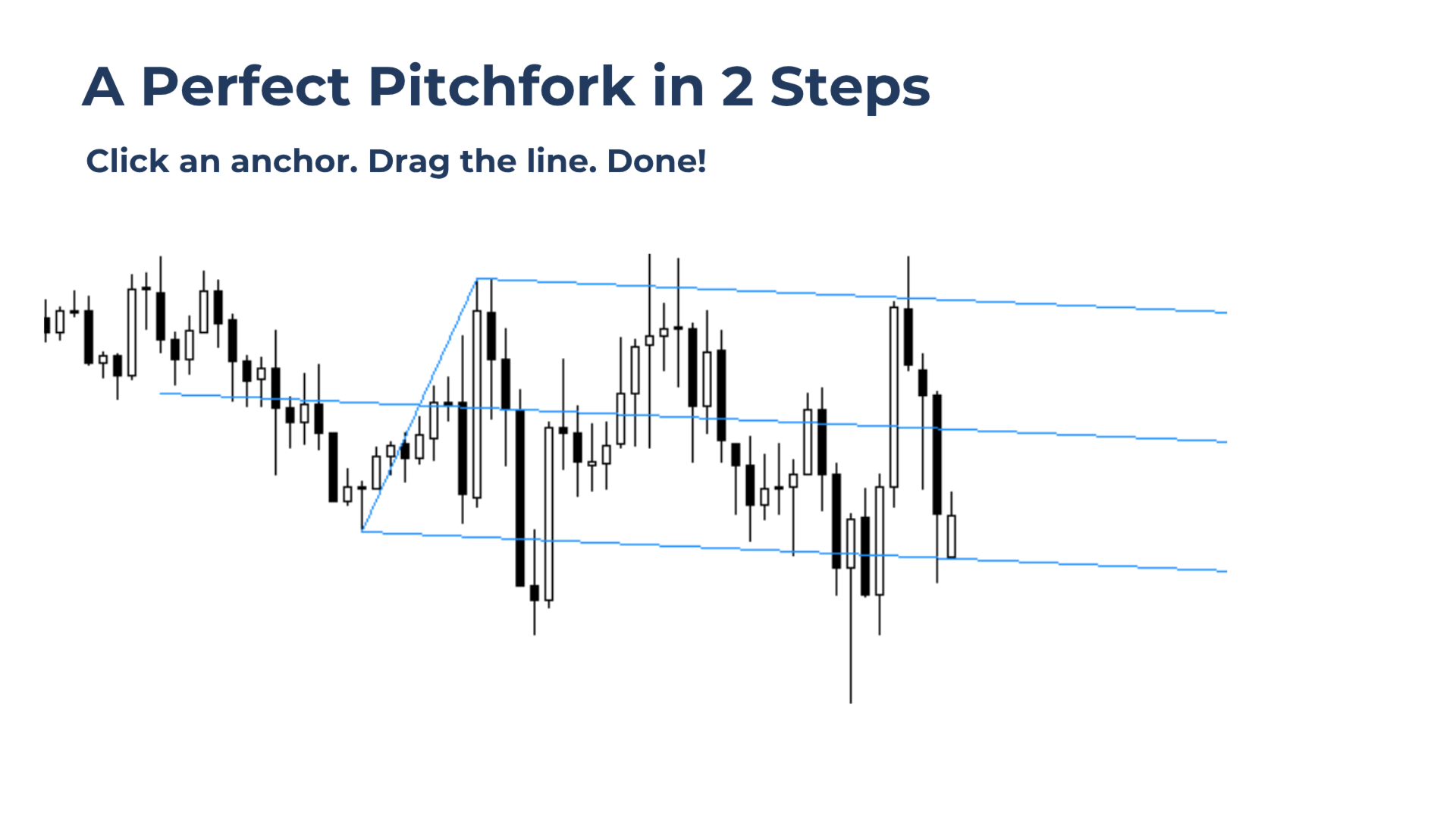
Draw precise wick-to-wick pitchfork structures in seconds with Pitchfork Precise.
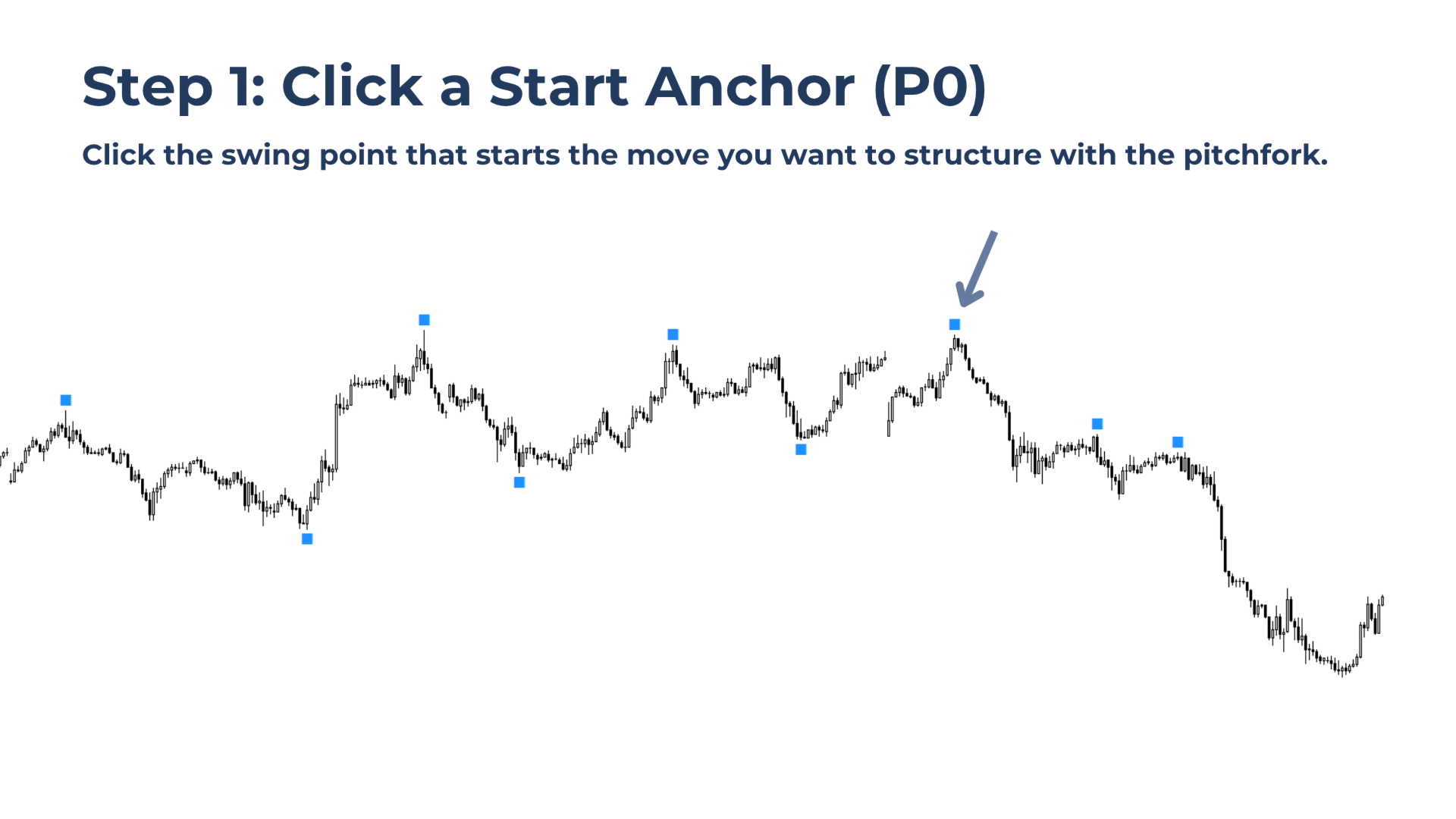
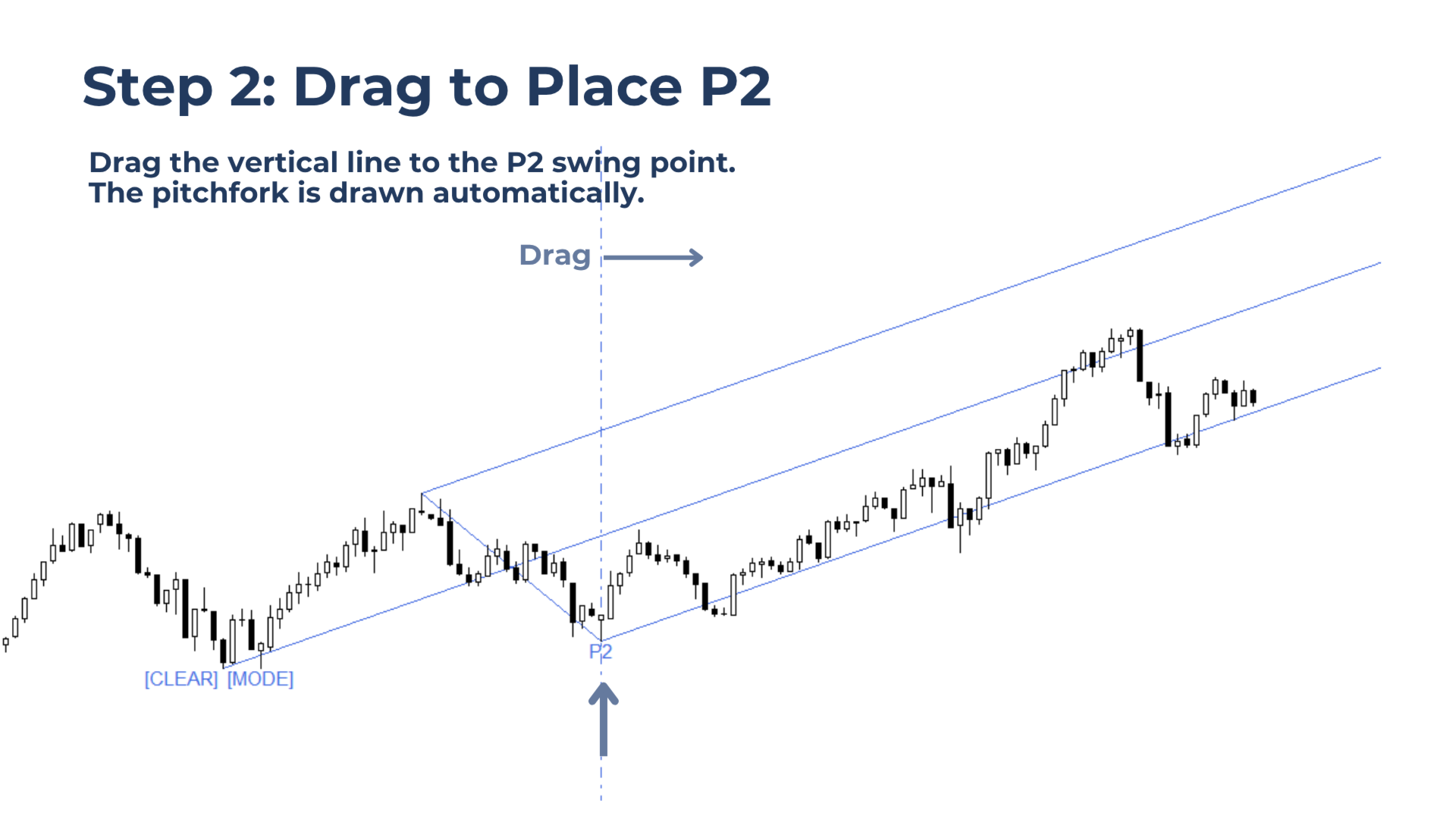
Simply place the start anchor (P0) with one click, then drag the vertical line just to the right of the third anchor swing (P2). Done!

All pitchforks drawn with this tool stay locked across timeframe changes and remain saved when switching symbols.

The reason for this tool is simple: precision matters when working with pitchforks. But manually placing the standard MetaTrader pitchfork exactly on three wick anchors takes time, especially when done frequently.

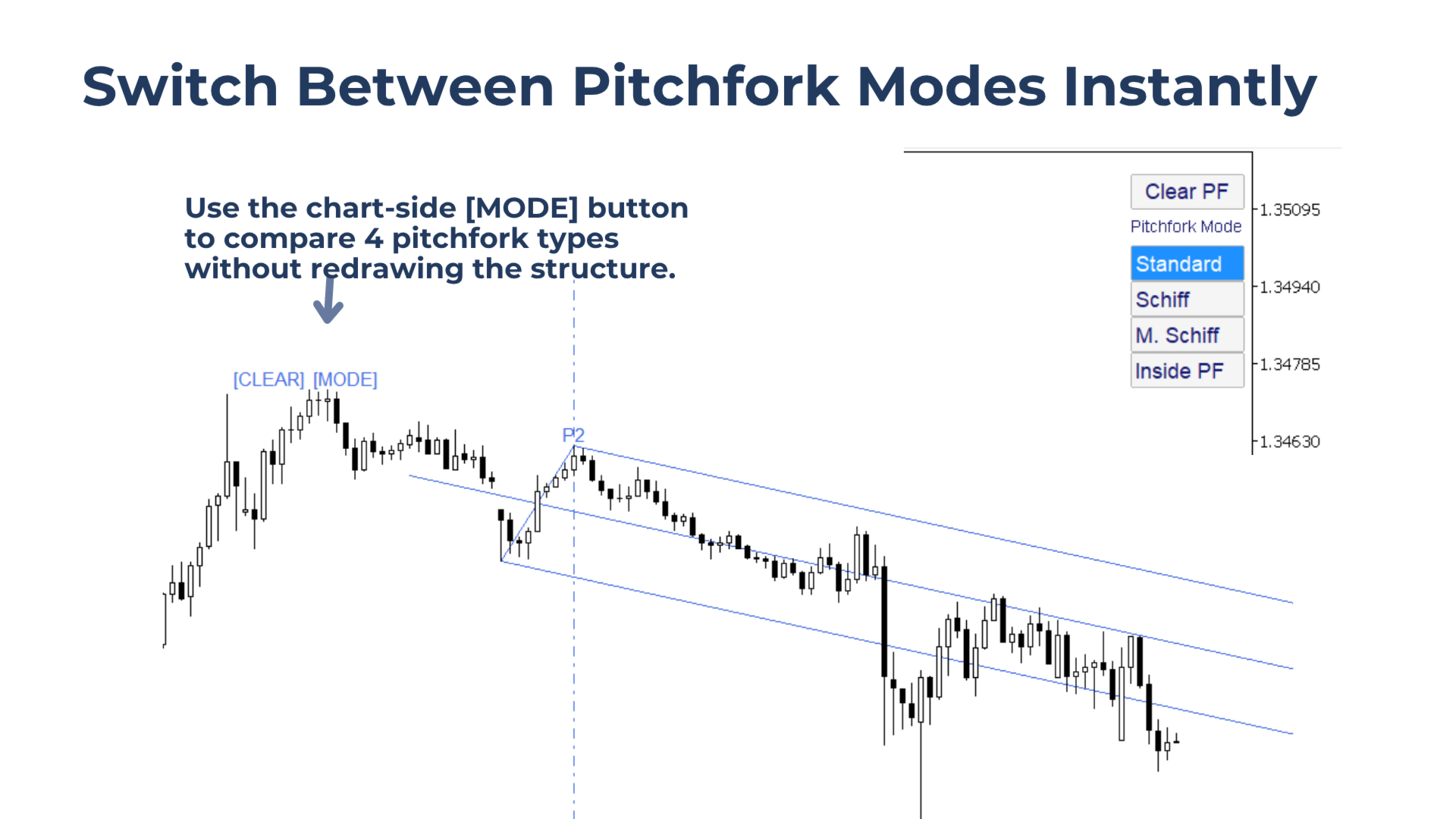
Pitchfork Precise removes that friction and lets traders instantly switch between Andrews, Schiff, Modified Schiff, and Inside Pitchfork variations.

Pitchfork Precise Launch Price: $30 — Limited-Time Offer

Who this tool is for:

  • Pitchfork traders who care about accurate wick-to-wick placement.
  • MT4 and MT5 traders who want faster pitchfork placement than the standard MetaTrader tool.
  • Traders who use pitchfork variations and want the same precision across different modes.
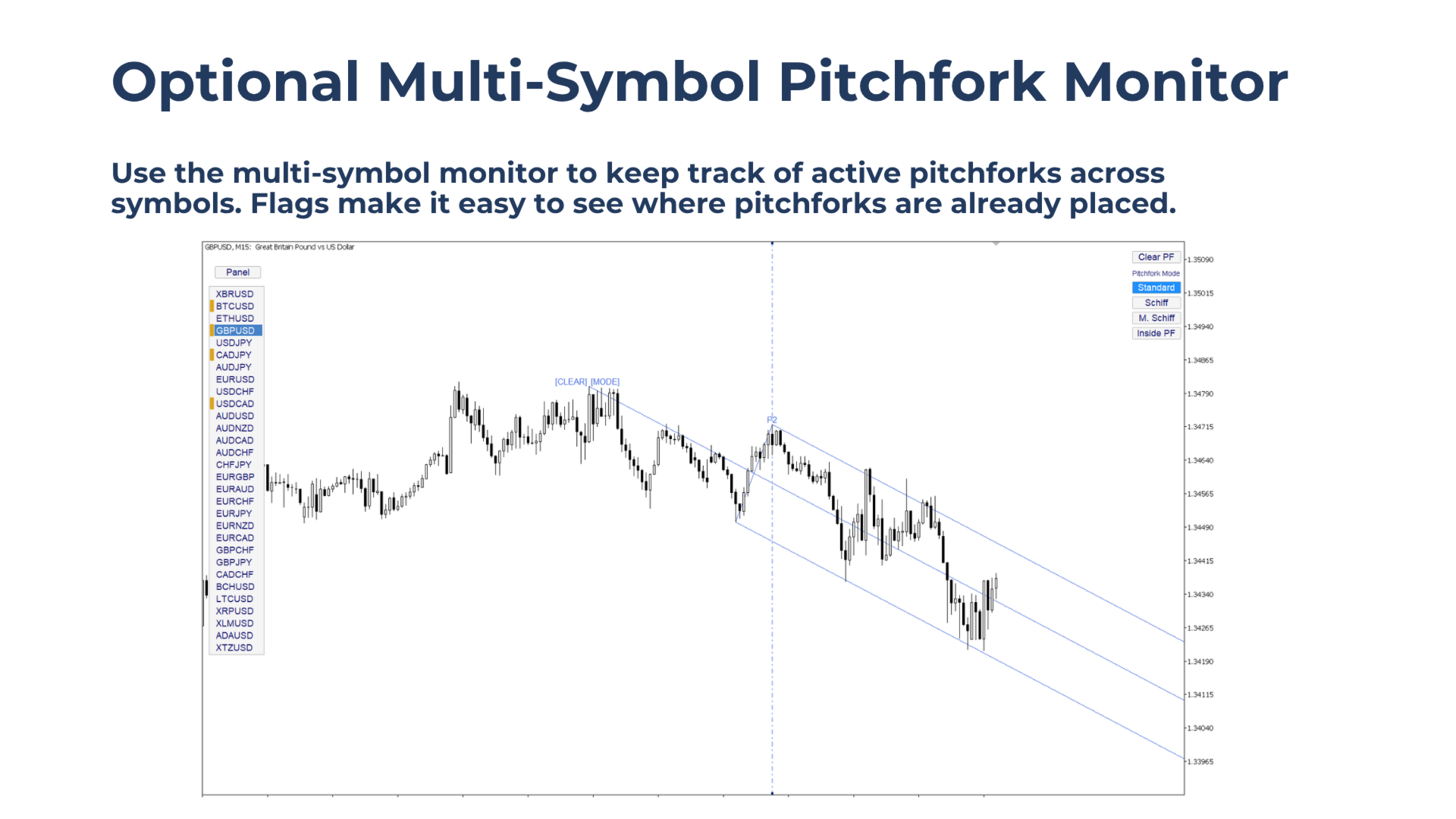
  • Multi-symbol traders who want pitchfork structures to stay intact while scrolling between symbols.

Key benefits

  • Place fast, precise pitchfork structures using authentic pitchfork rules.

  • Keeps pitchforks locked when changing timeframes.

  • Saves pitchfork structures per symbol, allowing traders to keep different pitchforks for multiple symbols on the same chart.

  • Switch instantly between Andrews, Schiff, Modified Schiff, and Inside Pitchfork modes.


Main features

On-Chart Anchors for Easy Start Selection
Pitchfork Precise displays clickable anchors on significant swing points, making it easy to select the starting anchor of the pitchfork.

Drag Line for Fast P1 and P2 Placement
After selecting P0, drag the vertical line just to the right of the desired P2 swing. The tool calculates the matching P1 automatically, so the pitchfork can be placed faster while still following the correct anchor structure.

Switch Pitchfork Mode Using the Corner Panel
Use the compact corner panel to switch between:

  • Andrews
  • Schiff
  • Modified Schiff
  • Inside Pitchfork

Multi-Timeframe Use
Pitchfork structures remain fixed when changing timeframes, making them useful for higher-timeframe planning and lower-timeframe execution. 

Multi-Symbol Memory
Pitchfork structures are saved per symbol. This keeps a symbol's pitchfork intact when switching or scrolling through different symbols.


How to Use Pitchfork Precise

1. Add the indicator to the chart. 

2. Click an anchor to instantly place the pitchfork start point, P0.  (Usually, P0 should be the highest swing in a downtrend or the lowest swing in an uptrend.) 

3. Drag the vertical line just to the right of the desired third anchor, P2. 

4. Use the corner panel to switch between different pitchfork variations. 

5. To choose a different starting anchor, click Reset to show the anchors again and repeat the process. 


Important Notes:

When a start anchor is selected, all other anchor markers are removed instantly for cleaner chart work. Need a different starting anchor? Click the Reset button to bring the anchors back, then select a new one.

When switching to a different  timeframe, the drag line is hidden and the mode buttons are removed to keep the chart clean.


What Does Correct Pitchfork Placement Mean?

Pitchfork Precise is designed for correct pitchfork placement based on the original Andrews logic.

A downtrend pitchfork is built from:

  • A high
  • Followed by a low
  • Followed by a lower high

An uptrend pitchfork is built from:

  • A low
  • Followed by a high
  • Followed by a higher low

This tool follows that anchor logic automatically. The result is a clean, authentic pitchfork structure based on the correct swing sequence.


Pitchfork Variations Explained

Pitchfork Precise includes multiple pitchfork variations, so you can quickly compare different structures and choose the one that fits price action best.

Schiff Pitchfork
The Schiff Pitchfork shifts the start point, P0, halfway in price toward P1, while keeping the same time position. This creates a flatter pitchfork, which can fit slower or shallower trends better.

Modified Schiff Pitchfork
The Modified Schiff Pitchfork shifts P0 halfway toward P1 in both price and time. This creates an angle between the standard Andrews Pitchfork and the Schiff Pitchfork. It can be useful when Andrews is too steep, but Schiff is too flat.

Inside Pitchfork
The Inside Pitchfork uses a different construction method to test an alternative structure when the other variations do not fit price action well. It is less common and can sometimes point in a different direction than the standard pitchfork.


Notes and Limitations

Pitchfork Precise supports one pitchfork per chart.

The tool is not supported in the Strategy Tester.


作者のその他のプロダクト
Never miss a clean candle-close break confirmation again without staring at the chart. Bar Break Alerter lets traders activate a break alert directly on the chart, step away from the screen, and get notified when a valid confirmation appears. Watching for break confirmations manually takes time and can easily lead to early FOMO entries, distraction, or missed signals when the trader is away for only a moment. Bar Break Alerter helps solve this by monitoring the selected direction in the backgr
Auto Fibonacci displays the 38.2, 61.8, and 78.6 Fib levels directly on the chart, helping traders use the same key retracement zones consistently when planning trades. Drawing Fibonacci levels manually over and over again can take time, especially when done with wick-to-wick precision. Auto Fibonacci removes that friction by detecting the latest trend leg and placing the main Fibonacci levels automatically. This helps traders keep consistent structure on the chart while planning pullbacks, ale
FREE
Place Fibonacci retracement levels with control, consistency, and wick-to-wick precision. Drag Fib combines the speed of an automatic Fib tool with the flexibility of letting the trader choose the exact trend leg to trade from. Simply drag a vertical line onto the chosen trend leg, and the Fibonacci retracement is placed automatically. As the trend extends, the levels adjust with it, helping traders keep the same structure on the chart while planning alerts, entries, targets, or trade decision
Auto Fibonacci displays the 38.2, 61.8, and 78.6 Fib levels directly on the chart, helping traders use the same key retracement zones consistently when planning trades. Drawing Fibonacci levels manually over and over again can take time, especially when done with wick-to-wick precision. Auto Fibonacci removes that friction by detecting the latest trend leg and placing the main Fibonacci levels automatically. This helps traders keep consistent structure on the chart while planning pullbacks, ale
FREE
Never miss the next candle close without keeping your eyes glued to the chart. Candle Close Alerter helps traders make candle-close decisions without waiting at the screen nonstop. Many trading actions depend on the moment a candle closes, such as checking for an entry signal, managing a trade, confirming an exit, or deciding whether a setup is still valid. But watching every candle close manually can lead to unnecessary screen time, distraction, and emotional decisions like FOMO. Candle Close
FREE
Plan trades around potential stop-run zones and get alerted when price reaches them, without watching the chart constantly. Bank Levels Tracker highlights levels around obvious swing highs and lows where retail stop losses may cluster. These areas can become important liquidity zones, often targeted by Smart Money before a possible market reversal. Instead of manually checking the chart and marking these levels over and over again, the tool highlights these zones in advance and instantly alert
Never miss the next candle close without keeping your eyes glued to the chart. Candle Close Alerter helps traders make candle-close decisions without waiting at the screen nonstop. Many trading actions depend on the moment a candle closes, such as checking for an entry signal, managing a trade, confirming an exit, or deciding whether a setup is still valid. But watching every candle close manually can lead to unnecessary screen time, distraction, and emotional decisions like FOMO. Candle Close
FREE
See volume-based support and resistance at a glance. Volume Structure turns visible-range volume into a chart-wide heatmap and marks local volume peaks as key levels for alerts, targets, and entries. Zoom out for the broader picture, or zoom in for more detailed structure. Built for traders who focus on: Market reversals at key zones  Support and resistance  Volume profile levels  What Does Volume Structure Do? Volume Structure displays a visible-range heatmap of volume zones across the chart a
Never miss a clean candle-close break confirmation again without staring at the chart. Bar Break Alerter lets traders activate a break alert directly on the chart, step away from the screen, and get notified when a valid confirmation appears. Watching for break confirmations manually takes time and can easily lead to early FOMO entries, distraction, or missed signals when the trader is away for only a moment. Bar Break Alerter helps solve this by monitoring the selected direction in the backgro
Draw precise wick-to-wick pitchfork structures in seconds with Pitchfork Precise. Simply place the start anchor (P0) with one click, then drag the vertical line just to the right of the third anchor swing (P2). Done! All pitchforks drawn with this tool stay locked across timeframe changes and remain saved when switching symbols. The reason for this tool is simple: precision matters when working with pitchforks. But manually placing the standard MetaTrader pitchfork exactly on three wick anchors
Plan trades around potential stop-run zones and get alerted when price reaches them, without watching the chart constantly. Bank Levels Tracker highlights levels around obvious swing highs and lows where retail stop losses may cluster. These areas can become important liquidity zones, often targeted by Smart Money before a possible market reversal. Instead of manually checking the chart and marking these levels over and over again, the tool highlights these zones in advance and instantly alert
Drag Fib
Part-time Day Trader
Place Fibonacci retracement levels with control, consistency, and wick-to-wick precision. Drag Fib combines the speed of an automatic Fib tool with the flexibility of letting the trader choose the exact trend leg to trade from. Simply drag a vertical line onto the chosen trend leg, and the Fibonacci retracement is placed automatically. As the trend extends, the levels adjust with it, helping traders keep the same structure on the chart while planning alerts, entries, targets, or trade decision
See volume-based support and resistance at a glance. Volume Structure turns visible-range volume into a chart-wide heatmap and marks local volume peaks as key levels for alerts, targets, and entries. Zoom out for the broader picture, or zoom in for more detailed structure. Built for traders who focus on: Market reversals at key zones  Support and resistance  Volume profile levels  What Does Volume Structure Do? Volume Structure displays a visible-range heatmap of volume zones across the chart a
フィルタ:
レビューなし
レビューに返信