PFA Merger
- ユーティリティ
-
Victor Paula Oberto
 Algo Trading Engineer | MQL5, C/C++/C#, Python | HFT, Arb, SaaS & AI
 - バージョン: 1.0
PFA Merger – Portfolio Position Merger Script
Introduction
PFA Merger is an MQL5 script and an essential component of the Portfolio Analyzer (PFA) system, a portfolio analysis toolkit included with compatible Expert Advisors from this profile. The PFA system allows traders to build, merge, and simulate multi-asset, multi-strategy portfolios entirely within the MT5 Strategy Tester, with no external tools required.
The three-step PFA workflow
- The PFA Exporter, built into the EA, exports backtest positions to individual CSV files per setup.
- The PFA Merger, this script, merges all exported CSV files into a single, clean, sorted file ready for simulation.
- The PFA Simulator, a separate EA also available in this profile, replays the merged portfolio inside the MT5 Strategy Tester to evaluate the true combined performance.
PFA Merger and PFA Simulator are compatible with any EA from this profile that includes the PFA Exporter module.
What the PFA Merger Does
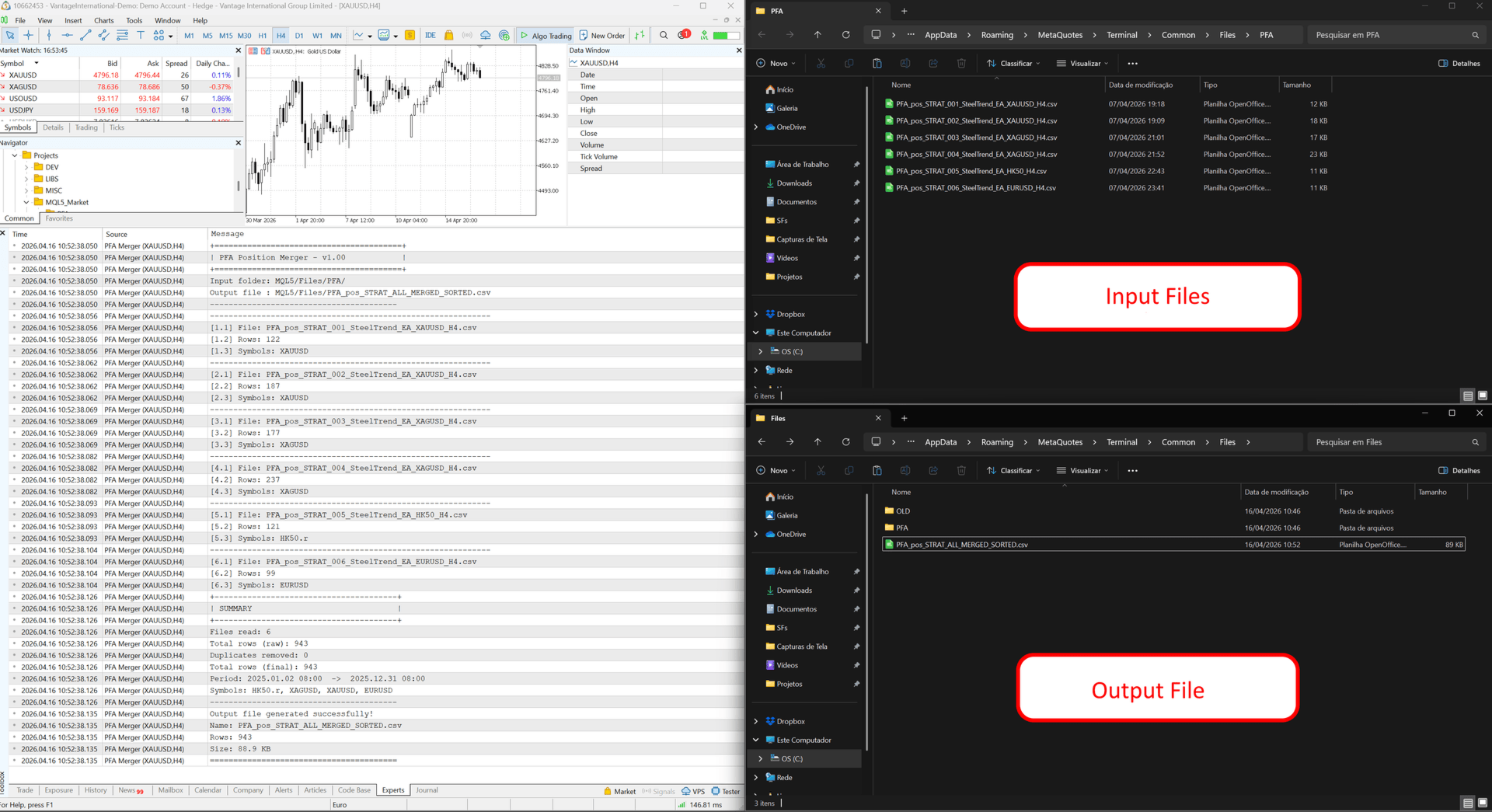
After running backtests across multiple symbols and configurations, the user will have a collection of individual PFA_pos*.csv files, one per setup. PFA Merger automates the entire consolidation process.
- The script scans the Terminal/Common/Files/PFA/ folder and finds all PFA_pos*.csv files automatically.
- It reads and combines positions from all discovered files into a single dataset, then sorts all merged positions by entry timestamp to ensure correct simulation order.
- When the duplicate removal option is enabled, the script detects and removes duplicate entries identified by the same entry timestamp and symbol.
- Each file's column structure is validated before processing, and malformed files are skipped gracefully.
- A per-file summary and a final merge report are printed to the Experts log.
- The output file PFA_pos_STRAT_ALL_MERGED_SORTED.csv is written to the same folder, ready to be loaded by the PFA Simulator.
How to Use
- Run backtests with any compatible EA with the PFA Exporter enabled for each desired symbol/configuration.
- Place all exported PFA_pos*.csv files in the Terminal/Common/Files/PFA/ folder (Common Files).
- Attach PFA Merger to any chart and run it as a script.
- Check the Experts log for the merge summary and confirmation.
- The output file PFA_pos_STRAT_ALL_MERGED_SORTED.csv is now ready for the PFA Simulator.
Parameters
| Parameter | Default | Description |
|---|---|---|
| Input folder | PFA/ | Folder inside Terminal/Common/Files/ where input CSVs are located. |
| Output filename | PFA_pos_STRAT_ALL_MERGED_SORTED.csv | Name of the merged output file. |
| Remove duplicates? | false | When set to true, it will remove duplicate positions by symbol and entry timestamp. |
What You Get
- PFA Merger Script – Ready to use, no configuration required for standard setups. Compatible with all PFA-enabled EAs from this profile.
PFA Merger is part of the PFA system. To complete the portfolio analysis workflow, also download the PFA Simulator EA from this profile.