 MetaTrader 5
 Experts
 지표
지표
 라이브러리
라이브러리
 유틸리티
유틸리티
 위젯
위젯
 규칙
규칙
MetaTrader 5용 새 트레이딩 유틸리티 - 52
 다음은 MetaTrader 5의 거래를 단순화하는 거래 프로그램입니다. 유틸리티의 설명과 목적을 읽으려면 유틸리티 위에 마우스를 놓으십시오.
Ritz_BUYnSELL_Detection
The Ritz_BUYnSELL_Detection is a custom MetaTrader 5 (MT5) indicator that detects BUY and SELL trading signals based on trend detection and ATR-based volatility filtering. It provides visual arrows , entry alerts , and mobile push notifications , making it suitable for traders using a VPS setup for 24/7 signal monitoring. How to Use the Indicator Install on MT5 : Place the .mq5 file in the MQL5/Indicators folder. Compile it in MetaEditor, then apply it to any chart. A
FREE

Position Recovery Dashboard EA for MT5 Position Recovery Dashboard is a simple yet highly useful utility EA , originally developed for the author's own trading needs. Designed with practicality in mind, it provides a fast and intuitive way to manage open trades directly from the chart — making it ideal for active and manual traders . Its key feature in the recovery trading system , which helps traders recover from losing positions by automatically calculating profit from selected lots. This E
FREE

Coin Flip – True Random Trading Automation Coin Flip is a unique and lightweight utility that makes trading decisions based on pure chance – just like flipping a coin! But don't let the simplicity fool you – this EA comes with powerful risk management features and professional-grade trade handling that gives you full control over your capital and strategy execution. Core Concept Unlike traditional systems based on indicators or patterns, Coin Flip EA executes trades based on a random deci
FREE

This Expert Advisor is designed to help you manage trading around high-impact news events, fetched from the Forex Factory economic calendar in XML format. It includes real-time monitoring of upcoming news and can automate trading operations before and after important economic releases. ------------------------------ 1. XML News Source ------------------------------ - The EA fetches news from: https://nfs.faireconomy.media/ff_calendar_thisweek.xml - The XML is saved locally as "ff_calendar_thi

Margin Call Shield – Defend Your Margin on Your Terms
Margin Call Shield is a tool for MetaTrader 5 traders who want to decide for themselves which open positions are closed during margin call situations before the platform does so automatically based on its internal rules. By default, the broker or platform decides which positions to close, often using undisclosed algorithms. Margin Call Shield lets you set this order according to your own strategy. Why Was Margin Call Shield Created? In a mar

Data Exporter EA is a powerful and easy-to-use Expert Advisor for MetaTrader 5 , designed to export high-precision market data and technical indicators into a structured .CSV file for backtesting, machine learning, algorithmic modeling, or statistical analysis. Whether you're a data-driven trader, quantitative analyst, or system developer, this EA provides a seamless way to collect and store historical indicator values alongside OHLC prices — with full control over timeframe, periods, and indica

交易辅助面板,功能众多,开仓-平仓-风控一体面板。 手动开仓,半自动马丁顺势网格加仓,逆势网格加仓。 账号清仓,全平仓,点数平仓,金额平仓,逐步平仓,追踪止损。 风控警报,风控锁仓,风控对冲。 辅助持仓信息显示。 Trading assistance panel with numerous functions, an all-in-one panel for opening positions, closing positions, and risk control.Manual opening of positions, semi-automatic Martingale trend grid scaling, counter-trend grid scaling.Account clearance, full liquidation, point clearing, amount clearing, gradual liquidation, and trailing stop loss.Risk control alerts, risk control locking, risk

Risk Guardian — Ultimate Equity & Drawdown Protection Protect your capital. Stay disciplined. Trade smarter. Risk Guardian is a powerful utility that helps traders automatically control daily risk and secure profits based on equity. Designed for MetaTrader 5, it’s lightweight, efficient, and extremely easy to use. Key Features: Daily Drawdown Limit (% based) Absolute Equity Target (e.g., stop trading after reaching 110,200 USD) Auto-close All Positions, Orders & Charts Visual Dashboard on C

SV Trade Manager is a professional MT5 trade management utility that instantly syncs your Stop Loss and Take Profit across all open positions the moment you change one — no more modifying trades one by one. It also automatically opens additional recovery trades while a position is in floating loss, following your exact pip spacing and timing rules. Every new trade inherits the existing SL/TP immediately. Built-in lot size display, total P&L projection at SL and TP, trailing stop, break-even aut
Unlock the Full Potential of Your Trading with ChartFix Rectangles Are you tired of manually adjusting rectangles on your MT5 charts every time the market shifts? Wish there was a faster, smarter way to manage your chart objects? ChartFix Rectangles is here to transform your trading experience, giving you unparalleled control over rectangles with just a few clicks.
Why ChartFix Rectangles is a Game-Changer
One-Click Extension : Instantly extend your rectangle’s right edge to the last bar —p

작동 데모 다운로드
Copy Cat More (카피캣) MT5 트레이드 카피어 (Trade Copier) 는 로컬 트레이드 카피어이자, 오늘날의 트레이딩 과제를 위해 설계된 완전한 리스크 관리 및 실행 프레임워크입니다. 프롭 펌 (prop firm) 챌린지부터 개인 포트폴리오 관리까지, 견고한 실행, 자본 보호, 유연한 설정, 고급 트레이드 처리의 조합으로 모든 상황에 적응합니다. 이 카피어는 마스터 (Master, 송신측) 와 슬레이브 (Slave, 수신측) 두 모드 모두에서 작동하며, 시장가 주문과 대기 주문, 트레이드 수정, 부분 청산, 상호 청산 (Close By) 작업을 실시간으로 동기화합니다. 데모 및 실거래 계좌, 트레이딩 또는 인베스터 로그인 모두와 호환되며, EA·터미널·VPS가 재시작되더라도 영구 트레이드 메모리 (Persistent Trade Memory) 시스템을 통해 복구를 보장합니다. 고유 ID로 여러 마스터와 슬레이브를 동시에 관리할 수 있으며, 브로커

FoxForex Management is a professional trade management and risk management system for MetaTrader 4 and MetaTrader 5. It helps traders automatically calculate position size, manage risk with precision, execute trades with a single click, protect profits, and identify supply and demand zones in real time. Designed for both discretionary and professional traders, it combines trade execution, money management, and position protection tools within a single intuitive interface. Risk management setting
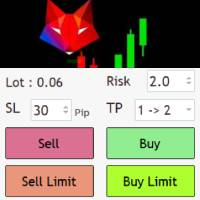
Risk management settings Automatic lot size calculation based on risk Open Buy and Sell positions with one click based on settings Open positions graphically (Buy Limit – Buy Stop – Sell Limit – Sell Stop) Real-time display of open positions' profit/loss and daily profit/loss Completely free You are welcome to explore and purchase from our other products as well. Please feel free to take a look and let us know if you have any questions.
FREE
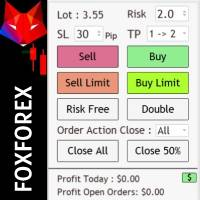
Risk management settings Automatic lot size calculation based on risk Open Buy and Sell positions with one click based on settings Open positions graphically (Buy Limit – Buy Stop – Sell Limit – Sell Stop) Risk-free open positions Open new trades with TP and SL from previous open trades Close all open trades with one click Save 50% of open trades' profit Setting to close open positions based on Sell or Buy positions Real-time display of open positions' profit/loss and daily profit/loss

This trading panel is developed specifically for the MT5 platform, offering a range of powerful features to enhance trading efficiency and precision. The current version includes the following core functionalities: Trend Trading Panel Trade Direction Selection : Users can choose to buy or sell based on market trends. Risk Type Configuration : Supports setting either a fixed monetary risk or a risk-based percentage, allowing traders to manage risk according to their preferences. Stop Loss Options

Capital Management EA – Smart Risk Management & Profit Optimization for MT5 Take control of your trading capital with smart, automated strategies — fully optimized for MetaTrader 5 (MT5). Looking to protect your capital and maximize profits through automated money management strategies ?
Capital Management EA is the all-in-one Expert Advisor for MetaTrader 5 (MT5) that helps you trade smarter, not harder. Core Features: 5-in-1 Capital Management Strategies – Built-in versatility
Gr

>>>>> The Ultimate Safety Net for Your Trading Account <<<<< Simple Risk Manager is a professional utility EA that automatically protects and enhances your trading with sophisticated risk management - without interfering with your trading strategy. Key Features: Automatic Stop Loss & Take Profit Management - Instantly applies your predefined SL/TP to every new position, even those opened manually or by other EAs. Intelligent Trailing Stop System - Secures your profits with a customizable tr

️ Ex-Calibur EA is Professional Trading Robot with Inside Bar Strategy.
Key Features:
Powerful Inside Bar Strategy - Automatic Inside Bar pattern detection for precise entry points - Colored indicator box visualization for easier analysis - Automated entry system with pending orders to capture breakouts
Advanced Risk Management - Flexible Trailing Stop system to secure profits - Automatic Break Even to protect capital - Adaptive Stop Loss and Take Profit based on market vol

PVC Intradía es un Asesor Experto, basaso en el Método Precio, Volumen y Calendario del autor Álvaro Contreras, el cual calcula y proyecta de forma automática sobre cualquier simbolo:
Una zona de reacción en color rojo, ideal para programar órdenes pendientes o por ejecución de mercado. Una zona de obtención de beneficios, ideal para programar take profits. Adicionalmente cuenta con líneas de apoyo, sensibles y útiles para entender la estructura del precio tales como: Cruce de periodos inferiore

Now, you have your very own PROP FIRM LOT SIZE CALCULATOR ! It now has BREAKEVEN and PARTIAL CLOSURE features! There's no need to go to other websites just to compute for the exact lot size. It also opens the trade with a click of a button. All inputs on the calculator can be edited. So if you want to change the SL or TP or the lot size, you can do so before placing an order. ========================================== INPUTS (Please see screenshot for reference): 1. SL PRICE TEXT . This is clic

This MT5 script calculates and displays the total lot sizes traded on your account. This is useful as a quick visual summary for VPS promotions from brokers. The script outputs directly onto the chart. This is broken down by symbol and by three customisable time periods: today this week this month Font sizes can be adjusted The summary will appear in your chart
To update the display after new trades, simply run the script again.
FREE

Indicador que calcula e exibe dois níveis de preço: o preço médio das posições atualmente abertas e o preço de cobertura, definido como o preço necessário para zerar ou manter o lucro acumulado em determinado período. O cálculo do preço médio considera o volume e o preço de entrada das operações abertas, enquanto o preço de cobertura é ajustado dinamicamente conforme o lucro ou prejuízo realizado e não realizado no período analisado.
Versão MT4: https://www.mql5.com/pt/market/product/139409
FREE

IndiSig by Buffer
Detect Signals from a Custom Indicator by Buffer & Send notifications to Telegram Channel or Open orders
* Buy/Sell Buffer: You may get this info on MT4/5 Data Window (CTRL + D)
* MT5 version: Add the indicator first, then the EA
* MT4 version: Only works properly with default settings of the indicator Join https://t.me/fxassistant_vn for more useful EAs!
FREE

PVC Semanal es un Asesor Experto, basaso en el Método Precio, Volumen y Calendario del autor Álvaro Contreras, el cual calcula y proyecta de forma automática sobre cualquier simbolo: Una zona de reacción en color rojo, ideal para programar ordenes pendientes o por ejecución de mercado. Una zona de obtención de beneficios, ideal para programar take profits. Adicionalmente cuenta con líneas de apoyo, sensibles y útiles para entender la estructura del precio tales como: Cruce de periodos inferiores

DCA Buddy: Advanced Price Visualiser Take control of your multi-position trading with DCA Buddy , an advanced indicator for MetaTrader 5. It provides a clear and accurate visualisation of the average break-even price for all your open trades on the current chart symbol. This powerful tool goes beyond simple averages, correctly handling both one-sided and complex hedged scenarios, and features a sophisticated alert system to notify you precisely when your net position achieves its goals. Core Fun
FREE

EASY Insight AIO – 스마트하고 손쉬운 트레이딩을 위한 올인원 솔루션 개요
외환, 금, 암호화폐, 지수, 심지어 주식까지 — 전 시장을 몇 초 만에, 수동 차트 확인이나 복잡한 설치, 인디케이터 설정 없이 스캔할 수 있다고 상상해 보세요.
EASY Insight AIO 는 AI 기반 트레이딩을 위한 궁극의 플러그 앤 플레이(Plug & Play) 데이터 내보내기 도구입니다. 단 하나의 깔끔한 CSV 파일로 전체 시장 스냅샷을 제공하며, ChatGPT, Claude, Gemini, Perplexity 등 다양한 AI 플랫폼에서 즉시 분석할 수 있습니다. 창 전환, 복잡함, 차트 오버레이는 더 이상 필요 없습니다. 자동으로 내보내지는 순수하고 구조화된 데이터 인사이트만으로, 반복적인 차트 감시 대신 데이터 기반의 스마트한 의사결정에 집중할 수 있습니다. 왜 EASY Insight AIO인가요? 진정한 올인원
• 별도의 설정, 인디케이터 설치, 차트 오버레이가 필요 없습

이 시스템은 거래별 정밀한 리스크 계산과 간편한 RR(리스크 대비 보상 비율) 설정을 제공하며, 모든 거래 매개변수를 한눈에 모니터링할 수 있습니다. 원클릭 실행으로 새로운 주문을 간편하게 열고, 부분 청산, Break-Even 및 다양한 기능으로 거래를 관리하여 모든 거래를 완벽하게 제어할 수 있습니다 — 직관적인 조작, 광범위한 사용자 설정, 초고속 실행, 정밀한 리스크 제어, 지속적인 개발, 그리고 직접 지원을 모두 갖추고 있습니다.
필요한 모든 것: 설치 가이드 | 사용 가이드 | 데모 버전
주문 시각화 진입가, 손절매, 이익실현을 차트에 직접 시각화합니다. 새로운 주문을 정밀하게 계획하고 거래 실행 전에 모든 관련 매개변수를 한눈에 확인할 수 있습니다. 사용자 친화적인 인터페이스를 통해 표시되는 매개변수를 개별적으로 표시하거나 숨길 수 있어, 가장 중요한 정보에 집중할 수 있습니다.
리스크 관리 리스크 계산 시스템은 설정한 리스크와 SL

News Shield – Protect Your Trades from Volatile News Events News Event Backtest
Short Description: In financial markets, economic news can trigger sudden and unpredictable volatility. News Shield is designed to protect your trading account during news releases — automatically, accurately, and without manual intervention. Features: Real-time display of all major economic news directly on your chart Customizable trade lock: block trading a few minutes before and after each news event Compatib
FREE
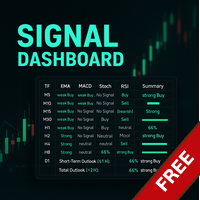
Link to the full version: https://www.mql5.com/de/market/product/138246?source=Site +Profile+Seller#description Feature enhancements or comments are always welcome! Description: This powerful script provides traders with a comprehensive real-time signal overview across multiple timeframes using some of the most reliable technical indicators. It is designed as a clear, compact table on the chart and displays actionable insights for selected timeframes - helping traders make informed decisions ba
FREE

Berikut adalah versi deskripsi produk Close All Filter yang sudah diformat khusus untuk dipublikasikan di MQL5 Market : Close All Filter for MetaTrader 5 Version: 1.00
Author: Muhammad Fadhlan Overview Close All Filter is a powerful yet simple script for MetaTrader 5 that helps traders close multiple positions in bulk based on specific filters. Whether you want to lock in profits, cut losses, or clean up trades from a specific symbol or time period, this tool gives you full control in just
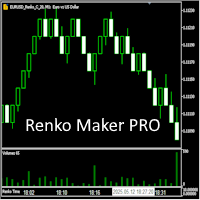
Revolution Renko Maker PRO — Инновационный Конструктор Ренко Графиков для MetaTrader 5
Создавайте идеальные ренко-бары с сохранением тиковых данных и реальных объемов — теперь с полной поддержкой индикаторов, советников и тестера стратегий!
Почему это лучше аналогов?
Возможность Обычные ренко Revolution Renko Maker PRO Разные типы баров Нет Да, три разных типа! Поддержка индикаторов Нет Да, любые! Работа в тестере стратеги

Это DEMO версия Renko Maker PRO к сожалению правила маркета не позволили указать это в названии. Почему то проверка маркета запрещает в названии слово DEMO. Демо версия строит ренко бары только на основе EURUSD из 1000 последних минутных баров. Revolution Renko Maker PRO — Инновационный Конструктор Ренко Графиков для MetaTrader 5
Создавайте идеальные ренко-бары с сохранением тиковых данных и реальных объемов — теперь с полной поддержкой индикаторов, советников и тестера стратегий!
FREE

Maximize your profits and protect your capital on any symbol, any broker, any digits. Demonstration video: https://youtube.com/shorts/enSPf2qCsVU?si=1LBVjmVzgFJE751C The Universal Trailing Stop and Breakeven EA is a powerful, beginner-friendly tool that automates trailing stop management across all your open trades. Whether you are scalping XAUUSD, swinging BTCUSD, or day trading EURUSD, this expert advisor ensures you are always locking in gains while minimizing risk.
What's New in 2.0? Perce
FREE

multi-currency utility BTCUSD, XAUUSD, US100, US30, forex market. Convenient trading by drag and drop line to select entry price, stoploss, takeprofit, display risk-to-profit ratio when dragging. Choose fixlot or balance percentage or risk usd depending on each trader's strategy. The video was run on the5ers fund read account. thanks you. Risk management
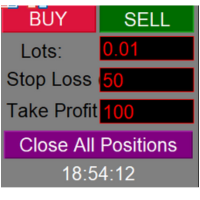
One - click position closing program featuring manual long/short trading and take - profit/stop - loss point settings.
In the rapidly changing environment of financial trading markets, efficient and precise trading operation tools are of utmost importance. This one-click position closing program is specifically designed to meet the diverse needs of traders.
The program's most prominent feature is its convenient "one-click position closing" function. Whether in forex, futures, or stock trading,

Real-Time Spread Display Tool
A real-time spread display tool is a specialized software or application designed to provide traders and investors with instant, live data on the spread —the difference between the bid price (the price at which buyers are willing to purchase an asset) and the ask price (the price at which sellers are willing to sell it)—for various financial instruments. This tool is critical in markets such as forex (FX), stocks, futures, and cryptocurrencies, where price f

Daily PnL Notifier – Get Telegram alerts when your daily profit or loss target is reached! Looking for a simple, fast, and reliable way to monitor your daily performance on MetaTrader 5?
Daily PnL Notifier is the tool you need. ️ Key features : Sends an instant Telegram notification when your account hits a custom profit or loss threshold . Fully customizable : you set your own daily gain or loss limits. Ultra simple: minimal interface , no useless settings. Works on all accounts (demo or li
FREE

Core Features: Profit Target Control:
Automatically closes all open positions once a defined total profit value is reached. Drawdown Protection:
Monitors total floating losses and closes all trades if the loss exceeds a set percentage of the account balance. Trading Halt on Target:
Automatically stops further trading once a desired percentage profit of account balance is achieved. Dynamic SL/ TP Adjustment:
Optionally adjusts Take Profit and Stop Loss for all open trades to pr
FREE
NoSwapEA MT5 - Trade Smart, Avoid Swaps Overview
NoSwapEA is a smart and efficient Expert Advisor designed to help traders avoid overnight swap charges by automatically closing and reopening trades based on a customizable schedule. Developed by NeonTrade, this EA is perfect for traders who want to optimize their trading strategy while minimizing costs. Key Features
Swap-Free Trading : Automatically closes trades before swap charges are applied and reopens them the next day, saving you money

GoldScalper Script Category: Utilities (Script)
Version: 1.00
Author: Alfred Jaftha
Product Type: MQL5 Script Overview GoldScalper Script is a one‑click pending‑order generator for XAUUSDm, designed to lock in potential scalping entries based on H1 trend confirmation and M1 Bollinger Bands/ATR levels. Unlike an EA, this script executes a single trade setup when launched, making it ideal for traders who prefer manual control combined with algorithmic precision. Key Features Trend Confirmation: U

Here’s a professional product description for your OneClick28Chart script on the MQL5 Market: OneClick28Chart — Instantly Open All 28 Major FX Pairs Tired of manually opening chart windows one by one?
OneClick28Chart is your go-to utility script for quickly launching all 28 major forex pairs with just a single click — perfect for multi-timeframe traders, BBMA users, or scalpers who analyze numerous pairs simultaneously. Key Features: Instantly opens 28 standard forex charts (7 majors ×
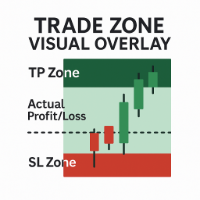
Trade Zone Visual Overlay – MT5용 실시간 거래 구역 표시 도구 늦기 전에 거래 성과를 즉시 시각화하세요. Trade Zone Visual Overlay 는 현재 보유 중인 포지션의 핵심 구역을 차트에 직접 표시하는 강력한 차트 도구입니다. 명확성을 중시하는 재량 거래자를 위해 설계된 이 인디케이터는 다음을 보여줍니다: 이익 실현 구역 (Take Profit Zone) – 전체 목표 수익 범위를 강조 표시 손절 구역 (Stop Loss Zone) – 리스크 노출 구간을 명확하게 표시 실제 손익 구역 – 수수료를 반영한 실시간 거래 진행 상황을 시각화 사용자 정의 가능한 색상과 수수료 조정 임계값을 통해 다음과 같은 정확한 스냅샷을 제공합니다: 거래가 실제로 이익인지 손실인지 (비용 차감 후) 현재 가격이 손절 또는 이익 실현 지점에서 얼마나 떨어져 있는지 실시간 위험 대비 보상이 차트에 명확히 표시됨 주요 기능: 현재 열려 있는 포지션을 자동으로 감지 진입 지

MetaTrader 5의 제한으로 EA는 전략 테스터 모드에서 작동하지 않습니다. 작동 방식을 확인하려면 데모 버전을 다운로드할 수 있습니다. 이 EA를 사용하는 기본적인 두 단계는 다음과 같습니다: How To Use EA를 원하는 종목 차트에 로드하고, 입력값을 Constructor로 설정합니다.
이후 생성된 사용자 정의 심볼에 EA를 로드하고, 입력값을 Controller로 설정합니다. Overview MT5 Bar Replay Pro는 TradingView의 Bar Replay 기능에 대응하는 MetaTrader 5 도구입니다. MT5의 모든 21개 시간 프레임을 완벽히 지원하며, 브로커의 데이터가 허용하는 한 과거로 돌아갈 수 있습니다. 전략 연습을 위한 내장 리스크 관리 도구와 보조용 그래픽 객체도 포함되어 있습니다. 각 연습 세션은 종목, 수익, 핍스, 총 거래 수, 승률, 수익 인자, 최대 손실, 회복 인자, 기대 수익 등의 데이터를 기록하며, 이 데이터는

목적:
마켓 워치 의 모든 심볼을 현재 시간 간격(TF)에 맞춰 default.tpl 템플릿으로 자동으로 열고, 현재 활성 차트를 제외한 모든 차트를 닫습니다. 수동 작업 없이 여러 종목을 빠르게 분석하기에 이상적입니다! 주요 기능:
자동화: 클릭 한 번으로 수십 개 차트를 열 수 있습니다.
안전성: 불필요한 차트를 닫고 현재 차트를 유지합니다.
유연성: 사용자 정의 default.tpl 템플릿 사용(사전 설정 필요!).
현재 시간 간격: 스크립트 실행 시 활성 차트의 TF와 동일하게 차트가 열립니다. 설치 방법: OpenAllSymbolsSafe.mq5 파일을 MetaTrader 5 터미널의 MQL5/Scripts 폴더에 복사합니다. 터미널을 재시작하거나 스크립트 목록을 새로 고칩니다(마우스 오른쪽 버튼 → 새로 고침 ). ️ 주의사항: default.tpl 이 MQL5/Profiles/Template/ 폴더에 있는지 확인하세요. 현재 차트를 제외
FREE

CloseAllChartsExceptCurrent — 메타트레이더 5 스마트 스크립트 설명:
MT5 터미널에서 수많은 차트를 수동으로 닫는 게 지겹다면? CloseAllChartsExceptCurrent 가 대신 처리해 드립니다! 스크립트는 현재 실행 중인 차트를 제외한 모든 차트를 즉시 닫습니다. 효율성을 중시하는 트레이더에게 완벽합니다. 주요 장점:
자동화 — 불필요한 차트를 한 번에 닫기.
시간 절약 — 탭 전환 필요 없음.
집중 유지 — 필요한 차트만 남김. 설치 방법: 스크립트 파일 CloseAllChartsExceptCurrent.mq5 복사. 폴더에 붙여넣기:
메타트레이더 5 터미널의 MQL5/Scripts 경로. 터미널 재시작 (또는 툴바에서 스크립트 목록 갱신). 사용법: MT5에서 임의의 차트 열기. 네비게이터에서 스크립트를 차트로 드래그. 다른 모든 차트가 즉시 닫힙니다. 참고: MT5 전용 (MT4와 호환되지 않음). 설정 불필
FREE

Sentinel PRO — RixiRoo의 자본 보호 도구
자본 보호의 마지막 해답입니다. Sentinel PRO는 Sentinel의 전체 버전입니다.
자본 보호에는 제한이 없습니다. 구매 전에 사용해보고 싶으신가요?
무료 버전을 확인해보세요 Sentinel Equity Protector Mini MT5 한 번의 실수가 마진콜로 이어질 수 있습니다.
Sentinel은 Authorooty로 당신의 자본을 보호합니다.
자본이 설정한 임계값 아래로 떨어지면, Sentinel은 즉시 완전 종료를 실행합니다. Sentinel의 기능: 모든 활성 거래를 종료합니다.
모든 대기 주문을 취소합니다.
모든 열린 차트를 닫습니다 (다른 EA를 비활성화함).
푸시 알림을 전송합니다 (활성화된 경우). Sentinel을 사용하는 이유: 단 하나의 입력값: EquityToProtect.
복잡한 설정 없음 – 연결하고 보호만 하면 됩니다.
속도와 신뢰성을
RRR Calculator is a gadget by MT4Gadgets that easily allows the trader to see the Risk to Reward Ratio for the desired trade. Given the Take Profit and Stop Loss levels, the tool will easily show the Risk to Reward Ratio. The simple interface and Drag and Drop feature makes it easy and quick to use. Risk to Reward is one of the most important aspects in a strategy and this tool allows an immediate view of the Risk to Reward Ratio, also known as R:R ratio.
Features: Visual interface Drag and Dro
FREE
Position Size Calculator is a gadget by MT4Gadgets that easily allows the trader to see the position size for the desired trade. Given the risk and established the Stop Loss level, the tool will easily show the possible Stop Loss value, the Take Profit and the position size to meet the risk profile. The simple interface and Drag and Drop feature makes it easy and quick to use.
Features: Visual interface Drag and Drop panel Ease of use
FREE

Quantum Simulator – Discover the Power of Quantum Dynamic Risk Quantum Simulator is an Expert Advisor designed to demonstrate the effectiveness of the Quantum function, fully integrated into the RiskGuard Management system. Through a simple interface, you can simulate an equity curve starting from a fixed balance of €100,000 , using your own custom statistics: Win Rate (%) Average Risk/Reward Ratio Number of Trades Maximum Allowed Drawdown (Optional) Minimum Accepted Drawdown The EA performs a
FREE
DYJ NetPilot is an Expert Advisor (Utilities) developed for the MetaTrader5 platform, designed to optimize trade exits by dynamically calculating the weighted average price (Pmix) of all open positions and adjusting exit levels accordingly. Key Features: Pmix Calculation: Computes the weighted average price (Price Mix) of open positions, providing a clear reference point for trade management. Dynamic Exit Strategy: Identify the prevailing direction (long/short positions) within open orders
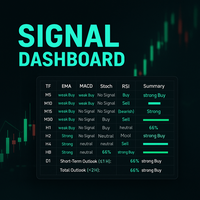
Description:
This powerful script provides traders with a comprehensive, real-time signal overview across multiple timeframes using some of the most trusted technical indicators. Designed as a clean, compact on-chart table, it displays actionable insights for 9 timeframes — from M5 to D1 — helping traders make well-informed decisions based on momentum, trend strength, and market conditions.
How it works:
For each timeframe (M5, M10, M15, M30, H1, H2, H4, H8, D1), the script calculates
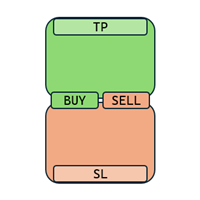
Enough with all these complex and confusing trade assistants and trade managers! Go simple and user-friendly! With One Click Order you set your risk, prepare your long or short trade and submit, DONE in seconds!
One Click Order is very easy to use Set your default risk (in % or amount) Select if you want to go long or short Drag the Open Price to your desired level, or leave as is for market orders Drag the SL to your desired Stop Loss Drag the TP to your desired Take Profit The tool will calcu

Crystal Profit Dashboard – Real-Time MT5 Account Performance Utility Overview
Crystal Profit Dashboard is a lightweight MetaTrader 5 utility that provides real-time profit and loss monitoring directly on the chart.
It offers a clean, modern dashboard interface that updates account performance without clutter, allowing traders to focus on execution while keeping essential metrics visible. Designed for scalpers, intraday traders, and swing traders, this tool provides accurate floating profit/los
FREE
TickData Recorder (v1.3): Real Ticks Recording for Reliable Backtesting in MT5 Elevate the accuracy of your strategy testing significantly! Tired of unrealistic backtest results on standard MetaTrader 5 data that don't match your broker's conditions? "TickData Recorder" is your tool to solve this problem. This Expert Advisor meticulously records every single tick price change (time with milliseconds, Bid, Ask, Last, Volume) directly from your broker's server (FTMO, RoboForex, IC Markets,

Manual Trade Helper
is an MT5 Expert Advisor designed as an automated assistant for managing manually opened trades. This EA does not open trades on its own, but instead enhances manual trading by automatically managing risk and position settings. Remote Management via VPS + Mobile Devices When deployed on a Virtual Private Server (VPS), the RitzEAneha Manual Trade Helper allows traders to seamlessly manage their trades from anywhere using just a smartphone or tablet. Since the EA runs 24/7 on t
FREE

Time-Based Trade Closer EA - Risk-Free Overnight? Yes! Time-Based Trade Closer Does It for You. Love it? Hate it? Let me know in a review! Feature requests and ideas for new tools are highly appreciated. :) Try "The AUDCAD Trader":
https://www.mql5.com/en/market/product/151841 ️ ALWAYS TEST THIS EA ON A DEMO ACCOUNT BEFORE USING IT LIVE! Overview The Time-Based Trade Closer EA is a powerful MetaTrader 5 Expert Advisor designed to automatically close all open positions and pending orders at
FREE

Golden Sizer By SKPAD – Calculateur et Gestionnaire de Position Intelligent Golden Sizer est bien plus qu'un simple outil de trading : c'est un assistant stratégique complet pour la gestion des risques et des positions. Conçu pour s'adapter à tous les styles de trading – du débutant au professionnel, du swing trader au scalpeur – il transforme votre approche des marchés grâce à une interface intuitive, une précision de calcul optimale et une exécution rapide. Compatible avec tous les marchés (F
FREE

Tired of manually closing dozens of charts or managing multiple positions one by one?
With Close All Pro, you can clear your workspace in a flash—saving time, reducing clutter, and streamlining your trading workflow. Love it? Hate it? Let me know in a review! Feature requests and ideas for new tools are highly appreciated. :) Try "The AUDCAD Trader":
https://www.mql5.com/en/market/product/151841 ️ ALWAYS TEST THIS EA ON A DEMO ACCOUNT BEFORE USING IT LIVE! Description: Close All Pro is desi
FREE

ATR RiskMaster – Lot Size Calculator Based on ATR Volatility ATR RiskMaster 1.00 is a powerful utility (runs as an Expert Advisor or Indicator) designed to automate lot size calculation, stop-loss, and take-profit levels based on market volatility using the Average True Range (ATR). Perfect for traders who prioritize consistent risk management and precision. Inputs & Features Explained ️ RiskPercent (1.0%)
Defines the percentage of your account you want to risk per trade. For example, with

️ PropShield is your automated guardian for proprietary trading firm challenges and funded accounts. If you've ever failed a challenge by exceeding the daily drawdown limit by just a few dollars, or if you struggle to enforce your own risk rules during volatile markets, PropShield is built for you. This is not a trading strategy - it's a safety system that watches your account 24/7, automatically closes positions when risk limits are breached, and keeps you on track to pass challenges and keep

Description: Advanced Position Closer EA monitors your open market orders per symbol, displays the counts directly on your chart, and automatically closes orders when configurable thresholds are met. It supports both global and per-symbol settings for direction, profit/loss filtering, and whether to close all matching orders or only those that passed your filters.
External Parameters:
1. GlobalMaxOpenOrders (int) - Sets a single maximum number of open market orders for every symbol. - 0

RexCatch EA is designed to recognize all forms of boxes or rectangles with the specified color which will later be used for order execution, both buy and sell in the form of Supply and demand. This EA is also able to read indicators installed on the chart that display box or rectangle shapes, such as the Supply Demand indicator or boxes and rectangles that are made manually by giving them the color as specified in the EA setting.
Can only open 1 order and will reopen the order when the active o

Advanced Take-profit Stop-loss EA v1.00 — Expert Advisor Description ===================================================================
Overview: --------- This Expert Advisor (EA) automatically monitors and closes positions based on overall profit or loss levels. Its primary goal is to help traders manage risk and lock in gains by defining thresholds for take-profit and stop-loss either globally or per individual symbol.
Key Features: ------------- 1. **Global and Per-Symbol Thresholds:*

Auto SL/TP Manager EA – Gestion Automatique Intelligente Auto SL/TP Manager EA est un Expert Advisor conçu pour automatiser la gestion des commandes avec une efficacité maximale et une grande discrétion. Il gère automatiquement : Le Stop Loss (SL) et le Take Profit (TP) Le Profit Lock (verrouillage progressif des bénéfices) Le Trailing Stop avec plusieurs méthodes avancées L' affichage masqué du SL et du TP pour plus de discrétion (non visible par le courtisan) C'est l'outil idéal pour les

Main Features Auto Entry & Exit
Automatically enters and closes positions when price reaches a trendline or horizontal line you draw.
Note: Your PC and MT5 must remain running. Quick & Easy Setup
Configure everything via on-chart input fields and buttons. Advanced Entry Controls
Includes trigger lines to refine entry conditions, invalidation lines to block unwanted entries, trailing stops, entry-time restrictions, and time-specified exits. How to Set Up Lines Draw your desired entry, exit, t

Overview Breakout Meter is a price action tool that identifies key breakout zones based on recent daily price activity. It highlights areas where momentum is likely to trigger, helping traders anticipate breakouts or reversals with minimal configuration. How It Works The EA analyzes a user-defined number of recent daily candles and marks high and low zones where price has shown strong reactions. It automatically updates levels with new data and removes outdated zones to keep charts clear. Users

EASY Insight – 더 스마트한 트레이딩, 여기서 시작하세요 개요
만약 단 몇 초 만에 외환, 금, 암호화폐, 지수, 심지어 주식 시장까지 전체를 수동 차트 확인 없이 스캔할 수 있다면 어떨까요? EASY Insight 는 인디케이터 데이터를 실행 가능한 트레이딩 인사이트로 바꿔주는 AI 준비형 데이터 내보내기 도구입니다. 추측이나 복잡한 시각적 혼란에 더 이상 시간을 낭비하고 싶지 않은 트레이더를 위해 개발되었으며, 하나의 깔끔한 CSV 파일로 전체 시장 스냅샷을 제공합니다. 이것이야말로 완전히 새로운 차원의 트레이딩입니다. 끝없는 창 전환도, 복잡한 차트 오버레이도 없습니다. 여러분이 이미 잘 알고 있는 도구(FX Power (FXP), FX Volume (FXV), FX Dynamic (FXD), FX Levels (FXL), 그리고 비외환 자산용 IX Power (IXP))에서 얻는 구조화된 순수 인사이트만을 제공합니다. 더욱 편리함을 원한다면, EASY Insig

Easy Trade – 스마트하고 간단하며 강력한 트레이드 관리 Easy Trade는 리스크를 철저히 관리하고 실행을 더욱 원활하게 하려는 MetaTrader 사용자들을 위한 올인원 트레이드 관리 솔루션입니다.
트레이더들의 피드백을 바탕으로 처음부터 설계된 Easy Trade는 여러 종목의 거래를 간단하게 실행, 모니터링 및 관리할 수 있도록 하며, 작업 흐름을 복잡하게 만들지 않습니다. 수동 스캘핑이든, 소규모 전략 포트폴리오 관리든, Easy Trade는 트레이더가 현명한 판단과 안정적인 수익에 집중할 수 있도록 돕습니다.
⸻
Easy Trade를 사용해야 하는 이유 정밀한 리스크 관리: 고정 로트 또는 퍼센트 기반 리스크 설정 가능. 실시간 리스크 및 수익률 정보 제공. 바스켓 기반 트레일링: 여러 거래의 수익을 모니터링하고 목표 달성 시 이익을 부분 확정 가능. 군집 진입에 이상적. 거래 캡처: 각 거래를 스크린샷으로 기록 가능 – 트레이딩 저널 및 성과 분석에 적합.

Drawdown Guardian Pro (v2.8) - MT5를 위한 향상된 계정 보호자! 치명적인 손실이 발생하기 전에 막으세요! "Drawdown Guardian Pro"는 MetaTrader 5 계정을 지속적으로 모니터링하고 사전 정의된 한도에 도달하면 자동으로 안전 조치를 적용하는 포괄적인 위험 관리 도구입니다. 통제 불능 EA, 시장 변동성 또는 감정적인 수동 거래로부터 보호하는 데 이상적입니다. 주요 특징 (v2.8): 다양한 손실 제한: 고정 (일일/전체, % 또는 통화 기준) 및 트레일링 손실 제한 모니터링. 절대 자산 수준: 최소 및 최대 임계값 설정. 유연한 시간 필터: 특정 시간 및 요일에 거래 허용 또는 차단. 동적 위험 시각화: 차트가 지표가 됩니다! 배경색 변경 및 중앙 텍스트가 위험 수준을 즉시 알립니다. 사용자 정의 가능한 주요 조치: 모든/손실/수익 관리 포지션 청산, 신규 거래 차단, 알림. 지정가 주문 삭제: 한도 도달 시 관리 지정가 주문 자동 삭

Flow – Hotkey Tool for Discretionary Traders Take full control of MT5 with your keyboard and mouse.
Flow is a powerful hotkey-based assistant designed specifically for discretionary traders who want to place orders, draw tools, and operate charts with speed and precision. No more right-click menus or wasting time. Just trade.
Key Features Order Execution Place pending Buy/Sell orders (limit or stop) instantly with just a mouse click. Stop Loss and Take Profit lines are automatically attac
MetaTrader 마켓은 MetaTrader 플랫폼용 애플리케이션을 구입할 수 있는 편리하고 안전한 환경을 제공합니다. Strategy Tester의 테스트를 위해 터미널에서 Expert Advisor 및 인디케이터의 무료 데모 버전을 다운로드하십시오.
MQL5.community 결제 시스템을 이용해 성능을 모니터링하고 원하는 제품에 대해 결제할 수 있도록 다양한 모드로 애플리케이션을 테스트할 수 있습니다.
