FlipPro Unlimited

FlipPro Unlimited EA Manual

1. Introduction

FlipPro Unlimited is an Expert Advisor (EA) designed for the MetaTrader 5 (MT5) trading platform. It is a versatile trading tool that allows users to initiate buy or sell positions with customizable stop loss (SL) mechanisms, and it supports automated flipping of trade directions upon hitting SL. The EA includes features like dynamic or fixed SL, trailing to breakeven (BE), martingale pending orders, target profit closure, and a common take profit (TP) level.

Key capabilities:
- Manual initiation of trades via buttons or keyboard.
- Automatic reversal (flip) on SL hits.
- Martingale strategy for hedging losses.
- User-friendly control panel and settings dialog.
- Real-time info labels for trade monitoring.

Important Disclaimer: Trading involves significant risk of loss. This EA does not guarantee profits and should be used with proper risk management. Backtest and demo test before live use. The developer (Roy and Sons Holdings) holds no responsibility for losses incurred.

Version: 1.0  
Copyright: 2024-2025, Roy and Sons Holdings

2. Installation

1. Download the EA: Obtain the "FlipPro Unlimited.ex5" file from the MQL5 Market or provided source.
2. Attach to Chart:
   - Open MT5 and navigate to the Navigator panel (Ctrl+N).
   - Find the EA under "Expert Advisors" and drag it onto a chart of your desired symbol (e.g., EURUSD).
   - In the EA properties window, configure input parameters (see Section 3) and allow live trading if needed.
   - Click "OK" to attach. The control panel should appear on the chart.
3. Permissions: Ensure "Allow live trading" and "Allow DLL imports" are enabled in MT5 settings (Tools > Options > Expert Advisors).
4. Restart Handling: If positions with the EA's MagicNumber exist on startup, the EA will detect and manage them automatically.

Note: The EA uses a control panel that can be dragged by clicking and holding the header. It also responds to chart changes and mouse events.

3. Input Parameters

These are configurable when attaching the EA or via the settings dialog (some parameters are runtime-changeable).

- LotSize (default: 0.1): Fixed lot size for trades (regardless of account balance). Can be changed at runtime via settings as "Initial Lot".
- MagicNumber (default: 1234567): Unique identifier for the EA's trades to avoid conflicts with other EAs.
- SlippageMax (default: 0): Maximum allowed slippage in points for order execution.
- MinTradeInterval (default: 0): Minimum seconds between trades to prevent rapid firing.
- CandleLookbackInput (default: 1): Number of candles to look back for dynamic SL calculation. Can be changed at runtime.
- MartingaleLevelsInput (default: 3): Number of martingale pending orders to place. Can be changed at runtime.
- MartingaleMultiplierInput (default: 2.0): Lot multiplier for each martingale level. Can be changed at runtime.
- CommissionPerLot (default: 0.5): Commission per lot in account currency (adjusts BE calculations).

Other runtime settings (via dialog):
- Fixed SL Pips (default: 10000.0): For fixed SL mode.
- Breakeven Multiplier (default: 1.0): Multiplier for trailing BE threshold (e.g., trail when profit reaches X times initial SL).
- Target Profit (default: 0.0): Total profit level to close all positions (disabled if 0).
- Take Profit Price (default: 0.0): Common TP price for all positions/orders (disabled if 0).
- Initial Lot (overrides LotSize at runtime).

4. User Interface

4.1 Control Panel
The panel appears on the chart (draggable via header). It includes buttons for trade control and toggles.

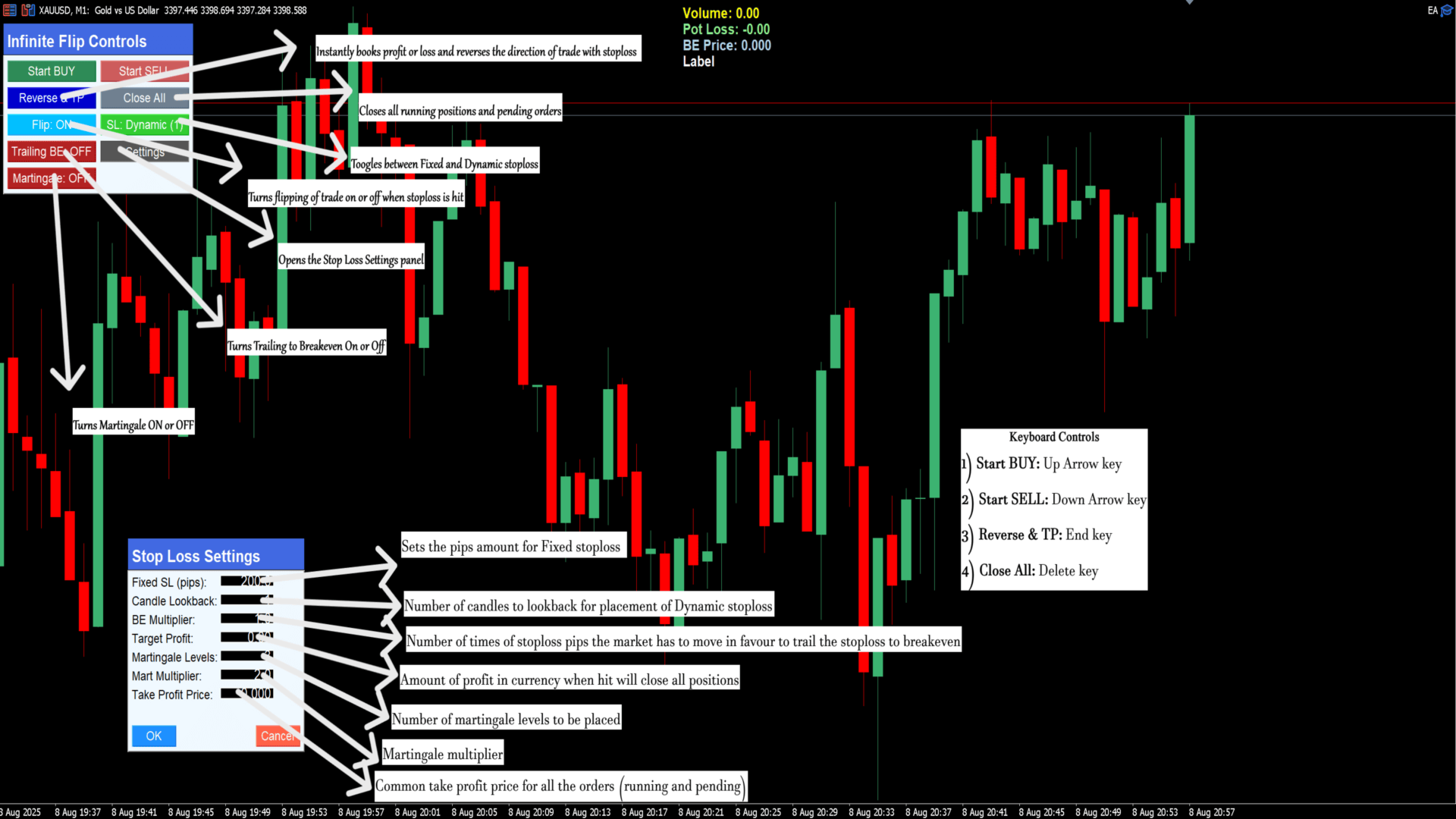
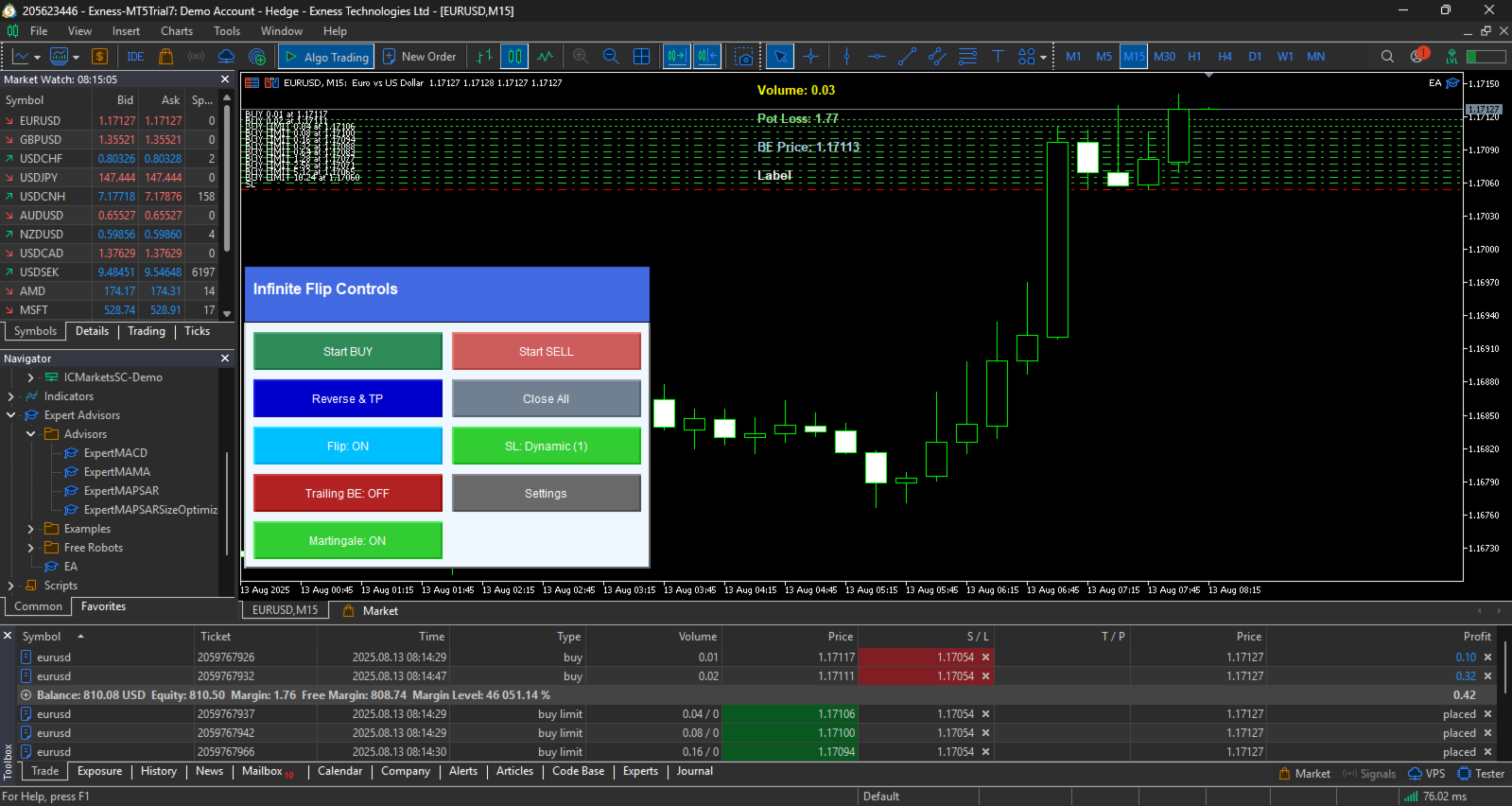
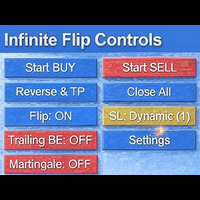
- Header: "Infinite Flip Controls" (blue background).
- Buttons:
  - Start BUY (green): Opens a buy position if no trade is active.
  - Start SELL (red): Opens a sell position if no trade is active.
  - Reverse & TP (blue): Closes all positions/pending orders, flips direction, and opens a new trade (includes martingale if enabled).
  - Close All (gray): Closes all positions and cancels pending orders.
  - Flip: ON/OFF (toggle, sky blue/dark blue): Enables/disables automatic flip on SL hit.
  - SL: Dynamic/Fixed (toggle, green/red): Switches between dynamic SL (based on candles) or fixed pips.
  - Trailing BE: ON/OFF (toggle, green/red): Enables/disables trailing to breakeven.
  - Martingale: ON/OFF (toggle, green/red): Enables/disables martingale pending orders.
  - Settings (gray): Opens the settings dialog.

4.2 Info Labels
Displayed at the top-center of the chart (updates in real-time):
- Volume: Total open volume for EA positions.
- Pot Loss: Potential loss if all SLs are hit (negative value shown as positive loss).
- BE Price: Weighted average entry price (breakeven point).
- Pot Profit: Potential profit if all TPs are hit (shown only if all positions have TP).

4.3 Settings Dialog
Opened via the "Settings" button (draggable via header). Allows runtime changes.

- Header: "Stop Loss Settings".
- Fields:
  - Fixed SL (pips): Set fixed SL distance.
  - Candle Lookback: Candles for dynamic SL.
  - BE Multiplier: Threshold multiplier for trailing BE.
  - Target Profit: Profit level to close all.
  - Martingale Levels: Number of martingale orders.
  - Mart Multiplier: Lot multiplier for martingale.
  - Take Profit Price: Common TP for all.
  - Initial Lot: Starting lot size.
- Buttons:
  - OK (blue): Applies changes and closes dialog. Updates active trades if applicable (e.g., moves SL).
  - Cancel (red): Closes without changes.

Note: Double-click on the chart to set a common TP price (if multiple orders exist).

5. Features Explanation

5.1 Flip Sequence
- When enabled (default: ON), if a position hits SL, the EA automatically flips direction and opens a new trade.
- Disabled: Trades close on SL without flipping.

5.2 Stop Loss Types
- Dynamic SL (default): Based on min/max of recent candles (CandleLookback). For buy: lowest low; for sell: highest high.
- Fixed SL: Fixed pips from entry (default: 10000 pips, adjustable).
- SL respects minimum stop levels and is normalized.

5.3 Trailing Breakeven
- When enabled, trails SL to breakeven (entry price adjusted for commission) once profit reaches Breakeven Multiplier * initial SL pips.
- Skips if already at BE or closer. Checks minimum distance to market.

5.4 Martingale
- When enabled, places pending orders at levels between entry and SL.
- Levels: Divided evenly (step = SL distance / (levels + 1)).
- Lots: Initial lot * multiplier^level.
- Type: Buy limit for buy trades; sell limit for sell.
- Shares SL and TP with main trade.

5.5 Target Profit
- If set (>0), monitors total profit across all EA positions and closes all when reached.

5.6 Common Take Profit
- Set via settings or double-click on chart price.
- Applies to all positions and pending orders (modifies existing).
- Potential profit label shows if all have TP.

5.7 Other Behaviors
- Retries failed order placements every second.
- Handles commission in BE calculations.
- Updates on timer (every second) for trailing, targets, and labels.

6. Keyboard Shortcuts
Active when settings dialog is closed:
- Up Arrow: Start BUY.
- Down Arrow: Start SELL.
- Delete: Close All.
- R or End: Reverse & TP.

7. Risk Management and Disclaimers
- Risks: Martingale can amplify losses. Large lots or high multipliers may lead to margin calls. Dynamic SL may be wider in volatile markets.
- Recommendations: Use small lots (e.g., 0.01). Set reasonable SL and targets. Monitor via info labels. Test on demo accounts.
- Limitations: No TP by default (unless set). Assumes FIFO/netting account types. Debug mode prints logs (enable via #define __MQLDEBUG__).
- Support: Refer to MQL5 Market page or contact developer.

For updates or issues, check the product link. Happy trading!
おすすめのプロダクト
Short Description Swing Timing Breakout EA is a smart Expert Advisor for MetaTrader 5 that combines trend filtering, momentum timing, and dynamic risk management to capture high-probability swing and breakout opportunities. Full Description Swing Timing Breakout EA is a professional trading robot designed for MetaTrader 5, suitable for traders who want a balance between automation, control, and disciplined risk management. This EA uses a trend-following and momentum confirmation approach ,
Panic Panel is a professional manual trade management tool for MetaTrader 5. It allows traders to control open positions quickly and safely directly from the chart. Main Features: - Symbol-specific position control - One-click Break Even - Manual Stop Loss step adjustment - Partial close: 25% / 50% / 75% - Net profit, position count and volume display - Independent per chart operation The panel works only on the active symbol and does not affect other instruments. This tool does NOT open tr
Flow – Hotkey Tool for Discretionary Traders Take full control of MT5 with your keyboard and mouse. Flow is a powerful hotkey-based assistant designed specifically for discretionary traders who want to place orders, draw tools, and operate charts with speed and precision. No more right-click menus or wasting time. Just trade. Key Features Order Execution Place pending Buy/Sell orders (limit or stop) instantly with just a mouse click. Stop Loss and Take Profit lines are automatically attac
This script is an Intelligence Gathering Utility designed to give you full control over your data exports from MetaTrader 5. It allows you to synchronize up to three different symbols into a single file with precise timestamping. 1. Setting the Data Range (Range) You can define exactly which historical period you want to capture: Date Mode : If Last N bars (0 = use date range above) is set to 0 , the script will export all data between your chosen start and end dates. Bar Mode : By entering a nu
AlphaGain AI – 次世代AIによるエリートトレーディング精度 AlphaGain AIは、MetaTrader 5向けに設計された高性能エキスパートアドバイザー(EA)で、AIと過去10年以上のデータを活用し、マーケット環境に応じた自動適応戦略で正確なシグナルを提供します。 主な特徴: AIコア:ローソク足パターン、ボラティリティゾーン、モメンタムロジックを解析; 10年以上のヒストリカルデータで学習; 高度なエントリー/エグジットロジック:SL/TP、トレーリングストップ、ブレイクイーブン、ボラティリティに応じたTP; 資金保護:ドローダウン制限、エクイティガード、最大スプレッドフィルター、取引時間制限; 完全自動運用:人間の介入不要; 低レイテンシー対応:ECN環境に最適化。 推奨設定: 通貨ペア:EUR/USD 時間足:15分(M15) 最低残高:100ドル アカウントタイプ:ECNまたはRaw Spread レバレッジ:1:100以上 AlphaGain AIを選ぶ理由: 簡単導入:.ex5ファイル、.set設定、PDFガイド付属;
Chart Walker Analysis Engine | Machine-led instincts Recommended Time Frames M30, H1 TRADING INTEGRITY: CHART WALKER NEVER REPAINTS ITS SIGNALS. What you see is EXACTLY what you get. Unlike standard indicators that alter past data to look profitable, the Chart Walker Analysis Engine locks its signals into market history the exact millisecond a candle closes.  ONCE PRINTED, IT STAYS FOREVER.  No vanishing Signals. No shifted entries. No historical manipulation. Every buy and sell alert remains
Onyx Sniper - スマートマネーコンセプト (SMC) アシスタント Onyx Sniper は、SMCトレードを簡素化するために設計された、強力で高精度なインジケーターです。高確率のオーダーブロック (OB) と市場構造を自動的に検出し、チャート上に正確なエントリーとエグジットのレベルを提供します。 主な機能: スマートオーダーブロック (OB): 有効な売買オーダーブロックを自動的に識別し、各セットアップの確率スコア(例:85%)を計算します。 市場構造マッピング: Change of Character (CHoCH) と Break of Structure (BOS) のラインを自動的に描画します。 マルチタイムフレームダッシュボード: チャートを切り替えることなく、6つのタイムフレーム(M1、M5、M15、M30、H1、H4)のトレンド方向を即座に確認できます。 組み込みトレードプラン: エントリー、ストップロス (SL)、および4つのテイクプロフィット (TP1-TP4) レベルを備えたダッシュボードを表示します。 クリーンなチャート: テスト済みまたはブレイク
Shadow Ema Pro
Ignacio Agustin Mene Franco
Shadow EMA Pro — Expert Advisor for XAUUSD M5 The smart way to trade Gold on the 5-minute chart Shadow EMA Pro is a 100% automated Expert Advisor, specifically designed for trading XAUUSD (Gold) on the M5 timeframe. It combines classic trend-following logic with high-precision entries through a multi-filter confluence system, achieving consistent performance with robust capital protection built into its core. Recommended initial capital: $1,000 USD Optimized for: XAUUSD · M5 · ECN Broker
スペシャルキャンドル 成功した一目均衡表戦略を持つ最高の外国為替指標の1つを使いたいですか?この一目均衡表戦略に基づく素晴らしいインジケーターを利用できます。 MT4バージョンはこちらです。 第1戦略: この戦略では、まれに発生する類似した強いクロスを特定することが含まれます。 この戦略に最適な時間枠は、30分(30M)および1時間(H1)です。 30分間隔の適切なシンボルには以下が含まれます: • CAD/JPY • CHF/JPY • USD/JPY • NZD/JPY • AUD/JPY • EUR/USD • EUR/GBP 1時間のタイムフレームに適したシンボルには以下が含まれます: • GBP/USD • GBP/NZD • GBP/AUD • USD/CAD • USD/CHF • USD/JPY • EUR/AUD 第2戦略: この戦略では、トレンドと同じ方向に発生した強力なTenkunsenおよびKijunsenのクロスを特定することが含まれます。 この戦略に最適な時間枠は、1分(1M)から15分(15M)です。 この戦略はほとんどの通貨およびシンボルに適用でき
The core idea: using the user interface, you configure the parameters the chart must meet before entering a position (or positions), choose which entry models to use, and set the rules for when trading and planning should end. Lazy Trader  handles the rest: it  takes over all the routine chart watching and execution! full description  :: 3 key videos [1] ->  [2]   ->  [3] What can it do? - Understands Larry Williams market structure - Understands swing market structure by Michael Huddleston
GOM Trade Manager helps you execute trades the way you want it. Works on all instruments Forex, Commodities, & Crypto. It helps you with lot calculations, spread addition and balance calculations so you can just focus on actual trading. For full automatic planned management, stackable triggers and spread widening protection >> check out GOM Trade Manager Pro . ------------------------------------------NOTABLE FEATURES------------------------------------------ You set everything based on bid
FREE
The Expert Advisor will help you forward all alert from  MetaTrader 5 to Telegram channel/ group.  All alert must save to folder <Data folder>MQL5\Files\Alerts\ , text file with format *.txt and screenshot with format *.gif or *.png. Parameters: - Telegram Bot Token: - create bot on Telegram and get token. - Telegram Chat ID:  - input your Telegram user ID,  group / channel ID - Forward Alert: - default true, to forward alert. - Send message as caption of Screenshot: - default false, set true t
BTC Trend Scalper MT5 トレンドキャプチャーエディション — BTCUSDのための精密モメンタムトレーディング トレーダーの皆さん、こんにちは! 私は   BTC Trend Scalper MT5   — 規律あるリスク管理でモメンタムの動きを捉えるために設計されたインテリジェントなビットコイントレーディングエキスパートアドバイザーです。 私は マーチンゲールではありません 。 私は グリッドシステムではありません 。 私は ギャンブルロボットではありません 。 私は トレンドフォロー型スキャルパー です。すべてのローソク足を追いかけるよりも資本を守ることが重要であると理解しているトレーダーのために特別に構築されました。 私の専門は? ビットコイン(BTCUSD) 私の使命は? リスクを厳格に管理しながら、高い確率で方向性のある動きを捉えること。 なぜ「トレンドキャプチャー」なのか? 多くのビットコインEAは、天井や底を予測しようとします。 多くのスキャルパーは、市場のわずかな変動に過剰に取引します。 私は別のアプローチを取ります。 私は待ちま
Classic SNR MetaTrader 5 Expert Advisor | Multi-Symbol Support & Resistance Trading with Trend-Based Logic Overview Classic SNR Breakout EA is a professional trading robot that identifies structural Support & Resistance levels using daily swing points and executes trades based on H1 price action relative to these levels. The EA applies   dual logic : in an uptrend, it sells on H1 rejection below an SNR level; in a downtrend, it buys on H1 rejection above an SNR level. Breakout confirmations are
Gold trend scanner MT5 a multi symbol multi timeframe dashboard that monitors and analyzes Average True Range indicator value in up to 28 symbols and 9 timeframes  in 3 modes :  It shows the ATR indicator value in all pairs and timeframes and signals when the ATR value reaches a maximum or minimum in a given duration. Short term ATR/Long term ATR ratio: It shows ratio of 2 ATRs with different periods. It's useful in detecting short term volatility and explosive moves. ATR Value/Spread ratio: S
AnaliTIck is a financial instrument analysis and testing program based on the Metatrader5 platform. The object of analysis is the sequence of changes in the prices of Bid and Ask - ticks. The program may be useful to developers of scalping advisers and strategies, those who work on the news. When the program is loaded, an array of ticks for the financial instrument, on the chart of which the program is installed, is filled for the current period. The analyzed period is 4 trading days. On this pe
Daily Drawdown Guardian is a focused daily-loss monitor with balance, equity and trailing reference modes. Key functions: - Broker-time daily rollover - Configurable warning thresholds - Persisted daily baseline - Symbol and Magic Number scope - Pending-order cancellation - Optional scoped position flattening - Guarded manual unlock and baseline reset - Event history for operational review This product monitors and enforces limits configured by the user. It does not provide entry signals or gu
HAS RSI Signal — SL/TP自動計算機能付き プロフェッショナル・トレンドインジケーター HAS RSI Signal は、信頼性の高いクラシックな手法と最新のノイズ除去アルゴリズムを融合させた強力なトレーディングツールです。 平均足スムーズド(Heiken Ashi Smoothed) と RSI を組み合わせることで、トレンドの転換点や買われすぎ・売られすぎ圏からの脱出タイミングを正確に捉え、明確なエントリーシグナルを提示します。 主な特徴: 二重のフィルタリング: 平均足スムーズドで市場の「ノイズ」を除去し、RSIで勢い(モメンタム)の強さを確認します。 損切り・利確ラインの自動計算: 単にシグナルを出すだけでなく、ボラティリティ( ATR )に基づいた最適なストップロス(SL) と テイクプロフィット(TP)を自動で算出します。 視覚的な分かりやすさ: シグナルはチャート上にカラーキャンドルとして表示されるため、一目でトレンドを把握でき、取引画面をスッキリと保てます。 充実の通知機能: アラート、音声、スマートフォンへのプッシュ通知機能を搭載。チャンスを逃すこと
PROMETHEUS TECHNICAN VERSION Free | By THE SONS A gift from The Sons — no strings, no trial, no expiry. Every trader deserves access to professional-grade market intelligence. That belief is why Prometheus Technical Version exists, and why it costs nothing. Consider it our handshake to the trading community. What You're Getting This is not a simplified tool dressed up as a gift. Prometheus Technican Version is a fully built, institutional-quality technical analysis indicator running a dual-model
FREE
FUTURES ORDERFLOW FOOTPRINT CHART Professional OrderFlow EA for MetaTrader 5 Version 1.01| Professional tool for real traders | Institutional-Grade Visualization STRATEGY TESTER USERS - PLEASE SELECT EVERY REAL TICK WHEN TESTING AND YOU HAVE DOWNLOADED HISTORICAL DATA. IF YOU SEE A WAITING SCREEN AND IT IS NOT DOWNLOADING, IT MEANS YOU HAVE LOW HISTORICAL DATA. TRY 1 MIN AND 5 MIN FIRST ON 1 DAY DATA. ONE DAY DATA SHOULD BE THE NEWEST AND MOST CURRENT DATE. PLEASE WAIT UNTIL THE MARKET HAS ROL
インジケーターについて このインジケーターは、金融商品の終値に対するモンテカルロシミュレーションに基づいています。モンテカルロ法とは、以前の観測結果に基づくランダムな数値を使用して、さまざまな結果の確率をモデル化するための統計的手法です。 どのように機能しますか? このインジケーターは、歴史的データに基づき、時間の経過とともにランダムに価格が変動する複数の価格シナリオを生成します。各シミュレーション試行は、 終値 の変動を考慮するためのランダム変数を使用し、与えられた期間における将来の市場変動を効果的に模倣します。 モンテカルロシミュレーションの利点 - モンテカルロシミュレーションは、複数の将来のシナリオに対して戦略をテストすることで、さまざまなトレード戦略のリスクを分析するのに役立ちます。 - 稀な極端なイベント(テールリスク)を含むさまざまな市場状況で戦略のパフォーマンスを把握することができます。 - 単一の予測に依存するのではなく、モンテカルロ法は関連する確率を伴う潜在的な結果の範囲を提供します。これにより、利益や損失の可能性を理解するのに役立ちます。 モンテカルロ法は、
Advanced MT5 Indicator: Precision-Powered with Pivot Points, MAs & Multi-Timeframe Logic Unlock the full potential of your trading strategy with this precision-engineered MetaTrader 5 indicator —an advanced tool that intelligently blends Pivot Points , Adaptive Moving Averages , and Multi-Timeframe Analysis to generate real-time Buy and Sell signals with high accuracy.    If you want to test on Real Market, Let me know. I will give the Demo file to run on Real Account.    Whether you're a scal
Ava 3
Sveinn FRIDFINNSSON
5 (1)
AvA 3 SET files AvA 3 - HELLENIC: Dynamic Multi-Module Trading System AvA 3 - HELLENIC is a sophisticated Expert Advisor meticulously engineered for serious forex traders seeking exceptional versatility and precision in automated trading. This powerful EA integrates multiple trading modules within a flexible framework, delivering a complete trading solution adaptable to diverse market conditions. At its core, AvA 3 - HELLENIC features four specialized trading modules - ALPHA, BETA, GAMMA, and
MQLplus Charting  Inspired by good charting solutions available on the web, this utility finally brings some neat features to MT5 to make charting fun again. Current version supports following features: Free floating charts , similar to Tradingview A sophisticated Cross-Hair , with detailed data display Multi-Chart Cross-Hair  sync function Measurement tool , showing account currency, points and period count as results Speed-Scrolling  to move fast through markets history Snail-Scrolling  to p
CosmiCLab SMC FIBO CosmiCLab SMC FIBO is a professional trading indicator designed for traders who use Smart Money Concepts (SMC), market structure analysis and Fibonacci retracement levels. The indicator automatically detects market swings and builds Fibonacci levels based on the latest impulse movement. It also identifies market structure changes such as BOS (Break of Structure) and CHOCH (Change of Character), helping traders understand the current market direction. CosmiCLab SMC FIBO also pr
This tool is used to generate a K - line reflection chart of a currency pair for foreign exchange transactions. For example, if the currency pair is EURUSD, a custom currency pair named EURUSD_ref is generated and a chart for that currency pair is opened. The price of a custom pair of currency is the inverse of the price of the original pair, which is the equivalent of a new pair of currency, the USDEUR. The usage is simple, put it on any chart, the new chart will open, and then draw the corr
Seconds Candles
Mativenga Geoffrey Mativenga
Seconds Candles Chart Utility  This Expert Advisor creates custom time-based candles shorter than 1 minute (10s–50s) by converting incoming market ticks into synthetic OHLC bars. Normally, MetaTrader only supports timeframes like:  M1, M5, M15, H1 etc. This EA allows you to generate sub-minute candles such as: 10-second candles, 20-second candles, 30-second candles, 40-second candles, 50-second candles These candles are written into a custom symbol so they behave like a normal chart. Traders
MAMMA インジケーターは、ストップ、ボリューム、またはリスクのレベルを計算する上級トレーダーだけでなく、初心者にも理想的です。 パラメータを制御し、ツールを取引に適応させるためのコックピットがあります。 このコックピットは、必要に応じて移動したり、単純に縮小して拡大したりできます。 3 つの計算方法があります。 * ロットサイズとストップサイズで何をする予定かを基にリスクを自動計算できます * 予想されるリスクとストップサイズに基づいてロットサイズを設定できます ※想定されるリスクとロットサイズから最適なストップサイズを設定できます。 各計算により、リスクの正確な量を知ることができ、計画されたストップの位置をチャートで直接確認することもできます。 計画を見失わないようにするために、その日の目標と最大損失を設定できます。 最後に、現在の市場または単に現在の日、週、月の進行状況を総合的に確認できます。 ボーナスとして、理想的なストップが提案された新しいオープンポジションごとにアラートを受け取ります。 最後に、コックピットはフランス語と英語の間でプログラミングできます。 ブローカーのサー
Global Investing FX Terminal は、MetaTrader 5 向けのオールインワン FX ダッシュボードです——中央銀行政策金利、CFTC COT ポジション、キャリーランキング、経済サプライズ、オプションスキュー、リテールセンチメント、相関まで、合計 13 のアナリティクスパネルを、ちらつきのない単一キャンバス上に表示し、単一の EA から 10 秒ごとに更新します。外部ソフトウェア不要です。 プロの FX 分析には、通常は別々のプラットフォームに分散しているデータへの同時アクセスが欠かせません。レートデリバティブ、政府統計ポータル、ブローカーのスワップ仕様、オプションデスク——このEAはそれらすべてを、実際に売買判断を下すトレーディングターミナルの単一画面に集約します。 ダッシュボードの表示内容 マーケットオーバービュー FX ペアテーブル — G10 全 28 ペアに加え、ブローカーの Market Watch に NOK/SEK クロスが存在する場合はそれも含めた最大 36 ペアのリアルタイム Bid/Ask。各行にはスプレッド、日次・週次変化、pip
# If you have any other requirements or are interested in collaboration, please contact  dev.quantech.london@gmail.com . Flash Trade (FT) Most friendly manual trading tool. Easy operation to secure your funds. Features of FT Click the chart to trade fast FT supports market orders and pending orders Click twice to complete the order and set SL and TP Click trice to complete the pending order and set SL and TP Automatically set the stop-loss amount of each order to a fixed percentage of the bala
このプロダクトを購入した人は以下も購入しています
Farmed Hedge Yield Farming | All Markets (Manual - Hybrid - Semi/Automated EA) VERIFIED TRADING RESULTS - Farmed Hedge Yield Axi Copy:  https://www.mql5.com/en/signals/2356376 - Farmed Hedge Yield Exn Copy:   https://www.mql5.com/en/signals/2356404 - Farmed Hedge Yield V Copy:  https://www.mql5.com/en/signals/2357156 * Before purchasing, please feel free to send me a message if you have any questions about the product or setup. ** After purchase,  Contact me via private message to receive t
Quant AI Agents are independent trading Expert Advisors. Instead of trading using a fixed strategy like other conventional EAs, Quant AI Agents   is a   multi-agent AI trading framework   that turns natural-language strategy prompts into live.  WANT THE SAME RESULTS AS MY LIVE SIGNAL?   Use the exact same brokers I do:   IC MARKETS , IC TRADING   .  Unlike the centralized stock market, Forex has no single, unified price feed.  Every broker sources liquidity from different providers, creating un
YuClusters
Yury Kulikov
4.93 (43)
Attention: You can view the program operation in the free version  YuClusters DEMO .  YuClusters is a professional market analysis system. The trader has unique opportunities to analyze the flow of orders, trade volumes, price movements using various charts, profiles, indicators, and graphical objects. YuClusters operates on data based on Time&Sales or ticks information, depending on what is available in the quotes of a financial instrument. YuClusters allows you to build graphs by combining da
AI Agent Supervisor is NOT an Expert Advisor. AI Agent Supervisor   is a   multi-agent AI risk & portfolio supervisor   that watches every EA on your account and intervenes in real time.  WANT AN AI PORTFOLIO MANAGER WATCHING YOUR FLEET 24/7?   Run your fleet on the same brokers I do:   IC MARKETS , IC TRADING   .  Unlike the centralized stock market, Forex has no single, unified price feed.  Every broker sources liquidity from different providers, creating unique data streams. The Supervisor r
Check EA performance  https://www.mql5.com/en/signals/2376164?source=Site +Profile+Seller Spot vs Future Arbitrage EA for MT5 Spot vs Future Arbitrage EA is an automated Expert Advisor designed for MetaTrader 5 that operates using price differences between Gold spot and Gold futures instruments. The strategy opens positions on both instruments simultaneously to take advantage of temporary differences between spot and futures prices. Requirements The trading account must provide both Gold spot
Adam FTMO MT5
Vyacheslav Izvarin
5 (2)
ADAM EA Special Version for FTMO Please use ShowInfo= false for backtesting ! Our 1st EA created using ChatGPT technology Trade only GOOD and checked PROP FIRMS  Default parameters for Challenge $100,000 Tested on EURUSD and GBPUSD only  Use 15MIN Time Frame Close all deals and Auto-trading  before Weekend at 12:00 GMT+3  Friday For Prop Firms MUST use special Protector  https://www.mql5.com/en/market/product/94362 --------------------------------------------------------------------------------
Trading Chaos Expert
Gennadiy Stanilevych
5 (11)
This software has no equals in the world and represents a universal trade "console" covering trading signals, automated market entry, setting of Stop Loss and Take Profit, as well as Trailing Profit for multiple trades at the same time in a single open window. Intuitive control of the Expert Advisor in "three clicks" ensures a comprehensive use of all its functions on different computers, including tablets PCs. Interacting with additional signal indicators that mark the chart to give a real mark
Features   With MT5 to Interactive Brokers(IB) Trader, you can: 1. Load chart data from IB to MT5, and Analyze with all standard or customer Indicators. 2. Place Orders to IB Account Directly in MT5. 3. Make your Own EAs upon IB Securities by only making minus changes of the trading function. Usage 1) Installation Copy the "Mt5ToIBTraderEn.ex4" and sample files to [MT5 Data Folder]->MQL5->Experts.  2)  MT5 Settings Add the IP Address to the MT5 Allowed URLs in 'Tools->Options->Expert Adviso
Mt5 To InterativeBrokers Copier allows you to copy deals from MT5 account to Interactive Brokers. With this, you can run your EA strategy on a MT5 Demo/Real Account, then copy all the deals to Interactive Brokers account real time. Features: 1. Copy or Invert-Copy deals Realtime from MT5 to IB Account. 2. Synchronizing positions of both accounts periodicaly, in case any missing copying. 3. You can choose only Buy position or Sell position. Symbols Setup: General Format:  {MT Symbol} -> {IB S
Latency Arbitrage – Ultra Fast Execution & Price Inefficiency Capture Latency Arbitrage  utility tool is designed to exploit short-term price inefficiencies between fast and slow price feeds. Instead of predicting market direction, the EA focuses on execution speed and price deviation opportunities, allowing traders to capture micro-movements before the market fully adjusts. With built-in risk controls and smart filtering, it ensures precise and disciplined trading performance. Price increases b
Unlimited Trade Copier Pro MT5 is a tool to copy trade remotely to multiple MT4, MT5 and cTrader accounts at different computers/locations over internet. This is an ideal solution for you if you are a signal provider and want to copy your trades to other receivers globally on your own rules. One provider can copy trades to multiple receivers and one receiver can get trade from multiple providers as well. The provider can even set the subscription expiry for each receiver, so that receiver will n
One button. One trade. MT5 Trading Deck is a hotkey trading panel for MetaTrader 5 that turns the platform into a keyboard-driven execution cockpit. Stop loss, take profit and lot size are pre-calculated for every key; the moment you press, a market order is live on the broker. A complete technical user manual is attached in the product Comments section. It documents every input parameter, the full hotkey map, the recommended Stream Deck XL layout, and the advanced workflows for Pre-Limit orders
Gamma Edge Pro MT5 — GexBot Classic API Integration Gamma Edge Pro   brings institutional-grade   Gamma Exposure (GEX) data   directly onto your MetaTrader 5 chart — the same data used by professional options traders to anticipate price magnets, hedging flows, and dealer positioning. Powered by the   GexBot Classic API , this indicator automatically maps options market data from US-listed instruments onto any   MT5 CFD instrument   — Forex pairs, Gold, indices, and more — with intelligent price
QCML Assistant
Maxime Turcotte-lafreniere
QCML Assistant MT5 Your Trading. Our Assistant. Your Edge. Looking for a tool that completely transforms your experience on MetaTrader 5? QCML Assistant is the all-in-one solution built by traders, for traders. Just one tool installed on your chart, and you get access to an ultra-complete, ultra-fast, and ultra-simple trading platform. No more hours wasted setting up your workspace. No more complicated trade entries. With QCML Assistant, everything becomes simple, smooth, and efficient right fro
Hedge Trimmer & Roll-Over EA Managing a hedged position means carrying two opposing trades simultaneously. Over time, the losing side grows while the profitable side offsets it. The standard problem is that closing the loser costs money you may not have sitting in cash — it has to come from somewhere. Hedge Trimmer EA solves this by using the floating profit on your winning trades as the funding source to progressively close down the losing side. It identifies which trades are in profit, uses a
News Trader Pro is a unique robot that allows you to trade the news by your predefined strategy. It loads every piece of news from several popular Forex websites. You can choose any news and preset the strategy to trade it, and then News Trader Pro will trade that news by selected strategy automatically when the news comes. News release gives opportunity to have pips since the price usually has big move at that time. Now, with this tool, trading news becomes easier, more flexible and more exciti
エリオット波動カウンターは、エリオット波動を迅速かつユーザーフレンドリーに手動でマークアップするためのパネルです。マークの色とレベルを選択できます。最後のマークアップとツールによって作成されたマークアップ全体を削除する機能もあります。マークアップはワンクリックで作成されます。 5 回クリック - 5 つの波があります。エリオット波動カウンターは、エリオット波動の初心者にもプロのアナリストにも最適なツールです。 エリオット波動カウンターのインストールと入力ガイド 取得したい場合     EA 追加 URL (   http://autofxhub.com   ) MT5 端末に関する 通知 (スクリーンショットを参照)。 MT4 バージョン https://www.mql5.com/en/market/product/14016 MT5 バージョン https://www.mql5.com/en/market/product/15081 一般的な入力: 波の種類ボタン: このボタンを使用すると、ユーザーはチャートで強調表示する波のパターンの種類を選択できます。使用可能なオプションには、イ
If you wish to draw Support and Resistance lines, view: daily market opening, classical pivot levels, Fibonacci pivot levels, trend lines, Fibonacci levels, the remaining time to candle closing, and current spread. If you seek to place your orders with the exact lot that meets your desired stop loss risk. If you wish to do all this and more with just one click, then this is the perfect tool to use. This tool will allow you to feel more relaxed when deciding to open orders, as well as predicting
如果产品有任何问题或者您需要在此产品上添加功能,请联系我 Contact/message me if you encounter any issue using the product or need extra feature to add on the base version. There is Demo version of this panel Dashboard Babon Scalping System MT5 Demo in my product list, please try it out to get familiar with all functionalities for free. Free version: LINK MT4 version: LINK This system basically utilizes TDI, Heiken Ashi Trend, Price Trend on H1 time-frame and TMA on H1&H4 time-frame to generate the trend (big picture). Then
The new version of  MirrorSoftware 2021  has been completely rewriten and optimized.  This version requires to be loaded only on a single chart because  it can detect all actions on every symbol and not only the actions of symbol where it is loaded. Even the  graphics and the configuration mode  have been completely redesigned. The MirrorSoftware is composed of two components (all components are required to work):  MirrorController  (free indicator): This component must be loaded into the MASTER
ClusterSecond
Rafil Nurmukhametov
4.78 (32)
The utility allows you to build different types of graphs: Seconds chart from 1 second to 86400 seconds Tick chart from 1 tick and above The volume chart Delta chart Renko chart Range chart Demo version of the utility https://www.mql5.com/ru/channels/clustersecond Built-in indicators for volumetric analysis: daily market profile and market profile of the selected timeframe, Cluster Search Imbalance VWAP Dynamic POC, VAH, VAL the profile depth of the market vertical volume with various display op
The script displays info about the share's corporate reports and dividends. The data is downloaded from   investing.com : Report date Profit per share (EPS) Revenue Market capitalization Amount of dividends Date of payment of dividends Dividend income The product cannot be tested in the tester (since it is not possible to receive data from the Internet). Before launching:  Add 2   URL   https://ru.investing.com/earnings-calendar/Service/getCalendarFilteredData  and   https://ru.investing.com/di
Telegram Publisher Agent は、 トレーダーが Telegram チャネルおよびグループにリアルタイムでシグナルを送信できるようにするアドオンです。このツールは、カスタマイズ可能なメッセージ、チャートのスクリーンショット、その他の機能を備えており、トレーダーが取引の洞察や戦略をフォロワーと共有するのに役立ちます。このツールは、明暗のテーマ切り替えを備えた美しいデザインも備えており、ユーザーに美的で機能的な取引体験を提供します。 Telegram Publisher Agent は、すべての取引をチャネルおよびグループ内のシグナルとして公開するように設計されています。あなたがしなければならないことは、取引を提供することだけです。その後、ボタンをクリックするだけで、Telegram Publisher Agent が取引シグナルを取引チャネルまたはグループに送信するためのすべての面倒な作業を実行します。 Telegram パブリッシャーエージェント   インストールと入力ガイド EA に関する通知を受け取りたい場合は、URL (   http://autofxhub.
Telegram Notify MT5 Telegram Notify MT5 is an utility tool to bridge your MetaTrader 5 activities to your Telegram chat/channel. It is useful for monitoring your MetaTrader 5 account by sending a notification to your particular Telegram chat/channel when someone/EA is placing trades, modifying order's TP/SL, closing trades and etc. This EA does not place any trade for your account. This EA also could be a convenient tool for monitoring other's EA trading activities or a tool for publishing your
Telegram ChartSnap MT5 is an utility tool to bridge your MetaTrader 5 activities to your Telegram chat/group/channel. It will screen shot your MetaTrader 5 chart and send it to your dedicated Telegram chat/group/channel through a Telegram bot. The whole process will keep repeating based on a time cycle that predetermined by the user. It is a convenient tool for those who like to get access to their favorite system/dashboard that only available at MetaTrader Desktop. Beside that, trader can easi
The  Easy Strategy Builder (ESB)  is a " Do It Yourself " solution that allows you to create a wide range of the automated trading strategies without any line of codes. This is the world’s easiest method to automate your strategies that can be used in STP, ECN and FIFO brokers. No drag and drop is needed. Just by set conditions of your trading strategy and change settings on desired values and let it work in your account. ESB has hundreds of modules to define unlimited possibilities of strategi
Quick operation, quick purchase, sale, empty operation. Provide three buttons: Buy, Sell, empty. Buy: Quickly place more orders after clicking, default 1 hand, profit point and stop-loss point are 110 points, after successful order can be manually modified. Sell: Quickly place an empty order after clicking, default 1 hand, profit point and stop-loss point are 110 points, can be manually modified after the order is successful. Empty: Quickly clear all orders, including purchase and s
Go Depth of Market   This product helps to watch the order book in a easily and friendly way, helping traders to take decisions that are more consistent with the timing of the market. Parameters: Activating EA (robot) mode   if you leave true it will become a robot, if you leave false it will become an indicator. Initial volume  VolumeDynamic   if you leave it enabled will be automatic batch Proportion:   Example: If you put 500 every 500 $ it will open a lot of 1.0 Takeprofit Stoploss Daily pr
1. Record the price data for each Tick transaction. Data file contents: "Tick time", "ASK price", "BID price", "SPREAD SPREAD", "Tick quoted quantity". 2. Meanwhile, generate a quotation data file with a 1-minute period. Content of 1min data file: "ASK time", "ASK OPEN price", "ASK HIGH price", "ASK LOW price", "ASK CLOSE price", "BID time", "BID OPEN price", "BID HIGH price", "BID LOW price", "BID CLOSE price", "Tick quoted quantity". 3. Save all quotation data in one file every day, which is c
私は連星の利用に対するその商用戦略をMT5で自動化しました、そして、我々のMt5BridgeBinaryで、私はそのBinary口座に命令を送りました、そして、私は以下をリストします:簡単なもののこの方法を操作し始めてください! 専門家のアドバイザーは、頑健さテストを最適化して、認識するために、作るのが簡単です;また、テストでは、その長期の収益性(我々がその最高の戦略をBinaryに接続するためにMt5BridgeBinaryをつくった理由です)を、我々は推定することができます。 特徴: - それは、私が望んだくらい多くの戦略を使用することができます。(専門家のアドバイザー)。 - 彼は、更なるプログラムを必要としません。 - 時間枠を輸入することなく、我々のEAを囲んでください。 - それは、すべての開いた活動を視覚化することができます。 - 彼だけは、すべての命令を受けるために1つのグラフだけの中で我々のEAを実行する必要があります。 - 我々のEAが働くように、それは複雑な構成を必要としません。 入場パラメータ: - メール:電子メールは、Binaryのその報告に関するも
フィルタ:
レビューなし
レビューに返信