 MetaTrader 5
 Experts
 Indicators
 Libraries
 Utilities
 Widgets
 Rules
Rules
Watch the Market tutorial videos on YouTube
How to buy а trading robot or an indicator
Run your EA on
virtual hosting
virtual hosting
Test аn indicator/trading robot before buying
Want to earn in the Market?
How to present a product for a sell-through
New trading utilities for MetaTrader 5 - 52
 Below are trading programs simplifying trading in MetaTrader 5. Hover over a utility to read its description and purpose.
Simple Position Manager is a professional-grade MT5 script designed for efficient trade management. This versatile tool allows traders to quickly apply Take Profit, Stop Loss, and Breakeven settings across multiple open positions with precision and reliability. Key Features Multi-Position Management Apply TP/SL to all open positions of the current symbol simultaneously Intelligent position filtering by symbol Batch modification capabilities Smart Breakeven Technology Automated breakeven tri
FREE

Keep your MetaTrader 5 charts alive, updated, and always in sync — automatically.
The MT5 Auto Refresh Utility is a smart, zero-lag chart updater designed for traders who want real-time accuracy across every open chart. Whether you use complex dashboards, multi-timeframe systems, or long-running analysis setups, this utility ensures your charts stay active and refreshed without manual clicks or chart reloading. Why You’ll Love It Automatic Chart Refresh
Refreshes your MT5 chart at a fixed int

K-line Terminator - a countdown tool that accurately grasps every second Core Summary: Still anxious about not knowing when the current candlestick will end? 'Candlestick Terminator' is an indispensable tool in your trading toolbox! It utilizes a clear and intuitive countdown timer to display the precise time remaining for the currently active candlestick in real-time, helping you avoid making hasty decisions during the chaotic moments of candlestick transitions, thus allowing you to enter, exit
FREE
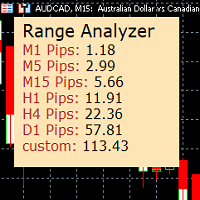
Range Analyzer calculates the Average True Range (ATR) values for different timeframes in pips to give a fast and simple overview about the volatility of the chosen symbol.
Settings are very easy:
bars for calculation: Choose the number of bars for calculation or use the default value (14 periods).
from bar: Choose the youngest bar to start the calculation or use the default setting (0 = current bar). custon timeframe: Choose another timeframe.
You can use it for forex, crypto, indices, comm
FREE
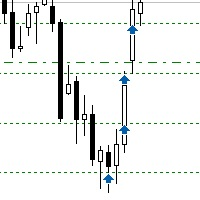
Sometimes the markets are in such a trending phase that it is impossible not to notice and it is enough to simply buy with the trend. 1) So, we scroll through the charts of different instruments, and see a good entry point, so let's specify the desired price for the first order in the Price_for_First_Order parameter and the direction in the Trend_Direction parameter, this is already enough for a good deal. (If Price_for_First_Order=0, the position will open immediately at the market price.) 2) T

Apeiron Edge Alerts - Advanced Price Level Alert System Overview Apeiron Edge Alerts is a powerful and intuitive alert management tool designed for active traders who need reliable notifications when price reaches critical levels. Track unlimited price levels across multiple timeframes with customizable alert settings, visual feedback, and persistent session management. Key Features Flexible Alert Creation Draw Mode : Click anywhere on the chart to create instant horizontal line alerts Make M

Guardian Equity PropFirm EA for MetaTrader 5 Guardian Equity PropFirm is an Expert Advisor designed to automatically enforce daily and monthly loss limits. It is especially useful for accounts subject to strict risk management rules, such as those required by proprietary trading firms. The EA continuously monitors the account and performs automated actions if predefined thresholds are exceeded. Key Features Daily loss control: Set a maximum daily loss percentage (e.g., 4%). Monthly loss c
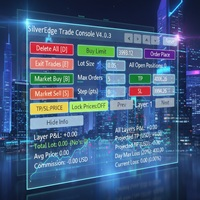
Description SilverEdge Trade Console is a fast, layer-based trading console for MT5 that lets you place, manage, and exit trades in a few keystrokes. It combines one-tap market orders, guided pending orders, per-layer TP/SL control, and a built-in break-even/trailing engine—wrapped in a clean dashboard that docks anywhere on your chart. Designed for scalpers and intraday traders who need speed, consistency, and clear logs. Features Layer-Based Workflow (1–9): Assign and work within layers to sep

Script Name: Close All Positions Language: MQL5 Type: Utility Script Primary Function: Instantly close all open positions on the current trading account Purpose The “Close All Positions” script is a lightweight and efficient tool designed for traders using MetaTrader 5. Its main purpose is to help users quickly exit all active trades with a single click, especially during volatile market conditions or when risk management requires immediate action. Instead of manually closing each position on
FREE

Selam arkadaşlar özellikle gold scalp yaparken zamana ve reflekse ne kadar ihtiyacımız olduğunu biliyorsunuz.
Bu sebeple ben kendime scalp yaparken bana yardımcı olacak buttonlar hazırladım.
ben gold scalp yaparken : 3 .çeşit Sell
3 .çeşit buy close sell close buy
açık emirleri kapat hepsini kapat
şeklinde kendime butonlar hazırladım. ve çok faydasını gördüm.
bütün butonların renklerini lot değerlerini isimlerini değiştirebililrsinz.
kesinnikle çok seveceğinize eminim
bol kazançlar.
FREE

️ EquityShield is your automated risk management guardian for MetaTrader 5. If you've ever exceeded your daily loss limit, struggled to enforce your own trading rules during volatile markets, or wanted to automatically lock in profits when you hit your targets, EquityShield is built for you. This is not a trading strategy - it's a safety system that watches your account 24/7, automatically closes positions when your risk limits are breached, and helps you maintain consistent trading discipline

Product Overview Trade with Natural Language, Let AI Execute Fully. This is a revolutionary MT5 trading program that allows you to describe trading strategies directly in natural language. AI will fully understand and automatically execute all trading operations. No programming knowledge required - simply describe your trading ideas, and the system will fully manage your trading account. It executes your strategy with creativity and optimizes trading strategies on its own! Contact me for a 15-d

EA Info Display Master Stop clicking through charts to find your EA configurations! Get a complete overview of all running Expert Advisors with their symbols and magic numbers in seconds. Managing multiple EAs across different symbols? Monitoring performance on FX Blue or other platforms? This tool instantly displays: All running EA names Their symbols and magic numbers Account details (number, broker, currency) Direct FX Blue statistics links (other provider will follow! Tell me what you need)

Colors schemes powerful MetaTrader 5 script designed for traders who value speed and a personalized trading environment. With a single click, you can instantly transform your chart's appearance using one of several professional, pre-designed color schemes, including popular styles like ICT/SMC. How to Use: In your MetaTrader 5 terminal, open the Navigator window (Ctrl+N). Find the Colors schemes script under the "Scripts" section. Drag and drop the script onto the chart you want to customize. A

Indique facilmente zonas de preço com espaçamento fixo!
O Price Steps Marker desenha linhas horizontais automáticas a cada 5 unidades. Price Steps Marker é um indicador visual simples que organiza o gráfico em zonas de preço equidistantes.
Ele marca automaticamente linhas horizontais a cada valor de 5 em 5 unidades, tanto acima quanto abaixo do preço atual — facilitando a leitura de volume.

This EA help traders close their open positions at a specific MT5 server time before news or before ending of H4 timeframe of the morning New York session to protect their profit or prevent from unexpected loss. The default setting is 19:30 (HH:MM) and you can adjust as require to fit trading strategies. It very user friendly where contain only single input parameter to specify a time that position will be closed.
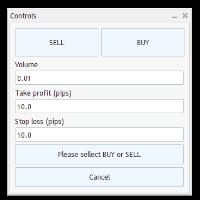
Trade Panel – Smart Order Execution Tool for MetaTrader 5 Trade Panel is a lightweight and intuitive trading assistant designed to simplify manual order execution in MetaTrader 5. It allows traders to quickly place BUY or SELL orders with custom lot size, stop loss, and take profit values — all managed through a clean, responsive interface. Key Features: Fast order placement with one-click confirmation Real-time visualization of Stop Loss and Take Profit lines Editable fields for lot size and pi
CLICK HERE TO SEE ALL MY FREE PRODUCTS
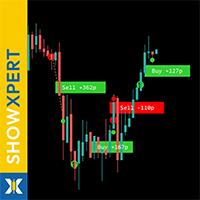
ShowXpert is your visual control center for MetaTrader 5. ShowXpert is an intelligent tool that shows you all your closed Buy and Sell trades directly on the chart , including the result in points and currency . Profits appear in green, losses in red, clearly, intuitively and in real time. At a glance you can see which setups worked and how your current trade is developing. Whether for strategy analysis, live monitoring or simply to make your trading visu
FREE

SmartLimits - Visual Pending Order Manager SmartLimits is a professional trading utility that allows you to manage pending orders directly on the chart with full visual control.
It lets you create, adjust, and confirm Buy or Sell Limit and Stop orders through an intuitive on-chart panel, without opening any MetaTrader order windows. This tool is designed for traders who prefer a fast and organized way to handle orders visually, minimizing repetitive actions and reducing potential input errors. M
FREE

Trade2Telegram — a plugin for automatic trade notifications from MetaTrader to Telegram. This tool is designed for traders managing capital, running signal channels, or leading educational communities. The plugin copies all trading operations from the terminal and publishes them to a selected Telegram chat, group, or channel. Messages are sent automatically when positions are opened or closed, stop-loss or take-profit levels are changed, pending orders are triggered, or trades are partially clos
FREE

Strifor SmartTrade Expert is a solution for professional traders that automates the key stages of trade execution: Instantly sets stop-loss and take-profit levels Fixes the risk per trade (configured in the Expert settings) Saves time and eliminates manual input errors Works perfectly together with Strifor Lot Calculator (the lot size is calculated in the calculator, and the same risk value is set in the Expert) Hotkey ALT+F4 — quick order entry. With a single press, an order is opened with pre-
FREE
VM Auto SLTP Pro - Advanced Order and Risk Management EA
VM Auto SLTP Pro is a professional trade management and risk control Expert Advisor for MetaTrader 5. It automatically sets and manages Stop Loss, Take Profit, Trailing Stop, Breakeven and Partial Close for positions opened manually or by other Expert Advisors. The EA also includes auto lot sizing, recovery modes, Prop Firm filters, news and session filters, pending order tools and Smart Money Concepts (SMC) features, all controlled throu

SFG Grid Manager MT5 – Smart Grid & Mirror System SFG Grid Manager MT5 is a professional automatic grid manager that follows an existing position (manual or EA) and opens one averaging trade per defined step (GridPips). When the primary trade closes or disappears, all the grid trades opened by the manager are closed automatically.
It works on any broker with Netting or Hedging accounts and is fully compatible with manual trading or external Expert Advisors. ️ Main Features Follows a primar

RM Pro – Advanced Trade Manager
Trade Smarter, Not Harder
Stop worrying about calculating lot sizes, risk percentages, or stop-loss levels. RM Pro gives you mental clarity so you can focus purely on your strategy and timing. Just set your risk amount and stop-loss price, and with a single click on Buy or Sell, the Expert Advisor instantly executes the order — automatically calculating the correct lot size, placing the stop loss and managing your trade according to your defined risk. Even pend

**Sync MT5 – Real-Time Multi-Chart Analysis Manager** chart sync
Transform your MT5 platform into a professional analysis workstation. Sync is a comprehensive tool that synchronizes charts, objects, and crosshairs across multiple windows, allowing you to trade with unprecedented precision and efficiency.
**MAIN FEATURES**
1. **Smart Chart Synchronization** - Synchronize symbols and timeframes across multiple charts with one click. - Group system – Organize your charts by strategy or as

This is tool that will help you to manage your trades.you can set target 1,2,3 in points and percentage size of lot size you want to close at this targets.like you have set target 1,2,3 as 5$,10$ and 15$ with size 40%,30%,30%.now if you take entry on xauusd on 4220 with 0.1 lot then it will close 0.04 lot on 5$ target ,0.03 lot at 10$ target and remaining quantity at 15$ target. you can set stoploss also in points. the stoploss and target will be automatically set when you take trade. also there

Kalifx Trade Manager is a smart on-chart trading and risk-management panel for MetaTrader 5. It replaces manual order tickets and spreadsheet risk math with a compact, draggable panel that lets you place, size, and manage trades directly from the chart — including automatic breakeven, trailing stops, and a 3-level partial close (multi-TP) system with draggable on-chart lines. Built for discretionary traders who want the speed of a one-click panel with the discipline of automated risk rules runni

Binance Copier allows to seamlessly and easily copy trades between MT5 and Binance Futures! The tool's main feature is to replicate trades and all available orders between MetaTrader 5 and Binance that can be applied to both Expert Advisors and manually opened ones.
Before purchase please familiarize with comparison between MT5 to Binance and Binance Copier Key Features: Bidirectional Copying - MT5 → Binance (Master Mode): Copy your MT5 trades to Binance - Binance → MT5 (Slave Mode): Mirror Bi

Operative Management Pro – Advanced Trading Utility Operative Management Pro is a smart visual tool for traders who want to analyze and simulate their trades before placing them on the market. This panel displays in real-time the most important parameters of the current symbol: Current price and minimum lot size Required margin Spread cost in USD and pips Take Profit and Stop Loss value in USD Automatic risk and reward calculation With just a click on the chart, you can simulate BUY or SELL t

AZ Trade Recovery Assistant MT5 combines manual trading flexibility with intelligent automated management.This advanced on-chart panel isn’t just for trade execution — it’s a complete trade management assistant. You can open or close positions instantly, adjust lot size, manage trailing stops, and modify Take Profit or Stop Loss — all directly from the panel. It’s built for traders who want full control of their trades with smart automation running in the background. What truly makes this assist

Imagine flying a real aircraft without ever stepping into a flight simulator. That's what trading is like. You have to simulate your strategy before you can take it to a live market. It is good if you can simulate things speedily before even stepping into any live market, or before coming up with an automated system. People don't have all day to stare at a higher timeframe chart until the entry signal finally arrives. That's why I built this so that you can simulate your strategy with speed. Th
FREE

[Regarding Investment Issues]
Question 1:
When market opportunities arise, most investors tend to place orders frantically. However, when placing orders in such a frantic manner, you have no way of knowing whether you will be liquidated. The only reference is the margin ratio, but the margin ratio cannot accurately determine whether you will be liquidated.
If the order quantity is large or the product order quantity is even larger, you cannot calculate the loss and profit. If there is a t
ATTENTION ! Utilities do not have a good functionality on backtest mode. For Having a Demo Trial, message me from message box and receive 3 days trial.
Our Team Services: If you are want to see our products click the link: LINK If you have an idea you'd like to develop into an application, click the link: LINK
Instant on-chart stop & target levels, from 1:1 up to 1:6. Trade Ratio Lines MT5 draws an open stop line and objective lines (take-profit) at fixed R-multiples relative to your entry

Heartbeat Agent is a cross-platform utility for monitoring the status of your trading terminal, compatible with both Windows and Linux. This tool sends regular GET requests to a specified URL, allowing you to monitor the terminal's performance and receive real-time updates on its status. If the connection to the terminal is lost for any reason, you will be immediately aware and can take the necessary actions. Key Features of Heartbeat Agent: Cross-Platform Compatibility: Heartbeat Agent supp
FREE
Manual trading panel — opens one test trade for validation only.
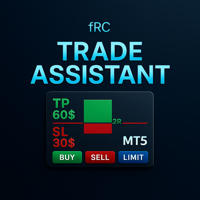
fRC Trade Assistant — Smart Manual Trading Panel fRC Trade Assistant is an intelligent trading panel designed for manual traders.
It allows you to open positions with one click, calculate lot size based on your predefined risk, and automatically place Stop Loss (SL) and Take Profit (TP) levels. For example, if your balance is $1000 and you set a 1% risk ,
the panel automatically calculates the appropriate lot size.
When the trad

Overview MAVIS Trader is a powerful one-click trading panel designed for traders who value speed, clarity, and precise control.
It lets you open multiple Buy/Sell positions instantly, automatically synchronize SL/TP levels across all open trades, and close every position on the symbol with a single click.
Perfect for scalpers, grid traders, and anyone who needs consistent, mirrored risk management without manual editing Key Features One-Click Buy/Sell: Open several trades at once with your

Overview:
The Drawdown Control Limiter MT5 is a robust and efficient tool designed for traders who aim to monitor and limit drawdown levels in their MetaTrader5 Live/Demo accounts. This Expert Advisor provides real-time tracking of drawdown percentages or amounts and automatically closes positions if the specified limits are exceeded, helping protect your capital. EA account drawdown protector is designed for normal trading Live and Demo accounts (not for Prop Firms) . Key Features: Customiza

Toma el Control Absoluto de Tus Operaciones ¿Cansado de calcular manualmente el tamaño de tu posición o de sudar frío esperando a que el precio toque tu stop loss? La gestión del riesgo es la línea que separa a los traders consistentes del resto. No dejes tu capital en manos de la improvisación. Presentamos la Calculadora de Posición y Riesgo , tu nueva aliada esencial para operar con precisión y disciplina profesional. Con esta poderosa herramienta, tú: Maximiza tu Potencial: Calcul
FREE

Short Description:
Prop Firm Protector EZ MT5 is an EA designed to protect your funded account by managing risk and ensuring compliance with the Prop Firm's trading rules. This EA automatically monitors equity levels, closes trades when profit targets or drawdown limits are reached, and provides a visual display of key account metrics. The EA features a Super Easy setup, is simple to use, and works with all different Prop Firm service providers.
Overview:
Prop Firm Protector EZ MT5 is an Draw
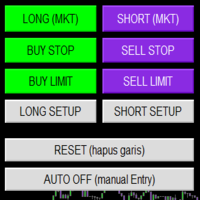
Smart Trade Panel
Trading Assistant is a powerful and elegant one-click trading panel for MetaTrader 5 — designed for professional traders who value speed, precision, and clarity.
Whether you scalp XAUUSD, swing trade indices, or run tight risk management, this tool gives you complete control with a clean visual layout, automatic ATR-based setups, and adaptive risk calculation.
️ Main Features One-Click Execution
Instant Buy/Sell Market Orders with pre-defined SL/TP
Supports Buy Stop
FREE

NiceProTrader Manager - Professional Risk & Trade Management Panel Trade with Confidence, Not with Fear! Control Your Exact Risk in Dollars with One Click. 2. Product Overview (The "Why") "Tired of complex lot size calculations and the fear of risking more than you planned? NiceProTrader Manager is a powerful and intuitive panel for MetaTrader 5 that revolutionizes how you manage your trades. Set your exact risk, stop loss, and take profit in dollars , not pips, and let the EA handle all the co

The Trade Panel Dashboard is a powerful, user-friendly interface designed to streamline and enhance your trading experience. This centralized hub provides real-time data visualization, advanced analytics, and seamless execution tools, empowering traders to make informed decisions with precision and speed. Key Features: Real-Time Market Data
Access live price feeds, market trends for multiple assets (stocks, cryptocurrencies, forex, commodities, etc.) in one consolidated view. Order Management
CLICK HERE TO SEE ALL MY FREE PRODUCTS
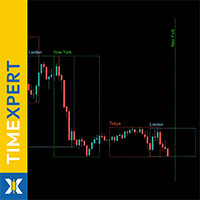
TimeXpert is a fully free tool for MetaTrader 5 that displays the global trading sessions – Tokyo, Sydney, London, and New York – directly on your chart. Instead of calculating times manually, you get an automatic, color-coded overview that shows at a glance when markets open, overlap, or close. This allows you to instantly identify where volatility emerges, when liquidity increases, and which periods best fit your trading strategy. All elements are ful
FREE

Telegram2MT5 Signal Copier — Automate Your Telegram Copy Signals Directly in MetaTrader 5 With Telegram2MT5 Signal Copier, every signal you receive on Telegram is executed instantly and automatically in your MetaTrader 5 account. Telegram to MT5 - Fast, reliable, and fully customizable.
Get the Windows Bridge APP File and Tutorial Bridge file are needed to connet de Local Web Panel to the MT5 EA Compatible with Windows 10 & Windows 11 - 64 bits - And Windows Server from 2016 Main Features Ful

AIX GROK FJU ASSISTANT | MetaTrader 5 AI-Powered Trading Advisor Transform your trading with the AIX GROK FJU ASSISTANT, an advanced MetaTrader 5 (MT5) Expert Advisor (EA) that leverages cutting-edge AI technology from GROK (powered by xAI) to provide real-time technical analysis and trading insights. Designed for both novice and seasoned traders, this EA connects your MT5 charts to GROK AI, delivering data-driven, emotion-free trading signals directly to your Discord or Telegram. By analyzing c

Manual position management. Missing SL. Price moves against you. No protection.
Trade Manager Lite automates Stop Loss, Take Profit, Trailing Stop, and Break-Even for your open positions. Attach to one chart. Configure your default SL/TP distance. Let it manage your positions automatically. What's Included (FREE Version) Auto SL/TP: Applies missing Stop Loss and Take Profit to positions based on your configured distance in points Trailing Stop: Adjusts SL dynamically as price moves in your favor
FREE

QuotesDownloader is a script for MetaTrader 5 that exports historical quotes of 28 currency pairs and gold (XAUUSD) to Excel. Key Features: Export data for the last 2290 days, hours, or 15-minute intervals. Supports 28 currency pairs and XAUUSD. Select timeframe: daily, hourly, or 15-minute. Automatic export to Excel for further analysis. Benefits: Simplifies the process of obtaining historical data. Suitable for traders, analysts, and strategy developers. Compatible with MetaTrader 5.

R.E.A. Automatic Risk Monetary (MT5) – Per-symbol manager for manual entries & pending orders Summary (hero) Automate risk management for manual trades (magic 0) and pending orders on the chart’s symbol : SL/TP by % of balance or fixed amount , BreakEven and Trailing (for positions), with instant reaction on order placement/execution. What it does Locked to the symbol where you attach it, this EA manages only: Your manual positions on that symbol. Your pending orders on that symbol (limit/stop/s
FREE

Take your technical execution to the highest level with the Fimathe Robot Designed specifically for professional traders who demand absolute precision, stability, and tactical flexibility, this Expert Advisor automates the time-tested Fimathe methodology by combining the intelligence of modern algorithms with a robust, high-performance interface. With a modern visual layout, the Painel Pro 5.5 offers complete operational freedom: execute trades in 100% manual mode with panel assistance or activ

TM Assistant Trade is a trading assistant tool designed for MetaTrader 5 (MT5). It helps users configure, monitor and manage trades directly on the chart through an interactive interface, minimizing manual operations and improving trading consistency. Introduction to TM Assistant Trade 1. Trading Interface
Line Function - Display on the trading screen (Entry price - Take profit - Stop loss) through icons and lines to help traders perform operations more conveniently.
Main area with screens displ

PGS Trade Panel – Professional Trade Management Tool for MT5 Take full control of your trading with structured execution, real-time feedback, and customizable automation, all directly on your chart. Profit Guard System Trade Panel is an advanced on-chart trading tool designed to give you discipline, clarity, and precision in every trade. It supports manual, semi-automated, and automated workflows with multiple strategies that can be enabled, customized, or disabled at any time. Automatic Take P

Telegram Trade Notifier for MT5 is a professional notification system that sends instant messages to your Telegram group or channel every time a trade is opened or closed on your MT5 account. MAIN FEATURES Sends notifications for every trade open and close
Compatible with Telegram Groups, Channels, and Topics (threads)
️ Customizable scan frequency and filters
Persistent memory (no duplicate messages after restart)
Ignores trade history — sends only new events
️ 100% safe: no DLLs

TradeVision is a simple and elegant performance indicator for MetaTrader 5. It was designed to give traders a clear and instant overview of their results. Gone are the days of digging through your account history! TradeVision displays a comprehensive and visually intuitive dashboard directly on your trading chart. At a glance, you can assess your efficiency and make more informed decisions. The widget displays your real-time performance statistics, segmented by key periods for a detailed and re

Auto-Shutdown MT5 Terminal - Saves you from Over-Trading by automatically closing MT5 Termial when daily loss limits are breached Love it? Hate it? Let me know in a review! Feature requests and ideas for new tools are highly appreciated. :)
Try "The AUDCAD Trader":
https://www.mql5.com/en/market/product/151841 ️ Your Automated Discipline Enforcer "I'll just make back what I lost..."
"One more trade to break even..."
"I can't end the day red..."
Sound familiar? These thoughts have d
FREE
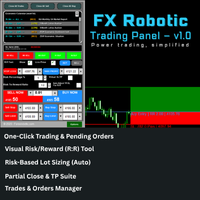
FX Robotic Trading Panel — v1.0 by Forex Robotic All-in-one MT5 panel for one-click execution, visual R:R control, risk-based lot sizing, partial closes (incl. virtual TPs), news, and MA signals—right on your chart. Overview FX Robotic Trading Panel is a professional, on-chart control center for MetaTrader 5 that blends lightning-fast trade execution , visual Risk/Reward management , auto lot sizing from risk% , staged partial take-profits (real or virtual ), an economic calendar , and a multi
FREE

Category: Utilities → Trade Panels
Version: 1.2 (auto-sizing buttons + adjustable font size) ClickCloserExpress is a super-lightweight panel for MetaTrader 5 that lets you close positions instantly by profit/loss, symbol, side (Buy/Sell), and magic number— without opening new trades or cluttering your chart. Perfect for manual/semi-auto management, scalping, and fast portfolio clean-ups. What it does One-click closing of: All positions. Profitable only or losing only . Symbol on chart o

Candle Time (MT5) The Candle Time indicator shows the remaining time for the current candle on the active chart timeframe. It adapts automatically to the chart period and updates on every tick. This is a charting utility; it does not provide trading signals and does not guarantee any profit. Main functions Display the time remaining for the current candle on any timeframe (M1 to MN). Color-coded state: green when price is above the open (up), gray when unchanged, and red when below the open (do
FREE

Adaptive ATR Trailing Stop (MT5)
Overview Adaptive ATR Trailing Stop is a utility Expert Advisor for MetaTrader 5 that manages stop loss levels for existing open positions. It uses the Average True Range (ATR) to calculate a volatility-based trailing distance.
This EA does not open trades. It only modifies the Stop Loss (SL) of existing positions and keeps the current Take Profit (TP) unchanged.
How it works - The EA runs on every tick of the chart where it is attached. - For each open posit
FREE

Elsna Alert (MT5 EA) is a lightweight Expert Advisor that monitors your trading account in real time and alerts you whenever a trade is opened or closed . It uses MetaTrader 5’s built-in OnTradeTransaction event to instantly detect any new executed deals—manual or automated—and plays a custom sound for each event.
You can choose whether it tracks all symbols or only the chart’s symbol . Key features: Instant audio alert when a trade opens or closes. Works with both manual and EA-driven trades. O
FREE

Помощник для ручной торговли. Рассчитывает лот по вашему риску, показывает все параметры сделки до её открытия.
Два режима: Market - для входа по текущей цене. Линия Open следит за Ask/Bid автоматически. Breakout - для отложенных ордеров. Выбираешь свечу и таймфрейм, линии ставятся на High/Low.
Можно менять цвета линий, переназначать клавиши, двигать панель куда удобно.
FREE

BTC Trading Assistant EA (MT5) Manual trading assistant that helps place and manage trades with automated risk and stop management. Overview BTC Trading Assistant EA is a utility Expert Advisor for MetaTrader 5 intended for manual traders. It provides a chart interface to execute BUY/SELL/CLOSE actions and automates selected trade management functions such as position sizing, initial SL/TP placement, break-even, trailing stop and optional partial profit taking. This EA does not generate trade si

Trade History By Magic Indicator Unlock Your Trading Insights with Trade History By Magic! Enhance your MetaTrader 5 experience with this powerful indicator designed for traders who demand precision and clarity. Trade History By Magic provides a clear, real-time display of your trading history, organized by magic numbers, directly on your chart. Perfect for both automated and manual traders, this tool helps you track performance effortlessly. Key Features: Organized Trade Tracking : Displays tra

# Trading Info Panel - Your Complete Trading Dashboard
## Why This Indicator Was Created
As a fullscreen trader, I was constantly frustrated with the hassle of: - Exiting fullscreen mode to check positions - Switching between charts and the terminal window - Losing focus on price action while checking account status - Missing critical margin levels during active trading
**I needed a simple, elegant solution that kept all vital trading information visible at a glance - without disruptin
FREE

Product Name: Magic Simulator “ Find your own 'Signature Setup ” Version: 1.0
From 'I Missed It' to 'I Took It' Transform those frustrating near misses into consistent winners. Practice each setup until your reaction becomes automatic and hesitation-free.
Full Product Description: Become a Confident, Disciplined Trader – Risk-Free Have you ever felt the sting of a bad trade and wished you could rewind time? Do you struggle with fear, greed, or hesitation? Ever spotted the perfect setup but mi

sTrade UI is a compact, lightweight alternative for O ne-Click Trading which built-in MT5 didn't offer.
Designed for traders especially scalpers who want a clean and fast trade execution. Key features: Minimal CPU footprint Docked One-click Right Panel to Perform New Position*
One-click Close at Position's Price* Ability to Close All Position* Option to stick Position's PL info to latest candle and able to colorize it *: Tied to EA's Magic number (EA's Id), set to 0 if want Globally This is m
CLICK HERE TO SEE ALL MY FREE PRODUCTS
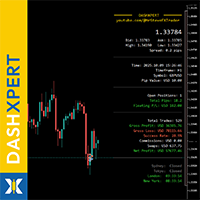
DashXpert is a completely free, powerful dashboard for MetaTrader 5 , displaying all essential market data, account information, and performance statistics directly on your chart . Instead of switching between windows and tabs, DashXpert gives you a central, intelligent overview – optimized for maximum clarity, minimal distraction , and a professional look. It provides a real-time, clear overview of your open positions, profits and losses, success rate,
FREE

Stats Dashboard & Journal Pro for MT5 - Trading Analytics Tool
Real-Time Performance Analysis & Professional Journaling for MetaTrader 5
Stats Dashboard Pro is a comprehensive analytics tool designed for MetaTrader 5 traders who need detailed performance insights, data-driven analysis, and a professional journaling system to master their trading discipline.
Public channel: CLICK HERE...
---
KEY FEATURES
* Multi-View Analytics Interface * 6 Interactive Tabs: Journ
FREE
OVERVIEW Transform your MT5 trading account into an automated signal execution station! This Expert Advisor automatically receives and executes trading signals from Telegram channels in real-time, enabling seamless copy trading operations from master accounts.
SYSTEM NOTICE: This EA receives and executes trading signals FROM Telegram channels. To broadcast signals TO Telegram, you need the companion EA: " Telegram Signal Broadcaster MT5 " (sold separately). KEY FEATURES: Automated signal recept

Play Trading: Get started in trading by playing and learning how Limit (rebound) and Stop (continuation) orders work. From a mobile and transparent panel (by clicking on the header), anticipate market developments and place Limit and/or Stop orders. Set the initial distance to generate the grid with the number of orders you want (for each type of order). Set the take profit points and lot size as you wish. Set the type of orders you want: BUY – SELL – NO (delete orders) – BOTH (Buy and Sell
FREE

EdgeZone EA Inspector - FREE Edition Monte Carlo Analysis Tool for Trading Strategies Important: This is an analysis tool, not a trading robot. It does not execute trades but analyzes strategy data through statistical simulations. The Problem Many Expert Advisors show impressive backtest results but fail in live trading. The most common reason: over-optimization - the strategy was adjusted until it looks perfect for past data, but doesn't work for the future. The Solution: EdgeZone EA Inspector
FREE
The MetaTrader Market is a simple and convenient site where developers can sell their trading applications.
We will help you post your product and explain you how to prepare your product description for the Market. All applications on the Market are encryption-protected and can only be run on a buyer's computer. Illegal copying is impossible.

You are missing trading opportunities:
- Free trading apps
- Over 8,000 signals for copying
- Economic news for exploring financial markets
Registration
Log in
You agree to website policy and terms of use
If you do not have an account, please register