 MetaTrader 5
 エキスパート
 インディケータ
 スクリプト
 ライブラリ
 ストレージ
無料でロボットをダウンロードする方法を見る
Facebook上で私たちを見つけてください。
私たちのファンページに参加してください
私たちのファンページに参加してください
スクリプトを気に入りましたか?MetaTrader 5ターミナルの中でそれを試してみてください。

License Guard - account number and expiry date lock for your own EA - MetaTrader 5のためのライブラリ

- ビュー:
- 8
- パブリッシュ済み:
-
 取引の機会を逃しています。
- 無料取引アプリ
- 8千を超えるシグナルをコピー
- 金融ニュースで金融マーケットを探索
-
 このコードに基づいたロボットまたはインジケーターが必要なら、フリーランスでご注文ください
フリーランスに移動


OVERVIEW
Many EA developers who sell or give an EA to a client want the .ex5 to work only on the client's account, and only until a certain date. LicenseGuard.mqh is a small include file for exactly that. You add a few #define lines and four function calls to your EA, compile one .ex5 per customer and send only the .ex5.
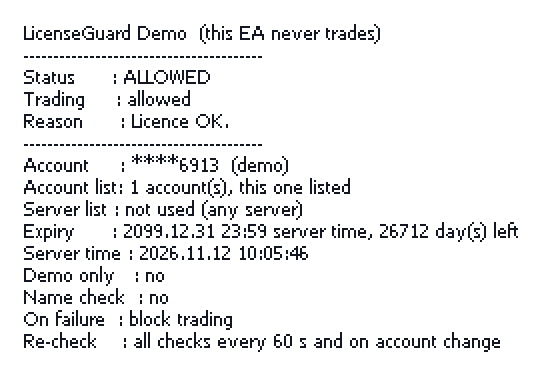
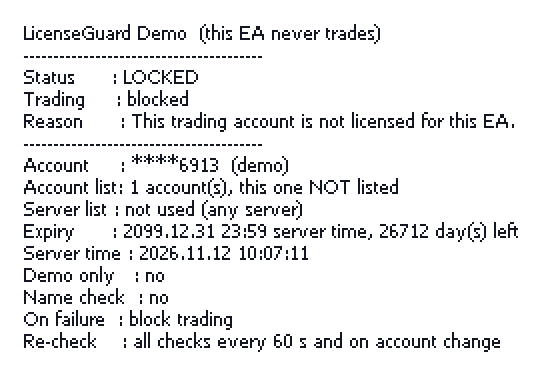
The included LicenseGuardDemo EA (LicenseGuardDemo.mq5, MT5) never sends orders. It runs the checks and shows the result on the chart, so you can see how each setting behaves before you add the file to your own EA.
WHAT IS CHECKED
All checks are optional and can be combined:
- Allowed account numbers: a comma separated list, e.g. "12345678,87654321". Empty = any account.
- Allowed trade server names: a comma separated list of the exact server names (upper and lower case ignored). Empty = any server.
- Expiry date in broker server time, e.g. D'2027.12.31 23:59'. Trading stops at the moment this time is reached. A date without a time, e.g. D'2027.12.31', means 2027.12.31 00:00, so trading stops at the START of that day. 0 = no expiry.
- Demo accounts only.
- Account holder name (compared without leading or trailing spaces, ignoring upper and lower case).
When a check fails:
- the reason is written to the Experts log once (not repeated on every tick) and shown in the chart corner,
- and, depending on LG_ON_FAIL, either trading is blocked (LG_TradingAllowed() returns false, the EA stays on the chart) or the EA removes itself with ExpertRemove(). The EA is removed only after two failed checks in a row, the second about one second after the first, so a single bad reading right after start-up does not remove it. Trading is blocked from the first failed check.
When the checks run (by default, with the built-in timer):
- at start (OnInit),
- again every LG_RECHECK_SECONDS seconds (default 60). Every check is repeated, not only the expiry date, so account values that arrive late from the server are read again,
- at once when the logged-in account changes,
- on every call while the terminal is not connected or the account data have not arrived yet (for example right after the terminal starts). The state is then WAITING: trading is blocked and the EA is not removed.
With LG_NO_TIMER the checks run only when your EA calls LG_TradingAllowed() or LG_OnTimer() (using the same rules as above).
A mistake in the settings (for example a letter in the account list, or a server list with no name in it) locks the EA with a "settings error" message, so a typo never leaves it unlocked.
WHY #define AND NOT input
Anything shown in the Inputs tab can be changed by the person who uses the EA. If the account list or the expiry date were inputs, the buyer could type in his own account number or a later date. This is why all settings are compile-time constants. Please do not turn them into inputs.
HOW TO USE
1. Copy LicenseGuard.mqh to MQL5\Include\ (MQL4\Include\ for MT4).
2. In your EA, before the #include, set what you need:
#define LG_ALLOWED_ACCOUNTS "12345678,87654321"
#define LG_EXPIRY D'2027.12.31 23:59'
#define LG_DEMO_ONLY false
#define LG_ACCOUNT_NAME ""
#define LG_ON_FAIL LG_BLOCK_TRADING // or LG_REMOVE_EA
#include <LicenseGuard.mqh>
3. Call it from your EA:
int OnInit()
{
int r = LG_Init();
if(r != INIT_SUCCEEDED)
return(r);
// ... your initialisation ...
return(INIT_SUCCEEDED);
}
void OnDeinit(const int reason) { LG_Deinit(reason); }
void OnTimer() { LG_OnTimer(); }
void OnTick()
{
if(!LG_TradingAllowed())
return;
// ... your trading code ...
}
4. Compile and send only the .ex5 (never the .mq5) to the customer.
IMPORTANT - IF YOUR EA USES ITS OWN TIMER
By default LG_Init() calls EventSetTimer(1) and LG_Deinit() calls EventKillTimer(). An EA has only one timer. If your EA calls EventSetTimer() itself, you MUST add #define LG_NO_TIMER before the #include and call LG_OnTimer() from your OnTimer(). Otherwise your timer and LicenseGuard's timer overwrite each other, and LG_Deinit() also stops your timer.
Settings you can define (all optional; defaults in brackets):
- LG_ALLOWED_ACCOUNTS ("" = any account)
- LG_ALLOWED_SERVERS ("" = any server)
- LG_EXPIRY (0 = no expiry)
- LG_DEMO_ONLY (false)
- LG_ACCOUNT_NAME ("" = not checked)
- LG_ON_FAIL (LG_BLOCK_TRADING)
- LG_RECHECK_SECONDS (60, allowed 1 to 86400)
- LG_SHOW_ON_CHART (true; uses Comment() while trading is blocked)
- LG_PRINT_IN_TESTER (false; no log lines in the Strategy Tester)
- LG_NO_TIMER (not defined; see above)
Functions: LG_Init(), LG_Deinit(reason), LG_OnTimer(), LG_TradingAllowed(), LG_State() (LG_STATE_OK, LG_STATE_LOCKED, LG_STATE_WAITING), LG_Reason(). The object g_licenseGuard gives more details (checked account, number of listed accounts and servers, server time used).
LicenseGuard does not define OnTimer() itself, so it does not clash with your code.
THE DEMO EA
Copy LicenseGuardDemo.mq5 to MQL5\Experts\. Change the #define lines at the top of the demo, compile and attach it to a chart:
- your own account number in LG_ALLOWED_ACCOUNTS: Status ALLOWED,
- another number: Status LOCKED, "This trading account is not licensed for this EA.",
- LG_EXPIRY in the past: Status LOCKED, "The licence expired on ... (server time).".
The panel shows the status, the reason, the account type, whether the account and the server are in the lists, the expiry date with the days left, and the server time used for the check. It is redrawn when the status changes and every 5 seconds, and not at all in a non-visual Strategy Tester run. Only the last four digits of the account number are shown, so a screenshot does not reveal the full number. With the default settings the demo prints nothing to the log.
LIMITS - PLEASE READ
- This is a simple licence lock, not copy protection that cannot be broken. It stops an .ex5 from running on accounts you did not license. It does not protect the .ex5 file against decompiling or patching; nothing written in MQL can do that. Never give the .mq5 source to a customer.
- Account numbers are given out by each broker. An account with the same number at another broker also passes the account number check. Add LG_ALLOWED_SERVERS if this matters to you.
- Expiry and the PC clock: "now" is the later of TimeCurrent() (time of the last quote received from the broker server) and, in MQL5, TimeTradeServer() (which keeps running on weekends). Setting the PC clock back does not move TimeCurrent() back, so it does not extend the licence; setting it forward only ends the licence earlier. The time used never goes backwards while the EA is running. MQL4 has no TimeTradeServer(), so MT4 uses the quote time only, which stops while the market is closed.
- Strategy Tester: the time there is the simulated time, so a backtest of past dates is not stopped by the expiry date. The account checks use the account the terminal is logged in to, also in the tester.
- The account holder name is whatever the broker stores, and brokers may write it differently. The account number list is the more reliable check.
- There is no online licence server (no DLL, no WebRequest, no files). To extend or change a licence, compile a new .ex5 and send it.
- Comment() is shared by all programs on a chart. If your EA writes its own Comment(), set LG_SHOW_ON_CHART to false and show LG_Reason() in your own text. LicenseGuard leaves its message on the chart only when it removed the EA itself.
COMPATIBILITY
- MetaTrader 5 (MQL5) and MetaTrader 4 (MQL4, build 600 or later): the same LicenseGuard.mqh.
- No DLL, no WebRequest, no file access, no global variables of the terminal.
This code is a programming example. It does not contain any trading method.
 GDS レンコ・トレード・マネージャー — MetaTrader 5
MetaTrader 5用の手動取引マネージャー:レンコ・ブリックの表示、設定可能なブレークイーブンおよびトレーリングストップロス、さらにチャート上のレンコ・ダッシュボードを備えています。自動エントリー機能はありません。
 Marginal Drawdown Contribution Analyzer
複数のエキスパートアドバイザーや設定を実行している口座向けのスクリプトです。このスクリプトは、各設定(マジックナンバー、またはマジックナンバーとシンボル)の純結果を暦日ごとに集計し、各設定がポートフォリオのドローダウンにどの程度寄与しているかを測定します。具体的には、「リーブ・ワン・アウト法によるドローダウンの増加分」、「最悪のドローダウンに占める割合」、および「オイラー分散の割合」を算出します。 評価結果、推奨事項、およびA+からFまでのヒューリスティックスコアを出力します。組み込みのデモポートフォリオ上でそのまま実行可能で、純粋なMQL5で記述されています。
 Adaptive Moving Average (AMA)
適応移動平均線は、ノイズの影響を受けにくい移動平均線を作るときに使われ、トレンドを検知する際にラグが最小に抑えられるという特徴を持ちます。
Accelerator Oscillator (AC)
アクセルレーション/デセレレーションインジケーター(AC)は現在の市場を動かす力の加速と減速を測ります。