Arman Gold Sniper
- Experts
- Versione: 1.0
- Attivazioni: 5

1. Introduction
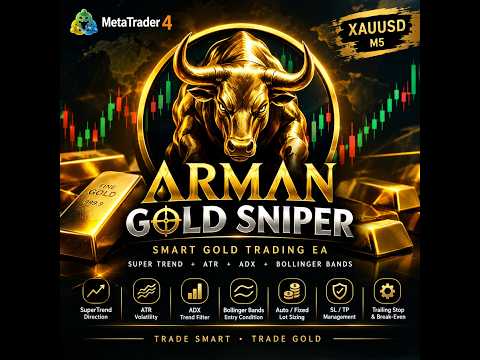
Arman Gold Sniper is an automated trading Expert Advisor developed for MetaTrader 4 (MT4), designed specifically for trading Gold against the US Dollar (XAUUSD).
The EA combines the SuperTrend indicator with Average True Range (ATR), ADX trend-strength filtering, and Bollinger Bands conditions to identify potential market entry opportunities.
Its trading system is designed to detect changes in market direction and manage trades using predefined Stop Loss, Take Profit, automatic lot sizing, Break-Even, and Trailing Stop functions.
The recommended trading timeframe is M5 (5 minutes).
Arman Gold Sniper is designed for traders who prefer a systematic approach to gold trading, with automated signal processing and configurable risk-management parameters.
Product Highlights
-
Designed for Gold (XAUUSD).
-
Recommended timeframe: M5.
-
SuperTrend-based direction detection.
-
ATR-based volatility analysis and trade distances.
-
ADX trend-strength filter.
-
Bollinger Bands entry conditions.
-
Automatic or fixed lot sizing.
-
ATR-based or fixed Stop Loss and Take Profit.
-
Break-Even and Trailing Stop functions.
-
Configurable trading hours.
-
Maximum spread filter.
-
On-chart information panel displaying account balance, current EA trade profit, and spread.
2. Trading Strategy
SuperTrend Indicator
The SuperTrend calculation uses ATR to establish dynamic price levels and identify potential changes in market direction.
The EA evaluates the SuperTrend direction on completed candles to identify potential bullish and bearish reversal signals.
-
Buy Signal: A qualifying change from bearish to bullish direction.
-
Sell Signal: A qualifying change from bullish to bearish direction.
The EA evaluates signals when a new candle begins, using previously completed candle data.
Average True Range (ATR)
ATR measures market volatility and forms an important part of the trading strategy.
ATR is used in the SuperTrend calculation and, by default, to determine the initial Stop Loss and Take Profit distances.
This allows the EA to calculate trade distances according to the measured volatility of the market rather than relying exclusively on fixed distances.
ADX Trend-Strength Filter
The Average Directional Index (ADX) is used to assess trend strength.
The EA checks the ADX value against a configurable minimum threshold before opening a new position.
Default settings:
-
ADX Period: 14
-
Minimum ADX Level: 20
A qualifying SuperTrend signal must also satisfy the ADX filter to be eligible for entry.
Bollinger Bands Conditions
The EA evaluates Bollinger Bands conditions as part of its signal-generation logic.
The default configuration uses a 20-period Bollinger Bands indicator with a deviation of 2.0.
These conditions form part of the EA's additional price-position filtering logic.
Automated Entry Management
The EA evaluates trading signals when a new candle begins and checks the configured trading hours, spread limit, trading permissions, and other entry requirements.
It is programmed to allow a new position in a direction only when there is no existing position in that direction for the same symbol and Magic Number.
Actual entries depend on the strategy conditions and the broker's execution environment.
3. Automatic Money Management — Dynamic Lot Sizing
Arman Gold Sniper includes an automatic lot-sizing function designed to calculate trading volume using the account balance and the selected MaxRisk parameter.
Auto_Lots = true
When enabled, the EA calculates the lot size automatically.
The current calculation uses the following formula:
Lot Size = Account Balance × MaxRisk ÷ 100 ÷ 10
For example, with an account balance of $1,000:
| MaxRisk | Calculated Lot Size |
|---|---|
| 0.01 | 0.01 lots |
| 0.02 | 0.02 lots |
| 0.03 | 0.03 lots |
The calculated volume can change when the account balance or the selected MaxRisk value changes.
The final lot size is subject to the broker's minimum lot, maximum lot, and lot-step requirements.
Auto_Lots = false
When automatic lot sizing is disabled, the EA uses the manually configured Lot1 value.
For example, if Lot1 = 0.01, the EA uses a fixed lot size of 0.01 lots, subject to the broker's volume requirements.
Understanding the MaxRisk Parameter
The MaxRisk parameter is used as an input to the EA's lot-size calculation. It is not a precise percentage-of-equity risk calculation based on the Stop Loss distance.
Actual financial risk depends on the position size, Stop Loss distance, XAUUSD contract specifications, spread, commissions, slippage, and execution conditions.
Always verify the resulting lot size and potential loss before using the EA on a live account.
4. Stop Loss and Take Profit
ATR-Based TP and SL
By default, Open_ATR_TP_SL = true.
In this mode, the EA calculates the initial Stop Loss and Take Profit distances using ATR.
Default multipliers:
-
Stop Loss: 2 × ATR
-
Take Profit: 3 × ATR
The theoretical distance ratio is 1:1.5 before trading costs and execution differences.
These values are defined in the EA's internal trading logic.
Fixed TP and SL
Users can set Open_ATR_TP_SL = false to use fixed distances instead.
-
TakeProfit: Fixed Take Profit distance in points.
-
StopLoss: Fixed Stop Loss distance in points.
Configure these values according to your broker's XAUUSD specifications and your trading requirements.
A zero value does not provide a corresponding fixed TP or SL distance.
Important: Always verify that Stop Loss and Take Profit modifications are accepted by your broker. Broker restrictions and execution errors can affect order protection.
5. Break-Even and Trailing Stop
Break-Even Protection
The Break-Even function can move the Stop Loss toward the entry price after the configured favorable price movement has been reached.
Default settings:
-
BreakEven = 100
-
MoveStopTo = 20
These settings define the activation distance and the intended Stop Loss offset in the EA's internal point units.
Break-Even is designed to help manage open trades after favorable movement. It does not guarantee a risk-free trade because execution prices and trading costs may differ.
Trailing Stop
The Trailing Stop function adjusts the Stop Loss as the market moves favorably.
Default settings:
-
TrailingStop = 100
-
TrailingStep = 70
The EA applies trailing rules to its own matching market positions.
Users can adjust these parameters according to their preferred trade-management approach and broker conditions.
6. Trading Hours and Spread Filter
Trading Schedule
The EA includes configurable trading hours.
Default settings:
-
Time_Start = "00:30"
-
Time_End = "20:00"
The time filter uses the broker's trading server time.
Adjust the schedule to match your preferred trading session and the server time of your broker.
The time filter controls new entry processing; it does not automatically close all open trades when the configured end time is reached.
Maximum Spread
Max_SPREAD = 10
This parameter defines the maximum permitted spread, in broker points, for opening new positions.
If the current spread exceeds the configured limit, the EA will not open a new position through its normal entry process.
Spread points must be interpreted according to your broker's XAUUSD quote format. Verify the actual spread displayed on your platform before selecting a value.
The spread filter does not eliminate slippage, commissions, or sudden spread widening after a position has been opened.
7. Opposite-Signal Management
The EA provides the following option:
Close_At_Next = false
When enabled, the EA can close existing positions in the opposite direction when a qualifying new signal is detected.
When disabled, an opposite signal does not trigger this specific closure function.
This setting can be configured according to your preferred trading approach. Test the behavior on a demo account before using it in live trading.
8. Input Parameters — Complete Reference
Risk Management
-
Lot1 = 0.01: Fixed lot size when automatic lot sizing is disabled.
-
Auto_Lots = true: Enables automatic lot calculation.
-
MaxRisk = 0.01: Input used by the automatic lot-sizing formula.
-
Max_SPREAD = 10: Maximum permitted spread in broker points for new entries.
Strategy Settings
-
ATR_Period = 14: ATR calculation period.
-
SuperTrend_Multiplier = 2.0: Multiplier used in the SuperTrend calculation.
-
ADX_Period = 14: ADX calculation period.
-
ADX_Min_Level = 20: Minimum ADX threshold required by the entry logic.
TP and SL Settings
-
Open_ATR_TP_SL = true: Enables ATR-based Stop Loss and Take Profit distances.
-
TakeProfit = 0: Fixed Take Profit distance when ATR-based TP/SL is disabled.
-
StopLoss = 0: Fixed Stop Loss distance when ATR-based TP/SL is disabled.
Trailing and Break-Even
-
TrailingStop = 100: Trailing activation distance.
-
TrailingStep = 70: Trailing Stop adjustment distance.
-
BreakEven = 100: Break-Even activation distance.
-
MoveStopTo = 20: Intended Stop Loss offset relative to the entry price.
Time Settings
-
Time_Start = "00:30": Start of the permitted entry window.
-
Time_End = "20:00": End of the permitted entry window.
-
Close_At_Next = false: Enables or disables closing positions on an opposite signal.
System Settings
-
MagicNumber = 2027: Identifier used to manage the EA's positions.
-
comment = "Arman Gold Sniper": Order comment.
Unless otherwise specified, the default numerical settings are subject to the EA's internal point calculations and the broker's trading specifications.
9. Recommended Trading Conditions
-
Platform: MetaTrader 4 (MT4)
-
Trading Symbol: XAUUSD
-
Recommended Timeframe: M5
-
Trading Strategy: SuperTrend + ATR with ADX and Bollinger Bands conditions
-
Recommended Leverage: 1:400, where available
-
Suggested Starting Capital: $100 may be possible under suitable conditions, but this amount is not guaranteed to be sufficient for every broker or configuration.
Important Note About Starting Capital
The appropriate starting balance depends on the selected lot size, Stop Loss distance, broker margin requirements, contract specifications, and market volatility.
A $100 account may have limited capacity to withstand adverse price movements. Use conservative settings and verify the required margin before enabling live trading.
A leverage ratio of 1:400 does not guarantee that a trade can be opened or safely maintained with a small balance.
10. Recommended Broker
For potentially lower spreads and efficient trade execution, a Zero Spread account is recommended, subject to the broker's actual commissions and account conditions.
Open an Exness Zero Account
https://one.exnesstrack.org/a/lmeqq9b7
Please review the broker's current account availability, commissions, leverage, margin requirements, and eligibility conditions before opening an account.
Trading conditions can vary by region, account type, and instrument.
11. Installation and Setup Guide
-
Install MetaTrader 4 and log in to your trading account.
-
Open the XAUUSD chart.
-
Select the M5 (5-minute) timeframe.
-
Install Arman Gold Sniper using the appropriate MT4 Expert Advisor installation process.
-
Attach the EA to the XAUUSD chart.
-
Enable automated trading and allow the EA to trade.
-
Open the EA's Inputs tab and review all parameters.
-
Select automatic or fixed lot sizing.
-
Configure the spread limit, Stop Loss, Take Profit, and trading schedule.
-
Confirm that the trading hours match your broker's server time.
-
Verify the Experts and Journal tabs for errors or rejected trade modifications.
-
Run a demo test and review the trading results before considering live trading.
For initial testing, consider keeping the default strategy parameters while adjusting only the settings necessary for your broker and account.
12. On-Chart Information Panel
Arman Gold Sniper includes an on-chart information panel displaying:
-
EA name
-
Account balance
-
Current profit or loss for the EA's matching open positions, including commission and swap where reported
-
Current spread
This information helps users monitor selected account and trading details while the EA is attached to the chart.
The displayed profit is not a guarantee of realized profit and may change as market prices move.
13. Risk Disclaimer
Trading Gold (XAUUSD) and Forex involves substantial financial risk. Gold prices can move rapidly during economic announcements, unexpected news events, periods of low liquidity, and changes in market conditions.
Arman Gold Sniper does not guarantee profits, a specific win rate, or protection against losses.
Stop Loss orders may be executed at prices different from their requested levels during gaps, slippage, or periods of high volatility. Spreads, commissions, swaps, margin requirements, and broker execution conditions can affect actual results.
Automatic lot sizing does not eliminate risk. The MaxRisk parameter is an input to the lot-size calculation and does not represent a precise percentage of account equity at risk per trade.
A starting balance of $100 should not be interpreted as a guarantee that the EA can be operated safely with that amount.
Always test the EA under realistic conditions, understand the selected settings, and never trade money you cannot afford to lose.
Past performance does not guarantee future results.
14. Final Notice
Arman Gold Sniper is a software tool that automates trading according to its programmed rules. It does not provide personalized financial advice or guarantee investment returns.
The user is responsible for selecting appropriate settings, verifying broker conditions, monitoring trading activity, and understanding the risks of automated trading.
Trading results may differ between brokers and accounts because of differences in spreads, commissions, execution, contract specifications, and market conditions.
By using this EA, you acknowledge that all trading involves risk and that you are responsible for your trading decisions and their financial consequences, to the extent permitted by applicable law.
Trade responsibly. Test on a demo account before live trading.
Developed by Samir Arman
Product: Arman Gold Sniper
Platform: MetaTrader 4 (MT4)