RealCost Spread Guard

Overview

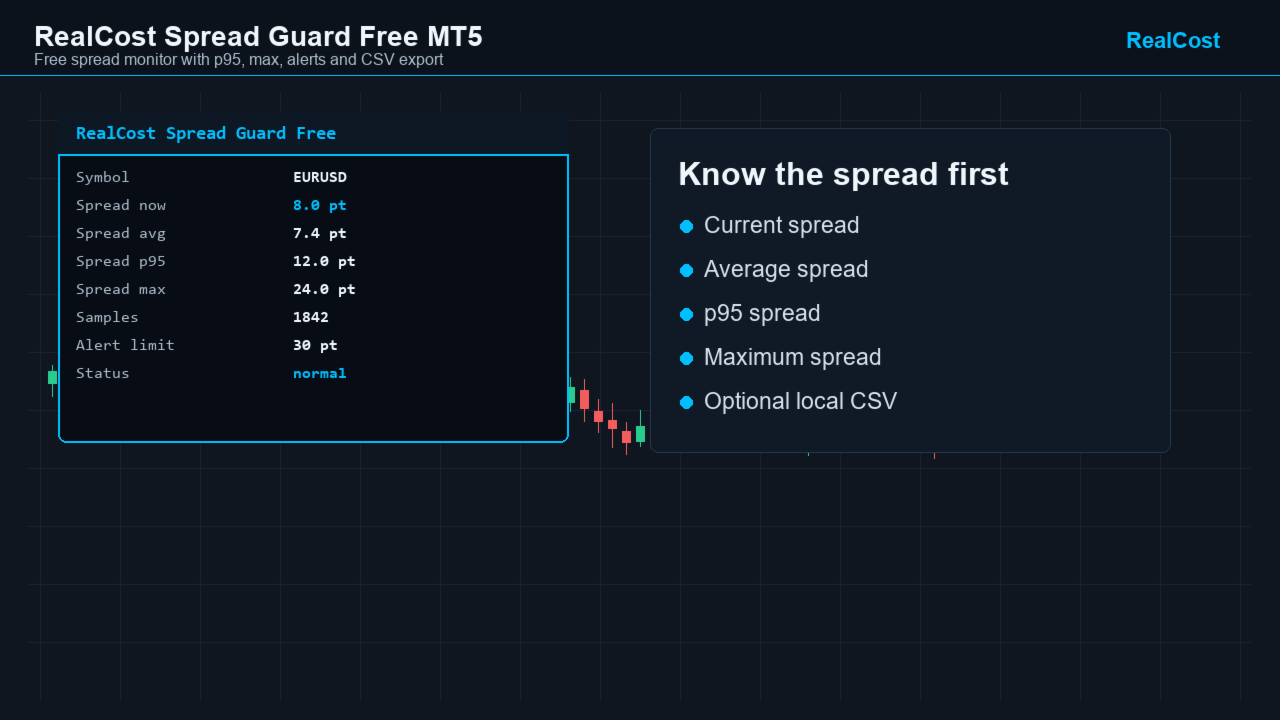
RealCost Spread Guard is a spread monitoring utility for MetaTrader 5. It does not trade, modify orders, or send data to external servers. It samples the current chart spread, displays live and historical spread statistics, optionally alerts when spread exceeds a configured threshold, and can write a local CSV file for later review.

This utility is useful before running manual entries, scalpers, grid systems, signal copiers, or any EA that is sensitive to spread spikes.

Typical Use Cases

- Check whether a symbol has stable spreads during a session.
- Watch spread behavior before manual entries.
- Review spread conditions before running an EA or copy-trading setup.
- Compare spread changes across market sessions.
- Export spread samples to CSV for a trading journal or later review.

Key Features

- Live chart spread in points.
- Average, p95, and maximum spread.
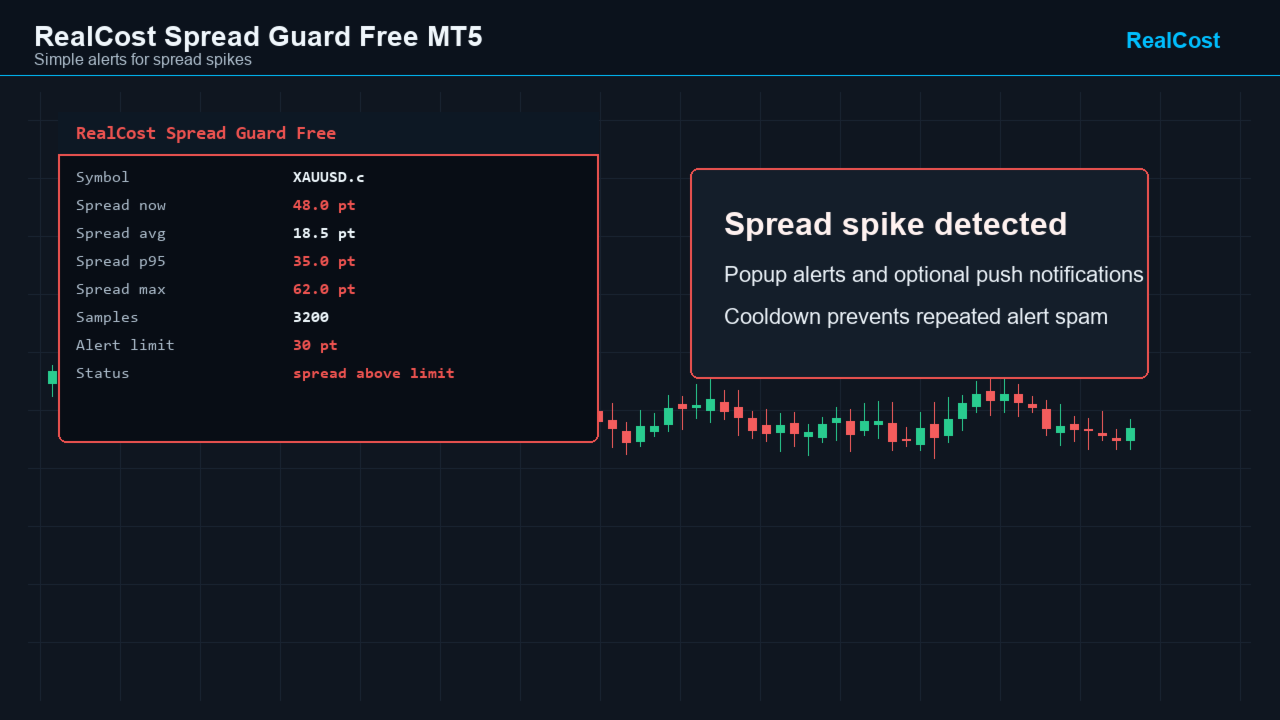
- Configurable spread alert threshold.
- Popup alerts and optional push notifications.
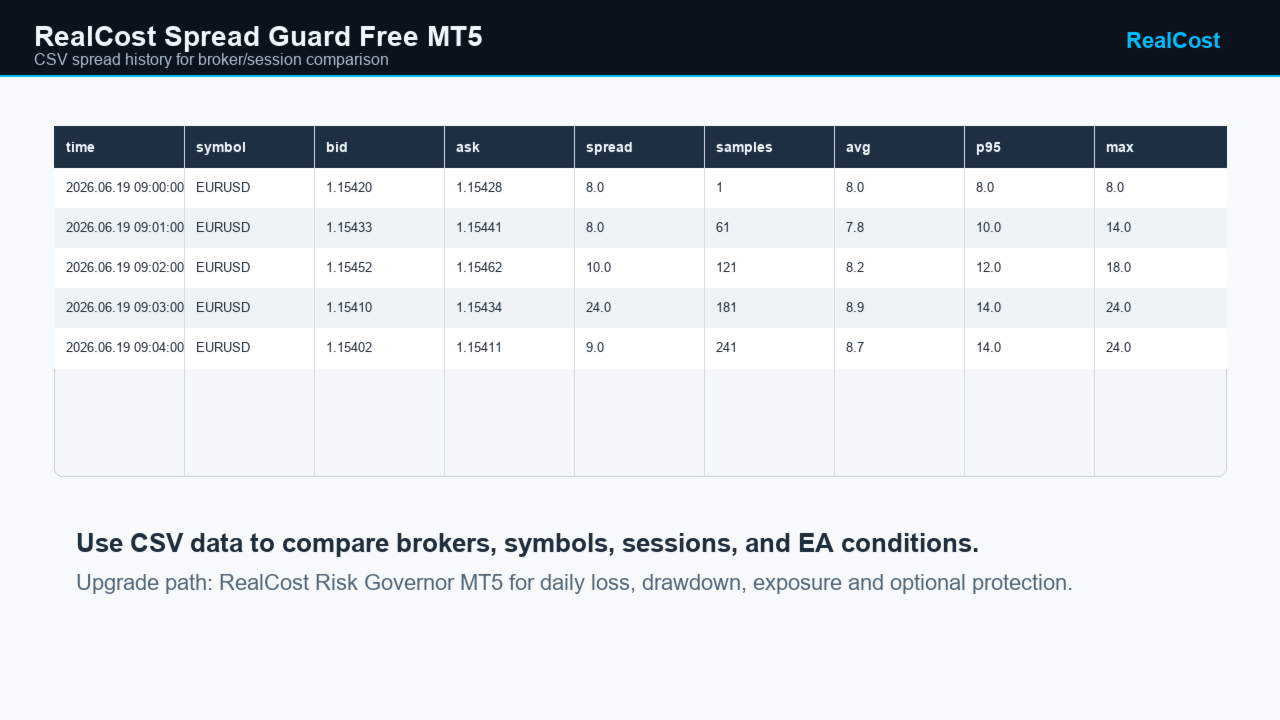
- Local CSV export with configurable write interval.
- Compact on-chart panel.
- No trading actions.
- No DLL, no WebRequest, no external service.

What It Does Not Do

- It does not trade.
- It does not modify positions or orders.
- It does not provide buy or sell signals.
- It does not reduce spread.
- It does not guarantee better execution.
- It does not provide financial or investment advice.

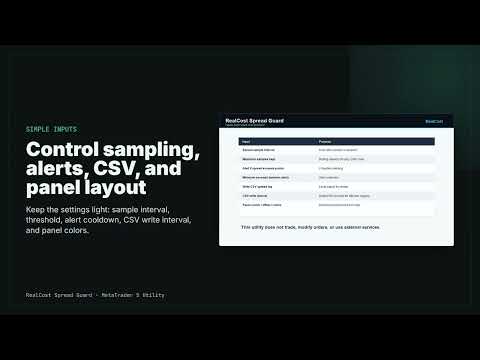
Input Parameters

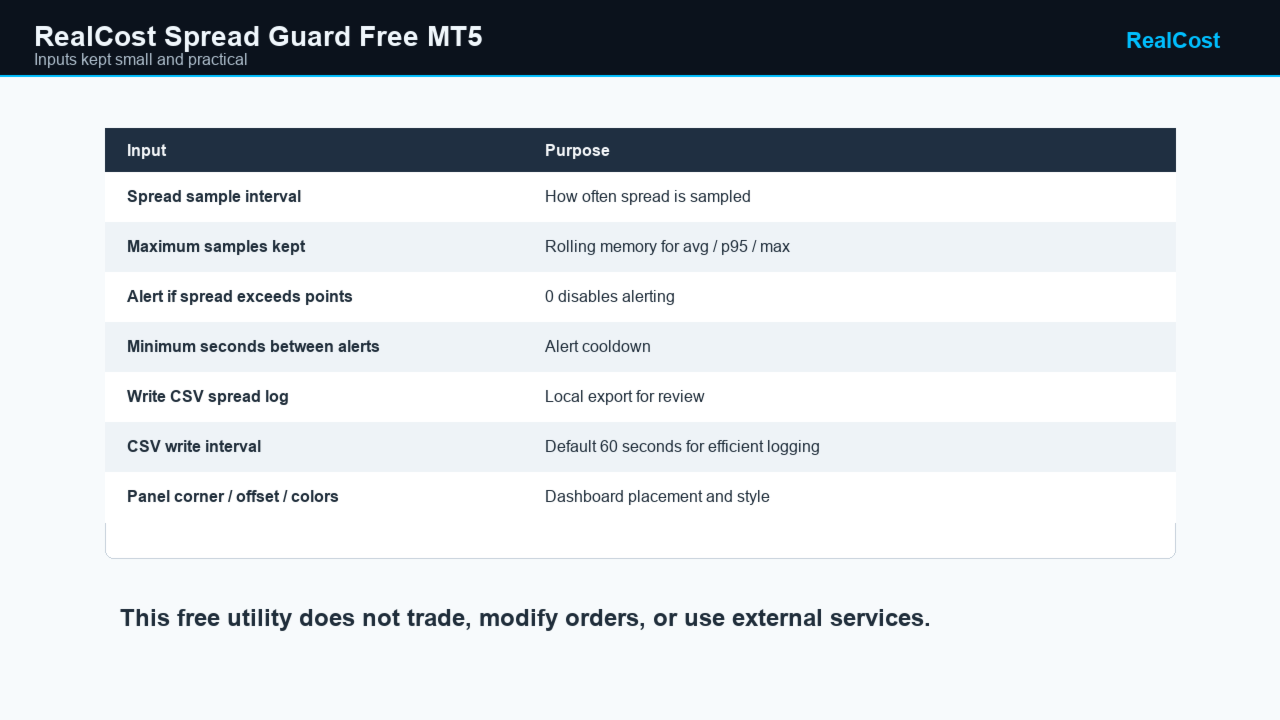
- Spread sample interval, seconds - how often spread is sampled.
- Maximum samples kept in memory - rolling sample capacity.
- Alert if spread exceeds points - alert threshold, 0 disables it.
- Minimum seconds between alerts - alert cooldown.
- Show popup alerts and Send mobile push notifications.
- Write CSV spread log - enable or disable local CSV export.
- Write to common terminal files folder - optional common folder output.
- CSV file prefix - custom file prefix.
- CSV write interval, seconds - how often status rows are written.
- Panel corner, offset, and colors.

CSV Columns

- time
- symbol
- bid
- ask
- spread points
- sample count
- average spread points
- p95 spread points
- maximum spread points

Usage

Attach RealCost Spread Guard to the symbol you want to watch. Leave it running during your trading session, EA test, copy-trading period, or broker comparison. The panel shows live spread statistics, and the CSV file can be opened later in Excel, Google Sheets, or a trading journal.

For account-level loss, drawdown, exposure, trade-count, and optional protection controls, open the author's profile and review the other RealCost tools.
Prodotti consigliati
Quantum panel
Yacine Bouziane
Quantum Trade Panel – The Ultimate Smart Assistant for Flawless Execution & Risk Management Tired of slow executions and calculating lot sizes manually while the market moves? Quantum Trade Panel is the ultimate, feature-rich Trading Assistant Expert Advisor (EA) for MT5 . It is specifically engineered to empower day traders and scalpers to manage, calculate, and execute trades in milliseconds with pinpoint accuracy. Combining a stunning, futuristic Cyber/Neon user interface with powerful und
Trade Utility Pro
Sovannara Voan
3.83 (87)
Trade Utility Pro is a bot utility designed to help you manage trades more easily, quickly, and accurately. This utility features a control panel interface and supports MetaTrader 5 exclusively. This utility does not link to any account information or external sources, ensuring safety. Main Features: Open Trade Support: Lot size calculation Fixed Lot: Custom input lot required Money Risk Lot: Automatically calculated based on stop loss and money risk Account % Risk Lot: Automatically calculated
FREE
SyncHistorySQL
Maxim Kuznetsov
Script for quick updates (synchronization) trade history in the SQLite database. Saves closed positions and orders, symbols data. Take advantage of SQLite's capabilities for intermediate data storage, analytics, and integrations of the MetaTrader platform. Keep all your data in one place. Use the saved data in SQL analytical queries, from Python and other languages, to build dashboards Parameters useDefaults   true - use default parameters. Save data to the COMMON hierarchy, to the db/ram/{s
FREE
Trading Calendar — Visualizza i tuoi giorni di trading più profittevoli Trasforma la tua cronologia di trading in insight chiari e giornalieri con Trading Calendar. Trading Calendar è un potente strumento di analisi per MT5 progettato per aiutare i trader a visualizzare la redditività giorno per giorno tramite una heatmap interattiva di profitti e perdite. Invece di scorrere un lungo storico di operazioni, puoi identificare subito i tuoi migliori giorni, i peggiori giorni, le serie vincenti e i
FREE
Binance History Loader
Andrey Khatimlianskii
This script is designed to download a long history of cryptocurrency quotes from the Binance exchange. You will find it perfectly suitable if you want once to download the history of cryptocurrencies for charts analyzing, collecting statistics or testing trading robots in the MetaTrader 5 strategy tester, or if you need to update the history not very frequently (for example, once a day or once a week). After running the script, you will have fully featured (but not automatically updated) cryptoc
Quant Panel
Kevin Craig E Gittins
Quant Panel Pro The Ultimate Multi-EA Performance Dashboard for Quantitative Traders Stop juggling multiple charts or external tools to monitor your algorithmic strategies! Quant Panel Pro delivers institutional-grade portfolio monitoring in one sleek, professional interface. Key Features Quantitative Analytics at Your Fingertips Real-time P&L aggregation   across all Expert Advisors Statistical win rate analysis   with trade frequency metrics Advanced drawdown tracking   (realized & unrealized
Session Overlay Stop guessing where sessions begin and end. Most session indicators mark zones by fixed clock hours. The result? Boxes that start 30 minutes late, end at the wrong candle, and never quite align with where price actually reacted. Session Overlay is built differently. Every session boundary is calculated from the D1 bar open — not a hardcoded offset — so the shading, the overlap zones, and the high/low lines all share the exact same time reference. What you see is what the market a
FREE
This is an utility for MetaTrader 5 designed to send notifications to a Telegram bot regarding trading activity on the terminal. The EA monitors changes in positions and orders, then sends structured messages to specified Telegram chats through the Telegram Bot API. It can optionally include chart screenshots when positions are opened. The EA uses the WebRequest function to communicate with the Telegram API. No additional servers or external services are required. Main Features Position Activity
Risk Calculator – PeterT (MT5 EA) What It Does This is a Position Size & Risk Calculator Expert Advisor for MetaTrader 5. It places a floating panel on your chart that automatically calculates the correct lot size based on your account balance and the risk percentage you set. Instead of doing math manually before every trade, the tool handles it instantly — so you always know exactly how much you're risking. Key Features Auto Lot Sizing — Enter your risk % and Stop Loss in pips, and the EA inst
Helios Trade Panel
Vitaliy Noshchenko
HELIOS Trade Panel — Centro di controllo trading tutto-in-uno per MetaTrader 5 che combina esecuzione rapida, protezione del capitale, gestione delle posizioni e un potente scanner di allerte multi-timeframe in un unico pannello.   Trading con un clic • Ordini a mercato BUY / SELL con calcolo automatico dello stop-loss per % di rischio • Ordini pendenti col mouse: trascina linee Entry / SL / TP direttamente sul grafico • Caricamento automatico visualizzazione (linee + zone profitto/perdita) do
Prendi facilmente il controllo della tua routine di trading con il rivoluzionario Trades Time Manager. Questo potente strumento automatizza l'esecuzione degli ordini in orari prestabiliti, trasformando il tuo approccio al trading. Crea elenchi di attività personalizzati per diverse azioni di trading, dall'acquisto all'impostazione degli ordini, il tutto senza intervento manuale. Trades Time Manager Guida all'installazione e agli input Se desideri ricevere notifiche sull'EA, aggiungi il nostro UR
Welcome to Smart Algo Trade Panel Manager MT5 - the ultimate   risk management tool designed to make trading more effective based on user needs.  It is a comprehensive solution for seamless trade planning, position management, and enhanced control over risk. It does not matter weather you a beginner or an advanced trader, or a scalper needing rapid executions, SmartAlgo Trade Panel  adapts to your needs offering flexibility across all markets of your choice. You can put SL, Lot and TP of choice
Chart Time Plus MT5
Isaac Montesinos Valdes
Description:   -   Chart Time + Indicator is very simple and easy, but it can be very important to control the time before opening any manual trade. This indicator shows the time in a panel between 3 different options. Can be possible to move the panel with mouse or with fixed coordinates on the chart. Input Parameters:   -   Local Time : Enable Local Time if you want to show it (Personal Computer Time).   -   Server Time : Enable Server Time if you want to show it (Broker Time).   -   GMT Time
Edgezone Strategy Monitor Edgezone Strategy Monitor è una soluzione professionale per l'analisi di portafogli, strategie e performance in MetaTrader 5. Lo strumento è stato sviluppato specificamente per trader che gestiscono più Expert Advisor, approcci di trading manuale o interi portafogli di strategie e desiderano monitorarne le performance in modo oggettivo. A differenza delle statistiche standard di MetaTrader, Strategy Monitor consente di assegnare con precisione le operazioni a singole st
FREE
Telegram to mt5 pro
Janet Abu Khalil
3.67 (3)
Telegram to MT5 Pro — Advanced Telegram Signal Copier with Auto-Fix, Multi-TP, Risk Control and Full Trade Management Telegram to MT5 Pro — Copiatore di segnali Telegram professionale Telegram to MT5 Pro è un copiatore di trading ad alte prestazioni che esegue automaticamente i segnali da Telegram direttamente nel tuo account MetaTrader 5, con pieno controllo su rischio, esecuzione e gestione del trading. Il sistema è composto da due componenti: • L’Expert Advisor (EA) che gira all’interno di M
TerminatorTrades
Uriel Alfredo Evia Canche
"Terminator Trades " EA robot, built on the powerful MQ5 code,  is designed to simplify the process of closing your positions and pending orders. You can adjust if you want close all the trades or by specific symbols. With just a single click on a button, you can efficiently manage your current positions, ensuring that you never miss an opportunity to terminate a trade.  Close Trades , Delete Pending Orders with Terminator Trades. 

FREE
# Higher-Lower Pending Bot - Advanced Multi-Pending Orders System ## Revolutionize Your Trading with Smart Pending Order Automation Welcome to the **Higher-Lower Pending Bot** - the most sophisticated pending order management system available on MQL5. Designed for traders who want to maximize opportunities while minimizing manual effort, this EA combines intelligent order placement with comprehensive profit tracking in one powerful package. ## What Makes Our Bot Unique? ### Smart D
Summary A simple yet powerful trade manager for MetaTrader 5 that combines lightning fast execution with bulletproof risk management  Features • Account summary showing balance, daily PnL, symbol and spread • Auto lot size calculation based on % of account risk per trade • Pre-defined stoploss and risk/reward targets • Breakeven toggle which moves stoploss to entry • Trailing stoploss toggle for active positions • Keyboard hotkeys for quick entries and exits • Lightweight and optimised for low
Binance Quotes Updater
Andrey Khatimlianskii
5 (1)
This service is designed to stream online cryptocurrency quotes   from the Binance exchange to your MetaTrader 5 terminal. You will find it perfectly suitable if you want to see the quotes of cryptocurrencies in real time — in the Market watch window and on the MetaTrader 5 charts. After running the service, you will have fully featured and automatically updated  cryptocurrency charts in your MetaTrader 5. You can apply templates, color schemes, technical indicators and any non-trading tools to
The utility is a checklist where you can write all the rules of your trading system and keep it on the chart in front of your eyes. As a rule is executed, mark it with a tick. To the right of each rule, you can write the "strength" (percentage) of the rule. And if there is a tick next to the rule, then all "forces" are summed up in the "Total" line. For the convenience of visual perception, you can set the color for displaying the “Total” value. Panel options: Title - The title of the panel N
FREE
Phantom Currency Heatmap Pro Real-Time Currency Heatmap & Trade Recommender for MetaTrader 5 Stop guessing which pairs to trade! The **Phantom Currency Heatmap Pro** is an essential visual tool for manual traders. It analyzes the 8 major currencies (USD, EUR, GBP, JPY, AUD, CAD, CHF, NZD) across all 28 major pairs to calculate their true underlying strength in real-time. By pairing the strongest currency against the weakest currency, you give yourself the highest probability of catching a str
Get news5
Aleksander Gladkov
Utility for reading news from investing.com To access the site, you need to add WebRequest in the Options terminal menu on the Expert Advisors tab: https://sslecal2.investing.com If reading is successful, a message about writing the file is displayed. The INV_week_this.txt file is written to the MQL5\Files folder of the terminal and is kept up to date, updating data according to its own timer. The  INV_week_last.txt   file is recorded on Saturday and saves the news data of the previous week .
PZ Mean Reversion MT5
PZ TRADING SLU
3 (2)
Indicatore unico che implementa un approccio professionale e quantitativo al trading di reversione. Sfrutta il fatto che il prezzo devia e ritorna alla media in modo prevedibile e misurabile, il che consente regole di entrata e uscita chiare che superano di gran lunga le strategie di trading non quantitative. [ Installation Guide | Update Guide | Troubleshooting | FAQ | All Products ] Segnali di trading chiari Incredibilmente facile da scambiare Colori e dimensioni personalizzabili Implementa l
You can see Binance Spot data instantly in Metatrader 5 and it allows you to use all the features that Metatrader has provided to you. You can access the data of all symbols listed on Binance Futures. Don't forget to set the timezone. Binance it's 00:00 UTC. You need to fix it according to your own country You need to install the free Binance Spot Symbol List plugin. https://www.mql5.com/tr/market/product/83507 After loading, it automatically downloads the data of the cryptos in the market obser
Overview : The Advanced News Trading Panel is a versatile tool designed for traders who rely on news-based trading strategies. This Expert Advisor (EA) provides an intuitive graphical interface that allows users to quickly set up pending orders and manage risk with ease. With the ability to automatically place Buy/Sell Stop orders based on your pre-set stop order distance from the bid/ask price, stop-loss and take-profit levels, the EA allows for precision trading during high-volatility news eve
Binance Copier allows to seamlessly and easily copy trades between MT5 and Binance Futures! The tool's main feature is to replicate trades and all available orders between MetaTrader 5 and Binance that can be applied to both Expert Advisors and manually opened ones. Key Features: Bidirectional Copying - MT5 → Binance (Master Mode): Copy your MT5 trades to Binance - Binance → MT5 (Slave Mode): Mirror Binance positions in MT5 - Real-time synchronization with configurable delays Complete Trade M
Telegram Notify MT5 Telegram Notify MT5 is an utility tool to bridge your MetaTrader 5 activities to your Telegram chat/channel. It is useful for monitoring your MetaTrader 5 account by sending a notification to your particular Telegram chat/channel when someone/EA is placing trades, modifying order's TP/SL, closing trades and etc. This EA does not place any trade for your account. This EA also could be a convenient tool for monitoring other's EA trading activities or a tool for publishing your
The professional browser of News and Trading Sessions is now available in MetaTrader 5. Now all the most important market information is collected on one dial! News located on the Time scale. Planning your working time has never been so easy and convenient ... The news scale can be switched a day, two, a week, a month forward or backward (see the details in the short video). All news updates in real time. Thanks to the built-in filters, you can configure the display of news by importance, cou
Multiple Positions
Emanuel Reynard Phillips
Hai bisogno di aprire più posizioni/operazioni contemporaneamente? Abbiamo creato la tua soluzione semplice. Ora puoi inserire più posizioni contemporaneamente. Puoi impostare la dimensione del lotto, il numero di posizioni, il take profit e lo stop loss. Ad esempio: desideri acquistare 3, 5, 10 o un numero qualsiasi di posizioni con una determinata dimensione del lotto. Ora puoi farlo semplicemente toccando il pulsante "Acquista". O Ad esempio: desideri vendere 3, 5, 10 o un numero qualsiasi d
PipsTrailingEA
Youssef Esseghaiar
Overview PipsTrailing EA   is a lightweight, efficient, and reliable   trailing stop manager   for MetaTrader 5. It automatically adjusts stop losses on your open positions as the market moves in your favor — locking in profits while giving your trades room to breathe. No complex settings. No unnecessary features. Just a pure, functional trailing stop that works on any symbol and any timeframe. Key Features Feature Description Manual & EA trades Works with positions opened manually or by o
Gli utenti di questo prodotto hanno anche acquistato
Trade Assistant MT5
Evgeniy Kravchenko
4.42 (212)
It helps to calculate the risk per trade, the easy installation of a new order, order management with partial closing functions, trailing stop of 7 types and other useful functions. Additional materials and instructions Installation instructions - Application instructions - Trial version of the application for a demo account Line function -   shows on the chart the Opening line, Stop Loss, Take Profit. With this function it is easy to set a new order and see its additional characteristics bef
Forex Trade Manager MT5
InvestSoft
4.98 (663)
Benvenuto a Trade Manager EA, lo strumento definitivo per la gestione del rischio , progettato per rendere il trading più intuitivo, preciso ed efficiente. Non è solo uno strumento per l'esecuzione degli ordini, ma una soluzione completa per la pianificazione delle operazioni, la gestione delle posizioni e il controllo del rischio. Che tu sia un principiante, un trader avanzato o uno scalper che necessita di esecuzioni rapide, Trade Manager EA si adatta alle tue esigenze, offrendo flessibilità s
Local Trade Copier EA MT5
Juvenille Emperor Limited
4.96 (140)
Sperimenta una copia di trading eccezionalmente veloce con il   Local Trade Copier EA MT5 . Con la sua facile configurazione in 1 minuto, questo copiatore di trading ti consente di copiare i trades tra diversi terminali di MetaTrader sullo stesso computer Windows o su Windows VPS con velocità di copia ultra veloci inferiori a 0.5 secondi. Che tu sia un trader principiante o professionista,   Local Trade Copier EA MT5   offre una vasta gamma di opzioni per personalizzarlo alle tue esigenze speci
TradePanel MT5
Alfiya Fazylova
4.87 (158)
Trade Panel è un assistente commerciale multifunzionale. L'applicazione contiene più di 50 funzioni di trading per il trading manuale e permette di automatizzare la maggior parte delle attività commerciali. Prima dell'acquisto, è possibile testare la versione dimostrativa su un conto demo. Scaricare la versione di prova dell'applicazione per un account dimostrativo: https://www.mql5.com/it/blogs/post/762419 . Istruzioni complete qui . Commercio. Consente di effettuare operazioni di trading con u
Versione Beta Telegram to MT5 Signal Trader è quasi pronto per il rilascio ufficiale in versione alpha. Alcune funzionalità sono ancora in fase di sviluppo e potresti riscontrare piccoli bug. Se riscontri problemi, ti preghiamo di segnalarli, il tuo feedback aiuta a migliorare il software per tutti. Telegram to MT5 Signal Trader è uno strumento potente che copia automaticamente segnali di trading da canali o gruppi Telegram al tuo account MetaTrader 5 . Supporta canali pubblici e privati e cons
FarmedHedge Pair Trading Dashboard
Tanapisit Tepawarapruek
5 (3)
Farmed Hedge Yield Farming | All Markets (Manual - Hybrid - Semi/Automated EA) MULTI-ASSET SUPPORT Trade any asset available on your broker - Forex: Major, Minor, Exotic pairs - Crypto: BTC, ETH, XRP, SOL, BNB - Stocks: Apple, Tesla, Amazon, Google, etc. - Commodities: Gold, Silver, Oil, Gas - Indices: US30, NAS100, SPX500, DAX40 - Any CFD your broker offers VERIFIED TRADING RESULTS - Farmed Hedge Yield Axi Copy:  https://www.mql5.com/en/signals/2356376 - Farmed Hedge Yield Exn Copy:   https:/
AI Agents Supervisor
Ho Tuan Thang
5 (1)
AI Agent Supervisor is NOT an Expert Advisor. AI Agent Supervisor   is a   multi-agent AI risk & portfolio supervisor   that watches every EA on your account and intervenes in real time.  WANT AN AI PORTFOLIO MANAGER WATCHING YOUR FLEET 24/7?   Run your fleet on the same brokers I do:   IC MARKETS , IC TRADING   .  Unlike the centralized stock market, Forex has no single, unified price feed.  Every broker sources liquidity from different providers, creating unique data streams. The Supervisor r
Power Candles Strategy Scanner - Strumento di ricerca configurazioni multi-simbolo con ottimizzazione automatica Power Candles Strategy Scanner utilizza lo stesso motore di auto-ottimizzazione che alimenta l'indicatore Power Candles, applicandolo a tutti i simboli presenti nel tuo Market Watch, uno accanto all'altro. Un unico pannello ti indica quali simboli sono statisticamente negoziabili in questo momento, quale strategia è vincente su ciascuno di essi, la coppia ottimale di Stop Loss / Take
Trade Dashboard MT5
Fatemeh Ameri
4.95 (129)
Trade Dashboard simplifies how you open, manage, and control your trades, with built-in lot size calculation. It allows you to execute trades, manage risk, and control positions directly on the chart, with tools such as partial close, breakeven, and trailing stop. Designed to reduce manual work and help you stay focused on your trading decisions. A demo version is available for testing. Detailed explanations of features are provided within the MQL5 platform. Installation instructions are include
The product will copy all telegram signal to MT5 ( which you are member) , also it can work as remote copier.  Easy to set up, copy order instant, can work with almost signal formats, image signal,  s upport to translate other language to English Work with all type of channel or group, even channel have "Restrict Saving Content", work with  multi channel, multi MT5 Work as remote copier: with signal have ticket number, it will copy exactly via ticket number. Support to backtest signal. How to s
Quant AI Agents
Ho Tuan Thang
5 (1)
Quant AI Agents are independent trading Expert Advisors. Instead of trading using a fixed strategy like other conventional EAs, Quant AI Agents   is a   multi-agent AI trading framework   that turns natural-language strategy prompts into live.  WANT THE SAME RESULTS AS MY LIVE SIGNAL?   Use the exact same brokers I do:   IC MARKETS , IC TRADING   .  Unlike the centralized stock market, Forex has no single, unified price feed.  Every broker sources liquidity from different providers, creating un
Exp COPYLOT CLIENT for MT5
Vladislav Andruschenko
3.94 (34)
Copiatore professionale di trade per MetaTrader 5 Un copiatore di trade veloce, professionale e affidabile per MetaTrader . COPYLOT consente di copiare operazioni Forex tra terminali MT4 e MT5 con supporto per conti Hedge e Netting . La versione MT5 di COPYLOT supporta: - MT5 Hedge → MT5 Hedge - MT5 Hedge → MT5 Netting - MT5 Netting → MT5 Hedge - MT5 Netting → MT5 Netting - MT4 → MT5 Hedge - MT4 → MT5 Netting Versione MT4 Descrizione completa + DEMO + PDF Come acquistare Come installare Come ot
Premium Trade Manager - Gestione dei trade rapida e disciplinata per MetaTrader 5 Premium Trade Manager è per i trader che vogliono tenere il focus sulla decisione mentre il pannello gestisce la routine: dimensionamento, piazzamento, parziali, trailing, news e limiti prop-firm, gestiti con la stessa disciplina su ogni trade. È un pannello rapido sul grafico per MetaTrader 5 che si occupa di tutto il lavoro meccanico in ogni trade. Decidi tu direzione, simbolo e momento; il pannello calcola la di
================================================================================ POC BREAKOUT - V20.72. Full Professional Grade Toolkit ================================================================================ POC Breakout is a full MetaTrader 5 trading dashboard for discretionary traders who want breakout signals, Point of Control (POC) context, volume profiles, order flow, market structure, news, alerts, and advanced trade planning in one professional workspace. Attached directly to you
Seconds Chart MT5
Boris Sedov
4.59 (17)
Seconds Chart - uno strumento unico per creare grafici in secondi su MetaTrader 5 . Con Seconds Chart , puoi generare grafici con timeframe definiti in secondi, ottenendo una flessibilità e una precisione d'analisi ideali, non disponibili nei grafici standard in minuti o ore. Ad esempio, il timeframe S15 indica un grafico con candele di 15 secondi. Puoi utilizzare qualsiasi indicatore e Expert Advisor con supporto per simboli personalizzati. Lavorare con loro è comodo quanto operare sui grafici
Footprint Chart Pro — Professional OrderFlow EA for MetaTrader 5 Version 6.34 | Professional tool for real traders | Institutional-Grade Visualization DEMO USERS - PLEASE SELECT EVERY TICK / REAL TICK WHEN TESTING AND YOU HAVE DOWNLOADED HISTORICAL DATA. IF YOU SEE A WAITING SCREEN AND IT IS NOT DOWNLOADING, IT MEANS YOU HAVE LOW HISTORICAL DATA. TRY 1 MIN AND 5 MIN FIRST ON 1 DAY DATA. ONE DAY DATA SHOULD BE THE NEWEST AND MOST CURRENT DATE. PLEASE WAIT UNTIL THE MARKET HAS ROLLED OVER PERIOD.
Signal Trading View to MT5 Pro
Mirel Daniel Gheonu
4 (1)
Signal TradingView to MT5 Pro Automator Esecuzione professionale istantanea tra TradingView e MetaTrader 5 Automatizza la tua strategia di trading con il ponte di comunicazione più robusto tra gli alert di TradingView e l'esecuzione reale in MT5. Progettato per i trader che richiedono velocità, flessibilità e una gestione del rischio impeccabile, questo Expert Advisor trasforma qualsiasi messaggio di avviso in un preciso ordine a mercato o limite. PUNTI DI FORZA E VANTAGGI Motore di Parsing Univ
Trade copier MT5
Alfiya Fazylova
4.56 (45)
Trade Copier è un'utilità professionale progettata per copiare e sincronizzare le transazioni tra conti di trading. La copiatura avviene dal conto/terminale del fornitore al conto/terminale del destinatario, che sono installati sullo stesso computer o vps. PROMOZIONE - Se avete già acquistato il "Trade copier MT5", potete ottenere gratuitamente il "Trade copier MT4" (per la copia MT4 > MT5 e MT4 < MT5). Per maggiori informazioni sulle condizioni, vi preghiamo di contattarci tramite messaggi priv
Prop Firm Os
Gayathiri Gopalakrishnan
5 (1)
PROP FIRM OS Structured Trading Assistant for MetaTrader 5 PROP FIRM OS is a structured trading assistant designed for MetaTrader 5 users who prefer rule-based market analysis and organized trading workflows. The Expert Advisor combines market analysis tools, scanner functions, dashboard monitoring, alerts, risk-control settings, and trade management features inside one system. PROP FIRM OS is designed to help traders follow selected rules, filters, and monitoring conditions during trading activ
Anchor Trade Manager
Kalinskie Gilliam
5 (3)
Anchor: The EA Manager Run your full EA portfolio without conflicts, without stacked risk, and without watching every chart yourself. Anchor coordinates up to 64 Expert Advisors on a single account. Attach Anchor to any chart. Type your EA names and magic numbers in one line. Click OK. Anchor begins coordinating immediately. Built for portfolios. Built for discipline. Built for prop firms. The Problem Running multiple EAs on the same account creates risk. Two gold EAs can open opposite positions
The News Filter MT5
Leolouiski Gan
4.78 (23)
Questo prodotto filtra tutti gli esperti consulenti e i grafici manuali durante il periodo delle notizie, così non dovrai preoccuparti di improvvisi picchi di prezzo che potrebbero distruggere le tue impostazioni di trading manuali o le negoziazioni effettuate da altri esperti consulenti. Questo prodotto viene fornito anche con un sistema completo di gestione degli ordini che può gestire le tue posizioni aperte e gli ordini in sospeso prima della pubblicazione di qualsiasi notizia. Una volta che
Working Demo Download Copy Cat More Trade Copier MT5 is a local trade copier and a complete risk management and execution framework designed for today’s trading challenges. From prop firm challenges to personal portfolio management, it adapts to every situation with a blend of robust execution, capital protection, flexible configuration, and advanced trade handling. The copier works in both Master (sender) and Slave (receiver) modes, with real-time synchronization of market and pending orders,
HINN MagicEntry Extra
ALGOFLOW OÜ
4.73 (15)
HINN MAGIC ENTRY – the ultimate tool for entry and position management! Place orders by selecting a level directly on the chart! full description   ::  demo-version  :: 60-sec-video-description Key features: - Market, limit, and pending orders - Automatic lot size calculation - Automatic spread and commission accounting - Unlimited partitial take-profits  - Breakeven and trailing stop-loss and take-profit  functions - Invalidation leves - Intuitive, adaptive, and customizable interface - Works
Trade Manager DaneTrades
Levi Dane Benjamin
4.28 (29)
Trade Manager per aiutarti a entrare e uscire rapidamente dalle operazioni calcolando automaticamente il tuo rischio. Incluse funzionalità che ti aiutano a prevenire l'eccessivo trading, il vendetta trading e il trading emotivo. Le operazioni possono essere gestite automaticamente e i parametri di performance del conto possono essere visualizzati in un grafico. Queste caratteristiche rendono questo pannello ideale per tutti i trader manuali e aiuta a migliorare la piattaforma MetaTrader 5. Suppo
RiskGuard Management
MONTORIO MICHELE
5 (22)
ATTENZIONE  per una versione di prova gratuita visita il mio sito web. Manuale QUANTUM RiskGuard Management — Il tuo alleato definitivo per un trading senza compromessi. Lot Calculator — Calcolo automatico della size. Quantum — Rischio automatico per massimizzare i profitti e ridurre i drawdown. Automatic Journal — Incluso e scaricabile gratuitamente dal mio sito. Automatic Screenshot — Due screenshot: uno in apertura e uno in chiusura del trade. Partial Profit — Uscite parziali gestite in modo
Take a Break MT5
Eric Emmrich
4.76 (25)
News filter, equity guard & session control for all your EAs — one tool, full protection — Free Demo | Latest Updates Take a Break has evolved from a basic news filter into a comprehensive account protection solution . It pauses your other Expert Advisors during news events or based on custom filters. When trading resumes, it automatically restores your entire chart setup , including all EA settings. New in v10: an integrated AI Trade Assessment evaluates each new trade entry directly on your ch
Timeless Charts
Samuel Manoel De Souza
5 (6)
Timeless Charts è un'utilità di trading completa progettata per trader professionisti. Combina tipi di grafici personalizzati come Grafici a Secondi e Renko con analisi avanzata del flusso ordini tramite Footprints , Clusters , Profili di Volume , studi VWAP e strumenti di analisi ancorata per una visione più approfondita del mercato. Il trading e la gestione delle posizioni vengono eseguiti direttamente dal grafico tramite un pannello integrato di gestione delle operazioni , mentre Market Repla
EA Auditor
Stephen J Martret
5 (3)
EA Auditor is an independent analysis tool for traders evaluating Expert Advisors and trading signals on MetaTrader 5. It audits backtest reports, reviews posted developer signals, and cross-verifies the two against each other to help traders assess strategies before committing capital. The MQL5 market offers a wide range of Expert Advisors from many developers, with varying approaches, quality, and transparency. EA Auditor provides a consistent, data-driven framework for reviewing them, answer
MT5 to Telegram Signal Provider è un'utilità facile da usare e completamente personalizzabile che consente l'invio di segnali specificati a una chat, canale o gruppo Telegram, rendendo il tuo account un fornitore di segnali. A differenza della maggior parte dei prodotti concorrenti, non utilizza importazioni DLL. [ Dimostrativo ] [ Manuale ] [ Versione MT4 ] [ Versione Discord ] [ Canale Telegram ]  New: [ Telegram To MT5 ] Configurazione Una guida utente passo-passo è disponibile. Nessuna cono
Telegram to MT5 Multi-Channel Copier copia automaticamente i segnali di trading dai tuoi canali Telegram direttamente in MetaTrader 5. Niente bot, niente estensioni del browser, niente copia manuale. Ricevi un segnale su Telegram e l'EA apre l'operazione sul tuo terminale in pochi secondi. Il prodotto include due componenti: un'applicazione Windows che ascolta i tuoi canali Telegram, e questo Expert Advisor che esegue i segnali sul tuo terminale MT5. È disponibile anche la versione MT4. Guida di
Altri dall’autore
RealCost Auditor MT5 is an execution-cost monitor for MetaTrader 5. It does not open, close, or modify trades. It watches the chart symbol, samples live spread, records executed deals, estimates signed slippage when the terminal exposes the requested price, and saves a local CSV audit file. Many backtests use spread, slippage, commission, and swap assumptions that are cleaner than real trading conditions. This utility gives you broker and account data from your own terminal before you trust a s
Overview RealCost Risk Governor MT5 is an account and trade-risk monitoring utility for MetaTrader 5. It does not predict price movement and does not provide buy or sell signals. It watches configured risk limits and shows a compact on-chart panel for daily P/L, floating P/L, equity drawdown, trade count, open positions, pending orders, total lots, and chart spread. The default mode is alert-only. If the trader explicitly enables protection actions, the utility can close scoped positions, del
RealCost Gold Session Trader MT5 is an intraday Expert Advisor built for gold-focused testing, especially XAUUSD M1 and M5. It uses a session range, EMA trend direction, ATR volatility, spread limits, and account risk controls before opening trades. The EA is not a grid system and does not use martingale lot multiplication. Each trade has a stop loss, take profit, optional break-even management, and optional trailing stop. The default preset is conservative: 0.25% risk per trade, 1.00 max lot

Filtro:
Nessuna recensione
Rispondi alla recensione