Simple Trading Lot Panel
- Utilità
-
Taihei Kono
 Hello, I’m a system developer who loves trading.
I mainly develop fully automated Expert Advisors (EAs).
My mission is to provide continuous forward testing signals and deliver regular updates, including bug fixes and performance improvements. - Versione: 1.3
- Aggiornato: 20 giugno 2026
- Attivazioni: 5
Thank you for visiting the product page of "Simple Trading Lot Panel".
This tool is designed to assist discretionary traders by simplifying risk calculations and enabling faster order execution.
Main Features
● Lot Size Calculation
You can choose from three different lot sizing modes. Each mode determines the trading volume based on the "Lot Sizing Value" specified in the panel (hereinafter referred to as "Value").
The calculation mode can be switched directly from the panel using the provided buttons.
① Calc by Risk
Automatically adjusts the lot size so that the loss remains within the percentage specified by "Value" if the Stop Loss is hit.
② Calc by Equity
Calculates the lot size based on your account balance and the specified "Value".
Formula:
Lot = Account Balance ÷ Value × 0.01
③ Fixed Lot
Uses the specified "Value" directly as the trading lot size.
● Real-Time Display of Take Profit, Stop Loss, and Risk/Reward Ratio
Take Profit (TP), Stop Loss (SL), and Risk/Reward Ratio are displayed in real time.
TP and SL values are shown both in account currency and pips.
These values are displayed in the lower section of the panel and directly on the TP/SL lines.
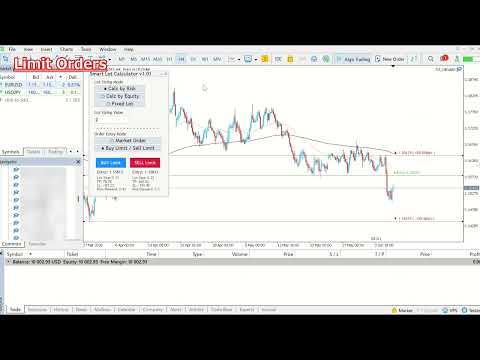
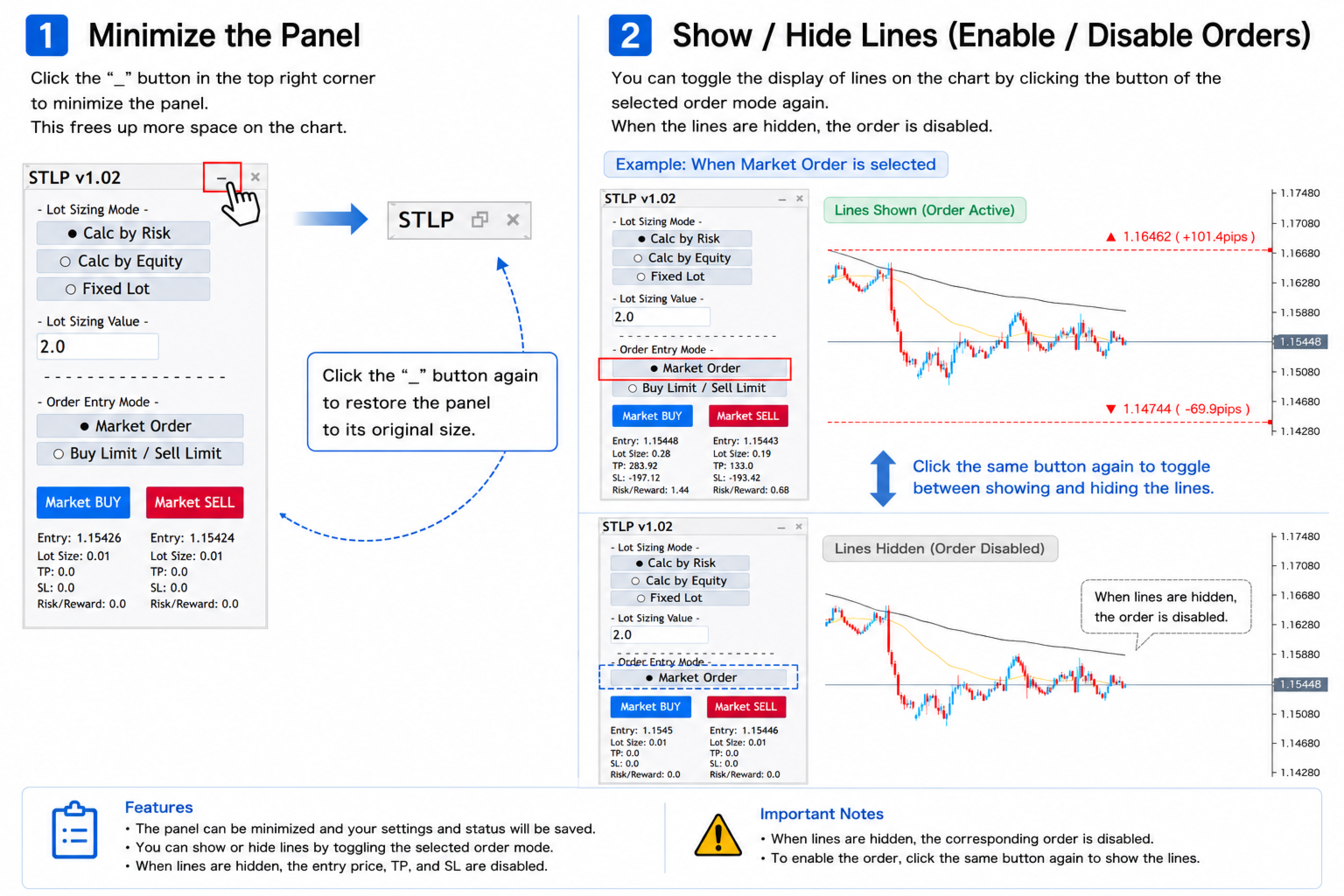
● Market Order and Limit Order Modes
The panel supports both Market Orders and Limit Orders.
You can switch between:
-
Market Order
-
Buy Limit
-
Sell Limit
The desired mode can be selected directly from the panel.
● Drag-and-Drop TP / SL Configuration
Stop Loss and Take Profit levels can be configured visually by dragging the lines displayed on the chart.
(In Limit Order mode, the Entry Price line is also displayed and can be adjusted.)
● Order Execution
Orders can be executed by pressing:
-
MARKET BUY / MARKET SELL
or -
BUY LIMIT / SELL LIMIT
depending on the currently selected order mode.
Trading Panel Overview and Main Features:https://c.mql5.com/31/2096/simple-trading-lot-panel-screen-4197.png
Placing Orders Using Draggable Lines (Two Order Modes):https://c.mql5.com/31/2097/simple-trading-lot-panel-screen-7508.png
3 Lot Sizing Modes:https://c.mql5.com/31/2097/simple-trading-lot-panel-screen-5412.png
Input Parameters
• MAGIC Number
Specifies the Magic Number used for order identification.
• Maximum Spread
Specifies the maximum allowed spread (in points).
Set to 0 to disable the spread filter.
• Initial TP/SL Distance (Points)
Specifies the initial distance of the TP/SL lines from the current market price.
• Display TP/SL Lines on Startup
Determines whether TP/SL lines are displayed automatically when the panel is loaded.
• High Line Color
Specifies the color of the High Line and its label text.
• Low Line Color
Specifies the color of the Low Line and its label text.
• Order Line Color
Specifies the color of the Order Line and its label text.
Input Value Persistence
The values entered by the user (Lot Sizing Value, Order Mode, and Risk Calculation Mode) are automatically saved. They will remain stored even if the EA is removed from the chart or MetaTrader 5 is closed, and will be restored automatically the next time the EA is launched.
Price Notice
The current price is an introductory price set during the early stage of this product.
As new features are added and user feedback continues to shape future updates, the price may be increased without prior notice.