Trade Shield Pro
- Utilità
- Versione: 6.0
- Attivazioni: 5

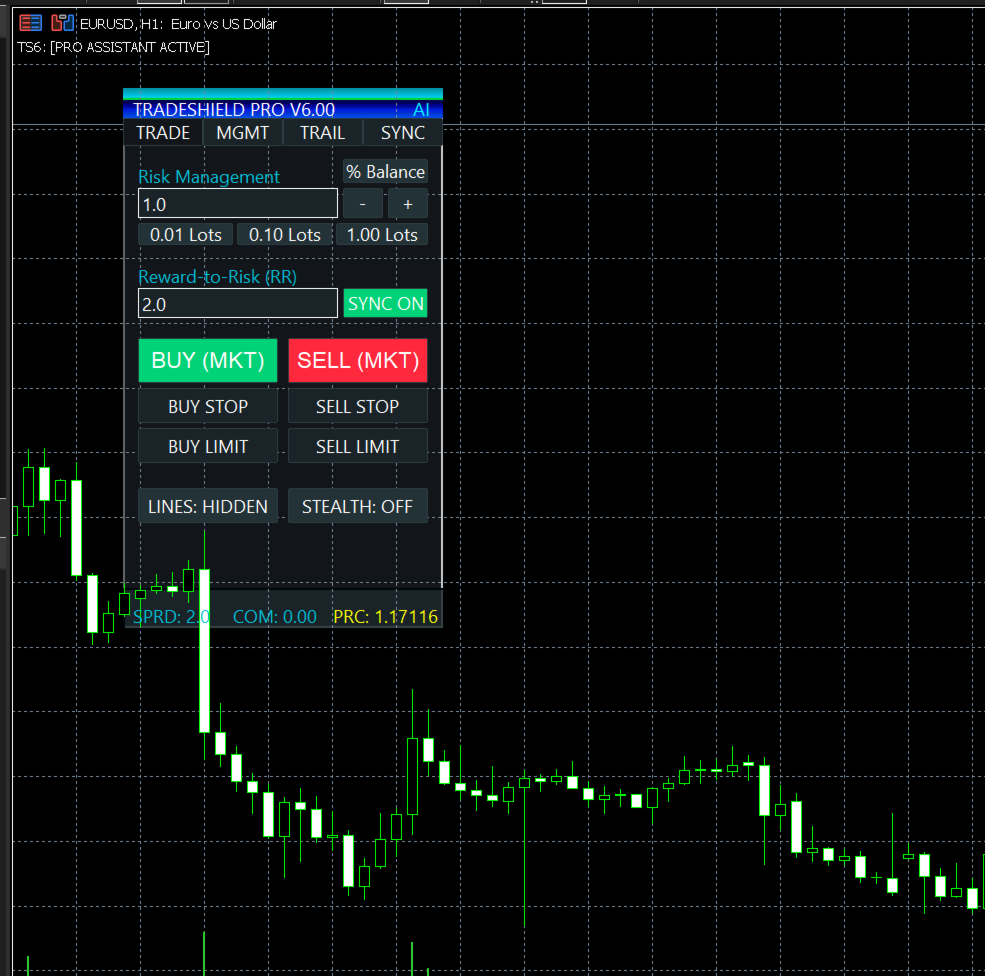
TradeShield Pro is an on-chart utility designed for risk management and trade execution. It provides a graphical interface allowing users to calculate position sizes based on specific risk parameters and manage orders visually on the MetaTrader 5 chart.
Core Features
-
Visual Order Placement: Users can drag and drop horizontal lines on the chart to set Entry, Stop Loss, and Take Profit levels. The panel automatically calculates the corresponding lot size, risk amount, and reward-to-risk (RR) ratio based on the line positions.
-
Risk Calculation: The utility calculates trading volume based on user preferences. Options include calculating risk as a percentage of the account balance, a fixed cash amount, or bypassing the calculation to use a fixed lot size. It calculates tick values for Forex, Indices, Metals, and Crypto.
-
Trade Management: Includes a Stealth Mode feature that keeps Stop Loss and Take Profit levels hidden from the server, executing market orders when the price crosses the visual lines. It also supports multi-level partial closes (setting up to two partial Take Profit levels) and includes buttons for moving the Stop Loss to break-even or closing all positions.
-
Trailing Stop Options: The utility offers standard point-based trailing, ATR-based trailing, and Parabolic SAR trailing methods.
-
Keyboard Shortcuts: Allows for trade execution and management using predefined keyboard combinations (e.g., Shift + B for Buy, Shift + S for Sell, Shift + C for Close All).
-
Market Data Display: An on-chart dashboard displays the current spread, Average Daily Range (ADR) exhaustion, and the remaining time for the current candle.
How to Use
-
Attach the utility to a chart.
-
Ensure Algo Trading is enabled in the MetaTrader 5 terminal.
-
Click the lines visibility button on the panel to display the visual trading lines.
-
Adjust the Entry, Stop Loss, and Take Profit lines to the desired levels on the chart.
-
Select the preferred risk parameters on the panel.
-
Execute the trade using the panel buttons.