Trade Anchor Manager MT5

5

🔥 MultiTP Trade Manager EA — Advanced Trade Management Made Effortless (MT5)


🔥 Limited Offer – First 100 Downloads FREE! 🔥
Be among the first 100 traders to download Trade Anchor Manager (MT4/MT5) completely free of charge. Hurry – once the limit is reached, the offer closes instantly!

💬 After trying it out, we’d love if you could leave a review and share your thoughts – your feedback helps us improve and lets other traders know what to expect.


Need this Trade Anchor Manager for MT4? https://www.mql5.com/en/market/product/146613?source=Site+Market+MT4+Search+Rating006%3atrade+anchor+


*Boost Your Trading Precision, Profitability, and Control with This All-in-One Trade Manager!*


🔹 *Platform*: MetaTrader 4 & 5

🔹 *Best For*: Scalping, Swing, Grid, Manual or EA-assisted trading

🔹 *Symbols*: Works with any Forex pair, indices, metals, crypto

🔹 *Timeframes*: Compatible with all timeframes

🔹 *No Requotes • Ultra-Lightweight • Reliable in Live Trading*


💡 What is MultiTP Trade Manager?


*MultiTP Trade Manager EA* is a powerful and intuitive tool for MetaTrader 4 designed to automate the management of *multiple take profit levels (TP1–TP4), dynamic **stop loss adjustment, and **breakeven handling, all with real-time **PnL tracking*.


It’s perfect for traders who want *precise trade exits, **partial take profits, **risk-managed scaling, and instant **visual feedback* — with no need to babysit trades.


Features At a Glance


* 📌 *Multable Take Profit Levels* with customizable pip distances and open trade allocation to allow trades to run.

* 🔁 *Adjust SL on the Fly* (Move to breakeven or increase stop loss dynamically)

* 🧠 *Trade Monitoring Panel* with ON/OFF toggle

* 📉 *Daily PnL Display*: Track floating, closed, and session PnL live on chart

* 💥 *One-Click Close All Trades* by Magic Number

* 💼 *Risk Tracking*: Shows total risk and whether current SLs are in profit

* 🎯 *Auto SL assignment* even if your trades start without SL

* *Lightweight Visual Interface* — No chart clutter, works on any screen size


🚀 How to Use (Quick Start)


1. *Place Your Trades*


* This can be manual or automated — the EA will track any open trades based on symbol and Magic Number.

* If using manual SL drag to desired position and then switch monitoring on to set reference trade, all other trade will use this same SL.

* If using fixed SL, just click enable monitoring and all other trades will adopt this fixed SL.


2. *Enable Monitoring*


* Click the Monitoring: OFF label to activate. The first open trade becomes the *Reference Trade* (for TP/SL logic).


3. *TP Allocation Begins*


* As trades are opened, TP1–TP4 targets are assigned automatically.

* Each TP line includes a label with the filled count (e.g., 1 at TP2 (0 filled)).


4. *SL Adjustment or Breakeven*


* Toggle Adjust SL to shift SL by a user-defined pip buffer (e.g., -100 to increase the stoploss if required).

* Or toggle Breakeven to move SL to entry once all trades are in profit (plus buffer).


5. *Visual Trade Zones*


* Entry, SL, and TP lines are drawn in real time.

* Directional label shows if the set is a BUY or SELL group.


6. *Track PnL at a Glance*


* See:

     Closed PnL Today

     Floating PnL

     Closed Set PnL

     Total Risk (color-coded if SLs are in profit)


7. *Exit All Trades Instantly*


* Click Close All Trades — the EA will cleanly close trades, capture final PnL, and reset the session.


🎯 Who is This For?


* Manual traders using scaling or staged exits

* EA users who want extra control over trade exits

* Prop firm traders managing strict risk limits

* Breakout or grid traders needing clean PnL tracking

* Traders who want *clear visual feedback* for SL/TP


Inputs (Fully Adjustable)


| Input                                     | Description                             |

| --------------------------             | --------------------------------------- |

| TP1_Pips – TP4_Pips               | Distance in pips for each TP level      |

| TradesAtTP1 – TP4                 | Number of trades to close at each TP    |

| LeaveRemainingTradesOpen   | Allow last trade to run after TP4       |

| UseFixedStopLoss                  | Use fixed SL if trade has no SL         |

| StopLossAdjustmentPips        | SL buffer when Adjust SL is ON          |

| BreakevenBufferPips             | SL buffer when Breakeven is ON          |

| MagicNumber                       | Filter trades by Magic Number (0 = all) |

| PnLLabelCorner                   | Choose where labels appear on screen    |

| DailyPnL_PositiveColor        | Color for positive PnL                  |

| DailyPnL_NegativeColor      | Color for negative PnL                  |


🔒 Stability & Compatibility


Error-handling included for all trade actions

Works in real-time and Strategy Tester

Panel auto-adjusts on screen resize

Perfect for prop firm rules, news volatility, or scalping


Here is the *complete user guide* for your MT4 Trade Manager:


🧠 *What This Trade Manager Does*


The MultiTP_EA_Enhanced_ShortLines_Display_LabelPrice_PnL.mq4 script is a powerful trade management tool that:


* Automatically manages *multiple Take Profits* (TP1–TP4).

* Inherits *Stop Loss* (SL) from a reference trade or applies a fixed SL.

* Allows *breakeven, **SL adjustment, and **manual override*.

* Visually shows *TP/SL lines* and *labels* for live trades.

* Displays a *daily PnL summary* and *risk info*.

* Provides *toggle buttons* to control key features live on chart.


*How to Use It – Step-by-Step*


IMPORTANT! Download the EA and make sure it’s placed in the EXPERTS FOLDER and NOT in the indicator folder.


📌 *Step 1: Attach the EA to Your Chart and then Allow Live Trading in the settings and also MT4 Auto Trading is Activated*


* Load the EA onto a chart.

* If you're managing different symbols, place on a different chart.

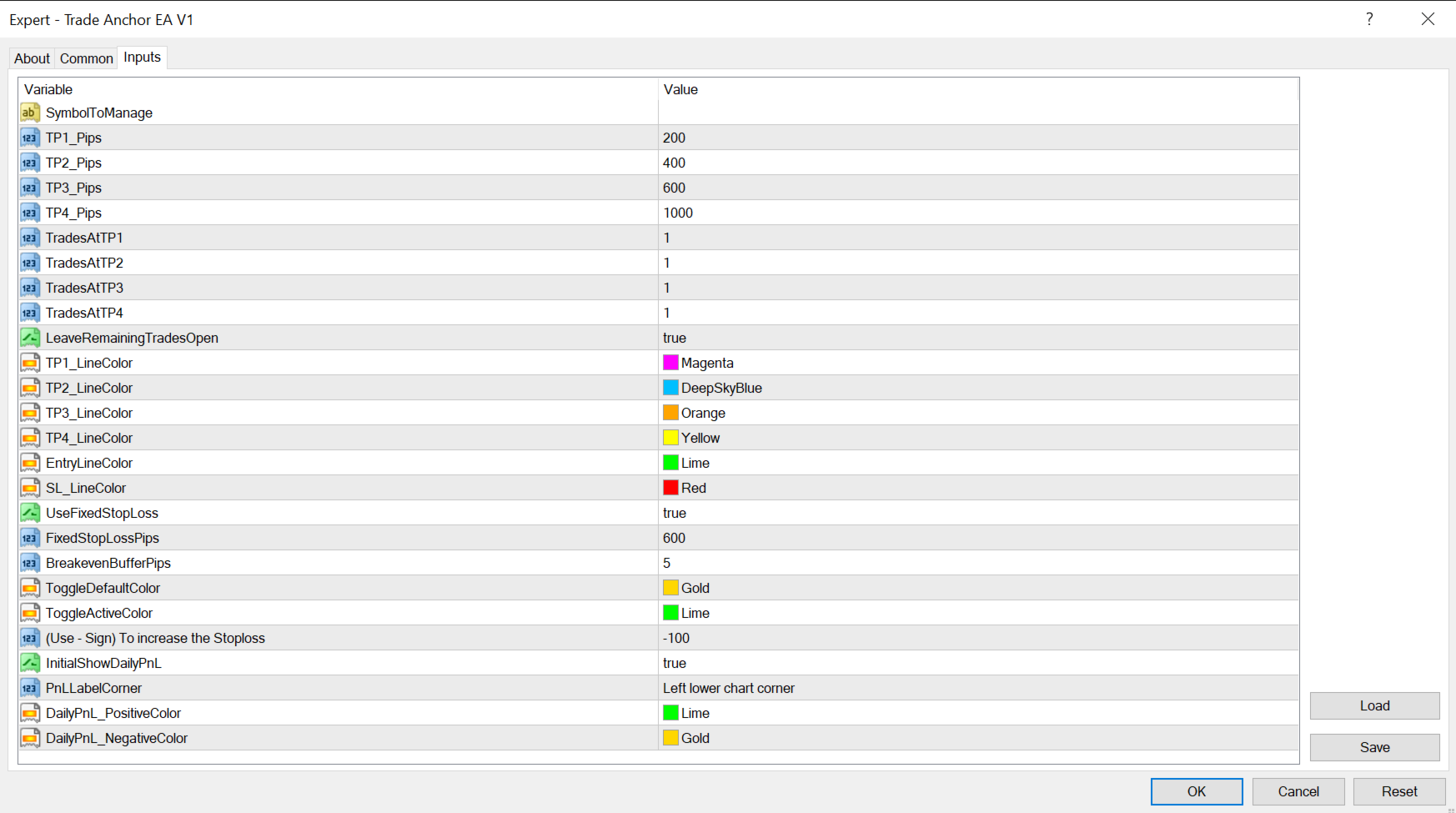
* Set TP/SL pip distances, trade counts at each TP, colors, etc.


📌 *Step 2: Open Your Trades*


* Open buy/sell trades manually or with another EA.

* As soon as the first trade is opened this becomes the **reference trade, drag SL to a desired position if using manual SL, all other trades will adopt this SL, if using fixed SL all following trades will use the set SL click monitoring on to set reference and start session*.

* All other trades will inherit SL and TP levels from this trade.


🧭 *Understanding the Panel Buttons*


| Label                                 | Description                                                                                                                    |

| --------------------------------- | ------------------------------------------------------------------------------------------------------------------------------ |

| 🔁 Monitoring: ON/OFF           | Starts/stops live trade tracking. Must be *ON* for TP/SL management. The first trade after activation becomes the reference. |

| Close All Trades                 | Closes all open trades with the same magic number/symbol. Also resets session state.                                           |

| 🛡 Adjust SL: ON/OFF              | Moves SL further away by a set amount (StopLossAdjustmentPips). Use to increase breathing room.                              |

| 📉 Breakeven: ON/OFF           | Moves SL to breakeven (+ buffer) for all trades in profit.                                                                            

| 💰 Daily Profit/Loss: Show/Hide | Toggles on-screen PnL and risk label (bottom-right or top-left).                                                               |


🔗 *How TP/SL Management Works*


🎯 Take Profits:


* You define *TP1\_Pips, TP2\_Pips, TP3\_Pips, TP4\_Pips*.

* Each TP level executes on *TradesAtTPx* trades.

* Remaining trades (after all TPs filled) are either left *open* or closed, based on LeaveRemainingTradesOpen.


🛑 Stop Loss:


* If your reference trade has an SL: that’s used.

* If not: a *fixed SL* is calculated using FixedStopLossPips.

* You can adjust this dynamically using the toggle Adjust SL.


Breakeven:


* When Breakeven: ON, SL is moved to entry price + buffer (BreakevenBufferPips).

* Disables SL adjustment automatically to avoid conflict.


📊 *On-Chart Visual Elements*


* *Lines*:


* Green: Entry

* Red: Stop Loss

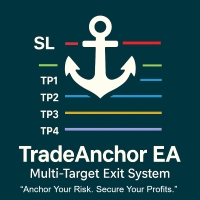
* Magenta / Blue / Orange / Yellow: TP1–TP4

* *Labels*:


* Display TP target, filled count, SL value, and trade direction.

* *PnL Labels*:


* *Closed PnL Today*

* *Floating PnL*

* *Closed Set PnL*

* *Total Risk*


🔍 *Daily PnL Breakdown*


When enabled via Daily Profit/Loss: Show:


* Tracks *closed trade profit* for today.

* Displays *floating PnL* from current open trades.

* Displays *Closed Set PnL* = sum of profits from trades managed by this session.

* *Total Risk* = total \$ risk based on SL of all trades.


Color-coded:


* *Green* = Profit or Risk-Free

* *Gold/Red* = Loss or Risk Present


🧼 *Session Management*


When All Trades Close:


* The EA resets tracking state.

* TP/SL lines and labels are removed.

* Monitoring: OFF is triggered.

* Final floating PnL is added once to the closed PnL log.


You can *restart* monitoring any time by clicking *Monitoring: ON* after opening a new trade.


*Input Parameters Overview*


| Input                                        | Description                                         |

| -------------------------------------- | --------------------------------------------------- |

| TPx_Pips                                  | Distance to each TP level                           |

| TradesAtTPx                            | How many trades close at each TP                    |

| LeaveRemainingTradesOpen     | Keeps leftover trades open                          |

| FixedStopLossPips                    | SL used if reference trade doesn’t have one         |

| StopLossAdjustmentPips           | Pips added to widen SL when SL Adjustment is ON     |

| BreakevenBufferPips                | Distance past entry to move SL when breakeven is ON |

| InitialShowDailyPnL                  | Whether to display PnL stats by default             |

| DailyPnL_PositiveColor/NegativeColor | Label color based on profit/loss                    |


🛠 *Best Practices*


* Always activate Monitoring: ON *after* placing trades.

* Ensure the first trade (reference) has an SL — or use UseFixedStopLoss.

* Use Adjust SL carefully if your strategy requires larger stops.

* Use Breakeven once trades are safely in profit.

* Avoid using both Adjust SL and Breakeven at the same time — one disables the other.


*Example Use Case*


Can be used for single or multiple trades with variant TP levels user defined depending on individual strategies

1. Attach the EA.

2. Click Monitoring: ON.

3. The EA sets TP1–TP4 (e.g., 2 trades close at TP1, 1 at TP2, 1 at TP3, 1 left open).

4. Once all allicated trades are in profit, you click Breakeven: ON — SLs move to entry.

5. Daily PnL shows +\$42 with \$0 risk — All trades are now risk-free.


Recensioni 1
Aleksandr Melinger
131
Aleksandr Melinger 2025.11.03 19:56 
 

Классный советник, но надо немного доработать. И будет шедевр.

Prodotti consigliati
How it works –   Base-departure detection — algorithmically finds consolidation bases (overlapping range with compressed volatility) followed by displacement departures. Patterns: Drop-Base-Rally, Rally-Base-Drop, Rally-Base-Rally, Drop-Base-Drop — detected structurally, not by candle names. –   Strength score (0–100) — from departure velocity, time-at-base, freshness (each revisit decays the score), higher-timeframe confluence and origin volume. –   Lifecycle — Fresh, Tested (decaying), Broken
FREE
The Amazing Chart Manager is a lightweight solution that allows you to restore and preserve your preferred chart colours and settings cluttered by the dirty EAs. Simply drop it on any chart to instantly apply and keep your chosen theme and configuration. Zero indicator buffers. No tick processing. Colours are resolved once on load. 7 THEMES - T.View — TradingView's dark blue with teal and red candles - Black — pure black OLED-friendly with deep green and red - Dim — soft dark theme with mute
FREE
Free automatic Fibonacci is an indicator that automatically plots a Fibonacci retracement based on the number of bars you select on the BarsToScan setting in the indicator. The Fibonacci is automatically updated in real time as new highest and lowest values appears amongst the selected bars. You can select which level values to be displayed in the indicator settings. You can also select the color of the levels thus enabling the trader to be able to attach the indicator several times with differe
FREE
Trade AST Pro
Pablo Luis Prieto Navarro
Boost Your Trading with the Trade AST PRO Imagine having a   personal trading assistant   that transforms how you trade. With our EA, success is just one click away:   Drag & Drop Smart Setup Place entry, SL and TP by simply dragging lines on the chart Automatic real-time risk and volume calculations Instant adaptation to every market move   Lightning-Fast Execution Direct BUY/SELL buttons on the chart MARKET mode for instant entry PENDING mode for planned trades   Auto Mobile Mirror Co
FREE
IMPORTANT NOTE: This is a professional Trade Management Utility and on-chart assistant. It is NOT an automated trading robot. It does not open trades on its own. The UltraFast Trade Manager MT5 is the ultimate execution and risk-management suite designed to give you absolute control over your manual and algorithmic trades. When managing multiple positions, calculating complex net break-even points, or constantly monitoring the economic calendar, hesitation can lead to costly mistakes. This utili
FREE
MultiTimeframe Info Feed (MIF) Indicator Description: MultiTimeframe Info Feed (MIF) is a smart MQL5 indicator that displays a dynamic, real-time info panel directly on your chart, offering powerful insight into current market conditions. Key features include: Real-time display of Open, High, Low, Close, and live Tick price Tick Rate (ticks per second) for assessing market activity Auto-calculated Entry Price on new candle formation Signal direction detection (BUY / SELL) Price action pattern re
FREE
Trade Mirror Master
Nguyen Thanh Cong
5 (1)
Advanced Trade Mirror   is a powerful Forex tool designed for traders who need instant, seamless trade replication across multiple terminals on the same machine. With lightning-fast execution, it ensures zero lag in copying trades, maintaining precision and efficiency in high-speed trading environments. Get the Trade Mirror Follower here:  https://www.mql5.com/en/market/product/133890 Specification: Master ID: Identity value of master terminal, please use a unique value to prevent duplicated mas
FREE
================================================================ MATRIX CONDITION MONITOR Live Trade Condition Panel for MetaTrader 5 Fully Automatic -- Works with ALL Matrix EAs ================================================================ NEVER MISS A TRADE SETUP AGAIN Matrix Condition Monitor is a free utility that attaches to any chart and automatically checks all 10 trade conditions in real time -- showing you exactly why a trade will or will not open, and alerting you the moment ever
FREE
Breakeven Manager
Ibrahim Olalekan Ganiu
Ciao, campioni di trading! Spero che stiate andando bene. Vi è mai capitato di entrare in una posizione in cui il mercato inizialmente si muoveva a vostro favore o di avvicinarvi al vostro takeprofit per poi improvvisamente invertirsi? Beh, mi è successo numerose volte e oggi ho deciso di reagire. Vi presento un trade manager che vi aiuta a proteggere le vostre posizioni. Questo progetto vi aiuta a impostare le vostre posizioni al pareggio al raggiungimento di un certo numero di pip da voi spe
FREE
Risk Manager Trade Panel is an on-chart tool that helps you size and manage trades with one click. Set your risk per trade as a percentage (for example 0.5%, 1% or 2%) and the panel instantly shows the correct lot size for your stop distance, taking your symbol's tick value and 3/5-digit pricing into account. One-click actions: Move the open position to breakeven (with a spread-safe offset). Close 50% of the position (partial close). Close the whole position. The tool does not open trades automa
FREE
Trade With Price is a powerful and user-friendly MetaTrader 5 Expert Advisor designed to simplify and accelerate your trading execution. This EA provides a smart one-click trading panel that allows traders to instantly place BUY, SELL, and pending orders directly at the current market price—eliminating the need to calculate distances in pips. Key Features One-click BUY & SELL execution Place pending orders based on market price instead of pips Clean and intuitive trading panel interface
FREE
Inverse Liquidity Grab Ultimate EA
Stephen Muriithi Muraguri
5 (1)
This EA finds Fair Value Liquidity (FVL) on the chart, tracks when they get mitigated , and then looks for an inversion signal (price “fails” through the zone). When that inversion happens, it places a trade in the opposite direction of the original Liquidity gap (an Inverse FVG approach). It also lets you control when it trades using market sessions , and it can auto-close positions at New York open (all positions or profitable-only). Key advantages Clear, rule-based entries (no guessing): trad
FREE
Mini Charts MTF EMA Mini Charts MTF EMA is a MetaTrader 5 indicator that displays multiple mini charts from selected timeframes directly on the main chart. It helps traders monitor multi-timeframe price movement and EMA direction in one clean visual layout. Main Features Multiple mini charts on the main chart Custom timeframe selection for each mini chart Up to 4 EMA lines for every mini chart Custom EMA period, shift, method, applied price, color, style, and width Custom mini chart width, heigh
FREE
Title:   Smart Position Manager PRO - Advanced Risk & Position Manager Description: Smart Position Manager PRO is an all-in-one visual trade management and risk calculation tool designed for serious traders who prioritize iron discipline and strict risk management. Whether you are executing precise SMC or ICT setups on personal capital or managing large funded accounts on strict prop firms, this tool ensures you focus on counting percentages rather than emotional money swings. With a highly int
FREE
LT Mini Charts
Thiago Duarte
4.88 (8)
This is a utility indicator that creates mini charts on left side of the chart you are looking at. It is very useful to watch many timeframes simultaneously, without having to change between multiple charts. Its configuration is very simple. You can have up to 4 mini charts opened. They automatically load the template of the "parent" chart. If you have any doubt please contact me. Enjoy! This is a free indicator, but it took hours to develop. If you want to pay me a coffee, I appreciate a lot  
FREE
Эксперт  MACD_LevelTrader MT5   создан для торговле валютной пары XAUUSD. Данная версия это наработки того, что можно извлечь  из  индикатора MACD и Moving Average.  Важно   перед тестированием изменить настройку с 1000 на 5000                       Offset in points UP from SMA200 for sell              5000                       Offset in points DOWN from SMA200 for buy        5000   Тайм фрейм  М5. Два варианта логики, П араметр  true=вход по уровню  MACD +   SMA200, false=вход по MACD  Тестиру
FREE
Follow The Line MT5
Oliver Gideon Amofa Appiah
4.6 (35)
This indicator obeys the popular maxim that: "THE TREND IS YOUR FRIEND" It paints a GREEN line for BUY and also paints a RED line for SELL. (you can change the colors). It gives alarms and alerts of all kinds. IT DOES NOT REPAINT and can be used for all currency pairs and timeframes. Yes, as easy and simple as that. Even a newbie can use it to make great and reliable trades. NB: For best results, get my other premium indicators for more powerful and reliable signals. Get them here: https://www.m
FREE
Trade Mirror Follower
Nguyen Thanh Cong
5 (1)
Advanced Trade Mirror   is a powerful Forex tool designed for traders who need instant, seamless trade replication across multiple terminals on the same machine. With lightning-fast execution, it ensures zero lag in copying trades, maintaining precision and efficiency in high-speed trading environments. Get the Trade Mirror Master here:  https://www.mql5.com/en/market/product/133891 Specification: Master ID: Identity value of master terminal, please use a unique value to prevent duplicated mas
FREE
Second Level Candles And Alligator Indicators 每12秒产生一个K线,而且自带Alligator指标,对超短线选手交易非常有帮助。程序启动时可能不成功,是因为MT5 MqlTick 数据加载少的原因。可以通过修改显示的数据参数避免,比如display=100,程序正常之后再将参数调大 display=300 。如果数据不正常,也可以采用重新加载的方式解决。 如果您对这个指标有任何建议,请联系作者。  Second Level Candles And Alligator Indicators  produced a candle per 12 seconds,include Alligator, it's helpful to Short-Term Trading。You'd better reload the indicator every start MT5 or change display parameter to reslove data bug. Please attach author when  you had some su
FREE
Donchian Breakout And Rsi
Mattia Impicciatore
4.5 (2)
Descrizione generale Questo indicatore è una versione avanzata del classico Donchian Channel , arricchita con funzioni operative per il trading reale. Oltre alle tre linee tipiche (massimo, minimo e linea centrale), il sistema rileva i breakout e li segnala graficamente con frecce sul grafico, mostrando solo la linea opposta alla direzione del trend per semplificare la lettura. L’indicatore include: Segnali visivi : frecce colorate al breakout Notifiche automatiche : popup, push e email Filtro R
FREE
QuantumAlert RSI Navigator is a free indicator available for MT4/MT5 platforms, its work is to provide "alerts" when the market is inside "overbought and oversold" regions in the form of "buy or sell" signals. This indicator comes with many customization options mentioned in the parameter section below, user can customise these parameters as needful. Join our MQL5 group , where we share important news and updates. You are also welcome to join our private channel as well, contact me for the priva
FREE
SimpleTrade by Gioeste
Giovanni Scelzi
4 (3)
Scopri il potere del trading automatizzato con **SimpleTradeGioeste**, un Expert Advisor (EA) progettato per ottimizzare le tue operazioni di trading sul mercato Forex. Questo EA innovativo combina strategie di trading avanzate con indicatori tecnici collaudati, offrendo un'esperienza di trading senza pari. ****Punti di Forza**** - **Strategia Multi-Indicatore**: SimpleTradeGioeste utilizza un approccio integrato che combina quattro indicatori tecnici principali: RSI, ADX, DeMarker e Awesome
FREE
Are you tired of drawing trendlines every time you're analyzing charts? Or perhaps you would like more consistency in your technical analysis. Then this is for you. This indicator will draw trend lines automatically when dropped on a chart. How it works Works similar to standard deviation channel found on mt4 and mt5. It has 2 parameters: 1. Starting Bar 2. Number of bars for calculation The   starting bar   is the bar which drawing of the trend lines will begin, while the   number of bars for c
FREE
The Bull DCA DowJones Signal – Premium Trend & Swing Indicator (WinWiFi Robot Series) Overview: Unlock the full potential of Index trading with the latest innovation from the WinWiFi Robot Series . "The Bull DCA DowJones Signal" is a precision-engineered indicator designed to conquer global Indices, Energy, and Forex markets. Optimized for the H4 Timeframe , this tool filters out market noise and delivers clear, actionable signals for Trend Following, Breakouts, and Pullbacks. Key Features & S
FREE
SX Theme Setter MT5
Mojtaba Sarikhani
5 (1)
SX Theme Setter is intended for changing chart appearance in 2 modes: - Gradient background mode: In this mode, the indicator creates a gradient background for your chart. Colors, steps and gradient type can be selected by user. - Color theme: Color theme mode provides more than 50 built-in different color themes which can be selected from a list. Most of these themes are converted from official color themes of real trading platforms of the past and present. Try them out and see if they suit
FREE
Donchian Pro
Paulo Henrique Faquineli Garcia
5 (3)
The Donchian Channel Channels are among the most popular tools of technical analysis, as they visually convey to the analyst the limits within which most price movement tends to occur. Channel users know that valuable information can be obtained at any time, whether prices are in the central region of a band or close to one of the border lines. One of the best known techniques to explore these concepts is Bollinger Bands. However, John Bollinger was not the only one to research the application
FREE
Gold Adaptive EA MT5 is an automated Expert Advisor for MetaTrader 5 designed for trading Gold (XAUUSD). The EA uses several internal trading models and market filters to adapt to different phases of Gold price movement. Instead of relying on one fixed entry pattern, Gold Adaptive EA MT5 analyzes market behavior and selects suitable logic for trend continuation, impulse moves, pullbacks and selected recovery conditions. The main goal of the Expert Advisor is to provide a structured Gold tradi
FREE
Indicator Description 4 Hull MA Color + Envelopes is a powerful trend-following indicator for MetaTrader 5 that combines four Hull Moving Averages (HMA) with Moving Average Envelopes to clearly identify market direction, trend strength, and potential reversal or pullback zones. This indicator is designed to reduce noise, react quickly to price movement, and provide a clean visual structure for professional trading.   Key Features   4 Hull Moving Averages (20, 50, 100, 200) Automatic color change
FREE
PZ Goldfinch Scalper EA MT5
PZ TRADING SLU
3.33 (57)
This is the latest iteration of my famous scalper, Goldfinch EA, published for the first time almost a decade ago. It scalps the market on sudden volatility expansions that take place in short periods of time: it assumes and tries to capitalize of inertia in price movement after a sudden price acceleration. This new version has been simplified to allow the trader use the optimization feature of the tester easily to find the best trading parameters. [ Installation Guide | Update Guide | Troublesh
FREE
This robot sends Telegram notifications based on the coloring rules of PLATINUM Candle indicator. Example message for selling assets: [SPX][M15] PLATINUM TO SELL 11:45. Example message for buying assets : [EURUSD][M15] PLATINUM TO BUY 11:45 AM. Before enable Telegram notifications  you need to create a Telegram bot, get the bot API Key and also get your personal Telegram chatId. It's not possible to send messages to groups or channels. You can only send messages to your user chatId. You should
FREE
Gli utenti di questo prodotto hanno anche acquistato
Trade Assistant MT5
Evgeniy Kravchenko
4.41 (215)
It helps to calculate the risk per trade, the easy installation of a new order, order management with partial closing functions, trailing stop of 7 types and other useful functions. Additional materials and instructions Installation instructions - Application instructions - Trial version of the application for a demo account Line function -   shows on the chart the Opening line, Stop Loss, Take Profit. With this function it is easy to set a new order and see its additional characteristics bef
Forex Trade Manager MT5
InvestSoft
4.98 (668)
Benvenuto a Trade Manager EA, lo strumento definitivo per la gestione del rischio , progettato per rendere il trading più intuitivo, preciso ed efficiente. Non è solo uno strumento per l'esecuzione degli ordini, ma una soluzione completa per la pianificazione delle operazioni, la gestione delle posizioni e il controllo del rischio. Che tu sia un principiante, un trader avanzato o uno scalper che necessita di esecuzioni rapide, Trade Manager EA si adatta alle tue esigenze, offrendo flessibilità s
Local Trade Copier EA MT5
Juvenille Emperor Limited
4.97 (144)
Sperimenta una copia di trading eccezionalmente veloce con il   Local Trade Copier EA MT5 . Con la sua facile configurazione in 1 minuto, questo copiatore di trading ti consente di copiare i trades tra diversi terminali di MetaTrader sullo stesso computer Windows o su Windows VPS con velocità di copia ultra veloci inferiori a 0.5 secondi. Che tu sia un trader principiante o professionista,   Local Trade Copier EA MT5   offre una vasta gamma di opzioni per personalizzarlo alle tue esigenze speci
TradePanel MT5
Alfiya Fazylova
4.88 (166)
Trade Panel è un assistente commerciale multifunzionale. L'applicazione contiene più di 50 funzioni di trading per il trading manuale e permette di automatizzare la maggior parte delle attività commerciali. Prima dell'acquisto, è possibile testare la versione dimostrativa su un conto demo. Scaricare la versione di prova dell'applicazione per un account dimostrativo: https://www.mql5.com/it/blogs/post/762419 . Istruzioni complete qui . Commercio. Consente di effettuare operazioni di trading con u
Versione Beta Telegram to MT5 Signal Trader è quasi pronto per il rilascio ufficiale in versione alpha. Alcune funzionalità sono ancora in fase di sviluppo e potresti riscontrare piccoli bug. Se riscontri problemi, ti preghiamo di segnalarli, il tuo feedback aiuta a migliorare il software per tutti. Telegram to MT5 Signal Trader è uno strumento potente che copia automaticamente segnali di trading da canali o gruppi Telegram al tuo account MetaTrader 5 . Supporta canali pubblici e privati e cons
================================================================================ POC BREAKOUT - V20.72. Full Professional Grade Toolkit ================================================================================ POC Breakout is a full MetaTrader 5 trading dashboard for discretionary traders who want breakout signals, Point of Control (POC) context, volume profiles, order flow, market structure, news, alerts, and advanced trade planning in one professional workspace. Attached directly to you
Anchor Trade Manager
Kalinskie Gilliam
5 (6)
Anchor: The EA Manager Run your full EA portfolio without conflicts, without stacked risk, and without watching every chart yourself. Anchor coordinates up to 64 Expert Advisors on a single account, including daily loss protection built for prop firm rules. Attach Anchor to any chart. Type your EA names and magic numbers in one line. Click OK. Anchor begins coordinating immediately. Built for portfolios. Built for prop firms. Built for discipline. The Problem Running multiple EAs on the same acc
Telegram to MT5 Multi-Channel Copier copia automaticamente i segnali di trading dai tuoi canali Telegram direttamente in MetaTrader 5. Nessun bot, nessuna estensione del browser, nessuna copia manuale. Ricevi un segnale su Telegram e l'EA apre l'operazione sul tuo terminale in pochi secondi. Il prodotto include due componenti: un'applicazione Windows che ascolta i tuoi canali Telegram, e questo Expert Advisor che esegue i segnali sul tuo terminale MT5. È disponibile anche una versione per MT4. G
Premium Trade Manager - Il pannello di trading con un coach integrato Premium Trade Manager porta un coach di trading direttamente nel tuo grafico, con un motore di esecuzione completo al di sotto. Imposta il trade come fai sempre, poi lascia che Max, il tuo coach di trading IA, legga esattamente quel setup rispetto al tuo conto live e ti dia un verdetto chiaro prima che tu confermi: lo stop rispetta un approccio disciplinato, il rischio è ragionevole, c'è un evento ad alto impatto tra pochi min
Exp COPYLOT CLIENT for MT5
Vladislav Andruschenko
3.97 (35)
Copiatore professionale di trade per MetaTrader 5 Un copiatore di trade veloce, professionale e affidabile per MetaTrader . COPYLOT consente di copiare operazioni Forex tra terminali MT4 e MT5 con supporto per conti Hedge e Netting . La versione MT5 di COPYLOT supporta: - MT5 Hedge → MT5 Hedge - MT5 Hedge → MT5 Netting - MT5 Netting → MT5 Hedge - MT5 Netting → MT5 Netting - MT4 → MT5 Hedge - MT4 → MT5 Netting Versione MT4 Descrizione completa + DEMO + PDF Come acquistare Come installare Come ot
Trade Dashboard MT5
Fatemeh Ameri
4.95 (131)
Trade Dashboard simplifies how you open, manage, and control your trades, with built-in lot size calculation. It allows you to execute trades, manage risk, and control positions directly on the chart, with tools such as partial close, breakeven, and trailing stop. Designed to reduce manual work and help you stay focused on your trading decisions. A demo version is available for testing. Detailed explanations of features are provided within the MQL5 platform. Installation instructions are include
Power Candles Strategy Scanner - Strumento di ricerca configurazioni multi-simbolo con ottimizzazione automatica Power Candles Strategy Scanner utilizza lo stesso motore di auto-ottimizzazione che alimenta l'indicatore Power Candles, applicandolo a tutti i simboli presenti nel tuo Market Watch, uno accanto all'altro. Un unico pannello ti indica quali simboli sono statisticamente negoziabili in questo momento, quale strategia è vincente su ciascuno di essi, la coppia ottimale di Stop Loss / Take
Trade copier MT5
Alfiya Fazylova
4.56 (50)
Trade Copier è un'utilità professionale progettata per copiare e sincronizzare le transazioni tra conti di trading. La copiatura avviene dal conto/terminale del fornitore al conto/terminale del destinatario, che sono installati sullo stesso computer o vps. PROMOZIONE - Se avete già acquistato il "Trade copier MT5", potete ottenere gratuitamente il "Trade copier MT4" (per la copia MT4 > MT5 e MT4 < MT5). Per maggiori informazioni sulle condizioni, vi preghiamo di contattarci tramite messaggi priv
VirtualTradePad PRO SE MT5 — centro di controllo professionale per il trading su MetaTrader 5 VirtualTradePad PRO SE è un pannello di trading premium basato sul grafico e un ambiente di gestione delle operazioni per MetaTrader 5 . È progettato per i trader che desiderano esecuzione più rapida, controllo più chiaro delle posizioni, gestione strutturata delle operazioni, pianificazione visiva dei livelli e un workflow professionale direttamente dal grafico. Non è soltanto un semplice pannello BUY
FarmedHedge Pair Trading Dashboard
Tanapisit Tepawarapruek
5 (3)
Farmed Hedge Yield Farming | All Markets (Manual - Hybrid - Semi/Automated EA) MULTI-ASSET SUPPORT Trade any asset available on your broker - Forex: Major, Minor, Exotic pairs - Crypto: BTC, ETH, XRP, SOL, BNB - Stocks: Apple, Tesla, Amazon, Google, etc. - Commodities: Gold, Silver, Oil, Gas - Indices: US30, NAS100, SPX500, DAX40 - Any CFD your broker offers VERIFIED TRADING RESULTS - Farmed Hedge Yield Axi Copy:  https://www.mql5.com/en/signals/2356376 - Farmed Hedge Yield Exn Copy:   https:/
MT5 to Telegram Signal Provider è un'utilità facile da usare e completamente personalizzabile che consente l'invio di segnali specificati a una chat, canale o gruppo Telegram, rendendo il tuo account un fornitore di segnali. A differenza della maggior parte dei prodotti concorrenti, non utilizza importazioni DLL. [ Dimostrativo ] [ Manuale ] [ Versione MT4 ] [ Versione Discord ] [ Canale Telegram ]  New: [ Telegram To MT5 ] Configurazione Una guida utente passo-passo è disponibile. Nessuna cono
Trade Assistant 38 in 1
Makarii Gubaydullin
4.91 (23)
Strumento multifunzionale: Calcolatore di Lotto, Ordini Grid, Rapporto R/R, Gestore di Trade, Zone di Domanda e Offerta, Price Action e molto altro Versione Demo   |   Manuale Utente L'Assistente di Trading   non funziona nel tester di strategie : puoi scaricare la   Versione Demo QUI  per testare l' utilità . Contattami   per qualsiasi domanda  / idee di miglioramento / in caso di bug riscontrato Se hai bisogno di una versione MT4, è disponibile qui Semplifica, accelera e automatizza il tuo  
HINN MagicEntry Extra
ALGOFLOW OÜ
4.75 (16)
LIMITED SUMMER SALE -40% !   ONLY $30 insead of $50!  Maximum real discount!  ONLY UNTIL 08/22 HINN MAGIC ENTRY – the ultimate tool for entry and position management! Place orders by selecting a level directly on the chart! full description   ::  demo-version  :: 60-sec-video-description Key features: - Market, limit, and pending orders - Automatic lot size calculation - Automatic spread and commission accounting - Unlimited partitial take-profits  - Breakeven and trailing stop-loss and take-p
Timeless Charts
Samuel Manoel De Souza
5 (7)
Timeless Charts è un'utilità di trading completa progettata per trader professionisti. Combina tipi di grafici personalizzati come Grafici a Secondi e Renko con analisi avanzata del flusso ordini tramite Footprints , Clusters , Profili di Volume , studi VWAP e strumenti di analisi ancorata per una visione più approfondita del mercato. Il trading e la gestione delle posizioni vengono eseguiti direttamente dal grafico tramite un pannello integrato di gestione delle operazioni , mentre Market Repla
Adam FTMO MT5
Vyacheslav Izvarin
5 (2)
ADAM EA Special Version for FTMO Please use ShowInfo= false for backtesting ! Our 1st EA created using ChatGPT technology Trade only GOOD and checked PROP FIRMS  Default parameters for Challenge $100,000 Tested on EURUSD and GBPUSD only  Use 15MIN Time Frame Close all deals and Auto-trading  before Weekend at 12:00 GMT+3  Friday For Prop Firms MUST use special Protector  https://www.mql5.com/en/market/product/94362 --------------------------------------------------------------------------------
YuClusters
Yury Kulikov
4.93 (43)
Attention: You can view the program operation in the free version  YuClusters DEMO .  YuClusters is a professional market analysis system. The trader has unique opportunities to analyze the flow of orders, trade volumes, price movements using various charts, profiles, indicators, and graphical objects. YuClusters operates on data based on Time&Sales or ticks information, depending on what is available in the quotes of a financial instrument. YuClusters allows you to build graphs by combining da
EA Auditor
Stephen J Martret
5 (4)
EA Auditor is an independent analysis tool for traders evaluating Expert Advisors and trading signals on MetaTrader 5. It audits backtest reports, reviews posted developer signals, and cross-verifies the two against each other to help traders assess strategies before committing capital. The MQL5 market offers a wide range of Expert Advisors from many developers, with varying approaches, quality, and transparency. EA Auditor provides a consistent, data-driven framework for reviewing them, answer
The product will copy all telegram signal to MT5 ( which you are member) , also it can work as remote copier.  Easy to set up, copy order instant, can work with almost signal formats, image signal,  s upport to translate other language to English Work with all type of channel or group, even channel have "Restrict Saving Content", work with  multi channel, multi MT5 Work as remote copier: with signal have ticket number, it will copy exactly via ticket number. Support to backtest signal. How to s
VirtualTradePad One Click Trading Panel
Vladislav Andruschenko
4.59 (74)
Pannello di trading per MetaTrader 5 — controllo professionale del trading in un clic dal grafico e dalla tastiera Un pannello di trading avanzato progettato per trader attivi, pensato per aprire, gestire e chiudere operazioni molto più velocemente rispetto all’interfaccia standard di MetaTrader. Questa soluzione è dedicata a chi desidera controllare posizioni, ordini pendenti, profitto totale ed esecuzione da un unico spazio di lavoro professionale. Non si tratta di un semplice utilitario. È u
Footprint Chart Pro — Professional OrderFlow EA for MetaTrader 5 Version 6.34 | Professional tool for real traders | Institutional-Grade Visualization DEMO USERS - PLEASE SELECT EVERY TICK / REAL TICK WHEN TESTING AND YOU HAVE DOWNLOADED HISTORICAL DATA. IF YOU SEE A WAITING SCREEN AND IT IS NOT DOWNLOADING, IT MEANS YOU HAVE LOW HISTORICAL DATA. TRY 1 MIN AND 5 MIN FIRST ON 1 DAY DATA. ONE DAY DATA SHOULD BE THE NEWEST AND MOST CURRENT DATE. PLEASE WAIT UNTIL THE MARKET HAS ROLLED OVER PERIOD.
Equity Protect Pro: Il tuo esperto di protezione del conto completo per un trading senza preoccupazioni Se stai cercando funzionalità come protezione del conto, protezione del capitale proprio, protezione del portafoglio, protezione multi-strategia, protezione dei profitti, raccolta dei profitti, sicurezza del trading, programmi di controllo del rischio, controllo automatico del rischio, liquidazione automatica, liquidazione condizionale, liquidazione programmata, liquidazione dinamica, trailin
KT Equity Protector MT5
KEENBASE SOFTWARE SOLUTIONS
3.6 (5)
L’unico EA che ogni trader MetaTrader dovrebbe avere in esecuzione, ma che molti ancora non usano. La maggior parte dei conti non viene bruciata perché la strategia era sbagliata. Viene bruciata perché, in un momento difficile, il trader lascia correre una perdita, aumenta l’esposizione, mantiene operazioni aperte durante il weekend, restituisce al mercato una settimana profittevole o dimentica il limite giornaliero di una prop firm per un singolo clic sbagliato. KT Equity Protector è il guardia
Telegram To MT5 Ultra
Mirel Daniel Gheonu
5 (3)
Telegram To MT5 — Copiatore di segnali Trasforma le indicazioni di trading dei tuoi canali Telegram in veri ordini MT5 — automaticamente, su quanti account vuoi, con rischio e regole totalmente sotto il tuo controllo. Telegram To MT5 collega i canali VIP / di segnali che già segui su Telegram al tuo terminale MetaTrader 5. Un'app desktop companion gratuita legge i messaggi (anche dai canali che bloccano i bot), e questo Expert Advisor li esegue sul tuo conto — applicando le tue impostazioni di r
Trade Manager DaneTrades
Levi Dane Benjamin
4.23 (30)
Trade Manager per aiutarti a entrare e uscire rapidamente dalle operazioni calcolando automaticamente il tuo rischio. Incluse funzionalità che ti aiutano a prevenire l'eccessivo trading, il vendetta trading e il trading emotivo. Le operazioni possono essere gestite automaticamente e i parametri di performance del conto possono essere visualizzati in un grafico. Queste caratteristiche rendono questo pannello ideale per tutti i trader manuali e aiuta a migliorare la piattaforma MetaTrader 5. Suppo
The News Filter MT5
Leolouiski Gan
4.78 (23)
Questo prodotto filtra tutti gli esperti consulenti e i grafici manuali durante il periodo delle notizie, così non dovrai preoccuparti di improvvisi picchi di prezzo che potrebbero distruggere le tue impostazioni di trading manuali o le negoziazioni effettuate da altri esperti consulenti. Questo prodotto viene fornito anche con un sistema completo di gestione degli ordini che può gestire le tue posizioni aperte e gli ordini in sospeso prima della pubblicazione di qualsiasi notizia. Una volta che
Altri dall’autore
MultiTP Trade Manager EA — Advanced Trade Management Made Effortless (MT4) Limited Offer – First 100 Downloads FREE! Be among the first 100 traders to download Trade Anchor Manager (MT4/MT5) completely free of charge. Hurry – once the limit is reached, the offer closes instantly! After trying it out, we’d love if you could leave a review and share your thoughts – your feedback helps us improve and lets other traders know what to expect. Need this Trade Anchor Manager for MT5?  http
FREE
Filtro:
Aleksandr Melinger
131
Aleksandr Melinger 2025.11.03 19:56 
 

Классный советник, но надо немного доработать. И будет шедевр.

Rispondi alla recensione